System configuration records, processes and procedures
systems engineering technical standards, principles, theories, concepts and techniques
Preview
Log In
Create an account to save your masterpiece. Only you can access the CVs and cover letters created and stored in your account. You’ll be taken to checkout right after you sign in or create an account. Hold on! Before we create your PDF masterpiece, sign in or create an account to keep it safe and secure! Hang on! Before your PDF preview, sign in or create an account to save your progress securely! Log in or create an account to access your files—it's all yours once we know it’s really you! Sign up or log in to upload your files — your content, your control, once we confirm it’s you! Please log in so that we know it's really you before we proceed! Ready for AI magic on your CV cover letter? Log in or create an account to save your masterpiece! Log in or sign up to save your latest masterpiece to the Cloud. Log in or sign up to save your masterpiece with a new name. Log in or sign up to rename your file. To edit this template, we need to create and save a new copy. Please log in or sign up to continue.
By continuing, you agree to our User Agreement and acknowledge that you understand the Privacy Policy.
Loading Google sign-in…
or
Invalid email or password.The email address you entered wasn't found. Please check for any errors or a new account.We're experiencing some issues on our end. Please try again later.There was a problem with your request. Please check your input and try again.
The email address you entered is already registered with Google login. Please use the Google login button above to sign in.This email is already associated with an account created using email and password. Please sign in using the standard login method.The email address you entered is already registered. Please use a different email address or with your existing account.We're experiencing some issues on our end. Please try again later.There was a problem with your request. Please check your input and try again.
Already have an account?
Submit
Reset your password
Enter your email address and we’ll send you a link to reset your password
An email with a link to reset your password has been sent to the address associated with your accountWe're experiencing some issues on our end. Please try again later.
Reset Password
Check your inbox
An email with a link to reset your password has been sent to the address associated with your account
Didn't get an email?
Reset your password
The reset password link has expired. Click to request a new reset password link.Unable to find the associated accountWe're experiencing some issues on our end. Please try again later.There was a problem with your request. Please check your input and try again.
Reset Password
Password reset complete
Password reset is now complete. Signing you in now...
Invalid email or password.The email address you entered wasn't found. Please check for any errors or a new account.We're experiencing some issues on our end. Please try again later.There was a problem with your request. Please check your input and try again.
If you are not logged in automatically, please
PDF Footer and Margins Setup
The margins are applied to the document, and the footer appears in both the preview and the PDF
Footer Font Settings
Are you applying for a specific job so we can tailor your CV to it?Are you applying for a specific job so we can tailor your cover letter to it?
Your data stays private and is never used for training.Privacy Policy
Enter a job link or copy/paste the job description text below
Your data stays private and is never used for training.Privacy Policy
Do you have a CV or LinkedIn profile?
OR GENERATE YOUR CV WITHOUT THEMOR GENERATE YOUR COVER LETTER WITHOUT THEM
Your data stays private and is never used for training.Privacy Policy
Drop your CV or choose a file
Drop your CV
or
PDF or Word — 3 MB max
Your data stays private and is never used for training.Privacy Policy
Attach your LinkedIn Profile (Attach PDF or Copy Text)
Website link found! Ready to create CV from:
Your data stays private and is never used for training.Privacy Policy
Select from one of your existing CVs
Select from one of the CVs you’ve already created on this platform
Your data stays private and is never used for training.Privacy Policy
Examples of how to write your details
Experienced Software Engineer:
Amelia Williams, with 5 years’ experience specialising in Java, Python and cloud technologies. Proven track record leading development teams at XYZ Corp to build scalable web applications. AWS Solutions Architect certified. Previously held a Software Developer role at ABC Tech, contributing to cloud migration projects and improving system performance. Certified in Agile Methodologies and Python Programming. View the Created CV: Software Engineer
Experienced Nurse Practitioner:
Isla Jones, with 7 years’ experience delivering patient care in both clinical and hospital settings. Skilled in diagnosing and treating a wide range of medical conditions, specialising in family medicine. Board Certified Family Nurse Practitioner (FNP-BC). Previously worked as a Registered Nurse at City General Hospital, implementing patient care plans and collaborating with multidisciplinary teams. Certified in Advanced Cardiovascular Life Support (ACLS) and Paediatric Advanced Life Support (PALS). View the Created CV: Family Nurse Practitioner
Driven Software Engineering Intern:
Create a tailored CV for this job posting URL:
https://www.google.com/search?q=software+engineer (Link shortened for illustration)
Lucas Wright, currently pursuing a BSc in Computer Science, with a solid foundation in full-stack development. Proficient in JavaScript, React, and backend development using Python. Experienced with relational databases such as PostgreSQL and MySQL. Demonstrated ability to lead collaborative software projects during academic and internship work, including building scalable web applications and improving system performance. Strong interest in AI/ML technologies and passionate about developing solutions to real-world problems. Keen to contribute to cutting-edge innovation within a fast-paced, cross-functional engineering environment. Here is my info: Lucas Wright +63 629487392 [email protected] linkedin.com/in/lucaswright 38 Oxford Street, SW1A 1AA London View the Created CV: Software Engineer Intern
Sales and Marketing Representative:
Create a tailored CV for this job posting
Job Position: Sales and Marketing Representative
Location: HA0, Perivale, Greater London
Schedule: Immediate Start Available
Salary: £20,000 - £25,000 per annum (commission + incentives)
Job Description: Looking to get into the sales and marketing industry without prior experience? Join a well-established marketing organisation offering full training, daily coaching, and the opportunity to represent some of the world’s most recognised brands. This self-employed role is ideal for motivated individuals with strong communication skills and a desire to grow. Full Job Description
Experienced Senior Scrum Master: Olivia Taylor, with 8 years’ experience leading Agile teams to deliver high-quality software solutions. Proven success facilitating Scrum ceremonies, coaching teams in Agile practices, and driving continuous improvement. Certified ScrumMaster (CSM) and Certified Scrum Professional (CSP). Led Agile transformation initiatives at Tech Solutions Inc., enhancing team efficiency and project delivery. Certified in Lean Six Sigma and Agile Coaching. View the Created CV: Agile Project Manager
Experienced Marketing Professional:
Noah Smith, with 10 years’ experience developing and executing comprehensive marketing strategies across digital and traditional channels. Proven success increasing brand awareness, driving customer engagement and boosting sales. Certified Digital Marketing Professional (CDMP) and Google Analytics Certified. Managed marketing campaigns at Bright Ideas Inc., achieving a 30% increase in online conversions. Certified in SEO, Content Marketing and Social Media Strategy. View the Created CV: Senior Marketing Strategist
Experienced Sales Professional:
Charlotte Hall, with 6 years’ experience in B2B and B2C sales, specialising in building strong client relationships and consistently exceeding sales targets. Proven track record driving revenue growth and expanding market share. Certified Sales Executive (CSE) and HubSpot Sales Software Certified. Previously a Sales Manager at Global Solutions, leading a team to a 25% increase in quarterly sales. Certified in Negotiation Skills and Customer Relationship Management (CRM). View the Created CV: Experienced Sales Professional
Motivated MBA Intern: Oliver Taylor, with a strong foundation in business strategy, finance and marketing. Keen to apply academic knowledge to real-world challenges within a dynamic business environment. Skilled in data analysis, business planning and team collaboration. Recently completed an MBA at University of Chicago, focusing on Corporate Finance and Marketing Strategy. Gained practical experience through internships at XYZ Corp, contributing to market research and financial modelling. Certified in Microsoft Excel and Data Analysis. View the Created CV: Marketing Analyst
Driven Technology Intern:
Benjamin Clark, focused on website security with a solid grounding in cybersecurity principles. Eager to apply academic knowledge and practical skills to enhance web application security and data protection. Recently graduated in Computer Science from [University Name], specialising in Cybersecurity and Network Security. Practical experience gained through internships at SecureTech, assisting with vulnerability assessments and security protocol implementation. Certified in CompTIA Security+ and Ethical Hacking. View the Created CV: Cybersecurity Specialist
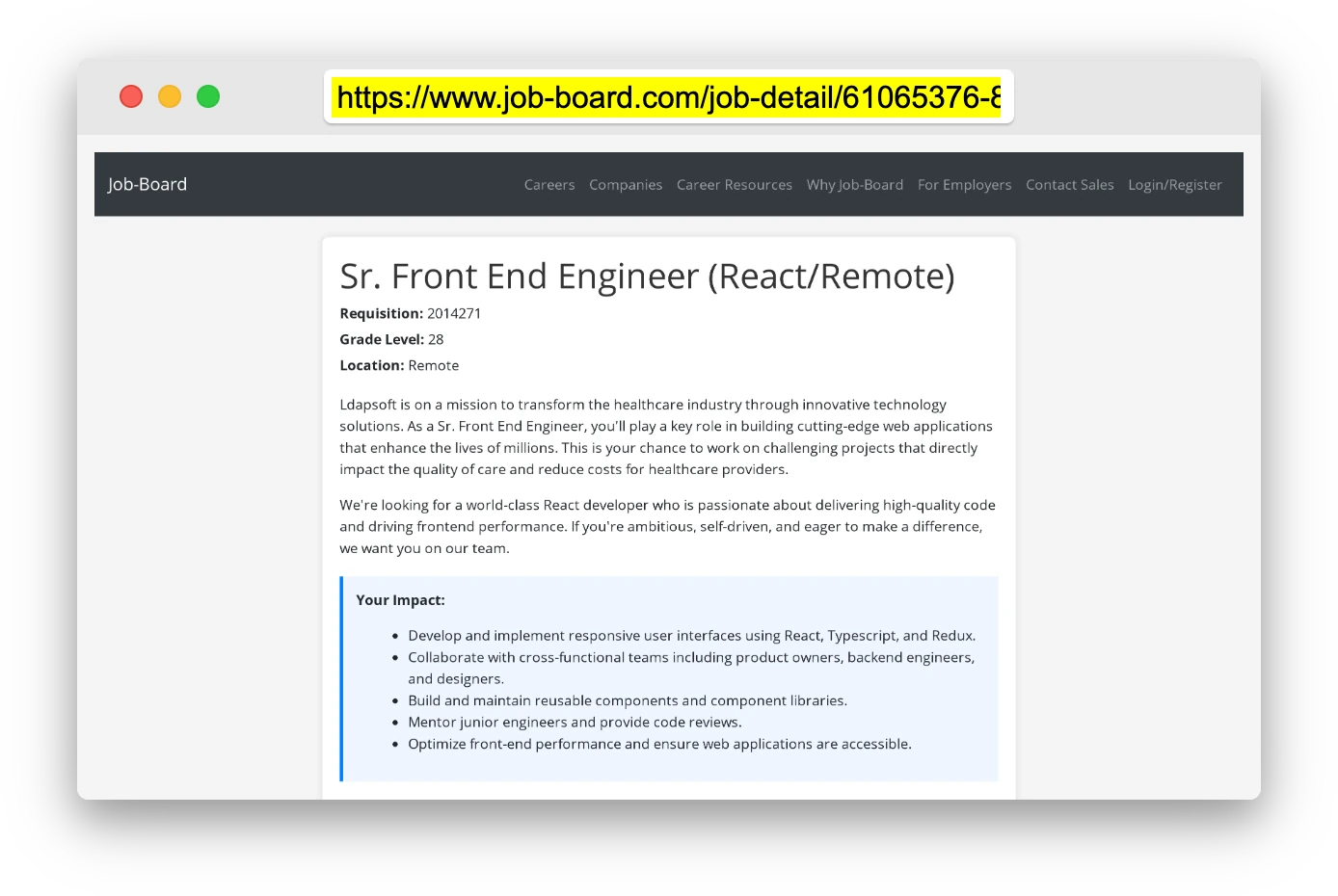
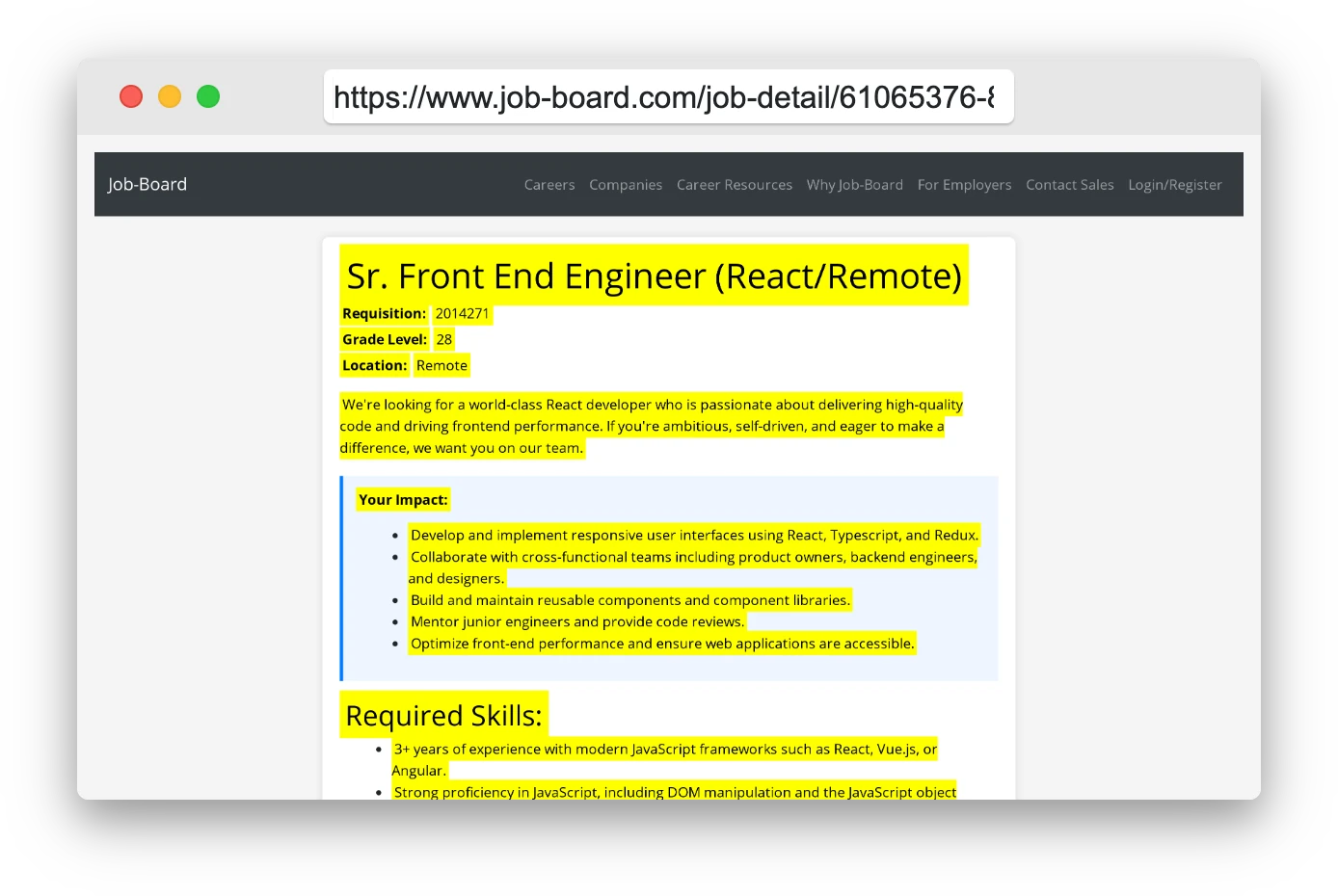
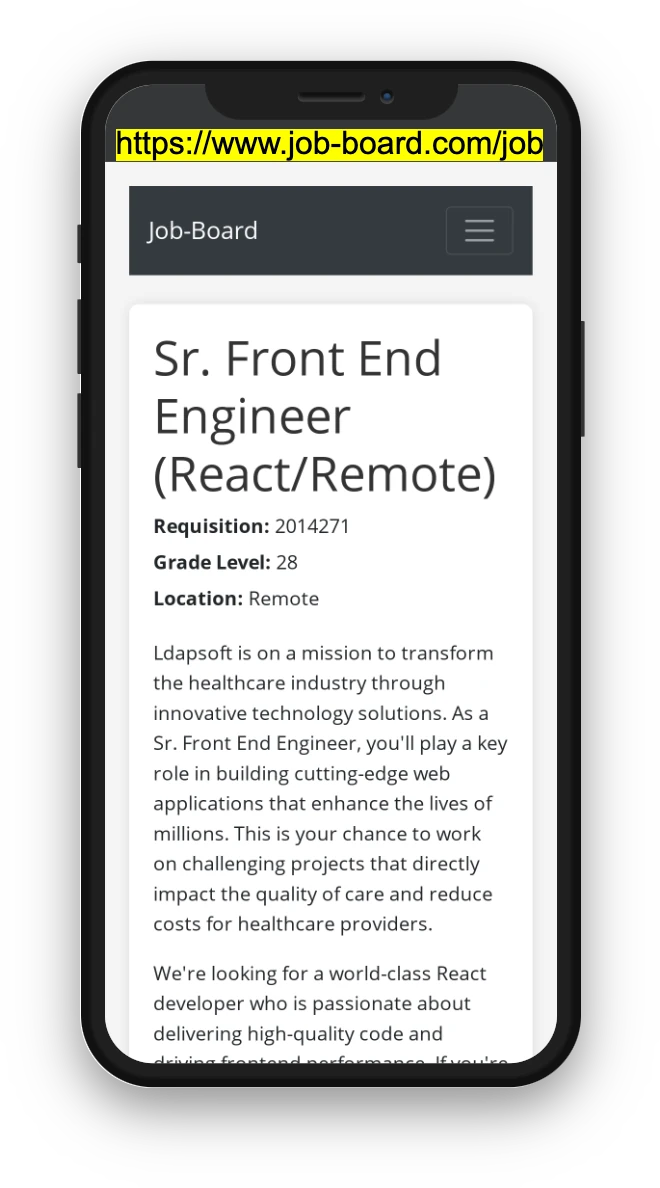
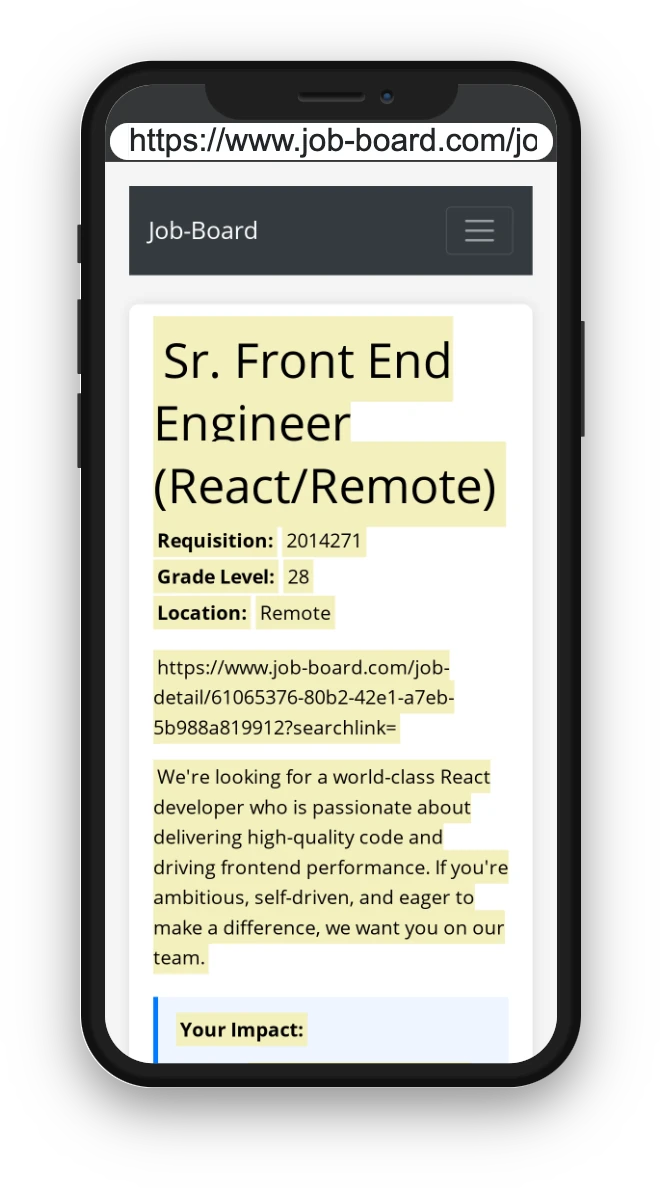
Where to Find the Job Posting Website Link and Description?
Explore examples to define detailed criteria and ensure your resume highlights what truly matters.
Explore examples to define detailed criteria and ensure your resume highlights what truly matters.
Open any job listing on platforms like Indeed, LinkedIn Jobs, Seek, Dice, Reed.co.uk, Jora, StepStone, JobStreet or Bayt, and copy either the job posting URL or the description. Only one is needed, as shown in the yellow highlighted screenshots.
OR
OR
Drag the into the box to verify you're human.
Drop here
My CVs
Showing {number_of_files} files (out of {total_of_all_files} total)
Name
File Type
Last Modified:
Description:
Rename File
Filename already exists!
Delete Files
Warning: This action is irreversible. Once you click submit, the files will be permanently deleted.
Heading text
Upload From Computer
Upload
Select From Existing
LinkedIn
Drag & Drop files anywhere in this tab, or
Uploaded Files
Delete
Name
Last Updated
Use This File
Select this to use the file for generating your resume and cover letter. Only one source—uploaded file, selected file, or LinkedIn text—can be used.
My Files
Resumes or cover letters you create will appear here. No files available yet.
Delete
Name
Last Updated
Use This File
Select this to use the file for generating your resume and cover letter. Only one source—uploaded file, selected file, or LinkedIn text—can be used.
Add LinkedIn Profile PDF
You can download your LinkedIn profile as a PDF by opening linkedin.com in a web browser, clicking your profile photo, selecting the “More” or “Resources” button, and choosing “Save to PDF.” You can then attach the PDF using the Upload From Computer tab.
Paste Your LinkedIn Profile Text
If you have copied the LinkedIn profile text, paste it below. See how to copy your profile from LinkedIn
Select this to use the LinkedIn profile text for generating your CV and covering letter. Only one source—uploaded file, selected file, or LinkedIn text—can be used.
Examples of How to Define Custom Criteria
Where to Find the Job Posting Website Link and Description?
Where to Find the Job Posting Website Link and Description?
Experienced Software Engineer:
Amelia Williams, with 5 years’ experience specialising in Java, Python and cloud technologies. Proven track record leading development teams at XYZ Corp to build scalable web applications. AWS Solutions Architect certified. Previously held a Software Developer role at ABC Tech, contributing to cloud migration projects and improving system performance. Certified in Agile Methodologies and Python Programming. View the Created CV: Software Engineer
Experienced Nurse Practitioner:
Isla Jones, with 7 years’ experience delivering patient care in both clinical and hospital settings. Skilled in diagnosing and treating a wide range of medical conditions, specialising in family medicine. Board Certified Family Nurse Practitioner (FNP-BC). Previously worked as a Registered Nurse at City General Hospital, implementing patient care plans and collaborating with multidisciplinary teams. Certified in Advanced Cardiovascular Life Support (ACLS) and Paediatric Advanced Life Support (PALS). View the Created CV: Family Nurse Practitioner
Experienced Senior Scrum Master: Olivia Taylor, with 8 years’ experience leading Agile teams to deliver high-quality software solutions. Proven success facilitating Scrum ceremonies, coaching teams in Agile practices, and driving continuous improvement. Certified ScrumMaster (CSM) and Certified Scrum Professional (CSP). Led Agile transformation initiatives at Tech Solutions Inc., enhancing team efficiency and project delivery. Certified in Lean Six Sigma and Agile Coaching. View the Created CV: Agile Project Manager
Experienced Marketing Professional:
Noah Smith, with 10 years’ experience developing and executing comprehensive marketing strategies across digital and traditional channels. Proven success increasing brand awareness, driving customer engagement and boosting sales. Certified Digital Marketing Professional (CDMP) and Google Analytics Certified. Managed marketing campaigns at Bright Ideas Inc., achieving a 30% increase in online conversions. Certified in SEO, Content Marketing and Social Media Strategy. View the Created CV: Senior Marketing Strategist
Experienced Sales Professional:
Charlotte Hall, with 6 years’ experience in B2B and B2C sales, specialising in building strong client relationships and consistently exceeding sales targets. Proven track record driving revenue growth and expanding market share. Certified Sales Executive (CSE) and HubSpot Sales Software Certified. Previously a Sales Manager at Global Solutions, leading a team to a 25% increase in quarterly sales. Certified in Negotiation Skills and Customer Relationship Management (CRM). View the Created CV: Experienced Sales Professional
Motivated MBA Intern: Oliver Taylor, with a strong foundation in business strategy, finance and marketing. Keen to apply academic knowledge to real-world challenges within a dynamic business environment. Skilled in data analysis, business planning and team collaboration. Recently completed an MBA at University of Chicago, focusing on Corporate Finance and Marketing Strategy. Gained practical experience through internships at XYZ Corp, contributing to market research and financial modelling. Certified in Microsoft Excel and Data Analysis. View the Created CV: Marketing Analyst
Driven Technology Intern:
Benjamin Clark, focused on website security with a solid grounding in cybersecurity principles. Eager to apply academic knowledge and practical skills to enhance web application security and data protection. Recently graduated in Computer Science from [University Name], specialising in Cybersecurity and Network Security. Practical experience gained through internships at SecureTech, assisting with vulnerability assessments and security protocol implementation. Certified in CompTIA Security+ and Ethical Hacking. View the Created CV: Cybersecurity Specialist