
33 Analyst, Revenue Finance (FP&A) - Advertising Revenue Planning Resume Templates with Example 2026 (ATS-Optimized)
This practical guide shows you how to create an Analyst, Revenue Finance (FP&A) - Advertising Revenue Planning resume that is clear, focused, and easy for recruiters to review. You will learn how to organize finance evidence so your planning, reporting, and analytical strengths are easy to understand.
Strong content for this role connects revenue FP&A work with monthly close, forecasting, budgeting, long-range planning, revenue consolidation, financial modeling, dashboards, and cross-functional partnership. Relevant tools and terms can include Anaplan, Essbase, revenue KPIs, headcount planning, deal analysis, scenario analysis, and financial trend analysis.
Below, you will find one complete Analyst, Revenue Finance (FP&A) - Advertising Revenue Planning resume example presented in 33 ATS-optimized resume layouts, with free PDF downloads and format guidance to help you compare professional presentation choices.
What Makes a Great Analyst, Revenue Finance (FP&A) - Advertising Revenue Planning Resume in 2026
A strong resume for this role is analytical, structured, and easy to scan. It should show how your work supports revenue planning, reporting, forecasting, and executive decision making.
Use concise evidence and targeted terms such as revenue consolidation, Anaplan, Essbase, scenario analysis, revenue KPIs, and financial trend analysis when they match your experience.
The examples shown below are intentionally detailed to demonstrate a range of experiences, skills, accomplishments and relevant keywords. We prefer detailed resumes as they provide more context to the hiring managers and also help the ATS systems identify relevant qualifications and score your resume better for a match. But the length of a resume is an individual choice. If you want a one page resume, just keep the most relevant experience and information for the job. Note: Resume examples are for educational purposes only. Use only information that accurately reflects your experience and qualifications. References to real organizations do not imply affiliation or endorsement.
#1 Plain Two Column Format Resume Example
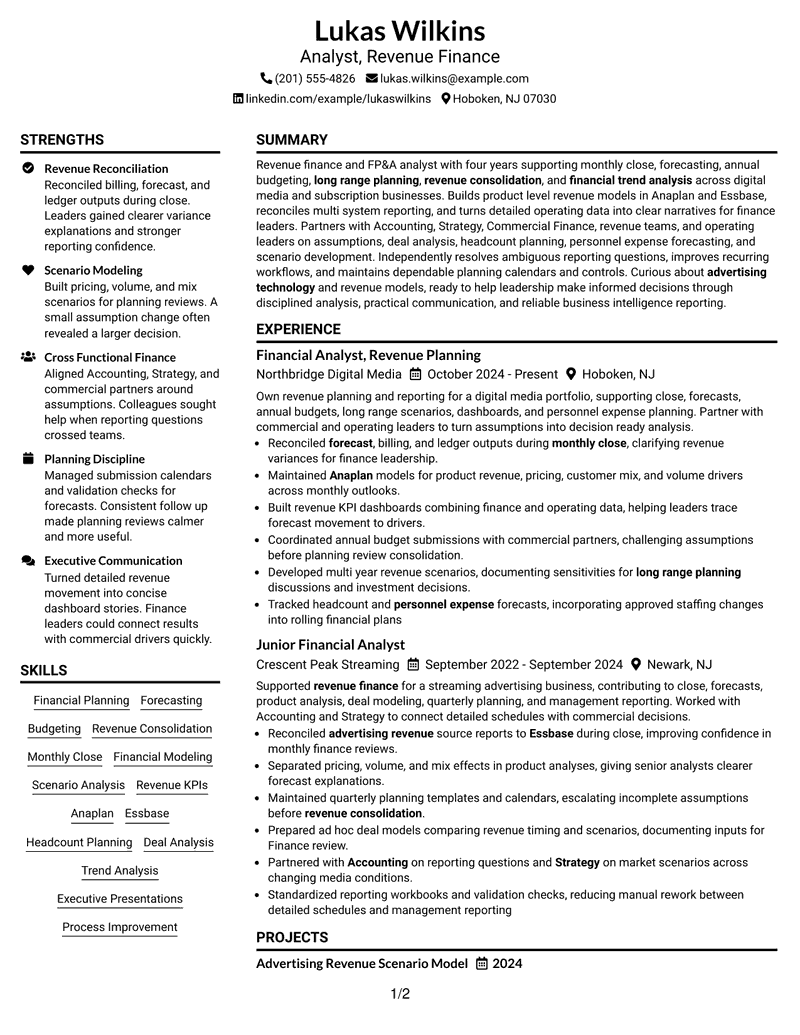
The Plain Two Column Format organizes revenue finance evidence into a clear hierarchy, giving experience and supporting skills defined places on the page.
Lukas Wilkins can use the structure to connect Anaplan and Essbase work with revenue consolidation, scenario analysis, KPI dashboards, budget coordination, and cross-functional finance partnership.

Resume Snapshot
- Revenue finance and FP&A focus
- Four years of finance experience
- Anaplan and Essbase systems experience
- Forecasting, budgeting, and revenue analysis
Why the Plain Two Column Format Works for a Resume
- Creates a clear section hierarchy for recruiter scanning.
- Keeps monthly close and forecasting evidence easy to locate.
- Gives Anaplan and Essbase appropriate visibility without crowding the experience section.
- Supports concise bullets on revenue consolidation, budgeting, and long-range planning.
- Separates core experience from skills, education, projects, and certifications.
- Makes revenue KPI dashboards and scenario analysis easy to connect with business decisions.
Resume Keywords
- Revenue Finance
- FP&A
- advertising revenue
- Financial Planning
- advertising technology
- Monthly Close
- forecast
- Revenue Consolidation
- Financial Systems
- revenue models
- annual budgeting
- long range planning
- Scenario Analysis
- revenue drivers
- Budget cycles
#2 Simple One Column Format Resume Example
A recruiter can move quickly from the summary into revenue planning experience, systems knowledge, and supporting qualifications in this Simple One Column Format.
The structure supports concise bullets on Anaplan and Essbase, revenue consolidation, scenario analysis, KPI dashboards, budget coordination, deal analysis, and cross-functional finance partnership.

Why the Simple One Column Format Works for a Resume
- Keeps monthly close and forecasting evidence easy to locate.
- Gives Anaplan and Essbase appropriate visibility without crowding the experience section.
- Supports concise bullets on revenue consolidation, budgeting, and long-range planning.
- Separates core experience from skills, education, projects, and certifications.
- Makes revenue KPI dashboards and scenario analysis easy to connect with business decisions.
- Provides room for headcount planning, deal analysis, and process improvement evidence.
Best For
- Applications that need a direct, easy-to-scan section hierarchy in the Simple One Column Format.
- Resumes with substantial finance detail that benefits from clear grouping in the Simple One Column Format.
- Candidates who want experience to remain the primary evidence in the Simple One Column Format.
- Documents that need distinct space for systems and planning skills in the Simple One Column Format.
- Revenue finance work spanning close, forecasts, budgets, and long-range scenarios in the Simple One Column Format.
- ATS-focused submissions where standard headings and readable text matter in the Simple One Column Format.
- Professionals balancing technical finance terms with concise business context in the Simple One Column Format.
#3 Clean Two Column Sidebar Format Resume Example
Revenue forecasting, close reporting, modeling, and planning evidence receive early attention in this Clean Two Column Sidebar Format, so the strongest finance content is easy to find.
The structure supports concise bullets on Anaplan and Essbase, revenue consolidation, scenario analysis, KPI dashboards, budget coordination, deal analysis, and cross-functional finance partnership.

Why the Clean Two Column Sidebar Format Works for a Resume
- Gives Anaplan and Essbase appropriate visibility without crowding the experience section.
- Supports concise bullets on revenue consolidation, budgeting, and long-range planning.
- Separates core experience from skills, education, projects, and certifications.
- Makes revenue KPI dashboards and scenario analysis easy to connect with business decisions.
- Provides room for headcount planning, deal analysis, and process improvement evidence.
- Helps financial trend analysis and variance commentary read as business-focused work.
Best For
- Resumes where chronological experience should read in one continuous path in the Clean Two Column Sidebar Format.
- Applications with detailed bullet points that need generous horizontal space in the Clean Two Column Sidebar Format.
- Professionals who prefer simple navigation from summary through education in the Clean Two Column Sidebar Format.
- Documents that need to keep finance systems close to the experience narrative in the Clean Two Column Sidebar Format.
- Content with several planning cycles, analyses, and cross-functional responsibilities in the Clean Two Column Sidebar Format.
- Recruiter reviews that favor conventional ordering and fast scanning in the Clean Two Column Sidebar Format.
- ATS submissions that benefit from straightforward text flow in the Clean Two Column Sidebar Format.
#4 Two Column Format Resume Example
Detailed finance experience and supporting skills are distributed with enough space to stay readable in this Two Column Format, even when the resume carries several planning responsibilities.
The structure supports concise bullets on Anaplan and Essbase, revenue consolidation, scenario analysis, KPI dashboards, budget coordination, deal analysis, and cross-functional finance partnership.

Why the Two Column Format Works for a Resume
- Supports concise bullets on revenue consolidation, budgeting, and long-range planning.
- Separates core experience from skills, education, projects, and certifications.
- Makes revenue KPI dashboards and scenario analysis easy to connect with business decisions.
- Provides room for headcount planning, deal analysis, and process improvement evidence.
- Helps financial trend analysis and variance commentary read as business-focused work.
- Supports ATS-friendly wording around revenue finance, FP&A, and advertising revenue planning.
- Creates a clear section hierarchy for recruiter scanning.
Best For
- Resumes that need a strong split between core experience and supporting evidence in the Two Column Format.
- Applications where skills and systems deserve a dedicated secondary area in the Two Column Format.
- Professionals presenting revenue modeling alongside close and forecast work in the Two Column Format.
- Documents with projects or certifications that should remain visible but secondary in the Two Column Format.
- Evidence-heavy finance resumes that need compact organization in the Two Column Format.
- Readers who want quick access to Anaplan, Essbase, and revenue KPI context in the Two Column Format.
- Candidates who need clear separation between responsibilities and qualifications in the Two Column Format.
#5 Photo Header Two Column Format Resume Example
For a revenue finance application that needs fast review, this Photo Header Two Column Format creates a direct path from professional summary to relevant FP&A evidence.
The structure supports concise bullets on Anaplan and Essbase, revenue consolidation, scenario analysis, KPI dashboards, budget coordination, deal analysis, and cross-functional finance partnership.

Why the Photo Header Two Column Format Works for a Resume
- Separates core experience from skills, education, projects, and certifications.
- Makes revenue KPI dashboards and scenario analysis easy to connect with business decisions.
- Provides room for headcount planning, deal analysis, and process improvement evidence.
- Helps financial trend analysis and variance commentary read as business-focused work.
- Supports ATS-friendly wording around revenue finance, FP&A, and advertising revenue planning.
- Creates a clear section hierarchy for recruiter scanning.
- Keeps monthly close and forecasting evidence easy to locate.
Best For
- Applications that need a balanced view of experience and supporting finance skills in the Photo Header Two Column Format.
- Resumes with enough content to benefit from two organized information zones in the Photo Header Two Column Format.
- Professionals presenting planning, reporting, and analysis in parallel in the Photo Header Two Column Format.
- Documents that need clear visual separation without reducing readability in the Photo Header Two Column Format.
- Revenue finance roles involving multiple stakeholders and planning processes in the Photo Header Two Column Format.
- Regions or application contexts where a professional photo is customary, using the Photo Header Two Column Format.
- Candidates who want projects and certifications visible beside core experience in the Photo Header Two Column Format.
#6 Colored Two Column Format Resume Example
A restrained visual hierarchy gives this Colored Two Column Format a polished presence while keeping revenue planning, systems, and analytical evidence at the center.
The structure supports concise bullets on Anaplan and Essbase, revenue consolidation, scenario analysis, KPI dashboards, budget coordination, deal analysis, and cross-functional finance partnership.

Why the Colored Two Column Format Works for a Resume
- Makes revenue KPI dashboards and scenario analysis easy to connect with business decisions.
- Provides room for headcount planning, deal analysis, and process improvement evidence.
- Helps financial trend analysis and variance commentary read as business-focused work.
- Supports ATS-friendly wording around revenue finance, FP&A, and advertising revenue planning.
- Creates a clear section hierarchy for recruiter scanning.
- Keeps monthly close and forecasting evidence easy to locate.
Best For
- Applications that need a direct, easy-to-scan section hierarchy in the Colored Two Column Format.
- Resumes with substantial finance detail that benefits from clear grouping in the Colored Two Column Format.
- Candidates who want experience to remain the primary evidence in the Colored Two Column Format.
- Documents that need distinct space for systems and planning skills in the Colored Two Column Format.
- Revenue finance work spanning close, forecasts, budgets, and long-range scenarios in the Colored Two Column Format.
- ATS-focused submissions where standard headings and readable text matter in the Colored Two Column Format.
- Professionals balancing technical finance terms with concise business context in the Colored Two Column Format.
#7 Stylish Two Column Designer Format Resume Example
The Stylish Two Column Designer Format organizes revenue finance evidence into a clear hierarchy, giving experience and supporting skills defined places on the page.
The structure supports concise bullets on Anaplan and Essbase, revenue consolidation, scenario analysis, KPI dashboards, budget coordination, deal analysis, and cross-functional finance partnership.

Why the Stylish Two Column Designer Format Works for a Resume
- Provides room for headcount planning, deal analysis, and process improvement evidence.
- Helps financial trend analysis and variance commentary read as business-focused work.
- Supports ATS-friendly wording around revenue finance, FP&A, and advertising revenue planning.
- Creates a clear section hierarchy for recruiter scanning.
- Keeps monthly close and forecasting evidence easy to locate.
- Gives Anaplan and Essbase appropriate visibility without crowding the experience section.
- Supports concise bullets on revenue consolidation, budgeting, and long-range planning.
Best For
- Resumes where chronological experience should read in one continuous path in the Stylish Two Column Designer Format.
- Applications with detailed bullet points that need generous horizontal space in the Stylish Two Column Designer Format.
- Professionals who prefer simple navigation from summary through education in the Stylish Two Column Designer Format.
- Documents that need to keep finance systems close to the experience narrative in the Stylish Two Column Designer Format.
- Content with several planning cycles, analyses, and cross-functional responsibilities in the Stylish Two Column Designer Format.
- Recruiter reviews that favor conventional ordering and fast scanning in the Stylish Two Column Designer Format.
- ATS submissions that benefit from straightforward text flow in the Stylish Two Column Designer Format.
#8 Modern Icon Format Resume Example
A recruiter can move quickly from the summary into revenue planning experience, systems knowledge, and supporting qualifications in this Modern Icon Format.
The structure supports concise bullets on Anaplan and Essbase, revenue consolidation, scenario analysis, KPI dashboards, budget coordination, deal analysis, and cross-functional finance partnership.

Why the Modern Icon Format Works for a Resume
- Helps financial trend analysis and variance commentary read as business-focused work.
- Supports ATS-friendly wording around revenue finance, FP&A, and advertising revenue planning.
- Creates a clear section hierarchy for recruiter scanning.
- Keeps monthly close and forecasting evidence easy to locate.
- Gives Anaplan and Essbase appropriate visibility without crowding the experience section.
- Supports concise bullets on revenue consolidation, budgeting, and long-range planning.
- Separates core experience from skills, education, projects, and certifications.
Best For
- Resumes that need a strong split between core experience and supporting evidence in the Modern Icon Format.
- Applications where skills and systems deserve a dedicated secondary area in the Modern Icon Format.
- Professionals presenting revenue modeling alongside close and forecast work in the Modern Icon Format.
- Documents with projects or certifications that should remain visible but secondary in the Modern Icon Format.
- Evidence-heavy finance resumes that need compact organization in the Modern Icon Format.
- Readers who want quick access to Anaplan, Essbase, and revenue KPI context in the Modern Icon Format.
- Candidates who need clear separation between responsibilities and qualifications in the Modern Icon Format.
#9 Modern Full Background Two Column Format Resume Example
Revenue forecasting, close reporting, modeling, and planning evidence receive early attention in this Modern Full Background Two Column Format, so the strongest finance content is easy to find.
The structure supports concise bullets on Anaplan and Essbase, revenue consolidation, scenario analysis, KPI dashboards, budget coordination, deal analysis, and cross-functional finance partnership.

Why the Modern Full Background Two Column Format Works for a Resume
- Supports ATS-friendly wording around revenue finance, FP&A, and advertising revenue planning.
- Creates a clear section hierarchy for recruiter scanning.
- Keeps monthly close and forecasting evidence easy to locate.
- Gives Anaplan and Essbase appropriate visibility without crowding the experience section.
- Supports concise bullets on revenue consolidation, budgeting, and long-range planning.
- Separates core experience from skills, education, projects, and certifications.
- Makes revenue KPI dashboards and scenario analysis easy to connect with business decisions.
Best For
- Applications that need a balanced view of experience and supporting finance skills in the Modern Full Background Two Column Format.
- Resumes with enough content to benefit from two organized information zones in the Modern Full Background Two Column Format.
- Professionals presenting planning, reporting, and analysis in parallel in the Modern Full Background Two Column Format.
- Documents that need clear visual separation without reducing readability in the Modern Full Background Two Column Format.
- Revenue finance roles involving multiple stakeholders and planning processes in the Modern Full Background Two Column Format.
- Recruiter reviews that need both quick scanning and useful detail in the Modern Full Background Two Column Format.
- Candidates who want projects and certifications visible beside core experience in the Modern Full Background Two Column Format.
#10 Dark Mode Two Column Format Resume Example
Detailed finance experience and supporting skills are distributed with enough space to stay readable in this Dark Mode Two Column Format, even when the resume carries several planning responsibilities.
Lukas Wilkins can use the structure to connect Anaplan and Essbase work with revenue consolidation, scenario analysis, KPI dashboards, budget coordination, and cross-functional finance partnership.

Why the Dark Mode Two Column Format Works for a Resume
- Creates a clear section hierarchy for recruiter scanning.
- Keeps monthly close and forecasting evidence easy to locate.
- Gives Anaplan and Essbase appropriate visibility without crowding the experience section.
- Supports concise bullets on revenue consolidation, budgeting, and long-range planning.
- Separates core experience from skills, education, projects, and certifications.
- Makes revenue KPI dashboards and scenario analysis easy to connect with business decisions.
- Provides room for headcount planning, deal analysis, and process improvement evidence.
Best For
- Applications that need a direct, easy-to-scan section hierarchy in the Dark Mode Two Column Format.
- Resumes with substantial finance detail that benefits from clear grouping in the Dark Mode Two Column Format.
- Candidates who want experience to remain the primary evidence in the Dark Mode Two Column Format.
- Documents that need distinct space for systems and planning skills in the Dark Mode Two Column Format.
- Revenue finance work spanning close, forecasts, budgets, and long-range scenarios in the Dark Mode Two Column Format.
- ATS-focused submissions where standard headings and readable text matter in the Dark Mode Two Column Format.
- Professionals balancing technical finance terms with concise business context in the Dark Mode Two Column Format.
#11 Dark Mode Box Header Format Resume Example
For a revenue finance application that needs fast review, this Dark Mode Box Header Format creates a direct path from professional summary to relevant FP&A evidence.
The structure supports concise bullets on Anaplan and Essbase, revenue consolidation, scenario analysis, KPI dashboards, budget coordination, deal analysis, and cross-functional finance partnership.

Why the Dark Mode Box Header Format Works for a Resume
- Keeps monthly close and forecasting evidence easy to locate.
- Gives Anaplan and Essbase appropriate visibility without crowding the experience section.
- Supports concise bullets on revenue consolidation, budgeting, and long-range planning.
- Separates core experience from skills, education, projects, and certifications.
- Makes revenue KPI dashboards and scenario analysis easy to connect with business decisions.
- Provides room for headcount planning, deal analysis, and process improvement evidence.
- Helps financial trend analysis and variance commentary read as business-focused work.
Best For
- Resumes where chronological experience should read in one continuous path in the Dark Mode Box Header Format.
- Applications with detailed bullet points that need generous horizontal space in the Dark Mode Box Header Format.
- Professionals who prefer simple navigation from summary through education in the Dark Mode Box Header Format.
- Documents that need to keep finance systems close to the experience narrative in the Dark Mode Box Header Format.
- Content with several planning cycles, analyses, and cross-functional responsibilities in the Dark Mode Box Header Format.
- Recruiter reviews that favor conventional ordering and fast scanning in the Dark Mode Box Header Format.
- ATS submissions that benefit from straightforward text flow in the Dark Mode Box Header Format.
#12 Elegant Full Background Two Column Format Resume Example
A restrained visual hierarchy gives this Elegant Full Background Two Column Format a polished presence while keeping revenue planning, systems, and analytical evidence at the center.
The structure supports concise bullets on Anaplan and Essbase, revenue consolidation, scenario analysis, KPI dashboards, budget coordination, deal analysis, and cross-functional finance partnership.

Why the Elegant Full Background Two Column Format Works for a Resume
- Gives Anaplan and Essbase appropriate visibility without crowding the experience section.
- Supports concise bullets on revenue consolidation, budgeting, and long-range planning.
- Separates core experience from skills, education, projects, and certifications.
- Makes revenue KPI dashboards and scenario analysis easy to connect with business decisions.
- Provides room for headcount planning, deal analysis, and process improvement evidence.
- Helps financial trend analysis and variance commentary read as business-focused work.
- Supports ATS-friendly wording around revenue finance, FP&A, and advertising revenue planning.
Best For
- Resumes that need a strong split between core experience and supporting evidence in the Elegant Full Background Two Column Format.
- Applications where skills and systems deserve a dedicated secondary area in the Elegant Full Background Two Column Format.
- Professionals presenting revenue modeling alongside close and forecast work in the Elegant Full Background Two Column Format.
- Documents with projects or certifications that should remain visible but secondary in the Elegant Full Background Two Column Format.
- Evidence-heavy finance resumes that need compact organization in the Elegant Full Background Two Column Format.
- Readers who want quick access to Anaplan, Essbase, and revenue KPI context in the Elegant Full Background Two Column Format.
- Candidates who need clear separation between responsibilities and qualifications in the Elegant Full Background Two Column Format.
#13 Creative Two Tone Format Resume Example
The Creative Two Tone Format organizes revenue finance evidence into a clear hierarchy, giving experience and supporting skills defined places on the page.
The structure supports concise bullets on Anaplan and Essbase, revenue consolidation, scenario analysis, KPI dashboards, budget coordination, deal analysis, and cross-functional finance partnership.

Why the Creative Two Tone Format Works for a Resume
- Supports concise bullets on revenue consolidation, budgeting, and long-range planning.
- Separates core experience from skills, education, projects, and certifications.
- Makes revenue KPI dashboards and scenario analysis easy to connect with business decisions.
- Provides room for headcount planning, deal analysis, and process improvement evidence.
- Helps financial trend analysis and variance commentary read as business-focused work.
- Supports ATS-friendly wording around revenue finance, FP&A, and advertising revenue planning.
- Creates a clear section hierarchy for recruiter scanning.
Best For
- Applications that need a balanced view of experience and supporting finance skills in the Creative Two Tone Format.
- Resumes with enough content to benefit from two organized information zones in the Creative Two Tone Format.
- Professionals presenting planning, reporting, and analysis in parallel in the Creative Two Tone Format.
- Documents that need clear visual separation without reducing readability in the Creative Two Tone Format.
- Revenue finance roles involving multiple stakeholders and planning processes in the Creative Two Tone Format.
- Recruiter reviews that need both quick scanning and useful detail in the Creative Two Tone Format.
- Candidates who want projects and certifications visible beside core experience in the Creative Two Tone Format.
#14 Minimal Header Format Resume Example
A recruiter can move quickly from the summary into revenue planning experience, systems knowledge, and supporting qualifications in this Minimal Header Format.
The structure supports concise bullets on Anaplan and Essbase, revenue consolidation, scenario analysis, KPI dashboards, budget coordination, deal analysis, and cross-functional finance partnership.

Why the Minimal Header Format Works for a Resume
- Separates core experience from skills, education, projects, and certifications.
- Makes revenue KPI dashboards and scenario analysis easy to connect with business decisions.
- Provides room for headcount planning, deal analysis, and process improvement evidence.
- Helps financial trend analysis and variance commentary read as business-focused work.
- Supports ATS-friendly wording around revenue finance, FP&A, and advertising revenue planning.
- Creates a clear section hierarchy for recruiter scanning.
- Keeps monthly close and forecasting evidence easy to locate.
Best For
- Applications that need a direct, easy-to-scan section hierarchy in the Minimal Header Format.
- Resumes with substantial finance detail that benefits from clear grouping in the Minimal Header Format.
- Candidates who want experience to remain the primary evidence in the Minimal Header Format.
- Documents that need distinct space for systems and planning skills in the Minimal Header Format.
- Revenue finance work spanning close, forecasts, budgets, and long-range scenarios in the Minimal Header Format.
- ATS-focused submissions where standard headings and readable text matter in the Minimal Header Format.
- Professionals balancing technical finance terms with concise business context in the Minimal Header Format.
#15 Plain One Column with Shaded Labels Resume Example
Revenue forecasting, close reporting, modeling, and planning evidence receive early attention in this Plain One Column with Shaded Labels, so the strongest finance content is easy to find.
The structure supports concise bullets on Anaplan and Essbase, revenue consolidation, scenario analysis, KPI dashboards, budget coordination, deal analysis, and cross-functional finance partnership.

Why the Plain One Column with Shaded Labels Works for a Resume
- Makes revenue KPI dashboards and scenario analysis easy to connect with business decisions.
- Provides room for headcount planning, deal analysis, and process improvement evidence.
- Helps financial trend analysis and variance commentary read as business-focused work.
- Supports ATS-friendly wording around revenue finance, FP&A, and advertising revenue planning.
- Creates a clear section hierarchy for recruiter scanning.
- Keeps monthly close and forecasting evidence easy to locate.
- Gives Anaplan and Essbase appropriate visibility without crowding the experience section.
Best For
- Resumes where chronological experience should read in one continuous path in the Plain One Column with Shaded Labels.
- Applications with detailed bullet points that need generous horizontal space in the Plain One Column with Shaded Labels.
- Professionals who prefer simple navigation from summary through education in the Plain One Column with Shaded Labels.
- Documents that need to keep finance systems close to the experience narrative in the Plain One Column with Shaded Labels.
- Content with several planning cycles, analyses, and cross-functional responsibilities in the Plain One Column with Shaded Labels.
- Recruiter reviews that favor conventional ordering and fast scanning in the Plain One Column with Shaded Labels.
- ATS submissions that benefit from straightforward text flow in the Plain One Column with Shaded Labels.
#16 Text/Fang Style Resume Example
Detailed finance experience and supporting skills are distributed with enough space to stay readable in this Text/Fang Style, even when the resume carries several planning responsibilities.
The structure supports concise bullets on Anaplan and Essbase, revenue consolidation, scenario analysis, KPI dashboards, budget coordination, deal analysis, and cross-functional finance partnership.

Why the Text/Fang Style Works for a Resume
- Provides room for headcount planning, deal analysis, and process improvement evidence.
- Helps financial trend analysis and variance commentary read as business-focused work.
- Supports ATS-friendly wording around revenue finance, FP&A, and advertising revenue planning.
- Creates a clear section hierarchy for recruiter scanning.
- Keeps monthly close and forecasting evidence easy to locate.
- Gives Anaplan and Essbase appropriate visibility without crowding the experience section.
- Supports concise bullets on revenue consolidation, budgeting, and long-range planning.
Best For
- Resumes that need a strong split between core experience and supporting evidence in the Text/Fang Style.
- Applications where skills and systems deserve a dedicated secondary area in the Text/Fang Style.
- Professionals presenting revenue modeling alongside close and forecast work in the Text/Fang Style.
- Documents with projects or certifications that should remain visible but secondary in the Text/Fang Style.
- Evidence-heavy finance resumes that need compact organization in the Text/Fang Style.
- Readers who want quick access to Anaplan, Essbase, and revenue KPI context in the Text/Fang Style.
- Candidates who need clear separation between responsibilities and qualifications in the Text/Fang Style.
#17 Bold Color Header Professional Format Resume Example
For a revenue finance application that needs fast review, this Bold Color Header Professional Format creates a direct path from professional summary to relevant FP&A evidence.
The structure supports concise bullets on Anaplan and Essbase, revenue consolidation, scenario analysis, KPI dashboards, budget coordination, deal analysis, and cross-functional finance partnership.

Why the Bold Color Header Professional Format Works for a Resume
- Helps financial trend analysis and variance commentary read as business-focused work.
- Supports ATS-friendly wording around revenue finance, FP&A, and advertising revenue planning.
- Creates a clear section hierarchy for recruiter scanning.
- Keeps monthly close and forecasting evidence easy to locate.
- Gives Anaplan and Essbase appropriate visibility without crowding the experience section.
- Supports concise bullets on revenue consolidation, budgeting, and long-range planning.
- Separates core experience from skills, education, projects, and certifications.
Best For
- Applications that need a balanced view of experience and supporting finance skills in the Bold Color Header Professional Format.
- Resumes with enough content to benefit from two organized information zones in the Bold Color Header Professional Format.
- Professionals presenting planning, reporting, and analysis in parallel in the Bold Color Header Professional Format.
- Documents that need clear visual separation without reducing readability in the Bold Color Header Professional Format.
- Revenue finance roles involving multiple stakeholders and planning processes in the Bold Color Header Professional Format.
- Recruiter reviews that need both quick scanning and useful detail in the Bold Color Header Professional Format.
- Candidates who want projects and certifications visible beside core experience in the Bold Color Header Professional Format.
#18 Photo Header Color Sidebar Format Resume Example
A restrained visual hierarchy gives this Photo Header Color Sidebar Format a polished presence while keeping revenue planning, systems, and analytical evidence at the center.
The structure supports concise bullets on Anaplan and Essbase, revenue consolidation, scenario analysis, KPI dashboards, budget coordination, deal analysis, and cross-functional finance partnership.

Why the Photo Header Color Sidebar Format Works for a Resume
- Supports ATS-friendly wording around revenue finance, FP&A, and advertising revenue planning.
- Creates a clear section hierarchy for recruiter scanning.
- Keeps monthly close and forecasting evidence easy to locate.
- Gives Anaplan and Essbase appropriate visibility without crowding the experience section.
- Supports concise bullets on revenue consolidation, budgeting, and long-range planning.
- Separates core experience from skills, education, projects, and certifications.
- Makes revenue KPI dashboards and scenario analysis easy to connect with business decisions.
Best For
- Applications that need a direct, easy-to-scan section hierarchy in the Photo Header Color Sidebar Format.
- Resumes with substantial finance detail that benefits from clear grouping in the Photo Header Color Sidebar Format.
- Candidates who want experience to remain the primary evidence in the Photo Header Color Sidebar Format.
- Documents that need distinct space for systems and planning skills in the Photo Header Color Sidebar Format.
- Revenue finance work spanning close, forecasts, budgets, and long-range scenarios in the Photo Header Color Sidebar Format.
- Regions or application contexts where a professional photo is customary, using the Photo Header Color Sidebar Format.
- Professionals balancing technical finance terms with concise business context in the Photo Header Color Sidebar Format.
#19 Top Left Header Color Accent Format Resume Example
The Top Left Header Color Accent Format organizes revenue finance evidence into a clear hierarchy, giving experience and supporting skills defined places on the page.
The structure supports concise bullets on Anaplan and Essbase, revenue consolidation, scenario analysis, KPI dashboards, budget coordination, deal analysis, and cross-functional finance partnership.

Why the Top Left Header Color Accent Format Works for a Resume
- Creates a clear section hierarchy for recruiter scanning.
- Keeps monthly close and forecasting evidence easy to locate.
- Gives Anaplan and Essbase appropriate visibility without crowding the experience section.
- Supports concise bullets on revenue consolidation, budgeting, and long-range planning.
- Separates core experience from skills, education, projects, and certifications.
- Makes revenue KPI dashboards and scenario analysis easy to connect with business decisions.
- Provides room for headcount planning, deal analysis, and process improvement evidence.
Best For
- Resumes where chronological experience should read in one continuous path in the Top Left Header Color Accent Format.
- Applications with detailed bullet points that need generous horizontal space in the Top Left Header Color Accent Format.
- Professionals who prefer simple navigation from summary through education in the Top Left Header Color Accent Format.
- Documents that need to keep finance systems close to the experience narrative in the Top Left Header Color Accent Format.
- Content with several planning cycles, analyses, and cross-functional responsibilities in the Top Left Header Color Accent Format.
- Recruiter reviews that favor conventional ordering and fast scanning in the Top Left Header Color Accent Format.
- ATS submissions that benefit from straightforward text flow in the Top Left Header Color Accent Format.
#20 Centered Header Classic Two Column Format Resume Example
A recruiter can move quickly from the summary into revenue planning experience, systems knowledge, and supporting qualifications in this Centered Header Classic Two Column Format.
Lukas Wilkins can use the structure to connect Anaplan and Essbase work with revenue consolidation, scenario analysis, KPI dashboards, budget coordination, and cross-functional finance partnership.

Why the Centered Header Classic Two Column Format Works for a Resume
- Keeps monthly close and forecasting evidence easy to locate.
- Gives Anaplan and Essbase appropriate visibility without crowding the experience section.
- Supports concise bullets on revenue consolidation, budgeting, and long-range planning.
- Separates core experience from skills, education, projects, and certifications.
- Makes revenue KPI dashboards and scenario analysis easy to connect with business decisions.
- Provides room for headcount planning, deal analysis, and process improvement evidence.
- Helps financial trend analysis and variance commentary read as business-focused work.
Best For
- Resumes that need a strong split between core experience and supporting evidence in the Centered Header Classic Two Column Format.
- Applications where skills and systems deserve a dedicated secondary area in the Centered Header Classic Two Column Format.
- Professionals presenting revenue modeling alongside close and forecast work in the Centered Header Classic Two Column Format.
- Documents with projects or certifications that should remain visible but secondary in the Centered Header Classic Two Column Format.
- Evidence-heavy finance resumes that need compact organization in the Centered Header Classic Two Column Format.
- Readers who want quick access to Anaplan, Essbase, and revenue KPI context in the Centered Header Classic Two Column Format.
- Candidates who need clear separation between responsibilities and qualifications in the Centered Header Classic Two Column Format.
#21 Left Aligned Header Clean Two Column Format Resume Example
Revenue forecasting, close reporting, modeling, and planning evidence receive early attention in this Left Aligned Header Clean Two Column Format, so the strongest finance content is easy to find.
The structure supports concise bullets on Anaplan and Essbase, revenue consolidation, scenario analysis, KPI dashboards, budget coordination, deal analysis, and cross-functional finance partnership.

Why the Left Aligned Header Clean Two Column Format Works for a Resume
- Gives Anaplan and Essbase appropriate visibility without crowding the experience section.
- Supports concise bullets on revenue consolidation, budgeting, and long-range planning.
- Separates core experience from skills, education, projects, and certifications.
- Makes revenue KPI dashboards and scenario analysis easy to connect with business decisions.
- Provides room for headcount planning, deal analysis, and process improvement evidence.
- Helps financial trend analysis and variance commentary read as business-focused work.
- Supports ATS-friendly wording around revenue finance, FP&A, and advertising revenue planning.
Best For
- Applications that need a balanced view of experience and supporting finance skills in the Left Aligned Header Clean Two Column Format.
- Resumes with enough content to benefit from two organized information zones in the Left Aligned Header Clean Two Column Format.
- Professionals presenting planning, reporting, and analysis in parallel in the Left Aligned Header Clean Two Column Format.
- Documents that need clear visual separation without reducing readability in the Left Aligned Header Clean Two Column Format.
- Revenue finance roles involving multiple stakeholders and planning processes in the Left Aligned Header Clean Two Column Format.
- Recruiter reviews that need both quick scanning and useful detail in the Left Aligned Header Clean Two Column Format.
- Candidates who want projects and certifications visible beside core experience in the Left Aligned Header Clean Two Column Format.
#22 Simple Two Column Format Resume Example
Detailed finance experience and supporting skills are distributed with enough space to stay readable in this Simple Two Column Format, even when the resume carries several planning responsibilities.
The structure supports concise bullets on Anaplan and Essbase, revenue consolidation, scenario analysis, KPI dashboards, budget coordination, deal analysis, and cross-functional finance partnership.

Why the Simple Two Column Format Works for a Resume
- Supports concise bullets on revenue consolidation, budgeting, and long-range planning.
- Separates core experience from skills, education, projects, and certifications.
- Makes revenue KPI dashboards and scenario analysis easy to connect with business decisions.
- Provides room for headcount planning, deal analysis, and process improvement evidence.
- Helps financial trend analysis and variance commentary read as business-focused work.
- Supports ATS-friendly wording around revenue finance, FP&A, and advertising revenue planning.
- Creates a clear section hierarchy for recruiter scanning.
Best For
- Applications that need a direct, easy-to-scan section hierarchy in the Simple Two Column Format.
- Resumes with substantial finance detail that benefits from clear grouping in the Simple Two Column Format.
- Candidates who want experience to remain the primary evidence in the Simple Two Column Format.
- Documents that need distinct space for systems and planning skills in the Simple Two Column Format.
- Revenue finance work spanning close, forecasts, budgets, and long-range scenarios in the Simple Two Column Format.
- ATS-focused submissions where standard headings and readable text matter in the Simple Two Column Format.
- Professionals balancing technical finance terms with concise business context in the Simple Two Column Format.
#23 Accent Divider Modern Two Column Format Resume Example
For a revenue finance application that needs fast review, this Accent Divider Modern Two Column Format creates a direct path from professional summary to relevant FP&A evidence.
The structure supports concise bullets on Anaplan and Essbase, revenue consolidation, scenario analysis, KPI dashboards, budget coordination, deal analysis, and cross-functional finance partnership.

Why the Accent Divider Modern Two Column Format Works for a Resume
- Separates core experience from skills, education, projects, and certifications.
- Makes revenue KPI dashboards and scenario analysis easy to connect with business decisions.
- Provides room for headcount planning, deal analysis, and process improvement evidence.
- Helps financial trend analysis and variance commentary read as business-focused work.
- Supports ATS-friendly wording around revenue finance, FP&A, and advertising revenue planning.
- Creates a clear section hierarchy for recruiter scanning.
- Keeps monthly close and forecasting evidence easy to locate.
Best For
- Resumes where chronological experience should read in one continuous path in the Accent Divider Modern Two Column Format.
- Applications with detailed bullet points that need generous horizontal space in the Accent Divider Modern Two Column Format.
- Professionals who prefer simple navigation from summary through education in the Accent Divider Modern Two Column Format.
- Documents that need to keep finance systems close to the experience narrative in the Accent Divider Modern Two Column Format.
- Content with several planning cycles, analyses, and cross-functional responsibilities in the Accent Divider Modern Two Column Format.
- Recruiter reviews that favor conventional ordering and fast scanning in the Accent Divider Modern Two Column Format.
- ATS submissions that benefit from straightforward text flow in the Accent Divider Modern Two Column Format.
#24 Shaded Labels Clean Two Column Format Resume Example
A restrained visual hierarchy gives this Shaded Labels Clean Two Column Format a polished presence while keeping revenue planning, systems, and analytical evidence at the center.
The structure supports concise bullets on Anaplan and Essbase, revenue consolidation, scenario analysis, KPI dashboards, budget coordination, deal analysis, and cross-functional finance partnership.

Why the Shaded Labels Clean Two Column Format Works for a Resume
- Makes revenue KPI dashboards and scenario analysis easy to connect with business decisions.
- Provides room for headcount planning, deal analysis, and process improvement evidence.
- Helps financial trend analysis and variance commentary read as business-focused work.
- Supports ATS-friendly wording around revenue finance, FP&A, and advertising revenue planning.
- Creates a clear section hierarchy for recruiter scanning.
- Keeps monthly close and forecasting evidence easy to locate.
- Gives Anaplan and Essbase appropriate visibility without crowding the experience section.
Best For
- Resumes that need a strong split between core experience and supporting evidence in the Shaded Labels Clean Two Column Format.
- Applications where skills and systems deserve a dedicated secondary area in the Shaded Labels Clean Two Column Format.
- Professionals presenting revenue modeling alongside close and forecast work in the Shaded Labels Clean Two Column Format.
- Documents with projects or certifications that should remain visible but secondary in the Shaded Labels Clean Two Column Format.
- Evidence-heavy finance resumes that need compact organization in the Shaded Labels Clean Two Column Format.
- Readers who want quick access to Anaplan, Essbase, and revenue KPI context in the Shaded Labels Clean Two Column Format.
- Candidates who need clear separation between responsibilities and qualifications in the Shaded Labels Clean Two Column Format.
#25 Photo Header Color Accent International Format Resume Example
The Photo Header Color Accent International Format organizes revenue finance evidence into a clear hierarchy, giving experience and supporting skills defined places on the page.
The structure supports concise bullets on Anaplan and Essbase, revenue consolidation, scenario analysis, KPI dashboards, budget coordination, deal analysis, and cross-functional finance partnership.

Why the Photo Header Color Accent International Format Works for a Resume
- Provides room for headcount planning, deal analysis, and process improvement evidence.
- Helps financial trend analysis and variance commentary read as business-focused work.
- Supports ATS-friendly wording around revenue finance, FP&A, and advertising revenue planning.
- Creates a clear section hierarchy for recruiter scanning.
- Keeps monthly close and forecasting evidence easy to locate.
- Gives Anaplan and Essbase appropriate visibility without crowding the experience section.
- Supports concise bullets on revenue consolidation, budgeting, and long-range planning.
Best For
- Applications that need a balanced view of experience and supporting finance skills in the Photo Header Color Accent International Format.
- Resumes with enough content to benefit from two organized information zones in the Photo Header Color Accent International Format.
- Professionals presenting planning, reporting, and analysis in parallel in the Photo Header Color Accent International Format.
- Documents that need clear visual separation without reducing readability in the Photo Header Color Accent International Format.
- Revenue finance roles involving multiple stakeholders and planning processes in the Photo Header Color Accent International Format.
- Regions or application contexts where a professional photo is customary, using the Photo Header Color Accent International Format.
- Candidates who want projects and certifications visible beside core experience in the Photo Header Color Accent International Format.
#26 Large Profile Photo International Two Column Format Resume Example
A recruiter can move quickly from the summary into revenue planning experience, systems knowledge, and supporting qualifications in this Large Profile Photo International Two Column Format.
The structure supports concise bullets on Anaplan and Essbase, revenue consolidation, scenario analysis, KPI dashboards, budget coordination, deal analysis, and cross-functional finance partnership.

Why the Large Profile Photo International Two Column Format Works for a Resume
- Helps financial trend analysis and variance commentary read as business-focused work.
- Supports ATS-friendly wording around revenue finance, FP&A, and advertising revenue planning.
- Creates a clear section hierarchy for recruiter scanning.
- Keeps monthly close and forecasting evidence easy to locate.
- Gives Anaplan and Essbase appropriate visibility without crowding the experience section.
- Supports concise bullets on revenue consolidation, budgeting, and long-range planning.
- Separates core experience from skills, education, projects, and certifications.
Best For
- Applications that need a direct, easy-to-scan section hierarchy in the Large Profile Photo International Two Column Format.
- Resumes with substantial finance detail that benefits from clear grouping in the Large Profile Photo International Two Column Format.
- Candidates who want experience to remain the primary evidence in the Large Profile Photo International Two Column Format.
- Documents that need distinct space for systems and planning skills in the Large Profile Photo International Two Column Format.
- Revenue finance work spanning close, forecasts, budgets, and long-range scenarios in the Large Profile Photo International Two Column Format.
- Regions or application contexts where a professional photo is customary, using the Large Profile Photo International Two Column Format.
- Professionals balancing technical finance terms with concise business context in the Large Profile Photo International Two Column Format.
#27 One Column Format with Photo Resume Example
Revenue forecasting, close reporting, modeling, and planning evidence receive early attention in this One Column Format with Photo, so the strongest finance content is easy to find.
The structure supports concise bullets on Anaplan and Essbase, revenue consolidation, scenario analysis, KPI dashboards, budget coordination, deal analysis, and cross-functional finance partnership.

Why the One Column Format with Photo Works for a Resume
- Supports ATS-friendly wording around revenue finance, FP&A, and advertising revenue planning.
- Creates a clear section hierarchy for recruiter scanning.
- Keeps monthly close and forecasting evidence easy to locate.
- Gives Anaplan and Essbase appropriate visibility without crowding the experience section.
- Supports concise bullets on revenue consolidation, budgeting, and long-range planning.
- Separates core experience from skills, education, projects, and certifications.
- Makes revenue KPI dashboards and scenario analysis easy to connect with business decisions.
Best For
- Resumes where chronological experience should read in one continuous path in the One Column Format with Photo.
- Applications with detailed bullet points that need generous horizontal space in the One Column Format with Photo.
- Professionals who prefer simple navigation from summary through education in the One Column Format with Photo.
- Documents that need to keep finance systems close to the experience narrative in the One Column Format with Photo.
- Content with several planning cycles, analyses, and cross-functional responsibilities in the One Column Format with Photo.
- Regions or application contexts where a professional photo is customary, using the One Column Format with Photo.
- ATS submissions that benefit from straightforward text flow in the One Column Format with Photo.
#28 One Column Format with Photo Right Resume Example
Detailed finance experience and supporting skills are distributed with enough space to stay readable in this One Column Format with Photo Right, even when the resume carries several planning responsibilities.
The structure supports concise bullets on Anaplan and Essbase, revenue consolidation, scenario analysis, KPI dashboards, budget coordination, deal analysis, and cross-functional finance partnership.

Why the One Column Format with Photo Right Works for a Resume
- Creates a clear section hierarchy for recruiter scanning.
- Keeps monthly close and forecasting evidence easy to locate.
- Gives Anaplan and Essbase appropriate visibility without crowding the experience section.
- Supports concise bullets on revenue consolidation, budgeting, and long-range planning.
- Separates core experience from skills, education, projects, and certifications.
- Makes revenue KPI dashboards and scenario analysis easy to connect with business decisions.
- Provides room for headcount planning, deal analysis, and process improvement evidence.
Best For
- Resumes that need a strong split between core experience and supporting evidence in the One Column Format with Photo Right.
- Applications where skills and systems deserve a dedicated secondary area in the One Column Format with Photo Right.
- Professionals presenting revenue modeling alongside close and forecast work in the One Column Format with Photo Right.
- Documents with projects or certifications that should remain visible but secondary in the One Column Format with Photo Right.
- Evidence-heavy finance resumes that need compact organization in the One Column Format with Photo Right.
- Regions or application contexts where a professional photo is customary, using the One Column Format with Photo Right.
- Candidates who need clear separation between responsibilities and qualifications in the One Column Format with Photo Right.
#29 One Column Boxed Contact Header Format Resume Example
For a revenue finance application that needs fast review, this One Column Boxed Contact Header Format creates a direct path from professional summary to relevant FP&A evidence.
The structure supports concise bullets on Anaplan and Essbase, revenue consolidation, scenario analysis, KPI dashboards, budget coordination, deal analysis, and cross-functional finance partnership.

Why the One Column Boxed Contact Header Format Works for a Resume
- Keeps monthly close and forecasting evidence easy to locate.
- Gives Anaplan and Essbase appropriate visibility without crowding the experience section.
- Supports concise bullets on revenue consolidation, budgeting, and long-range planning.
- Separates core experience from skills, education, projects, and certifications.
- Makes revenue KPI dashboards and scenario analysis easy to connect with business decisions.
- Provides room for headcount planning, deal analysis, and process improvement evidence.
- Helps financial trend analysis and variance commentary read as business-focused work.
Best For
- Applications that need a balanced view of experience and supporting finance skills in the One Column Boxed Contact Header Format.
- Resumes with enough content to benefit from two organized information zones in the One Column Boxed Contact Header Format.
- Professionals presenting planning, reporting, and analysis in parallel in the One Column Boxed Contact Header Format.
- Documents that need clear visual separation without reducing readability in the One Column Boxed Contact Header Format.
- Revenue finance roles involving multiple stakeholders and planning processes in the One Column Boxed Contact Header Format.
- Recruiter reviews that need both quick scanning and useful detail in the One Column Boxed Contact Header Format.
- Candidates who want projects and certifications visible beside core experience in the One Column Boxed Contact Header Format.
#30 One Column Shaded Contact Header Format Resume Example
A restrained visual hierarchy gives this One Column Shaded Contact Header Format a polished presence while keeping revenue planning, systems, and analytical evidence at the center.
Lukas Wilkins can use the structure to connect Anaplan and Essbase work with revenue consolidation, scenario analysis, KPI dashboards, budget coordination, and cross-functional finance partnership.

Why the One Column Shaded Contact Header Format Works for a Resume
- Gives Anaplan and Essbase appropriate visibility without crowding the experience section.
- Supports concise bullets on revenue consolidation, budgeting, and long-range planning.
- Separates core experience from skills, education, projects, and certifications.
- Makes revenue KPI dashboards and scenario analysis easy to connect with business decisions.
- Provides room for headcount planning, deal analysis, and process improvement evidence.
- Helps financial trend analysis and variance commentary read as business-focused work.
- Supports ATS-friendly wording around revenue finance, FP&A, and advertising revenue planning.
Best For
- Applications that need a direct, easy-to-scan section hierarchy in the One Column Shaded Contact Header Format.
- Resumes with substantial finance detail that benefits from clear grouping in the One Column Shaded Contact Header Format.
- Candidates who want experience to remain the primary evidence in the One Column Shaded Contact Header Format.
- Documents that need distinct space for systems and planning skills in the One Column Shaded Contact Header Format.
- Revenue finance work spanning close, forecasts, budgets, and long-range scenarios in the One Column Shaded Contact Header Format.
- ATS-focused submissions where standard headings and readable text matter in the One Column Shaded Contact Header Format.
- Professionals balancing technical finance terms with concise business context in the One Column Shaded Contact Header Format.
#31 Boxed Contact Header with Job Title Format Resume Example
The Boxed Contact Header with Job Title Format organizes revenue finance evidence into a clear hierarchy, giving experience and supporting skills defined places on the page.
The structure supports concise bullets on Anaplan and Essbase, revenue consolidation, scenario analysis, KPI dashboards, budget coordination, deal analysis, and cross-functional finance partnership.

Why the Boxed Contact Header with Job Title Format Works for a Resume
- Supports concise bullets on revenue consolidation, budgeting, and long-range planning.
- Separates core experience from skills, education, projects, and certifications.
- Makes revenue KPI dashboards and scenario analysis easy to connect with business decisions.
- Provides room for headcount planning, deal analysis, and process improvement evidence.
- Helps financial trend analysis and variance commentary read as business-focused work.
- Supports ATS-friendly wording around revenue finance, FP&A, and advertising revenue planning.
- Creates a clear section hierarchy for recruiter scanning.
Best For
- Resumes where chronological experience should read in one continuous path in the Boxed Contact Header with Job Title Format.
- Applications with detailed bullet points that need generous horizontal space in the Boxed Contact Header with Job Title Format.
- Professionals who prefer simple navigation from summary through education in the Boxed Contact Header with Job Title Format.
- Documents that need to keep finance systems close to the experience narrative in the Boxed Contact Header with Job Title Format.
- Content with several planning cycles, analyses, and cross-functional responsibilities in the Boxed Contact Header with Job Title Format.
- Recruiter reviews that favor conventional ordering and fast scanning in the Boxed Contact Header with Job Title Format.
- ATS submissions that benefit from straightforward text flow in the Boxed Contact Header with Job Title Format.
#32 Plain Professional Layout with Job Title & Shaded Labels Resume Example
A recruiter can move quickly from the summary into revenue planning experience, systems knowledge, and supporting qualifications in this Plain Professional Layout with Job Title & Shaded Labels.
The structure supports concise bullets on Anaplan and Essbase, revenue consolidation, scenario analysis, KPI dashboards, budget coordination, deal analysis, and cross-functional finance partnership.

Why the Plain Professional Layout with Job Title & Shaded Labels Works for a Resume
- Separates core experience from skills, education, projects, and certifications.
- Makes revenue KPI dashboards and scenario analysis easy to connect with business decisions.
- Provides room for headcount planning, deal analysis, and process improvement evidence.
- Helps financial trend analysis and variance commentary read as business-focused work.
- Supports ATS-friendly wording around revenue finance, FP&A, and advertising revenue planning.
- Creates a clear section hierarchy for recruiter scanning.
- Keeps monthly close and forecasting evidence easy to locate.
Best For
- Resumes that need a strong split between core experience and supporting evidence in the Plain Professional Layout with Job Title & Shaded Labels.
- Applications where skills and systems deserve a dedicated secondary area in the Plain Professional Layout with Job Title & Shaded Labels.
- Professionals presenting revenue modeling alongside close and forecast work in the Plain Professional Layout with Job Title & Shaded Labels.
- Documents with projects or certifications that should remain visible but secondary in the Plain Professional Layout with Job Title & Shaded Labels.
- Evidence-heavy finance resumes that need compact organization in the Plain Professional Layout with Job Title & Shaded Labels.
- Readers who want quick access to Anaplan, Essbase, and revenue KPI context in the Plain Professional Layout with Job Title & Shaded Labels.
- Candidates who need clear separation between responsibilities and qualifications in the Plain Professional Layout with Job Title & Shaded Labels.
#33 Classic One Column Resume Format Resume Example
Revenue forecasting, close reporting, modeling, and planning evidence receive early attention in this Classic One Column Resume Format, so the strongest finance content is easy to find.
The structure supports concise bullets on Anaplan and Essbase, revenue consolidation, scenario analysis, KPI dashboards, budget coordination, deal analysis, and cross-functional finance partnership.

Why the Classic One Column Resume Format Works for a Resume
- Makes revenue KPI dashboards and scenario analysis easy to connect with business decisions.
- Provides room for headcount planning, deal analysis, and process improvement evidence.
- Helps financial trend analysis and variance commentary read as business-focused work.
- Supports ATS-friendly wording around revenue finance, FP&A, and advertising revenue planning.
- Creates a clear section hierarchy for recruiter scanning.
- Keeps monthly close and forecasting evidence easy to locate.
- Gives Anaplan and Essbase appropriate visibility without crowding the experience section.
Best For
- Applications that need a balanced view of experience and supporting finance skills in the Classic One Column Resume Format.
- Resumes with enough content to benefit from two organized information zones in the Classic One Column Resume Format.
- Professionals presenting planning, reporting, and analysis in parallel in the Classic One Column Resume Format.
- Documents that need clear visual separation without reducing readability in the Classic One Column Resume Format.
- Revenue finance roles involving multiple stakeholders and planning processes in the Classic One Column Resume Format.
- Recruiter reviews that need both quick scanning and useful detail in the Classic One Column Resume Format.
- Candidates who want projects and certifications visible beside core experience in the Classic One Column Resume Format.
Why Build Your Analyst, Revenue Finance (FP&A) - Advertising Revenue Planning Resume with ResumeInMinutes
ResumeInMinutes helps finance professionals organize forecasting, revenue modeling, reporting systems, planning responsibilities, and cross-functional work into a resume that is clear, targeted, and easy to tailor.
- Diverse resume formats
- ATS-compliant section structure
- Keyword-optimized resume content
- Organized experience and skills presentation
- Free PDF resume previews
- Resume customization support
For an Analyst, Revenue Finance (FP&A) - Advertising Revenue Planning application, you can shape the resume around revenue forecasting, budget cycles, financial systems, dashboards, deal analysis, and clear business narratives while keeping the document easy to review.
See Also
- 33 Analyst, Revenue Finance (FP&A) - Revenue Planning Resume Templates with Example 2026 (ATS-Optimized)
- 33 Finance & FP&A Analyst Intern Resume Templates with Example 2026 (ATS-Optimized)
- 7 FP&A Analyst (Nutrition) Resume Templates with Example
- 7 Junior Business/Data Analyst - Market and Revenue Analysis Resume Templates with Example
- 33 Revenue Assurance Analyst - Deductions Resume Templates with Example
- 7 Senior Revenue Cycle Analyst - Revenue Integrity Resume Templates with Example
- 7 Data Analyst III - Finance Resume Templates with Example
- 33 Junior Client Finance Analyst Resume Templates with Example 2026 (ATS-Optimized)
- 30+ Finance & FP&A Analyst Intern Cover Letter Templates with Example 2026
- 7 Junior Business/Data Analyst - Market and Revenue Analysis Cover Letter Templates with Example
Frequently Asked Questions
Are these Analyst, Revenue Finance (FP&A) - Advertising Revenue Planning resume templates ATS-friendly?
Yes. The templates use clear sections and readable headings, and the content can support relevant terms such as revenue planning, forecasting, revenue consolidation, Anaplan, Essbase, and revenue KPIs.
Are these various resumes?
No. This guide presents one Analyst, Revenue Finance (FP&A) - Advertising Revenue Planning resume example in multiple distinct formats and design styles.
What should an Analyst, Revenue Finance (FP&A) - Advertising Revenue Planning resume include?
Include a focused summary, relevant experience, education, financial planning skills, systems knowledge, forecasting and budgeting work, revenue analysis, dashboards, scenario modeling, certifications, and measurable results when supported by your background.
Can I download the resume templates as PDFs?
Yes. Each resume design offers a free PDF download so you can preview the format and compare how your finance experience appears in different layouts.
Which resume style works well for an Analyst, Revenue Finance (FP&A) - Advertising Revenue Planning position?
A clear one-column or organized two-column format can work well because it keeps experience, financial systems, planning skills, and education easy to scan. Choose a design that preserves strong section hierarchy and readable finance detail.
Can professionals with varied experience build a strong revenue finance resume?
Yes. Focus on the evidence you can support, such as forecasting, close reporting, budget coordination, revenue modeling, dashboards, scenario analysis, financial systems, and cross-functional finance work.
Should I include a photo on my resume?
Include a photo only if it is customary or expected in your region, industry, or role. For U.S. applications, a no-photo resume template is usually a safer option.
Can I customize these resume templates?
Yes. ResumeInMinutes allows you to adjust resume text, format, design style, and PDF layout to align with your Analyst, Revenue Finance (FP&A) - Advertising Revenue Planning application.




