
33 Assistant Spa Director - Luxury Spa Operations Resume Templates with Example 2026 (ATS-Optimized)
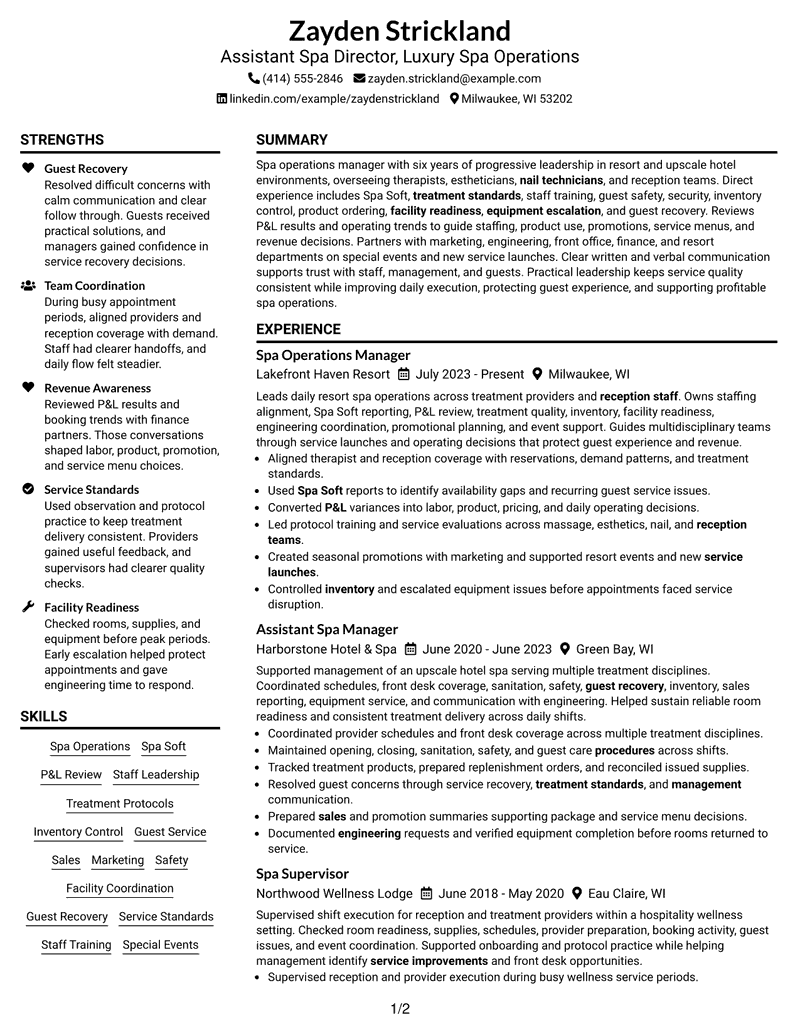
This practical guide shows you how to build an Assistant Spa Director - Luxury Spa Operations resume that is focused, easy to scan, and ready to tailor. You will learn how to organize leadership, operations, guest service, and business evidence so recruiters can see your value quickly.
Strong resumes for this role connect daily spa leadership with business results. Give clear space to management experience, treatment standards, staff development, guest recovery, inventory control, facility readiness, sales and marketing work, and P&L review.
The example below is presented in 33 ATS-optimized resume formats so you can compare reading order, section hierarchy, and visual structure. Use the format notes to choose a layout that keeps your strongest qualifications easy to find.
What Makes a Great Assistant Spa Director - Luxury Spa Operations Resume in 2026
A strong resume for this role is leadership-focused, operationally clear, and easy for recruiters to scan. It should show career progression, team oversight, guest service, financial awareness, and reliable spa administration.
Use concise bullets and relevant keywords such as Spa Soft, P&L review, treatment standards, inventory control, staff training, guest recovery, and facility coordination where they are supported by your experience.
The examples shown below are intentionally detailed to demonstrate a range of experiences, skills, accomplishments and relevant keywords. We prefer detailed resumes as they provide more context to the hiring managers and also help the ATS systems identify relevant qualifications and score your resume better for a match. But the length of a resume is an individual choice. If you want a one page resume, just keep the most relevant experience and information for the job. Note: Resume examples are for educational purposes only. Use only information that accurately reflects your experience and qualifications. References to real organizations do not imply affiliation or endorsement.
#1 Plain Two Column Format Resume Example
A plain two-column structure separates core resume sections into parallel reading areas, helping reviewers locate experience, skills, and credentials without visual clutter.

Resume Snapshot
- 6 years of progressive spa leadership experience
- Resort and upscale hotel spa operations
- Bachelor of Science in Hospitality Management
- Spa Management Certificate, 2021
Why This Format Works
- Parallel sections keep career progression and supporting qualifications easy to compare.
- Clear spacing gives achievements enough room without crowding nearby credentials.
- Two reading areas help reviewers locate skills and education efficiently.
Best For
- Balanced career and skills review
- Dense experience with supporting credentials
- Quick comparison across resume sections
- Traditional applications needing clear structure
- Leadership resumes with broad evidence
Resume Keywords
- Assistant Spa Director
- Luxury Spa Operations
- therapists
- estheticians
- nail technicians
- reception staff
- procedures
- treatment standards
- Staff Training
- guest safety
- security
- Inventory
- ordering
- Facility Readiness
- equipment escalation
#2 Simple One Column Format Resume Example
A simple one-column flow keeps every section in a direct top-to-bottom sequence, making career progression and supporting qualifications easy to follow.

Why This Format Works
- Linear section order makes career progression simple for reviewers to follow.
- Consistent spacing keeps achievements readable within a direct experience narrative.
- Supporting skills and credentials remain easy to find after core experience.
Best For
- ATS-focused application workflows
- Straightforward career progression
- Readers preferring linear scanning
- Detailed experience narratives
- Simple document customization
#3 Clean Two Column Sidebar Format Resume Example
A clean two-column sidebar structure creates strong section separation, giving reviewers a fast path between career history and supporting resume details.

Why This Format Works
- Sidebar separation keeps supporting qualifications distinct from the main experience story.
- Main content space gives career progression a clear, uninterrupted reading path.
- Visible section grouping helps reviewers locate education and credentials quickly.
Best For
- Visible separation of supporting qualifications
- Career history with compact side content
- Fast section-to-section navigation
- Recruiters comparing credentials quickly
- Professional resumes with varied sections
#4 Two Column Format Resume Example
This two-column format balances major experience content with supporting sections, helping reviewers compare career depth and qualifications without losing reading order.

Why This Format Works
- Balanced columns separate detailed experience from compact supporting resume sections.
- Career progression stays readable while skills remain available for quick reference.
- Distinct content areas reduce searching between achievements, education, and credentials.
Best For
- Balanced experience and qualification content
- Reviewers scanning parallel sections
- Career progression with concise supporting details
- Applications needing efficient space use
- Management resumes with broad responsibilities
#5 Photo Header Two Column Format Resume Example
A photo header anchors the top of the page while two body columns organize resume sections into clear parallel areas for review.

Why This Format Works
- Header separation creates a clear start before reviewers enter the career content.
- Two columns keep experience and supporting qualifications visually distinct below.
- Section spacing helps achievements and credentials remain readable beside each other.
Best For
- Regions where resume photos are accepted
- Two-column content with a visual header
- Applications needing strong section separation
- Professional profiles with varied credentials
- Readers comparing experience and qualifications
#6 Colored Two Column Format Resume Example
Color helps mark visual sections while the two-column body separates major career content from supporting qualifications for faster navigation.

Why This Format Works
- Color-defined sections help reviewers distinguish experience from supporting qualification groups.
- Two-column organization keeps career depth visible without burying concise skills.
- Clear boundaries make education and credentials faster to locate during scanning.
Best For
- Applications benefiting from stronger visual section cues
- Two-column organization for mixed content
- Career histories with supporting credentials
- Readers who scan by section
- Modern hospitality management applications
#7 Stylish Two Column Designer Format Resume Example
A styled two-column composition uses clear visual grouping to separate career history from supporting sections while keeping the resume easy to navigate.

Why This Format Works
- Visual grouping gives career progression a defined path through the two-column body.
- Supporting sections stay compact without competing with detailed experience content.
- Structured spacing keeps achievements, education, and credentials easy to distinguish.
Best For
- Polished visual presentation needs
- Two-column resumes with varied content
- Career evidence needing distinct grouping
- Reviewers navigating several qualification types
- Applications allowing expressive design
#8 Modern Icon Format Resume Example
Icons provide visual wayfinding across a two-column body, helping reviewers move between experience, skills, education, and credentials with less search effort.

Why This Format Works
- Icons act as wayfinding cues between major resume content categories.
- Two columns let reviewers compare experience depth with supporting qualifications efficiently.
- Section markers make skills and credentials easier to locate during fast scans.
Best For
- Readers who benefit from visual wayfinding
- Two-column organization with many sections
- Resumes balancing experience and credentials
- Quick navigation across content categories
- Modern applications with structured evidence
#9 Modern Full Background Two Column Format Resume Example
A full-background treatment frames a two-column body, while section spacing keeps career content and supporting qualifications clearly separated.

Why This Format Works
- Background contrast frames separate content groups without interrupting career progression.
- Two-column spacing preserves room for achievements and supporting qualifications together.
- Consistent section boundaries help reviewers locate education and credentials quickly.
Best For
- Strong visual framing across sections
- Two-column resumes with substantial content
- Career history plus supporting qualifications
- Readers scanning grouped information
- Applications allowing full-background styling
#10 Dark Mode Two Column Format Resume Example
Dark-mode contrast creates strong section boundaries across two columns, helping reviewers scan experience and supporting details as distinct content groups.

Why This Format Works
- High contrast makes section boundaries visible across a dense two-column layout.
- Experience remains distinct from supporting skills and credential information.
- Separate content zones help reviewers scan achievements without losing career sequence.
Best For
- High-contrast visual presentation
- Two-column resumes with multiple sections
- Reviewers scanning grouped career evidence
- Applications allowing dark design choices
- Experience balanced with supporting qualifications
#11 Dark Mode Box Header Format Resume Example
A boxed header establishes a clear starting point, while the two-column body organizes experience and supporting sections for quick review.

Why This Format Works
- Boxed header creates a firm starting point before detailed experience sections.
- Two-column grouping keeps supporting qualifications separate from career progression.
- Strong section contrast helps achievements and credentials remain easy to locate.
Best For
- Distinct header and body separation
- Two-column management resumes
- Applications needing strong visual hierarchy
- Readers reviewing several qualification groups
- Career histories with supporting credentials
#12 Elegant Full Background Two Column Format Resume Example
An elegant full-background design frames two columns with consistent section separation, helping reviewers track experience and qualifications across the page.

Why This Format Works
- Full-background framing keeps separate resume sections visually connected across two columns.
- Career history receives clear space while supporting qualifications stay readily accessible.
- Consistent grouping helps reviewers find achievements, education, and credentials efficiently.
Best For
- Refined visual presentation
- Two-column resumes with broad evidence
- Readers needing clear section boundaries
- Career progression plus supporting qualifications
- Applications allowing full-background design
#13 Creative Two Tone Format Resume Example
A two-tone design distinguishes major content areas within two columns, giving reviewers clear visual cues between career history and supporting details.

Why This Format Works
- Two-tone separation helps distinguish career content from supporting qualification areas.
- Parallel organization lets reviewers move between achievements and credentials without confusion.
- Section contrast keeps skills visible while preserving experience reading order.
Best For
- Applications benefiting from strong section contrast
- Two-column organization for varied content
- Readers comparing career and supporting evidence
- Creative but structured professional presentation
- Broad resumes needing visual separation
#14 Minimal Header Format Resume Example
A restrained header leads into a one-column reading path, keeping section order simple and letting career progression remain easy to trace.

Why This Format Works
- Minimal header treatment keeps attention on the one-column career sequence.
- Simple section spacing makes achievements easier to read without visual competition.
- Education and credentials follow a predictable path after core experience content.
Best For
- Readers preferring low-distraction layouts
- One-column career progression
- ATS-conscious applications
- Detailed experience with simple hierarchy
- Traditional professional review
#15 Plain One Column with Shaded Labels Resume Example
Shaded section labels break a one-column resume into visible blocks, helping reviewers find experience, skills, education, and credentials quickly.

Why This Format Works
- Shaded labels create clear checkpoints between experience and supporting resume sections.
- One-column order keeps career progression easy to trace from top down.
- Visible labels help reviewers return quickly to skills, education, or credentials.
Best For
- Readers who scan by labeled sections
- One-column resumes with varied content
- Experience-heavy career histories
- Applications needing clear section markers
- Credentials that need easy retrieval
#16 Text/Fang Style Resume Example
A text-forward one-column layout keeps the reading sequence direct, using clear section breaks to make dense professional content easier to follow.

Why This Format Works
- Text-forward structure gives detailed experience a steady, uninterrupted reading sequence.
- Clear breaks separate achievements from supporting qualifications without extra visual layers.
- One-column flow keeps education and credentials in an expected order.
Best For
- Text-dense professional resumes
- Readers prioritizing content over decoration
- One-column career narratives
- Applications needing simple scanning
- Detailed experience and credential sections
#17 Bold Color Header Professional Format Resume Example
A bold header creates a strong entry point, while the two-column body gives experience and supporting qualifications separate but coordinated reading areas.

Why This Format Works
- Bold header establishes hierarchy before reviewers enter the two-column body.
- Parallel sections keep detailed experience separate from concise supporting qualifications.
- Strong visual boundaries make achievements and credentials easier to revisit quickly.
Best For
- Applications needing a prominent professional header
- Two-column resumes with broad evidence
- Leadership histories with supporting qualifications
- Readers scanning for section hierarchy
- Modern management applications
#18 Photo Header Color Sidebar Format Resume Example
A photo header and colored sidebar create a two-column structure with clear visual zones, helping reviewers navigate major and supporting resume sections.

Why This Format Works
- Colored sidebar separates supporting qualifications from the main career history.
- Header treatment creates a clear start without changing the two-column reading structure.
- Distinct zones help reviewers find achievements, education, and credentials efficiently.
Best For
- Regions where resume photos are customary
- Sidebar organization for supporting details
- Two-column resumes with broad credentials
- Applications needing strong visual grouping
- Hospitality profiles with varied experience
#19 Top Left Header Color Accent Format Resume Example
A top-left header establishes the reading start, while two columns divide career content and supporting details into clear review paths.

Why This Format Works
- Top-left header supports a natural reading start for career information.
- Two-column division keeps supporting qualifications visible beside detailed experience.
- Clear content areas help reviewers scan achievements and credentials independently.
Best For
- Readers preferring a left-led reading start
- Two-column career and qualification balance
- Applications with several supporting sections
- Professional resumes needing visual accents
- Quick review of broad evidence
#20 Centered Header Classic Two Column Format Resume Example
A centered header creates a balanced opening above two columns, helping reviewers enter the document before moving through separated resume sections.

Why This Format Works
- Centered header gives reviewers a clear overview before entering separated columns.
- Two-column structure balances career progression with supporting qualifications.
- Consistent section order keeps achievements, education, and credentials easy to locate.
Best For
- Centered professional presentation
- Two-column resumes with balanced content
- Readers comparing experience and credentials
- Career histories needing clear hierarchy
- Applications favoring classic structure
#21 Left Aligned Header Clean Two Column Format Resume Example
A left-aligned header supports a natural reading start, followed by two clean columns that organize career history and supporting qualifications.

Why This Format Works
- Left-aligned header leads naturally into the main career reading path.
- Clean columns separate detailed experience from compact supporting sections.
- Reviewers can move quickly between achievements, skills, education, and credentials.
Best For
- Left-to-right reading clarity
- Two-column resumes with direct hierarchy
- Career progression plus compact qualifications
- Recruiters scanning broad evidence quickly
- Professional applications with varied sections
#22 Simple Two Column Format Resume Example
A simple two-column structure keeps major resume sections distinct without heavy styling, supporting quick comparison of experience and supporting details.

Why This Format Works
- Simple columns organize experience and supporting qualifications without excessive visual complexity.
- Career progression remains easy to trace within the main content area.
- Separate sections keep achievements and credentials accessible during quick review.
Best For
- Simple space-efficient organization
- Two-column resumes with mixed content
- Readers wanting clear experience separation
- Management histories with supporting credentials
- Applications avoiding heavy design
#23 Accent Divider Modern Two Column Format Resume Example
Accent dividers mark section changes across a two-column body, helping reviewers move cleanly between career history and supporting qualifications.

Why This Format Works
- Accent dividers make section changes visible across both content columns.
- Career progression stays readable while supporting qualifications remain clearly separated.
- Dividers help reviewers return quickly to achievements, education, or credentials.
Best For
- Readers who rely on visible section breaks
- Two-column career and qualification content
- Resumes with several evidence categories
- Modern applications needing clean navigation
- Experience-heavy professional profiles
#24 Shaded Labels Clean Two Column Format Resume Example
Shaded labels identify section boundaries within two columns, making experience, skills, education, and credentials easier to locate at a glance.

Why This Format Works
- Shaded labels make each content category easy to identify during scanning.
- Two columns keep detailed experience distinct from compact supporting qualifications.
- Visible section markers help reviewers find achievements and credentials without searching.
Best For
- Fast scanning by section label
- Two-column resumes with many content groups
- Career history plus concise credentials
- Readers revisiting specific qualifications
- Applications needing strong visual organization
#25 Photo Header Color Accent International Format Resume Example
A photo header and color accents frame a two-column international-style layout, with clear section separation for fast document navigation.

Why This Format Works
- Color accents create clear section cues across the two-column body.
- Header separation gives reviewers a defined start before career content.
- Parallel sections keep achievements and supporting credentials easy to distinguish.
Best For
- International contexts accepting resume photos
- Two-column resumes with color cues
- Applications needing clear section separation
- Readers reviewing broad professional evidence
- Hospitality resumes for global settings
#26 Large Profile Photo International Two Column Format Resume Example
A large profile photo creates a prominent header area, while two columns keep professional history and supporting sections organized below it.

Why This Format Works
- Large header area creates a strong visual start before professional content.
- Two columns organize detailed experience separately from supporting qualifications.
- Clear section spacing keeps achievements, education, and credentials easy to navigate.
Best For
- International contexts expecting prominent resume photos
- Two-column resumes with extensive content
- Applications needing a strong visual header
- Career history plus supporting credentials
- Readers navigating multiple qualification groups
#27 One Column Format with Photo Resume Example
A photo-led header sits above a one-column body, keeping the professional content in a simple top-to-bottom sequence for straightforward review.

Why This Format Works
- Header separation creates a clear start before the one-column career sequence.
- Linear flow keeps experience and achievements easy to follow without branching.
- Supporting skills, education, and credentials remain organized in predictable order.
Best For
- Contexts where resume photos are appropriate
- Readers preferring one-column flow
- Career progression with simple navigation
- Applications needing direct section order
- Detailed professional histories
#28 One Column Format with Photo Right Resume Example
A right-positioned photo balances the header while the one-column body preserves a direct reading order through every resume section.

Why This Format Works
- Right-aligned header element preserves a clear start without disrupting reading flow.
- One-column structure keeps career progression direct and easy to follow.
- Section spacing separates achievements from education, skills, and credentials cleanly.
Best For
- Contexts where resume photos are appropriate
- Right-weighted visual header preferences
- One-column professional narratives
- Readers wanting direct career progression
- Applications with varied supporting sections
#29 One Column Boxed Contact Header Format Resume Example
A boxed contact header separates identity details from a one-column body, giving reviewers a clear starting point before the career content.

Why This Format Works
- Boxed contact area separates header information from the professional content below.
- One-column reading order keeps experience and achievements easy to trace.
- Clear section blocks make skills, education, and credentials easy to revisit.
Best For
- Clear separation of contact and career content
- One-column ATS-friendly scanning
- Readers preferring familiar section order
- Professional histories with multiple roles
- Applications needing restrained styling
#30 One Column Shaded Contact Header Format Resume Example
A shaded contact header creates visible separation at the top, followed by a one-column flow that keeps the remaining sections easy to track.

Why This Format Works
- Shaded contact area marks a strong transition into the resume body.
- Linear section order preserves career progression without competing content paths.
- Visible spacing separates achievements, skills, education, and credentials effectively.
Best For
- Visible contact area without complex body design
- One-column career progression
- Readers scanning sequential sections
- Applications needing soft visual separation
- Detailed experience with supporting credentials
#31 Boxed Contact Header with Job Title Format Resume Example
A boxed contact area with the job title clarifies the document entry point, while the one-column body keeps section order direct.

Why This Format Works
- Job-title header clarifies the document focus before detailed career content begins.
- One-column flow keeps experience and achievements in a direct sequence.
- Boxed separation helps supporting sections remain easy to locate later.
Best For
- Applications needing the target title upfront
- One-column management resumes
- Readers preferring direct section sequence
- Career histories with several roles
- Professional profiles needing clear positioning
#32 Plain Professional Layout with Job Title & Shaded Labels Resume Example
A plain professional header with job title and shaded labels guides reviewers through a one-column sequence with clearly marked section changes.

Why This Format Works
- Shaded labels create clear boundaries throughout the one-column professional layout.
- Career progression remains direct while achievements receive distinct section space.
- Marked sections help reviewers find skills, education, and credentials quickly.
Best For
- Readers who depend on strong section labels
- One-column career progression
- Applications needing classic professional presentation
- Experience plus education and credentials
- Recruiters revisiting specific sections
#33 Classic One Column Resume Format Resume Example
A classic one-column structure keeps the entire resume in a familiar top-to-bottom order, making progression and supporting details simple to scan.

Why This Format Works
- Familiar one-column order keeps career progression easy to understand immediately.
- Simple section hierarchy gives achievements clear space within each experience entry.
- Supporting skills, education, and credentials follow an intuitive review sequence.
Best For
- Traditional professional applications
- ATS-focused one-column resumes
- Readers preferring familiar structure
- Career histories with clear progression
- Broad qualifications in simple sequence
Why Build Your Assistant Spa Director - Luxury Spa Operations Resume with ResumeInMinutes
ResumeInMinutes helps spa management professionals turn leadership, operations, service quality, business review, and cross-department experience into a clear resume that is easier to tailor and review.
- Diverse resume formats
- ATS-compliant section structure
- Keyword-optimized resume content
- Organized leadership and operations presentation
- Free PDF resume previews
- Resume customization support
You can build a focused resume that highlights spa leadership, service standards, financial review, promotions, guest experience, and facility coordination without losing a clear reading order.
See Also
- 7 Assistant Director of Operations - Financial Aid Resume Templates with Example
- 7 Assistant Director, Athletic Compliance Resume Templates with Example
- 7 Assistant Director Construction Management Resume Templates with Example
- 7 Assistant Director, Doctoral Programs Resume Templates with Example
- 7 Assistant Director for Employer Engagement Resume Templates with Example
- 33 Assistant Director of Development - Athletics Fundraising Resume Templates with Example
- 7 Assistant Director, Public Works Agency Resume Templates with Example
- 7 Assistant Director - Transportation Planning & Traffic Engineering Resume Templates with Example
- 7 Assistant Director, Athletic Compliance Cover Letter Templates with Example
- 7 Assistant Director, Doctoral Programs Cover Letter Templates with Example
Frequently Asked Questions
Are these Assistant Spa Director - Luxury Spa Operations resume templates ATS-friendly?
Yes. The templates use clear section structure and readable headings, and the content can include supported keywords such as spa operations, treatment standards, staff training, inventory control, and P&L review.
Are these different resumes?
No. This guide presents one Assistant Spa Director - Luxury Spa Operations resume example across distinct visual formats so you can compare organization and presentation.
What should an Assistant Spa Director - Luxury Spa Operations resume include?
Include a focused summary, spa management experience, leadership achievements, staff training, treatment standards, guest service, inventory responsibilities, financial review, education, certifications, and relevant systems.
Can I download the resume templates as PDFs?
Yes. Each resume design offers a free PDF download so you can preview the format and compare how your content appears.
Which resume style works well for an Assistant Spa Director - Luxury Spa Operations application?
A clear one-column or well-organized two-column resume can work well when it keeps leadership, experience, skills, education, and credentials easy to scan. Choose the layout that best fits your content volume and application context.
How can experienced spa managers make their resumes stronger?
Show progression in responsibility and connect leadership to operating decisions, guest experience, staff development, service quality, revenue awareness, promotions, inventory, and facility readiness.
Should I include a photo on my resume?
Include a photo only when it is customary or expected in your region or application context. For U.S. applications, a no-photo resume is usually the safer choice.
Can I customize these resume templates?
Yes. ResumeInMinutes allows you to adjust resume text, format, design style, and PDF layout for your Assistant Spa Director - Luxury Spa Operations application.




