
33 Business Strategy Manager, Vice President - Marketing Operations Strategy Resume Templates with Example 2026 (ATS-Optimized)
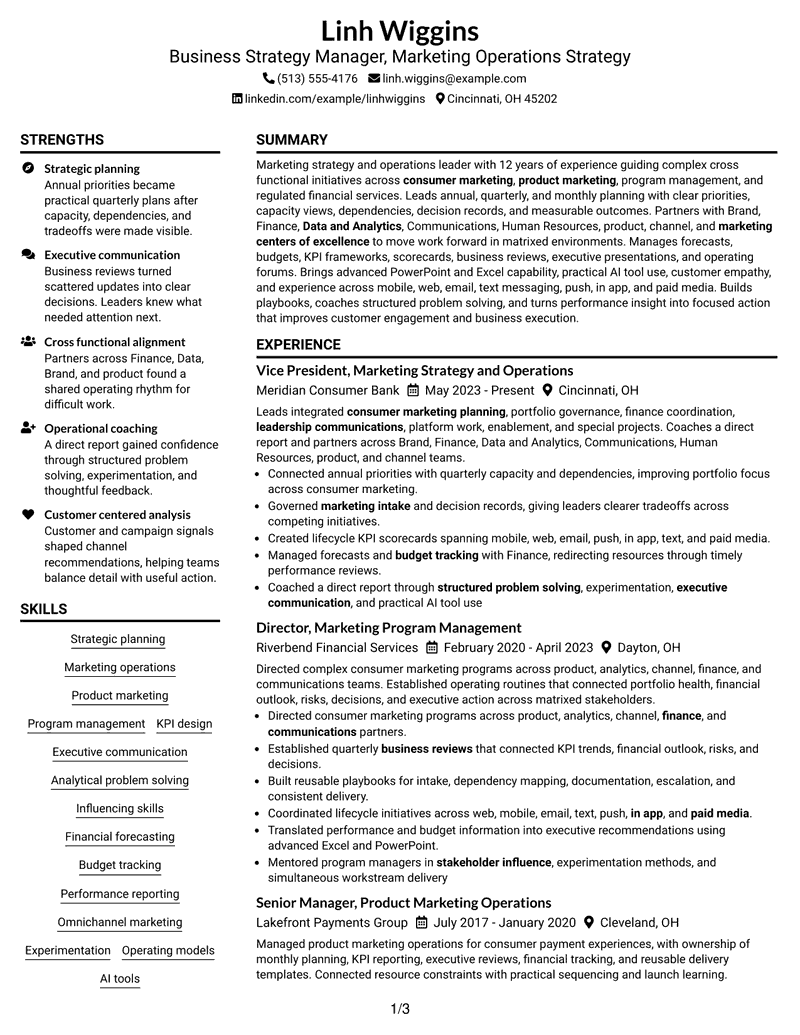
This practical guide shows you how to build a Business Strategy Manager, Vice President - Marketing Operations Strategy resume that is focused, clear, and easy to review. You will learn how to organize strong evidence and compare professional resume layouts.
Give priority to strategic planning, marketing operations, program leadership, KPI design, finance forecasting, budget tracking, executive communication, and cross-functional influence. Use clear achievement bullets and show how your work moved planning, decisions, performance, or delivery forward.
The same complete resume is presented in 33 layouts so you can compare reading order, section balance, two-column and one-column structures, and visual emphasis before choosing a format.
What Makes a Great Business Strategy Manager, Vice President - Marketing Operations Strategy Resume in 2026
A strong resume for this role makes strategic leadership easy to verify through clear sections, focused bullets, and evidence of complex cross-functional delivery.
Use role-relevant terms such as strategic planning, KPI design, budget tracking, executive communication, marketing operations, and program management where the evidence supports them.
The examples shown below are intentionally detailed to demonstrate a range of experiences, skills, accomplishments and relevant keywords. We prefer detailed resumes as they provide more context to the hiring managers and also help the ATS systems identify relevant qualifications and score your resume better for a match. But the length of a resume is an individual choice. If you want a one page resume, just keep the most relevant experience and information for the job. Note: Resume examples are for educational purposes only. Use only information that accurately reflects your experience and qualifications. References to real organizations do not imply affiliation or endorsement.
#1 Plain Two Column Format Resume Example
A plain two-column structure separates major resume sections so recruiters can scan leadership evidence and supporting details quickly.

Resume Snapshot
- 12 years of progressive marketing strategy and operations experience
- Vice President experience in consumer marketing planning and portfolio governance
- Advanced PowerPoint and Excel with practical AI tool use
- Omnichannel lifecycle work across mobile, web, email, text, push, in-app, and paid media
Why This Format Works
- Parallel section lanes separate career progression from supporting credentials clearly.
- Open body space keeps major achievements easy to locate during review.
- Simple structure lets skills and education remain visible without crowding experience.
Best For
- Parallel career and skills review
- Dense senior-level experience
- Visible supporting credentials
- Balanced leadership evidence
- Structured executive applications
Resume Keywords
- Business Strategy Manager
- Marketing Operations Strategy
- Product marketing
- Annual planning
- Quarterly planning
- monthly planning
- marketing intake
- Decision documentation
- leadership communications
- enablement
- special projects
- Business reviews
- executive presentations
- Cross business forums
- Budget tracking
#2 Simple One Column Format Resume Example
A simple one-column flow keeps experience, achievements, skills, and credentials in one clear reading sequence.

Why This Format Works
- Linear reading keeps career progression easy to follow from top to bottom.
- Single-flow sections give achievements room for concise supporting detail.
- Straightforward hierarchy helps skills and credentials appear in a predictable order.
Best For
- Straight chronological reading
- Detailed achievement bullets
- Traditional executive resumes
- Simple section hierarchy
- Content-first applications
#3 Clean Two Column Sidebar Format Resume Example
A clean two-column sidebar structure gives recruiters a main career story plus a separate area for supporting information.

Why This Format Works
- Sidebar separation keeps supporting qualifications apart from the main experience narrative.
- Main-column space gives leadership achievements a clear reading path.
- Distinct section blocks help education and credentials stay easy to find.
Best For
- Sidebar-supported qualifications
- Long career histories
- Separate skills reference
- Credential-rich resumes
- Quick section navigation
#4 Two Column Format Resume Example
A balanced two-column structure helps recruiters compare core experience with supporting resume sections without losing reading order.

Why This Format Works
- Balanced columns distribute experience and supporting sections without hiding either.
- Parallel organization helps recruiters compare achievements with broader qualifications efficiently.
- Section separation keeps skills accessible beside the main career story.
Best For
- Balanced section comparison
- Broad leadership scope
- Mixed experience and credentials
- High information density
- Two-track recruiter scanning
#5 Photo Header Two Column Format Resume Example
A photo header and two-column body create a clear identity area while keeping the main resume content organized.

Why This Format Works
- Photo header identifies the person without interrupting the two-column body.
- Divided body areas keep experience and supporting qualifications visually separate.
- Clear section boundaries help achievements remain distinct from credentials and skills.
Best For
- Markets where photos are customary
- Visible identity header
- Two-column career summaries
- International applications
- Distinct supporting details
#6 Colored Two Column Format Resume Example
A colored two-column structure uses visual contrast to separate sections and help recruiters locate key resume content faster.

Why This Format Works
- Color contrast marks major section changes across the two-column resume.
- Separated content areas help career progression remain easy to trace.
- Supporting skills and credentials gain visibility without breaking the main experience flow.
Best For
- Color-guided section review
- Complex leadership records
- Separated skills content
- Portfolio-style organization
- Visual section contrast
#7 Stylish Two Column Designer Format Resume Example
A stylish two-column design adds visual separation while preserving clear paths through experience, skills, and credentials.

Why This Format Works
- Designed section breaks guide recruiters between experience, achievements, and qualifications.
- Two-column balance keeps dense leadership content from becoming one long block.
- Supporting credentials remain distinct while the career narrative stays prominent.
Best For
- Design-aware professional applications
- Structured senior experience
- Distinct qualification groups
- Readable dense content
- Modern executive presentation
#8 Modern Icon Format Resume Example
A modern icon two-column layout adds navigation cues that help recruiters move between major resume sections.

Why This Format Works
- Icon cues help recruiters identify major resume sections during a quick scan.
- Two-column organization separates career evidence from supporting qualifications cleanly.
- Visual navigation supports fast movement between achievements, skills, and credentials.
Best For
- Icon-guided navigation
- Multi-section executive resumes
- Fast qualification lookup
- Parallel career evidence
- Modern professional styling
#9 Modern Full Background Two Column Format Resume Example
A full-background two-column design uses strong section contrast to keep dense leadership content easier to navigate.

Why This Format Works
- Background contrast creates clear boundaries around major resume content groups.
- Parallel sections reduce visual congestion across a detailed career history.
- Defined areas help supporting credentials stay visible beside experience.
Best For
- Strong background contrast
- Dense planning experience
- Large content volume
- Separated qualification areas
- Visual section grouping
#10 Dark Mode Two Column Format Resume Example
A dark-mode two-column layout creates strong visual separation while preserving parallel access to career and supporting sections.

Why This Format Works
- Dark contrast makes section boundaries easy to recognize during review.
- Two-column structure keeps career evidence and supporting content in separate lanes.
- Strong visual grouping helps achievements and credentials remain easy to distinguish.
Best For
- Dark visual presentation
- Parallel section review
- High-density career content
- Strong section separation
- Modern executive applications
#11 Dark Mode Box Header Format Resume Example
A dark two-column body with a boxed header gives recruiters a distinct contact area and organized resume sections below.

Why This Format Works
- Boxed header separates contact details before the career content begins.
- Dark two-column body divides experience from supporting qualifications clearly.
- Section grouping lets recruiters locate achievements, skills, and credentials with less searching.
Best For
- Distinct contact header
- Dark section contrast
- Senior career narratives
- Visible supporting qualifications
- Structured two-column review
#12 Elegant Full Background Two Column Format Resume Example
An elegant full-background two-column layout uses contrast and parallel structure to guide review across major resume sections.

Why This Format Works
- Full-background contrast separates major content areas without changing the resume evidence.
- Two columns give career progression and supporting qualifications distinct reading zones.
- Spacious grouping keeps achievements visible within a detailed senior-level history.
Best For
- Elegant section separation
- Broad career progression
- Dense executive evidence
- Parallel qualification review
- Formal visual presentation
#13 Creative Two Tone Format Resume Example
A creative two-tone two-column layout separates content areas clearly so recruiters can scan the resume by section.

Why This Format Works
- Two-tone contrast signals section changes across the parallel body structure.
- Separated zones help recruiters distinguish career evidence from supporting qualifications.
- Creative styling still leaves achievements and credentials in clear content groups.
Best For
- Two-tone section cues
- Creative professional settings
- Separated career content
- Balanced supporting evidence
- Modern visual identity
#14 Minimal Header Format Resume Example
A minimal header and one-column body keep recruiter attention on a direct sequence of experience, achievements, skills, and credentials.

Why This Format Works
- Minimal header reduces visual competition before the career evidence starts.
- Single-column order supports a direct review of progression and achievements.
- Simple section hierarchy keeps skills and credentials easy to locate later.
Best For
- Minimal visual treatment
- Long chronological experience
- Achievement-led resumes
- Straightforward executive review
- Clean content hierarchy
#15 Plain One Column with Shaded Labels Resume Example
A one-column body with shaded labels marks section changes clearly while keeping the career story in one reading path.

Why This Format Works
- Shaded labels mark section transitions without breaking the one-column sequence.
- Continuous reading helps recruiters follow career progression and leadership scope.
- Visible labels make skills, education, and credentials easier to find.
Best For
- Label-guided scanning
- One-column career stories
- Many resume sections
- Clear credential lookup
- Traditional ATS-conscious layouts
#16 Text/Fang Style Resume Example
A text-led one-column structure reduces visual interruption and keeps recruiter attention on the order of the resume evidence.

Why This Format Works
- Text-first presentation keeps attention on evidence rather than decorative elements.
- One-column flow supports careful reading of career progression and achievements.
- Simple hierarchy gives supporting skills and credentials a predictable place.
Best For
- Text-focused review
- Evidence-heavy resumes
- Long achievement sections
- Conservative applications
- Simple reading order
#17 Bold Color Header Professional Format Resume Example
A bold color header and two-column body create clear entry points for contact details and the main resume sections.

Why This Format Works
- Bold header creates a clear start before the two-column content begins.
- Parallel body sections separate career evidence from supporting qualifications effectively.
- Strong section contrast helps achievements remain easy to locate during review.
Best For
- Prominent contact area
- Executive-level applications
- Parallel section balance
- Strong visual entry point
- Leadership-focused resumes
#18 Photo Header Color Sidebar Format Resume Example
A photo header and color sidebar divide identity, career content, and supporting details into easy-to-find areas.

Why This Format Works
- Photo header handles identity while the body remains focused on resume evidence.
- Color sidebar separates supporting qualifications from the main career narrative.
- Two-column organization keeps achievements, skills, and credentials easy to distinguish.
Best For
- Markets accepting resume photos
- Sidebar qualification review
- Color-guided navigation
- International leadership roles
- Distinct career and skills areas
#19 Top Left Header Color Accent Format Resume Example
A top-left header with color accents leads into a two-column body that keeps major sections visually distinct.

Why This Format Works
- Top-left header creates a direct entry point into the resume.
- Color accents mark section changes across the two-column body.
- Parallel content areas keep experience and supporting credentials from competing for space.
Best For
- Direct top-left entry
- Color-accented section cues
- Two-column leadership resumes
- Fast supporting-detail lookup
- Structured modern applications
#20 Centered Header Classic Two Column Format Resume Example
A centered classic header and two-column body give recruiters a familiar starting point and organized paths through the resume.

Why This Format Works
- Centered header gives recruiters a familiar starting point for contact details.
- Classic two-column structure divides core experience from supporting qualifications.
- Clear grouping helps achievements, education, and credentials remain easy to scan.
Best For
- Classic centered header
- Formal executive resumes
- Balanced career sections
- Traditional two-column reading
- Broad qualification sets
#21 Left Aligned Header Clean Two Column Format Resume Example
A left-aligned header supports a direct start, while the two-column body separates core career evidence from supporting sections.

Why This Format Works
- Left-aligned header moves quickly into the main career content.
- Clean columns separate primary experience from supporting sections without visual clutter.
- Direct section breaks help recruiters locate achievements and credentials efficiently.
Best For
- Direct left-aligned start
- Clean career progression
- Low-decoration applications
- Separated supporting sections
- Fast recruiter scanning
#22 Simple Two Column Format Resume Example
A simple two-column arrangement keeps the page structured without heavy decoration, helping recruiters compare sections quickly.

Why This Format Works
- Simple columns create useful separation without adding heavy visual treatment.
- Career progression remains readable while supporting sections stay close by.
- Balanced spacing helps achievements and skills avoid crowded presentation.
Best For
- Simple side-by-side structure
- Balanced content volume
- Executive career summaries
- Easy skills reference
- Uncomplicated visual design
#23 Accent Divider Modern Two Column Format Resume Example
Accent dividers mark section boundaries across a modern two-column body, making long resume content easier to scan.

Why This Format Works
- Accent dividers signal section boundaries across the two-column layout.
- Modern separation helps recruiters move between career evidence and qualifications.
- Defined content blocks keep achievements and credentials from blending together.
Best For
- Divider-guided reading
- Modern leadership resumes
- Many distinct sections
- Parallel information review
- Clear achievement grouping
#24 Shaded Labels Clean Two Column Format Resume Example
Shaded labels give the two-column layout clear section markers so recruiters can locate experience, skills, and credentials efficiently.

Why This Format Works
- Shaded labels make each major section easy to identify quickly.
- Two-column structure keeps experience distinct from supporting resume content.
- Visible section markers help recruiters return to skills or credentials efficiently.
Best For
- Shaded section markers
- Credential-heavy resumes
- Quick section return
- Structured leadership evidence
- Organized two-column content
#25 Photo Header Color Accent International Format Resume Example
A photo header, color accents, and two-column body create clear visual zones for international resume presentation.

Why This Format Works
- Photo header identifies the person while color accents guide navigation.
- Two-column body keeps career evidence separate from supporting qualifications.
- International presentation leaves achievements and credentials in clear reading zones.
Best For
- International photo resumes
- Color-accented identity area
- Cross-border applications
- Two-column executive profiles
- Visible supporting qualifications
#26 Large Profile Photo International Two Column Format Resume Example
A large profile photo anchors the header while the two-column body keeps career evidence and supporting details separated.

Why This Format Works
- Large profile photo creates a strong identity area above the content.
- Two-column body prevents detailed career history from becoming visually dense.
- Supporting skills and credentials remain separated from the main experience path.
Best For
- Large-photo markets
- International executive presentation
- Detailed career history
- Strong identity treatment
- Parallel qualification sections
#27 One Column Format with Photo Resume Example
A photo header sits above a one-column body, leaving the main career story in a single reading sequence.

Why This Format Works
- Photo header stays separate from the one-column career narrative.
- Linear body order makes progression and achievements easy to follow.
- Single-flow sections keep skills and credentials in a consistent sequence.
Best For
- Photo-accepted applications
- Single-flow career evidence
- Chronological executive resumes
- Simple achievement reading
- International one-column use
#28 One Column Format with Photo Right Resume Example
A right-side photo header preserves a one-column body that keeps experience, achievements, skills, and credentials in order.

Why This Format Works
- Right-side photo preserves identity space without changing the one-column body.
- Continuous reading supports a clear progression through experience and achievements.
- Structured sections keep education and credentials easy to locate later.
Best For
- Right-photo presentation
- One-column leadership history
- Photo-accepted markets
- Continuous recruiter reading
- Balanced identity area
#29 One Column Boxed Contact Header Format Resume Example
A boxed contact header creates a distinct starting area before the one-column resume moves through each section in sequence.

Why This Format Works
- Boxed contact area separates identity details from the resume body.
- One-column sequence supports direct review of career progression and results.
- Clear section order keeps skills and credentials easy to find.
Best For
- Distinct contact details
- Traditional one-column resumes
- Long career progression
- Formal business applications
- Simple section sequence
#30 One Column Shaded Contact Header Format Resume Example
A shaded contact header separates identity details from a one-column body designed for straightforward recruiter reading.

Why This Format Works
- Shaded header gives contact information a distinct visual starting point.
- Linear body flow keeps leadership experience and achievements connected.
- Consistent section order supports quick access to skills and credentials.
Best For
- Shaded contact emphasis
- Straight career narratives
- Content-heavy executive resumes
- Clear identity separation
- Predictable section order
#31 Boxed Contact Header with Job Title Format Resume Example
A boxed contact header with the job title makes the target role visible before the one-column career evidence begins.

Why This Format Works
- Job title in the header clarifies the target before review begins.
- Boxed contact area keeps identity details separate from career evidence.
- One-column structure carries achievements and qualifications through a simple reading path.
Best For
- Visible target job title
- Role-focused executive resumes
- Clear contact separation
- Direct chronological reading
- Applications needing fast context
#32 Plain Professional Layout with Job Title & Shaded Labels Resume Example
A plain one-column body with a visible job title and shaded labels makes section changes easy to spot.

Why This Format Works
- Visible job title establishes context before the career history begins.
- Shaded labels make section changes clear throughout the one-column body.
- Plain structure keeps achievements, skills, and credentials easy to inspect.
Best For
- Job-title visibility
- Shaded section guidance
- Plain professional resumes
- Senior career histories
- Easy section identification
#33 Classic One Column Resume Format Resume Example
A classic one-column resume keeps the full document in a familiar top-to-bottom sequence for fast recruiter review.

Why This Format Works
- Classic reading order supports fast review from summary through credentials.
- One-column hierarchy keeps career progression and achievements closely connected.
- Familiar section sequence helps recruiters locate skills and education without searching.
Best For
- Classic executive applications
- Traditional chronological resumes
- Long career histories
- Familiar recruiter reading
- Simple professional presentation
Why Build Your Business Strategy Manager, Vice President - Marketing Operations Strategy Resume with ResumeInMinutes
ResumeInMinutes helps you turn planning, portfolio, finance, KPI, executive communication, and operating-model experience into a structured resume that is easier to scan and tailor.
- Professional resume formats
- ATS-friendly section structure
- Role-focused keyword guidance
- Clear achievement and skills organization
- Free PDF resume previews
- Resume customization support
You can adjust the wording and layout to keep executive-level planning, operational control, measurable performance, and stakeholder influence visible without overloading the page.
See Also
- 7 Vice President, Paid Media & Measurement Strategy - Small Business Card Resume Templates with Example
- 33 Vice President, Marketing Analytics Manager - Small Business Analytics Resume Templates with Example
- 33 HVAC Vice President - Service Operations Leadership Resume Templates with Example
- 7 Vice President of Operations and Chief Financial Officer Resume Templates with Example
- 33 Applied AI/ML Vice President Resume Templates with Example 2026 (ATS-Optimized)
- 33 Assistant Vice President Civil Engineer Resume Templates with Example 2026 (ATS-Optimized)
- 7 Assistant Vice President, Mechanical Engineer - Mechanical/Thermal Resume Templates with Example
- 7 Assistant Vice President of Principal Gifts Resume Templates with Example
- 30+ Applied AI/ML Vice President Cover Letter Templates with Example 2026
- 30+ Assistant Vice President Civil Engineer Cover Letter Templates with Example 2026
Frequently Asked Questions
Are these Business Strategy Manager, Vice President - Marketing Operations Strategy resume templates ATS-friendly?
Yes. The layouts use clear resume sections and readable headings. Keep important terms in normal text and match them to evidence in your experience, skills, and summary.
Are these different resumes?
No. This guide presents one complete resume in different visual formats so you can compare structure without changing the underlying career evidence.
What should this resume include?
Include a focused summary, progressive experience, measurable achievements, strategic planning, marketing operations, KPI work, finance coordination, executive communication, relevant skills, education, projects, and credentials that are accurate for you.
Can I download the resume templates as PDFs?
Yes. Each design includes a free PDF preview so you can compare the layout before choosing a format for your application.
Which resume style works well for this role?
A clear one-column or balanced two-column format can both work well. Choose the structure that keeps senior experience, achievements, skills, and credentials easy to find.
How should I show cross-functional leadership?
Use concise bullets that show the planning problem, the groups involved, the action you led, and the decision or business result that followed.
Should I include a photo on my resume?
Include a photo only when it is customary or expected in the target market. For many U.S. applications, a no-photo resume is the safer choice.
Can I customize these resume templates?
Yes. You can change the resume text, format, design, and PDF layout while keeping the content aligned with the exact role and your verified experience.




