
33 Customer Success Manager - Cloud Business Transformation Resume Templates with Example 2026 (ATS-Optimized)
This practical guide shows you how to build a Customer Success Manager - Cloud Business Transformation resume that is clear, focused, and easy to review. You will learn how to organize evidence so recruiters can quickly understand your fit for a customer-facing cloud transformation role.
Strong resumes for this role connect customer success work with cloud adoption, implementation progress, customer health, issue resolution, value realization, retention, and renewal readiness. Use clear sections for experience, skills, education, projects, certifications, and tools, then write concise bullets that show what you did and why it mattered.
Below, one complete resume example is presented in 33 layouts so you can compare reading order, section structure, visual emphasis, and recruiter scanning. The guide also explains useful keywords, ATS-friendly organization, and when each format may suit your document.
What Makes a Great Customer Success Manager - Cloud Business Transformation Resume in 2026
A strong resume is easy to scan and ties customer success work to adoption, business outcomes, issue ownership, and renewal readiness. Clear section order helps hiring teams see experience, skills, projects, and credentials without searching.
Include grounded keywords such as customer health, value realization, escalation management, project management, ERP, analytics, integration, and AI fundamentals when they match your real background. Keep bullets specific and avoid claiming tools, results, or qualifications you do not have.
The examples shown below are intentionally detailed to demonstrate a range of experiences, skills, accomplishments and relevant keywords. We prefer detailed resumes as they provide more context to the hiring managers and also help the ATS systems identify relevant qualifications and score your resume better for a match. But the length of a resume is an individual choice. If you want a one page resume, just keep the most relevant experience and information for the job. Note: Resume examples are for educational purposes only. Use only information that accurately reflects your experience and qualifications. References to real organizations do not imply affiliation or endorsement.
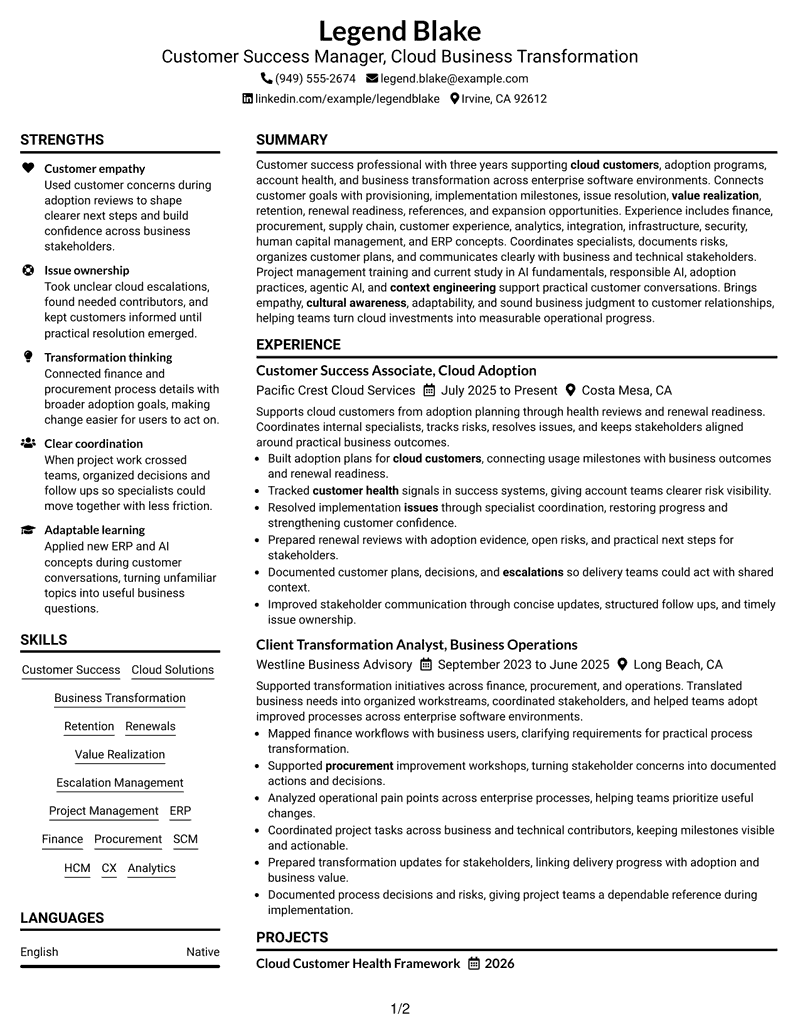
#1 Plain Two Column Format Resume Example
A plain two-column body separates major resume sections so recruiters can scan experience and supporting details side by side.

Resume Snapshot
- Three years of customer success and business transformation experience
- Cloud adoption, customer health, value realization, retention, and renewals
- Business Administration degree with project management and AI training
- Experience coordinating business and technical stakeholders across cloud initiatives
Why This Format Works
- Parallel sections separate experience from supporting qualifications without breaking reading order.
- Clear column boundaries help recruiters locate skills, education, and credentials faster.
- Compact grouping keeps achievements visible while preserving room for supporting sections.
Best For
- Balanced evidence across two columns
- Longer skills and credential lists
- Compact recruiter scanning
- Clear experience plus support sections
- Cloud customer success resumes
Resume Keywords
- Customer Success Manager
- Cloud Business Transformation
- cloud customers
- provisioning
- implementation
- Value Realization
- customer health
- Retention
- Renewals
- references
- Issue
- escalations
- Project Management
- adaptability
- cultural awareness
#2 Simple One Column Format Resume Example
A simple one-column flow gives recruiters one direct reading path through the resume from top to bottom.

Why This Format Works
- Linear reading keeps career progression easy to follow from section to section.
- Full-width space supports detailed experience bullets without a competing sidebar.
- Straight section order makes education and credentials simple to verify.
Best For
- Simple chronological reading
- Detailed experience bullets
- Traditional ATS-minded applications
- Full-width project descriptions
- Readers who prefer linear structure
#3 Clean Two Column Sidebar Format Resume Example
A clean two-column sidebar keeps supporting sections distinct while recruiters review the main career story.

Why This Format Works
- The sidebar isolates supporting qualifications from the main experience narrative.
- Main-column space keeps career progression readable while secondary details stay accessible.
- Distinct content zones help recruiters move between skills and credentials efficiently.
Best For
- Strong supporting-skill sidebar
- Experience-led career stories
- Compact credential visibility
- Quick section cross-checking
- Mixed experience and project content
#4 Two Column Format Resume Example
A balanced two-column structure lets recruiters compare core experience with supporting qualifications without losing section boundaries.

Why This Format Works
- Balanced columns give experience and supporting sections comparable visual access.
- Separated areas reduce long vertical runs of skills, education, and credentials.
- Section contrast helps recruiters compare achievements with broader qualifications.
Best For
- Balanced career and skills content
- Medium evidence volume
- Side-by-side section review
- Clear education visibility
- Structured professional applications
#5 Photo Header Two Column Format Resume Example
A photo header and two-column body create a clear visual entry point while keeping resume sections easy to scan.

Why This Format Works
- The body columns organize experience and supporting content independently of the photo.
- Header separation keeps identity details apart from the main resume evidence.
- Two-column structure helps recruiters locate skills and credentials without interrupting experience review.
Best For
- Markets where resume photos are customary
- Visual identity at the top
- Two-column evidence organization
- International application contexts
- Profiles needing compact support sections
#6 Colored Two Column Format Resume Example
Colored two-column sections add visual separation that helps recruiters move between experience, skills, and credentials.

Why This Format Works
- Color-separated areas make section boundaries easier to spot during a quick scan.
- Two columns reduce crowding between experience, skills, and education content.
- Visual grouping helps recruiters return to credentials after reading achievements.
Best For
- Color-guided section scanning
- Dense but organized qualifications
- Separated skills and experience
- Readers comparing multiple sections
- Modern professional presentation
#7 Stylish Two Column Designer Format Resume Example
A styled two-column design creates strong section contrast while preserving a practical recruiter scanning path.

Why This Format Works
- Strong section styling makes experience and supporting qualifications easier to distinguish.
- Two-column organization keeps career history prominent while credentials remain easy to find.
- Defined content blocks prevent skills and education from blending into achievement bullets.
Best For
- Applications allowing stronger visual styling
- Clear visual section boundaries
- Portfolio-adjacent professional resumes
- Two-column content balance
- Candidates with varied supporting sections
#8 Modern Icon Format Resume Example
Modern icons support navigation across a two-column body so recruiters can locate major resume sections quickly.

Why This Format Works
- Icons act as navigation cues for major resume categories across two columns.
- Two-column grouping keeps experience readable while supporting sections remain visible.
- Visual markers help recruiters revisit education, skills, and credentials quickly.
Best For
- Icon-guided section navigation
- Quick category recognition
- Two-column skill and experience balance
- Modern resume presentation
- Readers scanning many sections
#9 Modern Full Background Two Column Format Resume Example
A full-background two-column design uses contrast to separate content areas while keeping the resume easy to review.

Why This Format Works
- Background contrast separates major content regions without changing the two-column reading structure.
- Parallel organization gives experience and supporting sections clear visual boundaries.
- Distinct areas help recruiters scan achievements, skills, and credentials with less backtracking.
Best For
- High-contrast visual presentation
- Two-column content separation
- Applications with varied resume sections
- Recruiters needing clear content zones
- Modern professional layouts
#10 Dark Mode Two Column Format Resume Example
A dark two-column layout creates strong visual contrast while recruiters follow clearly separated resume sections.

Why This Format Works
- High contrast makes section changes easy to see across the two-column body.
- Parallel content areas keep experience and supporting qualifications visually distinct.
- Defined blocks support fast review of achievements, education, skills, and credentials.
Best For
- Dark-theme resume presentation
- Strong contrast preferences
- Two-column qualification review
- Digital portfolio use
- Readers comfortable with bold styling
#11 Dark Mode Box Header Format Resume Example
A boxed dark header frames the top information, while the two-column body keeps the remaining sections organized.

Why This Format Works
- The boxed header creates a firm starting point before the resume divides below.
- Two-column body sections keep career history separate from supporting qualifications.
- Strong boundaries help recruiters locate education and credentials after reviewing experience.
Best For
- Prominent header information
- Dark-theme visual structure
- Two-column career summaries
- Compact supporting sections
- Applications with clear target focus
#12 Elegant Full Background Two Column Format Resume Example
An elegant full-background design gives the two-column body clear visual structure for fast recruiter review.

Why This Format Works
- Full-background styling frames two columns without mixing major resume categories.
- Structured separation keeps experience, skills, and credentials easy to locate.
- Consistent visual zones help recruiters review achievements in an orderly sequence.
Best For
- Polished background treatment
- Balanced two-column evidence
- Readers wanting clear content zones
- Professional digital applications
- Organized skills and credentials
#13 Creative Two Tone Format Resume Example
A creative two-tone layout separates the two columns clearly so recruiters can distinguish primary and supporting content.

Why This Format Works
- Two-tone contrast clearly distinguishes the resume's parallel content areas.
- Separate columns keep detailed experience apart from shorter supporting sections.
- Color division helps recruiters move between achievements, skills, and education quickly.
Best For
- Two-tone visual distinction
- Creative but structured applications
- Parallel content review
- Strong section contrast
- Modern customer-facing resumes
#14 Minimal Header Format Resume Example
A minimal header keeps attention on a one-column reading path that recruiters can follow without side content.

Why This Format Works
- Minimal header treatment leaves more attention on the one-column content flow.
- Single-path structure keeps experience and achievements in an easy sequence.
- Simple section changes make skills, education, and credentials quick to locate.
Best For
- Low-distraction presentation
- One-column chronological reading
- Straightforward ATS preparation
- Detailed experience sections
- Readers preferring simple headers
#15 Plain One Column with Shaded Labels Resume Example
Shaded section labels mark each step in a one-column resume so recruiters can locate content quickly.

Why This Format Works
- Shaded labels create clear stops between experience, skills, education, and credentials.
- One-column flow preserves a direct view of career progression and achievements.
- Section markers help recruiters jump to supporting qualifications without losing context.
Best For
- Visible section labels
- Long one-column resumes
- Quick category scanning
- Clear credential separation
- Readers reviewing many sections
#16 Text/Fang Style Resume Example
A text-led Fang style keeps the one-column body compact and gives recruiters a steady reading sequence.

Why This Format Works
- Text-led styling keeps the one-column reading path focused on resume content.
- Compact section treatment supports steady review of experience and supporting qualifications.
- Clear text hierarchy helps recruiters distinguish achievements from education and credentials.
Best For
- Text-first presentation
- Compact one-column content
- Traditional professional applications
- Readers focused on wording
- Detailed experience narratives
#17 Bold Color Header Professional Format Resume Example
A bold color header establishes a clear start, while the two-column body separates major resume content.

Why This Format Works
- The bold header creates a strong entry point before the two-column body begins.
- Parallel sections keep experience distinct from skills, education, and credentials.
- Visible content boundaries support quick comparison of achievements and qualifications.
Best For
- Prominent role-focused header
- Two-column evidence review
- Applications needing strong visual entry
- Clear support-section separation
- Professional customer-facing roles
#18 Photo Header Color Sidebar Format Resume Example
A photo header and color sidebar divide identity details from a two-column body that remains easy to scan.

Why This Format Works
- The sidebar separates supporting sections while the main column carries detailed experience.
- Body organization keeps career progression readable regardless of the photo header.
- Color separation helps recruiters locate skills, education, and credentials efficiently.
Best For
- Markets where photos are expected
- Sidebar-based supporting details
- Two-column resume organization
- International customer-facing applications
- Readers needing quick category access
#19 Top Left Header Color Accent Format Resume Example
A top-left header and color accents guide the eye into a two-column structure with clear section changes.

Why This Format Works
- Top-left orientation gives recruiters a clear starting point for the two-column body.
- Accent cues mark transitions between experience and supporting resume categories.
- Parallel sections keep achievements visible while shorter qualifications stay easy to find.
Best For
- Left-oriented header scanning
- Color-accented organization
- Two-column professional resumes
- Clear section transitions
- Readers comparing qualifications quickly
#20 Centered Header Classic Two Column Format Resume Example
A centered header introduces a classic two-column body that helps recruiters review related resume sections efficiently.

Why This Format Works
- Centered header treatment provides a clear start before content divides into columns.
- Classic two-column grouping keeps career history and supporting details well separated.
- Balanced section structure helps recruiters review achievements and credentials efficiently.
Best For
- Classic centered presentation
- Balanced two-column sections
- Traditional professional settings
- Clear career and credential review
- Readers preferring formal structure
#21 Left Aligned Header Clean Two Column Format Resume Example
A left-aligned header starts a clean two-column reading pattern with clear access to supporting resume details.

Why This Format Works
- Left alignment creates a natural entry into the main two-column reading order.
- Clean body divisions keep experience separate from skills and credentials.
- Parallel structure gives recruiters quick access to education without disrupting career review.
Best For
- Left-aligned professional headers
- Direct two-column reading
- Experience-led resumes
- Compact supporting information
- Readers favoring clean structure
#22 Simple Two Column Format Resume Example
A simple two-column layout reduces visual complexity while helping recruiters compare main experience with secondary sections.

Why This Format Works
- Simple column division makes main experience and supporting sections easy to compare.
- Reduced styling keeps attention on achievements, skills, education, and credentials.
- Clear grouping limits visual competition between long and short resume sections.
Best For
- Simple two-column organization
- Moderate content volume
- Quick experience and skills comparison
- Low-decoration professional use
- Readers wanting clear balance
#23 Accent Divider Modern Two Column Format Resume Example
Accent dividers separate a modern two-column body into clear blocks that support quick recruiter scanning.

Why This Format Works
- Accent dividers mark section transitions clearly across the two-column body.
- Modern separation keeps career progression distinct from supporting qualifications.
- Visible boundaries help recruiters revisit skills and credentials after reading achievements.
Best For
- Divider-led navigation
- Modern two-column resumes
- Frequent section changes
- Recruiters revisiting key categories
- Balanced professional content
#24 Shaded Labels Clean Two Column Format Resume Example
Shaded labels create visible section markers across two columns, helping recruiters find key resume categories faster.

Why This Format Works
- Shaded labels make section names easy to spot in both columns.
- Two-column organization keeps detailed experience apart from compact supporting information.
- Strong labels help recruiters locate education, skills, and credentials with less searching.
Best For
- Label-heavy section navigation
- Complex qualification sets
- Two-column category scanning
- Clear education and skill lookup
- Readers needing strong landmarks
#25 Photo Header Color Accent International Format Resume Example
A photo header and color accents frame an international two-column layout with clear section navigation.

Why This Format Works
- The two-column body keeps experience and supporting qualifications clearly separated.
- Color accents improve navigation between skills, education, and credential sections.
- Header identity treatment stays distinct from the resume's evidence sections below.
Best For
- International markets using photos
- Color-accented personal branding
- Two-column evidence structure
- Customer-facing global applications
- Readers scanning varied qualifications
#26 Large Profile Photo International Two Column Format Resume Example
A large profile photo leads an international two-column design while the body keeps resume categories clearly separated.

Why This Format Works
- Large photo placement remains separate from the two-column organization of resume evidence.
- Parallel sections keep experience readable while supporting qualifications remain accessible.
- Body separation helps recruiters locate achievements, education, skills, and credentials.
Best For
- International resumes with large photos
- Strong personal identity treatment
- Two-column supporting sections
- Markets where photos are standard
- Readers expecting visual introductions
#27 One Column Format with Photo Resume Example
A photo header sits above a one-column body that gives recruiters one consistent path through the resume.

Why This Format Works
- One-column body keeps career progression and achievements in a continuous reading order.
- Header photo stays separate from the resume sections that carry qualifications.
- Full-width sections give skills, education, and credentials clear individual space.
Best For
- Photo-based one-column resumes
- Linear career storytelling
- International application contexts
- Full-width experience detail
- Readers preferring simple sequence
#28 One Column Format with Photo Right Resume Example
A right-side photo header keeps the one-column body orderly so recruiters can scan sections in sequence.

Why This Format Works
- The right-side photo does not interrupt the single-column resume reading path.
- One-column flow keeps experience and achievements easy to follow in sequence.
- Distinct sections make education, skills, and credentials simple to locate.
Best For
- Right-aligned photo presentation
- One-column professional resumes
- International photo-accepted markets
- Full-width section flow
- Readers wanting balanced header space
#29 One Column Boxed Contact Header Format Resume Example
A boxed contact header separates identity details from a one-column body built for straightforward recruiter reading.

Why This Format Works
- Boxed contact details separate identity information from the resume evidence below.
- One-column order keeps career progression and achievements easy to trace.
- Full-width section breaks help recruiters find skills, education, and credentials.
Best For
- Prominent contact information
- Classic one-column resumes
- Clear identity-to-evidence separation
- Traditional recruiter reading
- Applications with detailed experience
#30 One Column Shaded Contact Header Format Resume Example
A shaded contact header creates a visible starting point before recruiters move through the one-column resume.

Why This Format Works
- Shaded contact treatment creates a visible start without changing the linear body.
- Single-column structure supports uninterrupted review of experience and achievements.
- Clear section sequence makes supporting qualifications easy to check afterward.
Best For
- Soft header contrast
- Linear resume review
- Clear contact visibility
- Full-width career history
- Readers preferring subtle styling
#31 Boxed Contact Header with Job Title Format Resume Example
A boxed contact header with the job title clarifies the document focus before the one-column content begins.

Why This Format Works
- The job title in the boxed header clarifies the resume's target before review.
- One-column body preserves a simple sequence through experience and achievements.
- Section order keeps skills, education, and credentials easy to verify.
Best For
- Visible target job title
- Clear contact grouping
- One-column career progression
- Role-focused applications
- Readers needing immediate context
#32 Plain Professional Layout with Job Title & Shaded Labels Resume Example
Job-title emphasis and shaded labels create clear landmarks through a plain one-column resume.

Why This Format Works
- Shaded labels create clear landmarks within the plain one-column reading flow.
- Job-title emphasis establishes focus before recruiters review experience and achievements.
- Visible section markers make supporting qualifications easier to locate later.
Best For
- Job-title-forward presentation
- Shaded section navigation
- Plain one-column structure
- Easy category lookup
- Traditional professional applications
#33 Classic One Column Resume Format Resume Example
A classic one-column structure keeps every major section in a familiar sequence for recruiter review.

Why This Format Works
- Familiar one-column order makes career progression simple to understand.
- Full-width experience sections give achievements enough room for concise evidence.
- Traditional section breaks help recruiters find skills, education, and credentials quickly.
Best For
- Classic recruiter expectations
- Straight chronological review
- Full-width achievements
- Simple skills and education sections
- Conservative professional settings
Why Build Your Customer Success Manager - Cloud Business Transformation Resume with ResumeInMinutes
ResumeInMinutes helps you turn customer success, cloud adoption, transformation, and project work into a resume that is easier to scan, tailor, and compare across professional layouts.
- Clear resume format choices
- ATS-friendly section structure
- Role-focused keyword guidance
- Organized skills and experience sections
- Free PDF resume previews
- Practical resume customization support
Use the layouts to decide how you want recruiters to move through your summary, customer success experience, transformation work, skills, projects, education, and certifications. Then tailor the wording to the exact job while keeping every claim accurate.
See Also
- 7 Customer Success Director - Financial Services & Insurance Resume Templates with Example
- 7 Customer Success Manager - Managed IT Services Resume Templates with Example
- 7 Manager, Customer Success Strategic Accounts Resume Templates with Example
- 7 Administrative Support II - Career Success Resume Templates with Example
- 33 Biological Sciences Pre-Health Student Success and Program Coordinator Resume Templates with Example
- 7 Executive Director, Student Success and Retention Resume Templates with Example
- 7 People Success Partner Resume Templates with Example
- 7 Student Services Specialist - Veteran Student Success Resume Templates with Example
- 7 Customer Success Manager - Managed IT Services Cover Letter Templates with Example
- 7 Student Services Specialist - Veteran Student Success Cover Letter Templates with Example
Frequently Asked Questions
Are these Customer Success Manager - Cloud Business Transformation resume templates ATS-friendly?
They use clear resume sections and readable structure that can support ATS scanning. Your final result still depends on the file, wording, section labels, and how well your real experience matches the job.
Are these different resumes?
No. This guide shows one Customer Success Manager - Cloud Business Transformation resume in several visual formats so you can compare layout choices without changing the underlying candidate facts.
What should this resume include?
Include a focused summary, customer success and transformation experience, relevant skills, projects, education, certifications, and tools. Use concise bullets that show adoption work, issue resolution, stakeholder coordination, value realization, and renewal readiness when these are part of your background.
Can I download the resume templates as PDFs?
Yes. Each design includes a free PDF preview so you can review the layout before choosing the format you want to customize.
Which resume style works well for this role?
A clear one-column or well-organized two-column format can work well when it keeps experience, skills, education, projects, and credentials easy to find. Choose the layout that matches your content volume and keeps the reading order simple.
What keywords matter for this resume?
Useful terms can include customer success, cloud solutions, business transformation, retention, renewals, value realization, escalation management, project management, ERP, finance, procurement, SCM, HCM, CX, analytics, integration, and AI fundamentals. Use only terms that match your real experience.
Should I include a photo on my resume?
Include a photo only when it is normal or expected in the country or market where you are applying. For most U.S. applications, a no-photo resume is usually the safer choice.
Can I customize these resume templates?
Yes. You can adjust the resume text, format, section order, design style, and PDF layout to match the Customer Success Manager - Cloud Business Transformation role and your verified background.




