
33 Data Analyst - Healthcare Analytics Resume Templates with Example
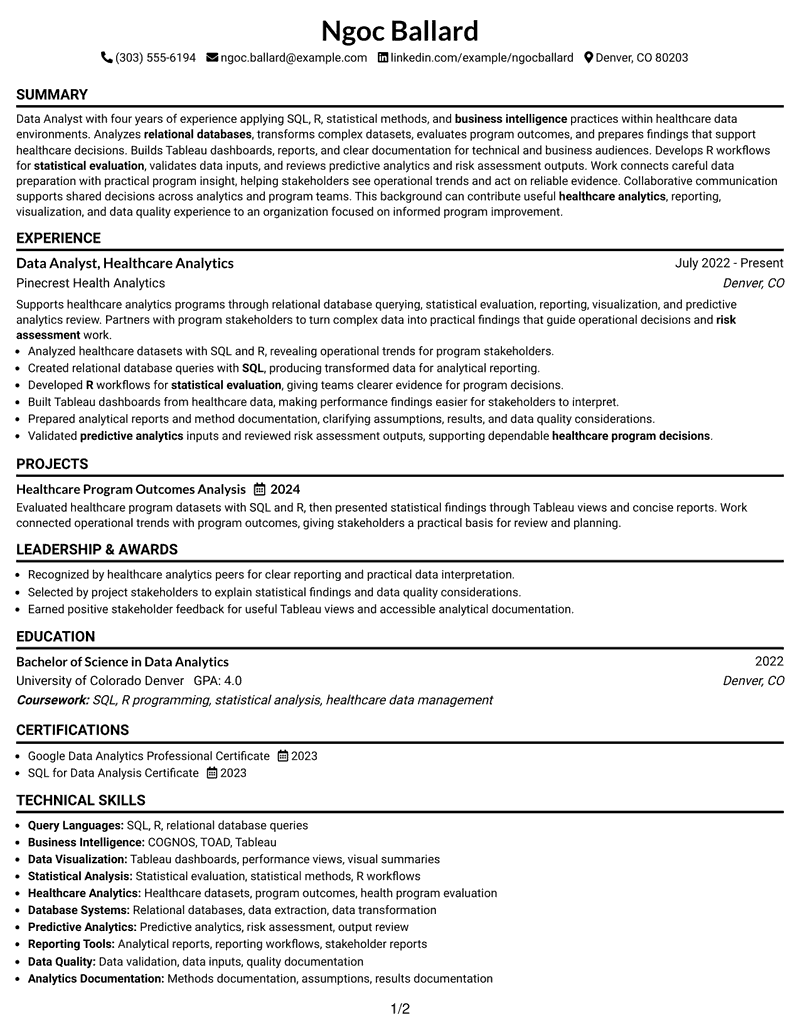
This guide shows you how to build a Data Analyst - Healthcare Analytics resume that is clear, focused, and easy to adapt. It explains how to organize your experience and compare professional resume layouts.
A strong resume for this role should present analysis work, healthcare data knowledge, reporting ability, and measurable results in sections that are easy for recruiters to scan. The examples show how to place skills, experience, education, projects, and certifications effectively.
This page presents one resume example in 33 layouts, with format guidance to help you select a structure that supports ATS review and clear reading.
What Makes a Great Data Analyst - Healthcare Analytics Resume in 2026
A strong resume uses clear sections, relevant keywords, and evidence of analytical work. Recruiters should quickly find experience, skills, education, and credentials.
Useful resume content includes SQL, R, Tableau, COGNOS, data visualization, statistical analysis, healthcare analytics, and reporting skills when they match your background.
The examples shown below are intentionally detailed to demonstrate a range of experiences, skills, accomplishments and relevant keywords. We prefer detailed resumes as they provide more context to the hiring managers and also help the ATS systems identify relevant qualifications and score your resume better for a match. But the length of a resume is an individual choice. If you want a one page resume, just keep the most relevant experience and information for the job. Note: Resume examples are for educational purposes only. Use only information that accurately reflects your experience and qualifications. References to real organizations do not imply affiliation or endorsement.
#1 Simple One Column Format Resume Example
This Simple One Column Format organizes resume sections in a single-column structure so recruiters can review information in a clear order.

Resume Snapshot
- Data Analyst, Healthcare Analytics
- SQL, R, Tableau, and healthcare analytics focus
- Bachelor of Science in Data Analytics
- Google Data Analytics Professional Certificate
Why This Format Works
- Separates experience and achievements for easier review
- Creates clear paths between sections and credentials
- Keeps important resume information easy to locate
Best For
- Clear section organization
- Readable content hierarchy
- Structured professional summaries
- Experience and project details
- ATS-friendly resume review
Resume Keywords
- Data Analyst
- healthcare analytics
- SQL
- R
- COGNOS
- TOAD
- relational databases
- statistical evaluation
- business intelligence
- Data Querying
- Analysis
- healthcare program decisions
- complex datasets
- reports
- predictive analytics
#2 Plain One Column with Shaded Labels Resume Example
This Plain One Column with Shaded Labels organizes resume sections in a single-column structure so recruiters can review information in a clear order.

Why This Format Works
- Separates experience and achievements for easier review
- Creates clear paths between sections and credentials
- Keeps important resume information easy to locate
Best For
- Clear section organization
- Readable content hierarchy
- Structured professional summaries
- Experience and project details
- ATS-friendly resume review
#3 One Column Format with Photo Right Resume Example
This One Column Format with Photo Right organizes resume sections in a single-column structure so recruiters can review information in a clear order.

Why This Format Works
- Separates experience and achievements for easier review
- Creates clear paths between sections and credentials
- Keeps important resume information easy to locate
Best For
- Clear section organization
- Readable content hierarchy
- Structured professional summaries
- Experience and project details
- ATS-friendly resume review
#4 Clean Two Column Sidebar Format Resume Example
This Clean Two Column Sidebar Format organizes resume sections in a two-column structure so recruiters can review information in a clear order.

Why This Format Works
- Separates experience and achievements for easier review
- Creates clear paths between sections and credentials
- Keeps important resume information easy to locate
Best For
- Clear section organization
- Readable content hierarchy
- Structured professional summaries
- Experience and project details
- ATS-friendly resume review
#5 Two Column Format Resume Example
This Two Column Format organizes resume sections in a two-column structure so recruiters can review information in a clear order.

Why This Format Works
- Separates experience and achievements for easier review
- Creates clear paths between sections and credentials
- Keeps important resume information easy to locate
Best For
- Clear section organization
- Readable content hierarchy
- Structured professional summaries
- Experience and project details
- ATS-friendly resume review
#6 Photo Header Two Column Format Resume Example
This Photo Header Two Column Format organizes resume sections in a two-column structure so recruiters can review information in a clear order.

Why This Format Works
- Separates experience and achievements for easier review
- Creates clear paths between sections and credentials
- Keeps important resume information easy to locate
Best For
- Clear section organization
- Readable content hierarchy
- Structured professional summaries
- Experience and project details
- ATS-friendly resume review
#7 Simple Two Column Format Resume Example
This Simple Two Column Format organizes resume sections in a two-column structure so recruiters can review information in a clear order.

Why This Format Works
- Separates experience and achievements for easier review
- Creates clear paths between sections and credentials
- Keeps important resume information easy to locate
Best For
- Clear section organization
- Readable content hierarchy
- Structured professional summaries
- Experience and project details
- ATS-friendly resume review
#8 Text/Fang Style Resume Example
This Text/Fang Style organizes resume sections in a single-column structure so recruiters can review information in a clear order.

Why This Format Works
- Separates experience and achievements for easier review
- Creates clear paths between sections and credentials
- Keeps important resume information easy to locate
Best For
- Clear section organization
- Readable content hierarchy
- Structured professional summaries
- Experience and project details
- ATS-friendly resume review
#9 One Column Boxed Contact Header Format Resume Example
This One Column Boxed Contact Header Format organizes resume sections in a single-column structure so recruiters can review information in a clear order.

Why This Format Works
- Separates experience and achievements for easier review
- Creates clear paths between sections and credentials
- Keeps important resume information easy to locate
Best For
- Clear section organization
- Readable content hierarchy
- Structured professional summaries
- Experience and project details
- ATS-friendly resume review
#10 Plain Two Column Format Resume Example
This Plain Two Column Format organizes resume sections in a two-column structure so recruiters can review information in a clear order.

Why This Format Works
- Separates experience and achievements for easier review
- Creates clear paths between sections and credentials
- Keeps important resume information easy to locate
Best For
- Clear section organization
- Readable content hierarchy
- Structured professional summaries
- Experience and project details
- ATS-friendly resume review
#11 Colored Two Column Format Resume Example
This Colored Two Column Format organizes resume sections in a two-column structure so recruiters can review information in a clear order.

Why This Format Works
- Separates experience and achievements for easier review
- Creates clear paths between sections and credentials
- Keeps important resume information easy to locate
Best For
- Clear section organization
- Readable content hierarchy
- Structured professional summaries
- Experience and project details
- ATS-friendly resume review
#12 One Column Shaded Contact Header Format Resume Example
This One Column Shaded Contact Header Format presents resume information in a single-column layout, helping recruiters follow sections in a clear reading order.

Why This Format Works
- Keeps experience sections separated for easier resume review
- Shows achievements in an organized reading sequence
- Helps readers locate education and credentials quickly
Best For
- Structured resume sections
- Clear content grouping
- Readable professional summaries
- Organized achievement details
- ATS-friendly review
#13 Boxed Contact Header with Job Title Format Resume Example
This Boxed Contact Header with Job Title Format presents resume information in a single-column layout, helping recruiters follow sections in a clear reading order.

Why This Format Works
- Keeps experience sections separated for easier resume review
- Shows achievements in an organized reading sequence
- Helps readers locate education and credentials quickly
Best For
- Structured resume sections
- Clear content grouping
- Readable professional summaries
- Organized achievement details
- ATS-friendly review
#14 Stylish Two Column Designer Format Resume Example
This Stylish Two Column Designer Format presents resume information in a two-column layout, helping recruiters follow sections in a clear reading order.

Why This Format Works
- Keeps experience sections separated for easier resume review
- Shows achievements in an organized reading sequence
- Helps readers locate education and credentials quickly
Best For
- Structured resume sections
- Clear content grouping
- Readable professional summaries
- Organized achievement details
- ATS-friendly review
#15 Modern Icon Format Resume Example
This Modern Icon Format presents resume information in a two-column layout, helping recruiters follow sections in a clear reading order.

Why This Format Works
- Keeps experience sections separated for easier resume review
- Shows achievements in an organized reading sequence
- Helps readers locate education and credentials quickly
Best For
- Structured resume sections
- Clear content grouping
- Readable professional summaries
- Organized achievement details
- ATS-friendly review
#16 Plain Professional Layout with Job Title & Shaded Labels Resume Example
This Plain Professional Layout with Job Title & Shaded Labels presents resume information in a single-column layout, helping recruiters follow sections in a clear reading order.

Why This Format Works
- Keeps experience sections separated for easier resume review
- Shows achievements in an organized reading sequence
- Helps readers locate education and credentials quickly
Best For
- Structured resume sections
- Clear content grouping
- Readable professional summaries
- Organized achievement details
- ATS-friendly review
#17 Classic One Column Resume Format Resume Example
This Classic One Column Resume Format presents resume information in a single-column layout, helping recruiters follow sections in a clear reading order.

Why This Format Works
- Keeps experience sections separated for easier resume review
- Shows achievements in an organized reading sequence
- Helps readers locate education and credentials quickly
Best For
- Structured resume sections
- Clear content grouping
- Readable professional summaries
- Organized achievement details
- ATS-friendly review
#18 One Column Format with Photo Resume Example
This One Column Format with Photo presents resume information in a single-column layout, helping recruiters follow sections in a clear reading order.

Why This Format Works
- Keeps experience sections separated for easier resume review
- Shows achievements in an organized reading sequence
- Helps readers locate education and credentials quickly
Best For
- Structured resume sections
- Clear content grouping
- Readable professional summaries
- Organized achievement details
- ATS-friendly review
#19 Minimal Header Format Resume Example
This Minimal Header Format presents resume information in a single-column layout, helping recruiters follow sections in a clear reading order.

Why This Format Works
- Keeps experience sections separated for easier resume review
- Shows achievements in an organized reading sequence
- Helps readers locate education and credentials quickly
Best For
- Structured resume sections
- Clear content grouping
- Readable professional summaries
- Organized achievement details
- ATS-friendly review
#20 Modern Full Background Two Column Format Resume Example
This Modern Full Background Two Column Format presents resume information in a two-column layout, helping recruiters follow sections in a clear reading order.

Why This Format Works
- Keeps experience sections separated for easier resume review
- Shows achievements in an organized reading sequence
- Helps readers locate education and credentials quickly
Best For
- Structured resume sections
- Clear content grouping
- Readable professional summaries
- Organized achievement details
- ATS-friendly review
#21 Dark Mode Two Column Format Resume Example
This Dark Mode Two Column Format presents resume information in a two-column layout, helping recruiters follow sections in a clear reading order.

Why This Format Works
- Keeps experience sections separated for easier resume review
- Shows achievements in an organized reading sequence
- Helps readers locate education and credentials quickly
Best For
- Structured resume sections
- Clear content grouping
- Readable professional summaries
- Organized achievement details
- ATS-friendly review
#22 Dark Mode Box Header Format Resume Example
This Dark Mode Box Header Format presents resume information in a two-column layout, helping recruiters follow sections in a clear reading order.

Why This Format Works
- Keeps experience sections separated for easier resume review
- Shows achievements in an organized reading sequence
- Helps readers locate education and credentials quickly
Best For
- Structured resume sections
- Clear content grouping
- Readable professional summaries
- Organized achievement details
- ATS-friendly review
#23 Elegant Full Background Two Column Format Resume Example
This Elegant Full Background Two Column Format presents resume content in a two-column layout, helping recruiters follow sections with a clear reading order.

Why This Format Works
- Separates resume content for simpler section review
- Guides readers through experience and credentials
- Creates clear space for organized information
Best For
- Organized resume sections
- Clear reading flow
- Structured career details
- Visible credential information
- ATS-friendly formatting
#24 Creative Two Tone Format Resume Example
This Creative Two Tone Format presents resume content in a two-column layout, helping recruiters follow sections with a clear reading order.

Why This Format Works
- Separates resume content for simpler section review
- Guides readers through experience and credentials
- Creates clear space for organized information
Best For
- Organized resume sections
- Clear reading flow
- Structured career details
- Visible credential information
- ATS-friendly formatting
#25 Bold Color Header Professional Format Resume Example
This Bold Color Header Professional Format presents resume content in a two-column layout, helping recruiters follow sections with a clear reading order.

Why This Format Works
- Separates resume content for simpler section review
- Guides readers through experience and credentials
- Creates clear space for organized information
Best For
- Organized resume sections
- Clear reading flow
- Structured career details
- Visible credential information
- ATS-friendly formatting
#26 Photo Header Color Sidebar Format Resume Example
This Photo Header Color Sidebar Format presents resume content in a two-column layout, helping recruiters follow sections with a clear reading order.

Why This Format Works
- Separates resume content for simpler section review
- Guides readers through experience and credentials
- Creates clear space for organized information
Best For
- Organized resume sections
- Clear reading flow
- Structured career details
- Visible credential information
- ATS-friendly formatting
#27 Top Left Header Color Accent Format Resume Example
This Top Left Header Color Accent Format presents resume content in a two-column layout, helping recruiters follow sections with a clear reading order.

Why This Format Works
- Separates resume content for simpler section review
- Guides readers through experience and credentials
- Creates clear space for organized information
Best For
- Organized resume sections
- Clear reading flow
- Structured career details
- Visible credential information
- ATS-friendly formatting
#28 Centered Header Classic Two Column Format Resume Example
This Centered Header Classic Two Column Format presents resume content in a two-column layout, helping recruiters follow sections with a clear reading order.

Why This Format Works
- Separates resume content for simpler section review
- Guides readers through experience and credentials
- Creates clear space for organized information
Best For
- Organized resume sections
- Clear reading flow
- Structured career details
- Visible credential information
- ATS-friendly formatting
#29 Left Aligned Header Clean Two Column Format Resume Example
This Left Aligned Header Clean Two Column Format presents resume content in a two-column layout, helping recruiters follow sections with a clear reading order.

Why This Format Works
- Separates resume content for simpler section review
- Guides readers through experience and credentials
- Creates clear space for organized information
Best For
- Organized resume sections
- Clear reading flow
- Structured career details
- Visible credential information
- ATS-friendly formatting
#30 Accent Divider Modern Two Column Format Resume Example
This Accent Divider Modern Two Column Format presents resume content in a two-column layout, helping recruiters follow sections with a clear reading order.

Why This Format Works
- Separates resume content for simpler section review
- Guides readers through experience and credentials
- Creates clear space for organized information
Best For
- Organized resume sections
- Clear reading flow
- Structured career details
- Visible credential information
- ATS-friendly formatting
#31 Shaded Labels Clean Two Column Format Resume Example
This Shaded Labels Clean Two Column Format presents resume content in a two-column layout, helping recruiters follow sections with a clear reading order.

Why This Format Works
- Separates resume content for simpler section review
- Guides readers through experience and credentials
- Creates clear space for organized information
Best For
- Organized resume sections
- Clear reading flow
- Structured career details
- Visible credential information
- ATS-friendly formatting
#32 Photo Header Color Accent International Format Resume Example
This Photo Header Color Accent International Format presents resume content in a two-column layout, helping recruiters follow sections with a clear reading order.

Why This Format Works
- Separates resume content for simpler section review
- Guides readers through experience and credentials
- Creates clear space for organized information
Best For
- Organized resume sections
- Clear reading flow
- Structured career details
- Visible credential information
- ATS-friendly formatting
#33 Large Profile Photo International Two Column Format Resume Example
This Large Profile Photo International Two Column Format presents resume content in a two-column layout, helping recruiters follow sections with a clear reading order.

Why This Format Works
- Separates resume content for simpler section review
- Guides readers through experience and credentials
- Creates clear space for organized information
Best For
- Organized resume sections
- Clear reading flow
- Structured career details
- Visible credential information
- ATS-friendly formatting
Why Build Your Data Analyst - Healthcare Analytics Resume with ResumeInMinutes
ResumeInMinutes helps users organize resume content into readable formats with clear sections and ATS-friendly structure.
See Also
- 33 Analyst, Data Analytics Resume Templates with Example 2026 (ATS-Optimized)
- 7 Data Analyst - Financial and Operational Analytics Resume Templates with Example
- 33 Data Analyst - Human Resources Analytics Resume Templates with Example 2026 (ATS-Optimized)
- 7 Data Analyst Intern - Business Analytics Resume Templates with Example
- 7 Data Analyst Intern - Human Services Analytics Resume Templates with Example
- 7 Data Analyst, New Grad - AI Agent Analytics Resume Templates with Example
- 33 Data Analyst with Tableau or Salesforce, Adobe Analytics Resume Templates with Example 2026 (ATS-Optimized)
- 7 Data Solutions & Analytics Senior Analyst Resume Templates with Example
- 30+ Analyst, Data Analytics Cover Letter Templates with Example 2026
- 7 Data Analyst - Financial and Operational Analytics Cover Letter Templates with Example
Frequently Asked Questions
Are these Data Analyst - Healthcare Analytics resume templates ATS-friendly?
Yes. The layouts use clear sections, readable headings, and resume organization practices that support ATS review.
Are these 33 different resumes?
No. This guide uses one Data Analyst - Healthcare Analytics resume example shown in 33 layouts.
What should a Data Analyst - Healthcare Analytics resume include?
It should include a summary, experience, education, skills, projects, certifications, tools, and relevant achievements.
Can I download the resume templates as PDFs?
Yes. Resume previews can help you compare layouts and choose a suitable format.
Which resume style works well for this role?
A clear one-column or two-column format can work when it presents sections and keywords in an easy-to-read order.




