
33 Deputy County Librarian - Public Library Leadership Resume Templates with Example 2026 (ATS-Optimized)
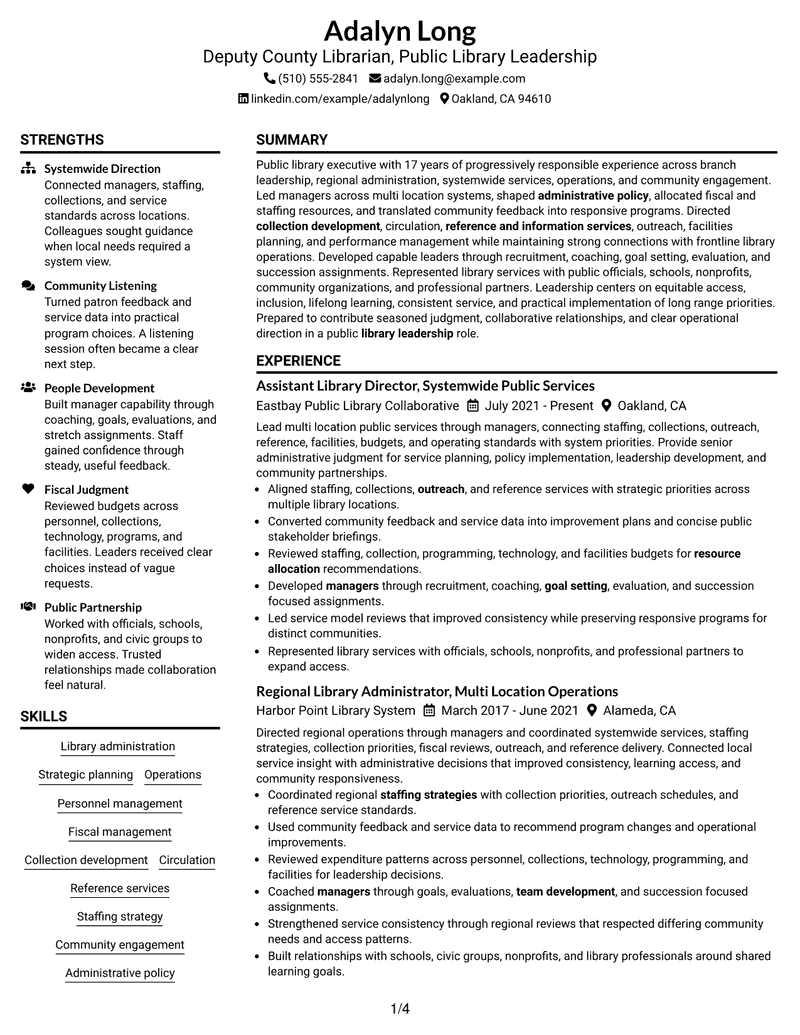
This guide shows you how to build a Deputy County Librarian - Public Library Leadership resume that is clear, focused, and easy to review. You will see how to organize leadership evidence, public service responsibilities, and administrative scope so recruiters can quickly understand your value.
Strong resumes for this role connect systemwide operations with people leadership, fiscal judgment, strategic planning, collections, outreach, facilities, and public communication. Use concise sections and direct achievement bullets to show increasing responsibility without burying the reader in long paragraphs.
Below, one complete Deputy County Librarian - Public Library Leadership resume example appears in 33 ATS-optimized resume formats, with free PDF downloads and practical format guidance to help you compare layouts.
What Makes a Great Deputy County Librarian - Public Library Leadership Resume in 2026
A strong resume makes senior library leadership easy to scan by showing clear career progression, systemwide responsibility, staff leadership, and executive-level decision making.
Build keyword alignment around library administration, strategic planning, fiscal management, collection development, staffing strategy, community engagement, policy, facilities planning, and executive communication.
The examples shown below are intentionally detailed to demonstrate a range of experiences, skills, accomplishments and relevant keywords. We prefer detailed resumes as they provide more context to the hiring managers and also help the ATS systems identify relevant qualifications and score your resume better for a match. But the length of a resume is an individual choice. If you want a one page resume, just keep the most relevant experience and information for the job. Note: Resume examples are for educational purposes only. Use only information that accurately reflects your experience and qualifications. References to real organizations do not imply affiliation or endorsement.
#1 Plain Two Column Format Resume Example
The Plain Two Column Format separates detailed experience from supporting qualifications, helping reviewers compare career progression with skills and credentials without losing the main reading path.

Resume Snapshot
- 17 years of progressively responsible public library experience
- Senior administrative leadership across multi-location library systems
- Master of Library and Information Science
- Experience spanning operations, staffing, budgets, collections, outreach, and facilities
Why This Format Works
- Parallel columns keep experience and supporting qualifications visually distinct for faster review.
- Clear section boundaries help recruiters trace career progression across several leadership roles.
- Balanced space keeps skills, education, and credentials visible beside deeper experience.
Best For
- Long leadership histories
- Multi-section executive resumes
- Readers comparing qualifications quickly
- Dense experience with supporting credentials
- Senior public library applications
Resume Keywords
- Public Library
- Library Leadership
- managers
- resource allocation
- Collection development
- Circulation
- outreach
- reference and information services
- community programs
- service needs
- service improvements
- Administrative policy
- recruitment
- training
- Mentoring
#2 Simple One Column Format Resume Example
The Simple One Column Format creates a direct top-to-bottom reading path, which helps reviewers follow career progression and supporting qualifications in a predictable order.

Why This Format Works
- Linear reading order makes long experience histories easy to follow.
- Full-width sections give leadership experience room for concise, detailed bullets.
- Simple hierarchy keeps education, skills, and credentials easy to locate.
Best For
- Traditional ATS review
- Long chronological experience
- Straightforward executive applications
- Readers who prefer linear scanning
- Content-first resume presentation
#3 Clean Two Column Sidebar Format Resume Example
The Clean Two Column Sidebar Format uses a main content area with a supporting side column, making it easier to keep career history prominent while grouping secondary qualifications.

Why This Format Works
- Main-column space keeps progressive experience central to the reviewer’s reading path.
- Supporting column groups skills, education, and credentials without interrupting experience.
- Distinct section zones make a complex leadership resume easier to navigate.
Best For
- Experience-heavy resumes
- Compact qualification grouping
- Readers comparing core and supporting sections
- Leadership resumes with many sections
- Public service executive applications
#4 Two Column Format Resume Example
The Two Column Format distributes resume content across parallel sections so reviewers can scan major qualifications while still following a clear experience sequence.

Why This Format Works
- Two-column organization reduces vertical crowding across a long leadership history.
- Section separation keeps experience distinct from skills and education content.
- Parallel content areas help reviewers compare qualifications without losing chronology.
Best For
- Broad executive experience
- Multiple qualification sections
- Readers scanning detailed resumes
- Balanced content density
- Senior administrative applications
#5 Photo Header Two Column Format Resume Example
The Photo Header Two Column Format combines a prominent header with a two-column body, giving reviewers a clear entry point before they scan experience and supporting qualifications.

Why This Format Works
- Header separation creates a clear starting point before detailed experience sections.
- Two-column body keeps career progression and supporting qualifications easy to compare.
- Section spacing helps skills, education, and credentials remain easy to find.
Best For
- Applications where photos are customary
- Two-column executive resumes
- Long leadership histories
- Distinct header presentation
- Readers balancing detail with quick scanning
#6 Colored Two Column Format Resume Example
The Colored Two Column Format uses contrast to separate major content areas while preserving a two-column reading structure for experience and supporting qualifications.

Why This Format Works
- Visual contrast strengthens section boundaries across a detailed leadership resume.
- Two-column spacing keeps experience substantial without burying supporting qualifications.
- Separated content zones make skills, education, and credentials easier to locate.
Best For
- Readers needing stronger section separation
- Detailed leadership resumes
- Multi-section public service applications
- Balanced experience and qualifications
- Candidates emphasizing content over decoration
#7 Stylish Two Column Designer Format Resume Example
The Stylish Two Column Designer Format adds stronger visual hierarchy to a two-column body, helping reviewers move between substantial experience and compact supporting sections.

Why This Format Works
- Distinct visual hierarchy helps separate deep experience from secondary qualifications.
- Two-column body keeps career progression readable across several leadership positions.
- Compact supporting sections preserve space for skills, education, and credentials.
Best For
- Information-rich executive resumes
- Readers who value visual hierarchy
- Long career histories
- Compact secondary qualifications
- Leadership applications needing clear navigation
#8 Modern Icon Format Resume Example
The Modern Icon Format uses a two-column body with visual markers that help reviewers identify section changes while they scan experience and qualifications.

Why This Format Works
- Visual markers make section changes easier to spot during fast review.
- Two-column organization balances detailed experience with compact supporting content.
- Section cues help readers locate skills, education, and credentials quickly.
Best For
- Readers who scan by section
- Two-column leadership resumes
- Applications with many content categories
- Modern visual navigation
- Experience plus compact qualifications
#9 Modern Full Background Two Column Format Resume Example
The Modern Full Background Two Column Format combines a strong visual field with parallel content areas, helping reviewers separate career history from supporting qualifications.

Why This Format Works
- Strong section contrast helps organize a long record of leadership experience.
- Parallel columns keep supporting qualifications visible without interrupting chronology.
- Consistent spacing improves navigation across experience, skills, education, and credentials.
Best For
- Visually structured executive resumes
- Dense career histories
- Readers comparing multiple qualification areas
- Two-column public service applications
- Strong section contrast
#10 Dark Mode Two Column Format Resume Example
The Dark Mode Two Column Format uses high contrast within a two-column body, making section boundaries easy to recognize while preserving a structured review path.

Why This Format Works
- High contrast clarifies section boundaries across detailed leadership experience.
- Two-column structure keeps supporting qualifications visible beside core experience.
- Consistent grouping helps readers locate skills, education, and credentials efficiently.
Best For
- High-contrast presentation
- Detailed executive resumes
- Readers scanning many sections
- Two-column qualification grouping
- Applications needing strong visual separation
#11 Dark Mode Box Header Format Resume Example
The Dark Mode Box Header Format gives the resume a defined opening block and a two-column body, creating a clear start before reviewers move into experience and qualifications.

Why This Format Works
- Boxed header establishes a strong starting point for the resume review.
- Two-column body keeps experience and supporting sections clearly separated.
- Defined content blocks improve navigation through skills, education, and credentials.
Best For
- Strong header hierarchy
- Two-column executive resumes
- Long leadership histories
- Readers who value clear entry points
- Structured qualification review
#12 Elegant Full Background Two Column Format Resume Example
The Elegant Full Background Two Column Format uses a unified visual field with two content areas, helping reviewers distinguish leadership experience from supporting resume sections.

Why This Format Works
- Unified background treatment reinforces clear separation between major content groups.
- Two-column structure supports long experience without hiding secondary qualifications.
- Readable spacing keeps skills, education, and credentials accessible during scanning.
Best For
- Executive resumes with broad content
- Balanced two-column organization
- Readers comparing experience and credentials
- Long leadership histories
- Formal public service applications
#13 Creative Two Tone Format Resume Example
The Creative Two Tone Format uses contrasting visual areas within a two-column structure, helping readers separate experience from supporting sections at a glance.

Why This Format Works
- Two-tone separation makes major content groups easier to identify quickly.
- Parallel columns let career progression remain prominent alongside supporting qualifications.
- Distinct zones keep education, skills, and credentials from blending together.
Best For
- Readers needing clear content zones
- Two-column leadership resumes
- Experience-heavy documents
- Compact supporting sections
- Applications allowing stronger visual design
#14 Minimal Header Format Resume Example
The Minimal Header Format keeps the top area restrained so the one-column body can lead reviewers directly into experience, skills, education, and credentials.

Why This Format Works
- Restrained header keeps attention on the resume’s substantive experience sections.
- One-column flow makes career progression straightforward to follow from top downward.
- Full-width sections give qualifications and credentials consistent reading space.
Best For
- Content-first executive resumes
- Linear chronological review
- ATS-focused applications
- Long leadership experience
- Minimal visual distraction
#15 Plain One Column with Shaded Labels Resume Example
The Plain One Column with Shaded Labels format combines a linear reading path with clearly marked section labels, helping reviewers move through a detailed leadership history.

Why This Format Works
- Shaded labels make section changes visible without breaking the reading flow.
- One-column structure keeps career progression easy to follow in sequence.
- Full-width content supports clear presentation of skills, education, and credentials.
Best For
- Readers who prefer labeled sections
- Long chronological resumes
- Detailed executive experience
- ATS-friendly linear structure
- Clear section-by-section review
#16 Text/Fang Style Resume Example
The Text/Fang Style keeps content in a focused one-column sequence, using text-led hierarchy to guide reviewers through experience and supporting qualifications.

Why This Format Works
- Text-led hierarchy keeps attention on experience and career progression.
- One-column sequence supports predictable scanning across several leadership positions.
- Simple section ordering makes skills, education, and credentials easy to find.
Best For
- Text-focused resumes
- Long leadership narratives
- Readers preferring simple hierarchy
- Chronological executive experience
- Applications prioritizing content over design
#17 Bold Color Header Professional Format Resume Example
The Bold Color Header Professional Format creates a strong visual entry point above a two-column body, helping reviewers orient themselves before scanning detailed resume sections.

Why This Format Works
- Bold header creates a clear start before detailed experience review.
- Two-column body separates core experience from supporting qualification sections.
- Structured spacing keeps skills, education, and credentials visible during scanning.
Best For
- Strong professional headers
- Two-column executive resumes
- Detailed leadership histories
- Readers needing quick orientation
- Public service management applications
#18 Photo Header Color Sidebar Format Resume Example
The Photo Header Color Sidebar Format combines a photo header with a two-column body and side section, helping reviewers distinguish primary experience from supporting qualifications.

Why This Format Works
- Header treatment creates a clear opening before reviewers enter detailed experience.
- Sidebar grouping keeps supporting qualifications separate from the main career history.
- Two-column organization helps skills, education, and credentials remain easy to locate.
Best For
- Applications where photos are accepted
- Experience plus sidebar organization
- Readers comparing core and supporting content
- Detailed leadership resumes
- Distinct header and section structure
#19 Top Left Header Color Accent Format Resume Example
The Top Left Header Color Accent Format anchors the resume at the upper left and uses a two-column body to keep major sections clearly separated.

Why This Format Works
- Left-anchored header gives reviewers an immediate and predictable starting point.
- Two-column structure keeps career history distinct from supporting qualifications.
- Section spacing helps skills, education, and credentials remain easy to scan.
Best For
- Readers preferring left-aligned hierarchy
- Two-column leadership resumes
- Detailed career progression
- Compact qualification sections
- Professional public service applications
#20 Centered Header Classic Two Column Format Resume Example
The Centered Header Classic Two Column Format gives the resume a balanced opening and a two-column body that supports fast comparison of experience and qualifications.

Why This Format Works
- Centered header creates a balanced entry point before section-by-section review.
- Two-column body keeps long experience and supporting content visually distinct.
- Classic hierarchy makes skills, education, and credentials easy to identify.
Best For
- Balanced executive presentation
- Two-column public service resumes
- Long leadership histories
- Readers comparing many sections
- Classic professional applications
#21 Left Aligned Header Clean Two Column Format Resume Example
The Left Aligned Header Clean Two Column Format starts the reader at a familiar left edge and carries that clarity into a structured two-column body.

Why This Format Works
- Left alignment supports a natural reading start for the recruiter.
- Two-column structure separates detailed experience from supporting resume sections.
- Clean spacing helps readers locate skills, education, and credentials quickly.
Best For
- Natural left-to-right scanning
- Two-column executive resumes
- Detailed chronological experience
- Readers needing clear section access
- Clean public sector applications
#22 Simple Two Column Format Resume Example
The Simple Two Column Format keeps visual treatment restrained while dividing content into two clear areas for experience and supporting qualifications.

Why This Format Works
- Restrained styling keeps the reviewer focused on substantive leadership experience.
- Two columns reduce crowding across a resume with many sections.
- Simple section grouping keeps skills, education, and credentials easy to access.
Best For
- Straightforward two-column resumes
- Experience-heavy leadership applications
- Readers who prefer restrained design
- Compact qualification grouping
- Public service executive roles
#23 Accent Divider Modern Two Column Format Resume Example
The Accent Divider Modern Two Column Format uses clear dividers across a two-column body, helping reviewers distinguish sections while keeping the resume compact.

Why This Format Works
- Dividers make transitions between experience and supporting sections easy to see.
- Two-column structure keeps a long leadership history visually manageable.
- Defined boundaries help readers locate skills, education, and credentials quickly.
Best For
- Readers needing strong section breaks
- Two-column leadership resumes
- Dense career histories
- Modern professional presentation
- Compact multi-section resumes
#24 Shaded Labels Clean Two Column Format Resume Example
The Shaded Labels Clean Two Column Format combines labeled section cues with a two-column body, helping reviewers move quickly between career history and supporting qualifications.

Why This Format Works
- Shaded labels make major resume sections easy to identify during scanning.
- Two-column body balances extensive experience with compact supporting information.
- Clear grouping keeps skills, education, and credentials visually separate.
Best For
- Readers who scan by section label
- Detailed two-column resumes
- Long leadership experience
- Compact supporting qualifications
- Clear multi-section navigation
#25 Photo Header Color Accent International Format Resume Example
The Photo Header Color Accent International Format combines a photo-led header with a two-column body and clear accents that support section navigation.

Why This Format Works
- Photo header creates a defined opening before detailed resume sections begin.
- Two-column body separates career progression from supporting qualifications.
- Accent cues help readers locate skills, education, and credentials efficiently.
Best For
- International applications using photos
- Two-column executive resumes
- Readers needing clear visual cues
- Long leadership histories
- Distinct header presentation
#26 Large Profile Photo International Two Column Format Resume Example
The Large Profile Photo International Two Column Format gives the header strong visual presence while the two-column body organizes experience and supporting qualifications.

Why This Format Works
- Large header area clearly separates identity details from resume content.
- Two-column layout preserves room for detailed leadership experience and qualifications.
- Structured sections keep education, skills, and credentials easy to scan.
Best For
- International applications using large photos
- Two-column executive resumes
- Detailed career histories
- Readers comparing qualifications quickly
- Strong header presence
#27 One Column Format with Photo Resume Example
The One Column Format with Photo keeps the body in a single reading sequence while using a photo header to create a distinct starting point.

Why This Format Works
- One-column flow keeps career progression simple to follow from top downward.
- Photo header separates identity details from the main experience sections.
- Full-width layout gives skills, education, and credentials consistent space.
Best For
- Applications where photos are customary
- Linear executive resumes
- Long chronological experience
- Readers preferring full-width sections
- Simple photo-based presentation
#28 One Column Format with Photo Right Resume Example
The One Column Format with Photo Right keeps content in a linear body while positioning the photo to the right, leaving the main reading path clear and predictable.

Why This Format Works
- Right-side photo leaves the main one-column reading path easy to follow.
- Linear structure supports clear review of career progression and experience.
- Full-width sections keep skills, education, and credentials easy to locate.
Best For
- Photo-based resumes with linear content
- Readers preferring right-side header balance
- Long leadership histories
- One-column executive applications
- International contexts using photos
#29 One Column Boxed Contact Header Format Resume Example
The One Column Boxed Contact Header Format separates contact details from the body, then guides reviewers through experience and qualifications in one continuous sequence.

Why This Format Works
- Boxed contact area creates a clear boundary before substantive resume content.
- One-column order keeps career progression easy to trace across roles.
- Full-width sections support readable skills, education, and credential blocks.
Best For
- Readers wanting clear contact separation
- Linear executive resumes
- Long chronological experience
- ATS-friendly one-column review
- Formal public sector applications
#30 One Column Shaded Contact Header Format Resume Example
The One Column Shaded Contact Header Format uses a shaded contact area to mark the start of the resume while preserving a simple top-to-bottom body.

Why This Format Works
- Shaded header separates contact details from leadership experience below.
- One-column flow keeps chronological progression direct and easy to scan.
- Full-width sections give skills, education, and credentials consistent visibility.
Best For
- Clear contact-area separation
- Long chronological resumes
- Readers preferring linear review
- Executive public service applications
- Simple ATS-friendly structure
#31 Boxed Contact Header with Job Title Format Resume Example
The Boxed Contact Header with Job Title Format creates a defined opening for identity and role information, followed by a clear one-column sequence.

Why This Format Works
- Boxed opening gives reviewers immediate context before detailed experience begins.
- One-column sequence keeps career progression straightforward across multiple roles.
- Full-width sections make skills, education, and credentials easy to locate.
Best For
- Role-focused header presentation
- Linear executive resumes
- Long leadership histories
- Readers wanting immediate role context
- Formal application packages
#32 Plain Professional Layout with Job Title & Shaded Labels Resume Example
The Plain Professional Layout with Job Title & Shaded Labels uses a clear role header and marked sections to guide reviewers through a one-column resume.

Why This Format Works
- Job-title header gives immediate role context before experience review.
- Shaded labels make section changes easy to recognize while scanning.
- One-column flow keeps career progression, skills, education, and credentials orderly.
Best For
- Readers needing strong section labels
- Role-focused executive resumes
- Long chronological experience
- Professional public service applications
- Clear one-column navigation
#33 Classic One Column Resume Format Resume Example
The Classic One Column Resume Format follows a familiar top-to-bottom structure that keeps career progression and supporting qualifications easy to review.

Why This Format Works
- Familiar one-column order supports fast review of progressive leadership experience.
- Full-width sections give detailed achievements and responsibilities consistent reading space.
- Clear sequence keeps skills, education, and credentials easy to find.
Best For
- Traditional executive applications
- Long leadership histories
- ATS-focused review
- Readers preferring familiar resume structure
- Content-rich public service resumes
Why Build Your Deputy County Librarian - Public Library Leadership Resume with ResumeInMinutes
ResumeInMinutes helps public library leaders turn complex operations, management scope, community service, and administrative responsibilities into a clear resume that is easy to tailor and review.
- Diverse resume formats
- ATS-compliant section structure
- Keyword-optimized resume content
- Organized leadership and experience presentation
- Free PDF resume previews
- Resume customization support
You can create a resume that presents systemwide leadership, staff development, fiscal oversight, public service operations, and community partnerships with stronger focus and cleaner structure.
See Also
- 7 Assistant County Attorney V - Affordable Housing Development and Finance Resume Templates with Example
- 7 Provisional Librarian - Academic Instruction and Research Support Resume Templates with Example
- 33 Constable Deputy - Civil Process Enforcement Resume Templates with Example 2026 (ATS-Optimized)
- 7 Deputy Attorney General II/III - Civil Litigation Resume Templates with Example
- 7 Deputy Chief of Police - Community Partnerships Resume Templates with Example
- 7 Deputy Chief - Operations (EMS) Resume Templates with Example
- 7 Deputy City Attorney - Health and Human Services Resume Templates with Example
- 7 Deputy City Attorney II/III - Employment/Labor Relations Resume Templates with Example
- 7 Provisional Librarian - Academic Instruction and Research Support Cover Letter Templates with Example
- 7 Deputy Chief of Police - Community Partnerships Cover Letter Templates with Example
Frequently Asked Questions
Are these Deputy County Librarian - Public Library Leadership resume templates ATS-friendly?
Yes. The templates use clear sections, readable headings, and role-focused language that supports ATS parsing for senior public library leadership applications.
Are these various resumes?
No. This guide presents one Deputy County Librarian - Public Library Leadership resume example in multiple distinct formats and design styles.
What should a Deputy County Librarian - Public Library Leadership resume include?
Include a focused summary, progressive library experience, people leadership, fiscal and operational scope, collections and information services, community engagement, education, credentials, and relevant skills.
Can I download the resume templates as PDFs?
Yes. Each resume design offers a free PDF download so you can preview the format and compare how the same content appears in different layouts.
Which resume style works well for this type of public library leadership application?
Choose a layout that keeps career progression, leadership scope, and core qualifications easy to scan. Both one-column and two-column options can work when headings and section order stay clear.
How should I show senior library leadership experience?
Use reverse-chronological experience, concise leadership bullets, and clear section labels. Show increasing responsibility across operations, people management, policy, budgets, programs, partnerships, and service delivery.
Should I include a photo on my resume?
Include a photo only if it is customary or expected in your region or application context. For U.S. applications, a no-photo resume template is usually the safer choice.
Can I customize these resume templates?
Yes. ResumeInMinutes allows you to modify resume text, format, design style, and PDF layout for a Deputy County Librarian - Public Library Leadership application.




