
33 Director, Engineering - Sterile Fill Resume Templates with Example
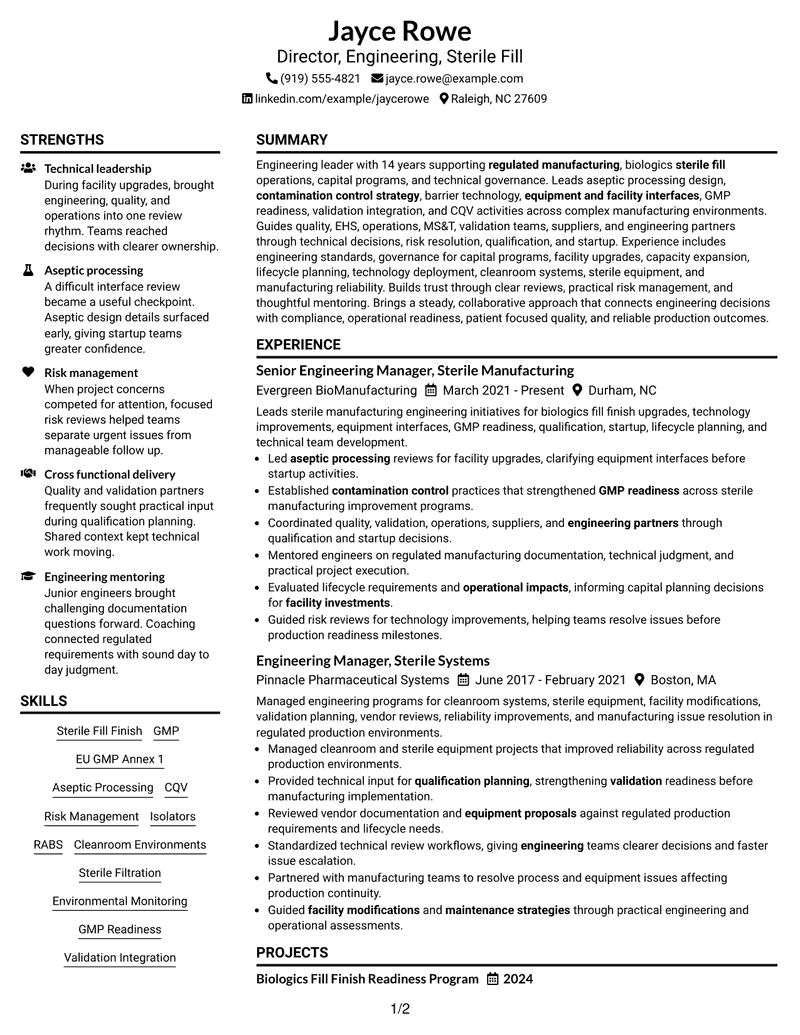
This guide shows you how to build a Director, Engineering - Sterile Fill resume that is clear, focused, and easy to review. You will see how strong structure helps senior engineering evidence stand out without making the document hard to scan.
For this role, your resume should connect engineering leadership with sterile fill-finish operations, aseptic processing, contamination control, GMP readiness, validation integration, CQV, capital programs, and cross-functional technical decisions. Use clear sections and concise achievement bullets so recruiters can see both technical depth and leadership impact.
The same resume example is shown in 33 layouts so you can compare reading order, section organization, and visual presentation. Use the examples to choose a format that keeps ATS parsing simple while giving enough space to explain complex regulated manufacturing work.
What Makes a Great Director, Engineering - Sterile Fill Resume in 2026
A strong resume for this role shows enterprise engineering leadership, regulated manufacturing judgment, and clear ownership of technical risk. It makes senior-level scope easy to find through focused sections and direct achievement bullets.
Use role-relevant terms such as sterile fill-finish, EU GMP Annex 1, aseptic processing, CQV, GMP readiness, contamination control, engineering governance, and risk management where they match your real experience.
The examples shown below are intentionally detailed to demonstrate a range of experiences, skills, accomplishments and relevant keywords. We prefer detailed resumes as they provide more context to the hiring managers and also help the ATS systems identify relevant qualifications and score your resume better for a match. But the length of a resume is an individual choice. If you want a one page resume, just keep the most relevant experience and information for the job. Note: Resume examples are for educational purposes only. Use only information that accurately reflects your experience and qualifications. References to real organizations do not imply affiliation or endorsement.
#1 Plain Two Column Format Resume Example
The Plain Two Column Format separates core sections cleanly, helping recruiters scan leadership history and supporting credentials faster.

Resume Snapshot
- 14 years supporting regulated manufacturing and biologics sterile fill operations
- Senior Engineering Manager at Evergreen BioManufacturing since March 2021
- Bachelor's Degree in Chemical Engineering from North Carolina State University
- Certified Pharmaceutical GMP Professional, 2024
Why This Format Works
- Two columns separate career progression from skills and supporting credentials clearly.
- Compact section grouping helps recruiters locate achievements without losing experience context.
- Balanced space keeps education and credentials visible beside substantial leadership experience.
Best For
- Dense senior experience with supporting sections
- Fast comparison of career history and skills
- Applications needing clear ATS-friendly section labels
- Resumes with several credentials and technical categories
- Readers who prefer compact professional organization
Resume Keywords
- Sterile Fill
- aseptic processing design
- contamination control strategy
- barrier technology
- equipment and facility interfaces
- GMP Readiness
- validation
- engineering standards
- Engineering Governance
- capacity expansion
- Lifecycle improvements
- technology deployment
- quality
- EHS
- operations
#2 Simple One Column Format Resume Example
The Simple One Column Format creates one direct reading path, making each resume section easy for recruiters to follow in order.

Why This Format Works
- Single-column reading keeps career progression clear from summary through credentials.
- Full-width sections give achievements room without competing side content.
- Linear structure supports straightforward ATS parsing and recruiter review.
Best For
- Long experience sections needing full width
- Readers who prefer a direct top-to-bottom flow
- ATS-focused applications with simple reading order
- Detailed achievement bullets and project evidence
- Resumes where career progression leads the story
#3 Clean Two Column Sidebar Format Resume Example
The Clean Two Column Sidebar Format gives supporting details their own area, so recruiters can stay focused on the main experience record.

Why This Format Works
- Sidebar separation keeps skills and credentials distinct from detailed experience.
- Main column preserves space for career progression and leadership achievements.
- Clear visual boundaries help recruiters switch between evidence categories quickly.
Best For
- Experience-heavy resumes with compact supporting details
- Quick scanning of skills beside career history
- Profiles with education, certifications, and focused strengths
- Readers comparing leadership evidence with qualifications
- Two-column organization without a photo
#4 Two Column Format Resume Example
The Two Column Format shares space across major sections, helping recruiters compare career evidence with qualifications without a long scroll.

Why This Format Works
- Parallel sections make experience and supporting qualifications easier to compare.
- Shared horizontal space reduces distance between achievements and related credentials.
- Section separation helps recruiters review substantial content without losing orientation.
Best For
- Broad resumes with several major content sections
- Side-by-side review of experience and qualifications
- Career histories supported by projects and credentials
- Readers who value compact information grouping
- Applications needing strong section separation
#5 Photo Header Two Column Format Resume Example
The Photo Header Two Column Format combines an identity-focused header with two body columns, while keeping the resume evidence easy to scan.

Why This Format Works
- Two body columns organize experience separately from supporting resume sections.
- Header identity stays distinct from the detailed career and credential content.
- Section grouping helps recruiters scan achievements while retaining visual orientation.
Best For
- Regions where professional resume photos are customary
- Two-column resumes needing a distinct identity header
- Career evidence paired with compact supporting sections
- International application contexts that accept photos
- Readers who want strong header separation
#6 Colored Two Column Format Resume Example
The Colored Two Column Format uses visible section contrast across two columns, helping recruiters distinguish major resume areas at a glance.

Why This Format Works
- Color contrast reinforces boundaries between experience and supporting content areas.
- Two-column organization keeps skills visible without interrupting career progression.
- Defined sections help recruiters locate education, credentials, and achievements faster.
Best For
- Resumes needing stronger visual section boundaries
- Compact review of skills beside experience
- Profiles with multiple supporting credential sections
- Readers who scan by clearly separated content blocks
- Professional applications allowing restrained color
#7 Stylish Two Column Designer Format Resume Example
The Stylish Two Column Designer Format uses stronger visual structure across two columns, helping recruiters navigate a content-rich resume with less effort.

Why This Format Works
- Distinct section styling makes experience, skills, and credentials easier to separate.
- Two-column balance supports dense content without hiding career progression.
- Structured visual cues help recruiters move between achievements and qualifications.
Best For
- Content-rich resumes needing stronger visual navigation
- Applications where polished design is appropriate
- Career histories with several supporting sections
- Readers moving often between experience and skills
- Professionals wanting structure beyond a plain layout
#8 Modern Icon Format Resume Example
The Modern Icon Format uses two-column organization with visual markers, helping recruiters identify section changes and move through the resume quickly.

Why This Format Works
- Two columns divide major content groups while preserving clear reading paths.
- Icons act as navigation cues for experience, education, skills, and credentials.
- Compact organization helps recruiters find supporting qualifications beside career evidence.
Best For
- Readers who benefit from visual navigation cues
- Resumes with many clearly labeled sections
- Compact comparison of career and supporting evidence
- Applications allowing modern visual details
- Profiles balancing experience, education, skills, and credentials
#9 Modern Full Background Two Column Format Resume Example
The Modern Full Background Two Column Format uses broad visual contrast with two content columns, helping recruiters track sections across a dense resume.

Why This Format Works
- Background contrast separates major areas without changing the two-column reading structure.
- Parallel content zones keep experience and supporting sections visually distinct.
- Strong section boundaries help recruiters follow achievements, education, and credentials.
Best For
- Resumes needing clear contrast across dense content
- Readers scanning several supporting sections quickly
- Two-column layouts with strong visual separation
- Applications where modern styling fits the context
- Career evidence that benefits from defined content zones
#10 Dark Mode Two Column Format Resume Example
The Dark Mode Two Column Format uses high visual contrast across two columns, helping recruiters distinguish content groups while scanning complex resume information.

Why This Format Works
- Dark contrast creates clear boundaries between experience and supporting resume content.
- Two-column structure keeps qualifications accessible beside detailed career history.
- Defined content areas help recruiters locate achievements and credentials quickly.
Best For
- Digital viewing where high contrast is useful
- Resumes with substantial experience and supporting details
- Readers who prefer clearly divided content areas
- Modern applications that allow darker presentation
- Side-by-side access to qualifications and career history
#11 Dark Mode Box Header Format Resume Example
The Dark Mode Box Header Format pairs a boxed header with two body columns, helping recruiters separate identity details from the main resume evidence.

Why This Format Works
- Boxed header separates contact details from career and qualification sections.
- Two body columns organize experience and supporting credentials in parallel.
- Dark section contrast helps recruiters maintain orientation across dense content.
Best For
- Resumes needing a strong header boundary
- Compact two-column career and credential review
- Readers who value visible section contrast
- Digital applications suited to dark styling
- Profiles with dense evidence below concise contact details
#12 Elegant Full Background Two Column Format Resume Example
The Elegant Full Background Two Column Format uses broad background contrast and two content columns, helping recruiters separate major resume areas quickly.

Why This Format Works
- Full-background contrast defines section areas around experience and supporting qualifications.
- Two columns keep career progression visible beside education and credentials.
- Clear visual zones help recruiters trace achievements without losing section context.
Best For
- Resumes with several dense information groups
- Readers who scan by large visual sections
- Career history paired with substantial credentials
- Two-column organization with stronger visual framing
- Applications where refined styling is appropriate
#13 Creative Two Tone Format Resume Example
The Creative Two Tone Format uses two contrasting visual areas across two columns, helping recruiters distinguish content groups during a quick review.

Why This Format Works
- Two-tone separation creates clear boundaries between experience and supporting sections.
- Parallel columns allow achievements and qualifications to remain easy to compare.
- Visual contrast guides recruiters between career history, skills, and credentials.
Best For
- Resumes needing clear visual category separation
- Readers comparing experience with supporting qualifications
- Applications that allow restrained creative styling
- Profiles balancing career history and multiple sections
- Two-column layouts needing stronger navigation cues
#14 Minimal Header Format Resume Example
The Minimal Header Format keeps the header quiet and the body in one column, helping recruiters move directly into the resume evidence.

Why This Format Works
- Simple header treatment keeps attention on experience and achievement sections.
- Single-column flow preserves an uninterrupted path through career progression.
- Full-width body space supports detailed credentials and project evidence.
Best For
- Readers who want content before visual styling
- Experience sections needing uninterrupted full-width space
- ATS-focused resumes with a simple reading path
- Profiles where career evidence should dominate
- Applications favoring restrained presentation
#15 Plain One Column with Shaded Labels Resume Example
The Plain One Column with Shaded Labels Format uses one reading path and shaded section labels, helping recruiters spot transitions without breaking flow.

Why This Format Works
- Shaded labels mark section changes across a continuous career narrative.
- One-column structure keeps achievements in a predictable top-to-bottom sequence.
- Visible labels make education, skills, and credentials easier to locate.
Best For
- Long resumes needing stronger section markers
- Readers following a clear vertical sequence
- Career narratives with several supporting sections
- ATS-friendly structure with visible labels
- Documents where quick section finding matters
#16 Text/Fang Style Resume Example
The Text/Fang Style keeps the resume in one column with text-led section cues, helping recruiters focus on sequence and written evidence.

Why This Format Works
- Text-led structure puts career evidence ahead of decorative visual elements.
- Linear organization keeps experience, projects, and credentials in clear sequence.
- Consistent section cues support focused reading across detailed resume content.
Best For
- Text-heavy resumes with detailed evidence
- Readers who prefer simple written hierarchy
- Career histories needing steady reading flow
- Applications where content carries the presentation
- Profiles with projects and credentials after experience
#17 Bold Color Header Professional Format Resume Example
The Bold Color Header Professional Format combines a prominent header with two body columns, helping recruiters identify the document quickly before scanning evidence.

Why This Format Works
- Prominent header separates identity details from experience and qualification content.
- Two body columns distribute career evidence and supporting sections efficiently.
- Strong header contrast helps recruiters orient before reviewing achievements.
Best For
- Resumes needing clear separation above the body
- Two-column documents with substantial supporting sections
- Readers who value fast visual orientation
- Applications permitting a stronger professional header
- Career evidence that benefits from compact body organization
#18 Photo Header Color Sidebar Format Resume Example
The Photo Header Color Sidebar Format pairs a photo header with a colored sidebar and two body columns, helping recruiters separate identity from supporting details.

Why This Format Works
- Photo header keeps personal identification separate from career evidence below.
- Sidebar space gives skills and credentials a clearly bounded area.
- Main content area preserves room for experience and achievement detail.
Best For
- Regions where resume photos are customary
- Profiles needing a dedicated supporting-information sidebar
- Readers separating career evidence from credentials
- International applications that permit photos
- Two-column resumes with compact skills sections
#19 Top Left Header Color Accent Format Resume Example
The Top Left Header Color Accent Format anchors contact details at the upper left and uses two columns, helping recruiters enter the resume from a clear starting point.

Why This Format Works
- Top-left header creates a natural starting point before career content.
- Two columns keep experience and supporting qualifications within close viewing range.
- Color accents mark section boundaries without changing the core reading structure.
Best For
- Readers who prefer left-to-right visual entry
- Resumes with compact contact information
- Career history beside supporting qualifications
- Applications allowing light color accents
- Two-column layouts needing an obvious starting point
#20 Centered Header Classic Two Column Format Resume Example
The Centered Header Classic Two Column Format places contact details above a balanced two-column body, helping recruiters begin from a familiar visual structure.

Why This Format Works
- Centered header keeps identity information separate from the two-column body.
- Balanced columns support orderly review of experience and supporting sections.
- Classic alignment makes career progression easy to enter and follow.
Best For
- Readers who prefer traditional header placement
- Balanced resumes with several supporting categories
- Career progression needing familiar visual structure
- Two-column layouts with restrained styling
- Applications favoring classic professional presentation
#21 Left Aligned Header Clean Two Column Format Resume Example
The Left Aligned Header Clean Two Column Format starts with a simple left header and keeps the body divided, helping recruiters scan from contact details into evidence.

Why This Format Works
- Left-aligned header creates a direct transition into the main resume content.
- Two columns keep career evidence and credentials visually connected but separate.
- Clean section breaks help recruiters locate achievements, education, and skills.
Best For
- Readers accustomed to left-aligned business documents
- Resumes needing a simple header transition
- Career evidence paired with compact credentials
- Two-column content with restrained visual treatment
- Applications emphasizing practical readability
#22 Simple Two Column Format Resume Example
The Simple Two Column Format divides the body without heavy styling, helping recruiters compare primary career evidence with compact supporting information.

Why This Format Works
- Simple column division keeps experience separate from smaller supporting sections.
- Limited styling leaves more attention on achievements and career progression.
- Compact organization makes education and credentials available without crowding experience.
Best For
- Resumes needing uncomplicated two-column organization
- Readers comparing experience with supporting details
- Applications where restrained design is preferred
- Career histories supported by concise credentials
- Profiles needing compact use of horizontal space
#23 Accent Divider Modern Two Column Format Resume Example
The Accent Divider Modern Two Column Format uses visible dividers across two columns, helping recruiters track section changes without losing the main reading path.

Why This Format Works
- Accent dividers separate experience, achievements, and supporting qualifications without crowding.
- Two columns keep career evidence and credentials within an efficient viewing area.
- Clear breaks help recruiters move between major sections with less effort.
Best For
- Resumes needing stronger section transitions
- Readers comparing career evidence with credentials
- Two-column documents with moderate content density
- Applications allowing subtle modern accents
- Profiles with several clearly separated sections
#24 Shaded Labels Clean Two Column Format Resume Example
The Shaded Labels Clean Two Column Format uses labeled sections across two columns, helping recruiters identify content groups before reading the details.

Why This Format Works
- Shaded labels make experience, education, skills, and credentials easy to find.
- Two-column structure keeps supporting sections close to the main career record.
- Visible section markers help recruiters scan dense resume content more confidently.
Best For
- Readers who scan by section labels
- Resumes with many supporting content groups
- Career histories paired with compact qualifications
- Two-column layouts needing clearer navigation
- Applications where light shading improves readability
#25 Photo Header Color Accent International Format Resume Example
The Photo Header Color Accent International Format combines a photo header, color accents, and two columns, helping recruiters separate identity from the resume body.

Why This Format Works
- Photo header identifies the applicant without changing the body reading order.
- Color accents mark boundaries around experience and supporting content sections.
- Two columns organize career evidence and credentials for quicker cross-reference.
Best For
- International markets where resume photos are accepted
- Readers wanting clear identity and body separation
- Two-column resumes with visible section accents
- Career evidence supported by compact credentials
- Applications where regional conventions allow photos
#26 Large Profile Photo International Two Column Format Resume Example
The Large Profile Photo International Two Column Format places a larger photo above a divided body, helping recruiters distinguish identity from detailed resume evidence.

Why This Format Works
- Large photo area keeps personal identification separate from career content.
- Two body columns divide detailed experience from supporting qualifications clearly.
- Structured body sections help recruiters review achievements, education, and credentials.
Best For
- International applications where larger photos are customary
- Readers needing strong identity separation
- Resumes with detailed experience and supporting qualifications
- Two-column documents with substantial evidence volume
- Markets that commonly accept profile images
#27 One Column Format with Photo Resume Example
The One Column Format with Photo keeps the body in one clear sequence while adding a photo, helping recruiters follow the resume from top to bottom.

Why This Format Works
- Single-column flow keeps experience and achievements in one uninterrupted sequence.
- Photo placement remains separate from the main career evidence.
- Full-width sections give education, credentials, and projects clear reading space.
Best For
- International applications that permit resume photos
- Readers who prefer a single reading path
- Experience sections needing full-width space
- Profiles with projects and credentials after career history
- Applications combining photo use with simple structure
#28 One Column Format with Photo Right Resume Example
The One Column Format with Photo Right keeps the main body linear while moving the photo to the right, helping recruiters start with text content.

Why This Format Works
- Right-side photo leaves the primary text entry area visually clear.
- One-column structure preserves continuous career progression from section to section.
- Full-width body supports detailed achievements and supporting credentials below.
Best For
- Readers who prioritize text before the photo
- International contexts where photos are acceptable
- Career histories needing uninterrupted vertical flow
- Resumes with detailed achievements and credentials
- Applications favoring simple body organization
#29 One Column Boxed Contact Header Format Resume Example
The One Column Boxed Contact Header Format places contact details in a defined header box, helping recruiters separate identity information from the resume narrative.

Why This Format Works
- Boxed header gives contact details a clear boundary above career content.
- Single-column body keeps experience, projects, and credentials in one sequence.
- Full-width reading supports detailed achievements without side-by-side distractions.
Best For
- Resumes needing stronger contact separation
- Readers following a direct vertical narrative
- Experience-heavy documents with detailed achievement bullets
- ATS-friendly applications with clear section order
- Profiles using a compact contact block
#30 One Column Shaded Contact Header Format Resume Example
The One Column Shaded Contact Header Format uses a shaded contact area above a linear body, helping recruiters distinguish personal details from professional evidence.

Why This Format Works
- Shaded contact area separates identity details from the experience sections.
- Linear body keeps career progression simple to follow from top downward.
- Consistent width gives achievements and credentials equal reading space.
Best For
- Readers who want a distinct contact area
- One-column resumes with moderate section depth
- Career histories needing steady vertical flow
- Applications allowing restrained header shading
- Profiles balancing achievements with supporting credentials
#31 Boxed Contact Header with Job Title Format Resume Example
The Boxed Contact Header with Job Title Format places the target title and contact details together above one column, helping recruiters understand document focus immediately.

Why This Format Works
- Job title in the header clarifies the resume's intended professional focus.
- Boxed contact area keeps identity details separate from career evidence.
- One-column flow gives experience and achievements a direct reading sequence.
Best For
- Applications needing immediate role clarity
- Readers who value a defined contact block
- Career evidence requiring full-width space
- ATS-focused resumes with clear title positioning
- Profiles with straightforward section hierarchy
#32 Plain Professional Layout with Job Title & Shaded Labels Resume Example
The Plain Professional Layout with Job Title & Shaded Labels uses one column, a visible job title, and labeled sections to guide recruiter review.

Why This Format Works
- Visible job title establishes document focus before the experience section begins.
- Shaded labels make skills, education, and credentials easier to locate.
- Single-column order keeps career progression and achievements simple to follow.
Best For
- Applications needing clear target-role identification
- Readers who scan by visible section labels
- Career histories with several supporting sections
- One-column resumes needing stronger navigation
- Professional documents with restrained visual structure
#33 Classic One Column Resume Format Resume Example
The Classic One Column Resume Format presents every section in a familiar vertical order, helping recruiters review the document without learning a new layout.

Why This Format Works
- Traditional vertical order keeps experience and career progression easy to follow.
- Full-width sections provide room for achievements, projects, and credentials.
- Simple hierarchy helps recruiters locate education and skills without visual complexity.
Best For
- Readers who prefer familiar resume structure
- Experience-heavy documents needing full-width sections
- ATS-focused applications with simple hierarchy
- Career stories that benefit from clear chronology
- Professional contexts favoring traditional presentation
Why Build Your Director, Engineering - Sterile Fill Resume with ResumeInMinutes
ResumeInMinutes helps you organize complex engineering leadership evidence into a resume that is easier to scan, tailor, and compare across professional layouts.
- Clear experience section hierarchy
- ATS-friendly resume structure
- Focused technical keyword placement
- Organized skills and credentials
- Free PDF resume previews
- Flexible layout comparison
You can adjust the same resume content while keeping leadership scope, sterile manufacturing expertise, capital program work, and validation readiness visible to recruiters.
See Also
- 7 Assistant Director - Transportation Planning & Traffic Engineering Resume Templates with Example
- 33 Director, Manufacturing Engineering Resume Templates with Example 2026 (ATS-Optimized)
- 33 Director of AI & ML Engineering Resume Templates with Example 2026 (ATS-Optimized)
- 33 Director of Applied AI & ML Engineering Resume Templates with Example 2026 (ATS-Optimized)
- 33 VP/Director of Data & Intelligence Engineering Resume Templates with Example 2026 (ATS-Optimized)
- 33 VP/Sr. Director, Software Engineering - DevOps & SRE Resume Templates with Example 2026 (ATS-Optimized)
- 7 Area Director - Dental Implant Sales Resume Templates with Example
- 7 Assistant Director, Athletic Compliance Resume Templates with Example
- 30+ Director, Manufacturing Engineering Cover Letter Templates with Example 2026
- 30+ Director of AI & ML Engineering Cover Letter Templates with Example 2026
Frequently Asked Questions
Are these Director, Engineering - Sterile Fill resume templates ATS-friendly?
Yes. The layouts use clear section structure and readable content blocks that support ATS parsing. Keep important terms in normal text and use job-relevant wording only when it matches your actual background.
Are these different resumes?
No. This guide shows one Director, Engineering - Sterile Fill resume in multiple visual formats so you can compare how the same content reads in each layout.
What should a Director, Engineering - Sterile Fill resume include?
Include a focused summary, engineering leadership experience, sterile manufacturing scope, technical governance, capital program work, skills, education, certifications, projects, and clear evidence of qualification and startup support.
Which keywords are useful for this resume?
Useful terms can include sterile fill-finish, aseptic processing, EU GMP Annex 1, contamination control strategy, isolators, RABS, sterile filtration, environmental monitoring, CQV, GMP readiness, and validation integration when they are accurate for you.
Can I download the resume templates as PDFs?
Yes. Each design includes a free PDF option so you can preview the layout and compare how your resume content appears before choosing a format.
Should I use a one-column or two-column resume?
Both can work. A one-column format gives a simple reading order, while a well-structured two-column format can separate supporting information from career experience without hiding key content.
Should I include a photo on a U.S. resume?
Usually no. For U.S. applications, a no-photo resume is generally the safer choice unless a specific application context clearly expects one.
Can I customize these resume templates?
Yes. You can adjust text, section order, layout, and PDF presentation while keeping the resume focused on the exact Director, Engineering - Sterile Fill role.




