
33 Electrical Engineer - Physical Substation Design Resume Templates with Example 2026 (ATS-Optimized)
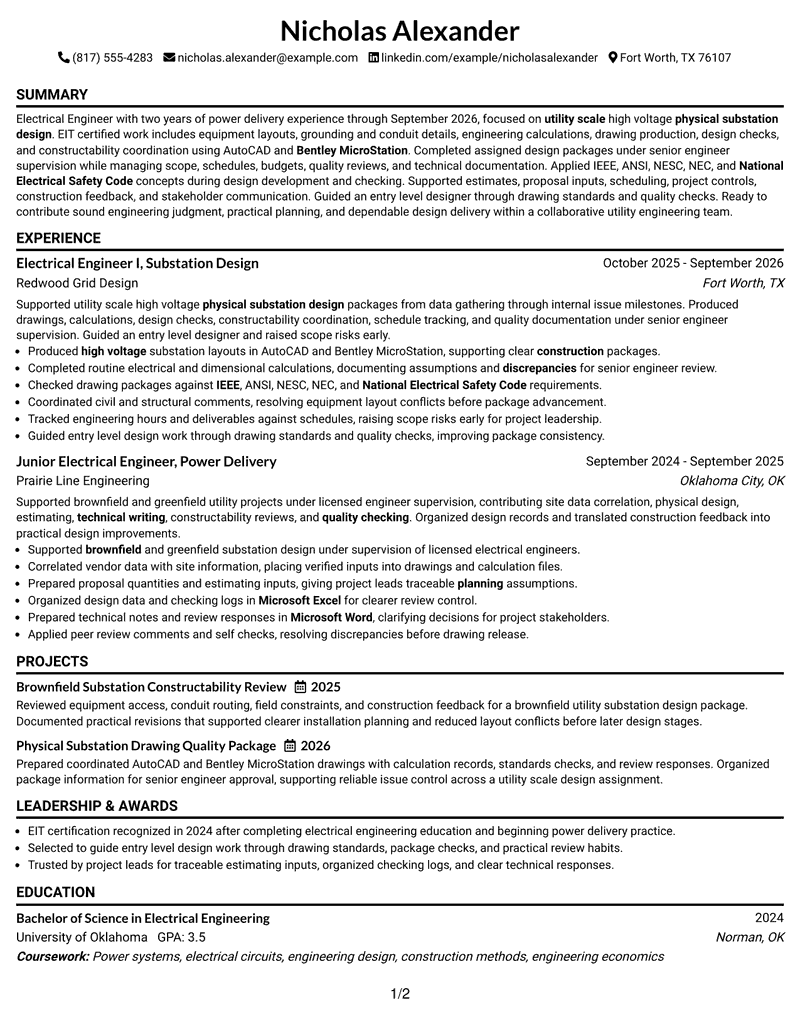
This guide shows you how to build an Electrical Engineer - Physical Substation Design resume that is clear, focused, and easy to review. You will learn how to organize technical evidence so recruiters can quickly understand your fit for physical substation design work.
Strong resumes for this role should make high-voltage substation experience, design software, engineering standards, calculations, constructability work, and quality checking easy to find. Use concise bullets and role-specific keywords such as AutoCAD, Bentley MicroStation, IEEE, ANSI, NESC, NEC, project controls, estimating, and technical writing when they accurately reflect your background.
The complete resume example below is presented in 33 ATS-friendly resume layouts, with free PDF downloads and practical format notes to help you compare reading order, section balance, and visual hierarchy.
What Makes a Great Electrical Engineer - Physical Substation Design Resume in 2026
A strong resume for this role is specific, well organized, and evidence based. It should show relevant substation design work, clear engineering responsibilities, and dependable quality practices.
Useful keyword alignment can include high-voltage substations, AutoCAD, Bentley MicroStation, EIT Certification, IEEE, ANSI, NESC, NEC, constructability, estimating, scheduling, and project controls when supported by your experience.
The examples shown below are intentionally detailed to demonstrate a range of experiences, skills, accomplishments and relevant keywords. We prefer detailed resumes as they provide more context to the hiring managers and also help the ATS systems identify relevant qualifications and score your resume better for a match. But the length of a resume is an individual choice. If you want a one page resume, just keep the most relevant experience and information for the job. Note: Resume examples are for educational purposes only. Use only information that accurately reflects your experience and qualifications. References to real organizations do not imply affiliation or endorsement.
#1 Simple One Column Format Resume Example
Simple One Column Format uses a clear one-column structure with defined section hierarchy. Recruiters can move from summary to experience, skills, projects, education, and certifications without losing the reading path.

Resume Snapshot
- 2 years of power delivery experience
- Engineer in Training (EIT), 2024
- AutoCAD and Bentley MicroStation
- High-voltage physical substation design
Why This Format Works
- Readable hierarchy keeps AutoCAD and Bentley MicroStation skills easy to locate.
- Organized sections support quick review of IEEE, ANSI, NESC, and NEC knowledge.
- Consistent structure keeps constructability, estimating, scheduling, and project controls visible.
- Experience space supports concise bullets about calculations, drawings, and design checks.
- Project separation gives brownfield and drawing quality work clear supporting context.
- Skill grouping keeps high-voltage substation keywords separate from employment chronology.
Best For
- Straightforward chronology with clear section order
- Applications needing visible EIT credentials
- Resumes with several technical keyword groups
- Readers comparing experience and project evidence
- ATS-focused engineering resume submissions
- Fast recruiter scanning of technical sections
Resume Keywords
- Electrical Engineer
- physical substation design
- utility scale
- high voltage
- power delivery
- AutoCAD
- Bentley MicroStation
- EIT certification
- construction
- constructability
- Proposal writing
- Project estimating
- scheduling
- project controls
- verbal communication
#2 Plain One Column with Shaded Labels Resume Example
Recruiters can follow the resume through a one-column reading path with clear section changes. The Plain One Column with Shaded Labels keeps related information grouped so longer technical content remains easy to navigate.

Why This Format Works
- Shaded labels separate experience, skills, projects, education, and EIT credentials clearly.
- Consistent structure keeps constructability, estimating, scheduling, and project controls visible.
- Experience space supports concise bullets about calculations, drawings, and design checks.
- Project separation gives brownfield and drawing quality work clear supporting context.
- Skill grouping keeps high-voltage substation keywords separate from employment chronology.
- Credential placement helps reviewers find EIT Certification without searching dense text.
Best For
- Applications with broad skills coverage
- Candidates listing standards and software tools
- Readers reviewing multiple qualification categories
- Longer resumes needing controlled section density
- Resumes carrying detailed engineering experience
- Technical projects needing separate supporting space
#3 One Column Format with Photo Right Resume Example
Experience, skills, projects, and credentials remain easy to locate within this one-column format. The One Column Format with Photo Right gives reviewers a direct path to the evidence they need for qualification checks. Its photo treatment is a visual option, while the body keeps the same professional section structure.

Why This Format Works
- Photo treatment remains separate from the resume's technical qualification evidence.
- Project separation gives brownfield and drawing quality work clear supporting context.
- Skill grouping keeps high-voltage substation keywords separate from employment chronology.
- Credential placement helps reviewers find EIT Certification without searching dense text.
- Section boundaries keep technical writing and quality checking evidence easy to verify.
- Clear section order keeps two years of power delivery experience easy to trace.
Best For
- Markets where resume photos are customary
- Reviewers verifying EIT and engineering skills
- Evidence-heavy power delivery resume content
- Experience backed by technical project evidence
- Applications emphasizing software and standards knowledge
- Resumes combining calculations and design work
#4 Clean Two Column Sidebar Format Resume Example
Content is distributed across a balanced two-column structure that separates major resume sections without crowding them. The Clean Two Column Sidebar Format helps reviewers compare technical evidence while keeping the page orderly.

Why This Format Works
- Sidebar organization can hold compact skills while experience keeps fuller reading space.
- Credential placement helps reviewers find EIT Certification without searching dense text.
- Section boundaries keep technical writing and quality checking evidence easy to verify.
- Clear section order keeps two years of power delivery experience easy to trace.
- Defined spacing separates substation projects from education and EIT credentials.
- Readable hierarchy keeps AutoCAD and Bentley MicroStation skills easy to locate.
Best For
- Professional resumes with structured supporting details
- ATS screening followed by human review
- Utility engineering application review
- Applications balancing technical and project evidence
- Remote or hybrid engineering applications
- Recruiters comparing qualifications across sections
#5 Two Column Format Resume Example
For applications that need quick technical review, this two-column format separates major sections clearly. The Two Column Format supports fast movement between experience, skills, projects, education, and certifications.

Why This Format Works
- Clear section order keeps two years of power delivery experience easy to trace.
- Defined spacing separates substation projects from education and EIT credentials.
- Readable hierarchy keeps AutoCAD and Bentley MicroStation skills easy to locate.
- Organized sections support quick review of IEEE, ANSI, NESC, and NEC knowledge.
- Consistent structure keeps constructability, estimating, scheduling, and project controls visible.
- Experience space supports concise bullets about calculations, drawings, and design checks.
Best For
- Resume reviews across digital and PDF formats
- Professional applications needing stronger visual hierarchy
- Technical resumes with distinct section groups
- Readers who prefer balanced page organization
- Engineering content needing clear visual separation
- Applications using moderate design emphasis
#6 Photo Header Two Column Format Resume Example
A restrained visual hierarchy gives this two-column format a distinct presentation while keeping section order clear. The Photo Header Two Column Format helps reviewers identify major resume blocks without distracting from the content. Its photo treatment is a visual option, while the body keeps the same professional section structure.

Why This Format Works
- Photo treatment remains separate from the resume's technical qualification evidence.
- Readable hierarchy keeps AutoCAD and Bentley MicroStation skills easy to locate.
- Organized sections support quick review of IEEE, ANSI, NESC, and NEC knowledge.
- Consistent structure keeps constructability, estimating, scheduling, and project controls visible.
- Experience space supports concise bullets about calculations, drawings, and design checks.
- Project separation gives brownfield and drawing quality work clear supporting context.
Best For
- Markets where resume photos are customary
- Power delivery engineering resume reviews
- Technical resumes with EIT credentials
- Applications highlighting design software experience
- Candidates presenting constructability knowledge
- Professional engineering resume presentations
#7 Simple Two Column Format Resume Example
Simple Two Column Format uses a clear two-column structure with defined section hierarchy. Recruiters can move from summary to experience, skills, projects, education, and certifications without losing the reading path.

Why This Format Works
- Consistent structure keeps constructability, estimating, scheduling, and project controls visible.
- Experience space supports concise bullets about calculations, drawings, and design checks.
- Project separation gives brownfield and drawing quality work clear supporting context.
- Skill grouping keeps high-voltage substation keywords separate from employment chronology.
- Credential placement helps reviewers find EIT Certification without searching dense text.
- Section boundaries keep technical writing and quality checking evidence easy to verify.
Best For
- Straightforward chronology with clear section order
- Applications needing visible EIT credentials
- Resumes with several technical keyword groups
- Readers comparing experience and project evidence
- ATS-focused engineering resume submissions
- Fast recruiter scanning of technical sections
#8 Text/Fang Style Resume Example
Recruiters can follow the resume through a one-column reading path with clear section changes. The Text/Fang Style keeps related information grouped so longer technical content remains easy to navigate.

Why This Format Works
- Project separation gives brownfield and drawing quality work clear supporting context.
- Skill grouping keeps high-voltage substation keywords separate from employment chronology.
- Credential placement helps reviewers find EIT Certification without searching dense text.
- Section boundaries keep technical writing and quality checking evidence easy to verify.
- Clear section order keeps two years of power delivery experience easy to trace.
- Defined spacing separates substation projects from education and EIT credentials.
Best For
- Applications with broad skills coverage
- Candidates listing standards and software tools
- Readers reviewing multiple qualification categories
- Longer resumes needing controlled section density
- Resumes carrying detailed engineering experience
- Technical projects needing separate supporting space
#9 One Column Boxed Contact Header Format Resume Example
Experience, skills, projects, and credentials remain easy to locate within this one-column format. The One Column Boxed Contact Header Format gives reviewers a direct path to the evidence they need for qualification checks.

Why This Format Works
- Boxed header treatment separates contact details from the technical resume body.
- Credential placement helps reviewers find EIT Certification without searching dense text.
- Section boundaries keep technical writing and quality checking evidence easy to verify.
- Clear section order keeps two years of power delivery experience easy to trace.
- Defined spacing separates substation projects from education and EIT credentials.
- Readable hierarchy keeps AutoCAD and Bentley MicroStation skills easy to locate.
Best For
- Candidates showing constructability and quality checks
- Reviewers verifying EIT and engineering skills
- Evidence-heavy power delivery resume content
- Experience backed by technical project evidence
- Applications emphasizing software and standards knowledge
- Resumes combining calculations and design work
#10 Plain Two Column Format Resume Example
Content is distributed across a balanced two-column structure that separates major resume sections without crowding them. The Plain Two Column Format helps reviewers compare technical evidence while keeping the page orderly.

Why This Format Works
- Clear section order keeps two years of power delivery experience easy to trace.
- Defined spacing separates substation projects from education and EIT credentials.
- Readable hierarchy keeps AutoCAD and Bentley MicroStation skills easy to locate.
- Organized sections support quick review of IEEE, ANSI, NESC, and NEC knowledge.
- Consistent structure keeps constructability, estimating, scheduling, and project controls visible.
- Experience space supports concise bullets about calculations, drawings, and design checks.
#11 Colored Two Column Format Resume Example
For applications that need quick technical review, this two-column format separates major sections clearly. The Colored Two Column Format supports fast movement between experience, skills, projects, education, and certifications.

Why This Format Works
- Color accents distinguish sections while preserving focus on engineering content.
- Readable hierarchy keeps AutoCAD and Bentley MicroStation skills easy to locate.
- Organized sections support quick review of IEEE, ANSI, NESC, and NEC knowledge.
- Consistent structure keeps constructability, estimating, scheduling, and project controls visible.
- Experience space supports concise bullets about calculations, drawings, and design checks.
- Project separation gives brownfield and drawing quality work clear supporting context.
Best For
- Resume reviews across digital and PDF formats
- Professional applications needing stronger visual hierarchy
- Technical resumes with distinct section groups
- Readers who prefer balanced page organization
- Engineering content needing clear visual separation
- Applications using moderate design emphasis
#12 One Column Shaded Contact Header Format Resume Example
A restrained visual hierarchy gives this one-column format a distinct presentation while keeping section order clear. The One Column Shaded Contact Header Format helps reviewers identify major resume blocks without distracting from the content.

Why This Format Works
- Shaded labels separate experience, skills, projects, education, and EIT credentials clearly.
- Consistent structure keeps constructability, estimating, scheduling, and project controls visible.
- Experience space supports concise bullets about calculations, drawings, and design checks.
- Project separation gives brownfield and drawing quality work clear supporting context.
- Skill grouping keeps high-voltage substation keywords separate from employment chronology.
- Credential placement helps reviewers find EIT Certification without searching dense text.
Best For
- Physical substation design applications
- Power delivery engineering resume reviews
- Technical resumes with EIT credentials
- Applications highlighting design software experience
- Candidates presenting constructability knowledge
- Professional engineering resume presentations
#13 Boxed Contact Header with Job Title Format Resume Example
Boxed Contact Header with Job Title Format uses a clear one-column structure with defined section hierarchy. Recruiters can move from summary to experience, skills, projects, education, and certifications without losing the reading path.

Why This Format Works
- Boxed header treatment separates contact details from the technical resume body.
- Visible job title framing reinforces the target physical substation design focus.
- Project separation gives brownfield and drawing quality work clear supporting context.
- Skill grouping keeps high-voltage substation keywords separate from employment chronology.
- Credential placement helps reviewers find EIT Certification without searching dense text.
- Section boundaries keep technical writing and quality checking evidence easy to verify.
Best For
- Straightforward chronology with clear section order
- Applications needing visible EIT credentials
- Resumes with several technical keyword groups
- Readers comparing experience and project evidence
- ATS-focused engineering resume submissions
- Fast recruiter scanning of technical sections
#14 Stylish Two Column Designer Format Resume Example
Recruiters can follow the resume through a two-column reading path with clear section changes. The Stylish Two Column Designer Format keeps related information grouped so longer technical content remains easy to navigate.

Why This Format Works
- Credential placement helps reviewers find EIT Certification without searching dense text.
- Section boundaries keep technical writing and quality checking evidence easy to verify.
- Clear section order keeps two years of power delivery experience easy to trace.
- Defined spacing separates substation projects from education and EIT credentials.
- Readable hierarchy keeps AutoCAD and Bentley MicroStation skills easy to locate.
- Organized sections support quick review of IEEE, ANSI, NESC, and NEC knowledge.
Best For
- Applications with broad skills coverage
- Candidates listing standards and software tools
- Readers reviewing multiple qualification categories
- Longer resumes needing controlled section density
- Resumes carrying detailed engineering experience
- Technical projects needing separate supporting space
#15 Modern Icon Format Resume Example
Experience, skills, projects, and credentials remain easy to locate within this two-column format. The Modern Icon Format gives reviewers a direct path to the evidence they need for qualification checks.

Why This Format Works
- Icon cues help distinguish resume sections without replacing technical evidence.
- Clear section order keeps two years of power delivery experience easy to trace.
- Defined spacing separates substation projects from education and EIT credentials.
- Readable hierarchy keeps AutoCAD and Bentley MicroStation skills easy to locate.
- Organized sections support quick review of IEEE, ANSI, NESC, and NEC knowledge.
- Consistent structure keeps constructability, estimating, scheduling, and project controls visible.
Best For
- Candidates showing constructability and quality checks
- Reviewers verifying EIT and engineering skills
- Evidence-heavy power delivery resume content
- Experience backed by technical project evidence
- Applications emphasizing software and standards knowledge
- Resumes combining calculations and design work
#16 Plain Professional Layout with Job Title & Shaded Labels Resume Example
Content is distributed across a balanced one-column structure that separates major resume sections without crowding them. The Plain Professional Layout with Job Title & Shaded Labels helps reviewers compare technical evidence while keeping the page orderly.

Why This Format Works
- Shaded labels separate experience, skills, projects, education, and EIT credentials clearly.
- Visible job title framing reinforces the target physical substation design focus.
- Readable hierarchy keeps AutoCAD and Bentley MicroStation skills easy to locate.
- Organized sections support quick review of IEEE, ANSI, NESC, and NEC knowledge.
- Consistent structure keeps constructability, estimating, scheduling, and project controls visible.
- Experience space supports concise bullets about calculations, drawings, and design checks.
Best For
- Professional resumes with structured supporting details
- ATS screening followed by human review
- Utility engineering application review
- Applications balancing technical and project evidence
- Remote or hybrid engineering applications
- Recruiters comparing qualifications across sections
#17 Classic One Column Resume Format Resume Example
For applications that need quick technical review, this one-column format separates major sections clearly. The Classic One Column Resume Format supports fast movement between experience, skills, projects, education, and certifications.

Why This Format Works
- Classic organization keeps chronology familiar for reviewers checking engineering progression.
- Consistent structure keeps constructability, estimating, scheduling, and project controls visible.
- Experience space supports concise bullets about calculations, drawings, and design checks.
- Project separation gives brownfield and drawing quality work clear supporting context.
- Skill grouping keeps high-voltage substation keywords separate from employment chronology.
- Credential placement helps reviewers find EIT Certification without searching dense text.
Best For
- Resume reviews across digital and PDF formats
- Professional applications needing stronger visual hierarchy
- Technical resumes with distinct section groups
- Readers who prefer balanced page organization
- Engineering content needing clear visual separation
- Applications using moderate design emphasis
#18 One Column Format with Photo Resume Example
A restrained visual hierarchy gives this one-column format a distinct presentation while keeping section order clear. The One Column Format with Photo helps reviewers identify major resume blocks without distracting from the content. Its photo treatment is a visual option, while the body keeps the same professional section structure.

Why This Format Works
- Photo treatment remains separate from the resume's technical qualification evidence.
- Project separation gives brownfield and drawing quality work clear supporting context.
- Skill grouping keeps high-voltage substation keywords separate from employment chronology.
- Credential placement helps reviewers find EIT Certification without searching dense text.
- Section boundaries keep technical writing and quality checking evidence easy to verify.
- Clear section order keeps two years of power delivery experience easy to trace.
Best For
- Markets where resume photos are customary
- Power delivery engineering resume reviews
- Technical resumes with EIT credentials
- Applications highlighting design software experience
- Candidates presenting constructability knowledge
- Professional engineering resume presentations
#19 Minimal Header Format Resume Example
Minimal Header Format uses a clear one-column structure with defined section hierarchy. Recruiters can move from summary to experience, skills, projects, education, and certifications without losing the reading path.

Why This Format Works
- Minimal header treatment leaves more attention for experience and technical sections.
- Credential placement helps reviewers find EIT Certification without searching dense text.
- Section boundaries keep technical writing and quality checking evidence easy to verify.
- Clear section order keeps two years of power delivery experience easy to trace.
- Defined spacing separates substation projects from education and EIT credentials.
- Readable hierarchy keeps AutoCAD and Bentley MicroStation skills easy to locate.
Best For
- Straightforward chronology with clear section order
- Applications needing visible EIT credentials
- Resumes with several technical keyword groups
- Readers comparing experience and project evidence
- ATS-focused engineering resume submissions
- Fast recruiter scanning of technical sections
#20 Modern Full Background Two Column Format Resume Example
Recruiters can follow the resume through a two-column reading path with clear section changes. The Modern Full Background Two Column Format keeps related information grouped so longer technical content remains easy to navigate.

Why This Format Works
- Strong background styling preserves clear section separation across dense technical content.
- Clear section order keeps two years of power delivery experience easy to trace.
- Defined spacing separates substation projects from education and EIT credentials.
- Readable hierarchy keeps AutoCAD and Bentley MicroStation skills easy to locate.
- Organized sections support quick review of IEEE, ANSI, NESC, and NEC knowledge.
- Consistent structure keeps constructability, estimating, scheduling, and project controls visible.
Best For
- Applications with broad skills coverage
- Candidates listing standards and software tools
- Readers reviewing multiple qualification categories
- Longer resumes needing controlled section density
- Resumes carrying detailed engineering experience
- Technical projects needing separate supporting space
#21 Dark Mode Two Column Format Resume Example
Experience, skills, projects, and credentials remain easy to locate within this two-column format. The Dark Mode Two Column Format gives reviewers a direct path to the evidence they need for qualification checks.

Why This Format Works
- Strong background styling preserves clear section separation across dense technical content.
- Readable hierarchy keeps AutoCAD and Bentley MicroStation skills easy to locate.
- Organized sections support quick review of IEEE, ANSI, NESC, and NEC knowledge.
- Consistent structure keeps constructability, estimating, scheduling, and project controls visible.
- Experience space supports concise bullets about calculations, drawings, and design checks.
- Project separation gives brownfield and drawing quality work clear supporting context.
Best For
- Candidates showing constructability and quality checks
- Reviewers verifying EIT and engineering skills
- Evidence-heavy power delivery resume content
- Experience backed by technical project evidence
- Applications emphasizing software and standards knowledge
- Resumes combining calculations and design work
#22 Dark Mode Box Header Format Resume Example
Content is distributed across a balanced two-column structure that separates major resume sections without crowding them. The Dark Mode Box Header Format helps reviewers compare technical evidence while keeping the page orderly.

Why This Format Works
- Boxed header treatment separates contact details from the technical resume body.
- Strong background styling preserves clear section separation across dense technical content.
- Consistent structure keeps constructability, estimating, scheduling, and project controls visible.
- Experience space supports concise bullets about calculations, drawings, and design checks.
- Project separation gives brownfield and drawing quality work clear supporting context.
- Skill grouping keeps high-voltage substation keywords separate from employment chronology.
Best For
- Professional resumes with structured supporting details
- ATS screening followed by human review
- Utility engineering application review
- Applications balancing technical and project evidence
- Remote or hybrid engineering applications
- Recruiters comparing qualifications across sections
#23 Elegant Full Background Two Column Format Resume Example
For applications that need quick technical review, this two-column format separates major sections clearly. The Elegant Full Background Two Column Format supports fast movement between experience, skills, projects, education, and certifications.

Why This Format Works
- Strong background styling preserves clear section separation across dense technical content.
- Project separation gives brownfield and drawing quality work clear supporting context.
- Skill grouping keeps high-voltage substation keywords separate from employment chronology.
- Credential placement helps reviewers find EIT Certification without searching dense text.
- Section boundaries keep technical writing and quality checking evidence easy to verify.
- Clear section order keeps two years of power delivery experience easy to trace.
Best For
- Resume reviews across digital and PDF formats
- Professional applications needing stronger visual hierarchy
- Technical resumes with distinct section groups
- Readers who prefer balanced page organization
- Engineering content needing clear visual separation
- Applications using moderate design emphasis
#24 Creative Two Tone Format Resume Example
A restrained visual hierarchy gives this two-column format a distinct presentation while keeping section order clear. The Creative Two Tone Format helps reviewers identify major resume blocks without distracting from the content.

Why This Format Works
- Color accents distinguish sections while preserving focus on engineering content.
- Credential placement helps reviewers find EIT Certification without searching dense text.
- Section boundaries keep technical writing and quality checking evidence easy to verify.
- Clear section order keeps two years of power delivery experience easy to trace.
- Defined spacing separates substation projects from education and EIT credentials.
- Readable hierarchy keeps AutoCAD and Bentley MicroStation skills easy to locate.
Best For
- Physical substation design applications
- Power delivery engineering resume reviews
- Technical resumes with EIT credentials
- Applications highlighting design software experience
- Candidates presenting constructability knowledge
- Professional engineering resume presentations
#25 Bold Color Header Professional Format Resume Example
Bold Color Header Professional Format uses a clear two-column structure with defined section hierarchy. Recruiters can move from summary to experience, skills, projects, education, and certifications without losing the reading path.

Why This Format Works
- Color accents distinguish sections while preserving focus on engineering content.
- Clear section order keeps two years of power delivery experience easy to trace.
- Defined spacing separates substation projects from education and EIT credentials.
- Readable hierarchy keeps AutoCAD and Bentley MicroStation skills easy to locate.
- Organized sections support quick review of IEEE, ANSI, NESC, and NEC knowledge.
- Consistent structure keeps constructability, estimating, scheduling, and project controls visible.
Best For
- Straightforward chronology with clear section order
- Applications needing visible EIT credentials
- Resumes with several technical keyword groups
- Readers comparing experience and project evidence
- ATS-focused engineering resume submissions
- Fast recruiter scanning of technical sections
#26 Photo Header Color Sidebar Format Resume Example
Recruiters can follow the resume through a two-column reading path with clear section changes. The Photo Header Color Sidebar Format keeps related information grouped so longer technical content remains easy to navigate. Its photo treatment is a visual option, while the body keeps the same professional section structure.

Why This Format Works
- Sidebar organization can hold compact skills while experience keeps fuller reading space.
- Color accents distinguish sections while preserving focus on engineering content.
- Photo treatment remains separate from the resume's technical qualification evidence.
- Readable hierarchy keeps AutoCAD and Bentley MicroStation skills easy to locate.
- Organized sections support quick review of IEEE, ANSI, NESC, and NEC knowledge.
- Consistent structure keeps constructability, estimating, scheduling, and project controls visible.
Best For
- Markets where resume photos are customary
- Candidates listing standards and software tools
- Readers reviewing multiple qualification categories
- Longer resumes needing controlled section density
- Resumes carrying detailed engineering experience
- Technical projects needing separate supporting space
#27 Top Left Header Color Accent Format Resume Example
Experience, skills, projects, and credentials remain easy to locate within this two-column format. The Top Left Header Color Accent Format gives reviewers a direct path to the evidence they need for qualification checks.

Why This Format Works
- Color accents distinguish sections while preserving focus on engineering content.
- Consistent structure keeps constructability, estimating, scheduling, and project controls visible.
- Experience space supports concise bullets about calculations, drawings, and design checks.
- Project separation gives brownfield and drawing quality work clear supporting context.
- Skill grouping keeps high-voltage substation keywords separate from employment chronology.
- Credential placement helps reviewers find EIT Certification without searching dense text.
Best For
- Candidates showing constructability and quality checks
- Reviewers verifying EIT and engineering skills
- Evidence-heavy power delivery resume content
- Experience backed by technical project evidence
- Applications emphasizing software and standards knowledge
- Resumes combining calculations and design work
#28 Centered Header Classic Two Column Format Resume Example
Content is distributed across a balanced two-column structure that separates major resume sections without crowding them. The Centered Header Classic Two Column Format helps reviewers compare technical evidence while keeping the page orderly.

Why This Format Works
- Classic organization keeps chronology familiar for reviewers checking engineering progression.
- Centered header gives contact information a clear start before two-column content.
- Project separation gives brownfield and drawing quality work clear supporting context.
- Skill grouping keeps high-voltage substation keywords separate from employment chronology.
- Credential placement helps reviewers find EIT Certification without searching dense text.
- Section boundaries keep technical writing and quality checking evidence easy to verify.
Best For
- Professional resumes with structured supporting details
- ATS screening followed by human review
- Utility engineering application review
- Applications balancing technical and project evidence
- Remote or hybrid engineering applications
- Recruiters comparing qualifications across sections
#29 Left Aligned Header Clean Two Column Format Resume Example
For applications that need quick technical review, this two-column format separates major sections clearly. The Left Aligned Header Clean Two Column Format supports fast movement between experience, skills, projects, education, and certifications.

Why This Format Works
- Left-aligned header creates a direct start before reviewers enter technical sections.
- Credential placement helps reviewers find EIT Certification without searching dense text.
- Section boundaries keep technical writing and quality checking evidence easy to verify.
- Clear section order keeps two years of power delivery experience easy to trace.
- Defined spacing separates substation projects from education and EIT credentials.
- Readable hierarchy keeps AutoCAD and Bentley MicroStation skills easy to locate.
Best For
- Resume reviews across digital and PDF formats
- Professional applications needing stronger visual hierarchy
- Technical resumes with distinct section groups
- Readers who prefer balanced page organization
- Engineering content needing clear visual separation
- Applications using moderate design emphasis
#30 Accent Divider Modern Two Column Format Resume Example
A restrained visual hierarchy gives this two-column format a distinct presentation while keeping section order clear. The Accent Divider Modern Two Column Format helps reviewers identify major resume blocks without distracting from the content.

Why This Format Works
- Accent dividers separate technical sections without interrupting the two-column reading flow.
- Clear section order keeps two years of power delivery experience easy to trace.
- Defined spacing separates substation projects from education and EIT credentials.
- Readable hierarchy keeps AutoCAD and Bentley MicroStation skills easy to locate.
- Organized sections support quick review of IEEE, ANSI, NESC, and NEC knowledge.
- Consistent structure keeps constructability, estimating, scheduling, and project controls visible.
Best For
- Physical substation design applications
- Power delivery engineering resume reviews
- Technical resumes with EIT credentials
- Applications highlighting design software experience
- Candidates presenting constructability knowledge
- Professional engineering resume presentations
#31 Shaded Labels Clean Two Column Format Resume Example
Shaded Labels Clean Two Column Format uses a clear two-column structure with defined section hierarchy. Recruiters can move from summary to experience, skills, projects, education, and certifications without losing the reading path.

Why This Format Works
- Shaded labels separate experience, skills, projects, education, and EIT credentials clearly.
- Readable hierarchy keeps AutoCAD and Bentley MicroStation skills easy to locate.
- Organized sections support quick review of IEEE, ANSI, NESC, and NEC knowledge.
- Consistent structure keeps constructability, estimating, scheduling, and project controls visible.
- Experience space supports concise bullets about calculations, drawings, and design checks.
- Project separation gives brownfield and drawing quality work clear supporting context.
Best For
- Straightforward chronology with clear section order
- Applications needing visible EIT credentials
- Resumes with several technical keyword groups
- Readers comparing experience and project evidence
- ATS-focused engineering resume submissions
- Fast recruiter scanning of technical sections
#32 Photo Header Color Accent International Format Resume Example
Recruiters can follow the resume through a two-column reading path with clear section changes. The Photo Header Color Accent International Format keeps related information grouped so longer technical content remains easy to navigate. Its photo treatment is a visual option, while the body keeps the same professional section structure.

Why This Format Works
- Color accents distinguish sections while preserving focus on engineering content.
- Photo treatment remains separate from the resume's technical qualification evidence.
- Consistent structure keeps constructability, estimating, scheduling, and project controls visible.
- Experience space supports concise bullets about calculations, drawings, and design checks.
- Project separation gives brownfield and drawing quality work clear supporting context.
- Skill grouping keeps high-voltage substation keywords separate from employment chronology.
Best For
- Markets where resume photos are customary
- Candidates listing standards and software tools
- Readers reviewing multiple qualification categories
- Longer resumes needing controlled section density
- Resumes carrying detailed engineering experience
- Technical projects needing separate supporting space
#33 Large Profile Photo International Two Column Format Resume Example
Experience, skills, projects, and credentials remain easy to locate within this two-column format. The Large Profile Photo International Two Column Format gives reviewers a direct path to the evidence they need for qualification checks. Its photo treatment is a visual option, while the body keeps the same professional section structure.

Why This Format Works
- Photo treatment remains separate from the resume's technical qualification evidence.
- Project separation gives brownfield and drawing quality work clear supporting context.
- Skill grouping keeps high-voltage substation keywords separate from employment chronology.
- Credential placement helps reviewers find EIT Certification without searching dense text.
- Section boundaries keep technical writing and quality checking evidence easy to verify.
- Clear section order keeps two years of power delivery experience easy to trace.
Best For
- Markets where resume photos are customary
- Reviewers verifying EIT and engineering skills
- Evidence-heavy power delivery resume content
- Experience backed by technical project evidence
- Applications emphasizing software and standards knowledge
- Resumes combining calculations and design work
Why Build Your Electrical Engineer - Physical Substation Design Resume with ResumeInMinutes
ResumeInMinutes helps you organize technical experience, engineering credentials, software skills, project work, and standards knowledge into a resume that is easier to scan and tailor.
- ATS-friendly section structure
- Role-specific keyword organization
- Experience and project presentation
- Skills and certification placement
- Free PDF resume previews
- Resume customization support
You can use the formats to compare how technical experience, EIT credentials, design tools, standards knowledge, and project controls information appear under different professional layouts.
See Also
- 33 Substation Electrical Engineer Intern Resume Templates with Example 2026 (ATS-Optimized)
- 7 Associate Electrical Design Engineer Resume Templates with Example
- 33 Electrical Design Engineer – Control Panels Resume Templates with Example 2026 (ATS-Optimized)
- 33 Entry Level Electrical Design Engineer Resume Templates with Example 2026 (ATS-Optimized)
- 33 Senior Electrical Design Engineer Resume Templates with Example 2026 (ATS-Optimized)
- 33 Associate Electrical Applications Engineer Resume Templates with Example 2026 (ATS-Optimized)
- 33 Electrical and Instrumentation Engineer Resume Templates with Example 2026 (ATS-Optimized)
- 33 Electrical Controls Engineer Resume Templates with Example 2026 (ATS-Optimized)
- 30+ Substation Electrical Engineer Intern Cover Letter Templates with Example 2026
- 30+ Electrical Design Engineer – Control Panels Cover Letter Templates with Example 2026
Frequently Asked Questions
Are these Electrical Engineer - Physical Substation Design resume templates ATS-friendly?
Yes. The templates use clear section structure and support role-specific terms such as physical substation design, high-voltage substations, AutoCAD, Bentley MicroStation, EIT Certification, IEEE, ANSI, NESC, and NEC.
Are these different resumes?
No. The guide uses one complete Electrical Engineer - Physical Substation Design resume example and shows it in different visual formats.
What should an Electrical Engineer - Physical Substation Design resume include?
Include a focused summary, relevant engineering experience, substation projects, design software, EIT or other supported credentials, standards knowledge, calculations, constructability work, and quality checking.
Can I download the resume templates as PDFs?
Yes. Each resume style provides a free PDF download so you can preview the format and compare its organization before choosing a layout.
Which resume style works well for physical substation design roles?
Choose a layout that keeps engineering experience, technical skills, certifications, and project evidence easy to scan. A clean one-column or balanced two-column format can both work well when section order remains clear.
How should I present EIT status and progress toward PE licensure?
List EIT Certification clearly in the certifications area. If you are preparing for Professional Engineer licensure, describe that accurately without implying that the license has already been earned.
Should I include a photo on my resume?
Include a photo only when it is customary or expected in your country, region, or industry. For U.S. applications, a no-photo resume is generally the safer choice.
Can I customize these resume templates?
Yes. You can adapt the resume text, layout, design style, and PDF presentation for your target Electrical Engineer - Physical Substation Design application.




