
33 HVACR & Liquid Cooling System Architect Resume Templates with Example
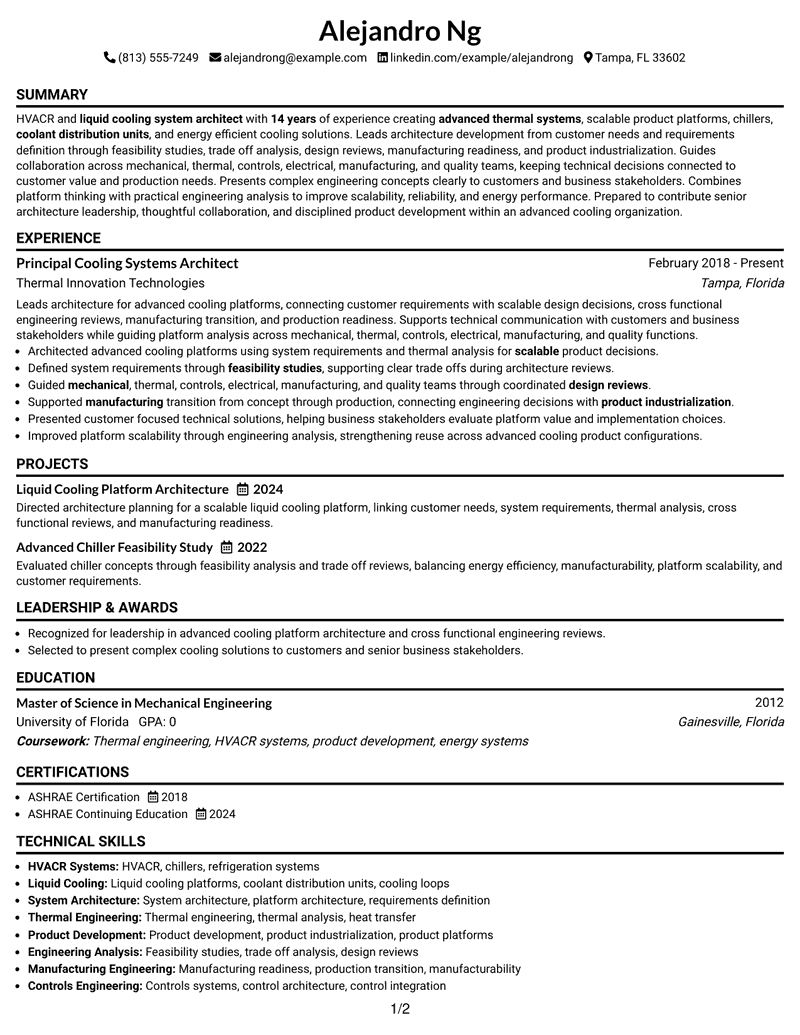
This guide shows you how to build an HVACR & Liquid Cooling System Architect resume that is clear, focused, and easy to adapt. It explains how to organize evidence and compare professional formats.
A strong resume for this role connects system architecture work, cooling solutions, engineering decisions, and business impact through clear sections. It helps reviewers quickly understand experience, skills, projects, education, and credentials.
This guide presents the document in 33 layouts so you can compare resume structures and choose a format that supports your goals.
What Makes a Great HVACR & Liquid Cooling System Architect Resume in 2026
Effective resumes are keyword-focused, evidence-based, and designed for quick recruiter scanning. The strongest documents show outcomes, responsibilities, and technical depth through organized sections.
Important resume areas include system architecture, thermal engineering, liquid cooling, HVACR systems, product development, manufacturing readiness, certifications, and measurable achievements when available.
The examples shown below are intentionally detailed to demonstrate a range of experiences, skills, accomplishments and relevant keywords. We prefer detailed resumes as they provide more context to the hiring managers and also help the ATS systems identify relevant qualifications and score your resume better for a match. But the length of a resume is an individual choice. If you want a one page resume, just keep the most relevant experience and information for the job. Note: Resume examples are for educational purposes only. Use only information that accurately reflects your experience and qualifications. References to real organizations do not imply affiliation or endorsement.
#1 Simple One Column Format Resume Example
This simple one column layout places resume sections in a clear order so reviewers can follow experience, skills, education, and credentials without distraction.

Resume Snapshot
- HVACR and Liquid Cooling System Architect summary
- Principal Cooling Systems Architect experience
- Mechanical Engineering education background
- System architecture and thermal engineering focus
Why This Format Works
- Clear sections help reviewers follow career progression
- Single reading path keeps experience details easy to locate
- Balanced spacing separates skills and credentials
Best For
- Straightforward resume reading
- ATS-focused section order
- Detailed professional history
- Clean information hierarchy
- Simple content review
Resume Keywords
- HVACR
- liquid cooling system architect
- United States
- HVACR systems
- chillers
- coolant distribution units
- Liquid Cooling Platform
- customer needs
- scalable
- energy efficient
- requirements definition
- feasibility studies
- trade off analysis
- design reviews
- manufacturing readiness
#2 Plain One Column with Shaded Labels Resume Example
The Plain One Column with Shaded Labels organizes resume information with a one-column structure that helps reviewers scan key sections and understand the document flow.

Why This Format Works
- Distinct sections guide reviewer attention 2
- Content grouping clarifies resume details 2
- Layout flow supports quick document review 2
Best For
- Document format selection 2
- Resume section planning 2
- Readable content arrangement 2
- Professional review needs 2
- Information presentation choices 2
#3 One Column Format with Photo Right Resume Example
The One Column Format with Photo Right organizes resume information with a one-column structure that helps reviewers scan key sections and understand the document flow.

Why This Format Works
- Distinct sections guide reviewer attention 3
- Content grouping clarifies resume details 3
- Layout flow supports quick document review 3
Best For
- Document format selection 3
- Resume section planning 3
- Readable content arrangement 3
- Professional review needs 3
- Information presentation choices 3
#4 Clean Two Column Sidebar Format Resume Example
The Clean Two Column Sidebar Format organizes resume information with a two-column structure that helps reviewers scan key sections and understand the document flow.

Why This Format Works
- Distinct sections guide reviewer attention 4
- Content grouping clarifies resume details 4
- Layout flow supports quick document review 4
Best For
- Document format selection 4
- Resume section planning 4
- Readable content arrangement 4
- Professional review needs 4
- Information presentation choices 4
#5 Two Column Format Resume Example
The Two Column Format organizes resume information with a two-column structure that helps reviewers scan key sections and understand the document flow.

Why This Format Works
- Distinct sections guide reviewer attention 5
- Content grouping clarifies resume details 5
- Layout flow supports quick document review 5
Best For
- Document format selection 5
- Resume section planning 5
- Readable content arrangement 5
- Professional review needs 5
- Information presentation choices 5
#6 Photo Header Two Column Format Resume Example
The Photo Header Two Column Format organizes resume information with a two-column structure that helps reviewers scan key sections and understand the document flow.

Why This Format Works
- Distinct sections guide reviewer attention 6
- Content grouping clarifies resume details 6
- Layout flow supports quick document review 6
Best For
- Document format selection 6
- Resume section planning 6
- Readable content arrangement 6
- Professional review needs 6
- Information presentation choices 6
#7 Simple Two Column Format Resume Example
The Simple Two Column Format organizes resume information with a two-column structure that helps reviewers scan key sections and understand the document flow.

Why This Format Works
- Distinct sections guide reviewer attention 7
- Content grouping clarifies resume details 7
- Layout flow supports quick document review 7
Best For
- Document format selection 7
- Resume section planning 7
- Readable content arrangement 7
- Professional review needs 7
- Information presentation choices 7
#8 Text/Fang Style Resume Example
The Text/Fang Style organizes resume information with a one-column structure that helps reviewers scan key sections and understand the document flow.

Why This Format Works
- Distinct sections guide reviewer attention 8
- Content grouping clarifies resume details 8
- Layout flow supports quick document review 8
Best For
- Document format selection 8
- Resume section planning 8
- Readable content arrangement 8
- Professional review needs 8
- Information presentation choices 8
#9 One Column Boxed Contact Header Format Resume Example
The One Column Boxed Contact Header Format organizes resume information with a one-column structure that helps reviewers scan key sections and understand the document flow.

Why This Format Works
- Distinct sections guide reviewer attention 9
- Content grouping clarifies resume details 9
- Layout flow supports quick document review 9
Best For
- Document format selection 9
- Resume section planning 9
- Readable content arrangement 9
- Professional review needs 9
- Information presentation choices 9
#10 Plain Two Column Format Resume Example
The Plain Two Column Format organizes resume information with a two-column structure that helps reviewers scan key sections and understand the document flow.

Why This Format Works
- Distinct sections guide reviewer attention 10
- Content grouping clarifies resume details 10
- Layout flow supports quick document review 10
Best For
- Document format selection 10
- Resume section planning 10
- Readable content arrangement 10
- Professional review needs 10
- Information presentation choices 10
#11 Colored Two Column Format Resume Example
The Colored Two Column Format organizes resume information with a two-column structure that helps reviewers scan key sections and understand the document flow.

Why This Format Works
- Distinct sections guide reviewer attention 11
- Content grouping clarifies resume details 11
- Layout flow supports quick document review 11
Best For
- Document format selection 11
- Resume section planning 11
- Readable content arrangement 11
- Professional review needs 11
- Information presentation choices 11
#12 One Column Shaded Contact Header Format Resume Example
The One Column Shaded Contact Header Format uses a one-column structure that helps reviewers scan resume sections in a clear order.

Why This Format Works
- Section spacing helps reviewers locate resume content 12
- Reading order keeps document details easy to follow 12
- Content grouping supports review of credentials 12
Best For
- Resume organization choice 12
- Readable section arrangement 12
- Professional content review 12
- ATS scanning needs 12
- Clear information structure 12
#13 Boxed Contact Header with Job Title Format Resume Example
The Boxed Contact Header with Job Title Format uses a one-column structure that helps reviewers scan resume sections in a clear order.

Why This Format Works
- Section spacing helps reviewers locate resume content 13
- Reading order keeps document details easy to follow 13
- Content grouping supports review of credentials 13
Best For
- Resume organization choice 13
- Readable section arrangement 13
- Professional content review 13
- ATS scanning needs 13
- Clear information structure 13
#14 Stylish Two Column Designer Format Resume Example
The Stylish Two Column Designer Format uses a two-column structure that helps reviewers scan resume sections in a clear order.

Why This Format Works
- Section spacing helps reviewers locate resume content 14
- Reading order keeps document details easy to follow 14
- Content grouping supports review of credentials 14
Best For
- Resume organization choice 14
- Readable section arrangement 14
- Professional content review 14
- ATS scanning needs 14
- Clear information structure 14
#15 Modern Icon Format Resume Example
The Modern Icon Format uses a two-column structure that helps reviewers scan resume sections in a clear order.

Why This Format Works
- Section spacing helps reviewers locate resume content 15
- Reading order keeps document details easy to follow 15
- Content grouping supports review of credentials 15
Best For
- Resume organization choice 15
- Readable section arrangement 15
- Professional content review 15
- ATS scanning needs 15
- Clear information structure 15
#16 Plain Professional Layout with Job Title & Shaded Labels Resume Example
The Plain Professional Layout with Job Title & Shaded Labels uses a one-column structure that helps reviewers scan resume sections in a clear order.

Why This Format Works
- Section spacing helps reviewers locate resume content 16
- Reading order keeps document details easy to follow 16
- Content grouping supports review of credentials 16
Best For
- Resume organization choice 16
- Readable section arrangement 16
- Professional content review 16
- ATS scanning needs 16
- Clear information structure 16
#17 Classic One Column Resume Format Resume Example
The Classic One Column Resume Format uses a one-column structure that helps reviewers scan resume sections in a clear order.

Why This Format Works
- Section spacing helps reviewers locate resume content 17
- Reading order keeps document details easy to follow 17
- Content grouping supports review of credentials 17
Best For
- Resume organization choice 17
- Readable section arrangement 17
- Professional content review 17
- ATS scanning needs 17
- Clear information structure 17
#18 One Column Format with Photo Resume Example
The One Column Format with Photo uses a one-column structure that helps reviewers scan resume sections in a clear order.

Why This Format Works
- Section spacing helps reviewers locate resume content 18
- Reading order keeps document details easy to follow 18
- Content grouping supports review of credentials 18
Best For
- Resume organization choice 18
- Readable section arrangement 18
- Professional content review 18
- ATS scanning needs 18
- Clear information structure 18
#19 Minimal Header Format Resume Example
The Minimal Header Format uses a one-column structure that helps reviewers scan resume sections in a clear order.

Why This Format Works
- Section spacing helps reviewers locate resume content 19
- Reading order keeps document details easy to follow 19
- Content grouping supports review of credentials 19
Best For
- Resume organization choice 19
- Readable section arrangement 19
- Professional content review 19
- ATS scanning needs 19
- Clear information structure 19
#20 Modern Full Background Two Column Format Resume Example
The Modern Full Background Two Column Format uses a two-column structure that helps reviewers scan resume sections in a clear order.

Why This Format Works
- Section spacing helps reviewers locate resume content 20
- Reading order keeps document details easy to follow 20
- Content grouping supports review of credentials 20
Best For
- Resume organization choice 20
- Readable section arrangement 20
- Professional content review 20
- ATS scanning needs 20
- Clear information structure 20
#21 Dark Mode Two Column Format Resume Example
The Dark Mode Two Column Format uses a two-column structure that helps reviewers scan resume sections in a clear order.

Why This Format Works
- Section spacing helps reviewers locate resume content 21
- Reading order keeps document details easy to follow 21
- Content grouping supports review of credentials 21
Best For
- Resume organization choice 21
- Readable section arrangement 21
- Professional content review 21
- ATS scanning needs 21
- Clear information structure 21
#22 Dark Mode Box Header Format Resume Example
The Dark Mode Box Header Format uses a two-column structure that helps reviewers scan resume sections in a clear order.

Why This Format Works
- Section spacing helps reviewers locate resume content 22
- Reading order keeps document details easy to follow 22
- Content grouping supports review of credentials 22
Best For
- Resume organization choice 22
- Readable section arrangement 22
- Professional content review 22
- ATS scanning needs 22
- Clear information structure 22
#23 Elegant Full Background Two Column Format Resume Example
The Elegant Full Background Two Column Format uses a two-column structure that separates resume information areas so reviewers can scan sections in a clear order.

Why This Format Works
- Separated areas help reviewers locate resume details 23
- Balanced sections make experience and credentials easier to follow 23
- Content flow supports focused resume review 23
Best For
- Structured document organization 23
- Resume comparison needs 23
- Readable section planning 23
- Professional information review 23
- Clear content navigation 23
#24 Creative Two Tone Format Resume Example
The Creative Two Tone Format uses a two-column structure that separates resume information areas so reviewers can scan sections in a clear order.

Why This Format Works
- Separated areas help reviewers locate resume details 24
- Balanced sections make experience and credentials easier to follow 24
- Content flow supports focused resume review 24
Best For
- Structured document organization 24
- Resume comparison needs 24
- Readable section planning 24
- Professional information review 24
- Clear content navigation 24
#25 Bold Color Header Professional Format Resume Example
The Bold Color Header Professional Format uses a two-column structure that separates resume information areas so reviewers can scan sections in a clear order.

Why This Format Works
- Separated areas help reviewers locate resume details 25
- Balanced sections make experience and credentials easier to follow 25
- Content flow supports focused resume review 25
Best For
- Structured document organization 25
- Resume comparison needs 25
- Readable section planning 25
- Professional information review 25
- Clear content navigation 25
#26 Photo Header Color Sidebar Format Resume Example
The Photo Header Color Sidebar Format uses a two-column structure that separates resume information areas so reviewers can scan sections in a clear order.

Why This Format Works
- Separated areas help reviewers locate resume details 26
- Balanced sections make experience and credentials easier to follow 26
- Content flow supports focused resume review 26
Best For
- Structured document organization 26
- Resume comparison needs 26
- Readable section planning 26
- Professional information review 26
- Clear content navigation 26
#27 Top Left Header Color Accent Format Resume Example
The Top Left Header Color Accent Format uses a two-column structure that separates resume information areas so reviewers can scan sections in a clear order.

Why This Format Works
- Separated areas help reviewers locate resume details 27
- Balanced sections make experience and credentials easier to follow 27
- Content flow supports focused resume review 27
Best For
- Structured document organization 27
- Resume comparison needs 27
- Readable section planning 27
- Professional information review 27
- Clear content navigation 27
#28 Centered Header Classic Two Column Format Resume Example
The Centered Header Classic Two Column Format uses a two-column structure that separates resume information areas so reviewers can scan sections in a clear order.

Why This Format Works
- Separated areas help reviewers locate resume details 28
- Balanced sections make experience and credentials easier to follow 28
- Content flow supports focused resume review 28
Best For
- Structured document organization 28
- Resume comparison needs 28
- Readable section planning 28
- Professional information review 28
- Clear content navigation 28
#29 Left Aligned Header Clean Two Column Format Resume Example
The Left Aligned Header Clean Two Column Format uses a two-column structure that separates resume information areas so reviewers can scan sections in a clear order.

Why This Format Works
- Separated areas help reviewers locate resume details 29
- Balanced sections make experience and credentials easier to follow 29
- Content flow supports focused resume review 29
Best For
- Structured document organization 29
- Resume comparison needs 29
- Readable section planning 29
- Professional information review 29
- Clear content navigation 29
#30 Accent Divider Modern Two Column Format Resume Example
The Accent Divider Modern Two Column Format uses a two-column structure that separates resume information areas so reviewers can scan sections in a clear order.

Why This Format Works
- Separated areas help reviewers locate resume details 30
- Balanced sections make experience and credentials easier to follow 30
- Content flow supports focused resume review 30
Best For
- Structured document organization 30
- Resume comparison needs 30
- Readable section planning 30
- Professional information review 30
- Clear content navigation 30
#31 Shaded Labels Clean Two Column Format Resume Example
The Shaded Labels Clean Two Column Format uses a two-column structure that separates resume information areas so reviewers can scan sections in a clear order.

Why This Format Works
- Separated areas help reviewers locate resume details 31
- Balanced sections make experience and credentials easier to follow 31
- Content flow supports focused resume review 31
Best For
- Structured document organization 31
- Resume comparison needs 31
- Readable section planning 31
- Professional information review 31
- Clear content navigation 31
#32 Photo Header Color Accent International Format Resume Example
The Photo Header Color Accent International Format uses a two-column structure that separates resume information areas so reviewers can scan sections in a clear order.

Why This Format Works
- Separated areas help reviewers locate resume details 32
- Balanced sections make experience and credentials easier to follow 32
- Content flow supports focused resume review 32
Best For
- Structured document organization 32
- Resume comparison needs 32
- Readable section planning 32
- Professional information review 32
- Clear content navigation 32
#33 Large Profile Photo International Two Column Format Resume Example
The Large Profile Photo International Two Column Format uses a two-column structure that separates resume information areas so reviewers can scan sections in a clear order.

Why This Format Works
- Separated areas help reviewers locate resume details 33
- Balanced sections make experience and credentials easier to follow 33
- Content flow supports focused resume review 33
Best For
- Structured document organization 33
- Resume comparison needs 33
- Readable section planning 33
- Professional information review 33
- Clear content navigation 33
See Also
- 7 Information Systems Architects Resume Templates with Example
- 7 Senior HR Systems Solutions Architect (Workday) Resume Templates with Example
- 33 Advisory Data Architect-Senior Manager Resume Templates with Example 2026 (ATS-Optimized)
- 7 Agentic Solution Architect Resume Templates with Example
- 7 AI Application Solutions Architect - Generative AI Resume Templates with Example
- 7 AI Engineering Solutions Architect Resume Templates with Example
- 33 AI/ML Solutions Architect Resume Templates with Example 2026 (ATS-Optimized)
- 33 AI Solutions Architect Resume Templates with Example 2026 (ATS-Optimized)
- 30+ Advisory Data Architect-Senior Manager Cover Letter Templates with Example 2026
- 7 Agentic Solution Architect Cover Letter Templates with Example
Frequently Asked Questions
Are these HVACR & Liquid Cooling System Architect resume templates ATS-friendly?
Yes. The layouts use clear sections and readable structures that help ATS systems and reviewers process resume content.
Are these 33 different resumes?
No. This guide presents one resume example in 33 different layouts.
What should this resume include?
It should include a summary, experience, skills, education, projects, certifications, and relevant technical keywords.




