
33 Nurse I - Long-Term Care Nursing Resume Templates with Example 2026 (ATS-Optimized)
This practical guide shows you how to create a Nurse I - Long-Term Care Nursing resume that is clear, focused, and easy to review. You will learn how to organize nursing experience, qualifications, and supporting evidence so recruiters can find the most important information quickly.
Strong resumes for this role should use clear sections, concise experience bullets, and relevant nursing terms. Useful content can include long-term care, skilled nursing, dementia care, clinical assessment, medication administration, electronic documentation, infection control, fall prevention, skin integrity, and quality assurance when those details are supported by your background.
Below, one complete resume example is presented across 33 ATS-optimized layouts, with free PDF downloads and format guidance to help you compare reading order, section structure, and visual presentation.
What Makes a Great Nurse I - Long-Term Care Nursing Resume in 2026
A strong Nurse I - Long-Term Care Nursing resume is easy to scan and shows clinical experience, resident safety work, communication, education, and credentials in clearly labeled sections.
Use concise bullets and accurate keywords such as long-term care, skilled nursing, assessment, medication administration, electronic documentation, infection control, fall prevention, and quality assurance when they match your experience.
The examples shown below are intentionally detailed to demonstrate a range of experiences, skills, accomplishments and relevant keywords. We prefer detailed resumes as they provide more context to the hiring managers and also help the ATS systems identify relevant qualifications and score your resume better for a match. But the length of a resume is an individual choice. If you want a one page resume, just keep the most relevant experience and information for the job. Note: Resume examples are for educational purposes only. Use only information that accurately reflects your experience and qualifications. References to real organizations do not imply affiliation or endorsement.
#1 Plain Two Column Format Resume Example
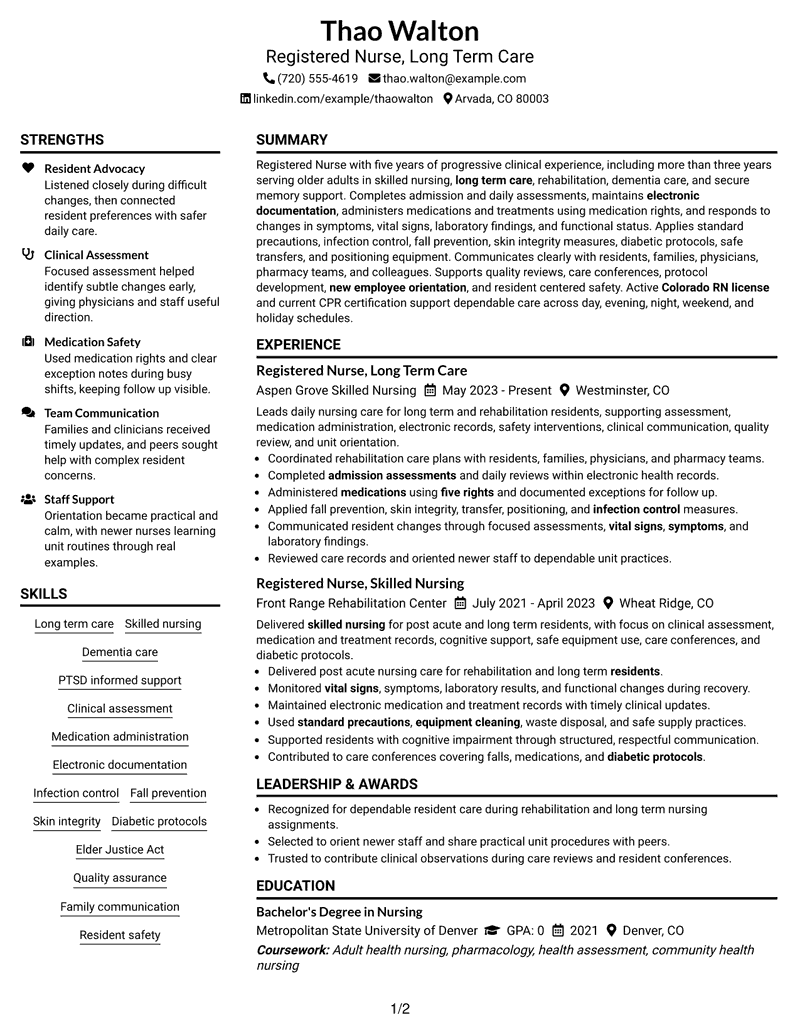
The plain two-column structure separates major resume sections without crowding the page, helping reviewers compare experience, skills, education, and credentials quickly.

Resume Snapshot
- Five years of progressive registered nursing experience
- More than three years in skilled nursing and long-term care
- Bachelor's Degree in Nursing, 2021
- Active Colorado RN license and current CPR certification
Why This Format Works
- Two columns separate career history from supporting qualifications without hiding either area.
- Consistent section spacing helps reviewers compare experience, skills, education, and credentials.
- A plain visual hierarchy keeps attention on the resume's documented career progression.
Best For
- Balanced career and qualifications review
- Compact two-column scanning
- Detailed clinical experience
- Visible credentials and education
- ATS-conscious section hierarchy
Resume Keywords
- Registered Nurse
- Skilled nursing
- Long Term Care
- admission assessments
- daily assessments
- Electronic documentation
- Medication
- treatments
- five rights
- Infection control
- symptoms
- vital signs
- physicians
- medication interaction
- transfer equipment
#2 Simple One Column Format Resume Example
The simple one-column structure creates a direct top-to-bottom reading path, making each resume section easy to follow in sequence.

Why This Format Works
- Linear reading order keeps experience and career progression easy to follow.
- One-column spacing gives achievements and skills enough room for clear scanning.
- Education and credentials remain visible without competing with parallel content areas.
Best For
- Chronological career storytelling
- Straightforward ATS parsing
- Longer experience descriptions
- Simple section navigation
- Traditional professional applications
#3 Clean Two Column Sidebar Format Resume Example
The clean two-column sidebar structure divides supporting details from the main career narrative, so reviewers can scan both without losing context.

Why This Format Works
- The sidebar creates a distinct place for supporting qualifications and credentials.
- Main-column space gives career progression room to read in chronological order.
- Clear separation helps reviewers connect experience with skills without visual crowding.
Best For
- Quick supporting-detail lookup
- Career history with many qualifications
- Sidebar-friendly credentials
- Dense but organized content
- Fast recruiter scanning
#4 Two Column Format Resume Example
The balanced two-column layout gives separate visual lanes to complementary resume sections, helping reviewers move between career history and supporting qualifications.

Why This Format Works
- Parallel sections let reviewers compare experience and supporting qualifications efficiently.
- Balanced column widths reduce long vertical stretches of dense resume content.
- Career progression stays readable while education and credentials remain easy to locate.
Best For
- Balanced content distribution
- Experience with several support sections
- Side-by-side qualification review
- Compact professional resumes
- Clear category separation
#5 Photo Header Two Column Format Resume Example
The photo header introduces a clear visual entry point, while the two-column body keeps the remaining resume sections organized for fast review.

Why This Format Works
- The header creates a strong entry point before detailed resume sections begin.
- Two-column organization keeps experience separate from skills, education, and credentials.
- Defined content areas help reviewers scan achievements without losing career chronology.
Best For
- Regions where resume photos are customary
- Visually distinct contact area
- Two-column content balance
- International applications
- Detailed experience with support sections
#6 Colored Two Column Format Resume Example
The colored two-column structure uses visual contrast to separate content areas, while keeping career evidence and supporting sections easy to locate.

Why This Format Works
- Color contrast strengthens section boundaries across the two-column resume body.
- Separate content areas help reviewers locate experience and supporting qualifications quickly.
- The structure preserves career progression while giving skills and credentials clear space.
Best For
- Readers who value strong section contrast
- Compact two-column organization
- Qualification-heavy resumes
- Fast visual navigation
- Structured professional presentation
#7 Stylish Two Column Designer Format Resume Example
The designer-style two-column structure creates clear section boundaries and a strong visual hierarchy without breaking the resume into disconnected reading paths.

Why This Format Works
- Distinct section blocks make experience and achievements easier to review independently.
- Two columns distribute skills, education, and credentials without compressing career history.
- Strong hierarchy guides reviewers through detailed content in a controlled order.
Best For
- Applications needing stronger visual hierarchy
- Detailed career records
- Multiple qualification categories
- Design-forward professional presentation
- Two-column content comparison
#8 Modern Icon Format Resume Example
The modern icon format uses two-column organization with visual markers that help reviewers identify section changes and navigate the resume efficiently.

Why This Format Works
- Visual markers make section changes easy to identify across two columns.
- Column separation helps reviewers distinguish career progression from supporting qualifications.
- Icons support navigation while experience and achievements remain the main evidence.
Best For
- Fast section recognition
- Icon-assisted navigation
- Two-column qualification review
- Detailed professional resumes
- Readers scanning many sections
#9 Modern Full Background Two Column Format Resume Example
The full-background two-column format keeps the resume visually unified while separating major content groups into two clear reading areas.

Why This Format Works
- The unified background keeps separate content areas visually connected for reviewers.
- Two columns reduce long reading runs across detailed experience and skills.
- Clear grouping helps education and credentials stay visible beside career evidence.
Best For
- Unified visual presentation
- Two-column information density
- Detailed work history
- Multiple credentials and skills
- Modern professional applications
#10 Dark Mode Two Column Format Resume Example
The dark-mode two-column layout relies on contrast and section separation to keep a detailed resume readable across two organized content areas.

Why This Format Works
- High contrast clarifies section boundaries across the two-column resume body.
- Parallel content areas help reviewers locate achievements and qualifications efficiently.
- Structured spacing keeps career progression readable within a visually dense presentation.
Best For
- High-contrast visual presentation
- Two-column content density
- Detailed experience records
- Clearly separated qualifications
- Modern resume portfolios
#11 Dark Mode Box Header Format Resume Example
The boxed header creates a clear starting point, then the two-column body gives reviewers distinct paths through experience and supporting qualifications.

Why This Format Works
- The boxed header gives reviewers a clear starting point before scanning sections.
- Two-column grouping keeps experience distinct from skills, education, and credentials.
- Strong section separation helps achievements remain easy to find during review.
Best For
- Strong header separation
- Two-column scanning
- Detailed professional history
- Credential visibility
- Applications needing clear document entry
#12 Elegant Full Background Two Column Format Resume Example
The elegant full-background design keeps two columns visually connected, helping reviewers move between career history, skills, education, and credentials.

Why This Format Works
- The full background visually unifies career history with supporting qualifications.
- Two columns help reviewers scan detailed experience without overlooking credentials.
- Section spacing preserves a clear relationship between progression, skills, and education.
Best For
- Unified two-column presentation
- Career history with many sections
- Balanced supporting qualifications
- Visually formal applications
- Structured recruiter review
#13 Creative Two Tone Format Resume Example
The two-tone design separates the two-column body through contrast, making section boundaries easier to recognize without changing the resume's core reading order.

Why This Format Works
- Two-tone contrast helps reviewers recognize separate resume content zones quickly.
- The two-column body balances career history with skills and credentials.
- Section boundaries keep achievements readable without fragmenting the overall document.
Best For
- Distinct visual section zones
- Two-column resume comparison
- Career evidence plus credentials
- Applications allowing color
- Readers needing clear boundaries
#14 Minimal Header Format Resume Example
The minimal header keeps attention on the one-column body, where sections follow a straightforward sequence from summary through experience and qualifications.

Why This Format Works
- A restrained header keeps focus on the ordered one-column resume body.
- Linear flow makes career progression and experience easy to follow chronologically.
- Simple section spacing keeps skills, education, and credentials easy to locate.
Best For
- Low-distraction review
- Linear career progression
- Traditional ATS workflows
- Experience-focused resumes
- Simple professional applications
#15 Plain One Column with Shaded Labels Resume Example
The one-column body keeps reading linear, while shaded labels help reviewers spot section changes without interrupting the document flow.

Why This Format Works
- Shaded labels make major resume sections easy to recognize during scanning.
- One-column order keeps career progression and achievements in a natural sequence.
- Consistent spacing gives skills, education, and credentials clear individual sections.
Best For
- Quick section identification
- Linear professional history
- Readers scanning labeled sections
- ATS-friendly organization
- Detailed resume content
#16 Text/Fang Style Resume Example
The text-forward one-column style gives the resume a continuous reading path, using simple section hierarchy to keep detailed content easy to follow.

Why This Format Works
- Text-forward structure keeps experience and achievements central to the reading path.
- One-column flow makes career progression easy to understand without visual detours.
- Clear headings separate skills, education, and credentials within the continuous layout.
Best For
- Text-heavy professional resumes
- Chronological career review
- Low-decoration applications
- ATS-oriented reading order
- Experience-first presentation
#17 Bold Color Header Professional Format Resume Example
The bold header establishes the document entry point, while the two-column body divides major resume categories into a compact, scannable structure.

Why This Format Works
- The strong header creates a visible start before the two-column body.
- Separate columns help reviewers compare career evidence with supporting qualifications.
- Clear hierarchy keeps experience, achievements, education, and credentials easy to navigate.
Best For
- Applications needing a strong title area
- Two-column professional resumes
- Visible career hierarchy
- Detailed credentials
- Structured recruiter scanning
#18 Photo Header Color Sidebar Format Resume Example
The photo header and color sidebar create a clear visual frame, while two columns separate the main career narrative from supporting information.

Why This Format Works
- The sidebar separates supporting qualifications from the main career narrative.
- Two columns give experience and achievements room without hiding credentials.
- Header framing helps reviewers enter the document before scanning detailed sections.
Best For
- Regions where resume photos are customary
- Sidebar-based qualification review
- Two-column clinical career content
- Color-accented professional applications
- International presentation needs
#19 Top Left Header Color Accent Format Resume Example
The top-left header starts the reading path clearly, and the two-column body keeps experience and supporting sections distinct but easy to compare.

Why This Format Works
- The left header gives the resume a direct starting point for reviewers.
- Two-column separation keeps experience distinct from skills, education, and credentials.
- Clear alignment supports quick movement between career progression and supporting evidence.
Best For
- Direct left-to-right scanning
- Two-column experience review
- Compact qualification sections
- Career history with supporting details
- Clear header orientation
#20 Centered Header Classic Two Column Format Resume Example
The centered header provides a balanced entry point, while the classic two-column body gives reviewers a predictable path through the resume.

Why This Format Works
- Centered header placement gives the resume a balanced and predictable entry point.
- Classic two-column structure separates experience from supporting qualifications clearly.
- Consistent hierarchy helps reviewers trace progression while checking education and credentials.
Best For
- Traditional two-column applications
- Balanced header presentation
- Detailed career history
- Credential-heavy resumes
- Predictable reviewer navigation
#21 Left Aligned Header Clean Two Column Format Resume Example
The left-aligned header begins the document with a direct reading cue, followed by two columns that keep major sections clearly separated.

Why This Format Works
- Left alignment creates a natural starting edge for the review path.
- Two columns organize detailed experience alongside skills, education, and credentials.
- Clear section breaks help achievements stand apart within the career narrative.
Best For
- Left-aligned reading preference
- Detailed experience with support sections
- Two-column professional applications
- Fast chronological review
- Clear section separation
#22 Simple Two Column Format Resume Example
The simple two-column structure uses clear spacing and section breaks to keep a substantial resume easy to scan without unnecessary visual complexity.

Why This Format Works
- Simple spacing keeps two-column content organized without adding visual distractions.
- Experience receives clear structure while supporting qualifications remain easy to scan.
- Balanced columns help reviewers compare career progression, skills, and credentials efficiently.
Best For
- Simple two-column organization
- Dense but readable resumes
- Career history plus qualifications
- Recruiter scanning efficiency
- Professional ATS workflows
#23 Accent Divider Modern Two Column Format Resume Example
Accent dividers reinforce section boundaries across the two-column body, helping reviewers distinguish career history from supporting qualifications at a glance.

Why This Format Works
- Accent dividers make section boundaries visible across the two-column body.
- Career history stays distinct from skills, education, and credentials during scanning.
- Consistent separation helps reviewers identify achievements within the broader experience record.
Best For
- Readers relying on visible dividers
- Two-column content navigation
- Detailed experience and credentials
- Modern professional applications
- Quick section transitions
#24 Shaded Labels Clean Two Column Format Resume Example
Shaded labels make section changes easy to spot, while the two-column body preserves clear separation between major resume content groups.

Why This Format Works
- Shaded labels help reviewers locate major resume sections at a glance.
- Two-column organization keeps career evidence separate from supporting qualifications.
- Clear labels reduce navigation effort across experience, skills, education, and credentials.
Best For
- Readers scanning labeled sections
- Two-column qualification review
- Dense clinical resume content
- Clear category boundaries
- Fast resume comparison
#25 Photo Header Color Accent International Format Resume Example
The photo header and color accents provide a strong visual entry point, while two columns organize the resume for readers accustomed to international presentation styles.

Why This Format Works
- Header presentation creates a visible entry point before the two-column content.
- Two columns organize career history and supporting qualifications for structured review.
- Color accents strengthen navigation between experience, education, skills, and credentials.
Best For
- International applications using photos
- Color-accented professional resumes
- Two-column career presentation
- Visible contact area
- Detailed qualification sets
#26 Large Profile Photo International Two Column Format Resume Example
A larger profile photo anchors the header, while the two-column body keeps career evidence and supporting sections distinct for structured review.

Why This Format Works
- The larger header image defines the document entry before detailed sections.
- Two columns preserve clear separation between career evidence and supporting qualifications.
- Structured grouping keeps achievements, skills, education, and credentials easy to locate.
Best For
- International applications favoring large photos
- Strong visual header presence
- Two-column experience review
- Credential-rich resumes
- Formal presentation needs
#27 One Column Format with Photo Resume Example
The one-column format keeps the body in a single reading sequence, with the photo serving only as a header element rather than dividing content.

Why This Format Works
- One-column flow keeps career progression easy to follow from top to bottom.
- The header image does not interrupt experience, skills, education, or credential sections.
- Linear spacing gives achievements enough room to remain clear and readable.
Best For
- Regions where resume photos are customary
- Linear career storytelling
- Photo header with ATS-conscious body
- Traditional section order
- Experience-focused applications
#28 One Column Format with Photo Right Resume Example
The right-side photo keeps the header visually balanced, while the one-column body preserves a direct top-to-bottom reading order.

Why This Format Works
- Right-side header placement leaves the one-column body free for linear reading.
- Career progression remains easy to trace through the uninterrupted section sequence.
- Experience, skills, education, and credentials each retain clear vertical separation.
Best For
- Regions where resume photos are customary
- Right-balanced header design
- Linear experience review
- Traditional one-column body
- Simple section sequencing
#29 One Column Boxed Contact Header Format Resume Example
The boxed contact header separates identifying information from the resume body, allowing the one-column sections below to follow a clean linear sequence.

Why This Format Works
- The boxed contact area keeps header details separate from resume evidence.
- One-column structure makes career progression easy to trace without side paths.
- Section order supports clear review of experience, skills, education, and credentials.
Best For
- Clear contact-information separation
- One-column professional applications
- Linear ATS scanning
- Detailed career history
- Traditional resume structure
#30 One Column Shaded Contact Header Format Resume Example
The shaded contact header creates a distinct starting area, then the one-column body carries the reviewer through each section in order.

Why This Format Works
- The shaded header distinguishes contact details from the resume's evidence sections.
- Linear body flow keeps experience and achievements easy to review in order.
- Clear section spacing supports quick access to skills, education, and credentials.
Best For
- Visible contact-header distinction
- One-column experience review
- Clear section sequencing
- ATS-conscious professional resumes
- Readers preferring subtle contrast
#31 Boxed Contact Header with Job Title Format Resume Example
The boxed contact area and visible job title clarify the document entry point, while the one-column body keeps section progression simple.

Why This Format Works
- The boxed header makes the job title easy to identify immediately.
- One-column order keeps career history and achievements in a predictable sequence.
- Supporting skills, education, and credentials remain easy to find below experience.
Best For
- Applications needing a visible job title
- One-column career progression
- Clear contact separation
- Traditional recruiter workflows
- Experience-first resumes
#32 Plain Professional Layout with Job Title & Shaded Labels Resume Example
The visible job title and shaded labels strengthen hierarchy in the one-column body, making section transitions easy to recognize during review.

Why This Format Works
- Shaded labels create strong section boundaries throughout the one-column resume body.
- Visible job title helps reviewers understand the document focus before scanning evidence.
- Linear organization keeps experience, skills, education, and credentials easy to compare.
Best For
- Applications needing visible section labels
- Job-title-forward presentation
- Linear professional history
- Detailed credential sections
- ATS-conscious organization
#33 Classic One Column Resume Format Resume Example
The classic one-column format uses a familiar top-to-bottom structure, giving every section a predictable place in the review sequence.

Why This Format Works
- Familiar one-column order makes career progression easy to follow during review.
- Consistent section hierarchy gives achievements and skills clear places in the document.
- Education and credentials remain easy to locate after the main experience record.
Best For
- Traditional recruiter expectations
- Linear career progression
- ATS-focused applications
- Detailed experience records
- Simple professional presentation
Why Build Your Nurse I - Long-Term Care Nursing Resume with ResumeInMinutes
ResumeInMinutes helps nursing professionals turn clinical experience, education, credentials, skills, and care responsibilities into a resume that is easy to read, tailor, and review.
- Diverse resume formats
- ATS-compliant section structure
- Keyword-optimized resume content
- Organized experience and skills presentation
- Free PDF resume previews
- Resume customization support
You can tailor the resume to highlight supported long-term care experience, clinical assessment, resident safety, communication, education, and active nursing credentials while keeping the document focused on the target role.
See Also
- 7 Registered Nurse 1 - Long-Term Care Resume Templates with Example
- 7 Registered Nurse - Long-Term Care Resume Templates with Example
- 7 Nurse II - Skilled Nursing Shift Leadership Resume Templates with Example
- 7 Registered Nurse - Emergency Nursing Resume Templates with Example
- 7 Registered Nurse Manager - Psychiatric Nursing Resume Templates with Example
- 33 Advanced Practice Registered Nurse (APRN) - Critical Care Resume Templates with Example 2026
- 7 Clinical Nurse I - Cardiac Surgery Intermediate Care Resume Templates with Example
- 7 Critical Care Charge Nurse (RN) - ICU Resume Templates with Example
- 7 Registered Nurse - Long-Term Care Cover Letter Templates with Example
- 7 Registered Nurse - Emergency Nursing Cover Letter Templates with Example
Frequently Asked Questions
Are these Nurse I - Long-Term Care Nursing resume templates ATS-friendly?
Yes. The templates use clear headings and structured resume sections that support ATS scanning and role-relevant nursing keywords.
Are these various resumes?
No. This guide shows one Nurse I - Long-Term Care Nursing resume example in multiple distinct visual formats.
What should a Nurse I - Long-Term Care Nursing resume include?
Include a focused summary, nursing experience, education, active credentials, relevant skills, and concise bullets showing assessment, medication, safety, documentation, and care coordination work when supported by your background.
Can I download the resume templates as PDFs?
Yes. Each resume design offers a free PDF download so you can preview the layout before choosing a format.
Which resume style works well for Nurse I - Long-Term Care Nursing applications?
A clear one-column or well-organized two-column format can both work well. Choose the layout that keeps experience, credentials, education, and skills easy to find and read.
Can experienced nurses use these formats for long-term care applications?
Yes. The formats can present progressive nursing experience, long-term care work, resident safety responsibilities, staff orientation, care coordination, and current credentials.
Should I include a photo on my resume?
Include a photo only when it is customary or expected in your region. For U.S. applications, a no-photo resume is usually the safer choice.
Can I customize these resume templates?
Yes. You can edit the resume text, format, design style, and PDF layout to match your Nurse I - Long-Term Care Nursing application.




