
33 Office Services Specialist - Regional Office Support Resume Templates with Example 2026 (ATS-Optimized)
This guide shows you how to build an Office Services Specialist - Regional Office Support resume that is clear, focused, and easy to review. You will see how strong section order and practical format choices can make office support experience easier to understand.
A strong resume for this role should make clerical administration, records work, customer service, data compilation, inventory maintenance, transcription, and general computer use easy to find. It should also show accurate word processing, filing, basic mathematics, and dependable support across changing office priorities.
Below, one complete resume example is presented in 33 layouts so you can compare reading order, spacing, section hierarchy, and visual structure before choosing a format.
What Makes a Great Office Services Specialist - Regional Office Support Resume in 2026
Strong resumes for this role are accurate, organized, and easy to scan. They show dependable office support through clear experience bullets, focused skills, and practical credentials.
Useful keywords include record keeping, customer service, data compilation, inventory maintenance, Microsoft Word, WordPerfect, transcription, and basic mathematics.
The examples shown below are intentionally detailed to demonstrate a range of experiences, skills, accomplishments and relevant keywords. We prefer detailed resumes as they provide more context to the hiring managers and also help the ATS systems identify relevant qualifications and score your resume better for a match. But the length of a resume is an individual choice. If you want a one page resume, just keep the most relevant experience and information for the job. Note: Resume examples are for educational purposes only. Use only information that accurately reflects your experience and qualifications. References to real organizations do not imply affiliation or endorsement.
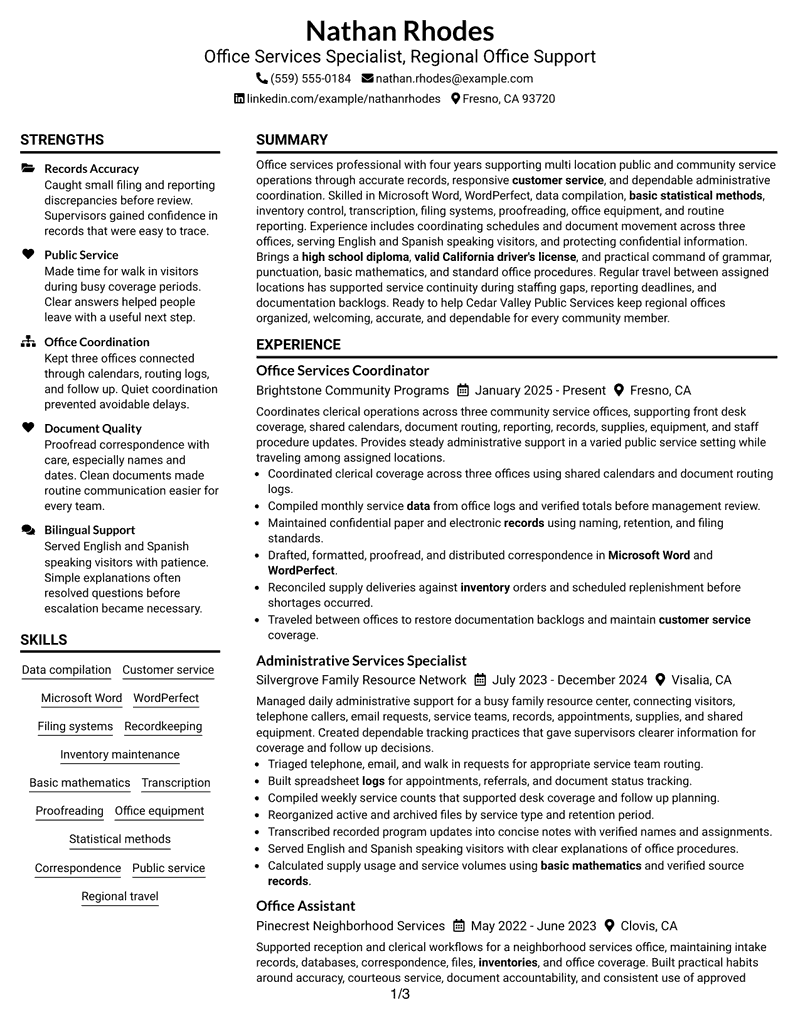
#1 Plain Two Column Format Resume Example
Plain Two Column Format divides the resume into two clear content areas, helping a recruiter compare core qualifications with detailed career evidence without losing the overall reading order.

Resume Snapshot
- Four years of clerical and office support experience
- Microsoft Word and WordPerfect document preparation
- Records, inventory, data compilation, and customer service
- Valid California Driver's License for regional office travel
Why This Format Works
- Two-column separation keeps detailed work history distinct from supporting skills.
- Parallel content areas make Microsoft Word and WordPerfect qualifications easier to locate.
- Compact organization accommodates projects, credentials, and regional office experience without crowding.
- Clear section grouping helps reviewers find records, inventory, and customer service evidence.
- The structure keeps Fresno and Clovis experience readable alongside supporting qualifications.
Resume Keywords
- Office Services Specialist
- Regional Office Support
- Clerical
- computer
- Records
- Customer service
- Administrative support
- travel
- High School Diploma
- office equipment
- Filing
- Record Keeping
- Inventory Maintenance
- Data Compilation
- Transcription
#2 Simple One Column Format Resume Example
A recruiter can move straight down the page in one continuous path. Simple One Column Format keeps section order obvious and gives longer experience content room to breathe.

Why This Format Works
- Single-column flow keeps the two-position work history easy to follow chronologically.
- Vertical section order gives detailed clerical responsibilities enough uninterrupted reading space.
- Skills like Microsoft Word and WordPerfect remain easy to locate by section.
- Projects and credentials follow naturally after the main experience evidence.
- Straight reading order supports careful review of records and customer service duties.
Best For
- Resumes with detailed chronological experience
- Straightforward ATS-oriented applications
- Readers who prefer linear section order
- Office support histories with several duties
- Content needing generous vertical space
#3 Clean Two Column Sidebar Format Resume Example
Experience and qualifications stay easy to compare because Clean Two Column Sidebar Format separates supporting details from the main career narrative. The two-column structure helps evidence remain visible without interrupting chronology.

Why This Format Works
- Two-column separation keeps detailed work history distinct from supporting skills.
- Parallel content areas make Microsoft Word and WordPerfect qualifications easier to locate.
- Sidebar organization keeps supporting qualifications near the main work history.
- Clear section grouping helps reviewers find records, inventory, and customer service evidence.
- The structure keeps Fresno and Clovis experience readable alongside supporting qualifications.
Best For
- Detailed experience plus compact support sections
- Quick comparison of skills and work history
- Records and clerical qualification emphasis
- Resumes with varied supporting credentials
- Reviewers who favor visible section separation
#4 Two Column Format Resume Example
Content is distributed across two columns so the page can hold detailed experience and supporting skills without feeling crowded. Two Column Format gives a reviewer distinct areas to scan.

Why This Format Works
- Two-column separation keeps detailed work history distinct from supporting skills.
- Parallel content areas make Microsoft Word and WordPerfect qualifications easier to locate.
- Compact organization accommodates projects, credentials, and regional office experience without crowding.
- Clear section grouping helps reviewers find records, inventory, and customer service evidence.
- The structure keeps Fresno and Clovis experience readable alongside supporting qualifications.
Best For
- Balanced experience and skills presentation
- Applications with several resume sections
- Compact presentation of office support evidence
- Reviewers comparing qualifications side by side
- Documents needing efficient page use
#5 Photo Header Two Column Format Resume Example
When a resume will be used where a professional image is appropriate, Photo Header Two Column Format combines a photo header with two organized body columns. Reviewers can still follow the document through clearly separated content areas.

Why This Format Works
- Photo header remains separate from the detailed office support experience below.
- Parallel content areas make Microsoft Word and WordPerfect qualifications easier to locate.
- Compact organization accommodates projects, credentials, and regional office experience without crowding.
- Clear section grouping helps reviewers find records, inventory, and customer service evidence.
- The structure keeps Fresno and Clovis experience readable alongside supporting qualifications.
Best For
- Applications where a photo is customary
- Two-column resumes with visual identity
- Regional or international presentation needs
- Candidates with substantial supporting sections
- Readers who value distinct header hierarchy
#6 Colored Two Column Format Resume Example
A restrained color treatment gives Colored Two Column Format a stronger visual hierarchy while keeping two body columns easy to follow. The structure helps reviewers distinguish major resume sections quickly.

Why This Format Works
- Two-column separation keeps detailed work history distinct from supporting skills.
- Parallel content areas make Microsoft Word and WordPerfect qualifications easier to locate.
- Compact organization accommodates projects, credentials, and regional office experience without crowding.
- Color hierarchy distinguishes resume sections without changing the underlying office support evidence.
- The structure keeps Fresno and Clovis experience readable alongside supporting qualifications.
Best For
- Professional resumes needing stronger visual hierarchy
- Two-column organization with restrained color
- Applications balancing detail and readability
- Office support content with many sections
- Readers who scan by section
#7 Stylish Two Column Designer Format Resume Example
Stylish Two Column Designer Format uses two organized content areas to separate supporting information from the main resume narrative. The result gives recruiters a clear path through dense office support content.

Why This Format Works
- Two-column separation keeps detailed work history distinct from supporting skills.
- Parallel content areas make Microsoft Word and WordPerfect qualifications easier to locate.
- Compact organization accommodates projects, credentials, and regional office experience without crowding.
- Clear section grouping helps reviewers find records, inventory, and customer service evidence.
- The structure keeps Fresno and Clovis experience readable alongside supporting qualifications.
Best For
- Polished resumes with dense supporting information
- Two-column review of skills and experience
- Applications needing visual distinction
- Documents with projects and credentials
- Reviewers comparing several evidence types
#8 Modern Icon Format Resume Example
A recruiter can scan the two-column Modern Icon Format by following its visual section cues and parallel content areas. The structure keeps detailed experience and supporting qualifications within easy reach.

Why This Format Works
- Two-column separation keeps detailed work history distinct from supporting skills.
- Section icons help reviewers locate Word processing, records, and customer service content.
- Compact organization accommodates projects, credentials, and regional office experience without crowding.
- Clear section grouping helps reviewers find records, inventory, and customer service evidence.
- The structure keeps Fresno and Clovis experience readable alongside supporting qualifications.
Best For
- Content-rich resumes needing guided scanning
- Two-column organization with icon cues
- Applications with varied supporting sections
- Reviewers locating skills quickly
- Detailed clerical and records experience
#9 Modern Full Background Two Column Format Resume Example
Career evidence receives strong visual space in Modern Full Background Two Column Format, while the second column keeps supporting details close by. The two-column structure helps the reviewer compare related information.

Why This Format Works
- Two-column separation keeps detailed work history distinct from supporting skills.
- Parallel content areas make Microsoft Word and WordPerfect qualifications easier to locate.
- Compact organization accommodates projects, credentials, and regional office experience without crowding.
- Clear section grouping helps reviewers find records, inventory, and customer service evidence.
- The structure keeps Fresno and Clovis experience readable alongside supporting qualifications.
Best For
- Applications needing strong visual framing
- Two-column resumes with substantial evidence
- Readers comparing experience and support details
- Documents with multiple qualification groups
- Office support resumes with projects
#10 Dark Mode Two Column Format Resume Example
Detailed content is balanced across two columns, giving Dark Mode Two Column Format enough room for experience, skills, projects, and credentials. The darker presentation changes the visual tone without changing the reading logic.

Why This Format Works
- Two-column separation keeps detailed work history distinct from supporting skills.
- Parallel content areas make Microsoft Word and WordPerfect qualifications easier to locate.
- Compact organization accommodates projects, credentials, and regional office experience without crowding.
- Clear section grouping helps reviewers find records, inventory, and customer service evidence.
- Dark styling frames the same records, customer service, and data evidence clearly.
Best For
- Applications suited to dark visual styling
- Two-column resumes with many sections
- Readers who prefer strong contrast
- Content needing compact page use
- Professional resumes with varied evidence
#11 Dark Mode Box Header Format Resume Example
For applications that benefit from a stronger visual header, Dark Mode Box Header Format combines a boxed header treatment with two body columns. Reviewers can move from identity details into clearly separated resume sections.

Why This Format Works
- Two-column separation keeps detailed work history distinct from supporting skills.
- Parallel content areas make Microsoft Word and WordPerfect qualifications easier to locate.
- Compact organization accommodates projects, credentials, and regional office experience without crowding.
- Clear section grouping helps reviewers find records, inventory, and customer service evidence.
- Dark styling frames the same records, customer service, and data evidence clearly.
Best For
- Applications needing a prominent boxed header
- Two-column content with clear hierarchy
- Readers who value strong section framing
- Resumes balancing work and supporting details
- Documents with substantial office experience
#12 Elegant Full Background Two Column Format Resume Example
A full-background treatment gives Elegant Full Background Two Column Format a polished visual frame while two columns maintain clear information hierarchy. Recruiters can distinguish primary experience from supporting qualifications.

Why This Format Works
- Two-column separation keeps detailed work history distinct from supporting skills.
- Parallel content areas make Microsoft Word and WordPerfect qualifications easier to locate.
- Compact organization accommodates projects, credentials, and regional office experience without crowding.
- Clear section grouping helps reviewers find records, inventory, and customer service evidence.
- The structure keeps Fresno and Clovis experience readable alongside supporting qualifications.
Best For
- Professional resumes needing polished visual framing
- Two-column organization for varied evidence
- Applications with detailed office support history
- Readers comparing experience and credentials
- Documents needing balanced section hierarchy
#13 Creative Two Tone Format Resume Example
Creative Two Tone Format uses a two-tone visual treatment across a two-column body. The contrast helps a reviewer separate content groups while keeping the resume compact.

Why This Format Works
- Two-column separation keeps detailed work history distinct from supporting skills.
- Parallel content areas make Microsoft Word and WordPerfect qualifications easier to locate.
- Compact organization accommodates projects, credentials, and regional office experience without crowding.
- Color hierarchy distinguishes resume sections without changing the underlying office support evidence.
- The structure keeps Fresno and Clovis experience readable alongside supporting qualifications.
Best For
- Applications suited to two-tone presentation
- Two-column resumes with clear visual separation
- Readers scanning several content groups
- Documents combining experience and projects
- Office support resumes needing visual variety
#14 Minimal Header Format Resume Example
A recruiter can read Minimal Header Format from top to bottom with very little visual interruption. Its one-column structure keeps chronology, skills, projects, and credentials in a straightforward sequence.

Why This Format Works
- Single-column flow keeps the two-position work history easy to follow chronologically.
- Vertical section order gives detailed clerical responsibilities enough uninterrupted reading space.
- Minimal header leaves more attention on experience, skills, projects, and credentials.
- Projects and credentials follow naturally after the main experience evidence.
- Straight reading order supports careful review of records and customer service duties.
Best For
- Resumes with substantial chronological detail
- ATS-focused applications favoring simple flow
- Readers who prefer minimal visual interruption
- Documents with several supporting sections
- Office support histories needing full-width space
#15 Plain One Column with Shaded Labels Resume Example
Experience evidence remains central in Plain One Column with Shaded Labels, while shaded section labels help mark transitions. The single-column flow keeps detailed office support content in a predictable order.

Why This Format Works
- Single-column flow keeps the two-position work history easy to follow chronologically.
- Shaded labels help separate experience, skills, projects, and credential content clearly.
- Skills like Microsoft Word and WordPerfect remain easy to locate by section.
- Projects and credentials follow naturally after the main experience evidence.
- Straight reading order supports careful review of records and customer service duties.
Best For
- Applications needing clear labeled sections
- One-column resumes with detailed evidence
- Readers who follow linear chronology
- Documents with projects and credentials
- Office support content needing clear transitions
#16 Text/Fang Style Resume Example
Information is spread vertically in one column, giving Text/Fang Style a simple reading path with room for complete experience descriptions. Reviewers can progress through sections without switching between parallel areas.

Why This Format Works
- Single-column flow keeps the two-position work history easy to follow chronologically.
- Vertical section order gives detailed clerical responsibilities enough uninterrupted reading space.
- Skills like Microsoft Word and WordPerfect remain easy to locate by section.
- Projects and credentials follow naturally after the main experience evidence.
- Straight reading order supports careful review of records and customer service duties.
Best For
- Text-focused resumes with longer descriptions
- Applications favoring one-column readability
- Readers reviewing duties in sequence
- Documents with detailed work history
- Content needing uninterrupted vertical space
#17 Bold Color Header Professional Format Resume Example
For applications that need a clear professional hierarchy, Bold Color Header Professional Format adds a strong header treatment above a two-column body. The structure separates identity information from detailed resume evidence.

Why This Format Works
- Two-column separation keeps detailed work history distinct from supporting skills.
- Parallel content areas make Microsoft Word and WordPerfect qualifications easier to locate.
- Compact organization accommodates projects, credentials, and regional office experience without crowding.
- Color hierarchy distinguishes resume sections without changing the underlying office support evidence.
- The structure keeps Fresno and Clovis experience readable alongside supporting qualifications.
Best For
- Applications needing a strong professional header
- Two-column resumes with clear hierarchy
- Readers who value quick section recognition
- Documents balancing skills and experience
- Office support applications with varied evidence
#18 Photo Header Color Sidebar Format Resume Example
A color sidebar and photo header give Photo Header Color Sidebar Format a distinct visual character, while its two-column body keeps supporting information separate from the main resume content. The structure remains easy to scan.

Why This Format Works
- Photo header remains separate from the detailed office support experience below.
- Parallel content areas make Microsoft Word and WordPerfect qualifications easier to locate.
- Sidebar organization keeps supporting qualifications near the main work history.
- Color hierarchy distinguishes resume sections without changing the underlying office support evidence.
- The structure keeps Fresno and Clovis experience readable alongside supporting qualifications.
Best For
- Applications where a photo is customary
- Two-column resumes with a color sidebar
- Readers who value strong visual hierarchy
- Documents with substantial office experience
- International-style presentation contexts
#19 Top Left Header Color Accent Format Resume Example
Top Left Header Color Accent Format starts with a left-aligned header and continues into two organized columns. The arrangement gives recruiters a direct path from contact details to experience and supporting qualifications.

Why This Format Works
- Two-column separation keeps detailed work history distinct from supporting skills.
- Parallel content areas make Microsoft Word and WordPerfect qualifications easier to locate.
- Compact organization accommodates projects, credentials, and regional office experience without crowding.
- Color hierarchy distinguishes resume sections without changing the underlying office support evidence.
- The structure keeps Fresno and Clovis experience readable alongside supporting qualifications.
Best For
- Applications needing a direct header start
- Two-column resumes with color accents
- Readers comparing work and support sections
- Documents with several qualification groups
- Professional office support applications
#20 Centered Header Classic Two Column Format Resume Example
A recruiter can begin with the centered header and then scan two balanced content areas. Centered Header Classic Two Column Format gives Malachi Randall's detailed experience and supporting sections clear separation.

Why This Format Works
- Two-column separation keeps detailed work history distinct from supporting skills.
- Parallel content areas make Microsoft Word and WordPerfect qualifications easier to locate.
- Compact organization accommodates projects, credentials, and regional office experience without crowding.
- Clear section grouping helps reviewers find records, inventory, and customer service evidence.
- The structure keeps Fresno and Clovis experience readable alongside supporting qualifications.
Best For
- Content-rich resumes with centered headers
- Two-column review of detailed experience
- Readers comparing skills and career evidence
- Documents with projects and credentials
- Applications needing balanced visual structure
#21 Left Aligned Header Clean Two Column Format Resume Example
Experience evidence stays prominent in Left Aligned Header Clean Two Column Format, with the second column available for supporting resume sections. A left-aligned header gives the reviewer a direct starting point.

Why This Format Works
- Two-column separation keeps detailed work history distinct from supporting skills.
- Parallel content areas make Microsoft Word and WordPerfect qualifications easier to locate.
- Compact organization accommodates projects, credentials, and regional office experience without crowding.
- Clear section grouping helps reviewers find records, inventory, and customer service evidence.
- The structure keeps Fresno and Clovis experience readable alongside supporting qualifications.
Best For
- Experience-focused resumes with supporting columns
- Readers who prefer left-aligned headers
- Applications with detailed clerical history
- Documents combining skills and projects
- Two-column evidence comparison
#22 Simple Two Column Format Resume Example
Resume content is balanced across two straightforward columns, giving Simple Two Column Format room for both detailed work history and compact supporting information. Reviewers can compare sections without excessive page length.

Why This Format Works
- Two-column separation keeps detailed work history distinct from supporting skills.
- Parallel content areas make Microsoft Word and WordPerfect qualifications easier to locate.
- Compact organization accommodates projects, credentials, and regional office experience without crowding.
- Clear section grouping helps reviewers find records, inventory, and customer service evidence.
- The structure keeps Fresno and Clovis experience readable alongside supporting qualifications.
Best For
- Straightforward two-column professional resumes
- Applications with several content sections
- Readers comparing experience and skills
- Documents needing compact page use
- Office support resumes with varied evidence
#23 Accent Divider Modern Two Column Format Resume Example
For applications that need a modern but restrained presentation, Accent Divider Modern Two Column Format uses dividers to clarify section changes across two columns. The reviewer gets clear visual breaks without losing content density.

Why This Format Works
- Two-column separation keeps detailed work history distinct from supporting skills.
- Parallel content areas make Microsoft Word and WordPerfect qualifications easier to locate.
- Accent dividers mark transitions between experience, projects, skills, and credentials.
- Clear section grouping helps reviewers find records, inventory, and customer service evidence.
- The structure keeps Fresno and Clovis experience readable alongside supporting qualifications.
Best For
- Modern applications needing clear section dividers
- Two-column resumes with compact organization
- Readers scanning varied resume evidence
- Documents balancing work and credentials
- Professional office support presentation
#24 Shaded Labels Clean Two Column Format Resume Example
Shaded labels create clear section markers in Shaded Labels Clean Two Column Format, while two columns keep related information grouped. The visual treatment helps reviewers locate evidence quickly.

Why This Format Works
- Two-column separation keeps detailed work history distinct from supporting skills.
- Shaded labels help separate experience, skills, projects, and credential content clearly.
- Compact organization accommodates projects, credentials, and regional office experience without crowding.
- Clear section grouping helps reviewers find records, inventory, and customer service evidence.
- The structure keeps Fresno and Clovis experience readable alongside supporting qualifications.
Best For
- Applications needing strong labeled sections
- Two-column resumes with clear grouping
- Readers locating qualifications quickly
- Documents with varied supporting evidence
- Office support resumes with several sections
#25 Photo Header Color Accent International Format Resume Example
Photo Header Color Accent International Format combines a photo header, color accents, and two body columns. The organization keeps the visual identity distinct while preserving clear section separation for reviewers.

Why This Format Works
- Photo header remains separate from the detailed office support experience below.
- Parallel content areas make Microsoft Word and WordPerfect qualifications easier to locate.
- Compact organization accommodates projects, credentials, and regional office experience without crowding.
- Color hierarchy distinguishes resume sections without changing the underlying office support evidence.
- The structure keeps Fresno and Clovis experience readable alongside supporting qualifications.
Best For
- Applications where photos are expected
- Two-column resumes with color accents
- International presentation contexts
- Readers valuing strong visual identity
- Documents with substantial supporting sections
#26 Large Profile Photo International Two Column Format Resume Example
A recruiter can move from the large profile photo area into two structured content columns. Large Profile Photo International Two Column Format gives substantial resume evidence room while preserving a strong visual identity.

Why This Format Works
- Photo header remains separate from the detailed office support experience below.
- Parallel content areas make Microsoft Word and WordPerfect qualifications easier to locate.
- Compact organization accommodates projects, credentials, and regional office experience without crowding.
- Clear section grouping helps reviewers find records, inventory, and customer service evidence.
- The structure keeps Fresno and Clovis experience readable alongside supporting qualifications.
Best For
- Applications suited to prominent profile imagery
- Two-column resumes with rich content
- International-style resume presentation
- Readers reviewing substantial evidence volume
- Documents balancing identity and qualifications
#27 One Column Format with Photo Resume Example
Experience and qualifications stay in one continuous vertical sequence beneath a photo area. One Column Format with Photo keeps the reading order simple when a photo is appropriate for the application context.

Why This Format Works
- Photo header remains separate from the detailed office support experience below.
- Vertical section order gives detailed clerical responsibilities enough uninterrupted reading space.
- Skills like Microsoft Word and WordPerfect remain easy to locate by section.
- Projects and credentials follow naturally after the main experience evidence.
- Straight reading order supports careful review of records and customer service duties.
Best For
- Applications where a photo is appropriate
- One-column resumes with detailed chronology
- Readers who prefer linear review
- Documents with substantial experience text
- Office support content needing full width
#28 One Column Format with Photo Right Resume Example
Content remains balanced in one vertical flow while the photo sits to the right in the header. One Column Format with Photo Right keeps the body easy to scan from top to bottom.

Why This Format Works
- Photo header remains separate from the detailed office support experience below.
- Vertical section order gives detailed clerical responsibilities enough uninterrupted reading space.
- Skills like Microsoft Word and WordPerfect remain easy to locate by section.
- Projects and credentials follow naturally after the main experience evidence.
- Straight reading order supports careful review of records and customer service duties.
Best For
- Applications using right-aligned photo headers
- One-column resumes with simple reading order
- Readers reviewing detailed work history
- Documents needing uninterrupted body space
- Photo-appropriate professional contexts
#29 One Column Boxed Contact Header Format Resume Example
For applications that benefit from clearly grouped contact details, One Column Boxed Contact Header Format places the header in a distinct box above a single-column body. Reviewers can then follow a direct vertical reading path.

Why This Format Works
- Boxed contact details stay separate from the detailed experience and skills sections.
- Vertical section order gives detailed clerical responsibilities enough uninterrupted reading space.
- Skills like Microsoft Word and WordPerfect remain easy to locate by section.
- Projects and credentials follow naturally after the main experience evidence.
- Straight reading order supports careful review of records and customer service duties.
Best For
- Applications needing clearly grouped contact details
- One-column resumes with simple navigation
- Readers who prefer familiar section order
- Documents with detailed experience evidence
- Professional office support applications
#30 One Column Shaded Contact Header Format Resume Example
A shaded contact header creates a clear visual starting point before the one-column resume body. One Column Shaded Contact Header Format keeps Malachi Randall's remaining sections in a simple vertical sequence.

Why This Format Works
- Single-column flow keeps the two-position work history easy to follow chronologically.
- Vertical section order gives detailed clerical responsibilities enough uninterrupted reading space.
- Skills like Microsoft Word and WordPerfect remain easy to locate by section.
- Projects and credentials follow naturally after the main experience evidence.
- Straight reading order supports careful review of records and customer service duties.
Best For
- Applications favoring a shaded contact header
- One-column resumes with clear hierarchy
- Readers who prefer direct vertical scanning
- Documents with varied resume sections
- Office support applications with detailed evidence
#31 Boxed Contact Header with Job Title Format Resume Example
Boxed Contact Header with Job Title Format groups identity and target role information before the one-column body begins. The structure gives recruiters an immediate context cue followed by a direct reading path.

Why This Format Works
- Boxed contact details stay separate from the detailed experience and skills sections.
- Visible job title adds context before reviewers reach detailed clerical experience.
- Skills like Microsoft Word and WordPerfect remain easy to locate by section.
- Projects and credentials follow naturally after the main experience evidence.
- Straight reading order supports careful review of records and customer service duties.
Best For
- Applications needing visible target-role context
- One-column resumes with boxed contact details
- Readers who value immediate job alignment
- Documents with detailed experience sections
- Office support resumes with clear hierarchy
#32 Plain Professional Layout with Job Title & Shaded Labels Resume Example
A recruiter can follow the document in one vertical sequence, with the job title and shaded labels helping mark important transitions. Plain Professional Layout with Job Title & Shaded Labels keeps longer content orderly.

Why This Format Works
- Single-column flow keeps the two-position work history easy to follow chronologically.
- Visible job title adds context before reviewers reach detailed clerical experience.
- Skills like Microsoft Word and WordPerfect remain easy to locate by section.
- Projects and credentials follow naturally after the main experience evidence.
- Straight reading order supports careful review of records and customer service duties.
Best For
- Content-rich resumes needing labeled transitions
- One-column applications with visible job title
- Readers who prefer familiar linear structure
- Documents with projects and credentials
- Detailed office support work histories
#33 Classic One Column Resume Format Resume Example
Experience evidence comes first in a straightforward one-column reading path, letting Classic One Column Resume Format keep career history and qualifications easy to follow. The structure favors familiar section order and simple navigation.

Why This Format Works
- Single-column flow keeps the two-position work history easy to follow chronologically.
- Vertical section order gives detailed clerical responsibilities enough uninterrupted reading space.
- Skills like Microsoft Word and WordPerfect remain easy to locate by section.
- Projects and credentials follow naturally after the main experience evidence.
- Straight reading order supports careful review of records and customer service duties.
Best For
- Traditional resumes with strong chronology
- ATS-focused applications with simple structure
- Readers who prefer familiar section order
- Documents with detailed office experience
- Resumes emphasizing clear evidence over decoration
Why Build Your Office Services Specialist - Regional Office Support Resume with ResumeInMinutes
ResumeInMinutes helps you organize office support experience, records responsibilities, customer service work, computer skills, and qualifications into a clear resume that is easy to tailor.
- Diverse resume formats
- ATS-compliant section structure
- Keyword-optimized resume content
- Organized experience and skills presentation
- Free PDF resume previews
- Resume customization support
You can adapt the resume to emphasize clerical coordination, records accuracy, public service, office software, inventory work, or regional office support while keeping the document easy to review.
See Also
- 7 Patient Services Specialist - Medical Clinic Front Office Resume Templates with Example
- 7 Administrative Assistant - Executive and Office Support Resume Templates with Example
- 7 Administrative Support Assistant - Executive Office Support Resume Templates with Example
- 7 Clinical Receptionist/Office Assistant - Nursing Clinical Support Resume Templates with Example
- 7 Office Assistant 3 - Community Corrections Support Resume Templates with Example
- 7 School Operations Support Assistant - Office Support Resume Templates with Example
- 7 Student Worker - Grants & Research Office Support Resume Templates with Example
- 33 Bookkeeper/Office Accountant Resume Templates with Example 2026 (ATS-Optimized)
- 7 School Operations Support Assistant - Office Support Cover Letter Templates with Example
- 30+ Bookkeeper/Office Accountant Cover Letter Templates with Example 2026
Frequently Asked Questions
Are these Office Services Specialist - Regional Office Support resume templates ATS-friendly?
Yes. The templates use clear sections and readable headings, and the content includes grounded keywords such as record keeping, customer service, Microsoft Word, WordPerfect, and data compilation.
Are these various resumes?
No. This guide presents one Office Services Specialist - Regional Office Support resume example in distinct visual formats and layouts.
What should an Office Services Specialist - Regional Office Support resume include?
Include a focused summary, relevant office experience, education, skills, tools, projects, credentials, and clear bullets covering records, customer service, inventory, data work, and word processing.
Can I download the resume templates as PDFs?
Yes. Each resume design offers a free PDF download so you can preview the format and choose a layout for your application.
Which resume style works well for this role?
A clear one-column or balanced two-column format can work well when headings, experience, skills, and qualifications remain easy to scan and ATS-friendly.
Can professionals with varied office experience still build a strong resume?
Yes. Focus on supported clerical duties, records work, customer service, computer use, data checks, inventory support, and other relevant responsibilities you have actually performed.
Should I include a photo on my resume?
Include a photo only when it is customary or expected in your region or application context. For U.S. applications, a no-photo resume is usually the safer choice.
Can I customize these resume templates?
Yes. ResumeInMinutes lets you adjust resume text, formatting, design style, and PDF layout while keeping the content aligned with your Office Services Specialist - Regional Office Support application.




