
US English


7 SAP SuccessFactors Employee Central Payroll (ECP) Consultant/Manager Resume Templates with Example
By Ria · Last Updated On October 25, 2026
Resume example — page 1

This guide shows you how to create a clear, focused SAP SuccessFactors Employee Central Payroll (ECP) Consultant/Manager resume. You will learn how to present consulting delivery, technical expertise, and team leadership so readers can quickly understand your value.

For this role, connect payroll schemas, rules, wage types, calculations, retroactive accounting, and compliance configuration to implementation, upgrade, and transformation work. Show how you guide teams, advise clients, and manage integrations across Employee Central, Time Management, Benefits, Finance, and third-party systems.

Compare the PNG image previews to see how the same resume is presented in 7 layouts. The notes below explain how each format supports scanning, and you can open an example in the editor to customize it.

What Makes a Great SAP SuccessFactors Employee Central Payroll (ECP) Consultant/Manager Resume in 2026

A strong resume makes consulting leadership and hands-on ECP expertise easy to find. Use clear sections and concise bullets to show delivery scope, team guidance, client work, and results.

Include relevant terms such as payroll schemas, wage types, retroactive accounting, multi-country payroll, integrations, testing, and managed services. Support them with specific examples from your own work.

Note: Resume examples are for educational purposes only. Use only information that accurately reflects your experience and qualifications. References to real organizations do not imply affiliation or endorsement.

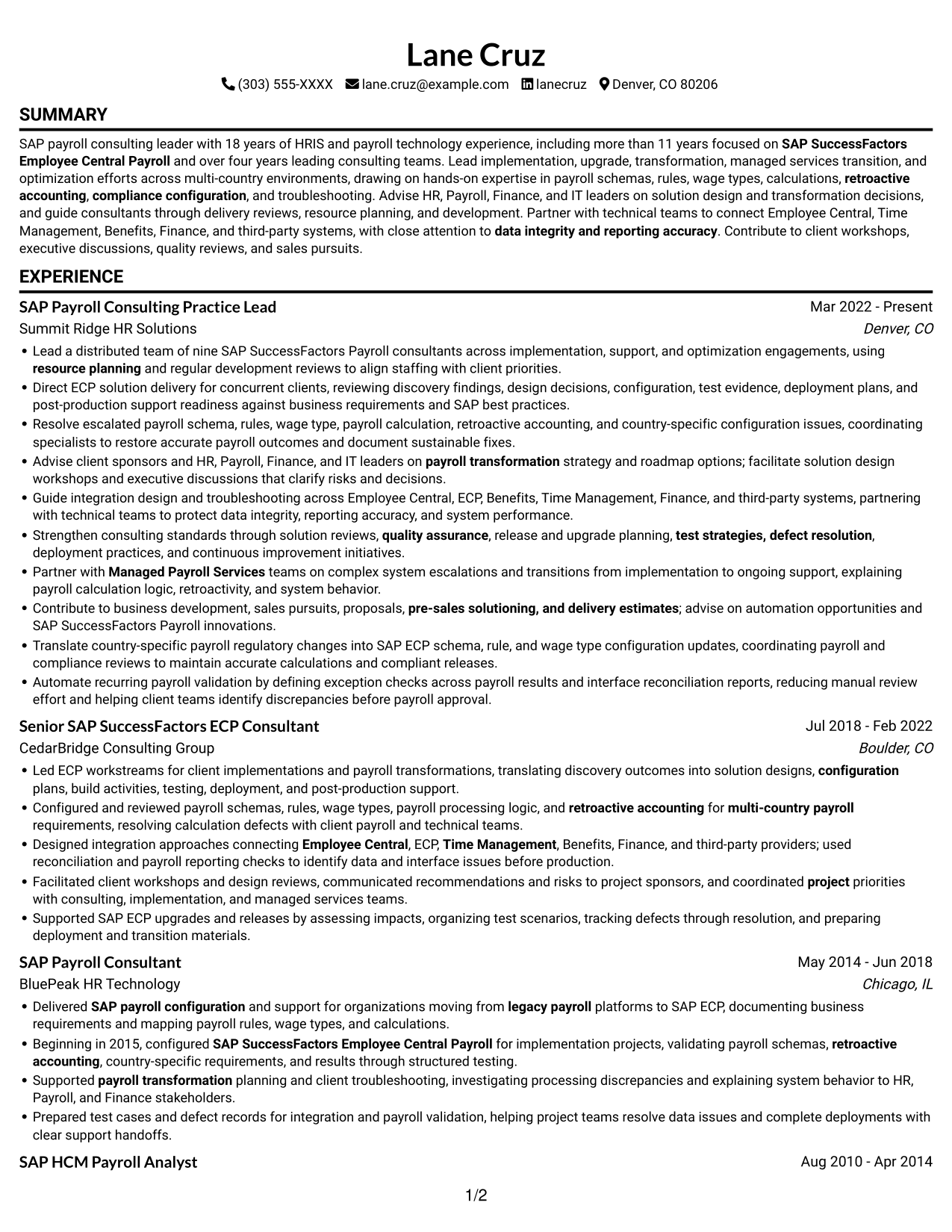
#1 Simple One Column Format Resume Example

The Simple One Column Format keeps resume content in one vertical path, which helps reviewers follow each section in sequence.
 
Resume example — page 1   Resume example — page 2

Why This Format Works

  • A single reading path helps reviewers follow career history from role to role.
  • Clear section flow makes skills, education, and credentials easy to locate.
  • The full text width gives experience bullets room for context and achievements.

Best For

  • Linear section-by-section review
  • Detailed role histories
  • Skills and credentials in one text flow
  • Text-only resume preference
  • ATS-readable section structure

Resume Keywords

  • implementation
  • SAP SuccessFactors Employee Central Payroll
  • hands-on expertise in payroll schemas, rules, wage types
  • calculations
  • retroactive accounting
  • compliance configuration
  • Direct ECP solution delivery
  • payroll transformation
  • Supported SAP ECP upgrades
  • Partner with Managed Payroll Services teams on complex system escalations and transitions from implementation to ongoing support
  • Lead implementation, upgrade, transformation, managed services transition, and optimization efforts
  • using resource planning and regular development reviews
  • coordinated project priorities with consulting, implementation, and managed services teams
  • Designed integration approaches connecting Employee Central, ECP, Time Management, Benefits, Finance, and third-party providers
  • Direct ECP solution delivery for concurrent clients, reviewing discovery findings, design decisions, configuration
See all keywords
 

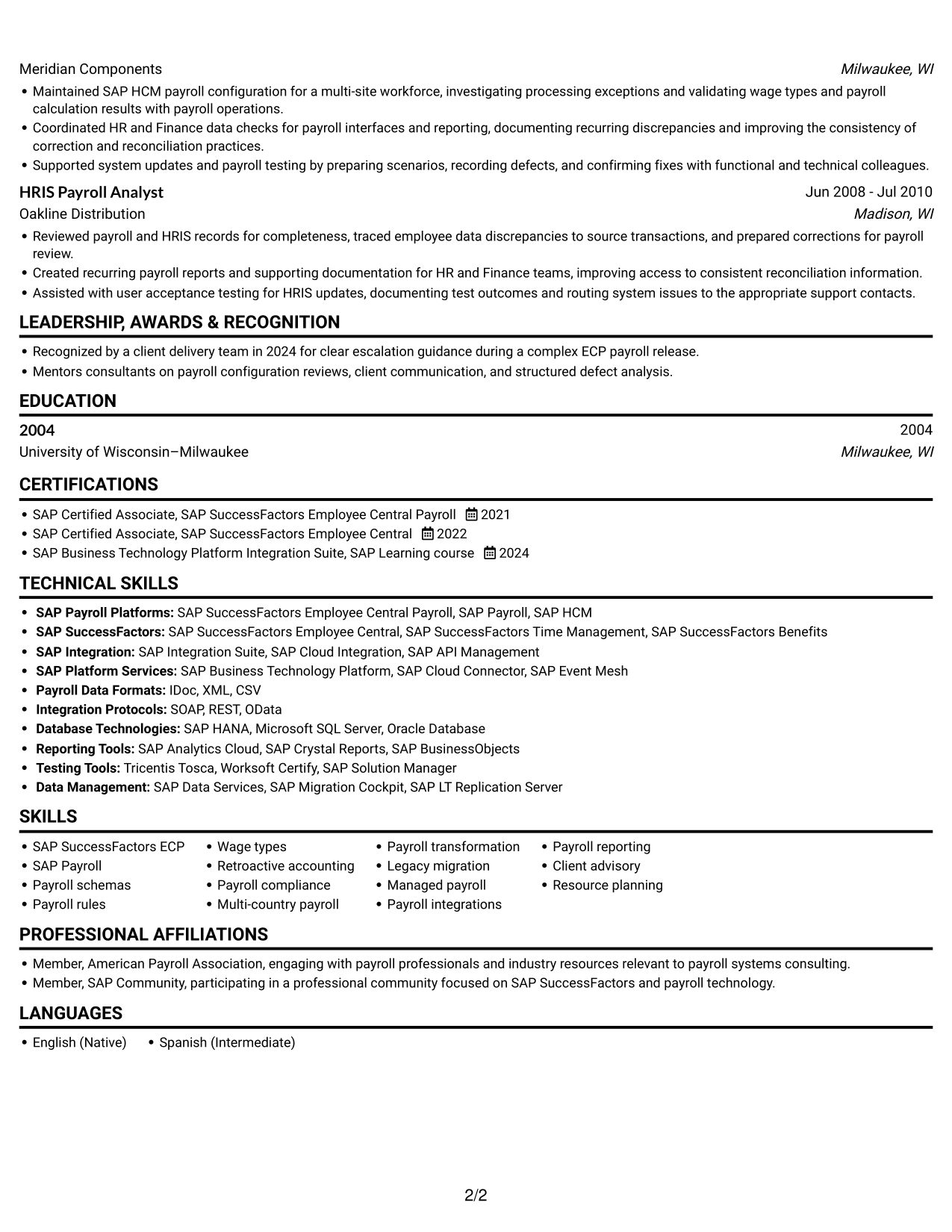
#2 Simple Two Column Format Resume Example

The Simple Two Column Format places resume content in two reading areas, helping reviewers compare sections without following one long text stream.
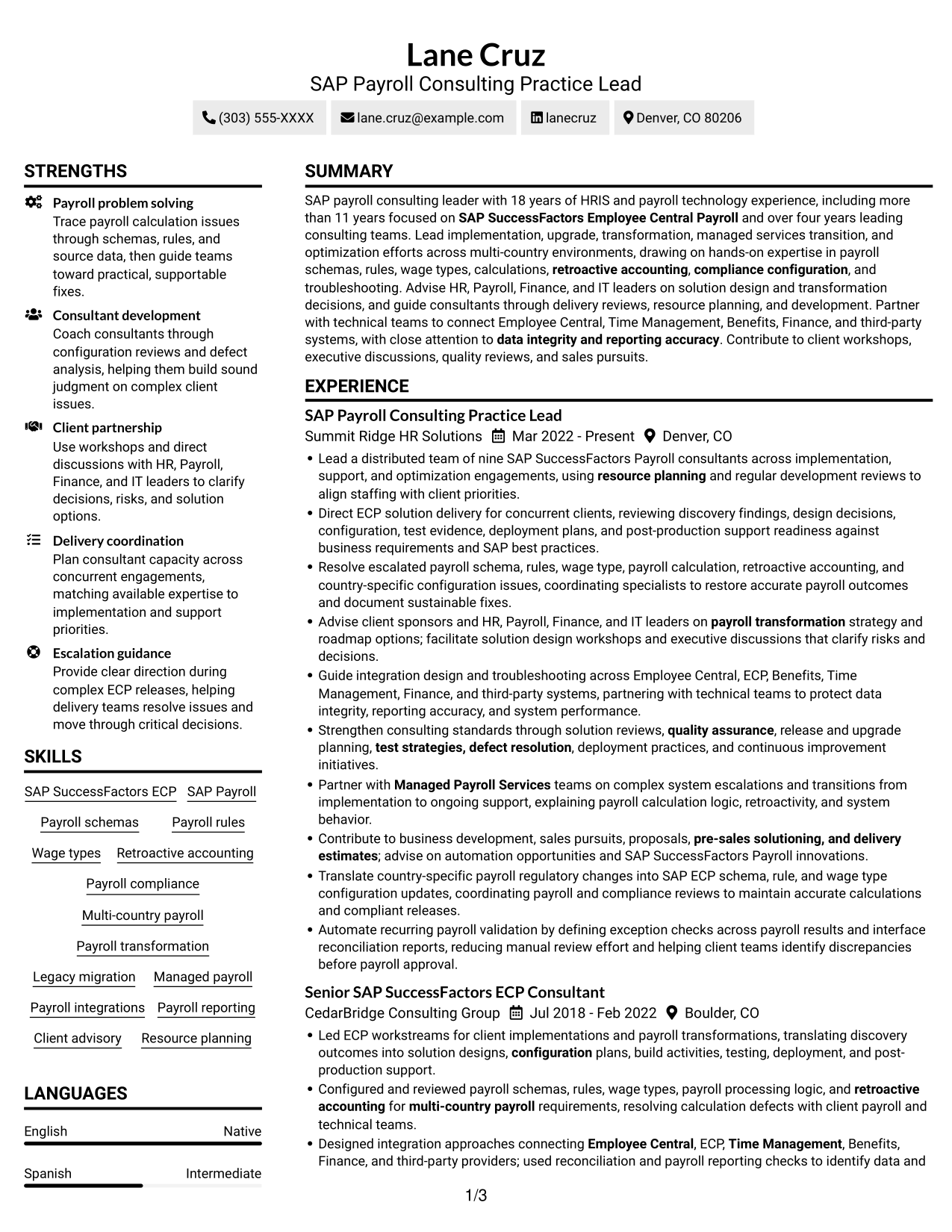
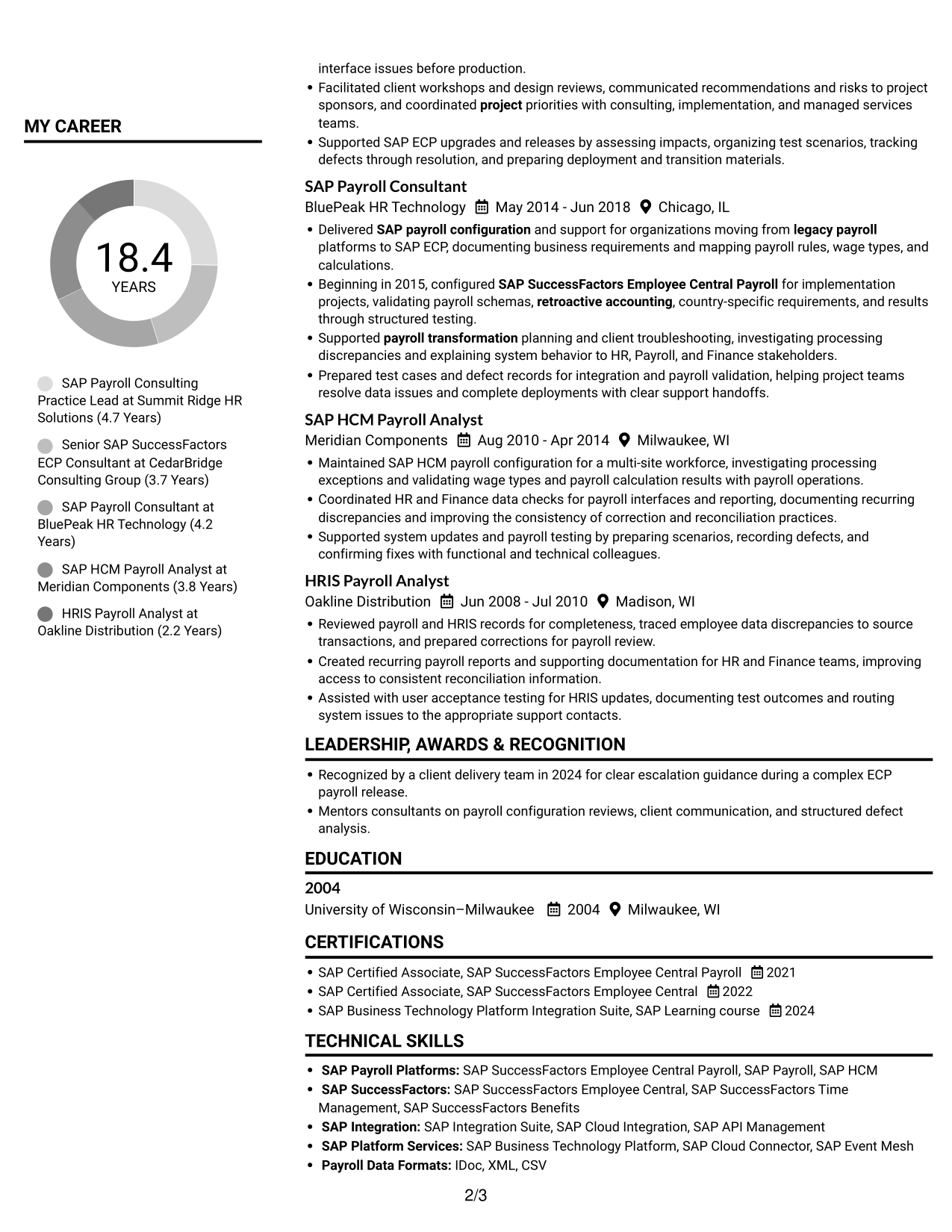
 
Resume example — page 1   Resume example — page 2

Why This Format Works

  • Two columns give career history and supporting sections distinct reading areas.
  • The structure lets reviewers move between experience and credentials with less scrolling.
  • Using both sides of the page can keep detailed resume content organized.

Best For

  • Side-by-side section organization
  • Dense resume information
  • Quick comparisons across sections
  • Text-only document preference
  • Skills and experience in separate areas

#3 Plain One Column with Shaded Labels Resume Example

Plain One Column with Shaded Labels keeps the resume in a single text path, a useful choice for readers who prefer a direct, section-by-section review.
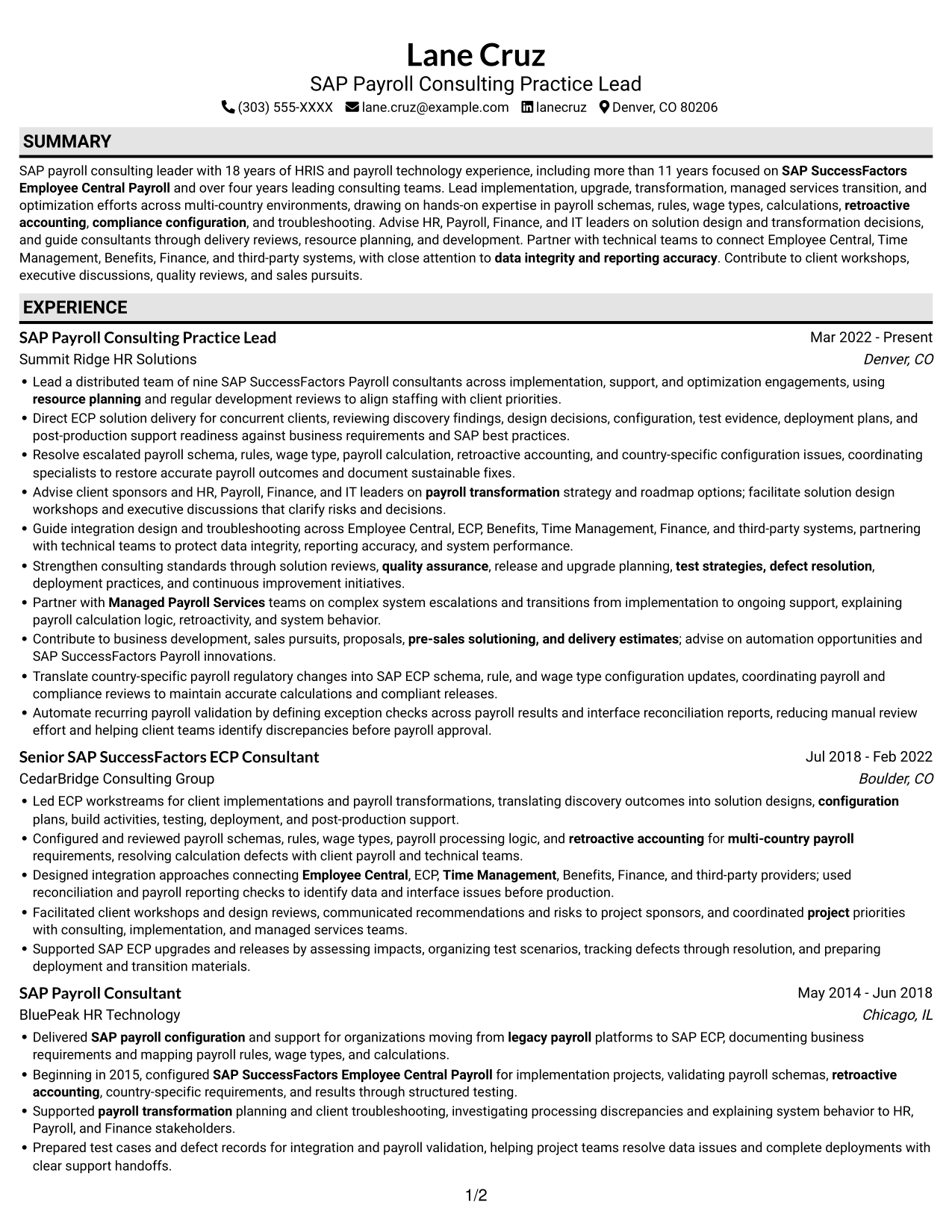
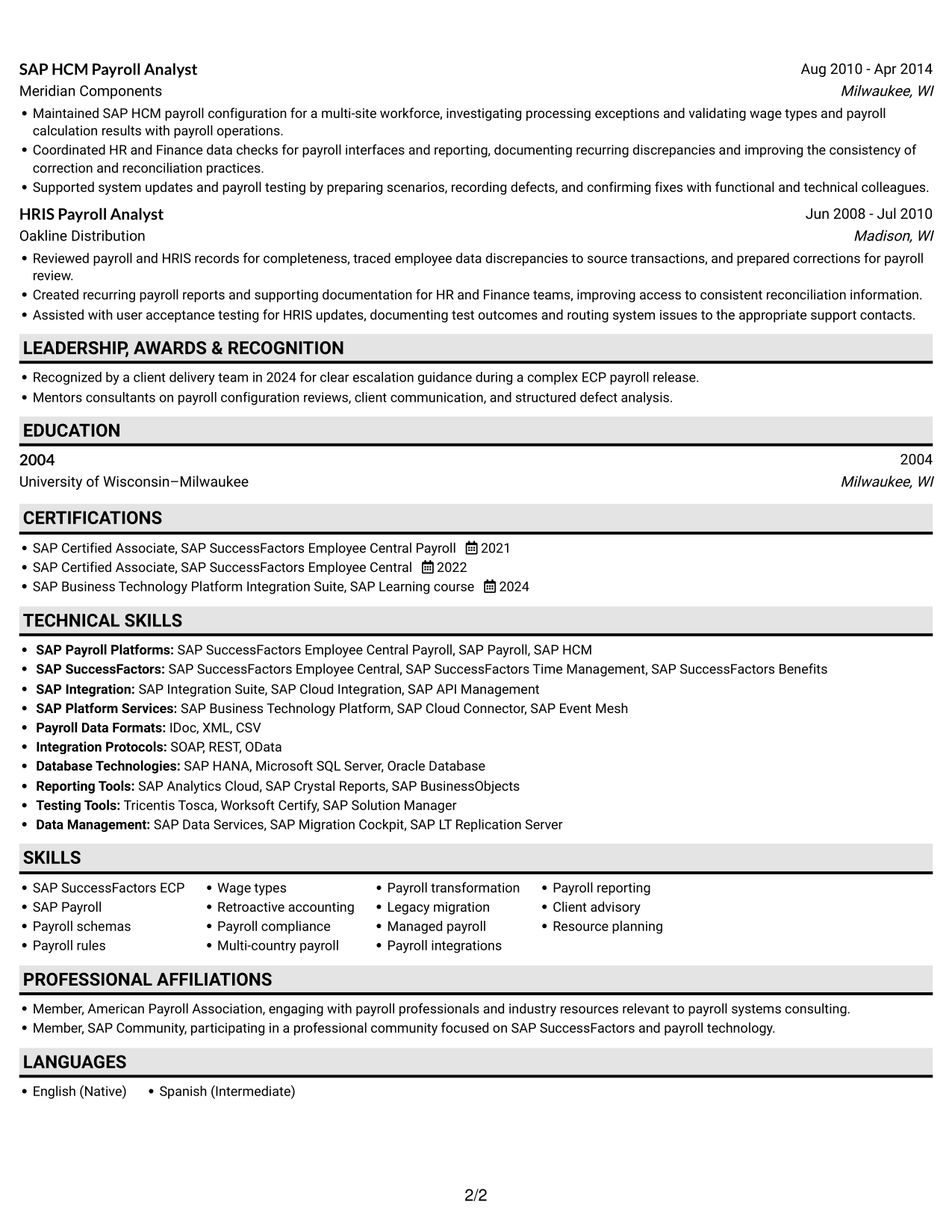
 
Resume example — page 1   Resume example — page 2

Why This Format Works

  • The vertical flow helps reviewers trace career progression across successive roles.
  • A single text path keeps education and credentials within the same review sequence.
  • Experience bullets can present context and achievements without a second column.

Best For

  • Single-path resume reading
  • Long experience sections
  • Text-only application documents
  • Education details in a clear sequence
  • Straightforward ATS review
 

#4 One Column Format with Photo Right Resume Example

One Column Format with Photo Right combines a vertical resume reading path with a photo, bringing a personal visual element to a text-focused document.
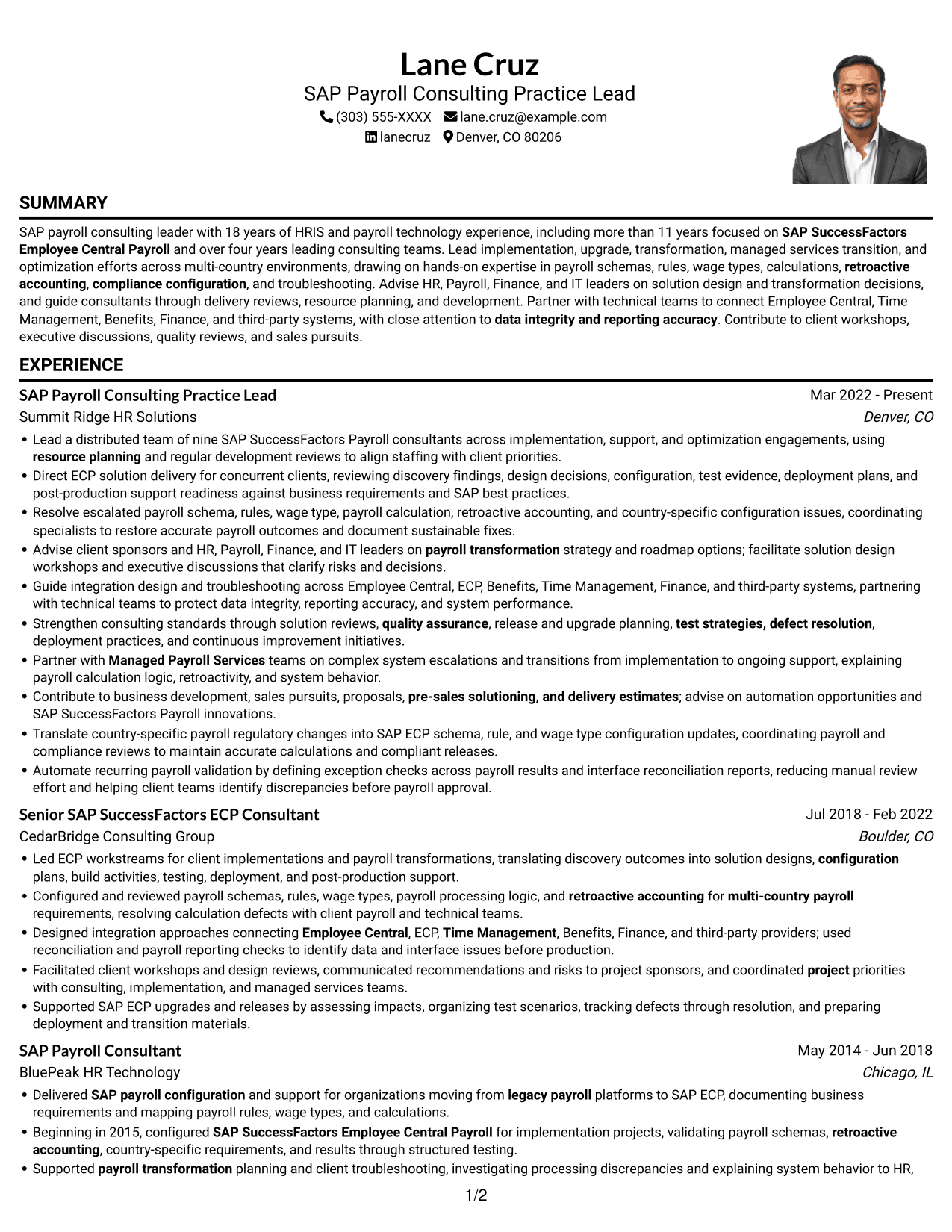
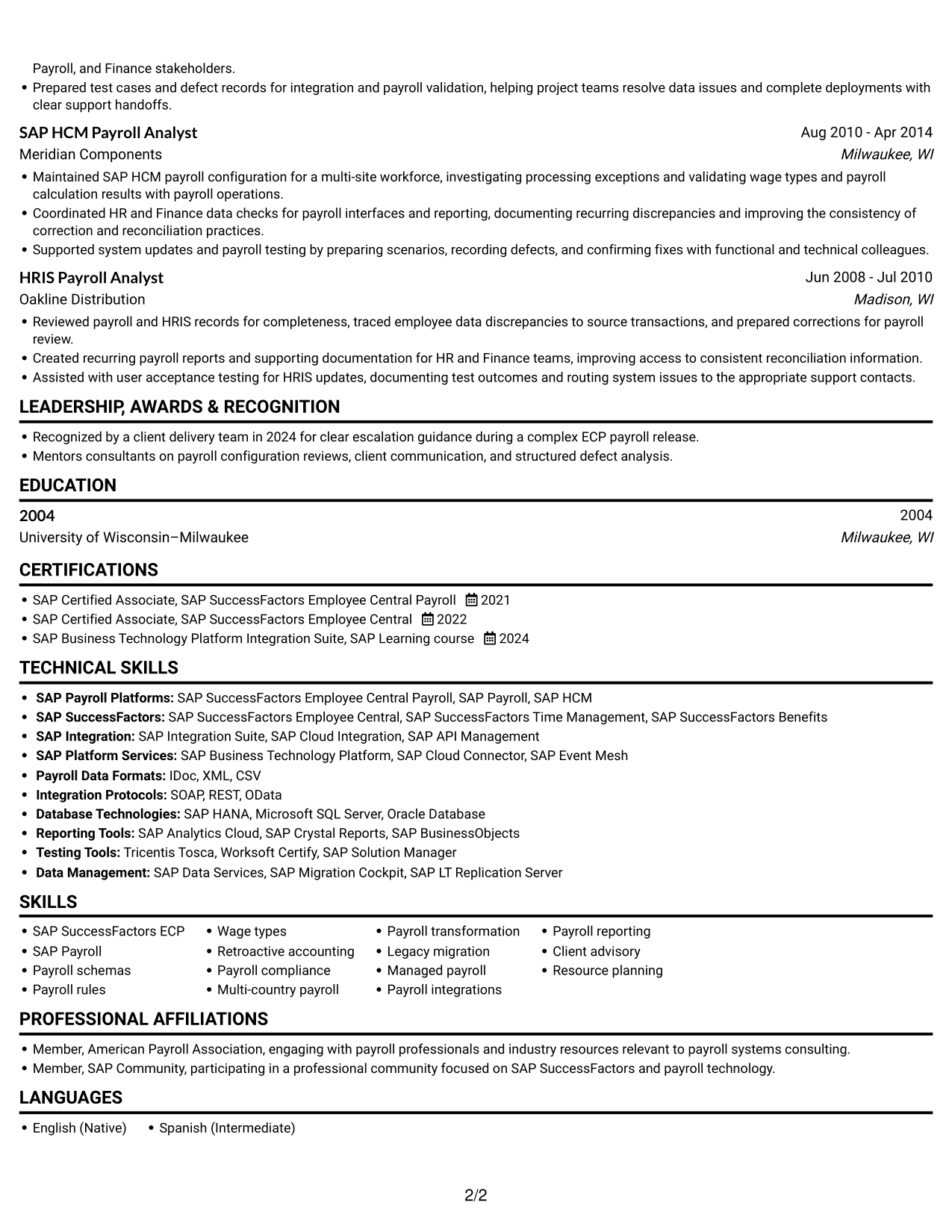
 
Resume example — page 1   Resume example — page 2

Why This Format Works

  • The single-column body gives reviewers one clear route through work history.
  • A continuous text area keeps skills and credentials within the same reading path.
  • The included photo adds a visual element without dividing resume content into columns.

Best For

  • Photo-inclusive resume presentation
  • Straightforward vertical reading
  • Role-by-role career histories
  • Text and portrait together
  • Detailed experience sections
 

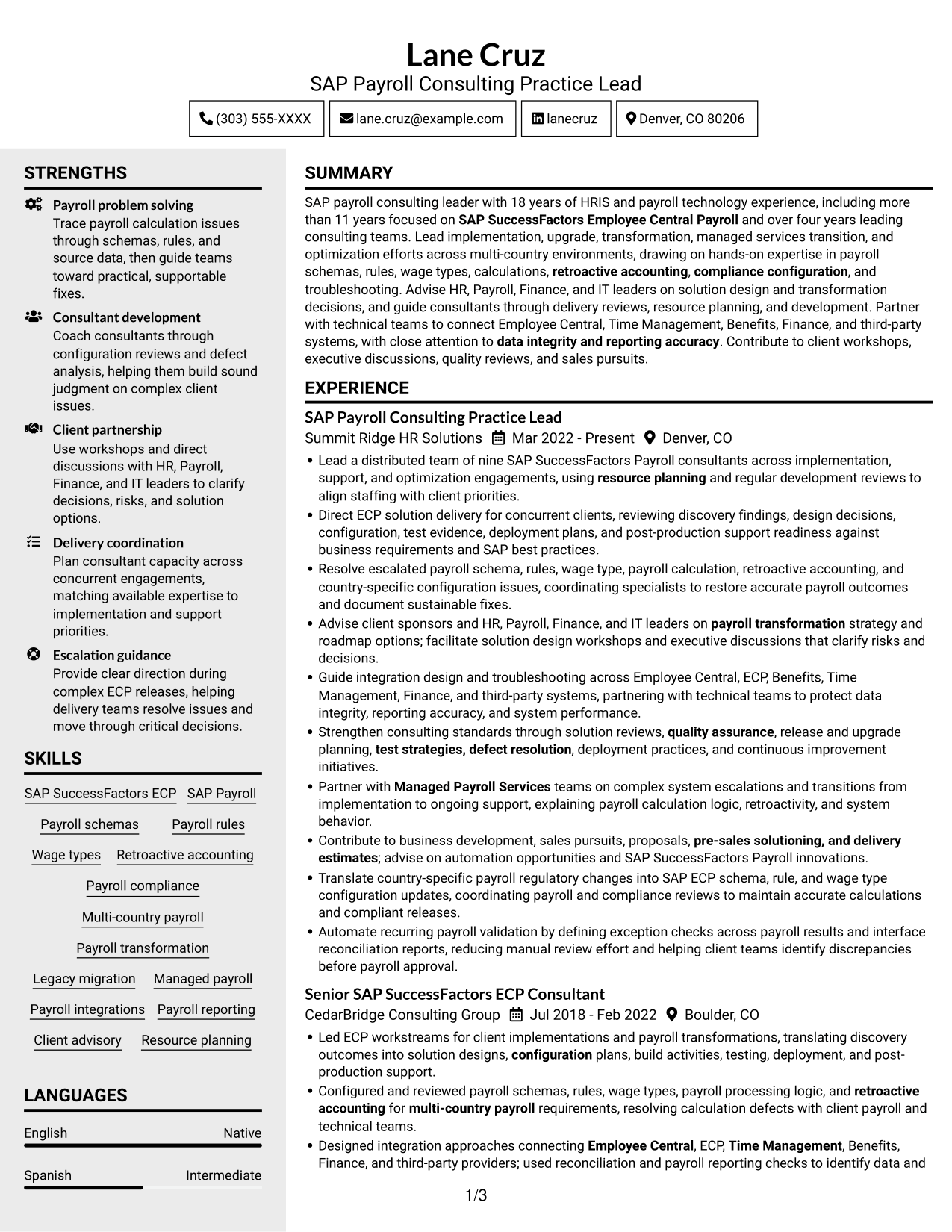
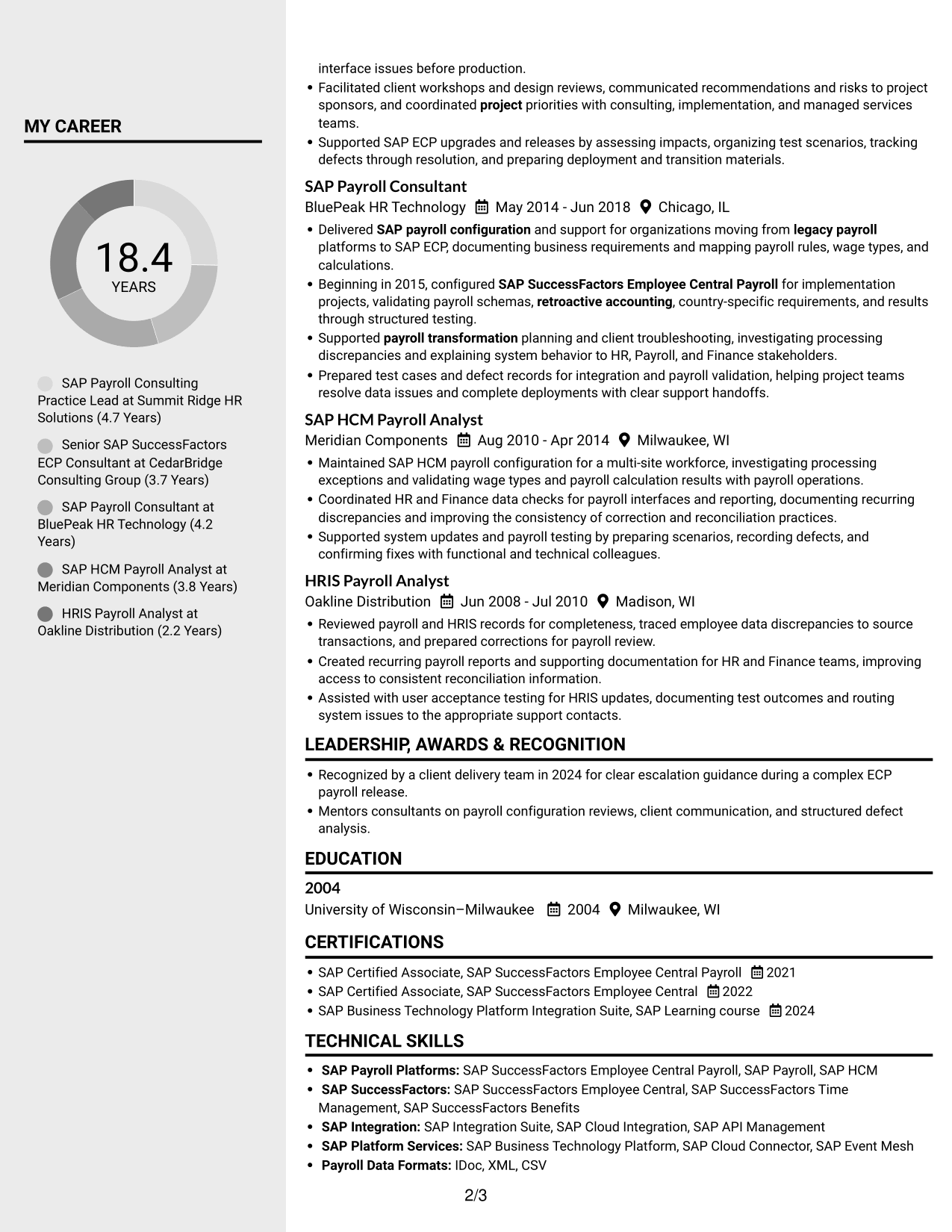
#5 Clean Two Column Sidebar Format Resume Example

Clean Two Column Sidebar Format uses two areas for resume content, making it a practical choice when a compact view of related sections matters.
 
Resume example — page 1   Resume example — page 2

Why This Format Works

  • Two-column organization separates career details from other resume sections.
  • The compact structure helps reviewers scan skills alongside broader career information.
  • Distinct reading areas make a large set of resume details easier to navigate.

Best For

  • Compact section organization
  • Large sets of resume details
  • Fast navigation between sections
  • Text-only application documents
  • Skills and career information together


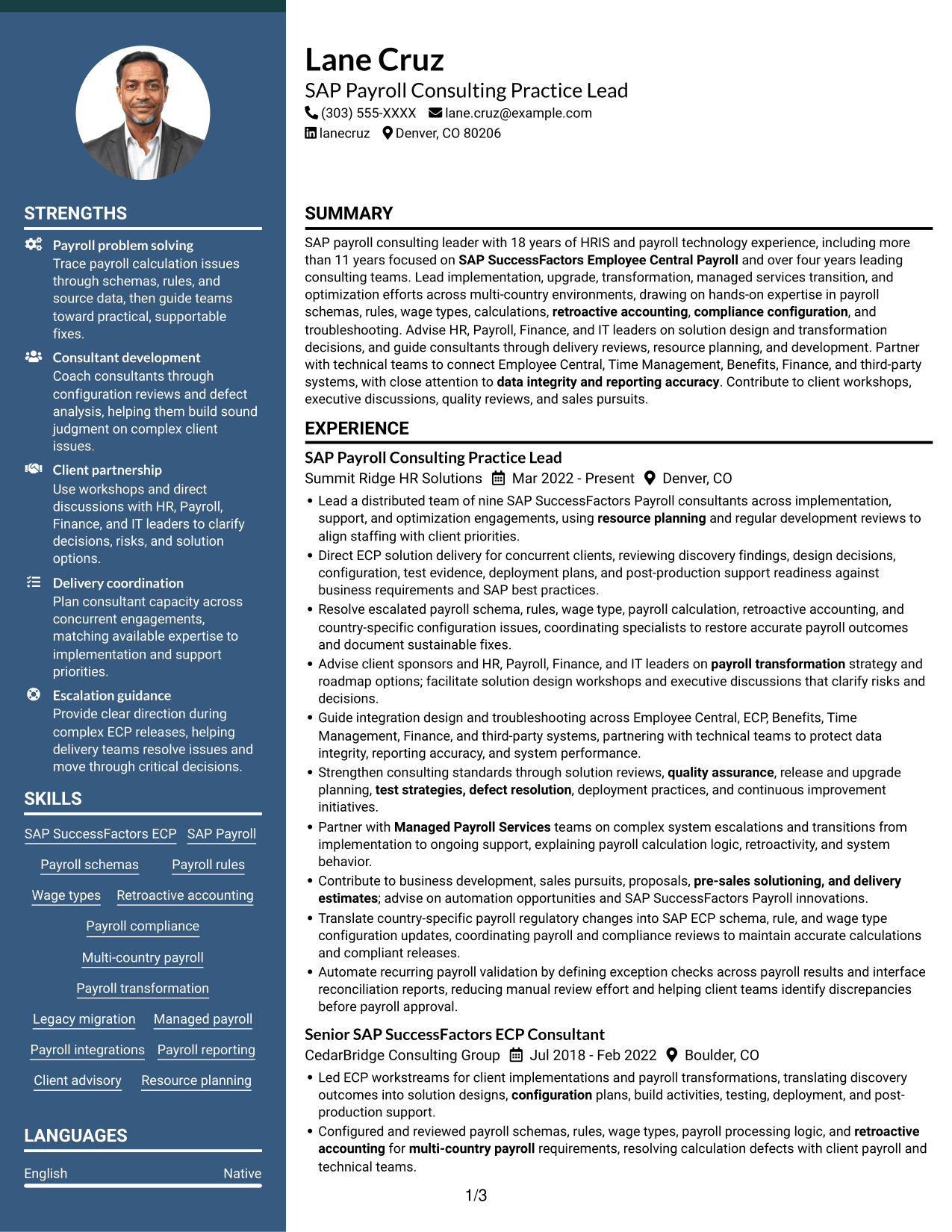
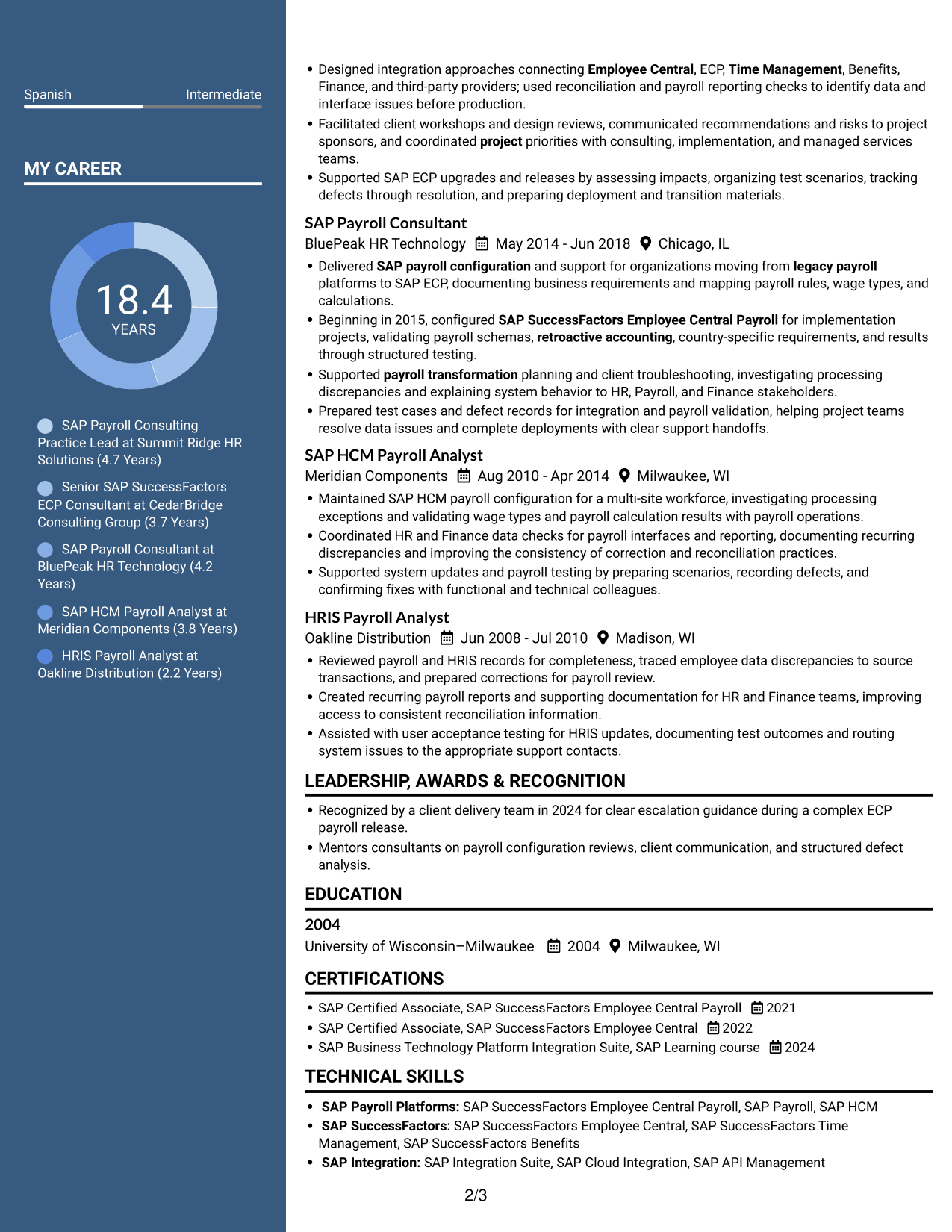
#6 Two Column Format Resume Example

Two Column Format spreads resume content across two reading areas, offering an organized way to review several kinds of information together.
 
Resume example — page 1   Resume example — page 2

Why This Format Works

  • The two-column body lets reviewers navigate career history and credentials across separate areas.
  • A structured reading order keeps work experience easy to follow.
  • The layout can accommodate detailed skills and education content in a compact view.

Best For

  • Parallel section organization
  • Dense information across two areas
  • Quick movement among resume sections
  • Text-only resume preference
  • Experience with supporting credentials
 

#7 Photo Header Two Column Format Resume Example

Photo Header Two Column Format pairs two resume reading areas with a photo, combining a split content layout with a personal visual element.
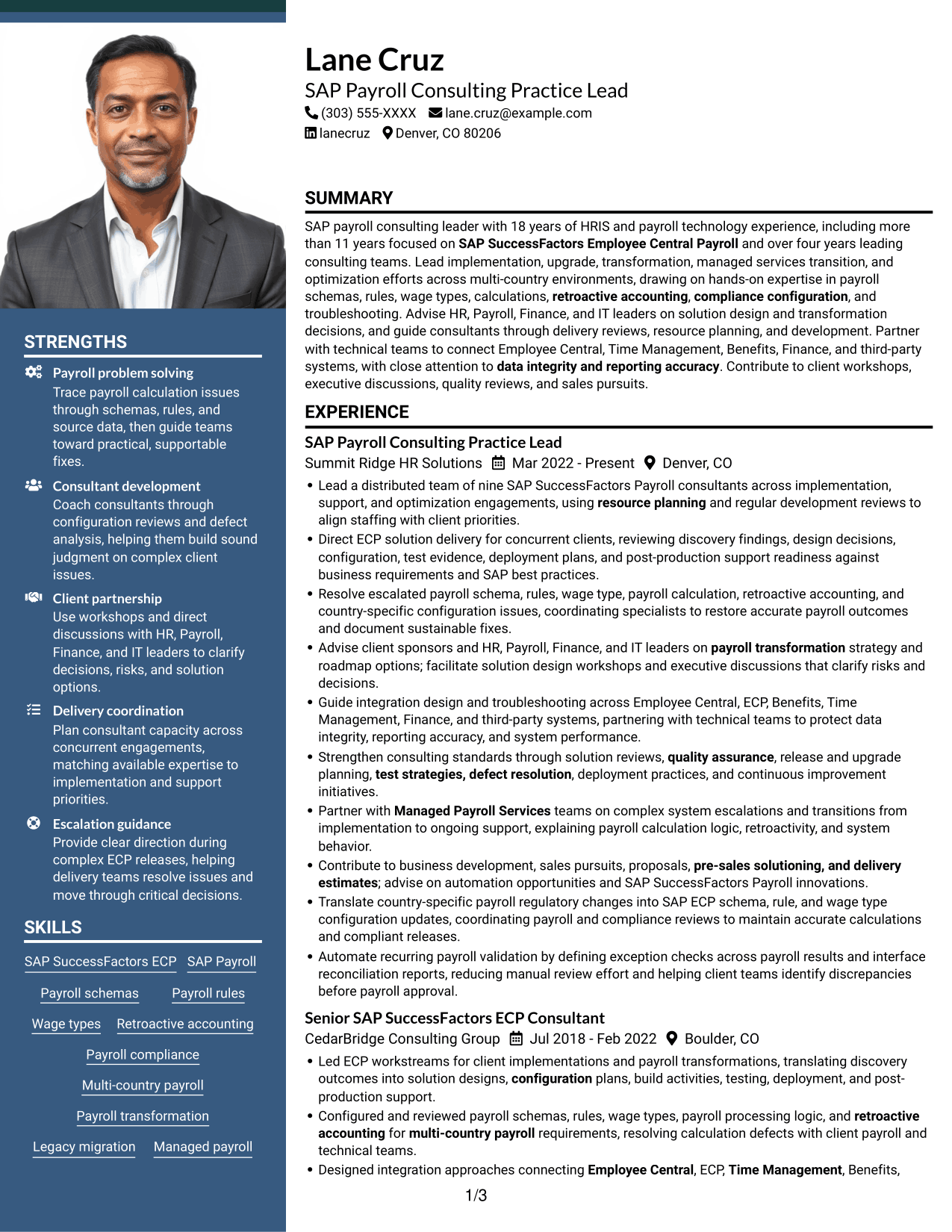
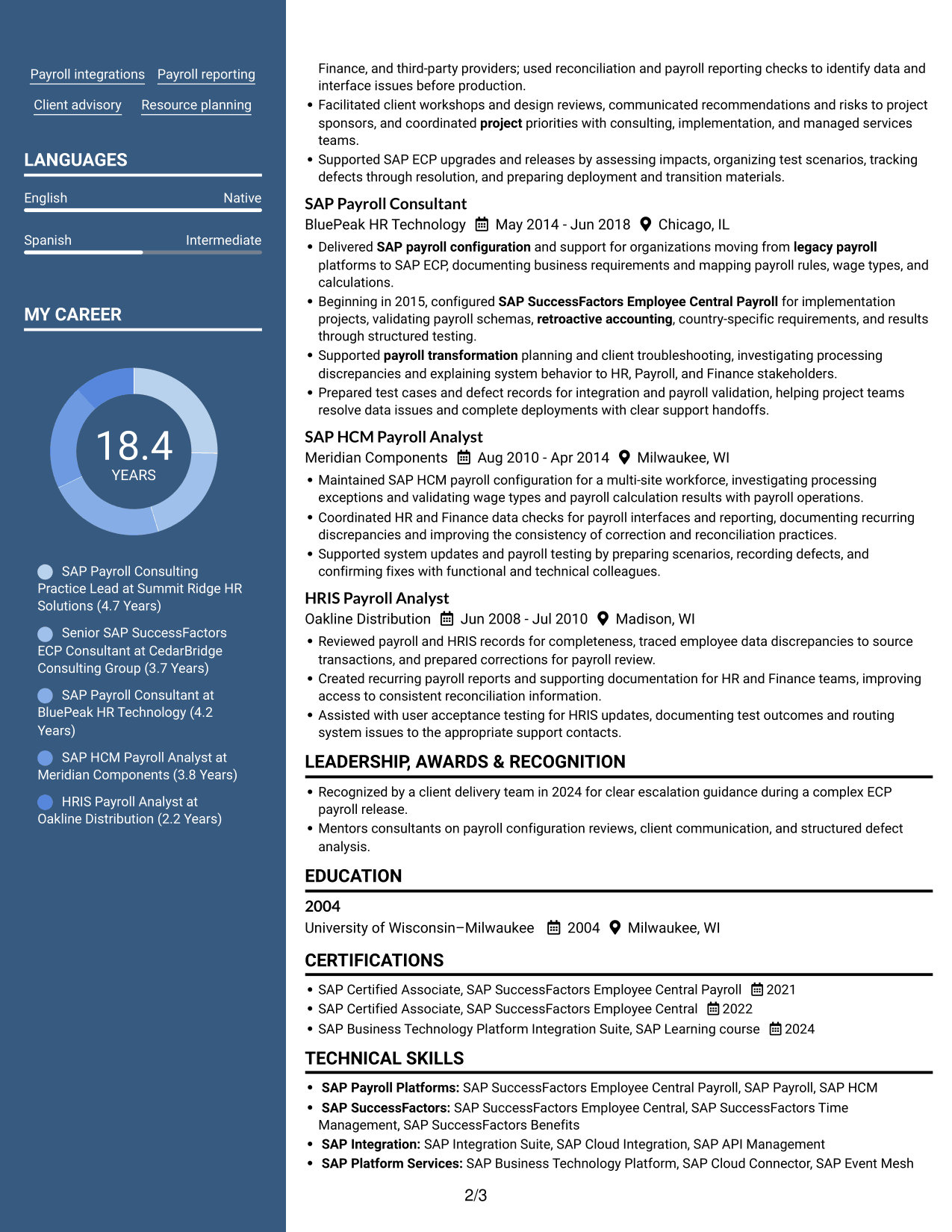
 
Resume example — page 1   Resume example — page 2

Why This Format Works

  • Two reading areas help reviewers locate experience and supporting resume sections.
  • The organized structure makes it easier to move between career details and qualifications.
  • An included photo adds a visual feature while the resume content remains arranged in columns.

Best For

  • Photo-inclusive two-column layout
  • Separate resume reading areas
  • Career details with supporting sections
  • Text and portrait together
  • Quick section navigation


Why Build Your SAP SuccessFactors Employee Central Payroll (ECP) Consultant/Manager Resume with ResumeInMinutes

ResumeInMinutes offers resume examples you can compare as image previews and open in the editor. Use the layout as a starting point, then organize your experience and skills around the ECP work you want readers to notice.

  • Clear resume section structure
  • ATS-readable headings
  • Role-specific keyword guidance
  • Space for delivery achievements
  • Skills and certification organization
  • Editor-based resume customization

Keep your strongest evidence easy to scan. Feature relevant implementation, configuration, client advisory, and team development work, and use measurable results when you can support them.


See Also


Frequently Asked Questions

Are these SAP SuccessFactors Employee Central Payroll (ECP) resume templates ATS-friendly?

The examples use clear headings and a readable section order. Include role-related terms such as payroll schemas, wage types, retroactive accounting, payroll integrations, testing, and consulting delivery where they match your experience.

How should I compare the resume examples?

Review the PNG image previews to compare each layout's section order and use of space. Open an example in the editor if you want to customize its structure.

What should an ECP Consultant/Manager resume include?

Include a focused summary, relevant experience, technical skills, education, and certifications. Use concise bullets to show implementation work, configuration expertise, client guidance, team leadership, integrations, and measurable outcomes.

How can I show payroll expertise without making the resume hard to scan?

Group related skills, then use experience bullets to show how you applied them. For example, explain how you handled schema or wage type changes, resolved payroll issues, supported a release, or improved testing and reconciliation.

Should I include SAP certifications on my resume?

List relevant, current certifications with their official names and completion dates. SAP SuccessFactors Employee Central Payroll and Employee Central credentials can help readers identify your platform knowledge.

Should I include a photo on my resume?

Include a photo only if it is customary or expected in your country, region, or industry. For U.S. applications, a no-photo resume is generally the safer choice.


ATS Score 95%

How we calculate this score

  • Keywords: 60% of the total. AI extracts keywords from your job description. If you do not provide one, a standard job description for the title matching your resume is used. This is not a match to a specific vacancy.
  • Text-based resume: 20%. The text resume assessed here receives 100 for this part.
  • Resume quality: 20%. We start at 100 and subtract points for issues found by our resume checks, down to a minimum of zero.
  • Keyword coverage = round(100 × confirmed matches ÷ total keywords). Exact matches and supported equivalents verified by AI receive full credit; unsupported keywords receive none. Live text checks use the saved equivalents and do not request a new AI review. Without keywords, no overall ATS score is available.
  • Final score = 60% of keyword coverage + 20% of the text score + 20% of the quality score, rounded to a whole number. Without keywords, no overall ATS score is available.

What this score means

Our scores are estimates, not employer ratings. They may contain errors and do not guarantee accurate parsing, a ranking, an interview, or a job. Check your document against the employer’s requirements. You are responsible for relying on this score.

Terms and Conditions

Score weights: Keywords 60% · Text based resume 20% · Resume quality 20%

Keyword coverage: 34 of 37 (92%) · Resume quality: 100%

Resume quality 100% · Weight 20% · Issues (0)

Details
  • ✓Name present: Lane Cruz
  • ✓Email format: lane.cruz@example.com
  • ✓Phone format: (303) 555-XXXX
  • ✓Experience 1: Job title: SAP Payroll Consulting Practice Lead
  • ✓Experience 1: Company name: Summit Ridge HR Solutions
  • ✓Experience 1: Work location: Denver, CO
  • ✓Experience 1: Employment dates: Mar 2022 - Present
  • ✓Experience 1: Description or achievements: Present
  • ✓Experience 2: Job title: Senior SAP SuccessFactors ECP Consultant
  • ✓Experience 2: Company name: CedarBridge Consulting Group
  • ✓Experience 2: Work location: Boulder, CO
  • ✓Experience 2: Employment dates: Jul 2018 - Feb 2022
  • ✓Experience 2: Description or achievements: Present
  • ✓Experience 3: Job title: SAP Payroll Consultant
  • ✓Experience 3: Company name: BluePeak HR Technology
  • ✓Experience 3: Work location: Chicago, IL
  • ✓Experience 3: Employment dates: May 2014 - Jun 2018
  • ✓Experience 3: Description or achievements: Present
  • ✓Experience 4: Job title: SAP HCM Payroll Analyst
  • ✓Experience 4: Company name: Meridian Components
  • ✓Experience 4: Work location: Milwaukee, WI
  • ✓Experience 4: Employment dates: Aug 2010 - Apr 2014
  • ✓Experience 4: Description or achievements: Present
  • ✓Experience 5: Job title: HRIS Payroll Analyst
  • ✓Experience 5: Company name: Oakline Distribution
  • ✓Experience 5: Work location: Madison, WI
  • ✓Experience 5: Employment dates: Jun 2008 - Jul 2010
  • ✓Experience 5: Description or achievements: Present
  • ✓No placeholder fields
  • ✓No repeated achievement bullets
  • ✓No empty bullets

No issues found by the current checks.

Text Based Resume 100% · Weight 20%

Parsed text
Lane Cruz
(303) 555-XXXX
lane.cruz@example.com
lanecruz
Denver, CO 80206
SUMMARY
SAP payroll consulting leader with 18 years of HRIS and payroll technology experience, including more than 11 years focused on SAP SuccessFactors Employee Central Payroll and over four years leading consulting teams. Lead implementation, upgrade, transformation, managed services transition, and optimization efforts across multi-country environments, drawing on hands-on expertise in payroll schemas, rules, wage types, calculations, retroactive accounting, compliance configuration, and troubleshooting. Advise HR, Payroll, Finance, and IT leaders on solution design and transformation decisions, and guide consultants through delivery reviews, resource planning, and development. Partner with technical teams to connect Employee Central, Time Management, Benefits, Finance, and third-party systems, with close attention to data integrity and reporting accuracy. Contribute to client workshops, executive discussions, quality reviews, and sales pursuits.
EXPERIENCE
SAP Payroll Consulting Practice Lead
Mar 2022 - Present
Summit Ridge HR Solutions
Denver, CO
Lead a distributed team of nine SAP SuccessFactors Payroll consultants across implementation, support, and optimization engagements, using resource planning and regular development reviews to align staffing with client priorities.
Direct ECP solution delivery for concurrent clients, reviewing discovery findings, design decisions, configuration, test evidence, deployment plans, and post-production support readiness against business requirements and SAP best practices.
Resolve escalated payroll schema, rules, wage type, payroll calculation, retroactive accounting, and country-specific configuration issues, coordinating specialists to restore accurate payroll outcomes and document sustainable fixes.
Advise client sponsors and HR, Payroll, Finance, and IT leaders on payroll transformation strategy and roadmap options; facilitate solution design workshops and executive discussions that clarify risks and decisions.
Guide integration design and troubleshooting across Employee Central, ECP, Benefits, Time Management, Finance, and third-party systems, partnering with technical teams to protect data integrity, reporting accuracy, and system performance.
Strengthen consulting standards through solution reviews, quality assurance, release and upgrade planning, test strategies, defect resolution, deployment practices, and continuous improvement initiatives.
Partner with Managed Payroll Services teams on complex system escalations and transitions from implementation to ongoing support, explaining payroll calculation logic, retroactivity, and system behavior.
Contribute to business development, sales pursuits, proposals, pre-sales solutioning, and delivery estimates; advise on automation opportunities and SAP SuccessFactors Payroll innovations.
Translate country-specific payroll regulatory changes into SAP ECP schema, rule, and wage type configuration updates, coordinating payroll and compliance reviews to maintain accurate calculations and compliant releases.
Automate recurring payroll validation by defining exception checks across payroll results and interface reconciliation reports, reducing manual review effort and helping client teams identify discrepancies before payroll approval.
Senior SAP SuccessFactors ECP Consultant
Jul 2018 - Feb 2022
CedarBridge Consulting Group
Boulder, CO
Led ECP workstreams for client implementations and payroll transformations, translating discovery outcomes into solution designs, configuration plans, build activities, testing, deployment, and post-production support.
Configured and reviewed payroll schemas, rules, wage types, payroll processing logic, and retroactive accounting for multi-country payroll requirements, resolving calculation defects with client payroll and technical teams.
Designed integration approaches connecting Employee Central, ECP, Time Management, Benefits, Finance, and third-party providers; used reconciliation and payroll reporting checks to identify data and interface issues before production.
Facilitated client workshops and design reviews, communicated recommendations and risks to project sponsors, and coordinated project priorities with consulting, implementation, and managed services teams.
Supported SAP ECP upgrades and releases by assessing impacts, organizing test scenarios, tracking defects through resolution, and preparing deployment and transition materials.
SAP Payroll Consultant
May 2014 - Jun 2018
BluePeak HR Technology
Chicago, IL
Delivered SAP payroll configuration and support for organizations moving from legacy payroll platforms to SAP ECP, documenting business requirements and mapping payroll rules, wage types, and calculations.
Beginning in 2015, configured SAP SuccessFactors Employee Central Payroll for implementation projects, validating payroll schemas, retroactive accounting, country-specific requirements, and results through structured testing.
Supported payroll transformation planning and client troubleshooting, investigating processing discrepancies and explaining system behavior to HR, Payroll, and Finance stakeholders.
Prepared test cases and defect records for integration and payroll validation, helping project teams resolve data issues and complete deployments with clear support handoffs.
SAP HCM Payroll Analyst
Aug 2010 - Apr 2014
Meridian Components
Milwaukee, WI
Maintained SAP HCM payroll configuration for a multi-site workforce, investigating processing exceptions and validating wage types and payroll calculation results with payroll operations.
Coordinated HR and Finance data checks for payroll interfaces and reporting, documenting recurring discrepancies and improving the consistency of correction and reconciliation practices.
Supported system updates and payroll testing by preparing scenarios, recording defects, and confirming fixes with functional and technical colleagues.
HRIS Payroll Analyst
Jun 2008 - Jul 2010
Oakline Distribution
Madison, WI
Reviewed payroll and HRIS records for completeness, traced employee data discrepancies to source transactions, and prepared corrections for payroll review.
Created recurring payroll reports and supporting documentation for HR and Finance teams, improving access to consistent reconciliation information.
Assisted with user acceptance testing for HRIS updates, documenting test outcomes and routing system issues to the appropriate support contacts.
LEADERSHIP, AWARDS & RECOGNITION
Recognized by a client delivery team in 2024 for clear escalation guidance during a complex ECP payroll release.
Mentors consultants on payroll configuration reviews, client communication, and structured defect analysis.
EDUCATION
2004
2004
University of Wisconsin–Milwaukee
Milwaukee, WI
CERTIFICATIONS
SAP Certified Associate, SAP SuccessFactors Employee Central Payroll
2021
SAP Certified Associate, SAP SuccessFactors Employee Central
2022
SAP Business Technology Platform Integration Suite, SAP Learning course
2024
TECHNICAL SKILLS
SAP Payroll Platforms: SAP SuccessFactors Employee Central Payroll, SAP Payroll, SAP HCM
SAP SuccessFactors: SAP SuccessFactors Employee Central, SAP SuccessFactors Time Management, SAP SuccessFactors Benefits
SAP Integration: SAP Integration Suite, SAP Cloud Integration, SAP API Management
SAP Platform Services: SAP Business Technology Platform, SAP Cloud Connector, SAP Event Mesh
Payroll Data Formats: IDoc, XML, CSV
Integration Protocols: SOAP, REST, OData
Database Technologies: SAP HANA, Microsoft SQL Server, Oracle Database
Reporting Tools: SAP Analytics Cloud, SAP Crystal Reports, SAP BusinessObjects
Testing Tools: Tricentis Tosca, Worksoft Certify, SAP Solution Manager
Data Management: SAP Data Services, SAP Migration Cockpit, SAP LT Replication Server
SKILLS
SAP SuccessFactors ECP
SAP Payroll
Payroll schemas
Payroll rules
Wage types
Retroactive accounting
Payroll compliance
Multi-country payroll
Payroll transformation
Legacy migration
Managed payroll
Payroll integrations
Payroll reporting
Client advisory
Resource planning
PROFESSIONAL AFFILIATIONS
Member, American Payroll Association, engaging with payroll professionals and industry resources relevant to payroll systems consulting.
Member, SAP Community, participating in a professional community focused on SAP SuccessFactors and payroll technology.
LANGUAGES
English (Native)
Spanish (Intermediate)

Matched keywords (34)

  • implementationOriginal keyword in JD: 3+ years leading consulting OR implementation OR support teams
  • SAP SuccessFactors Employee Central PayrollOriginal keyword in JD: SAP SuccessFactors Employee Central Payroll (ECP)
  • hands-on expertise in payroll schemas, rules, wage typesOriginal keyword in JD: Payroll schemas, rules, and wage types
  • calculationsOriginal keyword in JD: Payroll processing logic and calculations
  • retroactive accounting
  • compliance configurationOriginal keyword in JD: Payroll compliance configuration
  • Direct ECP solution deliveryOriginal keyword in JD: SAP ECP implementation leadership
  • payroll transformationOriginal keyword in JD: Payroll transformations
  • Supported SAP ECP upgradesOriginal keyword in JD: SAP Payroll upgrades
  • Partner with Managed Payroll Services teams on complex system escalations and transitions from implementation to ongoing supportOriginal keyword in JD: Managed payroll services engagements
  • Lead implementation, upgrade, transformation, managed services transition, and optimization effortsOriginal keyword in JD: Consulting delivery leadership
  • using resource planning and regular development reviewsOriginal keyword in JD: Consultant coaching and development
  • coordinated project priorities with consulting, implementation, and managed services teamsOriginal keyword in JD: Multiple project coordination and prioritization
  • Designed integration approaches connecting Employee Central, ECP, Time Management, Benefits, Finance, and third-party providersOriginal keyword in JD: Payroll integrations and interfaces
  • Designed integration approaches connecting Employee Central, ECP, Time Management, Benefits, Finance, and third-party providersOriginal keyword in JD: HR, Time, Benefits, and Finance system integrations
  • Direct ECP solution delivery for concurrent clients, reviewing discovery findings, design decisions, configurationOriginal keyword in JD: ECP solution design and configuration
  • translating discovery outcomes into solution designs, configuration plans, build activities, testing, deployment, and post-production supportOriginal keyword in JD: Full implementation lifecycle
  • Resolve escalated payroll schema, rules, wage type, payroll calculation, retroactive accounting, and country-specific configuration issuesOriginal keyword in JD: Payroll troubleshooting
  • multi-country payroll
  • Strengthen consulting standards through solution reviews, quality assuranceOriginal keyword in JD: Quality assurance and delivery standards
  • test strategies, defect resolutionOriginal keyword in JD: Testing strategy and defect resolution
  • data integrity and reporting accuracy
  • partnering with technical teams to protect data integrity, reporting accuracy, and system performanceOriginal keyword in JD: System performance optimization
  • Advise client sponsors and HR, Payroll, Finance, and IT leaders on payroll transformation strategy and roadmap optionsOriginal keyword in JD: Stakeholder management
  • facilitate solution design workshops and executive discussionsOriginal keyword in JD: Executive workshops and presentations
  • resource planning
  • Contribute to business development, sales pursuitsOriginal keyword in JD: Business development and sales pursuits
  • pre-sales solutioning, and delivery estimates
  • Delivered SAP payroll configuration and support for organizations moving from legacy payroll platforms to SAP ECPOriginal keyword in JD: Legacy payroll migration to SAP ECP
  • SAP SuccessFactors Employee Central
  • SAP SuccessFactors Time ManagementOriginal keyword in JD: SAP Time Management
  • SAP Business Technology PlatformOriginal keyword in JD: SAP Business Technology Platform (BTP)
  • Automate recurring payroll validationOriginal keyword in JD: Payroll automation
  • Translate country-specific payroll regulatory changes into SAP ECP schema, rule, and wage type configuration updatesOriginal keyword in JD: Payroll regulatory interpretation

Missing keywords (3)

  • Bachelor's degree in Human Resources OR Bachelor's degree in Information Systems OR Bachelor's degree in Business Administration OR Bachelor's degree in Finance OR Bachelor's degree in a related discipline
  • Client advisory and relationship management
  • 7+ years of SAP Payroll experience
Disclaimer: All names, images, contact information, employment histories, achievements, security clearances, military credentials, and other qualifications shown in this content are fictional and used for illustrative purposes only. Any resemblance to actual persons, living or deceased, is purely coincidental.

Resume and cover-letter examples and recommendations in this article reflect general best practices and professional experience and are provided for guidance only. Results may vary based on role, industry, region, and hiring organization.

Content Accuracy and Verification: To the fullest extent permitted by applicable law, we do not represent or warrant that resume or cover-letter guidance, examples, recommendations, or related information are accurate, complete, current, error-free, or suitable for any particular purpose. You are responsible for independently reviewing and verifying the information before relying on it.

ATS and Cover-Letter Scores: ATS scores are estimates calculated using our own formula, informed by publicly available guidance on resume formatting and keyword matching. They are not scores issued or endorsed by an ATS provider or employer. Cover-letter scores are also our own assessments. Parsing, weighting, screening criteria, and results vary between systems, employers, job descriptions, and document formats. No score guarantees successful parsing, a particular ranking, an interview, or employment. Use scores as general guidance and independently check your documents against the employer’s requirements. To the fullest extent permitted by applicable law, we accept no liability for errors in scores or parsing, or losses arising from reliance on these assessments. Nothing in this notice excludes liability or limits consumer rights that cannot lawfully be excluded or limited.

Terms and Conditions
 
> JP 1 1
PDF Footer and Margins Setup
The margins are applied to the document, and the footer shows up in the preview and the PDF

Footer Font Settings

Are you applying for a specific job
so we can tailor your resume to it?
Are you applying for a specific job
so we can tailor your cover letter to it?

Your data stays private and is never used for training.Privacy Policy

Type your details as text to generate a personalized resume Type your details as text to generate a personalized cover letter
Website link found! Ready to create resume from:

Your data stays private and is never used for training.Privacy Policy

Drag the into the box to verify you're human.
Drop here

My Resumes

Displaying {number_of_files} files (out of {total_of_all_files} total)
Name File Type Last Modified: Description:

Rename File

Filename already exists!

Delete Files

Warning: This action is irreversible. Once you click submit, the files will be permanently deleted.

Heading text
Upload From Computer Upload
Select From Existing
LinkedIn
Drag & Drop files anywhere in this tab, or

Uploaded Files

Delete Name Last Updated Use This File
Select this to use the file for generating your resume and cover letter. Only one source—uploaded file, selected file, or LinkedIn text—can be used.

My Files

Resumes or cover letters you create will appear here. No files available yet.
Delete Name Last Updated Use This File
Select this to use the file for generating your resume and cover letter. Only one source—uploaded file, selected file, or LinkedIn text—can be used.

Add LinkedIn Profile PDF

You can download your LinkedIn profile as a PDF by opening linkedin.com in a web browser, clicking your profile photo, selecting the “More” or “Resources” button, and choosing “Save to PDF.” You can then attach the PDF using the Upload From Computer tab.

Paste Your LinkedIn Profile Text

If you have copied the LinkedIn profile text, paste it below. See how to copy your profile from LinkedIn

Select this to use the LinkedIn profile text for generating your resume and cover letter. Only one source—uploaded file, selected file, or LinkedIn text—can be used.

Try these controls

<
>


