
33 Senior Engineering Manager - Wealth Management Technology Resume Templates with Example 2026 (ATS-Optimized)
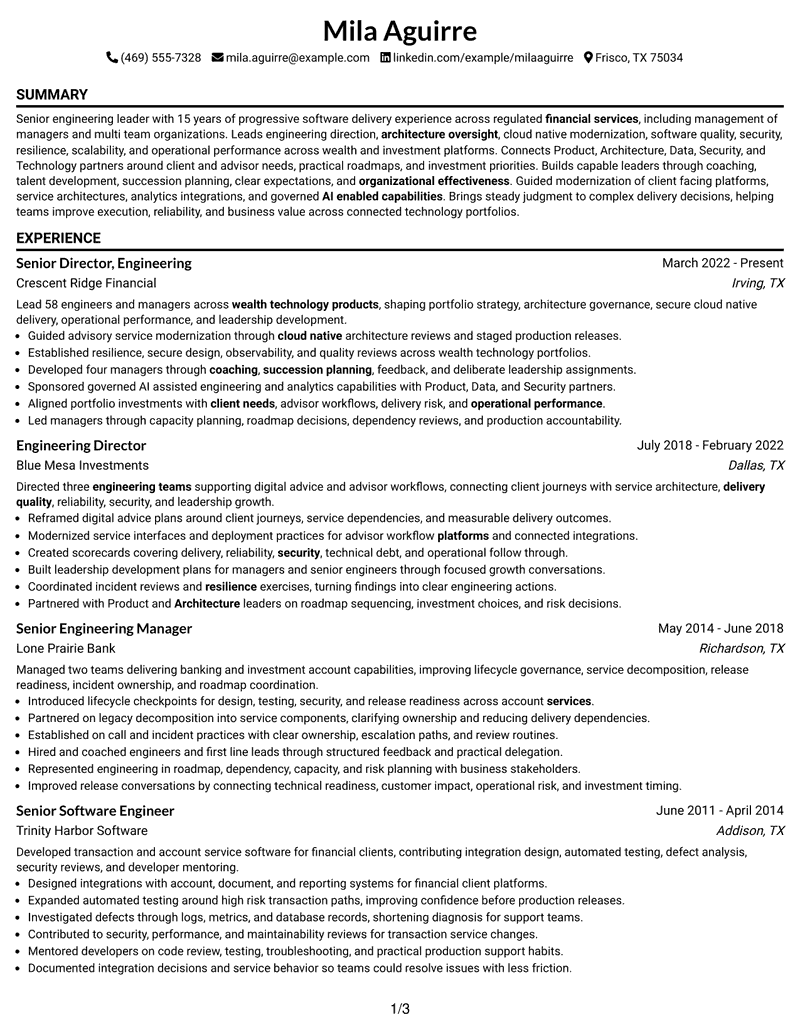
This guide shows you how to build a Senior Engineering Manager - Wealth Management Technology resume that is clear, focused, and easy to review. You will learn how to organize leadership evidence, technical direction, delivery accountability, and career progression across professional resume formats.
Strong resumes for this role connect people leadership with architecture, cloud-native engineering, secure delivery, resilience, operational excellence, and partnership across Product, Architecture, Data, Security, and Technology. Use concise achievement bullets, clear section hierarchy, and role-specific terms that ATS systems and recruiters can recognize quickly.
The same complete resume example appears in 33 ATS-friendly resume layouts, with free PDF downloads and practical notes to help you compare reading order, section balance, and visual presentation.
What Makes a Great Senior Engineering Manager - Wealth Management Technology Resume in 2026
Effective resumes show leadership scope, technology strategy, architecture oversight, delivery quality, security, resilience, and operational accountability in a fast-scanning structure.
Useful keyword alignment includes management of managers, wealth management technology, cloud-native engineering, SDLC, succession planning, incident management, observability, AI-enabled capabilities, and roadmaps.
The examples shown below are intentionally detailed to demonstrate a range of experiences, skills, accomplishments and relevant keywords. We prefer detailed resumes as they provide more context to the hiring managers and also help the ATS systems identify relevant qualifications and score your resume better for a match. But the length of a resume is an individual choice. If you want a one page resume, just keep the most relevant experience and information for the job. Note: Resume examples are for educational purposes only. Use only information that accurately reflects your experience and qualifications. References to real organizations do not imply affiliation or endorsement.
#1 Simple One Column Format Resume Example
A direct one-column reading path keeps each resume section in sequence, helping reviewers follow career progression without switching between parallel areas.

Resume Snapshot
- 15 years of progressive software delivery experience
- Leadership of 58 engineers and managers
- Management of managers and succession planning
- AWS Certified Solutions Architect Associate, 2023
Why This Format Works
- Linear section order makes long career progression simple to follow.
- Full-width experience space supports detailed achievements without competing side content.
- Sequential headings keep skills, education, and credentials easy to locate.
Best For
- Linear career progression
- ATS-first applications
- Detailed leadership experience
- Traditional recruiter review
- Full-width achievement bullets
Resume Keywords
- Senior Engineering Manager
- Wealth management technology
- engineering teams
- Technology strategy
- architecture oversight
- Operational excellence
- coaching
- expectations
- talent development
- succession planning
- organizational effectiveness
- engineering direction
- Product
- platforms
- services
#2 Plain One Column with Shaded Labels Resume Example
Shaded section labels break a single-column resume into clear stages, so reviewers can locate experience, skills, education, and credentials quickly.

Why This Format Works
- Shaded labels separate experience sections from supporting qualifications at a glance.
- Single-column flow keeps career progression readable from top to bottom.
- Visible section breaks help reviewers find skills and credentials quickly.
Best For
- Strong section separation
- Fast category scanning
- Long career histories
- Resume content with many sections
- ATS-friendly structure
#3 One Column Format with Photo Right Resume Example
The one-column body keeps the resume linear, while the right-side photo adds a distinct header element without changing the main reading order.

Why This Format Works
- Full-width body space keeps career progression continuous beneath the header.
- Photo placement stays separate from detailed experience and achievement content.
- Linear sections make education and credentials easy to review in sequence.
Best For
- Markets where photos are customary
- Linear experience review
- International applications
- Full-width career detail
- Simple body navigation
#4 Clean Two Column Sidebar Format Resume Example
A two-column structure with a dedicated sidebar separates supporting details from the main experience flow, giving reviewers two clear information zones.

Why This Format Works
- Sidebar separation gives skills and credentials a consistent secondary location.
- Main column preserves space for progressive experience and achievement bullets.
- Two content zones reduce competition between career detail and supporting sections.
Best For
- Dense leadership resumes
- Separated skills and experience
- Quick qualification scanning
- Multi-section career histories
- Balanced content density
#5 Two Column Format Resume Example
Two parallel columns divide detailed career content from supporting sections, helping reviewers scan a substantial leadership resume with less visual crowding.

Why This Format Works
- Parallel columns balance extensive experience with compact supporting qualifications.
- Main experience area can hold achievement detail without crowding secondary content.
- Separated sections help reviewers compare career progression and credentials efficiently.
Best For
- Extensive professional experience
- Compact skills presentation
- Parallel information scanning
- Leadership and technical balance
- Content-rich resumes
#6 Photo Header Two Column Format Resume Example
A photo-led header introduces the document above a two-column body, while the split structure keeps major resume sections easy to distinguish.

Why This Format Works
- Header photo remains distinct from the two-column resume content below.
- Split body keeps experience detail separate from skills and credentials.
- Clear content zones support quick navigation across a broad career history.
Best For
- Markets where photos are expected
- Executive-style presentation
- Detailed two-column organization
- International applications
- Mixed career and credential content
#7 Simple Two Column Format Resume Example
This straightforward two-column layout balances detailed experience with compact supporting sections, creating a practical reading path for dense professional content.

Why This Format Works
- Simple column division organizes dense experience without heavy visual complexity.
- Supporting sections gain dedicated space beside the main career narrative.
- Balanced structure helps reviewers move between achievements and qualifications.
Best For
- Straightforward two-column review
- Large experience sections
- Compact supporting details
- Leadership resumes with breadth
- Balanced ATS-conscious presentation
#8 Text/Fang Style Resume Example
Text-focused styling and a single-column flow keep attention on section sequence, concise bullets, and the progression of the resume itself.

Why This Format Works
- Text-first presentation keeps attention on achievements and career progression.
- Single reading path supports consistent review of every resume section.
- Reduced visual interruption helps skills and credentials remain easy to scan.
Best For
- Text-heavy career evidence
- Achievement-focused review
- Conservative applications
- Simple ATS parsing
- Long progressive histories
#9 One Column Boxed Contact Header Format Resume Example
A boxed contact header clearly separates identity details from a one-column body, leaving the remaining sections to follow in a simple vertical order.

Why This Format Works
- Boxed header separates contact details from career evidence below.
- Single-column body keeps experience and achievements in one clear sequence.
- Distinct header boundary preserves easy access to supporting qualifications.
Best For
- Distinct contact presentation
- Linear body scanning
- Traditional professional resumes
- Experience-led applications
- Clear top-level hierarchy
#10 Plain Two Column Format Resume Example
The plain two-column arrangement gives detailed experience and supporting qualifications separate space without adding extra decorative structure.

Why This Format Works
- Plain styling keeps attention on experience, achievements, and qualifications.
- Two columns separate detailed career evidence from compact supporting sections.
- Balanced spacing helps reviewers scan extensive content without decorative distraction.
Best For
- Low-decoration applications
- Dense career evidence
- Parallel section organization
- Experienced leadership profiles
- Efficient reviewer scanning
#11 Colored Two Column Format Resume Example
Color helps distinguish the two-column visual structure, while the body organization keeps experience and supporting resume sections easy to navigate.

Why This Format Works
- Color distinction reinforces boundaries between primary and supporting content areas.
- Two-column organization gives career progression and qualifications separate space.
- Section contrast helps achievements and credentials remain easy to locate.
Best For
- Visual section distinction
- Content-rich two-column resumes
- Leadership applications
- Balanced career and credential review
- Modern professional presentation
#12 One Column Shaded Contact Header Format Resume Example
A shaded contact header establishes a clear starting point, followed by a single-column body that preserves an uninterrupted review sequence.

Why This Format Works
- Shaded header creates a clear start before career progression begins.
- One-column order keeps experience, achievements, and credentials in sequence.
- Header separation prevents contact details from competing with resume content.
Best For
- Distinct contact hierarchy
- Single-path reading
- Long professional histories
- Traditional ATS workflows
- Clear resume sectioning
#13 Boxed Contact Header with Job Title Format Resume Example
The boxed header gives the job title and contact area strong separation before the one-column body moves through the remaining resume sections.

Why This Format Works
- Boxed job-title area establishes role focus before detailed experience.
- Single-column body preserves a continuous view of career progression.
- Clear header boundary helps supporting sections remain easy to identify.
Best For
- Strong target-title visibility
- Linear experience narratives
- Professional leadership applications
- Clear header separation
- Full-width achievement writing
#14 Stylish Two Column Designer Format Resume Example
This two-column designer layout creates distinct content zones, giving detailed experience room while supporting qualifications remain easy to find.

Why This Format Works
- Designer structure separates career detail from compact supporting qualifications.
- Two columns create room for achievements without compressing secondary sections.
- Distinct content areas help reviewers navigate a substantial leadership resume.
Best For
- Leadership resumes with breadth
- Visually organized career detail
- Separate supporting qualifications
- Modern executive presentation
- Dense multi-section content
#15 Modern Icon Format Resume Example
Icons provide visual signposts inside a two-column structure, helping reviewers recognize section boundaries while scanning a broad leadership resume.

Why This Format Works
- Icons act as section markers without replacing clear resume headings.
- Two-column structure separates experience depth from supporting qualifications.
- Visual signposts help reviewers locate skills, education, and credentials quickly.
Best For
- Readers who value visual signposts
- Two-column leadership resumes
- Quick section recognition
- Complex professional histories
- Modern presentation needs
#16 Plain Professional Layout with Job Title & Shaded Labels Resume Example
Job-title emphasis and shaded labels create visible section breaks in a one-column layout, making a detailed career record easier to follow.

Why This Format Works
- Shaded labels create clear breaks across a long career record.
- Job-title emphasis sets context before the experience sequence begins.
- One-column flow keeps achievements and credentials easy to track.
Best For
- Targeted leadership applications
- Clear section labeling
- Long career progression
- Job-title visibility
- Traditional recruiter review
#17 Classic One Column Resume Format Resume Example
A classic one-column structure presents the resume in a familiar top-to-bottom order, keeping attention on progression, achievements, and qualifications.

Why This Format Works
- Traditional reading order makes career progression immediately familiar to reviewers.
- Full-width sections give achievements enough space for concise context.
- Simple hierarchy keeps skills, education, and credentials easy to find.
Best For
- Conservative hiring environments
- Chronological career histories
- Achievement-rich experience
- ATS-focused submissions
- Straightforward qualification review
#18 One Column Format with Photo Resume Example
The photo adds a personal visual element to the header while the one-column body preserves a simple, sequential reading path.

Why This Format Works
- Photo remains confined to the header, separate from career evidence.
- Single-column body keeps progression and achievements in a familiar sequence.
- Full-width supporting sections preserve clear access to education and credentials.
Best For
- Markets where photos are customary
- International professional applications
- Linear career review
- Full-width achievement detail
- Simple section sequence
#19 Minimal Header Format Resume Example
A restrained header leaves more visual attention for the one-column body, where experience and supporting sections can be reviewed in order.

Why This Format Works
- Minimal header leaves visual priority with experience and achievements.
- Single-column structure keeps a long career record easy to follow.
- Simple section order supports quick access to skills and credentials.
Best For
- Minimal visual distraction
- Experience-first resumes
- Traditional screening processes
- Long career records
- Clear ATS structure
#20 Modern Full Background Two Column Format Resume Example
A full-background treatment frames a two-column body, while the split organization keeps lengthy career evidence and supporting details visually separate.

Why This Format Works
- Full-background styling frames distinct career and supporting content zones.
- Two columns reduce crowding across extensive experience and qualifications.
- Separated areas help reviewers scan achievements and credentials independently.
Best For
- Modern executive presentation
- Dense two-column content
- Visual differentiation needs
- Broad leadership histories
- Separate qualification scanning
#21 Dark Mode Two Column Format Resume Example
The dark visual theme sits behind a two-column structure, giving the document strong contrast while preserving distinct areas for core and supporting content.

Why This Format Works
- High contrast makes section boundaries visible across both content columns.
- Two-column organization separates career depth from supporting qualifications.
- Structured spacing helps achievements and credentials remain readable in dark styling.
Best For
- High-contrast presentation
- Modern leadership applications
- Two-column content density
- Digital resume viewing
- Distinct section navigation
#22 Dark Mode Box Header Format Resume Example
A boxed header creates a strong opening within a dark two-column design, then the divided body organizes career evidence and secondary qualifications.

Why This Format Works
- Boxed header clearly separates identity details from resume evidence.
- Dark two-column body keeps experience and supporting sections in distinct zones.
- Strong boundaries help reviewers move between achievements and qualifications.
Best For
- Strong header hierarchy
- Dark-theme presentation
- Content-rich leadership resumes
- Two-column reviewer scanning
- Modern professional branding
#23 Elegant Full Background Two Column Format Resume Example
The full-background presentation supports an elegant two-column layout, giving detailed leadership experience and supporting resume content clearly separated space.

Why This Format Works
- Elegant background treatment frames two clearly separated content columns.
- Main area supports detailed career progression and achievement evidence.
- Secondary space keeps skills and credentials easy to locate.
Best For
- Elegant executive presentation
- Substantial career evidence
- Separate supporting credentials
- Two-column resume density
- Visual hierarchy needs
#24 Creative Two Tone Format Resume Example
Two-tone styling reinforces the division between two content columns, helping reviewers distinguish major experience from compact supporting information.

Why This Format Works
- Two-tone treatment visually distinguishes primary and supporting resume content.
- Column separation gives achievements room beside compact qualifications.
- Clear color zones help reviewers navigate experience and credentials quickly.
Best For
- Distinct content zoning
- Modern professional applications
- Broad career portfolios
- Parallel section scanning
- Visually differentiated resumes
#25 Bold Color Header Professional Format Resume Example
A bold header creates a clear entry point, while the professional two-column body separates detailed career material from concise supporting sections.

Why This Format Works
- Bold header establishes a strong opening before detailed career evidence.
- Two columns separate achievement-rich experience from supporting qualifications.
- Professional section balance keeps skills and credentials easy to scan.
Best For
- Strong top-level hierarchy
- Senior leadership resumes
- Dense achievement sections
- Professional two-column structure
- Targeted executive applications
#26 Photo Header Color Sidebar Format Resume Example
The photo header and color sidebar create a strong visual hierarchy, while the two-column body keeps experience and supporting information distinct.

Why This Format Works
- Photo header remains separate from the resume evidence below.
- Sidebar creates a consistent home for compact supporting qualifications.
- Main column preserves room for career progression and achievement detail.
Best For
- Markets where photos are expected
- International leadership applications
- Sidebar-based qualification scanning
- Detailed career histories
- Strong visual hierarchy
#27 Top Left Header Color Accent Format Resume Example
A top-left header sets the starting point, and the two-column body uses color accenting to guide reviewers through separate content areas.

Why This Format Works
- Top-left header creates a clear starting point for reviewers.
- Color accents reinforce section boundaries across the two-column body.
- Split structure separates experience depth from supporting qualifications.
Best For
- Direct header scanning
- Modern two-column resumes
- Long leadership experience
- Clear section separation
- Balanced content review
#28 Centered Header Classic Two Column Format Resume Example
The centered header establishes a balanced opening, followed by a classic two-column body that separates detailed experience from supporting qualifications.

Why This Format Works
- Centered header provides a balanced entry before the split body.
- Classic columns separate career progression from supporting resume details.
- Clear organization helps achievements and credentials remain easy to compare.
Best For
- Classic two-column readers
- Centered professional presentation
- Broad career histories
- Separate skills scanning
- Traditional leadership applications
#29 Left Aligned Header Clean Two Column Format Resume Example
A left-aligned header creates an immediate reading anchor, while the clean two-column structure keeps long-form experience and concise sections distinct.

Why This Format Works
- Left-aligned header supports a direct top-to-bottom starting path.
- Clean columns distinguish detailed experience from compact supporting sections.
- Open structure keeps achievements and credentials easy to locate.
Best For
- Direct left-to-right scanning
- Clean executive resumes
- Dense career progression
- Separated supporting details
- Recruiter-friendly organization
#30 Accent Divider Modern Two Column Format Resume Example
Accent dividers strengthen section boundaries inside the two-column body, making it easier to move between detailed experience and supporting content.

Why This Format Works
- Accent dividers make section changes visible across both columns.
- Two-column body separates career evidence from supporting qualifications.
- Defined boundaries help reviewers scan achievements, skills, and credentials efficiently.
Best For
- Strong section boundaries
- Modern two-column review
- Achievement-heavy experience
- Quick qualification scanning
- Complex leadership resumes
#31 Shaded Labels Clean Two Column Format Resume Example
Shaded labels mark section changes clearly across two columns, helping reviewers locate experience, skills, education, and credentials with less searching.

Why This Format Works
- Shaded labels make section categories easy to recognize immediately.
- Two columns provide separate space for career detail and qualifications.
- Strong section markers support quick review of achievements and credentials.
Best For
- Fast section recognition
- Dense professional content
- Two-column career summaries
- Multiple supporting qualifications
- Structured recruiter review
#32 Photo Header Color Accent International Format Resume Example
A photo header and color accents add international-style presentation above a two-column body that keeps major resume sections clearly organized.

Why This Format Works
- Photo header is visually separate from professional evidence in the body.
- Color accents reinforce section boundaries across the two columns.
- Split organization keeps career progression and qualifications easy to navigate.
Best For
- International applications with photos
- Modern leadership presentation
- Color-accented section navigation
- Detailed two-column resumes
- Cross-border professional use
#33 Large Profile Photo International Two Column Format Resume Example
A large profile photo anchors the international header, while the two-column body provides separate space for career detail and supporting qualifications.

Why This Format Works
- Large photo anchors the header without replacing structured resume sections.
- Two columns separate detailed experience from compact supporting qualifications.
- Clear body organization keeps achievements, education, and credentials easy to find.
Best For
- International applications with photos
- Prominent personal branding
- Extensive career histories
- Two-column qualification organization
- Markets expecting profile images
Why Build Your Senior Engineering Manager - Wealth Management Technology Resume with ResumeInMinutes
ResumeInMinutes helps experienced engineering leaders turn complex portfolios, leadership scope, modernization work, operational ownership, and technical strategy into a resume that is easier to scan and tailor.
- ATS-friendly section structure
- Leadership and achievement organization
- Keyword-focused resume content
- Experience and skills hierarchy
- Free PDF resume previews
- Resume customization support
You can use the formats to present management depth, technical judgment, modernization work, security and resilience responsibilities, and cross-functional leadership without losing a clear reading path.
See Also
- 33 Adjunct Faculty - Chemical Engineering Technology Resume Templates with Example 2026 (ATS-Optimized)
- 7 Assistant Professor of Engineering Technologies and Applied Design Resume Templates with Example
- 7 Engineering Product Development Manager - Advanced Machine Technology Resume Templates with Example
- 33 Adjunct Instructor of Mechanical Engineering Resume Templates with Example 2026 (ATS-Optimized)
- 33 Advanced Manufacturing Engineering Intern, Process & Equipment Resume Templates with Example 2026 (ATS-Optimized)
- 33 AI and Software Development Engineering Intern Resume Templates with Example 2026 (ATS-Optimized)
- 33 AI Automation Engineering Intern Resume Templates with Example 2026 (ATS-Optimized)
- 7 AI Engineering Intern - Agentic AI and RAG Resume Templates with Example
- 30+ Adjunct Faculty - Chemical Engineering Technology Cover Letter Templates with Example 2026
- 30+ Adjunct Instructor of Mechanical Engineering Cover Letter Templates with Example 2026
Frequently Asked Questions
Are these Senior Engineering Manager - Wealth Management Technology resume templates ATS-friendly?
Yes. The templates use clear section structure and support role-specific terms such as engineering leadership, architecture, cloud-native engineering, operational excellence, resilience, and succession planning.
Are these 33 different resumes?
No. This guide shows one Senior Engineering Manager - Wealth Management Technology resume example in 33 different layouts and visual themes.
What should a Senior Engineering Manager - Wealth Management Technology resume include?
Include a focused summary, leadership scope, progressive experience, technical and organizational strengths, education, relevant certifications, major modernization work, and achievement bullets tied to delivery and operational outcomes.
Can I download the resume templates as PDFs?
Yes. Each resume style provides a free PDF download so you can preview the format and choose a layout that fits your content.
Which resume style works well for this leadership role?
A clear one-column format works well for linear career progression, while a structured two-column format can separate skills and credentials from detailed leadership experience. Choose the layout that keeps the most important evidence easy to scan.
How should I show management of managers on the resume?
State the leadership scope clearly, then support it with concise bullets about coaching, succession planning, organizational effectiveness, roadmap decisions, and accountability across multiple teams.
Should I include a photo on my resume?
Include a photo only where it is customary or expected. For most U.S. applications, a no-photo resume format is generally the safer choice.
Can I customize these resume templates?
Yes. You can adjust the resume text, layout, design style, and PDF format while keeping the content targeted to Senior Engineering Manager - Wealth Management Technology opportunities.




