
33 Senior Plant Controls Engineer - Global Design Leadership Resume Templates with Example 2026 (ATS-Optimized)
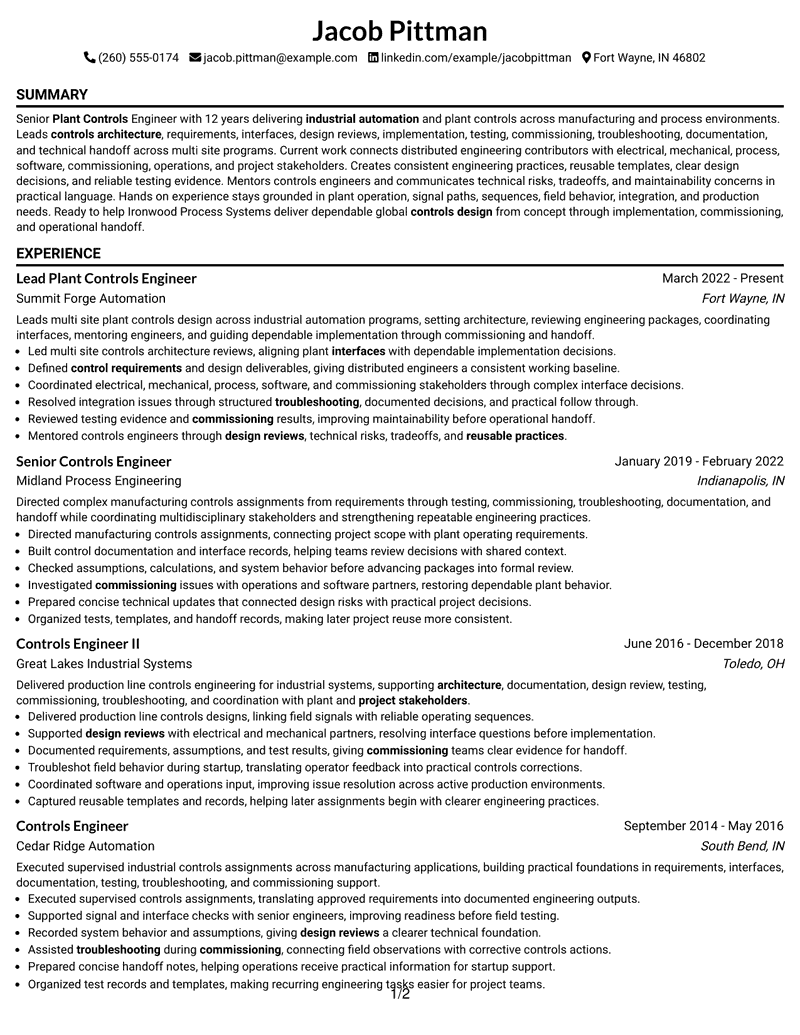
This practical guide shows you how to build a Senior Plant Controls Engineer - Global Design Leadership resume that is clear, focused, and easy to review. You will learn how to organize leadership evidence and technical depth so recruiters can quickly understand your value.
Strong resumes for this role connect plant controls design with architecture, requirements, interfaces, design reviews, testing, commissioning, troubleshooting, documentation, mentoring, and multidisciplinary coordination. Clear section hierarchy and concise achievement bullets help both ATS systems and human reviewers find that evidence.
Below, one complete Senior Plant Controls Engineer - Global Design Leadership resume example is presented in 33 ATS-friendly resume layouts, with free PDF downloads and format notes to help you compare professional presentation choices.
What Makes a Great Senior Plant Controls Engineer - Global Design Leadership Resume in 2026
An effective resume is leadership-focused, technically credible, and easy to scan. It should connect controls design decisions with implementation, commissioning, reliability, and operational handoff.
Use grounded keywords such as plant controls engineering, industrial automation, controls architecture, control requirements, design reviews, testing, commissioning, troubleshooting, technical documentation, mentoring, and global coordination.
The examples shown below are intentionally detailed to demonstrate a range of experiences, skills, accomplishments and relevant keywords. We prefer detailed resumes as they provide more context to the hiring managers and also help the ATS systems identify relevant qualifications and score your resume better for a match. But the length of a resume is an individual choice. If you want a one page resume, just keep the most relevant experience and information for the job. Note: Resume examples are for educational purposes only. Use only information that accurately reflects your experience and qualifications. References to real organizations do not imply affiliation or endorsement.
#1 Simple One Column Format Resume Example
The Simple One Column Format keeps the resume organized in a direct reading order, giving senior controls experience, technical leadership, and plant engineering evidence clear priority.
The structure supports concise bullets for controls architecture, requirements, interfaces, testing, troubleshooting, mentoring, and global project coordination, with clear separation between core evidence and supporting credentials.

Why the Simple One Column Format Works for a Resume
- Keeps plant controls engineering experience visible and easy to scan.
- Provides clear space for controls architecture and control requirements.
- Supports concise bullets on design reviews and multidisciplinary interfaces.
- Makes testing, commissioning, and troubleshooting evidence easy to locate.
- Separates technical documentation and reusable practices from core experience.
- Gives mentoring and technical leadership appropriate visibility.
- Supports ATS keyword placement without turning the resume into a keyword list.
Best For
- Applications that benefit from the Simple One Column Format information hierarchy
- Resumes that need clear separation between senior experience and supporting qualifications
- Readers who need to scan controls leadership evidence without dense narrative
- Candidates presenting several controls roles across a long professional timeline
- Applications where technical detail must remain readable alongside leadership evidence
- Resumes that need room for projects, certifications, education, and technical skills
Resume Keywords
- Senior Plant Controls Engineer
- industrial automation
- controls design
- controls architecture
- control requirements
- interfaces
- design documentation
- design reviews
- implementation
- testing
- commissioning
- troubleshooting
- technical handoff
- project stakeholders
- Global project
#2 Plain One Column with Shaded Labels Resume Example
Recruiters can move quickly from the professional summary into experience, skills, projects, and credentials in the Plain One Column with Shaded Labels, while detailed controls work remains easy to follow.
The structure supports concise bullets for controls architecture, requirements, interfaces, testing, troubleshooting, mentoring, and global project coordination, with clear separation between core evidence and supporting credentials.

Why the Plain One Column with Shaded Labels Works for a Resume
- Keeps plant controls engineering experience visible and easy to scan.
- Provides clear space for controls architecture and control requirements.
- Supports concise bullets on design reviews and multidisciplinary interfaces.
- Makes testing, commissioning, and troubleshooting evidence easy to locate.
- Separates technical documentation and reusable practices from core experience.
- Gives mentoring and technical leadership appropriate visibility.
- Supports ATS keyword placement without turning the resume into a keyword list.
Best For
- Applications that benefit from the Plain One Column with Shaded Labels information hierarchy
- Resumes that need clear separation between senior experience and supporting qualifications
- Readers who need to scan controls leadership evidence without dense narrative
- Candidates presenting several controls roles across a long professional timeline
- Applications where technical detail must remain readable alongside leadership evidence
- Resumes that need room for projects, certifications, education, and technical skills
#3 One Column Format with Photo Right Resume Example
Controls design leadership, commissioning work, and multidisciplinary coordination receive strong emphasis in the One Column Format with Photo Right, helping technical evidence stand out before supporting details.
The structure can pair a professional photo with concise resume content while preserving space for controls architecture, requirements, interfaces, testing, troubleshooting, mentoring, and global project coordination.

Why the One Column Format with Photo Right Works for a Resume
- Keeps plant controls engineering experience visible and easy to scan.
- Provides clear space for controls architecture and control requirements.
- Supports concise bullets on design reviews and multidisciplinary interfaces.
- Makes testing, commissioning, and troubleshooting evidence easy to locate.
- Separates technical documentation and reusable practices from core experience.
- Gives mentoring and technical leadership appropriate visibility.
- Supports ATS keyword placement without turning the resume into a keyword list.
Best For
- Applications that benefit from the One Column Format with Photo Right information hierarchy
- Resumes that need clear separation between senior experience and supporting qualifications
- Readers who need to scan controls leadership evidence without dense narrative
- Candidates presenting several controls roles across a long professional timeline
- Applications where technical detail must remain readable alongside leadership evidence
- Contexts where a professional photo is appropriate and the technical record still needs substantial space
#4 Clean Two Column Sidebar Format Resume Example
Experience and supporting qualifications share space carefully in the Clean Two Column Sidebar Format, so detailed plant controls work can remain prominent without hiding skills, education, projects, or certifications.
The structure supports concise bullets for controls architecture, requirements, interfaces, testing, troubleshooting, mentoring, and global project coordination, with clear separation between core evidence and supporting credentials.

Why the Clean Two Column Sidebar Format Works for a Resume
- Keeps plant controls engineering experience visible and easy to scan.
- Provides clear space for controls architecture and control requirements.
- Supports concise bullets on design reviews and multidisciplinary interfaces.
- Makes testing, commissioning, and troubleshooting evidence easy to locate.
- Separates technical documentation and reusable practices from core experience.
- Gives mentoring and technical leadership appropriate visibility.
- Supports ATS keyword placement without turning the resume into a keyword list.
Best For
- Applications that benefit from the Clean Two Column Sidebar Format information hierarchy
- Resumes that need clear separation between senior experience and supporting qualifications
- Readers who need to scan controls leadership evidence without dense narrative
- Candidates presenting several controls roles across a long professional timeline
- Applications where technical detail must remain readable alongside leadership evidence
- Resumes that need room for projects, certifications, education, and technical skills
#5 Two Column Format Resume Example
For a senior plant controls application, the Two Column Format provides a practical way to present technical depth, leadership responsibility, and a long progression of controls assignments.
The structure supports concise bullets for controls architecture, requirements, interfaces, testing, troubleshooting, mentoring, and global project coordination, with clear separation between core evidence and supporting credentials.

Why the Two Column Format Works for a Resume
- Keeps plant controls engineering experience visible and easy to scan.
- Provides clear space for controls architecture and control requirements.
- Supports concise bullets on design reviews and multidisciplinary interfaces.
- Makes testing, commissioning, and troubleshooting evidence easy to locate.
- Separates technical documentation and reusable practices from core experience.
- Gives mentoring and technical leadership appropriate visibility.
- Supports ATS keyword placement without turning the resume into a keyword list.
Best For
- Applications that benefit from the Two Column Format information hierarchy
- Resumes that need clear separation between senior experience and supporting qualifications
- Readers who need to scan controls leadership evidence without dense narrative
- Candidates presenting several controls roles across a long professional timeline
- Applications where technical detail must remain readable alongside leadership evidence
- Resumes that need room for projects, certifications, education, and technical skills
#6 Photo Header Two Column Format Resume Example
A restrained visual hierarchy gives the Photo Header Two Column Format a confident professional character while keeping controls architecture, design reviews, commissioning, and leadership evidence readable.
The structure can pair a professional photo with concise resume content while preserving space for controls architecture, requirements, interfaces, testing, troubleshooting, mentoring, and global project coordination.

Why the Photo Header Two Column Format Works for a Resume
- Keeps plant controls engineering experience visible and easy to scan.
- Provides clear space for controls architecture and control requirements.
- Supports concise bullets on design reviews and multidisciplinary interfaces.
- Makes testing, commissioning, and troubleshooting evidence easy to locate.
- Separates technical documentation and reusable practices from core experience.
- Gives mentoring and technical leadership appropriate visibility.
- Supports ATS keyword placement without turning the resume into a keyword list.
Best For
- Applications that benefit from the Photo Header Two Column Format information hierarchy
- Resumes that need clear separation between senior experience and supporting qualifications
- Readers who need to scan controls leadership evidence without dense narrative
- Candidates presenting several controls roles across a long professional timeline
- Applications where technical detail must remain readable alongside leadership evidence
- Contexts where a professional photo is appropriate and the technical record still needs substantial space
#7 Simple Two Column Format Resume Example
The Simple Two Column Format keeps the resume organized in a direct reading order, giving senior controls experience, technical leadership, and plant engineering evidence clear priority.
The structure supports concise bullets for controls architecture, requirements, interfaces, testing, troubleshooting, mentoring, and global project coordination, with clear separation between core evidence and supporting credentials.

Why the Simple Two Column Format Works for a Resume
- Keeps plant controls engineering experience visible and easy to scan.
- Provides clear space for controls architecture and control requirements.
- Supports concise bullets on design reviews and multidisciplinary interfaces.
- Makes testing, commissioning, and troubleshooting evidence easy to locate.
- Separates technical documentation and reusable practices from core experience.
- Gives mentoring and technical leadership appropriate visibility.
- Supports ATS keyword placement without turning the resume into a keyword list.
Best For
- Applications that benefit from the Simple Two Column Format information hierarchy
- Resumes that need clear separation between senior experience and supporting qualifications
- Readers who need to scan controls leadership evidence without dense narrative
- Candidates presenting several controls roles across a long professional timeline
- Applications where technical detail must remain readable alongside leadership evidence
- Resumes that need room for projects, certifications, education, and technical skills
#8 Text/Fang Style Resume Example
Recruiters can move quickly from the professional summary into experience, skills, projects, and credentials in the Text/Fang Style, while detailed controls work remains easy to follow.
The structure supports concise bullets for controls architecture, requirements, interfaces, testing, troubleshooting, mentoring, and global project coordination, with clear separation between core evidence and supporting credentials.

Why the Text/Fang Style Works for a Resume
- Keeps plant controls engineering experience visible and easy to scan.
- Provides clear space for controls architecture and control requirements.
- Supports concise bullets on design reviews and multidisciplinary interfaces.
- Makes testing, commissioning, and troubleshooting evidence easy to locate.
- Separates technical documentation and reusable practices from core experience.
- Gives mentoring and technical leadership appropriate visibility.
- Supports ATS keyword placement without turning the resume into a keyword list.
Best For
- Applications that benefit from the Text/Fang Style information hierarchy
- Resumes that need clear separation between senior experience and supporting qualifications
- Readers who need to scan controls leadership evidence without dense narrative
- Candidates presenting several controls roles across a long professional timeline
- Applications where technical detail must remain readable alongside leadership evidence
- Resumes that need room for projects, certifications, education, and technical skills
#9 One Column Boxed Contact Header Format Resume Example
Controls design leadership, commissioning work, and multidisciplinary coordination receive strong emphasis in the One Column Boxed Contact Header Format, helping technical evidence stand out before supporting details.
The structure supports concise bullets for controls architecture, requirements, interfaces, testing, troubleshooting, mentoring, and global project coordination, with clear separation between core evidence and supporting credentials.

Why the One Column Boxed Contact Header Format Works for a Resume
- Keeps plant controls engineering experience visible and easy to scan.
- Provides clear space for controls architecture and control requirements.
- Supports concise bullets on design reviews and multidisciplinary interfaces.
- Makes testing, commissioning, and troubleshooting evidence easy to locate.
- Separates technical documentation and reusable practices from core experience.
- Gives mentoring and technical leadership appropriate visibility.
- Supports ATS keyword placement without turning the resume into a keyword list.
Best For
- Applications that benefit from the One Column Boxed Contact Header Format information hierarchy
- Resumes that need clear separation between senior experience and supporting qualifications
- Readers who need to scan controls leadership evidence without dense narrative
- Candidates presenting several controls roles across a long professional timeline
- Applications where technical detail must remain readable alongside leadership evidence
- Resumes that need room for projects, certifications, education, and technical skills
#10 Plain Two Column Format Resume Example
Experience and supporting qualifications share space carefully in the Plain Two Column Format, so detailed plant controls work can remain prominent without hiding skills, education, projects, or certifications.
The structure supports concise bullets for controls architecture, requirements, interfaces, testing, troubleshooting, mentoring, and global project coordination, with clear separation between core evidence and supporting credentials.

Resume Snapshot
- 12 years of plant controls and industrial automation experience
- Lead Plant Controls Engineer since March 2022
- Bachelor of Science in Electrical Engineering
- Controls architecture, commissioning, troubleshooting, and mentoring
Why the Plain Two Column Format Works for a Resume
- Keeps plant controls engineering experience visible and easy to scan.
- Provides clear space for controls architecture and control requirements.
- Supports concise bullets on design reviews and multidisciplinary interfaces.
- Makes testing, commissioning, and troubleshooting evidence easy to locate.
- Separates technical documentation and reusable practices from core experience.
- Gives mentoring and technical leadership appropriate visibility.
- Supports ATS keyword placement without turning the resume into a keyword list.
#11 Colored Two Column Format Resume Example
For a senior plant controls application, the Colored Two Column Format provides a practical way to present technical depth, leadership responsibility, and a long progression of controls assignments.
The structure supports concise bullets for controls architecture, requirements, interfaces, testing, troubleshooting, mentoring, and global project coordination, with clear separation between core evidence and supporting credentials.

Why the Colored Two Column Format Works for a Resume
- Keeps plant controls engineering experience visible and easy to scan.
- Provides clear space for controls architecture and control requirements.
- Supports concise bullets on design reviews and multidisciplinary interfaces.
- Makes testing, commissioning, and troubleshooting evidence easy to locate.
- Separates technical documentation and reusable practices from core experience.
- Gives mentoring and technical leadership appropriate visibility.
- Supports ATS keyword placement without turning the resume into a keyword list.
Best For
- Applications that benefit from the Colored Two Column Format information hierarchy
- Resumes that need clear separation between senior experience and supporting qualifications
- Readers who need to scan controls leadership evidence without dense narrative
- Candidates presenting several controls roles across a long professional timeline
- Applications where technical detail must remain readable alongside leadership evidence
- Resumes that need room for projects, certifications, education, and technical skills
#12 One Column Shaded Contact Header Format Resume Example
A restrained visual hierarchy gives the One Column Shaded Contact Header Format a confident professional character while keeping controls architecture, design reviews, commissioning, and leadership evidence readable.
The structure supports concise bullets for controls architecture, requirements, interfaces, testing, troubleshooting, mentoring, and global project coordination, with clear separation between core evidence and supporting credentials.

Why the One Column Shaded Contact Header Format Works for a Resume
- Keeps plant controls engineering experience visible and easy to scan.
- Provides clear space for controls architecture and control requirements.
- Supports concise bullets on design reviews and multidisciplinary interfaces.
- Makes testing, commissioning, and troubleshooting evidence easy to locate.
- Separates technical documentation and reusable practices from core experience.
- Gives mentoring and technical leadership appropriate visibility.
- Supports ATS keyword placement without turning the resume into a keyword list.
Best For
- Applications that benefit from the One Column Shaded Contact Header Format information hierarchy
- Resumes that need clear separation between senior experience and supporting qualifications
- Readers who need to scan controls leadership evidence without dense narrative
- Candidates presenting several controls roles across a long professional timeline
- Applications where technical detail must remain readable alongside leadership evidence
- Resumes that need room for projects, certifications, education, and technical skills
#13 Boxed Contact Header with Job Title Format Resume Example
The Boxed Contact Header with Job Title Format keeps the resume organized in a direct reading order, giving senior controls experience, technical leadership, and plant engineering evidence clear priority.
The structure supports concise bullets for controls architecture, requirements, interfaces, testing, troubleshooting, mentoring, and global project coordination, with clear separation between core evidence and supporting credentials.

Why the Boxed Contact Header with Job Title Format Works for a Resume
- Keeps plant controls engineering experience visible and easy to scan.
- Provides clear space for controls architecture and control requirements.
- Supports concise bullets on design reviews and multidisciplinary interfaces.
- Makes testing, commissioning, and troubleshooting evidence easy to locate.
- Separates technical documentation and reusable practices from core experience.
- Gives mentoring and technical leadership appropriate visibility.
- Supports ATS keyword placement without turning the resume into a keyword list.
Best For
- Applications that benefit from the Boxed Contact Header with Job Title Format information hierarchy
- Resumes that need clear separation between senior experience and supporting qualifications
- Readers who need to scan controls leadership evidence without dense narrative
- Candidates presenting several controls roles across a long professional timeline
- Applications where technical detail must remain readable alongside leadership evidence
- Resumes that need room for projects, certifications, education, and technical skills
#14 Stylish Two Column Designer Format Resume Example
Recruiters can move quickly from the professional summary into experience, skills, projects, and credentials in the Stylish Two Column Designer Format, while detailed controls work remains easy to follow.
The structure supports concise bullets for controls architecture, requirements, interfaces, testing, troubleshooting, mentoring, and global project coordination, with clear separation between core evidence and supporting credentials.

Why the Stylish Two Column Designer Format Works for a Resume
- Keeps plant controls engineering experience visible and easy to scan.
- Provides clear space for controls architecture and control requirements.
- Supports concise bullets on design reviews and multidisciplinary interfaces.
- Makes testing, commissioning, and troubleshooting evidence easy to locate.
- Separates technical documentation and reusable practices from core experience.
- Gives mentoring and technical leadership appropriate visibility.
- Supports ATS keyword placement without turning the resume into a keyword list.
Best For
- Applications that benefit from the Stylish Two Column Designer Format information hierarchy
- Resumes that need clear separation between senior experience and supporting qualifications
- Readers who need to scan controls leadership evidence without dense narrative
- Candidates presenting several controls roles across a long professional timeline
- Applications where technical detail must remain readable alongside leadership evidence
- Resumes that need room for projects, certifications, education, and technical skills
#15 Modern Icon Format Resume Example
Controls design leadership, commissioning work, and multidisciplinary coordination receive strong emphasis in the Modern Icon Format, helping technical evidence stand out before supporting details.
The structure supports concise bullets for controls architecture, requirements, interfaces, testing, troubleshooting, mentoring, and global project coordination, with clear separation between core evidence and supporting credentials.

Why the Modern Icon Format Works for a Resume
- Keeps plant controls engineering experience visible and easy to scan.
- Provides clear space for controls architecture and control requirements.
- Supports concise bullets on design reviews and multidisciplinary interfaces.
- Makes testing, commissioning, and troubleshooting evidence easy to locate.
- Separates technical documentation and reusable practices from core experience.
- Gives mentoring and technical leadership appropriate visibility.
- Supports ATS keyword placement without turning the resume into a keyword list.
Best For
- Applications that benefit from the Modern Icon Format information hierarchy
- Resumes that need clear separation between senior experience and supporting qualifications
- Readers who need to scan controls leadership evidence without dense narrative
- Candidates presenting several controls roles across a long professional timeline
- Applications where technical detail must remain readable alongside leadership evidence
- Resumes that need room for projects, certifications, education, and technical skills
#16 Plain Professional Layout with Job Title & Shaded Labels Resume Example
Experience and supporting qualifications share space carefully in the Plain Professional Layout with Job Title & Shaded Labels, so detailed plant controls work can remain prominent without hiding skills, education, projects, or certifications.
The structure supports concise bullets for controls architecture, requirements, interfaces, testing, troubleshooting, mentoring, and global project coordination, with clear separation between core evidence and supporting credentials.

Why the Plain Professional Layout with Job Title & Shaded Labels Works for a Resume
- Keeps plant controls engineering experience visible and easy to scan.
- Provides clear space for controls architecture and control requirements.
- Supports concise bullets on design reviews and multidisciplinary interfaces.
- Makes testing, commissioning, and troubleshooting evidence easy to locate.
- Separates technical documentation and reusable practices from core experience.
- Gives mentoring and technical leadership appropriate visibility.
- Supports ATS keyword placement without turning the resume into a keyword list.
Best For
- Applications that benefit from the Plain Professional Layout with Job Title & Shaded Labels information hierarchy
- Resumes that need clear separation between senior experience and supporting qualifications
- Readers who need to scan controls leadership evidence without dense narrative
- Candidates presenting several controls roles across a long professional timeline
- Applications where technical detail must remain readable alongside leadership evidence
- Resumes that need room for projects, certifications, education, and technical skills
#17 Classic One Column Resume Format Resume Example
For a senior plant controls application, the Classic One Column Resume Format provides a practical way to present technical depth, leadership responsibility, and a long progression of controls assignments.
The structure supports concise bullets for controls architecture, requirements, interfaces, testing, troubleshooting, mentoring, and global project coordination, with clear separation between core evidence and supporting credentials.

Why the Classic One Column Resume Format Works for a Resume
- Keeps plant controls engineering experience visible and easy to scan.
- Provides clear space for controls architecture and control requirements.
- Supports concise bullets on design reviews and multidisciplinary interfaces.
- Makes testing, commissioning, and troubleshooting evidence easy to locate.
- Separates technical documentation and reusable practices from core experience.
- Gives mentoring and technical leadership appropriate visibility.
- Supports ATS keyword placement without turning the resume into a keyword list.
Best For
- Applications that benefit from the Classic One Column Resume Format information hierarchy
- Resumes that need clear separation between senior experience and supporting qualifications
- Readers who need to scan controls leadership evidence without dense narrative
- Candidates presenting several controls roles across a long professional timeline
- Applications where technical detail must remain readable alongside leadership evidence
- Resumes that need room for projects, certifications, education, and technical skills
#18 One Column Format with Photo Resume Example
A restrained visual hierarchy gives the One Column Format with Photo a confident professional character while keeping controls architecture, design reviews, commissioning, and leadership evidence readable.
The structure can pair a professional photo with concise resume content while preserving space for controls architecture, requirements, interfaces, testing, troubleshooting, mentoring, and global project coordination.

Why the One Column Format with Photo Works for a Resume
- Keeps plant controls engineering experience visible and easy to scan.
- Provides clear space for controls architecture and control requirements.
- Supports concise bullets on design reviews and multidisciplinary interfaces.
- Makes testing, commissioning, and troubleshooting evidence easy to locate.
- Separates technical documentation and reusable practices from core experience.
- Gives mentoring and technical leadership appropriate visibility.
- Supports ATS keyword placement without turning the resume into a keyword list.
Best For
- Applications that benefit from the One Column Format with Photo information hierarchy
- Resumes that need clear separation between senior experience and supporting qualifications
- Readers who need to scan controls leadership evidence without dense narrative
- Candidates presenting several controls roles across a long professional timeline
- Applications where technical detail must remain readable alongside leadership evidence
- Contexts where a professional photo is appropriate and the technical record still needs substantial space
#19 Minimal Header Format Resume Example
The Minimal Header Format keeps the resume organized in a direct reading order, giving senior controls experience, technical leadership, and plant engineering evidence clear priority.
The structure supports concise bullets for controls architecture, requirements, interfaces, testing, troubleshooting, mentoring, and global project coordination, with clear separation between core evidence and supporting credentials.

Why the Minimal Header Format Works for a Resume
- Keeps plant controls engineering experience visible and easy to scan.
- Provides clear space for controls architecture and control requirements.
- Supports concise bullets on design reviews and multidisciplinary interfaces.
- Makes testing, commissioning, and troubleshooting evidence easy to locate.
- Separates technical documentation and reusable practices from core experience.
- Gives mentoring and technical leadership appropriate visibility.
- Supports ATS keyword placement without turning the resume into a keyword list.
Best For
- Applications that benefit from the Minimal Header Format information hierarchy
- Resumes that need clear separation between senior experience and supporting qualifications
- Readers who need to scan controls leadership evidence without dense narrative
- Candidates presenting several controls roles across a long professional timeline
- Applications where technical detail must remain readable alongside leadership evidence
- Resumes that need room for projects, certifications, education, and technical skills
#20 Modern Full Background Two Column Format Resume Example
Recruiters can move quickly from the professional summary into experience, skills, projects, and credentials in the Modern Full Background Two Column Format, while detailed controls work remains easy to follow.
The structure supports concise bullets for controls architecture, requirements, interfaces, testing, troubleshooting, mentoring, and global project coordination, with clear separation between core evidence and supporting credentials.

Why the Modern Full Background Two Column Format Works for a Resume
- Keeps plant controls engineering experience visible and easy to scan.
- Provides clear space for controls architecture and control requirements.
- Supports concise bullets on design reviews and multidisciplinary interfaces.
- Makes testing, commissioning, and troubleshooting evidence easy to locate.
- Separates technical documentation and reusable practices from core experience.
- Gives mentoring and technical leadership appropriate visibility.
- Supports ATS keyword placement without turning the resume into a keyword list.
Best For
- Applications that benefit from the Modern Full Background Two Column Format information hierarchy
- Resumes that need clear separation between senior experience and supporting qualifications
- Readers who need to scan controls leadership evidence without dense narrative
- Candidates presenting several controls roles across a long professional timeline
- Applications where technical detail must remain readable alongside leadership evidence
- Resumes that need room for projects, certifications, education, and technical skills
#21 Dark Mode Two Column Format Resume Example
Controls design leadership, commissioning work, and multidisciplinary coordination receive strong emphasis in the Dark Mode Two Column Format, helping technical evidence stand out before supporting details.
The structure supports concise bullets for controls architecture, requirements, interfaces, testing, troubleshooting, mentoring, and global project coordination, with clear separation between core evidence and supporting credentials.

Why the Dark Mode Two Column Format Works for a Resume
- Keeps plant controls engineering experience visible and easy to scan.
- Provides clear space for controls architecture and control requirements.
- Supports concise bullets on design reviews and multidisciplinary interfaces.
- Makes testing, commissioning, and troubleshooting evidence easy to locate.
- Separates technical documentation and reusable practices from core experience.
- Gives mentoring and technical leadership appropriate visibility.
- Supports ATS keyword placement without turning the resume into a keyword list.
Best For
- Applications that benefit from the Dark Mode Two Column Format information hierarchy
- Resumes that need clear separation between senior experience and supporting qualifications
- Readers who need to scan controls leadership evidence without dense narrative
- Candidates presenting several controls roles across a long professional timeline
- Applications where technical detail must remain readable alongside leadership evidence
- Resumes that need room for projects, certifications, education, and technical skills
#22 Dark Mode Box Header Format Resume Example
Experience and supporting qualifications share space carefully in the Dark Mode Box Header Format, so detailed plant controls work can remain prominent without hiding skills, education, projects, or certifications.
The structure supports concise bullets for controls architecture, requirements, interfaces, testing, troubleshooting, mentoring, and global project coordination, with clear separation between core evidence and supporting credentials.

Why the Dark Mode Box Header Format Works for a Resume
- Keeps plant controls engineering experience visible and easy to scan.
- Provides clear space for controls architecture and control requirements.
- Supports concise bullets on design reviews and multidisciplinary interfaces.
- Makes testing, commissioning, and troubleshooting evidence easy to locate.
- Separates technical documentation and reusable practices from core experience.
- Gives mentoring and technical leadership appropriate visibility.
- Supports ATS keyword placement without turning the resume into a keyword list.
Best For
- Applications that benefit from the Dark Mode Box Header Format information hierarchy
- Resumes that need clear separation between senior experience and supporting qualifications
- Readers who need to scan controls leadership evidence without dense narrative
- Candidates presenting several controls roles across a long professional timeline
- Applications where technical detail must remain readable alongside leadership evidence
- Resumes that need room for projects, certifications, education, and technical skills
#23 Elegant Full Background Two Column Format Resume Example
For a senior plant controls application, the Elegant Full Background Two Column Format provides a practical way to present technical depth, leadership responsibility, and a long progression of controls assignments.
The structure supports concise bullets for controls architecture, requirements, interfaces, testing, troubleshooting, mentoring, and global project coordination, with clear separation between core evidence and supporting credentials.

Why the Elegant Full Background Two Column Format Works for a Resume
- Keeps plant controls engineering experience visible and easy to scan.
- Provides clear space for controls architecture and control requirements.
- Supports concise bullets on design reviews and multidisciplinary interfaces.
- Makes testing, commissioning, and troubleshooting evidence easy to locate.
- Separates technical documentation and reusable practices from core experience.
- Gives mentoring and technical leadership appropriate visibility.
- Supports ATS keyword placement without turning the resume into a keyword list.
Best For
- Applications that benefit from the Elegant Full Background Two Column Format information hierarchy
- Resumes that need clear separation between senior experience and supporting qualifications
- Readers who need to scan controls leadership evidence without dense narrative
- Candidates presenting several controls roles across a long professional timeline
- Applications where technical detail must remain readable alongside leadership evidence
- Resumes that need room for projects, certifications, education, and technical skills
#24 Creative Two Tone Format Resume Example
A restrained visual hierarchy gives the Creative Two Tone Format a confident professional character while keeping controls architecture, design reviews, commissioning, and leadership evidence readable.
The structure supports concise bullets for controls architecture, requirements, interfaces, testing, troubleshooting, mentoring, and global project coordination, with clear separation between core evidence and supporting credentials.

Why the Creative Two Tone Format Works for a Resume
- Keeps plant controls engineering experience visible and easy to scan.
- Provides clear space for controls architecture and control requirements.
- Supports concise bullets on design reviews and multidisciplinary interfaces.
- Makes testing, commissioning, and troubleshooting evidence easy to locate.
- Separates technical documentation and reusable practices from core experience.
- Gives mentoring and technical leadership appropriate visibility.
- Supports ATS keyword placement without turning the resume into a keyword list.
Best For
- Applications that benefit from the Creative Two Tone Format information hierarchy
- Resumes that need clear separation between senior experience and supporting qualifications
- Readers who need to scan controls leadership evidence without dense narrative
- Candidates presenting several controls roles across a long professional timeline
- Applications where technical detail must remain readable alongside leadership evidence
- Resumes that need room for projects, certifications, education, and technical skills
#25 Bold Color Header Professional Format Resume Example
The Bold Color Header Professional Format keeps the resume organized in a direct reading order, giving senior controls experience, technical leadership, and plant engineering evidence clear priority.
The structure supports concise bullets for controls architecture, requirements, interfaces, testing, troubleshooting, mentoring, and global project coordination, with clear separation between core evidence and supporting credentials.

Why the Bold Color Header Professional Format Works for a Resume
- Keeps plant controls engineering experience visible and easy to scan.
- Provides clear space for controls architecture and control requirements.
- Supports concise bullets on design reviews and multidisciplinary interfaces.
- Makes testing, commissioning, and troubleshooting evidence easy to locate.
- Separates technical documentation and reusable practices from core experience.
- Gives mentoring and technical leadership appropriate visibility.
- Supports ATS keyword placement without turning the resume into a keyword list.
Best For
- Applications that benefit from the Bold Color Header Professional Format information hierarchy
- Resumes that need clear separation between senior experience and supporting qualifications
- Readers who need to scan controls leadership evidence without dense narrative
- Candidates presenting several controls roles across a long professional timeline
- Applications where technical detail must remain readable alongside leadership evidence
- Resumes that need room for projects, certifications, education, and technical skills
#26 Photo Header Color Sidebar Format Resume Example
Recruiters can move quickly from the professional summary into experience, skills, projects, and credentials in the Photo Header Color Sidebar Format, while detailed controls work remains easy to follow.
The structure can pair a professional photo with concise resume content while preserving space for controls architecture, requirements, interfaces, testing, troubleshooting, mentoring, and global project coordination.

Why the Photo Header Color Sidebar Format Works for a Resume
- Keeps plant controls engineering experience visible and easy to scan.
- Provides clear space for controls architecture and control requirements.
- Supports concise bullets on design reviews and multidisciplinary interfaces.
- Makes testing, commissioning, and troubleshooting evidence easy to locate.
- Separates technical documentation and reusable practices from core experience.
- Gives mentoring and technical leadership appropriate visibility.
- Supports ATS keyword placement without turning the resume into a keyword list.
Best For
- Applications that benefit from the Photo Header Color Sidebar Format information hierarchy
- Resumes that need clear separation between senior experience and supporting qualifications
- Readers who need to scan controls leadership evidence without dense narrative
- Candidates presenting several controls roles across a long professional timeline
- Applications where technical detail must remain readable alongside leadership evidence
- Contexts where a professional photo is appropriate and the technical record still needs substantial space
#27 Top Left Header Color Accent Format Resume Example
Controls design leadership, commissioning work, and multidisciplinary coordination receive strong emphasis in the Top Left Header Color Accent Format, helping technical evidence stand out before supporting details.
The structure supports concise bullets for controls architecture, requirements, interfaces, testing, troubleshooting, mentoring, and global project coordination, with clear separation between core evidence and supporting credentials.

Why the Top Left Header Color Accent Format Works for a Resume
- Keeps plant controls engineering experience visible and easy to scan.
- Provides clear space for controls architecture and control requirements.
- Supports concise bullets on design reviews and multidisciplinary interfaces.
- Makes testing, commissioning, and troubleshooting evidence easy to locate.
- Separates technical documentation and reusable practices from core experience.
- Gives mentoring and technical leadership appropriate visibility.
- Supports ATS keyword placement without turning the resume into a keyword list.
Best For
- Applications that benefit from the Top Left Header Color Accent Format information hierarchy
- Resumes that need clear separation between senior experience and supporting qualifications
- Readers who need to scan controls leadership evidence without dense narrative
- Candidates presenting several controls roles across a long professional timeline
- Applications where technical detail must remain readable alongside leadership evidence
- Resumes that need room for projects, certifications, education, and technical skills
#28 Centered Header Classic Two Column Format Resume Example
Experience and supporting qualifications share space carefully in the Centered Header Classic Two Column Format, so detailed plant controls work can remain prominent without hiding skills, education, projects, or certifications.
The structure supports concise bullets for controls architecture, requirements, interfaces, testing, troubleshooting, mentoring, and global project coordination, with clear separation between core evidence and supporting credentials.

Why the Centered Header Classic Two Column Format Works for a Resume
- Keeps plant controls engineering experience visible and easy to scan.
- Provides clear space for controls architecture and control requirements.
- Supports concise bullets on design reviews and multidisciplinary interfaces.
- Makes testing, commissioning, and troubleshooting evidence easy to locate.
- Separates technical documentation and reusable practices from core experience.
- Gives mentoring and technical leadership appropriate visibility.
- Supports ATS keyword placement without turning the resume into a keyword list.
Best For
- Applications that benefit from the Centered Header Classic Two Column Format information hierarchy
- Resumes that need clear separation between senior experience and supporting qualifications
- Readers who need to scan controls leadership evidence without dense narrative
- Candidates presenting several controls roles across a long professional timeline
- Applications where technical detail must remain readable alongside leadership evidence
- Resumes that need room for projects, certifications, education, and technical skills
#29 Left Aligned Header Clean Two Column Format Resume Example
For a senior plant controls application, the Left Aligned Header Clean Two Column Format provides a practical way to present technical depth, leadership responsibility, and a long progression of controls assignments.
The structure supports concise bullets for controls architecture, requirements, interfaces, testing, troubleshooting, mentoring, and global project coordination, with clear separation between core evidence and supporting credentials.

Why the Left Aligned Header Clean Two Column Format Works for a Resume
- Keeps plant controls engineering experience visible and easy to scan.
- Provides clear space for controls architecture and control requirements.
- Supports concise bullets on design reviews and multidisciplinary interfaces.
- Makes testing, commissioning, and troubleshooting evidence easy to locate.
- Separates technical documentation and reusable practices from core experience.
- Gives mentoring and technical leadership appropriate visibility.
- Supports ATS keyword placement without turning the resume into a keyword list.
Best For
- Applications that benefit from the Left Aligned Header Clean Two Column Format information hierarchy
- Resumes that need clear separation between senior experience and supporting qualifications
- Readers who need to scan controls leadership evidence without dense narrative
- Candidates presenting several controls roles across a long professional timeline
- Applications where technical detail must remain readable alongside leadership evidence
- Resumes that need room for projects, certifications, education, and technical skills
#30 Accent Divider Modern Two Column Format Resume Example
A restrained visual hierarchy gives the Accent Divider Modern Two Column Format a confident professional character while keeping controls architecture, design reviews, commissioning, and leadership evidence readable.
The structure supports concise bullets for controls architecture, requirements, interfaces, testing, troubleshooting, mentoring, and global project coordination, with clear separation between core evidence and supporting credentials.

Why the Accent Divider Modern Two Column Format Works for a Resume
- Keeps plant controls engineering experience visible and easy to scan.
- Provides clear space for controls architecture and control requirements.
- Supports concise bullets on design reviews and multidisciplinary interfaces.
- Makes testing, commissioning, and troubleshooting evidence easy to locate.
- Separates technical documentation and reusable practices from core experience.
- Gives mentoring and technical leadership appropriate visibility.
- Supports ATS keyword placement without turning the resume into a keyword list.
Best For
- Applications that benefit from the Accent Divider Modern Two Column Format information hierarchy
- Resumes that need clear separation between senior experience and supporting qualifications
- Readers who need to scan controls leadership evidence without dense narrative
- Candidates presenting several controls roles across a long professional timeline
- Applications where technical detail must remain readable alongside leadership evidence
- Resumes that need room for projects, certifications, education, and technical skills
#31 Shaded Labels Clean Two Column Format Resume Example
The Shaded Labels Clean Two Column Format keeps the resume organized in a direct reading order, giving senior controls experience, technical leadership, and plant engineering evidence clear priority.
The structure supports concise bullets for controls architecture, requirements, interfaces, testing, troubleshooting, mentoring, and global project coordination, with clear separation between core evidence and supporting credentials.

Why the Shaded Labels Clean Two Column Format Works for a Resume
- Keeps plant controls engineering experience visible and easy to scan.
- Provides clear space for controls architecture and control requirements.
- Supports concise bullets on design reviews and multidisciplinary interfaces.
- Makes testing, commissioning, and troubleshooting evidence easy to locate.
- Separates technical documentation and reusable practices from core experience.
- Gives mentoring and technical leadership appropriate visibility.
- Supports ATS keyword placement without turning the resume into a keyword list.
Best For
- Applications that benefit from the Shaded Labels Clean Two Column Format information hierarchy
- Resumes that need clear separation between senior experience and supporting qualifications
- Readers who need to scan controls leadership evidence without dense narrative
- Candidates presenting several controls roles across a long professional timeline
- Applications where technical detail must remain readable alongside leadership evidence
- Resumes that need room for projects, certifications, education, and technical skills
#32 Photo Header Color Accent International Format Resume Example
Recruiters can move quickly from the professional summary into experience, skills, projects, and credentials in the Photo Header Color Accent International Format, while detailed controls work remains easy to follow.
The structure can pair a professional photo with concise resume content while preserving space for controls architecture, requirements, interfaces, testing, troubleshooting, mentoring, and global project coordination.

Why the Photo Header Color Accent International Format Works for a Resume
- Keeps plant controls engineering experience visible and easy to scan.
- Provides clear space for controls architecture and control requirements.
- Supports concise bullets on design reviews and multidisciplinary interfaces.
- Makes testing, commissioning, and troubleshooting evidence easy to locate.
- Separates technical documentation and reusable practices from core experience.
- Gives mentoring and technical leadership appropriate visibility.
- Supports ATS keyword placement without turning the resume into a keyword list.
Best For
- Applications that benefit from the Photo Header Color Accent International Format information hierarchy
- Resumes that need clear separation between senior experience and supporting qualifications
- Readers who need to scan controls leadership evidence without dense narrative
- Candidates presenting several controls roles across a long professional timeline
- Applications where technical detail must remain readable alongside leadership evidence
- Contexts where a professional photo is appropriate and the technical record still needs substantial space
#33 Large Profile Photo International Two Column Format Resume Example
Controls design leadership, commissioning work, and multidisciplinary coordination receive strong emphasis in the Large Profile Photo International Two Column Format, helping technical evidence stand out before supporting details.
The structure can pair a professional photo with concise resume content while preserving space for controls architecture, requirements, interfaces, testing, troubleshooting, mentoring, and global project coordination.

Why the Large Profile Photo International Two Column Format Works for a Resume
- Keeps plant controls engineering experience visible and easy to scan.
- Provides clear space for controls architecture and control requirements.
- Supports concise bullets on design reviews and multidisciplinary interfaces.
- Makes testing, commissioning, and troubleshooting evidence easy to locate.
- Separates technical documentation and reusable practices from core experience.
- Gives mentoring and technical leadership appropriate visibility.
- Supports ATS keyword placement without turning the resume into a keyword list.
Best For
- Applications that benefit from the Large Profile Photo International Two Column Format information hierarchy
- Resumes that need clear separation between senior experience and supporting qualifications
- Readers who need to scan controls leadership evidence without dense narrative
- Candidates presenting several controls roles across a long professional timeline
- Applications where technical detail must remain readable alongside leadership evidence
- Contexts where a professional photo is appropriate and the technical record still needs substantial space
Why Build Your Senior Plant Controls Engineer - Global Design Leadership Resume with ResumeInMinutes
ResumeInMinutes helps experienced controls professionals organize complex technical leadership, plant integration work, commissioning evidence, and reusable engineering practices into a resume that is easy to scan and customize.
- Professional resume layouts
- ATS-friendly section structure
- Role-specific keyword guidance
- Leadership and experience organization
- Free PDF resume previews
- Resume customization support
You can shape the resume around controls architecture, multidisciplinary interfaces, design reviews, testing, commissioning, troubleshooting, documentation, mentoring, and technical risk communication while keeping the evidence concise.
See Also
- 33 Senior Plant Controls Engineer - Combined Cycle Controls Resume Templates with Example 2026 (ATS-Optimized)
- 33 Electrical Design Engineer – Control Panels Resume Templates with Example 2026 (ATS-Optimized)
- 7 Inside Plant (ISP) Fiber Optic Engineer - High-Tech Connectivity Resume Templates with Example
- 33 Pilot Plant Chemist/Engineer Resume Templates with Example 2026 (ATS-Optimized)
- 33 Controls Engineer Intern Resume Templates with Example 2026 (ATS-Optimized)
- 33 Controls Engineer Resume Templates with Example 2026 (ATS-Optimized)
- 33 Data Center Controls Network Engineer Resume Templates with Example 2026 (ATS-Optimized)
- 33 Electrical Controls Engineer Resume Templates with Example 2026 (ATS-Optimized)
- 30+ Electrical Design Engineer – Control Panels Cover Letter Templates with Example 2026
- 7 Inside Plant (ISP) Fiber Optic Engineer - High-Tech Connectivity Cover Letter Templates with Example
Frequently Asked Questions
Are these Senior Plant Controls Engineer - Global Design Leadership resume templates ATS-friendly?
Yes. The templates use clear sections and support grounded keywords such as plant controls engineering, industrial automation, controls architecture, design reviews, testing, commissioning, troubleshooting, and technical leadership.
Are these different resumes?
No. This guide shows one Senior Plant Controls Engineer - Global Design Leadership resume example in different visual layouts and design themes.
What should a Senior Plant Controls Engineer - Global Design Leadership resume include?
Include a focused summary, controls engineering experience, architecture and interface work, design reviews, testing and commissioning, troubleshooting, technical documentation, leadership, education, projects, certifications, and relevant skills.
Can I download the resume templates as PDFs?
Yes. Each resume style provides a free PDF download so you can preview the format and compare presentation choices.
Which resume style works well for senior plant controls leadership?
A clean one-column or well-organized two-column format can make senior controls experience easy to scan. Choose a layout that gives enough space to show design leadership, technical depth, commissioning work, and multidisciplinary coordination.
How should I show global design leadership on the resume?
Use concise bullets that show technical direction, distributed engineering coordination, design reviews, reusable practices, mentoring, risk communication, and handoff across plant projects.
Should I include a photo on my resume?
Include a photo only when it is customary or expected in your country, region, or industry. For U.S. applications, a no-photo resume is generally the safer choice.
Can I customize these resume templates?
Yes. ResumeInMinutes lets you adjust resume text, layout, design style, and PDF format for a Senior Plant Controls Engineer - Global Design Leadership application.




