
33 Senior Software Engineer - Application Platform Resume Templates with Example
This practical guide shows you how to build a Senior Software Engineer - Application Platform resume that is clear, focused, and easy to review. You will see how to organize strong technical evidence and compare professional formats.
For this role, make backend platform work easy to find. Give clear space to system design, secure APIs, microservices, distributed systems, cloud services, Kubernetes, infrastructure as code, automation, testing, production support, and technical guidance when those details are true for you.
The same complete resume is presented in 33 ATS-friendly layouts. Compare how each format handles experience, skills, projects, education, certifications, keywords, and recruiter scanning before choosing a style.
What Makes a Great Senior Software Engineer - Application Platform Resume in 2026
A strong resume makes platform ownership, system design, reliable delivery, and technical guidance easy to scan. It uses focused sections and direct achievement bullets instead of long narrative blocks.
Use accurate keywords such as Python, Java, TypeScript, Kubernetes, APIs, microservices, distributed systems, infrastructure as code, secure development, and automation tools only when your background supports them.
The examples shown below are intentionally detailed to demonstrate a range of experiences, skills, accomplishments and relevant keywords. We prefer detailed resumes as they provide more context to the hiring managers and also help the ATS systems identify relevant qualifications and score your resume better for a match. But the length of a resume is an individual choice. If you want a one page resume, just keep the most relevant experience and information for the job. Note: Resume examples are for educational purposes only. Use only information that accurately reflects your experience and qualifications. References to real organizations do not imply affiliation or endorsement.
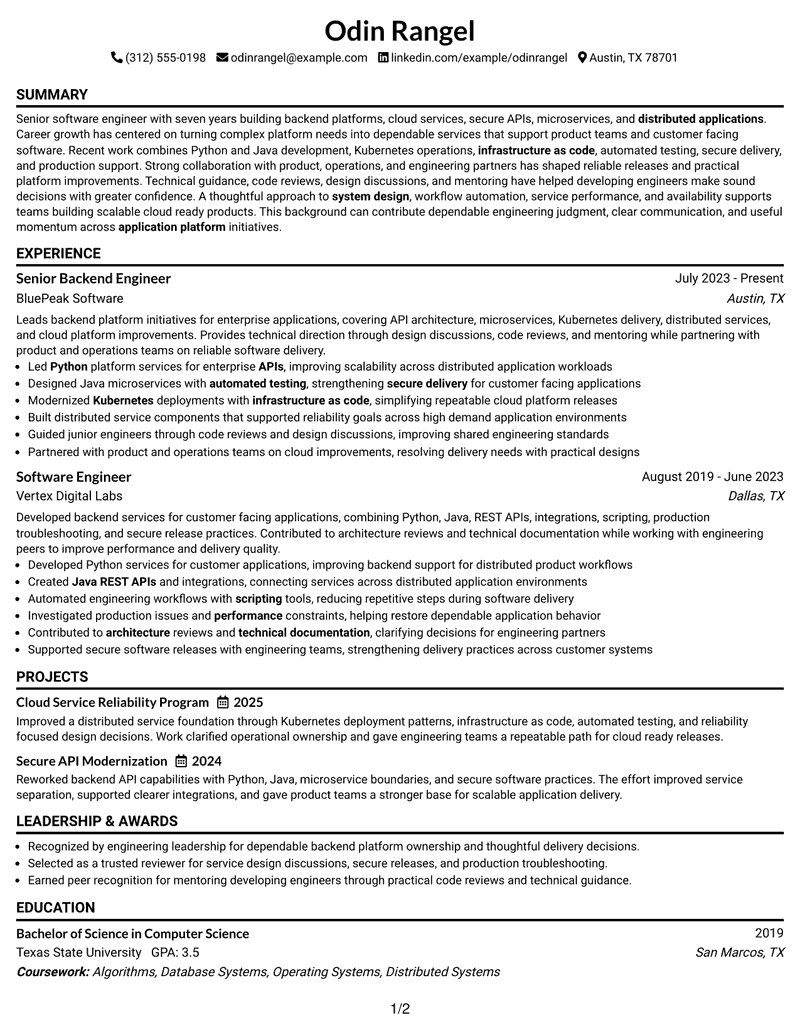
#1 Simple One Column Format Resume Example
The Simple One Column Format keeps every section in a direct reading order, helping recruiters scan detailed engineering evidence without switching columns.

Resume Snapshot
- Seven years of backend platform, cloud service, and distributed application experience
- Senior Backend Engineer at BluePeak Software since July 2023
- Bachelor of Science in Computer Science from Texas State University
- Certified Kubernetes Application Developer, 2024
Why This Format Works
- Linear reading order keeps career progression easy to follow from top to bottom
- Full-width sections give detailed experience bullets enough room to stay readable
- Skills and credentials remain easy to locate without competing column content
Best For
- Detailed backend engineering histories
- ATS-first applications
- Readers who prefer linear scanning
- Experience with several technical sections
- Resumes with projects and certifications
Resume Keywords
- Senior software engineer
- application platform
- system design
- Java
- JavaScript
- TypeScript
- Python
- Kubernetes
- infrastructure as code
- Automation Tools
- secure software practices
- communication
- Cross Functional Collaboration
- backend platforms
- cloud services
#2 Plain One Column with Shaded Labels Resume Example
Plain One Column with Shaded Labels uses clear section markers within a single flow, helping recruiters separate major resume areas during a fast scan.

Why This Format Works
- Shaded labels separate experience, skills, education, and credentials without changing reading order
- Single-column flow keeps career history connected and simple to review
- Clear section boundaries help recruiters return quickly to important resume categories
Best For
- Section-heavy technical resumes
- Fast recruiter review
- Career histories needing clear boundaries
- Applications with several credential types
- Readers who value labeled sections
#3 One Column Format with Photo Right Resume Example
One Column Format with Photo Right adds a right-side header photo while keeping the resume body in one clear sequence for straightforward recruiter scanning.

Why This Format Works
- One-column body keeps experience and achievements in an uninterrupted reading sequence
- Right-side photo stays separate from the main resume evidence below
- Full-width sections provide space for skills, projects, education, and credentials
Best For
- Markets where resume photos are customary
- Linear career narratives
- Detailed achievement bullets
- Applications needing visible personal identification
- Resumes with multiple supporting sections
#4 Clean Two Column Sidebar Format Resume Example
Clean Two Column Sidebar Format divides supporting details from the main career story, helping recruiters compare core experience with skills and credentials efficiently.

Why This Format Works
- Two-column separation distinguishes career history from supporting resume information
- Main content area gives experience and achievements a clear visual path
- Sidebar organization makes skills and credentials easier to find during review
Best For
- Resumes with broad skills inventories
- Career history plus supporting credentials
- Readers comparing experience and skills
- Compact organization of secondary details
- Technical applications with varied evidence
#5 Two Column Format Resume Example
Two Column Format balances two body areas, giving recruiters parallel access to career evidence and supporting resume sections without forcing a long vertical scan.

Why This Format Works
- Parallel columns reduce vertical distance between major resume content categories
- Career progression remains visible while supporting sections stay within easy reach
- Balanced body space helps separate achievements from education, skills, and credentials
Best For
- Balanced experience and skills content
- Resumes with several supporting sections
- Reviewers who scan by category
- Applications needing compact visual organization
- Career evidence with concise bullets
#6 Photo Header Two Column Format Resume Example
Photo Header Two Column Format combines a visible header photo with two organized body columns, helping recruiters scan career evidence and supporting details side by side.

Why This Format Works
- Two body columns separate career history from supporting information for quicker navigation
- Header photo identifies the person without interrupting experience and achievement sections
- Side-by-side organization keeps skills, education, projects, and credentials visually distinct
Best For
- Regions where professional photos are expected
- Resumes combining experience and credentials
- Side-by-side section comparison
- Applications with compact supporting details
- Readers who prefer strong section separation
#7 Simple Two Column Format Resume Example
Simple Two Column Format uses a straightforward split layout, helping recruiters move between the main experience record and shorter supporting sections with little visual effort.

Why This Format Works
- Straightforward column split makes main experience and supporting sections easy to distinguish
- Clear reading zones help reviewers locate achievements, skills, and credentials quickly
- Compact structure handles several resume categories without creating one long column
Best For
- Practical two-column organization
- Experience supported by concise skills
- Resumes with multiple short sections
- Recruiters scanning distinct content zones
- Applications needing restrained visual structure
#8 Text/Fang Style Resume Example
Text/Fang Style keeps the body in one column with strong text-led structure, helping recruiters follow the resume through clear section changes and steady reading order.

Why This Format Works
- Text-led structure keeps attention on experience, achievements, skills, and credentials
- Single-column sequence supports a consistent top-to-bottom review of career progression
- Clear section changes help separate projects and education from work history
Best For
- Content-first resume presentation
- Career stories with detailed text
- Readers who prefer steady scanning
- Applications where evidence matters most
- Resumes with clear section hierarchy
#9 One Column Boxed Contact Header Format Resume Example
One Column Boxed Contact Header Format separates contact details from the single-column body, helping recruiters begin the career review with a clean information boundary.

Why This Format Works
- Boxed contact area separates identifying information from the resume evidence below
- Single-column body preserves a direct sequence for experience and achievements
- Full-width section flow gives projects, skills, education, and credentials clear space
Best For
- Contact details needing clear separation
- Linear experience review
- Full-width technical content
- Resumes with detailed project descriptions
- Readers who prefer defined header boundaries
#10 Plain Two Column Format Resume Example
Plain Two Column Format uses an undecorated two-column structure, helping recruiters compare primary career content with supporting details through simple spatial separation.

Why This Format Works
- Plain column structure keeps section separation clear without heavy visual styling
- Two reading areas make experience and supporting qualifications easy to compare
- Simple spacing supports quick movement among achievements, skills, education, and credentials
Best For
- Low-decoration two-column resumes
- Structured comparison of career evidence
- Applications favoring simple visual treatment
- Resumes with concise supporting content
- Readers focused on section clarity
#11 Colored Two Column Format Resume Example
Colored Two Column Format uses color to distinguish two body areas, helping recruiters navigate between career history and supporting resume sections without losing structure.

Why This Format Works
- Color contrast clarifies boundaries between the two resume content areas
- Separate columns keep career history distinct from skills, education, and credentials
- Visual division helps reviewers switch between achievements and supporting information efficiently
Best For
- Applications allowing restrained color
- Two-column resumes needing stronger boundaries
- Career history with visible supporting sections
- Readers who benefit from visual separation
- Technical resumes with balanced content groups
#12 One Column Shaded Contact Header Format Resume Example
One Column Shaded Contact Header Format gives contact details a shaded header while keeping the body in one direct sequence for easy recruiter scanning.

Why This Format Works
- Shaded header separates contact information before the experience section begins
- Single-column body keeps career progression easy to trace without side content
- Full-width sections leave room for achievements, projects, skills, and credentials
Best For
- Contact details needing visual separation
- Linear experience review
- Resumes with detailed project content
- Readers who prefer one reading path
- Applications with several supporting sections
#13 Boxed Contact Header with Job Title Format Resume Example
Boxed Contact Header with Job Title Format frames the top identity area and keeps the rest of the resume in a simple one-column reading order.

Why This Format Works
- Boxed header groups contact details and target title before career evidence
- One-column flow keeps experience and achievements connected through a steady sequence
- Separate top block gives education, skills, and credentials a clean starting point
Best For
- Applications needing a visible target title
- Simple top-to-bottom scanning
- Career histories with clear chronology
- Resumes with compact contact details
- Readers who value defined header structure
#14 Stylish Two Column Designer Format Resume Example
Stylish Two Column Designer Format uses two distinct body areas, helping recruiters scan the main career record beside shorter supporting resume sections.

Why This Format Works
- Two-column structure separates main experience from supporting qualifications and credentials
- Distinct content areas help reviewers compare achievements with skills more quickly
- Parallel section space reduces long vertical movement across the resume
Best For
- Experience plus broad supporting content
- Readers comparing achievements and qualifications
- Resumes with several short sections
- Applications allowing stronger visual styling
- Compact two-column organization
#15 Modern Icon Format Resume Example
Modern Icon Format combines a two-column body with icon-based visual cues, helping recruiters move quickly between major resume sections without changing the underlying evidence.

Why This Format Works
- Two-column organization keeps career history separate from shorter supporting sections
- Icons act as navigation cues for skills, education, and credentials
- Parallel layout helps achievements and supporting details remain visible together
Best For
- Readers who use visual navigation cues
- Resumes with varied section types
- Applications allowing modern visual structure
- Career evidence paired with concise credentials
- Two-column layouts with strong section markers
#16 Plain Professional Layout with Job Title & Shaded Labels Resume Example
Plain Professional Layout with Job Title & Shaded Labels keeps a single-column flow while using labeled sections and a visible role title to guide recruiter review.

Why This Format Works
- Visible job title gives immediate context before the detailed career history
- Shaded labels make experience, projects, education, and credentials easier to separate
- Single-column reading order keeps achievements connected without competing side sections
Best For
- Applications needing immediate role context
- Section-heavy technical resumes
- Readers who value labeled navigation
- Career histories with detailed bullets
- Resumes mixing projects and credentials
#17 Classic One Column Resume Format Resume Example
Classic One Column Resume Format uses a familiar vertical structure, helping recruiters follow career history and supporting sections in a predictable order.

Why This Format Works
- Traditional reading order makes career progression simple to follow
- Full-width experience sections support clear achievement bullets and project details
- Predictable hierarchy helps readers locate skills, education, and credentials quickly
Best For
- Conservative application settings
- Detailed chronological experience
- ATS-focused submissions
- Readers who prefer familiar structure
- Resumes with substantial experience content
#18 One Column Format with Photo Resume Example
One Column Format with Photo places a photo in the header while keeping all resume evidence in a single body flow for straightforward review.

Why This Format Works
- Photo remains in the header without interrupting the career evidence below
- Single-column structure keeps experience and achievements in one clear sequence
- Full-width sections give projects, skills, education, and credentials consistent space
Best For
- Countries where resume photos are customary
- Applications requiring personal identification
- Linear career histories
- Resumes with detailed supporting sections
- Readers who prefer full-width content
#19 Minimal Header Format Resume Example
Minimal Header Format keeps the top area restrained and leaves attention on the single-column body, helping recruiters reach the career evidence quickly.

Why This Format Works
- Compact header moves attention quickly toward experience and achievement sections
- One-column body preserves a direct path through career progression
- Simple section flow keeps skills, education, projects, and credentials easy to locate
Best For
- Content-first applications
- Readers who prefer restrained headers
- Experience-heavy resumes
- Straightforward ATS review
- Documents needing fast access to career evidence
#20 Modern Full Background Two Column Format Resume Example
Modern Full Background Two Column Format uses a full-page background treatment with two organized content areas, helping recruiters distinguish the main career record from supporting sections.

Why This Format Works
- Two-column layout separates career history from shorter supporting information
- Full background treatment creates visible boundaries while preserving section readability
- Parallel content areas keep achievements and credentials accessible during the same scan
Best For
- Applications allowing bold visual treatment
- Resumes with balanced content groups
- Readers comparing main and supporting sections
- Career histories with concise side content
- Two-column designs needing strong separation
#21 Dark Mode Two Column Format Resume Example
Dark Mode Two Column Format uses a dark visual theme across a two-column body, helping recruiters navigate separate career and supporting sections through strong contrast.

Why This Format Works
- Dark contrast makes the boundary between two content areas easy to see
- Separate columns keep experience distinct from skills, education, and credentials
- Clear visual zones help reviewers move between achievements and supporting information
Best For
- Digital portfolios with dark visual themes
- Applications allowing high-contrast styling
- Resumes with balanced two-column content
- Readers who benefit from strong visual zones
- Career evidence paired with concise supporting details
#22 Dark Mode Box Header Format Resume Example
Dark Mode Box Header Format combines a boxed top section with a dark two-column body, helping recruiters separate identity details from the main resume content.

Why This Format Works
- Boxed header separates contact information before the two-column body begins
- Dark section contrast helps distinguish career history from supporting qualifications
- Two body areas keep achievements and credentials visible without one long scan
Best For
- Applications allowing dark professional styling
- Contact details needing a defined header
- Resumes with concise side sections
- Readers who prefer strong content boundaries
- Two-column review with clear top separation
#23 Elegant Full Background Two Column Format Resume Example
Elegant Full Background Two Column Format presents resume information in a two-column layout, helping recruiters review the document through its supported visual organization.

Why This Format Works
- Two-column areas keeps major resume sections separated and readable
- Visual structure helps reviewers move between experience, achievements, and credentials
- Section organization supports quick access to education, skills, and project information
Best For
- Readers needing organized resume sections
- Applications with varied document content
- Experience records with clear navigation
- ATS-focused resume reviews
- Structured presentation needs
#24 Creative Two Tone Format Resume Example
Creative Two Tone Format presents resume information in a two-column layout, helping recruiters review the document through its supported visual organization.

Why This Format Works
- Two-column areas keeps major resume sections separated and readable
- Visual structure helps reviewers move between experience, achievements, and credentials
- Section organization supports quick access to education, skills, and project information
Best For
- Readers needing organized resume sections
- Applications with varied document content
- Experience records with clear navigation
- ATS-focused resume reviews
- Structured presentation needs
#25 Bold Color Header Professional Format Resume Example
Bold Color Header Professional Format presents resume information in a two-column layout, helping recruiters review the document through its supported visual organization.

Why This Format Works
- Two-column areas keeps major resume sections separated and readable
- Visual structure helps reviewers move between experience, achievements, and credentials
- Section organization supports quick access to education, skills, and project information
Best For
- Readers needing organized resume sections
- Applications with varied document content
- Experience records with clear navigation
- ATS-focused resume reviews
- Structured presentation needs
#26 Photo Header Color Sidebar Format Resume Example
Photo Header Color Sidebar Format presents resume information in a two-column layout, helping recruiters review the document through its supported visual organization.

Why This Format Works
- Two-column areas keeps major resume sections separated and readable
- Visual structure helps reviewers move between experience, achievements, and credentials
- Section organization supports quick access to education, skills, and project information
Best For
- Readers needing organized resume sections
- Applications with varied document content
- Experience records with clear navigation
- ATS-focused resume reviews
- Structured presentation needs
#27 Top Left Header Color Accent Format Resume Example
Top Left Header Color Accent Format presents resume information in a two-column layout, helping recruiters review the document through its supported visual organization.

Why This Format Works
- Two-column areas keeps major resume sections separated and readable
- Visual structure helps reviewers move between experience, achievements, and credentials
- Section organization supports quick access to education, skills, and project information
Best For
- Readers needing organized resume sections
- Applications with varied document content
- Experience records with clear navigation
- ATS-focused resume reviews
- Structured presentation needs
#28 Centered Header Classic Two Column Format Resume Example
Centered Header Classic Two Column Format presents resume information in a two-column layout, helping recruiters review the document through its supported visual organization.

Why This Format Works
- Two-column areas keeps major resume sections separated and readable
- Visual structure helps reviewers move between experience, achievements, and credentials
- Section organization supports quick access to education, skills, and project information
Best For
- Readers needing organized resume sections
- Applications with varied document content
- Experience records with clear navigation
- ATS-focused resume reviews
- Structured presentation needs
#29 Left Aligned Header Clean Two Column Format Resume Example
Left Aligned Header Clean Two Column Format presents resume information in a two-column layout, helping recruiters review the document through its supported visual organization.

Why This Format Works
- Two-column areas keeps major resume sections separated and readable
- Visual structure helps reviewers move between experience, achievements, and credentials
- Section organization supports quick access to education, skills, and project information
Best For
- Readers needing organized resume sections
- Applications with varied document content
- Experience records with clear navigation
- ATS-focused resume reviews
- Structured presentation needs
#30 Accent Divider Modern Two Column Format Resume Example
Accent Divider Modern Two Column Format presents resume information in a two-column layout, helping recruiters review the document through its supported visual organization.

Why This Format Works
- Two-column areas keeps major resume sections separated and readable
- Visual structure helps reviewers move between experience, achievements, and credentials
- Section organization supports quick access to education, skills, and project information
Best For
- Readers needing organized resume sections
- Applications with varied document content
- Experience records with clear navigation
- ATS-focused resume reviews
- Structured presentation needs
#31 Shaded Labels Clean Two Column Format Resume Example
Shaded Labels Clean Two Column Format presents resume information in a two-column layout, helping recruiters review the document through its supported visual organization.

Why This Format Works
- Two-column areas keeps major resume sections separated and readable
- Visual structure helps reviewers move between experience, achievements, and credentials
- Section organization supports quick access to education, skills, and project information
Best For
- Readers needing organized resume sections
- Applications with varied document content
- Experience records with clear navigation
- ATS-focused resume reviews
- Structured presentation needs
#32 Photo Header Color Accent International Format Resume Example
Photo Header Color Accent International Format presents resume information in a two-column layout, helping recruiters review the document through its supported visual organization.

Why This Format Works
- Two-column areas keeps major resume sections separated and readable
- Photo placement remains separate from the document evidence and section content
- Section organization supports quick access to education, skills, and project information
Best For
- Readers needing organized resume sections
- Applications with varied document content
- Experience records with clear navigation
- ATS-focused resume reviews
- Structured presentation needs
#33 Large Profile Photo International Two Column Format Resume Example
Large Profile Photo International Two Column Format presents resume information in a two-column layout, helping recruiters review the document through its supported visual organization.

Why This Format Works
- Two-column areas keeps major resume sections separated and readable
- Photo placement remains separate from the document evidence and section content
- Section organization supports quick access to education, skills, and project information
Best For
- Readers needing organized resume sections
- Applications with varied document content
- Experience records with clear navigation
- ATS-focused resume reviews
- Structured presentation needs
Why Build Your Senior Software Engineer - Application Platform Resume with ResumeInMinutes
ResumeInMinutes helps you organize complex engineering experience into sections that recruiters and ATS systems can read quickly. You can compare layouts while keeping the same technical evidence and career story.
- ATS-friendly section structure
- Experience and project organization
- Skills and certification placement
- Keyword-focused resume content
- Free PDF resume previews
- Resume customization support
Use the format notes to decide how much visual separation you need for experience, skills, projects, education, and credentials. Keep the wording accurate, specific, and matched to the application platform work you have actually done.
See Also
- 7 Principal Software Engineer - Application Lifecycle Resume Templates with Example
- 7 Software Engineer - AI-Enabled Mission Applications Resume Templates with Example
- 7 Software Engineer II - Real-Time Applications Resume Templates with Example
- 33 AI Platform & Integrations Software Engineer Resume Templates with Example 2026 (ATS-Optimized)
- 7 Senior Software Engineer - Search Platform Resume Templates with Example
- 33 Software Engineer, ML Platform Internship Resume Templates with Example 2026 (ATS-Optimized)
- 33 AI Fullstack Software Engineer-Intern Resume Templates with Example 2026 (ATS-Optimized)
- 33 AI Fullstack Software Engineer Resume Templates with Example 2026 (ATS-Optimized)
- 7 Software Engineer - AI-Enabled Mission Applications Cover Letter Templates with Example
- 30+ AI Platform & Integrations Software Engineer Cover Letter Templates with Example 2026
Frequently Asked Questions
Are these Senior Software Engineer - Application Platform resume templates ATS-friendly?
Yes. The formats use clear sections and readable structure. For ATS alignment, include only supported terms such as backend software engineering, system design, platform services, APIs, Kubernetes, automation, and secure software practices.
Are these different resumes?
No. The guide shows one complete Senior Software Engineer - Application Platform resume in different visual formats so you can compare structure without changing the underlying evidence.
What should a Senior Software Engineer - Application Platform resume include?
Include a focused summary, backend engineering experience, platform achievements, programming languages, system design skills, cloud and Kubernetes work, automation, secure delivery practices, projects, education, and relevant certifications.
How should I write experience bullets for this role?
Start with the engineering action, name the system or platform area, and state the practical result when you can support it. Keep each bullet concise and easy to verify.
Which resume format works well for application platform engineering?
A clear one-column format gives a direct reading order for detailed experience. A well-structured two-column format can separate skills and credentials from the main career history when the layout keeps ATS reading order clear.
Should I include projects on a senior software engineering resume?
Projects can help when they show platform architecture, reliability, secure API work, deployment automation, or other relevant engineering outcomes that add useful evidence beyond job titles.
Should I include a photo on my resume?
For U.S. applications, a no-photo resume is generally the safer choice. In other countries, follow local hiring customs and any employer guidance.
Can I customize these resume templates?
Yes. You can adjust the resume text, section order, layout, and PDF format while keeping your technical facts accurate and relevant to the target role.




