
33 Staff Experience Designer - AI Evaluation Platform Resume Templates with Example
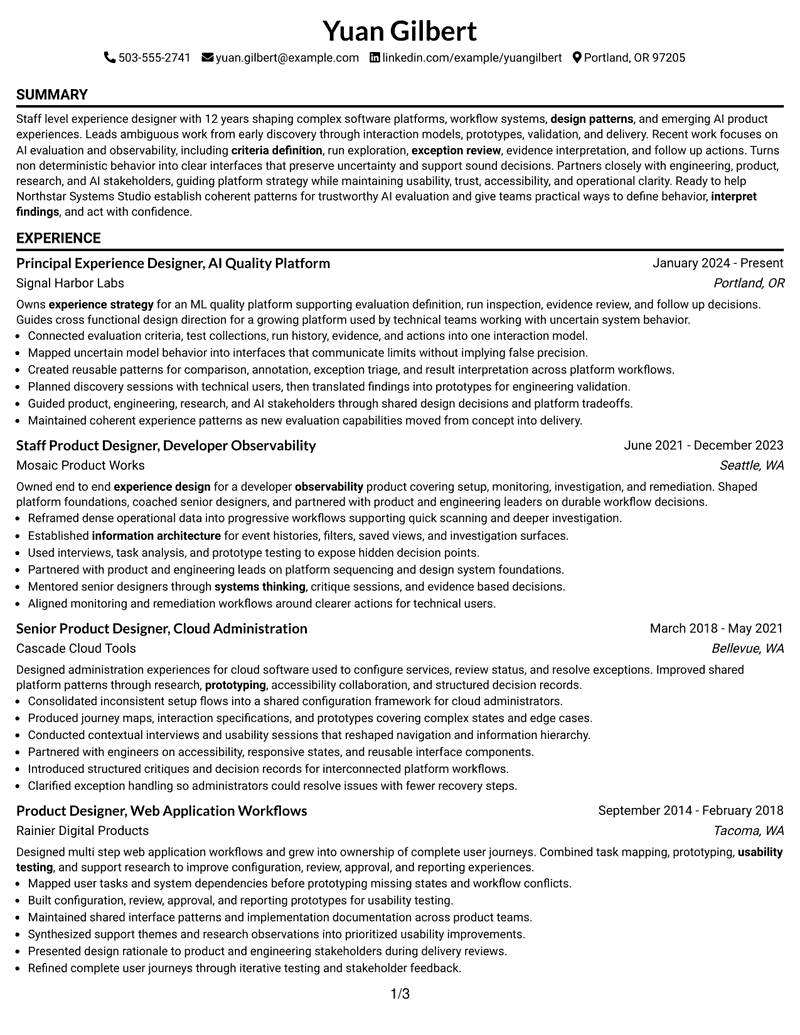
This guide shows you how to build a Staff Experience Designer - AI Evaluation Platform resume that is clear, focused, and easy to review. You will learn how to organize senior design evidence, show platform ownership, and compare professional resume structures.
Strong resumes for this role connect experience design with AI evaluation workflows, agentic systems, non-deterministic behavior, platform design, research, prototyping, and design systems. Use concise bullets and clear section hierarchy so reviewers can connect your decisions, methods, and platform impact.
The same complete resume example is presented in 33 ATS-friendly layouts so you can compare reading order, section balance, visual hierarchy, and free PDF options without changing the underlying career evidence.
What Makes a Great Staff Experience Designer - AI Evaluation Platform Resume in 2026
A strong resume is strategic, evidence-based, and easy to scan. It should show Staff-level ownership, complex workflow design, research, prototyping, and cross-functional leadership.
Align keywords with the work itself, including AI evaluation workflows, agentic systems, non-deterministic systems, platform design, interaction design, design systems, information architecture, user research, usability testing, and prototyping.
The examples shown below are intentionally detailed to demonstrate a range of experiences, skills, accomplishments and relevant keywords. We prefer detailed resumes as they provide more context to the hiring managers and also help the ATS systems identify relevant qualifications and score your resume better for a match. But the length of a resume is an individual choice. If you want a one page resume, just keep the most relevant experience and information for the job. Note: Resume examples are for educational purposes only. Use only information that accurately reflects your experience and qualifications. References to real organizations do not imply affiliation or endorsement.
#1 Simple One Column Format Resume Example
Simple One Column Format organizes the document through a one-column flow and direct section order. The structure helps reviewers move from summary to supporting evidence with little friction.

Resume Snapshot
- Target: Staff Experience Designer - AI Evaluation Platform
- Experience: 12 years across four design roles
- Focus: AI evaluation, observability, and platform workflows
- Education: BFA in Interaction Design
Why This Format Works
- Full-width sections give complex AI evaluation work enough descriptive space.
- Direct section order keeps platform design and research evidence easy to follow.
- Long experience bullets remain readable without competing parallel content.
- Projects and certifications stay distinct after the main experience history.
- Skills such as prototyping and systems thinking remain easy to locate.
- Simple sequencing supports direct review of the complete 12-year career history.
Best For
- Clear section-by-section scanning
- Detailed Staff-level experience records
- ATS-focused professional applications
- Resumes with several supporting sections
- Direct comparison of career progression
- Fast chronological resume review
Resume Keywords
- experience design
- interpret findings
- interaction patterns
- production AI experiences
- evaluation workflows
- criteria definition
- exception review
- observability
- design patterns
- Workflow design
- design system
- Interaction Design
- information architecture
- user research
- usability testing
#2 Plain One Column with Shaded Labels Resume Example
Recruiters can move through the resume in a clear one-column flow, using visible section cues to locate supporting details. Plain One Column with Shaded Labels keeps the reading path predictable.

Why This Format Works
- Long experience bullets remain readable without competing parallel content.
- Projects and certifications stay distinct after the main experience history.
- Skills such as prototyping and systems thinking remain easy to locate.
- Shaded labels help reviewers distinguish skills, projects, and experience sections quickly.
- Linear reading keeps four design roles in clear chronological sequence.
- Full-width sections give complex AI evaluation work enough descriptive space.
Best For
- Longer bullets needing readable spacing
- Skills alongside deep experience
- Credentials beyond core employment history
- Complex platform design portfolios
- Resumes with substantial experience detail
- Multiple roles plus project evidence
#3 One Column Format with Photo Right Resume Example
Career evidence receives a clear reading path in the one-column flow, with supporting sections kept distinct. One Column Format with Photo Right helps reviewers compare experience and qualifications efficiently.

Why This Format Works
- Skills such as prototyping and systems thinking remain easy to locate.
- The photo treatment remains separate from the resume's substantive experience evidence.
- Linear reading keeps four design roles in clear chronological sequence.
- Full-width sections give complex AI evaluation work enough descriptive space.
- Direct section order keeps platform design and research evidence easy to follow.
- Long experience bullets remain readable without competing parallel content.
Best For
- Platform ownership narratives
- Projects supporting recent experience
- Skills backed by career examples
- Experience-led design applications
- AI evaluation workflow evidence
- Regions where resume photos are customary
#4 Clean Two Column Sidebar Format Resume Example
Content is balanced across a two-column body, giving dense experience and shorter supporting sections distinct space. Clean Two Column Sidebar Format helps reviewers scan without flattening the hierarchy.

Why This Format Works
- Two-column organization separates deep experience from shorter supporting credentials.
- Parallel space helps skills complement four detailed design roles without crowding.
- The structure keeps AI evaluation work prominent while supporting sections stay accessible.
- Projects and certifications can remain distinct from the longer experience narrative.
- Platform design and research evidence gain clearer visual separation across sections.
- Sidebar organization gives compact credentials space beside the longer experience record.
Best For
- Applications with broad supporting credentials
- Structured review by multiple stakeholders
- Staff-level product design applications
- Technical platform design roles
- ATS-conscious application workflows
- Cross-functional leadership resumes
#5 Two Column Format Resume Example
When a resume carries deep experience and several supporting sections, the two-column body helps preserve hierarchy. Two Column Format supports focused review in a professional application.

Why This Format Works
- Platform design and research evidence gain clearer visual separation across sections.
- The layout supports dense Staff-level content without forcing one continuous text stream.
- Two-column organization separates deep experience from shorter supporting credentials.
- Parallel space helps skills complement four detailed design roles without crowding.
- The structure keeps AI evaluation work prominent while supporting sections stay accessible.
- Projects and certifications can remain distinct from the longer experience narrative.
Best For
- Polished but structured resume presentation
- Professional resumes needing visual hierarchy
- Dense experience with clear separation
- Modern platform design applications
- Readable presentation of supporting sections
- Career histories with varied evidence
#6 Photo Header Two Column Format Resume Example
A restrained visual treatment gives the two-column body a strong hierarchy without overwhelming the content. Photo Header Two Column Format keeps the reviewer focused on resume sections and evidence.

Why This Format Works
- Platform design and research evidence gain clearer visual separation across sections.
- The layout supports dense Staff-level content without forcing one continuous text stream.
- The photo treatment remains separate from the resume's substantive experience evidence.
- Two-column organization separates deep experience from shorter supporting credentials.
- Parallel space helps skills complement four detailed design roles without crowding.
- The structure keeps AI evaluation work prominent while supporting sections stay accessible.
Best For
- AI evaluation platform applications
- Staff experience design resumes
- Complex workflow design backgrounds
- Systems-thinking career narratives
- Research-led product design profiles
- Regions where resume photos are customary
#7 Simple Two Column Format Resume Example
Simple Two Column Format organizes the document through a two-column body and direct section order. The structure helps reviewers move from summary to supporting evidence with little friction.

Why This Format Works
- The structure keeps AI evaluation work prominent while supporting sections stay accessible.
- Projects and certifications can remain distinct from the longer experience narrative.
- Platform design and research evidence gain clearer visual separation across sections.
- The layout supports dense Staff-level content without forcing one continuous text stream.
- Two-column organization separates deep experience from shorter supporting credentials.
- Parallel space helps skills complement four detailed design roles without crowding.
Best For
- Clear section-by-section scanning
- Detailed Staff-level experience records
- ATS-focused professional applications
- Resumes with several supporting sections
- Direct comparison of career progression
- Fast chronological resume review
#8 Text/Fang Style Resume Example
Recruiters can move through the resume in a clear one-column flow, using visible section cues to locate supporting details. Text/Fang Style keeps the reading path predictable.

Why This Format Works
- Full-width sections give complex AI evaluation work enough descriptive space.
- Direct section order keeps platform design and research evidence easy to follow.
- Long experience bullets remain readable without competing parallel content.
- Projects and certifications stay distinct after the main experience history.
- Skills such as prototyping and systems thinking remain easy to locate.
- Text-led styling keeps attention on the depth of platform and research content.
Best For
- Longer bullets needing readable spacing
- Skills alongside deep experience
- Credentials beyond core employment history
- Complex platform design portfolios
- Resumes with substantial experience detail
- Multiple roles plus project evidence
#9 One Column Boxed Contact Header Format Resume Example
Career evidence receives a clear reading path in the one-column flow, with supporting sections kept distinct. One Column Boxed Contact Header Format helps reviewers compare experience and qualifications efficiently.

Why This Format Works
- Long experience bullets remain readable without competing parallel content.
- Projects and certifications stay distinct after the main experience history.
- Skills such as prototyping and systems thinking remain easy to locate.
- The boxed contact header separates identity details from the experience evidence below.
- Linear reading keeps four design roles in clear chronological sequence.
- Full-width sections give complex AI evaluation work enough descriptive space.
Best For
- Platform ownership narratives
- Projects supporting recent experience
- Skills backed by career examples
- Experience-led design applications
- AI evaluation workflow evidence
- Research and prototyping credentials
#10 Plain Two Column Format Resume Example
Content is balanced across a two-column body, giving dense experience and shorter supporting sections distinct space. Plain Two Column Format helps reviewers scan without flattening the hierarchy.

Why This Format Works
- The structure keeps AI evaluation work prominent while supporting sections stay accessible.
- Projects and certifications can remain distinct from the longer experience narrative.
- Platform design and research evidence gain clearer visual separation across sections.
- The layout supports dense Staff-level content without forcing one continuous text stream.
- Two-column organization separates deep experience from shorter supporting credentials.
- Parallel space helps skills complement four detailed design roles without crowding.
#11 Colored Two Column Format Resume Example
When a resume carries deep experience and several supporting sections, the two-column body helps preserve hierarchy. Colored Two Column Format supports focused review in a professional application.

Why This Format Works
- Two-column organization separates deep experience from shorter supporting credentials.
- Parallel space helps skills complement four detailed design roles without crowding.
- The structure keeps AI evaluation work prominent while supporting sections stay accessible.
- Projects and certifications can remain distinct from the longer experience narrative.
- Platform design and research evidence gain clearer visual separation across sections.
- Controlled visual contrast separates sections while preserving attention on career evidence.
Best For
- Polished but structured resume presentation
- Professional resumes needing visual hierarchy
- Dense experience with clear separation
- Modern platform design applications
- Readable presentation of supporting sections
- Career histories with varied evidence
#12 One Column Shaded Contact Header Format Resume Example
A restrained visual treatment gives the one-column flow a strong hierarchy without overwhelming the content. One Column Shaded Contact Header Format keeps the reviewer focused on resume sections and evidence.

Why This Format Works
- Linear reading keeps four design roles in clear chronological sequence.
- Full-width sections give complex AI evaluation work enough descriptive space.
- Direct section order keeps platform design and research evidence easy to follow.
- Long experience bullets remain readable without competing parallel content.
- Projects and certifications stay distinct after the main experience history.
- Skills such as prototyping and systems thinking remain easy to locate.
Best For
- AI evaluation platform applications
- Staff experience design resumes
- Complex workflow design backgrounds
- Systems-thinking career narratives
- Research-led product design profiles
- Cross-functional platform leadership
#13 Boxed Contact Header with Job Title Format Resume Example
Boxed Contact Header with Job Title Format organizes the document through a one-column flow and direct section order. The structure helps reviewers move from summary to supporting evidence with little friction.

Why This Format Works
- Linear reading keeps four design roles in clear chronological sequence.
- Full-width sections give complex AI evaluation work enough descriptive space.
- Direct section order keeps platform design and research evidence easy to follow.
- Long experience bullets remain readable without competing parallel content.
- Projects and certifications stay distinct after the main experience history.
- The boxed contact header separates identity details from the experience evidence below.
Best For
- Clear section-by-section scanning
- Detailed Staff-level experience records
- ATS-focused professional applications
- Resumes with several supporting sections
- Direct comparison of career progression
- Fast chronological resume review
#14 Stylish Two Column Designer Format Resume Example
Recruiters can move through the resume in a clear two-column body, using visible section cues to locate supporting details. Stylish Two Column Designer Format keeps the reading path predictable.

Why This Format Works
- Platform design and research evidence gain clearer visual separation across sections.
- The layout supports dense Staff-level content without forcing one continuous text stream.
- Two-column organization separates deep experience from shorter supporting credentials.
- Parallel space helps skills complement four detailed design roles without crowding.
- The structure keeps AI evaluation work prominent while supporting sections stay accessible.
- Projects and certifications can remain distinct from the longer experience narrative.
Best For
- Longer bullets needing readable spacing
- Skills alongside deep experience
- Credentials beyond core employment history
- Complex platform design portfolios
- Resumes with substantial experience detail
- Multiple roles plus project evidence
#15 Modern Icon Format Resume Example
Career evidence receives a clear reading path in the two-column body, with supporting sections kept distinct. Modern Icon Format helps reviewers compare experience and qualifications efficiently.

Why This Format Works
- Parallel space helps skills complement four detailed design roles without crowding.
- The structure keeps AI evaluation work prominent while supporting sections stay accessible.
- Projects and certifications can remain distinct from the longer experience narrative.
- Platform design and research evidence gain clearer visual separation across sections.
- The layout supports dense Staff-level content without forcing one continuous text stream.
- Icons provide navigation cues while two columns organize skills and experience evidence.
Best For
- Platform ownership narratives
- Projects supporting recent experience
- Skills backed by career examples
- Experience-led design applications
- AI evaluation workflow evidence
- Research and prototyping credentials
#16 Plain Professional Layout with Job Title & Shaded Labels Resume Example
Content is balanced across a one-column flow, giving dense experience and shorter supporting sections distinct space. Plain Professional Layout with Job Title & Shaded Labels helps reviewers scan without flattening the hierarchy.

Why This Format Works
- Shaded labels help reviewers distinguish skills, projects, and experience sections quickly.
- Visible job title treatment keeps the target role clear before deeper evidence.
- Linear reading keeps four design roles in clear chronological sequence.
- Full-width sections give complex AI evaluation work enough descriptive space.
- Direct section order keeps platform design and research evidence easy to follow.
- Long experience bullets remain readable without competing parallel content.
Best For
- Applications with broad supporting credentials
- Structured review by multiple stakeholders
- Staff-level product design applications
- Technical platform design roles
- ATS-conscious application workflows
- Cross-functional leadership resumes
#17 Classic One Column Resume Format Resume Example
When a resume carries deep experience and several supporting sections, the one-column flow helps preserve hierarchy. Classic One Column Resume Format supports focused review in a professional application.

Why This Format Works
- Skills such as prototyping and systems thinking remain easy to locate.
- Classic sequencing supports straightforward review of a 12-year design progression.
- Linear reading keeps four design roles in clear chronological sequence.
- Full-width sections give complex AI evaluation work enough descriptive space.
- Direct section order keeps platform design and research evidence easy to follow.
- Long experience bullets remain readable without competing parallel content.
Best For
- Polished but structured resume presentation
- Professional resumes needing visual hierarchy
- Dense experience with clear separation
- Modern platform design applications
- Readable presentation of supporting sections
- Career histories with varied evidence
#18 One Column Format with Photo Resume Example
A restrained visual treatment gives the one-column flow a strong hierarchy without overwhelming the content. One Column Format with Photo keeps the reviewer focused on resume sections and evidence.

Why This Format Works
- Linear reading keeps four design roles in clear chronological sequence.
- Full-width sections give complex AI evaluation work enough descriptive space.
- Direct section order keeps platform design and research evidence easy to follow.
- Long experience bullets remain readable without competing parallel content.
- Projects and certifications stay distinct after the main experience history.
- The photo treatment remains separate from the resume's substantive experience evidence.
Best For
- AI evaluation platform applications
- Staff experience design resumes
- Complex workflow design backgrounds
- Systems-thinking career narratives
- Research-led product design profiles
- Regions where resume photos are customary
#19 Minimal Header Format Resume Example
Minimal Header Format organizes the document through a one-column flow and direct section order. The structure helps reviewers move from summary to supporting evidence with little friction.

Why This Format Works
- Direct section order keeps platform design and research evidence easy to follow.
- Long experience bullets remain readable without competing parallel content.
- Projects and certifications stay distinct after the main experience history.
- Skills such as prototyping and systems thinking remain easy to locate.
- The minimal header leaves more visual emphasis for experience and project evidence.
- Linear reading keeps four design roles in clear chronological sequence.
Best For
- Clear section-by-section scanning
- Detailed Staff-level experience records
- ATS-focused professional applications
- Resumes with several supporting sections
- Direct comparison of career progression
- Fast chronological resume review
#20 Modern Full Background Two Column Format Resume Example
Recruiters can move through the resume in a clear two-column body, using visible section cues to locate supporting details. Modern Full Background Two Column Format keeps the reading path predictable.

Why This Format Works
- Platform design and research evidence gain clearer visual separation across sections.
- The layout supports dense Staff-level content without forcing one continuous text stream.
- Controlled visual contrast separates sections while preserving attention on career evidence.
- Two-column organization separates deep experience from shorter supporting credentials.
- Parallel space helps skills complement four detailed design roles without crowding.
- The structure keeps AI evaluation work prominent while supporting sections stay accessible.
Best For
- Longer bullets needing readable spacing
- Skills alongside deep experience
- Credentials beyond core employment history
- Complex platform design portfolios
- Resumes with substantial experience detail
- Multiple roles plus project evidence
#21 Dark Mode Two Column Format Resume Example
Career evidence receives a clear reading path in the two-column body, with supporting sections kept distinct. Dark Mode Two Column Format helps reviewers compare experience and qualifications efficiently.

Why This Format Works
- Controlled visual contrast separates sections while preserving attention on career evidence.
- Two-column organization separates deep experience from shorter supporting credentials.
- Parallel space helps skills complement four detailed design roles without crowding.
- The structure keeps AI evaluation work prominent while supporting sections stay accessible.
- Projects and certifications can remain distinct from the longer experience narrative.
- Platform design and research evidence gain clearer visual separation across sections.
Best For
- Platform ownership narratives
- Projects supporting recent experience
- Skills backed by career examples
- Experience-led design applications
- AI evaluation workflow evidence
- Research and prototyping credentials
#22 Dark Mode Box Header Format Resume Example
Content is balanced across a two-column body, giving dense experience and shorter supporting sections distinct space. Dark Mode Box Header Format helps reviewers scan without flattening the hierarchy.

Why This Format Works
- Parallel space helps skills complement four detailed design roles without crowding.
- The structure keeps AI evaluation work prominent while supporting sections stay accessible.
- Projects and certifications can remain distinct from the longer experience narrative.
- Platform design and research evidence gain clearer visual separation across sections.
- The layout supports dense Staff-level content without forcing one continuous text stream.
- Controlled visual contrast separates sections while preserving attention on career evidence.
Best For
- Applications with broad supporting credentials
- Structured review by multiple stakeholders
- Staff-level product design applications
- Technical platform design roles
- ATS-conscious application workflows
- Cross-functional leadership resumes
#23 Elegant Full Background Two Column Format Resume Example
When a resume carries deep experience and several supporting sections, the two-column body helps preserve hierarchy. Elegant Full Background Two Column Format supports focused review in a professional application.

Why This Format Works
- Projects and certifications can remain distinct from the longer experience narrative.
- Platform design and research evidence gain clearer visual separation across sections.
- The layout supports dense Staff-level content without forcing one continuous text stream.
- Controlled visual contrast separates sections while preserving attention on career evidence.
- Two-column organization separates deep experience from shorter supporting credentials.
- Parallel space helps skills complement four detailed design roles without crowding.
Best For
- Polished but structured resume presentation
- Professional resumes needing visual hierarchy
- Dense experience with clear separation
- Modern platform design applications
- Readable presentation of supporting sections
- Career histories with varied evidence
#24 Creative Two Tone Format Resume Example
A restrained visual treatment gives the two-column body a strong hierarchy without overwhelming the content. Creative Two Tone Format keeps the reviewer focused on resume sections and evidence.

Why This Format Works
- The layout supports dense Staff-level content without forcing one continuous text stream.
- Controlled visual contrast separates sections while preserving attention on career evidence.
- Two-column organization separates deep experience from shorter supporting credentials.
- Parallel space helps skills complement four detailed design roles without crowding.
- The structure keeps AI evaluation work prominent while supporting sections stay accessible.
- Projects and certifications can remain distinct from the longer experience narrative.
Best For
- AI evaluation platform applications
- Staff experience design resumes
- Complex workflow design backgrounds
- Systems-thinking career narratives
- Research-led product design profiles
- Cross-functional platform leadership
#25 Bold Color Header Professional Format Resume Example
Bold Color Header Professional Format organizes the document through a two-column body and direct section order. The structure helps reviewers move from summary to supporting evidence with little friction.

Why This Format Works
- Two-column organization separates deep experience from shorter supporting credentials.
- Parallel space helps skills complement four detailed design roles without crowding.
- The structure keeps AI evaluation work prominent while supporting sections stay accessible.
- Projects and certifications can remain distinct from the longer experience narrative.
- Platform design and research evidence gain clearer visual separation across sections.
- Controlled visual contrast separates sections while preserving attention on career evidence.
Best For
- Clear section-by-section scanning
- Detailed Staff-level experience records
- ATS-focused professional applications
- Resumes with several supporting sections
- Direct comparison of career progression
- Fast chronological resume review
#26 Photo Header Color Sidebar Format Resume Example
Recruiters can move through the resume in a clear two-column body, using visible section cues to locate supporting details. Photo Header Color Sidebar Format keeps the reading path predictable.

Why This Format Works
- Platform design and research evidence gain clearer visual separation across sections.
- The layout supports dense Staff-level content without forcing one continuous text stream.
- Sidebar organization gives compact credentials space beside the longer experience record.
- Controlled visual contrast separates sections while preserving attention on career evidence.
- The photo treatment remains separate from the resume's substantive experience evidence.
- Two-column organization separates deep experience from shorter supporting credentials.
Best For
- Longer bullets needing readable spacing
- Skills alongside deep experience
- Credentials beyond core employment history
- Complex platform design portfolios
- Resumes with substantial experience detail
- Regions where resume photos are customary
#27 Top Left Header Color Accent Format Resume Example
Career evidence receives a clear reading path in the two-column body, with supporting sections kept distinct. Top Left Header Color Accent Format helps reviewers compare experience and qualifications efficiently.

Why This Format Works
- Platform design and research evidence gain clearer visual separation across sections.
- The layout supports dense Staff-level content without forcing one continuous text stream.
- Controlled visual contrast separates sections while preserving attention on career evidence.
- The left-aligned header creates a direct entry point into the resume hierarchy.
- Two-column organization separates deep experience from shorter supporting credentials.
- Parallel space helps skills complement four detailed design roles without crowding.
Best For
- Platform ownership narratives
- Projects supporting recent experience
- Skills backed by career examples
- Experience-led design applications
- AI evaluation workflow evidence
- Research and prototyping credentials
#28 Centered Header Classic Two Column Format Resume Example
Content is balanced across a two-column body, giving dense experience and shorter supporting sections distinct space. Centered Header Classic Two Column Format helps reviewers scan without flattening the hierarchy.

Why This Format Works
- The centered header creates a clear starting point before the two-column body.
- Two-column organization separates deep experience from shorter supporting credentials.
- Parallel space helps skills complement four detailed design roles without crowding.
- The structure keeps AI evaluation work prominent while supporting sections stay accessible.
- Projects and certifications can remain distinct from the longer experience narrative.
- Platform design and research evidence gain clearer visual separation across sections.
Best For
- Applications with broad supporting credentials
- Structured review by multiple stakeholders
- Staff-level product design applications
- Technical platform design roles
- ATS-conscious application workflows
- Cross-functional leadership resumes
#29 Left Aligned Header Clean Two Column Format Resume Example
When a resume carries deep experience and several supporting sections, the two-column body helps preserve hierarchy. Left Aligned Header Clean Two Column Format supports focused review in a professional application.

Why This Format Works
- Parallel space helps skills complement four detailed design roles without crowding.
- The structure keeps AI evaluation work prominent while supporting sections stay accessible.
- Projects and certifications can remain distinct from the longer experience narrative.
- Platform design and research evidence gain clearer visual separation across sections.
- The layout supports dense Staff-level content without forcing one continuous text stream.
- The left-aligned header creates a direct entry point into the resume hierarchy.
Best For
- Polished but structured resume presentation
- Professional resumes needing visual hierarchy
- Dense experience with clear separation
- Modern platform design applications
- Readable presentation of supporting sections
- Career histories with varied evidence
#30 Accent Divider Modern Two Column Format Resume Example
A restrained visual treatment gives the two-column body a strong hierarchy without overwhelming the content. Accent Divider Modern Two Column Format keeps the reviewer focused on resume sections and evidence.

Why This Format Works
- Projects and certifications can remain distinct from the longer experience narrative.
- Platform design and research evidence gain clearer visual separation across sections.
- The layout supports dense Staff-level content without forcing one continuous text stream.
- Accent dividers create section boundaries around dense platform and research content.
- Two-column organization separates deep experience from shorter supporting credentials.
- Parallel space helps skills complement four detailed design roles without crowding.
Best For
- AI evaluation platform applications
- Staff experience design resumes
- Complex workflow design backgrounds
- Systems-thinking career narratives
- Research-led product design profiles
- Cross-functional platform leadership
#31 Shaded Labels Clean Two Column Format Resume Example
Shaded Labels Clean Two Column Format organizes the document through a two-column body and direct section order. The structure helps reviewers move from summary to supporting evidence with little friction.

Why This Format Works
- The layout supports dense Staff-level content without forcing one continuous text stream.
- Shaded labels help reviewers distinguish skills, projects, and experience sections quickly.
- Two-column organization separates deep experience from shorter supporting credentials.
- Parallel space helps skills complement four detailed design roles without crowding.
- The structure keeps AI evaluation work prominent while supporting sections stay accessible.
- Projects and certifications can remain distinct from the longer experience narrative.
Best For
- Clear section-by-section scanning
- Detailed Staff-level experience records
- ATS-focused professional applications
- Resumes with several supporting sections
- Direct comparison of career progression
- Fast chronological resume review
#32 Photo Header Color Accent International Format Resume Example
Recruiters can move through the resume in a clear two-column body, using visible section cues to locate supporting details. Photo Header Color Accent International Format keeps the reading path predictable.

Why This Format Works
- Controlled visual contrast separates sections while preserving attention on career evidence.
- The photo treatment remains separate from the resume's substantive experience evidence.
- Two-column organization separates deep experience from shorter supporting credentials.
- Parallel space helps skills complement four detailed design roles without crowding.
- The structure keeps AI evaluation work prominent while supporting sections stay accessible.
- Projects and certifications can remain distinct from the longer experience narrative.
Best For
- Longer bullets needing readable spacing
- Skills alongside deep experience
- Credentials beyond core employment history
- Complex platform design portfolios
- Resumes with substantial experience detail
- Regions where resume photos are customary
#33 Large Profile Photo International Two Column Format Resume Example
Career evidence receives a clear reading path in the two-column body, with supporting sections kept distinct. Large Profile Photo International Two Column Format helps reviewers compare experience and qualifications efficiently.

Why This Format Works
- The structure keeps AI evaluation work prominent while supporting sections stay accessible.
- Projects and certifications can remain distinct from the longer experience narrative.
- Platform design and research evidence gain clearer visual separation across sections.
- The layout supports dense Staff-level content without forcing one continuous text stream.
- The photo treatment remains separate from the resume's substantive experience evidence.
- Two-column organization separates deep experience from shorter supporting credentials.
Best For
- Platform ownership narratives
- Projects supporting recent experience
- Skills backed by career examples
- Experience-led design applications
- AI evaluation workflow evidence
- Regions where resume photos are customary
Why Build Your Staff Experience Designer - AI Evaluation Platform Resume with ResumeInMinutes
ResumeInMinutes helps experienced designers organize complex platform work into clear sections for experience, projects, skills, education, certifications, and ATS-focused keywords.
- ATS-friendly section structure
- Keyword-focused resume content
- Experience and project organization
- Skills and certification sections
- Free PDF resume previews
- Resume customization support
Use the layouts to present complex design leadership clearly while keeping AI evaluation, platform strategy, research, interaction patterns, and trustworthy product decisions easy to find.
See Also
- 33 Staff Experience Designer, AI Evaluation Platform - AI Evaluation Platform Resume Templates with Example 2026 (ATS-Optimized)
- 33 Associate Director, Senior Service Designer (GenAI Experience) Resume Templates with Example 2026 (ATS-Optimized)
- 33 Entry-Level UI/UX Experience Designer Resume Templates with Example 2026 (ATS-Optimized)
- 33 Lead User Experience (UX) Designer Resume Templates with Example 2026 (ATS-Optimized)
- 33 Senior Experience Designer Resume Templates with Example 2026 (ATS-Optimized)
- 33 User Experience Designer Resume Templates with Example 2026 (ATS-Optimized)
- 7 Staff Product Designer, Agentic Coding Resume Templates with Example
- 33 Principal UX Designer, Voice & AI UX, UI Resume Templates with Example 2026 (ATS-Optimized)
- 30+ Associate Director, Senior Service Designer (GenAI Experience) Cover Letter Templates with Example 2026
- 30+ Entry-Level UI/UX Experience Designer Cover Letter Templates with Example 2026
Frequently Asked Questions
Are these Staff Experience Designer - AI Evaluation Platform resume templates ATS-friendly?
Yes. The templates use clear resume sections and support grounded keywords such as AI evaluation workflows, agentic systems, platform design, interaction design, user research, prototyping, and design systems.
Are these different resumes?
No. The guide uses one complete Staff Experience Designer - AI Evaluation Platform resume example and presents it through different layout and design choices.
What should a Staff Experience Designer - AI Evaluation Platform resume include?
Include a focused summary, Staff-level experience, AI evaluation and observability work, platform design, research methods, interaction design, projects, education, certifications, and relevant design leadership evidence.
Can I download the resume templates as PDFs?
Yes. Each resume style includes a free PDF option so you can review the format before selecting a layout for your application.
Which resume style works well for this Staff-level design role?
A clear one-column layout supports direct chronological review, while a well-organized two-column layout can separate supporting skills and credentials from deeper experience. Choose the structure that keeps your strongest evidence easy to scan.
How should I show AI evaluation experience without overstating certainty?
Describe the workflows you designed, the evaluation concepts you supported, and how interfaces communicated uncertainty. Use precise language about criteria, evidence, result interpretation, exception review, and follow-up decisions.
Should I include a photo on my resume?
Include a photo only when it is customary or expected in your country, region, or industry. For U.S. applications, a no-photo format is generally the safer choice.
Can I customize these resume templates?
Yes. You can adjust the resume text, layout, design style, and PDF presentation while keeping your experience, skills, projects, education, and keywords aligned with the target role.




