
US English


7 Technical Solution Architect - Enterprise Integration Resume Templates with Example
By Ria · Last Updated On October 21, 2026
Resume example — page 1

This guide shows you how to build a Technical Solution Architect - Enterprise Integration resume that presents architecture work, client delivery, and business impact clearly. You will learn how to organize your evidence and compare formats that make key details easy to scan.

Strong resumes for this role connect business needs to technical decisions. Show how you handle API integration design, enterprise discovery, delivery planning, and stakeholder communication, then support those points with relevant tools such as Aprimo, MuleSoft, and REST APIs.

The same resume example is presented in 7 layouts, so you can compare how each format organizes experience, skills, and credentials. Review the image preview, then open an example in the editor to explore its structure.

What Makes a Great Technical Solution Architect - Enterprise Integration Resume in 2026

A strong resume makes architecture decisions, project delivery, and client impact easy to find. Use clear sections and concise bullets to show your role in discovery, design, implementation, and adoption.

Support your claims with specific evidence, such as API patterns, governance work, KPI planning, and team guidance. Include relevant terms like Aprimo, MuleSoft, REST APIs, and enterprise integration where they match your experience.

Note: Resume examples are for educational purposes only. Use only information that accurately reflects your experience and qualifications. References to real organizations do not imply affiliation or endorsement.

#1 Simple One Column Format Resume Example

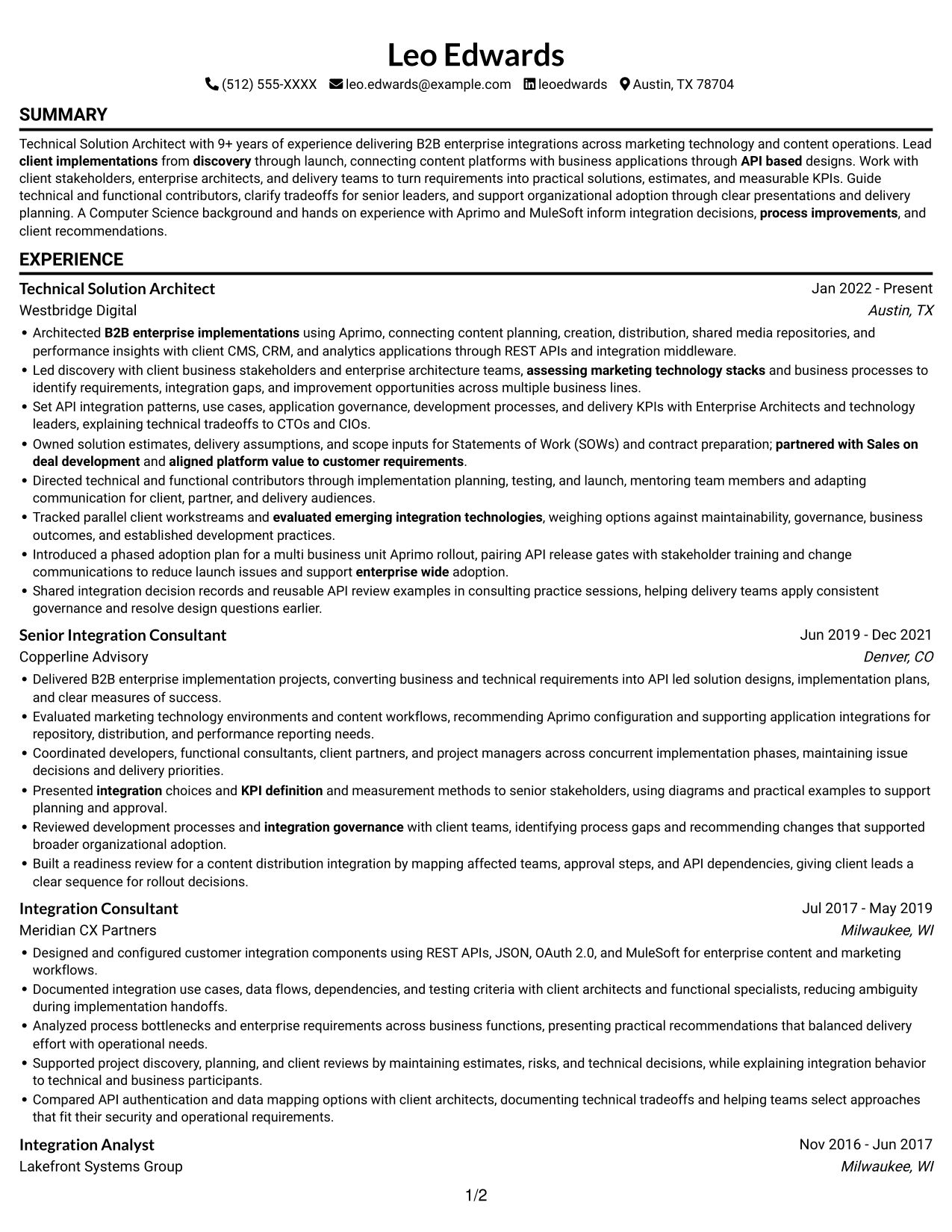
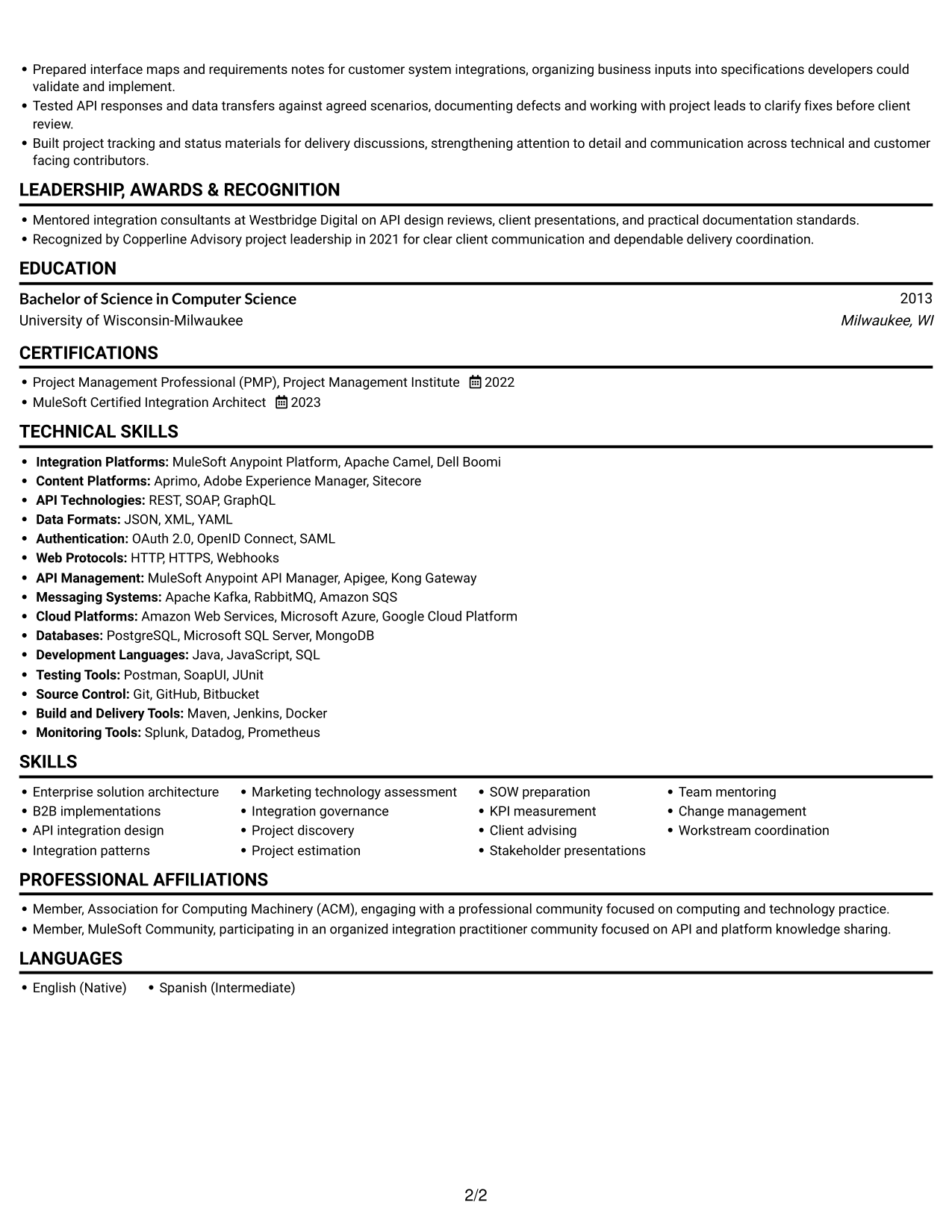
The single-column structure keeps the resume in one clear reading path, helping reviewers follow its sections from start to finish.
 
Resume example — page 1   Resume example — page 2

Why This Format Works

  • Career history reads in one sequence, helping reviewers follow role progression.
  • Experience bullets stay within a shared reading path, supporting quick review of project scope.
  • Education, certifications, and technical skills remain part of the same straightforward scan.

Best For

  • Sequential career histories
  • Detailed experience bullets
  • Standard ATS review
  • Combined skills and credential sections
  • Straightforward section navigation

Resume Keywords

  • Bachelor of Science in Computer Science
  • connecting content platforms with business applications through API based designs
  • Architected B2B enterprise implementations using Aprimo, connecting content planning, creation, distribution, shared media repositories, and performance insights with client CMS, CRM, and analytics applications through REST APIs and integration middleware.
  • Set API integration patterns, use cases
  • Introduced a phased adoption plan for a multi business unit Aprimo rollout, pairing API release gates with stakeholder training and change communications to reduce launch issues and support enterprise wide adoption.
  • Project Management
  • Delivered B2B enterprise implementation projects
  • B2B enterprise implementations
  • Lead client implementations from discovery through launch
  • assessing marketing technology stacks and business processes to identify requirements, integration gaps, and improvement opportunities across multiple business lines.
  • assessing marketing technology stacks
  • Led discovery with client business stakeholders and enterprise architecture teams
  • integration governance
  • Tracked parallel client workstreams
  • Directed technical and functional contributors through implementation planning, testing, and launch, mentoring team members
See all keywords
 

#2 Simple Two Column Format Resume Example

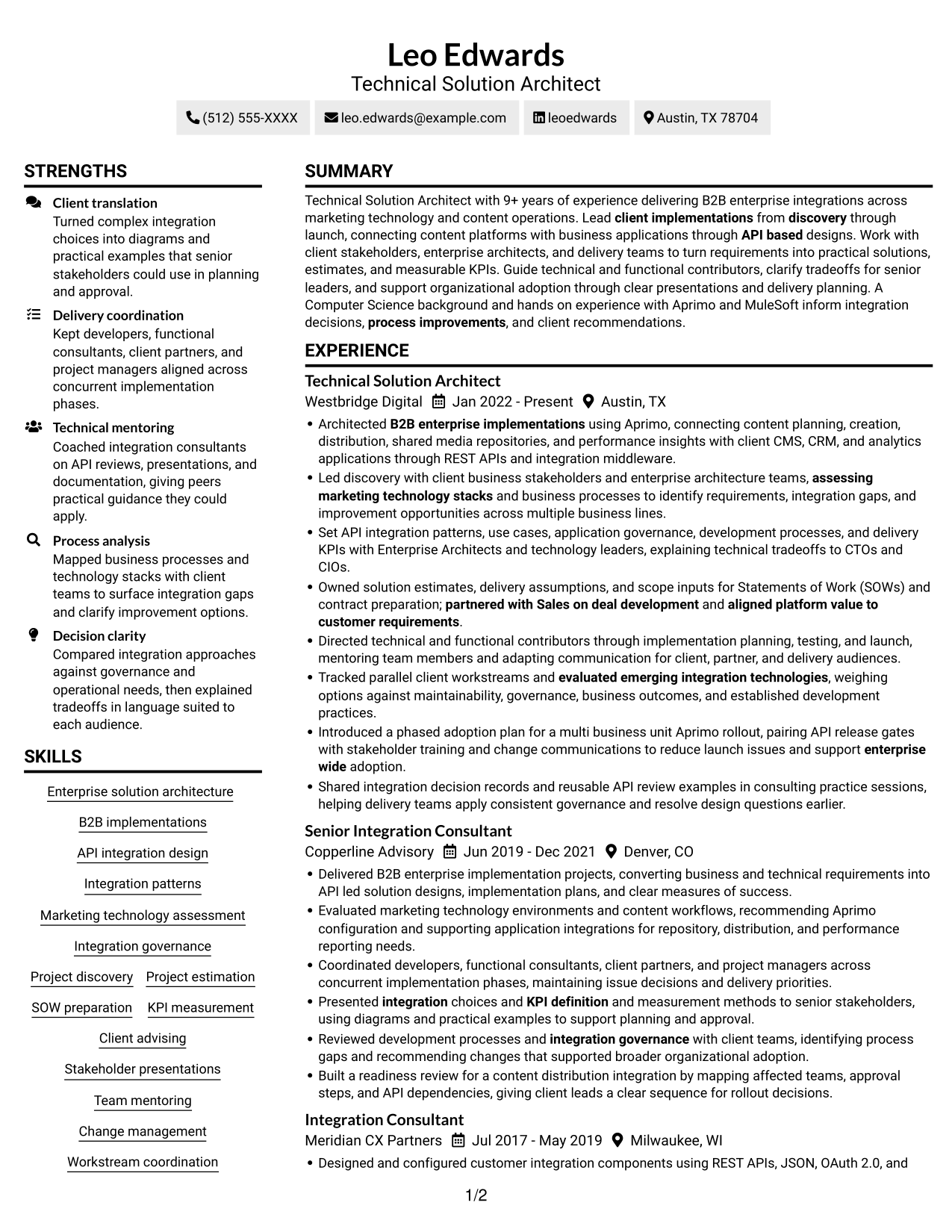
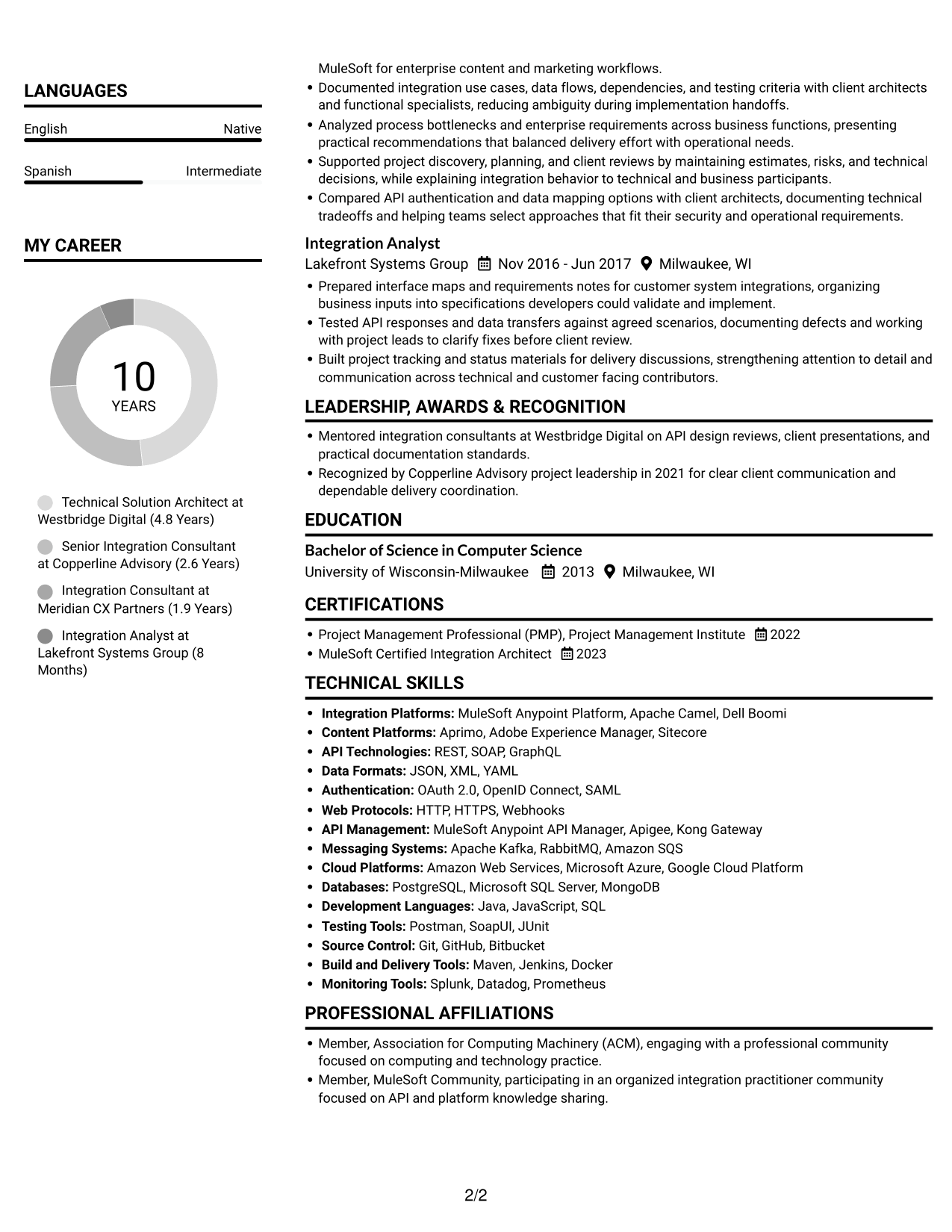
The two-column body separates information into parallel areas, giving reviewers another way to move between experience and supporting details.
 
Resume example — page 1   Resume example — page 2

Why This Format Works

  • Separate columns give experience and supporting sections distinct areas for easier navigation.
  • Bullet points in the experience section remain easy to locate during a focused scan.
  • Skills and credentials can be reviewed apart from the career history.

Best For

  • Side-by-side section review
  • Experience with supporting details
  • Technical skills alongside career history
  • Concise section labels
  • Readers who prefer parallel content areas

#3 Plain One Column with Shaded Labels Resume Example

The single-column structure presents resume content in one reading path, making it easy to follow career history and related sections in sequence.
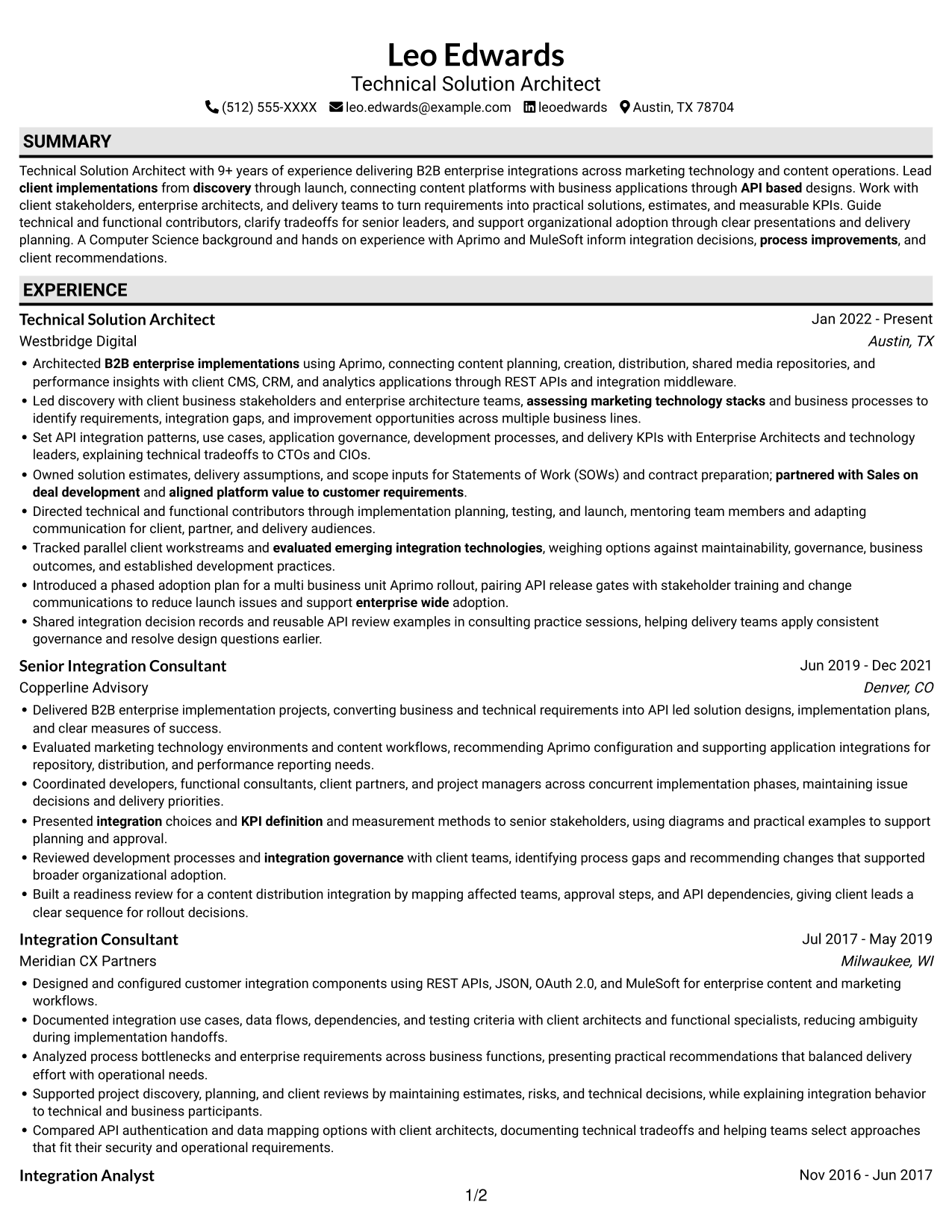
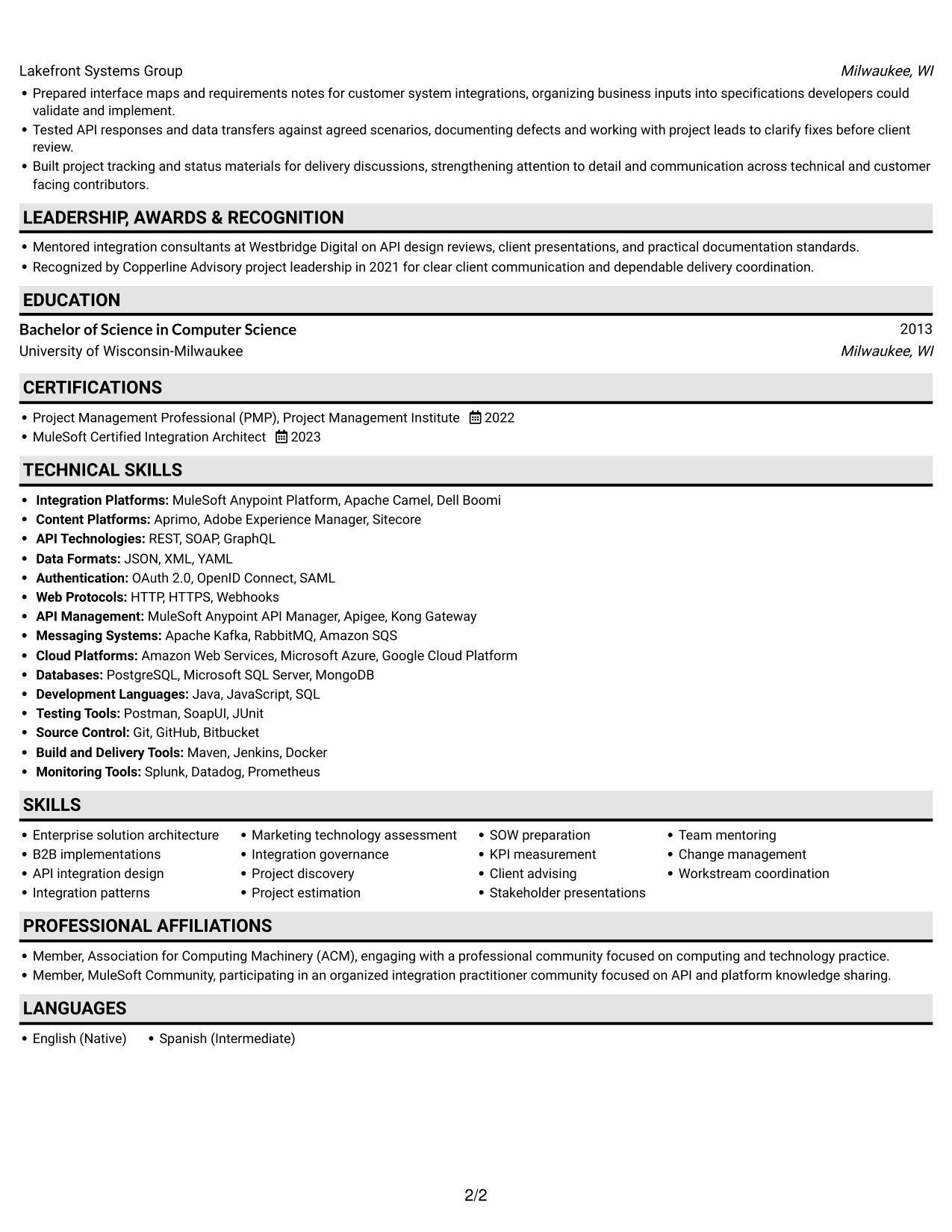
 
Resume example — page 1   Resume example — page 2

Why This Format Works

  • A continuous reading path helps reviewers trace career progression across roles.
  • Experience bullets can be scanned in sequence without switching between columns.
  • Education and certifications follow the same direct section-by-section review.

Best For

  • Chronological experience records
  • Step-by-step career review
  • Longer role descriptions
  • Education with certifications
  • Readers who prefer one reading path
 

#4 One Column Format with Photo Right Resume Example

The single-column resume includes a photo, pairing one clear reading path with a personal visual element.
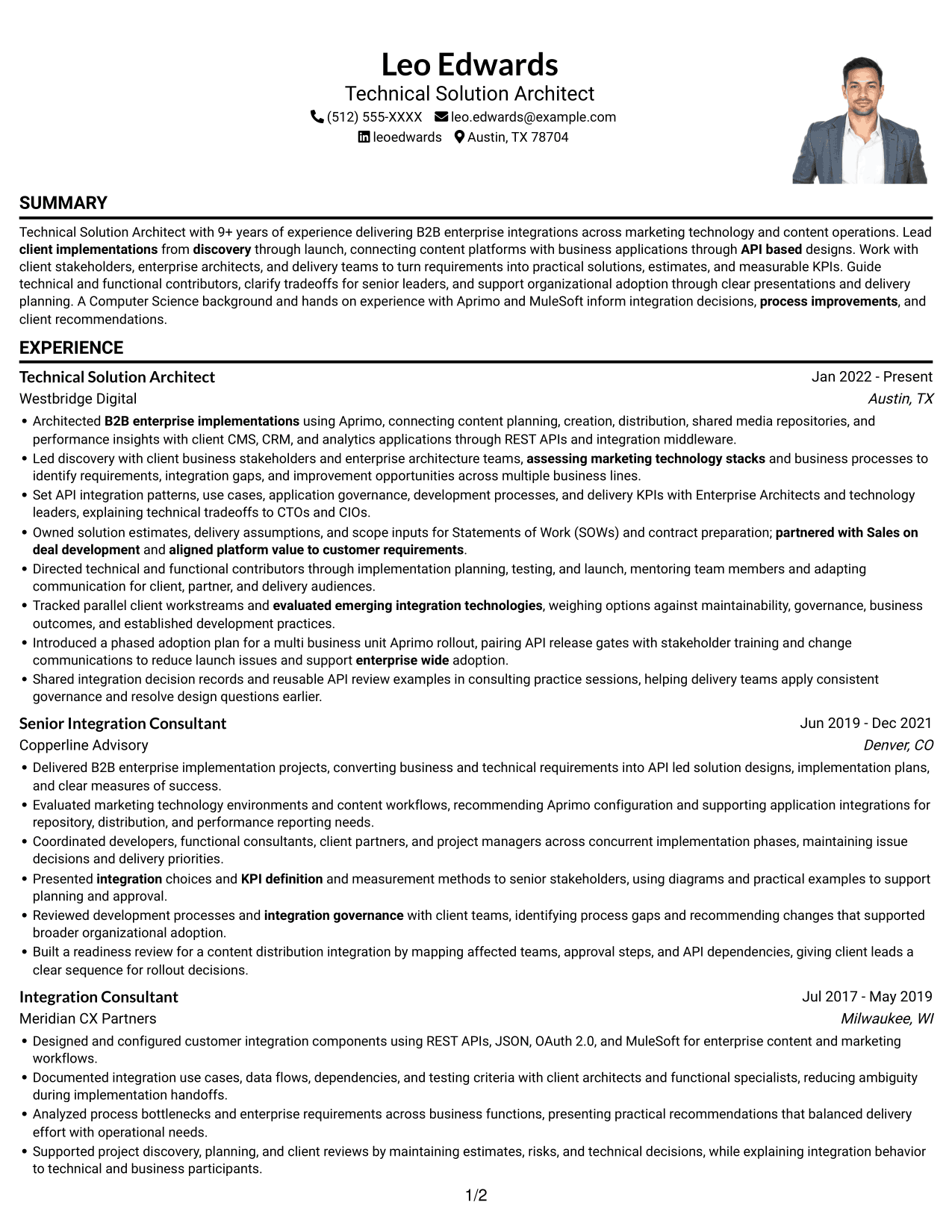
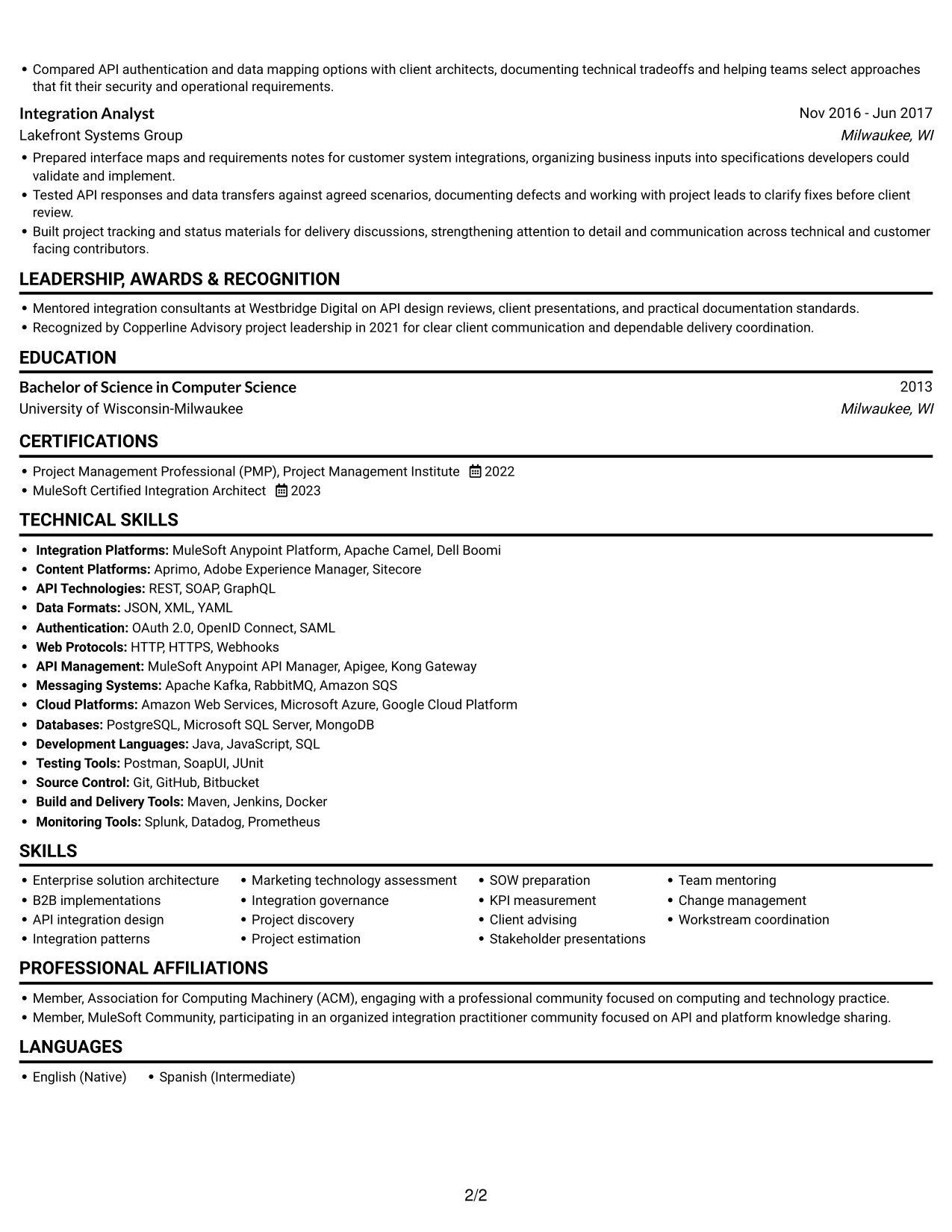
 
Resume example — page 1   Resume example — page 2

Why This Format Works

  • The single-column body keeps career history and supporting sections in one review path.
  • Experience bullets follow a consistent direction, helping readers track responsibilities and scope.
  • Skills and credentials remain part of the same focused section-by-section scan.

Best For

  • One-column resume review
  • Applications where a portrait is appropriate
  • Sequential career histories
  • Experience with supporting credentials
  • Readers who value a personal visual element
 

#5 Clean Two Column Sidebar Format Resume Example

The two-column body gives the resume parallel reading areas, which can help reviewers move between career history and supporting details.
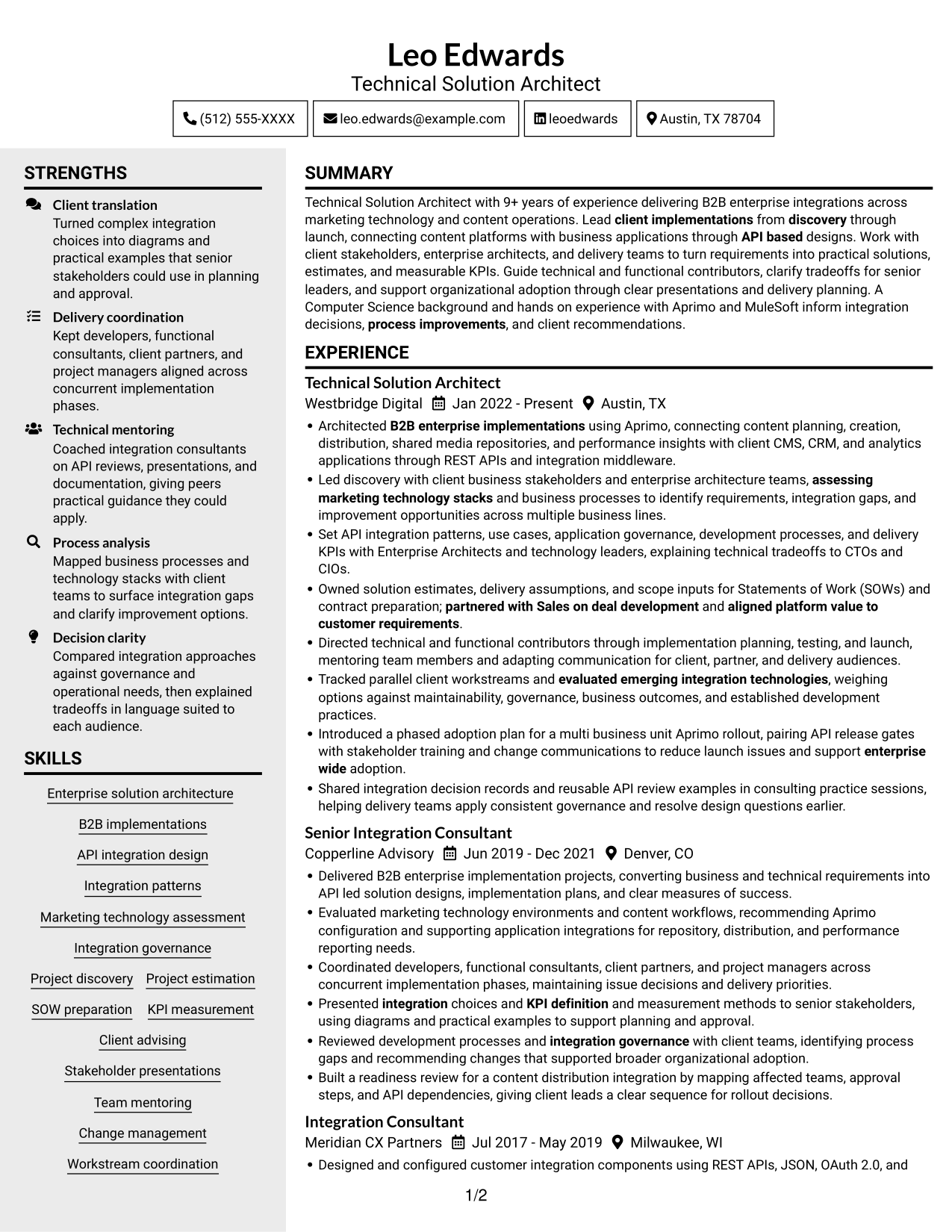
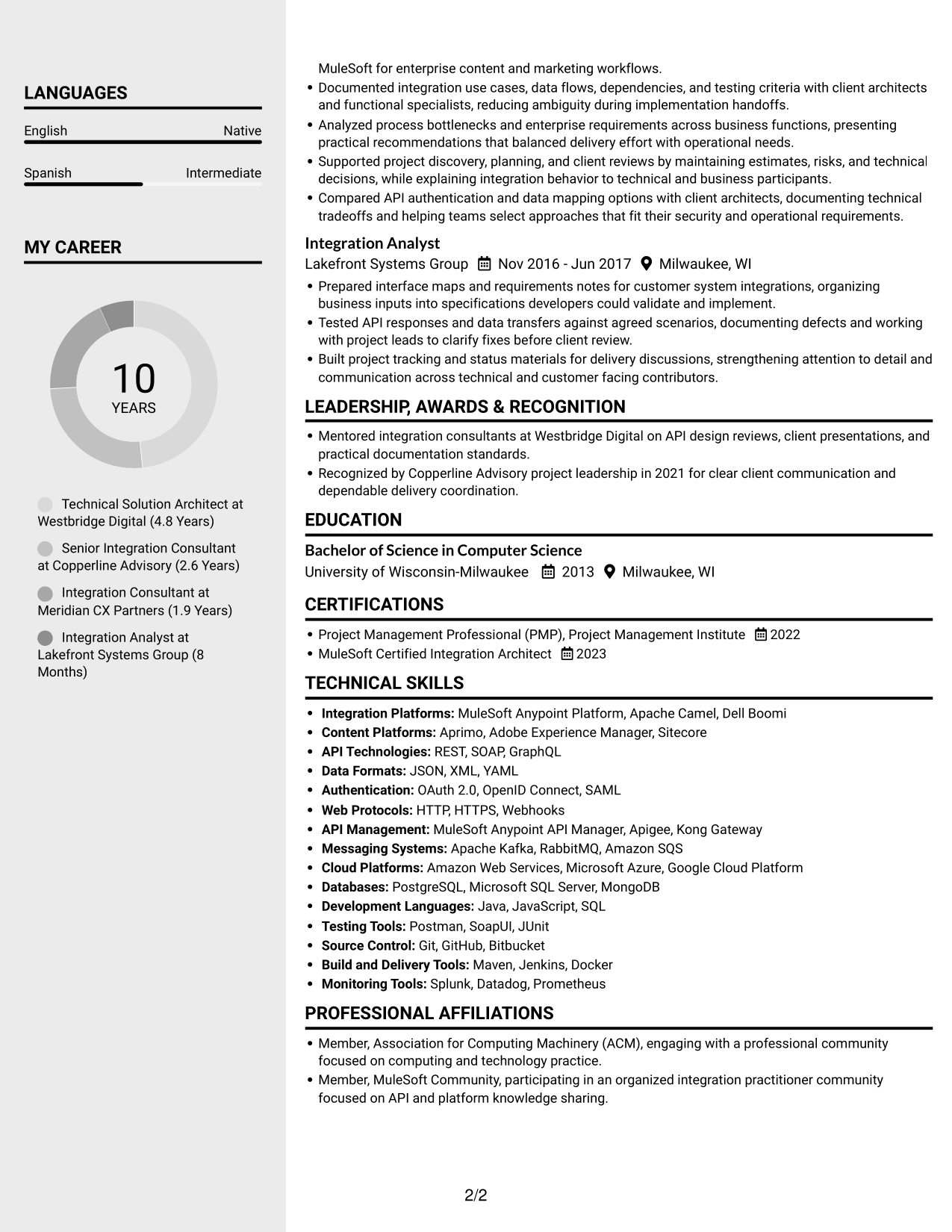
 
Resume example — page 1   Resume example — page 2

Why This Format Works

  • Parallel content areas let reviewers locate experience and related qualifications without losing the overall structure.
  • The experience section can be scanned separately from education and certifications.
  • Technical skills have a distinct place within the resume's wider information structure.

Best For

  • Parallel content review
  • Career history with related qualifications
  • Technical skills and certifications
  • Readers comparing section details
  • Resumes with varied information types


#6 Two Column Format Resume Example

The two-column body places resume information in parallel areas, offering reviewers a choice of where to begin scanning.
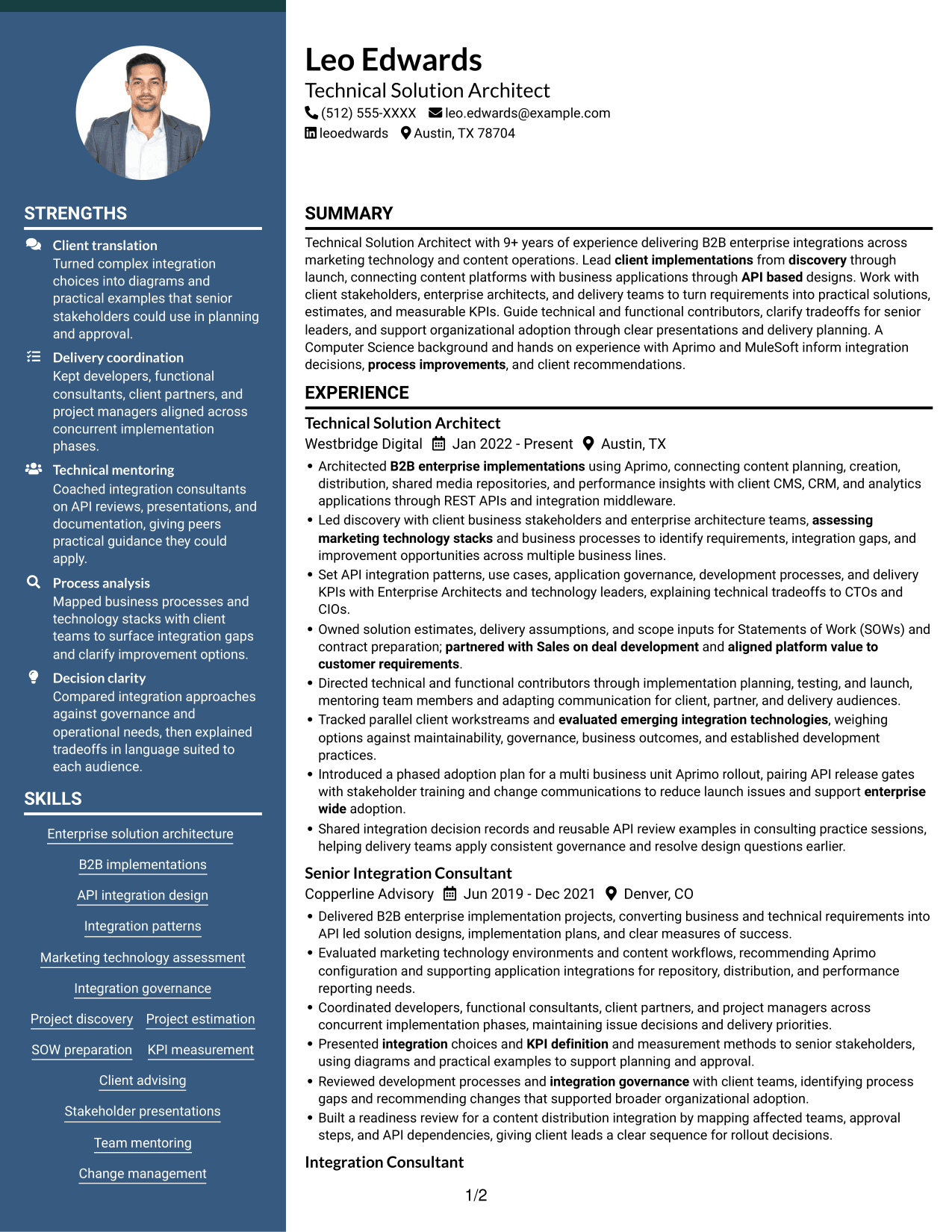
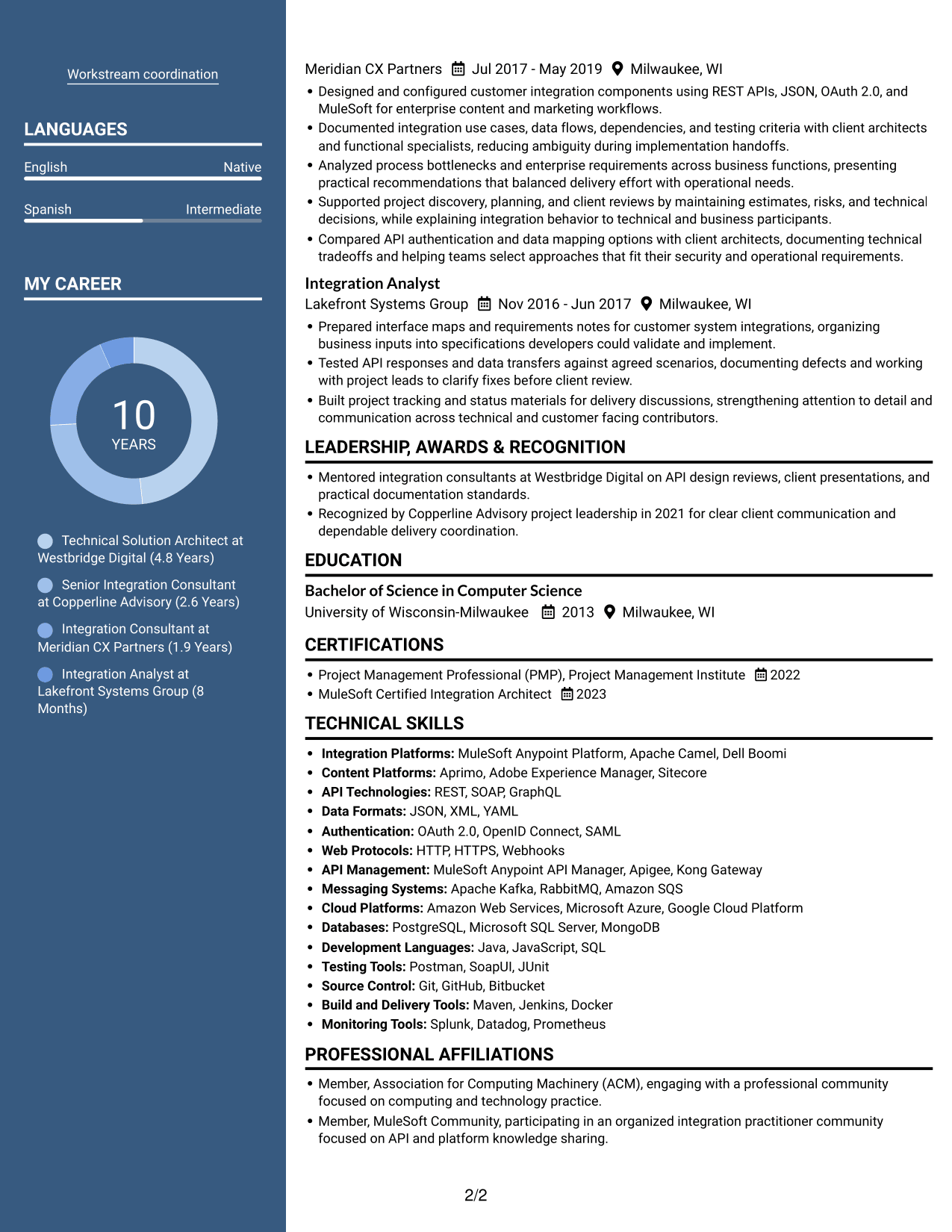
 
Resume example — page 1   Resume example — page 2

Why This Format Works

  • Parallel reading areas help reviewers find experience and supporting sections at a glance.
  • Separate columns make it easier to return to skills while reviewing career history.
  • Education and credentials can be checked without following every experience bullet.

Best For

  • Flexible scanning order
  • Experience and skills in parallel
  • Quick review of credentials
  • Multiple resume section types
  • Readers who switch between content areas
 

#7 Photo Header Two Column Format Resume Example

The two-column body includes a photo, combining parallel content areas with a personal visual element.
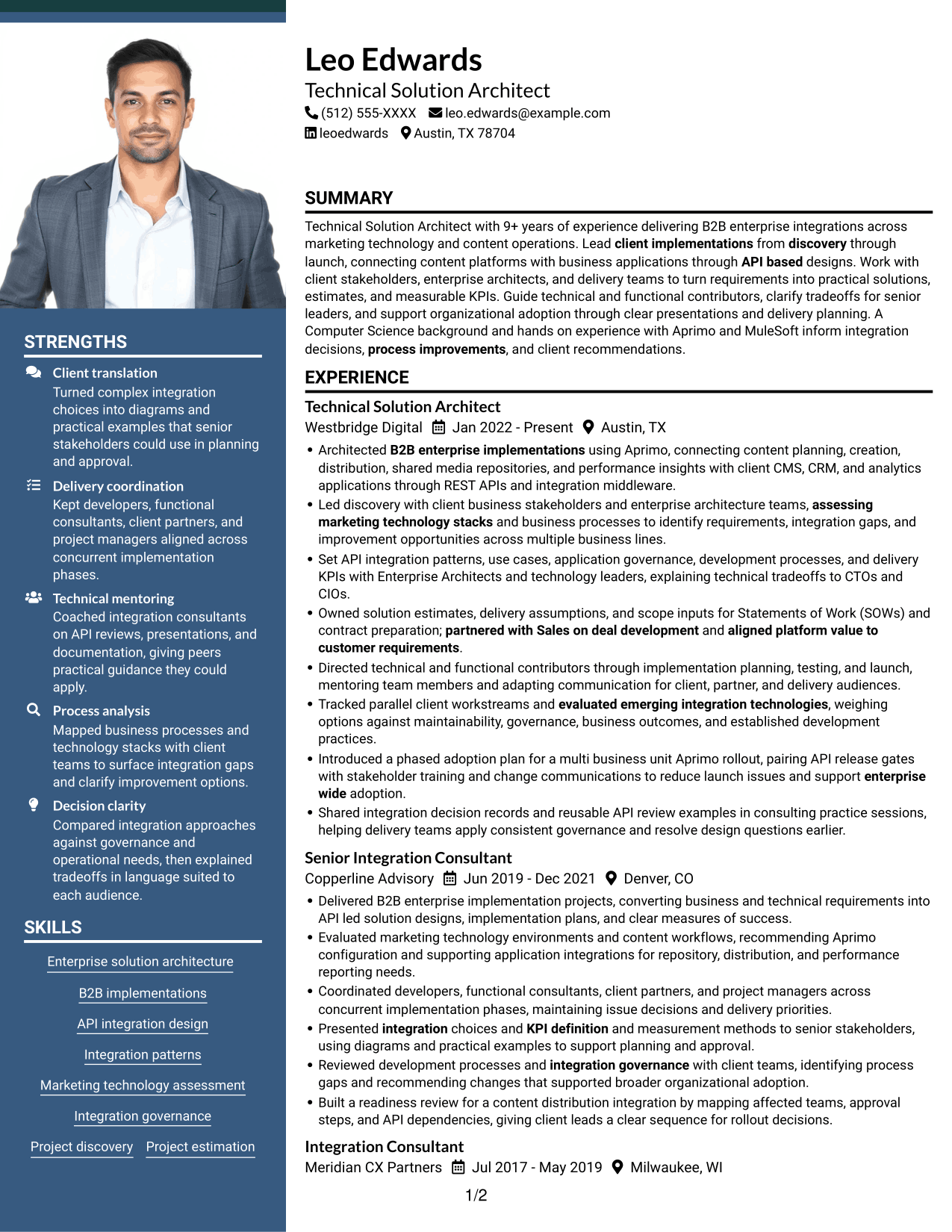
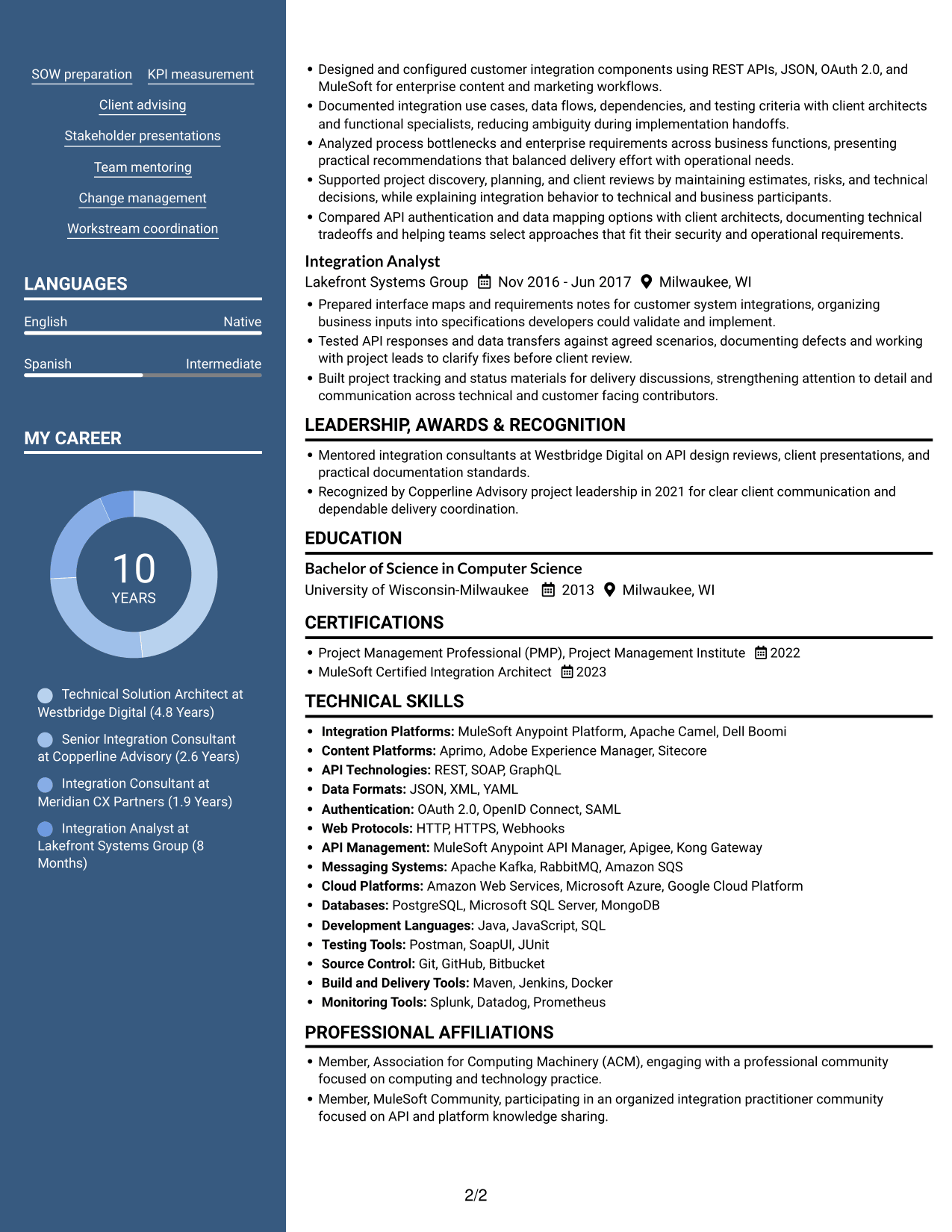
 
Resume example — page 1   Resume example — page 2

Why This Format Works

  • Two content areas help reviewers move between career history and supporting qualifications.
  • The experience section remains distinct from other resume details during a quick scan.
  • A photo adds a personal visual element without changing how the content is organized.

Best For

  • Two-column resume review
  • Applications where a portrait is appropriate
  • Career history with supporting details
  • Readers who prefer parallel sections
  • A personal visual element


Why Build Your Technical Solution Architect - Enterprise Integration Resume with ResumeInMinutes

ResumeInMinutes helps you organize architecture work, technical skills, education, and certifications in a clear resume. Use the example as a guide for presenting complex integration work in a format that is easy to review and customize.

  • Multiple resume layouts
  • Clear section structure
  • Role-relevant keyword guidance
  • Experience and skills organization
  • PNG resume previews
  • Resume customization in the editor

For this role, focus your resume on integration design, enterprise implementation, stakeholder advising, and measurable delivery outcomes. Keep each bullet direct, and explain the business value of your technical work.


See Also


Frequently Asked Questions

Are these Technical Solution Architect - Enterprise Integration resume templates ATS-friendly?

They use readable headings and a clear section order to support scanning. Include relevant terms such as API integration, enterprise architecture, governance, Aprimo, MuleSoft, and REST APIs when they accurately describe your work.

What does this resume example page show?

It shows one Technical Solution Architect - Enterprise Integration resume example in different layouts. Compare the image previews and open an example in the editor to review its organization.

What should a Technical Solution Architect - Enterprise Integration resume include?

Include a focused summary, work experience, technical skills, education, and relevant certifications. Add evidence of API design, project estimates, delivery planning, governance, stakeholder work, and team mentoring.

Which resume style works well for an enterprise integration architect?

A simple one-column layout makes headings and experience easy to scan. Choose a design with clear spacing and readable text, and keep technical skills and achievements easy to locate.

How can I show the impact of integration work?

Describe the systems or teams involved, the decision or action you led, and the result. Add verified measures such as delivery KPIs, reduced launch issues, or improved process outcomes when you have reliable figures.

Should I include a photo on my resume?

Include a photo only if it is customary or expected in your country, region, or industry. For U.S. applications, a no-photo resume is generally the safer choice.


ATS Score 91%

How we calculate this score

  • Keywords: 60% of the total. AI extracts keywords from your job description. If you do not provide one, a standard job description for the title matching your resume is used. This is not a match to a specific vacancy.
  • Text-based resume: 20%. The text resume assessed here receives 100 for this part.
  • Resume quality: 20%. We start at 100 and subtract points for issues found by our resume checks, down to a minimum of zero.
  • Keyword coverage = round(100 × confirmed matches ÷ total keywords). Exact matches and supported equivalents verified by AI receive full credit; unsupported keywords receive none. Live text checks use the saved equivalents and do not request a new AI review. Without keywords, no overall ATS score is available.
  • Final score = 60% of keyword coverage + 20% of the text score + 20% of the quality score, rounded to a whole number. Without keywords, no overall ATS score is available.

What this score means

Our scores are estimates, not employer ratings. They may contain errors and do not guarantee accurate parsing, a ranking, an interview, or a job. Check your document against the employer’s requirements. You are responsible for relying on this score.

Terms and Conditions

Score weights: Keywords 60% · Text based resume 20% · Resume quality 20%

Keyword coverage: 29 of 34 (85%) · Resume quality: 100%

Resume quality 100% · Weight 20% · Issues (0)

Details
  • ✓Name present: Leo Edwards
  • ✓Email format: leo.edwards@example.com
  • ✓Phone format: (512) 555-XXXX
  • ✓Experience 1: Job title: Technical Solution Architect
  • ✓Experience 1: Company name: Westbridge Digital
  • ✓Experience 1: Work location: Austin, TX
  • ✓Experience 1: Employment dates: Jan 2022 - Present
  • ✓Experience 1: Description or achievements: Present
  • ✓Experience 2: Job title: Senior Integration Consultant
  • ✓Experience 2: Company name: Copperline Advisory
  • ✓Experience 2: Work location: Denver, CO
  • ✓Experience 2: Employment dates: Jun 2019 - Dec 2021
  • ✓Experience 2: Description or achievements: Present
  • ✓Experience 3: Job title: Integration Consultant
  • ✓Experience 3: Company name: Meridian CX Partners
  • ✓Experience 3: Work location: Milwaukee, WI
  • ✓Experience 3: Employment dates: Jul 2017 - May 2019
  • ✓Experience 3: Description or achievements: Present
  • ✓Experience 4: Job title: Integration Analyst
  • ✓Experience 4: Company name: Lakefront Systems Group
  • ✓Experience 4: Work location: Milwaukee, WI
  • ✓Experience 4: Employment dates: Nov 2016 - Jun 2017
  • ✓Experience 4: Description or achievements: Present
  • ✓No placeholder fields
  • ✓No repeated achievement bullets
  • ✓No empty bullets

No issues found by the current checks.

Text Based Resume 100% · Weight 20%

Parsed text
Leo Edwards
(512) 555-XXXX
leo.edwards@example.com
leoedwards
Austin, TX 78704
SUMMARY
Technical Solution Architect with 9+ years of experience delivering B2B enterprise integrations across marketing technology and content operations. Lead client implementations from discovery through launch, connecting content platforms with business applications through API based designs. Work with client stakeholders, enterprise architects, and delivery teams to turn requirements into practical solutions, estimates, and measurable KPIs. Guide technical and functional contributors, clarify tradeoffs for senior leaders, and support organizational adoption through clear presentations and delivery planning. A Computer Science background and hands on experience with Aprimo and MuleSoft inform integration decisions, process improvements, and client recommendations.
EXPERIENCE
Technical Solution Architect
Jan 2022 - Present
Westbridge Digital
Austin, TX
Architected B2B enterprise implementations using Aprimo, connecting content planning, creation, distribution, shared media repositories, and performance insights with client CMS, CRM, and analytics applications through REST APIs and integration middleware.
Led discovery with client business stakeholders and enterprise architecture teams, assessing marketing technology stacks and business processes to identify requirements, integration gaps, and improvement opportunities across multiple business lines.
Set API integration patterns, use cases, application governance, development processes, and delivery KPIs with Enterprise Architects and technology leaders, explaining technical tradeoffs to CTOs and CIOs.
Owned solution estimates, delivery assumptions, and scope inputs for Statements of Work (SOWs) and contract preparation; partnered with Sales on deal development and aligned platform value to customer requirements.
Directed technical and functional contributors through implementation planning, testing, and launch, mentoring team members and adapting communication for client, partner, and delivery audiences.
Tracked parallel client workstreams and evaluated emerging integration technologies, weighing options against maintainability, governance, business outcomes, and established development practices.
Introduced a phased adoption plan for a multi business unit Aprimo rollout, pairing API release gates with stakeholder training and change communications to reduce launch issues and support enterprise wide adoption.
Shared integration decision records and reusable API review examples in consulting practice sessions, helping delivery teams apply consistent governance and resolve design questions earlier.
Senior Integration Consultant
Jun 2019 - Dec 2021
Copperline Advisory
Denver, CO
Delivered B2B enterprise implementation projects, converting business and technical requirements into API led solution designs, implementation plans, and clear measures of success.
Evaluated marketing technology environments and content workflows, recommending Aprimo configuration and supporting application integrations for repository, distribution, and performance reporting needs.
Coordinated developers, functional consultants, client partners, and project managers across concurrent implementation phases, maintaining issue decisions and delivery priorities.
Presented integration choices and KPI definition and measurement methods to senior stakeholders, using diagrams and practical examples to support planning and approval.
Reviewed development processes and integration governance with client teams, identifying process gaps and recommending changes that supported broader organizational adoption.
Built a readiness review for a content distribution integration by mapping affected teams, approval steps, and API dependencies, giving client leads a clear sequence for rollout decisions.
Integration Consultant
Jul 2017 - May 2019
Meridian CX Partners
Milwaukee, WI
Designed and configured customer integration components using REST APIs, JSON, OAuth 2.0, and MuleSoft for enterprise content and marketing workflows.
Documented integration use cases, data flows, dependencies, and testing criteria with client architects and functional specialists, reducing ambiguity during implementation handoffs.
Analyzed process bottlenecks and enterprise requirements across business functions, presenting practical recommendations that balanced delivery effort with operational needs.
Supported project discovery, planning, and client reviews by maintaining estimates, risks, and technical decisions, while explaining integration behavior to technical and business participants.
Compared API authentication and data mapping options with client architects, documenting technical tradeoffs and helping teams select approaches that fit their security and operational requirements.
Integration Analyst
Nov 2016 - Jun 2017
Lakefront Systems Group
Milwaukee, WI
Prepared interface maps and requirements notes for customer system integrations, organizing business inputs into specifications developers could validate and implement.
Tested API responses and data transfers against agreed scenarios, documenting defects and working with project leads to clarify fixes before client review.
Built project tracking and status materials for delivery discussions, strengthening attention to detail and communication across technical and customer facing contributors.
LEADERSHIP, AWARDS & RECOGNITION
Mentored integration consultants at Westbridge Digital on API design reviews, client presentations, and practical documentation standards.
Recognized by Copperline Advisory project leadership in 2021 for clear client communication and dependable delivery coordination.
EDUCATION
Bachelor of Science in Computer Science
2013
University of Wisconsin-Milwaukee
Milwaukee, WI
CERTIFICATIONS
Project Management Professional (PMP), Project Management Institute
2022
MuleSoft Certified Integration Architect
2023
TECHNICAL SKILLS
Integration Platforms: MuleSoft Anypoint Platform, Apache Camel, Dell Boomi
Content Platforms: Aprimo, Adobe Experience Manager, Sitecore
API Technologies: REST, SOAP, GraphQL
Data Formats: JSON, XML, YAML
Authentication: OAuth 2.0, OpenID Connect, SAML
Web Protocols: HTTP, HTTPS, Webhooks
API Management: MuleSoft Anypoint API Manager, Apigee, Kong Gateway
Messaging Systems: Apache Kafka, RabbitMQ, Amazon SQS
Cloud Platforms: Amazon Web Services, Microsoft Azure, Google Cloud Platform
Databases: PostgreSQL, Microsoft SQL Server, MongoDB
Development Languages: Java, JavaScript, SQL
Testing Tools: Postman, SoapUI, JUnit
Source Control: Git, GitHub, Bitbucket
Build and Delivery Tools: Maven, Jenkins, Docker
Monitoring Tools: Splunk, Datadog, Prometheus
SKILLS
Enterprise solution architecture
B2B implementations
API integration design
Integration patterns
Marketing technology assessment
Integration governance
Project discovery
Project estimation
SOW preparation
KPI measurement
Client advising
Stakeholder presentations
Team mentoring
Change management
Workstream coordination
PROFESSIONAL AFFILIATIONS
Member, Association for Computing Machinery (ACM), engaging with a professional community focused on computing and technology practice.
Member, MuleSoft Community, participating in an organized integration practitioner community focused on API and platform knowledge sharing.
LANGUAGES
English (Native)
Spanish (Intermediate)

Matched keywords (29)

  • Bachelor of Science in Computer ScienceOriginal keyword in JD: Bachelor's degree
  • Bachelor of Science in Computer ScienceOriginal keyword in JD: Computer Science preferred
  • connecting content platforms with business applications through API based designsOriginal keyword in JD: API-based integration solutions
  • Architected B2B enterprise implementations using Aprimo, connecting content planning, creation, distribution, shared media repositories, and performance insights with client CMS, CRM, and analytics applications through REST APIs and integration middleware.Original keyword in JD: Enterprise integration architecture
  • Set API integration patterns, use casesOriginal keyword in JD: Integration patterns and use cases
  • Introduced a phased adoption plan for a multi business unit Aprimo rollout, pairing API release gates with stakeholder training and change communications to reduce launch issues and support enterprise wide adoption.Original keyword in JD: Enterprise-wide integration initiatives
  • Project Management
  • Delivered B2B enterprise implementation projectsOriginal keyword in JD: Enterprise implementation delivery
  • B2B enterprise implementations
  • Lead client implementations from discovery through launchOriginal keyword in JD: Customer project delivery
  • assessing marketing technology stacks and business processes to identify requirements, integration gaps, and improvement opportunities across multiple business lines.Original keyword in JD: Enterprise requirements assessment
  • assessing marketing technology stacksOriginal keyword in JD: Marketing technology stack assessment
  • Led discovery with client business stakeholders and enterprise architecture teamsOriginal keyword in JD: Enterprise architecture collaboration
  • integration governance
  • Lead client implementations from discovery through launchOriginal keyword in JD: Project discovery and implementation
  • Tracked parallel client workstreamsOriginal keyword in JD: Parallel workstream coordination
  • Directed technical and functional contributors through implementation planning, testing, and launch, mentoring team membersOriginal keyword in JD: Team oversight and mentoring
  • Introduced a phased adoption plan for a multi business unit Aprimo rollout, pairing API release gates with stakeholder training and change communications to reduce launch issues and support enterprise wide adoption.Original keyword in JD: Organizational change management
  • Project estimation
  • Statements of Work (SOWs)
  • contract preparation
  • partnered with Sales on deal developmentOriginal keyword in JD: Sales deal development
  • KPI definition and measurement
  • Presented integration choices and KPI definition and measurement methods to senior stakeholdersOriginal keyword in JD: Senior stakeholder engagement
  • Presented integration choices and KPI definition and measurement methods to senior stakeholders, using diagrams and practical examples to support planning and approval.Original keyword in JD: Technical presentation and communication
  • process improvementsOriginal keyword in JD: Process improvement
  • evaluated emerging integration technologiesOriginal keyword in JD: Emerging technology evaluation
  • aligned platform value to customer requirementsOriginal keyword in JD: Solution value articulation
  • Shared integration decision records and reusable API review examples in consulting practice sessionsOriginal keyword in JD: Consulting practice knowledge sharing

Missing keywords (5)

  • 5-10 years of advanced solution design and delivery experience
  • Development processes and best practices
  • Client and stakeholder advising
  • Critical thinking and technical tradeoff assessment
  • Enterprise integration maturity
Disclaimer: All names, images, contact information, employment histories, achievements, security clearances, military credentials, and other qualifications shown in this content are fictional and used for illustrative purposes only. Any resemblance to actual persons, living or deceased, is purely coincidental.

Resume and cover-letter examples and recommendations in this article reflect general best practices and professional experience and are provided for guidance only. Results may vary based on role, industry, region, and hiring organization.

Content Accuracy and Verification: To the fullest extent permitted by applicable law, we do not represent or warrant that resume or cover-letter guidance, examples, recommendations, or related information are accurate, complete, current, error-free, or suitable for any particular purpose. You are responsible for independently reviewing and verifying the information before relying on it.

ATS and Cover-Letter Scores: ATS scores are estimates calculated using our own formula, informed by publicly available guidance on resume formatting and keyword matching. They are not scores issued or endorsed by an ATS provider or employer. Cover-letter scores are also our own assessments. Parsing, weighting, screening criteria, and results vary between systems, employers, job descriptions, and document formats. No score guarantees successful parsing, a particular ranking, an interview, or employment. Use scores as general guidance and independently check your documents against the employer’s requirements. To the fullest extent permitted by applicable law, we accept no liability for errors in scores or parsing, or losses arising from reliance on these assessments. Nothing in this notice excludes liability or limits consumer rights that cannot lawfully be excluded or limited.

Terms and Conditions
 
> JP 1 1
PDF Footer and Margins Setup
The margins are applied to the document, and the footer shows up in the preview and the PDF

Footer Font Settings

Are you applying for a specific job
so we can tailor your resume to it?
Are you applying for a specific job
so we can tailor your cover letter to it?

Your data stays private and is never used for training.Privacy Policy

Type your details as text to generate a personalized resume Type your details as text to generate a personalized cover letter
Website link found! Ready to create resume from:

Your data stays private and is never used for training.Privacy Policy

Drag the into the box to verify you're human.
Drop here

My Resumes

Displaying {number_of_files} files (out of {total_of_all_files} total)
Name File Type Last Modified: Description:

Rename File

Filename already exists!

Delete Files

Warning: This action is irreversible. Once you click submit, the files will be permanently deleted.

Heading text
Upload From Computer Upload
Select From Existing
LinkedIn
Drag & Drop files anywhere in this tab, or

Uploaded Files

Delete Name Last Updated Use This File
Select this to use the file for generating your resume and cover letter. Only one source—uploaded file, selected file, or LinkedIn text—can be used.

My Files

Resumes or cover letters you create will appear here. No files available yet.
Delete Name Last Updated Use This File
Select this to use the file for generating your resume and cover letter. Only one source—uploaded file, selected file, or LinkedIn text—can be used.

Add LinkedIn Profile PDF

You can download your LinkedIn profile as a PDF by opening linkedin.com in a web browser, clicking your profile photo, selecting the “More” or “Resources” button, and choosing “Save to PDF.” You can then attach the PDF using the Upload From Computer tab.

Paste Your LinkedIn Profile Text

If you have copied the LinkedIn profile text, paste it below. See how to copy your profile from LinkedIn

Select this to use the LinkedIn profile text for generating your resume and cover letter. Only one source—uploaded file, selected file, or LinkedIn text—can be used.

Try these controls

<
>


