
33 Vice President, Sales - Public Sector Enterprise Solutions Resume Templates with Example 2026 (ATS-Optimized)
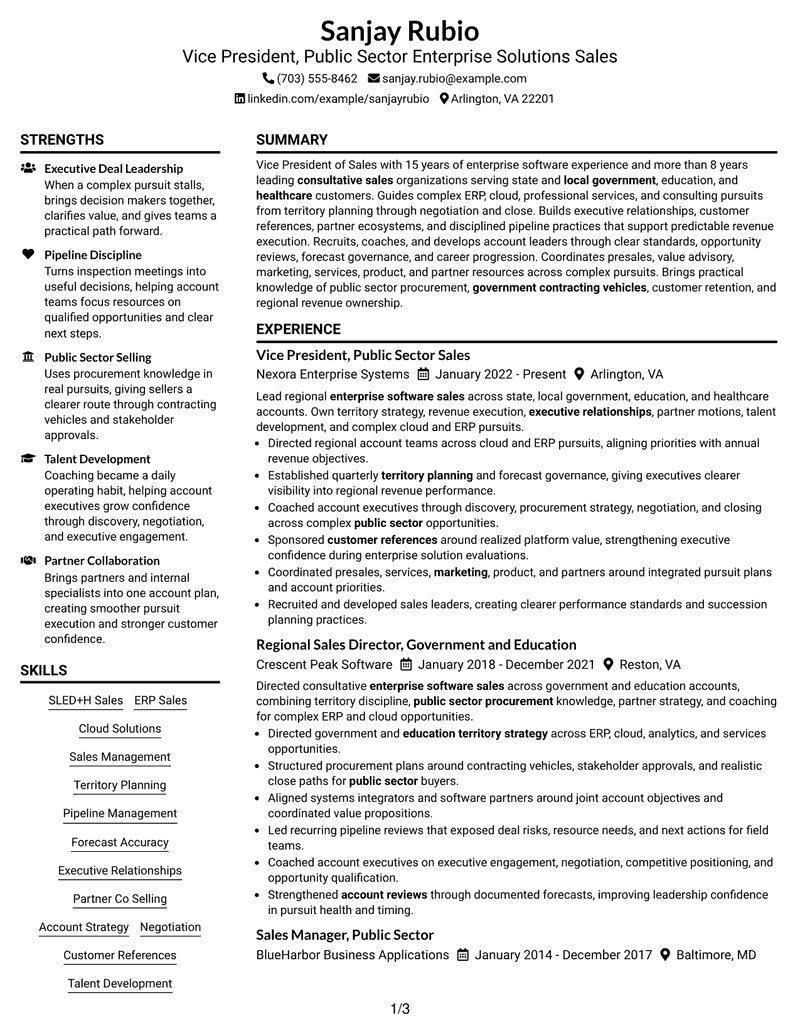
This practical guide shows you how to build a Vice President, Sales - Public Sector Enterprise Solutions resume that is clear, focused, and easy to review. You will learn how to organize executive sales evidence and compare professional resume formats.
Strong resumes for this role connect revenue leadership with enterprise software sales, public-sector procurement, territory strategy, pipeline discipline, executive relationships, partner co-selling, and talent development. Use concise bullets and clear section labels so recruiters can find the evidence that supports each requirement.
The same complete resume example appears in 33 ATS-friendly layouts, with format guidance and free PDF previews. Compare how each design presents experience, skills, education, credentials, and leadership evidence before choosing a structure for your application.
What Makes a Great Vice President, Sales - Public Sector Enterprise Solutions Resume in 2026
A strong executive sales resume makes leadership scope, enterprise selling experience, and public-sector knowledge easy to scan. It also shows a clear career path and disciplined revenue execution.
Use accurate terms such as SLED+H sales, ERP sales, pipeline management, forecast accuracy, government contracting vehicles, and partner co-selling where your experience supports them. Keep each bullet focused on a real action, responsibility, or result.
The examples shown below are intentionally detailed to demonstrate a range of experiences, skills, accomplishments and relevant keywords. We prefer detailed resumes as they provide more context to the hiring managers and also help the ATS systems identify relevant qualifications and score your resume better for a match. But the length of a resume is an individual choice. If you want a one page resume, just keep the most relevant experience and information for the job. Note: Resume examples are for educational purposes only. Use only information that accurately reflects your experience and qualifications. References to real organizations do not imply affiliation or endorsement.
#1 Plain Two Column Format Resume Example
The Plain Two Column Format lets recruiters scan core experience beside supporting resume details without breaking the overall career story.

Resume Snapshot
- 15 years of enterprise software sales experience
- More than 8 years leading consultative sales organizations
- Public-sector sales across government, education, and healthcare
- Leadership in territory planning, forecasting, partners, and talent development
Why This Format Works
- Parallel columns keep leadership history visible while supporting skills remain easy to find.
- Recruiters can compare career progression with education and credentials without losing context.
- The plain structure gives achievements room while avoiding unnecessary visual distraction.
Best For
- Parallel scanning of long career history
- Balanced experience and skills review
- Dense executive resume content
- Clear supporting detail separation
- Public-sector sales leadership resumes
Resume Keywords
- Public Sector
- Enterprise Solutions
- SLED+H
- local government
- Education
- healthcare
- enterprise software sales
- Sales Management
- territory strategy
- Territory Planning
- Account assignments
- Executive Relationships
- customer retention
- Customer References
- Pipeline Management
#2 Simple One Column Format Resume Example
The Simple One Column Format gives recruiters one direct reading path through the resume, making section order easy to follow.

Why This Format Works
- A single reading path makes career progression easy to follow role by role.
- Experience receives uninterrupted space before reviewers move into skills and credentials.
- Simple section order helps recruiters scan a long executive history consistently.
Best For
- Straight chronological reading
- Simple recruiter navigation
- Long experience sections
- Traditional executive applications
- Complex sales career progression
#3 Clean Two Column Sidebar Format Resume Example
The Clean Two Column Sidebar Format uses a sidebar to separate supporting details from the main career narrative for faster recruiter scanning.

Why This Format Works
- The sidebar separates supporting qualifications from the main leadership story.
- Career progression stays continuous while skills and credentials occupy a distinct area.
- Clean section boundaries help recruiters switch between evidence types without confusion.
Best For
- Sidebar-based supporting details
- Main-column career storytelling
- Quick credential lookup
- Content with several section types
- Executive sales resumes with broad scope
#4 Two Column Format Resume Example
The Two Column Format balances parallel information areas so recruiters can compare leadership history with supporting qualifications efficiently.

Why This Format Works
- Balanced columns divide detailed experience from supporting resume information for quicker comparison.
- Recruiters can scan leadership history and qualifications without repeatedly moving down the page.
- Parallel organization gives achievements and credentials separate visual breathing room.
Best For
- Balanced information density
- Side-by-side section review
- Long leadership histories
- Multiple supporting qualifications
- Enterprise sales applications
#5 Photo Header Two Column Format Resume Example
The Photo Header Two Column Format combines a visible photo header with two body columns, giving recruiters a structured scan across the page.

Why This Format Works
- The photo header identifies the applicant while two columns organize the remaining content.
- Split body space keeps detailed experience distinct from supporting skills and credentials.
- Recruiters get a clear header entry point before scanning the career record.
Best For
- Photo-appropriate regional applications
- Two-column content organization
- Visible personal header needs
- Detailed executive career records
- International leadership resumes
#6 Colored Two Column Format Resume Example
The Colored Two Column Format uses color and parallel columns to create clear visual boundaries that help recruiters move between resume sections.

Why This Format Works
- Color-defined sections help recruiters distinguish experience, skills, and credentials at a glance.
- Two columns handle substantial career information without forcing one long visual stream.
- Clear visual grouping supports faster movement between achievements and supporting qualifications.
Best For
- Color-guided section navigation
- Parallel experience and skills review
- High information volume
- Distinct section grouping
- Senior sales leadership profiles
#7 Stylish Two Column Designer Format Resume Example
The Stylish Two Column Designer Format adds stronger visual styling to a two-column structure while keeping the career record easy to navigate.

Why This Format Works
- Stronger styling adds visual character while two columns preserve practical section separation.
- Leadership progression remains readable beside supporting skills, education, and credentials.
- Recruiters can scan substantial experience without the page feeling visually flat.
Best For
- Visually polished applications
- Two-column executive summaries
- Detailed experience with supporting sections
- Design-conscious professional contexts
- Leadership resumes needing stronger visual character
#8 Modern Icon Format Resume Example
The Modern Icon Format uses icons within a two-column layout to give recruiters extra visual cues when moving between major resume sections.

Why This Format Works
- Icons create quick section cues while the two-column body handles detailed content.
- Recruiters can locate skills and credentials without interrupting the experience review.
- Parallel organization keeps career progression and supporting information visually distinct.
Best For
- Icon-aided section finding
- Two-column content scanning
- Multiple resume section types
- Modern professional presentation
- Complex leadership experience
#9 Modern Full Background Two Column Format Resume Example
The Modern Full Background Two Column Format uses a full-background treatment with two columns to separate resume content into distinct reading areas.

Why This Format Works
- Full-background contrast creates clear regions for experience and supporting resume sections.
- Two columns prevent a long leadership record from becoming one dense reading block.
- Recruiters can move between achievements, skills, and credentials through visible section separation.
Best For
- Strong background contrast
- Separated content regions
- Dense career evidence
- Modern executive presentation
- Enterprise leadership resumes
#10 Dark Mode Two Column Format Resume Example
The Dark Mode Two Column Format uses a dark visual treatment and two columns to help recruiters distinguish major information groups quickly.

Why This Format Works
- Dark contrast makes section boundaries noticeable while two columns divide major content groups.
- Experience and supporting qualifications remain separate during a fast recruiter scan.
- The structured body keeps leadership progression readable despite the stronger visual treatment.
Best For
- Dark visual presentation
- Parallel content review
- Distinct section groups
- Modern executive applications
- Long sales leadership histories
#11 Dark Mode Box Header Format Resume Example
The Dark Mode Box Header Format pairs a boxed dark header with two-column organization, creating a clear starting point for recruiter review.

Why This Format Works
- The boxed header establishes a clear starting point before the two-column body begins.
- Recruiters can identify contact information quickly, then move into career evidence.
- Parallel body sections keep experience depth separate from skills and credentials.
Best For
- Strong header emphasis
- Two-column body scanning
- Clear contact-area separation
- Detailed leadership resumes
- Executive applications needing visual hierarchy
#12 Elegant Full Background Two Column Format Resume Example
The Elegant Full Background Two Column Format combines a full-background style with two columns, helping recruiters scan dense executive content in defined areas.

Why This Format Works
- The full-background treatment creates defined visual areas around a detailed executive history.
- Two columns distribute experience and supporting qualifications without breaking career continuity.
- Recruiters can scan achievements and credentials through a refined, clearly segmented structure.
Best For
- Refined full-background presentation
- Two-column evidence organization
- Long career narratives
- Multiple supporting sections
- Senior enterprise sales profiles
#13 Creative Two Tone Format Resume Example
The Creative Two Tone Format uses two-tone styling across a two-column body, giving recruiters strong visual separation between resume information groups.

Why This Format Works
- Two-tone styling marks distinct information areas without changing the underlying reading logic.
- Parallel columns let recruiters compare leadership experience with supporting qualifications efficiently.
- Career progression stays visible while color differences make section transitions easier to spot.
Best For
- Two-tone section distinction
- Creative executive presentation
- Parallel information review
- Varied resume content
- Leadership applications with modern styling
#14 Minimal Header Format Resume Example
The Minimal Header Format keeps a restrained header above one continuous column, giving recruiters a simple path through the complete resume.

Why This Format Works
- A restrained header moves attention quickly into the single-column career narrative.
- One continuous flow makes long-term progression easy to review in sequence.
- Minimal visual elements leave experience, achievements, and credentials as the main focus.
Best For
- Low-visual-noise applications
- Single-flow career review
- Traditional recruiter scanning
- Detailed chronological experience
- Executive sales resumes with clear progression
#15 Plain One Column with Shaded Labels Resume Example
The Plain One Column with Shaded Labels format uses shaded section labels to mark transitions while preserving a straightforward top-to-bottom reading order.

Why This Format Works
- Shaded labels signal section changes while the one-column story remains uninterrupted.
- Recruiters can follow career progression without searching for where each section begins.
- Visible labels make skills, education, and credentials easier to locate after experience.
Best For
- Shaded section markers
- Linear reading order
- Long experience histories
- Frequent section transitions
- Leadership resumes with several credentials
#16 Text/Fang Style Resume Example
The Text/Fang Style keeps the resume in one column with text-led styling, helping recruiters focus on content sequence rather than parallel sections.

Why This Format Works
- Text-led styling keeps attention on the sequence of experience and achievements.
- A single column supports careful reading of a long leadership career.
- Reduced visual decoration makes section wording and evidence easier to compare.
Best For
- Text-first applications
- Content-heavy career records
- Single-path recruiter review
- Minimal visual distraction
- Senior sales experience narratives
#17 Bold Color Header Professional Format Resume Example
The Bold Color Header Professional Format uses a prominent color header above two columns, giving recruiters an immediate entry point into the resume.

Why This Format Works
- The bold header creates immediate orientation before recruiters enter the two-column body.
- Parallel sections keep extensive experience separate from skills and credentials.
- Strong top-level contrast helps the resume establish hierarchy without hiding career progression.
Best For
- Prominent executive header
- Two-column body organization
- Strong first-view structure
- Detailed professional histories
- Public-sector sales leadership applications
#18 Photo Header Color Sidebar Format Resume Example
The Photo Header Color Sidebar Format combines a photo header and colored sidebar with two-column organization for a clearly segmented recruiter scan.

Why This Format Works
- The photo header gives personal identification while the colored sidebar separates supporting details.
- Main career evidence remains distinct from skills, education, and credentials.
- Recruiters can scan the two-column body using clear color and section boundaries.
Best For
- Photo-appropriate applications
- Sidebar-supported scanning
- Color-separated supporting details
- Long executive experience
- International sales leadership profiles
#19 Top Left Header Color Accent Format Resume Example
The Top Left Header Color Accent Format places a color-accented header at the upper left and uses two columns to guide recruiter navigation.

Why This Format Works
- The top-left header creates a direct visual starting point for recruiter review.
- Color accents mark transitions while two columns divide experience from supporting information.
- Career progression stays easy to trace across a detailed leadership record.
Best For
- Left-anchored header scanning
- Color-accented section finding
- Two-column information balance
- Detailed career progression
- Enterprise sales leadership resumes
#20 Centered Header Classic Two Column Format Resume Example
The Centered Header Classic Two Column Format starts with a centered header, then divides the body into two clear areas for recruiter review.

Why This Format Works
- The centered header gives the resume a balanced opening before the body divides.
- Classic two-column structure separates career history from supporting qualifications cleanly.
- Recruiters can review achievements and credentials without losing the overall experience sequence.
Best For
- Centered professional header
- Classic two-column scanning
- Balanced supporting sections
- Long management histories
- Executive public-sector applications
#21 Left Aligned Header Clean Two Column Format Resume Example
The Left Aligned Header Clean Two Column Format uses a left-aligned header and clean two-column body to keep the reading path visually grounded.

Why This Format Works
- The left-aligned header leads naturally into a clean two-column reading pattern.
- Experience stays prominent while supporting sections remain easy to reach beside it.
- Simple alignment helps recruiters move through career progression without decorative distractions.
Best For
- Left-aligned contact clarity
- Clean two-column reading
- Direct career-history access
- Multiple qualification sections
- Senior enterprise sales resumes
#22 Simple Two Column Format Resume Example
The Simple Two Column Format uses an uncomplicated two-column body so recruiters can scan experience and supporting sections without heavy decoration.

Why This Format Works
- The uncomplicated two-column body handles detailed experience without heavy visual styling.
- Recruiters can compare qualifications with career evidence through clear parallel organization.
- Simple section structure keeps achievements, skills, and credentials easy to locate.
Best For
- Simple parallel scanning
- Low-decoration two-column layouts
- Detailed experience and skills
- Recruiter-friendly section comparison
- Executive sales applications
#23 Accent Divider Modern Two Column Format Resume Example
The Accent Divider Modern Two Column Format uses accent dividers to separate sections across two columns, helping recruiters locate major content groups.

Why This Format Works
- Accent dividers create visible stops between major resume sections across both columns.
- Recruiters can locate supporting qualifications quickly without interrupting the career story.
- Modern separation keeps long experience and achievements from blending into adjacent sections.
Best For
- Divider-led section finding
- Modern two-column organization
- Long career histories
- Many distinct resume sections
- Sales leadership resumes with broad scope
#24 Shaded Labels Clean Two Column Format Resume Example
The Shaded Labels Clean Two Column Format pairs shaded labels with two columns, giving recruiters clear markers for moving through varied resume content.

Why This Format Works
- Shaded labels make section names easy to spot across the two-column body.
- Recruiters can jump between experience, skills, education, and credentials with less searching.
- Clear labels support dense executive content while preserving distinct information groups.
Best For
- Shaded label navigation
- Two-column section separation
- Dense executive information
- Frequent category changes
- Enterprise sales leadership profiles
#25 Photo Header Color Accent International Format Resume Example
The Photo Header Color Accent International Format combines a photo header, color accents, and two columns for applications where photo resumes are customary.

Why This Format Works
- The photo header suits markets where applicant photos are customary and expected.
- Color accents help distinguish sections across the two-column resume body.
- Recruiters can review detailed experience beside supporting qualifications through structured separation.
Best For
- Photo-customary markets
- Color-accented international resumes
- Two-column executive content
- Visible personal branding needs
- Global public-sector sales applications
#26 Large Profile Photo International Two Column Format Resume Example
The Large Profile Photo International Two Column Format features a larger profile photo with two columns, creating a strong personal header and structured body.

Why This Format Works
- The large profile photo creates a prominent personal header for photo-customary markets.
- Two columns keep the remaining career content organized after the visual introduction.
- Experience and credentials stay distinct even with a stronger personal presentation.
Best For
- Large-photo resume markets
- Highly visible personal header
- Structured two-column content
- International executive applications
- Senior sales leadership profiles
#27 One Column Format with Photo Resume Example
The One Column Format with Photo places a photo above a single reading flow, keeping the rest of the resume easy to follow from top to bottom.

Why This Format Works
- The photo adds personal identification while the body keeps one continuous reading path.
- Single-column order makes career progression easy to follow after the header.
- Recruiters can review achievements, skills, and credentials without parallel-body navigation.
Best For
- Photo-inclusive applications
- Single-column career flow
- Simple chronological review
- Long leadership experience
- International executive sales resumes
#28 One Column Format with Photo Right Resume Example
The One Column Format with Photo Right keeps a single body flow while placing the photo at the right side of the header for a balanced opening.

Why This Format Works
- The right-side photo balances the header while preserving a single body column.
- Career progression follows one uninterrupted sequence beneath the personal introduction.
- Recruiters can scan experience and supporting sections without switching between columns.
Best For
- Right-aligned photo preference
- Continuous one-column reading
- Balanced header presentation
- Detailed career progression
- Photo-appropriate leadership applications
#29 One Column Boxed Contact Header Format Resume Example
The One Column Boxed Contact Header Format uses a boxed contact header before a continuous body, giving recruiters a clear start and simple reading sequence.

Why This Format Works
- The boxed contact header separates personal details clearly before the career narrative starts.
- One-column order keeps extensive leadership experience easy to follow in sequence.
- Recruiters can move from experience into skills and credentials through familiar section flow.
Best For
- Clearly separated contact details
- Traditional one-column reading
- Long executive experience
- Simple section hierarchy
- Senior sales applications
#30 One Column Shaded Contact Header Format Resume Example
The One Column Shaded Contact Header Format uses a shaded contact header above one column, making contact details distinct without splitting the career narrative.

Why This Format Works
- The shaded contact header distinguishes personal details without dividing the main resume body.
- A single column gives leadership progression a clear top-to-bottom reading path.
- Supporting qualifications follow the experience story in an easy, predictable sequence.
Best For
- Shaded contact-area distinction
- Linear career narrative
- Low-complexity body structure
- Detailed management experience
- Executive sales resumes
#31 Boxed Contact Header with Job Title Format Resume Example
The Boxed Contact Header with Job Title Format highlights contact details and job title in a boxed header, then keeps the body in one reading path.

Why This Format Works
- The boxed header makes the target job title and contact details immediately visible.
- One continuous body keeps career progression simple to trace across leadership roles.
- Recruiters can review achievements and credentials without navigating parallel content areas.
Best For
- Visible target job title
- Boxed contact information
- Single-flow career review
- Leadership career progression
- Targeted executive sales applications
#32 Plain Professional Layout with Job Title & Shaded Labels Resume Example
The Plain Professional Layout with Job Title & Shaded Labels uses a visible job title and shaded labels to mark sections within one continuous column.

Why This Format Works
- The visible job title frames the resume before the career evidence begins.
- Shaded labels help recruiters locate sections throughout the single-column body.
- Long experience records remain readable because every section follows one clear sequence.
Best For
- Job-title-forward presentation
- Shaded section navigation
- Traditional single-column review
- Long experience records
- Public-sector enterprise sales resumes
#33 Classic One Column Resume Format Resume Example
The Classic One Column Resume Format follows a traditional top-to-bottom structure, letting recruiters review the full career record in a familiar sequence.

Why This Format Works
- The traditional one-column structure gives recruiters a familiar top-to-bottom review path.
- Career progression remains easy to understand across a long executive history.
- Simple section order keeps experience, skills, education, and credentials straightforward to locate.
Best For
- Conservative resume presentation
- Familiar chronological reading
- Detailed executive histories
- Simple recruiter scanning
- Senior sales leadership applications
Why Build Your Vice President, Sales - Public Sector Enterprise Solutions Resume with ResumeInMinutes
ResumeInMinutes helps you turn complex sales leadership experience into a resume with clear sections, focused bullets, relevant keywords, and a structure that is easier to tailor for executive public-sector sales opportunities.
- Professional resume formats
- ATS-friendly section structure
- Role-focused keyword guidance
- Clear leadership and experience organization
- Free PDF resume previews
- Resume customization support
Use the layouts to decide how prominently to present enterprise sales leadership, public-sector procurement knowledge, executive relationships, partner work, and talent development while keeping the document easy to scan.
See Also
- 33 Applied AI/ML Vice President Resume Templates with Example 2026 (ATS-Optimized)
- 33 Assistant Vice President Civil Engineer Resume Templates with Example 2026 (ATS-Optimized)
- 7 Assistant Vice President, Mechanical Engineer - Mechanical/Thermal Resume Templates with Example
- 7 Assistant Vice President of Principal Gifts Resume Templates with Example
- 33 Business Strategy Manager, Vice President - Marketing Operations Strategy Resume Templates with Example 2026 (ATS-Optimized)
- 7 Data Engineer - Vice President Resume Templates with Example
- 33 HVAC Vice President - Service Operations Leadership Resume Templates with Example
- 33 Investment Banking Vice President Resume Templates with Example 2026 (ATS-Optimized)
- 30+ Applied AI/ML Vice President Cover Letter Templates with Example 2026
- 30+ Assistant Vice President Civil Engineer Cover Letter Templates with Example 2026
Frequently Asked Questions
Are these Vice President, Sales - Public Sector Enterprise Solutions resume templates ATS-friendly?
Yes. The formats use clear resume sections and readable headings. For ATS-focused applications, keep wording simple and include supported terms such as enterprise software sales, SLED+H, ERP sales, pipeline management, and public-sector procurement.
Are these different resumes?
No. This guide shows one complete Vice President, Sales - Public Sector Enterprise Solutions resume in different visual formats so you can compare presentation choices without changing the underlying evidence.
What should this executive sales resume include?
Include a focused summary, leadership experience, enterprise sales scope, territory and pipeline responsibilities, public-sector procurement knowledge, partner work, skills, education, and relevant credentials. Add measurable achievements only when they are accurate.
Can I download the resume templates as PDFs?
Yes. Each design includes a free PDF preview so you can review the layout before choosing the format you want to customize.
Which resume style works well for this role?
Choose a layout that keeps senior experience, leadership scope, and core skills easy to find. A clear one-column format gives a direct reading path, while a well-organized two-column format can separate supporting skills and credentials from the main experience story.
How should I show public-sector sales experience?
Use specific, accurate bullets that show the sales cycle you led, the customer groups you served, procurement or contracting work, account strategy, partner coordination, forecasting, and team leadership. Do not add requirements from a job posting unless they are true for you.
Should I include a photo on my resume?
Use a photo only when it is appropriate for the country and application context. For most U.S. applications, a no-photo resume is the safer choice.
Can I customize these resume templates?
Yes. You can adjust the resume text, format, design style, and PDF layout while keeping your experience, skills, and credentials accurate.




