US English


7 Entry-Level Geotechnical Engineer Resume Templates with Example
By Ria · Last Updated On October 22, 2026Follow Us on Facebook
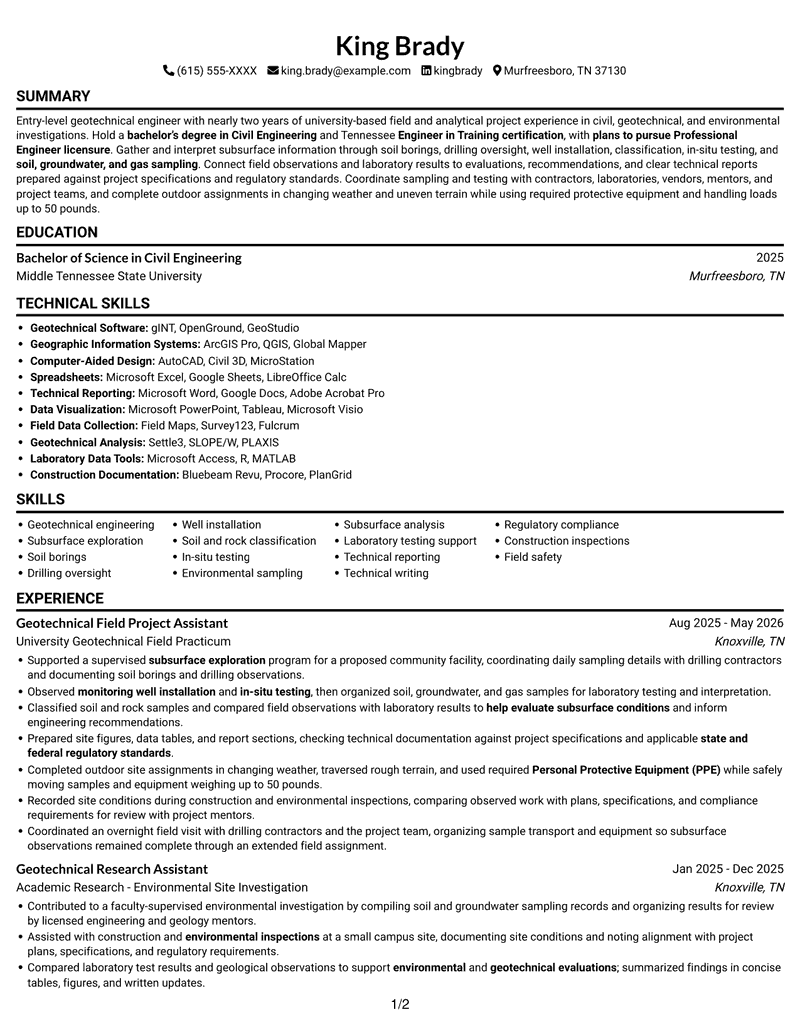
Resume example — page 1

This guide shows you how to create an Entry-Level Geotechnical Engineer resume that presents your qualifications in a clear, focused way. Learn how to organize relevant evidence so readers can quickly understand your field and analytical experience.

Build a strong resume with clear sections for education, experience, technical skills, certifications, and projects. Use specific evidence for subsurface exploration, soil and rock classification, sampling, laboratory support, inspections, and technical reporting.

Compare the example in 7 layouts and learn how each format presents geotechnical work, education, and skills. The image previews let you compare designs, and you can open an example in the editor to customize it.

What Makes a Great Entry-Level Geotechnical Engineer Resume in 2026

A strong resume uses clear section headings, concise bullet points, and relevant details about fieldwork, analysis, and technical reporting. Put your most useful qualifications where readers can find them quickly.

Use accurate terms such as soil borings, drilling oversight, monitoring well installation, in-situ testing, and regulatory compliance. Support them with specific examples from experience, education, or projects.

Note: Resume examples are for educational purposes only. Use only information that accurately reflects your experience and qualifications. References to real organizations do not imply affiliation or endorsement.

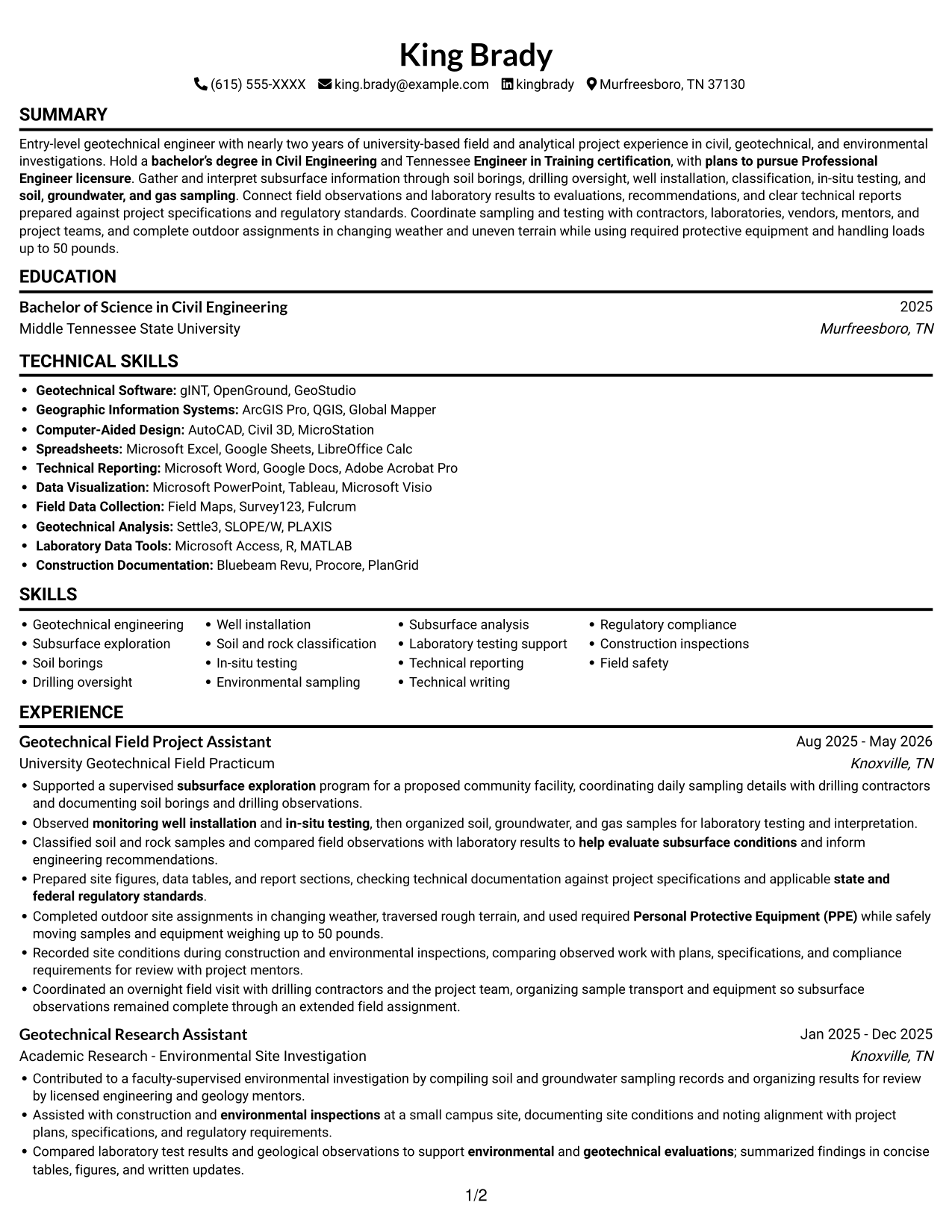
#1 Simple One Column Format Resume Example

The Simple One Column Format places resume content in one vertical column, giving reviewers a direct path through each section.
 

Why This Format Works

  • Experience, education, and credentials follow a clear top-to-bottom reading order.
  • Skills and technical reporting remain within the same section sequence.
  • Project achievements can be reviewed without switching between body columns.

Best For

  • Single-direction section review
  • Chronological experience records
  • Education and credential sequences
  • Continuous reading without parallel columns
  • Career history with multiple entries

Resume Keywords

  • bachelor’s degree in Civil Engineering
  • Engineer in Training certification
  • Geotechnical engineering
  • Subsurface exploration
  • soil borings
  • drilling oversight
  • monitoring well installation
  • Soil and rock classification
  • in-situ testing
  • soil, groundwater, and gas sampling
  • Compared laboratory test results and geological observations to support environmental and geotechnical evaluations
  • help evaluate subsurface conditions
  • Laboratory testing support
  • support environmental and geotechnical evaluations
  • Technical Reporting
See all keywords
 

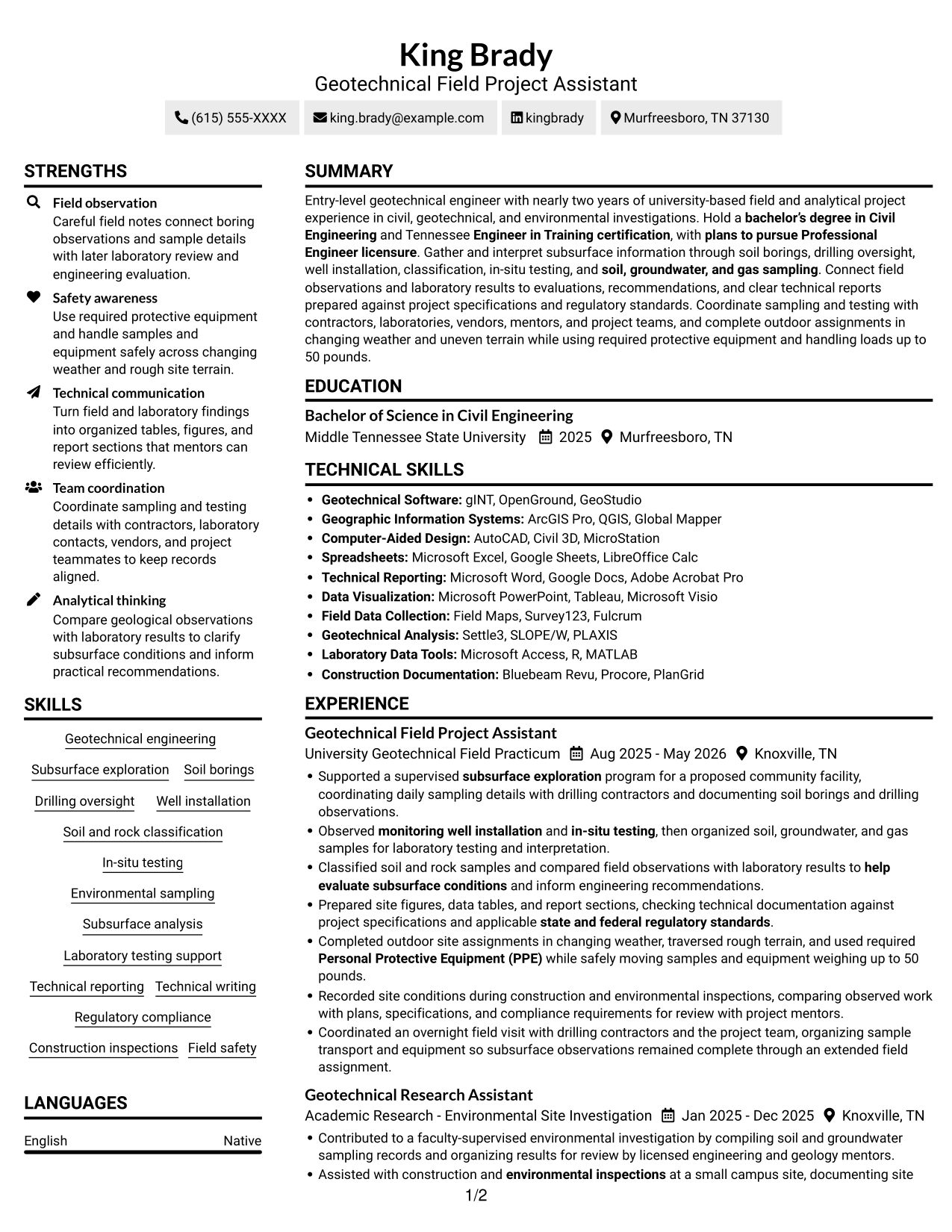
#2 Simple Two Column Format Resume Example

The Simple Two Column Format arranges resume content in two body columns, helping reviewers move between career history and supporting sections.
 

Why This Format Works

  • Two body columns give experience and supporting sections distinct reading areas.
  • Separate content areas help reviewers locate skills, education, and credentials.
  • Related achievements can be reviewed across the two-column reading order.

Best For

  • Two-area resume organization
  • Experience with supporting qualifications
  • Quick movement between section groups
  • Several distinct content categories
  • Parallel review of related details

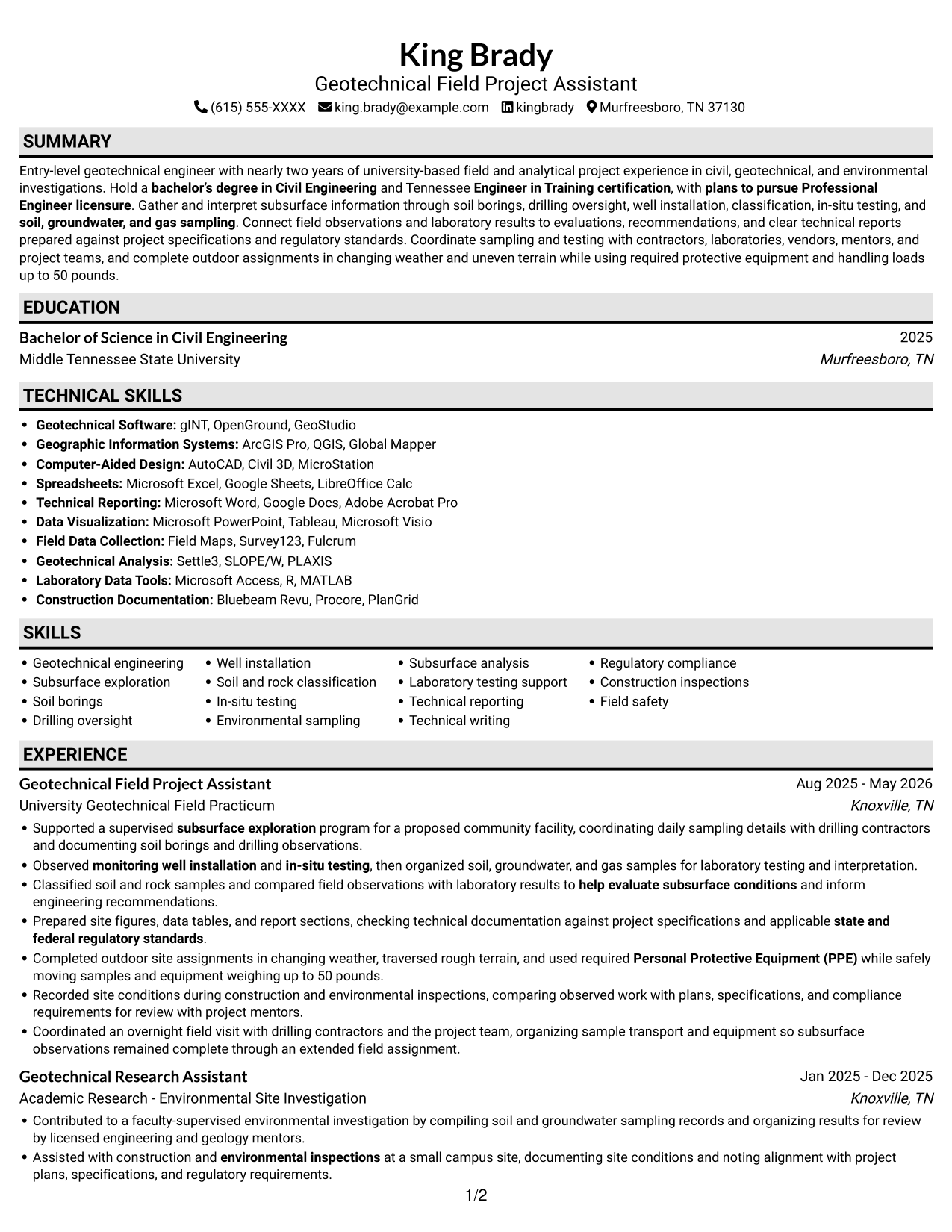
#3 Plain One Column with Shaded Labels Resume Example

With one body column, the Plain One Column with Shaded Labels format lets reviewers follow the resume from section to section in one direction.
 

Why This Format Works

  • A single column keeps education and experience in a straightforward review sequence.
  • Skills and credentials remain part of the same vertical reading path.
  • Project achievements appear in the same order as the surrounding sections.

Best For

  • Section-by-section resume reading
  • Chronological career and project records
  • Education and qualification review
  • Multiple resume content sections
  • Continuous, single-column text
 

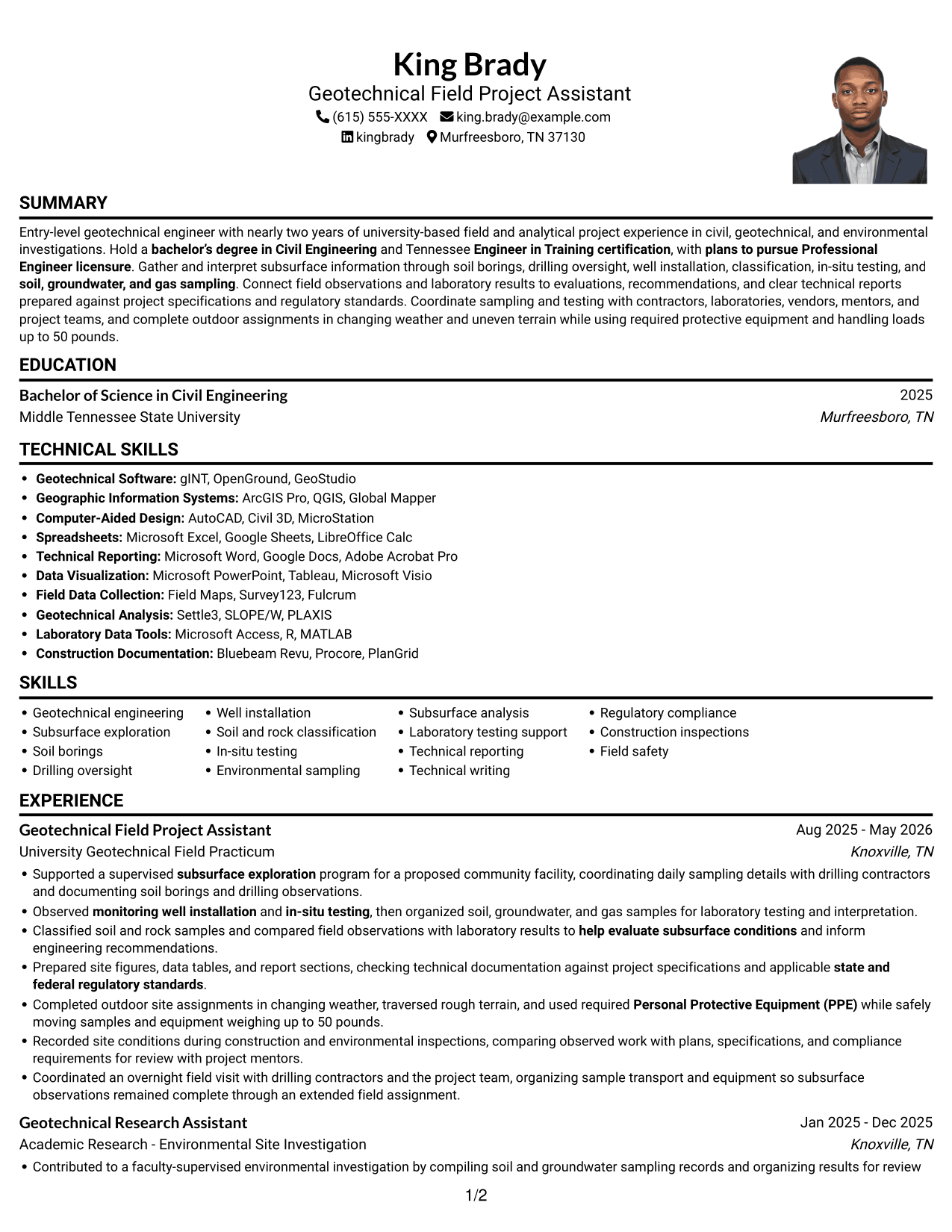
#4 One Column Format with Photo Right Resume Example

The One Column Format with Photo Right pairs a one-column body with a photo while keeping resume sections in a single reading order.
 

Why This Format Works

  • One-column reading keeps experience, education, and credentials in a single sequence.
  • Skills remain easy to find within the main resume reading path.
  • Photo inclusion adds a visual element without changing section order.

Best For

  • Photo-inclusive resume preference
  • One-direction section navigation
  • Career history and credentials in sequence
  • Resume content with a visual identity element
  • Single-column section organization
 

#5 Clean Two Column Sidebar Format Resume Example

The Clean Two Column Sidebar Format uses two body columns, giving reviewers separate areas to navigate through resume content.
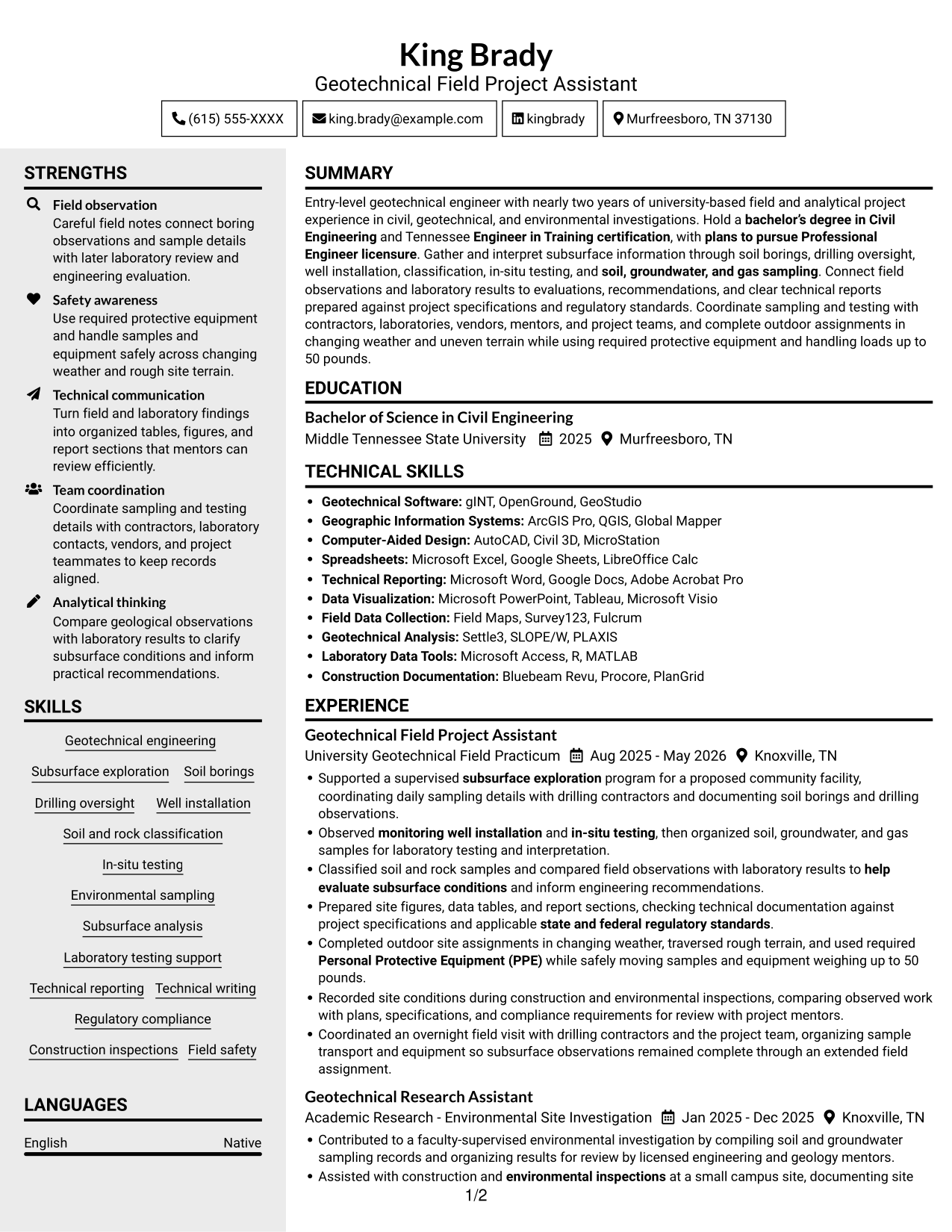
 

Why This Format Works

  • Two body columns let reviewers move between experience and supporting resume sections.
  • Separate content areas help reviewers locate experience, skills, and credentials.
  • Education and achievement details remain visible as reviewers scan across sections.

Best For

  • Separated resume content areas
  • Career history with supporting details
  • Quick movement between section groups
  • Several types of qualifications
  • Two-column document preference


#6 Two Column Format Resume Example

The Two Column Format divides resume content between two body columns, offering reviewers a choice of reading path across sections.
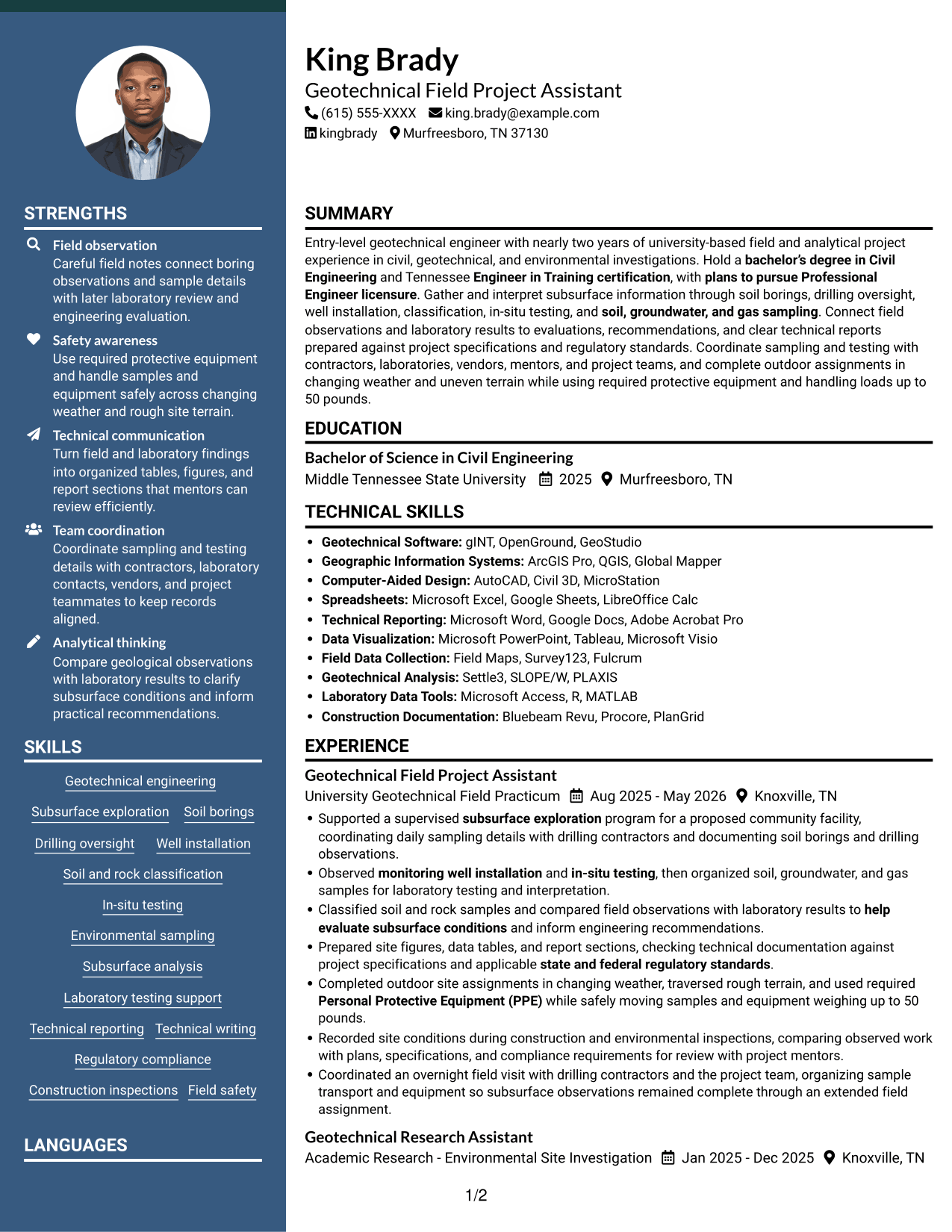
 

Why This Format Works

  • Two-column organization lets reviewers scan one content area, then the other.
  • Experience and education can occupy distinct areas for section navigation.
  • Skills and achievement sections remain easy to compare during review.

Best For

  • Side-by-side content navigation
  • Parallel review of resume sections
  • Related career details in separate areas
  • Multiple section categories
  • Two-column reading preference
 

#7 Photo Header Two Column Format Resume Example

The Photo Header Two Column Format combines a photo with two body columns, giving reviewers separate areas to navigate through resume content.
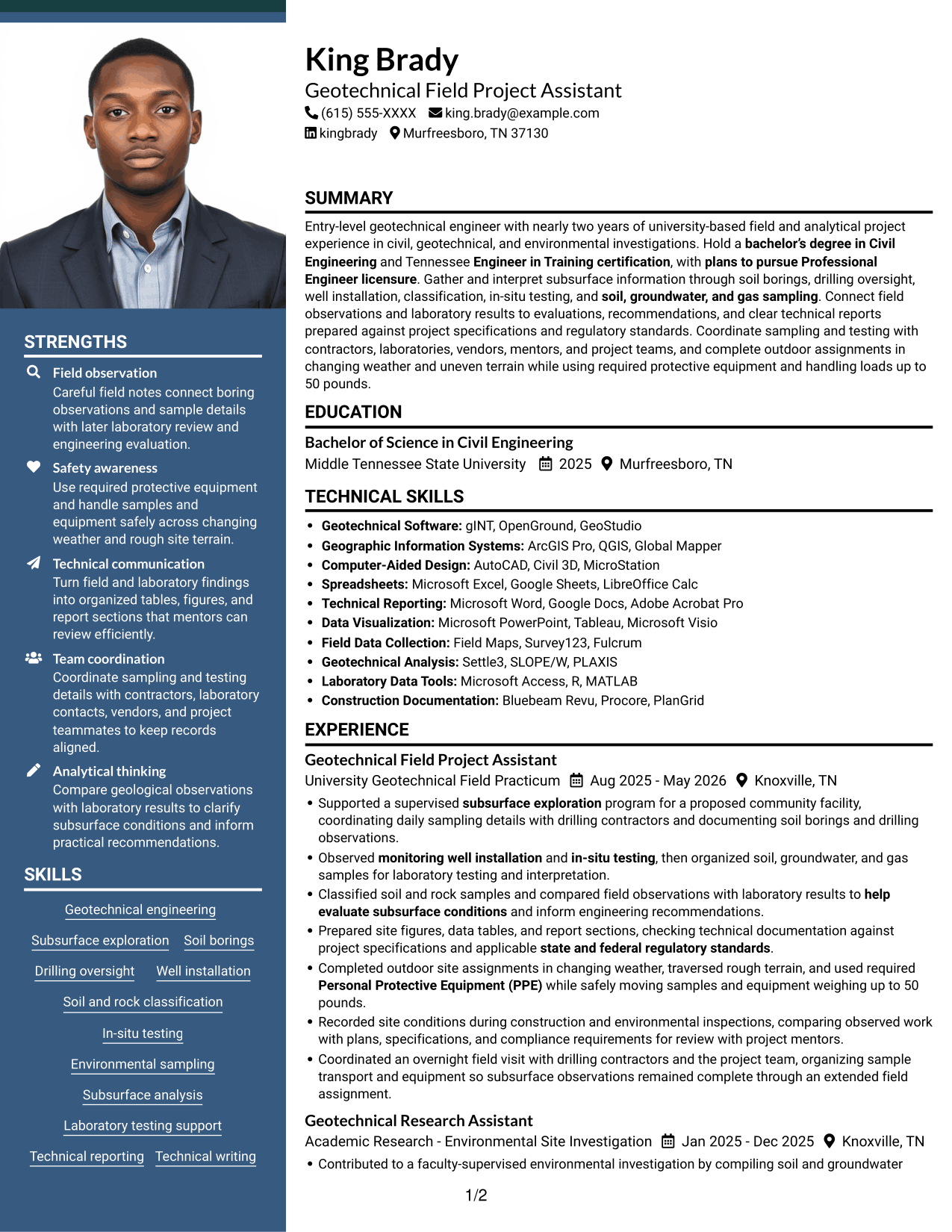
 

Why This Format Works

  • Two body columns offer separate areas for experience and supporting sections.
  • Section separation helps reviewers find education, skills, and credentials.
  • The included photo adds a visual identity element without directing section order.

Best For

  • Photo-inclusive two-column layout preference
  • Separate resume content areas
  • Career history with supporting information
  • Multi-section qualification review
  • Visual element with organized content


See Also


Frequently Asked Questions

How can I make an Entry-Level Geotechnical Engineer resume ATS-friendly?

Use standard section headings and simple formatting. Include relevant terms that match your actual experience, such as subsurface exploration, soil and rock classification, sampling, laboratory testing support, and technical reporting.

What do the resume previews show?

The image previews show the same example in different layouts. Compare how each design organizes sections, then open an example in the editor to customize it.

What should an entry-level geotechnical engineer resume include?

Include a focused summary, education, relevant experience or projects, technical skills, and certifications. Add clear bullet points that describe field observations, analysis, documentation, and teamwork.

How should I describe geotechnical field experience?

Name the task, explain your role, and state the work product or purpose. For example, describe documenting soil borings, organizing samples for laboratory testing, or preparing site figures and report sections.

Which resume format works well for this role?

A simple, easy-to-scan format works well for showing technical skills, education, and relevant experience. Use clear headings and concise bullet points, and keep important details in the main text rather than relying on decorative elements.

Should I include EIT certification and a PE licensure goal?

List an Engineer in Training (EIT) certification if you have earned it, including the state and date when relevant. If pursuing Professional Engineer licensure is a current goal, mention it accurately in your summary or career objective.

ATS Score 88%

How we calculate this score

  • Keywords: 60% of the total. AI extracts keywords from your job description. If you do not provide one, a standard job description for the title matching your resume is used. This is not a match to a specific vacancy.
  • Text-based resume: 20%. The text resume assessed here receives 100 for this part.
  • Resume quality: 20%. We start at 100 and subtract points for issues found by our resume checks, down to a minimum of zero.
  • Keyword coverage = round(100 × confirmed matches ÷ total keywords). Exact matches and supported equivalents verified by AI receive full credit; unsupported keywords receive none. Live text checks use the saved equivalents and do not request a new AI review. Without keywords, no overall ATS score is available.
  • Final score = 60% of keyword coverage + 20% of the text score + 20% of the quality score, rounded to a whole number. Without keywords, no overall ATS score is available.

What this score means

Our scores are estimates, not employer ratings. They may contain errors and do not guarantee accurate parsing, a ranking, an interview, or a job. Check your document against the employer’s requirements. You are responsible for relying on this score.

Terms and Conditions

Score weights: Keywords 60% · Text based resume 20% · Resume quality 20%

Keyword coverage: 28 of 35 (80%) · Resume quality: 100%

Resume quality 100% · Weight 20% · Issues (0)

Details
  • ✓Name present: King Brady
  • ✓Email format: king.brady@example.com
  • ✓Phone format: (615) 555-XXXX
  • ✓Experience 1: Job title: Geotechnical Field Project Assistant
  • ✓Experience 1: Company name: University Geotechnical Field Practicum
  • ✓Experience 1: Work location: Knoxville, TN
  • ✓Experience 1: Employment dates: Aug 2025 - May 2026
  • ✓Experience 1: Description or achievements: Present
  • ✓Experience 2: Job title: Geotechnical Research Assistant
  • ✓Experience 2: Company name: Academic Research - Environmental Site Investigation
  • ✓Experience 2: Work location: Knoxville, TN
  • ✓Experience 2: Employment dates: Jan 2025 - Dec 2025
  • ✓Experience 2: Description or achievements: Present
  • ✓Experience 3: Job title: Civil Engineering Student Project Contributor
  • ✓Experience 3: Company name: Capstone Project - Geotechnical Site Evaluation
  • ✓Experience 3: Work location: Murfreesboro, TN
  • ✓Experience 3: Employment dates: Aug 2024 - May 2025
  • ✓Experience 3: Description or achievements: Present
  • ✓No placeholder fields
  • ✓No repeated achievement bullets
  • ✓No empty bullets

No issues found by the current checks.

Text Based Resume 100% · Weight 20%

Parsed text
King Brady
(615) 555-XXXX
king.brady@example.com
kingbrady
Murfreesboro, TN 37130
SUMMARY
Entry-level geotechnical engineer with nearly two years of university-based field and analytical project experience in civil, geotechnical, and environmental investigations. Hold a bachelor’s degree in Civil Engineering and Tennessee Engineer in Training certification, with plans to pursue Professional Engineer licensure. Gather and interpret subsurface information through soil borings, drilling oversight, well installation, classification, in-situ testing, and soil, groundwater, and gas sampling. Connect field observations and laboratory results to evaluations, recommendations, and clear technical reports prepared against project specifications and regulatory standards. Coordinate sampling and testing with contractors, laboratories, vendors, mentors, and project teams, and complete outdoor assignments in changing weather and uneven terrain while using required protective equipment and handling loads up to 50 pounds.
EDUCATION
Bachelor of Science in Civil Engineering
2025
Middle Tennessee State University
Murfreesboro, TN
TECHNICAL SKILLS
Geotechnical Software: gINT, OpenGround, GeoStudio
Geographic Information Systems: ArcGIS Pro, QGIS, Global Mapper
Computer-Aided Design: AutoCAD, Civil 3D, MicroStation
Spreadsheets: Microsoft Excel, Google Sheets, LibreOffice Calc
Technical Reporting: Microsoft Word, Google Docs, Adobe Acrobat Pro
Data Visualization: Microsoft PowerPoint, Tableau, Microsoft Visio
Field Data Collection: Field Maps, Survey123, Fulcrum
Geotechnical Analysis: Settle3, SLOPE/W, PLAXIS
Laboratory Data Tools: Microsoft Access, R, MATLAB
Construction Documentation: Bluebeam Revu, Procore, PlanGrid
SKILLS
Geotechnical engineering
Subsurface exploration
Soil borings
Drilling oversight
Well installation
Soil and rock classification
In-situ testing
Environmental sampling
Subsurface analysis
Laboratory testing support
Technical reporting
Technical writing
Regulatory compliance
Construction inspections
Field safety
EXPERIENCE
Geotechnical Field Project Assistant
Aug 2025 - May 2026
University Geotechnical Field Practicum
Knoxville, TN
Supported a supervised subsurface exploration program for a proposed community facility, coordinating daily sampling details with drilling contractors and documenting soil borings and drilling observations.
Observed monitoring well installation and in-situ testing, then organized soil, groundwater, and gas samples for laboratory testing and interpretation.
Classified soil and rock samples and compared field observations with laboratory results to help evaluate subsurface conditions and inform engineering recommendations.
Prepared site figures, data tables, and report sections, checking technical documentation against project specifications and applicable state and federal regulatory standards.
Completed outdoor site assignments in changing weather, traversed rough terrain, and used required Personal Protective Equipment (PPE) while safely moving samples and equipment weighing up to 50 pounds.
Recorded site conditions during construction and environmental inspections, comparing observed work with plans, specifications, and compliance requirements for review with project mentors.
Coordinated an overnight field visit with drilling contractors and the project team, organizing sample transport and equipment so subsurface observations remained complete through an extended field assignment.
Geotechnical Research Assistant
Jan 2025 - Dec 2025
Academic Research - Environmental Site Investigation
Knoxville, TN
Contributed to a faculty-supervised environmental investigation by compiling soil and groundwater sampling records and organizing results for review by licensed engineering and geology mentors.
Assisted with construction and environmental inspections at a small campus site, documenting site conditions and noting alignment with project plans, specifications, and regulatory requirements.
Compared laboratory test results and geological observations to support environmental and geotechnical evaluations; summarized findings in concise tables, figures, and written updates.
Coordinated sample handling and testing schedules with laboratory contacts and vendors, maintaining clear records for the research team.
Civil Engineering Student Project Contributor
Aug 2024 - May 2025
Capstone Project - Geotechnical Site Evaluation
Murfreesboro, TN
Evaluated subsurface conditions for a proposed low-rise structure using a supervised site investigation plan, soil boring logs, soil and rock classification, and basic in-situ testing concepts.
Analyzed course laboratory data to support foundation and earthwork considerations, documenting assumptions and findings in an organized technical report.
Presented geotechnical recommendations to faculty and classmates using annotated site figures and graphical summaries, strengthening college-level technical writing and presentation skills.
LEADERSHIP, AWARDS & RECOGNITION
Received Civil Engineering Department Academic Merit Recognition in 2025 for academic achievement.
Earned placement on the College of Engineering Dean's List in 2024.
Mentored first-year civil engineering students during 2024-2025, helping peers navigate early coursework and campus resources.
Volunteered at campus sustainability and site clean-up events from 2023-2025.
CERTIFICATIONS
Engineer in Training (EIT), Tennessee
2025
OSHA 10-Hour Construction Safety Training
2025
PROFESSIONAL AFFILIATIONS
Student member, American Society of Civil Engineers (ASCE), participating in a professional community for civil engineering students.
Student member, ASCE Geo-Institute, engaging with a geotechnical engineering professional community.
LANGUAGES
English (Native)
Spanish (Beginner)

Matched keywords (28)

  • bachelor’s degree in Civil EngineeringOriginal keyword in JD: Bachelor's degree in Civil Engineering OR Geotechnical Engineering
  • Engineer in Training certificationOriginal keyword in JD: Engineer in Training (EIT) certification OR progress toward obtaining EIT certification
  • Geotechnical engineering
  • Subsurface exploration
  • soil borings
  • drilling oversight
  • monitoring well installation
  • Soil and rock classification
  • in-situ testing
  • soil, groundwater, and gas sampling
  • Compared laboratory test results and geological observations to support environmental and geotechnical evaluationsOriginal keyword in JD: Geological and geotechnical data interpretation
  • help evaluate subsurface conditionsOriginal keyword in JD: Subsurface condition analysis
  • Laboratory testing support
  • support environmental and geotechnical evaluationsOriginal keyword in JD: Engineering and environmental evaluations
  • Technical Reporting
  • Technical writing
  • state and federal regulatory standards
  • Construction inspections
  • environmental inspections
  • Regulatory compliance
  • coordinating daily sampling details with drilling contractorsOriginal keyword in JD: Drilling contractor coordination
  • Coordinate sampling and testing with contractors, laboratories, vendorsOriginal keyword in JD: Laboratory and vendor coordination
  • plans to pursue Professional Engineer licensureOriginal keyword in JD: Professional Engineer (PE) licensure pursuit
  • university-based field and analytical project experience in civil, geotechnical, and environmental investigationsOriginal keyword in JD: Field investigations
  • environmental investigations
  • Personal Protective Equipment (PPE)
  • complete outdoor assignments in changing weatherOriginal keyword in JD: Outdoor fieldwork in changing weather
  • complete outdoor assignments in changing weather and uneven terrainOriginal keyword in JD: Uneven-terrain fieldwork

Missing keywords (7)

  • Data tables, figures, and graphical presentations
  • Site condition documentation
  • Project plans and specifications
  • Client and project team communication
  • Lifting and carrying 40 to 50 pounds
  • Extended field assignments up to 12 hours
  • Project-related travel, including overnight assignments
Disclaimer: All names, images, contact information, employment histories, achievements, security clearances, military credentials, and other qualifications shown in this content are fictional and used for illustrative purposes only. Any resemblance to actual persons, living or deceased, is purely coincidental.

Resume and cover-letter examples and recommendations in this article reflect general best practices and professional experience and are provided for guidance only. Results may vary based on role, industry, region, and hiring organization.

Content Accuracy and Verification: To the fullest extent permitted by applicable law, we do not represent or warrant that resume or cover-letter guidance, examples, recommendations, or related information are accurate, complete, current, error-free, or suitable for any particular purpose. You are responsible for independently reviewing and verifying the information before relying on it.

ATS and Cover-Letter Scores: ATS scores are estimates calculated using our own formula, informed by publicly available guidance on resume formatting and keyword matching. They are not scores issued or endorsed by an ATS provider or employer. Cover-letter scores are also our own assessments. Parsing, weighting, screening criteria, and results vary between systems, employers, job descriptions, and document formats. No score guarantees successful parsing, a particular ranking, an interview, or employment. Use scores as general guidance and independently check your documents against the employer’s requirements. To the fullest extent permitted by applicable law, we accept no liability for errors in scores or parsing, or losses arising from reliance on these assessments. Nothing in this notice excludes liability or limits consumer rights that cannot lawfully be excluded or limited.

Terms and Conditions
 
> JP 1 1
PDF Footer and Margins Setup
The margins are applied to the document, and the footer shows up in the preview and the PDF

Footer Font Settings

Are you applying for a specific job
so we can tailor your resume to it?
Are you applying for a specific job
so we can tailor your cover letter to it?

Your data stays private and is never used for training.Privacy Policy

Type your details as text to generate a personalized resume Type your details as text to generate a personalized cover letter
Website link found! Ready to create resume from:

Your data stays private and is never used for training.Privacy Policy

Drag the into the box to verify you're human.
Drop here

My Resumes

Displaying {number_of_files} files (out of {total_of_all_files} total)
Name File Type Last Modified: Description:

Rename File

Filename already exists!

Delete Files

Warning: This action is irreversible. Once you click submit, the files will be permanently deleted.

Heading text
Upload From Computer Upload
Select From Existing
LinkedIn
Drag & Drop files anywhere in this tab, or

Uploaded Files

Delete Name Last Updated Use This File
Select this to use the file for generating your resume and cover letter. Only one source—uploaded file, selected file, or LinkedIn text—can be used.

My Files

Resumes or cover letters you create will appear here. No files available yet.
Delete Name Last Updated Use This File
Select this to use the file for generating your resume and cover letter. Only one source—uploaded file, selected file, or LinkedIn text—can be used.

Add LinkedIn Profile PDF

You can download your LinkedIn profile as a PDF by opening linkedin.com in a web browser, clicking your profile photo, selecting the “More” or “Resources” button, and choosing “Save to PDF.” You can then attach the PDF using the Upload From Computer tab.

Paste Your LinkedIn Profile Text

If you have copied the LinkedIn profile text, paste it below. See how to copy your profile from LinkedIn

Select this to use the LinkedIn profile text for generating your resume and cover letter. Only one source—uploaded file, selected file, or LinkedIn text—can be used.

Try these controls

<
>