
US English


7 Journey IT System Administrator - Microsoft 365 and Server Infrastructure Resume Templates with Example
By Ria · Last Updated On October 12, 2026
Resume Example Page 1

This guide shows you how to create a clear, focused Journey IT System Administrator - Microsoft 365 and Server Infrastructure resume. It explains how to organize your qualifications and choose a format that helps readers find relevant evidence quickly.

For this role, connect your server and Microsoft 365 work to results that matter, such as reliable service, secure access, tested recovery, and fewer repeat incidents. Use concise bullets to show experience with Windows and Linux servers, Exchange, Active Directory, VMware or Hyper-V, Veeam or AWS backups, Intune, and SCCM when those skills apply to your background.

The resume example is presented in 7 layouts, with format notes to help you compare section order, readability, and ATS-friendly structure.

What Makes a Great Journey IT System Administrator - Microsoft 365 and Server Infrastructure Resume in 2026

A strong resume makes server, identity, Microsoft 365, endpoint, and recovery work easy to scan. Use clear headings and achievement bullets that show the scale of systems supported and the value of the work.

Match relevant terms from the job description to accurate evidence, including Active Directory, Exchange, MFA, Conditional Access, PowerShell, Veeam, Intune, SCCM, and disaster recovery. Add numbers when they are supported by your results, such as servers managed, users supported, or recovery tests completed.

The examples shown below are intentionally detailed to demonstrate a range of experiences, skills, accomplishments and relevant keywords. We prefer detailed resumes as they provide more context to the hiring managers and also help the ATS systems identify relevant qualifications and score your resume better for a match. But the length of a resume is an individual choice. If you want a one page resume, just keep the most relevant experience and information for the job. Note: Resume examples are for educational purposes only. Use only information that accurately reflects your experience and qualifications. References to real organizations do not imply affiliation or endorsement.

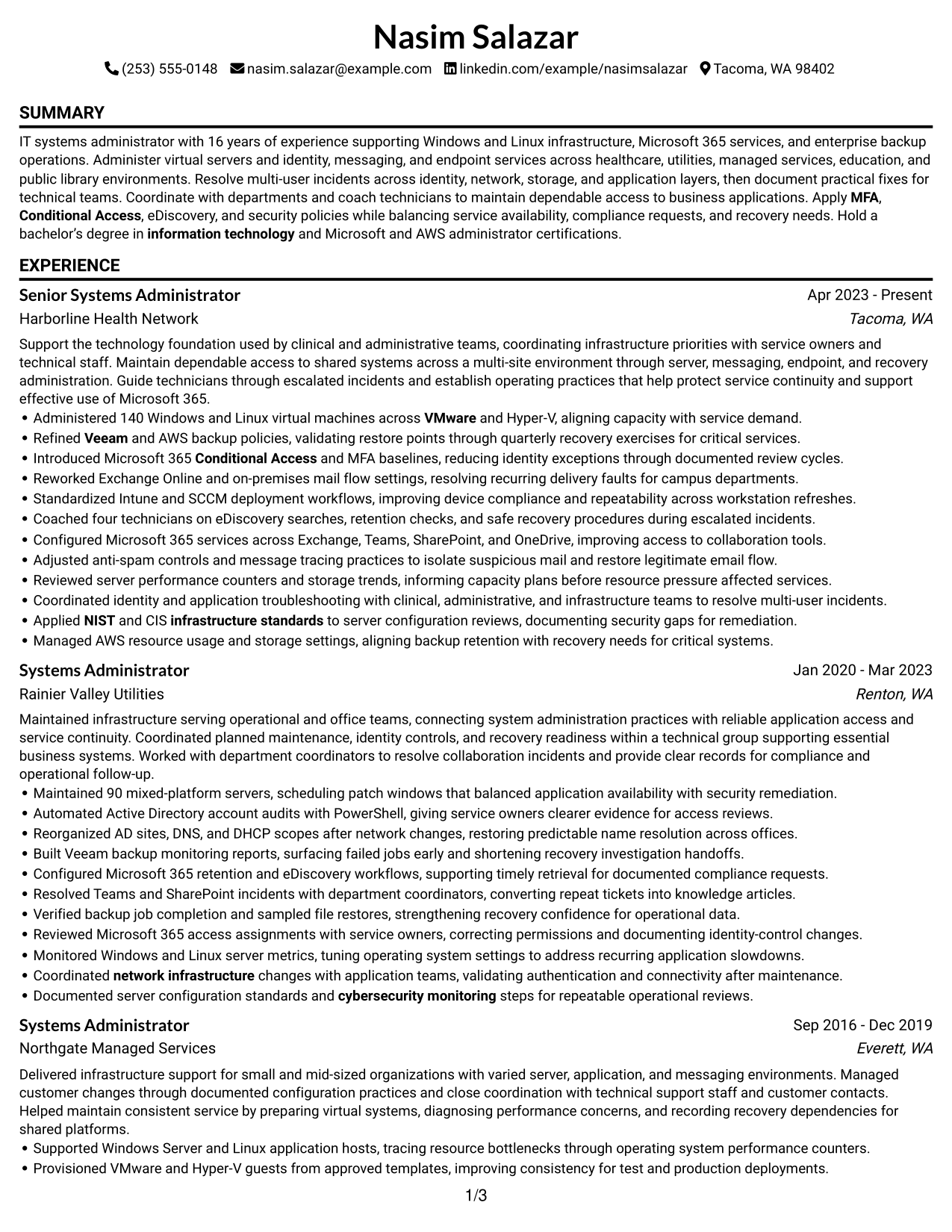
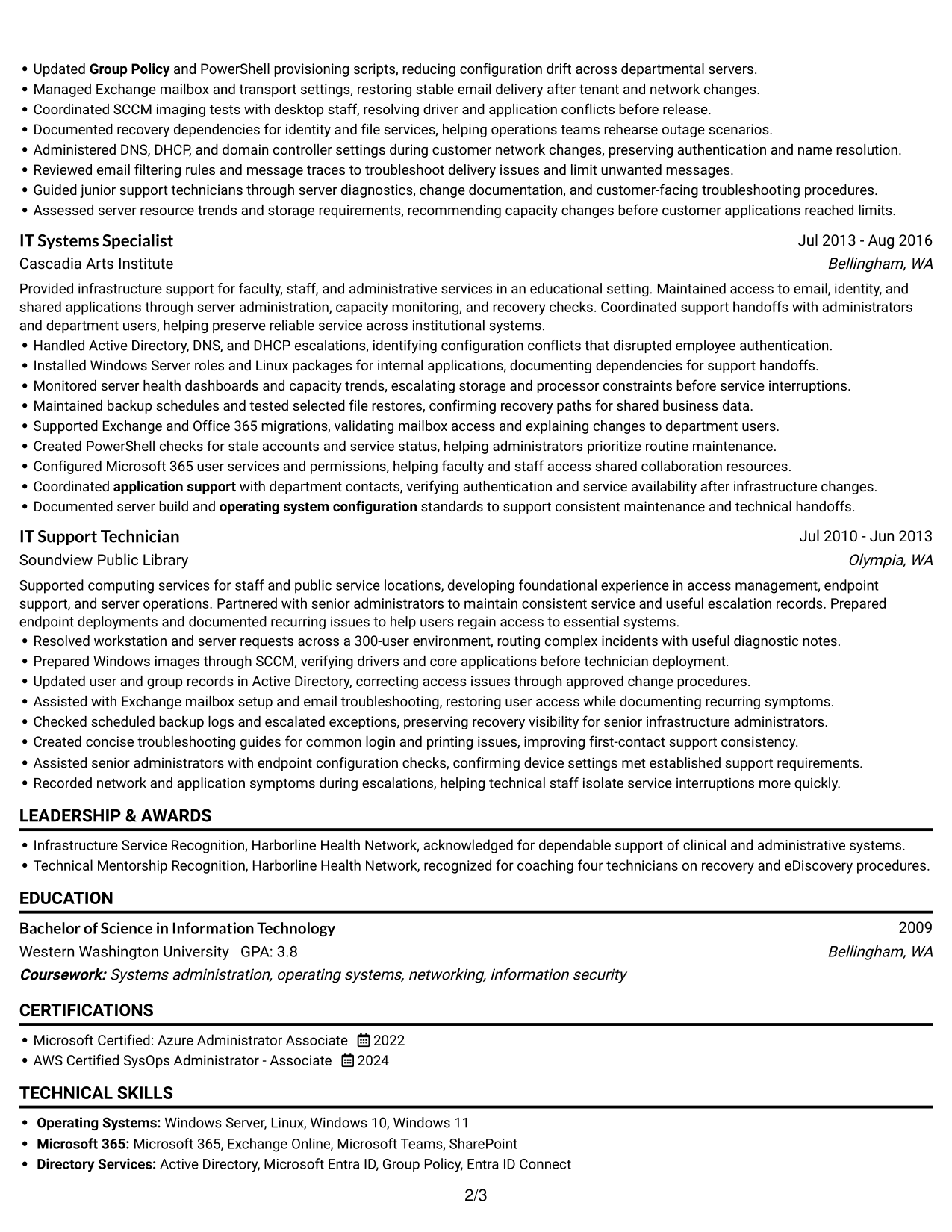
#1 Simple One Column Format Resume Example

The Simple One Column Format gives recruiters one clear reading path through experience, skills, education, and credentials.
 
Resume Example Page 1   Resume Example Page 2

Why This Format Works

  • A single reading path lets recruiters follow experience, skills, education, and credentials in sequence.
  • Consistent flow helps reviewers track career progression across multiple roles.
  • Open section transitions make achievements easier to connect with the relevant experience.

Best For

  • Linear career-history review
  • Sequential skills and education review
  • Traditional resume structure
  • ATS-focused text flow
  • Detailed experience sections

Resume Keywords

  • Group Policy
  • MFA
  • Conditional Access
  • Entra ID Connect
  • Veeam
  • operating system configuration
  • application support
  • network infrastructure
  • cybersecurity monitoring
  • infrastructure standards
  • information technology
  • Microsoft Certified: Azure Administrator Associate
  • VMware
  • NIST
 

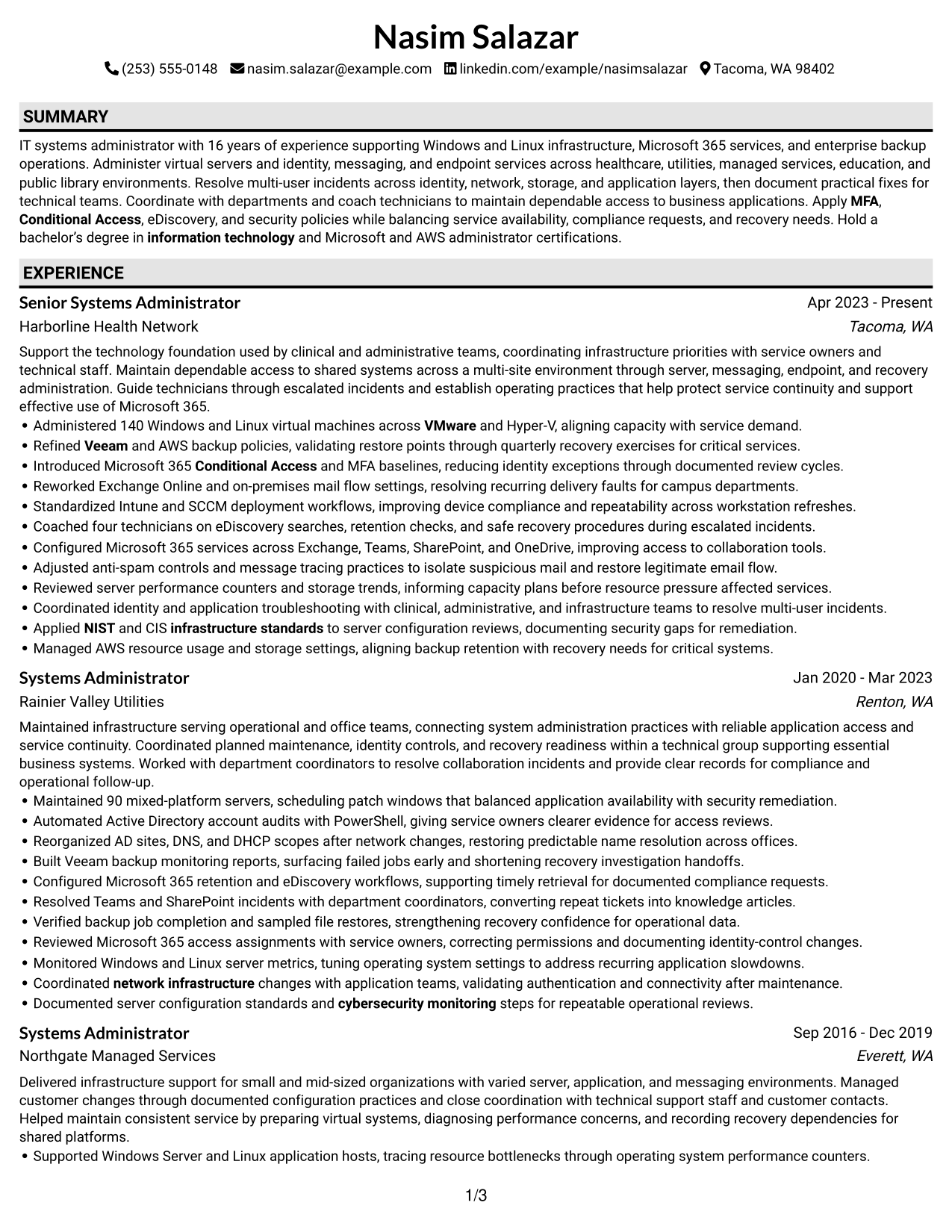
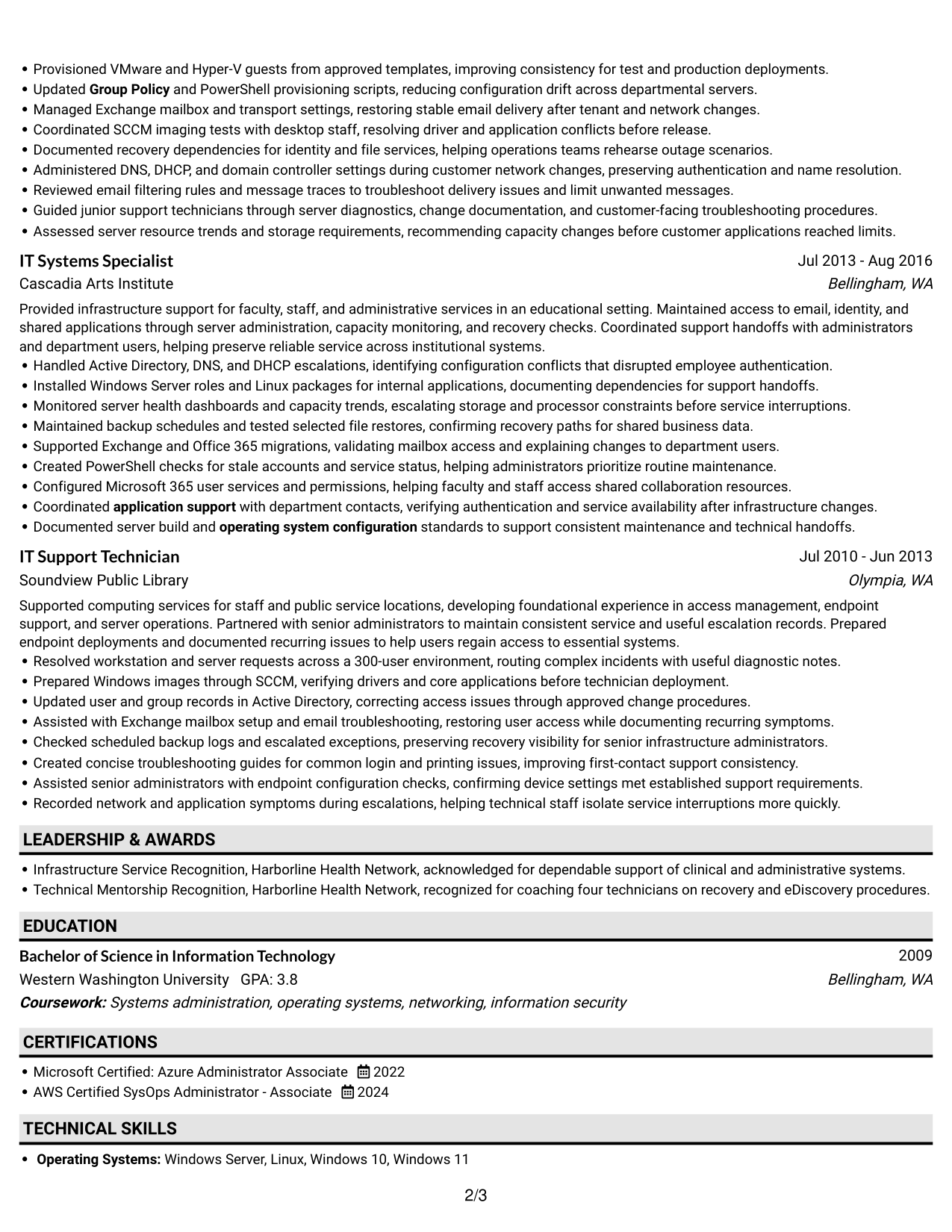
#2 Plain One Column with Shaded Labels Resume Example

Plain One Column with Shaded Labels uses clear section cues in a single column, helping recruiters move through the resume in order.
 
Resume Example Page 1   Resume Example Page 2

Why This Format Works

  • Shaded labels help recruiters locate experience, skills, education, and credentials without losing reading order.
  • Visible section breaks distinguish career history from supporting qualifications.
  • The single-column flow keeps achievements connected to their related roles.

Best For

  • Section-by-section scanning
  • Clear content landmarks
  • Traditional chronological review
  • Several qualification sections
  • Single-column text reading
 

#3 One Column Format with Photo Right Resume Example

One Column Format with Photo Right places a photo at the right of the header while keeping resume content in one reading column.
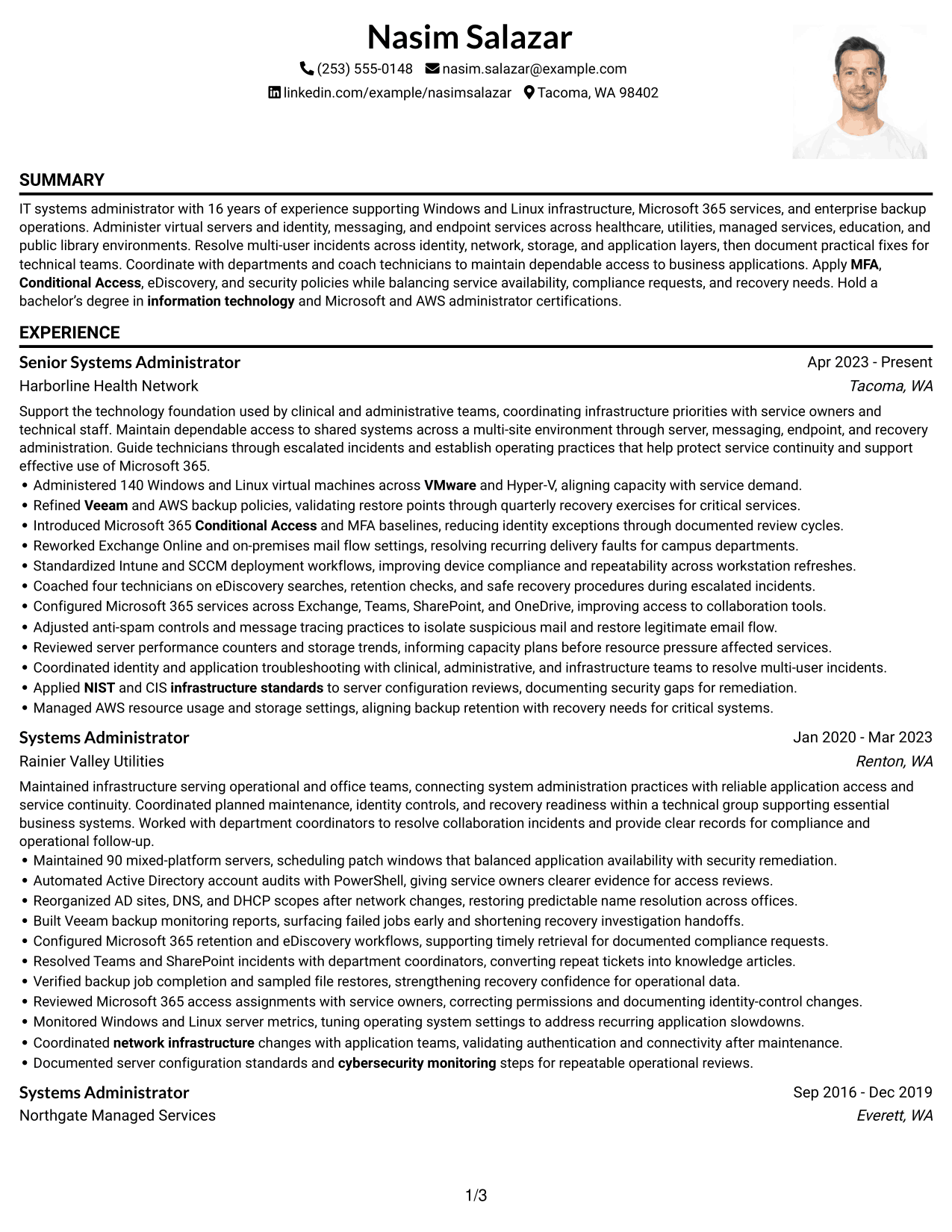
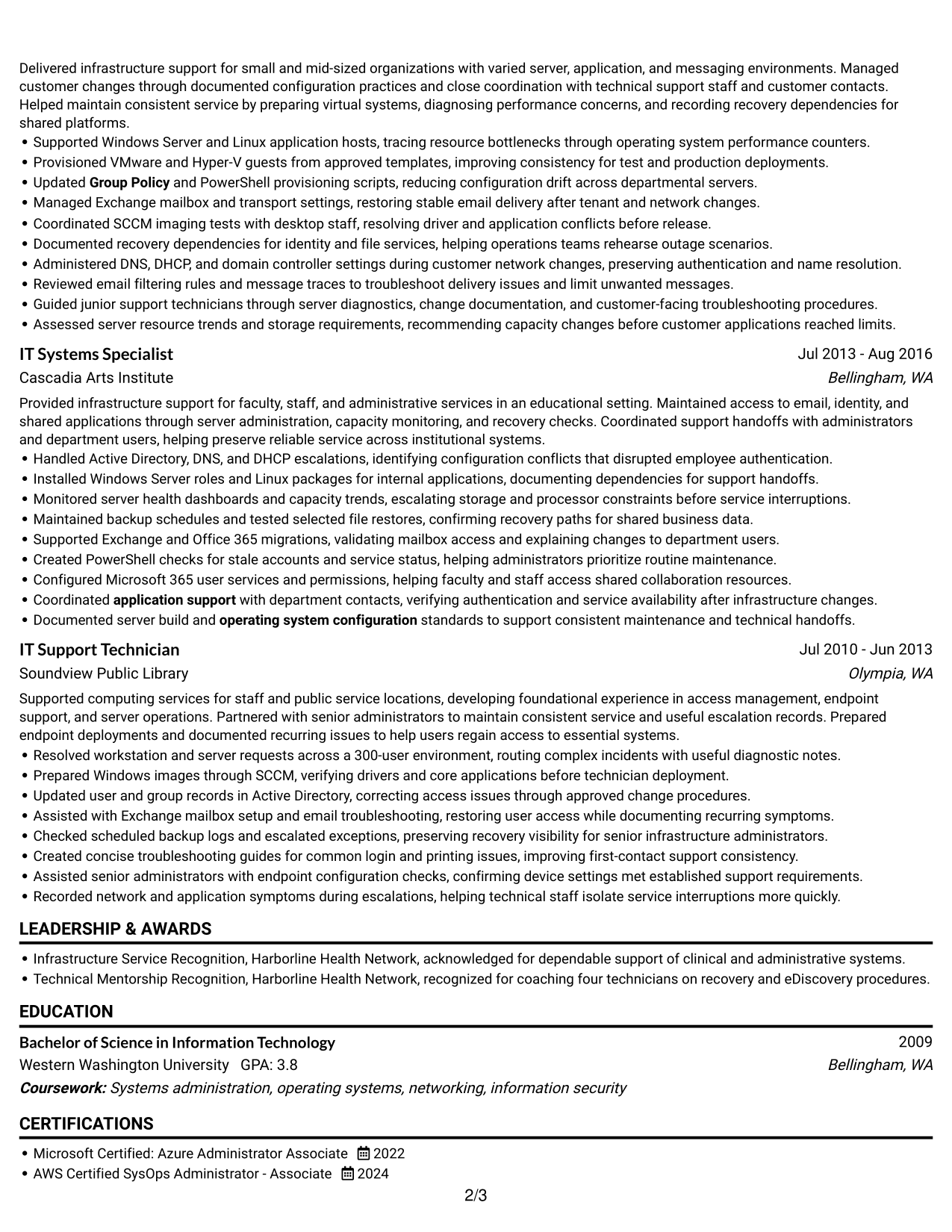
 
Resume Example Page 1   Resume Example Page 2

Why This Format Works

  • Career history stays in one reading path, separate from the photo and detailed qualification text.
  • A continuous body helps reviewers follow role progression before comparing skills and education.
  • The single-column structure keeps achievements near their related experience.

Best For

  • Photo-requested resume layouts
  • One-path career review
  • Visually distinct headers
  • Linear experience histories
  • Qualification-focused text scanning
 

#4 Clean Two Column Sidebar Format Resume Example

Clean Two Column Sidebar Format separates the body into two areas, giving recruiters a clear way to scan resume sections.
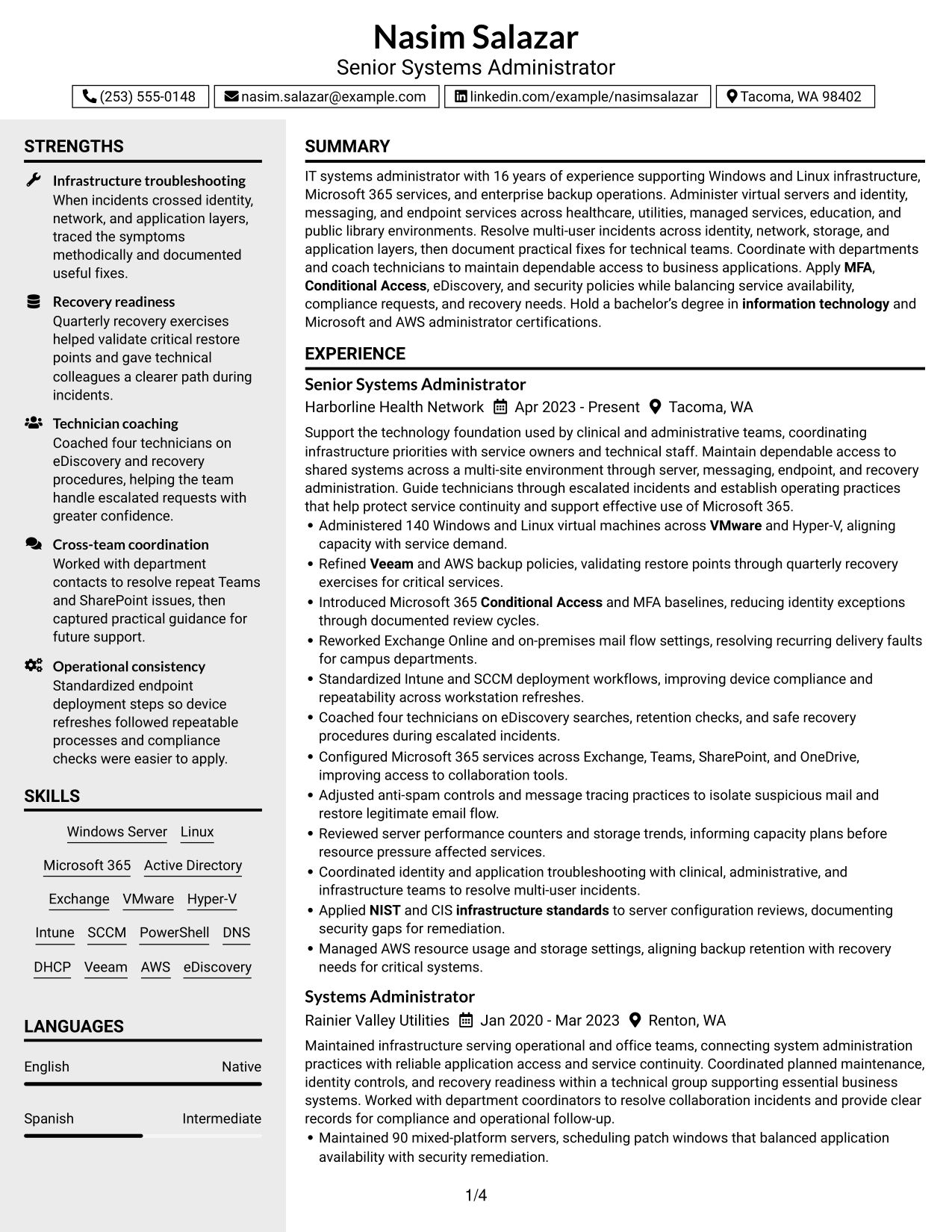
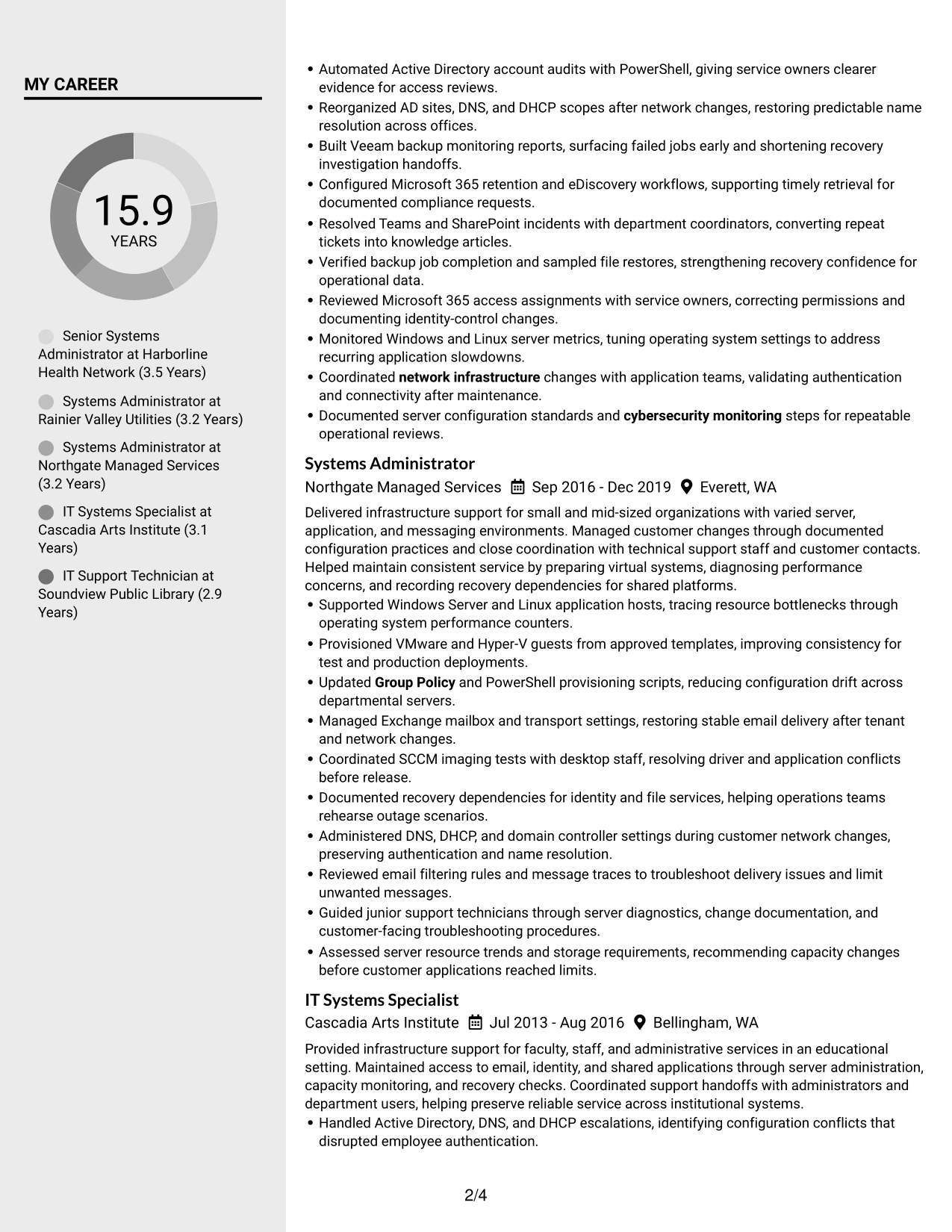
 
Resume Example Page 1   Resume Example Page 2

Why This Format Works

  • Distinct column areas help recruiters compare career history with skills and credentials.
  • Separate reading areas make education easier to locate alongside experience.
  • The sidebar structure gives supporting qualifications a clear place in the resume.

Best For

  • Sidebar and main-column reading
  • Separate content-area scanning
  • Quick skills-to-history comparison
  • Compact section navigation
  • Visible education and credentials


#5 Two Column Format Resume Example

Two Column Format divides the resume body into two columns, giving reviewers separate areas to scan without changing the document's overall reading order.
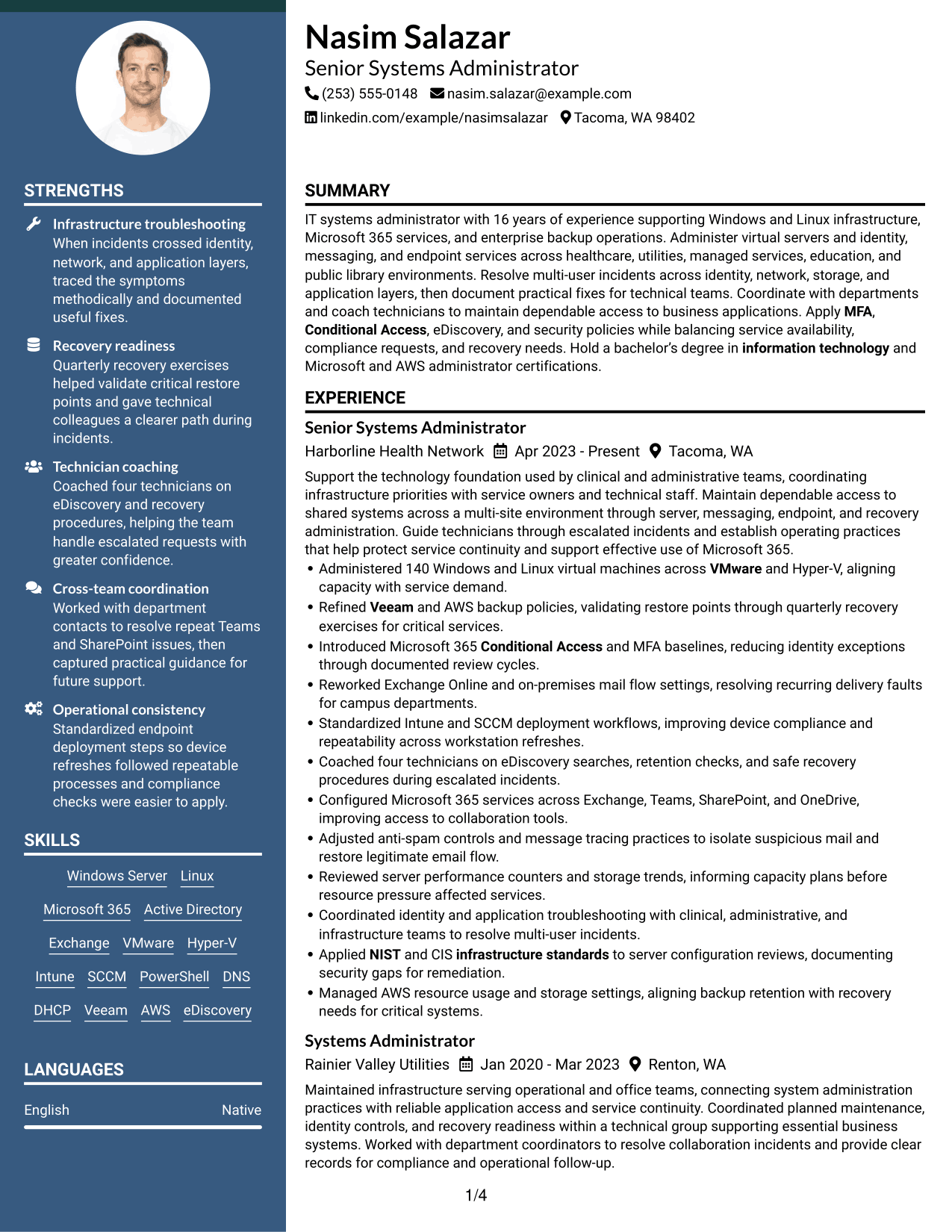
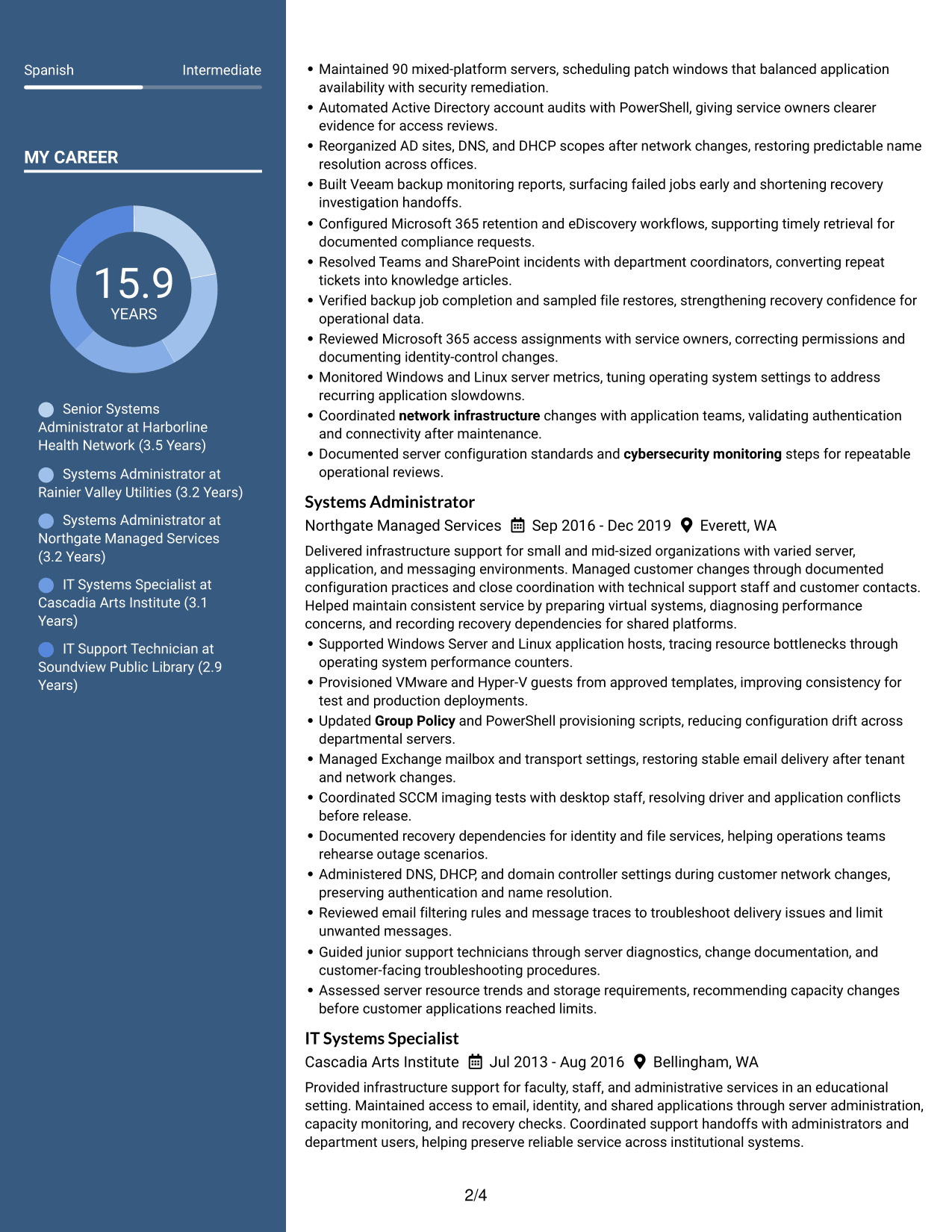
 
Resume Example Page 1   Resume Example Page 2

Why This Format Works

  • Separate body columns help recruiters locate experience and skills without reading one dense block.
  • Distinct reading areas make education and credentials easier to scan beside career history.
  • The two-column structure gives different resume sections visible boundaries.

Best For

  • Parallel section scanning
  • Compact content organization
  • Several distinct resume sections
  • Readers comparing content areas
  • Experience and skills review
 

#6 Photo Header Two Column Format Resume Example

Photo Header Two Column Format pairs a photo in the header with two body columns for a distinct visual opening and organized resume content.
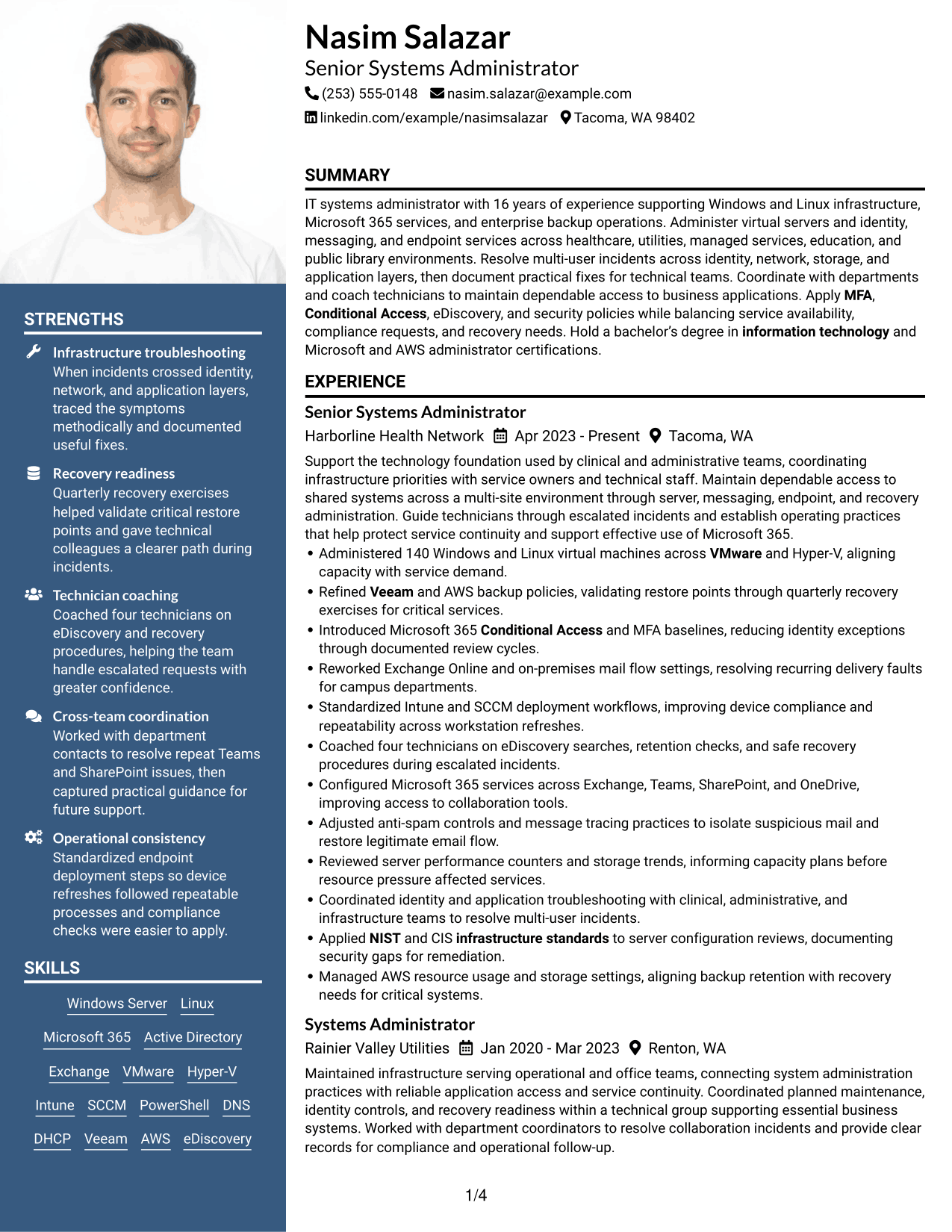
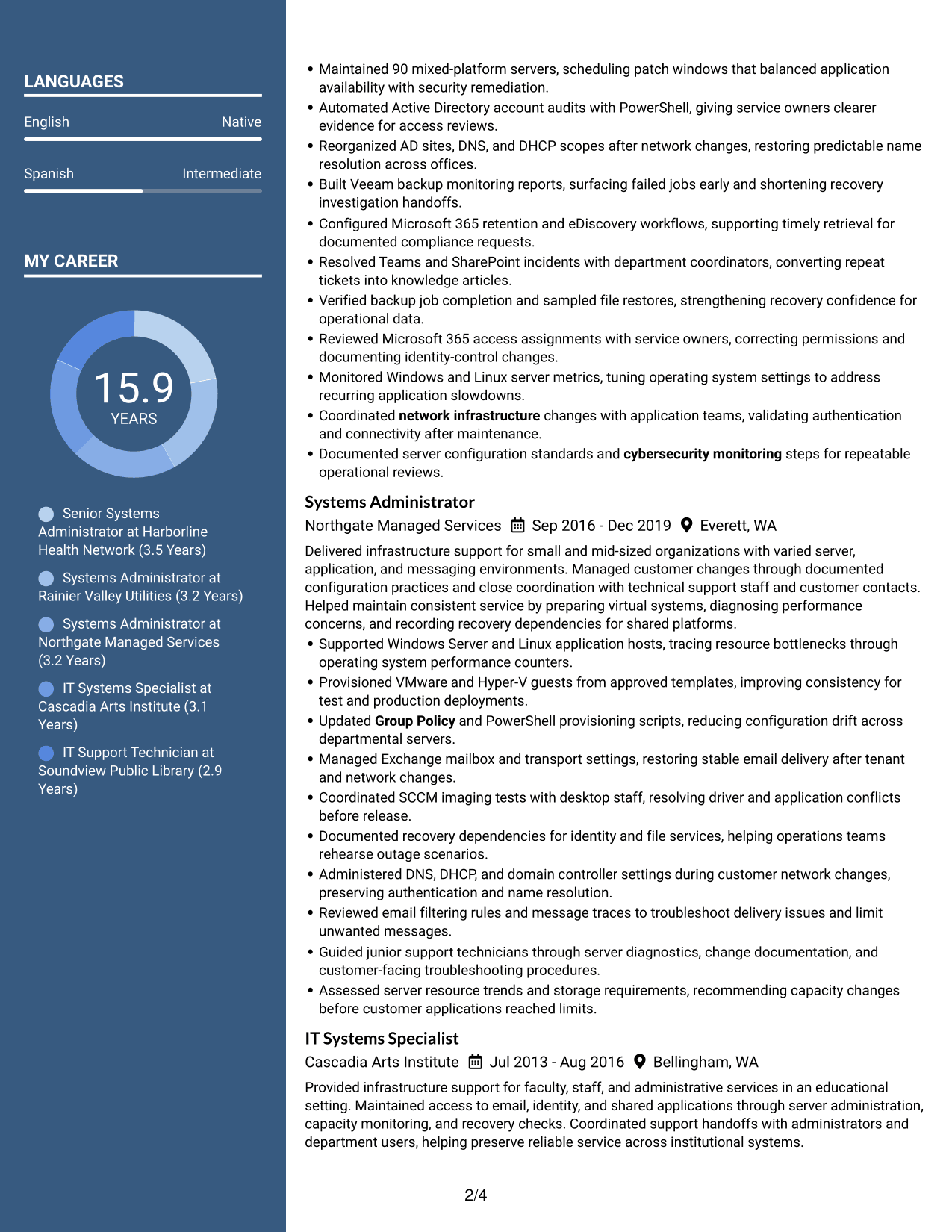
 
Resume Example Page 1   Resume Example Page 2

Why This Format Works

  • Two body columns let recruiters scan career history and qualifications as distinct content areas.
  • The column split reduces long vertical scanning across skills, education, and experience.
  • A separate photo header keeps the visual introduction apart from detailed resume content.

Best For

  • Photo-led header layouts
  • Two-area section navigation
  • Side-by-side content review
  • Resumes with varied sections
  • Visual introduction with detailed body
 

#7 Simple Two Column Format Resume Example

Simple Two Column Format uses two clear body areas to help recruiters scan resume sections without extra visual complexity.
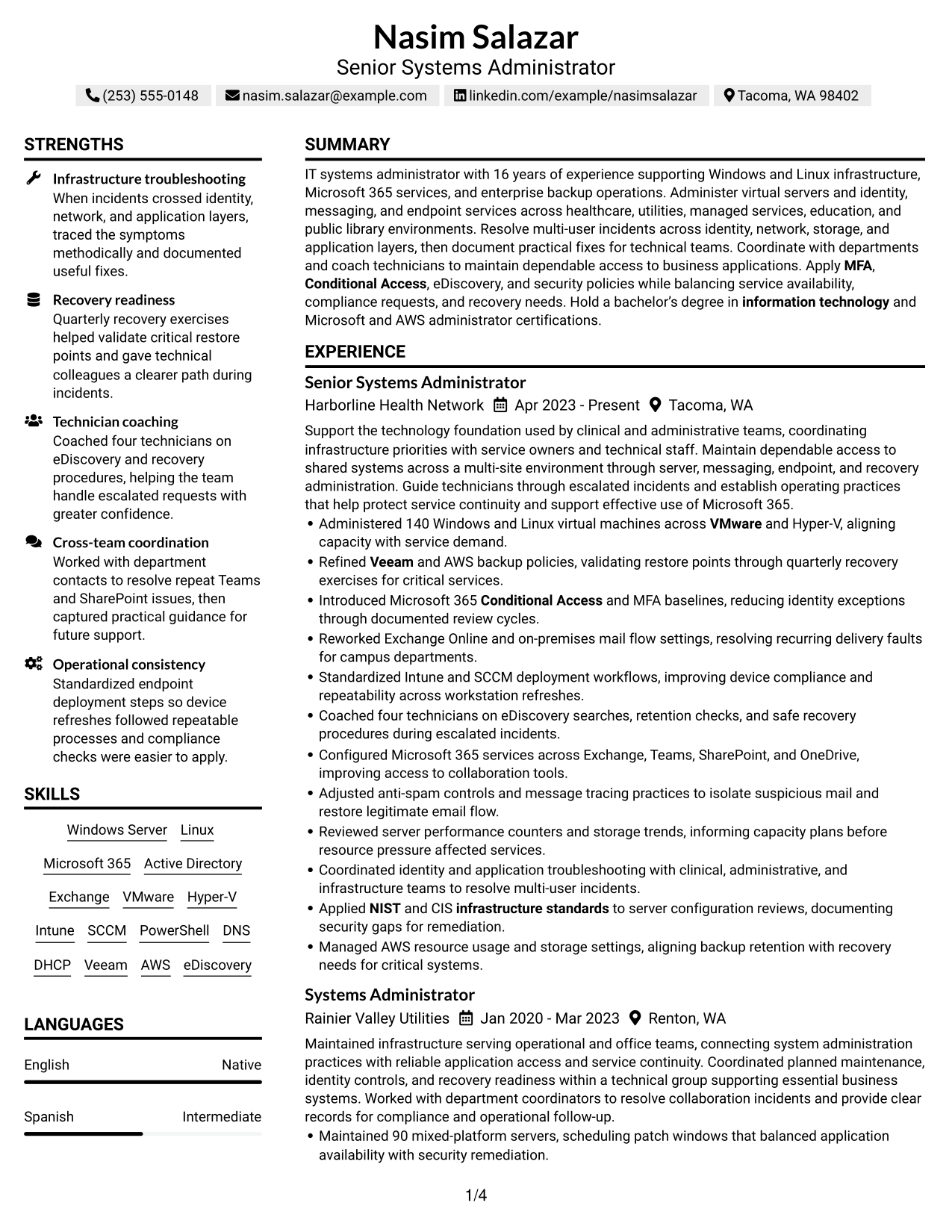
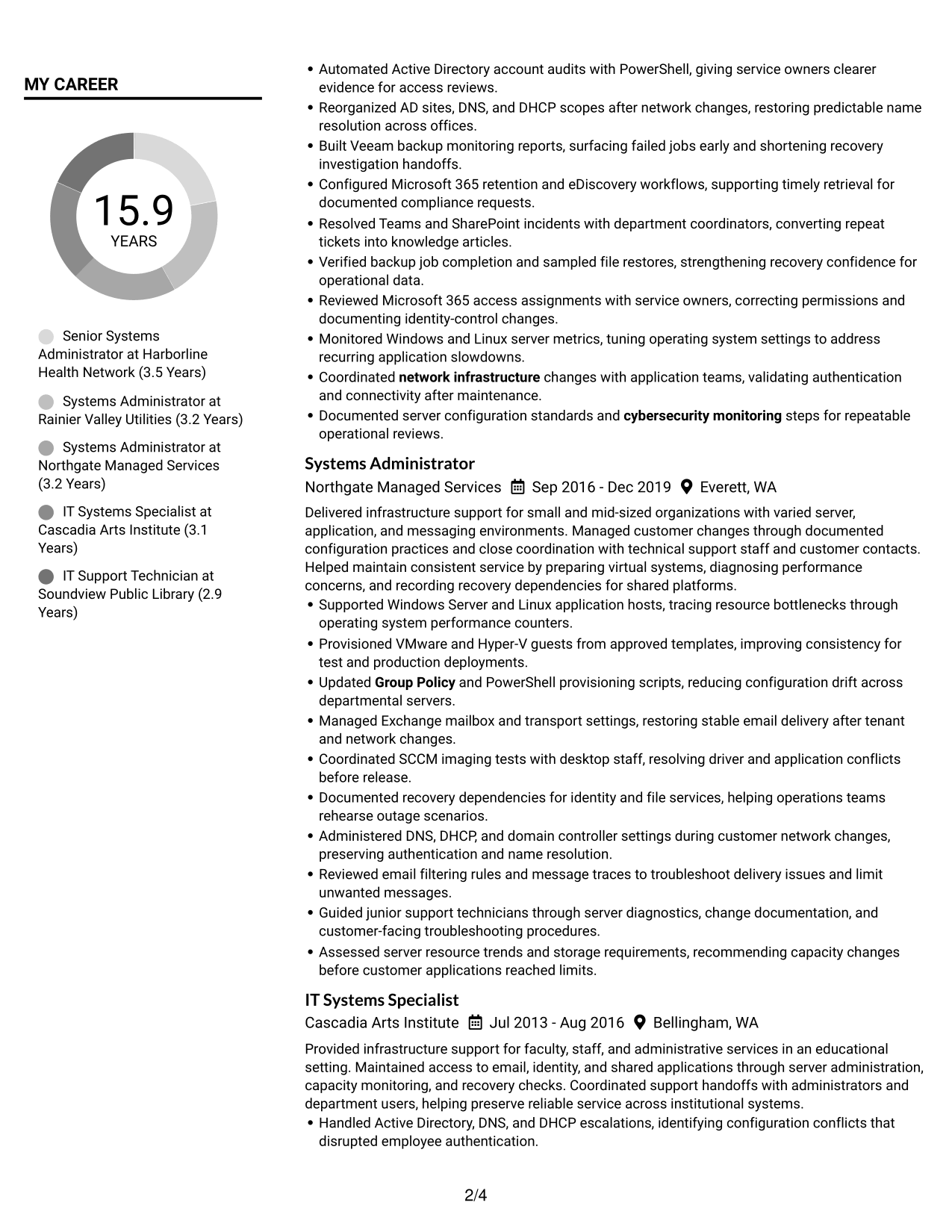
 
Resume Example Page 1   Resume Example Page 2

Why This Format Works

  • The two-column reading areas separate career history from other resume sections for quicker review.
  • Simple section boundaries help reviewers move between skills, education, and experience.
  • A straightforward structure keeps achievements connected to the roles where they belong.

Best For

  • Simple two-column organization
  • Distinct content-area scanning
  • Quick qualification review
  • Resumes with several section types
  • No-photo resume presentation


Why Build Your Journey IT System Administrator Resume with ResumeInMinutes

ResumeInMinutes helps you organize your experience, technical skills, education, and certifications into a resume that is easy to read and update. You can adjust the section order and wording to show the infrastructure work most relevant to this role.

  • ATS-friendly section structure
  • Clear skills and experience sections
  • Keyword-focused resume guidance
  • Space for measurable achievements
  • Free PDF resume previews
  • Resume customization support

Use the editor to highlight relevant work with Microsoft 365, Windows and Linux servers, identity controls, endpoint management, and backup recovery. Keep every tool, certification, and result accurate to your experience.


See Also


Frequently Asked Questions

Are these Journey IT System Administrator resume templates ATS-friendly?

The layouts use readable headings and clear resume sections to support scanning and ATS review. Add relevant terms, such as Microsoft 365, Exchange, Active Directory, PowerShell, Intune, SCCM, Veeam, and server virtualization, only when they match your experience.

Do the layouts show different resume content?

No. The guide presents one resume example in different layouts. The content stays focused on the role, while the page design and section presentation vary.

What should a Journey IT System Administrator resume include?

Include a focused summary, relevant experience, technical skills, education, and certifications. Use achievement bullets to describe server administration, Microsoft 365 services, identity and endpoint work, troubleshooting, and recovery tasks.

How can I show Microsoft 365 and server infrastructure skills?

Name the services and systems you have used, such as Exchange Online, Teams, SharePoint, Windows Server, Linux, VMware, or Hyper-V. Pair each skill with a brief example of administration, troubleshooting, security, or service improvement.

How can I make server administration achievements more specific?

Use figures that you can verify, such as the number of servers or virtual machines supported, recovery exercises completed, or technicians coached. Explain the result, such as improved capacity planning, more dependable restores, or fewer recurring incidents.

Should I include certifications on this resume?

Yes, list current certifications that relate to the role. Include the full credential name and its date, such as Microsoft Certified: Azure Administrator Associate or AWS Certified SysOps Administrator - Associate.

Should I include a photo on my resume?

For U.S. applications, a photo is usually not needed. A no-photo format keeps attention on your skills, experience, and results.

Can I customize these resume templates?

Yes. You can edit the resume text and layout, then save or download a PDF. Check that your skills, dates, certifications, and achievement details are accurate before sharing it.


ATS score 78%

How we calculate this score

  • Keywords: 60% of the total. AI extracts keywords from your job description. If you do not provide one, a standard job description for the title matching your resume is used. This is not a match to a specific vacancy.
  • Text-based resume: 20%. The text resume assessed here receives 100 for this part.
  • Resume quality: 20%. We start at 100 and subtract points for issues found by our resume checks, down to a minimum of zero.
  • Keyword coverage = 100 × (confirmed matches + 0.8 × possible matches) ÷ total keywords, rounded and capped at 100. Possible matches still need checking. Saved generation audits use their saved keyword percentage.
  • Final score = 60% of keyword coverage + 20% of the text score + 20% of the quality score, rounded to a whole number. Without keywords, no overall ATS score is available.

What this score means

Our scores are estimates, not employer ratings. They may contain errors and do not guarantee accurate parsing, a ranking, an interview, or a job. Check your document against the employer’s requirements. You are responsible for relying on this score.

Terms and Conditions

Score weights: Keywords 60% · Text based resume 20% · Resume quality 20%

Keywords: 14 matched + 17 possible of 43 (64%) · Resume quality: 100%

Resume quality 100% · Weight 20% · Issues (0)

Details
  • ✓Name present: Nasim Salazar
  • ✓Email format: nasim.salazar@example.com
  • ✓Phone format: (253) 555-0148
  • ✓Experience 1: Job title: Senior Systems Administrator
  • ✓Experience 1: Company name: Harborline Health Network
  • ✓Experience 1: Work location: Tacoma, WA
  • ✓Experience 1: Employment dates: Apr 2023 - Present
  • ✓Experience 1: Description or achievements: Present
  • ✓Experience 2: Job title: Systems Administrator
  • ✓Experience 2: Company name: Rainier Valley Utilities
  • ✓Experience 2: Work location: Renton, WA
  • ✓Experience 2: Employment dates: Jan 2020 - Mar 2023
  • ✓Experience 2: Description or achievements: Present
  • ✓Experience 3: Job title: Systems Administrator
  • ✓Experience 3: Company name: Northgate Managed Services
  • ✓Experience 3: Work location: Everett, WA
  • ✓Experience 3: Employment dates: Sep 2016 - Dec 2019
  • ✓Experience 3: Description or achievements: Present
  • ✓Experience 4: Job title: IT Systems Specialist
  • ✓Experience 4: Company name: Cascadia Arts Institute
  • ✓Experience 4: Work location: Bellingham, WA
  • ✓Experience 4: Employment dates: Jul 2013 - Aug 2016
  • ✓Experience 4: Description or achievements: Present
  • ✓Experience 5: Job title: IT Support Technician
  • ✓Experience 5: Company name: Soundview Public Library
  • ✓Experience 5: Work location: Olympia, WA
  • ✓Experience 5: Employment dates: Jul 2010 - Jun 2013
  • ✓Experience 5: Description or achievements: Present
  • ✓No placeholder fields
  • ✓No repeated achievement bullets
  • ✓No empty bullets

No issues found by the current checks.

Text Based Resume 100% · Weight 20%

Parsed text
Nasim Salazar
(253) 555-0148
nasim.salazar@example.com
linkedin.com/example/nasimsalazar
Tacoma, WA 98402
SUMMARY
IT systems administrator with 16 years of experience supporting Windows and Linux infrastructure, Microsoft 365 services, and enterprise backup operations. Administer virtual servers and identity, messaging, and endpoint services across healthcare, utilities, managed services, education, and public library environments. Resolve multi-user incidents across identity, network, storage, and application layers, then document practical fixes for technical teams. Coordinate with departments and coach technicians to maintain dependable access to business applications. Apply MFA, Conditional Access, eDiscovery, and security policies while balancing service availability, compliance requests, and recovery needs. Hold a bachelor’s degree in information technology and Microsoft and AWS administrator certifications.
EXPERIENCE
Senior Systems Administrator
Harborline Health Network
Apr 2023 - Present
Tacoma, WA
Support the technology foundation used by clinical and administrative teams, coordinating infrastructure priorities with service owners and technical staff. Maintain dependable access to shared systems across a multi-site environment through server, messaging, endpoint, and recovery administration. Guide technicians through escalated incidents and establish operating practices that help protect service continuity and support effective use of Microsoft 365.
Administered 140 Windows and Linux virtual machines across VMware and Hyper-V, aligning capacity with service demand.
Refined Veeam and AWS backup policies, validating restore points through quarterly recovery exercises for critical services.
Introduced Microsoft 365 Conditional Access and MFA baselines, reducing identity exceptions through documented review cycles.
Reworked Exchange Online and on-premises mail flow settings, resolving recurring delivery faults for campus departments.
Standardized Intune and SCCM deployment workflows, improving device compliance and repeatability across workstation refreshes.
Coached four technicians on eDiscovery searches, retention checks, and safe recovery procedures during escalated incidents.
Configured Microsoft 365 services across Exchange, Teams, SharePoint, and OneDrive, improving access to collaboration tools.
Adjusted anti-spam controls and message tracing practices to isolate suspicious mail and restore legitimate email flow.
Reviewed server performance counters and storage trends, informing capacity plans before resource pressure affected services.
Coordinated identity and application troubleshooting with clinical, administrative, and infrastructure teams to resolve multi-user incidents.
Applied NIST and CIS infrastructure standards to server configuration reviews, documenting security gaps for remediation.
Managed AWS resource usage and storage settings, aligning backup retention with recovery needs for critical systems.
Systems Administrator
Rainier Valley Utilities
Jan 2020 - Mar 2023
Renton, WA
Maintained infrastructure serving operational and office teams, connecting system administration practices with reliable application access and service continuity. Coordinated planned maintenance, identity controls, and recovery readiness within a technical group supporting essential business systems. Worked with department coordinators to resolve collaboration incidents and provide clear records for compliance and operational follow-up.
Maintained 90 mixed-platform servers, scheduling patch windows that balanced application availability with security remediation.
Automated Active Directory account audits with PowerShell, giving service owners clearer evidence for access reviews.
Reorganized AD sites, DNS, and DHCP scopes after network changes, restoring predictable name resolution across offices.
Built Veeam backup monitoring reports, surfacing failed jobs early and shortening recovery investigation handoffs.
Configured Microsoft 365 retention and eDiscovery workflows, supporting timely retrieval for documented compliance requests.
Resolved Teams and SharePoint incidents with department coordinators, converting repeat tickets into knowledge articles.
Verified backup job completion and sampled file restores, strengthening recovery confidence for operational data.
Reviewed Microsoft 365 access assignments with service owners, correcting permissions and documenting identity-control changes.
Monitored Windows and Linux server metrics, tuning operating system settings to address recurring application slowdowns.
Coordinated network infrastructure changes with application teams, validating authentication and connectivity after maintenance.
Documented server configuration standards and cybersecurity monitoring steps for repeatable operational reviews.
Systems Administrator
Northgate Managed Services
Sep 2016 - Dec 2019
Everett, WA
Delivered infrastructure support for small and mid-sized organizations with varied server, application, and messaging environments. Managed customer changes through documented configuration practices and close coordination with technical support staff and customer contacts. Helped maintain consistent service by preparing virtual systems, diagnosing performance concerns, and recording recovery dependencies for shared platforms.
Supported Windows Server and Linux application hosts, tracing resource bottlenecks through operating system performance counters.
Provisioned VMware and Hyper-V guests from approved templates, improving consistency for test and production deployments.
Updated Group Policy and PowerShell provisioning scripts, reducing configuration drift across departmental servers.
Managed Exchange mailbox and transport settings, restoring stable email delivery after tenant and network changes.
Coordinated SCCM imaging tests with desktop staff, resolving driver and application conflicts before release.
Documented recovery dependencies for identity and file services, helping operations teams rehearse outage scenarios.
Administered DNS, DHCP, and domain controller settings during customer network changes, preserving authentication and name resolution.
Reviewed email filtering rules and message traces to troubleshoot delivery issues and limit unwanted messages.
Guided junior support technicians through server diagnostics, change documentation, and customer-facing troubleshooting procedures.
Assessed server resource trends and storage requirements, recommending capacity changes before customer applications reached limits.
IT Systems Specialist
Cascadia Arts Institute
Jul 2013 - Aug 2016
Bellingham, WA
Provided infrastructure support for faculty, staff, and administrative services in an educational setting. Maintained access to email, identity, and shared applications through server administration, capacity monitoring, and recovery checks. Coordinated support handoffs with administrators and department users, helping preserve reliable service across institutional systems.
Handled Active Directory, DNS, and DHCP escalations, identifying configuration conflicts that disrupted employee authentication.
Installed Windows Server roles and Linux packages for internal applications, documenting dependencies for support handoffs.
Monitored server health dashboards and capacity trends, escalating storage and processor constraints before service interruptions.
Maintained backup schedules and tested selected file restores, confirming recovery paths for shared business data.
Supported Exchange and Office 365 migrations, validating mailbox access and explaining changes to department users.
Created PowerShell checks for stale accounts and service status, helping administrators prioritize routine maintenance.
Configured Microsoft 365 user services and permissions, helping faculty and staff access shared collaboration resources.
Coordinated application support with department contacts, verifying authentication and service availability after infrastructure changes.
Documented server build and operating system configuration standards to support consistent maintenance and technical handoffs.
IT Support Technician
Soundview Public Library
Jul 2010 - Jun 2013
Olympia, WA
Supported computing services for staff and public service locations, developing foundational experience in access management, endpoint support, and server operations. Partnered with senior administrators to maintain consistent service and useful escalation records. Prepared endpoint deployments and documented recurring issues to help users regain access to essential systems.
Resolved workstation and server requests across a 300-user environment, routing complex incidents with useful diagnostic notes.
Prepared Windows images through SCCM, verifying drivers and core applications before technician deployment.
Updated user and group records in Active Directory, correcting access issues through approved change procedures.
Assisted with Exchange mailbox setup and email troubleshooting, restoring user access while documenting recurring symptoms.
Checked scheduled backup logs and escalated exceptions, preserving recovery visibility for senior infrastructure administrators.
Created concise troubleshooting guides for common login and printing issues, improving first-contact support consistency.
Assisted senior administrators with endpoint configuration checks, confirming device settings met established support requirements.
Recorded network and application symptoms during escalations, helping technical staff isolate service interruptions more quickly.
LEADERSHIP & AWARDS
Infrastructure Service Recognition, Harborline Health Network, acknowledged for dependable support of clinical and administrative systems.
Technical Mentorship Recognition, Harborline Health Network, recognized for coaching four technicians on recovery and eDiscovery procedures.
EDUCATION
Bachelor of Science in Information Technology
Western Washington University
GPA: 3.8
2009
Bellingham, WA
Coursework: Systems administration, operating systems, networking, information security
CERTIFICATIONS
Microsoft Certified: Azure Administrator Associate
2022
AWS Certified SysOps Administrator - Associate
2024
TECHNICAL SKILLS
Operating Systems: Windows Server, Linux, Windows 10, Windows 11
Microsoft 365: Microsoft 365, Exchange Online, Microsoft Teams, SharePoint
Directory Services: Active Directory, Microsoft Entra ID, Group Policy, Entra ID Connect
Virtualization: VMware vSphere, Hyper-V, VMware ESXi, vCenter Server
Endpoint Management: Microsoft Intune, Microsoft Configuration Manager, SCCM, Windows Autopilot
Scripting: PowerShell, Windows PowerShell ISE, Bash, VBScript
Backup and Recovery: Veeam Backup & Replication, AWS Backup, Amazon S3, Amazon EC2
Network Services: DNS, DHCP, TCP/IP, VPN
Identity Security: Multi-Factor Authentication, Conditional Access, Microsoft Defender, Microsoft Entra ID
Storage: Amazon EBS, Amazon S3, Windows Storage Spaces, NTFS
Email and Compliance: Exchange Server, Exchange Online Protection, Microsoft Purview, Microsoft eDiscovery
SKILLS
Windows Server
Linux
Microsoft 365
Active Directory
Exchange
VMware
Hyper-V
Intune
SCCM
PowerShell
DNS
DHCP
Veeam
AWS
eDiscovery
PROFESSIONAL AFFILIATIONS
Member, Association for Computing Machinery, professional community for computing and information technology practitioners.
Member, CompTIA Association of Information Technology Professionals, community for IT professionals and industry development.
LANGUAGES
English (Native)
Spanish (Intermediate)
ADDITIONAL INFORMATION
Work Status
: Authorized to work in United States. No sponsorship required.
REFERENCES
AVAILABLE ON REQUEST

Matched keywords (14)

  • Group Policy
  • MFA
  • Conditional Access
  • Entra ID Connect
  • VeeamOriginal keyword in JD: Veeam OR AWS Backup Solutions
  • operating system configuration
  • application support
  • network infrastructure
  • cybersecurity monitoring
  • infrastructure standards
  • information technologyOriginal keyword in JD: Computer Science OR Information Technology OR Related Field OR Equivalent Experience
  • Microsoft Certified: Azure Administrator AssociateOriginal keyword in JD: Microsoft Certified: Azure Administrator Associate OR AWS Certified SysOps Administrator OR Red Hat Certified Engineer (RHCE)
  • VMwareOriginal keyword in JD: VMware OR Hyper-V
  • NISTOriginal keyword in JD: NIST OR CIS OR ISO 27001

Missing keywords (12)

  • Exchange Administration
  • Hypervisor Administration
  • PowerShell Administration
  • DNS Administration
  • DHCP Administration
  • Disaster Recovery Planning
  • Capacity Planning
  • Storage Configuration
  • SharePoint Administration
  • OneDrive Administration
  • Cross-Department Coordination
  • Technical Training

Possible matches (17)

  • Windows Server Administration80% credit: 1.86 percentage points of 2.33 possible.
  • Linux Server Administration80% credit: 1.86 percentage points of 2.33 possible.
  • Microsoft 365 Administration80% credit: 1.86 percentage points of 2.33 possible.
  • Active Directory Administration80% credit: 1.86 percentage points of 2.33 possible.
  • Server Virtualization80% credit: 1.86 percentage points of 2.33 possible.
  • Intune Endpoint Configuration and Compliance80% credit: 1.86 percentage points of 2.33 possible.
  • SCCM Endpoint Imaging and Management80% credit: 1.86 percentage points of 2.33 possible.
  • Identity and Access Management80% credit: 1.86 percentage points of 2.33 possible.
  • Domain Controller Administration80% credit: 1.86 percentage points of 2.33 possible.
  • Backup Verification and Recovery80% credit: 1.86 percentage points of 2.33 possible.
  • Microsoft 365 eDiscovery80% credit: 1.86 percentage points of 2.33 possible.
  • Compliance-Driven Data Retrieval80% credit: 1.86 percentage points of 2.33 possible.
  • Email Flow Troubleshooting80% credit: 1.86 percentage points of 2.33 possible.
  • Anti-Spam Configuration80% credit: 1.86 percentage points of 2.33 possible.
  • Server Performance Monitoring and Tuning80% credit: 1.86 percentage points of 2.33 possible.
  • AWS Resource Management80% credit: 1.86 percentage points of 2.33 possible.
  • Teams Administration80% credit: 1.86 percentage points of 2.33 possible.
Disclaimer: All names, images, contact information, employment histories, achievements, security clearances, military credentials, and other qualifications shown in this content are fictional and used for illustrative purposes only. Any resemblance to actual persons, living or deceased, is purely coincidental.

Resume and cover-letter examples and recommendations in this article reflect general best practices and professional experience and are provided for guidance only. Results may vary based on role, industry, region, and hiring organization.

Content Accuracy and Verification: To the fullest extent permitted by applicable law, we do not represent or warrant that resume or cover-letter guidance, examples, recommendations, or related information are accurate, complete, current, error-free, or suitable for any particular purpose. You are responsible for independently reviewing and verifying the information before relying on it.

ATS and Cover-Letter Scores: ATS scores are estimates calculated using our own formula, informed by publicly available guidance on resume formatting and keyword matching. They are not scores issued or endorsed by an ATS provider or employer. Cover-letter scores are also our own assessments. Parsing, weighting, screening criteria, and results vary between systems, employers, job descriptions, and document formats. No score guarantees successful parsing, a particular ranking, an interview, or employment. Use scores as general guidance and independently check your documents against the employer’s requirements. To the fullest extent permitted by applicable law, we accept no liability for errors in scores or parsing, or losses arising from reliance on these assessments. Nothing in this notice excludes liability or limits consumer rights that cannot lawfully be excluded or limited.

Terms and Conditions
 
> JP 1 1
PDF Footer and Margins Setup
The margins are applied to the document, and the footer shows up in the preview and the PDF

Footer Font Settings

Are you applying for a specific job
so we can tailor your resume to it?
Are you applying for a specific job
so we can tailor your cover letter to it?
Type your details as text to generate a personalized resume Type your details as text to generate a personalized cover letter
Website link found! Ready to create resume from:
Drag the into the box to verify you're human.
Drop here

My Resumes

Displaying {number_of_files} files (out of {total_of_all_files} total)
Name File Type Last Modified: Description:

Rename File

Filename already exists!

Delete Files

Warning: This action is irreversible. Once you click submit, the files will be permanently deleted.

Heading text
Upload From Computer Upload
Select From Existing
LinkedIn
Drag & Drop files anywhere in this tab, or

Uploaded Files

Delete Name Last Updated Use This File
Select this to use the file for generating your resume and cover letter. Only one source—uploaded file, selected file, or LinkedIn text—can be used.

My Files

Resumes or cover letters you create will appear here. No files available yet.
Delete Name Last Updated Use This File
Select this to use the file for generating your resume and cover letter. Only one source—uploaded file, selected file, or LinkedIn text—can be used.

Add LinkedIn Profile PDF

You can download your LinkedIn profile as a PDF by opening linkedin.com in a web browser, clicking your profile photo, selecting the “More” or “Resources” button, and choosing “Save to PDF.” You can then attach the PDF using the Upload From Computer tab.

Paste Your LinkedIn Profile Text

If you have copied the LinkedIn profile text, paste it below. See how to copy your profile from LinkedIn

Select this to use the LinkedIn profile text for generating your resume and cover letter. Only one source—uploaded file, selected file, or LinkedIn text—can be used.

Try these controls

<
>


