
US English


7 Manager, HRIS - SuccessFactors and UKG Resume Templates with Example
By Ria · Last Updated On October 17, 2026
Resume example — page 1

This guide shows you how to build a Manager, HRIS - SuccessFactors and UKG resume that is clear, focused, and easy to review. You will learn how to organize your experience and show how your work supports reliable HR systems and workforce decisions.

A strong resume connects HRIS operations with clear evidence of data quality, system releases, reporting, and team leadership. It also uses relevant terms for SAP SuccessFactors, UKG Pro, payroll systems, integrations, audits, and workforce analytics where they match your experience.

The example is presented in 7 layouts so you can compare the PNG image previews, review each design, and open an example in the editor to customize it.

What Makes a Great Manager, HRIS - SuccessFactors and UKG Resume in 2026

A strong resume makes HRIS operations, system knowledge, team leadership, and business results easy to find. Use clear headings and concise bullets to show how you manage data, releases, reporting, and stakeholder needs.

Add keywords that match your experience, such as SAP SuccessFactors, UKG Pro, Cognos Analytics, SQL, data integrations, audit support, and workforce analytics. Support them with measurable results, such as fewer reconciliation issues or faster release support.

Note: Resume examples are for educational purposes only. Use only information that accurately reflects your experience and qualifications. References to real organizations do not imply affiliation or endorsement.

#1 Plain Two Column Format Resume Example

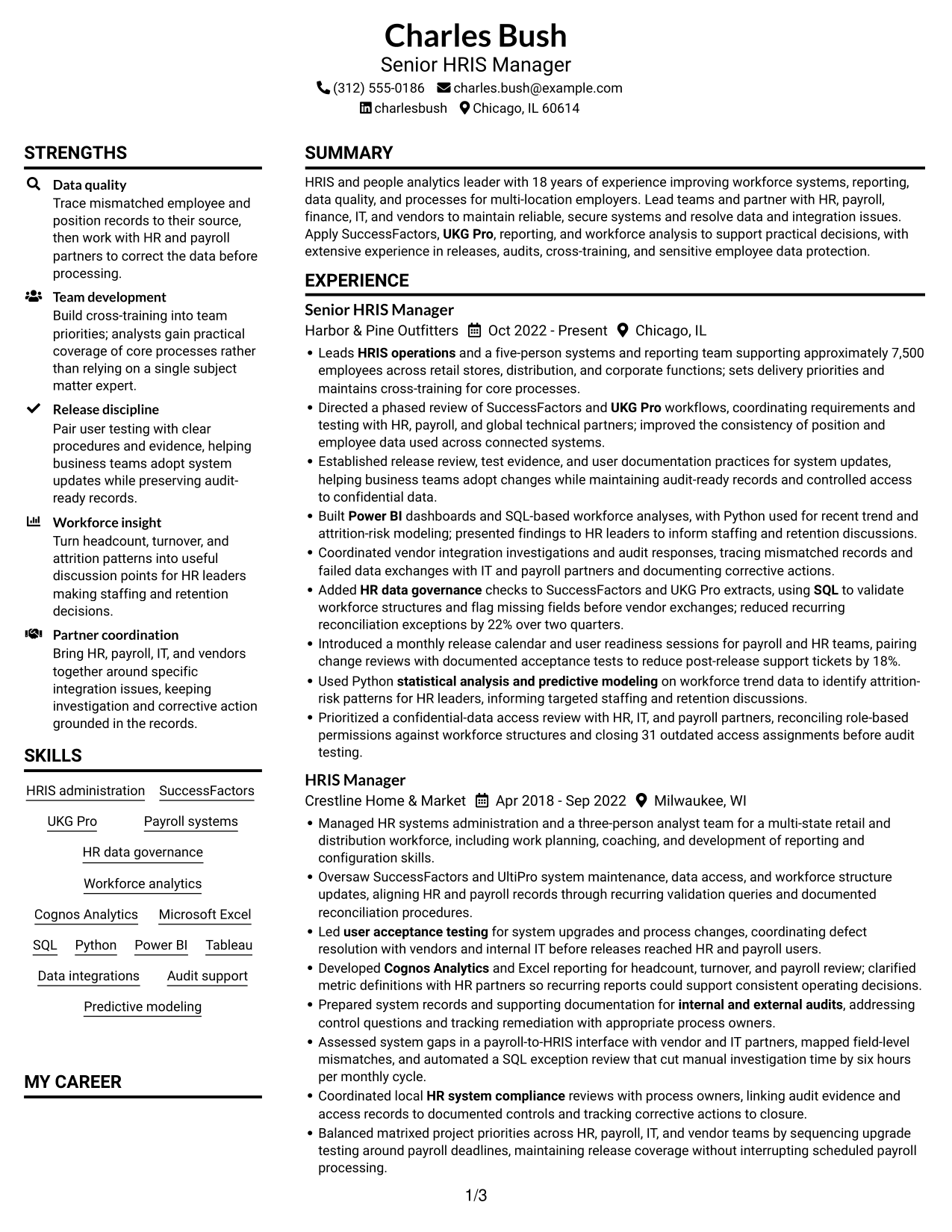
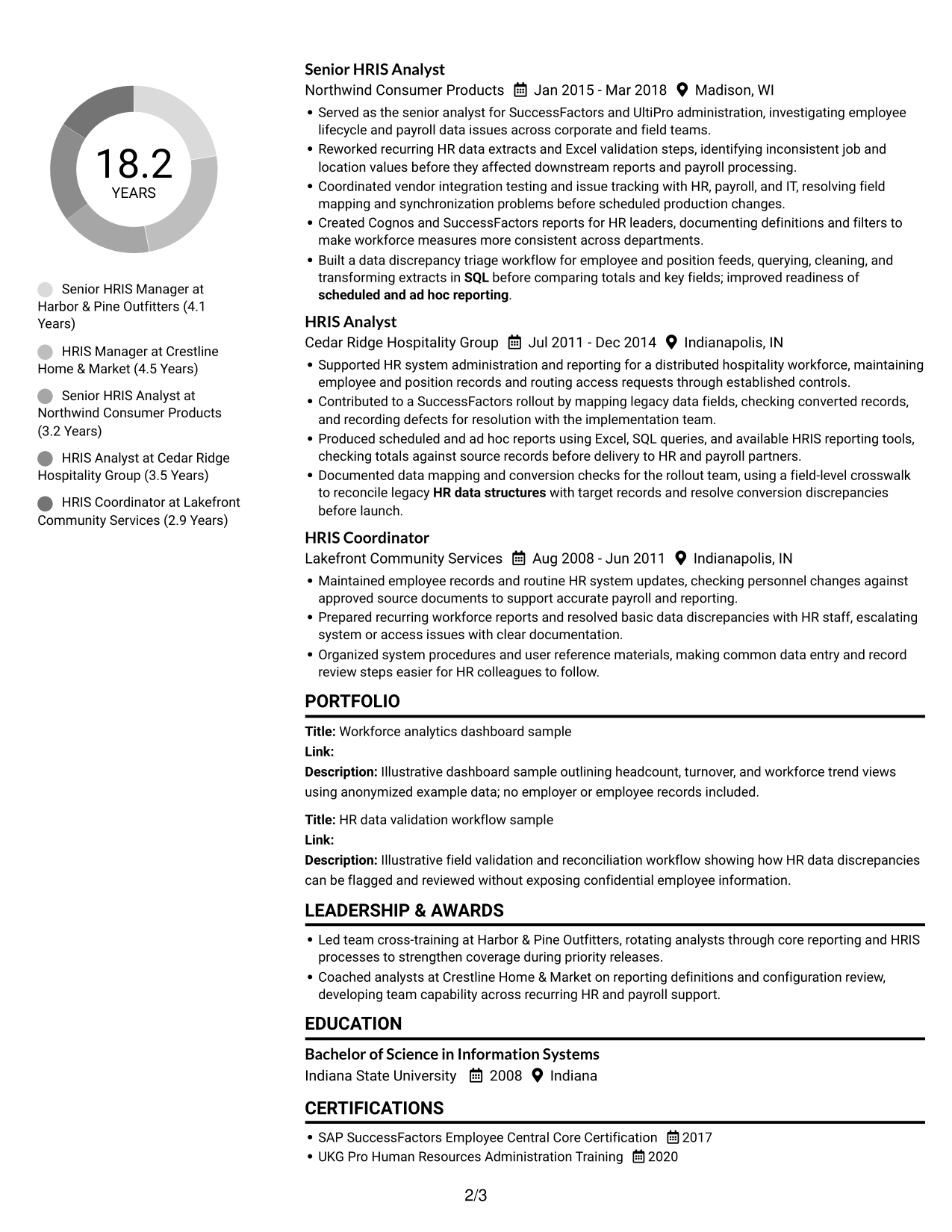
This two-column body gives resume sections separate reading areas, a practical choice when you want clear organization without a photo.
 
Resume example — page 1   Resume example — page 2

Resume Snapshot

  • 18 years in HRIS and people analytics
  • Leadership and cross-training experience
  • SAP SuccessFactors and UKG Pro
  • B.S. in Information Systems

Why This Format Works

  • Two reading areas help reviewers find experience, skills, education, and credentials.
  • Distinct sections make team leadership and system achievements easier to scan.
  • The organized structure keeps reporting, integrations, and audit work easy to locate.

Best For

  • Resumes with several career stages
  • Clear separation of supporting sections
  • Quick review of skills and credentials
  • Experience with detailed achievement bullets
  • A layout that omits a photo

Resume Keywords

  • SAP SuccessFactors
  • HRIS operations
  • UKG Pro
  • Payroll systems
  • HR data governance
  • HR data structures
  • Cognos Analytics
  • Microsoft Excel
  • SQL
  • Power BI
  • Workforce analytics
  • statistical analysis and predictive modeling
  • scheduled and ad hoc reporting
  • user acceptance testing
  • HR system compliance
See all keywords
 

#2 Simple One Column Format Resume Example

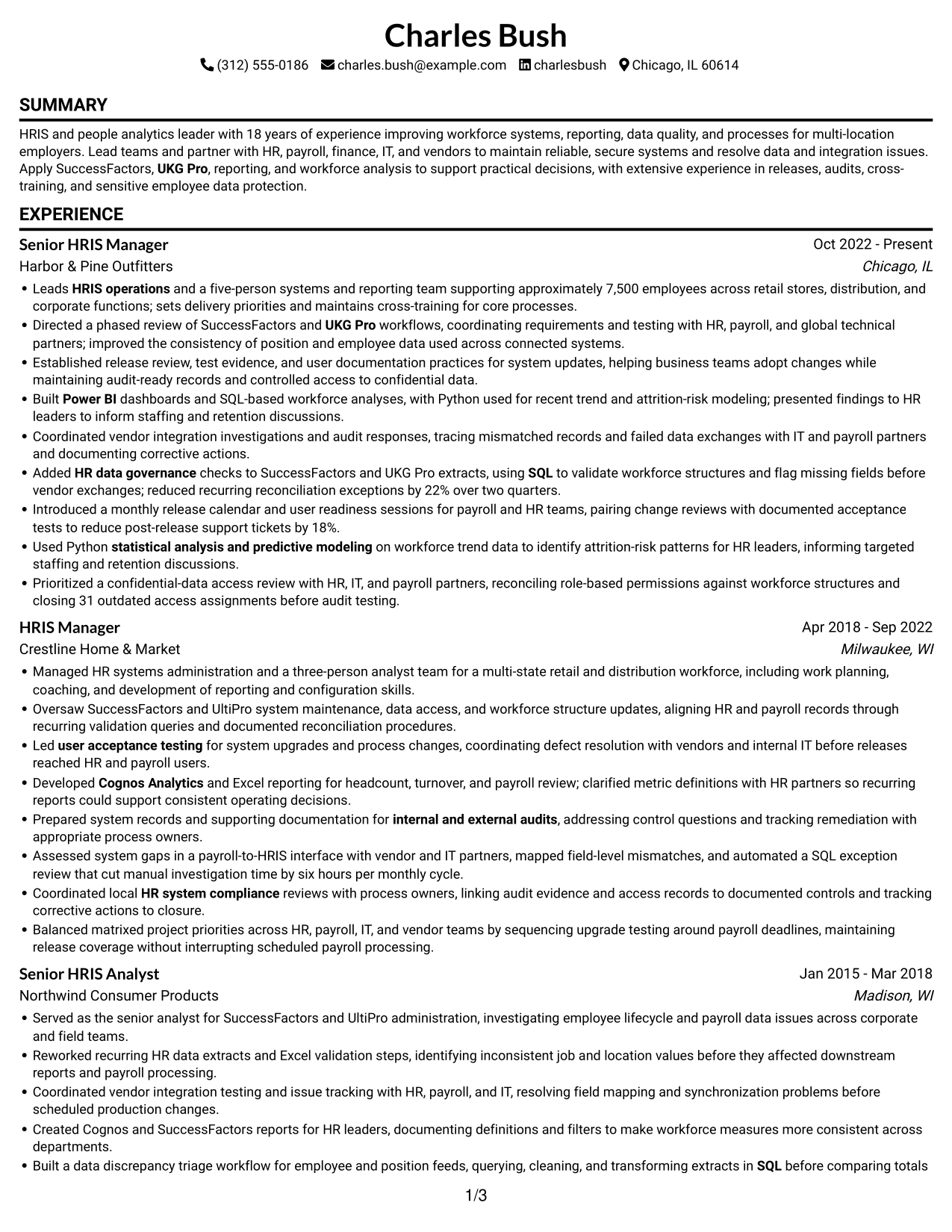
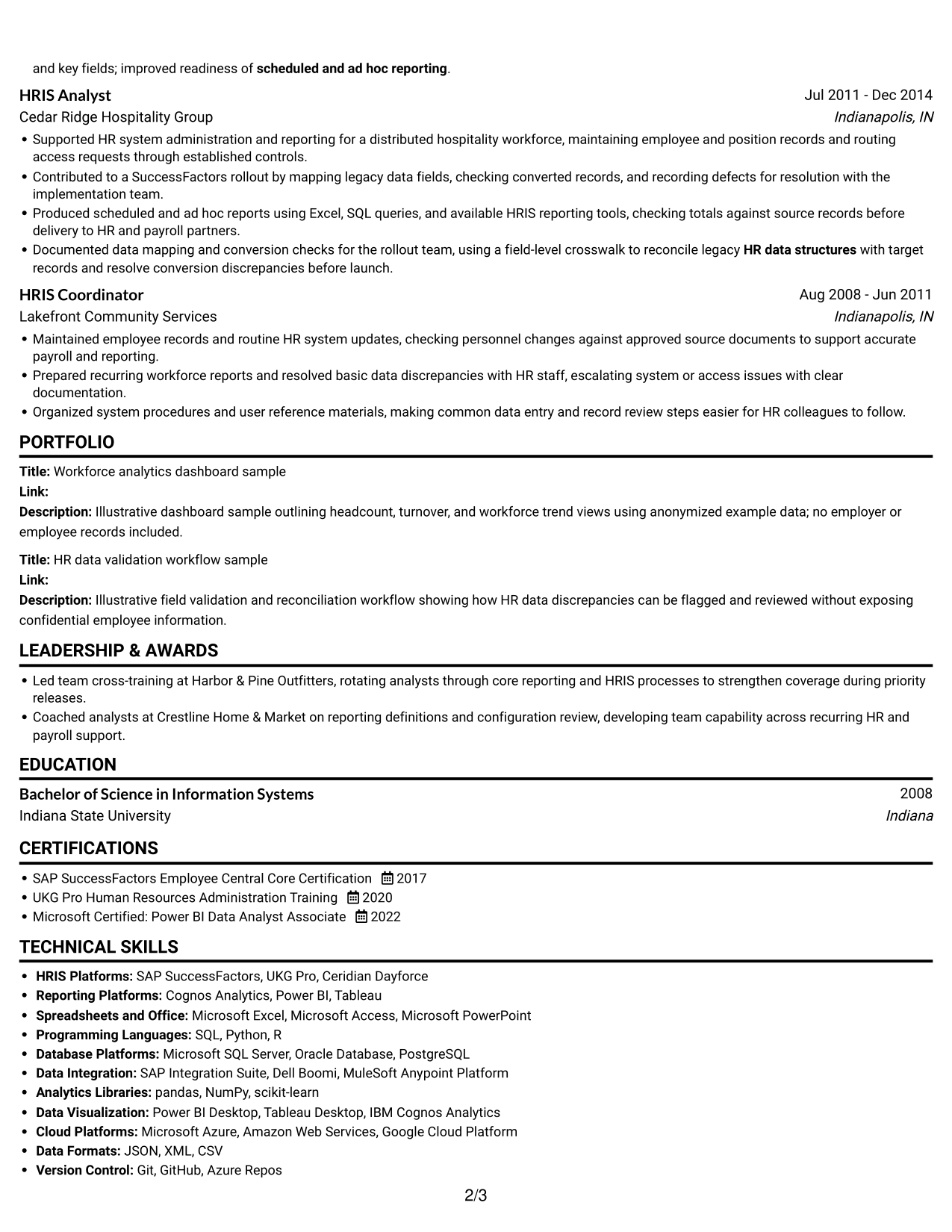
A single-column body gives every section one clear reading path, which suits resumes where a straightforward order matters most.
 
Resume example — page 1   Resume example — page 2

Why This Format Works

  • One reading path keeps career history and supporting sections in a clear sequence.
  • Consistent section order helps reviewers follow experience from role to role.
  • A simple structure leaves skills, education, and credentials easy to find.

Best For

  • Straightforward career timelines
  • ATS-friendly section order
  • Detailed experience bullets
  • Simple skills and education review
  • Resumes without a photo
 

#3 Clean Two Column Sidebar Format Resume Example

The two-column body gives this resume a distinct sidebar area, helping readers move between sections without adding a photo.
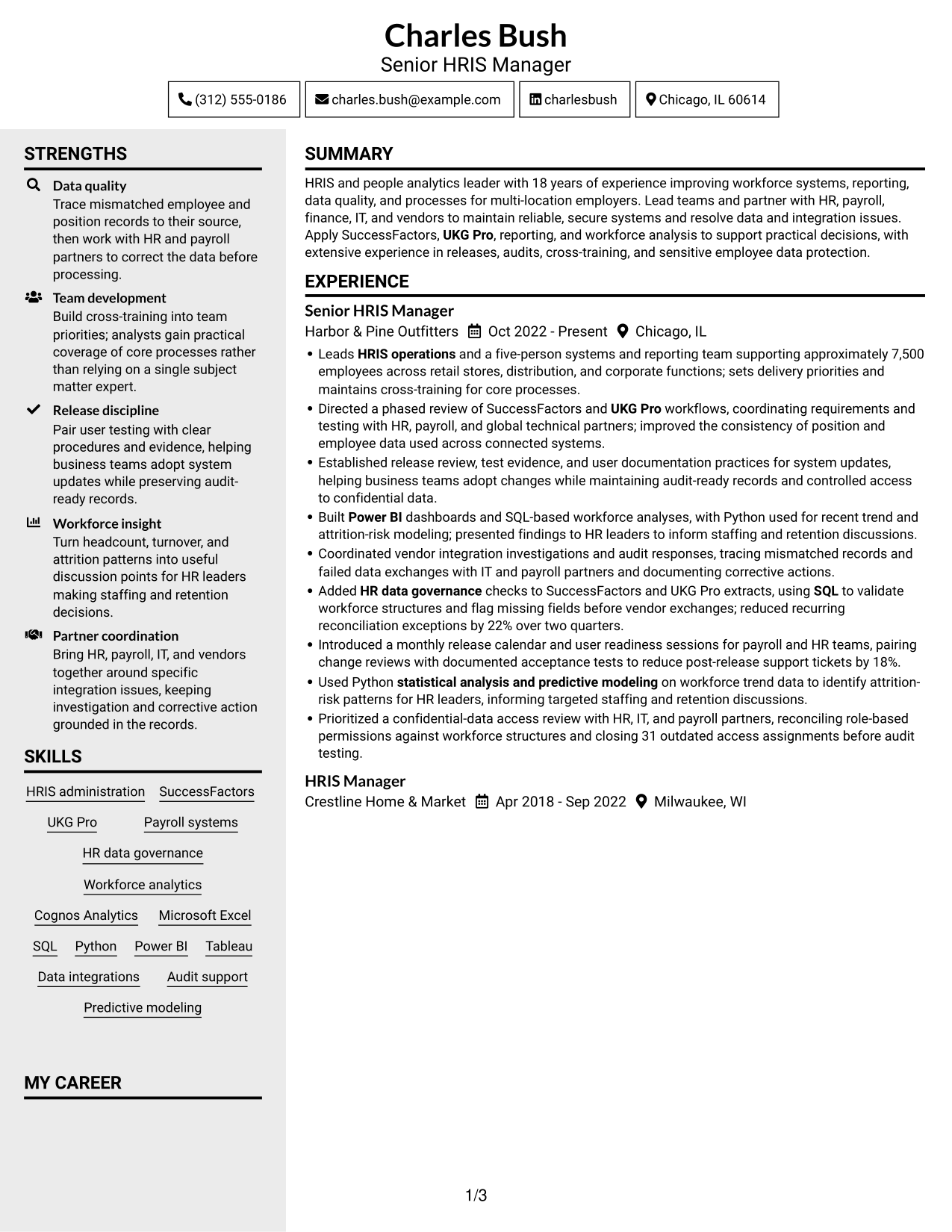
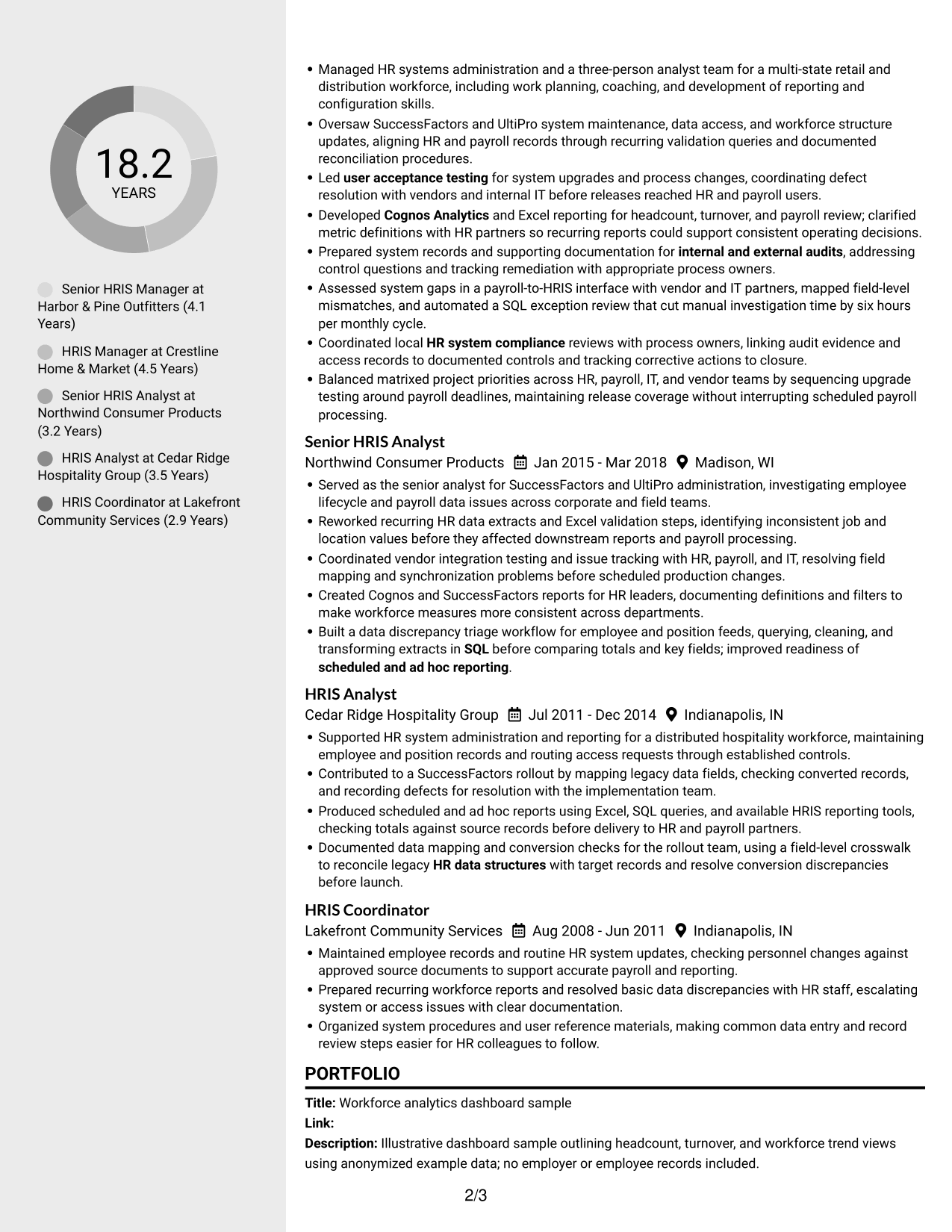
 
Resume example — page 1   Resume example — page 2

Why This Format Works

  • The separate areas help reviewers distinguish career history from supporting resume sections.
  • Clear section boundaries make skills and education easier to locate during review.
  • Experience bullets remain distinct, so achievements do not blend into other details.

Best For

  • Resumes with several supporting sections
  • Separate review of skills and experience
  • Compact section navigation
  • Detailed career history
  • A photo-free document
 

#4 Two Column Format Resume Example

A two-column body separates resume content into distinct areas, a useful choice for presenting career history alongside supporting sections.
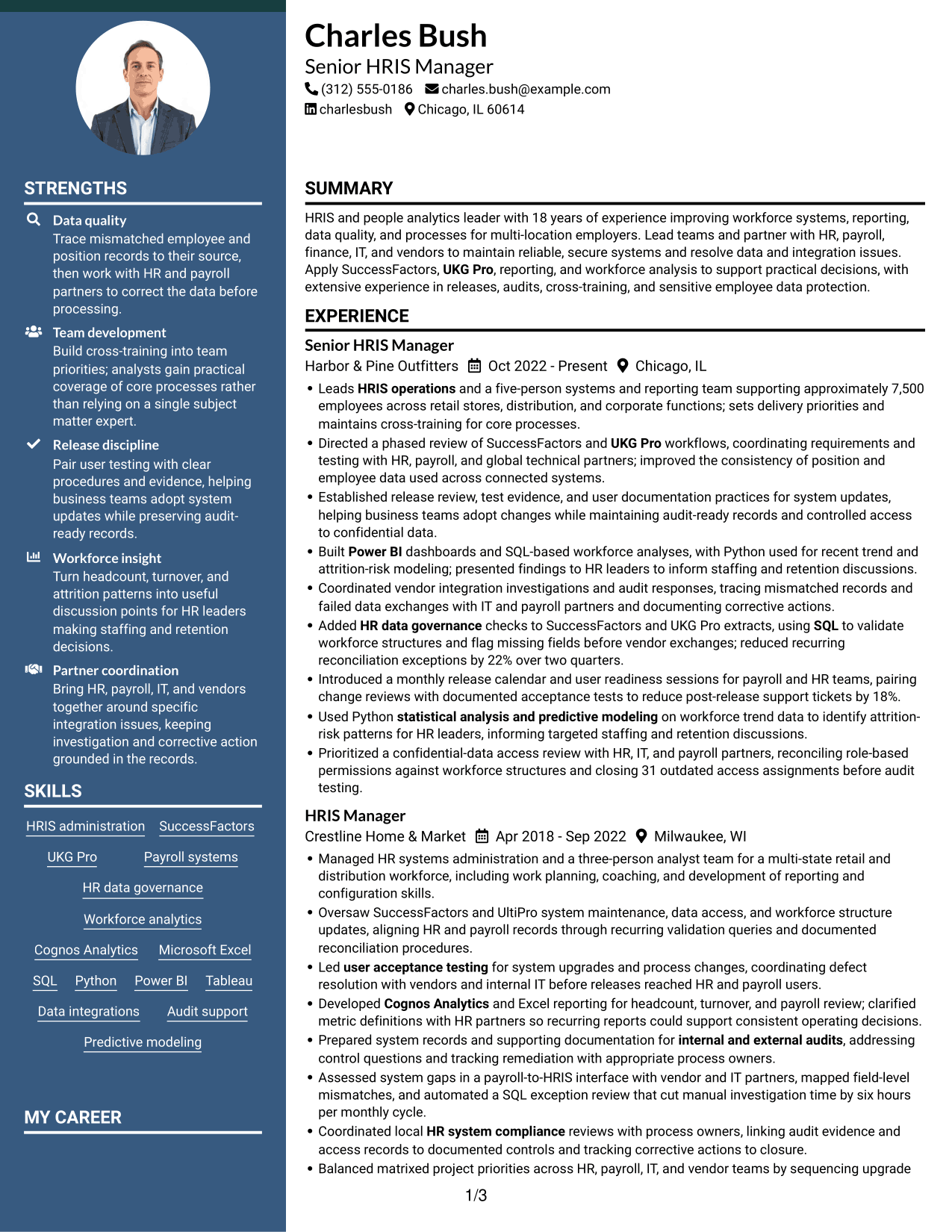
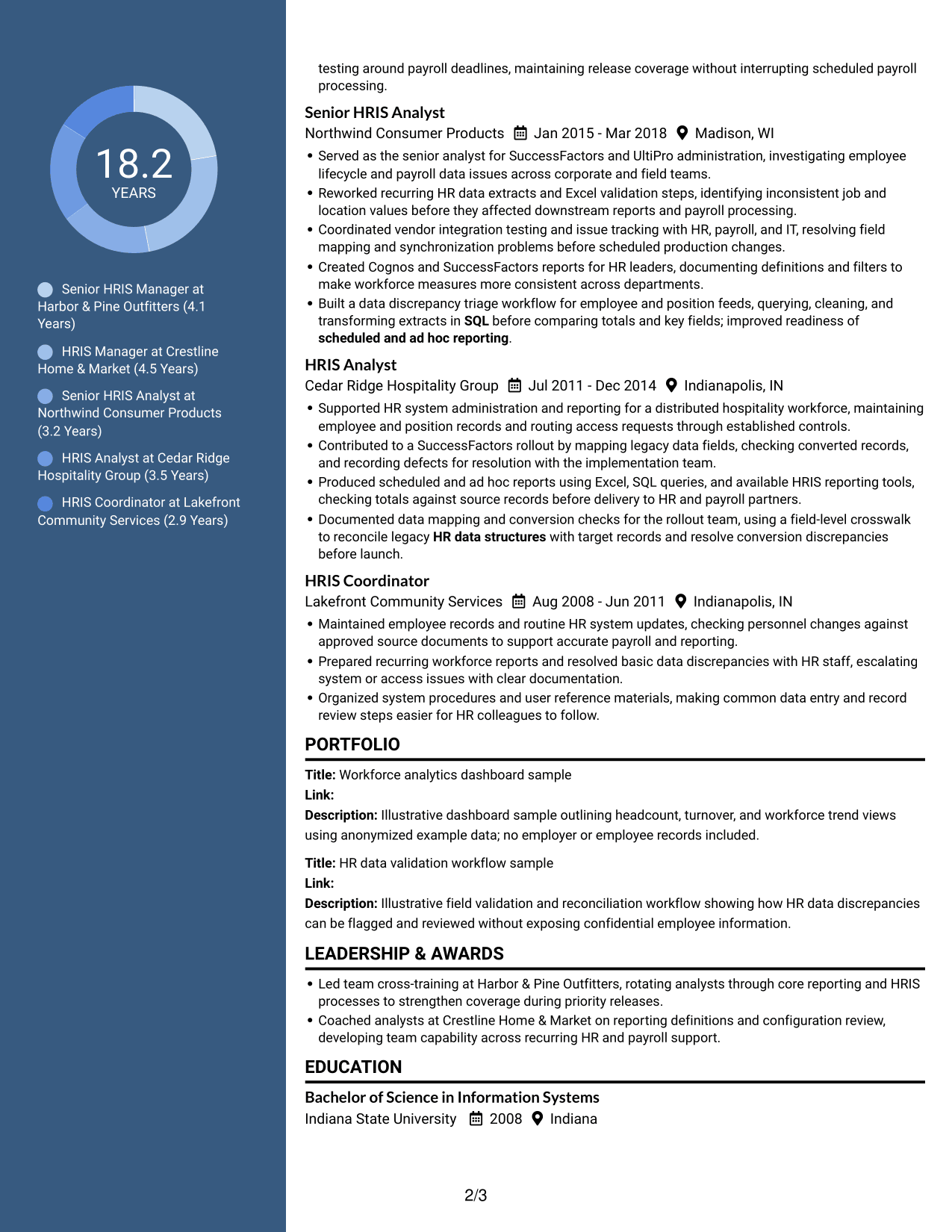
 
Resume example — page 1   Resume example — page 2

Why This Format Works

  • Separate areas help reviewers compare career progression with education and credentials.
  • The layout makes skills and experience sections easier to distinguish at a glance.
  • Clear content boundaries keep achievements and supporting details from running together.

Best For

  • Career histories with multiple roles
  • Experience paired with supporting details
  • Separate skills and education sections
  • Achievement-focused bullet points
  • Resumes without a photo


#5 Photo Header Two Column Format Resume Example

The two-column body pairs organized resume sections with a photo in the header, for readers who prefer a personal image above the content.
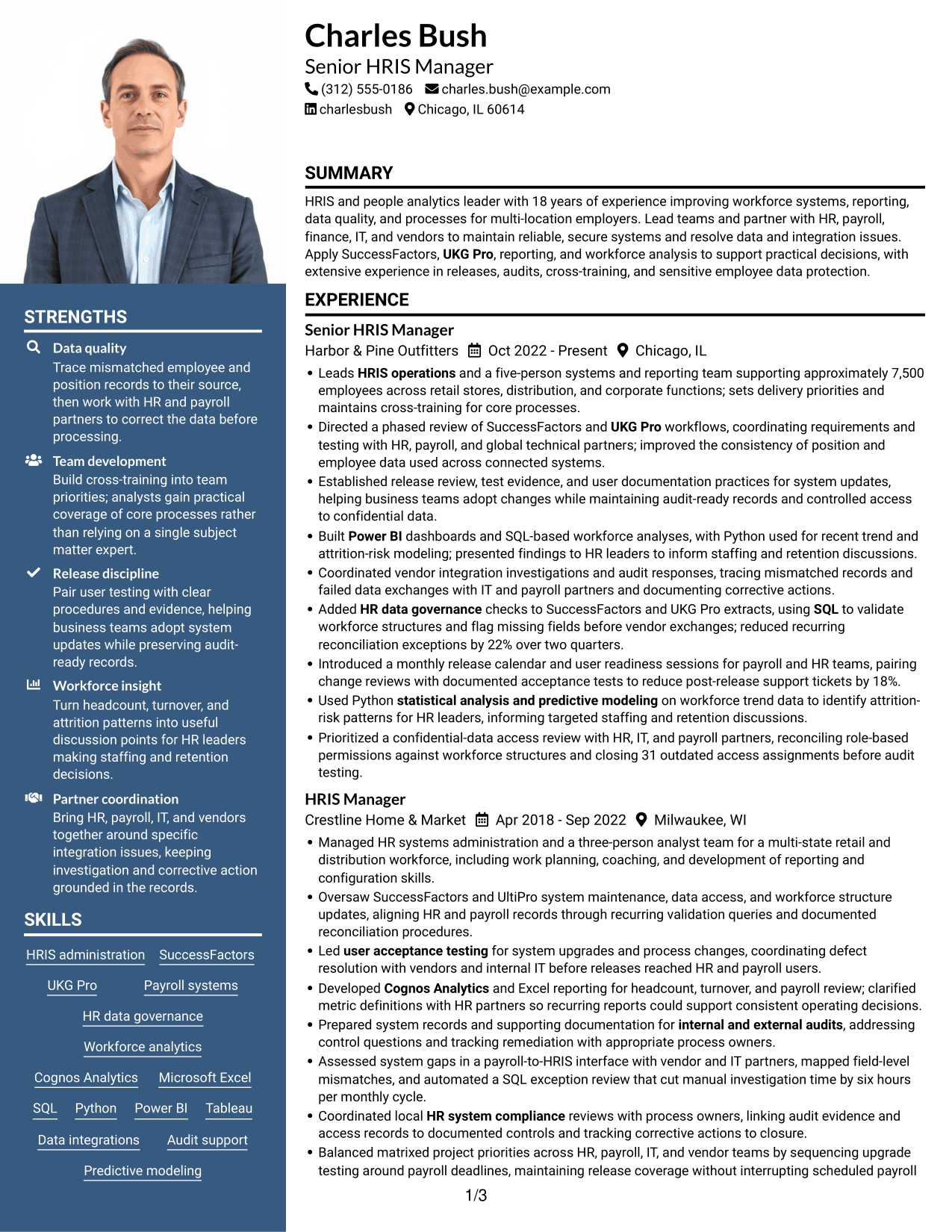
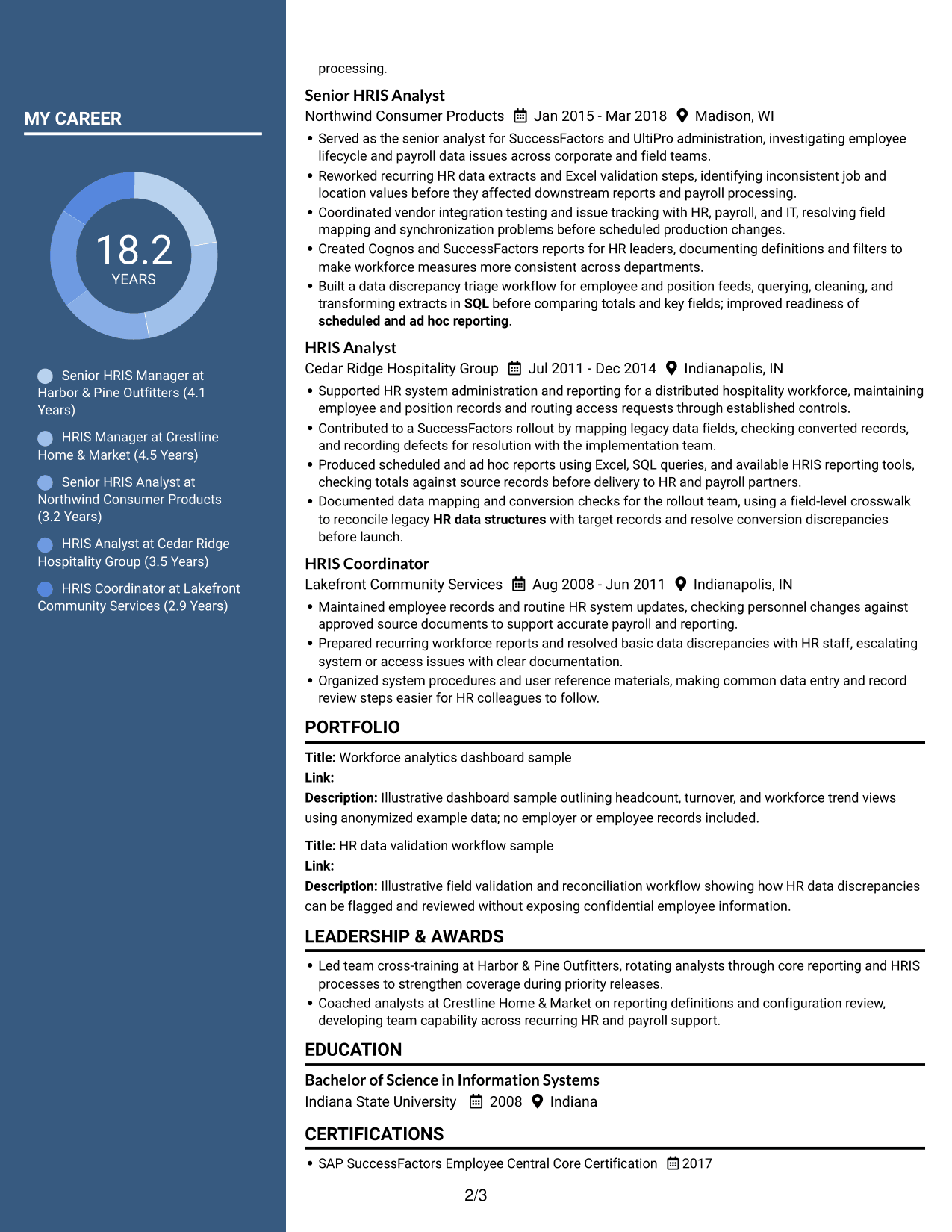
 
Resume example — page 1   Resume example — page 2

Why This Format Works

  • The separate body areas help reviewers find experience and supporting qualifications.
  • Clear section divisions keep education and credentials distinct from career details.
  • A header photo offers a visible personal touch without interrupting resume sections.

Best For

  • Resumes where a photo is preferred
  • Career histories with several roles
  • Separate skills and experience review
  • Education and credentials beside career details
  • A visible personal image
 

#6 Colored Two Column Format Resume Example

This two-column body uses separate content areas without a photo, suited to readers who want organized sections and a clear visual distinction.
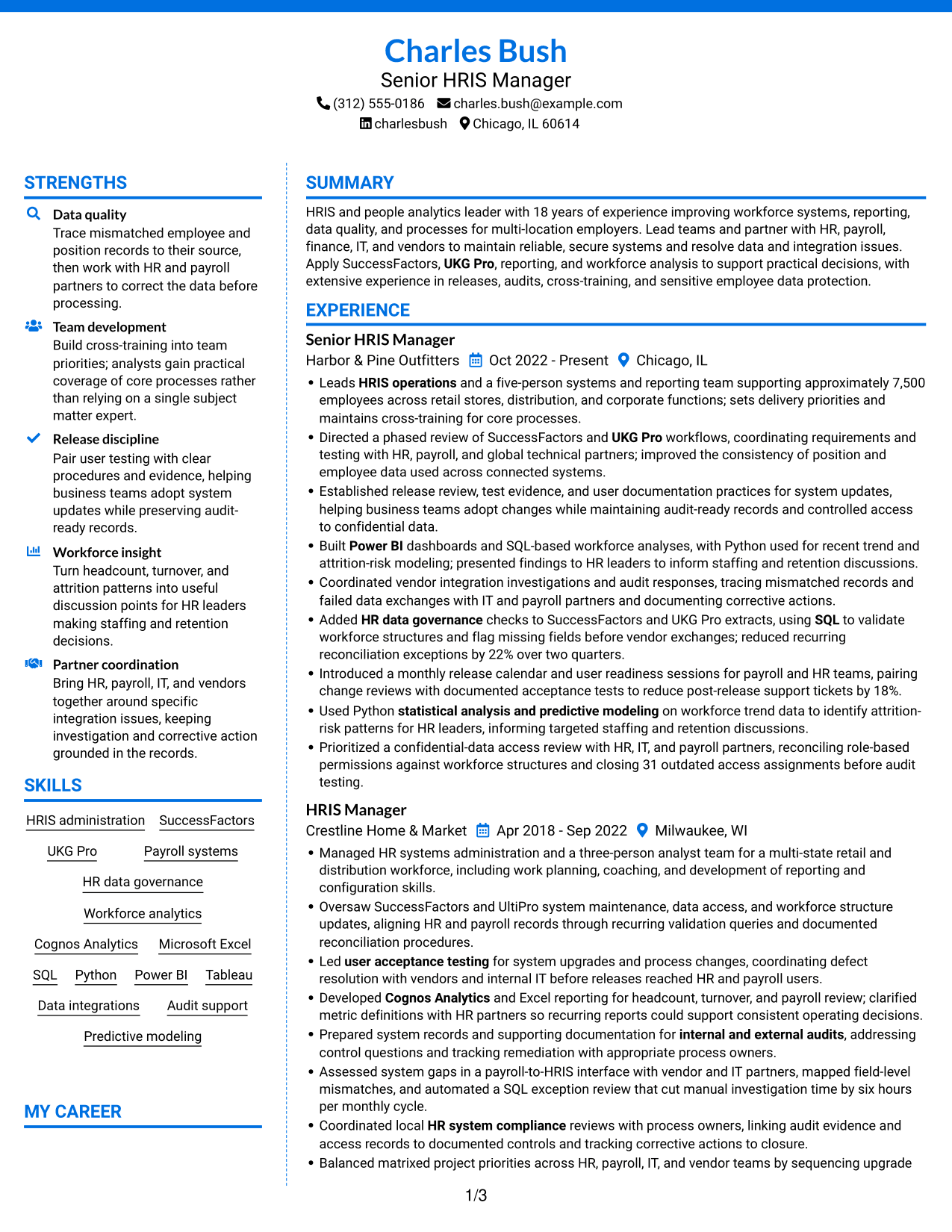
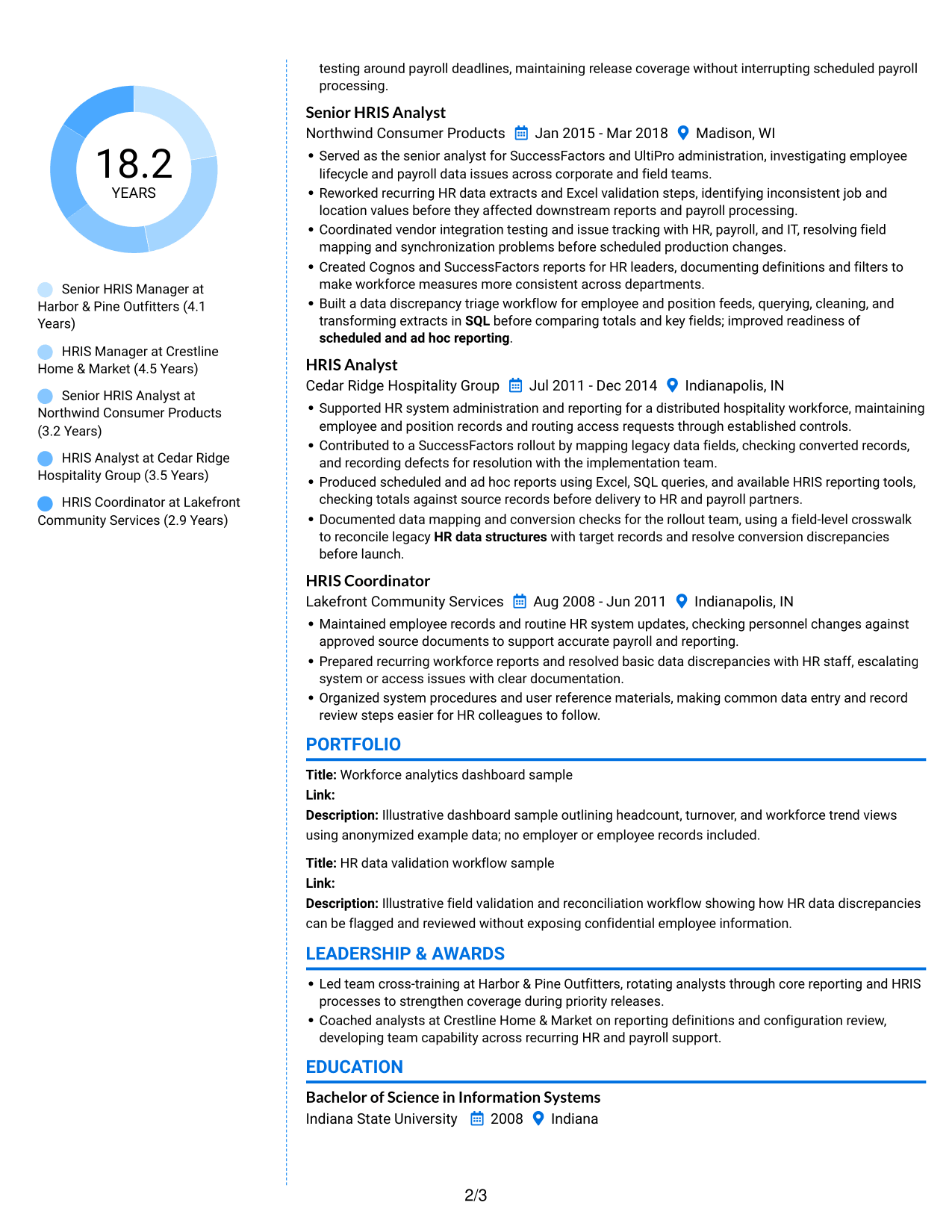
 
Resume example — page 1   Resume example — page 2

Why This Format Works

  • The two areas help reviewers separate career details from supporting resume information.
  • Distinct sections make skills, education, and credentials easier to find.
  • Experience bullets stay grouped, helping achievements remain clear during a quick review.

Best For

  • Resumes with substantial work history
  • Clear grouping of supporting sections
  • Quick review of skills and credentials
  • Achievement details grouped by role
  • A photo-free layout
 

#7 Stylish Two Column Designer Format Resume Example

A two-column body gives this resume a structured, side-by-side reading format without a photo, useful when section separation is a priority.
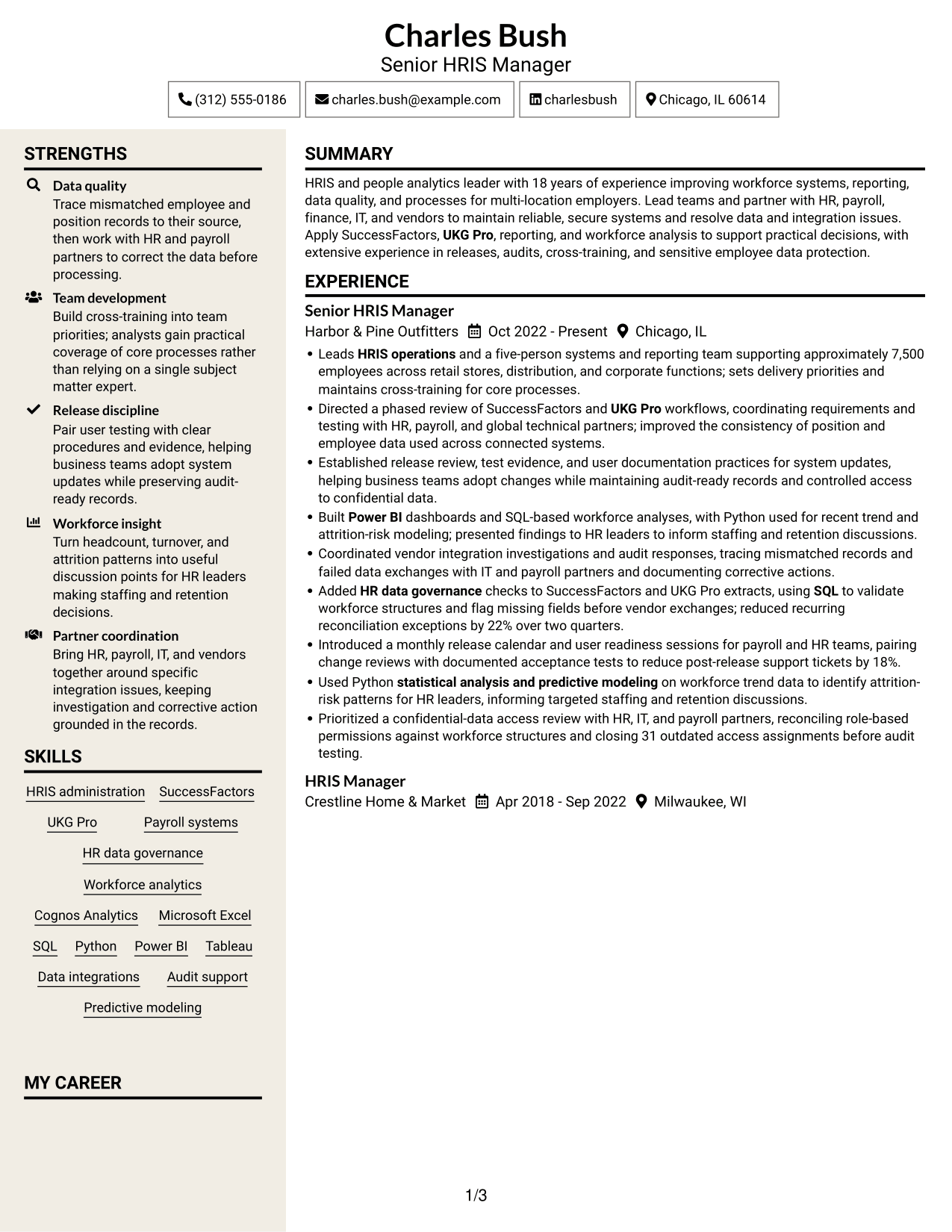
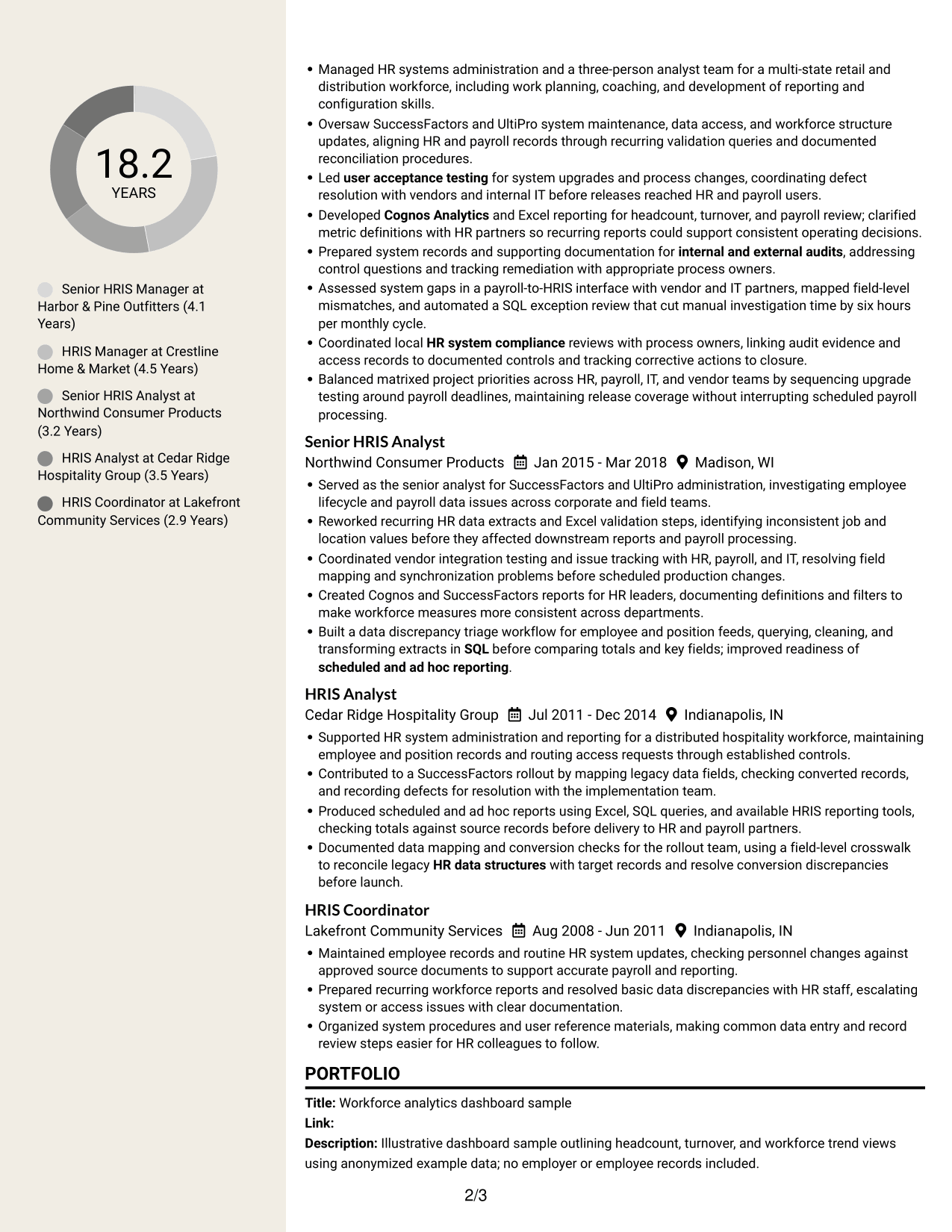
 
Resume example — page 1   Resume example — page 2

Why This Format Works

  • Separate content areas give experience and supporting sections their own clear places.
  • Section divisions help reviewers move between skills, education, and career history.
  • Grouped experience bullets make achievements easier to review by role.

Best For

  • Resumes with distinct content groups
  • Role-by-role achievement details
  • Separate education and skills review
  • Career histories with supporting credentials
  • A document without a photo


Why Build Your Manager, HRIS - SuccessFactors and UKG Resume with ResumeInMinutes

ResumeInMinutes helps you organize your HRIS experience, skills, and results in a resume that is easy to scan. Compare image previews, then open an example in the editor to customize it.

  • Multiple resume layouts
  • Clear resume section structure
  • Relevant HRIS keyword guidance
  • Organized skills and experience
  • PNG image previews
  • Editor links for customization

Use the examples to make your SuccessFactors and UKG work, data controls, system improvements, and team contributions clear to recruiters.


See Also


Frequently Asked Questions

Are these Manager, HRIS - SuccessFactors and UKG resume templates ATS-friendly?

The layouts use readable sections and headings. For stronger ATS alignment, include relevant terms such as SuccessFactors, UKG Pro, payroll systems, HR data governance, and system releases when they reflect your experience.

Does the guide show one resume in different layouts?

Yes. The page presents one resume example in several visual layouts. The image previews help you compare them, and editor links let you open an example to customize it.

What should a Manager, HRIS - SuccessFactors and UKG resume include?

Include a focused summary, HRIS experience, relevant skills and tools, education, and certifications. Use bullet points to show results in data quality, integrations, releases, audit support, reporting, and team development.

Which resume layout works well for this role?

Choose a layout with clear headings, readable text, and a simple order for your experience and skills. A straightforward design helps recruiters scan your HRIS results and is easier for applicant tracking systems to read.

How can I show measurable HRIS results?

Include specific outcomes that you can support, such as reduced data exceptions, fewer post-release support tickets, improved reporting, or faster issue review. Explain the action you took and the result.

Should I include a photo on my resume?

For U.S. applications, a resume without a photo is usually the safer choice. Use the space for relevant HRIS skills, results, and experience instead.


ATS Score 82%

How we calculate this score

  • Keywords: 60% of the total. AI extracts keywords from your job description. If you do not provide one, a standard job description for the title matching your resume is used. This is not a match to a specific vacancy.
  • Text-based resume: 20%. The text resume assessed here receives 100 for this part.
  • Resume quality: 20%. We start at 100 and subtract points for issues found by our resume checks, down to a minimum of zero.
  • Keyword coverage = 100 × (confirmed matches + 0.8 × possible matches) ÷ total keywords, rounded and capped at 100. Possible matches still need checking. Saved generation audits use their saved keyword percentage.
  • Final score = 60% of keyword coverage + 20% of the text score + 20% of the quality score, rounded to a whole number. Without keywords, no overall ATS score is available.

What this score means

Our scores are estimates, not employer ratings. They may contain errors and do not guarantee accurate parsing, a ranking, an interview, or a job. Check your document against the employer’s requirements. You are responsible for relying on this score.

Terms and Conditions

Score weights: Keywords 60% · Text based resume 20% · Resume quality 20%

Keywords: 17 matched + 19 possible of 46 (70%) · Resume quality: 100%

Resume quality 100% · Weight 20% · Issues (0)

Details
  • ✓Name present: Charles Bush
  • ✓Email format: charles.bush@example.com
  • ✓Phone format: (312) 555-0186
  • ✓Experience 1: Job title: Senior HRIS Manager
  • ✓Experience 1: Company name: Harbor & Pine Outfitters
  • ✓Experience 1: Work location: Chicago, IL
  • ✓Experience 1: Employment dates: Oct 2022 - Present
  • ✓Experience 1: Description or achievements: Present
  • ✓Experience 2: Job title: HRIS Manager
  • ✓Experience 2: Company name: Crestline Home & Market
  • ✓Experience 2: Work location: Milwaukee, WI
  • ✓Experience 2: Employment dates: Apr 2018 - Sep 2022
  • ✓Experience 2: Description or achievements: Present
  • ✓Experience 3: Job title: Senior HRIS Analyst
  • ✓Experience 3: Company name: Northwind Consumer Products
  • ✓Experience 3: Work location: Madison, WI
  • ✓Experience 3: Employment dates: Jan 2015 - Mar 2018
  • ✓Experience 3: Description or achievements: Present
  • ✓Experience 4: Job title: HRIS Analyst
  • ✓Experience 4: Company name: Cedar Ridge Hospitality Group
  • ✓Experience 4: Work location: Indianapolis, IN
  • ✓Experience 4: Employment dates: Jul 2011 - Dec 2014
  • ✓Experience 4: Description or achievements: Present
  • ✓Experience 5: Job title: HRIS Coordinator
  • ✓Experience 5: Company name: Lakefront Community Services
  • ✓Experience 5: Work location: Indianapolis, IN
  • ✓Experience 5: Employment dates: Aug 2008 - Jun 2011
  • ✓Experience 5: Description or achievements: Present
  • ✓No placeholder fields
  • ✓No repeated achievement bullets
  • ✓No empty bullets

No issues found by the current checks.

Text Based Resume 100% · Weight 20%

Parsed text
Charles Bush
Senior HRIS Manager
(312) 555-0186
charlesbush
charles.bush@example.com
Chicago, IL 60614
STRENGTHS
Data quality
Trace mismatched employee and position records to their source, then work with HR and payroll partners to correct the data before processing.
Team development
Build cross-training into team priorities; analysts gain practical coverage of core processes rather than relying on a single subject matter expert.
Release discipline
Pair user testing with clear procedures and evidence, helping business teams adopt system updates while preserving audit-ready records.
Workforce insight
Turn headcount, turnover, and attrition patterns into useful discussion points for HR leaders making staffing and retention decisions.
Partner coordination
Bring HR, payroll, IT, and vendors together around specific integration issues, keeping investigation and corrective action grounded in the records.
SUMMARY
HRIS and people analytics leader with 18 years of experience improving workforce systems, reporting, data quality, and processes for multi-location employers. Lead teams and partner with HR, payroll, finance, IT, and vendors to maintain reliable, secure systems and resolve data and integration issues. Apply SuccessFactors, UKG Pro, reporting, and workforce analysis to support practical decisions, with extensive experience in releases, audits, cross-training, and sensitive employee data protection.
EXPERIENCE
Senior HRIS Manager
Harbor & Pine Outfitters
Oct 2022 - Present
Chicago, IL
Leads HRIS operations and a five-person systems and reporting team supporting approximately 7,500 employees across retail stores, distribution, and corporate functions; sets delivery priorities and maintains cross-training for core processes.
Directed a phased review of SuccessFactors and UKG Pro workflows, coordinating requirements and testing with HR, payroll, and global technical partners; improved the consistency of position and employee data used across connected systems.
Established release review, test evidence, and user documentation practices for system updates, helping business teams adopt changes while maintaining audit-ready records and controlled access to confidential data.
Built Power BI dashboards and SQL-based workforce analyses, with Python used for recent trend and attrition-risk modeling; presented findings to HR leaders to inform staffing and retention discussions.
Coordinated vendor integration investigations and audit responses, tracing mismatched records and failed data exchanges with IT and payroll partners and documenting corrective actions.
Added HR data governance checks to SuccessFactors and UKG Pro extracts, using SQL to validate workforce structures and flag missing fields before vendor exchanges; reduced recurring reconciliation exceptions by 22% over two quarters.
Introduced a monthly release calendar and user readiness sessions for payroll and HR teams, pairing change reviews with documented acceptance tests to reduce post-release support tickets by 18%.
Used Python statistical analysis and predictive modeling on workforce trend data to identify attrition-risk patterns for HR leaders, informing targeted staffing and retention discussions.
Prioritized a confidential-data access review with HR, IT, and payroll partners, reconciling role-based permissions against workforce structures and closing 31 outdated access assignments before audit testing.
HRIS Manager
Crestline Home & Market
Apr 2018 - Sep 2022
Milwaukee, WI
Managed HR systems administration and a three-person analyst team for a multi-state retail and distribution workforce, including work planning, coaching, and development of reporting and configuration skills.
Oversaw SuccessFactors and UltiPro system maintenance, data access, and workforce structure updates, aligning HR and payroll records through recurring validation queries and documented reconciliation procedures.
Led user acceptance testing for system upgrades and process changes, coordinating defect resolution with vendors and internal IT before releases reached HR and payroll users.
Developed Cognos Analytics and Excel reporting for headcount, turnover, and payroll review; clarified metric definitions with HR partners so recurring reports could support consistent operating decisions.
Prepared system records and supporting documentation for internal and external audits, addressing control questions and tracking remediation with appropriate process owners.
Assessed system gaps in a payroll-to-HRIS interface with vendor and IT partners, mapped field-level mismatches, and automated a SQL exception review that cut manual investigation time by six hours per monthly cycle.
Coordinated local HR system compliance reviews with process owners, linking audit evidence and access records to documented controls and tracking corrective actions to closure.
Balanced matrixed project priorities across HR, payroll, IT, and vendor teams by sequencing upgrade testing around payroll deadlines, maintaining release coverage without interrupting scheduled payroll processing.
Senior HRIS Analyst
Northwind Consumer Products
Jan 2015 - Mar 2018
Madison, WI
Served as the senior analyst for SuccessFactors and UltiPro administration, investigating employee lifecycle and payroll data issues across corporate and field teams.
Reworked recurring HR data extracts and Excel validation steps, identifying inconsistent job and location values before they affected downstream reports and payroll processing.
Coordinated vendor integration testing and issue tracking with HR, payroll, and IT, resolving field mapping and synchronization problems before scheduled production changes.
Created Cognos and SuccessFactors reports for HR leaders, documenting definitions and filters to make workforce measures more consistent across departments.
Built a data discrepancy triage workflow for employee and position feeds, querying, cleaning, and transforming extracts in SQL before comparing totals and key fields; improved readiness of scheduled and ad hoc reporting.
HRIS Analyst
Cedar Ridge Hospitality Group
Jul 2011 - Dec 2014
Indianapolis, IN
Supported HR system administration and reporting for a distributed hospitality workforce, maintaining employee and position records and routing access requests through established controls.
Contributed to a SuccessFactors rollout by mapping legacy data fields, checking converted records, and recording defects for resolution with the implementation team.
Produced scheduled and ad hoc reports using Excel, SQL queries, and available HRIS reporting tools, checking totals against source records before delivery to HR and payroll partners.
Documented data mapping and conversion checks for the rollout team, using a field-level crosswalk to reconcile legacy HR data structures with target records and resolve conversion discrepancies before launch.
HRIS Coordinator
Lakefront Community Services
Aug 2008 - Jun 2011
Indianapolis, IN
Maintained employee records and routine HR system updates, checking personnel changes against approved source documents to support accurate payroll and reporting.
Prepared recurring workforce reports and resolved basic data discrepancies with HR staff, escalating system or access issues with clear documentation.
Organized system procedures and user reference materials, making common data entry and record review steps easier for HR colleagues to follow.
SKILLS
HRIS administration
SQL
Cognos Analytics
Data integrations
UKG Pro
Python
HR data governance
Workforce analytics
Predictive modeling
Power BI
Payroll systems
Microsoft Excel
SuccessFactors
Audit support
Tableau
MY CAREER
18.2Years
Senior HRIS Manager at Harbor & Pine Outfitters (4.1 Years)
HRIS Manager at Crestline Home & Market (4.5 Years)
Senior HRIS Analyst at Northwind Consumer Products (3.2 Years)
HRIS Analyst at Cedar Ridge Hospitality Group (3.5 Years)
HRIS Coordinator at Lakefront Community Services (2.9 Years)
PORTFOLIO
Title: Workforce analytics dashboard sample
Link:
Description: Illustrative dashboard sample outlining headcount, turnover, and workforce trend views using anonymized example data; no employer or employee records included.
Title: HR data validation workflow sample
Link:
Description: Illustrative field validation and reconciliation workflow showing how HR data discrepancies can be flagged and reviewed without exposing confidential employee information.
LEADERSHIP & AWARDS
Led team cross-training at Harbor & Pine Outfitters, rotating analysts through core reporting and HRIS processes to strengthen coverage during priority releases.
Coached analysts at Crestline Home & Market on reporting definitions and configuration review, developing team capability across recurring HR and payroll support.
EDUCATION
Bachelor of Science in Information Systems
Indiana State University
2008
Indiana
CERTIFICATIONS
SAP SuccessFactors Employee Central Core Certification
2017
UKG Pro Human Resources Administration Training
2020
Microsoft Certified: Power BI Data Analyst Associate
2022
TECHNICAL SKILLS
HRIS Platforms: SAP SuccessFactors, UKG Pro, Ceridian Dayforce
Reporting Platforms: Cognos Analytics, Power BI, Tableau
Spreadsheets and Office: Microsoft Excel, Microsoft Access, Microsoft PowerPoint
Programming Languages: SQL, Python, R
Database Platforms: Microsoft SQL Server, Oracle Database, PostgreSQL
Data Integration: SAP Integration Suite, Dell Boomi, MuleSoft Anypoint Platform
Analytics Libraries: pandas, NumPy, scikit-learn
Data Visualization: Power BI Desktop, Tableau Desktop, IBM Cognos Analytics
Cloud Platforms: Microsoft Azure, Amazon Web Services, Google Cloud Platform
Data Formats: JSON, XML, CSV
Version Control: Git, GitHub, Azure Repos
PROFESSIONAL AFFILIATIONS
Member, Society for Human Resource Management (SHRM), supporting continued engagement with human resources management practices.
Member, International Association for Human Resource Information Management (IHRIM), engaging with the HR technology professional community.

Matched keywords (17)

  • SAP SuccessFactors
  • HRIS operations
  • UKG ProOriginal keyword in JD: UKG Pro OR UltiPro
  • Payroll systems
  • HR data governance
  • HR data structures
  • Cognos Analytics
  • Microsoft Excel
  • SQLOriginal keyword in JD: SQL OR Python OR R
  • Power BIOriginal keyword in JD: Power BI OR Tableau
  • Workforce analytics
  • statistical analysis and predictive modeling
  • scheduled and ad hoc reporting
  • user acceptance testing
  • HR system compliance
  • internal and external audits
  • Bachelor of Science in Information SystemsOriginal keyword in JD: Bachelor's degree in a technical discipline (preferred)

Missing keywords (10)

  • Data synchronization troubleshooting
  • Access security
  • Dashboard development
  • Procedure documentation
  • System gap assessment
  • Complex issue resolution
  • Process improvement
  • People management
  • Business decision support
  • Stakeholder communication and influencing

Possible matches (19)

  • HRIS administration and configuration80% credit: 1.74 percentage points of 2.17 possible.
  • HR data integrity80% credit: 1.74 percentage points of 2.17 possible.
  • HR data extraction80% credit: 1.74 percentage points of 2.17 possible.
  • HR data reporting80% credit: 1.74 percentage points of 2.17 possible.
  • HR data integrations80% credit: 1.74 percentage points of 2.17 possible.
  • SuccessFactors reporting80% credit: 1.74 percentage points of 2.17 possible.
  • HR metrics and KPIs80% credit: 1.74 percentage points of 2.17 possible.
  • Workforce trend analysis80% credit: 1.74 percentage points of 2.17 possible.
  • Data querying, cleaning, and transformation80% credit: 1.74 percentage points of 2.17 possible.
  • Data validation and discrepancy investigation80% credit: 1.74 percentage points of 2.17 possible.
  • System releases and maintenance80% credit: 1.74 percentage points of 2.17 possible.
  • Business user readiness80% credit: 1.74 percentage points of 2.17 possible.
  • Workflow automation and functionality enhancements80% credit: 1.74 percentage points of 2.17 possible.
  • Vendor integration management80% credit: 1.74 percentage points of 2.17 possible.
  • Team development and cross-training80% credit: 1.74 percentage points of 2.17 possible.
  • Workforce structure alignment80% credit: 1.74 percentage points of 2.17 possible.
  • Confidential employee data protection80% credit: 1.74 percentage points of 2.17 possible.
  • Matrixed project prioritization80% credit: 1.74 percentage points of 2.17 possible.
  • Ceridian Dayforce (preferred)80% credit: 1.74 percentage points of 2.17 possible.
Disclaimer: All names, images, contact information, employment histories, achievements, security clearances, military credentials, and other qualifications shown in this content are fictional and used for illustrative purposes only. Any resemblance to actual persons, living or deceased, is purely coincidental.

Resume and cover-letter examples and recommendations in this article reflect general best practices and professional experience and are provided for guidance only. Results may vary based on role, industry, region, and hiring organization.

Content Accuracy and Verification: To the fullest extent permitted by applicable law, we do not represent or warrant that resume or cover-letter guidance, examples, recommendations, or related information are accurate, complete, current, error-free, or suitable for any particular purpose. You are responsible for independently reviewing and verifying the information before relying on it.

ATS and Cover-Letter Scores: ATS scores are estimates calculated using our own formula, informed by publicly available guidance on resume formatting and keyword matching. They are not scores issued or endorsed by an ATS provider or employer. Cover-letter scores are also our own assessments. Parsing, weighting, screening criteria, and results vary between systems, employers, job descriptions, and document formats. No score guarantees successful parsing, a particular ranking, an interview, or employment. Use scores as general guidance and independently check your documents against the employer’s requirements. To the fullest extent permitted by applicable law, we accept no liability for errors in scores or parsing, or losses arising from reliance on these assessments. Nothing in this notice excludes liability or limits consumer rights that cannot lawfully be excluded or limited.

Terms and Conditions
 
> JP 1 1
PDF Footer and Margins Setup
The margins are applied to the document, and the footer shows up in the preview and the PDF

Footer Font Settings

Are you applying for a specific job
so we can tailor your resume to it?
Are you applying for a specific job
so we can tailor your cover letter to it?

Your data stays private and is never used for training.Privacy Policy

Type your details as text to generate a personalized resume Type your details as text to generate a personalized cover letter
Website link found! Ready to create resume from:

Your data stays private and is never used for training.Privacy Policy

Drag the into the box to verify you're human.
Drop here

My Resumes

Displaying {number_of_files} files (out of {total_of_all_files} total)
Name File Type Last Modified: Description:

Rename File

Filename already exists!

Delete Files

Warning: This action is irreversible. Once you click submit, the files will be permanently deleted.

Heading text
Upload From Computer Upload
Select From Existing
LinkedIn
Drag & Drop files anywhere in this tab, or

Uploaded Files

Delete Name Last Updated Use This File
Select this to use the file for generating your resume and cover letter. Only one source—uploaded file, selected file, or LinkedIn text—can be used.

My Files

Resumes or cover letters you create will appear here. No files available yet.
Delete Name Last Updated Use This File
Select this to use the file for generating your resume and cover letter. Only one source—uploaded file, selected file, or LinkedIn text—can be used.

Add LinkedIn Profile PDF

You can download your LinkedIn profile as a PDF by opening linkedin.com in a web browser, clicking your profile photo, selecting the “More” or “Resources” button, and choosing “Save to PDF.” You can then attach the PDF using the Upload From Computer tab.

Paste Your LinkedIn Profile Text

If you have copied the LinkedIn profile text, paste it below. See how to copy your profile from LinkedIn

Select this to use the LinkedIn profile text for generating your resume and cover letter. Only one source—uploaded file, selected file, or LinkedIn text—can be used.

Try these controls

<
>


