
US English


7 Product Manager - Onboarding and Growth Resume Templates with Example
By Ria · Last Updated On October 23, 2026
Resume example — page 1

This guide shows you how to build a Product Manager - Onboarding and Growth resume that puts customer outcomes and product decisions at the center. You will learn how to present relevant evidence clearly and choose a layout that supports quick review.

For this role, connect customer research to the product work it shaped. Show how onboarding journeys, product signals, adoption measures, and cross-functional decisions helped customers reach value and supported lasting use.

Explore one resume example presented in 7 layouts. Compare the image previews, then open an example in the editor to review its structure and customize the content.

What Makes a Great Product Manager - Onboarding and Growth Resume in 2026

A strong resume uses clear sections and focused bullets to show how product decisions improved onboarding, adoption, or customer value. Make the connection between the problem, your action, and the result easy to follow.

Support your claims with evidence such as time to first completed workflow, cohort analysis, or use of core capabilities. Include relevant terms like product-led growth, customer journey mapping, adoption metrics, Product Qualified Leads, and Revenue Operations where they match your work.

Note: Resume examples are for educational purposes only. Use only information that accurately reflects your experience and qualifications. References to real organizations do not imply affiliation or endorsement.

#1 Simple One Column Format Resume Example

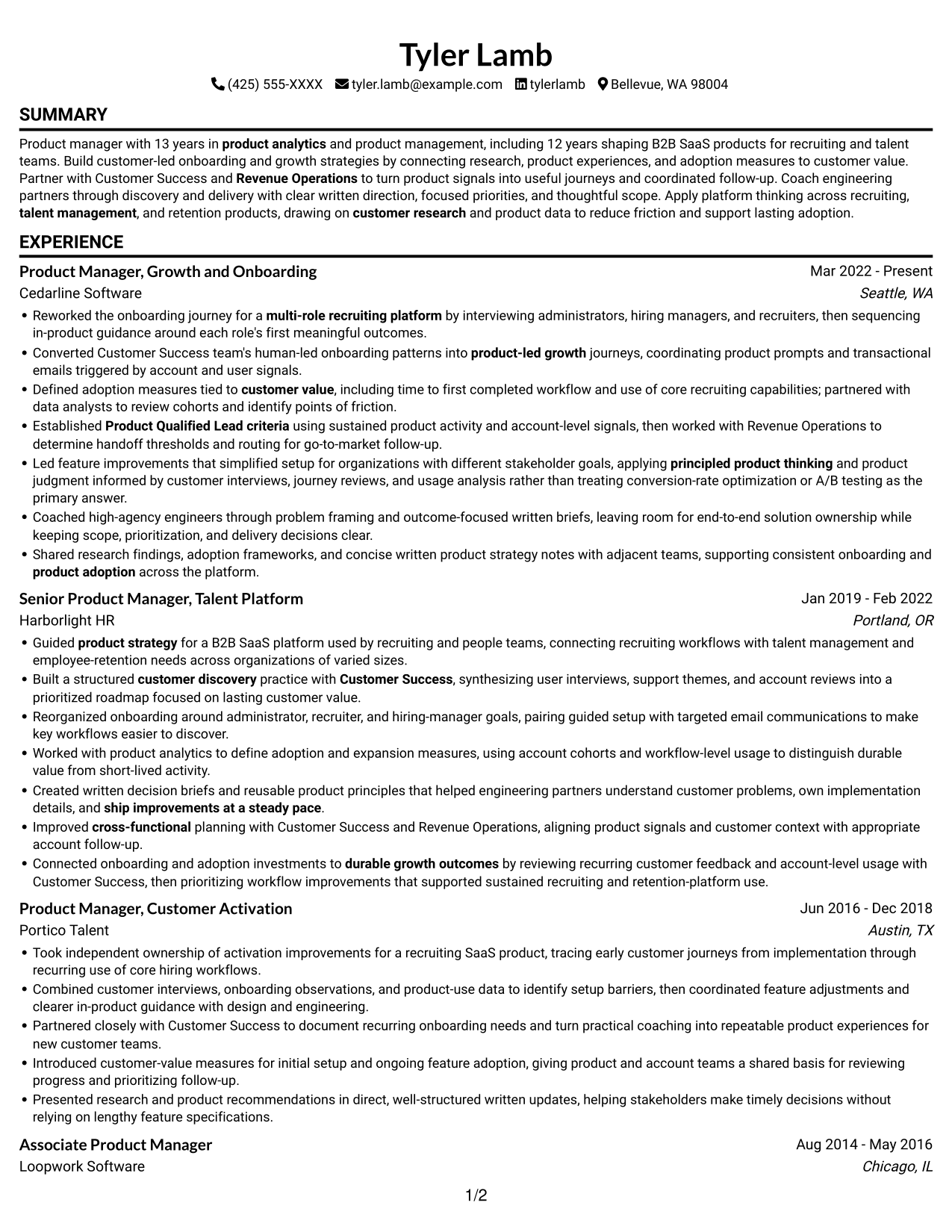
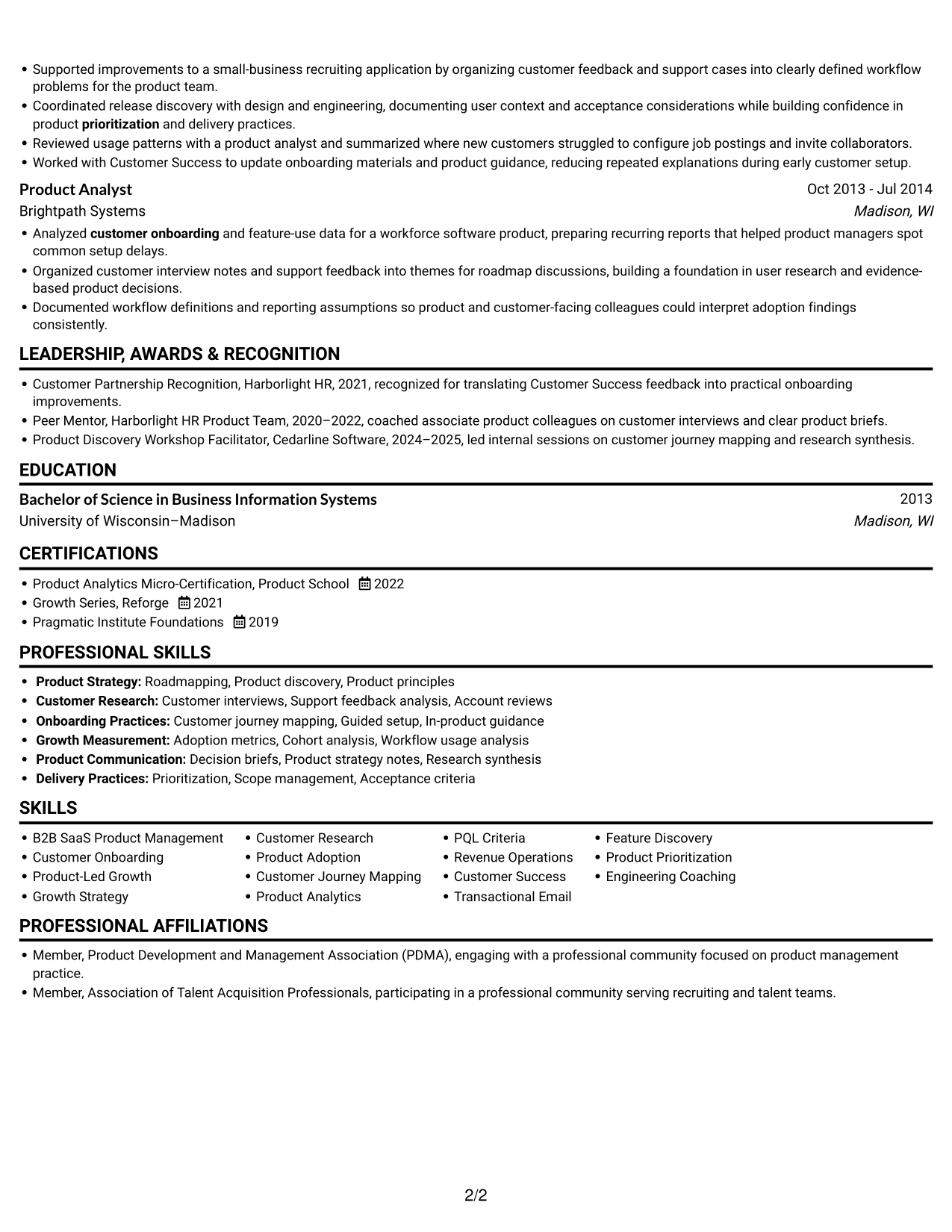
The one-column layout gives the resume a single reading path, a practical choice when reviewers need to move through each section in sequence.
 
Resume example — page 1   Resume example — page 2

Why This Format Works

  • One reading path lets reviewers follow experience entries without switching between columns.
  • Full-width sections keep detailed achievement bullets within one consistent reading lane.
  • Education and certifications remain in the same top-to-bottom sequence as experience.

Best For

  • Chronological career histories
  • Detailed achievement bullets
  • Text-first resume review
  • Experience with education and credentials
  • Single-path section reading

Resume Keywords

  • B2B SaaS Product Management
  • customer onboarding
  • product-led growth
  • Growth Strategy
  • customer research
  • product adoption
  • Defined adoption measures tied to customer value, including time to first completed workflow and use of core recruiting capabilities
  • customer journey mapping
  • Product Qualified Lead criteria
  • Built a structured customer discovery practice with Customer Success
  • product strategy
  • product judgment
  • Transactional Email
  • product prompts and transactional emails triggered by account and user signals
  • Revenue Operations
See all keywords
 

#2 Simple Two Column Format Resume Example

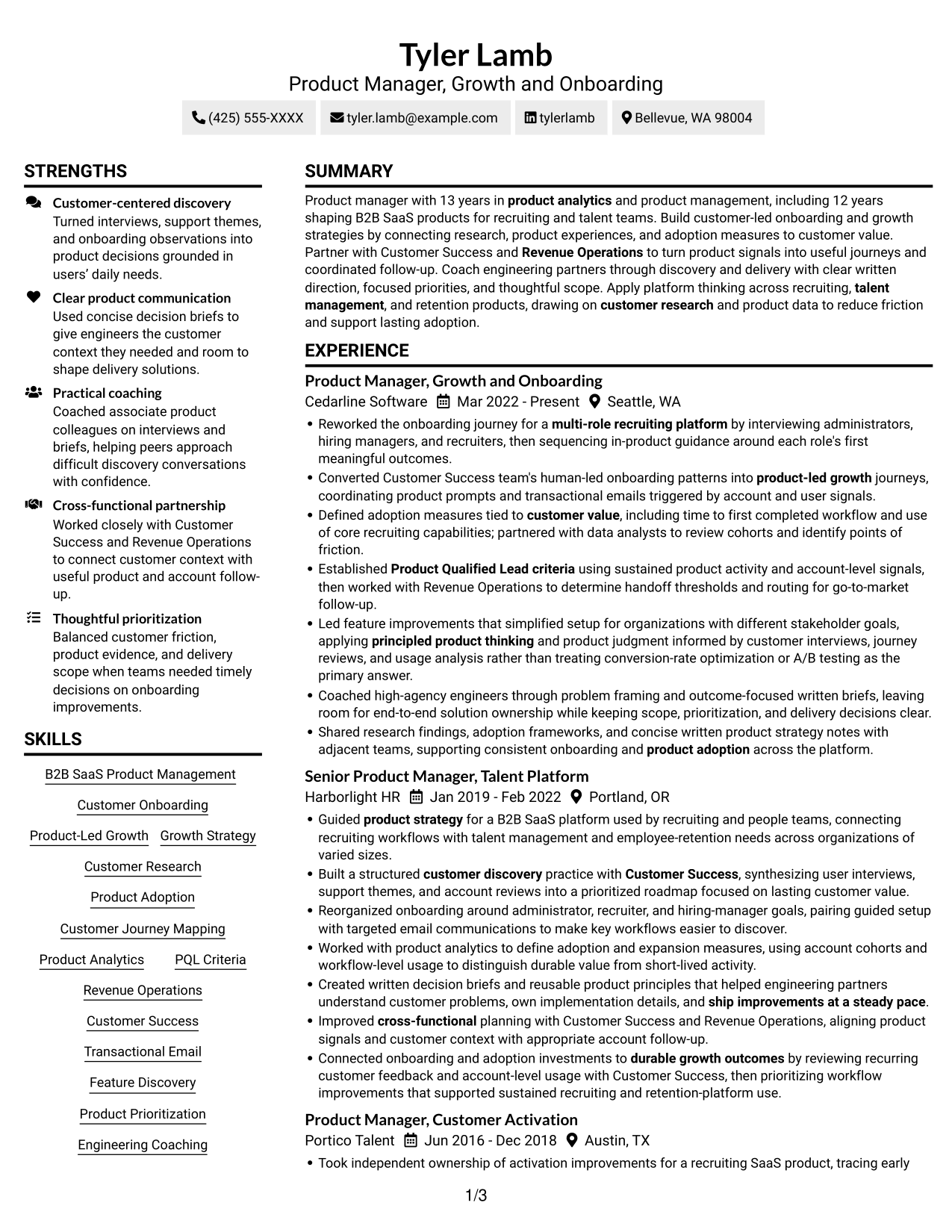
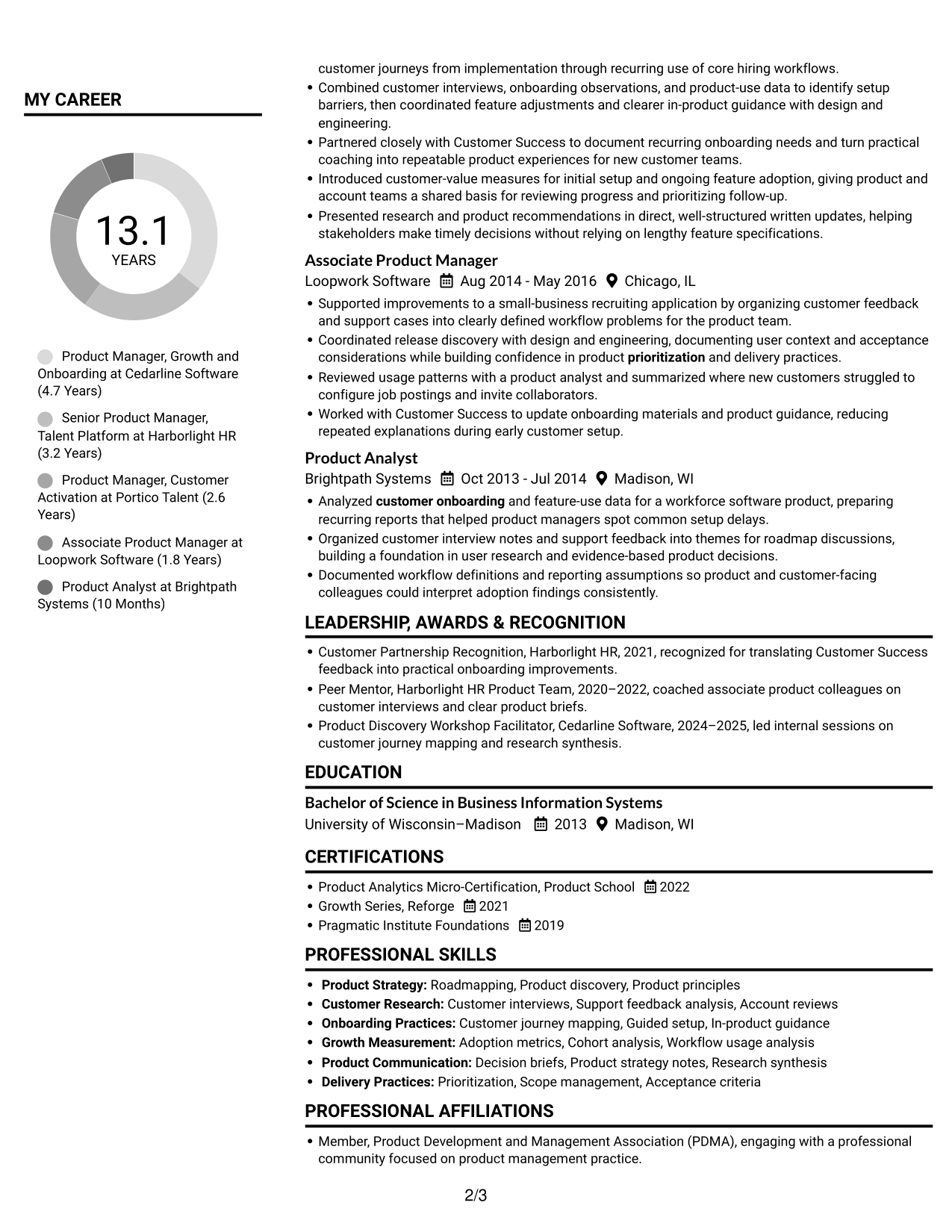
Two columns organize the resume into parallel areas, giving reviewers a direct way to scan separate content groups.
 
Resume example — page 1   Resume example — page 2

Why This Format Works

  • Two reading areas separate experience from supporting skills for section-based review.
  • Reviewers can move between section groups while preserving a clear order within each.
  • Education and credentials can be checked without scanning every experience entry.

Best For

  • Parallel section review
  • Resumes with grouped information
  • Skills beside career details
  • Cross-section recruiter scanning
  • Education and experience checks

#3 Plain One Column with Shaded Labels Resume Example

One column keeps resume sections in a straight reading path, making it easier to review a full career record from top to bottom.
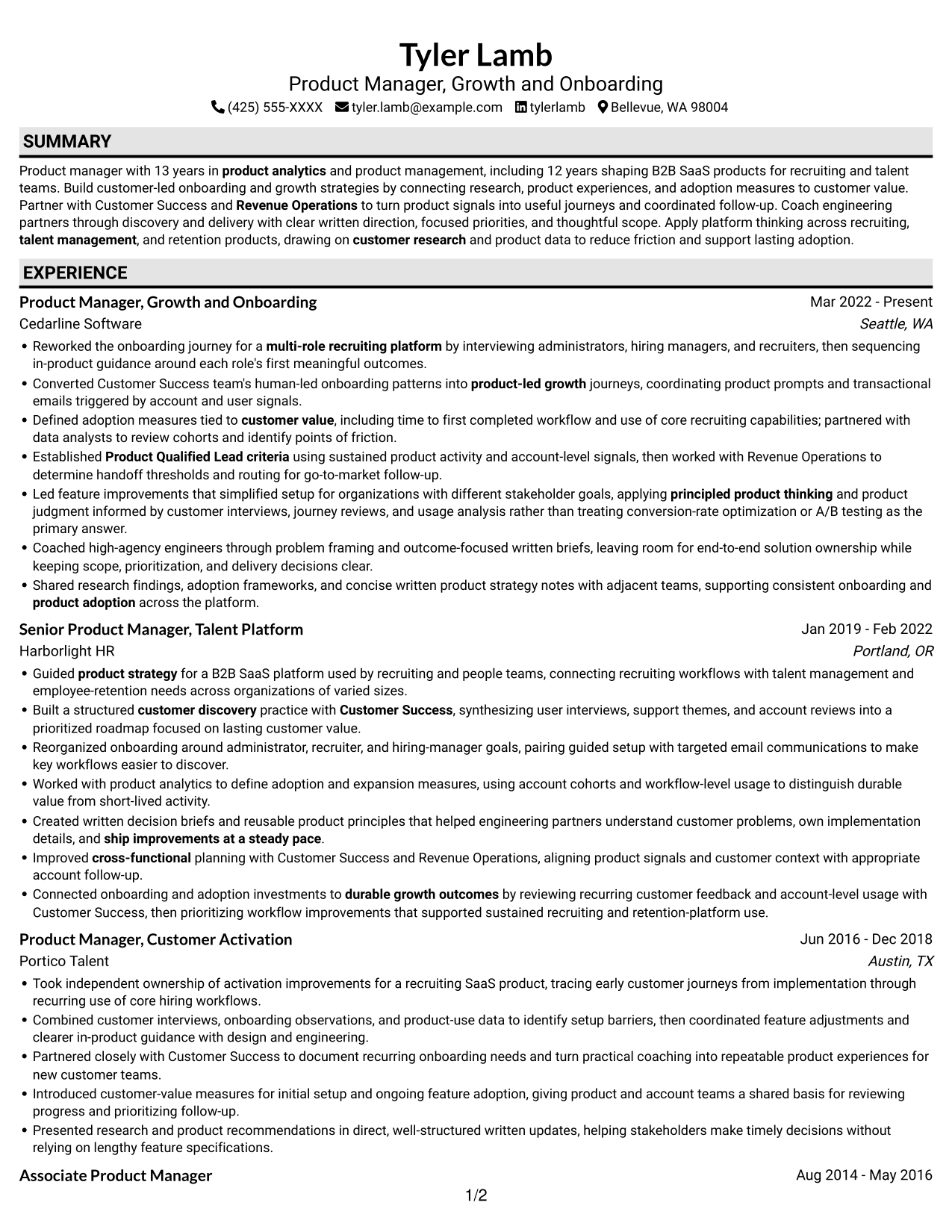
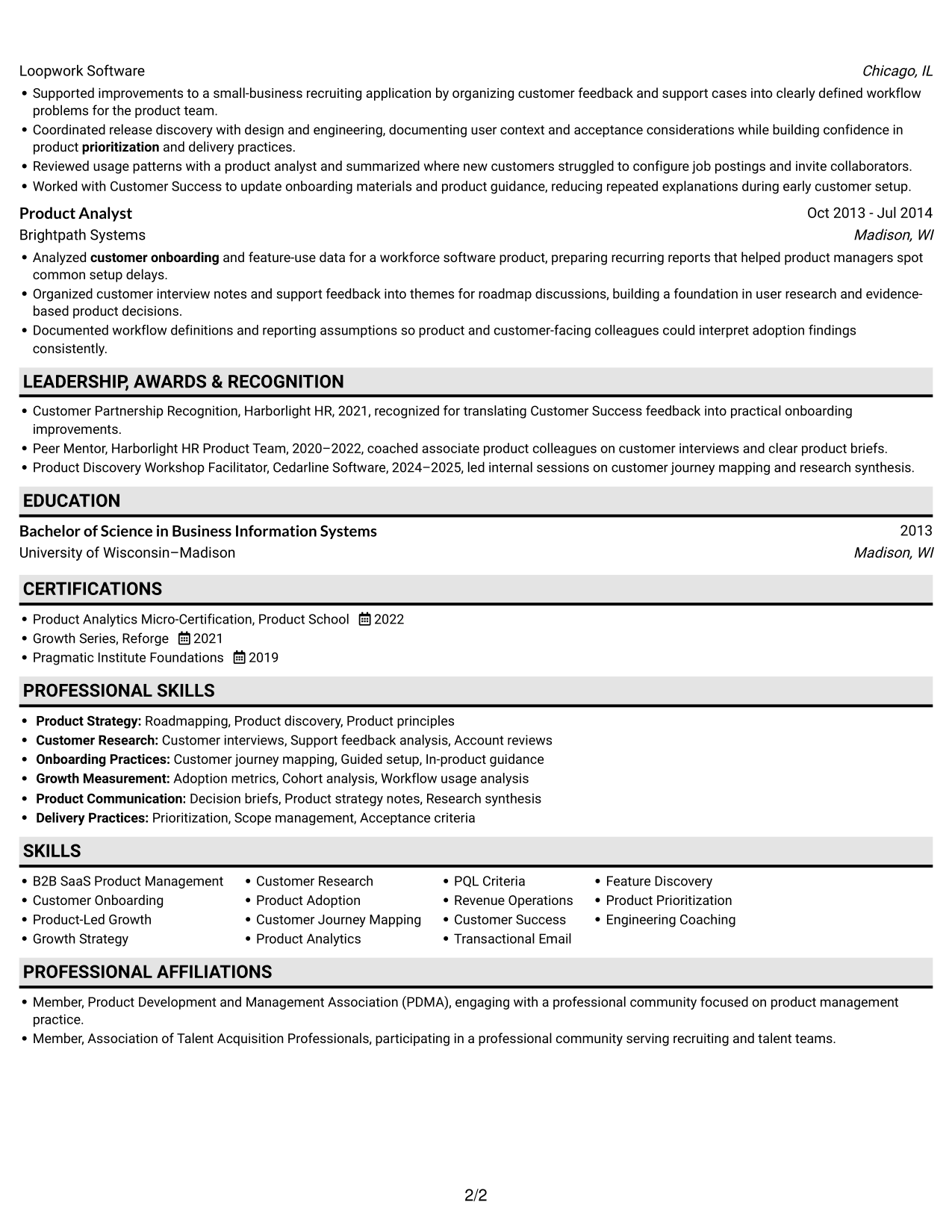
 
Resume example — page 1   Resume example — page 2

Why This Format Works

  • Experience entries stay in one vertical sequence, making career progression easy to follow.
  • Skills can be reviewed in the same flow as the resume’s other sections.
  • A single text path keeps credentials connected to the resume’s broader section order.

Best For

  • Sequential career records
  • Long-form experience entries
  • Top-to-bottom resume review
  • Education within one reading path
  • Evidence-rich work histories
 

#4 One Column Format with Photo Right Resume Example

The right-side photo adds a visible identity detail, while the one-column body keeps resume content in a direct reading path.
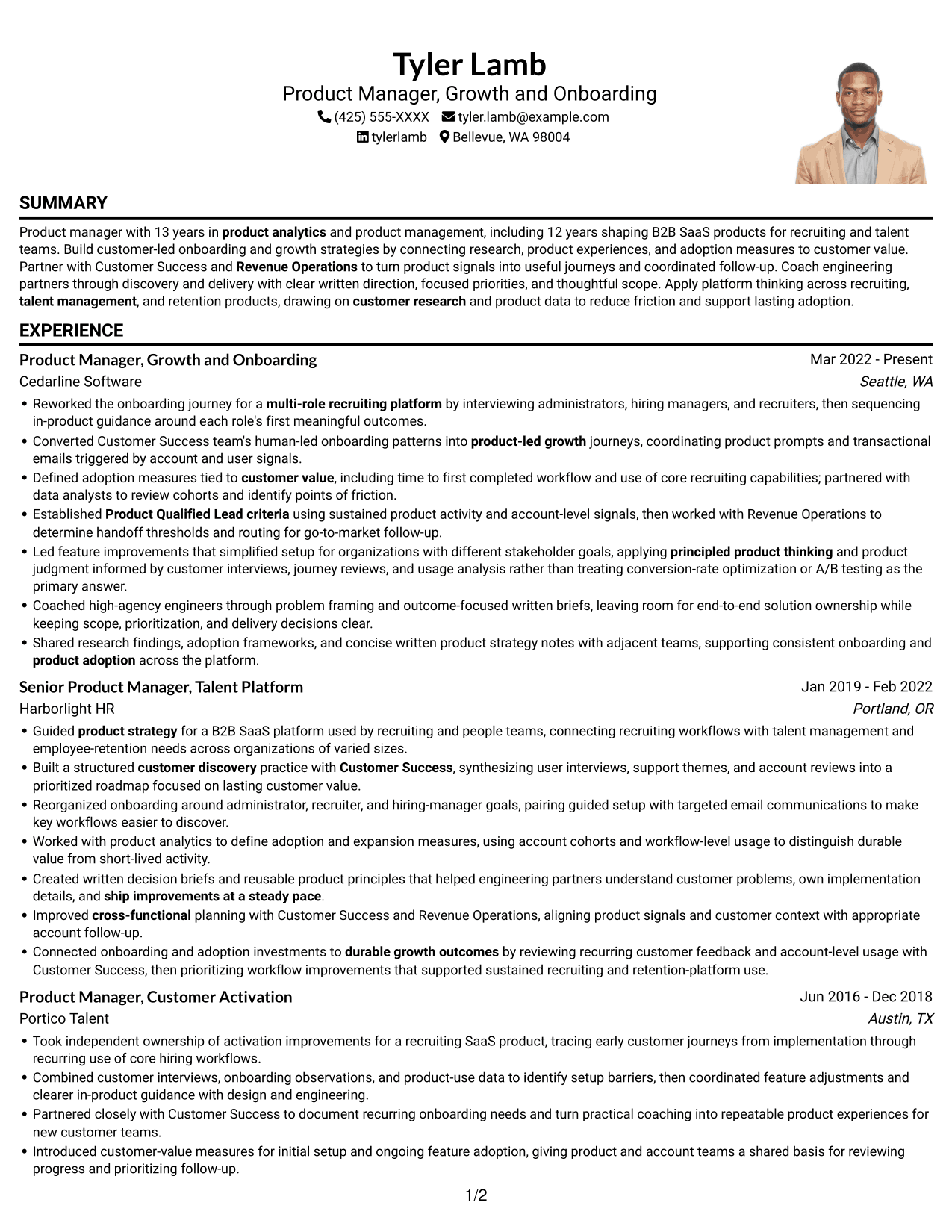
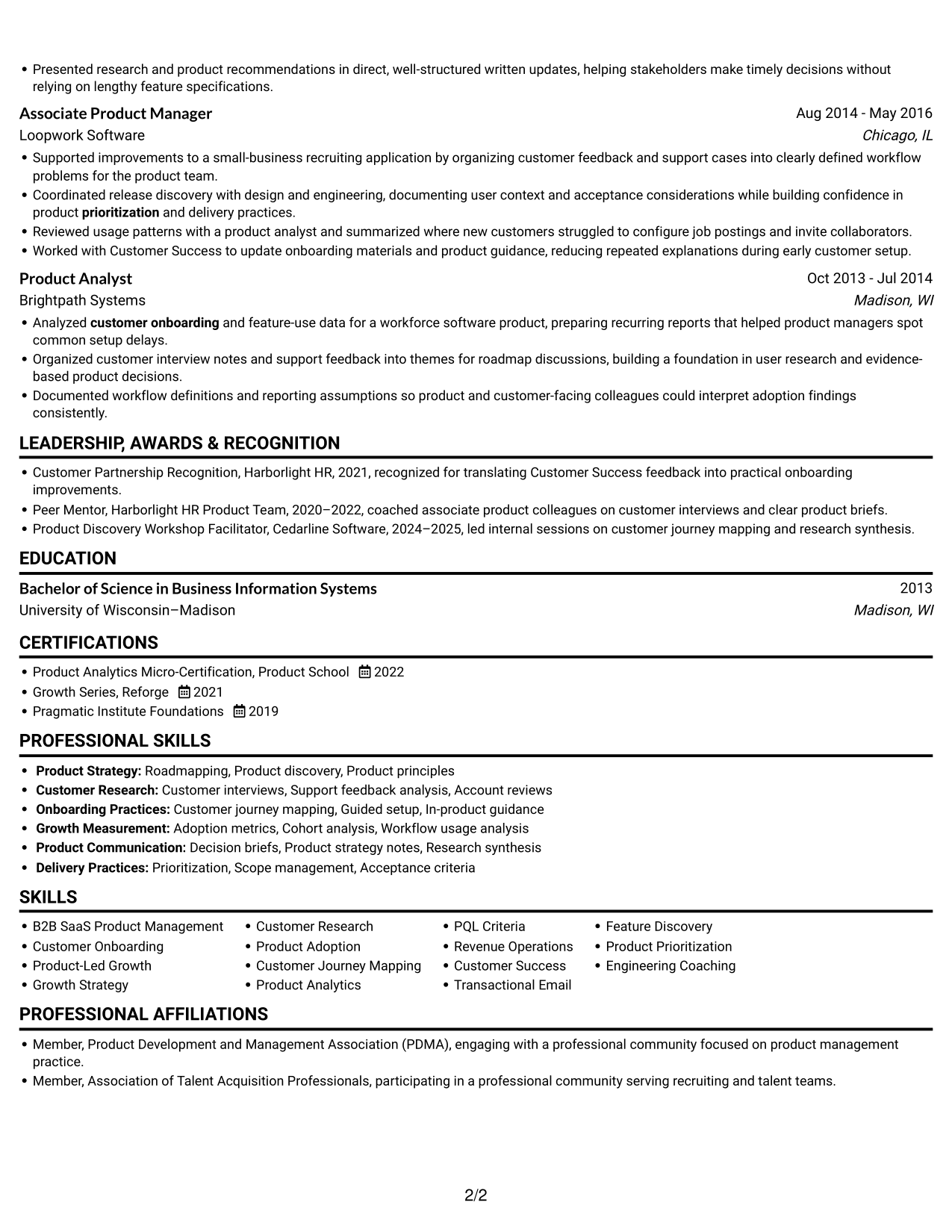
 
Resume example — page 1   Resume example — page 2

Why This Format Works

  • Single-column sections give experience bullets a direct route through the resume.
  • Reviewers can follow skills, education, and credentials without switching between columns.
  • The right-side photo adds a personal visual element without dividing the written content.

Best For

  • Photo-inclusive resume presentation
  • Single-path experience review
  • Text-heavy career histories
  • Sequential section checks
  • Visual identity preference
 

#5 Clean Two Column Sidebar Format Resume Example

A two-column body creates parallel reading areas, useful when reviewers need to move between resume sections instead of following one long sequence.
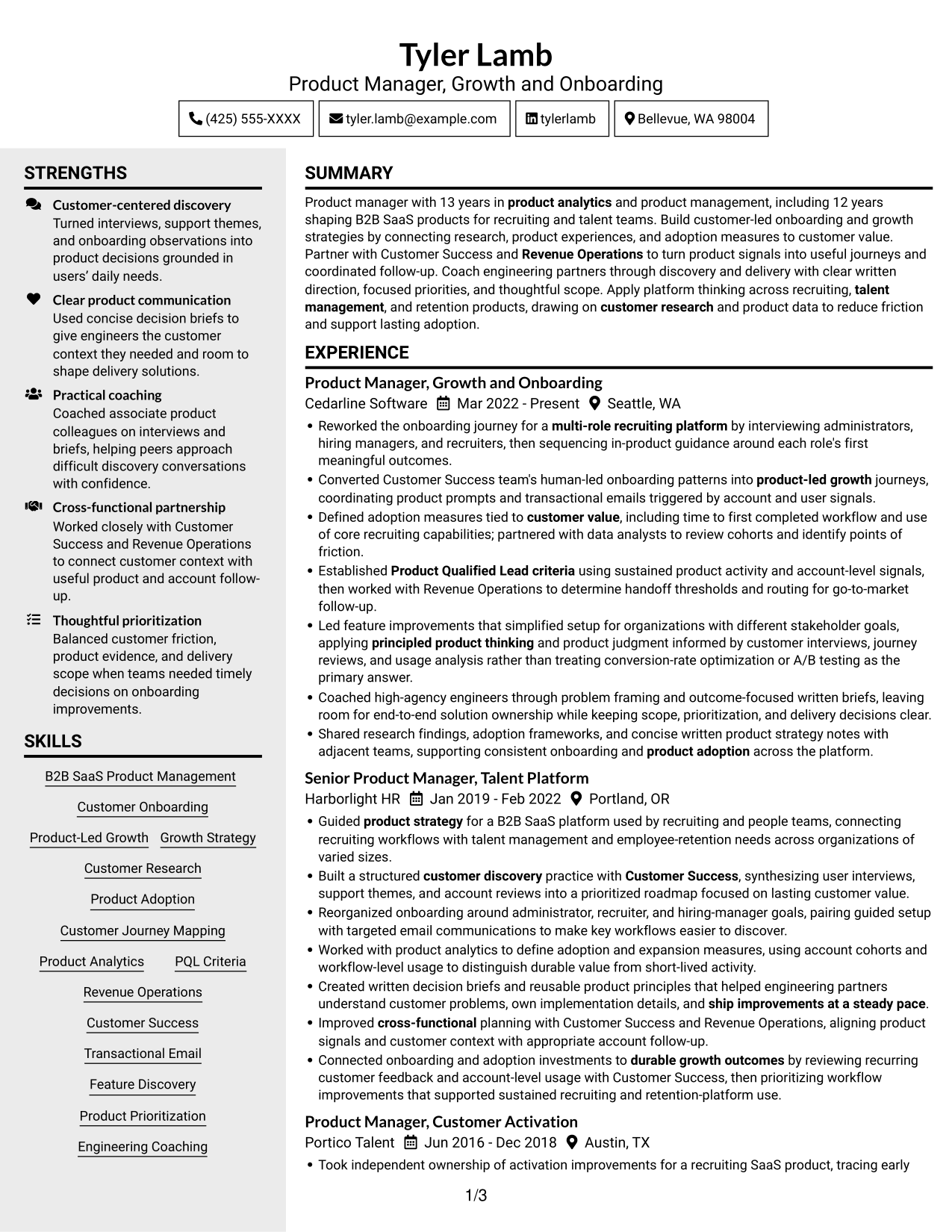
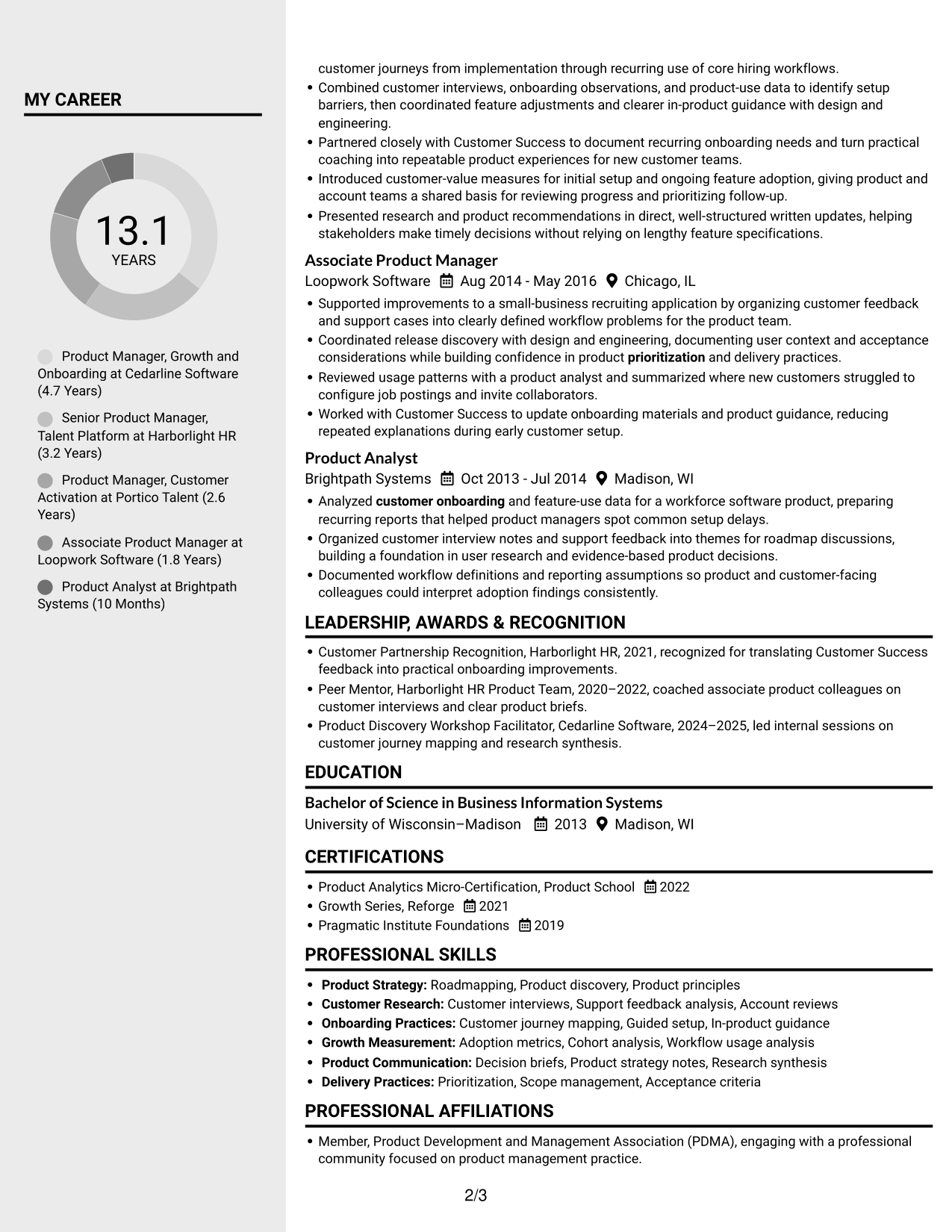
 
Resume example — page 1   Resume example — page 2

Why This Format Works

  • Two columns give reviewers parallel routes through experience and supporting resume sections.
  • Separate reading areas help keep skills visible while career entries remain distinct.
  • Education and certifications can be found through section-based scanning rather than one long sequence.

Best For

  • Side-by-side section scanning
  • Distinct career and skills review
  • Multiple resume section groups
  • Quick education checks
  • Organized information in parallel areas


#6 Two Column Format Resume Example

The two-column body supports a cross-section scan, a useful choice when reviewers need to move between experience and other resume content.
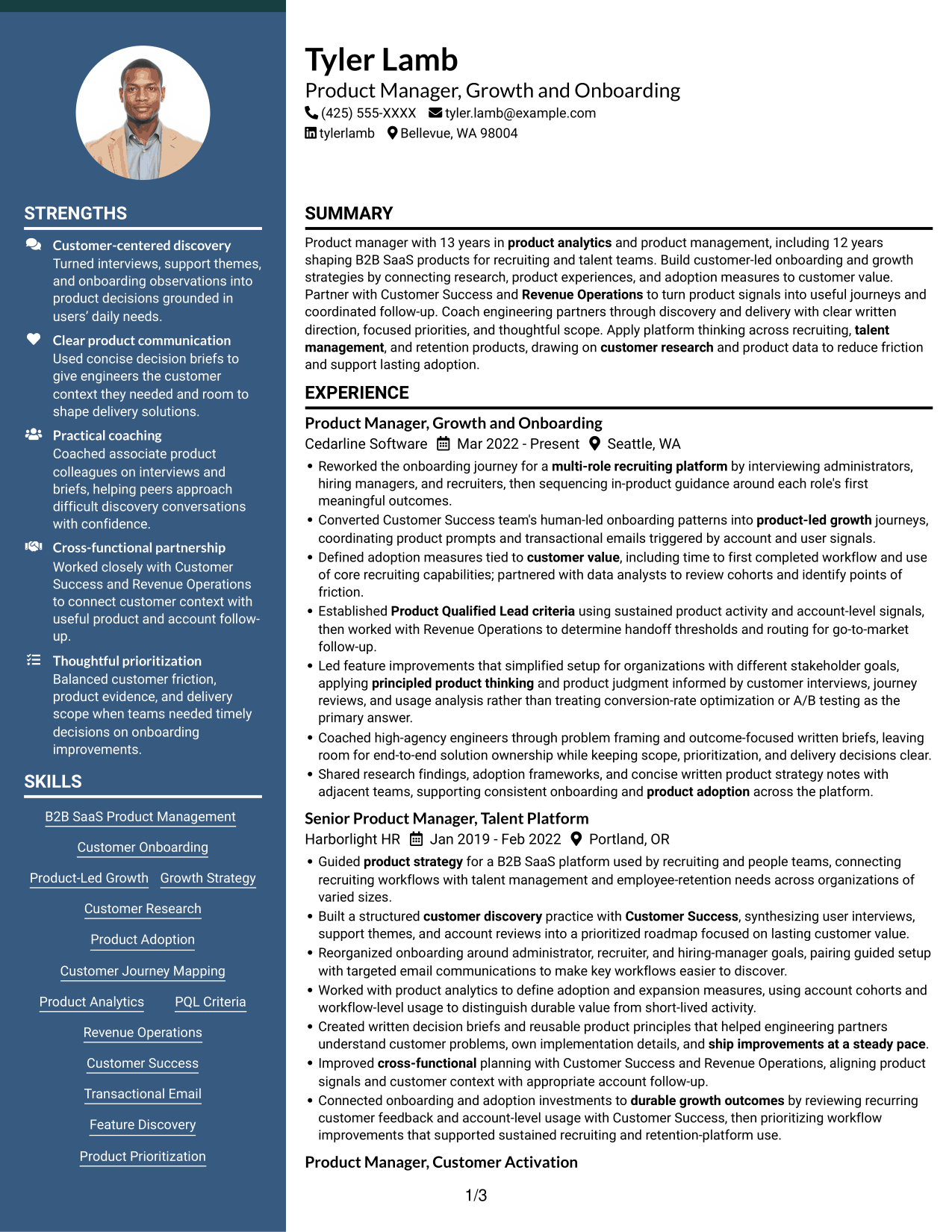
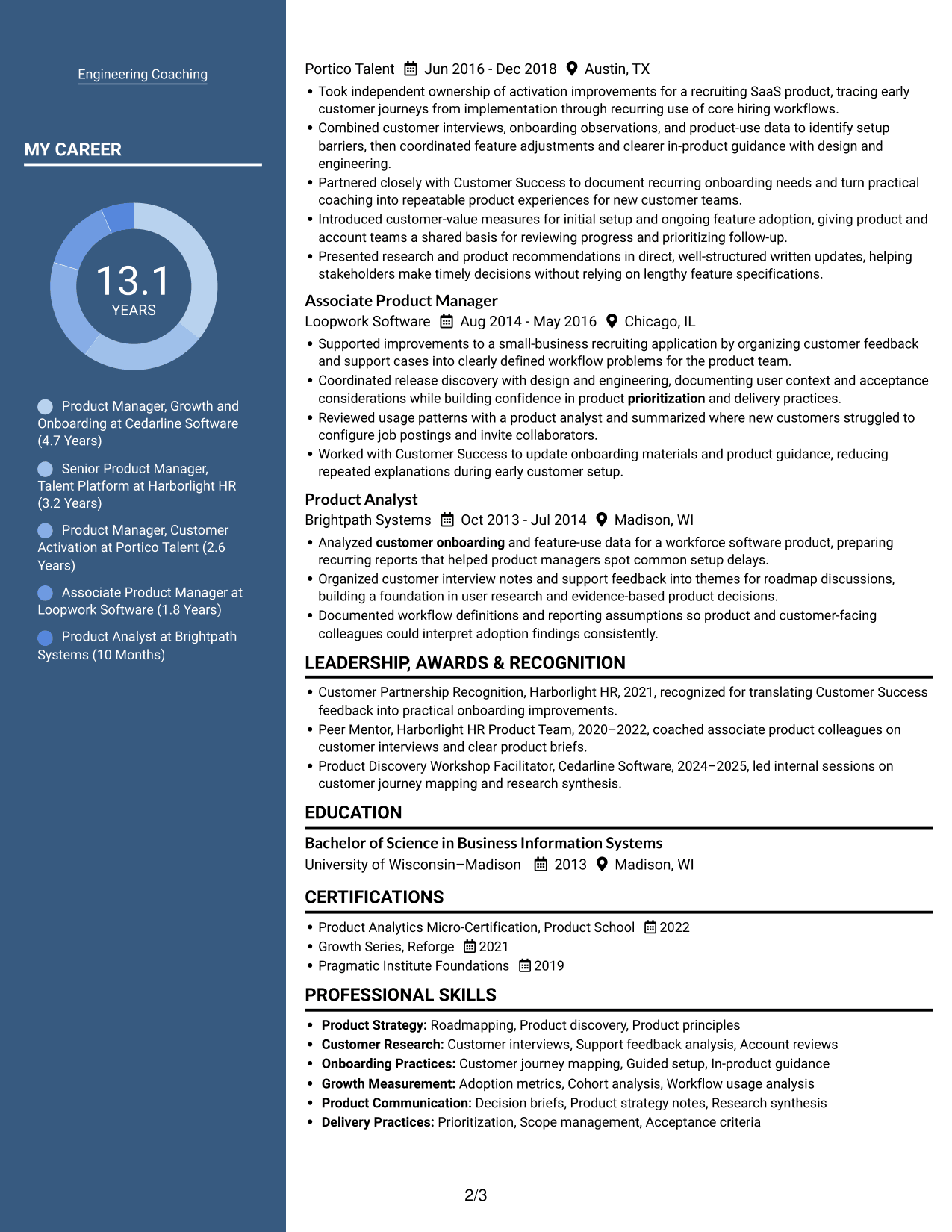
 
Resume example — page 1   Resume example — page 2

Why This Format Works

  • The two-column body lets reviewers check supporting details alongside the career record.
  • Section paths reduce the need to scan every experience bullet for education or credentials.
  • Reviewers can start with the section most relevant to their first-pass resume check.

Best For

  • Parallel section navigation
  • Reviews across content groups
  • Experience with supporting details
  • Skills-focused first-pass checks
  • Career and credential scanning
 

#7 Photo Header Two Column Format Resume Example

A photo in the header adds a visible identity detail above the two-column body, a useful choice when both photo and section-based reading suit the presentation.
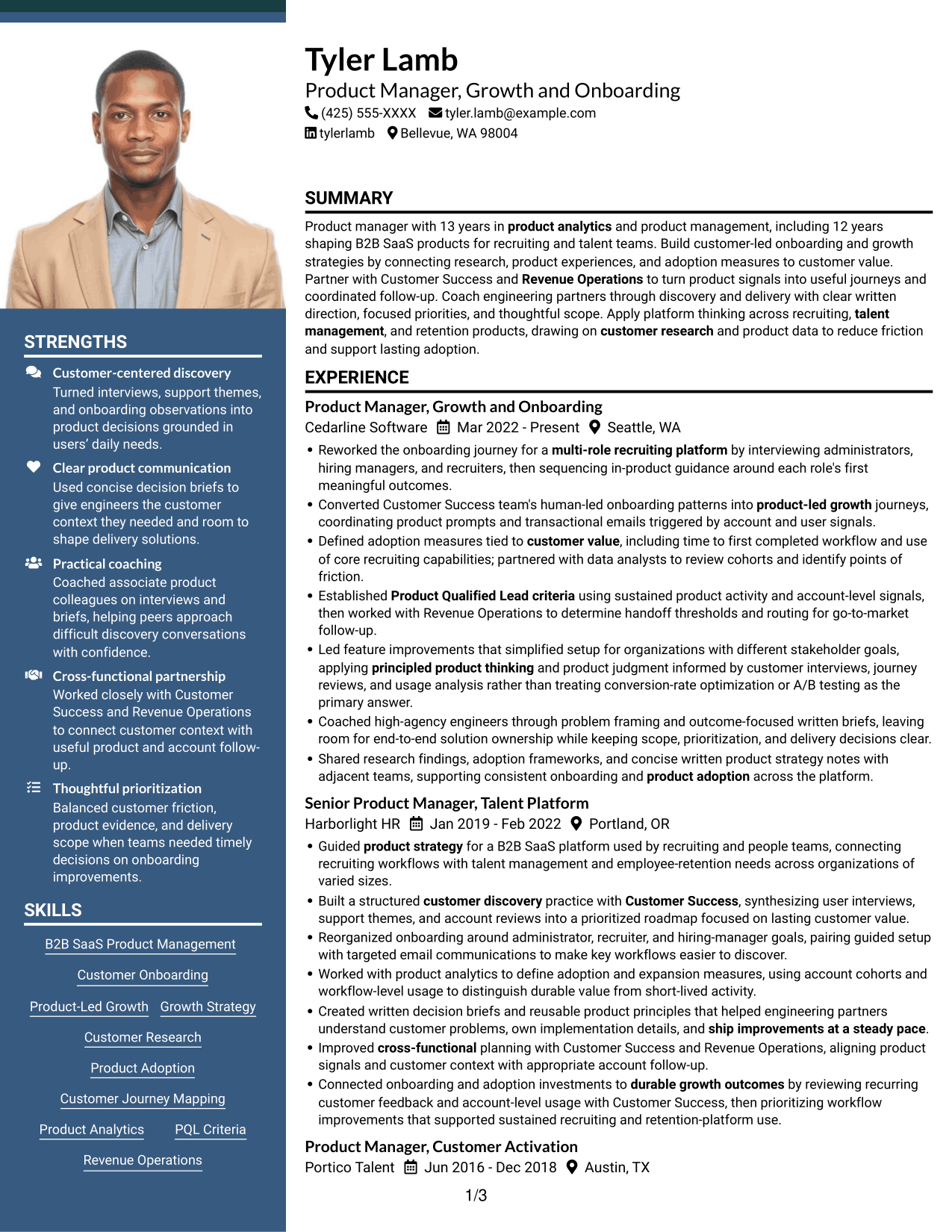
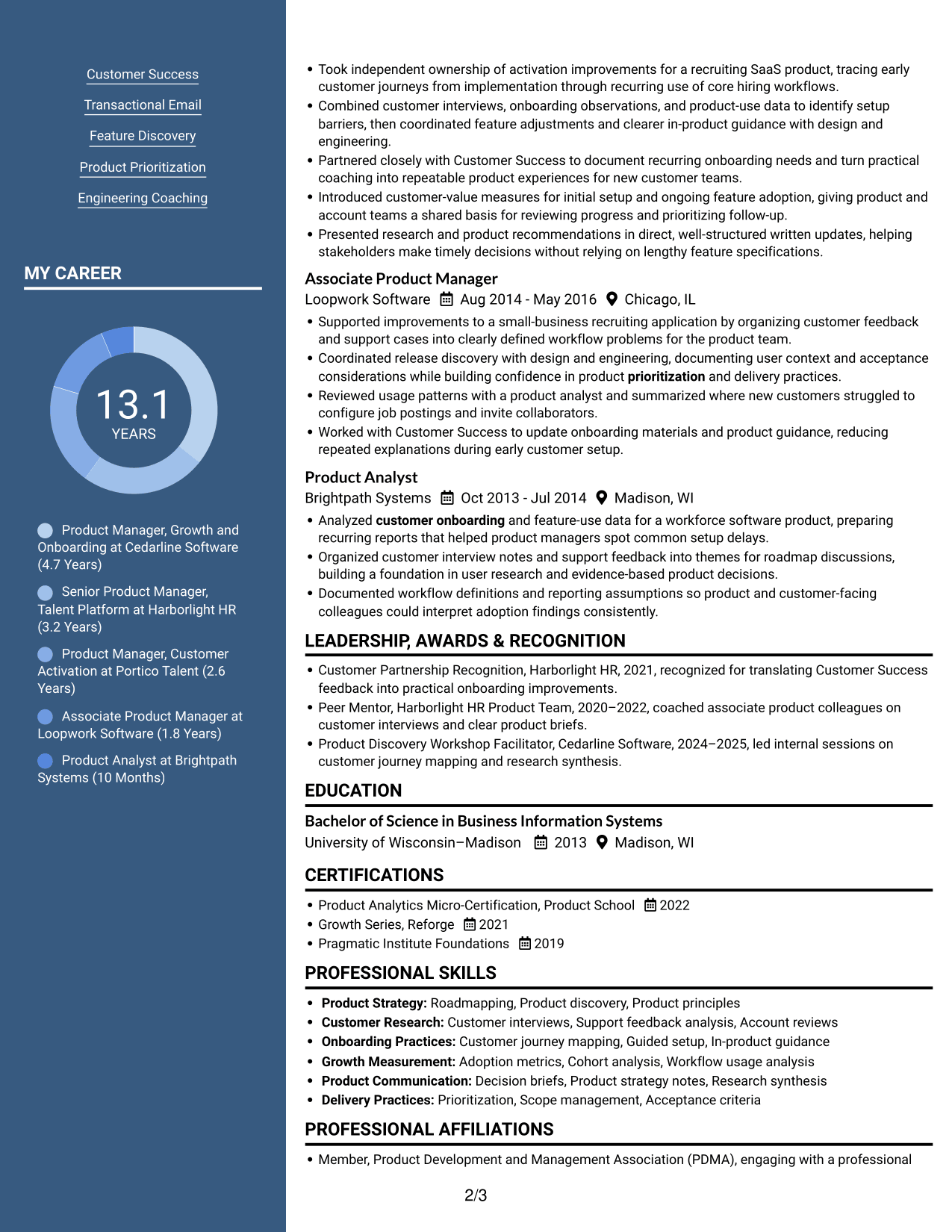
 
Resume example — page 1   Resume example — page 2

Why This Format Works

  • The two-column body gives career entries and supporting sections separate scan paths.
  • Reviewers can move between education, credentials, and experience without following one long text sequence.
  • The header photo adds a visible identity detail while the body remains organized in columns.

Best For

  • Photo-led header preference
  • Two-path resume review
  • Experience and supporting sections
  • Visual identity with organized content
  • Cross-section scanning


Why Build Your Product Manager - Onboarding and Growth Resume with ResumeInMinutes

Use the image previews to compare how each layout organizes experience, skills, education, and certifications. Open an example in the editor to review its structure and customize the resume content.

  • ATS-aware section structure
  • Clear experience and skills sections
  • Space for measurable product outcomes
  • Room for research and adoption evidence
  • Image previews for layout comparison
  • Examples you can open in the editor

Keep the resume focused on this role. Prioritize customer research, onboarding improvements, adoption measures, product signals, and partnership with Customer Success and Revenue Operations.


See Also


Frequently Asked Questions

Are these Product Manager - Onboarding and Growth resume templates ATS-friendly?

The layouts use clear sections and readable headings to support scanning. Use standard resume labels and include relevant terms, such as customer onboarding, product adoption, B2B SaaS, and Product Qualified Lead criteria, where they accurately describe your experience.

What does the resume example show?

It shows one resume in different visual layouts. Review the image previews to compare section order and page design, then open an example in the editor to examine its structure.

What should a Product Manager - Onboarding and Growth resume include?

Include a focused summary, relevant experience, skills, education, and applicable certifications. Use concise bullets to show customer research, onboarding work, adoption measures, product signals, and outcomes.

How can I show the impact of onboarding work?

Describe the customer or workflow problem, the product change you made, and the evidence used to assess it. Measures such as time to first completed workflow, core feature use, or cohort behavior can help show progress when available.

Which resume layout should I choose?

Choose a layout with clear headings and an easy-to-follow experience section. A simple structure helps readers find your product decisions, evidence, and relevant skills quickly.

Should I include a photo on my resume?

For applications in the United States, a resume without a photo is generally the safer choice. Follow local expectations if you are applying elsewhere.


ATS Score 100%

How we calculate this score

  • Keywords: 60% of the total. AI extracts keywords from your job description. If you do not provide one, a standard job description for the title matching your resume is used. This is not a match to a specific vacancy.
  • Text-based resume: 20%. The text resume assessed here receives 100 for this part.
  • Resume quality: 20%. We start at 100 and subtract points for issues found by our resume checks, down to a minimum of zero.
  • Keyword coverage = round(100 × confirmed matches ÷ total keywords). Exact matches and supported equivalents verified by AI receive full credit; unsupported keywords receive none. Live text checks use the saved equivalents and do not request a new AI review. Without keywords, no overall ATS score is available.
  • Final score = 60% of keyword coverage + 20% of the text score + 20% of the quality score, rounded to a whole number. Without keywords, no overall ATS score is available.

What this score means

Our scores are estimates, not employer ratings. They may contain errors and do not guarantee accurate parsing, a ranking, an interview, or a job. Check your document against the employer’s requirements. You are responsible for relying on this score.

Terms and Conditions

Score weights: Keywords 60% · Text based resume 20% · Resume quality 20%

Keyword coverage: 31 of 31 (100%) · Resume quality: 100%

Resume quality 100% · Weight 20% · Issues (0)

Details
  • ✓Name present: Tyler Lamb
  • ✓Email format: tyler.lamb@example.com
  • ✓Phone format: (425) 555-XXXX
  • ✓Experience 1: Job title: Product Manager, Growth and Onboarding
  • ✓Experience 1: Company name: Cedarline Software
  • ✓Experience 1: Work location: Seattle, WA
  • ✓Experience 1: Employment dates: Mar 2022 - Present
  • ✓Experience 1: Description or achievements: Present
  • ✓Experience 2: Job title: Senior Product Manager, Talent Platform
  • ✓Experience 2: Company name: Harborlight HR
  • ✓Experience 2: Work location: Portland, OR
  • ✓Experience 2: Employment dates: Jan 2019 - Feb 2022
  • ✓Experience 2: Description or achievements: Present
  • ✓Experience 3: Job title: Product Manager, Customer Activation
  • ✓Experience 3: Company name: Portico Talent
  • ✓Experience 3: Work location: Austin, TX
  • ✓Experience 3: Employment dates: Jun 2016 - Dec 2018
  • ✓Experience 3: Description or achievements: Present
  • ✓Experience 4: Job title: Associate Product Manager
  • ✓Experience 4: Company name: Loopwork Software
  • ✓Experience 4: Work location: Chicago, IL
  • ✓Experience 4: Employment dates: Aug 2014 - May 2016
  • ✓Experience 4: Description or achievements: Present
  • ✓Experience 5: Job title: Product Analyst
  • ✓Experience 5: Company name: Brightpath Systems
  • ✓Experience 5: Work location: Madison, WI
  • ✓Experience 5: Employment dates: Oct 2013 - Jul 2014
  • ✓Experience 5: Description or achievements: Present
  • ✓No placeholder fields
  • ✓No repeated achievement bullets
  • ✓No empty bullets

No issues found by the current checks.

Text Based Resume 100% · Weight 20%

Parsed text
Tyler Lamb
(425) 555-XXXX
tyler.lamb@example.com
tylerlamb
Bellevue, WA 98004
SUMMARY
Product manager with 13 years in product analytics and product management, including 12 years shaping B2B SaaS products for recruiting and talent teams. Build customer-led onboarding and growth strategies by connecting research, product experiences, and adoption measures to customer value. Partner with Customer Success and Revenue Operations to turn product signals into useful journeys and coordinated follow-up. Coach engineering partners through discovery and delivery with clear written direction, focused priorities, and thoughtful scope. Apply platform thinking across recruiting, talent management, and retention products, drawing on customer research and product data to reduce friction and support lasting adoption.
EXPERIENCE
Product Manager, Growth and Onboarding
Mar 2022 - Present
Cedarline Software
Seattle, WA
Reworked the onboarding journey for a multi-role recruiting platform by interviewing administrators, hiring managers, and recruiters, then sequencing in-product guidance around each role's first meaningful outcomes.
Converted Customer Success team's human-led onboarding patterns into product-led growth journeys, coordinating product prompts and transactional emails triggered by account and user signals.
Defined adoption measures tied to customer value, including time to first completed workflow and use of core recruiting capabilities; partnered with data analysts to review cohorts and identify points of friction.
Established Product Qualified Lead criteria using sustained product activity and account-level signals, then worked with Revenue Operations to determine handoff thresholds and routing for go-to-market follow-up.
Led feature improvements that simplified setup for organizations with different stakeholder goals, applying principled product thinking and product judgment informed by customer interviews, journey reviews, and usage analysis rather than treating conversion-rate optimization or A/B testing as the primary answer.
Coached high-agency engineers through problem framing and outcome-focused written briefs, leaving room for end-to-end solution ownership while keeping scope, prioritization, and delivery decisions clear.
Shared research findings, adoption frameworks, and concise written product strategy notes with adjacent teams, supporting consistent onboarding and product adoption across the platform.
Senior Product Manager, Talent Platform
Jan 2019 - Feb 2022
Harborlight HR
Portland, OR
Guided product strategy for a B2B SaaS platform used by recruiting and people teams, connecting recruiting workflows with talent management and employee-retention needs across organizations of varied sizes.
Built a structured customer discovery practice with Customer Success, synthesizing user interviews, support themes, and account reviews into a prioritized roadmap focused on lasting customer value.
Reorganized onboarding around administrator, recruiter, and hiring-manager goals, pairing guided setup with targeted email communications to make key workflows easier to discover.
Worked with product analytics to define adoption and expansion measures, using account cohorts and workflow-level usage to distinguish durable value from short-lived activity.
Created written decision briefs and reusable product principles that helped engineering partners understand customer problems, own implementation details, and ship improvements at a steady pace.
Improved cross-functional planning with Customer Success and Revenue Operations, aligning product signals and customer context with appropriate account follow-up.
Connected onboarding and adoption investments to durable growth outcomes by reviewing recurring customer feedback and account-level usage with Customer Success, then prioritizing workflow improvements that supported sustained recruiting and retention-platform use.
Product Manager, Customer Activation
Jun 2016 - Dec 2018
Portico Talent
Austin, TX
Took independent ownership of activation improvements for a recruiting SaaS product, tracing early customer journeys from implementation through recurring use of core hiring workflows.
Combined customer interviews, onboarding observations, and product-use data to identify setup barriers, then coordinated feature adjustments and clearer in-product guidance with design and engineering.
Partnered closely with Customer Success to document recurring onboarding needs and turn practical coaching into repeatable product experiences for new customer teams.
Introduced customer-value measures for initial setup and ongoing feature adoption, giving product and account teams a shared basis for reviewing progress and prioritizing follow-up.
Presented research and product recommendations in direct, well-structured written updates, helping stakeholders make timely decisions without relying on lengthy feature specifications.
Associate Product Manager
Aug 2014 - May 2016
Loopwork Software
Chicago, IL
Supported improvements to a small-business recruiting application by organizing customer feedback and support cases into clearly defined workflow problems for the product team.
Coordinated release discovery with design and engineering, documenting user context and acceptance considerations while building confidence in product prioritization and delivery practices.
Reviewed usage patterns with a product analyst and summarized where new customers struggled to configure job postings and invite collaborators.
Worked with Customer Success to update onboarding materials and product guidance, reducing repeated explanations during early customer setup.
Product Analyst
Oct 2013 - Jul 2014
Brightpath Systems
Madison, WI
Analyzed customer onboarding and feature-use data for a workforce software product, preparing recurring reports that helped product managers spot common setup delays.
Organized customer interview notes and support feedback into themes for roadmap discussions, building a foundation in user research and evidence-based product decisions.
Documented workflow definitions and reporting assumptions so product and customer-facing colleagues could interpret adoption findings consistently.
LEADERSHIP, AWARDS & RECOGNITION
Customer Partnership Recognition, Harborlight HR, 2021, recognized for translating Customer Success feedback into practical onboarding improvements.
Peer Mentor, Harborlight HR Product Team, 2020–2022, coached associate product colleagues on customer interviews and clear product briefs.
Product Discovery Workshop Facilitator, Cedarline Software, 2024–2025, led internal sessions on customer journey mapping and research synthesis.
EDUCATION
Bachelor of Science in Business Information Systems
2013
University of Wisconsin–Madison
Madison, WI
CERTIFICATIONS
Product Analytics Micro-Certification, Product School
2022
Growth Series, Reforge
2021
Pragmatic Institute Foundations
2019
PROFESSIONAL SKILLS
Product Strategy: Roadmapping, Product discovery, Product principles
Customer Research: Customer interviews, Support feedback analysis, Account reviews
Onboarding Practices: Customer journey mapping, Guided setup, In-product guidance
Growth Measurement: Adoption metrics, Cohort analysis, Workflow usage analysis
Product Communication: Decision briefs, Product strategy notes, Research synthesis
Delivery Practices: Prioritization, Scope management, Acceptance criteria
SKILLS
B2B SaaS Product Management
Customer Onboarding
Product-Led Growth
Growth Strategy
Customer Research
Product Adoption
Customer Journey Mapping
Product Analytics
PQL Criteria
Revenue Operations
Customer Success
Transactional Email
Feature Discovery
Product Prioritization
Engineering Coaching
PROFESSIONAL AFFILIATIONS
Member, Product Development and Management Association (PDMA), engaging with a professional community focused on product management practice.
Member, Association of Talent Acquisition Professionals, participating in a professional community serving recruiting and talent teams.

Matched keywords (31)

  • B2B SaaS Product Management
  • customer onboarding
  • product-led growth
  • Growth Strategy
  • customer research
  • product adoption
  • Defined adoption measures tied to customer value, including time to first completed workflow and use of core recruiting capabilitiesOriginal keyword in JD: Customer-Value Metrics
  • customer journey mapping
  • Product Qualified Lead criteriaOriginal keyword in JD: Product Qualified Lead (PQL) Criteria
  • Built a structured customer discovery practice with Customer SuccessOriginal keyword in JD: Customer Success Partnership
  • product strategy
  • product judgment
  • Transactional Email
  • product prompts and transactional emails triggered by account and user signalsOriginal keyword in JD: Product-Signal-Based Experiences
  • Revenue Operations
  • Established Product Qualified Lead criteria using sustained product activity and account-level signals, then worked with Revenue Operations to determine handoff thresholds and routing for go-to-market follow-up.Original keyword in JD: Go-to-Market Lead Routing
  • product analytics
  • principled product thinking
  • durable growth outcomes
  • Created written decision briefs and reusable product principlesOriginal keyword in JD: Written Product Communication
  • Coached high-agency engineers through problem framing and outcome-focused written briefsOriginal keyword in JD: High-Agency Engineering Coaching
  • Product Discovery
  • ship improvements at a steady paceOriginal keyword in JD: Product Delivery
  • prioritization
  • Scope management
  • feature improvementsOriginal keyword in JD: Feature Improvement
  • Improved cross-functional planning with Customer Success and Revenue OperationsOriginal keyword in JD: Cross-Functional Collaboration
  • multi-role recruiting platformOriginal keyword in JD: Recruiting Platforms
  • talent management
  • employee-retention
  • platform thinking

Missing keywords (0)

No missing keywords.

Disclaimer: All names, images, contact information, employment histories, achievements, security clearances, military credentials, and other qualifications shown in this content are fictional and used for illustrative purposes only. Any resemblance to actual persons, living or deceased, is purely coincidental.

Resume and cover-letter examples and recommendations in this article reflect general best practices and professional experience and are provided for guidance only. Results may vary based on role, industry, region, and hiring organization.

Content Accuracy and Verification: To the fullest extent permitted by applicable law, we do not represent or warrant that resume or cover-letter guidance, examples, recommendations, or related information are accurate, complete, current, error-free, or suitable for any particular purpose. You are responsible for independently reviewing and verifying the information before relying on it.

ATS and Cover-Letter Scores: ATS scores are estimates calculated using our own formula, informed by publicly available guidance on resume formatting and keyword matching. They are not scores issued or endorsed by an ATS provider or employer. Cover-letter scores are also our own assessments. Parsing, weighting, screening criteria, and results vary between systems, employers, job descriptions, and document formats. No score guarantees successful parsing, a particular ranking, an interview, or employment. Use scores as general guidance and independently check your documents against the employer’s requirements. To the fullest extent permitted by applicable law, we accept no liability for errors in scores or parsing, or losses arising from reliance on these assessments. Nothing in this notice excludes liability or limits consumer rights that cannot lawfully be excluded or limited.

Terms and Conditions
 
> JP 1 1
PDF Footer and Margins Setup
The margins are applied to the document, and the footer shows up in the preview and the PDF

Footer Font Settings

Are you applying for a specific job
so we can tailor your resume to it?
Are you applying for a specific job
so we can tailor your cover letter to it?

Your data stays private and is never used for training.Privacy Policy

Type your details as text to generate a personalized resume Type your details as text to generate a personalized cover letter
Website link found! Ready to create resume from:

Your data stays private and is never used for training.Privacy Policy

Drag the into the box to verify you're human.
Drop here

My Resumes

Displaying {number_of_files} files (out of {total_of_all_files} total)
Name File Type Last Modified: Description:

Rename File

Filename already exists!

Delete Files

Warning: This action is irreversible. Once you click submit, the files will be permanently deleted.

Heading text
Upload From Computer Upload
Select From Existing
LinkedIn
Drag & Drop files anywhere in this tab, or

Uploaded Files

Delete Name Last Updated Use This File
Select this to use the file for generating your resume and cover letter. Only one source—uploaded file, selected file, or LinkedIn text—can be used.

My Files

Resumes or cover letters you create will appear here. No files available yet.
Delete Name Last Updated Use This File
Select this to use the file for generating your resume and cover letter. Only one source—uploaded file, selected file, or LinkedIn text—can be used.

Add LinkedIn Profile PDF

You can download your LinkedIn profile as a PDF by opening linkedin.com in a web browser, clicking your profile photo, selecting the “More” or “Resources” button, and choosing “Save to PDF.” You can then attach the PDF using the Upload From Computer tab.

Paste Your LinkedIn Profile Text

If you have copied the LinkedIn profile text, paste it below. See how to copy your profile from LinkedIn

Select this to use the LinkedIn profile text for generating your resume and cover letter. Only one source—uploaded file, selected file, or LinkedIn text—can be used.

Try these controls

<
>


