
US English


7 Systems Development Engineer II - Physical Access Control Systems Resume Templates with Example
By Ria · Last Updated On October 15, 2026
Resume example — page 1

This guide shows you how to create a clear, focused Systems Development Engineer II - Physical Access Control Systems resume. It explains how to present your relevant evidence and choose a professional format that is easy to review.

Strong resumes connect physical access control integrations with secure infrastructure work. Use clear section headings, concise experience bullets, and specific details about systems, tools, and results, such as Python integrations, Linux services, Terraform provisioning, CI/CD checks, and incident response.

The example is presented in 7 layouts so you can compare the image previews and see how different designs organize the same resume content. Open a version in the editor to view or customize it.

What Makes a Great Systems Development Engineer II - Physical Access Control Systems Resume in 2026

A strong resume uses clear sections and direct bullet points to show how you build, secure, and support physical access control systems. It should make relevant experience, technical skills, and measurable outcomes easy to find.

Include accurate details about integrations, APIs and middleware, distributed systems, Linux, Python, infrastructure as code, and CI/CD. Support claims with specific work, such as improving deployment checks, monitoring device health, or strengthening service security.

Note: Resume examples are for educational purposes only. Use only information that accurately reflects your experience and qualifications. References to real organizations do not imply affiliation or endorsement.

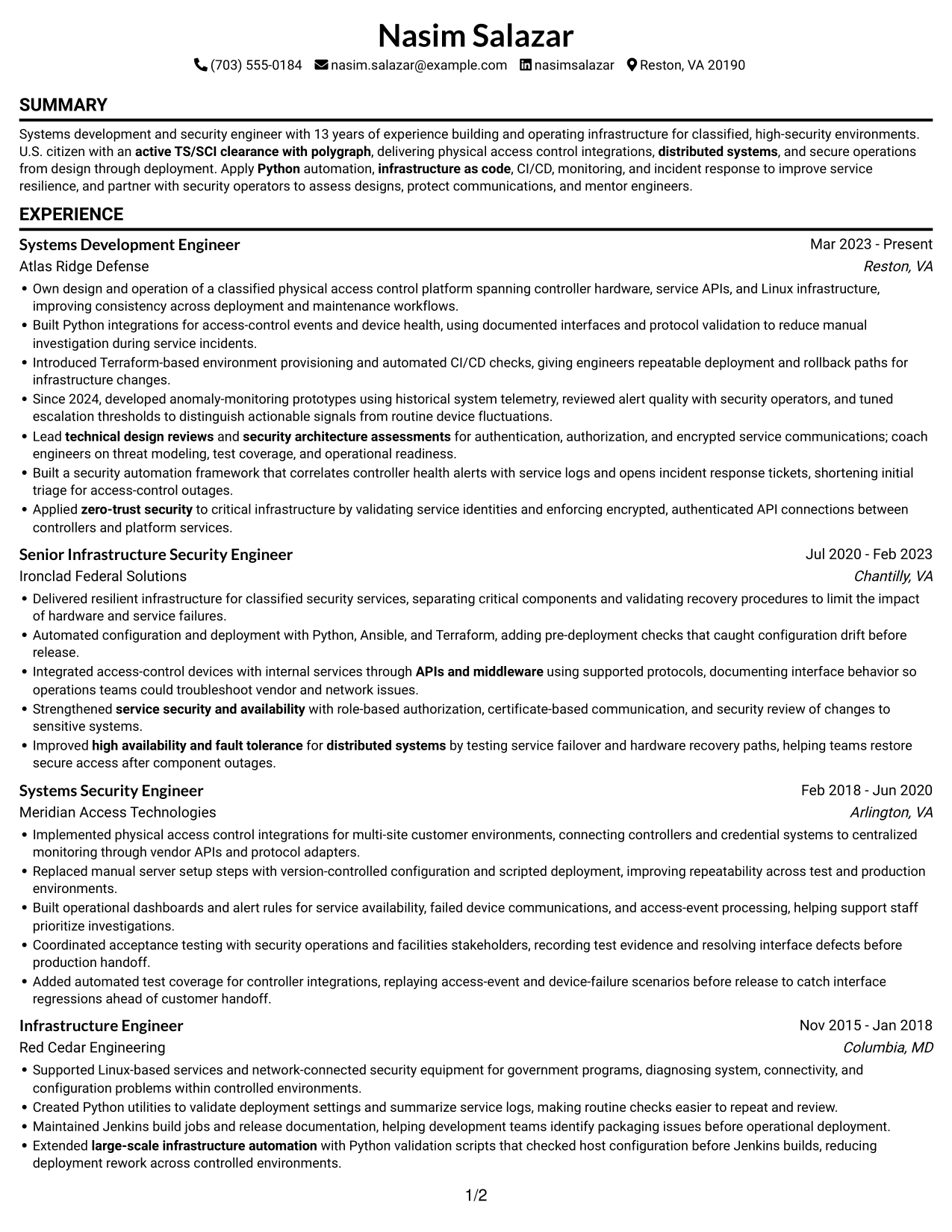
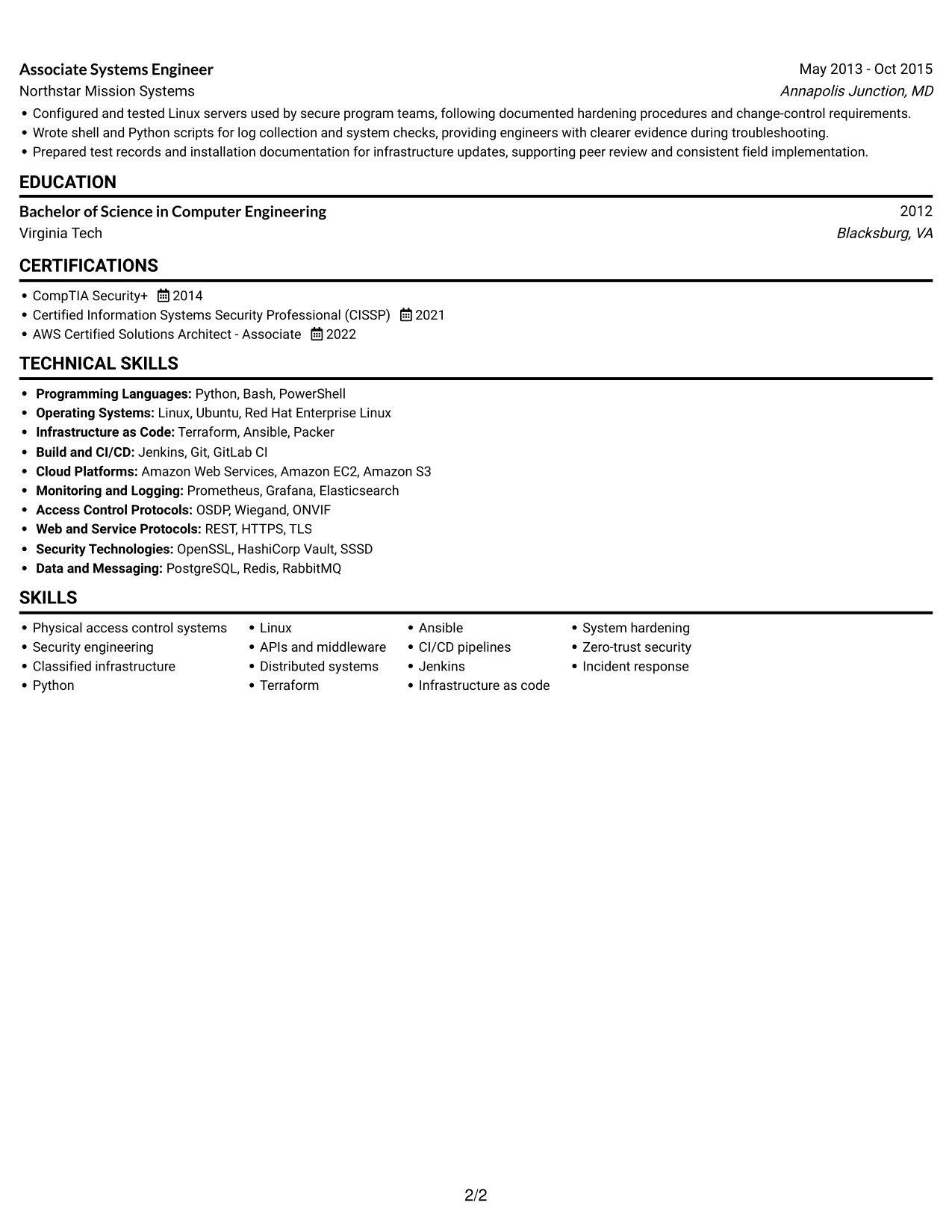
#1 Simple One Column Format Resume Example

The single-column page keeps experience, technical skills, education, and certifications in one reading path, making the section order easy to follow.
 
Resume example — page 1   Resume example — page 2

Why This Format Works

  • One column gives ATS a clear path through headings and work history.
  • Work history reads in sequence, helping reviewers follow career progression without switching columns.
  • Skills, education, and certifications remain easy to locate in the same vertical order.

Best For

  • ATS-focused submissions
  • Chronological experience histories
  • Text-first resume reviews
  • Resumes with several technical sections
  • Single-path reading preferences

Resume Keywords

  • Physical access control systems
  • large-scale infrastructure automation
  • infrastructure as code
  • CI/CD pipelines
  • distributed systems
  • APIs and middleware
  • high availability and fault tolerance
  • System hardening
  • zero-trust security
  • security architecture assessments
  • technical design reviews
  • service security and availability
  • Python
  • active TS/SCI clearance with polygraph
 

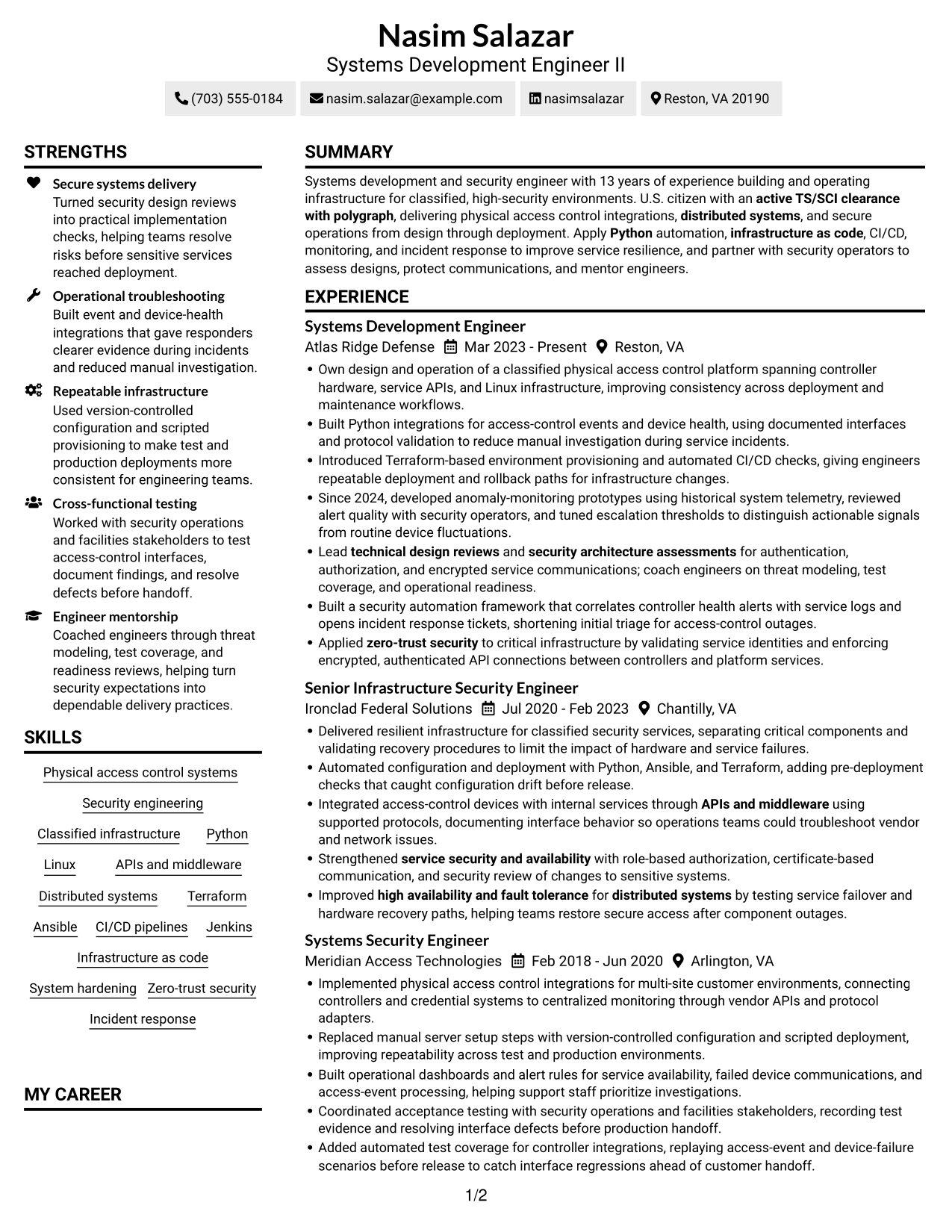
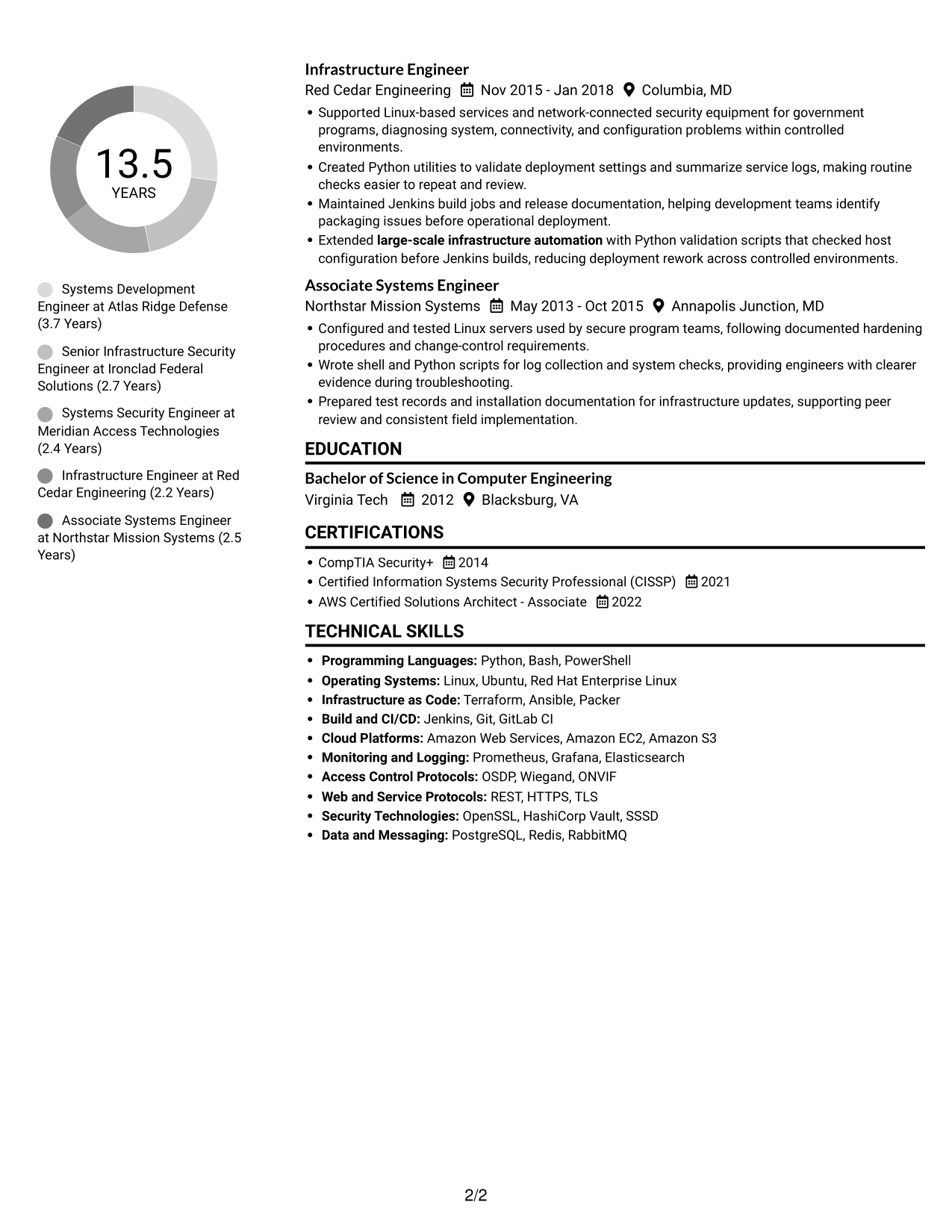
#2 Simple Two Column Format Resume Example

The two-column body places resume content in parallel areas, giving reviewers a practical way to scan experience and supporting details.
 
Resume example — page 1   Resume example — page 2

Why This Format Works

  • Two columns let reviewers locate skills and credentials without scanning every experience entry.
  • Work history can retain its sequence while supporting sections use separate space.
  • Parallel content areas help organize a broad technical record without adding visual clutter.

Best For

  • Resumes with varied section types
  • Parallel content organization
  • Technical records with multiple categories
  • Readers scanning skills and experience
  • Applications needing distinct content areas

#3 Plain One Column with Shaded Labels Resume Example

A single-column layout keeps the resume in a direct top-to-bottom order, which suits readers who prefer a familiar scan.
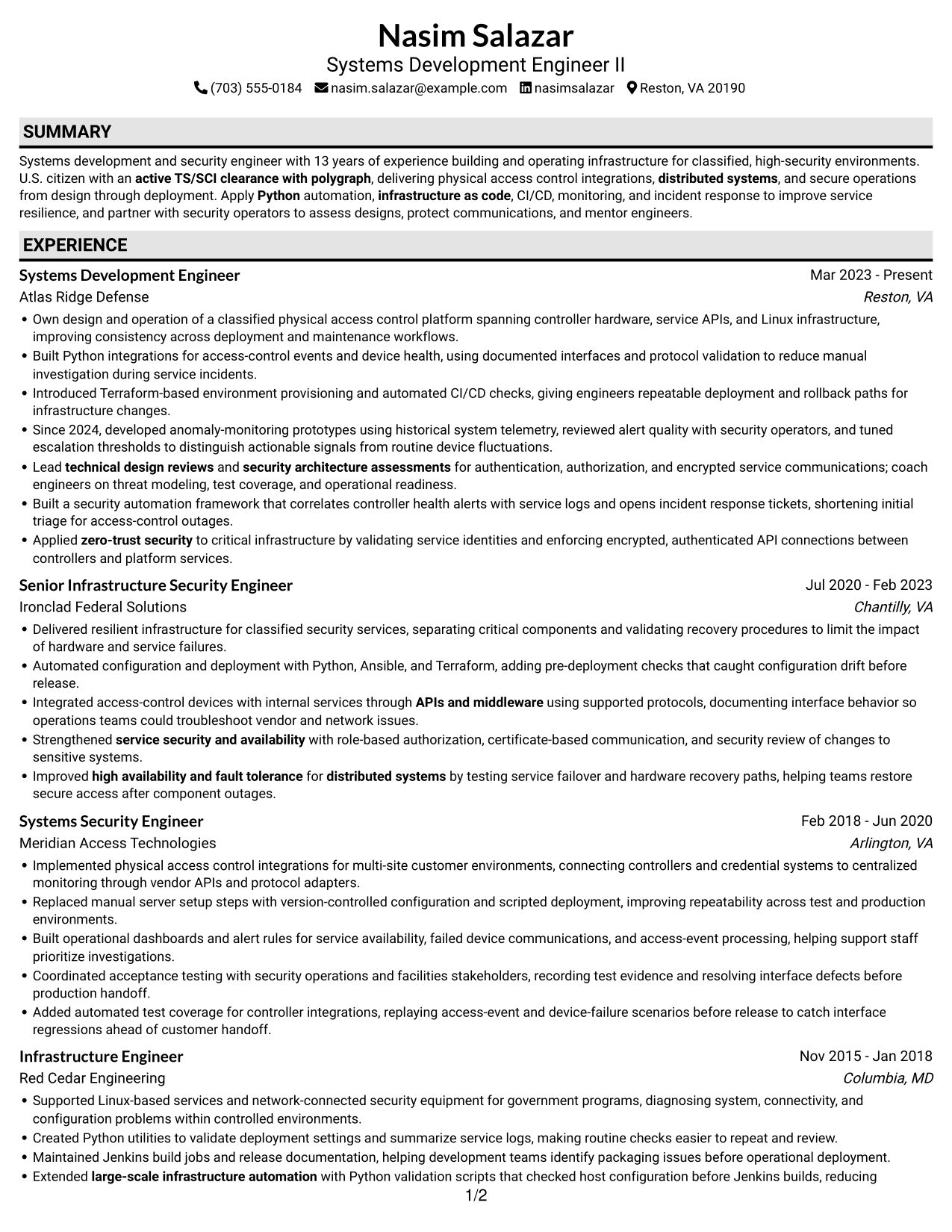
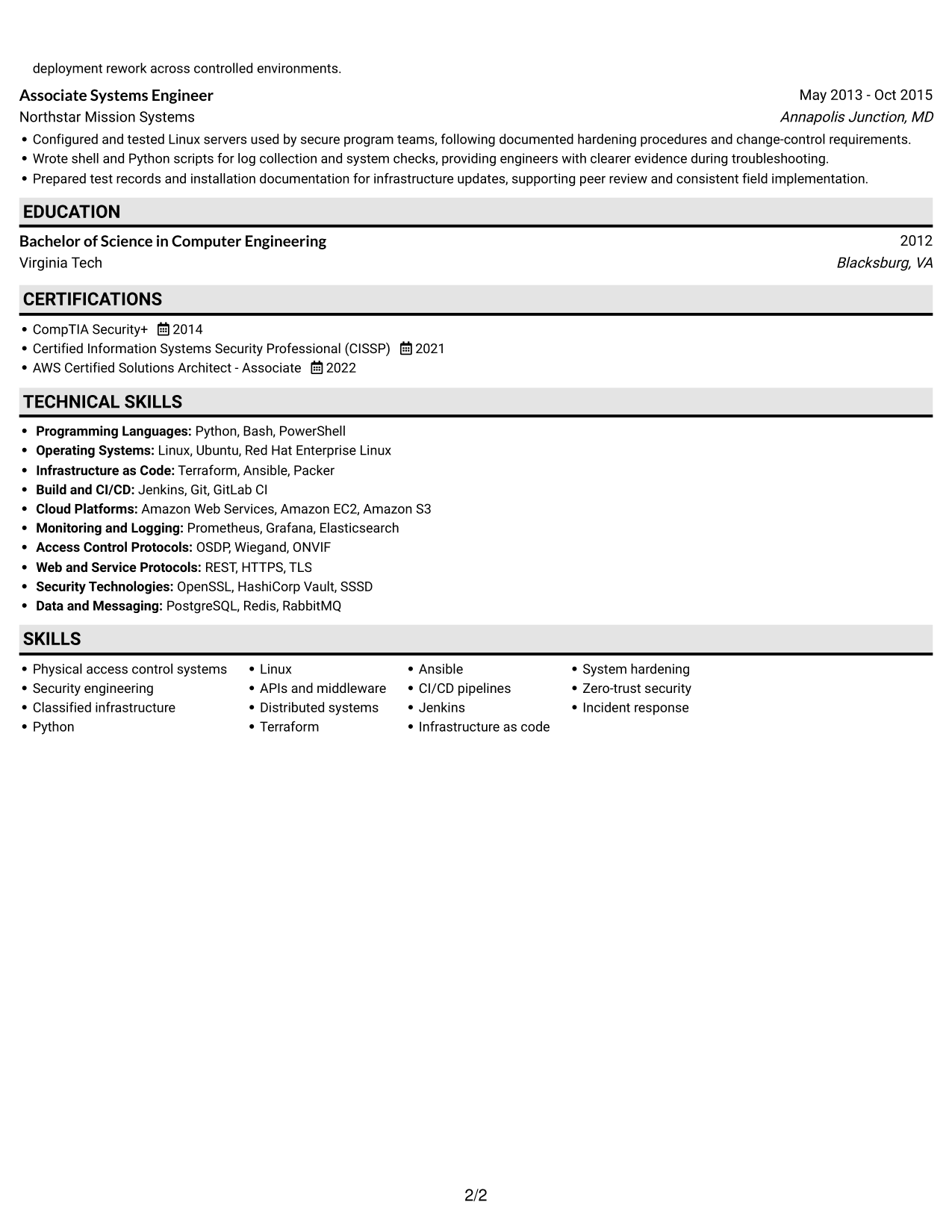
 
Resume example — page 1   Resume example — page 2

Why This Format Works

  • A direct vertical sequence helps reviewers move from summary through experience and credentials.
  • Section headings make technical skills and education easier to find in a text-first layout.
  • One-column reading order gives ATS tools a straightforward route through resume content.

Best For

  • Text-first application systems
  • Resumes with a clear section sequence
  • Reviewers who prefer vertical reading
  • Technical content with several sections
  • Chronological career records
 

#4 One Column Format with Photo Right Resume Example

This one-column format pairs a resume photo with a direct text sequence, for readers who want a portrait and straightforward section order.
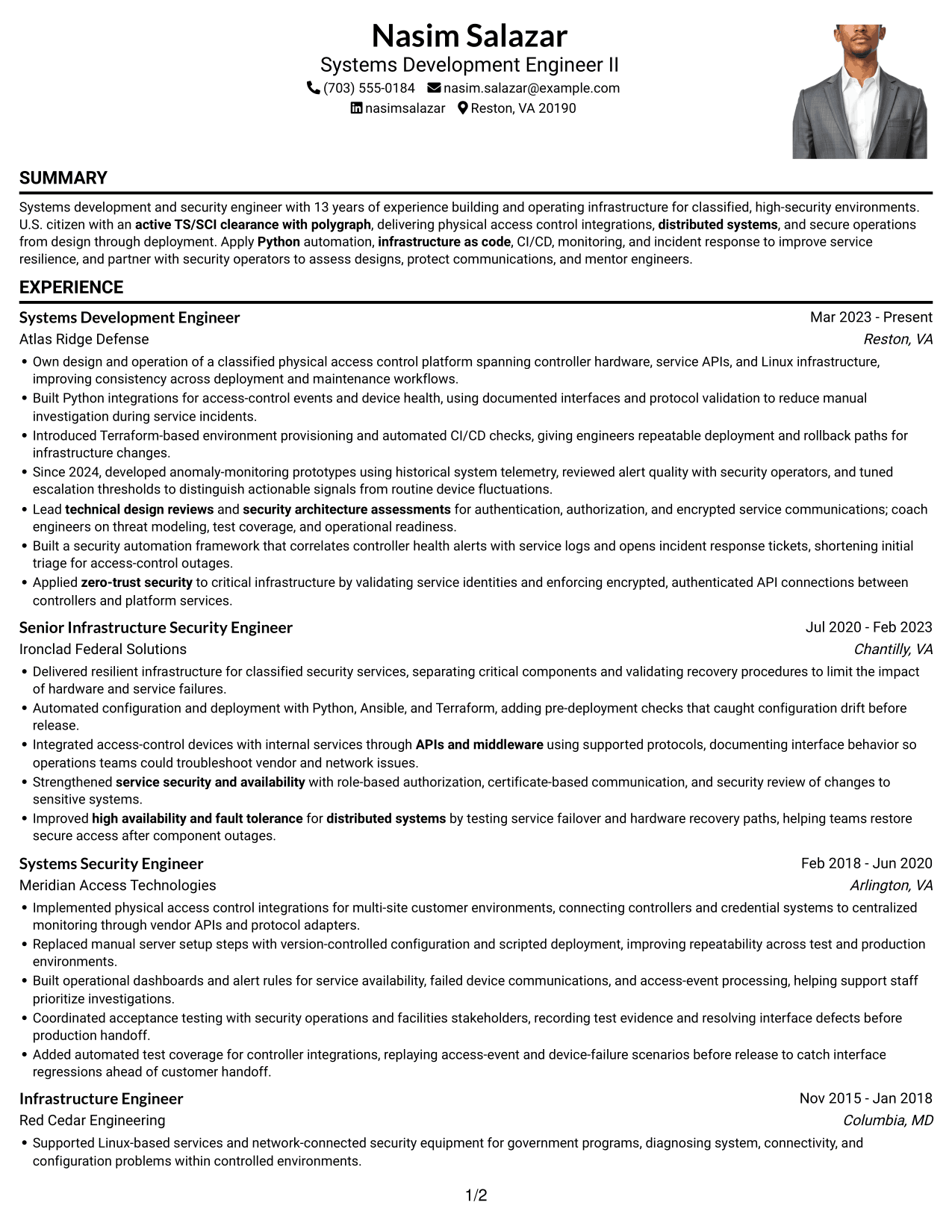
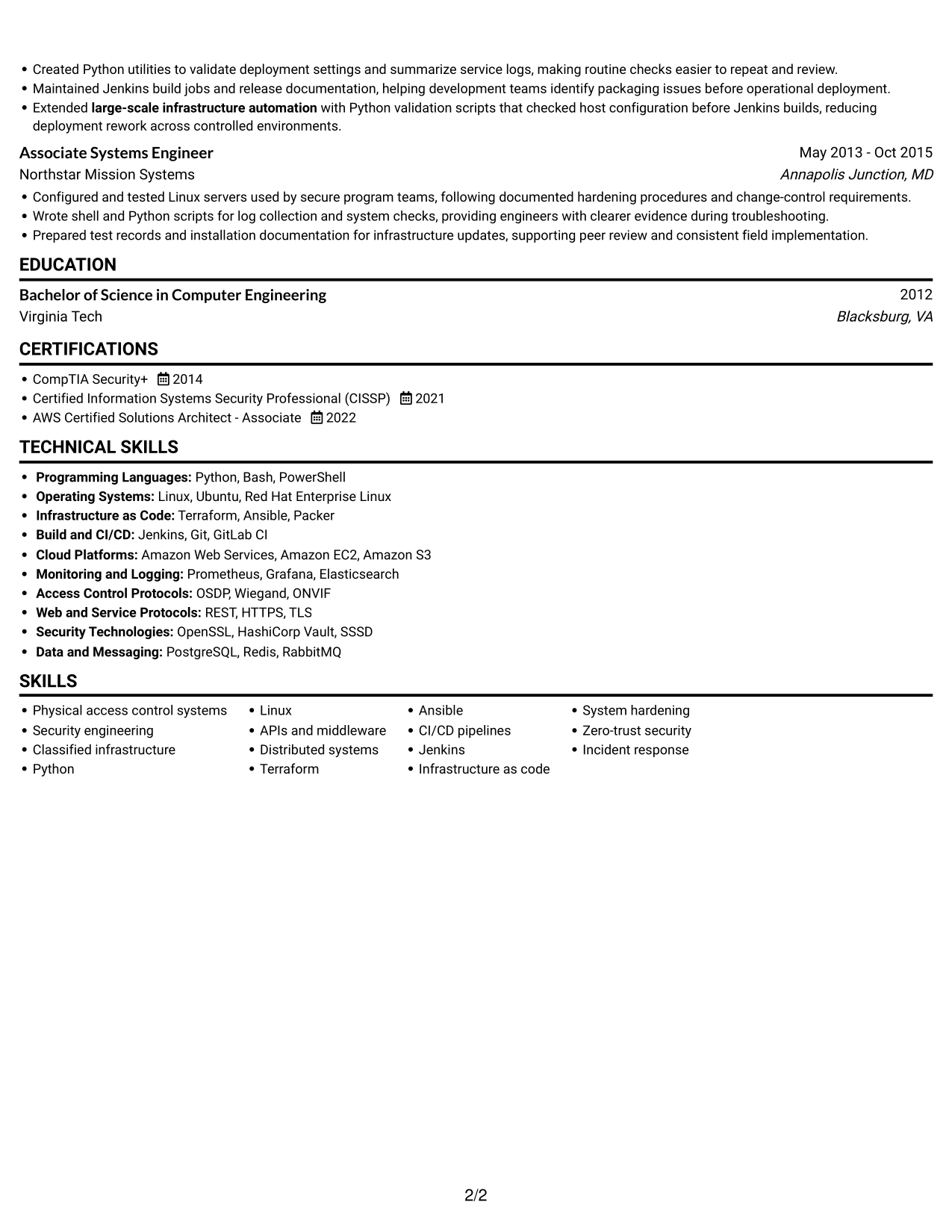
 
Resume example — page 1   Resume example — page 2

Why This Format Works

  • The portrait offers a visual reference, while experience and credentials remain the evidence.
  • Reviewers can follow work history from top to bottom without moving between columns.
  • Skills and education stay within the same reading path as experience.

Best For

  • Resume photo preferences
  • Single-path document reading
  • Portrait-inclusive applications
  • Chronological experience summaries
  • Text paired with a visual identity
 

#5 Clean Two Column Sidebar Format Resume Example

The two-column body gives resume sections separate areas, helping readers scan a detailed record without following one long text stream.
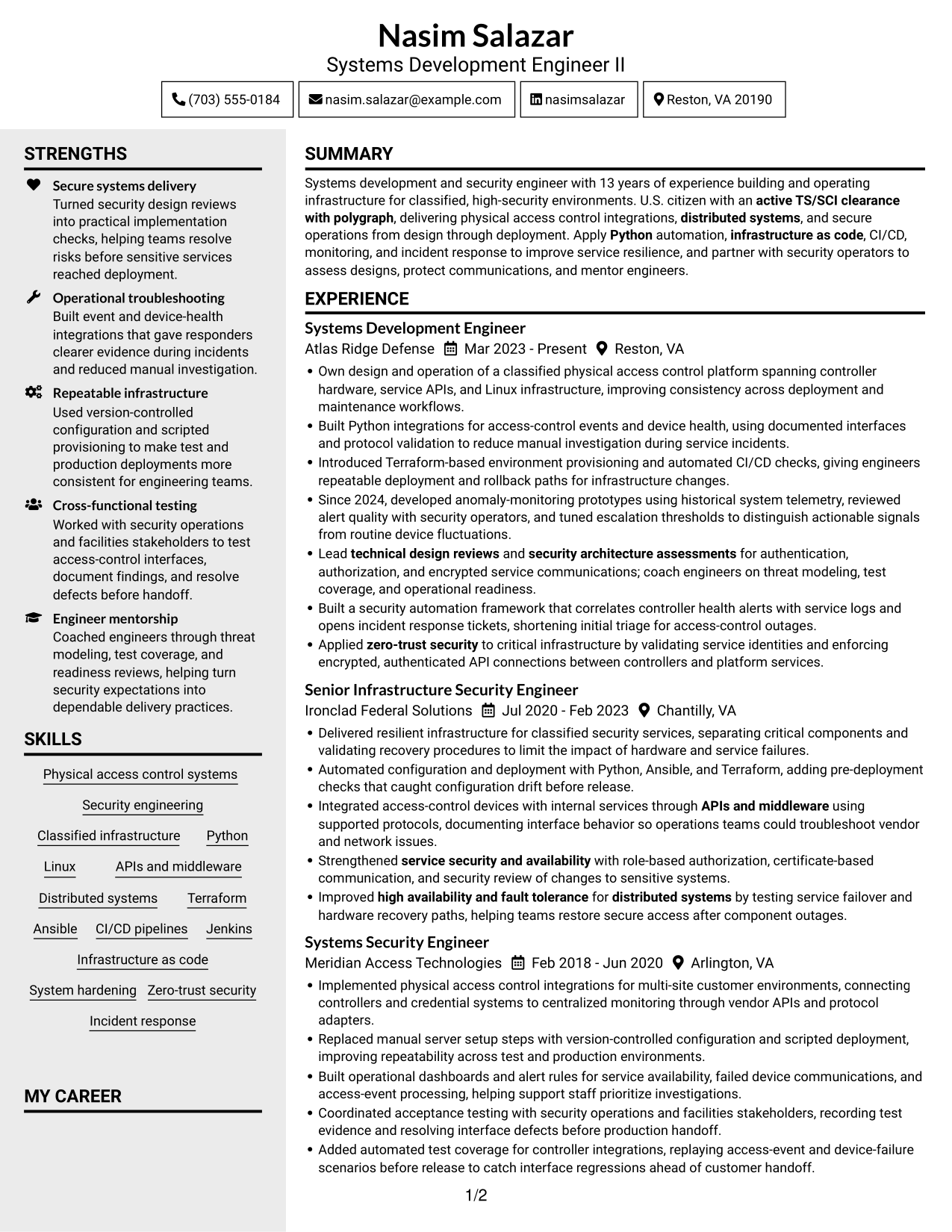
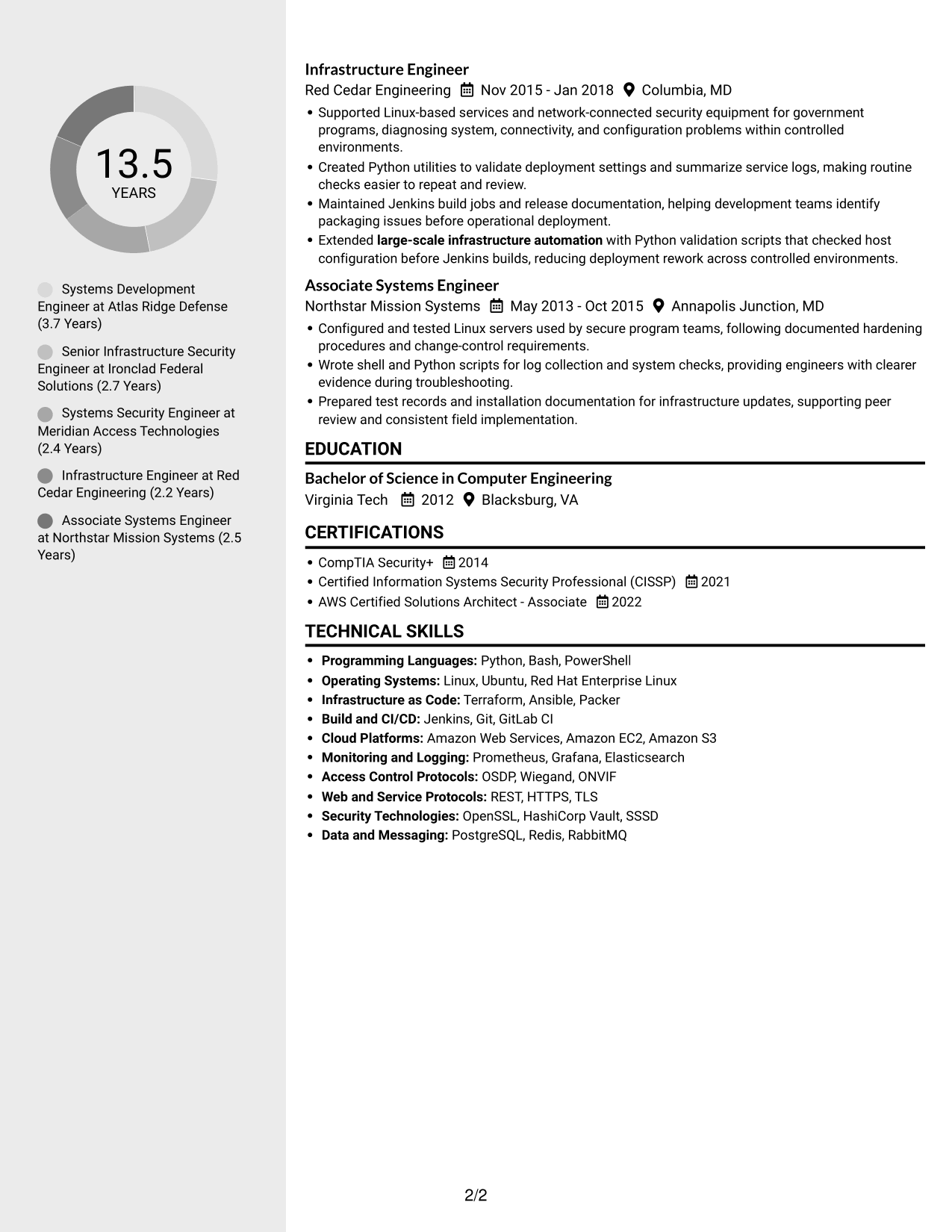
 
Resume example — page 1   Resume example — page 2

Why This Format Works

  • Separate columns distinguish work history from supporting sections during a focused review.
  • Skills and credentials can be located without interrupting the sequence of experience entries.
  • The two-column arrangement gives several resume sections room to remain distinct.

Best For

  • Parallel content organization
  • Resumes with many section types
  • Quick access to supporting details
  • No-photo resume preferences
  • Dense technical content


#6 Two Column Format Resume Example

The two-column body creates parallel reading areas, a useful choice when the resume includes several types of information.
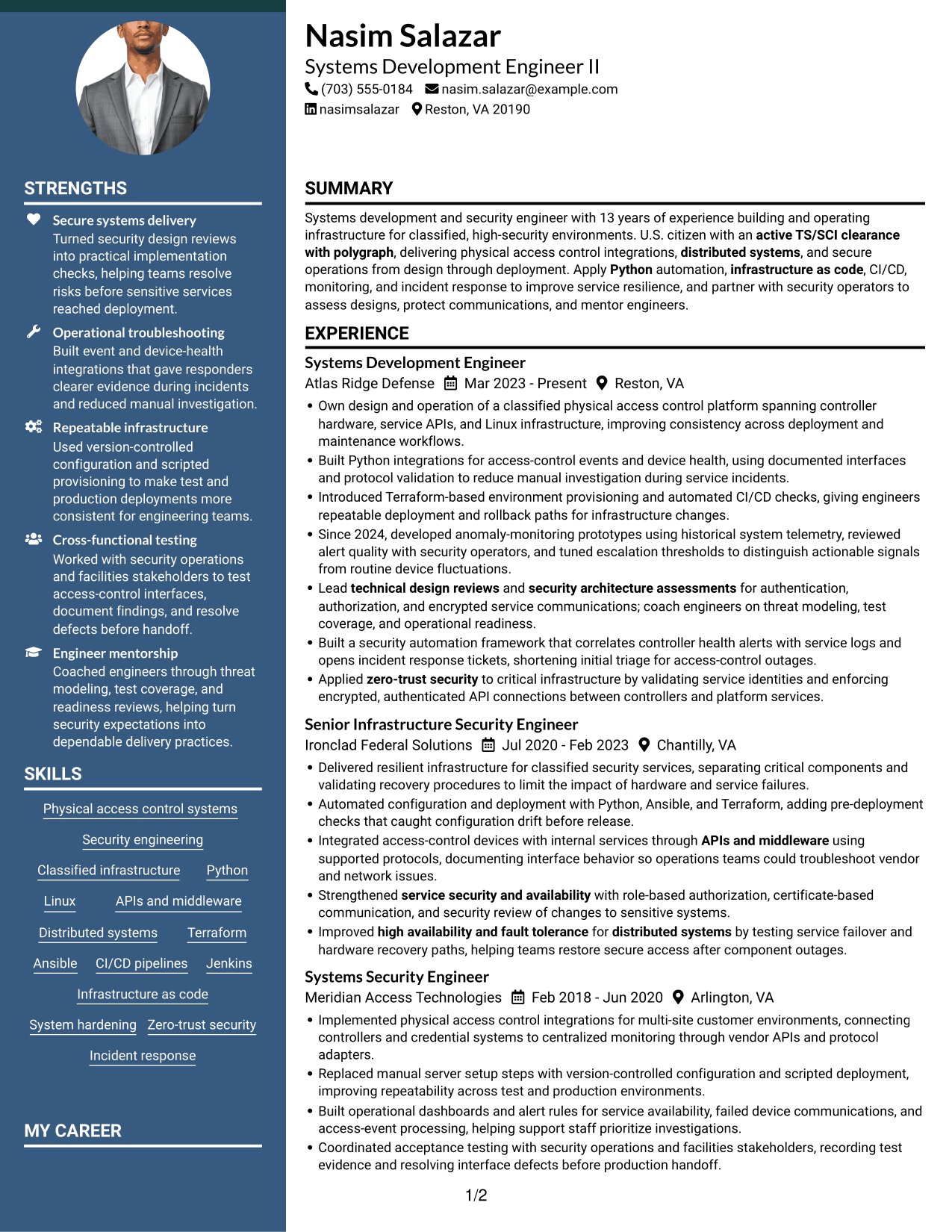
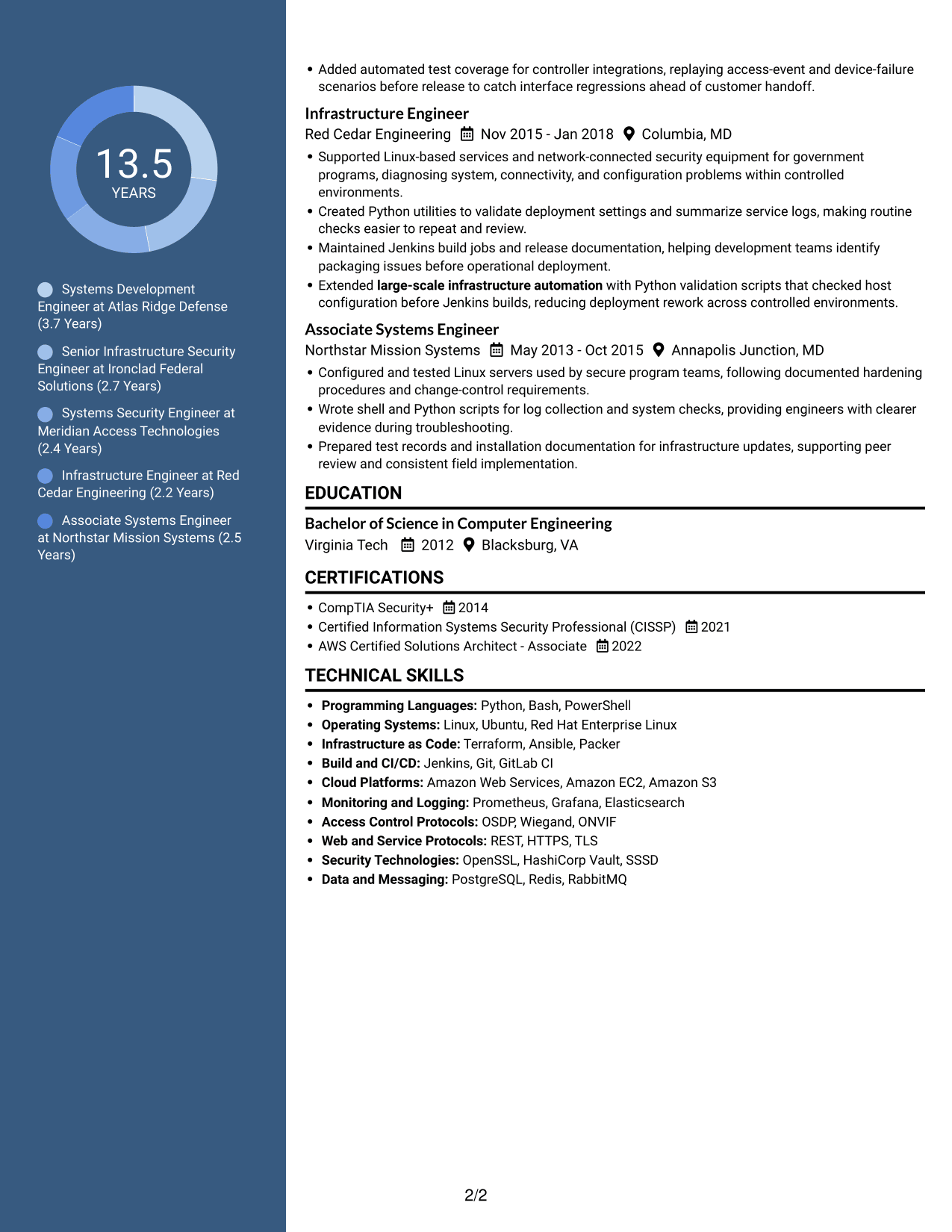
 
Resume example — page 1   Resume example — page 2

Why This Format Works

  • Experience and supporting details can occupy distinct areas, reducing back-and-forth during review.
  • A clear reading order helps reviewers find education and credentials across the columns.
  • Skills remain visible as reviewers assess work history and technical scope.

Best For

  • Two-area content organization
  • Experience with supporting resume sections
  • Technical histories with varied details
  • Readers comparing skills and work history
  • Resumes needing distinct content zones
 

#7 Photo Header Two Column Format Resume Example

The two-column body includes a resume photo, combining a portrait option with distinct areas for organizing written content.
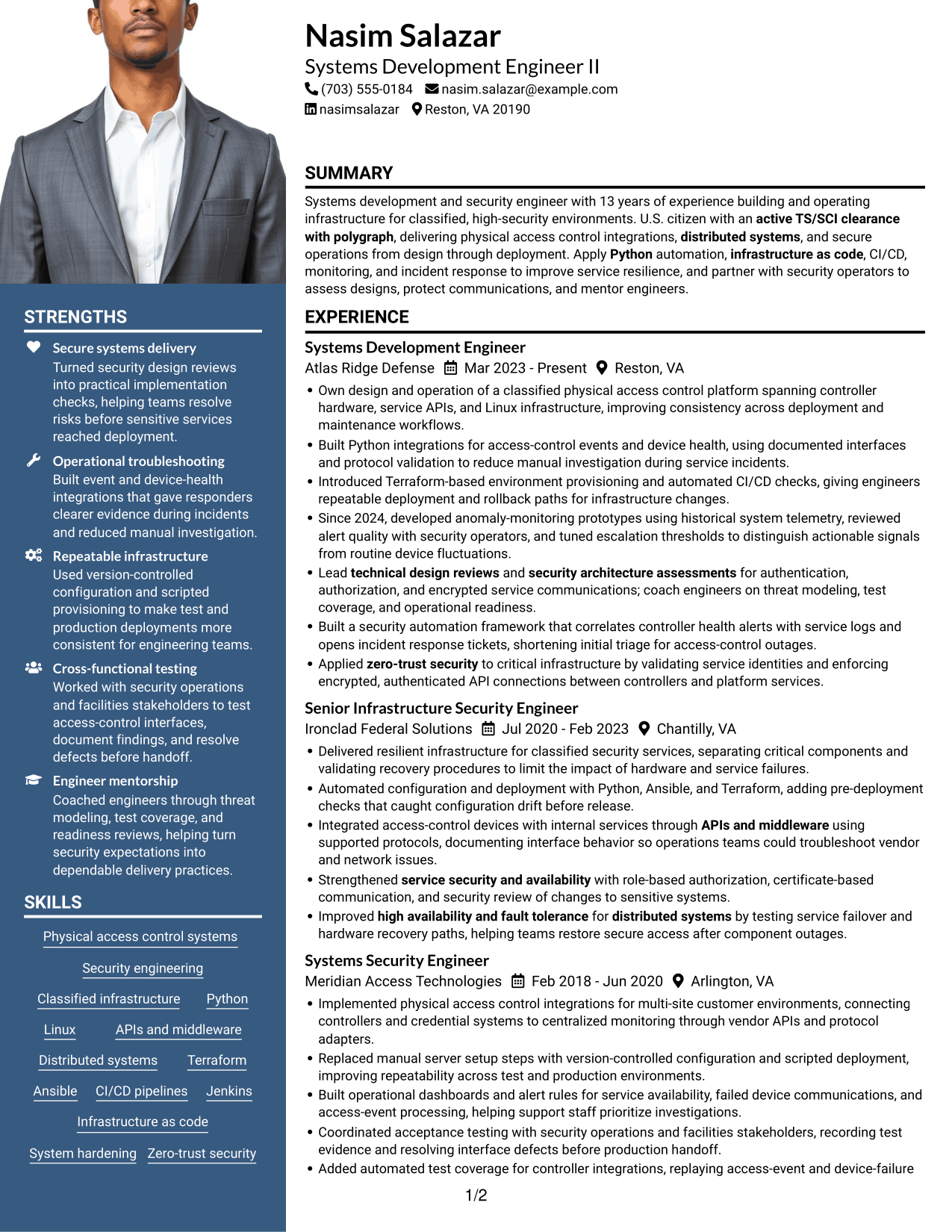
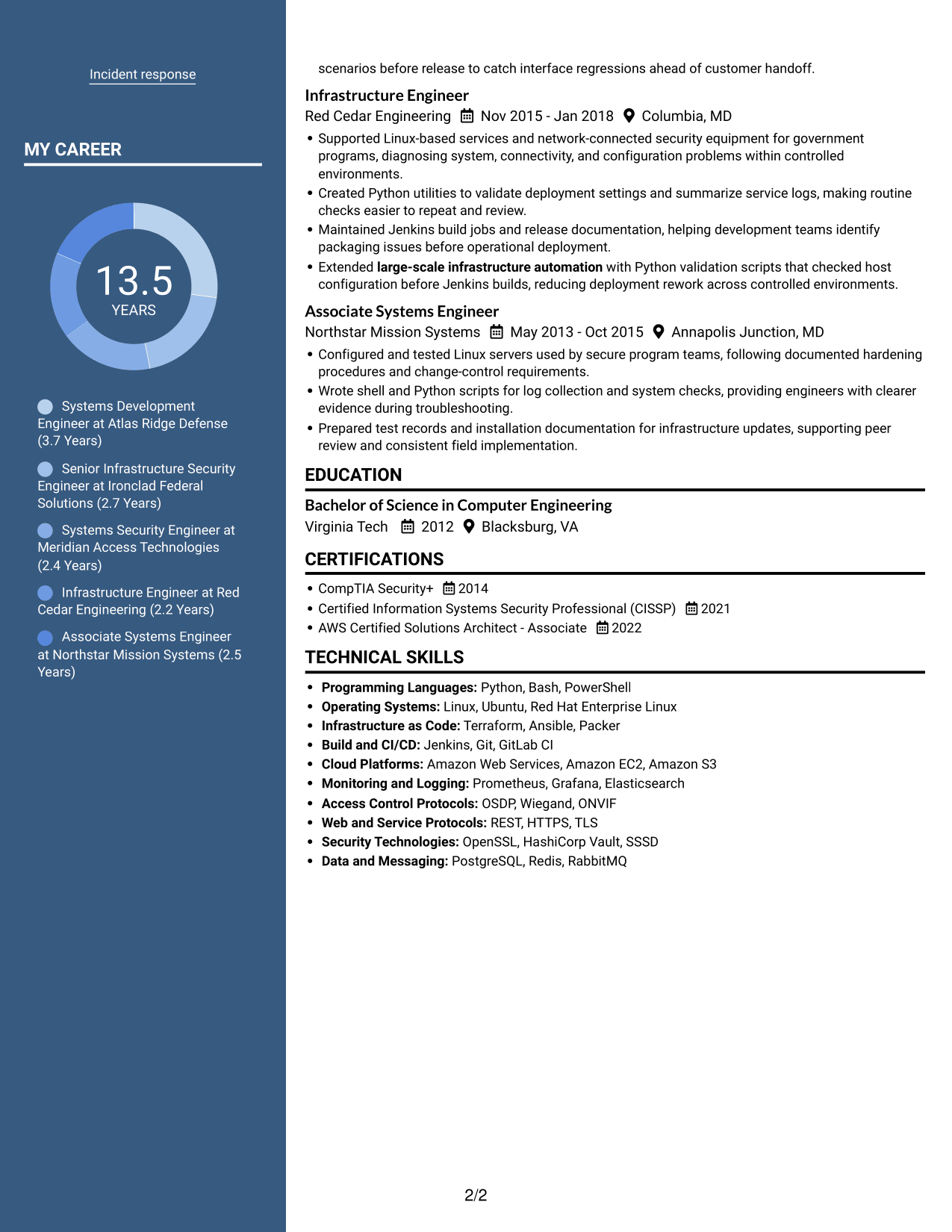
 
Resume example — page 1   Resume example — page 2

Why This Format Works

  • Two columns separate content areas, while the photo adds a clear portrait element.
  • Work history and supporting sections can be scanned as distinct parts of the resume.
  • Education and certifications remain available without interrupting review of experience entries.

Best For

  • Photo-inclusive resume preferences
  • Two-column content organization
  • Resumes pairing a portrait with detailed text
  • Separate areas for multiple sections
  • Technical histories with broad supporting details


Why Build Your Systems Development Engineer II - Physical Access Control Systems Resume with ResumeInMinutes

ResumeInMinutes lets you review resume image previews and open an example in the editor. Use the layout to organize your experience, technical skills, education, and certifications for this systems development role.

  • Professional resume layouts
  • Clear, ATS-friendly section structure
  • Role-focused keyword guidance
  • Experience and skills organization
  • Image previews for comparison
  • Resume customization in the editor

Keep each section relevant to the target position. Use specific examples to show your work with access-control integrations, secure communications, automation, deployment, and operational monitoring.


See Also


Frequently Asked Questions

Are these Systems Development Engineer II - Physical Access Control Systems resume templates ATS-friendly?

The layouts use readable headings and a clear section structure. For stronger ATS alignment, use accurate terms from your experience, such as physical access control systems, Python, Linux, APIs, infrastructure as code, CI/CD, and distributed systems.

Do the examples show different resumes?

The page shows one resume example in several layouts. The image previews let you compare how each design organizes the same information.

What should this resume include?

Include a focused summary, relevant experience, technical skills, education, and certifications. Use concise bullets to explain your role in access-control integrations, secure infrastructure, deployment, monitoring, and incident response.

How should I describe physical access control systems experience?

Name the systems or interfaces you worked with, then explain the task and its result. Where accurate, mention controller integrations, APIs and middleware, OSDP or Wiegand, device-health monitoring, security controls, and testing.

Which resume format works well for this role?

A clean, easy-to-scan format works well for technical experience. Choose headings and columns that keep your experience, technical skills, education, and certifications clear in both the image preview and the editor.

Should I include a photo on my resume?

For applications in the United States, a photo is usually not needed. A no-photo resume keeps attention on your skills and work history.


ATS Score 79%

How we calculate this score

  • Keywords: 60% of the total. AI extracts keywords from your job description. If you do not provide one, a standard job description for the title matching your resume is used. This is not a match to a specific vacancy.
  • Text-based resume: 20%. The text resume assessed here receives 100 for this part.
  • Resume quality: 20%. We start at 100 and subtract points for issues found by our resume checks, down to a minimum of zero.
  • Keyword coverage = 100 × (confirmed matches + 0.8 × possible matches) ÷ total keywords, rounded and capped at 100. Possible matches still need checking. Saved generation audits use their saved keyword percentage.
  • Final score = 60% of keyword coverage + 20% of the text score + 20% of the quality score, rounded to a whole number. Without keywords, no overall ATS score is available.

What this score means

Our scores are estimates, not employer ratings. They may contain errors and do not guarantee accurate parsing, a ranking, an interview, or a job. Check your document against the employer’s requirements. You are responsible for relying on this score.

Terms and Conditions

Score weights: Keywords 60% · Text based resume 20% · Resume quality 20%

Keywords: 14 matched + 6 possible of 29 (65%) · Resume quality: 100%

Resume quality 100% · Weight 20% · Issues (0)

Details
  • ✓Name present: Nasim Salazar
  • ✓Email format: nasim.salazar@example.com
  • ✓Phone format: (703) 555-0184
  • ✓Experience 1: Job title: Systems Development Engineer
  • ✓Experience 1: Company name: Atlas Ridge Defense
  • ✓Experience 1: Work location: Reston, VA
  • ✓Experience 1: Employment dates: Mar 2023 - Present
  • ✓Experience 1: Description or achievements: Present
  • ✓Experience 2: Job title: Senior Infrastructure Security Engineer
  • ✓Experience 2: Company name: Ironclad Federal Solutions
  • ✓Experience 2: Work location: Chantilly, VA
  • ✓Experience 2: Employment dates: Jul 2020 - Feb 2023
  • ✓Experience 2: Description or achievements: Present
  • ✓Experience 3: Job title: Systems Security Engineer
  • ✓Experience 3: Company name: Meridian Access Technologies
  • ✓Experience 3: Work location: Arlington, VA
  • ✓Experience 3: Employment dates: Feb 2018 - Jun 2020
  • ✓Experience 3: Description or achievements: Present
  • ✓Experience 4: Job title: Infrastructure Engineer
  • ✓Experience 4: Company name: Red Cedar Engineering
  • ✓Experience 4: Work location: Columbia, MD
  • ✓Experience 4: Employment dates: Nov 2015 - Jan 2018
  • ✓Experience 4: Description or achievements: Present
  • ✓Experience 5: Job title: Associate Systems Engineer
  • ✓Experience 5: Company name: Northstar Mission Systems
  • ✓Experience 5: Work location: Annapolis Junction, MD
  • ✓Experience 5: Employment dates: May 2013 - Oct 2015
  • ✓Experience 5: Description or achievements: Present
  • ✓No placeholder fields
  • ✓No repeated achievement bullets
  • ✓No empty bullets

No issues found by the current checks.

Text Based Resume 100% · Weight 20%

Parsed text
Nasim Salazar
(703) 555-0184
nasim.salazar@example.com
nasimsalazar
Reston, VA 20190
SUMMARY
Systems development and security engineer with 13 years of experience building and operating infrastructure for classified, high-security environments. U.S. citizen with an active TS/SCI clearance with polygraph, delivering physical access control integrations, distributed systems, and secure operations from design through deployment. Apply Python automation, infrastructure as code, CI/CD, monitoring, and incident response to improve service resilience, and partner with security operators to assess designs, protect communications, and mentor engineers.
EXPERIENCE
Systems Development Engineer
Mar 2023 - Present
Atlas Ridge Defense
Reston, VA
Own design and operation of a classified physical access control platform spanning controller hardware, service APIs, and Linux infrastructure, improving consistency across deployment and maintenance workflows.
Built Python integrations for access-control events and device health, using documented interfaces and protocol validation to reduce manual investigation during service incidents.
Introduced Terraform-based environment provisioning and automated CI/CD checks, giving engineers repeatable deployment and rollback paths for infrastructure changes.
Since 2024, developed anomaly-monitoring prototypes using historical system telemetry, reviewed alert quality with security operators, and tuned escalation thresholds to distinguish actionable signals from routine device fluctuations.
Lead technical design reviews and security architecture assessments for authentication, authorization, and encrypted service communications; coach engineers on threat modeling, test coverage, and operational readiness.
Built a security automation framework that correlates controller health alerts with service logs and opens incident response tickets, shortening initial triage for access-control outages.
Applied zero-trust security to critical infrastructure by validating service identities and enforcing encrypted, authenticated API connections between controllers and platform services.
Senior Infrastructure Security Engineer
Jul 2020 - Feb 2023
Ironclad Federal Solutions
Chantilly, VA
Delivered resilient infrastructure for classified security services, separating critical components and validating recovery procedures to limit the impact of hardware and service failures.
Automated configuration and deployment with Python, Ansible, and Terraform, adding pre-deployment checks that caught configuration drift before release.
Integrated access-control devices with internal services through APIs and middleware using supported protocols, documenting interface behavior so operations teams could troubleshoot vendor and network issues.
Strengthened service security and availability with role-based authorization, certificate-based communication, and security review of changes to sensitive systems.
Improved high availability and fault tolerance for distributed systems by testing service failover and hardware recovery paths, helping teams restore secure access after component outages.
Systems Security Engineer
Feb 2018 - Jun 2020
Meridian Access Technologies
Arlington, VA
Implemented physical access control integrations for multi-site customer environments, connecting controllers and credential systems to centralized monitoring through vendor APIs and protocol adapters.
Replaced manual server setup steps with version-controlled configuration and scripted deployment, improving repeatability across test and production environments.
Built operational dashboards and alert rules for service availability, failed device communications, and access-event processing, helping support staff prioritize investigations.
Coordinated acceptance testing with security operations and facilities stakeholders, recording test evidence and resolving interface defects before production handoff.
Added automated test coverage for controller integrations, replaying access-event and device-failure scenarios before release to catch interface regressions ahead of customer handoff.
Infrastructure Engineer
Nov 2015 - Jan 2018
Red Cedar Engineering
Columbia, MD
Supported Linux-based services and network-connected security equipment for government programs, diagnosing system, connectivity, and configuration problems within controlled environments.
Created Python utilities to validate deployment settings and summarize service logs, making routine checks easier to repeat and review.
Maintained Jenkins build jobs and release documentation, helping development teams identify packaging issues before operational deployment.
Extended large-scale infrastructure automation with Python validation scripts that checked host configuration before Jenkins builds, reducing deployment rework across controlled environments.
Associate Systems Engineer
May 2013 - Oct 2015
Northstar Mission Systems
Annapolis Junction, MD
Configured and tested Linux servers used by secure program teams, following documented hardening procedures and change-control requirements.
Wrote shell and Python scripts for log collection and system checks, providing engineers with clearer evidence during troubleshooting.
Prepared test records and installation documentation for infrastructure updates, supporting peer review and consistent field implementation.
EDUCATION
Bachelor of Science in Computer Engineering
2012
Virginia Tech
Blacksburg, VA
CERTIFICATIONS
CompTIA Security+
2014
Certified Information Systems Security Professional (CISSP)
2021
AWS Certified Solutions Architect - Associate
2022
TECHNICAL SKILLS
Programming Languages: Python, Bash, PowerShell
Operating Systems: Linux, Ubuntu, Red Hat Enterprise Linux
Infrastructure as Code: Terraform, Ansible, Packer
Build and CI/CD: Jenkins, Git, GitLab CI
Cloud Platforms: Amazon Web Services, Amazon EC2, Amazon S3
Monitoring and Logging: Prometheus, Grafana, Elasticsearch
Access Control Protocols: OSDP, Wiegand, ONVIF
Web and Service Protocols: REST, HTTPS, TLS
Security Technologies: OpenSSL, HashiCorp Vault, SSSD
Data and Messaging: PostgreSQL, Redis, RabbitMQ
SKILLS
Physical access control systems
Security engineering
Classified infrastructure
Python
Linux
APIs and middleware
Distributed systems
Terraform
Ansible
CI/CD pipelines
Jenkins
Infrastructure as code
System hardening
Zero-trust security
Incident response

Matched keywords (14)

  • Physical access control systems
  • large-scale infrastructure automation
  • infrastructure as code
  • CI/CD pipelines
  • distributed systems
  • APIs and middleware
  • high availability and fault tolerance
  • System hardening
  • zero-trust security
  • security architecture assessmentsOriginal keyword in JD: Security architecture assessment
  • technical design reviews
  • service security and availability
  • PythonOriginal keyword in JD: Python OR Ruby OR Go OR Java OR C++ OR C# OR Rust
  • active TS/SCI clearance with polygraph

Missing keywords (9)

  • Build processes
  • Threat detection
  • Operational monitoring
  • Anomaly detection
  • Cryptographic protections
  • Test automation
  • Engineering practices
  • Technical mentorship
  • U.S. citizenship

Possible matches (6)

  • Security automation frameworks80% credit: 2.76 percentage points of 3.45 possible.
  • Deployment and configuration management80% credit: 2.76 percentage points of 3.45 possible.
  • Automated incident response80% credit: 2.76 percentage points of 3.45 possible.
  • Monitoring and alerting80% credit: 2.76 percentage points of 3.45 possible.
  • Critical infrastructure security80% credit: 2.76 percentage points of 3.45 possible.
  • Authentication and authorization protocols80% credit: 2.76 percentage points of 3.45 possible.
Disclaimer: All names, images, contact information, employment histories, achievements, security clearances, military credentials, and other qualifications shown in this content are fictional and used for illustrative purposes only. Any resemblance to actual persons, living or deceased, is purely coincidental.

Resume and cover-letter examples and recommendations in this article reflect general best practices and professional experience and are provided for guidance only. Results may vary based on role, industry, region, and hiring organization.

Content Accuracy and Verification: To the fullest extent permitted by applicable law, we do not represent or warrant that resume or cover-letter guidance, examples, recommendations, or related information are accurate, complete, current, error-free, or suitable for any particular purpose. You are responsible for independently reviewing and verifying the information before relying on it.

ATS and Cover-Letter Scores: ATS scores are estimates calculated using our own formula, informed by publicly available guidance on resume formatting and keyword matching. They are not scores issued or endorsed by an ATS provider or employer. Cover-letter scores are also our own assessments. Parsing, weighting, screening criteria, and results vary between systems, employers, job descriptions, and document formats. No score guarantees successful parsing, a particular ranking, an interview, or employment. Use scores as general guidance and independently check your documents against the employer’s requirements. To the fullest extent permitted by applicable law, we accept no liability for errors in scores or parsing, or losses arising from reliance on these assessments. Nothing in this notice excludes liability or limits consumer rights that cannot lawfully be excluded or limited.

Terms and Conditions
 
> JP 1 1
PDF Footer and Margins Setup
The margins are applied to the document, and the footer shows up in the preview and the PDF

Footer Font Settings

Are you applying for a specific job
so we can tailor your resume to it?
Are you applying for a specific job
so we can tailor your cover letter to it?
Type your details as text to generate a personalized resume Type your details as text to generate a personalized cover letter
Website link found! Ready to create resume from:
Drag the into the box to verify you're human.
Drop here

My Resumes

Displaying {number_of_files} files (out of {total_of_all_files} total)
Name File Type Last Modified: Description:

Rename File

Filename already exists!

Delete Files

Warning: This action is irreversible. Once you click submit, the files will be permanently deleted.

Heading text
Upload From Computer Upload
Select From Existing
LinkedIn
Drag & Drop files anywhere in this tab, or

Uploaded Files

Delete Name Last Updated Use This File
Select this to use the file for generating your resume and cover letter. Only one source—uploaded file, selected file, or LinkedIn text—can be used.

My Files

Resumes or cover letters you create will appear here. No files available yet.
Delete Name Last Updated Use This File
Select this to use the file for generating your resume and cover letter. Only one source—uploaded file, selected file, or LinkedIn text—can be used.

Add LinkedIn Profile PDF

You can download your LinkedIn profile as a PDF by opening linkedin.com in a web browser, clicking your profile photo, selecting the “More” or “Resources” button, and choosing “Save to PDF.” You can then attach the PDF using the Upload From Computer tab.

Paste Your LinkedIn Profile Text

If you have copied the LinkedIn profile text, paste it below. See how to copy your profile from LinkedIn

Select this to use the LinkedIn profile text for generating your resume and cover letter. Only one source—uploaded file, selected file, or LinkedIn text—can be used.

Try these controls

<
>


