1. What is the difference between an inner join and an outer join, and when would an analyst use each?
Explain matching and unmatched rows, distinguish left/full outer behavior, and include a business-reporting example with a row-count validation check.
An INNER JOIN returns only rows where the join condition matches in both tables. A LEFT OUTER JOIN keeps every row from the left table and adds matching right-side data; when there is no match, the right-side columns are NULL. A FULL OUTER JOIN keeps matching rows plus unmatched rows from either table. I would use INNER JOIN when the report only needs records present in both datasets, LEFT JOIN when I must preserve the full left-side population, and FULL OUTER JOIN for reconciliation. I would also validate row counts because one-to-many joins can increase the number of output rows.
See the Code while reading this explanation.
A join combines rows from two tables using a relationship such as customer_id. The key decision is which rows the report must keep when a match is missing. An INNER JOIN removes unmatched rows. A LEFT OUTER JOIN keeps every row from the left table and uses NULL for right-table columns when no match exists. A FULL OUTER JOIN keeps unmatched rows from both tables. Before writing SQL, I check each table's grain and relationship because one customer can have several orders, so one customer may produce multiple joined rows.
- Which table defines the population that must remain complete in the report?
- Is the relationship one-to-one or one-to-many, and what should the output grain be?
- Can the join key be NULL, duplicated, or missing from the other table?
- Should unmatched records be excluded, shown with NULL values, or reported separately for reconciliation?
- What row counts or trusted totals should I use to validate the result?
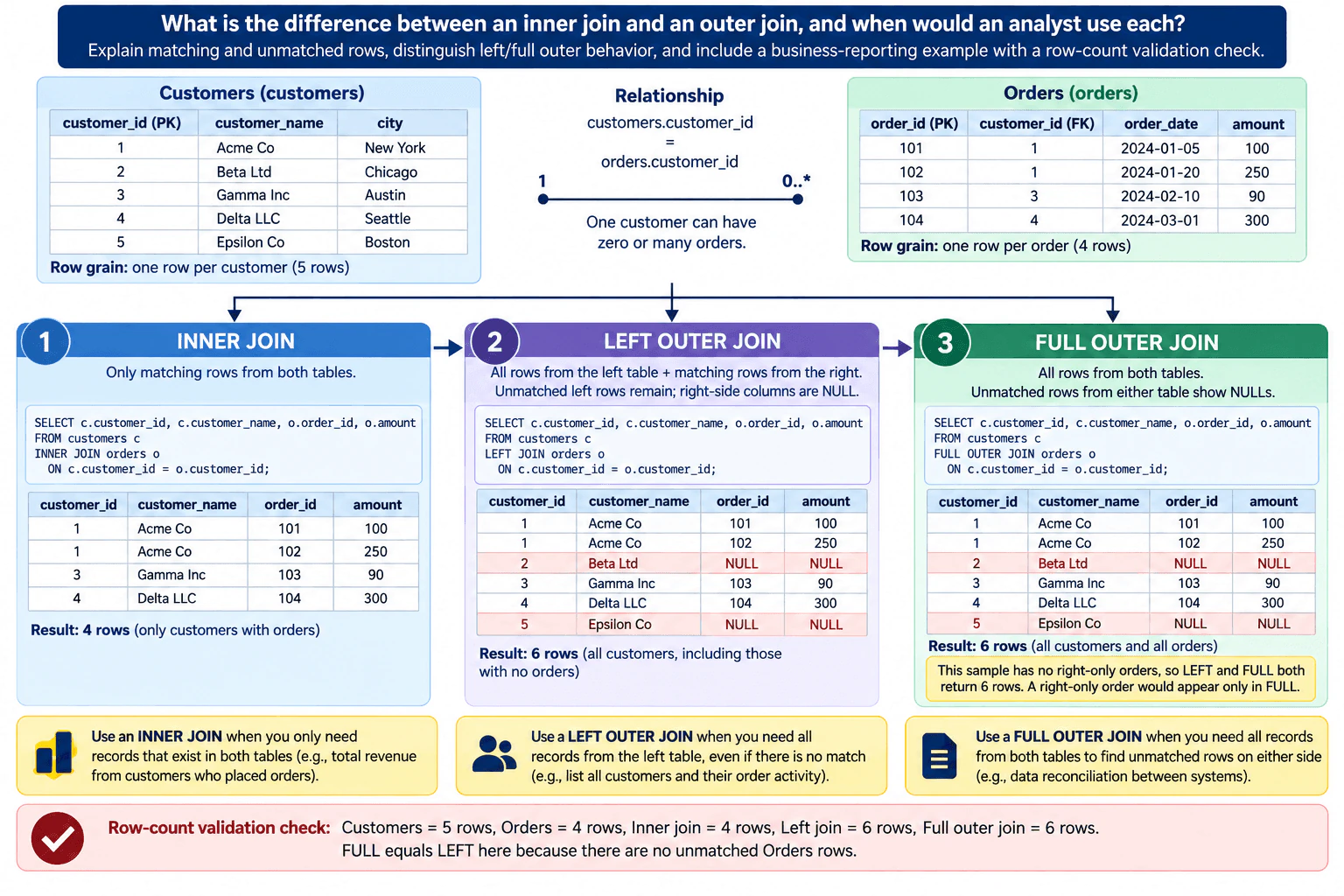
In the diagram, Customers contains one row per customer with customer_id as the primary key. Orders contains one row per order with order_id as the primary key and customer_id as the relationship back to Customers. The relationship is one customer to zero or many orders. That means a customer with two orders appears twice after a join at order grain.
With an INNER JOIN, only matching customer-order pairs remain. In the sample, customers 1, 3, and 4 have orders. Customer 1 has two orders, so the INNER JOIN returns four rows: two for customer 1, one for customer 3, and one for customer 4. Customers 2 and 5 disappear because they have no matching order. This fits a business report such as revenue from customers who actually placed orders.
A LEFT OUTER JOIN starts with the complete Customers population. Matching Orders rows are attached where they exist. Customers 2 and 5 still appear, but their order_id and amount values are NULL because there is no matching order. The result contains six rows: four matching order rows plus two unmatched customer rows. This is appropriate for a customer coverage or activity report because customers with zero orders must remain visible.
A FULL OUTER JOIN keeps matching rows plus unmatched rows from either side. In this sample, every Orders row has a matching customer, so the FULL OUTER JOIN also returns six rows. That is why the LEFT and FULL counts are the same in the diagram. If there were an order-side row with no matching customer, a FULL OUTER JOIN would retain it with NULL values for the customer columns, while the LEFT JOIN starting from Customers would not.
NULL handling is important. In an outer join, NULL values introduced on the non-matching side mean no matching row was found; they are not the same as zero or an empty string. For an equality join, a NULL join key does not compare equal to another value, including another NULL, because the comparison evaluates to UNKNOWN rather than TRUE. An INNER JOIN therefore does not match such rows. A LEFT JOIN still preserves an unmatched left row, and a FULL OUTER JOIN preserves unmatched rows from either side.
Filtering also matters. If I perform a LEFT JOIN and then put a condition such as o.amount > 100 in the WHERE clause, rows with no matching order have NULL for o.amount and are removed by that filter. If the business requirement is to keep every customer while limiting which Orders rows can match, I would put that condition in the ON clause instead.
Finally, I validate the output. The diagram's control counts are Customers = 5 rows, Orders = 4 rows, INNER JOIN = 4 rows, LEFT JOIN = 6 rows, and FULL OUTER JOIN = 6 rows. The LEFT JOIN has more rows than the five-row Customers table because customer 1 has two matching orders. I would also compare COUNT() with COUNT(DISTINCT customer_id), inspect unmatched rows, check for unexpected duplicate keys, and compare business totals with a trusted source before publishing the report.
- State the SQL dialect and identify the two tables, join columns, and keys.
- Define the input grain: one row per customer in Customers and one row per order in Orders.
- Identify the relationship as one customer to zero or many orders.
- Decide which population must be preserved when a match is missing.
- Use INNER JOIN when only matching rows are needed.
- Use LEFT OUTER JOIN when every left-side row must remain.
- Use FULL OUTER JOIN when unmatched rows from either side must remain.
- Check NULL behavior and place filters so they do not accidentally remove required unmatched rows.
- Validate COUNT(), distinct business keys, one-to-many row expansion, unmatched rows, and trusted business totals.
The main analytical risk is not the JOIN keyword itself but the number of rows it produces. In a one-to-many relationship, one left-side row can match several right-side rows, so the output may contain more rows than the left table. That can cause overcounting if an analyst later aggregates at the wrong grain. INNER JOIN can remove unmatched records that the business expected to see, while outer joins preserve more records and can produce a larger result. Performance depends on data size, indexes, statistics, join conditions, and the database optimizer, but correctness and expected grain should be established before performance tuning.
Using the diagram's Customers and Orders tables, the following PostgreSQL-style SQL demonstrates INNER JOIN, LEFT OUTER JOIN, and FULL OUTER JOIN on customer_id. The row-count checks confirm the sample results shown in the diagram: 5 Customers rows, 4 Orders rows, 4 INNER JOIN rows, 6 LEFT JOIN rows, and 6 FULL OUTER JOIN rows. LEFT and FULL have the same count here because every Orders row has a matching customer.
-- INNER JOIN: keep only matching customer/order rows
SELECT
  c.customer_id,
  c.customer_name,
  o.order_id,
  o.amount
FROM
  customers AS c
  INNER JOIN orders AS o ON c.customer_id = o.customer_id;


-- LEFT OUTER JOIN: preserve every customer
SELECT
  c.customer_id,
  c.customer_name,
  o.order_id,
  o.amount
FROM
  customers AS c
  LEFT OUTER JOIN orders AS o ON c.customer_id = o.customer_id;


-- FULL OUTER JOIN: preserve unmatched rows from either table
SELECT
  c.customer_id,
  c.customer_name,
  o.order_id,
  o.amount
FROM
  customers AS c
  FULL OUTER JOIN orders AS o ON c.customer_id = o.customer_id;


-- Row-count validation for the sample
SELECT
  COUNT() AS customer_rows
FROM
  customers;


-- 5
SELECT
  COUNT() AS order_rows
FROM
  orders;


-- 4
SELECT
  COUNT() AS inner_rows
FROM
  customers AS c
  INNER JOIN orders AS o ON c.customer_id = o.customer_id;


-- 4
SELECT
  COUNT() AS left_rows
FROM
  customers AS c
  LEFT OUTER JOIN orders AS o ON c.customer_id = o.customer_id;


-- 6
SELECT
  COUNT() AS full_rows
FROM
  customers AS c
  FULL OUTER JOIN orders AS o ON c.customer_id = o.customer_id;


-- 6INNER JOIN is common when a report should include only entities with matching activity, such as calculating revenue from customers who placed orders. LEFT OUTER JOIN is common for population-based reporting, such as listing every customer and showing order activity when available, including customers with zero orders. FULL OUTER JOIN is useful for reconciliation, migration checks, and completeness testing when an analyst needs to find records present in either dataset but missing from the other.
Interviewers want to see whether the candidate understands matching versus unmatched rows, which side of an outer join is preserved, row grain, NULL behavior, and one-to-many row multiplication. They also want to know whether the candidate chooses a join based on the reporting population and validates the output instead of relying only on correct SQL syntax.
Common mistakes are assuming one joined row always equals one customer, forgetting that a one-to-many relationship can multiply rows, using INNER JOIN when customers with no activity must remain visible, reversing LEFT JOIN behavior, treating NULL as zero, assuming NULL join keys match each other, placing a right-table condition in WHERE and accidentally removing unmatched LEFT JOIN rows, and checking only SQL syntax without validating row counts, distinct keys, or trusted business totals.
State the grain first, then say which population must be preserved. A concise explanation is: INNER keeps matches, LEFT keeps all rows from the left plus matches from the right, and FULL keeps unmatched rows from both sides. Finish with a business example and a row-count check, especially noting that one-to-many joins can increase the number of output rows.