This interview guide is for educational and informational purposes only. It is designed to help readers prepare, but it does not guarantee any interview result, hiring decision, offer, or outcome. Interview questions, hiring criteria, and preferred answers can vary by employer, interviewer, industry, location, and time. All answers, examples, and explanations in this guide are suggested examples for interview preparation, not definitive answers or instructions for professional practice. They are based on research and judgment, are provided without warranties of any kind, and should be adapted to the question, role, and applicable laws and professional requirements. Diagrams are simplified illustrations intended to highlight the main concepts and their relationships; actual situations, systems, and practices may be more complex. Alternative approaches may be equally valid or better suited to a particular question, context, or interviewer. To the fullest extent permitted by applicable law, the contributors and publisher are not liable for decisions made, actions taken, or losses incurred based on this guide.
State Laws and Professional Responsibilities
Laws and requirements governing an occupation vary by state and jurisdiction. You are responsible for checking the current laws, licensing requirements, and scope-of-practice rules that apply to your location and role, and for ensuring that your answers and actions comply with them. Adapt examples in this guide to those requirements. This guide is not legal advice.
Identity, Image, and Privacy Notice
To respect individual privacy, some names, profile photographs, avatars, biographical details, and other identifying information displayed in this guide may be replaced with pseudonyms, licensed stock images, illustrative avatars, composite images, or representative descriptions. Unless a person is expressly identified as an actual contributor, a displayed name, image, or profile should not be understood as depicting or identifying a specific candidate, interviewer, employee, or other real individual. These representations are provided for editorial and illustrative purposes only and do not imply endorsement, employment, participation, or affiliation with this guide or any company mentioned in it. Any resemblance to an actual person is coincidental.
Company Notice
This guide is an independent educational resource and is not affiliated with, endorsed by, sponsored by, or approved by the company named in this guide. Company names identify reported interview experiences or the employer context of clearly labeled original practice exercises. Interview practices can change without notice, and inclusion of company-specific content does not mean these questions are official, complete, or guaranteed to be asked. To the fullest extent permitted by law, the author, contributors, and publisher are not responsible for outcomes related to use of this material.
Content Accuracy and Verification
To the fullest extent permitted by applicable law, we do not represent or warrant that interview guides, questions, answers, examples, or diagrams are accurate, complete, current, error-free, or suitable for any particular purpose. You are responsible for independently reviewing and verifying the information before relying on it.
Questions or comments?
Contact us for general questions, or share feedback, technical corrections, and comments with the community.
1. How would you secure an enterprise network?Security ArchitectureHardAmazon
i Question Details
Which products, tools, and technologies would you use to secure that network?
Short Interview Answer (30-60 seconds)
I would combine edge filtering, zero-trust identity checks, least-privilege authorization, segmented internal networks, endpoint protection, encryption, centralized SIEM monitoring, incident response, and protected tested backups. Every request is verified rather than trusted by network location, which reduces lateral movement and blast radius.
Detailed Explanation
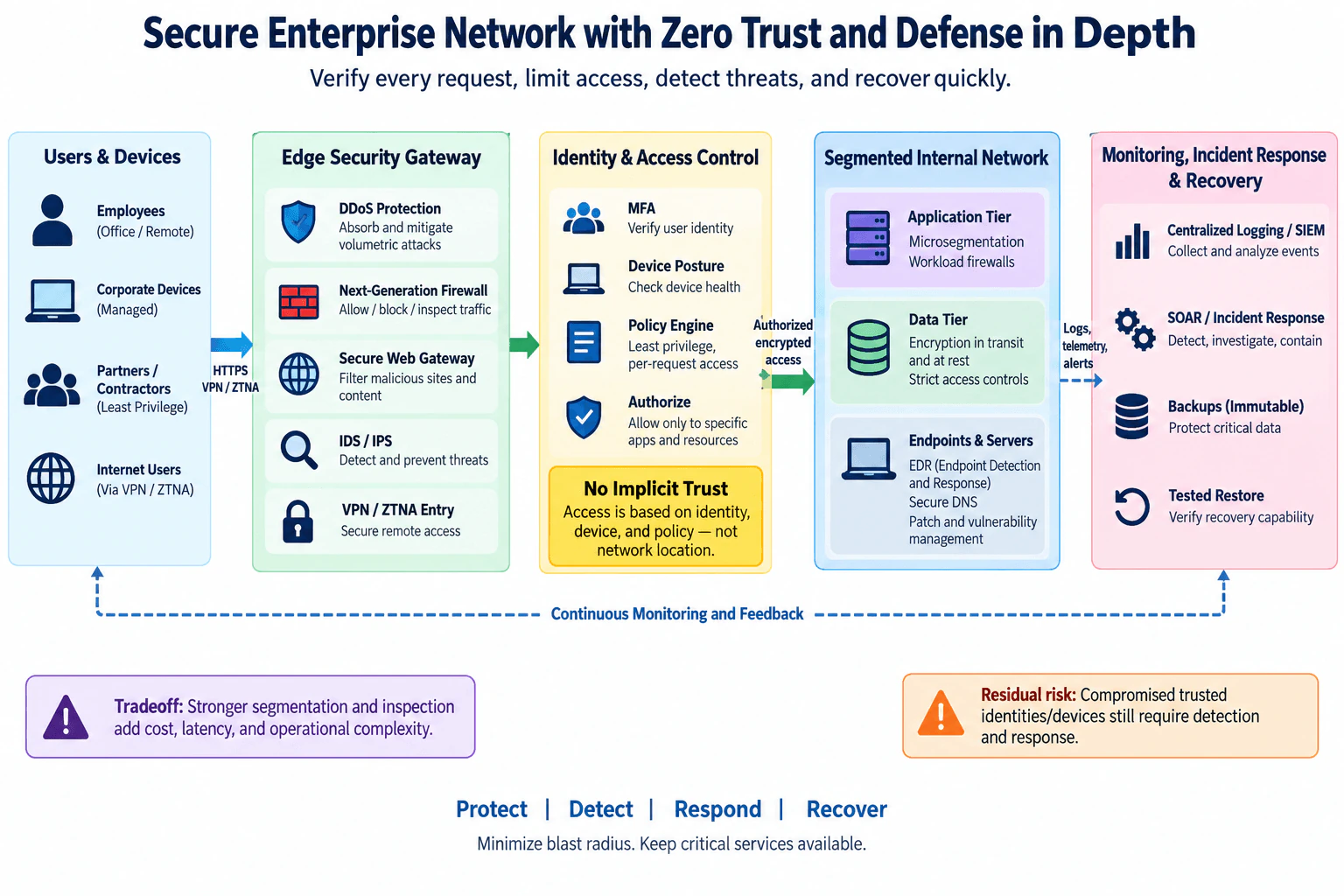
This question asks how I would protect an enterprise network as one complete system and which technologies I would use at each important trust boundary. I would protect employees, managed devices, partners, contractors, applications, servers, and data with several independent layers. The design combines an edge security gateway, identity and access control, a segmented internal network, endpoint protection, centralized monitoring, incident response, and verified recovery. The central rule is zero trust: being inside the enterprise network does not automatically make a request trustworthy. Access is authorized only after identity, device, policy, and resource requirements are evaluated.
Useful Questions to Ask the Interviewer
Are employees, contractors, and partners accessing the environment both on-site and remotely?
Which applications, systems, and data are the most critical assets?
Is the environment mainly on-premises, cloud-based, or hybrid?
What availability and recovery expectations exist for critical services?
Which identity, endpoint, firewall, SIEM, and backup platforms already exist?
How to Explain It in an Interview
I would explain the architecture from left to right, following the approved diagram.
Edge security gateway
Employees, corporate devices, partners, contractors, and remote users first cross the enterprise edge. Normal application traffic uses protected HTTPS connections, while remote access can use VPN or Zero Trust Network Access, or ZTNA, depending on the application and access model.
The edge security gateway provides several independent controls. DDoS protection addresses volumetric availability attacks. A next-generation firewall permits, blocks, and inspects traffic according to policy. A secure web gateway filters malicious or unwanted destinations and content. IDS/IPS detects suspicious network activity and can block traffic when configured for prevention. VPN or ZTNA provides controlled remote entry. These controls form defense in depth; none is assumed to stop every attack by itself.
Identity and access control
Passing the network edge does not create trust. The identity layer verifies the user with multi-factor authentication, or MFA, evaluates device posture, and sends those signals to a policy engine. The policy engine makes a least-privilege decision for the particular request. Only authorized access to specific applications and resources is allowed.
This matches the zero-trust principle that network location alone must not create implicit trust. Authentication and authorization occur before protected resource access, and device security posture can contribute to the access decision. If the required identity, device, or policy checks cannot be completed, sensitive access should fail closed rather than silently granting broad network access. A separately governed emergency-access process can be used for exceptional operational situations without weakening normal policy.
Segmented internal network
Authorized traffic enters a segmented internal environment instead of a flat trusted network. The application tier uses microsegmentation and workload firewalls so workloads can communicate only over approved paths. The data tier uses encryption in transit and at rest together with strict access controls. Endpoints and servers use Endpoint Detection and Response, or EDR, secure DNS, patching, and vulnerability management.
Segmentation reduces unnecessary east-west connectivity. If one endpoint, identity, or workload is compromised, the attacker should not automatically gain access to every other internal system. This reduces lateral movement and limits blast radius. The default should be to deny unnecessary communication and explicitly permit required application and data flows.
Monitoring, detection, and response
Logs, telemetry, and alerts from the edge gateway, identity controls, applications, endpoints, servers, and data systems feed centralized logging and a Security Information and Event Management platform, or SIEM. The security operations team uses this evidence to correlate events and investigate suspicious behavior.
Security Orchestration, Automation and Response, or SOAR, can support approved incident-response workflows. Examples include isolating an affected endpoint, disabling or restricting a compromised identity, blocking confirmed malicious traffic, or opening an incident for investigation. High-impact actions should use appropriate authorization and safeguards because an alert by itself is not proof of compromise.
Recovery
Critical information is protected with backups designed to resist unauthorized alteration or deletion. Backups are useful only if they can actually be restored, so restoration must be tested regularly. A recovery exercise should confirm that systems and data can return to a known-good state rather than assuming that a successful backup job proves recoverability.
Continuous monitoring and feedback
Monitoring is a feedback loop rather than a final step. Findings from SIEM alerts, EDR telemetry, incidents, vulnerability management, patch status, and recovery exercises should feed back into access rules, segmentation policy, endpoint controls, and operating procedures. This allows the enterprise to adjust controls when risk or system behavior changes.
Ownership and validation
Network and security teams operate edge controls and segmentation. Identity teams operate authentication and authorization policy. Endpoint or infrastructure teams manage EDR, secure DNS, patching, and vulnerability remediation. Security operations owns centralized monitoring and incident coordination. Application and data owners approve legitimate access to their resources. Recovery owners maintain backups and verify restoration.
I would validate the design with firewall and segmentation rule reviews, least-privilege access tests, denied-access tests, device-posture tests, endpoint coverage checks, SIEM ingestion checks, incident-response exercises, vulnerability scanning, patch verification, and tested restores.
Failure behavior and residual risk
The architecture assumes that preventive controls can fail or be bypassed. If a trusted identity or managed device is compromised, the attacker may still produce requests that appear legitimate. Least privilege and segmentation therefore limit what that identity or device can reach, while SIEM and EDR provide evidence for detection and response.
If an authorization dependency fails, sensitive access should generally fail closed. If centralized monitoring fails, production services may continue where appropriate, but security visibility is degraded and that loss of telemetry should itself generate operational attention. Recovery controls provide a separate path for returning affected systems and data to a verified safe state.
Tradeoff
Stronger segmentation, inspection, identity checks, telemetry collection, and security automation improve isolation and visibility but also add cost, latency, administrative work, integration effort, and troubleshooting complexity. I would therefore apply the strongest controls around the most sensitive resources while keeping policies understandable and maintainable. The goal is to protect, detect, respond, and recover while minimizing blast radius and keeping critical services available.
Technical Approach
Identify the protected users, managed devices, partners, contractors, applications, servers, endpoints, and critical data.
Treat network location as insufficient evidence of trust.
Route external and remote traffic through DDoS protection, a next-generation firewall, secure web filtering, IDS/IPS, and VPN or ZTNA where appropriate.
Verify identity with MFA and evaluate device posture.
Use a policy engine to authorize least-privilege, resource-specific access.
Place applications, data, endpoints, and servers in segmented internal zones and allow only required communication.
Protect endpoints and servers with EDR, secure DNS, patching, and vulnerability management.
Protect data with strict access controls and encryption in transit and at rest.
Send logs, telemetry, and alerts to centralized SIEM monitoring.
Investigate and contain confirmed threats through controlled incident-response and SOAR workflows.
Maintain protected backups and verify recovery with tested restores.
Feed monitoring, incident, vulnerability, and recovery findings back into policies and controls.
Practical Complexity & Trade-offs
This design improves security by adding several independent layers, but every layer creates operational cost. Firewalls, IDS/IPS, secure web gateways, EDR, identity services, SIEM, SOAR, segmentation, vulnerability management, and backup systems require licensing or infrastructure, integration, skilled operators, and maintenance. Traffic inspection and repeated access decisions can add latency. Fine-grained segmentation creates more policies to design and troubleshoot. Centralized telemetry increases storage and analysis costs. MFA and restrictive access can add user friction. Protected backups require additional storage and testing. The benefit is stronger prevention, earlier detection, a smaller blast radius, and a more reliable recovery path.
Where it is used
This architecture is appropriate for medium and large enterprises with office and remote employees, managed endpoints, contractors or partners, internal applications, sensitive data, internet-connected services, and security operations teams. It is especially useful in hybrid environments where users and resources exist across enterprise facilities and cloud environments because access decisions depend on identity, device posture, policy, and resource requirements rather than assuming that an internal network location is trusted.
Why Interviewers Ask This
This question tests whether the candidate can combine network, identity, endpoint, data, monitoring, incident-response, and recovery controls into one coherent enterprise architecture instead of simply listing products. It also tests judgment about trust boundaries, least privilege, defense in depth, segmentation, failure behavior, operational ownership, residual risk, and the cost and complexity introduced by stronger controls.
Common interview mistakes
Common mistakes include treating a firewall as the complete security architecture, trusting the internal network after traffic crosses the perimeter, giving authenticated users broad network access, using a flat internal network, deploying segmentation without defining allowed flows, collecting logs without an incident-response process, assuming IDS/IPS or EDR prevents every attack, ignoring device posture, failing to patch systems, leaving backups modifiable through normal production credentials, and assuming that a successful backup job proves recovery. Another mistake is naming many products without explaining which threat, boundary, or security objective each control addresses.
Interview tip
Start with the design decision: defense in depth plus zero trust. Walk left to right through users and devices, the edge gateway, identity verification, least-privilege authorization, segmented internal resources, monitoring, response, and recovery. For each layer, explain the boundary it protects and what happens if that layer fails. End with the residual risk and the tradeoff: stronger segmentation and inspection reduce blast radius but increase cost, latency, and operational complexity.
Interviewer may ask next
What would you do if a legitimate employee account and managed device were compromised?
I would assume that some normal identity and device checks may succeed, so other layers must limit the damage. Resource-specific least privilege restricts which applications the identity can use. Microsegmentation and workload firewalls reduce lateral movement. Strict data-tier controls limit sensitive-data access. EDR and SIEM provide behavioral and security evidence. If investigation confirms compromise, incident response can restrict or disable the identity, isolate the endpoint, block relevant traffic, and contain affected systems. This is why the architecture treats compromised trusted identities or devices as an important residual risk instead of assuming authentication alone is sufficient.
What happens if the identity policy engine or centralized SIEM becomes unavailable?
For sensitive resources, I would normally fail closed when identity or authorization cannot be validated rather than grant broad access. The identity and policy service should therefore be designed for appropriate availability, with separately controlled emergency access for exceptional cases. SIEM failure is different: production services may continue where appropriate, but detection visibility becomes degraded. I would alert on telemetry loss, retain security evidence through available durable logging paths, restore centralized monitoring quickly, and treat prolonged monitoring loss as a security operational issue. Tested backups and recovery procedures remain a separate path for restoring affected systems and data.
2. What are the differences between a vulnerability, a threat, and a risk?Threat ModelingEasyAmazon
Short Interview Answer (30-60 seconds)
A vulnerability is an exploitable or triggerable weakness. A threat is a circumstance or event that can cause harm. Risk is the potential harm assessed using likelihood and impact. A threat may exploit a vulnerability, cause an adverse impact, and therefore contribute to risk.
Detailed Explanation
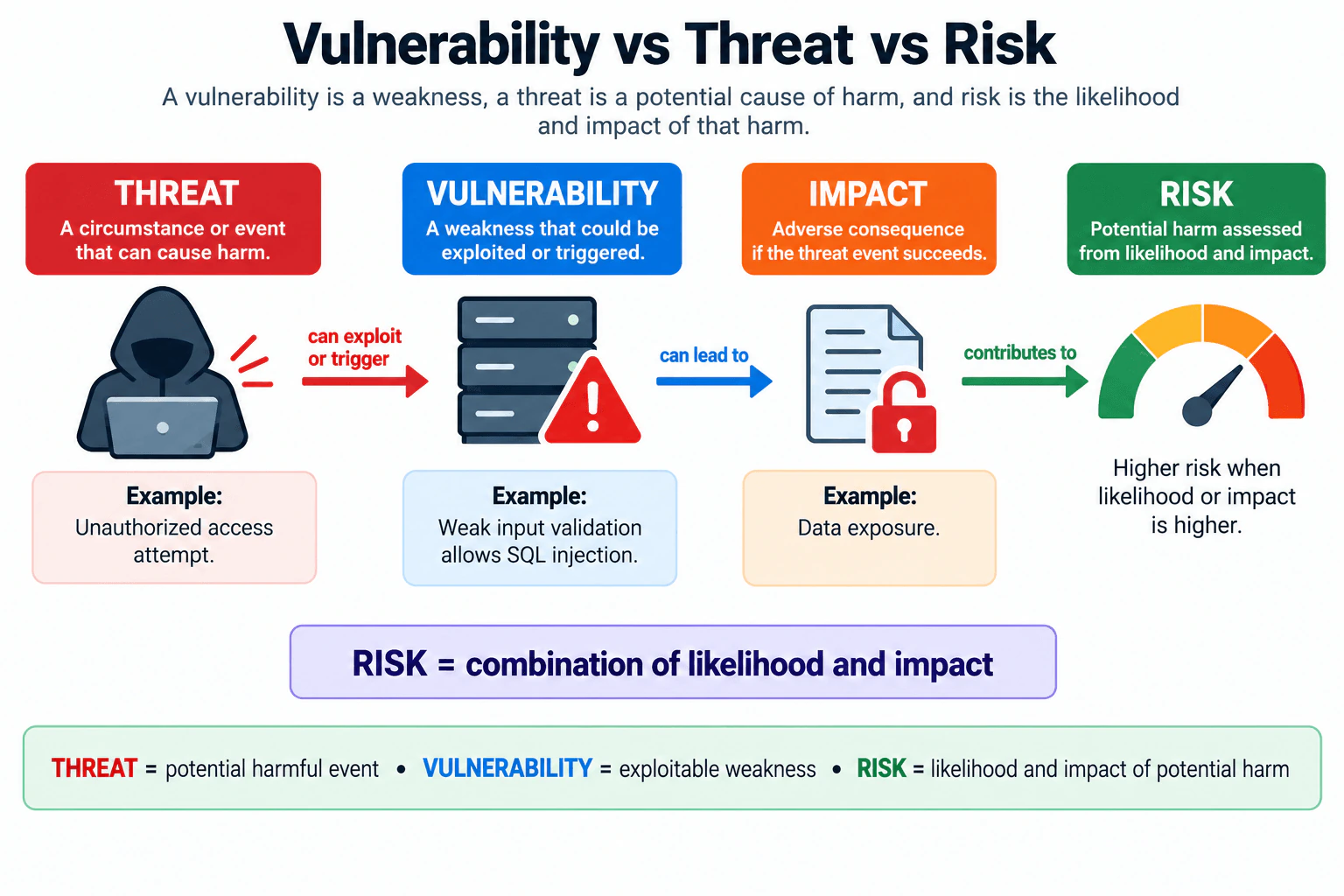
The practical difference is simple: a vulnerability describes what is weak, a threat describes what could cause harm, and risk describes the potential harm after considering likelihood and impact. They are related, but they are not synonyms. In the diagram, the threat is an unauthorized access attempt. The vulnerability is weak input validation that allows SQL injection. If the threat successfully exploits or triggers that weakness, the impact can be data exposure. That impact contributes to risk, and the risk becomes higher when the likelihood or impact is higher.
Useful Questions to Ask the Interviewer
Do you want only the definitions, or should I also walk through the example?
Should I explain risk qualitatively, or also discuss how likelihood and impact can be assessed?
Do you want me to distinguish a threat from the actor or threat source behind it?
How to Explain It in an Interview
Start with the three definitions.
A vulnerability is a weakness in a system, process, or control that could be exploited or triggered. In this example, the vulnerability is weak input validation that allows SQL injection.
A threat is a circumstance or event that has the potential to cause harm. In this example, the threat event is an unauthorized access attempt. The hooded figure visually represents a potentially malicious actor associated with that event, but the actor and the threat event are not the same concept.
Impact is the adverse consequence if the harmful event succeeds. The diagram uses data exposure as the impact. Impact is not the same as risk because it describes the consequence, not the combined assessment of likelihood and consequence.
Risk is the potential harm assessed from likelihood and impact. The diagram summarizes this as "RISK = combination of likelihood and impact." If either the likelihood of the harmful event or its impact becomes greater, the risk can become greater as well.
The relationship is therefore: a threat can exploit or trigger a vulnerability, successful exploitation can lead to impact, and that impact contributes to risk. This is a conceptual relationship, not a universal mathematical formula.
An exploit is also different from a vulnerability. The vulnerability is the weakness. Exploitation is the act or technique that takes advantage of that weakness. In the diagram's example, weak input validation is the weakness, while SQL injection describes the type of exploitation that the weakness allows.
For this question, a detailed trust-boundary model or list of controls is unnecessary because the interviewer is asking for the distinction among the concepts. In a real threat model, context such as system exposure, attacker capability, existing controls, and business consequences would affect likelihood and impact. Those factors help determine the actual risk, but they do not change the definitions.
Technical Approach
Identify the vulnerability: the specific weakness that could be exploited or triggered.
Identify the threat: the circumstance or event that could cause harm, and distinguish it from the actor or threat source.
Describe how the threat could exploit or trigger the vulnerability.
Identify the possible adverse impact if exploitation succeeds.
Assess risk by considering the likelihood of the harmful event and the severity of its impact.
Reassess the risk when likelihood, impact, exposure, or system context changes.
Practical Insights
The definitions are simple, but real risk assessment requires judgment. Teams need time to understand which weaknesses matter, which threats can reach them, how likely harmful events are, and how serious the consequences would be. More detailed scoring can make prioritization more consistent, but it adds analysis and maintenance work. Likelihood and impact can also be uncertain, so risk scores should not imply more precision than the available evidence supports.
Why Interviewers Ask This
Interviewers want to know whether you can distinguish three foundational security concepts instead of using them as synonyms. A strong answer shows that you understand what is weak, what can cause harm, what adverse consequence may follow, and how likelihood and impact are used to reason about risk.
Common interview mistakes
Common mistakes include calling a threat, vulnerability, impact, and risk the same thing; treating the attacker as identical to the threat event; treating an exploit as the vulnerability itself; calling the adverse impact the risk; and assuming that every vulnerability represents the same level of risk. Another mistake is presenting a made-up multiplication formula as a universal risk standard. A safer explanation is that risk is assessed from the combination of likelihood and impact.
Interview tip
Give the three definitions first, then use the diagram's single example: unauthorized access attempt → weak input validation → data exposure → risk based on likelihood and impact. Explicitly say that threat, vulnerability, impact, exploit, and risk are related but are not synonyms.
Interviewer may ask next
What is the difference between a threat and a threat actor?
A threat is a circumstance or event that can cause harm. A threat actor is the person, group, system, or other source associated with causing or initiating that event. In the diagram, the hooded figure represents a potentially malicious actor, while the unauthorized access attempt is the threat event.
Can a vulnerability exist without creating high risk?
Yes. A vulnerability is still a weakness even when the resulting risk is low. Risk depends on context, especially the likelihood of a harmful event and the severity of its impact. A difficult-to-reach weakness with limited consequences may represent lower risk, while a readily exploitable weakness with serious consequences may represent higher risk.
3. How would you develop a security model for a parking garage?Threat ModelingMediumAmazon
i Question Details
Identify the security concerns, threats, and risks you would consider, and describe possible mitigations.
Short Interview Answer (30-60 seconds)
I would model the garage from the untrusted public entrance through controlled entry, parking, exit, and monitoring. I would protect people, vehicles, records, and availability; analyze unauthorized access, theft, tampering, tailgating, outages, and insider misuse; then map controls, logging, response, and residual risk to each threat.
Detailed Explanation
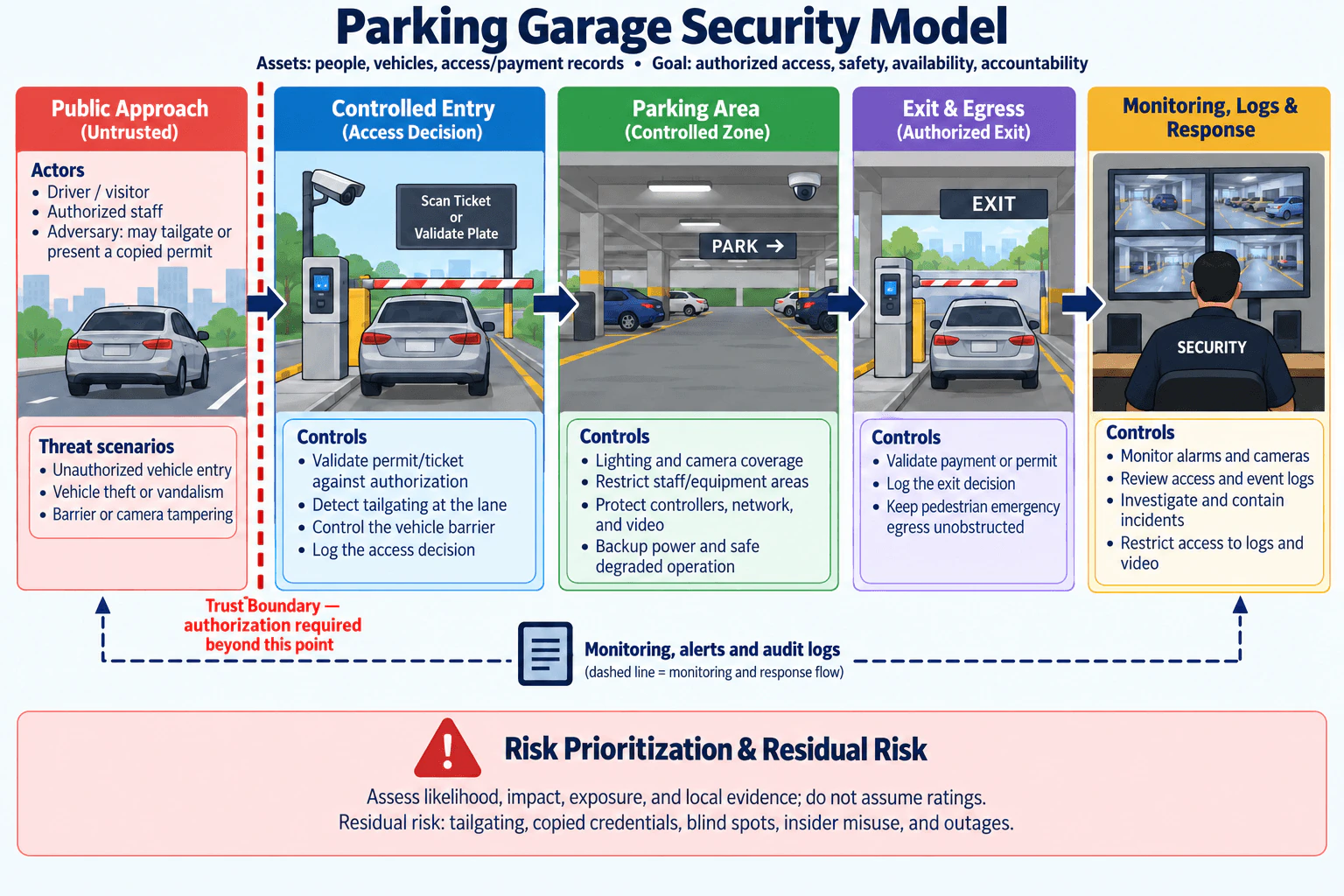
A parking-garage security model should begin with what we are protecting and where trust changes. The key assets are people, vehicles, access and payment records, and the availability of the garage. Drivers, visitors, authorized staff, and possible adversaries interact with the system. The main trust boundary is the controlled entrance, where a public user must present an authorization input before proceeding. I would then examine plausible threat scenarios, choose controls for each one, record security-relevant decisions, plan monitoring and response, and explicitly document uncertainty and residual risk rather than assigning unsupported ratings.
Useful Questions to Ask the Interviewer
Is this a public garage, an employee garage, or both?
What forms of authorization are supported, such as permits or tickets?
Are access and payment records in scope for the threat model?
Are there restricted staff or equipment areas inside the garage?
What availability and emergency-egress requirements must remain true during an outage?
How to Explain It in an Interview
I would walk through the garage from left to right because that makes the trust boundary and security decisions easy to explain.
First, I define the scope and security objectives. The protected assets are people, vehicles, access and payment records, and the ability to operate the garage safely. The objectives are authorized access, safety, availability, and accountability. Accountability means keeping enough trustworthy evidence to understand important access and security events later.
Next, I identify actors and realistic attacker capability. Legitimate actors include drivers, visitors, and authorized staff. I would assume an adversary may try to tailgate another vehicle or present a copied permit. I would not assume stronger capabilities unless the interviewer provides evidence for them.
The main trust boundary is between the public approach and controlled entry. Crossing that boundary requires an authorization decision. A permit, ticket, or license-plate value can be an input to that decision, but it should not automatically be treated as proof of a person's identity.
At controlled entry, I would validate the permit or ticket against the garage's authorization rules, detect tailgating at the lane, control the vehicle barrier, and log the access decision. These controls primarily reduce the risk of unauthorized vehicle entry and provide evidence for later investigation. They do not eliminate copied credentials or tailgating, so those remain residual risks.
Inside the controlled parking area, the important threat scenarios include vehicle theft or vandalism and tampering with barriers, cameras, controllers, or other equipment. I would use lighting and camera coverage for deterrence and detection, restrict access to staff and equipment areas, protect controllers, networks, and video, and provide backup power with safe degraded operation. Cameras can improve visibility but cannot prove that every event will be detected, so blind spots remain a residual risk.
At exit, I would validate payment or permit status and log the exit decision. I would also keep pedestrian emergency egress unobstructed. This distinction matters because vehicle-gate authorization and human emergency egress are different concerns. The system should not assume that the vehicle-gate policy determines how people safely leave during an emergency.
Monitoring and response complete the model. Security staff or the responsible monitoring function should monitor alarms and cameras, review access and event logs, investigate and contain incidents, and restrict access to logs and video. Logging supports detection, investigation, and accountability, but logs are evidence rather than prevention by themselves.
For prioritization, I would consider likelihood, impact, exposure, feasibility, and local evidence such as the garage design, known operating conditions, and observed incidents. I would not invent High or Medium ratings without evidence. The important residual risks shown in this model are tailgating, copied credentials, camera blind spots, insider misuse, and outages.
I would validate the design with authorized tests. I would verify that permitted and non-permitted inputs produce the intended access decisions, confirm tailgating-detection behavior, test barrier and controller failure modes, review camera coverage for blind spots, verify that important events reach monitoring and logs, and confirm that pedestrian emergency egress remains unobstructed during degraded operation.
The main tradeoffs are security versus convenience, privacy, cost, complexity, and availability. More cameras and monitoring can improve detection but increase storage, maintenance, privacy exposure, and operational work. Stricter entry controls can reduce unauthorized access but can also create delays. Backup power and resilient controllers improve availability but add installation and maintenance cost. The final design should therefore document which threats are mitigated, how controls are verified, and which residual risks remain accepted or require further treatment.
Technical Approach
Define scope, assets, and security objectives: people, vehicles, access/payment records, authorized access, safety, availability, and accountability.
Identify actors and realistic attacker capability: drivers, visitors, authorized staff, and an adversary who may tailgate or present a copied permit.
Mark the trust boundary between the public approach and controlled entry, where authorization is required.
Enumerate relevant threat scenarios: unauthorized vehicle entry, vehicle theft or vandalism, barrier or camera tampering, copied credentials, blind spots, insider misuse, and outages.
Map controls to those threats: authorization validation, tailgating detection, vehicle barriers, lighting, camera coverage, restricted equipment areas, protected controllers/network/video, backup power, exit validation, and event logging.
Define monitoring and response: alarms, cameras, access and event logs, investigation, containment, and restricted access to evidence.
Define safe degraded behavior, especially keeping pedestrian emergency egress unobstructed.
Prioritize risks using likelihood, impact, exposure, feasibility, and local evidence instead of invented ratings.
Test the controls and document residual risk.
Revisit the model when incidents, garage design, authorization methods, or operating assumptions materially change.
Practical Insights
The main cost is operational rather than computational. More cameras, sensors, resilient power, protected controllers, logging, and monitoring require equipment, storage, maintenance, staff time, testing, and incident-response work. Stricter authorization can slow entry and exit. More video and access records increase privacy and data-handling responsibilities. Backup power and resilient components improve availability but add installation and maintenance cost. Human operators also need procedures and training. Any compliance work depends on the applicable local rules and organizational policies for surveillance, records, safety, and emergency egress. The goal is not maximum control everywhere; it is to spend effort where likelihood, impact, exposure, feasibility, and business context justify it.
Why Interviewers Ask This
This question tests whether the candidate can turn a familiar physical system into a structured threat model instead of listing generic security controls. A strong answer identifies assets, security objectives, actors, attacker capabilities, trust boundaries, threats, controls, evidence, failure behavior, and residual risk. It also tests judgment: the candidate should distinguish authorization from identity, avoid unsupported risk ratings, and balance security with safety, availability, privacy, cost, and operational usability.
Common interview mistakes
Common mistakes are starting with a long control checklist before defining assets and threats; treating a ticket, permit, or license plate as proof of a person's identity; mixing threats, vulnerabilities, attack methods, risks, and controls as if they were the same thing; assigning High or Medium risk labels without evidence; focusing only on vehicle theft while ignoring safety, availability, equipment tampering, monitoring, and insider misuse; assuming cameras prevent incidents instead of mainly supporting deterrence, detection, and investigation; failing to restrict access to logs and video; treating logging as prevention; and applying a vehicle-gate failure rule to pedestrian emergency egress.
Interview tip
Explain the model as one journey: public approach, controlled entry, parking area, exit, then monitoring and response. At each stage, name the asset, threat, control, evidence, and remaining risk. This keeps the answer structured and demonstrates threat-modeling judgment instead of producing a generic security checklist.
Interviewer may ask next
How would you prioritize the parking-garage threats?
I would prioritize them only after gathering context. I would compare likelihood, impact, exposure, attacker feasibility, existing controls, and business or safety consequences. For example, an entrance that is easy to tailgate may deserve more attention than a theoretical attack with little exposure. I would use local evidence such as observed incidents, access logs, layout, camera coverage, and control-test results. If evidence is weak, I would state the uncertainty instead of inventing a precise High or Medium rating. The priority should be revisited when incidents, controls, or operating conditions change.
What would you do if the garage loses power or part of the access-control system fails?
I would use a defined degraded mode rather than treating every component as simply fail-open or fail-closed. Backup power should support critical controllers and monitoring where appropriate. Vehicle access decisions should follow the approved operational policy for the garage, while pedestrian emergency egress must remain unobstructed. Important failures should create monitoring events when the monitoring path is available, and staff should have a documented response procedure. After recovery, I would verify controller state, review available logs, confirm barriers and monitoring are operating normally, and investigate any relevant access that occurred during the degraded period. The residual risk is that outages can still reduce visibility or weaken normal controls.
4. What is the seven-layer OSI model?Network SecurityEasyAmazon
Short Interview Answer (30-60 seconds)
The OSI model divides network communication into seven conceptual layers: Application, Presentation, Session, Transport, Network, Data Link, and Physical. Data conceptually moves down the sender's stack during encapsulation, crosses the network, and moves up the receiver's stack during decapsulation.
Detailed Explanation
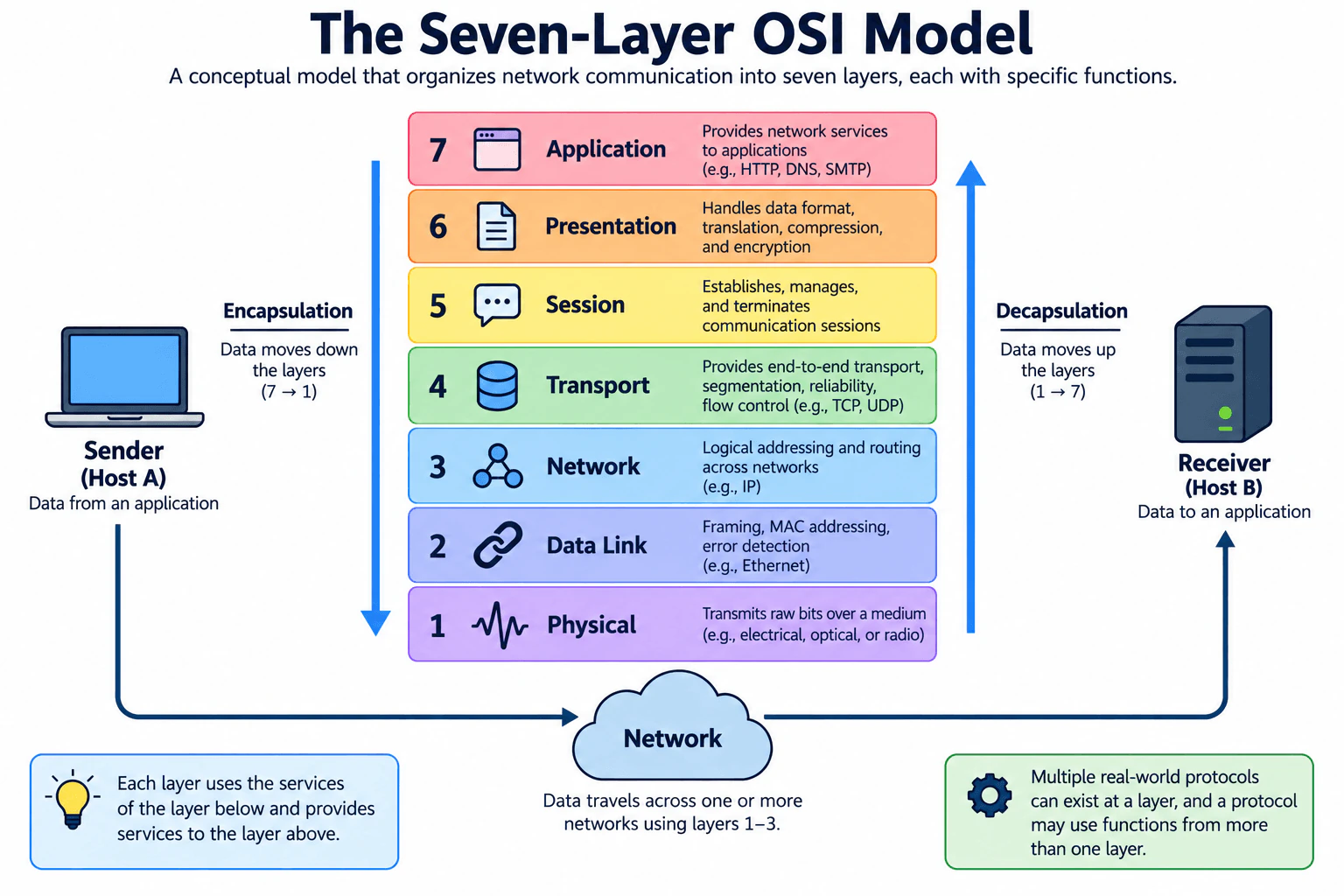
The OSI model is a conceptual reference model that organizes network communication into seven layers. It helps engineers separate responsibilities such as application services, data representation, sessions, end-to-end transport, routing, local-link delivery, and physical transmission. In the approved diagram, data starts at the sender's application, moves downward from Layer 7 to Layer 1 during encapsulation, travels across the network, and then moves upward from Layer 1 to Layer 7 during decapsulation at the receiver. The model is mainly a way to describe, teach, design, and troubleshoot communication rather than a literal implementation of the modern Internet protocol suite.
Useful Questions to Ask the Interviewer
Would you like just the seven layer names, or a short explanation and example for each layer?
Would you like me to relate the layers to examples such as HTTP, TCP, IP, and Ethernet?
Should I also explain encapsulation and decapsulation between the sender and receiver?
How to Explain It in an Interview
Start at Layer 7 and work downward:
Layer 7 — Application: Provides network services used by applications. Examples commonly mapped here include HTTP, DNS, and SMTP.
Layer 6 — Presentation: Deals with how data is represented between systems. Conceptual responsibilities include data formatting, translation, compression, and encryption-related transformations.
Layer 5 — Session: Establishes, manages, and terminates communication sessions between applications.
Layer 4 — Transport: Provides end-to-end transport services. It can handle segmentation, reliability, ordering, and flow control when the transport protocol provides those features. TCP is connection-oriented and provides reliable, ordered delivery and flow control. UDP is connectionless and does not provide TCP-style reliability or ordering guarantees.
Layer 3 — Network: Handles logical addressing and routing across networks. IP is the main example in the diagram. Routers commonly make forwarding decisions using network-layer addressing and routing information.
Layer 2 — Data Link: Handles communication over a local link, including framing and link-layer addressing such as Ethernet MAC addresses. Ethernet is the example shown in the diagram, and link-layer technologies can also provide error detection.
Layer 1 — Physical: Transmits raw bits as physical signals over a medium. The medium can use electrical, optical, or radio signals.
The sender-to-receiver flow is important. During encapsulation, data conceptually moves from Layer 7 toward Layer 1. Each higher layer uses services provided by lower layers, while the protocols involved add or interpret the information needed for their communication functions. At Layer 1, the information is transmitted as physical signals. Across one or more networks, Layers 1 through 3 are especially important for physical transmission, local-link delivery, and routing between networks. At the destination, decapsulation reverses the conceptual direction: processing moves from Layer 1 upward until the application receives the data.
The model is also useful for troubleshooting. No physical connectivity can suggest a Layer 1 problem. Ethernet framing or local MAC-addressing problems point toward Layer
IP addressing or routing problems point toward Layer
TCP connection or transport-reliability problems can involve Layer
HTTP or DNS behavior is commonly discussed at Layer 7.
The main limitation is that the OSI model is an abstraction. Real protocols and implementations do not always fit perfectly into a single layer, and the Internet protocol suite does not implement a literal seven-layer OSI stack. Therefore, mappings such as HTTP to Application, TCP to Transport, IP to Network, and Ethernet to Data Link are useful conceptual mappings, not proof that every real implementation function stays inside one strict layer.
Technical Approach
Name the seven layers from top to bottom: Application, Presentation, Session, Transport, Network, Data Link, Physical.
Give one simple responsibility for each layer.
Map the diagram's examples: HTTP, DNS, and SMTP to Application; TCP and UDP to Transport; IP to Network; Ethernet to Data Link.
Explain encapsulation as data moving conceptually from Layer 7 toward Layer 1 at the sender.
Explain that communication crosses the network using physical, link, and network-layer functions as needed.
Explain decapsulation as processing moving from Layer 1 toward Layer 7 at the receiver.
Finish by stating that OSI is a conceptual reference model and real protocols may span or interact across conceptual layer boundaries.
Practical Insights
The OSI model itself has no runtime or financial cost because it is a conceptual model. Its benefit is clarity: engineers get a common vocabulary for discussing and troubleshooting communication. The tradeoff is simplification. Seven layers make networking easier to learn and reason about, but real protocols can cross conceptual boundaries, so forcing every protocol or security function into exactly one layer can lead to incorrect conclusions.
Why Interviewers Ask This
Interviewers ask this question to check whether a candidate understands the basic layered model used to reason about network communication. A Cybersecurity Engineer should be able to name the seven layers in order, explain their main responsibilities, map common examples such as HTTP, TCP, IP, and Ethernet to the appropriate conceptual layers, and use the model to discuss where a network problem may occur.
Common interview mistakes
Common mistakes include listing the layers in the wrong order; confusing Layer 2 framing and MAC addressing with Layer 3 IP routing; putting TCP or UDP at the Network layer instead of the Transport layer; putting HTTP at the Transport layer; assuming UDP provides TCP-style reliability; describing the OSI model as the exact protocol stack used by the modern Internet; treating encryption as belonging exclusively to the Presentation layer in every implementation; and assuming every real protocol fits perfectly into only one OSI layer.
Interview tip
Give the seven layers in order, state one simple responsibility for each, and use a few familiar examples such as HTTP, TCP, IP, and Ethernet. Then explain encapsulation down the sender's stack and decapsulation up the receiver's stack. Finish by saying that OSI is a conceptual reference model, not a literal description of every modern network implementation.
Interviewer may ask next
How do encapsulation and decapsulation work in the OSI model?
At the sender, data conceptually moves from Layer 7 toward Layer 1. As it moves downward, the relevant protocol layers add or prepare the information needed for transmission, such as transport, network, and link-layer information. Layer 1 carries the resulting information as physical signals. At the receiver, processing moves from Layer 1 upward, with the appropriate layer information interpreted and removed until the application receives the data. The downward process is called encapsulation, and the upward process is called decapsulation.
Does every real network protocol fit exactly into one OSI layer?
No. The OSI model is a conceptual reference model, and real implementations do not always map perfectly to one layer. HTTP is commonly mapped to Application, TCP to Transport, IP to Network, and Ethernet to Data Link, but some technologies perform functions associated with multiple conceptual layers. The model is most useful as a common vocabulary for understanding and troubleshooting communication rather than as a strict implementation map.
5. What is zero trust security?Network SecurityEasyAmazon
Short Interview Answer (30-60 seconds)
Zero trust means no implicit trust based on network location. Verify each resource-access request using identity, device posture, context, and policy. If approved, grant only the access required for that resource. If the request does not satisfy policy, deny access.
Detailed Explanation
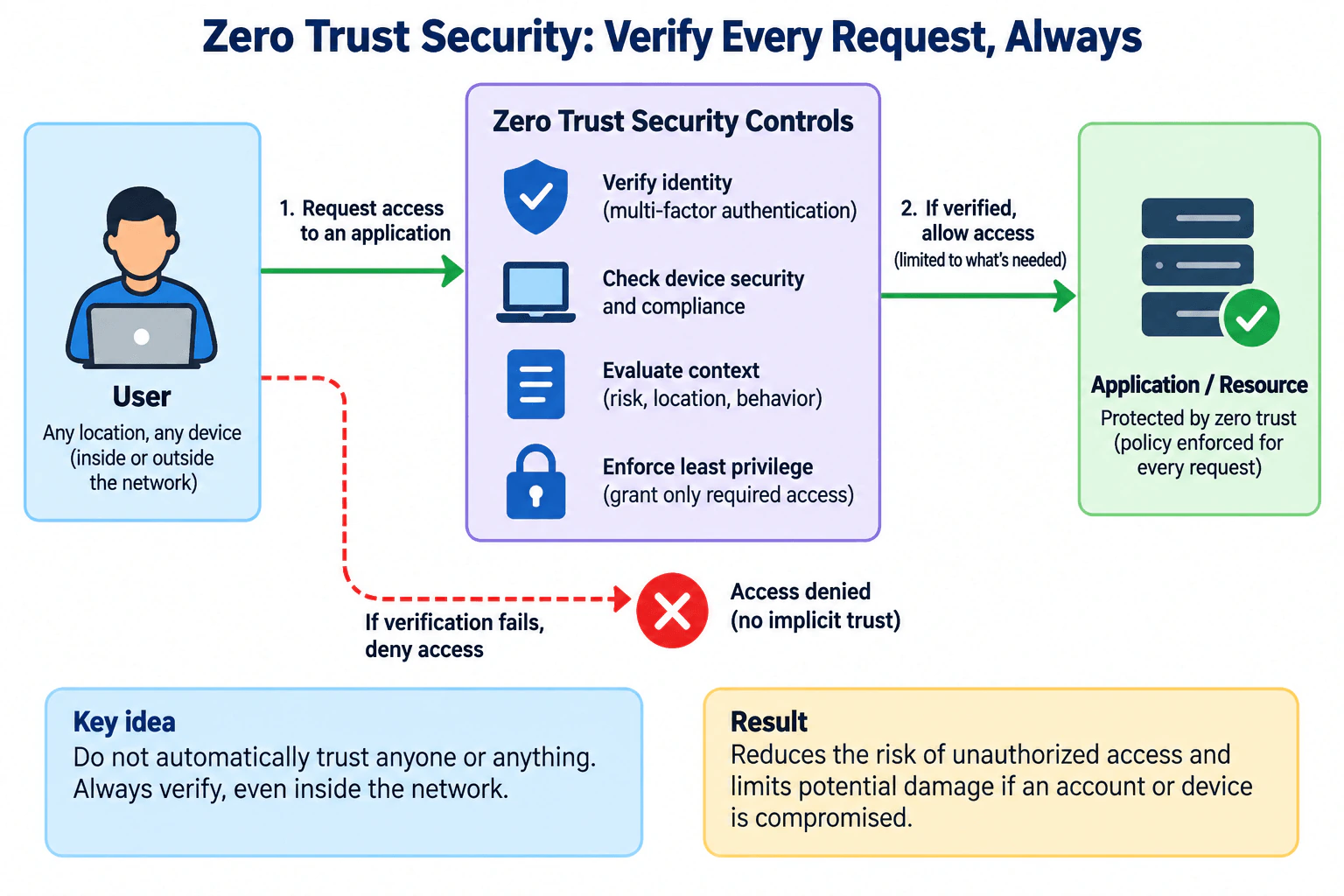
Zero trust security changes the practical question from "Is this user inside our network?" to "Should this exact request be allowed to this resource?" A user or device can be inside or outside the network, but location alone does not establish trust. For each resource-access request, the system verifies identity, evaluates device security or compliance, considers context such as risk, location, or behavior, and applies authorization policy. If the request is approved, least privilege limits access to what is needed. If required checks or policy conditions fail, access is denied. This reduces unauthorized access and limits damage from compromised accounts or devices.
Useful Questions to Ask the Interviewer
Are you asking for the zero trust concept only, or also how it would be implemented in an enterprise?
Should I focus on user access, or include device and workload identities as well?
Do you want me to explain how device posture and contextual risk affect authorization decisions?
How to Explain It in an Interview
Start with the practical rule: do not automatically trust a user, device, or request because it comes from an internal network. Zero trust removes implicit trust based solely on network location or asset ownership and focuses access decisions on protected resources.
A simple flow that matches the diagram is:
A user on any location or device requests access to an application or protected resource.
The zero trust controls verify the user's identity. Multi-factor authentication is one common way to strengthen identity verification, but zero trust is broader than MFA alone.
The controls check device security and compliance posture. A valid user identity does not automatically make the device acceptable.
The controls evaluate context such as risk, location, behavior, and other policy-relevant conditions. Location is a signal, not proof of trust.
Authorization policy decides whether the request should be allowed and what access is permitted.
If the request is approved, least privilege grants only the access needed for the requested application or resource.
If verification fails or required policy conditions are not met, the request is denied rather than trusted because it originated inside the network.
Authentication and authorization are different. Authentication establishes who or what is making the request. Authorization determines what that authenticated identity may access. A successful login therefore does not imply broad access to other applications or data.
The protected application or resource is the focus of the decision. The design does not treat the entire internal network as one trusted zone. This is important for remote work, cloud services, personally owned devices, contractors, and environments where applications are distributed across different networks.
The safe failure behavior is denial when required verification or authorization conditions are not satisfied. A production design may provide a defined remediation path, such as requiring stronger authentication or bringing a device back into compliance, but it should not silently bypass the failed control.
To validate the design, test both allowed and denied cases. An authorized user with an acceptable device and context should receive only the intended resource permissions. A request that violates policy should be rejected. Authentication events, device-posture results, authorization decisions, and resource-access logs can provide evidence that the intended policy is operating correctly.
Zero trust reduces risk but does not eliminate compromise. A valid account can still be stolen, a compliant device can later become compromised, and policy can be misconfigured. Least privilege limits how much a compromised identity or device can reach, while continued policy evaluation and logging help identify changing conditions.
The main tradeoff is stronger, more precise access control versus operational complexity and user friction. Identity, device, policy, and application systems must work together reliably. Stronger checks can create extra authentication steps or legitimate access denials, so policies need careful design, testing, exception handling, and regular review.
Technical Approach
Identify the protected application or resource and the access being requested.
Authenticate the requesting user or workload identity; use stronger authentication such as MFA when appropriate.
Evaluate the device's security and compliance posture when device state is relevant to policy.
Evaluate contextual signals such as risk, location, behavior, and request conditions without treating location alone as trusted.
Apply authorization policy to decide whether the request is permitted.
If permitted, grant only the minimum access required for the requested resource.
If required verification or policy conditions fail, deny the request rather than granting implicit trust.
Record relevant authentication, posture, policy-decision, and resource-access evidence for validation and investigation.
Review permissions, policies, device requirements, and contextual signals regularly because identities, devices, and risk conditions change.
Practical Insights
Zero trust adds operational work because identity, device posture, policy, and application-access systems must work together. Users can experience additional authentication or access checks. Security teams must maintain policies, review permissions, manage legitimate exceptions, investigate denied requests, and keep device information accurate. Identity services, endpoint-management tools, policy engines, logging, and engineering can also add financial and maintenance cost. The benefit is more precise access control and less dependence on a broad trusted network. The challenge is keeping policies strict enough to reduce risk without unnecessarily blocking legitimate work.
Why Interviewers Ask This
Interviewers ask this to check whether you understand the shift from perimeter-based trust to resource-focused access decisions. A strong answer distinguishes authentication from authorization, explains why network location alone does not establish trust, includes identity, device posture, contextual signals, and least privilege, and describes what happens when verification or policy requirements fail.
Common interview mistakes
Common mistakes include saying zero trust means "trust nobody," describing it as one product, or claiming MFA alone implements zero trust. MFA strengthens identity verification, but the access decision can also depend on device posture, context, authorization policy, and least privilege. Another mistake is assuming that a VPN, private network, VLAN, firewall, or internal IP address makes a requester trusted. Network location can be a contextual signal, but it does not establish implicit trust. It is also incorrect to say zero trust prevents all compromises. It reduces exposure and limits what a compromised identity or device can access, but residual risk remains.
Interview tip
Lead with one sentence: "Zero trust means no implicit trust based on network location; verify each request and grant only the access required." Then walk through the diagram in order: request access, verify identity, check device posture, evaluate context, apply policy, enforce least privilege, and deny requests that fail the required checks. Finish with the tradeoff: reduced unauthorized access and blast radius in exchange for more policy and operational complexity.
Interviewer may ask next
How is zero trust different from traditional perimeter-based security?
Traditional perimeter-based security often gives greater trust to users or devices after they enter an internal network boundary. Zero trust does not treat network location as sufficient proof of trust. Each resource-access request is evaluated using identity, device posture, context, and authorization policy. Approved requests receive only the permissions required for the specific resource.
What happens if a legitimate user passes authentication but their device fails the security policy?
Successful authentication proves or increases confidence in the user's identity, but it does not automatically authorize access. If acceptable device posture is a required policy condition and the device fails that check, the protected-resource request should be denied or limited according to an explicitly defined policy. The user can regain appropriate access after satisfying the required remediation or device-compliance conditions.
6. Explain how SSH works in technical detail.Network SecurityMediumAmazon
Short Interview Answer (30-60 seconds)
SSH builds trust in stages: TCP connection, SSH identification and algorithm negotiation, key exchange with server host-key verification, protected user authentication, then multiplexed channels. The client must reject an untrusted server identity, and the server must deny access when user authentication fails.
Detailed Explanation
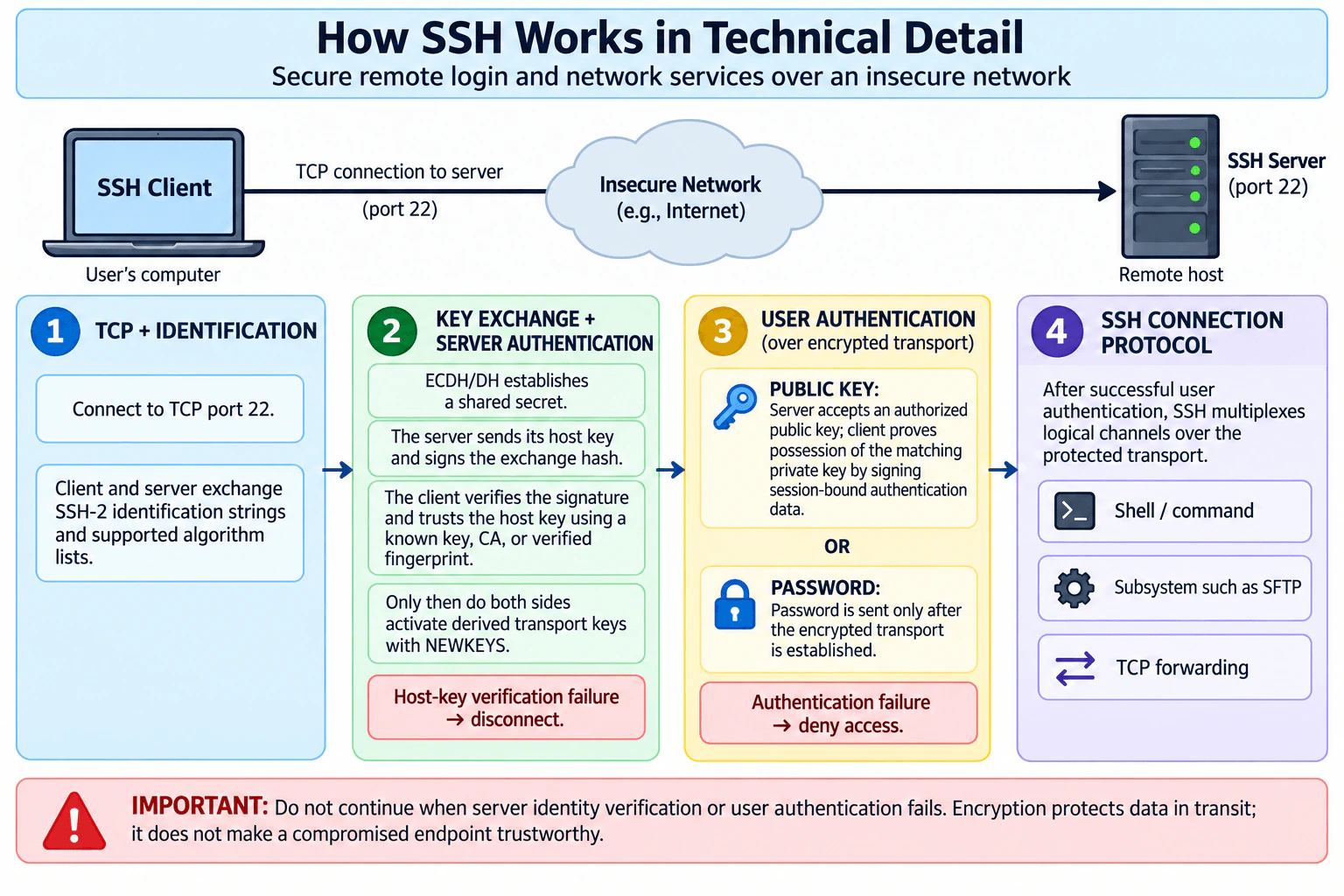
SSH provides secure remote login and other network services across an untrusted network. The key idea is that it builds protection and trust in stages instead of assuming that encryption alone is enough. A client normally reaches an SSH server over TCP port 22. The peers identify the SSH protocol, negotiate cryptographic algorithms, establish shared transport keys, authenticate the server, and then authenticate the user. After those checks succeed, the SSH Connection Protocol carries protected logical channels such as a shell, command, SFTP subsystem, or TCP forwarding over the same SSH connection.
Useful Questions to Ask the Interviewer
Do you want the protocol-message sequence or a higher-level connection lifecycle?
Should I focus mainly on public-key authentication or compare it with password authentication?
Should I explain host-key trust and what happens when a server host key changes?
How to Explain It in an Interview
1. TCP connection and SSH identification
The SSH client first establishes a TCP connection to the remote SSH server, normally on destination port 22. TCP gives SSH a reliable byte stream, but TCP does not authenticate the remote endpoint.
The client and server then exchange SSH identification strings, such as an SSH-2 protocol identification. The diagram groups supported algorithm lists with this first stage for teaching simplicity. Technically, the supported algorithm lists are carried in SSH_MSG_KEXINIT messages, which begin the SSH key-exchange phase.
2. Algorithm negotiation, key exchange, and server authentication
Each side sends its supported key-exchange, host-key, encryption, integrity, and related algorithm choices. They select mutually supported algorithms.
A Diffie-Hellman-family key exchange, including elliptic-curve variants, allows both peers to compute a shared secret without transmitting that secret directly. The exchange produces a shared secret and an exchange hash. Encryption and integrity keys are derived from this material.
Server authentication is bound to this key exchange. The server sends its public host key and signs the exchange hash using the corresponding host private key. The client verifies the signature. It must also decide whether that host key belongs to the intended server, for example by comparing it with a previously trusted key, validating an SSH certificate under a trusted SSH certificate authority, or comparing a fingerprint through an independently trusted channel.
Those are two related but different checks: the signature proves possession of the private key corresponding to the presented host key, while host-key validation establishes whether that key should be trusted for this server.
If server host-key verification fails or an unexpected key cannot be independently explained, the safe action is to disconnect. Continuing without validating server identity weakens protection against an active man-in-the-middle attack.
At the end of key exchange, each side sends SSH_MSG_NEWKEYS. Messages sent afterward use the newly negotiated keys and algorithms. This establishes the protected SSH transport used by higher-level SSH services.
3. User authentication over the protected transport
Next, the server authenticates the client-side user. This is separate from server authentication: first the client verified the server, and now the server verifies the user requesting access.
With public-key authentication, the server determines whether the offered public key is acceptable for the requested user and service. The client proves possession of the matching private key by signing authentication data that includes the SSH session identifier. The private key itself never needs to be transmitted to the server. If the public key is not acceptable or the signature is invalid, authentication is rejected.
With password authentication, the password is represented as plaintext inside the SSH authentication message, but that packet is carried by the already established encrypted SSH transport. The server validates the credential according to its authentication policy.
Successful authentication identifies the user according to the accepted authentication method. Authorization remains a server-side policy decision: the server should permit only the account, service, commands, forwarding, or other capabilities that policy allows. If authentication fails, access is denied.
4. SSH Connection Protocol and logical channels
After successful user authentication, SSH can start the SSH Connection Protocol. It multiplexes multiple logical channels over the same protected transport connection.
A session channel can carry an interactive shell or execution of a command. A session can also request a configured subsystem such as SFTP. SSH can additionally carry TCP forwarding channels. Multiple independent channels may exist at the same time without requiring a separate SSH transport connection for each one.
Trust boundary and failure behavior
The network between the SSH client and server may be untrusted. SSH protects confidentiality and integrity across that network, but the cryptographic tunnel does not make either endpoint trustworthy. A compromised client, compromised server, or stolen private key can still misuse an otherwise correctly encrypted SSH session.
The practical rule is therefore fail closed on identity failures: disconnect when server identity cannot be trusted and deny access when user authentication fails.
Evidence and validation
For an authorized validation, I would verify the server host-key fingerprint or certificate against an independently trusted source, confirm that the expected user-authentication method succeeds, and review server-side SSH authentication records when investigating an access decision. A packet capture can establish facts such as TCP connectivity, the SSH identification exchange, and the presence of protocol messages, but protected application content is not visible as plaintext on the network after encryption is active.
Tradeoffs and limitations
Public-key authentication avoids sending a reusable password to the server and supports cryptographic proof of private-key possession, but private keys must be securely stored, distributed, rotated, and revoked. Host-key verification creates operational work when systems are rebuilt or keys legitimately rotate, but automatically trusting unexpected keys removes an important defense against server impersonation.
SSH protects data in transit between its endpoints and provides authentication mechanisms. It does not prove that either endpoint is uncompromised, and it does not replace least-privilege authorization on the server.
Technical Approach
1. Establish a TCP connection from the SSH client to the SSH server, normally on port 22. 2. Exchange SSH identification strings. 3. Exchange SSH_MSG_KEXINIT algorithm lists and select mutually supported algorithms. 4. Perform a Diffie-Hellman-family key exchange to derive shared transport secrets. 5. Verify the server's signature and validate its host key against a trusted key, SSH CA, or independently verified fingerprint; disconnect if trust cannot be established. 6. Exchange SSH_MSG_NEWKEYS and activate the derived protected transport. 7. Authenticate the user with an allowed method such as public key or password; deny access when authentication fails. 8. After successful authentication, open only authorized SSH Connection Protocol channels such as a shell, command, SFTP subsystem, or TCP forwarding.
Practical Insights
SSH adds some connection latency because the peers must negotiate algorithms, perform key exchange, verify the server, and authenticate the user before normal work starts. The cryptographic processing is usually small compared with a long-running session. The larger operational cost is trust and credential management: protecting private keys, maintaining trusted host keys or SSH certificates, rotating and revoking credentials, reviewing authentication policy, and investigating unexpected host-key changes or failed logins. There is no single compliance or financial outcome inherent to SSH; those costs depend on the organization's environment and controls.
Why Interviewers Ask This
Interviewers want to see whether you understand SSH as a layered security protocol rather than simply encrypted remote login. A strong answer separates TCP connectivity, SSH identification, algorithm negotiation, key exchange, server host authentication, user authentication, protected transport, and multiplexed connection channels. It also shows that you understand the difference between encryption and endpoint trust, and that unexpected server identity or failed user authentication should stop access.
Common interview mistakes
Common mistakes include saying that SSH only encrypts a password and opens a shell; confusing the server host key with the user's authentication key; saying that the user's private key is sent to the server; and treating encryption as proof that an endpoint is trustworthy. Another mistake is skipping host-key validation or blindly accepting an unexpected host-key change. Also keep the protocol order clear: SSH identification occurs first, SSH_MSG_KEXINIT starts algorithm negotiation and key exchange, server authentication is bound to key exchange, SSH_MSG_NEWKEYS activates the derived transport keys, user authentication follows over that protected transport, and connection channels come afterward.
Interview tip
Explain SSH as four stages matching the diagram: TCP plus identification, key exchange plus server authentication, user authentication over the protected transport, and the SSH Connection Protocol. Clearly separate the server host key from the user's authentication key and mention the fail-closed behavior when either identity check fails.
Interviewer may ask next
What exactly happens during SSH public-key user authentication?
The server determines whether the offered public key is an acceptable authenticator for the requested user and service. The client then signs authentication data using the matching private key. That signed data includes the SSH session identifier, which binds the proof to the current session. The server verifies the signature using the public key. The private key is not transmitted. If the key is unacceptable or the signature is invalid, the authentication request is rejected; the server may also require additional authentication methods before returning final success.
Why is SSH host-key verification important, and what should happen when the host key unexpectedly changes?
During key exchange, the server signs the exchange hash using its host private key and the client verifies that signature with the presented host public key. The client must then establish that the host key belongs to the intended server by using a trusted known key, SSH certificate authority, or independently verified fingerprint. An unexpected change can be legitimate, such as controlled key rotation or a server rebuild, but it can also indicate impersonation. The safe response is to stop the connection and verify the new key through a trusted channel before accepting it.
7. Explain the SSL handshake.Network SecurityMediumAmazon
Short Interview Answer (30-60 seconds)
A modern SSL handshake is really a TLS handshake. In TLS 1.3, ClientHello and ServerHello negotiate parameters and key shares, the server authenticates with its certificate and signature, Finished messages confirm the handshake, and derived application traffic keys then protect data with authenticated encryption.
Detailed Explanation
The practical purpose of the SSL handshake is to create a secure connection before normal application data is exchanged. In modern systems, I would describe this as a TLS 1.3 handshake. The client and server first agree on cryptographic parameters and establish shared keying material. The server then proves its identity using its certificate and a digital signature. The client validates that identity and the handshake. Both sides confirm the result with Finished messages. After that, they use derived application traffic keys to encrypt and integrity-protect application data.
Useful Questions to Ask the Interviewer
Should I explain the modern TLS 1.3 handshake or compare it with older TLS versions?
Should I assume normal server authentication, or also cover mutual TLS?
Should I focus on a full handshake and leave session resumption and 0-RTT out of scope?
How to Explain It in an Interview
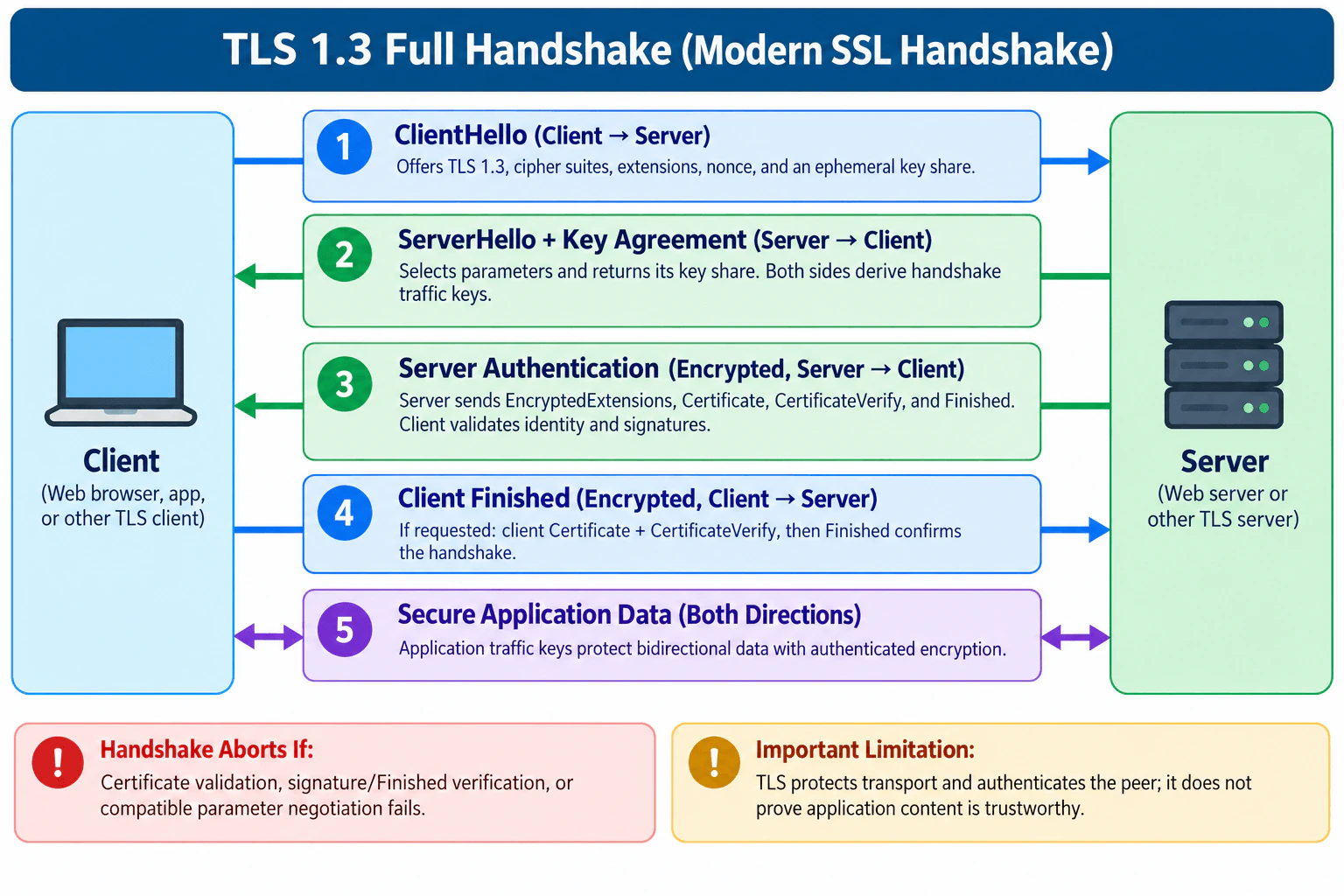
I would assume the full TLS 1.3 certificate-authenticated handshake shown in the diagram.
ClientHello: The client sends a ClientHello to the server. It advertises support for TLS 1.3 through the supported_versions extension, offers supported cipher suites and other extensions, supplies a fresh random value, and normally includes an ephemeral key share for Diffie-Hellman key agreement.
ServerHello and key agreement: The server chooses compatible parameters and sends its ServerHello with its selected TLS version and, for the key-exchange flow shown in the diagram, its own ephemeral key share. The ClientHello and ServerHello information lets both endpoints independently derive the same handshake traffic secrets. Their private ephemeral values are not transmitted. After ServerHello, the remaining TLS 1.3 handshake messages are protected with handshake traffic keys.
Server authentication: The server sends EncryptedExtensions and, in this certificate-authenticated flow, Certificate, CertificateVerify, and Finished. The Certificate message provides the certificate chain used for server authentication. CertificateVerify contains a signature over the handshake context, demonstrating possession of the private key corresponding to the authenticated certificate. Finished provides key confirmation and verifies the integrity of the handshake transcript.
The client validates the certificate according to the application's trust policy. For an HTTPS-style connection, this normally includes building an acceptable path to a trusted certificate authority, checking certificate validity, and confirming that the certificate identifies the expected server name. The client also verifies CertificateVerify and Finished. If certificate validation, signature verification, Finished verification, or compatible parameter negotiation fails, the handshake is aborted rather than continuing with application data.
Client Finished: After validating the server side, the client sends client-authentication messages only if the server requested them. In that case, the client sends Certificate and CertificateVerify before Finished. Otherwise, it sends Finished without a client certificate. The client Finished confirms its view of the handshake and proves possession of the derived handshake keying material.
Secure application data: After the required Finished messages are successfully verified, both endpoints derive application traffic keys from the TLS 1.3 key schedule. They can then exchange bidirectional application data using authenticated encryption, which provides confidentiality and integrity between the TLS endpoints.
The trust boundary is the TLS connection between the client and the server where TLS terminates. TLS protects data while it travels between those endpoints and authenticates peers according to the configured authentication method. It does not, by itself, prove that the application or the content returned by that application is trustworthy.
A useful validation method is to inspect an authorized test connection and verify the negotiated TLS version, certificate information, server identity, cipher suite, and handshake result. Negative tests should confirm that invalid certificates or failed handshake verification cause the connection to terminate instead of silently continuing.
The main tradeoff is that certificate validation, public-key operations, transcript verification, and key derivation add processing and connection-setup latency. In return, they establish authenticated encrypted transport before application data is exchanged.
Technical Approach
Client sends ClientHello with TLS 1.3 support, cipher suites, extensions, a fresh random value, and an ephemeral key share.
Server sends ServerHello with selected parameters and its key share.
Both endpoints derive handshake traffic keys.
Server sends EncryptedExtensions, Certificate, CertificateVerify, and Finished.
Client validates the server certificate according to application policy and verifies CertificateVerify and Finished; abort on failure.
If client authentication was requested, the client sends Certificate and CertificateVerify.
Client sends Finished.
Both endpoints derive application traffic keys and exchange application data using authenticated encryption.
Practical Insights
The handshake adds some connection setup time and CPU work because the endpoints perform key agreement, certificate and signature verification, transcript hashing, and key derivation before normal traffic begins. Certificate management also creates operational work such as issuance, renewal, trust-store maintenance, and failure handling. These costs are generally worthwhile because the handshake establishes authenticated encrypted transport. Connection reuse and TLS session resumption can reduce repeated setup work, although those flows are outside the full handshake shown in the diagram.
Why Interviewers Ask This
Interviewers want to know whether you understand how a secure connection negotiates cryptographic parameters, establishes shared keying material, authenticates an endpoint, validates certificates, verifies handshake integrity, handles failures, and transitions to protected application traffic. A strong answer also distinguishes encrypted transport from complete trust in the application or its content.
Common interview mistakes
Common mistakes are calling modern TLS simply SSL without explaining the distinction; saying the certificate itself encrypts application data; claiming the server sends its private key; mixing TLS 1.2 messages such as ClientKeyExchange into a TLS 1.3 flow; forgetting that TLS 1.3 handshake messages after ServerHello are protected; treating any certificate as automatically trusted without validation; placing optional client Certificate and CertificateVerify after the client Finished instead of before it; and claiming that TLS proves the application or its content is trustworthy.
Interview tip
Explain the handshake in five stages: ClientHello, ServerHello and key agreement, server authentication, client Finished, then protected application data. Emphasize that certificate validation authenticates the expected endpoint, ephemeral key agreement establishes shared secrets without transmitting those secrets, Finished verifies the handshake, and important validation failures terminate the connection.
Interviewer may ask next
What changes when mutual TLS is used?
With mutual TLS, the server still authenticates to the client, but it also requests client authentication. In the TLS 1.3 flow shown here, the client sends its Certificate and CertificateVerify before its Finished message. The server validates the client's certificate and signature according to its trust policy. This cryptographically authenticates both TLS endpoints, but application authorization remains a separate decision.
What happens if the server certificate or Finished message cannot be verified?
The handshake must not continue as a normal trusted TLS session. Certificate validation failure means the client cannot establish the expected server identity under its trust policy. CertificateVerify failure means the server's authentication signature could not be validated. Finished failure means handshake integrity or key confirmation failed. The safe behavior is to terminate the handshake instead of exchanging normal application data over that unverified connection.
8. Compare symmetric and asymmetric encryption.Application SecurityEasyAmazon
Short Interview Answer (30-60 seconds)
Symmetric encryption uses one shared secret key for encryption and decryption, making it fast and suitable for large data. Asymmetric encryption uses a public/private key pair, making key distribution easier but computation heavier. Real systems commonly combine the two approaches.
Detailed Explanation
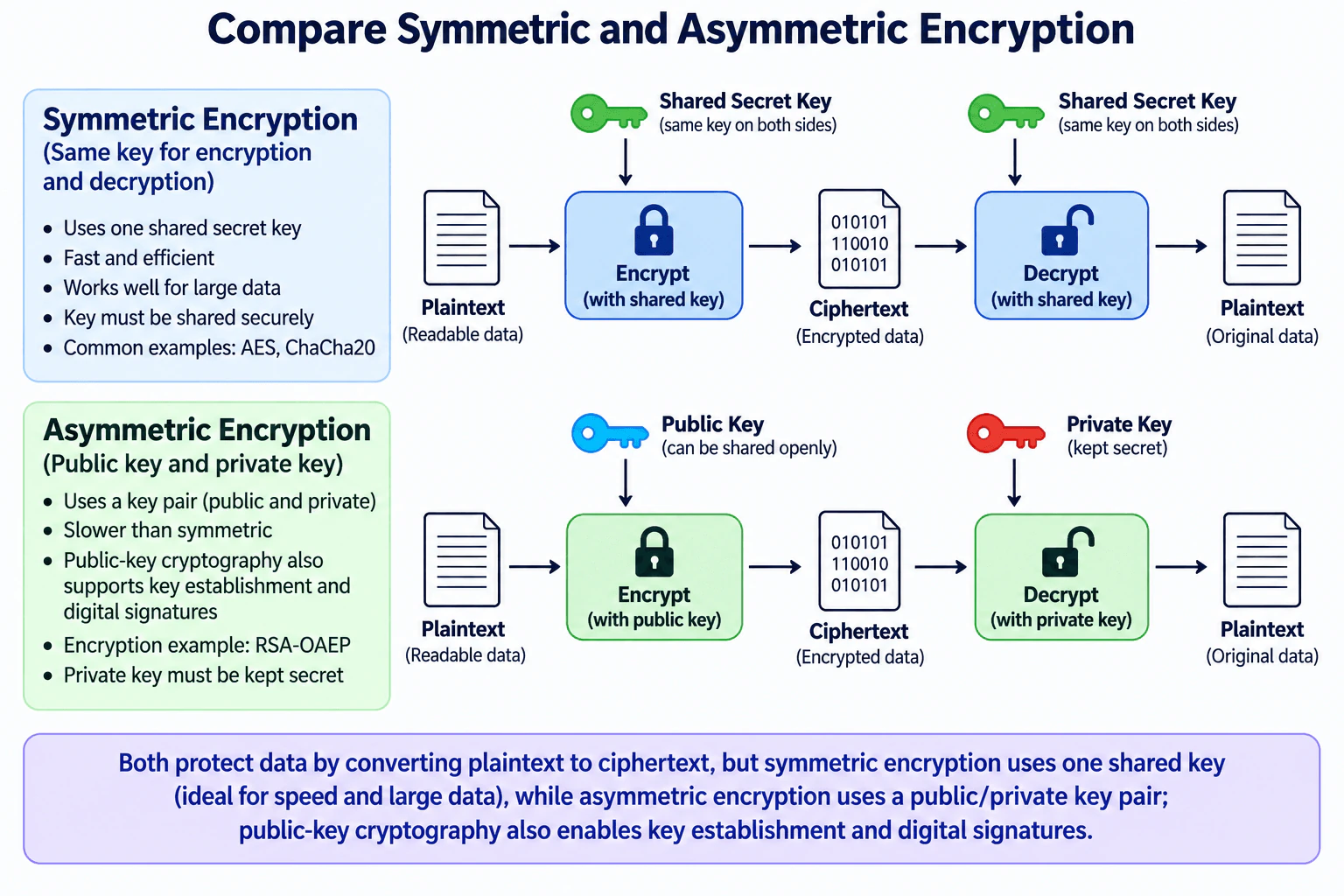
This question asks you to compare two ways of protecting plaintext by converting it into ciphertext. Symmetric encryption uses one shared secret key for both encryption and decryption. It is fast and works well for large amounts of data, but the secret key must be distributed securely. Asymmetric encryption uses a public/private key pair. The public key can be shared openly while the private key stays secret. It is computationally heavier, but it helps when parties do not already share a secret. Public-key cryptography also supports key establishment and digital signatures.
Useful Questions to Ask the Interviewer
Are you asking only about encryption, or should I also mention related public-key operations such as key establishment and digital signatures?
Should I explain how symmetric and asymmetric cryptography are commonly combined in production systems?
How to Explain It in an Interview
Start with the practical decision. Use symmetric encryption when both parties can securely share the same secret key and you need efficient protection for larger amounts of data. Use asymmetric encryption when a public/private key pair helps avoid giving the sender the recipient's private secret.
Symmetric encryption uses one shared secret key. Plaintext is encrypted with that key to produce ciphertext, and the same key is used to decrypt the ciphertext back into plaintext. AES is a standardized symmetric block cipher. ChaCha20 is a symmetric stream cipher. Symmetric cryptography is generally much faster than public-key cryptography, which makes it suitable for bulk data such as files, storage, backups, and network payloads.
The main tradeoff is key sharing. Both authorized sides need the same secret key, so that key must be distributed and stored securely. If the shared key is exposed, an attacker who obtains relevant ciphertext may be able to decrypt data protected by that key. The organization should rotate or revoke the compromised key as appropriate and investigate its exposure.
Asymmetric encryption uses a mathematically related public and private key pair. The public key may be distributed openly, while the private key must remain secret. In the RSA-OAEP flow shown in the diagram, plaintext is encrypted with the recipient's RSA public key to create ciphertext. The recipient uses the corresponding RSA private key to decrypt it. RFC 8017 specifies RSAES-OAEP as an RSA public-key encryption scheme and describes this public-key encryption and private-key decryption relationship.
Asymmetric encryption is computationally heavier than symmetric encryption, so it is normally not the best choice for encrypting large amounts of application data directly. RSA-OAEP also has a strict message-size limit based on the RSA modulus and selected hash function. A common design is therefore to use public-key mechanisms for small keying material and symmetric encryption for the larger data.
It is important to separate asymmetric encryption from the broader category of public-key cryptography. Public-key cryptography also supports key establishment and digital signatures, but these are different operations. For example, NIST SP 800-56A defines key-establishment schemes based on finite-field and elliptic-curve cryptography. A digital signature provides authenticity and integrity properties; it should not be described as simply encrypting data with a private key.
The trust boundary is mainly around secret keys. In symmetric encryption, every authorized participant holding the shared key must protect it. In asymmetric encryption, the private key is the critical secret, while the public key may be shared. A public key may still need authenticity validation so an attacker cannot substitute a different key.
Encryption protects confidentiality, but it does not prove that an endpoint itself is trustworthy. Applications should use vetted cryptographic libraries and established constructions rather than creating custom cryptography. Where integrity is required, use an authenticated-encryption construction or another appropriate integrity mechanism rather than relying on encryption alone.
Safe failure means rejecting invalid or tampered ciphertext without exposing partial plaintext or unnecessary cryptographic error details. Verification should include successful encryption and decryption tests plus negative tests showing that the wrong key and modified ciphertext are rejected.
The interview summary is simple: symmetric encryption uses one shared key and is ideal for speed and large data. Asymmetric encryption uses a public/private key pair and is useful when key distribution is the harder problem. Public-key cryptography additionally enables key establishment and digital signatures. Production systems commonly combine public-key mechanisms with efficient symmetric encryption.
Technical Approach
Identify the data that needs confidentiality and who is authorized to decrypt it.
If both sides can securely share one secret key, use a vetted symmetric construction for the data.
If the sender should not need the recipient's private secret, use an appropriate public-key mechanism; RSA-OAEP is an example for encrypting small values.
Keep symmetric keys and asymmetric private keys secret; public keys may be distributed but should be authenticated when substitution is a threat.
For bulk data, prefer a hybrid design in which public-key mechanisms handle keying material and symmetric encryption protects the larger payload.
Use established cryptographic libraries instead of custom algorithms.
Reject invalid or tampered ciphertext safely and test correct-key, wrong-key, and tampered-ciphertext behavior.
Practical Insights
Symmetric encryption is generally faster and uses less CPU, so it is practical for large files and high-volume traffic. Its main operational cost is securely distributing, storing, rotating, and revoking shared secret keys. Asymmetric cryptography requires more computation and more complex key management, but the public key can be distributed without exposing the private key. RSA-OAEP also cannot encrypt arbitrarily large messages directly. Both approaches require secure key storage, careful rotation, vetted libraries, monitoring, and incident-response procedures.
Why Interviewers Ask This
This question checks whether you understand the fundamental difference between shared-secret and public-key cryptography, can explain their performance and key-management tradeoffs, and can choose the appropriate approach without confusing encryption with hashing, digital signatures, or key establishment.
Common interview mistakes
Common mistakes include saying symmetric encryption uses two different keys; saying asymmetric encryption is normally used for bulk data; treating all elliptic-curve cryptography as an encryption algorithm; describing a digital signature as simply encrypting with a private key; confusing encryption with hashing; assuming a public key automatically proves the recipient's identity; ignoring RSA-OAEP message-size limits; using custom cryptography; and forgetting that compromise of a symmetric secret key or asymmetric private key can expose protected data.
Interview tip
Lead with the simplest distinction: symmetric encryption uses one shared secret key, while asymmetric encryption uses a public/private key pair. Then compare speed, key distribution, typical use, and the importance of protecting secret keys. Finish by explaining that production systems often combine public-key mechanisms with symmetric encryption.
Interviewer may ask next
Why do production systems often combine symmetric and asymmetric cryptography?
Public-key mechanisms help parties establish or protect keying material when they do not already share a secret, but public-key operations are computationally heavier. After suitable keying material is established, symmetric encryption can protect the larger data efficiently. This hybrid approach combines easier key distribution with fast bulk encryption.
What happens if an encryption key is compromised?
If a symmetric shared key is compromised, data protected with that key may be exposed, so the key should be revoked or rotated as appropriate and the exposure investigated. If an asymmetric private key is compromised, confidentiality for data protected for that key may be affected and other capabilities associated with that private key may also be at risk. Public keys are not secret, although their authenticity may still need to be verified.
9. How should an Android application store its authentication tokens securely?Application SecurityMediumAmazon
Short Interview Answer (30-60 seconds)
Keep a symmetric encryption key in Android Keystore and persist only encrypted token ciphertext plus its nonce and required metadata in app-private internal storage. Decrypt only when needed, send tokens over TLS, clear stored token material on logout or revocation, and never fall back to plaintext storage.
Detailed Explanation
The practical goal is to prevent authentication tokens from being exposed as plaintext if application storage is copied or inspected. The Android app should separate the token from the cryptographic key that protects it. Keep a symmetric key in Android Keystore, use that key to encrypt tokens, and store only the ciphertext and required encryption metadata in app-private internal storage. Access tokens should be short-lived. Refresh tokens require stronger lifecycle protection because they can obtain new access tokens. Secure storage reduces extraction risk, but it does not make a compromised device fully trustworthy.
Useful Questions to Ask the Interviewer
Are both access tokens and refresh tokens stored on the device?
What Android versions and device security capabilities must the application support?
Is hardware-backed Keystore protection required, or should the application use it when available?
What should happen when the Keystore key becomes unavailable or token decryption fails?
Does the authentication service support refresh-token rotation and server-side revocation?
How to Explain It in an Interview
Start with the main decision: do not intentionally persist authentication tokens as plaintext. Keep the token-encryption key in Android Keystore and keep the encrypted token data separately in app-private internal storage. Android Keystore can prevent secret key material from being exported. When supported and selected by the application, cryptographic operations can also be enforced by hardware-backed security such as a Trusted Execution Environment (TEE) or StrongBox.
The authentication server sends the access token and refresh token to the Android application over TLS. TLS protects the network connection while the token is in transit, but it does not by itself protect the token after the application receives it. The application therefore encrypts the tokens before persistent storage. The app-private internal storage should contain only ciphertext plus the nonce and metadata required for decryption. The symmetric key must remain in Android Keystore rather than being stored beside the ciphertext.
When the application needs to call the backend, it reads the ciphertext and uses the Keystore-protected key to decrypt the token. Plaintext should exist in application memory only for the period needed to make the request. The application then sends the access token to the application backend over TLS. The backend validates the token before serving the protected request. Secure client-side storage does not replace backend token validation or authorization decisions.
Access tokens should be short-lived so a stolen token has a limited useful lifetime. Refresh tokens are usually more sensitive because they can obtain new access tokens. If OAuth refresh tokens are issued to a public client, current OAuth security guidance requires them to be sender-constrained or protected with refresh-token rotation. With rotation, the authorization server issues a new refresh token during refresh and invalidates the previous one so reuse of an old token can reveal replay.
Logout and revocation are part of the token lifecycle. On logout, the application should clear all locally stored token material. If the server supports token revocation, server-side revocation should also be used when actual invalidation is needed because deleting the local copy cannot invalidate another copy that may already exist elsewhere.
Failure must be safe. If token decryption fails, the token is no longer valid, or secure storage is unavailable, the application should stop using that stored credential and require authentication again. It must never recover by writing or keeping the token in plaintext. Security-relevant failures may be logged, but the token value itself must not be written to logs.
Verification should confirm that persistent application storage contains no plaintext token values, the Keystore key cannot be exported, ciphertext cannot be decrypted without the expected key, logout removes stored token material, and invalid or undecryptable token state leads to the safe authentication path. When hardware-backed protection matters, the application should check the actual Keystore security level rather than assuming that every device provides StrongBox.
The main tradeoff is stronger protection versus compatibility, latency, and implementation complexity. StrongBox provides a dedicated secure processor but is not available on every device and is more resource-constrained and slower than less isolated Keystore implementations. It is therefore appropriate when the threat model justifies the additional protection rather than as a universal requirement.
The residual risk is important. Keystore-backed encryption and app-private storage reduce the risk of extracting reusable token material from persistent storage. They do not completely protect a token on a rooted or otherwise compromised device while the application is running. A sufficiently compromised environment may observe plaintext after legitimate decryption or cause the application to perform authorized cryptographic operations. Secure storage therefore reduces risk; it does not prove that the endpoint itself is trustworthy.
Technical Approach
Authenticate the user with the authentication server over TLS and receive the required token material.
Keep a symmetric encryption key in Android Keystore so the key is non-exportable.
Use hardware-backed Keystore protection such as TEE or StrongBox when the device supports it and the threat model justifies it.
Encrypt the access token and refresh token with the Keystore-protected key using a vetted authenticated-encryption mechanism with a fresh nonce where required.
Persist only ciphertext, nonce, and required metadata in app-private internal storage.
When an API request is needed, load the ciphertext and decrypt the token with the Keystore-protected key.
Keep the plaintext token in memory only while needed and send it to the application backend over TLS.
Have the backend validate the token and authorize the protected request.
Use short-lived access tokens and protect refresh-token replay with rotation or another standards-compliant sender-constraining mechanism when applicable.
Clear locally stored token material on logout or invalidation and use server-side revocation when actual server-side invalidation is required.
If decryption fails, the credential is invalid, or secure storage is unavailable, stop using the stored credential and require authentication again; never fall back to plaintext storage.
Practical Insights
The tokens are small, so the encryption and decryption work is normally inexpensive. The larger cost is engineering complexity. The application must correctly manage key creation, ciphertext, nonces, token expiration, refresh, logout, revocation, migration, and failure cases. Hardware-backed operations can add some latency, and StrongBox is slower and more resource-constrained than other Keystore implementations. Device capabilities also vary. The backend must continue to validate tokens and enforce authorization. Testing and maintenance must confirm that plaintext tokens do not leak into persistent storage, logs, or other unintended locations.
Why Interviewers Ask This
This question tests whether the candidate understands that secure token handling requires both protected key storage and a safe token lifecycle. A strong answer separates the Android Keystore key from encrypted token data, explains app-private internal storage and TLS, handles access and refresh tokens carefully, describes logout and revocation behavior, fails safely when secure storage is unavailable, and recognizes the remaining risk on a rooted or otherwise compromised device.
Common interview mistakes
Common mistakes include storing tokens as plaintext in preferences, databases, or files; storing the encryption key beside the encrypted token; assuming app-private storage alone eliminates token-extraction risk; assuming TLS protects data after it reaches the device; keeping decrypted tokens in memory longer than necessary; writing tokens to logs; failing to clear local token material on logout; treating local deletion as equivalent to server-side revocation; using long-lived access tokens unnecessarily; failing to protect refresh tokens against replay; assuming every device supports StrongBox; and falling back to plaintext when Keystore or decryption operations fail.
Interview tip
Lead with the separation of responsibilities: Android Keystore protects the symmetric encryption key, while app-private internal storage contains only ciphertext plus the required nonce and metadata. Then walk through receipt over TLS, encryption, temporary in-memory decryption, backend validation, logout or revocation, safe failure, and the residual risk of a compromised device.
Interviewer may ask next
Should the application store the access token and refresh token the same way?
Both should be protected from plaintext persistence, but their risk differs. Access tokens should normally be short-lived, which limits the useful lifetime of a stolen token. Refresh tokens can obtain new access tokens and therefore need especially careful storage and lifecycle handling. Store both as encrypted ciphertext protected by the Keystore-managed key. If OAuth refresh tokens are issued to a public client, the authorization server must also use sender-constrained refresh tokens or refresh-token rotation to protect against replay.
Does Android Keystore completely protect tokens on a rooted or compromised device?
No. Android Keystore makes direct key extraction more difficult and may keep cryptographic operations inside hardware-backed security, but it cannot guarantee token secrecy after the application legitimately decrypts a token for use. A compromised runtime may observe plaintext or cause authorized operations. Short-lived access tokens, careful refresh-token handling, backend validation, revocation, minimal plaintext lifetime, and abuse monitoring therefore remain important.
10. Where would you check in Linux to investigate a malicious process?Incident ResponseMediumAmazon
Short Interview Answer (30-60 seconds)
I would start with /proc/<PID> and the process tree, then check the executable, command line, owner, open files, memory mappings, network sockets, relevant logs, and persistence locations. I would correlate the evidence and preserve it before killing the process unless immediate containment is necessary.
Detailed Explanation
This question asks where I would look on a Linux host after a process appears malicious. I would not assume that one alert, unusual name, or network connection proves compromise. I would first identify the PID, affected host, user, and time, then preserve useful volatile evidence. From there, I would inspect the process executable, arguments, ancestry, open files, mapped memory, network activity, logs, and possible persistence. The goal is to build a reliable timeline, determine scope, and choose the smallest safe containment action without unnecessarily destroying evidence or disrupting production.
Useful Questions to Ask the Interviewer
Do we already have a PID, process name, or endpoint alert that identified the suspicious process?
Is this a production system where stopping or isolating the process could cause business impact?
Do we have centralized endpoint, auditd, network, or SIEM telemetry available?
Are there evidence-retention or chain-of-custody requirements for this investigation?
How to Explain It in an Interview
I would begin with the suspicious PID. On Linux, /proc/<PID>/ is a primary source of live process metadata.
First, I would check /proc/<PID>/exe. It is a symbolic link to the executable associated with the process. If the executable file has been unlinked while the process is still running, Linux appends "(deleted)" to the pathname. That can be useful evidence, but it is still only one indicator.
Next, I would inspect /proc/<PID>/cmdline for the process arguments and /proc/<PID>/status for fields such as the process name, state, parent PID, and user-related identifiers. I would not treat cmdline as tamper-proof because a running process can modify the argument strings that appear there.
I would then establish process ancestry with tools such as ps or pstree. The parent process, owner, start time, and child processes often provide more context than the suspicious process name alone. For example, an unexpected shell started by a network-facing service would deserve closer investigation.
I would inspect /proc/<PID>/fd to see the process's open file descriptors. These entries can point to regular files, pipes, and sockets. I would also inspect /proc/<PID>/maps for mapped memory regions and associated files or libraries. Unusual paths or deleted mappings can justify deeper investigation, but they are not automatically proof of malicious activity.
Next, I would correlate network behavior. Tools such as ss can help identify listening or established sockets and, with sufficient permissions and options, associate sockets with processes. I would compare unusual destinations, listening ports, or connection timing with the process timeline.
I would review relevant logs around the process start time. Depending on the Linux distribution and configuration, this can include the systemd journal, authentication logs, auditd records, service logs, and security-agent telemetry. I would look for login activity, privilege changes, service starts, command execution records where available, and other events that explain how the process appeared.
If the evidence suggests persistence, I would check mechanisms appropriate to that host, such as systemd services and timers, cron jobs, shell startup files, and SSH authorized_keys. I would not blindly enumerate every persistence mechanism if the evidence does not support it.
Throughout the investigation, I would record timestamps, commands used, and evidence provenance. If legal, regulatory, disciplinary, or law-enforcement use is possible, I would follow the organization's chain-of-custody process. I would avoid deleting the executable or terminating the process before collecting important volatile evidence unless continued execution creates unacceptable risk.
Containment should be the smallest safe action. If the process is actively causing harm, exfiltrating data, or maintaining attacker access, isolating the host or restricting the relevant communication may be appropriate. Containment reduces immediate risk; it is not the same as eradicating the root cause.
Finally, I would correlate host evidence with endpoint, identity, network, DNS, or SIEM evidence when those sources are available and relevant. I would update the timeline, determine whether the activity is a confirmed incident, establish scope, eradicate the cause, recover the system, validate normal operation, and monitor for recurrence. NIST SP 800-61 Rev. 3, finalized in April 2025, places incident response within broader cybersecurity risk management and emphasizes detection, response, and recovery activities.
The main limitation is that live host evidence can be incomplete or manipulated, permissions can restrict access to /proc data, logs may be missing or altered, and volatile evidence disappears when a process or host stops. That is why I would correlate several independent evidence sources instead of trusting one command or file.
Technical Approach
Record the alert context, hostname, PID or process name, user, timestamp, business impact, and initial severity.
Preserve relevant volatile evidence before destructive actions when it is safe to do so.
Identify the process with ps or an equivalent tool and establish PID, PPID, owner, start time, and process tree.
Inspect /proc/<PID>/exe, /proc/<PID>/cmdline, /proc/<PID>/status, /proc/<PID>/fd, and /proc/<PID>/maps.
Examine open files and network sockets, and correlate unusual activity with the process.
Review relevant system, authentication, audit, service, endpoint, and SIEM logs that are actually available.
If evidence supports it, investigate persistence mechanisms such as systemd units, timers, cron, startup files, or SSH keys.
Build a timeline and distinguish indicators or hypotheses from evidence that confirms an incident.
Choose the smallest safe containment action based on active risk and business impact.
Determine root cause and scope, eradicate the malicious mechanism, recover affected assets, validate recovery, and monitor for recurrence.
Practical Insights
The Linux checks themselves are usually lightweight, but the investigation can cost significant analyst time. Volatile evidence must often be collected quickly, and deeper forensic or memory collection needs more storage and specialist skill. Centralized endpoint and SIEM telemetry improves visibility but adds licensing, infrastructure, tuning, retention, and maintenance costs. Production systems also create operational risk because stopping a process or isolating a host can interrupt services. Evidence containing secrets or personal data needs controlled access, appropriate retention, and chain-of-custody handling when required.
Why Interviewers Ask This
The interviewer is testing whether I know where Linux exposes process evidence and whether I can investigate safely instead of simply killing a suspicious process. A strong answer connects the process to its executable, command line, parent-child relationship, user, files, network activity, logs, and possible persistence. It also shows incident-response judgment: an alert or indicator is not automatically proof of compromise, volatile evidence can disappear, and containment should balance security risk with business impact.
Common interview mistakes
Common mistakes are killing the process before collecting useful volatile evidence; treating an unusual name or connection as proof of compromise; checking only ps and ignoring /proc, process ancestry, files, sockets, and logs; trusting /proc/<PID>/cmdline as immutable evidence; deleting a suspicious executable before preserving it; ignoring deleted-but-running executables; failing to build a timeline; checking persistence without evidence that it is relevant; treating host isolation as eradication; and declaring recovery before validating the system and monitoring for recurrence.
Interview tip
Answer in layers: start with the PID and /proc, then process ancestry, files, network sockets, logs, and persistence. Emphasize evidence preservation and correlation before containment. Saying that an indicator is not automatically proof of compromise shows stronger incident-response judgment than simply listing Linux commands.
Interviewer may ask next
Which /proc/<PID> entries are most useful during the investigation?
I would prioritize exe for the executable pathname, cmdline for arguments, status for process metadata, fd for open file descriptors, and maps for mapped memory regions. I would correlate them rather than trust any one entry. Linux documents that cmdline reflects argument strings that a running process can change, while exe can show an executable pathname with "(deleted)" appended after the underlying file is unlinked.
Would you immediately kill a process that appears malicious?
Not automatically. I would first assess whether it is causing active harm and collect important volatile evidence when safe. Killing it may stop malicious activity, but it can also destroy evidence, disrupt a critical service, or change attacker behavior. If risk is immediate, I would choose the smallest safe containment action, such as isolating the host or restricting relevant communication when appropriate, then continue investigation and eradication.
More questions load as you scroll
Cybersecurity Engineer Resume Examples
Explore the resume examples below to find the one that best matches your target Cybersecurity Engineer role.
Disclaimer: This interview guide is for educational and informational purposes only. It is designed to help readers prepare, but it does not guarantee any interview result, hiring decision, offer, or outcome. Interview questions, hiring criteria, and preferred answers can vary by employer, interviewer, industry, location, and time. All answers, examples, and explanations in this guide are suggested examples for interview preparation, not definitive answers or instructions for professional practice. They are based on research and judgment, are provided without warranties of any kind, and should be adapted to the question, role, and applicable laws and professional requirements. Diagrams are simplified illustrations intended to highlight the main concepts and their relationships; actual situations, systems, and practices may be more complex. Alternative approaches may be equally valid or better suited to a particular question, context, or interviewer. To the fullest extent permitted by applicable law, the contributors and publisher are not liable for decisions made, actions taken, or losses incurred based on this guide.
State Laws and Professional Responsibilities: Laws and requirements governing an occupation vary by state and jurisdiction. You are responsible for checking the current laws, licensing requirements, and scope-of-practice rules that apply to your location and role, and for ensuring that your answers and actions comply with them. Adapt examples in this guide to those requirements. This guide is not legal advice.
Company Notice: This guide is an independent educational resource and is not affiliated with, endorsed by, sponsored by, or approved by the company named in this guide. Company names identify reported interview experiences or the employer context of clearly labeled original practice exercises. Interview practices can change without notice, and inclusion of company-specific content does not mean these questions are official, complete, or guaranteed to be asked. To the fullest extent permitted by law, the author, contributors, and publisher are not responsible for outcomes related to use of this material.
Content Accuracy and Verification: To the fullest extent permitted by applicable law, we do not represent or warrant that interview guides, questions, answers, examples, or diagrams are accurate, complete, current, error-free, or suitable for any particular purpose. You are responsible for independently reviewing and verifying the information before relying on it.