Meta JavaScript Frontend Developer Interview Questions & Answers

meta icon

Questions with Detailed ExplanationsWith Detailed Explanations

(Last Updated: August 28, 2026)

11. Design the frontend architecture for Instagram Stories.System DesignMediumMeta

Question Details

Design the browser frontend for Instagram Stories, beginning by defining the user flow and the scope you will cover. Explain the page and component boundaries, story and viewer state, sequencing through a creator's items and between creators, image or video loading, progress timing, user controls, prefetching, and navigation persistence. Cover loading, empty, media-error, expired-story, offline or slow-network, background-tab, and resumed-session behavior; keyboard and screen-reader access; memory cleanup; analytics boundaries; and the browser-facing data contracts needed without expanding into unrelated storage internals.

Short Interview Answer (30-60 seconds)

At a high level, the frontend should let users open Stories, move through one creator’s items, continue to the next creator, and return to the feed without losing context. I would use the diagram’s CSR single-page design with an initial HTML shell, route-based code splitting, and a StoryViewer component tree. URL, local, shared, remote, and persisted browser state have separate jobs. Media is prefetched carefully. The main trade-off is smooth playback versus extra bandwidth and memory.

Detailed Explanation

The goal is to make Instagram Stories feel fast and continuous in the browser. A user can enter from the Stories tray, an avatar, or a deep link. The main challenge is coordinating media playback, progress timing, navigation, network work, and saved position without wasting bandwidth or memory. I would explain the design through rendering, routes and components, state, data flow, failure handling, accessibility, and safe release controls.

Useful Questions to Ask the Interviewer
  • Should Stories work well on slow mobile networks and desktop browsers?
  • How much offline viewing should the browser support?
  • Should users resume the same Story after reopening the viewer?
  • Are keyboard, screen-reader, RTL, and reduced-motion behaviors required?
  • Can the browser prefetch a few upcoming Stories?
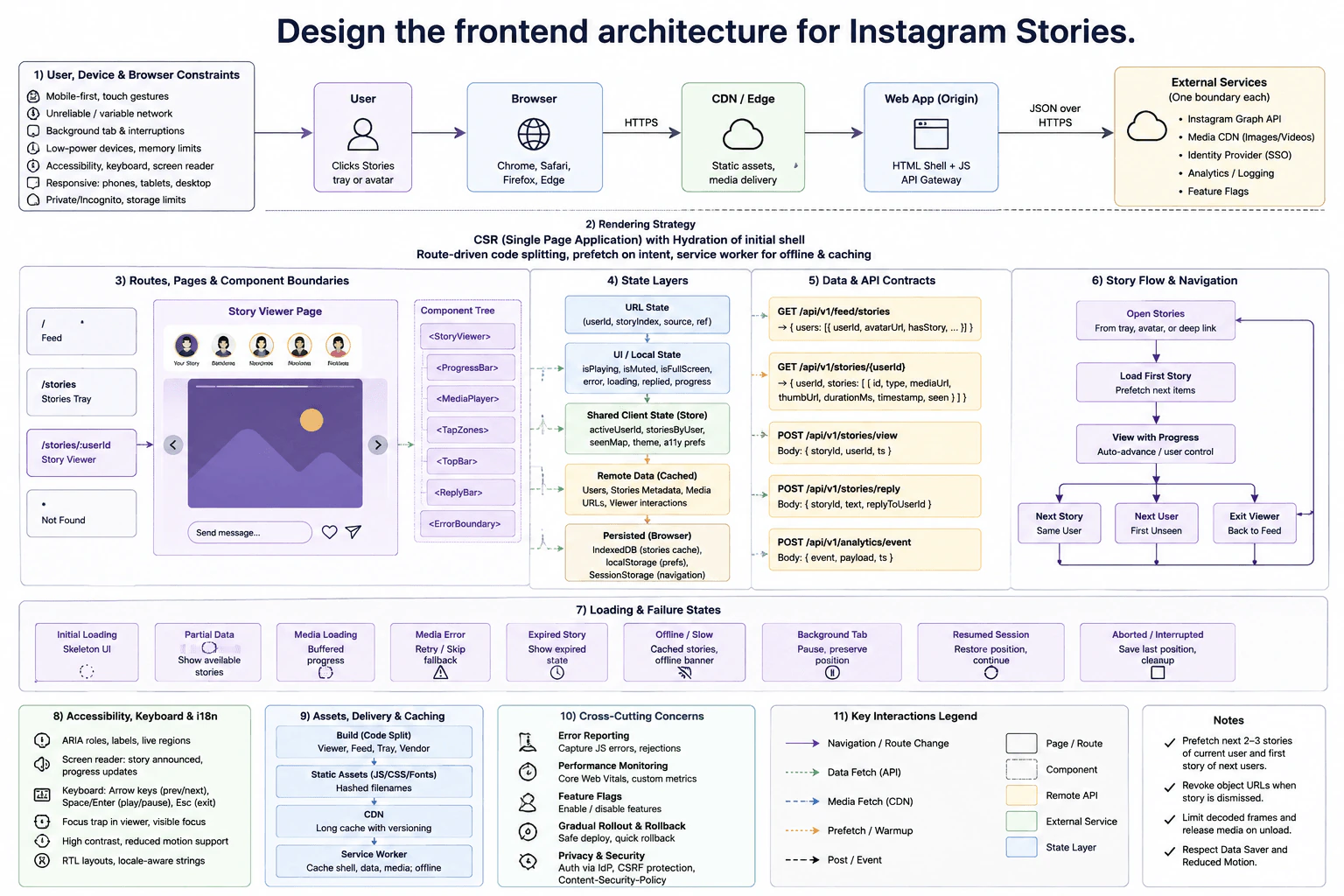
Design the frontend architecture for Instagram Stories. diagram
How to Explain It in an Interview
1. Start with rendering and navigation

The browser gets static assets through the CDN and loads the HTML shell plus JavaScript from the web application path. I would use the diagram’s CSR single-page approach with hydration of the initial shell. After that, route changes stay inside the browser.

Route-based code splitting loads only JavaScript needed for the current route. The service worker can cache the shell, selected data, and media for offline use.

2. Define routes, components, and state

The main routes are /, /stories, /stories/:userId, and a not-found route. The Story Viewer Page contains StoryViewer, ProgressBar, MediaPlayer, TapZones, TopBar, ReplyBar, and ErrorBoundary.

URL state keeps userId, storyIndex, source, and ref. Local UI state keeps playing, muted, fullscreen, loading, error, reply, and progress values. Shared client state keeps activeUserId, storiesByUser, seenMap, theme, and accessibility preferences.

Remote data contains users, Story metadata, media URLs, and viewer interactions. IndexedDB keeps cached Stories. localStorage keeps preferences. sessionStorage keeps navigation state for session restore.

3. Explain the Story data and media flow

The tray uses GET /api/v1/feed/stories. Opening a creator uses GET /api/v1/stories/{userId}. Story data includes fields such as storyId, type, media URL, thumbnail URL, duration, timestamp, and seen state.

MediaPlayer loads image or video media from the Media CDN. The browser prefetches the next two or three Stories from the current creator and the first Story from following creators. When progress finishes, it moves to the next Story. After the creator ends, it can move to the next user’s first unseen Story.

Views use POST /api/v1/stories/view. Replies use POST /api/v1/stories/reply. Analytics uses POST /api/v1/analytics/event. Analytics is separate from viewer correctness.

4. Handle loading, failures, and browser lifecycle

Initial loading shows a skeleton. Partial data shows available Stories. An empty result shows the empty state. Media loading shows buffered progress. A media error can retry, skip, or use a fallback. An expired Story shows the expired state.

On slow or offline networks, cached Stories can remain available with an offline banner. When navigation makes an old request unnecessary, the browser should cancel that work when possible and ignore late results that no longer match the active Story. Background tabs pause playback and preserve position. Resumed sessions restore that position.

The viewer revokes object URLs after dismissal and releases media on unload. It also limits decoded frames to control memory.

5. Cover accessibility, measurement, and rollout

The viewer uses ARIA roles, labels, live regions, visible focus, and a focus trap. Arrow keys move between Stories. Space or Enter controls playback. Escape exits. Responsive layouts support phones, tablets, and desktop screens. RTL layouts and locale-aware strings support different languages.

Client error reporting captures JavaScript errors and rejected work. Performance monitoring uses Core Web Vitals and custom metrics. Feature flags support gradual rollout, and a remote kill switch supports safe rollback.

Engineering Considerations / Design Trade-offs

The benefit is fast movement after the first page load. Code splitting keeps the first JavaScript smaller. Prefetching also makes the next Story feel faster. The downside is more network use and memory. Cached Stories help on slow or offline connections, but cached data may be older than the latest remote result. Saving navigation state improves resume behavior, but adds cleanup work. A service worker improves offline use, but has its own browser lifecycle. The design limits prefetching, releases media quickly, and respects Data Saver and reduced-motion settings.

Why Interviewers Ask This

The interviewer wants to see whether the candidate can turn a familiar product into clear frontend responsibilities. They are testing judgment about state ownership, media loading, navigation, browser storage, accessibility, failures, and memory. They also want clear trade-offs instead of a list of tools. A strong answer keeps remote systems as external boundaries and focuses on what the browser must do correctly.
Interviewer may ask next
How would you change this design if many users have very slow or expensive mobile connections?

I would keep the same architecture, but make media loading more conservative. The main changes would affect MediaPlayer, the prefetch queue, cached remote data, and the service worker.

The current design can prefetch two or three upcoming Stories and the first Story from following creators. On a slow connection or when Data Saver is enabled, I would reduce that amount. The current Story would get priority. Images could also be preferred before large videos when that gives a usable result faster.

The existing loading and offline states still work. Media loading would show buffered progress. Cached Stories could remain available with an offline banner. A failed media request could retry, skip, or show the existing fallback without blocking the whole viewer.

I would still preserve the current Story position during interruptions. I would also release decoded media quickly after it is no longer needed.

The downside is less seamless navigation. Some next Stories may wait for media instead of opening immediately.

How would the design change if users must reliably resume the exact Story position after closing and reopening the viewer?

I would keep the same routes and components, but make persisted navigation state more important. The affected parts are URL state, sessionStorage, cached Story data, and the resumed-session flow.

While the viewer is active, I would keep the current userId, storyIndex, and playback position updated. sessionStorage would keep short-lived navigation state for the browser session. IndexedDB would continue holding cached Story data that the diagram already allows.

When the viewer opens again, the frontend would check whether the saved Story is still available. If it is, StoryViewer restores that item and position. If it has expired, the existing expired-story state is shown instead of restoring invalid media.

Background-tab behavior would still pause playback and preserve position. Normal cleanup would still revoke object URLs and release media resources when they are no longer needed.

The downside is more state coordination. The browser must avoid restoring an old position for content that has expired or changed.

12. Design an internationalization system for a large frontend product.System DesignMediumMeta

Question Details

Design an i18n architecture for a browser product used by many routes and independently developed components. Define locale selection and persistence, message identifiers and resource bundles, lazy loading, fallback behavior, plural and gender rules where supported, number/date/relative-time formatting, right-to-left layout, interpolation safety, and missing-translation handling. Cover server-rendered or pre-rendered content and hydration when present, cache and version boundaries, a locale change during navigation, offline behavior, bundle-size limits, developer tooling, extraction and review workflow, pseudolocalization, accessibility, testing, observability, staged migration, and compatibility when a component and translation bundle are on different versions.

Short Interview Answer (30-60 seconds)

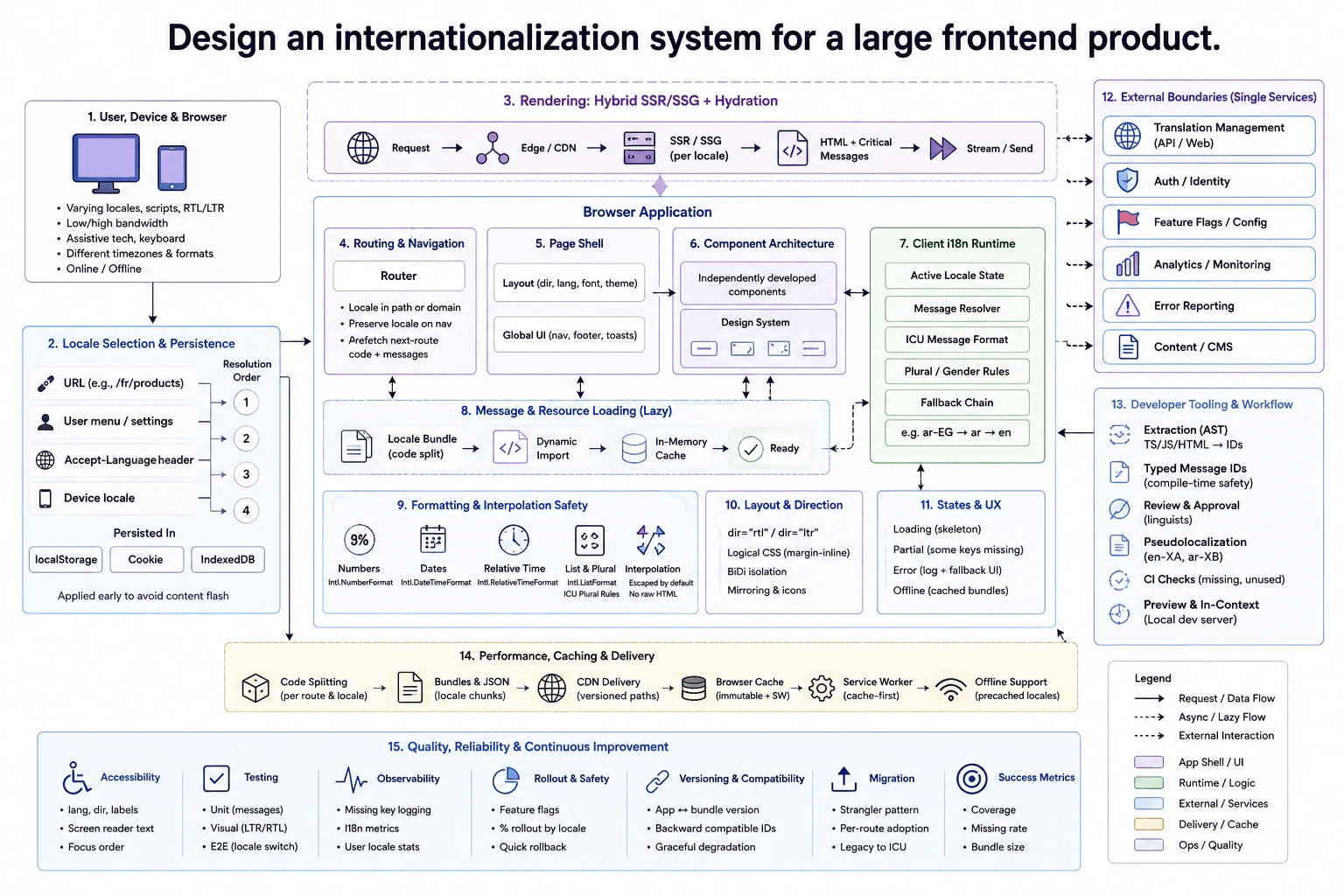
At a high level, I would make locale part of the product state and load only the translations each route needs. The first page can use SSR or SSG, then hydration attaches browser behavior. The router preserves locale during navigation. The client i18n runtime resolves message IDs, formatting, plural rules, fallbacks, and RTL layout. Bundles are cached through the CDN, browser cache, and service worker. The trade-off is better speed and offline support versus more cache and version complexity.

Detailed Explanation

The goal is to give every user the same product experience in their language and regional format. The hard part is keeping many routes and independently developed components consistent. We also need small bundles, safe fallbacks, RTL support, offline behavior, and smooth locale changes. I would divide the design into locale selection, rendering, message loading, formatting, delivery, and safe operations. The browser owns locale state and presentation. Remote systems stay outside the frontend boundary.

Useful Questions to Ask the Interviewer
  • Do we need SSR, SSG, or both for first-page rendering?
  • Must previously loaded translations work offline?
  • How many locales and RTL languages must we support?
  • Can users choose a locale, or only use automatic detection?
  • Can components and translation bundles be released at different times?
Design an internationalization system for a large frontend product. diagram
How to Explain It in an Interview
1. Select and persist the locale

I would resolve locale in a clear order. The URL wins first, such as /fr/products. Next comes the user setting. Then we can use the Accept-Language header or device locale.

The selected locale becomes active client state. It can also be saved in a cookie, localStorage, or IndexedDB. Applying it early avoids briefly showing the wrong language.

2. Render the first page and preserve locale during navigation

The diagram uses hybrid SSR or SSG with hydration. SSR or SSG provides HTML and critical messages for the first page. Hydration means attaching browser behavior to that HTML.

The router keeps locale in the path or domain. During navigation, it preserves the locale and can prefetch the next route's code and messages. The page shell controls language, direction, font, and other global UI settings.

3. Resolve messages inside the browser

Independently developed components and the design system use message IDs instead of hard-coded translations. The client i18n runtime owns active locale state, message lookup, ICU message formatting, plural and gender rules, and fallback behavior.

For example, ar-EG can fall back to ar, then en. Numbers use Intl.NumberFormat. Dates use Intl.DateTimeFormat. Relative time uses Intl.RelativeTimeFormat. Lists use Intl.ListFormat. Interpolated values are escaped by default, so translated content does not become raw HTML.

4. Lazy-load and cache translation resources

Translation resources are split by route and locale. Code splitting means loading only the code and messages needed now. A dynamic import loads the locale bundle, and an in-memory cache keeps it ready for reuse.

The delivery path uses versioned bundles, CDN delivery, browser caching, and a cache-first service worker. Cache keys include locale, namespace, and version. This protects compatibility when a component and translation bundle are released at different times. Previously cached locales can still work offline.

5. Handle states, RTL, accessibility, and failures

While messages load, the UI can show a skeleton. If some keys are missing, available content can still render while the fallback chain supplies safe text. Missing keys and failures go to error reporting and monitoring.

RTL pages use dir="rtl", logical CSS such as margin-inline, BiDi isolation, and mirrored directional icons. Accessibility checks cover lang, dir, labels, screen-reader text, and focus order.

6. Build, test, and release safely

Developer tooling extracts message IDs from JavaScript, TypeScript, JSX, and HTML. Typed IDs and CI checks catch missing or unused messages. Translation Management handles translation review and approval. Pseudolocales such as en-XA and ar-XB expose layout and RTL problems before release.

Testing covers message units, LTR and RTL visuals, and end-to-end locale switching. Analytics and monitoring track missing keys and locale usage. Success metrics include coverage, missing rate, and bundle size. Feature flags support rollout by locale and quick rollback. A strangler migration can move legacy messages gradually to ICU formatting. Auth or identity and Content or CMS remain external boundaries rather than browser-owned services.

Engineering Considerations / Design Trade-offs

The benefit is faster pages because each route loads only its own code and translations. CDN and browser caching reduce repeated downloads. The service worker also helps previously cached locales work offline. The downside is more cache and version rules. A component may expect messages from a newer bundle. Versioned cache keys and backward-compatible message IDs reduce that risk. SSR or SSG improves the first page, but hydration adds browser work. RTL support, pseudolocalization, testing, and staged rollout also add effort, but they prevent many user-facing mistakes.

Why Interviewers Ask This

The interviewer wants to see how you organize a frontend problem shared by many teams. They want to know whether you can choose clear state ownership, load resources efficiently, handle missing translations, support RTL and accessibility, and plan for offline use. They also want to see how you manage version changes, testing, monitoring, rollout, and trade-offs without making the browser design unnecessarily complex.

Interviewer may ask next
How would you change the design if components and translation bundles can be deployed at different times?

I would keep the same architecture, but make version compatibility a stronger rule at the message-loading boundary. Each route or component would declare the translation bundle version it expects. The cache key would include locale, namespace, and version, matching the diagram.

When a component loads, the message resolver first looks for the expected bundle version. If that version is unavailable, it can use backward-compatible message IDs only when the team has declared them safe. Otherwise, the component should fall back gracefully instead of showing broken or missing text.

I would also keep feature flags around risky migrations. We could release a new component and translation version to a small percentage of one locale first. Missing-key metrics and error reporting would show whether the rollout is safe. If problems appear, we can roll back quickly.

CI should also compare component message IDs with the intended bundle before release. The main downside is extra storage and release complexity because several bundle versions may need to remain available.

What would you do if the user changes locale while a route navigation is still loading?

I would treat the locale change as a new navigation state. The router would update the active locale and preserve it in the URL or domain. The i18n runtime would then load the new locale bundle for the destination route.

Any older translation load must not update the page after the locale changes. If the loading API supports cancellation, I would cancel that old work. Otherwise, I would compare the locale associated with the completed result against the current active locale before applying it. This protects the page from a stale result, meaning an older result that finishes after the user's newer choice.

While the new bundle loads, the UI can keep safe existing content or show the diagram's loading state. If loading fails, the fallback chain can provide usable text, while error reporting records the failure.

The main downside is more navigation-state logic because route code and translation resources may both be loading when the user changes locale.

13. Design a dashboard that shows newly registered users on a map.System DesignMediumMeta

Question Details

Design the reported frontend dashboard for newly registered users, including a map. Define the time range and filters the user can control, the aggregate and per-location data the browser needs, page and widget boundaries, cache ownership, URL state, request cancellation, and update cadence. Cover initial, loading, empty, partial, stale, malformed-data, and permission-denied states; map clustering or aggregation at different zoom levels; a keyboard- and screen-reader-accessible non-map representation; responsive layouts; large datasets; background refresh; privacy-aware display; rendering and memory limits; failure isolation; and the measurements used to distinguish network, processing, and paint delay.

Short Interview Answer (30-60 seconds)

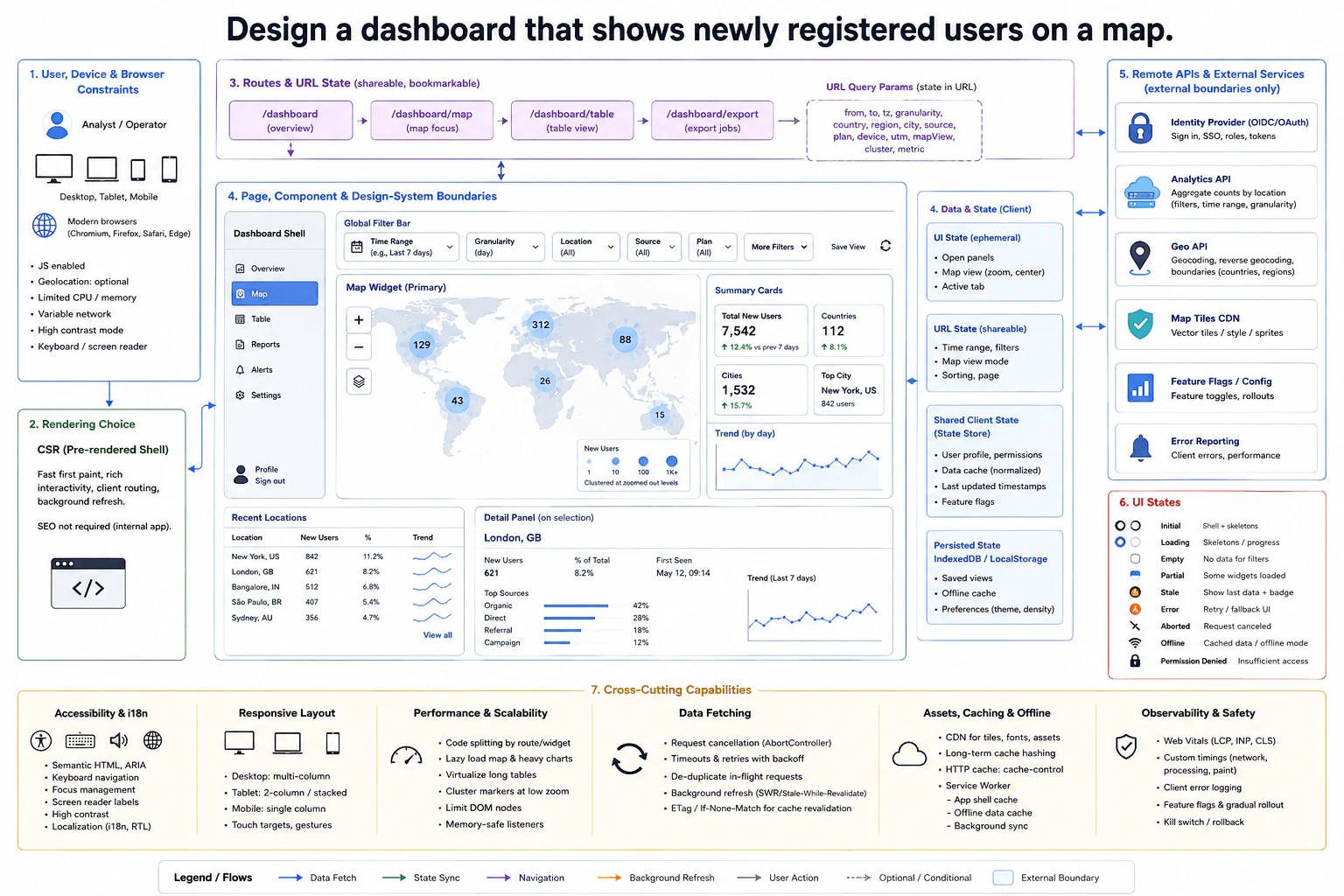
At a high level, this dashboard helps an analyst see where new users register and how that changes over time. I would use CSR with a pre-rendered shell, then load map, summary, and location data in the browser. Filters and map state live in the URL, while remote data uses a client cache. Old requests are canceled when filters change. The main trade-off is freshness versus speed, so cached data can stay visible while a background refresh runs.

Detailed Explanation

The goal is to help an analyst understand where newly registered users come from. The hard frontend problem is keeping filters, map zoom, URL state, cached remote data, tables, and failure states consistent. I would use a pre-rendered application shell and CSR for the interactive dashboard. Remote systems stay outside the frontend boundary. I would explain the design through routes and components, state ownership, data fetching, resilience, accessibility, and performance.

Useful Questions to Ask the Interviewer
  • How fresh must registration data be?
  • Which filters must be shareable through the URL?
  • How large can the location dataset become?
  • Do users need the last viewed data while offline?
  • What accessibility and localization requirements apply?
Design a dashboard that shows newly registered users on a map. diagram
How to Explain It in an Interview
1. Start with routes and the main user flow

The main view is /dashboard/map. The shell also links to /dashboard, /dashboard/table, and /dashboard/export. The global filter bar controls time range, granularity, location, source, plan, and other filters.

Those values, plus map view, sorting, and paging, belong in URL state. This makes a filtered dashboard shareable and bookmarkable.

2. Keep page and widget boundaries clear

The dashboard shell owns navigation and the global filter bar. The map page contains the map widget, summary cards, recent locations, and a selected-location detail panel. The recent-locations table is also a keyboard- and screen-reader-accessible non-map view.

Each widget handles its own loading or failure state. This isolates failures, so one broken widget does not have to remove the whole dashboard.

3. Give each kind of state one owner

Temporary UI state holds open panels, the active tab, and map interaction state. Shared client state holds the user profile, permissions, normalized cached data, update timestamps, and feature flags. IndexedDB or localStorage stores saved views, offline data, and user preferences.

Remote results remain remote data, not permanent browser truth. Cached results can become stale, meaning they may be older than the newest server result.

4. Fetch, validate, cancel, and refresh safely

The browser requests aggregate counts and per-location data from the Analytics API. Filter changes start a new request and cancel old work with AbortController. The client also ignores results that no longer match the active filters.

At low zoom, the map shows clustered or aggregated counts. More detail appears as the user zooms in. The Geo API supports geographic lookup, while the Map Tiles CDN supplies map tiles or styles.

Background refresh revalidates cached data without first clearing useful content. HTTP caching and the browser cache own reusable network responses and static assets. The service worker owns app-shell and offline fallback behavior.

5. Show every important outcome clearly

Initial and loading states use a shell or skeletons. Empty means no users match the filters. Partial means some widgets succeeded while others failed. Stale keeps the last useful data visible with a freshness indicator.

Malformed data uses a safe fallback and is reported. Aborted requests do not show an error. Offline mode shows cached data when available. Permission-denied views hide sensitive details, while the remote system remains responsible for real authorization.

6. Protect accessibility, responsiveness, and performance

The page uses semantic HTML, ARIA where needed, keyboard navigation, focus management, screen-reader labels, high contrast, and localization support. Desktop can use several columns, tablet can stack sections, and mobile uses a simpler single-column layout.

For large datasets, I would cluster map markers, virtualize long tables, lazy load heavy widgets, limit DOM nodes, and clean up event listeners. Code splitting means loading only the JavaScript needed for the current route or widget.

I would measure network delay with DNS, connection, TTFB, transfer, and API timing. Processing timing covers parsing, validation, transformation, and state updates. Paint timing covers style, layout, paint, composition, FPS, and long tasks. Error reporting, Web Vitals, feature flags, gradual rollout, and a kill switch support safe releases.

Engineering Considerations / Design Trade-offs

The benefit is that the dashboard stays useful as data grows. Clustering reduces how many map items the browser draws. Virtualized tables reduce how many rows exist in the DOM. The downside is more frontend logic. Caching makes repeat views faster, but cached data can become stale. Background refresh improves freshness, but it uses more network and processing work. URL state makes views easy to share, but the URL becomes more complex. Offline support is helpful, but service-worker and cache rules add more cases to test.

Why Interviewers Ask This

The interviewer wants to see whether you can turn a broad dashboard idea into clear frontend responsibilities. They are testing how you separate URL state, local state, cached remote data, components, and failure handling. They also want to see whether you understand large datasets, accessibility, request cancellation, browser rendering limits, and performance measurement. Most importantly, they want clear reasoning about trade-offs.

Interviewer may ask next
What would you change if the dashboard needed much fresher registration data?

I would keep the same basic design, but I would make background refresh more frequent and more visible to the user. The main parts affected are the data-fetching layer, the client cache, and the stale-data indicator.

The browser would still request data through the same Analytics API boundary. Filter changes would still cancel old requests with AbortController. Cached data could remain on screen while a background request checks for a newer result. Before applying that result, the client would verify that it still matches the active URL filters and map view.

I would also avoid refreshing hidden or inactive widgets when that work gives no user value. Map clustering and table virtualization would remain unchanged because they solve rendering size, not freshness.

The main downside is more network traffic, more browser processing, and more chances for overlapping refresh work.

How would you handle millions of locations without freezing the browser?

I would keep the same architecture, but I would reduce how much location detail the browser renders at one time. The main changes are inside the map widget and recent-locations table.

At low zoom, the map should use aggregated counts or clusters instead of drawing every location. As the user zooms in, the browser can show smaller clusters and more detailed points. This keeps the number of visible map objects bounded.

For the table, I would use virtualization. Virtualization means only rows near the visible area are placed in the DOM. I would also lazy load the heavy map code, limit DOM nodes, and remove unused event listeners when components unmount.

I would measure processing and paint time separately from network time. That shows whether delays come from data transfer, JavaScript work, or rendering. The downside is more complexity around clustering, selection, and keeping the map and table synchronized.

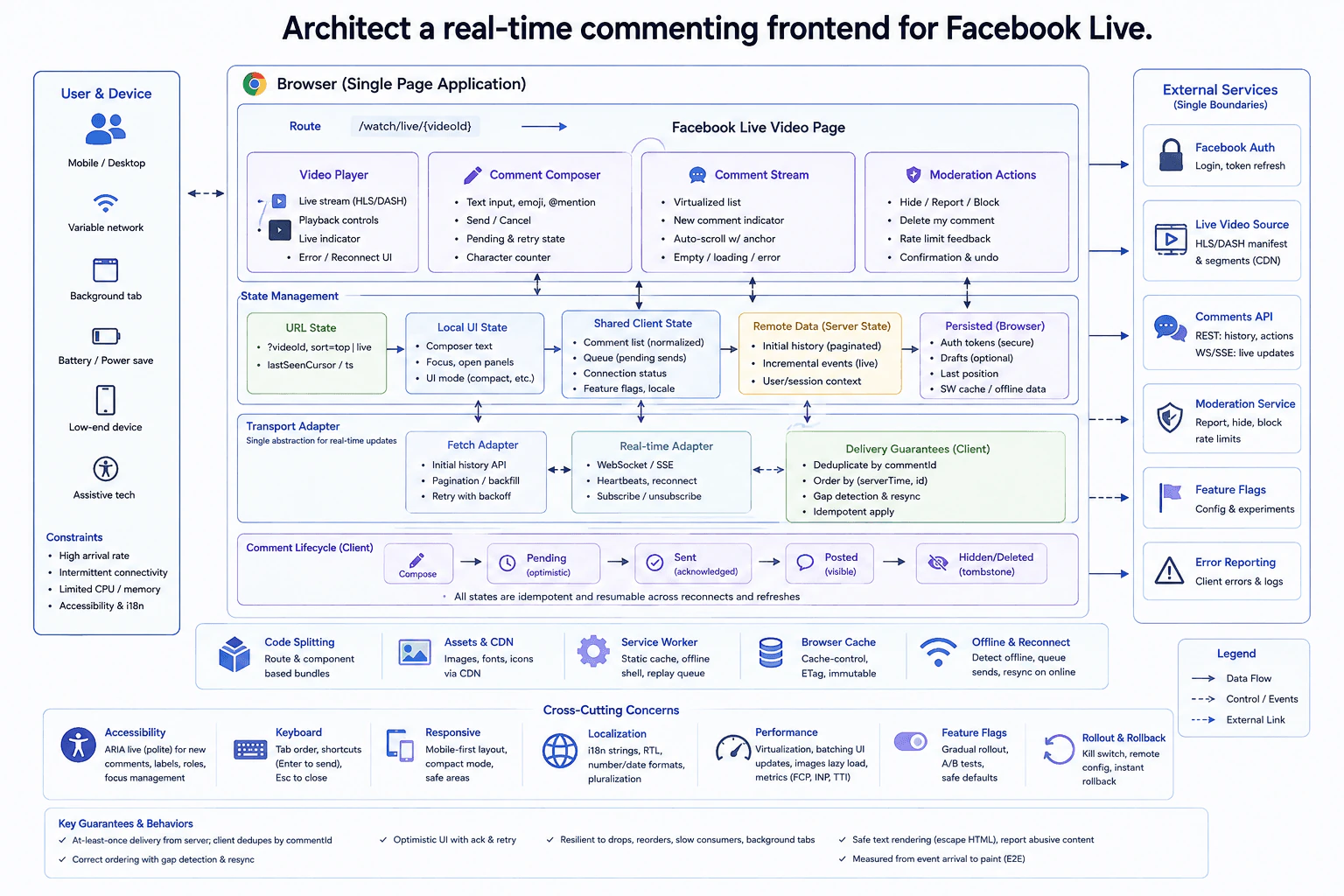
14. Architect a real-time commenting frontend for Facebook Live.System DesignHardMeta

Question Details

Design the frontend comment experience attached to a live Facebook video. Define the video-page, composer, comment-stream, moderation, and transport-adapter boundaries; initial history and incremental-update state; comment identity, ordering, deduplication, pending sends, acknowledgements, and reconnect behavior. Cover high arrival rates, dropped or out-of-order events, authentication expiry, slow consumers, background tabs, deleted or hidden comments, safe text rendering, scroll anchoring, virtualization or summarization thresholds, keyboard operation, restrained live announcements, failure containment, and measurements from event arrival to usable paint. Keep the answer centered on browser architecture and the contracts the client needs.

Short Interview Answer (30-60 seconds)

At a high level, the page must keep live video smooth while comments arrive quickly and sometimes out of order. I would use a CSR single-page app on /watch/live/{videoId} with separate Video Player, Comment Composer, Comment Stream, and Moderation Actions. Initial history uses the Fetch Adapter, while incremental events use WebSocket or SSE. Shared client state orders and deduplicates comments. Virtualization, batching, reconnect, safe rendering, and polite live announcements protect performance and accessibility, with some extra client complexity.

Detailed Explanation

The goal is to let viewers watch Facebook Live and use comments without hurting video playback or browser responsiveness. The difficult part is that comment events can arrive very quickly, arrive twice, arrive out of order, or stop during a weak connection. The browser may also be slow or running in a background tab. I would use a CSR single-page application. I would separate the video, composer, comment stream, moderation controls, state, and transport adapters. Remote systems stay outside the browser as clear external boundaries.

Useful Questions to Ask the Interviewer
  • Should comments default to top or live order?
  • How much comment history should load initially?
  • What offline reading and sending behavior is expected?
  • Can the client use WebSocket or SSE for live updates?
  • What accessibility and localization targets must we support?
Architect a real-time commenting frontend for Facebook Live. diagram
How to Explain It in an Interview
1. Page and component boundaries

The route is /watch/live/{videoId}. It opens the Facebook Live Video Page inside the browser SPA.

The Video Player handles HLS or DASH playback and reconnect feedback. The Comment Composer owns text, emoji, mentions, send, cancel, pending state, and retry feedback. The Comment Stream uses virtualization, scroll anchoring, and a new-comment indicator. Moderation Actions expose hide, report, block, and delete flows.

2. State ownership

URL state stores videoId, top or live sorting, and the last seen cursor or timestamp. Local UI state stores composer text, focus, open panels, and compact layout choices.

Shared client state stores normalized comments, comment order, pending sends, connection status, feature flags, and locale. Remote data holds paginated history, incremental events, and user or session context. Persisted browser state keeps secure authentication data, optional drafts, the last position, and service-worker cache or offline data.

3. History, identity, and live updates

The Fetch Adapter loads initial history, pagination, and backfill. The Real-time Adapter subscribes through WebSocket or SSE and handles heartbeats, reconnect, subscribe, and unsubscribe.

Each comment uses commentId for identity. The client deduplicates by that id and orders accepted events by (serverTime, id). Because delivery can repeat, applying the same event twice must be safe. Gap detection finds missing events and starts a resync or backfill.

4. Sending and failure recovery

A new comment moves from Compose to Pending with optimistic UI. An acknowledgement moves it to Sent, then Posted. A hidden or deleted comment becomes a tombstone instead of silently changing identity.

If authentication expires, Facebook Auth handles login or token refresh. Pending work waits for recovery instead of pretending it succeeded. After reconnect, the client resumes from its last known position and backfills gaps when needed.

5. High rates, accessibility, and safe delivery

The stream virtualizes rows and batches UI work during bursts. If the viewer is not at the newest comment, scroll anchoring keeps the reading position stable. A new-comment indicator avoids forced scrolling. Under extreme rates, the view can reduce immediate rendering or summarize activity instead of painting every arrival.

Background tabs and slow consumers should reduce unnecessary painting and resync when active again. Text is escaped instead of inserting unsafe HTML. Keyboard navigation, focus management, labels, and polite ARIA live announcements keep the experience usable without overwhelming assistive technology.

Code splitting loads route and component bundles as needed. Assets use CDN delivery and browser caching. The service worker supports the static shell, offline data, and queued replay when browser lifecycle rules allow it. Error Reporting collects client failures. I would measure event-arrival-to-usable-paint, reconnects, drops, FCP, INP, and related page timings. Feature flags support gradual rollout, A/B tests, safe defaults, and rollback.

Engineering Considerations / Design Trade-offs

The benefit is that history loading and live updates use separate adapters. Each path is easier to understand and recover. The downside is more client state and reconnect logic. Virtualization and batching protect slow browsers during large comment bursts, but scroll behavior becomes harder. Optimistic sending feels fast, but acknowledgements and retries must be handled carefully. Offline support helps weak networks, but service-worker lifecycle rules add complexity. Safe text rendering and polite announcements improve security and accessibility. Feature flags make rollout safer, but every extra flag creates another state that must be tested.

Why Interviewers Ask This

The interviewer wants to see whether you can turn a busy real-time experience into clear browser responsibilities. They care about state ownership, ordering, deduplication, reconnects, pending work, and keeping the UI responsive. They also want good judgment about accessibility, safe rendering, offline behavior, measurements, and rollout. The main skill is explaining these tradeoffs clearly without designing hidden server internals.

Interviewer may ask next
What would you change if comments arrived much faster than the browser could paint them?

I would keep the same architecture, but I would make the Comment Stream more aggressive about reducing browser work. The Real-time Adapter would still receive WebSocket or SSE events. Shared client state would still deduplicate by commentId, order by (serverTime, id), and detect missing ranges.

The main change would be in Derived/View State and rendering. I would keep a smaller visible window, batch more updates, and avoid painting every event immediately. When the viewer is reading older comments, scroll anchoring would keep that position stable. The page would increase the new-comment indicator instead of forcing an auto-scroll. At an extreme threshold, the view could summarize activity until the arrival rate falls.

Correctness stays in the normalized shared state. Gap detection and the Fetch Adapter can still backfill after a drop or reconnect. The downside is that some new comments may appear slightly later during very large bursts.

How would the design handle an authentication token expiring during a live session?

I would keep the same basic design, but I would treat authentication expiry as a recoverable transport failure. Facebook Auth remains the external boundary responsible for login or token refresh. The Fetch Adapter and Real-time Adapter should stop authenticated work while that refresh is happening.

After a successful refresh, the Real-time Adapter reconnects and subscribes again. It resumes from the last event id, cursor, or timestamp already tracked by client state. Gap detection then decides whether the Fetch Adapter must request backfill. Pending sends remain pending until an acknowledgement arrives, which helps prevent duplicate visible comments after reconnect.

If refresh fails, the UI shows a clear error and disables actions that require authentication. Existing readable content can remain visible when allowed. Remote services still enforce authorization; hiding a browser button is not security. The downside is more recovery states to test around pending sends, reconnects, and expired sessions.

15. Do you have experience with older versions of Angular?BehavioralEasyMeta

Question Details

Answer from real work only. Identify the Angular version or generation you used, the type of frontend product, the responsibilities you personally owned, and the constraints that made the older version relevant. Describe one concrete implementation, debugging, migration, compatibility, testing, or maintenance decision; how you verified it; and what knowledge still transfers to current frontend engineering. Distinguish direct experience from adjacent familiarity, and state candidly when you have not used a particular version rather than implying expertise.

Interview tip:

Use STAR to structure your answer: briefly explain the Situation and Task, make Action the most detailed part, and finish with the Result. For example, describe a real project where you worked with an older Angular version, explain what you personally owned, why the application still used that version, one implementation or maintenance decision you made, how you tested the change, what knowledge still applies today, and which Angular versions you have only studied rather than used directly.

Situation

Yes. In my last role, I worked directly with Angular 8 on an internal web application used for daily business operations. The application had been built several years earlier and depended on an older component library and other packages that made an immediate Angular upgrade risky. I have also studied AngularJS and understand its main concepts, but I have not used AngularJS in a production role, so I would not present myself as having direct AngularJS experience.

Task

I was responsible for maintaining several frontend features, fixing defects, and making changes without breaking existing workflows. One issue involved a shared form component that behaved correctly during normal navigation but sometimes showed old values after the user changed records. My goal was to fix the state problem while keeping the change small because a larger framework upgrade was outside the scope of that release.

Action

I first reproduced the issue and followed the data flow from the parent component into the shared form. I found that the component initialization logic assumed the input data would only arrive once. That assumption was wrong because the same component instance could receive new input when the user selected another record. I moved the update logic into the Angular lifecycle handling that reacts when input values change. I also made sure the form state was rebuilt from the new input instead of reusing values from the previous record. I chose this approach because it fixed the actual lifecycle problem without adding a manual refresh or changing unrelated parts of the application. I then added unit tests for the component and tested the main user flow in the browser, including switching between several records and editing values. I also checked nearby screens that reused the component so the fix did not create a regression. Working with Angular 8 gave me direct experience with components, dependency injection, services, routing, forms, lifecycle methods, RxJS, and testing. Those ideas still transfer to current Angular development even though the framework APIs and recommended patterns have continued to improve.

Result

The stale form behavior was removed and the shared component handled changing input correctly. The change was small enough to release safely without forcing a framework migration at the same time. I also learned that working effectively with an older framework means understanding its actual behavior, respecting the constraints around it, and avoiding unnecessary rewrites. Today I would use the same debugging discipline, while also evaluating whether newer Angular features could simplify the design during a planned upgrade.

Why Interviewers Ask This

Interviewers ask this question to understand whether the candidate can work responsibly in an existing codebase instead of only building with the newest tools. A strong answer shows real Angular experience, clear limits around that experience, knowledge of older framework behavior, safe maintenance practices, and an understanding of which frontend concepts still apply to modern Angular.

Interviewer may ask next
Why did you fix the component instead of upgrading Angular at the same time?

The immediate problem was limited to how the shared component reacted to changing input data. Upgrading Angular would have affected many packages and screens, so it would have added much more risk to a focused defect fix. I kept the production change small, verified it carefully, and treated the framework upgrade as a separate piece of work that would need its own planning and testing.

How would your approach change if you worked on the same application today?

I would still begin by reproducing the issue and understanding the component data flow before changing code. I would also review the application's upgrade path, dependencies, tests, and current Angular recommendations. If an upgrade was practical, I would plan it separately and use newer Angular features where they made the code simpler, but I would not mix a large migration into a small production fix without a clear reason.

16. What would you want to work on in your first week at Meta?BehavioralEasyMeta

Question Details

Ground the response in your real frontend experience and in the role rather than proposing an uninformed production change. Identify the kind of user-interface, browser, accessibility, performance, or architecture problem you would be motivated to learn about first; explain which past experience makes that interest credible; and describe the people, product context, code, metrics, and operating constraints you would seek to understand before acting. Define a responsible first-week outcome such as a validated understanding, small safe contribution, or agreed learning plan, without claiming access to confidential team details.

Interview tip:

Use STAR to structure your answer: briefly explain the Situation and Task, make Action the most detailed part, and finish with the Result. For example, describe the kind of frontend problem you would want to understand first, connect that interest to relevant experience from a previous role, explain how you would learn from the team, product, code, metrics, and constraints before making changes, and define a safe first week outcome such as a validated understanding, a small contribution, or an agreed learning plan.

Situation

In my first week at Meta, I would want to understand a real frontend problem that affects users before trying to change anything. I would be especially interested in user interface performance and how the application stays responsive as the page becomes more complex. In my last role, I worked on JavaScript interfaces where unnecessary rendering and expensive browser work could make an experience feel slow, so this is an area where I already have useful experience.

Task

My goal in that first week would be to learn how the team defines the problem, how the frontend architecture works, and what good performance means for that product. I would not assume that a technique that worked in my previous role should be applied at Meta. I would first understand the users, product goals, existing technical decisions, and operating constraints.

Action

I would start by speaking with my manager, frontend engineers, product partners, designers, and other people who understand the area. I would ask which user experiences matter most, where the team already sees performance concerns, and which constraints have shaped the current design. Then I would read the relevant JavaScript and component code and follow the path from user interaction to browser rendering. I would learn the team's development, testing, review, and release process before proposing a change. I would also look at the metrics and debugging tools the team already trusts, because a page that feels slow during local testing may not represent what real users experience. If I found something interesting, I would validate it with the team instead of immediately treating it as a problem. For example, I might trace an interaction that causes repeated component rendering and then check whether that work has a meaningful user impact. If there were a small and clearly understood improvement that was safe for a new engineer to make, I would discuss it with the team and contribute it through the normal review process. Otherwise, I would document what I learned and agree on the next area to investigate.

Result

A successful first week for me would not be a large production change. It would be a clear understanding of the product, the important frontend architecture, the team's performance goals, and the people I should learn from. Ideally, I would also complete one small safe contribution or leave the week with an agreed learning plan. That would give me enough context to make better technical decisions in the following weeks instead of changing code based on assumptions.

Why Interviewers Ask This

Interviewers ask this question to understand how a candidate approaches an unfamiliar environment. A strong answer shows curiosity, useful frontend experience, good judgment, and respect for existing team knowledge. It also shows that the candidate can balance the desire to contribute quickly with the need to understand users, code, metrics, and constraints before making important changes.

Interviewer may ask next
Why would you focus on understanding performance instead of trying to ship a feature immediately?

I would want to contribute quickly, but my first priority would be to understand where my work can actually help. Performance is an area where I have relevant frontend experience, so it gives me a useful starting point for learning the code and product. I would still follow the team's priorities. If a feature or another problem were more important, I would focus there instead.

What would you do if you found a possible performance problem during that first week?

I would first confirm that it is a real user problem. I would review the relevant code, use the team's existing measurements, and discuss what I found with engineers who know that area. I would also learn why the current design exists because there may be constraints I do not know yet. If the issue were validated and the fix were small and safe, I would contribute it through the normal review process. Otherwise, I would document the finding and agree with the team on the right next step.

17. What level of frontend system design and ownership do you currently handle?BehavioralMediumMeta

Question Details

Use a real current or recent frontend system. Define its user and product goal, scale or criticality, and the architecture, roadmap, delivery, or operational boundaries you personally owned. Explain which decisions were yours, which required alignment or approval, how you handled dependencies and tradeoffs, and what evidence shows the system or team outcome. Separate hands-on contribution from influence, distinguish ownership from title, and identify one boundary you are ready to expand in your next role.

Interview tip:

Use STAR to structure your answer: briefly explain the Situation and Task, make Action the most detailed part, and finish with the Result. For example, describe a recent frontend system where you owned important architecture and delivery decisions, explain the product goal and criticality, separate your hands on work from decisions that needed team alignment, show how you managed dependencies and tradeoffs, and identify the next ownership boundary you want to expand.

Situation

In my last role, I worked on a business critical web application used by customers to manage important account workflows. The frontend had grown over time, so different areas handled state, data fetching, errors, and reusable UI patterns in different ways. This made new features harder to deliver safely and increased the chance that one change could affect another part of the application.

Task

I owned the frontend technical direction for a major area of the application. My responsibility included designing the frontend structure, planning technical work with the product roadmap, reviewing important implementation choices, and helping the team operate the system after release. I did not own every product or backend decision. Product priorities were agreed with product and design, and changes to shared APIs required alignment with backend engineers. My goal was to give the frontend a clear structure that supported current features without making future changes unnecessarily difficult.

Action

I first mapped the main user flows and identified which parts of the frontend were stable business rules and which parts changed often with product needs. I used that to define clearer boundaries between page level features, shared UI components, data access code, and application state. I kept local state close to the component when only that area needed it, and I used shared state only when several parts of the application truly depended on the same information. I also created a consistent data fetching approach so loading, error, retry, and stale data behavior worked in the same way across the area I owned. I personally implemented some of the core JavaScript and React patterns, reviewed higher risk changes, and wrote short design notes so other engineers understood why the boundaries existed. For decisions that affected the backend contract, I worked with backend engineers before implementation instead of treating the API as something the frontend could change alone. When product requests created pressure to add special cases, I explained the maintenance cost and suggested simpler options when they could meet the same user need. I also helped break the roadmap into smaller releases so we could improve the architecture while still shipping product work. After release, I watched frontend errors, user reported issues, and recurring support problems to see whether our design assumptions were working in practice. My ownership was therefore broader than writing components, but I was also clear about the limits. I influenced product sequencing and API design, but final product priority and wider platform decisions required agreement from the responsible teams.

Result

The frontend area became easier for the team to understand and change because common concerns followed consistent patterns and feature boundaries were clearer. Engineers could make changes with more confidence, and discussions about new work became faster because we had an agreed structure instead of redesigning the approach for every feature. I learned that frontend ownership is not about controlling every decision. It is about making the decisions inside your scope, creating clarity around shared decisions, and staying responsible for how the system behaves after release. In my next role, I am ready to expand that boundary by owning frontend architecture across a larger product area and taking a stronger role in cross team technical planning.

Why Interviewers Ask This

Interviewers ask this question to understand the real scope of a candidate's frontend ownership rather than relying on job title alone. A strong answer shows whether the candidate can design frontend boundaries, make sound technical tradeoffs, connect architecture to product goals, work across team dependencies, operate what they build, and clearly explain which decisions they owned versus influenced.

Interviewer may ask next
How did you decide which frontend decisions you could make yourself and which ones needed broader alignment?

I made decisions directly when they stayed inside the frontend area I owned and did not change another team's contract or product commitment. For example, component boundaries, local state choices, and common frontend error handling were usually within my scope. I involved other teams when a decision changed an API, affected shared platform behavior, changed a product requirement, or created work for another team. That kept ownership clear without slowing down decisions that the frontend team could reasonably make on its own.

What ownership boundary would you like to expand in your next role?

I would like to expand from owning architecture and delivery for one major frontend area to owning technical direction across a broader product surface. I already have experience connecting frontend architecture, product planning, backend dependencies, code quality, and production behavior. My next step is to apply that judgment across multiple related frontend areas and help other engineers make consistent design decisions while still staying hands on where my contribution has the most value.

18. How much of your work involves React, browser performance, or frontend architecture?BehavioralMediumMeta

Question Details

Ground the answer in your actual recent workload rather than percentages you cannot support. Give representative examples of React or another verified UI framework work, direct browser-performance investigation, and frontend architecture decisions, naming what you personally implemented or decided in each area. Explain the depth of responsibility, tools or evidence used, outcomes, and any area where your exposure is lighter. Connect the mix of experience to the JavaScript frontend role without converting adjacent backend or full-stack work into frontend evidence.

Interview tip:

Use STAR to structure your answer: briefly explain the Situation and Task, make Action the most detailed part, and finish with the Result. For example, describe a recent frontend project where you personally built React features, investigated browser performance with direct evidence, and made frontend architecture decisions. Explain what you owned, which tools guided your decisions, what improved, where your exposure is lighter, and how that experience prepares you for this JavaScript frontend role.

Situation

In my last role, a large part of my recent frontend work involved React and JavaScript. On one project, I worked on an interactive page that had grown more complex as new features were added. The page worked, but some interactions felt slow, and the component structure was becoming harder to change safely.

Task

I was responsible for implementing several React features and improving the frontend code around them. I also needed to understand why the browser was doing unnecessary work and make architecture decisions that would keep the page easier to extend. My React work was deeper and more frequent than my direct performance investigation work, so I wanted to base performance changes on measurements instead of assumptions.

Action

I first worked directly in the React components and traced how data, state, and user actions moved through the page. I used React DevTools Profiler to find components that rendered more often than necessary. I also used the Chrome DevTools Performance panel to inspect browser activity during the slow interactions. That helped me separate React rendering problems from other browser work. I changed state ownership so that updates affected a smaller part of the component tree. I removed unnecessary derived state and kept values derived from existing data instead of storing duplicate copies. Where repeated rendering was actually expensive, I used memoization carefully rather than adding it everywhere. For the architecture, I separated data access and state logic from presentational components, moved repeated behavior into focused custom hooks, and kept shared components responsible for clear UI behavior instead of page specific business rules. I also introduced clearer loading and data error states for data fetching problems, and I used an error boundary around the relevant React subtree to handle render failures without affecting the whole experience. I discussed these changes with other frontend engineers before moving shared code because I wanted the structure to solve a real reuse problem rather than create abstraction too early. I worked with backend teammates when an API response affected the interface, but I treat that as collaboration with the backend rather than evidence of frontend architecture ownership.

Result

The page became easier to maintain, and the interactions we investigated became noticeably smoother because we removed unnecessary rendering and reduced avoidable browser work. The clearer component boundaries also made later frontend changes easier to review and test. I learned that React development is a major part of my experience, frontend architecture is something I regularly make practical decisions about, and direct browser performance investigation is a smaller but important part of my workload. When performance matters, I am comfortable using browser evidence to find the cause before changing the code. That mix of regular React work, frontend architecture ownership, and evidence based browser performance investigation prepares me well for this JavaScript frontend role.

Why Interviewers Ask This

Interviewers ask this question to understand how closely the candidate's recent work matches a frontend focused role. They want evidence of real React ownership, practical browser performance skills, and sound frontend architecture judgment. A strong answer also shows that the candidate can describe the depth of each area accurately without turning adjacent backend or full stack work into frontend experience.

Interviewer may ask next
How did you decide which React performance problems were worth fixing?

I focused on interactions where users could actually feel a delay and then checked those interactions with React DevTools Profiler and the Chrome DevTools Performance panel. I did not optimize every render. I changed code when the evidence showed repeated or expensive work that affected the experience.

What would you do differently if you were designing that frontend architecture again?

I would define state ownership and component responsibilities earlier. The page became harder to change because some state and business logic had spread across several components. I would still avoid creating abstractions before they are needed, but I would establish clearer boundaries sooner and use performance tools earlier when an interaction begins to feel slow.

Disclaimer: This interview guide is for educational and informational purposes only. It is designed to help readers prepare, but it does not guarantee any interview result, hiring decision, offer, or outcome. Interview questions, hiring criteria, and preferred answers can vary by employer, interviewer, industry, location, and time. The examples and explanations reflect the authors' research and judgment, are provided without warranties of any kind, and should not be treated as the only correct approach. Diagrams are simplified illustrations intended to highlight the main components and their interactions; actual systems and implementations may be more complex. Alternative approaches may be equally valid or better suited to a particular question, context, or interviewer. To the fullest extent permitted by applicable law, the author, contributors, and publisher are not liable for decisions made, actions taken, or losses incurred based on this guide.

Company Notice: This guide is an independent educational resource and is not affiliated with, endorsed by, sponsored by, or approved by the company named in this guide. Company names are used only to identify interview experiences commonly reported by candidates. Interview practices can change without notice, and inclusion of company-specific content does not mean these questions are official, complete, or guaranteed to be asked. To the fullest extent permitted by law, the author, contributors, and publisher are not responsible for outcomes related to use of this material.