15 Apple JavaScript Frontend Developer Interview Questions & Answers

apple icon

Questions with Detailed ExplanationsWith Detailed Explanations

(Last Updated: August 28, 2026)

1. What are the trade-offs of using GraphQL in a frontend?API DesignMediumApple

Question Details

Discuss GraphQL as a browser-facing API choice and explain which trade-offs have influenced technical decisions in your own frontend work.

Short Interview Answer (30-60 seconds)

I use GraphQL when the UI needs flexible data shapes and I want to reduce over-fetching. A user action builds a GraphQL query and variables, then the browser sends one HTTPS request directly to the external GraphQL API. I keep AbortController separate so an obsolete request can be canceled, and I ignore stale responses before they update the screen. When JSON returns, I check the HTTP result, content type, parsing, and GraphQL response shape. I keep loading, success, empty, aborted, and error states separate. CORS protects the browser boundary, while the trusted server still owns authorization. In my frontend decisions, I choose GraphQL when flexible data needs outweigh extra client complexity and weaker default HTTP caching.

Detailed Explanation

GraphQL lets a frontend ask for the data shape one screen needs. This can reduce over-fetching and some extra requests. The trade-off is more work in the browser application. Queries can become complex. Client caching and partial errors also need careful handling. In this design, a user action builds a GraphQL request and sends it directly to one external API boundary. AbortController can cancel obsolete work without becoming a network hop. The browser validates the returned JSON before changing UI state. In my frontend decisions, I use these trade-offs to decide whether GraphQL is worth the added complexity.

Useful Questions to Ask the Interviewer
  • What GraphQL query and response shapes must the frontend support?
  • How does the browser receive authentication state: cookies or tokens?
  • What caching behavior does the API support?
  • Should obsolete requests be canceled, ignored when stale, or both?
  • Are partial GraphQL responses with both data and errors expected?
  • Are persisted queries available or required?
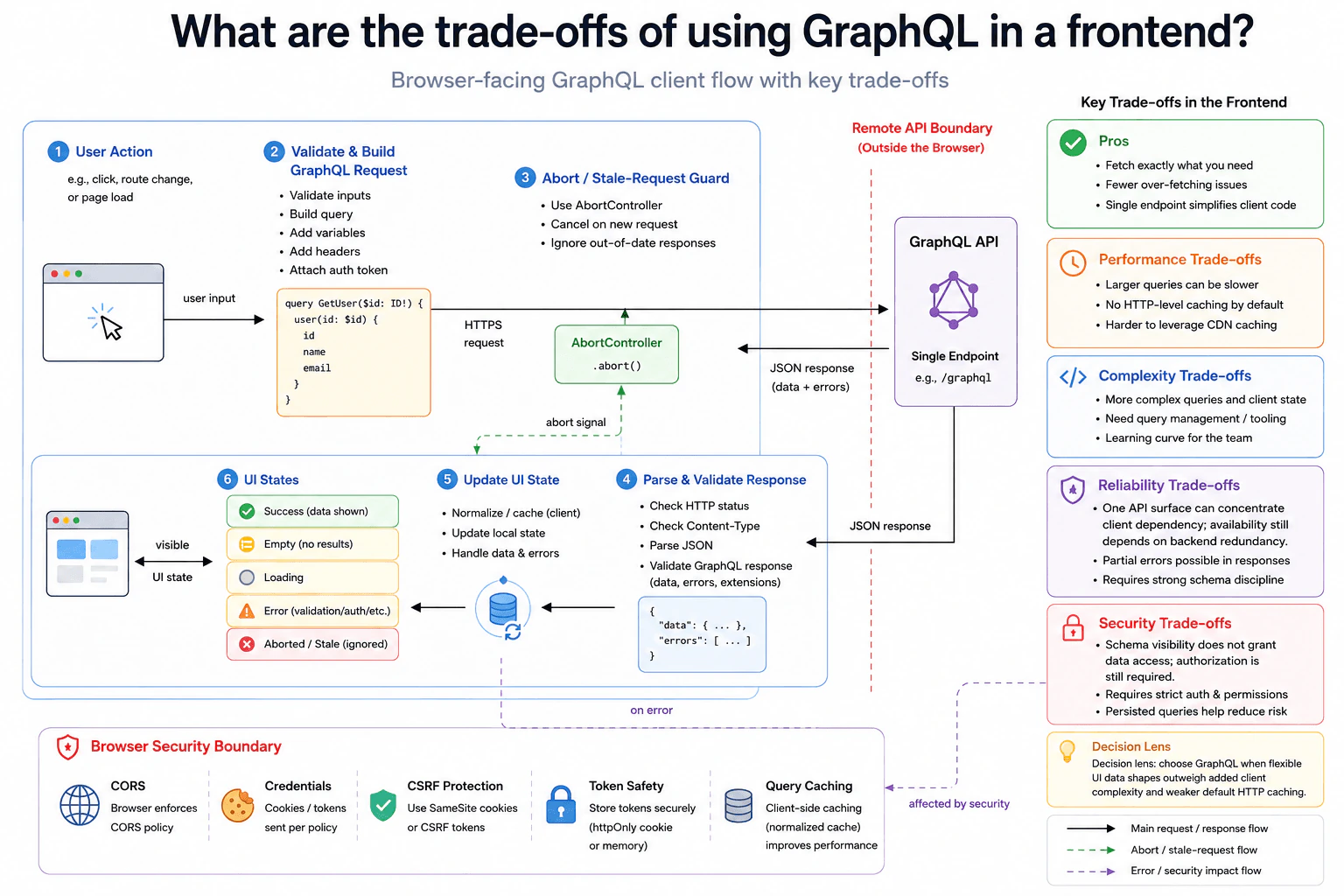
What are the trade-offs of using GraphQL in a frontend? diagram
How to Explain It in an Interview
1. Define the browser contract

A user action or page event starts the flow. The frontend first validates its input. It then builds the GraphQL query and variables.

The diagram shows this example query:

query GetUser($id: ID!) { user(id: $id) { id name email } }

The frontend may add supported headers and authentication state. The exact HTTP method is not defined by this design. The browser sends an HTTPS GraphQL request directly to the external GraphQL API. The diagram shows /graphql only as an example endpoint shape.

The API returns JSON containing GraphQL data, errors, or both. This matters because GraphQL can return useful data together with field-level errors. The frontend therefore should not treat every response as only success or failure.

2. Start and control the request

When the request starts, the UI can enter a loading state. Request creation and cancellation remain separate responsibilities.

AbortController does not sit between the frontend and API. It controls the browser's in-flight request. If a newer request makes an older one unnecessary, the frontend can send an abort signal. The frontend can also ignore an out-of-date response before it changes UI state.

The HTTPS request still flows directly from request construction to the GraphQL API. This matches the main request path in the diagram.

3. Validate the response

When an HTTP response arrives, Fetch normally resolves even when the HTTP result represents an error. The frontend must inspect the response before trusting the expected body.

First, it checks the HTTP result. Next, it checks the Content-Type. Then it parses the JSON. After parsing, it validates the GraphQL response shape before changing application state.

The response can contain data, errors, or both. Runtime shape checking protects the UI from unexpected network data. Only validated data should move into the normal UI update path.

4. Handle success and failure

After validation, the frontend updates its local state. It may also normalize or cache validated data in its client-side cache.

The visible UI states stay separate. The diagram shows loading, success, empty, aborted or stale, and error states. The error path can include validation, authentication, authorization, retryable, or final errors when those conditions are known by the surrounding contract.

An aborted request should not appear as an ordinary application failure. A stale response should be ignored instead of replacing newer data.

GraphQL also needs a clear partial-error rule. A response can contain both data and errors. The frontend must decide whether the available data is safe and useful to display.

5. Protect the browser boundary

CORS is a browser mechanism that controls whether frontend JavaScript can read allowed cross-origin responses. It is not authentication. The same-origin policy also restricts cross-origin access in the browser.

Credentials must follow the application's security policy. Cookies or tokens may carry authentication state. When cookies are sent automatically, CSRF protection can matter. The diagram shows SameSite cookies or CSRF tokens as possible protections.

An HttpOnly cookie cannot be read by JavaScript. The diagram also allows token state to be kept in memory when that matches the authentication design.

GraphQL schema visibility does not grant permission to access data. The trusted server must still enforce authorization. Persisted queries can reduce some query-related risk, but they do not replace authorization.

6. Explain the GraphQL trade-offs

The main benefit is precise data selection. A screen can request the fields it needs. This reduces many over-fetching problems.

A single GraphQL API surface can also simplify the frontend request model. However, it can concentrate the client's dependency on that API surface. Actual availability still depends on backend redundancy.

The first major cost is complexity. Queries can grow large or deeply nested. The frontend also needs query management, schema discipline, validation, and team learning.

Caching is another trade-off. GraphQL does not automatically map each data shape to a separate HTTP resource. Normal HTTP and CDN caching can therefore be less direct. A normalized client cache can help, but it adds another layer of state management.

Performance still depends on query shape. Asking for exact fields can reduce unnecessary data, but a large query can still be expensive. Partial errors also require clear UI behavior.

In my frontend decisions, I use a simple rule. I choose GraphQL when flexible UI data shapes and reduced over-fetching are more valuable than added client complexity and weaker default HTTP caching.

Why Interviewers Ask This

Interviewers use this question to test engineering judgment, not GraphQL syntax. They want to see whether you understand the browser-to-API boundary, request and response validation, cancellation, stale responses, UI state, caching, and security ownership. They also want you to separate authentication from authorization and explain CORS correctly. A strong answer shows that you can choose GraphQL for the right frontend needs while clearly explaining its complexity, reliability, caching, performance, and maintenance trade-offs.
Interviewer may ask next
What would you change if users quickly switch between pages and older GraphQL responses sometimes arrive after newer ones?

I would keep the same GraphQL API and strengthen the browser-side request control. Each new page action would still validate its input, build the GraphQL query and variables, and send the HTTPS request directly to the external GraphQL API. The change is in the AbortController and stale-response flow. When a newer request makes an older request unnecessary, I would abort the old in-flight request when possible. I would also keep the existing stale-response protection so an outdated result cannot update the screen. An aborted request would move to the aborted state instead of the normal error state. A stale response would simply be ignored. Response validation, CORS behavior, authentication state, trusted server-side authorization, and client caching would stay unchanged. Correctness is maintained because only the current validated response may update UI state. Security is unchanged because cancellation does not change the trust boundary. The main downside is extra request-lifecycle logic and more testing around navigation, cancellation, and race conditions.

How would you handle caching if the frontend is making too many repeated GraphQL requests?

I would keep the same external GraphQL API and improve the client-side caching already shown in the design. The frontend would still build the GraphQL request, send it over HTTPS, validate the returned JSON, and update the same loading, success, empty, aborted, and error states. I would use the normalized client cache for reusable validated GraphQL data. That can let different screens reuse known objects instead of always requesting the same information again. I would keep HTTP and CDN caching separate because GraphQL requests do not automatically behave like individually cacheable resource URLs. Any browser or intermediary caching behavior must follow the real API contract instead of assumptions made by the frontend. Authentication, CORS, CSRF protection, and trusted server-side authorization remain unchanged. Correctness depends on clear freshness and invalidation rules. The main downside is extra client complexity. Bad cache rules can show stale data even when the GraphQL API and network are working correctly.

2. Compare Axios and Fetch for browser API calls.API DesignEasyApple

Question Details

Compare native-versus-library behavior for response parsing, interceptors, cancellation, timeout handling, and error handling in a React frontend.

Short Interview Answer (30-60 seconds)

I would choose between Axios and Fetch based on how much browser-client behavior I want built in. Both send HTTPS requests from the frontend to one remote API. Before sending, I validate the input and build the request. I use AbortController and a stale-response guard so an old response cannot replace newer UI data. Axios gives automatic JSON parsing, interceptors, a timeout option, and default rejection for non-2xx responses. Fetch is native and has no library bundle cost, but I manually parse the body and check response.ok. Both still follow browser security rules such as CORS, same-origin policy, cookie rules, and CSRF protection when cookies are used.

Detailed Explanation

Axios and Fetch solve the same browser problem. A user does something, such as clicking a button or loading a page. The frontend validates the input, builds a request, and sends it to one remote API. The main difference is how much client behavior comes built in. Axios is a library with useful conveniences. Fetch is built into the browser and needs more manual handling. With either choice, I still need cancellation, stale-response protection, response validation, clear UI states, and correct browser security rules.

Useful Questions to Ask the Interviewer
  • Do we prefer the native Fetch API or an extra client library?
  • Do requests need shared request or response interceptors?
  • Should a newer request cancel an older in-flight request?
  • What timeout behavior should the frontend use?
  • Does authentication use cookies or another credential mechanism?
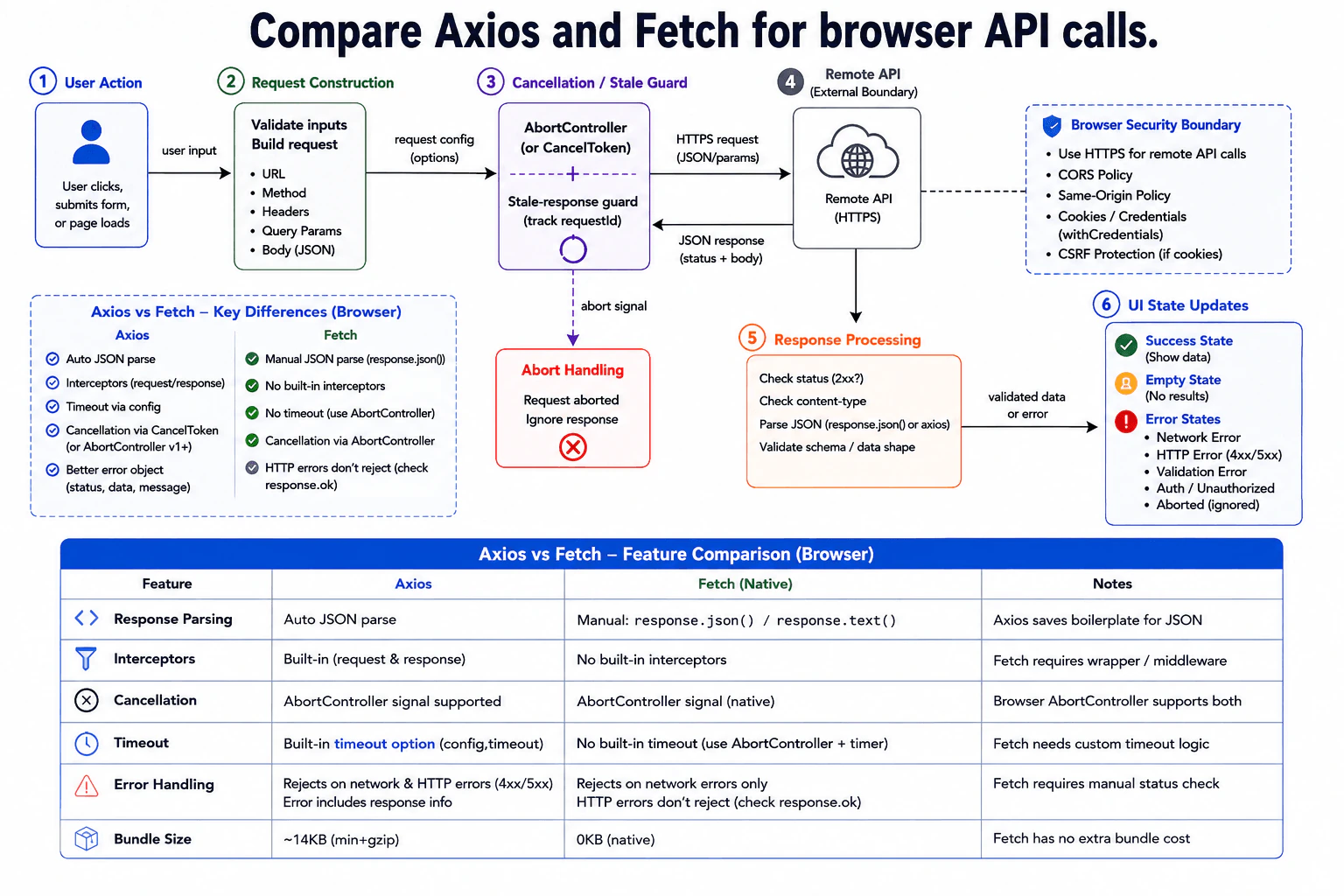
Compare Axios and Fetch for browser API calls. diagram
How to Explain It in an Interview
1. Define the browser contract

A user action starts the flow. It can be a click, form submission, or page load. The frontend validates the input before sending anything. It then builds the request configuration. The diagram allows a URL, method, headers, query parameters, body, and credential policy.

The diagram does not define one fixed URL or HTTP method. I would not invent either one. Axios or Fetch sends the request over HTTPS to one external remote API boundary. The API returns an HTTP response with status information and a response body.

The visible result can become success, empty, error, or an ignored aborted response.

2. Start and control the request

Before sending the request, I can create an AbortController. AbortController is a browser feature that provides a signal for cancelling asynchronous work. Modern Axios and Fetch can both use that signal. Older Axios code can also use CancelToken, which is the legacy Axios cancellation API shown in the diagram.

I also keep a stale-response guard, such as a request identifier. This protects the UI when requests finish out of order. If an older response returns after a newer request, I ignore the older result.

Axios has a timeout configuration option. Cancellation and timeout are separate controls. With Fetch, this design has no Fetch-specific timeout option. The frontend uses AbortController with timer logic when it needs a time limit.

Axios also provides request and response interceptors. An interceptor is shared logic that runs around requests or responses. Fetch has no built-in interceptor system. Similar behavior needs a wrapper around Fetch.

3. Validate the response

When the response arrives, I check its HTTP status first. I also check the content type and then parse the expected body. Before updating the UI, I validate the data shape expected by the frontend.

Axios normally parses JSON responses for us and exposes the parsed data on its response object. Fetch returns a Response object. With Fetch, I explicitly read the body with a method such as response.json() or response.text().

Their HTTP error behavior is also different. Axios rejects its Promise for non-2xx HTTP responses by default. It also rejects for network failures. Fetch normally resolves when an HTTP response arrives, including a 4xx or 5xx response. I therefore check response.ok or the status before treating a Fetch response as successful. Fetch rejects for network-level failures and aborted requests.

4. Handle success and failure

After validation, the frontend updates the visible UI state.

A valid response with useful data produces the success state. The UI shows the data. A valid response with no results produces the empty state.

Network failures, HTTP 4xx or 5xx responses, response-validation failures, authentication problems, authorization problems, and other unexpected failures go to an error state. An aborted or stale response is ignored instead of replacing newer data.

These outcomes stay separate. An aborted request is not a server error. An empty result is also not automatically an error.

5. Protect the browser boundary

The browser security boundary applies to Axios and Fetch in the same way. The remote API call uses HTTPS. HTTPS protects data while it travels between the browser and remote API.

The browser also enforces the same-origin policy. This policy limits how one origin can access another origin. CORS is the mechanism that lets a remote server tell the browser which cross-origin responses JavaScript may read. CORS is not authentication or authorization.

If the application sends cookies or credentials automatically, the cookie policy must be configured correctly. CSRF protection also matters for cookie-based authenticated actions. CSRF means another site tries to make the browser send an unwanted authenticated request.

Axios and Fetch do not replace these browser rules. The trusted remote service must still enforce authorization.

6. Verify the behavior

I would test the normal response path and each important failure path. I would test valid data, empty data, invalid response shape, HTTP errors, network failure, cancellation, timeout behavior, and stale-response protection.

For Axios, I would also verify request and response interceptors. I would test its default rejection behavior for non-2xx responses. For Fetch, I would verify that code checks response.ok or status before treating the response as successful. I would also test manual body-parsing failures.

The main trade-off is convenience against dependency cost and manual control. Axios reduces repeated client code with automatic JSON parsing, interceptors, timeout configuration, and richer error objects. The approved diagram shows an approximate Axios bundle cost of about 14 KB minified and gzipped, although the exact size depends on the Axios version and build. Fetch adds no separate client-library bundle because it is provided by the browser, but the application needs more wrapper code for equivalent conveniences.

Practical Complexity & Trade-offs

Both choices can make the same browser request to the same remote API, so the main difference is frontend maintenance and bundle cost. Axios gives automatic JSON parsing, request and response interceptors, a timeout option, and a convenient error object. This reduces repeated code, but it adds a library dependency. The diagram shows about 14 KB minified and gzipped, although the exact size depends on version and build. Fetch is native to the browser, so it adds no separate Fetch-library bundle. However, the application must manually parse the response body, check response.ok or status, create interceptor-like wrappers, and implement timeout behavior with AbortController and timer logic. Both choices still need cancellation, stale-response protection, response validation, clear UI states, and correct browser security handling.

Why Interviewers Ask This

The interviewer wants to see whether I understand browser HTTP behavior, not only library syntax. They are testing whether I know the practical differences between a native API and a library. Important areas include response parsing, interceptors, cancellation, timeout handling, and HTTP error behavior. They also want sound judgment about stale responses, validation, UI states, and browser security boundaries. A strong answer explains these trade-offs without incorrectly treating Axios or Fetch as a replacement for server authorization or browser security rules.

Interviewer may ask next
What would you change if users can trigger the same request many times very quickly?

I would keep the same API flow, but I would strengthen the cancellation and stale-response controls. When a new user action starts, the frontend can abort the older in-flight request with AbortController when cancellation is appropriate. Both modern Axios and Fetch can receive the AbortController signal. I would also keep the request identifier shown by the stale-response guard. When a response returns, the frontend checks that identifier before changing UI state. If the response belongs to an older request, the frontend ignores it.

The affected parts are the cancellation or stale-guard step, the Axios or Fetch client, and the final UI update. The remote API remains the same single external boundary.

Correctness improves because an older response cannot overwrite newer data. The browser security boundary does not change. HTTPS, CORS, same-origin policy, cookie behavior, and CSRF protection still apply normally.

The main downside is extra client-side state and cleanup logic. Poorly managed controllers or request identifiers can make the frontend harder to understand, test, and maintain.

How does the design change when authentication uses browser cookies across origins?

I would keep the same request, parsing, cancellation, and UI-state flow. The main change is stricter handling at the browser security boundary. The Axios or Fetch request must use the required credential behavior when cookies are allowed to travel to the remote API. The remote side must also provide a CORS policy that permits the intended origin and credential use.

The affected flow is the browser API client crossing the security boundary to the remote API. CORS controls whether browser JavaScript may read an allowed cross-origin response. It does not authenticate the user. The trusted remote service must still authenticate the cookie and enforce authorization.

Because cookies can be sent automatically, CSRF protection becomes important. The same-origin policy and cookie rules also continue to apply.

Axios and Fetch do not remove these requirements. Their response parsing, interceptor, cancellation, timeout, and error-handling differences stay the same.

The main downside is more security configuration. Incorrect CORS, credential, cookie, or CSRF settings can block valid requests or allow unwanted authenticated actions.

3. Compare Zustand and Redux for frontend state management.System DesignEasyApple

Question Details

Compare their state-management models and explain which application constraints would influence choosing one over the other for a production frontend.

Short Interview Answer (30-60 seconds)

At a high level, I would choose between Zustand and Redux Toolkit based on application and team complexity. The diagram uses a React and Vite client-rendered SPA with client-side routing and clear component boundaries. Shared client state can use either store. Zustand gives a small API, direct actions, and less boilerplate. Redux Toolkit gives actions, reducers, stronger conventions, and richer DevTools. Both can work with browser storage and remote APIs. The main trade-off is flexibility versus structure and predictability.

Detailed Explanation

The goal is to choose a shared-state model that keeps the React application easy to build, debug, and maintain. The main constraint is not only application size. Team size, state complexity, debugging needs, bundle sensitivity, and preferred conventions also matter. The diagram uses a client-rendered React and Vite SPA with client-side routing, component boundaries, route code splitting, CDN assets, browser storage, remote APIs, and optional service-worker caching. I would compare Zustand and Redux Toolkit inside that same browser architecture, then choose the simpler model that still gives the team enough control.

Useful Questions to Ask the Interviewer
  • How large and complex is the shared client state?
  • How many developers or teams will work on the application?
  • Do we need strong action history, time-travel debugging, or auditing?
  • Is keeping JavaScript bundle size very small important?
  • Do we need persisted browser state or offline fallbacks?
  • Does the team prefer flexible patterns or strict conventions?
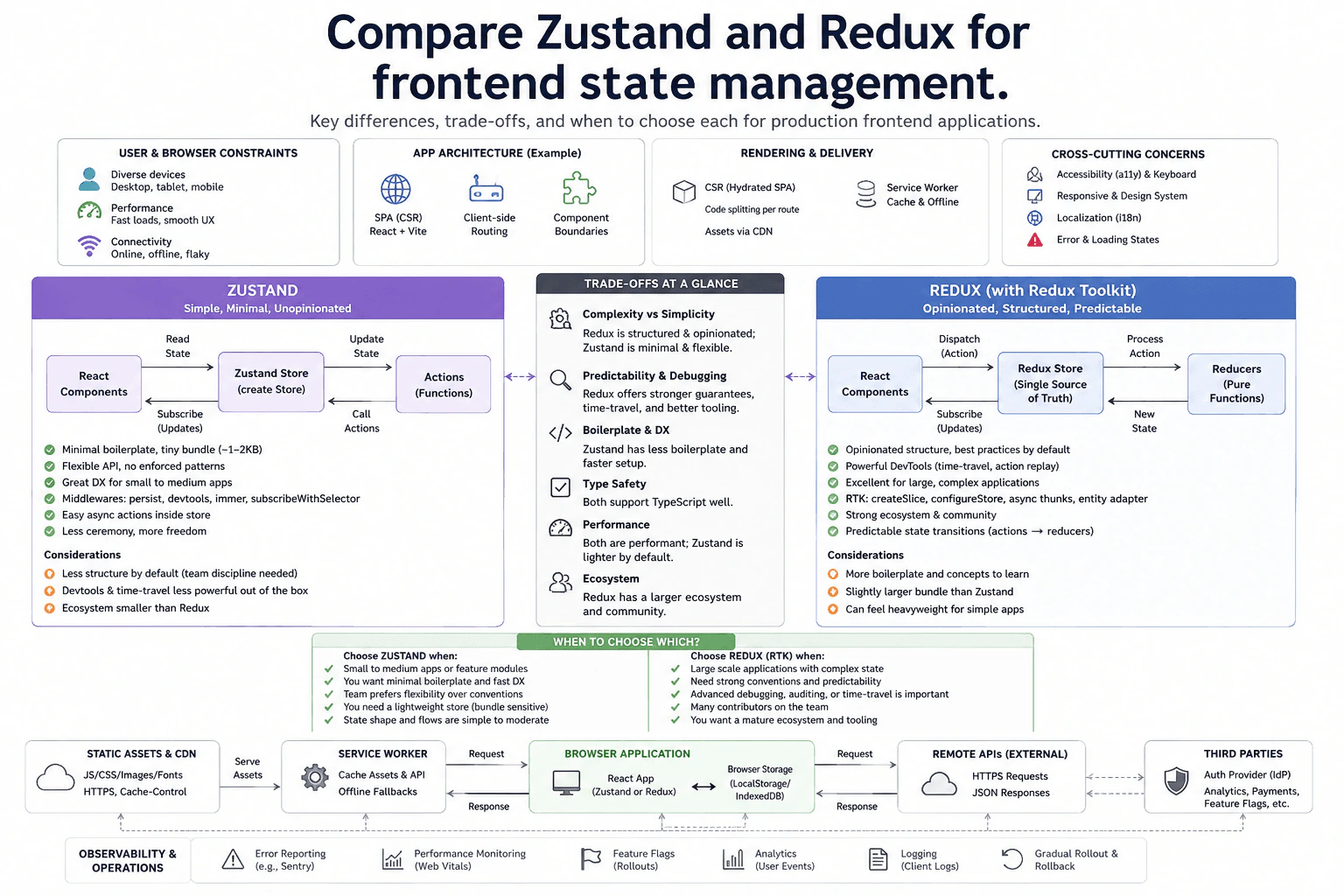
Compare Zustand and Redux for frontend state management. diagram
How to Explain It in an Interview
1. Start with the browser application

The user opens a React SPA built with Vite. It uses client-side routing and clear component boundaries. Code splitting loads JavaScript by route instead of loading everything at once.

Static JavaScript, CSS, images, and fonts are served through a CDN. Browser caching can reuse those files. A service worker can cache assets and selected API responses for offline fallbacks.

2. Keep different state types separate

Not every value belongs in a global store. Browser storage such as localStorage or IndexedDB can hold persisted values. Remote data still comes from external APIs through HTTPS requests and JSON responses.

Zustand or Redux Toolkit is mainly for shared client state used across React components. Keeping these boundaries separate prevents the global store from becoming responsible for every kind of data.

3. Understand the Zustand flow

With Zustand, React components read shared state from a store created with create. The store uses simple functions as actions. Those actions update the store, and subscribed components receive the new values they use.

Zustand has little boilerplate and allows flexible store shapes. Optional middleware can add persistence, DevTools support, Immer, or selector subscriptions. This works well for small or medium applications and feature modules. The downside is less structure by default, so larger teams need their own conventions.

4. Understand the Redux Toolkit flow

With Redux Toolkit, React components dispatch actions to a Redux store created with configureStore. Reducers process those actions and create the next state. Subscribed components then read the updated values.

Redux Toolkit gives a more opinionated and predictable flow. Its DevTools, action history, middleware, and large ecosystem help when state becomes complex. The downside is more concepts and slightly more setup than Zustand.

5. Choose using production constraints

I would choose Zustand when the application is small to medium, bundle sensitivity matters, and the team wants fast development with fewer rules. I would choose Redux Toolkit when many developers share complex state and strong debugging or predictable conventions matter more.

The rest of the frontend stays the same. Accessibility, responsive design, localization, error and loading states, performance monitoring, analytics, feature flags, gradual rollout, and rollback are still needed with either library.

Engineering Considerations / Design Trade-offs

The benefit of Zustand is simplicity. It has a small API, little boilerplate, and flexible store patterns. That can make small and medium applications faster to build. The downside is weaker structure by default, so a large team must agree on its own rules. Redux Toolkit gives stronger conventions, predictable action and reducer flows, powerful DevTools, and a larger ecosystem. The downside is more concepts and slightly more code. Both can perform well. I would mainly decide using app complexity, team size, debugging needs, bundle sensitivity, and how much structure the team wants.

Why Interviewers Ask This

The interviewer wants to see whether you choose a state tool from real application needs instead of popularity. They want to know if you understand the difference between simple shared state and highly structured state changes. They also look for judgment about team size, debugging, performance, bundle cost, browser persistence, and long-term maintenance. The key skill is explaining why one trade-off fits the production constraints better.

Interviewer may ask next
What would you change if the application grew from one small team to many teams sharing complex state?

I would keep the same React application, client-side routing, CDN delivery, browser storage, service worker, and remote API boundaries. The part I would reconsider is the shared client-state layer.

If many teams were changing the same complex state, I would lean more toward Redux Toolkit. Its action and reducer flow gives everyone a common way to update state. Its DevTools also make it easier to inspect action history and understand why a value changed.

I would not move every value into Redux. Local component state, browser storage, and remote API data would keep their existing responsibilities. I would migrate shared domains gradually and use feature flags, error reporting, and performance monitoring to check each rollout.

The main downside is added structure. Developers must learn more concepts, and simple features may require more code than they would with Zustand.

How would offline support affect the choice between Zustand and Redux Toolkit?

I would keep the same basic comparison because offline support is mainly handled by browser storage and the service worker. The service worker can cache assets and selected API responses. localStorage or IndexedDB can persist selected browser state.

Zustand can use persistence middleware for chosen store values. Redux Toolkit can use middleware or persistence tooling for the same purpose. In both designs, the external API still owns remote server data. A cached value is only a local copy and may be older than the latest remote result.

When the connection returns, the browser application can request fresh JSON from the external API and update the visible state. Loading, error, and offline fallbacks should remain clear to the user.

The main downside is extra complexity. Cache versions, stale local copies, storage cleanup, and offline testing must be handled whichever state library we choose.

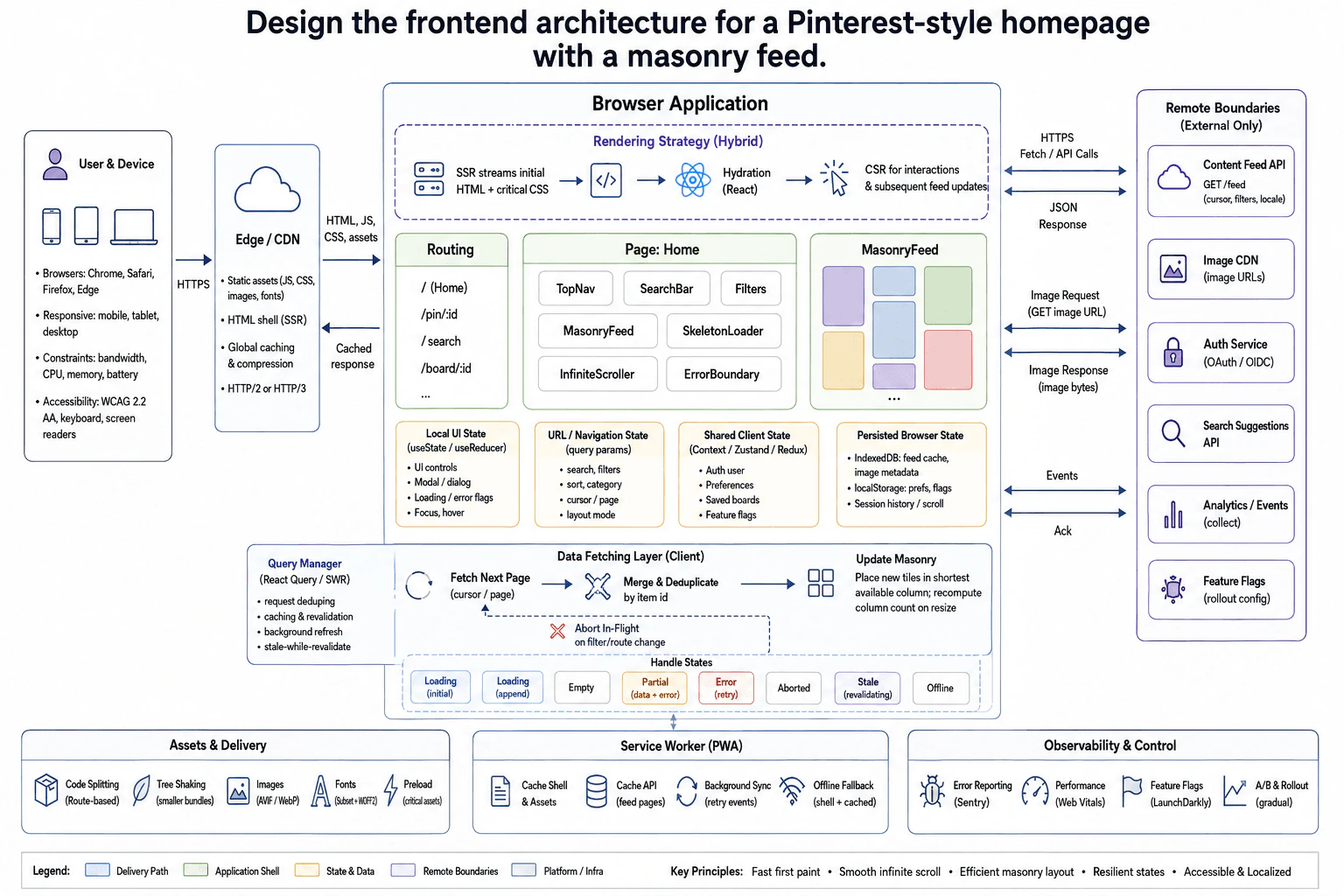
4. Design the frontend architecture for a Pinterest-style homepage with a masonry feed.System DesignHardApple

Question Details

Design the homepage as an image feed whose items can have different heights. Focus on page architecture, the multi-column masonry layout, and the data-fetching boundary, including how newly loaded content joins the feed while the layout continues to use the available screen space efficiently.

Short Interview Answer (30-60 seconds)

At a high level, the page must show a fast, smooth image feed on phones, tablets, and desktops. The main challenge is placing cards with different heights while new pages keep arriving. I would stream the first HTML with SSR, hydrate the React app, then use CSR for interactions and later feed updates. A Query Manager handles fetching and caching. New items are deduplicated and placed into the shortest masonry column. This adds client-side layout work, but it gives fast first paint and smooth infinite scrolling.

Detailed Explanation

The goal is to build a homepage that shows many image cards with different heights. The page should load quickly and keep scrolling smoothly as more content arrives. The main frontend challenge is the masonry layout. New cards must join the feed without wasting available screen space. I would divide the design into delivery and rendering, page and state boundaries, feed fetching and masonry updates, then resilience, performance, accessibility, and safe rollout.

Useful Questions to Ask the Interviewer
  • Do we need strong SEO for the homepage and pin pages?
  • Which browsers and device sizes must we support?
  • How important is offline browsing?
  • Should filters and search state be shareable in the URL?
  • What accessibility target should we meet?
  • How fresh must feed data be?
Design the frontend architecture for a Pinterest-style homepage with a masonry feed. diagram
How to Explain It in an Interview
1. Start with delivery and rendering

The browser reaches the Edge/CDN over HTTPS. It delivers the SSR HTML shell and static JavaScript, CSS, images, and fonts. SSR means useful HTML reaches the browser before React becomes interactive.

The first HTML and critical CSS are streamed. React then hydrates the page. Hydration means React attaches behavior to the HTML already on screen. After that, CSR handles interactions and later feed updates.

2. Define routes, components, and state

Routing includes /, /pin/:id, /search, and /board/:id. The Home page contains TopNav, SearchBar, Filters, MasonryFeed, SkeletonLoader, InfiniteScroller, and ErrorBoundary.

Local UI state stores controls, dialogs, focus, and loading flags. URL state stores search, filters, sort, category, cursor, page, and layout mode. Shared client state stores the auth user, preferences, saved boards, and feature flags. IndexedDB stores feed cache and image metadata. localStorage stores preferences and flags, while browser history can preserve scroll state.

3. Fetch and append feed data

The Query Manager, using React Query or SWR, handles request deduplication, caching, revalidation, and background refresh.

When the infinite-scroll sentinel is reached, the client fetches the next page using a cursor or page value. The Content Feed API returns JSON. The client merges the items and removes duplicates by item id.

The masonry layout places each new tile into the shortest available column. When the viewport changes, it recomputes the column count. This keeps horizontal space used efficiently.

If filters or routes change, an in-flight request can be aborted. This side path prevents old work from affecting the new view.

4. Handle remote data and failure states

Feed data contains image URLs. The browser sends an image request to the Image CDN and receives image bytes back.

The frontend also treats Auth Service, Search Suggestions API, Analytics/Events, and Feature Flags as external boundaries. The browser sends analytics events and receives acknowledgements. Feature flags support controlled variants and rollout.

The feed handles initial loading, append loading, empty results, partial data, retryable errors, aborted requests, stale data, and offline mode.

5. Improve delivery, accessibility, and safe rollout

Code splitting loads only JavaScript needed for the current route or component. Tree shaking removes unused bundled code. Images use AVIF or WebP and lazy loading. Fonts can use subsets and WOFF2, while critical assets may be preloaded.

A service worker caches the shell and assets through browser Cache API behavior. It can cache feed pages, retry selected events in the background, and provide an offline fallback.

The interface must work on mobile, tablet, and desktop. It should support keyboard use, screen readers, focus management, and WCAG 2.2 AA needs.

Errors are reported to monitoring. Web Vitals measure real performance. Feature flags support A/B testing, gradual rollout, and rollback.

Engineering Considerations / Design Trade-offs

The benefit is a fast first screen because SSR sends useful HTML early. The downside is that hydration and client state add more moving parts. The Query Manager makes caching and repeated requests easier, but stale data can briefly be older than the latest remote result. Masonry uses screen space well, but the browser must recalculate columns when the viewport changes. Offline caching helps on weak networks, but cached feed data may be old. Feature flags make rollout safer, but they also create more states that the frontend must test.

Why Interviewers Ask This

The interviewer wants to see how you break one visual problem into clear frontend responsibilities. They want to know whether you can choose a rendering strategy, place state in the right location, fetch data safely, and update a complex layout correctly. They also want to see whether you understand performance, caching, accessibility, failures, and rollout trade-offs without designing unnecessary server internals.

Interviewer may ask next
What would you change if the feed had to work well on very slow mobile networks?

I would keep the same architecture, but I would make the loading path more conservative. The Edge/CDN, streamed SSR, Query Manager, Image CDN, and service worker would become more important.

For the first load, I would keep the streamed HTML and critical CSS small. Code splitting would delay JavaScript that is not needed immediately. Images would stay lazy loaded, and the browser would request optimized AVIF or WebP variants from the Image CDN.

For later scrolling, the Query Manager would still fetch the next page. I would avoid fetching too far ahead on a weak connection. Append-loading skeletons should appear before the user reaches the end of the current feed.

The service worker could reuse cached shell assets and previously cached feed pages. If cached data is stale, the page can show it while revalidation checks for newer data.

The main downside is complexity. More caching and network-aware behavior creates more states that must be tested.

How would the design handle users changing filters very quickly while feed requests are still running?

I would keep the same design, but request cancellation would become more important. The affected parts are URL state, the Query Manager, the abort side path, and the MasonryFeed update step.

When a filter changes, the new value goes into URL state. Any request started for the old filter should be aborted when possible. The new filter then starts its own feed request.

The query identity should include the active filter values. This keeps cached results for different filters separate. It also prevents an old response from being treated as data for the new filter.

When the correct response arrives, the client merges its items and removes duplicates by item id. MasonryFeed then places the new cards into the shortest available columns.

Loading, empty, partial, error, aborted, and stale states still work the same way.

The main downside is extra coordination. Fast filter changes create more cancellation and cache states to test carefully.

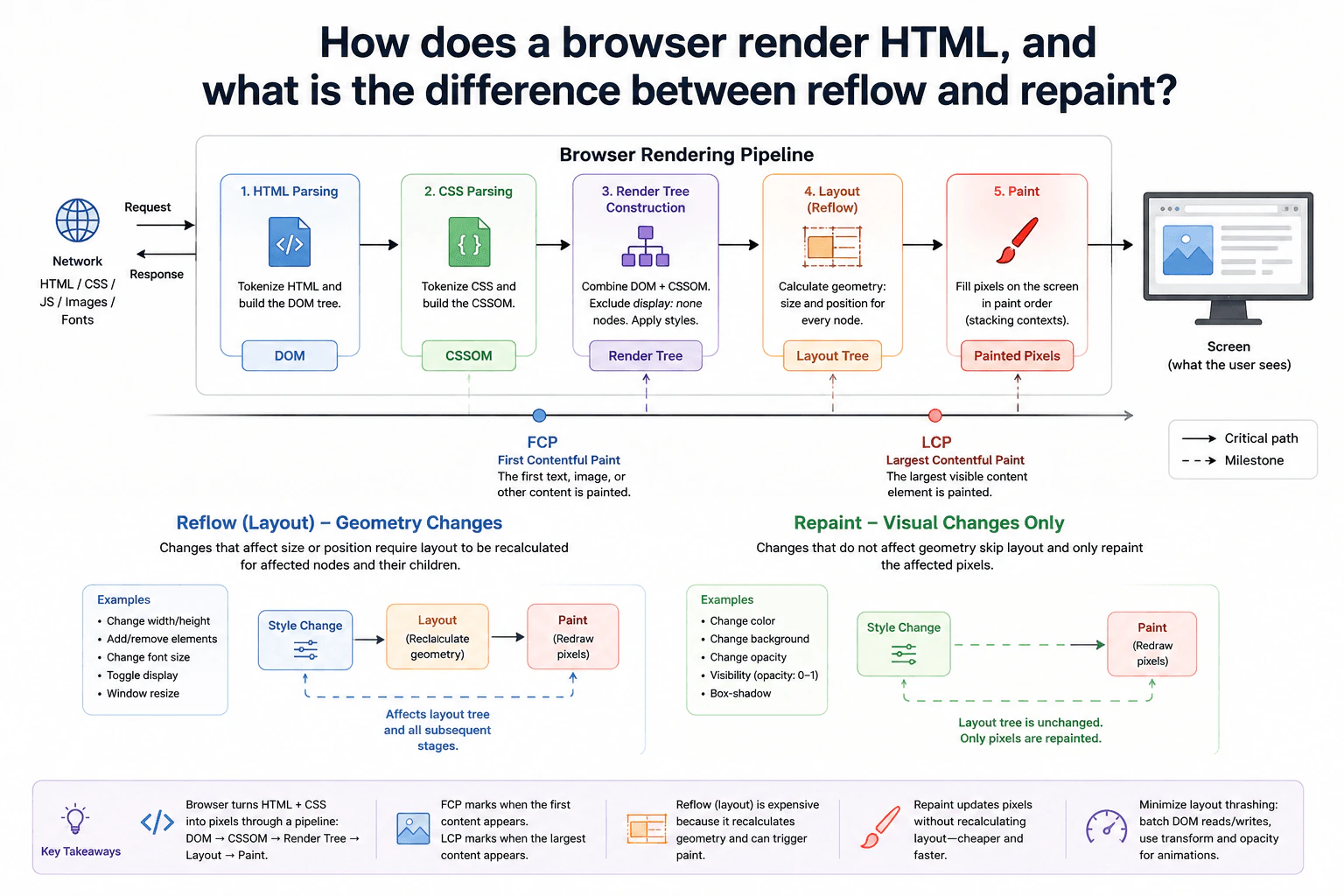
5. How does a browser render HTML, and what is the difference between reflow and repaint?System DesignEasyApple

Question Details

Trace a page from HTML parsing and DOM construction through CSS parsing and CSSOM construction, render-tree construction, layout, and paint. Explain where First Contentful Paint and Largest Contentful Paint fit, then distinguish a geometry-changing reflow from a repaint that does not recalculate layout.

Short Interview Answer (30-60 seconds)

At a high level, the browser turns HTML and CSS into pixels the user can see. The main challenge is knowing which changes affect geometry and which only affect appearance. The browser builds the DOM and CSSOM, combines them into a render tree, calculates layout, and paints the result. FCP marks the first visible content, while LCP tracks the largest visible content. Reflow recalculates geometry. Repaint redraws pixels without recalculating layout.

Detailed Explanation

A browser must turn downloaded page files into something the user can see. The important path is HTML and CSS parsing, render-tree creation, layout, and paint. The key performance question is what happens after something changes. A geometry change can force layout work again. A visual-only change can often skip layout. I would explain the normal rendering path first, place FCP and LCP around visible rendering, then compare reflow with repaint.

Useful Questions to Ask the Interviewer
  • Should I focus on the initial page render and later DOM or style changes?
  • Should I explain FCP and LCP as browser performance measurements?
  • Do you want examples of changes that cause reflow versus repaint?
How does a browser render HTML, and what is the difference between reflow and repaint? diagram
How to Explain It in an Interview
1. Start with the files the browser receives

The browser receives HTML, CSS, JavaScript, images, and fonts from the network. For this question, HTML and CSS are the main inputs to the rendering pipeline.

The browser parses HTML and builds the DOM. The DOM is a tree representing the page elements. It also parses CSS and builds the CSSOM. The CSSOM represents the style rules that apply to those elements.

2. Build the render tree

Next, the browser combines the DOM with the CSSOM. This produces the render tree used for visible content.

The browser applies styles while building this representation. Elements with display: none do not create render-tree boxes. The result contains the elements that need layout and painting.

3. Calculate layout, also called reflow

The browser then performs layout. Layout calculates the geometry of rendered boxes. This means their size and position on the page.

For example, changing width or height can affect nearby elements. Adding or removing elements can also change geometry. Font-size changes, display changes, and window resizing may require layout again.

When the browser recalculates this geometry after a change, frontend developers commonly call it reflow. The browser may only need to recalculate the affected part of the layout tree, depending on the change.

4. Paint the visible result

After layout provides geometry, the browser paints the visual result. Painting produces the pixels for text, backgrounds, borders, images, shadows, and other visible details. Paint order and stacking rules decide which content appears in front.

Those painted pixels become what the user sees on the screen.

FCP means First Contentful Paint. It records when the browser first renders content such as text or an image. LCP means Largest Contentful Paint. It records the render time of the largest qualifying content element visible in the viewport.

5. Reflow versus repaint

A reflow happens when geometry must change. Changing width, height, font size, adding elements, changing display, or resizing the window can require layout again. After the new geometry is calculated, affected content may also need painting again.

A repaint happens when appearance changes without changing layout geometry. Changing a color or background is a common example. The browser can redraw the affected pixels without recalculating layout.

The practical lesson is to avoid unnecessary layout work. Batch DOM reads and writes when possible. For animations, transform and opacity can often avoid layout work, and modern browsers may handle them through compositing rather than ordinary repainting.

Engineering Considerations / Design Trade-offs

The benefit of this pipeline is that each step has a clear job. Parsing builds the DOM and CSSOM. The render tree decides what participates in rendering. Layout calculates size and position. Paint draws the visible result. The downside is that geometry changes can be expensive because layout may run again and then cause more painting. Visual-only changes are usually cheaper because layout can be skipped. We should reduce repeated layout work. Batching DOM reads and writes helps prevent layout thrashing. For animations, transform and opacity are often better choices because they can avoid changing page geometry.

Why Interviewers Ask This

The interviewer wants to see whether you understand how browser rendering affects frontend performance. They are checking whether you can explain the path from HTML and CSS to visible pixels. They also want to know whether you can separate geometry changes from visual-only changes. A strong answer connects browser behavior with practical performance decisions instead of only memorizing definitions.

Interviewer may ask next
What happens if JavaScript repeatedly changes an element's width while also reading its layout in the same loop?

That can cause repeated reflows and make the page slow. The important part of the diagram is the Layout step. Changing width affects geometry, so the browser may need to recalculate the affected layout.

The problem becomes worse when JavaScript writes a style, immediately reads layout information, and then writes another style. The browser may need to finish pending layout work before returning the measurement. Repeating this pattern is often called layout thrashing.

I would keep the same rendering pipeline but change how the updates are scheduled. I would collect required layout reads first. Then I would group DOM writes together. This gives the browser a better chance to perform fewer layout calculations.

The final page stays correct because the same geometry changes are still applied. We are only avoiding unnecessary intermediate recalculations. The downside is that batching reads and writes requires more careful code organization.

What changes if an animation uses transform instead of changing width and position on every frame?

I would prefer transform when the visual result allows it. In the diagram, changing width or geometry can send work back through Layout. That reflow can then require another Paint.

A transform usually does not change normal document-flow geometry. The browser can move or scale the visual result without recalculating where surrounding elements belong. In modern browsers, transforms may also be handled during compositing, which can avoid normal paint work in suitable cases.

The basic rendering pipeline stays the same. HTML still builds the DOM. CSS still builds the CSSOM. The browser still creates the render tree, performs layout, and paints the initial page. The difference is that later animation frames can avoid repeating expensive geometry calculations.

Correctness depends on whether the transformed visual position matches the required design. The downside is that transforms do not change document flow, so surrounding elements still use the original geometry.

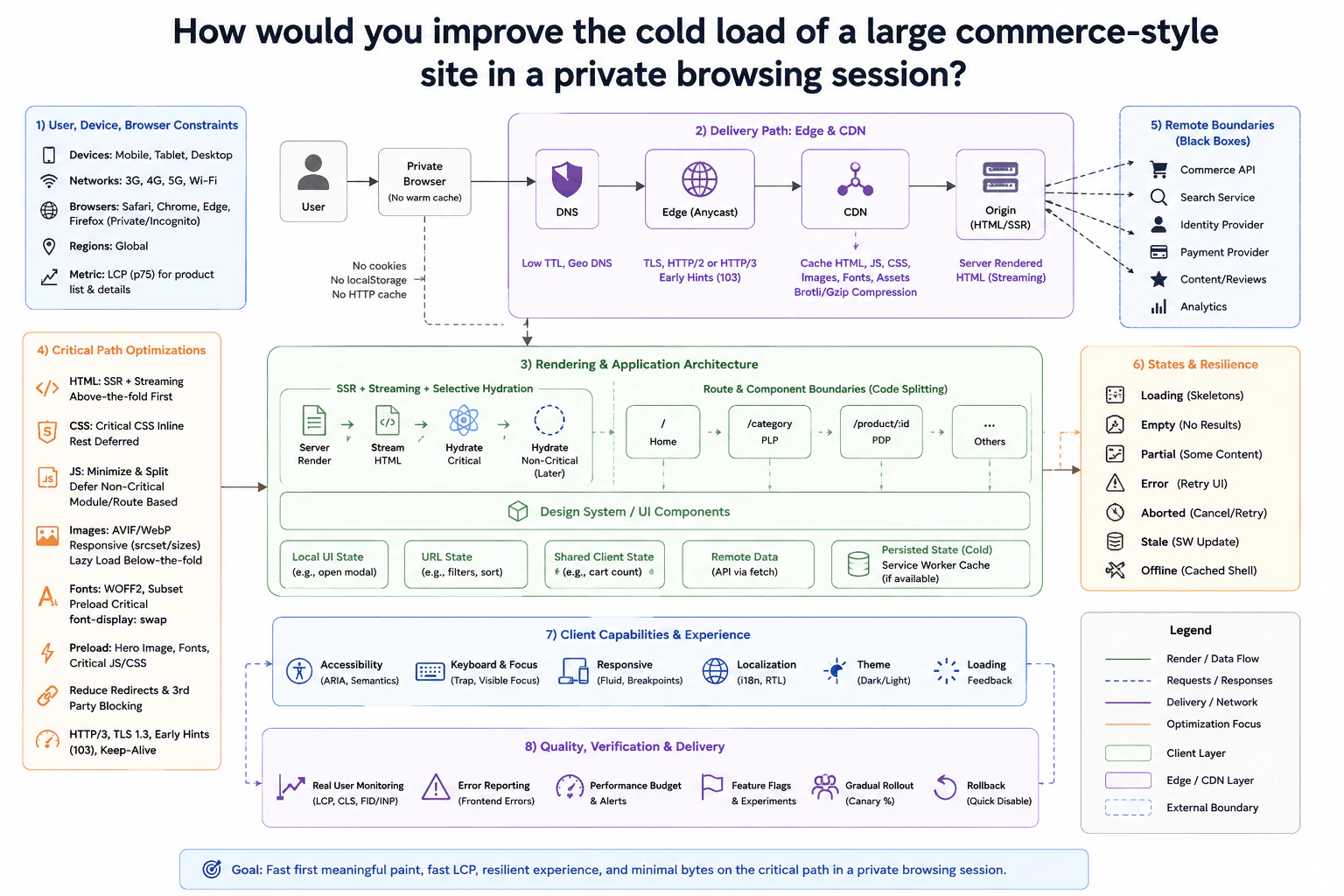
6. How would you improve the cold load of a large commerce-style site in a private browsing session?System DesignMediumApple

Question Details

Assume the user has no warm application cache and important content must remain visible. Begin by defining the relevant devices, networks, browsers, regions, and user-visible metric. Then prioritize the network and rendering critical paths, server and CDN behavior, compression and caching, images, fonts, JavaScript, CSS, above-the-fold content, hydration work, and real-user verification.

Short Interview Answer (30-60 seconds)

At a high level, I would optimize for a fast first useful view with no warm cache. I would use server-rendered HTML with streaming, then hydrate only critical parts first. The browser reaches the site through DNS, the edge, CDN, and origin. Route-based code splitting keeps JavaScript small. Local, URL, shared, remote, and persisted state have clear roles. The trade-off is more rendering and hydration complexity in exchange for faster LCP and better resilience.

Detailed Explanation

The goal is to make the first private-browser visit feel fast and useful. We cannot depend on old cookies, localStorage, or a warm HTTP cache. I would measure LCP at the 75th percentile for product-list and product-detail pages. I would test mobile, tablet, desktop, 3G, 4G, 5G, Wi-Fi, modern browsers, and global regions. I would focus first on network delay, above-the-fold HTML, small critical assets, and limited hydration work. Important content should remain visible even before the whole application becomes interactive.

Useful Questions to Ask the Interviewer
  • Which regions have the largest user traffic?
  • What LCP target matters for product-list and product-detail pages?
  • Which browsers must we support?
  • How important is offline support in private browsing?
  • Which page content must appear before JavaScript finishes loading?
How would you improve the cold load of a large commerce-style site in a private browsing session? diagram
How to Explain It in an Interview
1. Start with the delivery path

The user opens the site in a private browser with no warm cache. DNS resolves the site first. The request then moves through the edge, CDN, and origin. The CDN can cache HTML, JavaScript, CSS, images, fonts, and other assets when allowed. The origin provides server-rendered HTML and can stream it in parts.

I would use TLS, HTTP/2 or HTTP/3, keep-alive connections, and Brotli or gzip compression. Early Hints can help the browser discover important resources sooner.

The diagram keeps remote systems as black boxes. These include Commerce API, Search Service, Identity Provider, Payment Provider, Content/Reviews, and Analytics. Their internal storage or scaling is outside this frontend design.

2. Render useful content before full interactivity

The origin sends server-rendered HTML for important above-the-fold content. Streaming lets the browser paint useful sections before the complete response finishes.

Hydration means attaching JavaScript behavior to server-rendered HTML. I would hydrate critical areas first and hydrate non-critical areas later. This reduces main-thread work during the most important loading period.

3. Keep routes, components, and state clear

The main routes are Home, /category for the product-list page, /product/:id for the product-detail page, and other routes. Code splitting means loading only the JavaScript needed for the current route.

Reusable UI comes from the design system and UI components. Local UI state handles things like an open modal. URL state holds filters or sorting. Shared client state can hold values such as the cart count. Remote data comes through API fetches. Persisted state can use a service worker cache when available, but the first private load starts cold.

4. Reduce critical bytes

I would inline critical CSS and defer the rest. JavaScript should be minimized, split into ES modules, and non-critical code should load later.

Images should use AVIF or WebP, responsive srcset and sizes, and lazy loading below the fold. Fonts should use WOFF2, small subsets, critical preloading, and font-display: swap. I would preload the hero image, important fonts, and critical JavaScript or CSS only when they are truly needed. I would also reduce redirects and blocking third-party work.

5. Handle bad conditions and user needs

The UI needs loading skeletons, empty results, partial results, retryable errors, aborted work, stale service-worker updates, and an offline cached shell when available. Work that is no longer useful should be cancelled during navigation so an old result does not replace the current page.

Accessibility uses semantic HTML, ARIA where needed, visible keyboard focus, and predictable focus management. Layouts must remain responsive. Localization must support international text and right-to-left layouts. The client also supports theme changes and clear loading feedback.

6. Verify with real users and release safely

I would collect privacy-safe real-user measurements for LCP, CLS, FID or INP as shown in the design, and frontend errors. Performance budgets help prevent regressions.

Feature flags and experiments allow controlled changes. Canary rollout limits risk by exposing a release gradually. If a release hurts cold-load performance, the rollback path quickly disables it.

Engineering Considerations / Design Trade-offs

The benefit is a faster first useful screen because the browser receives HTML early and downloads fewer critical bytes. Streaming and selective hydration also reduce the work needed before the page feels usable. The downside is extra frontend complexity because the team must decide what renders and hydrates first. Code splitting creates more bundle decisions. A service worker can help with later loads or offline use, but private browsing starts without stored application data. Aggressive caching also needs careful versioning so a release does not leave users with old assets.

Why Interviewers Ask This

The interviewer wants to see whether you can find the real cold-load bottlenecks instead of only saying to make JavaScript smaller. They want to see how you reason about networks, rendering, caching, images, fonts, browser work, failures, and real-user measurements together. They also want to know whether you can separate critical first-load work from work that can safely happen later.

Interviewer may ask next
What would you change if most users were on slow 3G networks with high latency?

I would keep the same architecture, but I would make the critical path even smaller. The main changes would affect the CDN delivery path, above-the-fold assets, and hydration order.

I would send server-rendered HTML as early as possible and stream the important product content first. I would inline only the CSS needed for the first screen. JavaScript for non-critical components would wait until later. The Home, /category, and /product/:id routes would still use code splitting, but each first-route bundle should stay small.

Images would use smaller responsive sources with AVIF or WebP. I would preload only the hero image, important fonts, and truly critical JavaScript or CSS. Brotli compression, keep-alive connections, and the edge and CDN path remain important because every extra round trip is expensive on 3G.

Correctness stays the same because the remote systems remain external black boxes. The main downside is that more features appear progressively instead of becoming interactive immediately.

How would you handle a new release that makes LCP worse for product-detail pages?

I would keep the same design and use the existing measurement and rollout controls. The affected parts are Real User Monitoring, performance budgets, feature flags, canary rollout, and rollback.

First, I would compare LCP for /product/:id before and after the release. I would also check frontend errors and the amount of critical JavaScript, CSS, font, and image data. This helps show whether the regression comes from delivery, rendering, hydration, or larger assets.

If the regression is tied to a flagged feature, I would disable that flag. If the whole release is responsible, I would use the quick rollback path. Canary rollout reduces risk because only a limited group receives the new version before a wider release.

The page remains correct because rollback changes the frontend release, not the ownership of Commerce API or the other remote boundaries. The downside is slower feature delivery because stronger performance checks can delay releases.

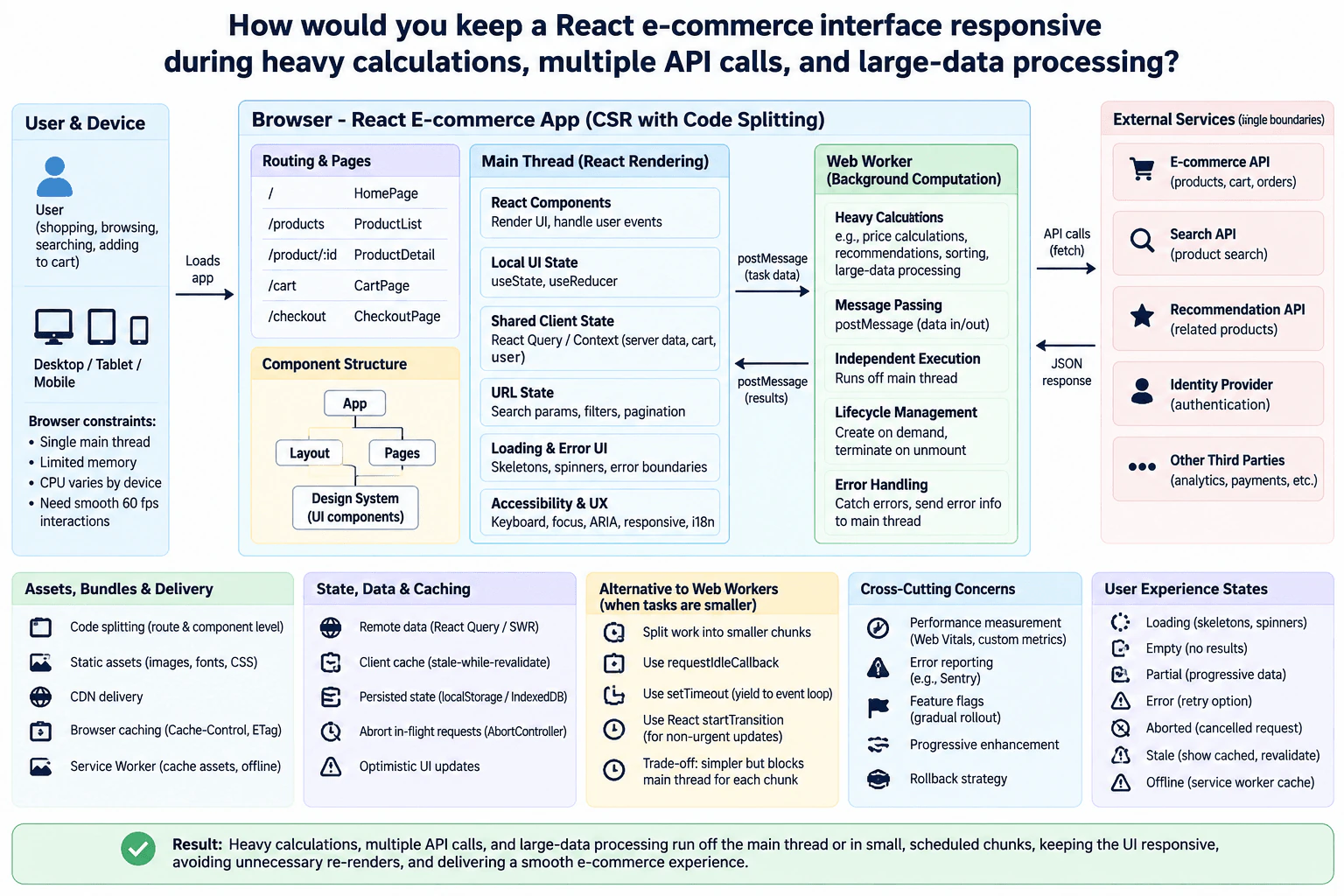
7. How would you keep a React e-commerce interface responsive during heavy calculations, multiple API calls, and large-data processing?System DesignHardApple

Question Details

The page must complete expensive calculations without freezing the UI or causing unnecessary re-renders. Discuss the boundary between React rendering and background computation, the use of Web Workers with postMessage, worker lifecycle cleanup, and the trade-offs of alternatives that schedule smaller pieces of work on the browser's main thread.

Short Interview Answer (30-60 seconds)

At a high level, I would keep React focused on rendering and user input. The app uses CSR with route-based code splitting. Heavy calculations move to a Web Worker and communicate through postMessage, so they do not block the main thread. API calls stay asynchronous, with caching, cancellation, and clear loading or error states. Smaller work can run in scheduled main-thread chunks. The trade-off is extra worker, request, and state-management complexity.

Detailed Explanation

The goal is to keep shopping, searching, cart updates, and checkout smooth during heavy work. The main constraint is the browser's main thread. React rendering, user events, and JavaScript calculations compete for this thread. I would keep rendering work small, move expensive calculations into a Web Worker, and manage remote requests separately. I would also split JavaScript by route, cache useful data, cancel stale requests, and show clear loading or failure states.

Useful Questions to Ask the Interviewer
  • How large can the product data become?
  • Which calculations are expensive enough to block the UI?
  • Must the experience work well on slower mobile devices?
  • How fresh must product, cart, and search data be?
  • How much offline behavior is required?
How would you keep a React e-commerce interface responsive during heavy calculations, multiple API calls, and large-data processing? diagram
How to Explain It in an Interview
1. Keep React rendering on the main thread

The browser app uses CSR, or client-side rendering, with code splitting. Code splitting means loading JavaScript only when a route or component needs it.

Routes include /, /products, /product/:id, /cart, and /checkout. The component structure has App, Layout, Pages, and reusable Design System components.

React components render the UI and handle user events. Local UI state uses tools such as useState or useReducer. URL state stores search parameters, filters, and pagination. Shared client state holds data needed across components. Keeping state in the smallest useful scope also reduces unnecessary React updates.

2. Move heavy calculations into a Web Worker

Large calculations should not run beside React rendering. Examples include price calculations, recommendations, sorting, and large-data processing.

The main thread sends task data to the Web Worker with postMessage. The worker executes away from the main thread and returns results with another postMessage. Worker errors are sent back to the main thread for handling.

I would create the worker when needed. I would terminate it when the related component unmounts. This cleanup avoids wasting CPU and memory after navigation.

3. Keep remote requests and cached data controlled

The browser calls external boundaries such as the E-commerce API, Search API, Recommendation API, Identity Provider, and other third parties. These remain outside the frontend design.

Remote data can use React Query or SWR. The client cache may show stale data, meaning data older than the newest remote result, while a fresh request runs.

I would cancel requests that are no longer useful with AbortController. This matters when users quickly change filters or leave a page. Persisted browser state can use localStorage or IndexedDB when data must survive reloads.

4. Handle delivery and user experience states

Static JavaScript, CSS, images, and fonts can be delivered through a CDN. The browser cache can reuse assets through normal HTTP caching such as Cache-Control and ETag.

A service worker can cache selected assets and support limited offline behavior. The UI should show loading, empty, partial, error, aborted, stale, and offline states instead of appearing frozen.

Accessibility includes keyboard support, focus handling, ARIA, responsive layouts, and localization. Progressive enhancement keeps basic behavior useful when optional features are unavailable.

5. Use main-thread scheduling only for smaller work

A Web Worker is the better choice for expensive CPU work. Smaller tasks can sometimes stay on the main thread if the code splits them into short chunks.

setTimeout can yield between chunks. requestIdleCallback can run optional work when the browser has idle time. React startTransition is different: it marks React updates as non-urgent, but it does not move heavy JavaScript off the main thread.

Finally, I would measure Web Vitals and custom performance metrics. I would report client errors, release changes with feature flags, and keep a rollback strategy.

Engineering Considerations / Design Trade-offs

The benefit of a Web Worker is that heavy calculation does not freeze React rendering. The downside is extra code for messages, startup, cleanup, and errors. Smaller main-thread chunks are simpler, but every chunk still blocks the main thread while running. startTransition can make React updates less urgent, but it does not move CPU work to another thread. Caching makes repeated data faster, but cached data can become stale. A service worker helps with cached assets and offline use, but it adds lifecycle complexity.

Why Interviewers Ask This

The interviewer wants to see whether you understand browser limits. They want to know if you can separate React rendering from expensive CPU work, handle several asynchronous requests, and avoid unnecessary updates. They also want to see how you handle cancellation, worker cleanup, caching, failures, and slower devices. Most importantly, they are testing whether you can explain performance trade-offs clearly.

Interviewer may ask next
What would you change if product filtering had to process hundreds of thousands of records on slower mobile devices?

I would keep the same architecture, but I would rely more strongly on the Web Worker for filtering and sorting. The React main thread would send the required input with postMessage and display the returned result.

I would avoid sending unnecessary data because transferring large messages can cost time and memory. I would also ignore obsolete worker results when the user quickly changes filters. That prevents an older calculation from replacing the newest result.

The UI would keep showing a loading or partial state while the latest worker task runs. React would remain responsible for rendering, input, keyboard behavior, and focus handling.

I would measure worker execution time and main-thread responsiveness on slower devices. The existing route code splitting, CDN delivery, and browser caching would remain unchanged.

The main downside is complexity. Worker messaging, stale-result protection, memory use, and lifecycle cleanup become more important as the dataset grows.

How would you handle several API requests when the user changes search filters very quickly?

I would keep the same fetch and state design, but I would cancel requests that are no longer useful. Each filter change can start a new request while AbortController stops the previous request when possible.

The URL state would still hold the current filters and pagination. Remote data would stay separate from local UI state. React Query or SWR could show useful cached data while the latest request is running.

I would also protect against stale responses. An older response must never replace data for newer filters. The UI would show loading, partial, aborted, empty, stale, or error states based on the active request.

The Web Worker remains separate. It still handles expensive local processing after relevant data arrives. A Promise represents asynchronous completion, but it does not create a background CPU thread.

The downside is more request-management logic. Cancellation, caching, stale-response checks, and visible UI states must all agree on which request is current.

8. What is your reason for looking for a new opportunity?BehavioralEasyApple

Question Details

Give the real factors behind your search and connect them to the kind of JavaScript frontend work, responsibility, and learning you are seeking. Keep the explanation factual and professional.

Interview tip:

Use STAR to structure your answer: briefly explain the Situation and Task, make Action the most detailed part, and finish with the Result. For example, describe how your current role changed, what kind of JavaScript frontend responsibility and learning you wanted next, how you evaluated that decision carefully, and why you are now seeking a role that offers stronger technical ownership and growth.

Situation

In my last role, I gained solid experience building and maintaining JavaScript frontend features. Over time, much of my work became focused on maintaining existing screens and making smaller changes. I was still contributing, but I wanted more opportunities to solve deeper frontend problems and take responsibility for larger parts of the user experience.

Task

I needed to decide whether my current role could still give me the technical growth and responsibility I was looking for. I wanted to continue improving in areas such as frontend architecture, performance, accessibility, reusable components, and close collaboration with design and backend teams.

Action

I first looked for ways to grow within my existing work instead of immediately deciding to leave. I volunteered for frontend tasks that required more ownership. I asked to be involved earlier in technical discussions so I could understand product requirements and help shape the frontend approach. I also spent more time reviewing how our components were structured, finding places where code could be simpler and easier to maintain, and learning from feedback during code reviews. These efforts helped me grow, but I also realized that the available work was still becoming more limited in the areas where I wanted to develop. I then thought carefully about what I wanted from my next role. I decided I was looking for a position where I could work on meaningful JavaScript frontend problems, contribute to technical decisions, learn from experienced engineers, and take more ownership of the quality of the final user experience. That is the main reason I started exploring new opportunities.

Result

I became much clearer about the kind of role I want next. I am not looking for a change simply to leave my current position. I am looking for a role where I can keep growing as a frontend engineer, take broader responsibility, and contribute to products where frontend quality is treated as an important engineering problem. The experience also taught me to first look for growth opportunities where I am before deciding that a change is necessary.

Why Interviewers Ask This

Interviewers ask this question to understand the candidate's motivation for changing roles and whether the decision is thoughtful and professional. A strong answer shows that the candidate is moving toward clear goals such as greater responsibility, stronger technical growth, meaningful frontend work, and continued learning rather than simply speaking negatively about a previous employer.

Interviewer may ask next
What kind of responsibility are you hoping to take on in your next frontend role?

I want to own larger parts of the frontend experience from early technical discussion through implementation and improvement. That includes helping make decisions about component structure, performance, accessibility, maintainability, and how the frontend works with design and backend systems. I still value collaboration, but I want to be responsible for more than completing isolated tasks.

What did you do before deciding that you needed a new opportunity?

I first tried to create more growth in my existing role. I volunteered for work with more frontend ownership, joined technical discussions earlier, improved parts of the component structure when appropriate, and used code review feedback to strengthen my skills. Those steps were useful, but they also helped me see that the available opportunities were not fully aligned with the direction in which I wanted to grow. That is when I decided to explore a new role.

9. How do you keep up to date with current technology?BehavioralEasyApple

Question Details

Describe the real sources, experiments, peer discussions, or project work you use to evaluate new frontend technologies, and explain how you decide what is useful enough to adopt.

Interview tip:

Use STAR to structure your answer: briefly explain the Situation and Task, make Action the most detailed part, and finish with the Result. For example, describe how you use trusted frontend sources, small experiments, peer discussions, and real project needs to evaluate new technology before deciding whether it is useful enough to adopt.

Situation

In my last role, I needed to keep my frontend skills current without introducing new tools just because they were popular. Our team regularly saw new JavaScript frameworks, browser features, build tools, and testing libraries, so I wanted a simple way to learn about them and judge whether they could solve a real problem.

Task

My responsibility was to stay informed, test useful ideas, and bring recommendations to the team only when I had enough evidence. I wanted to balance learning with stability because changing frontend technology can affect development speed, maintainability, accessibility, browser support, and the experience of other developers.

Action

I used several sources instead of depending on one source. I followed MDN Web Docs, official framework and library documentation and release notes, and browser compatibility information for JavaScript, browser APIs, and the main tools we already used. I also read respected frontend articles and watched technical discussions to understand what other developers were learning from real use. When something looked relevant, I first connected it to a problem we actually had. For example, during one previous project, I was looking for a better way to reduce unnecessary client side work in an interactive page. I read the official documentation for a newer browser capability and checked its support across the browsers we needed. Then I built a small isolated experiment instead of changing the main application immediately. I compared the new approach with our existing solution and looked at code complexity, browser behavior, accessibility, testing effort, and how easy it would be for another developer to understand. I shared the experiment with teammates and asked them to challenge the idea. Their feedback helped me notice maintenance questions that were not obvious from the documentation alone. Based on that review, I decided the technology was useful for a limited part of the application, but not mature enough to use everywhere. We introduced it only where it solved the original problem clearly and kept the existing approach in other areas.

Result

This process helped me stay current without chasing every new trend. The team gained a useful improvement while keeping the application understandable and stable. I also learned that keeping up to date is not only about reading news. For me, the important part is testing new technology against a real need, checking reliable sources, discussing the tradeoffs with other developers, and adopting it only when the benefit is clear.

Why Interviewers Ask This

Interviewers ask this question to understand whether a developer learns continuously and uses good judgment when evaluating change. A strong answer shows that the candidate uses reliable sources, experiments with new ideas, considers real project needs and risks, learns from peers, and does not adopt technology only because it is popular.

Interviewer may ask next
How do you decide whether a new frontend technology is ready to use in a real project?

I start with the problem we need to solve. Then I check official documentation, browser or platform support, maintenance expectations, accessibility impact, testing needs, and how well the technology fits our existing code. I also build a small experiment and discuss the result with teammates. In the example I described, that process showed that the new browser capability was useful in one focused area, but it did not give us enough benefit to replace our existing approach everywhere.

What did you learn from discussing your experiment with other developers?

I learned that my own experiment can show whether something works, but peer discussion often reveals longer term concerns. My teammates raised questions about maintenance and how easily other developers could understand the new approach. That feedback helped me choose a limited adoption instead of a broad change, and it made the final decision safer for the team.

10. What do you think about the quality of your code?BehavioralEasyApple

Question Details

Assess your real frontend work using concrete evidence such as readability, correctness, maintainability, testing, review feedback, or production results. Explain where your current quality bar is strong and where you are still improving it.

Interview tip:

Use STAR to structure your answer: briefly explain the Situation and Task, make Action the most detailed part, and finish with the Result. For example, describe a frontend project where you reviewed the quality of your own code, improved readability, correctness, maintainability, and testing, used review feedback and production behavior as evidence, and identified one area where you still wanted to improve.

Situation

In my last role, I worked on a JavaScript frontend feature that had grown over several releases. The feature worked, but some components had become difficult to read because they handled data loading, user interaction, validation, and display logic in the same place. I felt the code quality was acceptable for correctness, but the maintainability was below the standard I wanted.

Task

I was responsible for adding another change to the feature without making the existing complexity worse. I also wanted to make the code easier for other developers to understand, review, test, and safely change later.

Action

I first read the existing code and tests before changing anything. I looked for repeated logic, large functions, unclear names, and places where one component had too many responsibilities. I separated data handling from presentation logic and moved repeated behavior into small reusable functions. I chose clear names that explained intent instead of implementation details. I kept the changes focused so the review would be easier to understand. I also added tests around the important user behavior and edge cases that could break during future changes. During code review, I asked reviewers to comment not only on correctness but also on whether the structure was easy to follow. I received feedback that one abstraction made the flow less obvious, so I simplified it instead of defending the original design. After the change was released, I also watched for production errors related to the feature. This process reinforced how I judge my own code quality. I think my strongest areas are readability, testing important behavior, and responding well to review feedback. I am still improving at finding the right level of abstraction. I have learned that making code more reusable does not always make it easier to understand.

Result

The feature was delivered reliably, and the updated code was easier for the team to review and modify afterward. The tests also gave us more confidence when later changes touched the same behavior. I learned that I should judge code quality with evidence, not by whether the code simply looks clean to me. I now look at correctness, readability, tests, review feedback, maintainability, and production behavior together.

Why Interviewers Ask This

Interviewers ask this question to understand whether a developer can evaluate their own work with a realistic quality bar. A strong answer shows that the candidate cares about correctness and readability, uses testing and review feedback as evidence, thinks about future maintainability, and can identify an area where they are still improving.

Interviewer may ask next
How do you decide when an abstraction improves code quality and when it makes the code harder to understand?

I ask whether the abstraction removes meaningful repetition and makes the main flow easier to understand. In this project, one abstraction hid simple behavior behind an extra layer, and review feedback showed that it made the code harder to follow. I simplified it. Now I prefer a small amount of clear duplication over an abstraction that does not make the intent clearer.

How did you know the quality of the code actually improved?

I used several signals. The important behavior had stronger test coverage, reviewers found the updated structure easier to follow, and later changes could be made without reopening the same complex areas. I also checked production errors after release. Those signals gave me more confidence than simply saying the code looked cleaner.

More questions load as you scroll

Disclaimer: This interview guide is for educational and informational purposes only. It is designed to help readers prepare, but it does not guarantee any interview result, hiring decision, offer, or outcome. Interview questions, hiring criteria, and preferred answers can vary by employer, interviewer, industry, location, and time. The examples and explanations reflect the authors' research and judgment, are provided without warranties of any kind, and should not be treated as the only correct approach. Diagrams are simplified illustrations intended to highlight the main components and their interactions; actual systems and implementations may be more complex. Alternative approaches may be equally valid or better suited to a particular question, context, or interviewer. To the fullest extent permitted by applicable law, the author, contributors, and publisher are not liable for decisions made, actions taken, or losses incurred based on this guide.

Company Notice: This guide is an independent educational resource and is not affiliated with, endorsed by, sponsored by, or approved by the company named in this guide. Company names are used only to identify interview experiences commonly reported by candidates. Interview practices can change without notice, and inclusion of company-specific content does not mean these questions are official, complete, or guaranteed to be asked. To the fullest extent permitted by law, the author, contributors, and publisher are not responsible for outcomes related to use of this material.