18 Meta JavaScript Frontend Developer Interview Questions & Answers

meta icon

Questions with Detailed ExplanationsWith Detailed Explanations

(Last Updated: August 28, 2026)

1. Decode the hidden message in a two-dimensional character grid.CodingMediumMeta

Question Details

Implement decodeMessage(grid) in JavaScript. grid is a rectangular array whose entries are one-character strings; it may contain zero rows, and the function must not mutate it. When a cell exists, start at the top-left cell, append that character, and move one row down and one column right. At the bottom boundary, switch to moving one row up and one column right; at the top boundary, switch back to down-right. Continue alternating at vertical boundaries and stop when neither diagonal move is possible. Return the collected string, or '' when the grid has no character. Inputs outside this reported rectangular-character schema are out of scope. Example: decodeMessage([['I','B','C','A','L','K','A'],['D','R','F','C','A','E','A'],['G','H','O','E','L','A','D']]) must return 'IROCLED'. The traversal should visit at most one cell per column, using O(1) auxiliary state besides the returned string.

Short Interview Answer (30-60 seconds)

I would simulate the diagonal path with three small pieces of state: the current row, the current column, and a vertical direction. I start at the top-left cell and append its character. Each successful move goes one column right. If the next row crosses the top or bottom boundary, I reverse the vertical direction and try again. I stop when no valid diagonal move exists. This visits at most one cell per column, so it takes O(C) time and O(1) auxiliary space besides the returned string.

Detailed Explanation

See the Code while reading this explanation.

The grid is a rectangle of characters. We start with the character in the top-left corner. Then we keep moving diagonally to the right. We go down until the next step would leave the bottom, then we go up. At the top, we switch back to going down. Every visited character is added to the message. We stop when there is no valid diagonal cell in the next column. The input must stay unchanged. For the given example, the visited characters spell "IROCLED".

Useful Questions to Ask the Interviewer
  1. Can the grid have zero rows or rows with zero columns?
  2. Can I assume every non-empty row has the same number of columns and every entry is exactly one character?
  3. Should the function leave the input grid unchanged?
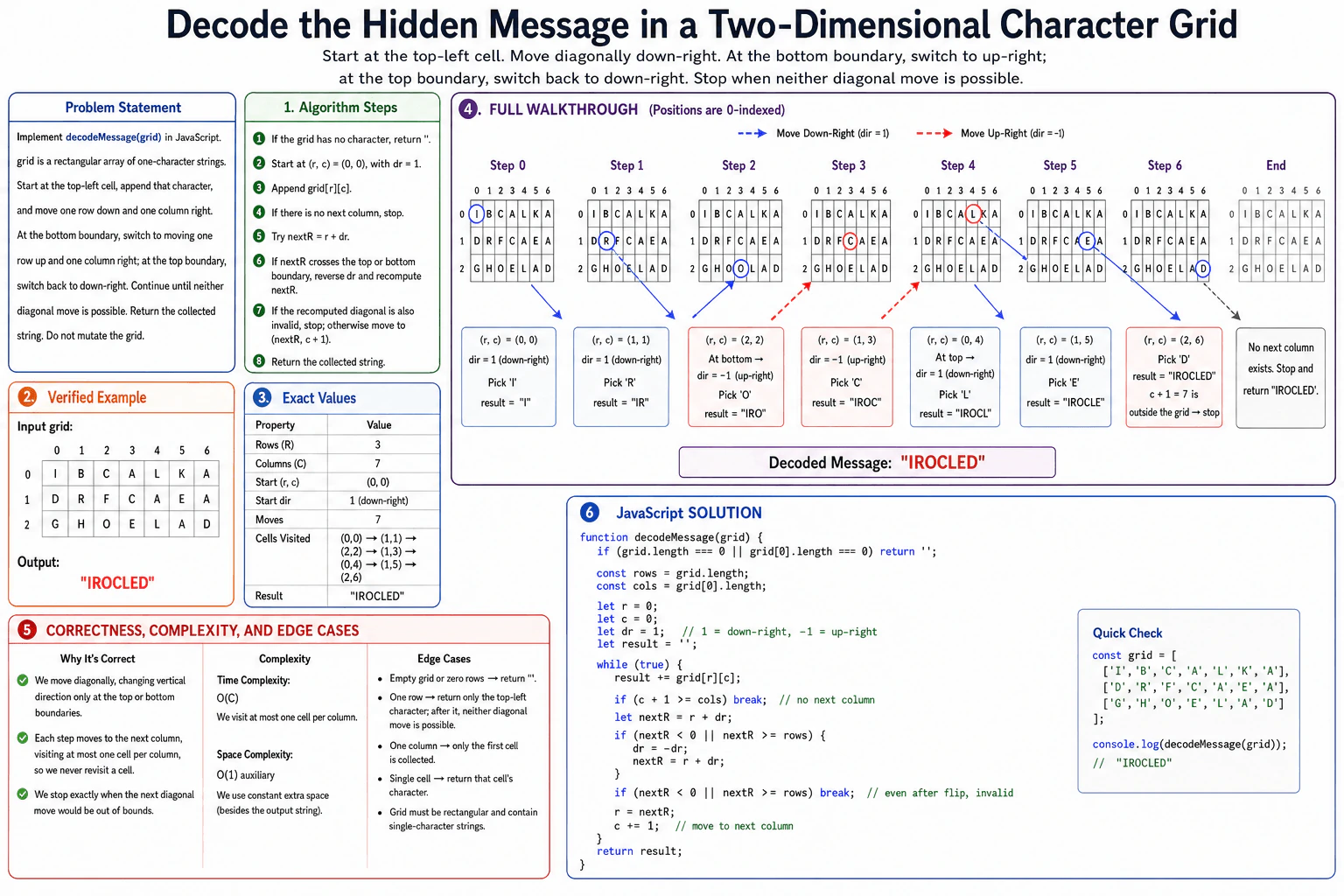
Decode the hidden message in a two-dimensional character grid. diagram
How to Explain It in an Interview
1. Understand the input and output

The input is a rectangular two-dimensional array of one-character strings. The function must not change it. If the grid has no character, return ''. Otherwise, start at row 0, column 0, collect characters in the required diagonal order, and return the collected string.

2. Initialize the traversal state

Use r for the current row and c for the current column. Use dr for the vertical direction. dr = 1 means down-right and dr = -1 means up-right. Start with r = 0, c = 0, dr = 1, and result = ''.

3. Process one visited cell at a time

Append grid[r][c] to result. If c + 1 is outside the grid, stop because there is no next column. Otherwise, calculate nextR = r + dr. If nextR is above the top or below the bottom, reverse dr and calculate nextR again. If that second row is also invalid, stop. Otherwise, move to (nextR, c + 1).

4. Walk through the example

The grid has 3 rows and 7 columns. The visited cells are (0,0) → (1,1) → (2,2) → (1,3) → (0,4) → (1,5) → (2,6). Their characters are I → R → O → C → L → E → D. At (2,2), the down-right move would cross the bottom, so the direction changes to up-right. At (0,4), the up-right move would cross the top, so the direction changes back to down-right. At (2,6), there is no next column, so the algorithm stops and returns "IROCLED".

5. Explain why it is correct

The invariant is simple: after each successful move, the column increases by exactly one and the row follows the currently valid diagonal direction. The direction changes only when the next row would cross a vertical boundary. Because the column never moves left, no cell is revisited. Therefore the algorithm follows exactly the required path and appends the required characters in order.

6. Explain the JavaScript implementation

The code first handles an empty grid or an empty first row. It stores the row and column counts. Then it runs the traversal with r, c, and dr. Each loop appends the current character, checks whether another column exists, calculates the next row, flips direction when needed, and moves to the next valid cell. Finally, it returns the collected string.

7. Explain complexity and edge cases

Let C be the number of columns. At most one cell is visited in each column, so the time complexity is O(C). The algorithm keeps only a few variables, so auxiliary space is O(1) besides the returned string. An empty grid returns ''. A one-row grid returns only the top-left character because both diagonal row choices are invalid. A one-column grid also returns only its first character.

Key Insight / Why This Solution Works

Use direct simulation. Keep the current row, current column, and vertical direction. The central invariant is that every successful move advances exactly one column and uses the valid diagonal direction for that position. Try nextR = r + dr. If that row crosses the top or bottom boundary, reverse dr and try again. If the recomputed row is still invalid, no diagonal move exists and the traversal stops. Because the column only increases, the algorithm never revisits a cell and processes at most one cell per column.

Code
function decodeMessage(grid) {
  // No character exists when there are no rows or the first row is empty.
  if (grid.length === 0 || grid[0].length === 0) return '';

  // Store the rectangular grid dimensions for boundary checks.
  const rows = grid.length;
  const cols = grid[0].length;

  // Start at the top-left cell.
  let r = 0;
  let c = 0;

  // dr = 1 means down-right. dr = -1 means up-right.
  let dr = 1;

  // Build the decoded message without mutating the grid.
  let result = '';

  while (true) {
    // Collect the character at the current visited cell.
    result += grid[r][c];

    // A diagonal move always needs the next column.
    if (c + 1 >= cols) break;

    // First try to keep moving in the current vertical direction.
    let nextR = r + dr;

    // If that row crosses a vertical boundary, reverse direction.
    if (nextR < 0 || nextR >= rows) {
      dr = -dr;
      nextR = r + dr;
    }

    // If the opposite diagonal is also invalid, no move is possible.
    if (nextR < 0 || nextR >= rows) break;

    // Move to the valid diagonal cell in the next column.
    r = nextR;
    c += 1;
  }

  // Return the characters in the exact order they were visited.
  return result;
}

// Same example as the diagram.
const grid = [
  ['I', 'B', 'C', 'A', 'L', 'K', 'A'],
  ['D', 'R', 'F', 'C', 'A', 'E', 'A'],
  ['G', 'H', 'O', 'E', 'L', 'A', 'D'],
];

console.log(decodeMessage(grid)); // IROCLED
Time & Space Complexity

Let C be the number of columns. The traversal visits at most one cell in each column, so the time complexity is O(C). It does not create another grid, map, set, stack, or queue. It only keeps a few variables such as the current row, current column, direction, and next row. Therefore the auxiliary space is O(1) besides the returned string. The returned string itself can contain up to C characters because those characters are the required output.

Where it is used

This kind of direct grid simulation is useful when software must follow a fixed movement rule through a matrix. Similar patterns appear in board and puzzle logic, image-grid processing, animation paths, and other tasks where a position and direction fully describe the current state.

Why Interviewers Ask This

This problem checks whether you can turn movement rules into correct state updates. The interviewer is looking for careful boundary handling, a clear invariant, and a correct stopping condition. It also tests whether your code and explanation stay consistent, whether you notice special cases such as a one-row grid, whether you avoid unnecessary data structures, and whether you can justify O(C) time and O(1) auxiliary space for the exact traversal.

Common interview mistakes
  1. Moving outside the grid first and only then trying to repair the position. The code should validate the next row before updating r.
  2. Forgetting that every successful move must also increase the column by one.
  3. Stopping after the first invalid diagonal instead of reversing the vertical direction and trying the opposite diagonal.
  4. Mishandling a one-row grid, where both diagonal row choices are invalid after the first character.
  5. Claiming O(R × C) time even though the traversal visits at most one cell per column.
Interview tip

Explain the movement with one sentence: the column always moves right, while dr controls whether the row moves down or up. Then show that dr flips only when the next row crosses the top or bottom boundary. This makes both the correctness argument and the O(C) time complexity easy to defend.
Interviewer may ask next
What happens if the grid has only one row?

The algorithm still starts at the top-left cell and appends that character. If another column exists, the first diagonal row is invalid. After reversing dr, the opposite diagonal row is also invalid because there is only one row. Therefore no diagonal move is possible, so the function stops and returns only the top-left character. The time for this case is O(1), and the auxiliary space remains O(1).

Why is the time complexity O(C) instead of O(R × C)?

The algorithm never scans every cell. Each successful step moves exactly one column to the right, so it can visit at most one cell in each of the C columns. It may stop even earlier if neither diagonal move is valid. Therefore the traversal takes O(C) time in the worst case for this algorithm. It still uses O(1) auxiliary space besides the returned string.

2. Reorder an array in place using a parallel array of destination indexes.CodingEasyMeta

Question Details

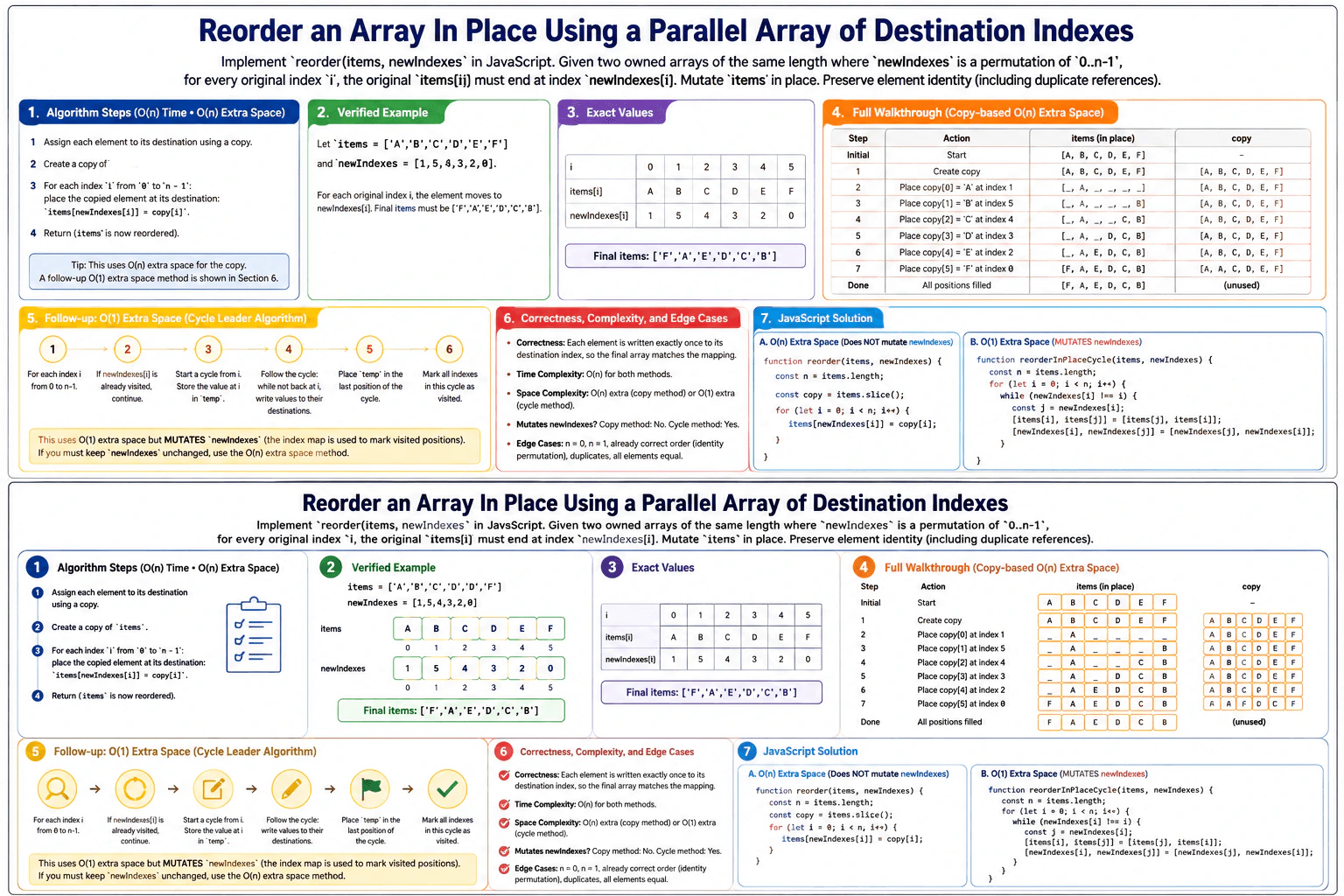
Implement reorder(items, newIndexes) in JavaScript. The inputs are guaranteed valid: both are owned arrays of the same length, and newIndexes is a permutation of 0..items.length - 1. For every original index i, the original items[i] must end at index newIndexes[i]. Mutate items in place; tests ignore the function's return value. Preserve element identity, including duplicate object references. First provide a correct O(n)-auxiliary-space solution, then explain or implement the reported O(1)-auxiliary-space follow-up and state whether that follow-up mutates newIndexes. Example: with items = ['A','B','C','D','E','F'] and newIndexes = [1,5,4,3,2,0], the final items must be ['F','A','E','D','C','B'].

Short Interview Answer (30-60 seconds)

I would first copy the original items so I never overwrite a value before using it. Then, for every original index i, I place copy[i] at items[newIndexes[i]]. This directly follows the destination mapping and takes O(n) time with O(n) auxiliary space. For the O(1)-space follow-up, I swap items while also swapping entries in newIndexes until every newIndexes[i] equals i. That also takes O(n) time, uses O(1) auxiliary space, and mutates newIndexes.

Detailed Explanation

See the Code while reading this explanation.

We have two owned arrays of the same length. Each value in newIndexes tells us where the item from the same original position must go. For example, the original item at index 0 must move to index 1 because newIndexes[0] is 1. We must change items itself, preserve the exact elements and object references, and produce ['F','A','E','D','C','B']. The simple solution first copies items so later writes cannot destroy original values that are still needed.

Useful Questions to Ask the Interviewer
  1. Can I rely on newIndexes always being a valid permutation of 0 through n - 1?
  2. For the O(1)-space follow-up, is it acceptable to mutate newIndexes?
Reorder an array in place using a parallel array of destination indexes. diagram
How to Explain It in an Interview
1. Understand the input and required output

The input is items plus a parallel array called newIndexes. For every original index i, the original items[i] must finish at newIndexes[i]. With items = ['A','B','C','D','E','F'] and newIndexes = [1,5,4,3,2,0], A goes to index 1, B goes to 5, C goes to 4, D stays at 3, E goes to 2, and F goes to 0. The required final items array is ['F','A','E','D','C','B']. Tests ignore the function's return value, so the important result is the mutation of items.

2. Use a copy for the O(n)-auxiliary-space solution

First, make copy = items.slice(). The copy keeps every original array entry available. Then process i from 0 to n - 1. At each index, write copy[i] into items[newIndexes[i]]. The central invariant is that copy never changes, so copy[i] is always the original entry from index i. This also preserves object identity because slice() makes a shallow copy. It copies references instead of cloning the objects.

3. Walk through the example

Start with copy = ['A','B','C','D','E','F']. At i = 0, newIndexes[0] is 1, so put 'A' at items[1]. At i = 1, newIndexes[1] is 5, so put 'B' at items[5]. At i = 2, newIndexes[2] is 4, so put 'C' at items[4]. At i = 3, newIndexes[3] is 3, so put 'D' at items[3]. At i = 4, newIndexes[4] is 2, so put 'E' at items[2]. At i = 5, newIndexes[5] is 0, so put 'F' at items[0]. Now items is ['F','A','E','D','C','B'].

4. Explain the O(1)-auxiliary-space follow-up

Because newIndexes is owned by the function, we can use it as mutable state. For each i, while newIndexes[i] !== i, let j = newIndexes[i]. Swap items[i] with items[j]. Then swap newIndexes[i] with newIndexes[j]. The item and its destination entry move together. When newIndexes[i] becomes i, the item at index i is in its final position. For the example, index 0 first swaps with 1, then with 5. Index 2 then swaps with 4. Index 3 is already fixed. The final items array is ['F','A','E','D','C','B'], and newIndexes becomes [0,1,2,3,4,5]. This follow-up uses O(1) auxiliary space, but it mutates newIndexes.

5. Explain why the result is correct

For the copy method, copy[i] always means the original entry from index i, and we write it directly to its required destination newIndexes[i]. Since newIndexes is a permutation, every destination appears exactly once. For the O(1) method, items and their destination entries are swapped together. When newIndexes[i] equals i, the entry currently at i belongs there. Each swap makes permanent progress toward the identity permutation, so the process finishes with every entry at its required destination.

6. Explain the JavaScript implementation

The first function creates a shallow copy with slice(), then performs one loop and assigns items[newIndexes[i]] = copy[i]. It does not need to return the array because the required result is the mutation of items. The follow-up function uses a for loop with an inner while loop. It swaps both arrays in parallel until every destination entry equals its own index. The inputs are guaranteed valid, so no extra validation is required.

7. Explain complexity and edge cases

Both methods take O(n) total time. The copy method needs O(n) auxiliary space because the copied array grows with n. The swap-based follow-up uses O(1) auxiliary space because it only keeps a few variables, but it mutates newIndexes. Empty and one-element arrays require no meaningful movement. An identity permutation already has every item in place. Duplicate values and duplicate object references work correctly because both methods move array entries by position and preserve the original references.

Key Insight / Why This Solution Works

The key idea is that newIndexes is a destination mapping. Original entry i must move to newIndexes[i]. The simple solution keeps an unchanged shallow copy of items. Its invariant is that copy[i] always refers to the original entry from index i, so writing items[newIndexes[i]] = copy[i] cannot destroy information that will be needed later. The O(1)-auxiliary-space follow-up uses the permutation itself as mutable state. It swaps an item and its destination entry together until newIndexes becomes the identity permutation. This removes the copied array, but the tradeoff is that newIndexes is mutated.

Code
function reorder(items, newIndexes) {
  // Protect every original entry before items is overwritten.
  // slice() is shallow, so object references keep their identity.
  const copy = items.slice();

  // Original entry i must finish at destination newIndexes[i].
  for (let i = 0; i < items.length; i++) {
    items[newIndexes[i]] = copy[i];
  }

  // No return value is required. The caller observes the mutation of items.
}

function reorderInPlaceCycle(items, newIndexes) {
  const n = items.length;

  // Resolve each position by using the owned permutation as mutable state.
  for (let i = 0; i < n; i++) {
    // Keep moving the current entry until position i is resolved.
    while (newIndexes[i] !== i) {
      const j = newIndexes[i];

      // Move the entries while preserving their exact values or references.
      [items[i], items[j]] = [items[j], items[i]];

      // Move the matching destination entries with those items.
      // This gradually turns newIndexes into the identity permutation.
      [newIndexes[i], newIndexes[j]] = [newIndexes[j], newIndexes[i]];
    }
  }

  // This version mutates newIndexes and also does not require a return value.
}

// Run the diagram example with the O(n)-auxiliary-space solution.
const items1 = ['A', 'B', 'C', 'D', 'E', 'F'];
const newIndexes1 = [1, 5, 4, 3, 2, 0];
reorder(items1, newIndexes1);
console.log(items1); // ['F', 'A', 'E', 'D', 'C', 'B']
console.log(newIndexes1); // [1, 5, 4, 3, 2, 0] — unchanged

// Run the same example with the O(1)-auxiliary-space follow-up.
const items2 = ['A', 'B', 'C', 'D', 'E', 'F'];
const newIndexes2 = [1, 5, 4, 3, 2, 0];
reorderInPlaceCycle(items2, newIndexes2);
console.log(items2); // ['F', 'A', 'E', 'D', 'C', 'B']
console.log(newIndexes2); // [0, 1, 2, 3, 4, 5] — mutated
Time & Space Complexity

Let n be items.length. The copy-based solution takes O(n) time. Creating items.slice() takes O(n), and the placement loop takes another O(n), which is still O(n) overall. It uses O(n) auxiliary space for the copied array. The O(1)-space follow-up also takes O(n) total time. Even though it has a while loop inside a for loop, each swap makes permanent progress in the permutation, so there are only O(n) swaps in total. It uses O(1) auxiliary space because it stores only a few variables. Its tradeoff is that newIndexes is mutated.

Where it is used

This pattern is useful when one array describes where entries from another array must be placed. Similar cases appear when applying a permutation, rearranging parallel records, or restoring data into a required index order. The copy-based method is useful when the destination-index array must stay unchanged. The swap-based method is useful when extra memory matters and changing the owned destination-index array is allowed.

Why Interviewers Ask This

This problem checks whether you can reason carefully about array mutation and index mappings. The interviewer can see whether you distinguish a source index from a destination index, avoid overwriting data that is still needed, preserve object references, and use the permutation guarantee correctly. The O(1)-space follow-up also tests whether you can reason about permutation cycles, maintain an invariant while swapping, write correct JavaScript, and explain the time-space tradeoff accurately.

Common interview mistakes

A common mistake is writing items[i] directly to items[newIndexes[i]] without first protecting the original entries. An earlier write can destroy a value that is still needed. Another mistake is reversing the mapping and treating newIndexes[i] as a source index instead of a destination index. Deep-cloning objects is also wrong because it can break element identity. In the O(1)-space follow-up, swapping items without swapping the matching newIndexes entries breaks the invariant. It is also incorrect to claim that the O(1) follow-up leaves newIndexes unchanged.

Interview tip

State the mapping before coding: "The original entry at index i must go to destination newIndexes[i]." Then explain why the copy protects the first solution from overwriting needed values. For the follow-up, say clearly that O(1) auxiliary space is possible because the owned newIndexes array is allowed to be mutated while the permutation is swapped into identity order.

Interviewer may ask next
Can you reduce the auxiliary space from O(n) to O(1)?

Yes, if mutating newIndexes is allowed. For each i, while newIndexes[i] !== i, set j = newIndexes[i], swap items[i] with items[j], and swap newIndexes[i] with newIndexes[j]. The item and its destination entry move together. When newIndexes[i] becomes i, position i is resolved. The process finishes with the required items order and newIndexes changed to the identity permutation. Time remains O(n), auxiliary space becomes O(1), and the tradeoff is mutation of newIndexes.

What if newIndexes must remain unchanged?

Use the O(n)-auxiliary-space copy method. Make copy = items.slice(), then assign items[newIndexes[i]] = copy[i] for every i. The copy protects all original entries while items is overwritten, and newIndexes is never changed. This takes O(n) time and O(n) auxiliary space. The tradeoff is the extra array, but the destination mapping stays intact.

3. Implement a JavaScript store that uses DOM nodes as keys.CodingEasyMeta

Question Details

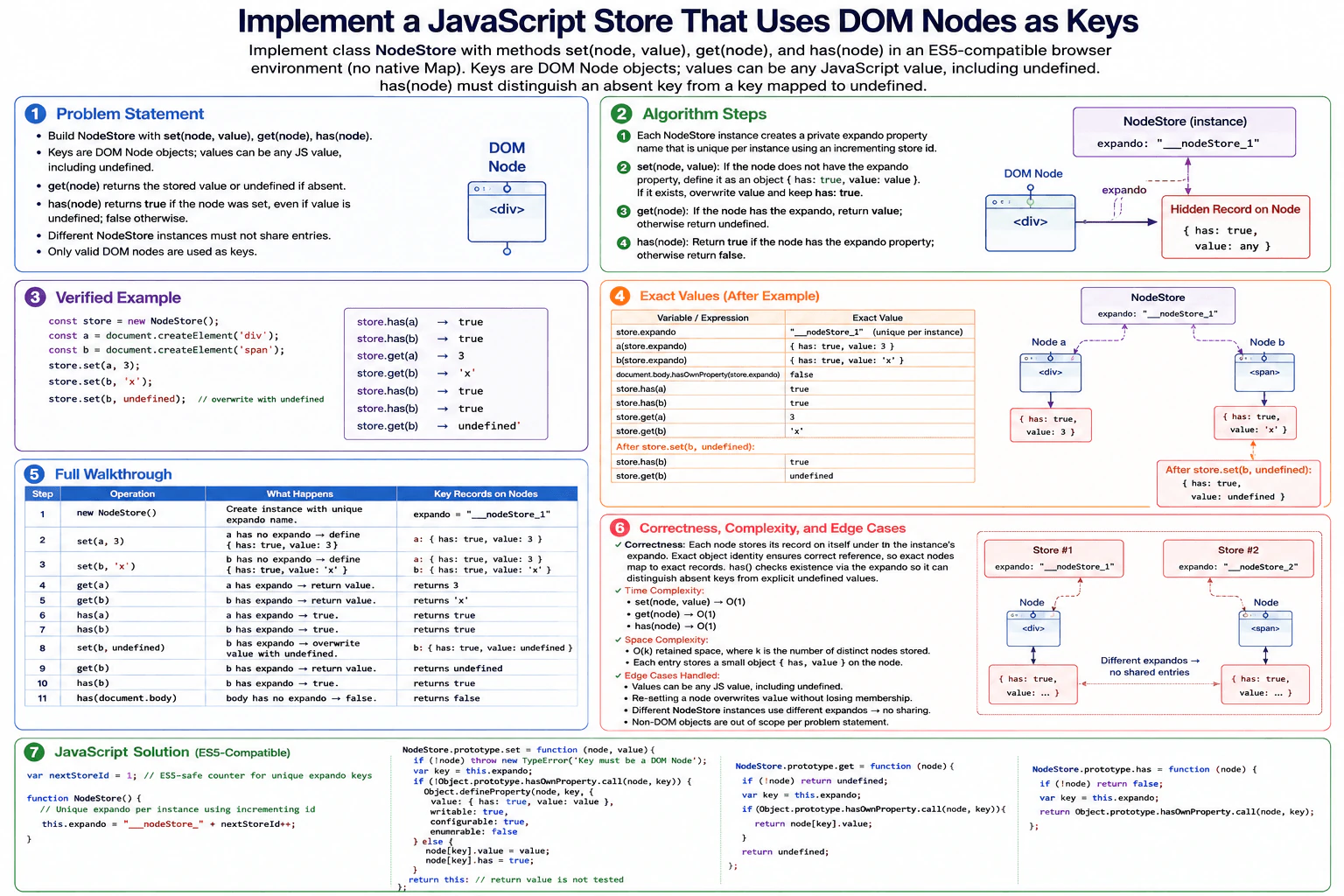
Implement class NodeStore with methods set(node, value), get(node), and has(node) in an ES5-compatible browser environment where native Map is unavailable. A key is a DOM Node, and a value may be any JavaScript value, including undefined. set associates or overwrites the value for that exact node, get returns the stored value or undefined when no association exists, and has distinguishes an absent key from a key explicitly mapped to undefined. Separate store instances must not share entries. Only valid DOM-node keys are in scope, and the methods' return values other than get and has are not tested. Example: after store.set(a, 3) and store.set(b, 'x'), store.has(a) and store.has(b) are true, while store.get(a) is 3 and store.get(b) is 'x'. Explain the time and retained-space cost of the representation you choose.

Short Interview Answer (30-60 seconds)

I would give each NodeStore instance its own expando property name using an incrementing store ID. When set is called, I attach a small record directly to that exact DOM node. The record keeps a presence flag and the stored value, so undefined is still a valid value. get reads the record, and has checks whether the expando exists. Different store instances use different expando names, so they do not share entries. Each operation is O(1), and retained space is O(k) for k stored nodes.

Detailed Explanation

See the Code while reading this explanation.

The goal is to store a value for an exact DOM node without using Map. The value can even be undefined, so we cannot use the returned value alone to decide whether a node is present. The diagram solves this by giving every NodeStore instance a different property name. The store places a small record under that property directly on each node. This keeps node identity naturally. Reading and checking the record is direct, and separate stores use different property names, so their entries stay separate.

Useful Questions to Ask the Interviewer
  1. Can I assume every key passed to the methods is a valid DOM Node?
  2. Is it acceptable to attach a non-enumerable private property to each DOM node?
  3. Should a value of undefined still count as an existing association?
Implement a JavaScript store that uses DOM nodes as keys. diagram
How to Explain It in an Interview
1. Understand the required behavior

The key is the DOM node object itself. set(node, value) must create or overwrite the association for that exact node. get(node) returns the stored value. It returns undefined when the node has no association. has(node) must still return true when the stored value itself is undefined. Separate NodeStore objects must not see each other's entries.

2. Give each store its own expando key

An expando is simply an extra JavaScript property placed on an object. A counter starts at 1. The first NodeStore gets the property name "__nodeStore_1", the second gets "__nodeStore_2", and so on. This is the central isolation rule. A record written by one store is under a different property from records written by another store.

3. Store a small record on the DOM node

For set(node, value), the store reads its own expando key. For the valid DOM-node inputs required by the problem, if that property is not already on the node, it creates a non-enumerable property with a record like { has: true, value: value }. If the record already exists, set overwrites its value and keeps has true. The node object itself therefore carries the store entry.

4. Walk through the verified example

Create one NodeStore. Its expando is "__nodeStore_1". After store.set(a, 3), node a has { has: true, value: 3 } under that property. After store.set(b, 'x'), node b has { has: true, value: 'x' }. store.has(a) is true. store.has(b) is true. store.get(a) returns 3. store.get(b) returns 'x'.

The diagram then shows the important undefined case. store.set(b, undefined) updates b's existing record to { has: true, value: undefined }. store.get(b) now returns undefined, but store.has(b) remains true. A node such as document.body that was never set has no expando for this store, so has returns false.

5. Explain why it is correct

The invariant is simple: a node belongs to this store exactly when it has this store's own expando property. Its record contains the current value. Because each NodeStore gets a different counter-generated expando key, two stores do not read each other's records. Because membership is checked from property existence rather than from the stored value, an explicit undefined value is different from an absent entry.

6. Explain the JavaScript implementation

The constructor creates the instance's unique expando name. set rejects a falsy key defensively, then uses Object.prototype.hasOwnProperty.call to test whether the expando is already present. Object.defineProperty creates the first record as non-enumerable. Later calls update the existing record. get returns undefined for a falsy key, then uses the same own-property test and returns node[key].value when present. has returns false for a falsy key and otherwise performs the same own-property check. Valid DOM nodes are the only required inputs, so those defensive checks do not change the stated contract.

7. Explain complexity and edge cases

set, get, and has each perform a constant number of direct object-property operations, so their normal operation cost is O(1). If this store has entries on k distinct nodes, retained space is O(k). Each of those DOM nodes carries one small record for this store. Removing a node from the document does not itself remove that JavaScript property. The record remains as long as the node object itself remains reachable. An explicitly stored undefined value remains present, resetting a node overwrites its value without losing membership, and different stores remain isolated.

Key Insight / Why This Solution Works

The key insight is to use the DOM node object as the physical place where the entry is stored. Each NodeStore instance receives a distinct expando property name from an incrementing counter. That property is the store-specific namespace on every node. The invariant is: a node is present in a particular store exactly when that node owns that store's expando property. The property contains { has: true, value: ... }. This makes exact node identity automatic, lets has distinguish an absent entry from a stored undefined value, and keeps different NodeStore instances isolated because their expando names are different.

Code
var nextStoreId = 1;

function NodeStore() {
  // Give this store instance its own deterministic expando key.
  // Different instances therefore read and write different properties.
  this.expando = '__nodeStore_' + nextStoreId++;
}

NodeStore.prototype.set = function (node, value) {
  // The problem supplies valid DOM nodes, but keep the diagram's defensive guard.
  if (!node) {
    throw new TypeError('Key must be a DOM Node');
  }

  var key = this.expando;

  // Create this store's record the first time this node is used.
  if (!Object.prototype.hasOwnProperty.call(node, key)) {
    Object.defineProperty(node, key, {
      value: { has: true, value: value },
      writable: true,
      configurable: true,
      enumerable: false,
    });
  } else {
    // Overwrite the current value without losing membership.
    // This remains true even when value is explicitly undefined.
    node[key].value = value;
    node[key].has = true;
  }

  // The problem does not test set's return value.
  return this;
};

NodeStore.prototype.get = function (node) {
  // Match the diagram's defensive behavior for a missing/falsy key.
  if (!node) {
    return undefined;
  }

  var key = this.expando;

  // Presence is checked separately from the stored value.
  if (Object.prototype.hasOwnProperty.call(node, key)) {
    return node[key].value;
  }

  // No association exists for this node in this store.
  return undefined;
};

NodeStore.prototype.has = function (node) {
  // Match the diagram's defensive behavior for a missing/falsy key.
  if (!node) {
    return false;
  }

  var key = this.expando;

  // An own expando property means this exact node has an entry in this store.
  return Object.prototype.hasOwnProperty.call(node, key);
};

// Run the same example and operation order shown in the diagram.
var store = new NodeStore();
var a = document.createElement('div');
var b = document.createElement('span');

store.set(a, 3);
store.set(b, 'x');

console.log(store.has(a)); // true
console.log(store.has(b)); // true
console.log(store.get(a)); // 3
console.log(store.get(b)); // 'x'

// Overwrite b with undefined. Membership must remain true.
store.set(b, undefined);
console.log(store.get(b)); // undefined
console.log(store.has(a)); // true
console.log(store.has(b)); // true

// document.body was never stored in this NodeStore instance.
console.log(store.has(document.body)); // false
Time & Space Complexity

set, get, and has each do only a fixed number of object-property checks or updates, so each operation is O(1) in the representation shown. If the store has been used with k distinct DOM nodes, retained space is O(k). Each stored node keeps one small record under this store's expando property. Removing a node from the DOM does not automatically delete that property, so the record remains while the node object itself remains reachable.

Where it is used

This pattern is useful in older browser code when native Map is unavailable and data must be associated with DOM-node identity. It can attach framework metadata, event-related state, cached information, or bookkeeping data to individual DOM nodes. In newer environments, Map or WeakMap is usually a cleaner choice because it avoids adding application-specific properties directly to DOM objects.

Why Interviewers Ask This

This problem tests whether you understand JavaScript object identity and can build key-value behavior without native Map. It also checks whether you notice the difference between an absent key and a key whose value is undefined. The interviewer can evaluate how you isolate state between class instances, use DOM objects as storage locations, reason about own properties, write ES5-compatible JavaScript, and explain both constant-time operations and retained O(k) space accurately.

Common interview mistakes

A common mistake is implementing has(node) as get(node) !== undefined. That fails when undefined is a valid stored value. Another mistake is using one shared expando name for every NodeStore instance, which makes stores share entries. Using a random name also does not give the deterministic isolation shown in the diagram, so this solution uses an incrementing store ID. Candidates may also use node.hasOwnProperty directly instead of Object.prototype.hasOwnProperty.call. Finally, removing a node from the document does not automatically remove the expando record from that JavaScript object.

Interview tip

State the invariant early: a node is present in this store exactly when it owns this store instance's expando property. Then use the undefined example to show why has must check membership separately from get's returned value.

Interviewer may ask next
How would the design change if WeakMap were available?

I would use one WeakMap inside each NodeStore instance. set would call weakMap.set(node, value), get would call weakMap.get(node), and has would call weakMap.has(node). Node identity and store isolation would then be handled directly by WeakMap, so no expando property would be added to the DOM node. Operations are expected O(1), and WeakMap entries do not keep their node keys alive. The tradeoff is that WeakMap is not available in the ES5-only environment required by the original problem.

What if the store also needs a delete(node) method?

delete would check whether the node owns this store's expando property. If it does, it would remove that property with delete node[this.expando] and return true. Otherwise it would return false. The invariant stays the same because a node is present exactly while that property exists. The operation is O(1), and deleting the property removes this store's retained record from that node. The main tradeoff is that delete now mutates the DOM object by removing the expando.

4. Convert a valid standard Roman numeral to an integer.CodingEasyMeta

Question Details

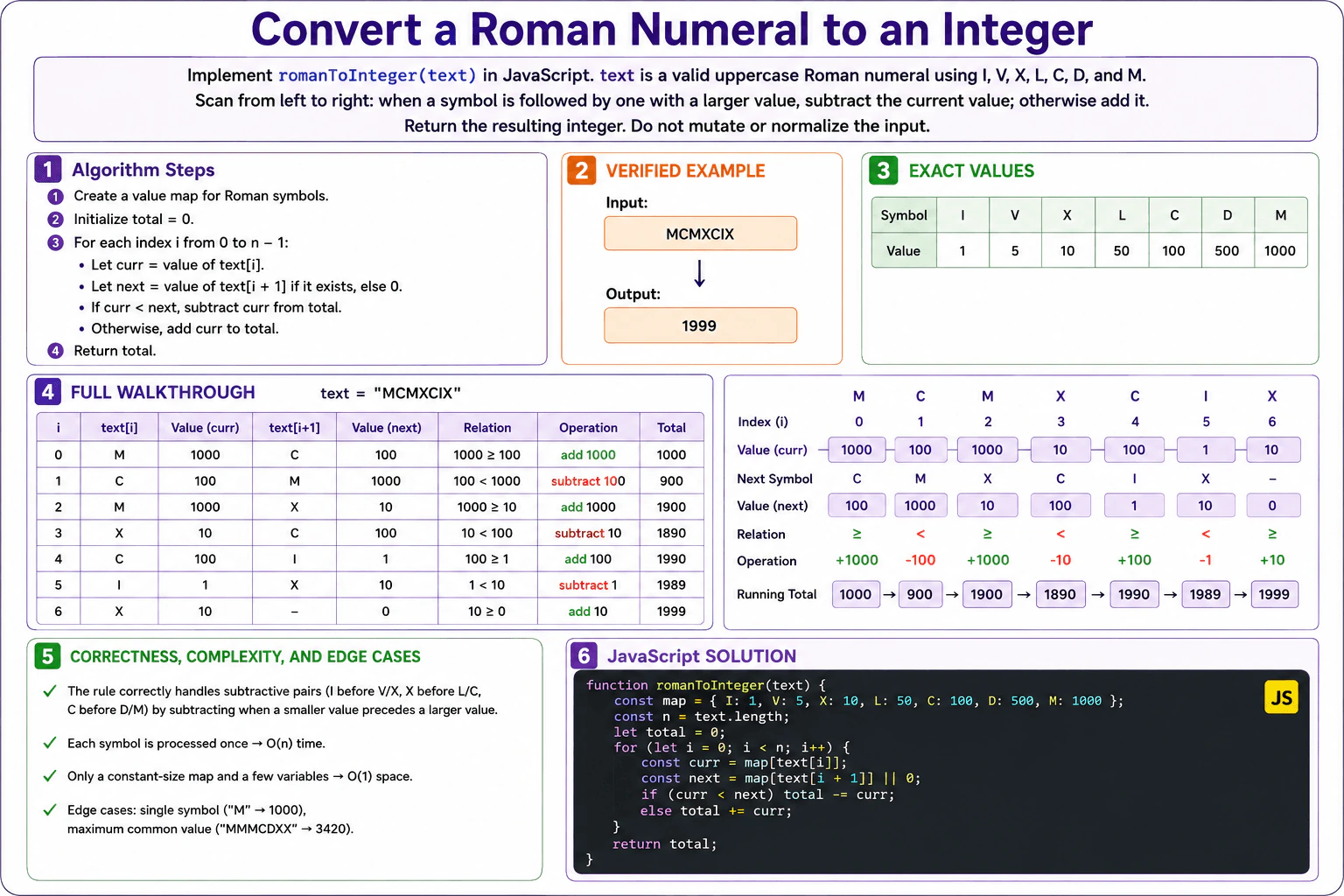
Implement romanToInteger(text) in JavaScript. text is guaranteed to be a valid uppercase Roman numeral in standard form using I, V, X, L, C, D, and M, with values 1, 5, 10, 50, 100, 500, and 1000. Scan from left to right: when a symbol is followed by one with a larger value, subtract the current value; otherwise add it. Return the resulting integer without mutating or normalizing the input. Invalid Roman strings are outside the reported contract. Examples: romanToInteger('CXXIII') returns 123, romanToInteger('MCMXCIX') returns 1999, and romanToInteger('MMMCDXX') returns 3420. Target O(n) time and O(1) auxiliary space.

Short Interview Answer (30-60 seconds)

I would scan the Roman numeral from left to right and keep a running total. I use a fixed lookup table for the seven Roman symbols. At each index, I compare the current symbol value with the next one. If the current value is smaller, I subtract it. Otherwise, I add it. This correctly handles subtractive pairs such as CM and XC. For MCMXCIX, the result is 1999. The time complexity is O(n), and the auxiliary space is O(1).

Detailed Explanation

See the Code while reading this explanation.

The input is one valid uppercase Roman numeral in standard form. We need to return the integer represented by that text without changing the input. Each Roman symbol has a fixed number value. We move from left to right. Usually we add the current value. The special case is when the next symbol has a larger value. Then the current value is part of a subtractive pair, so we subtract it instead. This direct rule matches the required conversion and needs only a running total and a fixed symbol table.

Useful Questions to Ask the Interviewer
  1. Can I assume the input is always a valid uppercase Roman numeral in standard form?
  2. Should I return only the integer and leave the original string unchanged?
Convert a valid standard Roman numeral to an integer. diagram
How to Explain It in an Interview
1. Understand the input and required output

The input is a valid uppercase Roman numeral such as MCMXCIX. The allowed symbols are I, V, X, L, C, D, and M. Their values are 1, 5, 10, 50, 100, 500, and 1000. We return one integer. For the diagram example, MCMXCIX must return 1999. We do not mutate or normalize the input. Invalid Roman strings are outside the stated contract.

2. Choose the left-to-right rule

I keep a fixed lookup table from each Roman symbol to its value. I process the string from left to right. At every index, I read the current value and the next value. If the current value is smaller than the next value, I subtract the current value from the total. Otherwise, I add it. The central invariant is that after each index, the running total contains the correct contribution of every symbol processed so far.

3. Initialize the state

The symbol table is I=1, V=5, X=10, L=50, C=100, D=500, and M=1000. I set total to 0. The loop starts at index 0. When there is no next symbol, the code uses 0 as the next value. That makes the final Roman symbol get added because its value is greater than or equal to 0.

4. Walk through MCMXCIX

At index 0, M is 1000 and the next symbol C is 100. Since 1000 is not smaller than 100, add 1000. Total becomes 1000.

At index 1, C is 100 and the next symbol M is 1000. Since 100 < 1000, subtract 100. Total becomes 900.

At index 2, M is 1000 and the next symbol X is 10. Since 1000 is not smaller than 10, add 1000. Total becomes 1900.

At index 3, X is 10 and the next symbol C is 100. Since 10 < 100, subtract 10. Total becomes 1890.

At index 4, C is 100 and the next symbol I is 1. Since 100 is not smaller than 1, add 100. Total becomes 1990.

At index 5, I is 1 and the next symbol X is 10. Since 1 < 10, subtract 1. Total becomes 1989.

At index 6, X is 10 and there is no next Roman symbol, so next is treated as 0. Since 10 is not smaller than 0, add 10. The final total becomes 1999.

5. Explain why the result is correct

In a valid standard Roman numeral, a smaller value before a larger value is subtracted. Otherwise, the value is added. The algorithm applies exactly that rule at every position. Because each symbol's contribution is decided using only itself and the next symbol, the running total stays correct after every processed index. After the final symbol, all contributions have been included, so the total is the correct integer.

6. Explain the JavaScript implementation, complexity, and edge cases

The JavaScript object stores the seven fixed symbol values. The loop reads each character from left to right. It gets the current value and, when available, the next value. The comparison decides whether to subtract or add the current value. Finally, the function returns total. With n equal to text.length, the loop takes O(n) time. The symbol table always has seven entries, so auxiliary space is O(1). A single symbol such as M returns 1000. The valid example MMMCDXX returns 3420. The last symbol is handled by treating the missing next value as 0.

Key Insight / Why This Solution Works

The key idea is to decide the contribution of each Roman symbol by comparing it with the symbol immediately after it. A fixed lookup table gives each symbol its numeric value. If current < next, the current value is subtractive, so we subtract it. Otherwise, we add it. The invariant is that after processing index i, the running total contains the correct contribution of every symbol from index 0 through i. This works because the input is guaranteed to be a valid Roman numeral in standard form.

Code
function romanToInteger(text) {
  // Store the fixed numeric value for every allowed Roman symbol.
  const map = {
    I: 1,
    V: 5,
    X: 10,
    L: 50,
    C: 100,
    D: 500,
    M: 1000,
  };

  // Save the input length and start the running total at zero.
  const n = text.length;
  let total = 0;

  // Process each Roman symbol from left to right exactly once.
  for (let i = 0; i < n; i++) {
    // Read the value of the current symbol.
    const curr = map[text[i]];

    // Read the next value when it exists.
    // Use 0 at the last index so the final symbol is added.
    const next = map[text[i + 1]] || 0;

    // A smaller value before a larger value is subtractive.
    if (curr < next) {
      total -= curr;
    } else {
      // Otherwise, the current value contributes positively.
      total += curr;
    }
  }

  // All symbol contributions are now included in the total.
  return total;
}

// Run the same example used in the diagram.
console.log(romanToInteger('MCMXCIX')); // 1999
Time & Space Complexity

Let n be the number of characters in the Roman numeral. We visit each character once, so the time complexity is O(n). The lookup table always contains exactly seven Roman symbols, regardless of input length. The algorithm also keeps only a few numeric variables. Therefore, the auxiliary space complexity is O(1).

Where it is used

This pattern is useful when parsing a sequence where the meaning of the current symbol depends on the next symbol. Roman numeral conversion is a direct example because a smaller value before a larger value changes from addition to subtraction.

Why Interviewers Ask This

This problem checks whether you can turn a simple written rule into correct code. The interviewer can see whether you choose a suitable fixed lookup table, process the string in the correct order, handle subtractive pairs correctly, deal with the last character safely, and keep the input unchanged. It also tests whether you can trace an example carefully and explain why the solution is O(n) time with O(1) auxiliary space.

Common interview mistakes
  1. Always adding every symbol. That fails on subtractive pairs such as CM, XC, and IX.
  2. Subtracting the larger symbol instead of the smaller current symbol when current < next.
  3. Comparing Roman characters directly instead of comparing their numeric values from the lookup table.
  4. Mishandling the last character. In this solution, the missing next value is treated as 0, so the final symbol is added.
  5. Claiming that the fixed seven-entry symbol table uses O(n) space. Its size never grows with the input, so auxiliary space is O(1).
Interview tip

While coding, say the rule before writing the loop: "If the current value is smaller than the next value, subtract it. Otherwise, add it." Then trace one subtractive pair such as C before M from MCMXCIX. This makes the code and correctness argument easy to follow.

Interviewer may ask next
What would change if invalid Roman numeral strings also had to be rejected?

I would add validation before or during conversion. The validation would check that every symbol is allowed and that ordering, repetition, and subtractive combinations follow the required Roman numeral rules. After validation, I would use the same left-to-right conversion rule. This can still run in O(n) time with O(1) auxiliary space because only a fixed amount of state is needed. The tradeoff is more validation logic because the current problem guarantees valid standard input.

Why is the auxiliary space O(1) even though the solution uses a lookup object?

The lookup object always has exactly seven entries: I, V, X, L, C, D, and M. Its size does not grow when the input string becomes longer. The other stored values are only n, total, curr, next, and the loop index. Because the amount of extra memory stays constant as n grows, the auxiliary space complexity is O(1).

5. Implement `clearAllTimeout()` for browser timeouts.CodingEasyMeta

Question Details

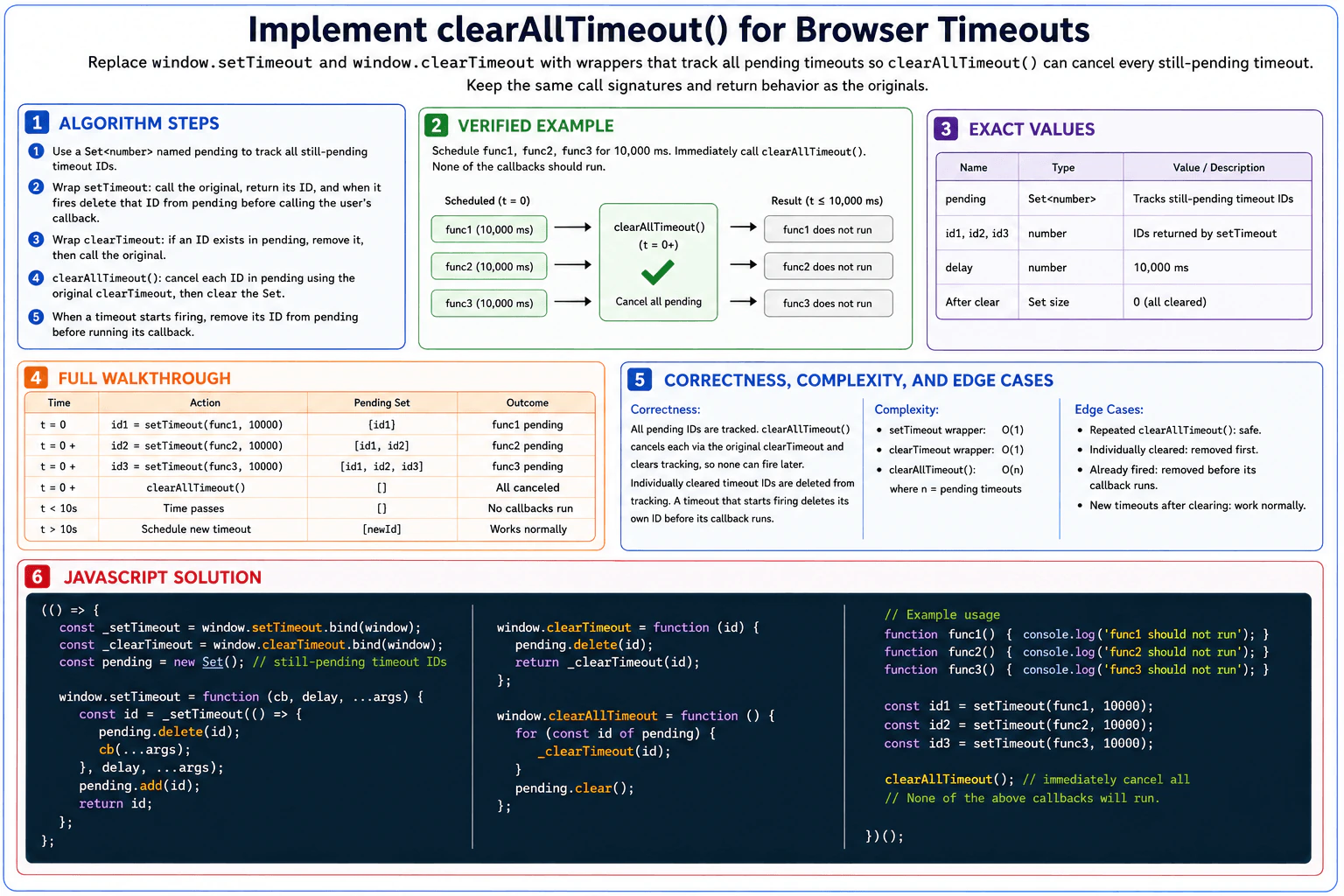
Implement clearAllTimeout() in browser JavaScript while keeping the call signatures and ordinary return behavior of window.setTimeout and window.clearTimeout unchanged. You may replace those two global functions with wrappers so that clearAllTimeout() can cancel every timeout that is still pending when it is called. A timeout that already fired or was individually cleared must no longer be tracked, repeated calls to clearAllTimeout() must be harmless, and timeouts scheduled after a clearing operation must work normally. Use browser timeout APIs only and release tracking references when a timer is no longer pending. Example: after scheduling func1, func2, and func3 for 10,000 ms and immediately calling clearAllTimeout(), none of the three callbacks may run.

Short Interview Answer (30-60 seconds)

I would save the original browser timer functions, then wrap setTimeout and clearTimeout. I keep every still-pending timeout ID in a Set. When a timeout starts, I remove its ID before running its callback. An individual clear also removes the ID. clearAllTimeout loops through the Set, cancels every pending timeout with the original clearTimeout, then empties the Set. Set operations are O(1) on average. clearAllTimeout takes O(n) time and the tracking Set uses O(n) auxiliary space.

Detailed Explanation

See the Code while reading this explanation.

The goal is to add one operation that can cancel every timeout that is still waiting. Normal setTimeout and clearTimeout calls must continue to work in the usual way. I save the original browser functions and replace the globals with small wrappers. A Set remembers only timeout IDs that are still waiting. When a timeout starts or is individually cleared, its ID is removed. This keeps the stored state accurate. clearAllTimeout can then cancel exactly the timers that are still pending.

Useful Questions to Ask the Interviewer
  1. Should clearAllTimeout cancel only timeouts that are still pending when it is called? Yes, that is the required behavior here.
  2. Should timers created after clearAllTimeout work normally? Yes. They should be tracked as new pending timers.
  3. Should repeated calls to clearAllTimeout be harmless when nothing is pending? Yes.
Implement `clearAllTimeout()` for browser timeouts. diagram
How to Explain It in an Interview
1. Understand the required behavior

We replace window.setTimeout and window.clearTimeout with wrappers while keeping their normal way of being called. setTimeout must still return the browser timeout ID. clearTimeout must still delegate to the original browser clearTimeout. The new clearAllTimeout function must cancel every timeout that is still pending at the moment it is called.

2. Choose the tracking structure

I use a Set named pending. Each entry is one browser timeout ID. The central invariant is simple: pending contains only timeout IDs whose callbacks have not started and that have not been individually cleared. A Set fits because we only need to add IDs, delete IDs, and iterate over the remaining IDs.

3. Wrap setTimeout and clearTimeout

The setTimeout wrapper calls the saved original setTimeout. It adds the returned ID to pending and returns that same ID to the caller. When the timeout starts firing, the internal callback deletes its own ID from pending before running the user's callback. The clearTimeout wrapper also deletes the ID from pending and then calls the saved original clearTimeout. Deleting an ID that is not present is harmless.

4. Walk through the verified example

At t = 0, setTimeout(func1, 10000) returns id1, so pending is [id1]. Then setTimeout(func2, 10000) returns id2, so pending is [id1, id2]. Then setTimeout(func3, 10000) returns id3, so pending is [id1, id2, id3]. Immediately afterward, clearAllTimeout() runs. It calls the original clearTimeout for id1, id2, and id3, then clears pending. The Set is now empty. When 10,000 ms passes, func1, func2, and func3 do not run. A timeout scheduled later gets a new ID, is added to pending, and works normally.

5. Explain why the result is correct

The Set represents the timers that are still pending. A timer is added when it is scheduled. It is removed when its callback starts or when it is individually cleared. Therefore, when clearAllTimeout iterates over pending, every stored ID represents a timeout that still needs cancellation. After those IDs are cancelled and the Set is emptied, none of those cancelled callbacks can run.

6. Explain the JavaScript implementation

The code first saves bound references to the original browser timer functions. It then creates pending as a Set. The setTimeout wrapper schedules an internal callback. That callback deletes its own timeout ID before calling the user's function. The returned ID is added to pending and returned unchanged. The clearTimeout wrapper removes the ID from tracking and delegates to the original clearTimeout. clearAllTimeout iterates through pending, calls the original clearTimeout for every ID, and then calls pending.clear().

7. Explain complexity and edge cases

Adding and deleting IDs in a JavaScript Set are O(1) on average. Each normal setTimeout or clearTimeout wrapper therefore has O(1) expected tracking work. If n timeouts are pending, clearAllTimeout takes O(n) time because it visits each pending ID once. The Set can hold up to n pending IDs, so auxiliary space is O(n). Repeated clearing is safe. Individually cleared or already-fired timers are no longer tracked. New timers scheduled after clearing work normally.

Key Insight / Why This Solution Works

The key idea is to maintain an exact registry of timers that are still pending. The registry is a Set of browser timeout IDs. Its invariant is: an ID is in pending only while that timeout has not started its callback and has not been individually cleared. The setTimeout wrapper adds each new ID. The wrapped callback removes its own ID before user code runs. The clearTimeout wrapper also removes the ID. Because pending always describes the current pending timers, clearAllTimeout can iterate through it, cancel every stored ID with the original clearTimeout, and then empty the Set.

Code
(() => {
  // Save the original browser timer functions before replacing the globals.
  const _setTimeout = window.setTimeout.bind(window);
  const _clearTimeout = window.clearTimeout.bind(window);

  // Store only timeout IDs whose callbacks have not started yet.
  const pending = new Set();

  window.setTimeout = function (cb, delay, ...args) {
    // Schedule the timeout with the original browser API.
    const id = _setTimeout(
      () => {
        // The timer is no longer pending once its callback starts.
        pending.delete(id);

        // Run the user's callback with the arguments supplied to setTimeout.
        cb(...args);
      },
      delay,
      ...args
    );

    // Track the ID while this timeout is still waiting to run.
    pending.add(id);

    // Preserve the ordinary setTimeout return value.
    return id;
  };

  window.clearTimeout = function (id) {
    // An individually cleared timeout is no longer pending.
    pending.delete(id);

    // Delegate to the original API and preserve its ordinary return behavior.
    return _clearTimeout(id);
  };

  window.clearAllTimeout = function () {
    // Cancel every timeout that is still pending now.
    for (const id of pending) {
      _clearTimeout(id);
    }

    // Release all tracking references after cancellation.
    pending.clear();
  };

  // Verified example from the diagram and question.
  function func1() {
    console.log('func1 should not run');
  }

  function func2() {
    console.log('func2 should not run');
  }

  function func3() {
    console.log('func3 should not run');
  }

  const id1 = setTimeout(func1, 10000);
  const id2 = setTimeout(func2, 10000);
  const id3 = setTimeout(func3, 10000);

  // Immediately cancel all three still-pending timeouts.
  clearAllTimeout();

  // None of func1, func2, or func3 will run.
})();
Time & Space Complexity

JavaScript Set add and delete operations are O(1) on average. Therefore, the extra tracking work in each wrapped setTimeout or clearTimeout call is O(1) expected time. If n timeouts are still pending, clearAllTimeout takes O(n) time because it cancels each pending ID once. The Set can store up to n pending timeout IDs, so the auxiliary space is O(n).

Where it is used

This pattern is useful when one part of an application owns several delayed tasks and needs one cleanup operation. Examples include resetting a UI flow, cancelling delayed notifications, or cleaning up timers when a page feature is removed.

Why Interviewers Ask This

This question checks whether you understand browser timer behavior and can wrap global APIs while keeping their normal usage intact. It also tests state tracking with a Set, cleanup of references, callback timing, and idempotent clearing. A strong answer explains exactly when a timer enters and leaves the pending Set, preserves the returned timeout ID and ordinary clearTimeout behavior, and gives correct O(n) clearing time and O(n) auxiliary space.

Common interview mistakes

A common mistake is keeping timeout IDs after their callbacks have started. That leaves stale references in the tracking Set. Another mistake is removing the ID only after user callback code finishes instead of before it starts. Candidates may also forget to remove IDs when clearTimeout is called individually. Another common error is overwriting window.setTimeout or window.clearTimeout before saving the original functions, which can cause the wrappers to call themselves recursively. Finally, clearAllTimeout should clear only the current pending timers and must not stop future timeouts from working normally.

Interview tip

State the invariant early: the Set contains exactly the timeout IDs that are still pending. Then explain each wrapper by showing how it keeps that invariant true. This makes the correctness of clearAllTimeout easy to justify.

Interviewer may ask next
What happens if clearAllTimeout() is called twice in a row?

The first call cancels every ID currently in pending and then empties the Set. On the second call, pending is already empty, so the loop performs no cancellations and pending.clear() is harmless. Correctness is preserved because there are no tracked pending timers left. If n timers are pending on the first call, that call takes O(n) time. The immediate second call takes O(1) time. Auxiliary space is still O(n) in the general case.

What happens if a new timeout is scheduled after clearAllTimeout() finishes?

The setTimeout wrapper is still installed. The new timeout receives a new browser timeout ID, that ID is added to pending, and the ID is returned normally. If the timeout starts, its ID is removed before its callback runs. If it is individually cleared, the clearTimeout wrapper removes its ID. The tracking work for scheduling that timeout is O(1) expected time. A later clearAllTimeout still takes O(n) time for however many timers are pending at that moment.

6. Implement a minimal synchronous test framework with `it`, `expect`, and `toBe`.CodingEasyMeta

Question Details

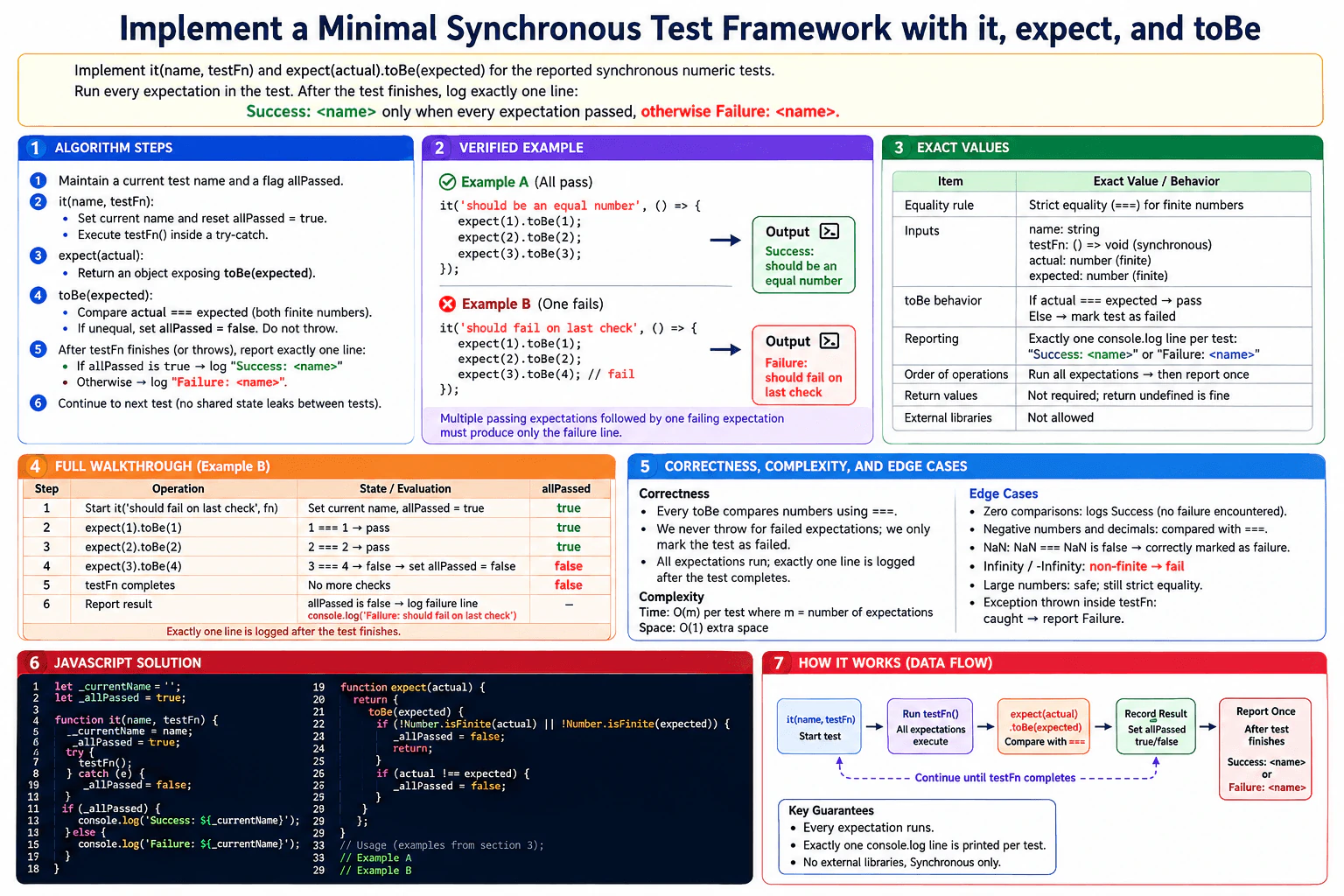
Implement it(name, testFn) and expect(actual).toBe(expected) for the reported synchronous numeric tests. name is a string, testFn is a zero-argument function, and each toBe compares finite number values with strict equality. Run every expectation in the test. After the test finishes, log exactly one line: Success: <name> only when every expectation passed, otherwise Failure: <name>. Multiple passing expectations followed by one failing expectation must produce only the failure line. Return values from it, expect, and toBe are not otherwise tested, and external test libraries are prohibited. Example: it('should be an equal number', () => { expect(1).toBe(1); }) logs Success: should be an equal number; replacing the last comparison with expect(1).toBe(2) logs the corresponding failure line.

Short Interview Answer (30-60 seconds)

I would keep one boolean flag for the current test. it resets that flag to true, runs the whole test function, and prints one final result. expect(actual).toBe(expected) checks that both values are finite numbers and then uses strict equality. A failed expectation only changes the flag to false, so later expectations still run. If the test function throws, the test also fails. With m expectations, the time is O(m) and the auxiliary space is O(1).

Detailed Explanation

See the Code while reading this explanation.

This problem asks us to build a very small test tool. A test has a name and a function that contains one or more checks. Every check must run. A check passes only when two finite numbers are exactly equal. If any check fails, the whole test fails. We wait until the test function finishes before printing anything. Then we print exactly one line. It is a success line only when every check passed. Otherwise, it is a failure line. A thrown error also makes the test fail.

Useful Questions to Ask the Interviewer
  1. Should a thrown error inside testFn make the test fail? The diagram treats it as a failure.
  2. Should NaN, Infinity, and -Infinity fail because the contract only accepts finite numbers? The diagram says yes.
  3. Are return values from it, expect, and toBe important? The problem says they are not tested.
Implement a minimal synchronous test framework with `it`, `expect`, and `toBe`. diagram
How to Explain It in an Interview
1. Understand the input and required output

it(name, testFn) receives a test name and a zero-argument synchronous function. Inside that function, the code can call expect(actual).toBe(expected) several times. Each actual and expected value is a finite number under the stated contract. After all checks finish, it prints exactly one line. It prints Success: <name> when every check passes. Otherwise, it prints Failure: <name>.

2. Keep one result flag for the current test

The implementation uses _allPassed as the current test state. At the start of every call to it, _allPassed becomes true. This means the test is considered successful until a failed check or thrown error proves otherwise. _currentName stores the current test name so the final message can use it.

The central invariant is simple: _allPassed is true only if no failure has been seen so far in the current test. Once it becomes false, it stays false for the rest of that test.

3. Run every expectation before reporting

it calls testFn() inside try...catch. The important part is that toBe does not throw when a comparison fails. It only changes _allPassed to false. This lets later expectations continue running. If testFn itself throws an exception, the catch block also changes _allPassed to false. Only after testFn finishes or throws does it print one final line.

4. Walk through the example

The diagram uses it('should fail on last check', () => { expect(1).toBe(1); expect(2).toBe(2); expect(3).toBe(4); }).

At the start, _allPassed is true. The first check compares 1 === 1, so it passes and the flag stays true. The second check compares 2 === 2, so it also passes and the flag stays true. The third check compares 3 === 4, which is false. toBe changes _allPassed to false. The test function then finishes. No more checks remain. it sees that _allPassed is false and prints exactly Failure: should fail on last check.

The passing example follows the same flow. 1 === 1, 2 === 2, and 3 === 3 all pass. The flag stays true, so the final output is Success: should be an equal number.

5. Explain why the result is correct

Every expectation is executed because a failed comparison only updates the shared result flag. It does not stop the test function. The flag starts as true and can only move from true to false. Therefore, after the test function finishes, the flag tells us whether every expectation passed. Reporting happens once, after execution, so multiple passing checks followed by one failed check still produce only one failure line.

6. Explain the JavaScript implementation

it stores the test name, resets _allPassed, and executes testFn. The catch block marks the test as failed if the test function throws. After execution, it uses the flag to choose the exact success or failure message.

expect(actual) returns an object with a toBe(expected) method. toBe first checks both values with Number.isFinite. If either value is not finite, it marks the test as failed and returns from that matcher call. Otherwise, it uses strict inequality, !==, to detect a failed strict-equality comparison. It never prints its own result.

7. Explain complexity and edge cases

If a test contains m expectations, each expectation does constant work, so the time is O(m). The implementation keeps only constant-size state for the active test, so the auxiliary space is O(1) with respect to m.

Relevant edge cases shown in the diagram are zero expectations, negative numbers, decimal numbers, NaN, Infinity, -Infinity, large finite numbers, and an exception thrown inside testFn. Zero expectations produce success because no failure occurs. NaN, Infinity, and -Infinity fail the finite-number check.

Key Insight / Why This Solution Works

The key idea is to separate checking from reporting. Each toBe only updates one boolean result flag. It does not print and it does not stop the test. it owns the lifetime of that flag. It resets the flag before the test starts and reads it only after the test finishes. The invariant is that _allPassed stays true exactly while no failed expectation or thrown error has been seen. Once it becomes false, later successful checks cannot change it back. This directly supports the requirement to run every expectation and still print exactly one final line.

Code
let _currentName = '';
let _allPassed = true;

function it(name, testFn) {
  // Start a fresh result state for this test.
  _currentName = name;
  _allPassed = true;

  try {
    // Run the complete synchronous test body so every expectation can execute.
    testFn();
  } catch (error) {
    // Any exception from the test body makes this test fail.
    _allPassed = false;
  }

  // Report exactly once after the test body has finished or thrown.
  if (_allPassed) {
    console.log(`Success: ${_currentName}`);
  } else {
    console.log(`Failure: ${_currentName}`);
  }
}

function expect(actual) {
  // Return the minimal matcher API required by the problem.
  return {
    toBe(expected) {
      // Only finite numeric values are valid for these reported tests.
      // Mark the test as failed without stopping later expectations.
      if (!Number.isFinite(actual) || !Number.isFinite(expected)) {
        _allPassed = false;
        return;
      }

      // A strict-equality mismatch makes the current test fail.
      // Do not throw, because the remaining expectations must still run.
      if (actual !== expected) {
        _allPassed = false;
      }
    },
  };
}

// Example A from the diagram: every expectation passes.
it('should be an equal number', () => {
  expect(1).toBe(1);
  expect(2).toBe(2);
  expect(3).toBe(3);
});

// Example B from the diagram: the last expectation fails.
// All expectations run, but only one final failure line is printed.
it('should fail on last check', () => {
  expect(1).toBe(1);
  expect(2).toBe(2);
  expect(3).toBe(4);
});
Time & Space Complexity

Let m be the number of toBe calls in one test. Each call checks finiteness and strict equality in constant time, so the total time is O(m). The implementation does not keep any collection that grows with m. It stores only constant-size state for the active test, so the auxiliary space is O(1).

Where it is used

This pattern appears in small test runners and validation systems. Many checks can update one overall pass-or-fail state while final reporting waits until all checks finish. It is useful when a program must continue checking after a failure but still produce one final result.

Why Interviewers Ask This

This question checks whether a candidate can turn a small behavioral contract into precise JavaScript. The interviewer can see whether the candidate separates execution from reporting, maintains a simple invariant, lets every expectation run, handles thrown errors, uses strict equality correctly, and respects the finite-number rule. It also tests whether the candidate can coordinate state between it, expect, and toBe without adding unnecessary libraries or complexity.

Common interview mistakes

A common mistake is printing inside toBe, which can produce several output lines instead of one final line. Another mistake is throwing on the first failed comparison, which stops later expectations from running. Resetting the pass flag inside expect can erase an earlier failure. Using loose equality instead of strict equality is also wrong. Candidates may also forget the finite-number check for NaN, Infinity, and -Infinity, or forget to reset the state at the start of each it call.

Interview tip

Explain the invariant before writing code: the test starts as passing, any failed expectation can change the flag to false, and nothing changes it back to true until the next it call. Then explain that reporting happens exactly once after testFn finishes.

Interviewer may ask next
How would you change the design if tests could run asynchronously?

it would need to wait for the test function to finish before reporting. One simple change is to make it async and use await testFn(). If multiple asynchronous tests can overlap, the shared globals _currentName and _allPassed are no longer safe. Each it call should instead own its own result state, and its expectations must update that test-specific state. The checking work is still O(m) for m expectations, with O(1) result state per test. The main tradeoff is more state management because tests may overlap in time.

How would you support several tests running at the same time without state leaking between them?

I would remove the shared _currentName and _allPassed globals. Each it call would create its own local state object, such as { allPassed: true }. The expectation function for that test would close over that specific object. Then a failed expectation changes only its own test state. This preserves the same pass-or-fail invariant while allowing independent tests to overlap. Each test still takes O(m) checking time and O(1) auxiliary result state. The tradeoff is that expect must be connected to the correct test context.

7. Animate an element horizontally with JavaScript and no CSS transition.CodingMediumMeta

Question Details

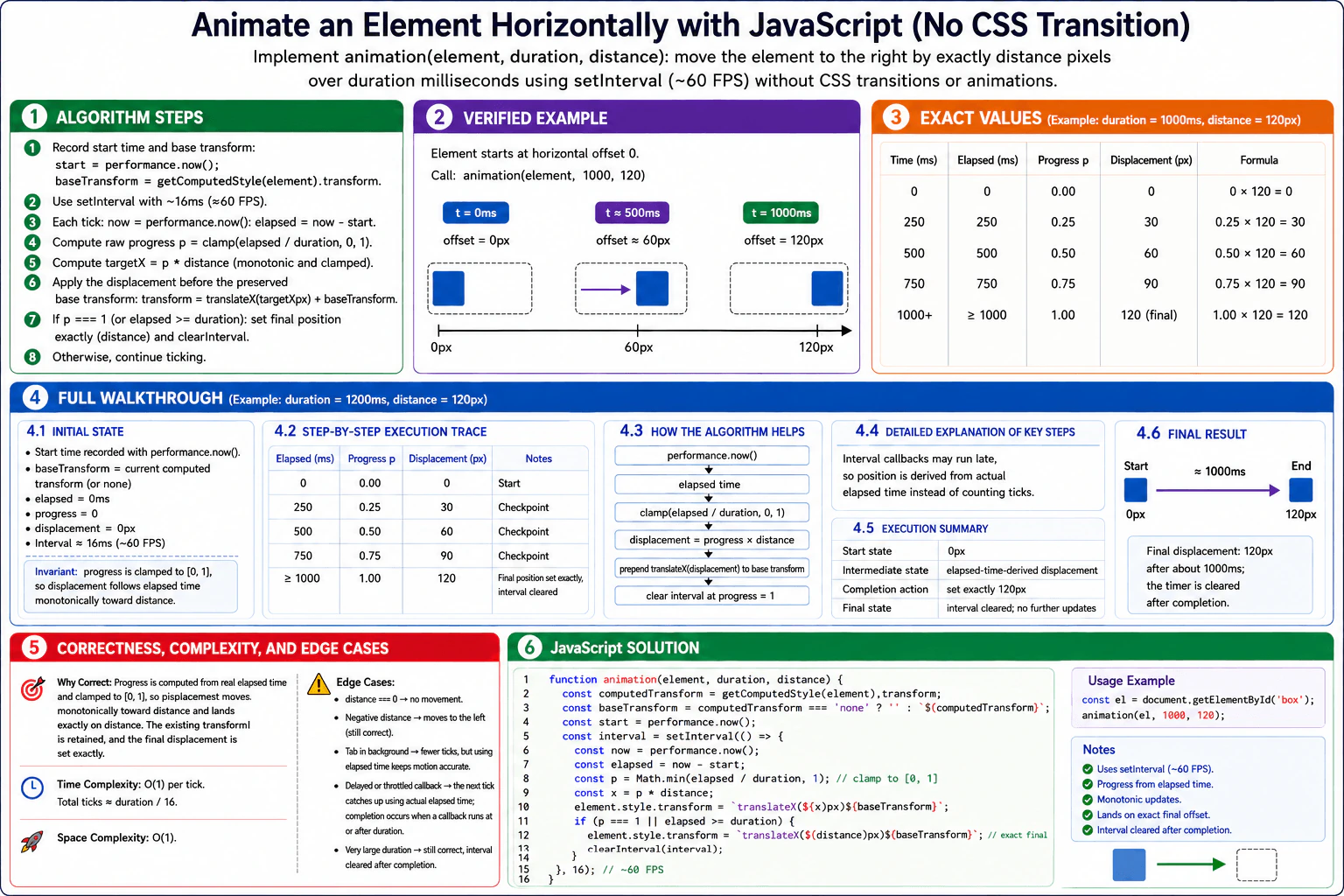
Implement animation(element, duration, distance) in browser JavaScript. element is a connected HTMLElement, duration is a positive finite number of milliseconds, and distance is a finite number of CSS pixels; inputs are otherwise valid. Move the rendered element to the right by exactly distance over duration without CSS transitions or CSS animations. Use setInterval at approximately 60 frames per second, calculate progress from elapsed time rather than assuming every interval fires on schedule, update the element's style monotonically, land on the exact final offset, and clear the interval after completion. The test harness observes the horizontal offset and ignores the function's return value. Example: an element starting at horizontal offset 0 with duration = 1000 and distance = 120 must finish at offset 120 after about one second without continuing to update afterward.

Short Interview Answer (30-60 seconds)

I would use setInterval at about 60 FPS, but I would not assume each callback arrives exactly every 16 milliseconds. I record the start time with performance.now(), calculate progress from real elapsed time, clamp it to 1, and move the element by progress times distance while keeping its existing transform. At completion, I write the exact final distance and clear the interval. Each callback is O(1), and the solution uses O(1) auxiliary space.

Detailed Explanation

See the Code while reading this explanation.

The function moves a connected browser element horizontally by a requested number of CSS pixels over a requested amount of time. The timer may run late, so the movement must be based on real elapsed time instead of counting timer callbacks. We also keep the element's existing transform. The movement must approach the requested distance monotonically, finish at the exact final displacement, and stop updating afterward. In the verified example, the element starts at horizontal offset 0px and moves 120px over about 1000ms.

Useful Questions to Ask the Interviewer
  1. Should an existing transform on the element remain while the horizontal displacement is added?
  2. Should a negative distance move the element in the opposite horizontal direction?
  3. Is performance.now() the expected clock for calculating elapsed browser time?
Animate an element horizontally with JavaScript and no CSS transition. diagram
How to Explain It in an Interview
1. Understand the input and required output

The inputs are a connected HTMLElement, a positive finite duration in milliseconds, and a finite distance in CSS pixels. The function's return value does not matter because the test harness observes the element's rendered horizontal offset. For the verified example, duration is 1000ms and distance is 120px. The element begins at horizontal offset 0px and must finish exactly 120px from that starting position.

2. Initialize the state

First, save the element's current computed transform. This lets the animation add its horizontal displacement without throwing away an existing transform. Record the start time with performance.now(). The interval runs about every 16ms, which is approximately 60 callbacks per second. At the beginning, elapsed time is 0ms, progress is 0, and displacement is 0px.

3. Calculate progress from elapsed time

On every interval callback, read performance.now() again. Compute elapsed = now - start. Then compute progress = Math.min(elapsed / duration, 1). This clamps progress to the range from 0 to 1. Next compute displacement = progress * distance. Because progress moves monotonically toward 1, the displacement moves monotonically toward the requested distance.

4. Walk through the verified example

At 0ms, progress is 0.00 and displacement is 0px. At 250ms, progress is 0.25 and displacement is 30px. At 500ms, progress is 0.50 and displacement is 60px. At 750ms, progress is 0.75 and displacement is 90px. When a callback runs at or after 1000ms, progress is clamped to 1.00 and the displacement is 120px. The code writes the exact 120px final displacement and clears the interval, so there are no later updates.

5. Explain why it is correct

Real elapsed time is the source of truth. A late interval callback therefore catches up automatically instead of pretending that only one 16ms step passed. Clamping progress to 1 prevents the animation displacement from going past the requested distance. Multiplying progress by distance makes the displacement move toward the correct final value. The element's existing transform is retained. At completion, the code explicitly writes distance itself, so the final displacement is exact before the interval is cleared.

6. Explain the JavaScript implementation

The implementation reads the current computed transform and converts the special value 'none' into an empty base transform. It records the start time and starts setInterval with a 16ms delay. Each callback calculates elapsed time, clamped progress, and the current displacement. It prepends translateX(displacement) to the saved base transform. When progress reaches 1, it writes translateX(distance) exactly and calls clearInterval. A delayed or throttled callback may reduce the number of visible intermediate updates, but the next callback still uses the correct elapsed time.

Key Insight / Why This Solution Works

The key insight is to use real elapsed time as the animation clock. setInterval only tells the program when it has an opportunity to update the element. It must not be treated as perfectly regular timing. Save the start time, then calculate progress as Math.min((performance.now() - start) / duration, 1) on each callback. The central invariant is that progress remains in [0, 1] and moves monotonically toward 1. Therefore displacement = progress * distance moves monotonically toward distance. The saved base transform is retained, and the interval is cleared after the exact final displacement is written.

Code
function animation(element, duration, distance) {
  // Save the element's current rendered transform so this animation does not discard it.
  const computedTransform = getComputedStyle(element).transform;
  const baseTransform = computedTransform === 'none' ? '' : ` ${computedTransform}`;

  // Use a high-resolution timestamp as the real animation clock.
  const start = performance.now();

  // About 16ms is approximately 60 callbacks per second.
  const intervalMs = 16;

  const intervalId = setInterval(() => {
    // Measure actual elapsed time because interval callbacks may run late.
    const now = performance.now();
    const elapsed = now - start;

    // Clamp progress to 1 so the animation never advances beyond the requested duration.
    const progress = Math.min(elapsed / duration, 1);

    // Convert time progress into the current horizontal displacement.
    const displacement = progress * distance;

    // Prepend the horizontal displacement while retaining the element's saved base transform.
    element.style.transform = `translateX(${displacement}px)${baseTransform}`;

    // At completion, write the exact final displacement and stop future updates.
    if (progress === 1 || elapsed >= duration) {
      element.style.transform = `translateX(${distance}px)${baseTransform}`;
      clearInterval(intervalId);
    }
  }, intervalMs);
}

// Direct runnable example matching the verified diagram example.
const element = document.createElement('div');
element.textContent = 'Move me';
element.style.position = 'relative';
element.style.width = '80px';
element.style.padding = '8px';
element.style.border = '1px solid black';
document.body.appendChild(element);

// Starting horizontal offset is 0px. Move by 120px over about 1000ms.
animation(element, 1000, 120);
Time & Space Complexity

Each interval callback performs a constant amount of work, so one callback is O(1). With an approximately 16ms interval, the normal number of callbacks is roughly duration / 16, although browsers can delay or throttle callbacks. The function stores only a few numbers, a timer id, and a saved transform string. Auxiliary space is O(1).

Where it is used

This pattern is useful for small browser animations where position must follow real elapsed time instead of assuming timer callbacks are perfectly regular. The same idea can be used for custom progress indicators, movement effects, teaching animation timing, and other UI updates that need to catch up correctly after delayed callbacks.

Why Interviewers Ask This

This problem checks whether you understand that browser timers are not perfectly regular. It tests whether you can calculate animation progress from elapsed time, maintain a simple correctness invariant, stop work at the right moment, and guarantee an exact final displacement. It also checks practical browser JavaScript knowledge, including setInterval, clearInterval, performance.now(), getComputedStyle(), and style.transform, plus whether you can explain time and auxiliary space costs accurately.

Common interview mistakes

A common mistake is counting interval callbacks and assuming every callback represents exactly 16ms. That causes wrong positions when the browser delays callbacks. Another mistake is forgetting to clamp progress to 1, which can overshoot the requested distance. Candidates may also forget to write the exact final distance before clearing the interval. Replacing the transform without retaining the existing transform can remove styling the element already had. Finally, distance === 0 means no movement, while a negative distance moves in the opposite horizontal direction.

Interview tip

Explain that setInterval is only the update trigger and performance.now() is the clock. Then write progress = Math.min(elapsed / duration, 1). This single formula makes delayed callbacks, monotonic movement, and exact completion easy to explain.

Interviewer may ask next
What happens if the browser delays or throttles the interval callbacks?

The algorithm still calculates progress from real elapsed time. When the next callback finally runs, performance.now() shows how much time actually passed, so the displacement catches up immediately. If elapsed time is at least duration, progress becomes 1, the exact final distance is written, and the interval is cleared. The tradeoff is that fewer intermediate positions may be displayed. Each callback remains O(1), and auxiliary space remains O(1).

What changes if distance is negative?

The algorithm itself does not need to change. Progress still moves from 0 toward 1. Multiplying progress by a negative distance makes displacement move monotonically toward that negative value, so the element moves in the opposite horizontal direction. At completion, the exact negative distance is written and the interval is cleared. Work per callback remains O(1), and auxiliary space remains O(1).

8. Implement a basic Observable class in JavaScript.CodingMediumMeta

Question Details

Implement class Observable whose constructor receives a producer function (subscriber) => void, and whose subscribe(observer) method starts that producer for a new independent subscription. An observer may be an object with optional next, error, and complete callbacks, or a function treated as next. Return a subscription object with unsubscribe(). Deliver values in producer order; deliver error or complete at most once; ignore every later next, error, or complete after a terminal notification or unsubscription; and support multiple subscriptions to the same observable. Producer teardown return values are outside this reported basic contract. Example: a producer that calls next(1), next(2), later next(3), next(4), and complete() must make a subscribed observer receive 1, 2, 3, 4 and then one completion notification, unless it unsubscribes first.

Short Interview Answer (30-60 seconds)

I would store the producer on the Observable and create independent stopped state for every subscribe call. I normalize either a function observer or an observer object, then pass the producer a safe subscriber with next, error, and complete methods. next forwards values only while active. error and complete stop the subscription before forwarding once. unsubscribe also stops it. Each notification takes O(1) time, and each subscription uses O(1) auxiliary space.

Detailed Explanation

See the Code while reading this explanation.

The Observable stores a function that produces values. Each call to subscribe starts that producer again for a new and independent subscriber. A subscriber can receive normal values, an error, or a completion signal. Values must stay in producer order. Error or completion can be delivered only once. After error, completion, or unsubscribe, later notifications are ignored. The solution uses one isStopped flag for each subscription. This keeps every subscriber independent and makes the lifecycle easy to control.

Useful Questions to Ask the Interviewer
  1. Should a function passed to subscribe be treated as only the next callback?
  2. Should missing next, error, or complete callbacks simply be ignored?
  3. Are producer teardown return values outside this basic contract, as stated in the question?
Implement a basic Observable class in JavaScript. diagram
How to Explain It in an Interview
1. Store the producer

The constructor receives the producer function and saves it. The producer does not run yet. Each later subscribe call starts it for that new subscription.

2. Create independent subscription state

When subscribe(observer) runs, I normalize the observer first. If it is a function, I treat that function as next. If it is an object, its next, error, and complete callbacks are optional.

I then create isStopped = false. This variable belongs only to this subscription. Another subscription gets a different isStopped variable.

3. Create the safe subscriber

The producer receives a safe subscriber with next, error, and complete methods.

next(value) first checks isStopped. If the subscription is active, it forwards the value to observer.next when that callback exists.

error(error) also checks isStopped. If active, it first changes isStopped to true. It then calls observer.error when provided. This makes error terminal and prevents later notifications.

complete() uses the same rule. It changes isStopped to true before calling observer.complete. Completion therefore happens at most once.

4. Walk through the verified example

The producer calls next(1), next(2), then later next(3), next(4), and complete().

Subscriber X stays active. It receives 1, 2, 3, 4, then complete.

Subscriber Y is a separate subscription. It receives 1 and 2, then unsubscribe() is called. Its isStopped flag becomes true. Its later next(3), next(4), and complete() notifications are ignored.

Subscriber X is not affected because its state is independent.

5. Explain why it is correct

The central invariant is that callbacks are forwarded only while the current subscription has isStopped equal to false. error, complete, and unsubscribe change that state to true. After that transition, next, error, and complete all do nothing. Because subscribe creates fresh state each time, one subscriber cannot stop another subscriber.

6. Explain the JavaScript implementation

The constructor validates and stores the producer. subscribe normalizes the observer and creates isStopped = false. It builds guarded next, error, and complete functions. It then executes the producer with that safe subscriber. A synchronous exception thrown by the producer is passed through the safe error path. Finally, subscribe returns an object with unsubscribe(), which sets isStopped to true. Producer teardown return values are intentionally outside this basic implementation.

7. Explain complexity and edge cases

Each next, error, or complete call does constant work, so notification dispatch is O(1). Each subscription keeps a fixed amount of state, so auxiliary space is O(1) per subscription. A function observer is treated as next only. Missing callbacks are safely ignored. Repeated unsubscribe calls are harmless. Terminal notifications are delivered at most once, and multiple subscriptions remain independent.

Key Insight / Why This Solution Works

The key idea is to give every subscription its own small lifecycle state. The state is one boolean named isStopped. While isStopped is false, next values may be forwarded. The first error, completion, or unsubscribe changes isStopped to true. After that, every later next, error, or complete call is ignored. The central invariant is: the safe subscriber forwards observer callbacks only while its own subscription is active. Because subscribe creates fresh state and a fresh safe subscriber each time, multiple subscriptions to the same Observable remain independent.

Code
class Observable {
  constructor(producer) {
    // The Observable must receive a function that produces notifications.
    if (typeof producer !== 'function') {
      throw new TypeError('Producer must be a function');
    }

    // Save the producer so each subscribe() call can start it independently.
    this._producer = producer;
  }

  subscribe(observerOrNext) {
    // A function is treated as the next callback.
    // An object may contain optional next, error, and complete callbacks.
    const observer = this._normalizeObserver(observerOrNext);

    // This lifecycle state belongs only to this subscription.
    let isStopped = false;

    // The producer receives guarded callbacks instead of the raw observer.
    const safeSubscriber = {
      next: (value) => {
        // Forward values only while the subscription is active.
        if (!isStopped && typeof observer.next === 'function') {
          observer.next(value);
        }
      },

      error: (error) => {
        // Error is terminal. Change the state before calling user code so
        // every later notification is ignored.
        if (!isStopped) {
          isStopped = true;

          if (typeof observer.error === 'function') {
            observer.error(error);
          }
        }
      },

      complete: () => {
        // Completion is also terminal and can be forwarded at most once.
        if (!isStopped) {
          isStopped = true;

          if (typeof observer.complete === 'function') {
            observer.complete();
          }
        }
      },
    };

    try {
      // Start a fresh producer execution for this subscription.
      // A teardown value returned by the producer is outside this basic contract.
      this._producer(safeSubscriber);
    } catch (error) {
      // Send a synchronous producer failure through the same terminal path.
      safeSubscriber.error(error);
    }

    return {
      unsubscribe: () => {
        // Repeated unsubscribe calls are safe because the state stays stopped.
        isStopped = true;
      },
    };
  }

  _normalizeObserver(observerOrNext) {
    // A function observer means next-only behavior.
    if (typeof observerOrNext === 'function') {
      return { next: observerOrNext };
    }

    // Keep only callbacks that are actually functions.
    if (observerOrNext && typeof observerOrNext === 'object') {
      return {
        next: typeof observerOrNext.next === 'function' ? observerOrNext.next : undefined,
        error: typeof observerOrNext.error === 'function' ? observerOrNext.error : undefined,
        complete:
          typeof observerOrNext.complete === 'function' ? observerOrNext.complete : undefined,
      };
    }

    // Missing callbacks are allowed and are simply ignored during dispatch.
    return {};
  }
}

// Verified example from the diagram.
// Each subscription starts this producer independently.
const observable = new Observable((subscriber) => {
  subscriber.next(1);
  subscriber.next(2);

  setTimeout(() => subscriber.next(3), 10);
  setTimeout(() => subscriber.next(4), 20);
  setTimeout(() => subscriber.complete(), 30);
});

// Subscriber X stays active and receives the full sequence.
observable.subscribe({
  next: (value) => console.log('X next', value),
  complete: () => console.log('X complete'),
});

// Subscriber Y has separate subscription state.
const subscriptionY = observable.subscribe({
  next: (value) => console.log('Y next', value),
  complete: () => console.log('Y complete'),
});

// Stop Y after the immediate values 1 and 2 and before next(3).
setTimeout(() => {
  subscriptionY.unsubscribe();
}, 5);

// One possible output order:
// X next 1
// X next 2
// Y next 1
// Y next 2
// X next 3
// X next 4
// X complete
// Y receives no later values and no completion after unsubscribe().
Time & Space Complexity

Each next, error, or complete notification performs a state check and at most one callback, so it takes O(1) time per notification. subscribe creates only a fixed set of variables and wrapper functions. The auxiliary space is therefore O(1) per subscription. These bounds describe the Observable wrapper itself. They do not include extra work or memory used inside the producer.

Where it is used

This pattern is useful for values that arrive over time. Examples include UI events, timers, network updates, and other asynchronous streams. Each subscriber gets its own lifecycle state, so one subscriber can unsubscribe while other subscribers continue independently.

Why Interviewers Ask This

This problem tests whether you can manage lifecycle state correctly with JavaScript callbacks and closures. The interviewer can see whether you understand independent subscriptions, optional observer methods, ordered notification delivery, and terminal conditions. It also checks whether you can prevent events after completion or unsubscribe, write a small class API cleanly, and explain why one simple invariant makes the implementation correct.

Common interview mistakes

A common mistake is using one isStopped flag for the whole Observable instead of one flag per subscription. Then one subscriber could incorrectly stop another. Another mistake is forwarding next after error, complete, or unsubscribe. It is also important to set isStopped before calling the error or complete callback so a terminal state is already established. Candidates may incorrectly require every observer callback even though the callbacks are optional. Another mistake is adding producer teardown behavior even though teardown return values are outside this basic contract.

Interview tip

Explain the per-subscription isStopped flag first. Then show that next works only while it is false, while error, complete, and unsubscribe all move that one subscription into the stopped state.

Interviewer may ask next
How would you extend this Observable to support a teardown function returned by the producer?

I would capture the producer's returned value when it is a function and store it for that subscription. The teardown would run at most once when the subscription is unsubscribed or reaches a terminal state. I would guard it with once-only state so repeated unsubscribe calls cannot execute it again. Notification dispatch would remain O(1) per event, and auxiliary space would remain O(1) per subscription. The tradeoff is extra lifecycle bookkeeping.

What happens when several observers subscribe to the same Observable?

Each subscribe call creates a new isStopped flag, a new safe subscriber, and a new execution of the producer. One subscriber can therefore unsubscribe without changing another subscriber's state. A subscriber that stays active can still receive 1, 2, 3, 4, then complete even if another subscriber stops after 1 and 2. The wrapper uses O(1) auxiliary space per subscription and O(1) work for each notification it dispatches.

9. Design the public API for a rich-text editor with block and inline formatting.API DesignMediumMeta

Question Details

Design a framework-neutral component and document API for a rich-text editor that supports block-level list items and blockquotes plus inline bold and italic formatting. Define the document and selection model, stable node identity, initial value, controlled or uncontrolled ownership, commands and query methods, change and selection events, serialization, validation, read-only and disabled states, undo/redo boundary, paste or inserted-text handling, and extension/version behavior. Specify observable results when formatting a collapsed selection versus a range, applying a block command across multiple blocks, receiving an invalid document, or replacing the value while the editor is focused. Include one concrete initialization and command sequence whose resulting document value and emitted events are unambiguous; do not make raw HTML the required source of truth.

Short Interview Answer (30-60 seconds)

I would make the editor API framework-neutral and keep a versioned JSON document as the source of truth, not raw HTML. The editor owns a tree with stable node IDs and an anchor/focus selection. It exposes commands for bold, italic, lists, blockquotes, text insertion, undo, and redo, plus read-only queries. It supports controlled ownership with value and onChange, or uncontrolled ownership with defaultValue. Invalid values are rejected without changing state. Pasted HTML is sanitized and mapped into the document model. The trade-off is more validation and migration work, but the API becomes predictable and extensible.

Detailed Explanation

This question asks us to design the public contract for a rich-text editor. The editor should work without depending on React, Vue, or another framework. I would keep content in a versioned JSON document. The document contains blocks, text nodes, formatting marks, and stable IDs. The editor also keeps a selection. Commands change editor state. Queries only read state. Events tell the consumer what changed. Validation rejects bad values before they replace good state. Raw HTML is not the required source of truth.

Useful Questions to Ask the Interviewer
  • When an extension introduces a new node or mark, should older documents be migrated automatically or rejected?
  • For pasted HTML, how much unsupported formatting should be removed versus mapped into supported nodes and marks?
Design the public API for a rich-text editor with block and inline formatting. diagram
How to Explain It in an Interview
1. Define the document and selection model

The editor value is a versioned JSON document.

The root contains block nodes. The shown block types include paragraphs, lists, list items, and blockquotes. Text lives in text nodes. Inline formatting is stored as marks such as bold and italic.

Every node has a stable id. The ID is separate from the node position. If the same logical node survives an edit, its ID should stay stable. This helps selection mapping, history, collaboration, and diffing.

The selection is a range with anchor and focus. Each point uses a path into the tree plus an offset. A collapsed selection has the same anchor and focus. A non-collapsed range covers content between two different points.

2. Define ownership and the initial value

createEditor(options) returns an editor instance.

The API supports controlled ownership with value and onChange. The consumer stores the current value in that mode.

It also supports uncontrolled ownership with defaultValue. The editor stores its own current value in that mode.

The initial value is a JSON document. It is not raw HTML.

The instance exposes getValue() and setValue(value, source?). It also exposes selection and state queries such as getSelection(), isReadOnly(), isDisabled(), and isFocused().

3. Separate commands from queries

Commands may change editor state.

Inline commands include toggleBold() and toggleItalic(). Block commands include toggleList(type) and toggleBlockquote(). Editing commands include insertText(text), insertParagraph(), deleteSelection(), undo(), redo(), and clearHistory().

Queries do not change state. The diagram shows getSelection(), isCollapsed(), getFormat(), getBlockType(at?), canUndo(), canRedo(), and getDocument().

The consumer should not edit tree objects directly. A command goes through the editor. The editor validates the action, builds a document transaction, updates the document and selection, and emits the supported events.

4. Define observable formatting behavior

A collapsed selection changes formatting for future input.

For example, toggleBold() at the caret does not rewrite existing text. Text typed after the command becomes bold.

A range selection behaves differently. Calling toggleItalic() adds or removes the italic mark on the selected text.

Block commands operate on block boundaries. If a selection covers several blocks, the command applies to every fully or partially covered block.

These rules make formatting predictable for callers.

5. Define events and consumer state

The editor exposes onChange, onSelectionChange, onFocus, onBlur, onPaste, onUndo, onRedo, and onError.

The diagram models onChange with the new value, change information, and a source. onSelectionChange carries the new selection.

Events flow from the editor to the consumer. A controlled consumer stores value and selection and updates visible UI such as the content area and toolbar.

Focus and selection remain separate concepts. The editor can report each one independently.

6. Serialize, validate, and replace values safely

The API supports toJSON() and fromJSON(value).

Validation checks the incoming document before it becomes editor state. It checks the schema, required fields, and allowed nodes and marks.

If setValue() receives an invalid document, the editor rejects it and keeps the old value. The error is reported instead of partly applying bad state.

Replacing the value while focused has a defined rule. The editor maps the current selection into the new document when possible. If mapping fails, the selection moves to the start.

The JSON value remains the source of truth. HTML paste is sanitized and mapped into supported blocks, text, and marks.

The consumer may optionally persist or share the JSON value. The diagram shows LocalStorage, IndexedDB, or a backend API as application choices. Persistence is outside the core editor contract.

7. Define read-only, disabled, history, and paste behavior

readOnly blocks edits but still allows selection.

disabled blocks editing, focus, and selection interaction.

Undo and redo belong to editor history. The diagram treats a command as a history item and allows batching for complex operations.

Plain inserted text becomes text nodes. Pasted HTML is sanitized before it is mapped into the supported document model.

This prevents pasted markup from becoming a second source of truth.

8. Define extensions and versioning

The document carries a version.

Extensions may add nodes, marks, commands, paste rules, or serializers. The public API follows semantic versioning.

Breaking API changes belong in major versions. Schema versioning and migration help older stored documents remain usable.

The core editor stays framework-neutral. React, Vue, Svelte, or another UI system can use adapters around the same editor contract. The document and command API do not depend on those adapters.

9. Walk through the concrete example

The diagram initializes the editor with createEditor({ defaultValue: initialValue, onChange, onSelectionChange }) and then calls editor.focus().

The shown command sequence is:

  1. insertText("Hello")
  2. toggleBold()
  3. insertText("world")
  4. insertParagraph()
  5. toggleBlockquote()
  6. insertText("Be concise.")

The first text node contains Hello without marks. The collapsed toggleBold() changes the active mark for future input. The next inserted text, world, therefore has the bold mark. A new block is then created, changed into a blockquote, and filled with Be concise..

The resulting document shown in the diagram contains a paragraph with Hello and bold world, followed by a blockquote containing Be concise..

For emitted events, I would preserve the concrete sequence exactly as the approved diagram defines it: onChange(value1, delta1, 'api'), onChange(value2, delta2, 'api'), onChange(value3, delta3, 'api'), onChange(value4, delta4, 'api'), onSelectionChange(sel1), and onFocus(). I would not infer additional callbacks beyond the explicit example contract.

10. State the main trade-offs

A structured JSON tree requires more work than storing HTML. The editor must validate nodes, preserve stable IDs, map selections, and migrate older document versions.

The benefit is predictable behavior. Commands work against one known model. Consumers do not need to parse arbitrary browser HTML to understand document state.

Controlled mode gives the application full ownership, but it requires careful state synchronization. Uncontrolled mode is simpler, but the editor owns more state.

Extensions add flexibility. They also increase schema, migration, testing, and compatibility work.

Practical Complexity & Trade-offs

The cost depends on how much content a command touches. Formatting a small range should inspect only that range. A block command may update several selected blocks. Validation and serialization may inspect much more of the document, so they should not run unnecessarily. Stable IDs, selection mapping, and undo history use extra memory, but they make editing behavior easier to reason about. Controlled mode adds coordination between application state and editor state. Extensions improve flexibility, but every new node or mark increases validation, migration, testing, and long-term compatibility work.

Why Interviewers Ask This

Interviewers use this problem to test API judgment rather than syntax memory. They want clear ownership, a stable document model, predictable command behavior, and useful events. They also look for correct handling of selections, invalid values, focus, undo and redo, paste, serialization, and versioning. A strong answer separates commands from queries, avoids raw HTML as the required source of truth, explains trade-offs clearly, and keeps the core contract framework-neutral.

Interviewer may ask next
How would you change this design if extensions can add custom node and mark types after documents are already stored?

I would keep the same editor API, but make schema versioning and migration more explicit. The affected flow is fromJSON(value) or setValue(value, source?) before a document becomes active editor state. Each stored document already has a version, so the editor can recognize an older shape and run supported migrations before validation. Extensions would still register nodes, marks, commands, paste rules, and serializers. Validation would then check the migrated document against the active schema. Unknown or invalid content would still be rejected instead of partly applied. Stable node IDs should be preserved whenever the same logical node survives migration. That protects selection mapping, history, collaboration, and diffing. The public command, query, and event APIs stay unchanged, so framework adapters do not need a different architecture. The main downside is maintenance cost. Long-lived extensions may require migration code and compatibility tests across several document versions.

How should the editor behave when the application replaces the value while the editor is focused?

I would use the replacement rule already defined by the editor contract. The affected component is setValue(value, source?). First, the editor validates the incoming JSON document. If the document is invalid, it reports the error and keeps the current value unchanged. If it is valid, the editor replaces the document and then tries to map the existing selection into the new tree. Stable node IDs help when the same logical content still exists. If no valid mapping exists, the selection moves to the start of the document. The supported change and selection events then allow a controlled consumer to update its stored state and visible UI. Read-only, disabled, serialization, history, paste, and extension behavior remain unchanged. The main downside is implementation complexity. Selection mapping becomes difficult when external updates delete, split, merge, or heavily reorder the nodes that contained the previous selection.

10. Design a reusable poll widget for the browser.System DesignEasyMeta

Question Details

Design one frontend poll widget and state the product assumptions you need, such as whether a poll permits one or multiple selections and when results become visible. Define the poll and option data model, component boundaries, client state, vote-submission flow, expiration behavior, and the policy for refreshing result counts. Cover loading, voting, confirmed, failed, expired, and unavailable states; optimistic versus confirmed updates; cache ownership and likely bottlenecks; keyboard and screen-reader operation; restrained result animations; cleanup when the widget unmounts; and how the design remains reusable without coupling rendering to one transport implementation.

Short Interview Answer (30-60 seconds)

At a high level, I would build the poll as a reusable CSR widget inside the page. The main challenge is keeping voting state, remote results, offline behavior, and accessibility correct without tying the UI to one API style. PollWidget owns the interaction flow and talks through a poll-data adapter. The Poll API remains authoritative for confirmed votes. Cached data improves speed, while ETag-based refreshes balance freshness against extra network requests.

Detailed Explanation

The goal is to let a user open a page, understand a poll, choose an option, submit a vote, and see a clear result. The main frontend challenge is keeping the widget reusable while handling slow networks, stale results, expiration, failures, and accessibility. I would use client-side rendering, or CSR, because this poll is mainly interactive UI. I would separate the design into delivery, component ownership, state, voting, resilience, and accessibility.

Useful Questions to Ask the Interviewer
  • Can a poll allow one choice, multiple choices, or both?
  • Are results visible before voting, only after voting, or after expiration?
  • How fresh must result counts be?
  • Is offline voting allowed, or only offline reading?
  • Must the widget support screen readers and keyboard-only users?

For this design, I will assume the poll may define single-select or multi-select behavior. I will also assume results can be shown after a confirmed vote and when the poll expires.

Design a reusable poll widget for the browser. diagram
How to Explain It in an Interview
1. Start with the page, model, and delivery path

The page uses a CSR single-page application. The route is /article/:id. The browser loads the HTML shell, CSS, and a code-split JavaScript bundle. Static assets can come through the CDN. A service worker may cache the shell and assets for offline use.

The poll model contains an id, question, options, selection mode, expiry time, and result-visibility rule. Each option contains an id, label, and result count when results are available. PollWidget receives this data through the poll-data adapter.

2. Define component and state ownership

PollWidget contains Header, OptionList, ResultsView, Actions, and StatusBanner. Shared buttons, typography, spacing, icons, and motion come from the Design System.

Local UI state stores loading, voting, confirmed, failed, expired, and unavailable modes. It also stores selected options and local errors. URL state can hold the poll id and results tab. Shared client state is only for data such as user information or feature flags.

Remote cached data owns poll details, options, results, and expiry information. Persisted browser state can keep preferences or an optional offline vote queue. The Poll API remains the source of truth for confirmed votes and result counts.

3. Explain the main vote flow

First, the widget fetches poll details with GET /poll/:id. The user selects one or more options based on the poll rules. The Actions component then submits the selection with POST /vote.

The UI may reflect the selection optimistically. This means it can respond before confirmation. The server-confirmed response remains authoritative. If voting succeeds, the widget enters confirmed state and refreshes results with GET /results.

If submission fails, the widget rolls back or reconciles the optimistic change. It then shows a retry or error state. The remote system must still enforce authentication and authorization.

4. Handle freshness, expiration, failures, and offline use

After a successful vote, the widget refreshes result counts. Later refreshes are restrained. They can happen when the page becomes visible again, on user demand, or on a bounded interval. ETag validators can avoid downloading unchanged results.

If the poll expires, voting is disabled and the expired state appears. If the network is unavailable, the widget shows offline state. Cached results may still be readable. An offline vote is queued only when the product allows it.

The likely frontend bottlenecks are repeated result requests, large widget bundles, and unnecessary rerenders. Code splitting, caching, bounded refreshes, and lazy loading reduce that work.

When PollWidget unmounts, it aborts in-flight requests. It also clears timers and removes event listeners.

5. Keep the widget accessible and safe to release

Keyboard users can move through options and submit a vote. Single-choice polls use radio semantics. Multi-choice polls use checkbox semantics. Focus remains visible. Screen readers receive status and live-region updates.

Result animation stays small and respects reduced-motion settings. The widget is responsive across desktop and mobile sizes. Client logs, performance marks, and error reporting provide observability. Feature flags support gradual rollout, rollback, and a kill switch.

Engineering Considerations / Design Trade-offs

The benefit is reuse. PollWidget can work with different transports because rendering talks to a poll-data adapter instead of REST or GraphQL directly. The downside is one more abstraction layer. Optimistic UI gives faster feedback, but failed votes need rollback logic. Cached results improve speed and offline reading, but counts can become stale. More frequent refreshes improve freshness, but they increase network work. Offline vote queues can improve usability, but they add retry and failure cases. Code splitting reduces initial JavaScript work, but it adds another loading boundary.

Why Interviewers Ask This

The interviewer wants to see how you break one small feature into clear frontend responsibilities. They want to know whether you can choose the right source of truth, separate local state from remote data, handle failures and caching, design for accessibility, and explain trade-offs clearly. They also want to see whether you can keep a component reusable without adding unnecessary backend complexity.

Interviewer may ask next
What would you change if result counts had to be refreshed within five seconds while the poll is open?

I would keep the same PollWidget, Poll API, remote-data cache, and GET /results path. I would mainly change the result-refresh policy.

The widget could use a shorter bounded interval while the poll is visible. It would still refresh after a successful vote and when the page becomes visible again. I would keep ETag validation so unchanged results do not require the full result payload.

I would stop the interval when PollWidget unmounts or when the page becomes hidden. I would also avoid starting another refresh when an equivalent request is already running. That limits unnecessary network work.

Correctness still comes from the Poll API response. Cached counts are only a local view of remote data. The main downside is higher request volume. A five-second target improves freshness, but it uses more network, battery, and browser work.

What would you change if the product allowed users to submit votes while offline?

I would keep the same architecture, but I would enable the optional offline vote queue shown in persisted browser state.

When the user is offline, PollWidget would validate the selection locally and store the pending vote in the browser queue. The UI must clearly say that the vote is queued, not confirmed. A queued vote must never be shown as an authoritative server result.

When connectivity returns, the existing data layer can submit the queued vote through the same poll-data adapter. After the Poll API confirms it, the widget moves to confirmed state and refreshes results. If submission fails, the item stays failed or is retried according to the product policy.

Cleanup still aborts active requests and removes listeners when the widget unmounts. The main downside is complexity. Offline submission adds more states, retries, duplicate-submission concerns, and harder user messaging.

More questions load as you scroll

Disclaimer: This interview guide is for educational and informational purposes only. It is designed to help readers prepare, but it does not guarantee any interview result, hiring decision, offer, or outcome. Interview questions, hiring criteria, and preferred answers can vary by employer, interviewer, industry, location, and time. The examples and explanations reflect the authors' research and judgment, are provided without warranties of any kind, and should not be treated as the only correct approach. Diagrams are simplified illustrations intended to highlight the main components and their interactions; actual systems and implementations may be more complex. Alternative approaches may be equally valid or better suited to a particular question, context, or interviewer. To the fullest extent permitted by applicable law, the author, contributors, and publisher are not liable for decisions made, actions taken, or losses incurred based on this guide.

Company Notice: This guide is an independent educational resource and is not affiliated with, endorsed by, sponsored by, or approved by the company named in this guide. Company names are used only to identify interview experiences commonly reported by candidates. Interview practices can change without notice, and inclusion of company-specific content does not mean these questions are official, complete, or guaranteed to be asked. To the fullest extent permitted by law, the author, contributors, and publisher are not responsible for outcomes related to use of this material.