11. Build an old-style multi-tap phone keypad.
Implement createMultiTapKeypad(container, { commitDelayMs = 1000 } = {}) in framework-neutral browser JavaScript. Render an output field and native buttons for digits 2 through 9 using the mappings 2=abc, 3=def, 4=ghi, 5=jkl, 6=mno, 7=pqrs, 8=tuv, and 9=wxyz. Pressing the same key again before its pending character is committed cycles that character; after the configured delay, or when a different key is pressed, the pending character is committed and the next press starts a new character. Expose { getValue(), destroy() }; labels and output must be text, all buttons must work by keyboard, one timer at most may be pending, and destroy() must remove listeners and clear it. container is an empty connected Element, commitDelayMs is a positive finite number, and invalid input is outside scope. Example: press 2, press 2 again, wait at least one second, press 2, then press 6; the displayed text must become bam after the pending m is committed.
I would keep committed text separate from one pending character. Each digit maps to its letters. If the same key is pressed before the timer fires, I cycle the pending letter and restart the timer. A different key commits the old letter before starting a new one. The timer also commits after the delay. I keep at most one timer. Each press uses O(1) keypad-state work, and the auxiliary state is O(1), excluding the output text itself.
See the Code while reading this explanation.
This problem asks us to recreate typing on an old mobile-phone keypad. Buttons 2 through 9 each represent a small group of letters. Repeated quick presses on the same button change the current letter. Waiting for the delay accepts that letter. Pressing a different button also accepts the current letter before starting another one. The displayed text must always contain all accepted letters plus the current pending letter. The solution therefore keeps committed text and one pending character as separate state and uses one resettable timer.
- Should
getValue()include the currently pending character? Here, yes. It returns the same current text shown in the output. - Should Enter and Space work when a keypad button has focus? Yes. Native
buttonelements already provide keyboard activation. - Should
destroy()remove the UI created by the function as well as listeners and the timer? The approved implementation removes its created UI after cleaning up the listeners and timer.
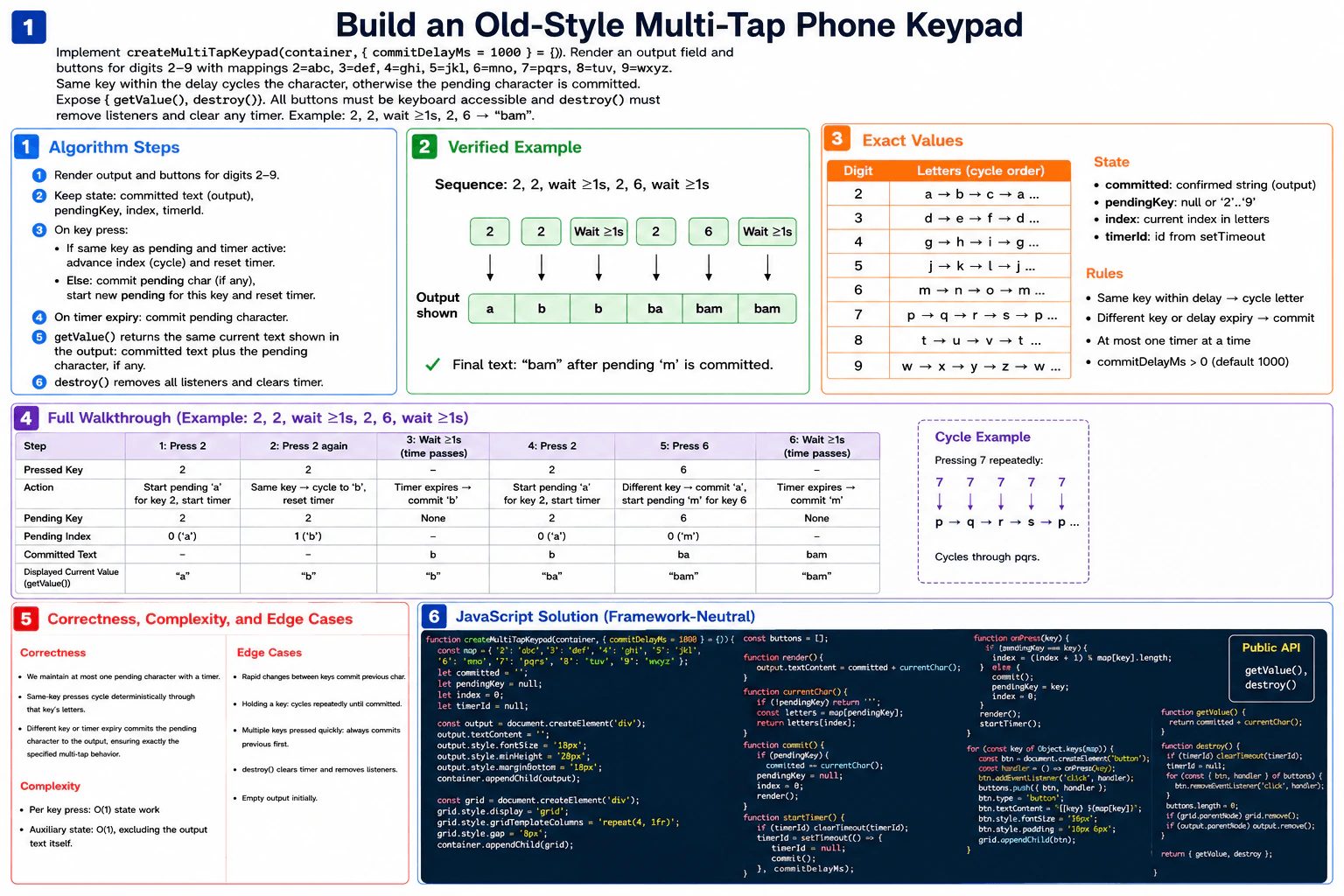
committed stores characters that are already accepted. pendingKey stores the digit whose character is still being selected. index selects a letter inside that digit's mapping. At most one character is pending. The current displayed value is always committed + currentChar().
If the pressed digit is the same as pendingKey, the press happened before that character was committed. I advance index and wrap it with modulo. For example, repeated presses on 7 cycle p → q → r → s → p.
If the pressed digit is different, I first commit the previous pending character, if one exists. Then I make the new digit the pending key and start at index 0 of its letter group.
After every press, I restart the commit timer. If an older timer is pending, I clear it first. When the new timer fires, I set timerId to null and commit the pending character. This guarantees that at most one timeout is pending.
Initially, committed = "" and there is no pending key.
Press 2. The mapping is abc, so index 0 gives pending a. The displayed value is a.
Press 2 again before the timer fires. It is the same key, so index changes from 0 to 1. The pending character becomes b. The displayed value is b.
Wait at least one second. The timer commits b. Now committed = "b", no character is pending, and the displayed value remains b.
Press 2. A new pending character starts at index 0, so the pending character is a. The displayed value becomes ba.
Press 6. Because this is a different key, the pending a is committed first. Now committed = "ba". Key 6 maps to mno, so pending m starts at index 0. The displayed value becomes bam.
Wait at least one second. The timer commits m. Now committed = "bam", no character is pending, and the displayed value remains bam.
The displayed-value sequence is therefore a → b → b → ba → bam → bam.
The invariant is simple: committed contains only accepted characters, while pendingKey and index describe at most one unfinished character. A same-key press only changes that unfinished character. A different-key press commits it before starting another one. Timer expiry also commits it. Because both the output and getValue() use committed + currentChar(), they always represent the current keypad state.
The function creates one text output element and eight native buttons for digits 2 through 9. Button labels use textContent, so they are text. Native buttons provide normal keyboard activation. Each button gets a stored click-handler reference so destroy() can remove exactly the function that was registered. The output also uses textContent. destroy() clears a pending timer, removes all button listeners, and removes the UI created by this function.
Each press performs O(1) keypad-state work because every key has only three or four letters and the state updates are constant-sized. Auxiliary state is O(1), excluding the output text itself. Rapid same-key presses restart the timer and cycle correctly. A different key commits the previous character first. Cycling wraps around. The output starts empty. destroy() clears the pending timer and removes every registered listener.
Use a small state machine with committed text plus at most one pending character. committed holds accepted text. pendingKey identifies the active digit, and index identifies its current letter. The central invariant is that there is never more than one pending character and the current value is always committed + currentChar(). A repeated press on the same key advances the pending index. A different key commits the old pending character before starting the new key. One resettable timeout performs the same commit when the user pauses.
function createMultiTapKeypad(container, { commitDelayMs = 1000 } = {}) {
  // Fixed old-style phone keypad mapping.
  const map = {
    2: 'abc',
    3: 'def',
    4: 'ghi',
    5: 'jkl',
    6: 'mno',
    7: 'pqrs',
    8: 'tuv',
    9: 'wxyz',
  };

  // Accepted characters live in `committed`.
  // At most one unfinished character is described by pendingKey + index.
  let committed = '';
  let pendingKey = null;
  let index = 0;
  let timerId = null;

  // Keep each button and the exact listener registered on it.
  const buttonListeners = [];

  // Create a text-only output field.
  const output = document.createElement('div');
  output.textContent = '';
  output.setAttribute('role', 'status');
  output.setAttribute('aria-live', 'polite');
  container.appendChild(output);

  // Hold the native keypad buttons.
  const grid = document.createElement('div');
  container.appendChild(grid);

  // Read the current unfinished character without changing state.
  function currentChar() {
    if (pendingKey === null) {
      return '';
    }
    return map[pendingKey][index];
  }

  // The UI always shows accepted text plus the pending preview.
  function render() {
    output.textContent = committed + currentChar();
  }

  // Accept the current pending character, if one exists.
  function commit() {
    if (pendingKey === null) {
      return;
    }

    committed += currentChar();
    pendingKey = null;
    index = 0;
    render();
  }

  // Replace any older timeout so at most one timer is pending.
  function startTimer() {
    if (timerId !== null) {
      clearTimeout(timerId);
    }

    timerId = setTimeout(() => {
      // The timeout is no longer pending once this callback starts.
      timerId = null;
      commit();
    }, commitDelayMs);
  }

  // Apply one logical keypad press.
  function onPress(key) {
    if (pendingKey === key) {
      // Same key before commit: cycle to the next mapped letter.
      index = (index + 1) % map[key].length;
    } else {
      // Different key: accept the old character before starting a new one.
      commit();
      pendingKey = key;
      index = 0;
    }

    // Show the new pending value immediately and restart its delay.
    render();
    startTimer();
  }

  // Native buttons already support keyboard activation with Enter and Space.
  for (const key of Object.keys(map)) {
    const button = document.createElement('button');
    button.type = 'button';

    // Keep the digit and mapped letters as plain text.
    button.textContent = `${key} ${map[key]}`;

    // Save this exact function object so destroy() can remove it later.
    const handler = () => onPress(key);
    button.addEventListener('click', handler);
    buttonListeners.push({ button, handler });

    grid.appendChild(button);
  }

  // Return exactly the same current value that the output shows.
  function getValue() {
    return committed + currentChar();
  }

  function destroy() {
    // Cancel an automatic commit that has not fired yet.
    if (timerId !== null) {
      clearTimeout(timerId);
      timerId = null;
    }

    // Remove every event listener with its original function reference.
    for (const { button, handler } of buttonListeners) {
      button.removeEventListener('click', handler);
    }
    buttonListeners.length = 0;

    // Remove only the UI nodes created by this keypad.
    grid.remove();
    output.remove();
  }

  render();
  return { getValue, destroy };
}

// Direct runnable example matching the approved diagram.
const demoContainer = document.createElement('div');
document.body.appendChild(demoContainer);

const keypad = createMultiTapKeypad(demoContainer, { commitDelayMs: 1000 });
const demoButtons = [...demoContainer.querySelectorAll('button')];

function press(digit) {
  const button = demoButtons.find((item) => item.textContent.startsWith(`${digit} `));
  button.click();
}

function wait(ms) {
  return new Promise((resolve) => setTimeout(resolve, ms));
}

(async () => {
  // Step 1: pending 'a'. Display: "a".
  press('2');

  // Step 2: same key cycles to pending 'b'. Display: "b".
  press('2');

  // Step 3: timeout commits 'b'. Display remains "b".
  await wait(1100);

  // Step 4: start pending 'a'. Display: "ba".
  press('2');

  // Step 5: different key commits 'a' and starts pending 'm'. Display: "bam".
  press('6');

  // Step 6: timeout commits 'm'. Display remains "bam".
  await wait(1100);

  console.log(keypad.getValue()); // "bam"
})();Each keypad press uses O(1) state work. Looking up a digit, moving to the next letter, changing the pending state, and starting or clearing one timer are constant-sized operations because there are only eight fixed keys and each mapping contains at most four letters. Auxiliary state is O(1), excluding the output text itself. The text shown to the user grows as the user types. Updating or creating that JavaScript string can depend on the current output length, so the O(1) statement applies specifically to the keypad-state work shown in the diagram.
This state-and-timer pattern is useful when repeated activation of one control changes a pending choice before that choice becomes final. Examples include old-style multi-tap text entry, compact hardware controls, delayed-confirmation interfaces, and other small input devices where several choices share one button.
This question tests whether a candidate can model browser interaction as clear state transitions. It checks timer management, event-listener cleanup, native keyboard accessibility, safe text rendering, and API behavior. It also shows whether the candidate understands pending versus committed state, can guarantee that only one timeout is active, can remove the exact listeners that were registered, and can keep the implementation, example walkthrough, and complexity explanation consistent.
One common mistake is mixing committed text with the pending preview, which makes cycling difficult to reason about. Another is cycling when a different key is pressed instead of committing the old character first. A candidate may accidentally leave multiple timers active instead of clearing the previous one. Another bug is registering an anonymous listener and later trying to remove it with a new function object. getValue() may also be implemented incorrectly if it returns only committed text instead of the current displayed text. Finally, custom Enter or Space handlers are unnecessary when native buttons already provide keyboard activation.
Before writing event code, state the invariant clearly: committed contains finished characters, while pendingKey and index describe at most one unfinished character. Then make every branch preserve that invariant.