This interview guide is for educational and informational purposes only. It is designed to help readers prepare, but it does not guarantee any interview result, hiring decision, offer, or outcome. Interview questions, hiring criteria, and preferred answers can vary by employer, interviewer, industry, location, and time. All answers, examples, and explanations in this guide are suggested examples for interview preparation, not definitive answers or instructions for professional practice. They are based on research and judgment, are provided without warranties of any kind, and should be adapted to the question, role, and applicable laws and professional requirements. Diagrams are simplified illustrations intended to highlight the main concepts and their relationships; actual situations, systems, and practices may be more complex. Alternative approaches may be equally valid or better suited to a particular question, context, or interviewer. To the fullest extent permitted by applicable law, the contributors and publisher are not liable for decisions made, actions taken, or losses incurred based on this guide.
State Laws and Professional Responsibilities
Laws and requirements governing an occupation vary by state and jurisdiction. You are responsible for checking the current laws, licensing requirements, and scope-of-practice rules that apply to your location and role, and for ensuring that your answers and actions comply with them. Adapt examples in this guide to those requirements. This guide is not legal advice.
Identity, Image, and Privacy Notice
To respect individual privacy, some names, profile photographs, avatars, biographical details, and other identifying information displayed in this guide may be replaced with pseudonyms, licensed stock images, illustrative avatars, composite images, or representative descriptions. Unless a person is expressly identified as an actual contributor, a displayed name, image, or profile should not be understood as depicting or identifying a specific candidate, interviewer, employee, or other real individual. These representations are provided for editorial and illustrative purposes only and do not imply endorsement, employment, participation, or affiliation with this guide or any company mentioned in it. Any resemblance to an actual person is coincidental.
Company Notice
This guide is an independent educational resource and is not affiliated with, endorsed by, sponsored by, or approved by the company named in this guide. Company names identify reported interview experiences or the employer context of clearly labeled original practice exercises. Interview practices can change without notice, and inclusion of company-specific content does not mean these questions are official, complete, or guaranteed to be asked. To the fullest extent permitted by law, the author, contributors, and publisher are not responsible for outcomes related to use of this material.
Content Accuracy and Verification
To the fullest extent permitted by applicable law, we do not represent or warrant that interview guides, questions, answers, examples, or diagrams are accurate, complete, current, error-free, or suitable for any particular purpose. You are responsible for independently reviewing and verifying the information before relying on it.
Questions or comments?
Contact us for general questions, or share feedback, technical corrections, and comments with the community.
21. Design iCloud Photo Sync across iOS, macOS, and watchOSAPI DesignHardApple
i Question Details
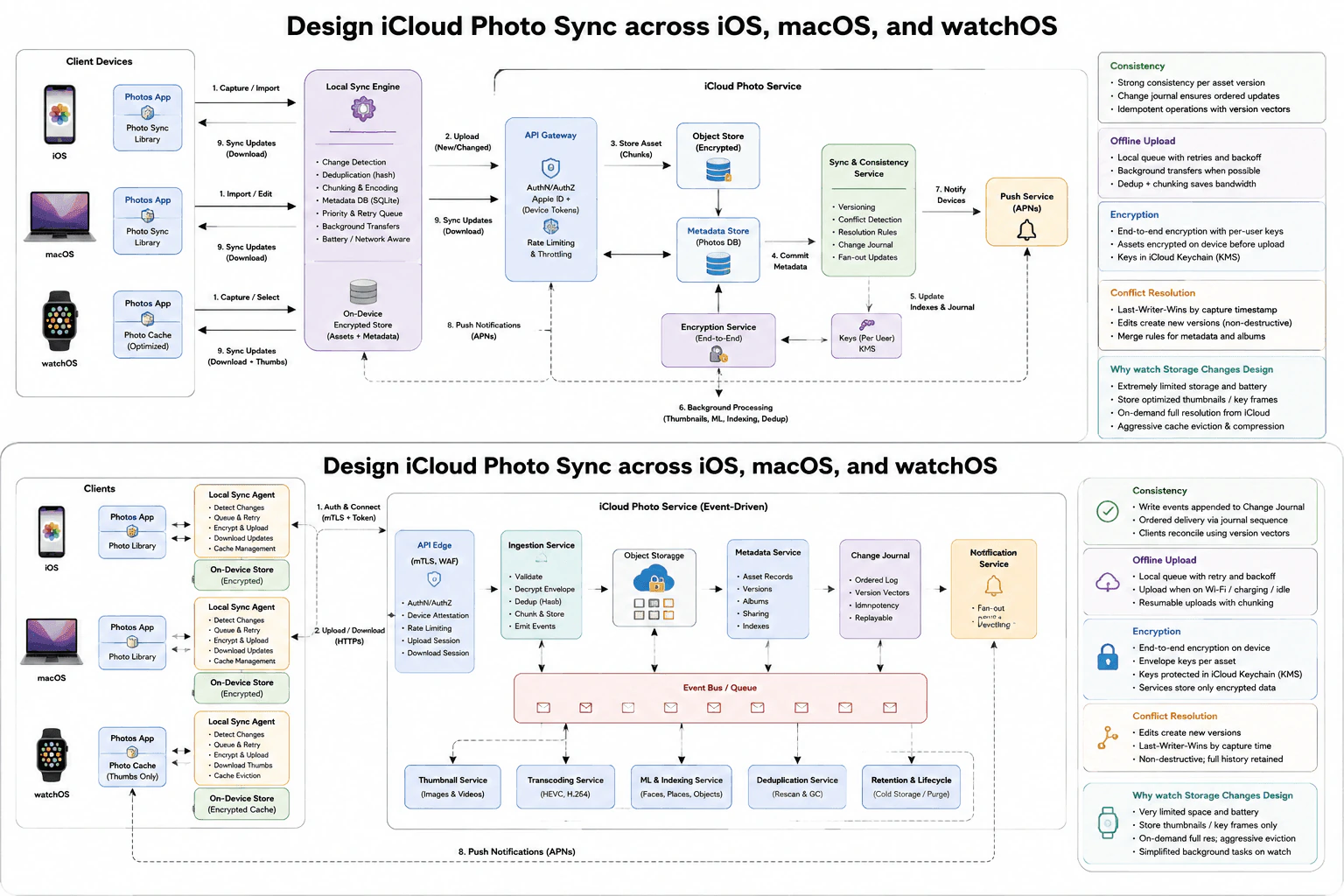
Cover consistency, offline upload, encryption, conflict resolution, and why watch storage changes the design.
Short Interview Answer (30-60 seconds)
At a high level, I would make photo sync offline-first and version-aware. Each iOS, macOS, or watchOS client tracks local changes and uploads them through the authenticated cloud API when connectivity is available. The cloud stores encrypted photo objects and metadata, records ordered changes, detects conflicts, and notifies devices through APNs. Clients then download missing changes and reconcile versions. Encryption starts on the device with per-user keys. The main trade-off is watchOS: limited storage and battery mean it keeps thumbnails or selected items and fetches full-resolution content on demand.
Detailed Explanation
The goal is to keep one photo library usable across an iPhone, Mac, and Apple Watch. A person may create or change photos while a device is offline, so those changes must wait safely and upload later. The system must also protect private photos and avoid losing work when two devices change the same item. After the cloud accepts a change, other devices should learn about it and eventually show the same result. The diagram shows both the main sync path and the event-driven cloud processing used behind that path.
Useful Questions to Ask the Interviewer
Should every device eventually converge to the same library state?
Can the same photo be edited offline on multiple devices?
Should watchOS ever keep full-resolution originals locally?
Can large uploads wait for Wi-Fi, charging, or idle time?
How to Explain It in an Interview
1. Track changes locally first
I would start on the client because offline work begins there. iOS and macOS use the Photos app, local photo library, local sync engine or agent, and encrypted on-device storage. The sync component detects changes, chunks or deduplicates data, keeps metadata, and maintains a retry queue. watchOS follows the same sync idea, but its local photo cache contains mainly thumbnails or selected content. This lets every device continue working when the network disappears.
2. Upload through the cloud API boundary
When connectivity returns, the client sends queued photo changes through HTTPS to the API Gateway or API Edge. The diagram also shows device trust or mTLS-related checks. This boundary performs authentication and authorization, rate limiting, routing, and upload-session handling. The design does not show literal REST paths or HTTP methods, so I would not invent them. The contract is simply an authenticated upload or download between the local sync component and the cloud service.
3. Store photo data and metadata separately
Accepted uploads enter the cloud ingestion path. Photo objects are stored in encrypted object storage, while asset records, versions, albums, sharing data, and indexes are stored through the metadata service or photo database. The event-driven view also shows an Event Bus or Queue feeding thumbnail generation, transcoding, machine-learning indexing, deduplication, and retention work. This keeps slower background work away from the main client sync path. Chunking and deduplication also reduce repeated transfer work.
4. Keep devices consistent with versions and an ordered journal
The Sync and Consistency Service owns versioning, conflict detection, resolution rules, and fan-out. The Change Journal keeps ordered updates and version information. Clients reconcile using the journal sequence and version vectors. The diagram describes strong consistency for each committed asset version, while the wider library reaches the same state through ordered updates and client reconciliation. Idempotent processing prevents a safe retry from creating an unwanted duplicate result.
5. Resolve concurrent edits without destroying history
If two devices change the same asset before syncing, the service detects a conflict instead of blindly overwriting data. The diagram keeps edits as new versions and retains the history. Its automatic policy uses last-writer-wins based on capture time, while metadata and album changes can use merge rules. Keeping versions makes the process non-destructive because earlier work remains available even when one version becomes the current result.
6. Encrypt, notify, and adapt for watchOS
The encryption design protects assets on the client before upload and uses per-user keys protected through iCloud Keychain or the shown key-management system. Stored photo data remains encrypted. After a committed change, the Notification Service or Push Service sends an APNs notification. APNs only tells a device that new state exists; the device still downloads the real data through the sync path. watchOS changes the design because storage, power, and connectivity are limited. It keeps optimized thumbnails or key frames, fetches full-resolution content on demand, evicts cached data aggressively, and does less background work.
Practical Complexity & Trade-offs
The benefit of this design is that each problem has a clear owner. Local queues support offline use and retries. Chunking and deduplication save bandwidth. The Change Journal and versions help devices converge without silently losing edits. Separating large photo objects from metadata also makes storage easier to scale. Encryption improves privacy, but key handling becomes more complicated. Keeping old versions makes conflicts safer, but it costs more storage. The Event Bus or Queue keeps expensive background work away from uploads, but it adds operational complexity. APNs avoids constant polling, but devices must still fetch the real changes. The watch saves battery and storage by keeping small content, but full-resolution viewing can require another network request.
Why Interviewers Ask This
This question tests whether a candidate can combine API design with distributed-system judgment. The interviewer wants correct client and cloud boundaries, separate upload and download flows, offline retry behavior, consistency choices, encryption ownership, and safe conflict handling. The watchOS requirement tests product judgment as well as architecture. A strong candidate should explain why constrained devices need a different caching strategy and clearly describe the privacy, reliability, storage, latency, and operational trade-offs.
Interviewer may ask next
What happens if millions of devices reconnect and upload queued photos at the same time?
I would keep the same design and use the controls already shown in the diagram. The API Edge continues authenticating devices, rate limiting requests, and managing upload sessions. Clients keep their local queues and use retry with backoff instead of repeatedly sending work as fast as possible. Chunked or resumable uploads reduce the cost of failed large transfers. After the ingestion path accepts work, the Event Bus or Queue lets thumbnail, transcoding, indexing, deduplication, and retention services process it asynchronously. The Change Journal still records committed updates in order, so clients can reconcile after the traffic spike. Encryption does not change, and stored assets remain protected. The main downside is slower convergence. Some devices may wait longer before they see every remote change, but the queue and rate limits protect the cloud services from a reconnect storm while preserving the same consistency model.
How do you handle a photo edited offline on both an iPhone and a Mac?
I would preserve both edits as versions and let the existing conflict flow decide the current result. Each device records its local edit and queues it while offline. When the devices reconnect, both local sync agents upload through the normal API boundary. The Sync and Consistency Service compares their version information with the current cloud state. The Change Journal and version vectors reveal that both edits came from an earlier common state, so this is a real concurrent conflict. The diagram's policy can choose a current version using last-writer-wins based on capture time, while edits remain non-destructive because previous versions are retained. Metadata or album changes can use the shown merge rules. After resolution, the result is recorded in the ordered change history and APNs tells other devices to fetch updates. The downside is extra metadata and storage because preserving history costs more than overwriting one copy.
22. Design iMessage's message delivery and read-receipt system across a user's multiple devicesAPI DesignHardApple
i Question Details
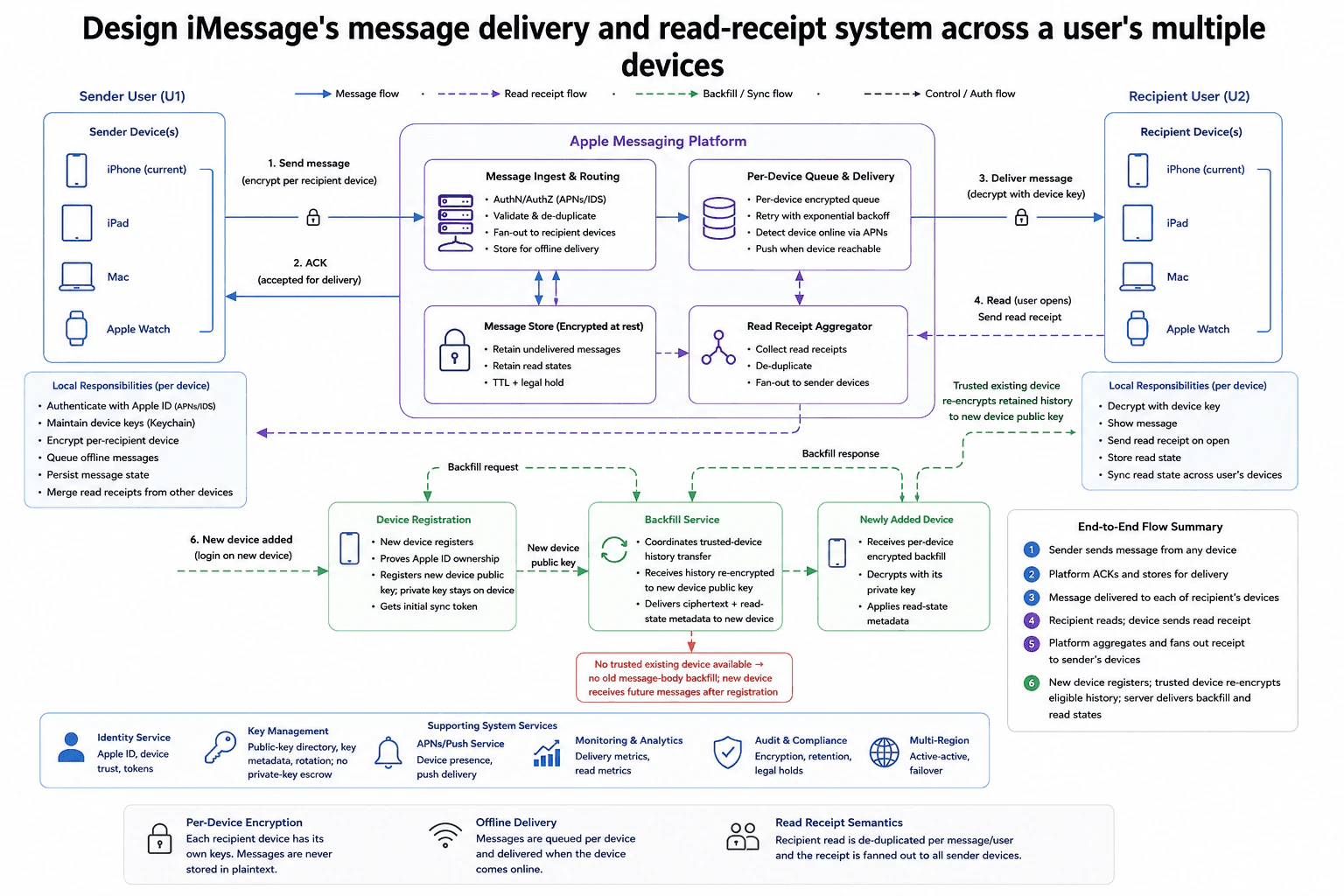
Cover per-device encryption, offline delivery, read receipt fan-out, and the backfill case for newly added devices.
Short Interview Answer (30-60 seconds)
At a high level, I would treat message delivery as a per-device operation. The sender encrypts separately for each recipient device, then Message Ingest & Routing validates and fans out the work to Per-Device Queue & Delivery. Offline devices keep their encrypted delivery queued until they reconnect. When the recipient reads the message, the Read Receipt Aggregator de-duplicates the event and fans the receipt out to the sender's devices. A newly added device registers its public key and uses the backfill flow for eligible history. The trade-off is extra storage and synchronization for stronger device-level security.
Detailed Explanation
We need one conversation to stay correct across several phones, tablets, watches, and computers. A recipient may have some devices online and others offline. Each device must receive a message safely without depending on another device being available. The sender's devices should also agree when the recipient has read the message. A newly added device creates another problem because it did not have the keys used for older deliveries. The design handles these cases with separate device delivery, shared read-state handling, and a controlled history backfill flow.
Useful Questions to Ask the Interviewer
Should every active recipient device receive its own encrypted delivery?
How much eligible history should a newly added device receive?
Should one recipient read event synchronize to all sender devices?
How to Explain It in an Interview
1. Start with per-device encryption
I would first treat every registered device as a separate security and delivery target. Each device keeps its own private key locally. The sender encrypts separately for each recipient device. This means the recipient's iPhone, iPad, Mac, and Apple Watch can each receive ciphertext intended for that device.
The Key Management service keeps the public-key directory and key metadata. The diagram explicitly avoids private-key escrow. Identity information connects registered devices to the correct Apple ID. The benefit is better device isolation. The cost is more key metadata and more encrypted delivery work.
2. Ingest, validate, and fan out the message
The sender sends the message to Message Ingest & Routing. This component handles authentication and authorization, validates the request, removes duplicates, and fans the message out to the recipient's devices.
The Message Store retains encrypted message data needed by the design and also keeps read-state information. The diagram also shows retention through TTL and legal-hold behavior.
After the platform accepts the message for delivery, an ACK returns to the sender. This only means the platform accepted the message. It does not mean that every recipient device has already received it.
3. Deliver independently to every device
The message then moves through Per-Device Queue & Delivery. Each target device has independent encrypted delivery state. When a device is reachable, the platform pushes the message and that device decrypts it with its own device key.
If one device is offline, its delivery remains queued. The service retries with exponential backoff and uses APNs for device presence and push delivery. Other recipient devices continue normally. For example, an online iPhone can receive immediately while an offline Mac waits until it reconnects.
This separation is the main reliability decision. One unavailable device must not block the rest of the user's devices.
4. Collect and fan out read receipts
When the recipient opens the message, that device sends a read receipt to the Read Receipt Aggregator. The aggregator collects and de-duplicates read events. It then fans the resulting receipt out to the sender's devices.
The bottom read-receipt rule in the diagram describes this as message-and-user level de-duplication followed by fan-out to all sender devices. The Message Store also retains read-state information so synchronization and later backfill can use the same state.
5. Register and backfill a new device
When a new device is added, Device Registration verifies Apple ID ownership and registers the new device public key. The private key remains on the device. The device also receives its initial synchronization token.
The Backfill Service coordinates trusted-device history transfer. Eligible history is re-encrypted to the new device public key. The service then delivers encrypted history together with read-state metadata. The newly added device decrypts the backfill with its private key and applies the read state.
The failure case is important. If no trusted existing device is available, old message bodies are not backfilled. The new device still completes registration and can receive future messages. This keeps the per-device encryption model intact instead of pretending the server can decrypt ciphertext created for older device keys.
6. Explain the trade-off
This design gives strong device isolation, reliable offline delivery, and consistent read state across multiple devices. It also scales delivery independently by device.
The downside is more storage, queue entries, key metadata, retry work, and synchronization logic. Backfill is also more complicated because a newly created device key cannot decrypt old ciphertext automatically. The design accepts that complexity to keep private keys on devices while still supporting multi-device messaging.
Practical Complexity & Trade-offs
The benefit is that every device is handled independently. An offline Mac does not block an online iPhone. Per-device encryption also keeps private keys separated between devices. The downside is extra work. The platform must track separate delivery state, encrypted messages, device keys, retries, and read synchronization. Read receipts also need de-duplication because several recipient devices may report the same logical read. Backfill is harder because a new device cannot decrypt ciphertext created for older device keys. The design therefore uses trusted-device history transfer and re-encryption for eligible history. If no trusted device is available, old message bodies are not backfilled. This is safer, but the user may lose access to some older content on the newly added device.
Why Interviewers Ask This
This question tests whether the candidate can design beyond a simple user-to-user API. The interviewer wants clear thinking about per-device delivery, encryption ownership, offline queues, read-state fan-out, and new-device synchronization. They are also checking whether the candidate understands failure behavior and realistic security limits. A strong answer separates routing, delivery, storage, identity, receipt handling, and backfill while explaining the reliability and operational trade-offs in simple terms.
Interviewer may ask next
What happens if one recipient device stays offline for a long time?
I would keep that device's delivery independent from the recipient's other devices. Its work remains in Per-Device Queue & Delivery while online devices continue receiving their own encrypted copies. The platform retries the offline device using the exponential-backoff behavior shown in the diagram. APNs supports device presence and push delivery, so delivery can continue when that device becomes reachable again.
Correctness is maintained because delivery state is tracked per device. Receiving the message on the recipient's iPhone does not imply that the offline Mac also received it. Security remains unchanged because the queued content stays encrypted for the target device and is decrypted with that device's local private key.
The main downside is retention cost. A device that remains offline can keep delivery state and encrypted message data around longer. The Message Store therefore has the TTL and legal-hold retention behavior shown in the design. Routing, read receipts, identity, and encryption otherwise remain unchanged.
How would you handle message history when the user adds a new device?
I would use the Device Registration and Backfill Service flow already shown in the design. The new device first proves Apple ID ownership and registers its public key. Its private key stays on that device. The Backfill Service then coordinates trusted-device history transfer. Eligible history is re-encrypted to the new device public key, and encrypted history plus read-state metadata is delivered to the new device.
The new device decrypts that backfill with its own private key and applies the retained read state. This keeps the backfill consistent with the normal per-device encryption model.
The important failure case is when no trusted existing device is available. I would not weaken encryption just to recover history. Old message bodies are not backfilled in that case. Registration still succeeds, and the device receives future messages normally. The main downside is reduced history availability, but that is preferable to introducing server-side access to private device keys or pretending old ciphertext is decryptable by the new key.
23. How do you handle inconsistent or optional fields when decoding JSON from a backend API in Swift?API DesignEasyApple
i Question Details
Explain how Codable behaves with missing and renamed fields, what custom decoding is needed for type mismatches, and how you prevent one bad field from failing the whole decode.
Short Interview Answer (30-60 seconds)
At a high level, I make the Swift model tolerant of backend JSON changes without hiding important data problems. JSONDecoder from Foundation reads the response into a Codable model. Optional properties handle missing or null values, CodingKeys map renamed fields, and custom init(from:) logic handles a value that may arrive as either an Int or a String. For non-critical fields, I decode safely so one bad value does not fail the whole model. The trade-off is extra decoding code, but the app becomes more resilient and easier to monitor.
Detailed Explanation
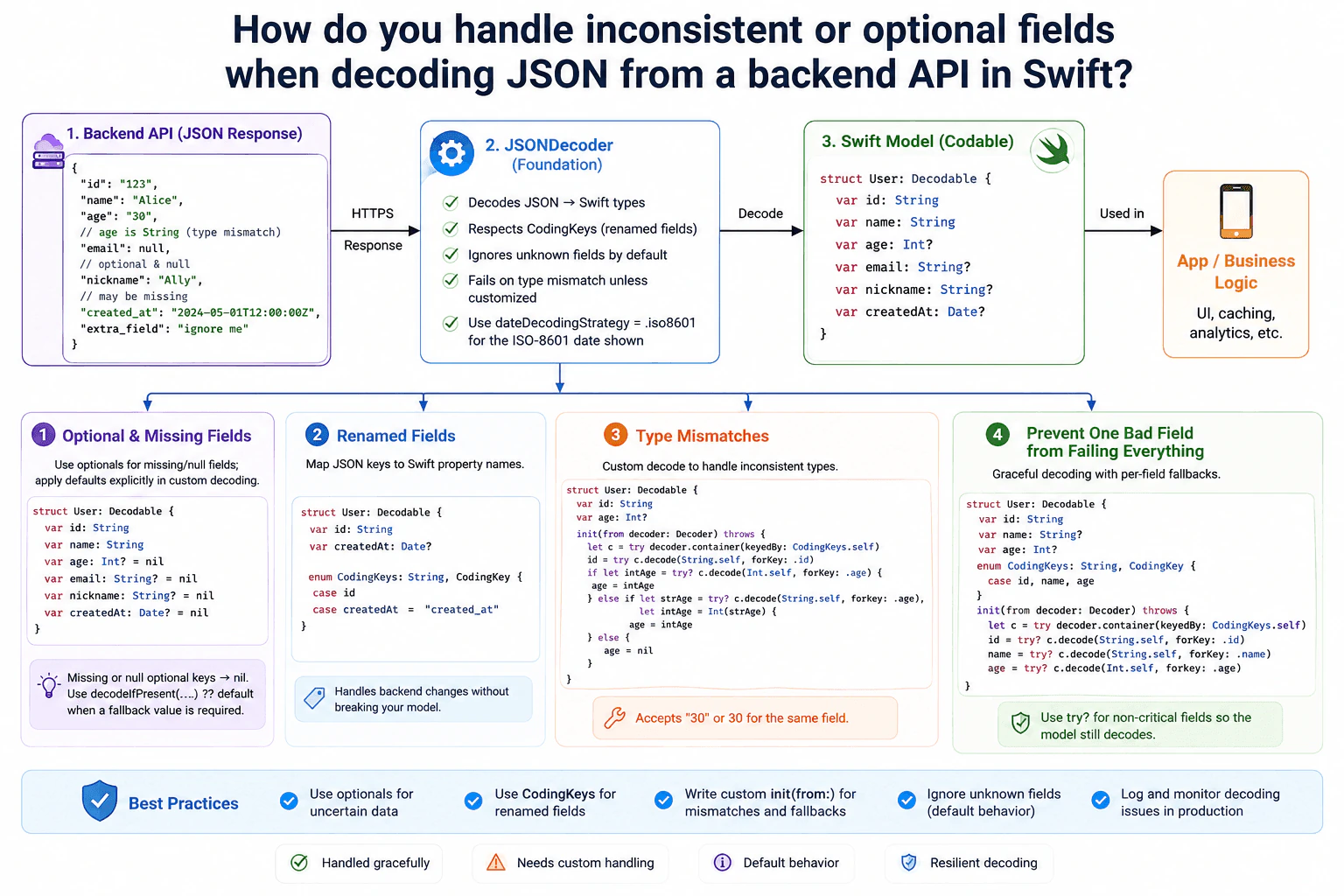
This question is about keeping an app working when server data is not always consistent. Some values may be missing. Some values may be null. A field name may differ from the Swift property name. A number may sometimes arrive as text. The goal is to keep useful data when that is safe, while still rejecting important bad data. The diagram follows one clear path. A backend JSON response goes through JSONDecoder, becomes a Swift Codable model, and then moves into the app or business logic.
Useful Questions to Ask the Interviewer
Which fields are required for the app to work correctly?
Which fields are allowed to be missing or null?
Can the backend send the same field using different JSON types?
Do renamed fields need backward compatibility?
How to Explain It in an Interview
1. Start with the normal decode path
I would first explain the normal flow. The backend sends a JSON response over HTTPS. JSONDecoder from Foundation converts that JSON into Swift values. The destination is the Codable User model. After decoding succeeds, the app or business logic can use the model for UI, caching, analytics, or similar work.
JSONDecoder ignores JSON fields that are not represented by the model. For example, the extra_field value shown in the diagram does not break decoding. This makes the client more tolerant when the backend adds fields that an older app does not use.
2. Handle missing and null fields with optionals
For values that may be absent, I use optional Swift properties such as Int? or String?. With synthesized Decodable behavior, a missing key or JSON null becomes nil for an optional property.
If I need a real fallback value instead of nil, I apply that fallback explicitly during custom decoding. A common pattern is decodeIfPresent(...) ?? default. I keep required fields strict. Making every property optional could hide important backend problems.
3. Map renamed fields with CodingKeys
If the JSON key differs from the Swift property name, I use CodingKeys. The diagram maps the JSON key created_at to the Swift property createdAt.
This keeps the Swift model readable while making the backend mapping explicit. The timestamp shown is an ISO-8601 string. I configure JSONDecoder with dateDecodingStrategy = .iso8601 so that value can be decoded into Date?.
4. Use custom decoding for type mismatches
Codable does not automatically convert the string "30" into the integer 30. If the model expects Int and the backend sends a String, normal decoding produces a type mismatch.
For a backend known to send both forms, I write a custom init(from:). I first try to decode age as Int. If that fails, I try String and convert it with Int(...). If neither form works, a non-critical optional age can become nil.
This keeps the conversion rule close to the field that needs special handling.
5. Prevent one bad field from failing the whole model
For non-critical fields, I can use targeted forgiving logic such as try?, decodeIfPresent, or custom decoding inside init(from:). The diagram shows fields being decoded independently so a bad optional value does not have to destroy otherwise useful data.
I would use this carefully. If a field such as id is essential, I would decode it with normal try and let decoding fail when the value is invalid. Resilient decoding should protect optional data. It should not silently hide corruption in required data.
6. Keep decoding problems visible
After successful decoding, the Swift model moves into the app or business logic. The diagram also recommends logging and monitoring decoding issues in production. This helps the team detect unexpected backend contract changes.
The main trade-off is extra custom code and more cases to test. The benefit is controlled resilience. Unknown fields are harmless. Renamed fields are mapped explicitly. Known type mismatches are handled intentionally. Only non-critical bad fields receive fallbacks.
Time & Space Complexity
The benefit of this design is that small backend changes do not break the entire app. Optional properties handle missing or null values. CodingKeys handle JSON names that differ from Swift property names. Custom decoding handles known type mismatches, such as age arriving as either 30 or "30". The downside is extra code and more tests. Forgiving decoding can also hide server bugs if it is used everywhere. I would therefore keep required fields strict and make only non-critical fields tolerant. I would log decoding problems so backend changes remain visible. Unknown fields are ignored by JSONDecoder when the model does not define them. We accept the extra decoding logic because it keeps the app usable while protecting important data rules.
Why Interviewers Ask This
Interviewers ask this to test whether you understand Codable beyond the happy path. They want to see if you know the difference between missing values, renamed keys, and real type mismatches. They also want judgment about when decoding should stay strict and when a field may fail safely. A strong answer shows clear fallback rules, avoids hiding important errors, and explains how to keep the app resilient while still noticing backend contract problems.
Interviewer may ask next
What would you change if the backend started sending several more fields with inconsistent types?
I would keep the same Backend API to JSONDecoder to Codable flow, but I would centralize repeated conversion rules instead of writing unrelated logic for every property. For example, if several numeric fields may arrive as either numbers or strings, I could create a small decoding helper that tries the supported representations in a defined order. Each affected model could call that helper from init(from:).
I would still keep required fields strict. An invalid required id should fail if the app cannot safely identify the user without it. Non-critical fields could fall back to nil or another explicit default. I would also log which field failed and which representation was received so the backend contract problem is visible.
The main downside is maintenance. More tolerant decoding creates more code paths and tests. I would therefore support only known backend variations and remove compatibility logic when those variations are no longer needed.
How would you handle a renamed field while supporting both old and new backend payloads?
I would keep the same Codable model and make the compatibility rule explicit in custom decoding. CodingKeys is enough when one JSON key maps to one Swift property, such as created_at to createdAt. If I must temporarily accept both an old key and a new key for the same property, I would define both keys and try the preferred new key first. If it is absent, I would try the old key.
The rest of the flow stays unchanged. JSONDecoder still creates the User model. Unknown fields remain harmless. The app still receives the same Swift property. I would keep that property optional only if its business meaning allows it. If the value is required, decoding should still fail when neither key is present.
The downside is temporary compatibility code. It makes the decoder more complex. I would monitor use of the old key and remove the fallback after older backend payloads are no longer expected.
24. Design AirDrop for cross-device file transfer between iOS and macOSSystem DesignMediumApple
i Question Details
Explain discovery, transfer transport, privacy gating, and how the design behaves when devices are nearby but not on the internet.
Short Interview Answer (30-60 seconds)
At a high level, AirDrop should let nearby iOS and macOS devices find each other and transfer files securely. The main challenge is doing this without depending on the internet while still protecting user privacy. I would explain it in three flows: discovery, privacy and secure connection, then file transfer and recovery. BLE helps devices discover each other, peer-to-peer Wi-Fi carries the file, and the receiver controls acceptance. The trade-off is that range, battery use, and link quality can affect transfers.
Detailed Explanation
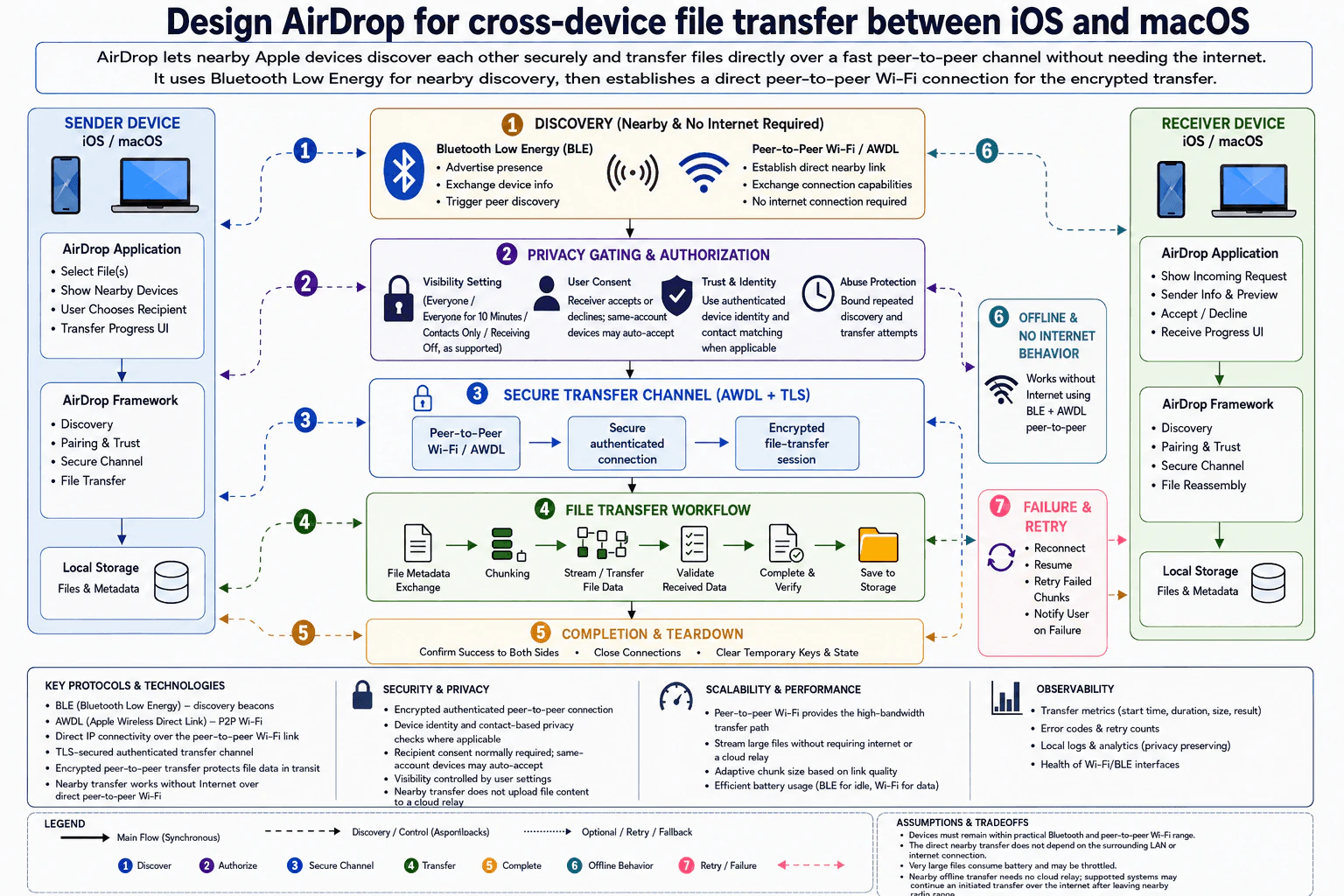
The goal is to let two nearby Apple devices find each other and transfer files safely. The devices may be close together even when there is no internet connection. The difficult parts are finding the other device, deciding whether the receiver should be visible, creating a secure connection, and moving a file without losing progress. The diagram solves this with nearby discovery, privacy and trust checks, a secure peer-to-peer transfer path, and retry handling when the connection becomes weak or breaks.
Useful Questions to Ask the Interviewer
Should the design support both iOS-to-macOS and macOS-to-iOS transfers?
Should nearby transfer work when both devices have no internet access?
Should large files support retry or resume after a broken connection?
Should same-account devices be allowed to accept transfers automatically?
How to Explain It in an Interview
1. Start with nearby discovery
I would start with Bluetooth Low Energy, or BLE, because it uses little power for nearby discovery. The sender advertises its presence and exchanges device information needed to find possible receivers. After discovery, the devices establish peer-to-peer Wi-Fi using AWDL. AWDL provides the nearby direct Wi-Fi path, so the transfer does not depend on the surrounding LAN or an internet connection.
2. Apply privacy gating before transfer
The next step is deciding whether the receiver should appear and accept the request. The receiver can use visibility settings such as Everyone, Everyone for 10 Minutes, Contacts Only, or Receiving Off, as supported. The design also checks authenticated device identity and contact matching when applicable. The receiver normally accepts or declines the request. Same-account devices may auto-accept. Abuse Protection bounds repeated discovery and transfer attempts.
3. Build the secure transfer channel
After approval, the devices create a secure authenticated connection over peer-to-peer Wi-Fi and AWDL. The file-transfer session is encrypted, which protects file data while it moves between devices. The diagram also shows a TLS-secured authenticated transfer channel. Nearby transfer does not need to upload file content to a cloud relay before the receiver gets it.
4. Transfer, validate, and save the file
The sender exchanges file metadata first. The file is then chunked and streamed through the encrypted connection. The receiver validates the received data, completes verification, and saves the file to local storage. Both applications can show transfer progress. After success, the devices confirm completion, close connections, and clear temporary keys and state.
5. Handle offline use, failures, and trade-offs
Nearby AirDrop works without internet because BLE and peer-to-peer Wi-Fi handle discovery and transport. If the connection breaks, the design can reconnect, resume, retry failed chunks, and notify the user if recovery fails. Chunk size can adapt when link quality changes. Large files can use more battery and may be throttled. Devices must stay within practical Bluetooth and peer-to-peer Wi-Fi range for nearby transfer. On supported systems, an already started transfer may continue over the internet after the devices leave nearby radio range.
Engineering Considerations / Design Trade-offs
The benefit is that nearby transfers do not need a router, internet connection, or cloud relay. BLE keeps discovery power use low, while peer-to-peer Wi-Fi gives the faster data path. Encryption protects file data in transit. The downside is that radio range and link quality can change during a transfer. Large files also use more battery. Retry and resume make failures easier to handle, but they add temporary state and cleanup work. Privacy settings also add checks before a transfer starts. We accept this because user control and secure nearby transfer are more important than making the flow extremely simple.
Why Interviewers Ask This
The interviewer wants to see whether you can break one user action into clear system flows. They are testing how you handle nearby discovery, privacy, secure transport, file transfer, retries, and offline behavior. They also want to see whether you understand trade-offs such as range, battery use, link quality, and user consent. The goal is to test engineering judgment and clear explanation, not memorization.
Interviewer may ask next
How would the design change if large file transfers must recover after the devices temporarily move out of nearby Wi-Fi range?
I would keep the same discovery, privacy, and secure-transfer design, but I would depend more on the existing Failure & Retry path. The sender would keep enough temporary transfer state to know which file parts were completed. The receiver would keep matching temporary state until the transfer finishes or is abandoned.
If the nearby peer-to-peer link returns, the devices reconnect and resume instead of sending the full file again. The diagram already supports retrying failed chunks, so that becomes the main recovery mechanism. The receiver still validates the received data before completing verification and saving the file.
On supported systems, an already started transfer may continue over the internet after the devices leave nearby radio range. That does not remove the original privacy decision or secure connection requirement. The downside is more temporary state, longer cleanup windows, and more logic for deciding when a transfer is complete or permanently failed.
How would you handle a receiver that is being flooded with repeated AirDrop discovery and transfer requests?
I would keep the same architecture and strengthen the Abuse Protection part of Privacy Gating & Authorization. The receiver should bound repeated discovery and transfer attempts so one nearby device cannot keep interrupting the user.
Visibility settings remain the first control. Receiving Off can block incoming requests. Contacts Only narrows who should appear when contact matching applies. The receiver can also limit repeated attempts associated with the same nearby device or authenticated identity for a period of time.
The secure transfer channel should only be created after the request passes these privacy checks. This prevents unwanted attempts from reaching the more expensive transfer path. User consent still matters, while same-account devices can keep the supported auto-accept behavior. The downside is that aggressive limits may temporarily block a legitimate sender who retries several times because of a weak radio connection.
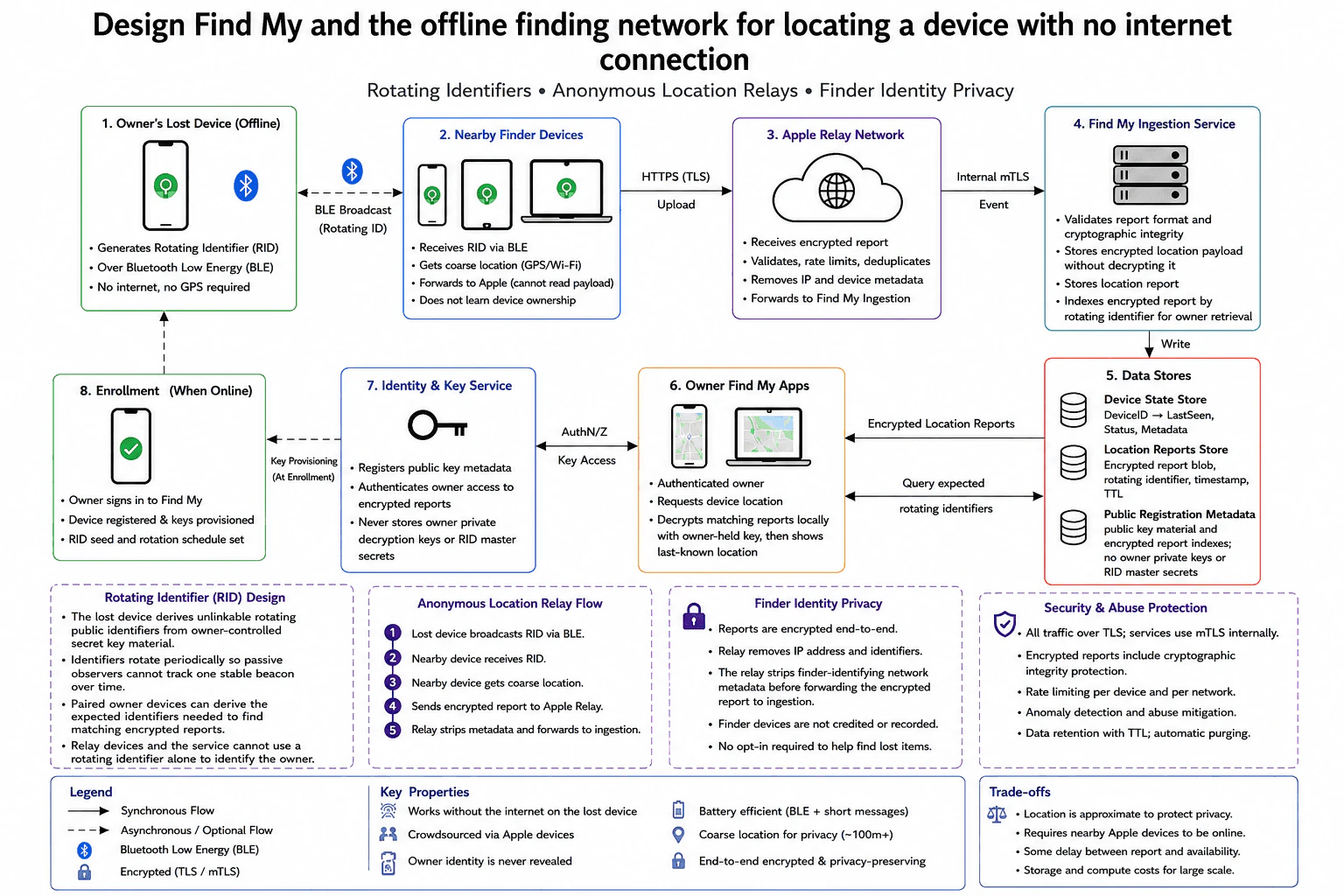
25. Design Find My and the offline finding network for locating a device with no internet connectionSystem DesignMediumApple
i Question Details
Describe rotating identifiers, anonymous location relays, and how the system keeps finder identity private.
Short Interview Answer (30-60 seconds)
At a high level, the goal is to find an offline device without exposing the owner or finder. The main challenge is sharing a useful location while keeping identifiers temporary and location reports encrypted. I would explain three flows: the lost device broadcasts a rotating identifier, nearby finder devices relay encrypted location reports, and the owner later retrieves and decrypts matching reports locally. The main trade-off is privacy versus freshness because finding depends on nearby Apple devices becoming online.
Detailed Explanation
The goal is to help an owner find a lost device even when that device has no internet connection. The difficult part is privacy. Nearby devices must help report its location without learning who owns it. Apple services should also avoid receiving the location in readable form. The diagram solves this with rotating identifiers, encrypted location reports, anonymous forwarding, and owner-side decryption. The flow starts at the lost device, passes through nearby finder devices and Apple services, and ends inside the owner’s Find My app.
Useful Questions to Ask the Interviewer
How accurate does the reported location need to be?
How long should encrypted location reports be kept?
How quickly should a newly reported location become available?
How to Explain It in an Interview
1. Explain enrollment and rotating identifiers
I would start with the setup that happens while the device is online. During Enrollment, the owner signs in to Find My. The device is registered and keys are provisioned. The RID seed and rotation schedule are also prepared.
When the device becomes offline, it generates a Rotating Identifier, or RID. The RID changes periodically. This prevents passive observers from following one stable beacon over time. The lost device broadcasts the RID using Bluetooth Low Energy, or BLE. This step needs neither internet access nor GPS on the lost device.
2. Let nearby finder devices create encrypted reports
A Nearby Finder Device receives the RID over BLE. It gets a coarse location using GPS or Wi-Fi. It then creates an encrypted location report and uploads it over HTTPS.
The finder device does not learn the lost device owner’s identity. It only helps transport the rotating identifier and encrypted location information into the network.
3. Relay and ingest the report without decrypting it
The Apple Relay Network receives the encrypted report. It validates the report, applies rate limits, removes duplicates, and strips IP and device metadata. It then forwards the report toward Find My Ingestion.
The Find My Ingestion Service receives the event over internal mTLS. It validates the report format and cryptographic integrity. It stores the encrypted location payload without decrypting it. It also indexes the encrypted report by rotating identifier so the owner can retrieve matching reports later.
4. Store encrypted reports and let the owner read them
The Data Stores keep Device State, Location Reports, and Public Registration Metadata. The Location Reports Store contains the encrypted report blob, rotating identifier, timestamp, and TTL. TTL means the stored report is automatically removed after its allowed lifetime.
The Owner Find My Apps authenticate the owner and query expected rotating identifiers. The Data Stores return matching Encrypted Location Reports. The owner app decrypts those reports locally with the owner-held key. It can then show the last-known location.
The Identity & Key Service registers public key metadata and authenticates owner access to encrypted reports. It never stores the owner’s private decryption keys or RID master secrets.
5. Explain privacy, security, and limits
External traffic uses TLS, while services use mTLS internally. Encrypted reports include cryptographic integrity protection. Rate limiting, anomaly detection, abuse mitigation, TTL-based retention, and automatic purging reduce misuse and unnecessary stored data.
The main limitation is freshness. A nearby Apple device must hear the BLE beacon and become online before a new report reaches the owner. Location is also approximate for privacy, and storing many encrypted reports creates storage and compute cost.
Engineering Considerations / Design Trade-offs
The benefit is strong privacy. The lost device broadcasts changing identifiers, so one fixed identifier cannot easily track it over time. Finder devices forward encrypted reports without learning the owner’s identity. Apple services keep the location payload encrypted, and the owner decrypts matching reports locally. The downside is that finding is not instant. A nearby Apple device must hear the BLE beacon and later get online. Location is also approximate instead of exact. Keeping many encrypted reports costs storage and compute. Shorter data retention improves privacy, but it gives the owner less time to retrieve an older report.
Why Interviewers Ask This
Interviewers ask this question to see whether you can break a privacy-sensitive system into clear flows. They want to see good judgment around rotating identifiers, encryption, anonymous relays, finder privacy, storage, and owner-side decryption. They also want you to explain practical limits such as delayed reports, approximate location, rate limits, retention, abuse protection, and the cost of operating the network at large scale.
Interviewer may ask next
What would you change if encrypted location reports had to expire much faster for stronger privacy?
I would keep the same basic architecture and shorten the TTL in the Location Reports Store. TTL is the lifetime of each stored encrypted report. When that time ends, the report is removed automatically.
The lost device would still broadcast rotating identifiers over BLE. Nearby Finder Devices would still create encrypted reports and send them through the Apple Relay Network and Find My Ingestion Service. The owner would still query expected rotating identifiers and decrypt matching reports locally.
The main change is how long encrypted reports remain available in the Data Stores. Shorter retention reduces how much historical location data exists. It also reduces some storage use.
Correctness stays the same because the reports remain encrypted and indexed by rotating identifier. The Identity & Key Service still never stores the owner’s private decryption keys or RID master secrets.
The downside is a smaller recovery window. If the owner checks too late, a useful encrypted report may already have been removed.
What happens if no nearby finder device can get online for a long time?
The design still works, but the owner may wait much longer for a new location. The lost device can continue broadcasting its rotating identifier over BLE because that step does not require internet access.
A Nearby Finder Device must first hear that beacon. It must then become online before it can upload the encrypted location report over HTTPS. Until this happens, the Apple Relay Network and Find My Ingestion Service receive no new report to store.
The Owner Find My Apps can still query the Data Stores using expected rotating identifiers. They may only receive an older encrypted report. The app can decrypt that report locally and show the older last-known location.
Privacy does not change during the delay. Rotating identifiers still reduce tracking. Finder devices still do not learn the owner’s identity. Apple services still keep the location payload encrypted.
The downside is freshness. The newest available location may be much older than the lost device’s real current position.
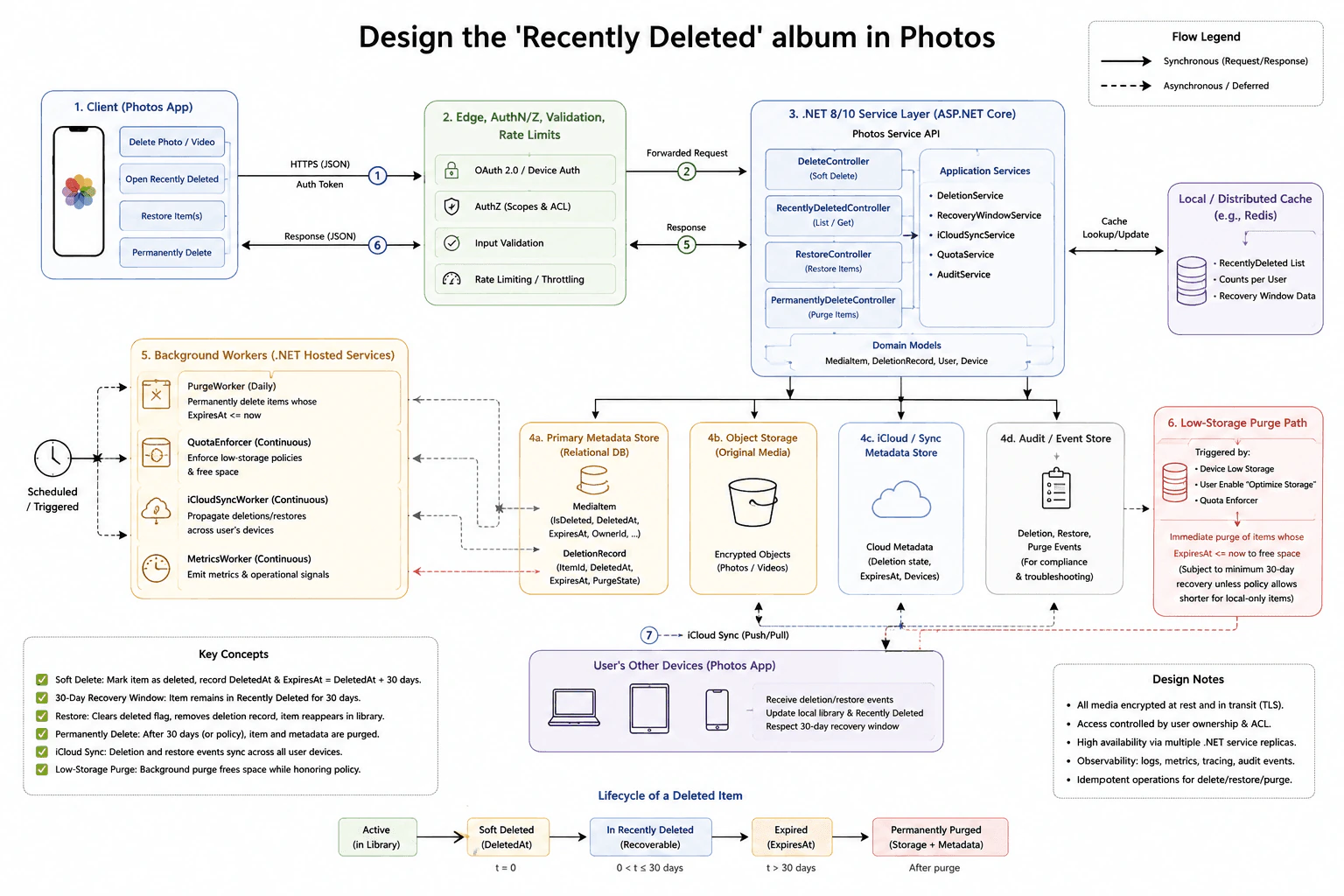
26. Design the 'Recently Deleted' album in PhotosSystem DesignMediumApple
i Question Details
Explain soft delete, the 30-day recovery window, iCloud sync, and the low-storage purge path.
Short Interview Answer (30-60 seconds)
At a high level, this system lets users delete photos without losing them immediately. The main challenge is keeping the 30-day recovery window correct across devices while freeing storage when policy allows it. I would explain three flows: soft delete and restore, iCloud sync, and permanent purge. The .NET service keeps deletion metadata, leaves media in encrypted object storage, and uses background workers for expiry, sync, and quota checks. The trade-off is extra storage and background work during recovery.
Detailed Explanation
The goal is to let users remove photos from their normal library without destroying them immediately. Deleted items stay recoverable for 30 days. A restore must make the item visible again, while an expired or explicitly purged item can be removed permanently. The hard part is keeping the deletion state, expiry time, original media, and the user's other devices consistent enough to give predictable behavior. The diagram organizes this into the client request path, stored deletion state, background workers, iCloud sync, and the low-storage purge path.
Useful Questions to Ask the Interviewer
Should every deleted item normally have the same 30-day recovery window?
Can the user permanently delete an item before the recovery window ends?
Can policy shorten recovery for local-only items when storage is critically low?
How quickly should deletes and restores appear on the user's other devices?
How to Explain It in an Interview
1. Start with the client and request path
I would start with the Photos App actions shown in the diagram. A user can delete an item, open Recently Deleted, restore an item, or permanently delete it. The app sends HTTPS JSON requests through the edge layer. OAuth 2.0 or device authentication identifies the caller. Authorization checks scopes and access rules. Input validation and rate limiting protect the service before the request reaches the ASP.NET Core Photos Service API.
2. Explain soft delete and restore
For a normal delete, DeleteController uses DeleteService to perform a soft delete. Soft delete means the item is marked deleted without removing the original media. The Primary Metadata Store records fields such as IsDeleted, DeletedAt, and ExpiresAt. It also keeps a DeletionRecord with the item, deletion time, expiry time, and purge state. The encrypted photo or video remains in Object Storage.
RecentlyDeletedController reads the recoverable items. RestoreController uses RecoveryWindowService to check whether recovery is still allowed. A successful restore clears the deleted state, removes the deletion record, and returns the item to the normal library.
3. Explain the 30-day lifecycle and permanent purge
The lifecycle is Active, Soft Deleted, In Recently Deleted, Expired, and Permanently Purged. A normal soft delete sets ExpiresAt to DeletedAt plus 30 days. PurgeWorker runs daily and permanently removes items whose ExpiresAt is at or before the current time. PermanentlyDeleteController also handles an explicit permanent-delete request. Delete, restore, and purge operations are designed to be safe when the same operation is repeated.
4. Explain iCloud sync and supporting data
The iCloudSyncService and continuous iCloudSyncWorker carry deletion and restore state across the user's devices. The iCloud / Sync Metadata Store keeps cloud deletion state, expiry information, and device data. Other Photos App devices use iCloud push and pull to receive changes, update the local library, and update Recently Deleted.
The Local / Distributed Cache can keep the Recently Deleted list, per-user counts, and recovery-window data. AuditService records deletion, restore, and purge events in the Audit / Event Store. MetricsWorker emits operational signals.
5. Explain low storage, security, and trade-offs
QuotaService and the continuous QuotaEnforcer watch storage usage and policy. The low-storage path can be triggered by device low storage, an enabled Optimize Storage setting, and quota enforcement. It can immediately purge items whose ExpiresAt is already at or before the current time. The diagram keeps the minimum 30-day recovery rule unless policy allows a shorter period for local-only items.
Media is encrypted at rest and protected by TLS in transit. User ownership and access controls protect private data. Multiple .NET service replicas improve availability. The main trade-off is that recoverability costs storage, metadata, sync work, and background processing until purge is allowed.
Engineering Considerations / Design Trade-offs
The benefit is that normal deletion is safe because the original media is not destroyed right away. Users have time to recover mistakes, and iCloud can carry delete and restore changes to their other devices. The downside is extra storage because deleted media may remain during the recovery window. The system also needs deletion records, expiry checks, cache updates, audit events, and background workers. Low-storage cleanup can free space from items that are already expired. This helps storage pressure, but the purge path must still follow the recovery policy. Device sync can also have a short delay.
Why Interviewers Ask This
Interviewers ask this question to see whether a candidate can separate logical deletion from physical deletion. They also want to see how the candidate handles time-based recovery, cross-device sync, background cleanup, storage pressure, security, and repeated operations. A strong answer shows clear judgment about what must be stored safely, what can happen later in the background, and which trade-offs are acceptable.
Interviewer may ask next
What would you change if delete and restore actions had to appear on the user's other devices much faster?
I would keep the same design, but I would make the iCloudSyncService and iCloudSyncWorker path react more quickly after each delete or restore. The Primary Metadata Store would still record the change first. That keeps the main deletion state safe before another device sees it.
After that write, the sync path would publish the updated deletion or restore state through the iCloud / Sync Metadata Store. The user's other Photos App devices would receive the change through the existing iCloud push and pull path. Their local library and Recently Deleted view could then update sooner.
Repeated sync work must remain safe. Receiving the same deletion or restore more than once should not corrupt the item state. The downside is more sync traffic and more background work. A device that is offline can still be behind until it reconnects, so faster sync does not mean every device changes at exactly the same instant.
How should the system behave if a device is critically low on storage before the normal recovery window ends?
I would keep the low-storage path shown in the diagram. QuotaService and the continuous QuotaEnforcer detect storage pressure and apply the user's Optimize Storage setting and quota policy. The safest first choice is to purge items whose ExpiresAt time has already passed, because those items are outside the normal recovery window.
The important rule is that low storage should not silently break the promised recovery period. The diagram keeps the minimum 30-day window unless policy explicitly allows a shorter period for local-only items. The QuotaEnforcer and PurgeWorker therefore use the stored expiry and policy information before removing media. Purge activity is also recorded through the Audit / Event Store.
The downside is that the device may remain low on storage when many deleted items are still protected. The design chooses recovery safety over reclaiming every possible byte immediately.
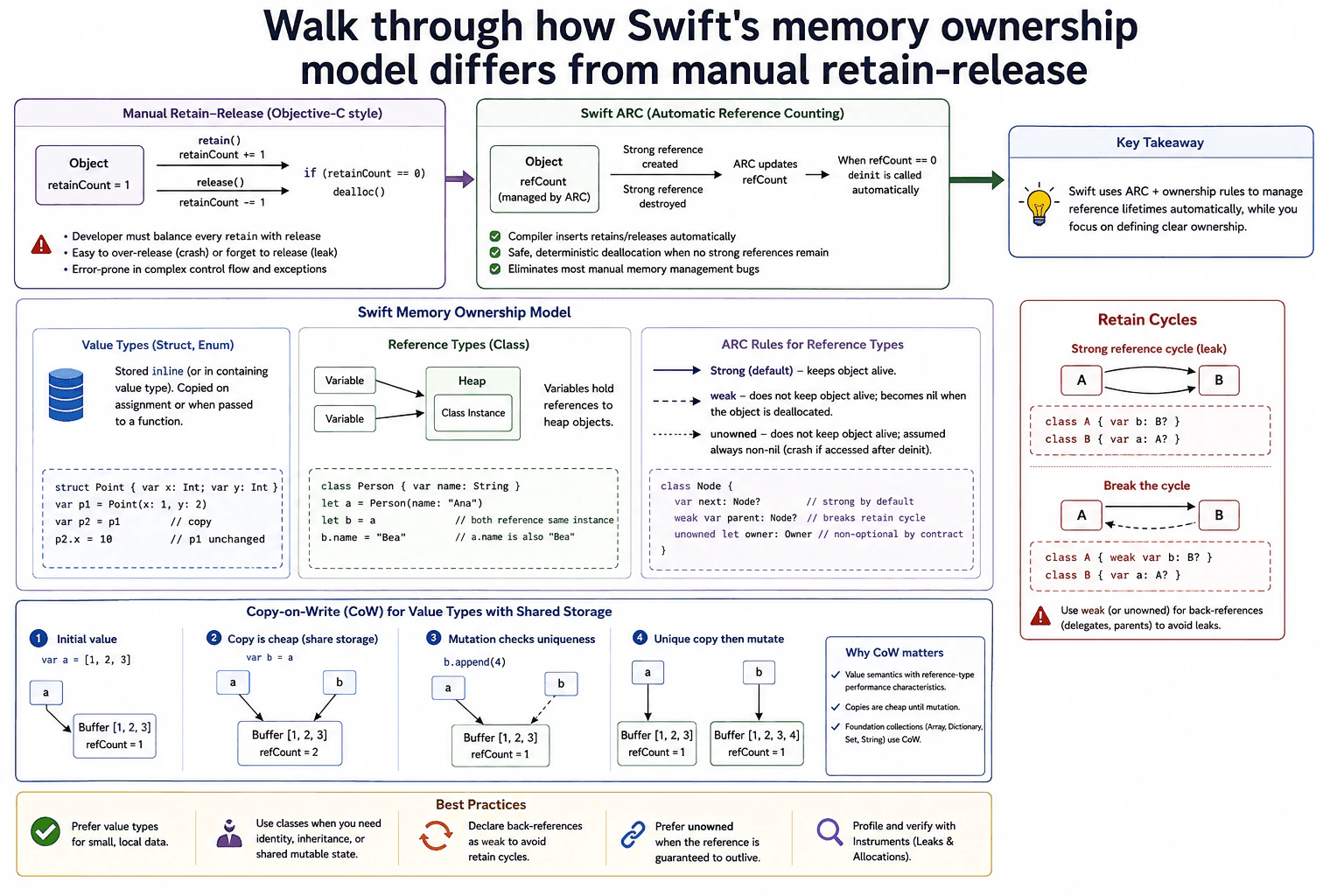
27. Walk through how Swift's memory ownership model differs from manual retain-releaseSystem DesignEasyApple
i Question Details
Explain ARC, retain cycles, value versus reference types, and the common follow-up about copy-on-write.
Short Interview Answer (30-60 seconds)
At a high level, Swift makes reference ownership safer than manual retain-release. The main challenge is keeping class instances alive only while something owns them, without creating leaks. I would explain it in three parts: ARC ownership rules, value versus reference types, and copy-on-write. ARC removes most manual retain and release calls, but strong reference cycles can still leak. Swift handles those cycles with weak or unowned references. The trade-off is safer memory management, but developers still need to design ownership correctly.
Detailed Explanation
The goal is to understand how Swift manages memory without making developers manually balance every retain and release call. Manual retain-release puts that work on the programmer, so a missing release can leak memory and an extra release can destroy an object too early. Swift moves most of this work into ARC. The remaining challenge is ownership. Developers still need to know which references should keep an object alive, how cycles happen, and why value types behave differently from class references. Copy-on-write then shows how Swift keeps value semantics efficient.
Useful Questions to Ask the Interviewer
Should I compare Swift ARC mainly with Objective-C style manual retain-release?
Should I explain both weak and unowned references when discussing retain cycles?
Should I cover copy-on-write using standard value types such as Array, Dictionary, Set, and String?
How to Explain It in an Interview
1. Start with manual retain-release
I would start with the older model because it makes ARC easier to understand. Under manual retain-release, code explicitly calls retain when another owner needs an object. That increases its reference count. Code later calls release to decrease the count.
When the count reaches zero, the object is destroyed. The danger is that every retain must be balanced correctly. Too many releases can destroy an object too early. Missing a release can leave an unused object in memory.
2. Explain Swift ARC
Next, I would explain ARC, which means Automatic Reference Counting. Swift manages the reference-counting operations needed for class instances automatically. A strong reference keeps a class instance alive.
As strong references are created and removed, ARC tracks the object's ownership. When no strong references remain, Swift deinitializes the instance automatically. This removes most manual retain and release work. The developer still defines the ownership relationships that ARC follows.
3. Explain strong, weak, and unowned references
Strong is the normal reference type. A strong reference owns the object and keeps it alive. Weak and unowned references do not keep the referenced object alive.
A weak reference is optional and becomes nil when the referenced object is deallocated. An unowned reference is used when the program expects the referenced object to remain alive whenever that reference is accessed. Accessing an unowned reference after its object has been deallocated is unsafe, so that lifetime rule must really hold.
4. Explain retain cycles
A retain cycle happens when class instances keep each other alive with strong references. For example, A can strongly reference B while B strongly references A. Neither reference count reaches zero, so ARC cannot deallocate either instance.
The normal fix is to make a back-reference weak when it may become nil. Unowned can be used when the lifetime relationship guarantees that the referenced object must outlive that reference. Delegates, parent relationships, and similar back-references are common places to check for cycles.
5. Compare value types, reference types, and copy-on-write
Structs and enums are value types. Assignment gives independent value semantics, so changing one value does not change another copy. Classes are reference types. Multiple variables can point to the same class instance, so a change through one reference is visible through the others.
Copy-on-write makes large value types cheaper to copy. For example, two Array values can initially share the same backing buffer. A mutation checks whether that storage is shared. If it is shared, Swift gives the value being changed its own buffer before applying the mutation. This keeps value semantics while avoiding unnecessary copying. Standard types such as Array, Dictionary, Set, and String use this idea. In practice, I would also use Instruments when I need to find leaks or unexpected allocations.
Engineering Considerations / Design Trade-offs
The benefit is that ARC removes most manual retain and release work. This makes reference management safer and avoids many common mistakes. The downside is that ARC only follows ownership references. It cannot decide that two strongly connected objects are no longer useful, so retain cycles can still leak memory. Weak and unowned references solve that problem when used with the correct lifetime rules. Value types are easier to reason about because copies behave independently. Copy-on-write keeps those value semantics without always copying large storage immediately. The downside is that the first mutation of shared storage may require a new allocation and a real copy.
Why Interviewers Ask This
Interviewers ask this to see whether you understand ownership rather than only Swift syntax. They want to know why ARC is safer than manual retain-release, where ARC can still fail because of strong reference cycles, and when weak or unowned references are appropriate. They also want to see whether you understand value semantics, reference semantics, and how copy-on-write gives Swift value types good performance without changing their expected behavior.
Interviewer may ask next
What happens if two Swift class instances strongly reference each other, and how would you fix it?
They can form a retain cycle. Suppose object A has a strong reference to B, and B has a strong reference back to A. Each object keeps the other alive. Even after the rest of the program stops using them, both still have a strong owner. Their reference counts therefore never reach zero, so ARC does not deinitialize them.
I would break the cycle by making one side non-owning. A weak reference is appropriate when that relationship may disappear. Weak references are optional and automatically become nil after the referenced object is deallocated.
I would use unowned only when the lifetime relationship guarantees that the referenced object will still exist whenever the reference is accessed. A common pattern is a strong forward ownership relationship and a weak back-reference, such as a child pointing weakly to its parent or a delegate reference being weak.
The downside is that ARC cannot choose this ownership design for us. Developers still need to model object lifetimes correctly.
Why does Swift use copy-on-write for value types such as Array instead of always copying their storage immediately?
Copy-on-write keeps value semantics while avoiding copies that may never be needed. Suppose a contains an Array and b is assigned from a. Logically, a and b are independent values. Swift can still let them share the same backing buffer while neither value is being changed.
When b is mutated, Swift checks whether that buffer is shared. If a still uses the same storage, b receives its own buffer before the change is applied. After the mutation, a still has the original elements while b has the changed elements. Their value semantics therefore remain correct.
The benefit is that a simple assignment can be cheap even when the collection contains a lot of data. Swift only pays for a full storage copy when a mutation actually requires separate storage. The downside is that this cost is delayed rather than removed. A later write to shared storage can require a new allocation and copy.
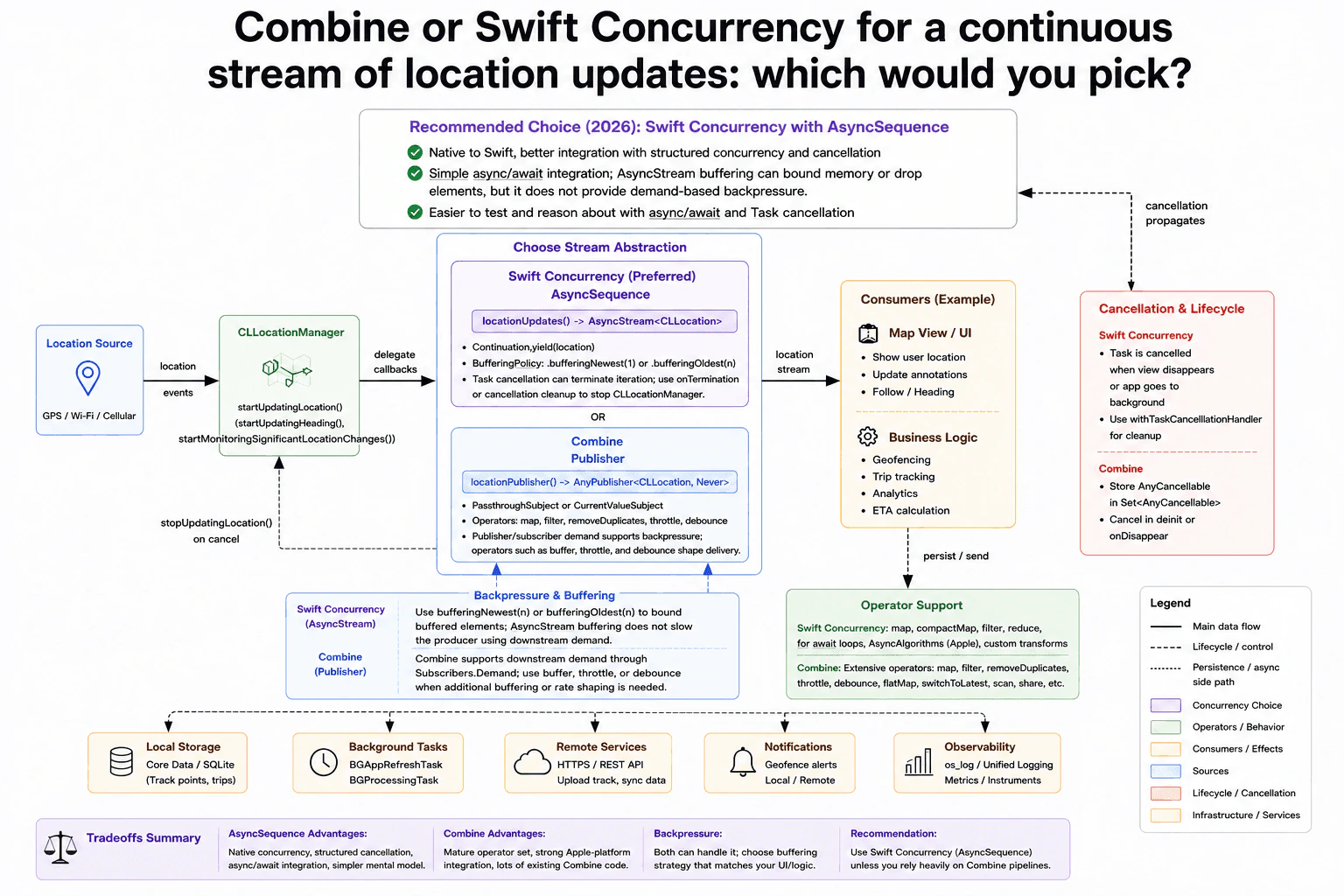
28. Combine or Swift Concurrency for a continuous stream of location updates: which would you pick?System DesignEasyApple
i Question Details
Compare cancellation, backpressure, and operator support for a live location stream.
Short Interview Answer (30-60 seconds)
At a high level, I need a clean way to consume continuous location updates. The main challenge is handling cancellation, slow consumers, and stream operations without making the code hard to manage. I would compare Swift Concurrency and Combine across cancellation, backpressure, and operator support. For new code, I would pick Swift Concurrency with AsyncSequence. AsyncStream gives simple async/await integration and bounded buffering. Combine remains strong when I need demand-aware publishers or an existing, operator-heavy Combine pipeline.
Detailed Explanation
The goal is to handle a continuous stream of location changes and deliver useful updates to the application. The difficult part is managing a stream that may run for a long time. We must stop work when the consumer disappears, avoid unlimited buffering when updates arrive quickly, and transform values when needed. The diagram compares two choices. Swift Concurrency uses AsyncSequence with AsyncStream. Combine uses a Publisher. I would compare cancellation, buffering and backpressure, and operator support before choosing one.
Useful Questions to Ask the Interviewer
Is this new code, or does the application already use Combine heavily?
Does the consumer need every location update, or mainly the newest location?
Do we need complex stream operations such as throttle, debounce, or combining publishers?
How to Explain It in an Interview
1. Start with the location source
I would start with where the updates come from. Location Source represents GPS, Wi-Fi, or cellular events. CLLocationManager receives those events and exposes delegate callbacks.
The manager can use startUpdatingLocation(), startUpdatingHeading(), or startMonitoringSignificantLocationChanges(). Those callbacks feed the stream abstraction in the middle of the diagram.
2. Prefer Swift Concurrency for new code
For new code, I would choose Swift Concurrency with AsyncSequence. The diagram wraps the delegate callbacks as locationUpdates() returning AsyncStream<CLLocation>.
The continuation yields each location value. A consumer can read the stream with a for await loop. This fits naturally with async/await and structured concurrency, where asynchronous work follows the lifetime of the task that owns it.
Cancellation still needs cleanup. Task cancellation can end iteration, but the stream should use onTermination or cancellation cleanup to call stopUpdatingLocation(). This prevents CLLocationManager from continuing after the consumer is gone.
3. Handle buffering and backpressure correctly
AsyncStream can use bufferingNewest(n) or bufferingOldest(n). These policies bound the number of buffered elements and can drop values when the consumer is slower.
This is not demand-based backpressure. The producer is not automatically slowed by downstream demand. The policy decides which values remain buffered while production continues.
Combine supports downstream demand through Subscribers.Demand when the publisher honors that demand. Operators such as buffer, throttle, and debounce can further shape delivery.
4. Compare operator support
Swift Concurrency supports operations such as map, compactMap, filter, and reduce. AsyncAlgorithms can provide more sequence operations, and custom transforms can be written around await loops.
Combine has a mature operator set. The diagram shows map, filter, removeDuplicates, throttle, debounce, flatMap, switchToLatest, scan, and share. That makes Combine attractive when an application already has complex Combine pipelines.
5. Connect the stream to consumers and lifecycle handling
The location stream can update a Map View or UI. It can also drive business logic such as geofencing, trip tracking, analytics, and ETA calculation.
The diagram shows optional side paths for Local Storage, Background Tasks, Remote Services, Notifications, and Observability. These are supporting paths, not requirements for every location update.
For lifecycle handling, Swift Concurrency cancels the task and performs cleanup. Combine stores AnyCancellable values in Set<AnyCancellable> and cancels them when the consumer disappears. The main trade-off is simple. Swift Concurrency gives a cleaner async/await model and structured cancellation. Combine gives mature operators and subscriber demand. For new code, I would choose Swift Concurrency unless the application already relies heavily on Combine.
Engineering Considerations / Design Trade-offs
The benefit of Swift Concurrency is simpler code. AsyncSequence fits naturally with async/await, and task cancellation is easier to follow. AsyncStream can also keep only a bounded number of location values. The downside is that this buffering is not demand-based backpressure. A slow consumer does not automatically slow the producer. Combine supports subscriber demand and has a larger mature operator set. That helps with pipelines using throttle, debounce, flatMap, or similar operations. The downside is more subscription and lifecycle management. For new code, the diagram favors Swift Concurrency. Existing Combine-heavy applications may reasonably keep Combine.
Why Interviewers Ask This
The interviewer wants to see whether you can choose a streaming model for the real problem instead of choosing a technology by habit. They want you to understand cancellation, slow consumers, bounded buffering, demand-based backpressure, and operator support. They also want clear judgment about trade-offs. A strong answer explains why Swift Concurrency fits new code while recognizing when an existing Combine pipeline is still the better choice.
Interviewer may ask next
What would you change if location updates arrive much faster than the consumer can process them and losing older updates is acceptable?
I would keep the same Swift Concurrency design, but I would make the AsyncStream buffering policy explicit. If the UI mainly needs the newest position, I would use bufferingNewest(n). That keeps only a bounded number of recent locations and drops older buffered values when newer ones arrive.
This changes only the buffering behavior in the AsyncStream section. CLLocationManager still produces delegate callbacks, and the consumer still reads values through AsyncSequence. Cancellation and cleanup also stay the same.
The benefit is bounded memory use. It also matches a map UI where an old position may no longer matter once a newer position exists.
The downside is that some location updates may never reach the consumer. This also does not create demand-based backpressure. The producer is not automatically slowed because the consumer is busy.
What would you choose if the application already has several complex Combine pipelines for location processing?
I would seriously consider keeping Combine for that part of the application. The diagram already shows Combine as a valid choice with a mature operator set. Existing pipelines may depend on removeDuplicates, throttle, debounce, flatMap, switchToLatest, scan, or share.
The main flow would stay the same. CLLocationManager still provides delegate callbacks. Those callbacks feed locationPublisher(), and consumers subscribe to the Publisher. Combine also supports downstream demand through Subscribers.Demand when the publisher honors it.
I would keep lifecycle handling explicit by storing AnyCancellable values in Set<AnyCancellable> and cancelling them when the consumer disappears. That prevents subscriptions from living longer than needed.
The downside is that the code keeps Combine's subscription model instead of the simpler async/await style. Replacing a large working Combine pipeline may create migration work without enough benefit.
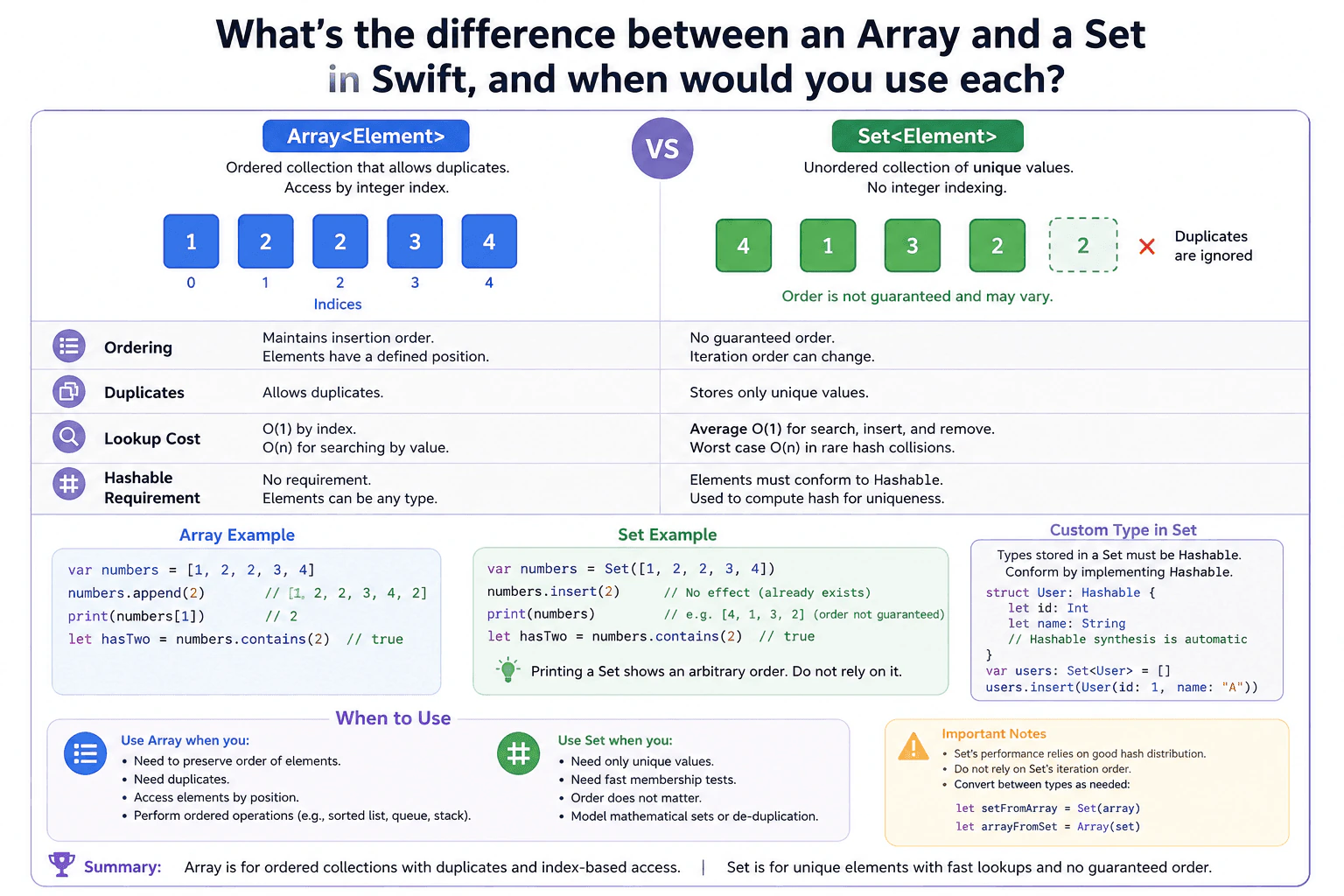
29. What's the difference between an Array and a Set in Swift, and when would you use each?System DesignEasyApple
i Question Details
Compare ordering, duplicates, lookup cost, and the Hashable requirement for custom types.
Short Interview Answer (30-60 seconds)
At a high level, Array and Set solve different collection needs in Swift. The main choice is whether order, duplicates, or fast membership checks matter most. I would compare them in three parts: ordering and duplicates, lookup cost, and type requirements. An Array keeps insertion order, allows duplicates, and supports O(1) index access. A Set stores unique values and gives average O(1) membership checks, but its order is not guaranteed. The trade-off is that Set elements must conform to Hashable.
Detailed Explanation
This question asks us to choose the right Swift collection for the job. An Array is useful when values need a known order or when duplicates are meaningful. A Set is useful when values must be unique or when we often need to check whether something exists. The main challenge is understanding which behavior matters more for the program. I would explain the choice by comparing order, duplicates, lookup cost, and the requirement that Set elements support Hashable. Then I would show when each collection is the better fit.
Useful Questions to Ask the Interviewer
Do we need to preserve the order of the values?
Are duplicate values meaningful, or should each value appear once?
Will we frequently check whether a value already exists?
Will the collection store custom types?
How to Explain It in an Interview
1. Start with ordering and access
I would start by saying that Array is ordered, while Set has no guaranteed order. An Array keeps elements in insertion order. Each element also has a position, so we can access it using an integer index. Reading a known Array index is O(1), which means the access cost stays roughly constant as the collection grows. A Set does not provide integer-based indexing. Its iteration order can change, so code should not depend on that order.
2. Compare duplicate behavior
Next, I would explain that an Array allows duplicate values. For example, [1, 2, 2, 3, 4] is a valid Array. A Set stores only unique values. If 2 is already in the Set, inserting 2 again does not add another copy. This makes Set a natural choice when duplicate values should be removed or prevented.
3. Compare lookup cost
The lookup difference is important when the collection becomes large. Searching an Array by value is O(n), because Swift may need to examine many elements. A Set uses hashing to find values quickly. Its search, insert, and remove operations are average O(1). In rare cases with poor hash distribution, the cost can reach O(n). That is why Set is useful when fast membership checks matter more than order.
4. Explain the Hashable requirement
A Set requires its element type to conform to Hashable. Hashable lets Swift calculate a hash value that helps the Set locate values and keep them unique. Common types such as Int and String already support it. The diagram also shows a custom User struct conforming to Hashable. When its stored properties support Hashable, Swift can synthesize the conformance automatically.
5. Choose the collection from the requirement
I would use Array when order matters, duplicates are allowed, or I need position-based access. I would use Set when I need unique values or frequent membership checks and order does not matter. Swift can convert an Array to a Set with Set(array) and convert back with Array(set). The important trade-off is that converting to a Set removes duplicates and does not preserve a guaranteed iteration order.
Engineering Considerations / Design Trade-offs
The benefit of Array is that it keeps a predictable order and supports direct access by position. It also allows duplicate values. The downside is that searching for a value normally takes O(n), so repeated membership checks can become slower as the Array grows. The benefit of Set is average O(1) search, insert, and remove, and it keeps values unique automatically. The downside is that Set has no guaranteed iteration order and does not support integer-based indexing. Its elements must also conform to Hashable. We accept those limits when uniqueness and fast membership checks matter more than ordering.
Why Interviewers Ask This
Interviewers ask this to see whether you choose a collection based on the real requirement instead of habit. They want to know if you understand ordering, duplicates, lookup cost, and Hashable. They also want to hear the trade-off clearly. A strong answer shows that you can explain why Array fits one kind of data and Set fits another.
Interviewer may ask next
What would you change if membership checks became very frequent and the order of the values did not matter?
I would use a Set for that collection. The requirement has changed because fast membership checks now matter more than order or position-based access. With an Array, searching for a value is normally O(n), because Swift may need to check many elements. With a Set, contains is average O(1), so repeated membership checks are usually much faster.
I would first confirm that duplicate values are not meaningful. I would also make sure the element type conforms to Hashable. If the values currently come from an Array, I can create the Set with Set(array). Any duplicate values are removed during that conversion.
The behavior stays correct because Set directly represents the new requirement: unique values with fast membership tests. The main downside is that iteration order is no longer guaranteed, and I cannot access elements using integer indexes.
What if the collection must store a custom Swift type that does not currently conform to Hashable?
I would first decide whether the program really needs Set behavior. A Set requires every element to conform to Hashable. Swift uses that support to calculate hashes and locate values efficiently. If the custom type has a clear meaning of equality, I would make it conform to Hashable. For a simple struct whose stored properties also support Hashable, Swift can usually synthesize that conformance automatically.
If Hashable does not make sense for the custom type, I would use an Array instead. Array has no Hashable requirement, so it can store the type without that extra constraint. The collection would still preserve order and allow duplicates.
The main downside is lookup cost. Searching an Array by value is normally O(n), while Set membership checks are average O(1). So the choice depends on whether Hashable and uniqueness fit the model.
30. How do you diagnose and fix excessive scroll jitter in a UITableView or UICollectionView?System DesignEasyApple
i Question Details
Walk through the diagnosis order, how Instruments is used, and which layout or image-loading fixes actually remove the jank.
Short Interview Answer (30-60 seconds)
At a high level, the goal is to make scrolling stay smooth while cells appear and update. The main challenge is finding which work misses the frame budget instead of guessing. I would break the diagnosis into three parts: reproduce the jitter, measure it with Instruments, then fix the measured bottleneck and profile again. Common fixes simplify cell and layout work, move image decoding off the main thread, reduce overdraw, and avoid full reloads. The downside is more background-work and cache management.
Detailed Explanation
The goal is to find why a table or collection view cannot draw some frames quickly enough. The difficult part is that many different problems can look like the same scroll stutter. Heavy cell setup, layout work, image decoding, extra drawing, memory churn, or synchronous work can all delay the next frame. The diagram uses an evidence-first process. Reproduce the problem on a real device, measure it, identify the bottleneck, confirm it with evidence, apply the matching fix, and record again to prove that scrolling improved.
Useful Questions to Ask the Interviewer
Does the jitter happen on real devices, or only in the Simulator?
Is it worse when images appear or complex cells become visible?
Are we targeting about 60 FPS and frames below 16.7 ms?
How to Explain It in an Interview
1. Reproduce and create a baseline
I would first make the problem repeatable. I would use a real device with a Release build and record a short scrolling trace. I would note the device, content size, and cell type. I would also use Color Blended Layers or Slow Animations when they help expose rendering problems.
2. Measure before changing code
Next, I would profile the actual hitch. Core Animation shows FPS, long frames, and rendering problems. Time Profiler shows main-thread CPU hotspots and useful backtraces. Allocations shows object churn during scrolling. I would also inspect memory for retain cycles when memory growth is part of the symptom.
3. Identify and confirm the bottleneck
Then I would connect the measurements to the exact scroll hitch. I would check for too many layout passes, expensive cell work, image decoding on the main thread, overdraw, or synchronous disk and network work. Allocation spikes can also reveal repeated temporary objects. I would fix only a cause that the trace supports.
4. Fix cell, layout, and image work
For cells, I would keep cellForRowAt or cellForItemAt lightweight. Heavy data or image preparation should happen before the cell needs it. I would reuse content views and use UIContentConfiguration with updateConfiguration(using:) where it fits.
For layout, I would create constraints once and update constants. I would set estimatedRowHeight or estimatedItemSize correctly and avoid layoutIfNeeded during scrolling. Self-sizing cells need complete, unambiguous constraints.
For images, I would load and decode them away from the main thread. I would downsample them to the displayed size, cache completed images, show a placeholder immediately, prefetch when useful, and cancel in-flight work when a reused cell no longer needs it.
5. Reduce drawing, updates, and CPU pressure
If overdraw is expensive, I would remove unnecessary backgrounds, transparency, masks, and shadow combinations. Opaque views can reduce blending work. For data changes, I would prefer incremental Diffable Data Source updates and batching instead of full reloads. Background preparation can use OperationQueue or Task priorities, while UI changes stay on the main actor. I would also throttle background work so it does not consume all available CPU.
6. Re-run the same test
Finally, I would record the same scroll again. I would look for about 60 FPS, frame times below roughly 16.7 ms, lower main-thread CPU, fewer allocations, and stable memory. I would test multiple real devices and add performance tests or signposts for regressions. The key rule is simple: measure, fix the proven cause, and measure again.
Engineering Considerations / Design Trade-offs
The benefit is that this approach fixes the measured cause instead of hiding the symptom. Moving expensive image and data work away from the main thread gives each frame more time to draw. Caching and prefetching can also avoid repeated work. The downside is more code for cancellation, cache limits, task priorities, and reused cells. Simpler layouts and fewer visual effects can also limit some UI choices. Background work must be controlled because too much of it can still compete for CPU. We accept that extra care because stable frame timing is more important than doing unnecessary work while the user scrolls.
Why Interviewers Ask This
Interviewers want to see whether you diagnose performance problems with evidence instead of guessing. They also want to know if you understand frame timing, main-thread work, Instruments, cell reuse, Auto Layout, image decoding, overdraw, and memory churn. A strong answer connects a measured bottleneck to a specific fix, then repeats the measurement to prove that the change actually improved scrolling.
Interviewer may ask next
What would you change if the collection view is an image-heavy feed and the jitter mainly happens when new images first appear?
I would keep the same diagnosis flow, but I would focus first on the Image Loading path. I would use Time Profiler and Core Animation while new images enter the screen. If decoding or resizing appears in the main-thread hotspots during a hitch, that gives me a specific cause to fix.
I would load and decode the images away from the main thread. I would downsample each image to roughly the size actually displayed in the cell. Completed images can be stored in NSCache and a disk cache so repeated scrolling does not repeat expensive work. I would also show a placeholder immediately and use prefetching when it helps prepare nearby images.
Cell reuse needs special care. When a cell is reused, I would cancel work that no longer belongs to it and verify the result still matches the current cell before updating the UI. The final UI change stays on the main actor. The downside is more cache, cancellation, and request-management code.
What would you do if Time Profiler shows that Auto Layout is causing most of the long frames?
I would keep the same overall workflow and change only the Layout Performance part of the fix. First, I would confirm that layout work lines up with the recorded scroll hitches. Then I would inspect the cells that become visible during those expensive frames.
I would create constraints once instead of rebuilding them during every cell update. When content changes, I would update constraint constants. I would avoid repeated layoutIfNeeded calls in the scrolling path. For self-sizing cells, I would make the constraints complete and set estimatedRowHeight or estimatedItemSize correctly. I would also reduce unnecessary nested views and expensive sizeThatFits or preferredLayoutAttributes work if the profile points there.
After changing the layout, I would record the same scroll again and compare frame time and main-thread CPU. This keeps the fix tied to evidence. The downside is that simplifying a complex cell layout may require UI restructuring and more testing across different content sizes.
More questions load as you scroll
Disclaimer: This interview guide is for educational and informational purposes only. It is designed to help readers prepare, but it does not guarantee any interview result, hiring decision, offer, or outcome. Interview questions, hiring criteria, and preferred answers can vary by employer, interviewer, industry, location, and time. All answers, examples, and explanations in this guide are suggested examples for interview preparation, not definitive answers or instructions for professional practice. They are based on research and judgment, are provided without warranties of any kind, and should be adapted to the question, role, and applicable laws and professional requirements. Diagrams are simplified illustrations intended to highlight the main concepts and their relationships; actual situations, systems, and practices may be more complex. Alternative approaches may be equally valid or better suited to a particular question, context, or interviewer. To the fullest extent permitted by applicable law, the contributors and publisher are not liable for decisions made, actions taken, or losses incurred based on this guide.
State Laws and Professional Responsibilities: Laws and requirements governing an occupation vary by state and jurisdiction. You are responsible for checking the current laws, licensing requirements, and scope-of-practice rules that apply to your location and role, and for ensuring that your answers and actions comply with them. Adapt examples in this guide to those requirements. This guide is not legal advice.
Company Notice: This guide is an independent educational resource and is not affiliated with, endorsed by, sponsored by, or approved by the company named in this guide. Company names identify reported interview experiences or the employer context of clearly labeled original practice exercises. Interview practices can change without notice, and inclusion of company-specific content does not mean these questions are official, complete, or guaranteed to be asked. To the fullest extent permitted by law, the author, contributors, and publisher are not responsible for outcomes related to use of this material.
Content Accuracy and Verification: To the fullest extent permitted by applicable law, we do not represent or warrant that interview guides, questions, answers, examples, or diagrams are accurate, complete, current, error-free, or suitable for any particular purpose. You are responsible for independently reviewing and verifying the information before relying on it.