This interview guide is for educational and informational purposes only. It is designed to help readers prepare, but it does not guarantee any interview result, hiring decision, offer, or outcome. Interview questions, hiring criteria, and preferred answers can vary by employer, interviewer, industry, location, and time. All answers, examples, and explanations in this guide are suggested examples for interview preparation, not definitive answers or instructions for professional practice. They are based on research and judgment, are provided without warranties of any kind, and should be adapted to the question, role, and applicable laws and professional requirements. Diagrams are simplified illustrations intended to highlight the main concepts and their relationships; actual situations, systems, and practices may be more complex. Alternative approaches may be equally valid or better suited to a particular question, context, or interviewer. To the fullest extent permitted by applicable law, the contributors and publisher are not liable for decisions made, actions taken, or losses incurred based on this guide.
State Laws and Professional Responsibilities
Laws and requirements governing an occupation vary by state and jurisdiction. You are responsible for checking the current laws, licensing requirements, and scope-of-practice rules that apply to your location and role, and for ensuring that your answers and actions comply with them. Adapt examples in this guide to those requirements. This guide is not legal advice.
Identity, Image, and Privacy Notice
To respect individual privacy, some names, profile photographs, avatars, biographical details, and other identifying information displayed in this guide may be replaced with pseudonyms, licensed stock images, illustrative avatars, composite images, or representative descriptions. Unless a person is expressly identified as an actual contributor, a displayed name, image, or profile should not be understood as depicting or identifying a specific candidate, interviewer, employee, or other real individual. These representations are provided for editorial and illustrative purposes only and do not imply endorsement, employment, participation, or affiliation with this guide or any company mentioned in it. Any resemblance to an actual person is coincidental.
Company Notice
This guide is an independent educational resource and is not affiliated with, endorsed by, sponsored by, or approved by the company named in this guide. Company names identify reported interview experiences or the employer context of clearly labeled original practice exercises. Interview practices can change without notice, and inclusion of company-specific content does not mean these questions are official, complete, or guaranteed to be asked. To the fullest extent permitted by law, the author, contributors, and publisher are not responsible for outcomes related to use of this material.
Content Accuracy and Verification
To the fullest extent permitted by applicable law, we do not represent or warrant that interview guides, questions, answers, examples, or diagrams are accurate, complete, current, error-free, or suitable for any particular purpose. You are responsible for independently reviewing and verifying the information before relying on it.
Questions or comments?
Contact us for general questions, or share feedback, technical corrections, and comments with the community.
31. Design CI/CD for AI services.System DesignMediumApple
i Question Details
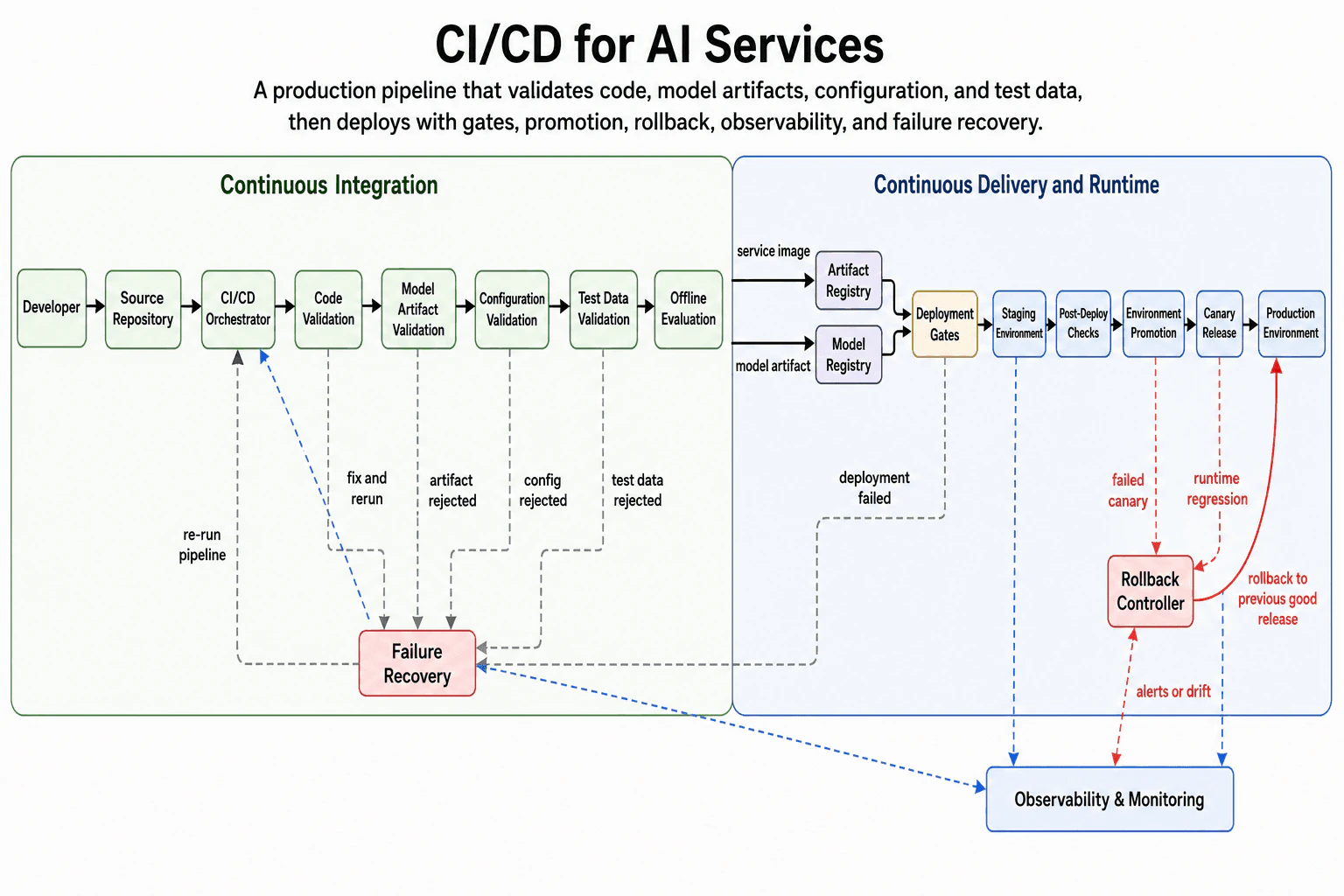
Design a CI/CD system for AI services that validates code, model artifacts, configuration, test data, deployment gates, rollback, environment promotion, observability, and failure recovery.
Short Interview Answer (30-60 seconds)
At a high level, this system moves AI changes safely from development into production. The main challenge is that code, model artifacts, configuration, and test data can fail in different ways. I would explain it in three parts: validation, controlled environment promotion, and runtime recovery. The pipeline stores approved service and model artifacts, deploys through staging and canary steps, and watches production. The trade-off is slower releases in exchange for lower production risk.
Detailed Explanation
The goal is to release AI services safely without treating every change as ordinary application code. A release may contain code, a model artifact, configuration, and test data. Any one of these inputs can produce a bad deployment. The diagram handles this through three connected areas: Continuous Integration, Continuous Delivery and Runtime, and recovery paths for both pipeline and production failures.
Useful Questions to Ask the Interviewer
Which user flows and system capabilities are required for the first version?
What traffic, data volume, latency, and availability targets should I design for?
Which consistency, security, geographic, and cost constraints matter most?
How to Explain It in an Interview
1. Explain how a release begins
I would start by saying that the Developer sends changes to the Source Repository. The CI/CD Orchestrator then controls the release process. It decides which validation step runs next and tracks whether the release may continue.
This single control point keeps the flow ordered. It also provides one place to restart the pipeline after a problem is fixed.
2. Explain the validation flow
The main validation path moves from left to right. Code Validation checks the service code. Model Artifact Validation checks the model package. Configuration Validation checks the settings used by the service. Test Data Validation checks the data used during release testing.
Offline Evaluation then tests the model before deployment. This gives the team a chance to find model-quality problems before users see them.
Each validation failure goes to Failure Recovery. The diagram shows reasons such as artifact rejection, bad configuration, and rejected test data. After the team fixes the problem, Failure Recovery sends the process back to the CI/CD Orchestrator for another run.
3. Explain artifact storage and deployment gates
After Offline Evaluation passes, the pipeline creates two approved outputs. The service image goes to the Artifact Registry. The model artifact goes to the Model Registry.
Both registries feed Deployment Gates. A deployment gate is a required approval or check before release work continues. This makes sure the service image and model artifact have both passed the earlier checks.
A deployment failure returns to Failure Recovery. The release does not continue until the problem is corrected and the pipeline runs again.
4. Explain safe environment promotion
The approved release first enters the Staging Environment. Post-Deploy Checks test the running service after deployment. Environment Promotion then moves the same release toward production.
The next step is Canary Release. A canary exposes the release to a limited production group first. If it remains healthy, the release reaches the Production Environment.
This order reduces risk. A bad release can be stopped before it affects every user.
5. Explain monitoring, rollback, and recovery
Observability & Monitoring receives signals from the CI/CD Orchestrator, Staging Environment, Canary Release, and Production Environment. Observability means using service signals to understand health and behavior.
A failed canary, runtime regression, alert, or model drift can trigger the Rollback Controller. Drift means the model starts behaving differently from the expected pattern. The controller returns production to the previous good release.
Failure Recovery and rollback solve different problems. Failure Recovery handles build and deployment pipeline failures. The Rollback Controller handles a release that has already reached a runtime environment.
The main trade-off is release speed versus safety. More validation and promotion steps take extra time. They greatly reduce the chance that a bad model or service reaches all users.
Engineering Considerations / Design Trade-offs
The benefit is safer AI releases. Code, model artifacts, configuration, and test data are checked separately. Staging and canary release also reduce production risk. The downside is that every release takes longer. The system also needs more moving parts, including two registries, deployment gates, monitoring, failure recovery, and rollback control. A strict check may block a release that is actually safe. A weak check may allow a bad release through. We accept the extra work because AI failures can affect both normal service behavior and model results.
Why Interviewers Ask This
Interviewers ask this question to test engineering judgment. They want to see whether the candidate treats models, configuration, and test data as real release inputs. They also look for safe promotion, clear monitoring, failure recovery, and rollback. A strong answer separates pipeline failures from runtime failures and explains the trade-off between release speed and production safety.
Interviewer may ask next
How would the design change if model artifacts were released much more often than service code?
I would keep the same architecture, but I would let model releases move through the pipeline independently. Model Artifact Validation, Test Data Validation, and Offline Evaluation would become the main checks for those releases. The approved model would still go to the Model Registry.
Deployment Gates would combine that model with an already approved service image from the Artifact Registry. The release would still pass through Staging Environment, Post-Deploy Checks, Environment Promotion, and Canary Release. This keeps the same safety rules.
Observability & Monitoring would continue watching staging, canary, and production. If the new model causes drift or a runtime regression, the Rollback Controller would restore the previous good release.
The main downside is version management. The team must clearly record which service image and model artifact were released together.
What happens if the canary looks healthy but the release fails later in production?
I would use Observability & Monitoring to detect the later production problem. The diagram already sends production signals into that component. A runtime regression, alert, or drift signal can trigger the Rollback Controller.
The controller then returns the Production Environment to the previous good release. This is faster than creating a new emergency build because the earlier release has already passed the pipeline.
The failed change should then return through Failure Recovery. The team fixes the code, model artifact, configuration, or test data that caused the problem. The CI/CD Orchestrator runs the validation and deployment flow again before another promotion.
The main downside is detection delay. Some users may see the bad release before monitoring finds the issue and rollback finishes.
32. Design iCloud Photos sync across a user's devices.System DesignMediumApple
i Question Details
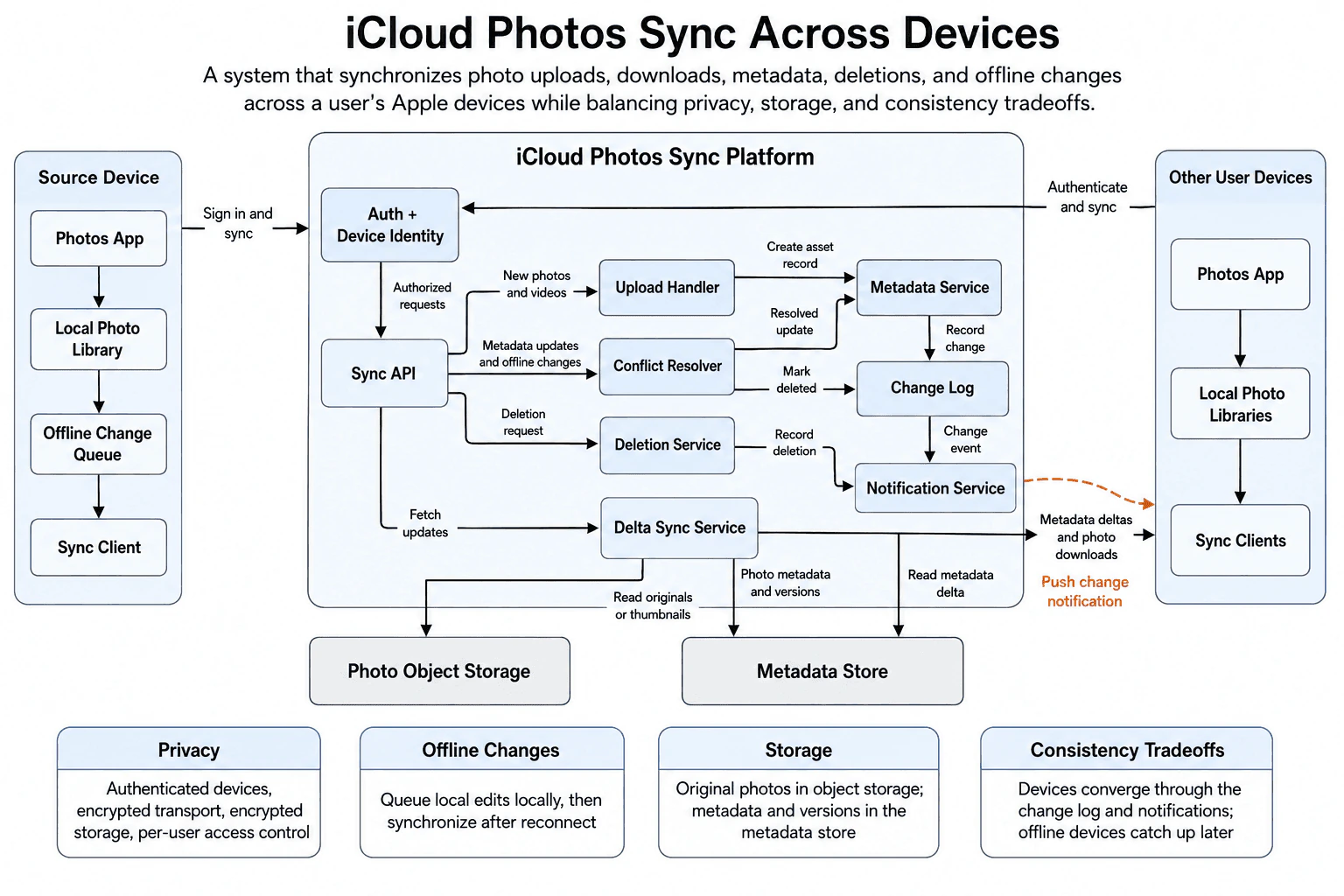
Design a system that keeps photos and metadata synchronized across a user's Apple devices. Explain upload, download, conflict handling, offline changes, metadata updates, deletion, privacy, storage, and consistency tradeoffs.
Short Interview Answer (30-60 seconds)
At a high level, this system keeps one photo library synchronized across a user’s devices. The main challenge is handling uploads, offline edits, metadata changes, and deletions without losing important updates. I would explain three flows: sending changes to iCloud, recording and notifying other devices, and downloading missing changes. Photo files live in Photo Object Storage, while Metadata Store keeps details and versions. Devices may differ briefly, but the Change Log, notifications, and delta sync help them catch up.
Detailed Explanation
The goal is to make a user’s photo library feel consistent across every device. A photo may be uploaded on one device, edited on another, or deleted while a device is offline. These actions can happen in different orders. The design handles this through three connected paths. First, devices send uploads and changes to the iCloud Photos Sync Platform. Next, the platform records metadata changes and notifies other devices. Finally, devices use Delta Sync Service to download only the changes and photo files they are missing.
Useful Questions to Ask the Interviewer
Which user flows and system capabilities are required for the first version?
What traffic, data volume, latency, and availability targets should I design for?
Which consistency, security, geographic, and cost constraints matter most?
How to Explain It in an Interview
1. Start with the device and identity flow
I would begin with the Source Device. Its Photos App works with the Local Photo Library and Sync Client.
When the device has no connection, edits wait in the Offline Change Queue. After reconnecting, Sync Client can send those changes to the platform.
The device first signs in through Auth + Device Identity. This confirms the user and device. Authorized requests then move to Sync API.
Other User Devices use the same identity path. This supports the privacy controls shown in the diagram. Data uses authenticated devices, encrypted transport, encrypted storage, and per-user access control.
2. Explain the upload path
For a new photo or video, Sync API sends the request to Upload Handler. Upload Handler manages the incoming photo data.
The diagram shows it asking Metadata Service to create an asset record. That record describes the photo and its related versions.
Photo Object Storage holds the original photo files. Metadata Store holds the smaller photo records and versions. Separating these two kinds of data keeps large files away from metadata operations.
3. Explain metadata updates and conflicts
Metadata updates and offline changes go from Sync API to Conflict Resolver. This component handles changes that may disagree.
The diagram does not require one fixed conflict rule. Conflict Resolver produces a resolved update and sends it to Metadata Service.
Metadata Service saves photo metadata and versions in Metadata Store. It also sends a record-change entry to Change Log. This log gives the system an ordered history of changes that devices can later fetch.
4. Explain deletion and notification handling
Deletion requests go from Sync API to Deletion Service. The diagram shows the deletion being recorded through the notification path so other devices can learn about it.
It also shows a mark-deleted result entering Change Log from Conflict Resolver. This lets deletion-related state become part of the change history.
For normal updates, Metadata Service records the change in Change Log. Change Log then sends a change event to Notification Service.
Notification Service sends a push change notification to Other User Devices. The notification tells Sync Clients that new changes are ready. It does not replace the full synchronization step.
5. Explain downloads and the main trade-off
When a device asks for updates, Sync API sends the request to Delta Sync Service. A delta means only the changes since the device’s last known state.
Delta Sync Service reads metadata changes from Metadata Store. It reads originals or thumbnails from Photo Object Storage. It then sends metadata deltas and photo downloads to Sync Clients on the other devices.
A notification may be delayed or missed. An offline device also cannot update immediately. After reconnecting, it can fetch the missing delta and catch up.
The main trade-off is temporary difference between devices. The benefit is that each device can keep working offline. The downside is that all devices may not show the same state at the same moment.
Engineering Considerations / Design Trade-offs
The benefit is that photo files and metadata use separate storage. Large originals stay in Photo Object Storage. Smaller records and versions stay in Metadata Store. This makes each kind of data easier to handle. Offline devices can keep working because changes wait in the Offline Change Queue. The downside is that two devices may change the same photo before reconnecting. Conflict Resolver must produce one resolved result. Notifications help devices react quickly, but they can be delayed or missed. We accept this because Delta Sync Service can later fetch the missing changes and make the devices catch up.
Why Interviewers Ask This
Interviewers use this question to test how you divide a large sync problem into clear flows. They want to see how you separate photo files from metadata, handle offline changes, resolve conflicts, and spread deletions. They also check whether you understand the difference between a notification and a full sync. A strong answer explains privacy and temporary device differences without promising instant agreement everywhere.
Interviewer may ask next
What would change if deletions must appear on every online device almost immediately?
I would keep the same basic design, but I would make the existing deletion and notification path more urgent. Sync API would still send the deletion request to Deletion Service. The deletion state would still enter the change and notification flow shown in the diagram.
Notification Service would send the push change notification as soon as the deletion is recorded. Each online Sync Client would then call Delta Sync Service immediately. Delta Sync Service would read the deletion-related metadata from Metadata Store and update the Local Photo Library.
Correctness must not depend only on the push notification. Notifications can be delayed or missed. A device must still fetch its missing delta after reconnecting or opening the Photos App.
The main downside is more traffic. A large deletion batch could create many notifications and many Delta Sync Service requests at the same time.
How should the system handle two offline devices editing the same photo metadata?
I would keep the same architecture and use Conflict Resolver for both updates. Each device stores its edit in the Offline Change Queue. After reconnecting, Sync Client sends the update through Auth + Device Identity and Sync API.
Sync API sends both offline changes to Conflict Resolver. The resolver applies the product’s conflict rules and produces one resolved update. The diagram does not require one specific rule, so I would not assume that the newest timestamp always wins.
The resolved update goes to Metadata Service. Metadata Service saves the result in Metadata Store and records the change in Change Log. Notification Service then alerts the other devices. Their Sync Clients use Delta Sync Service to fetch the resolved version.
The downside is that one edit may be changed or lost when both updates cannot be combined. Clear product rules are therefore important.
33. Design a feature that decides between on-device and cloud processing.System DesignMediumApple
i Question Details
Design a feature that chooses whether work should run on the device or in the cloud. Explain decision inputs, privacy, latency, battery, network conditions, model or rule updates, fallbacks, monitoring, and user experience tradeoffs.
Short Interview Answer (30-60 seconds)
At a high level, this feature chooses where each request should run. The main challenge is balancing privacy, speed, battery, network quality, and processing power. I would explain three flows: how the Decision Engine chooses a path, how on-device or cloud processing produces a result, and how fallbacks protect the user experience. On-device work supports privacy and offline use. Cloud work supports larger models and heavier compute. The trade-off is keeping results consistent when the system switches paths.
Detailed Explanation
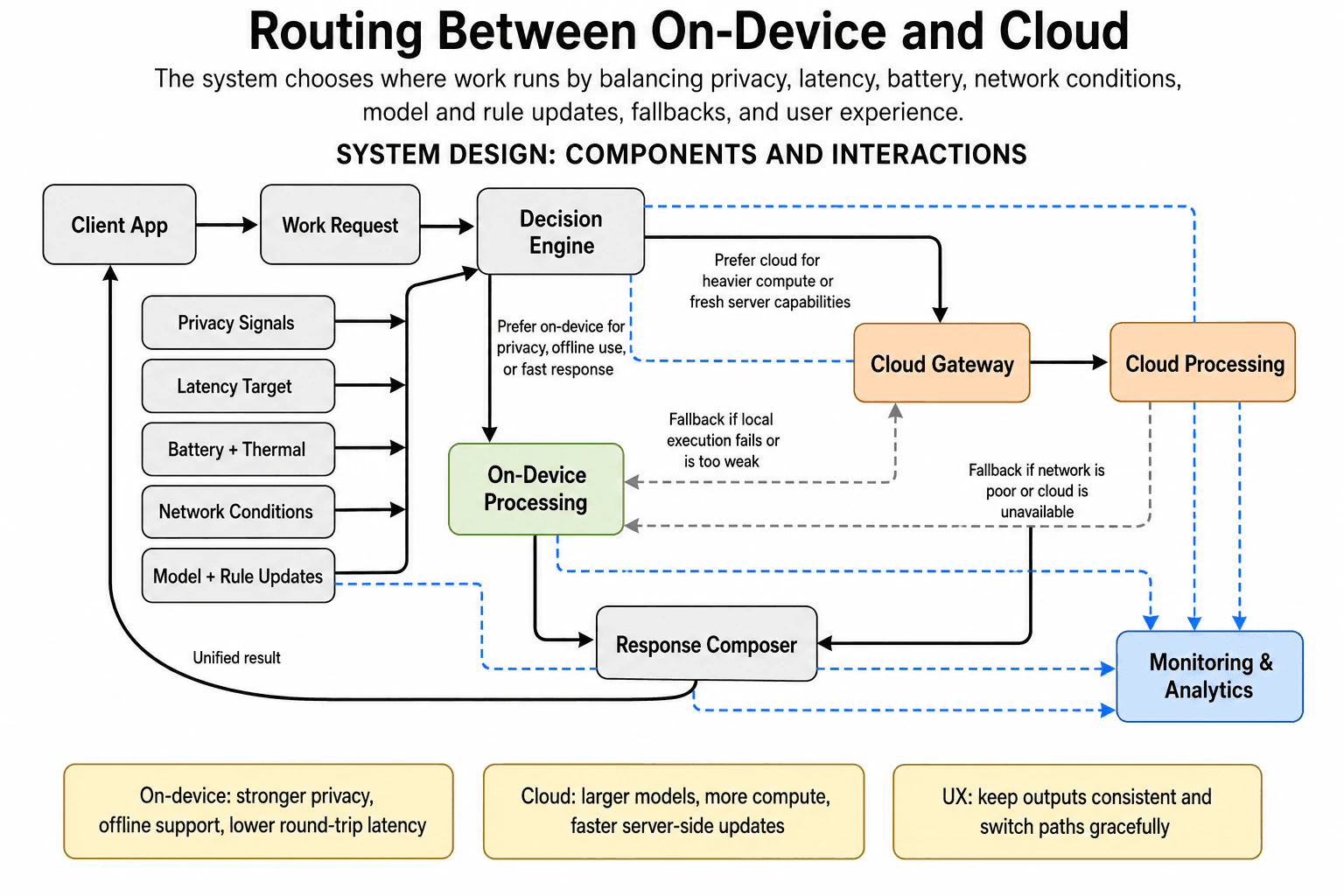
The goal is to run each Work Request in the best available place. Some requests need strong privacy or a very fast response. Other requests need larger models or more computing power. The design solves this with five decision inputs, two processing paths, fallback routes, one shared response path, and monitoring.
Useful Questions to Ask the Interviewer
Which user flows and system capabilities are required for the first version?
What traffic, data volume, latency, and availability targets should I design for?
Which consistency, security, geographic, and cost constraints matter most?
How to Explain It in an Interview
1. Explain how the system makes the decision
I would start with the Client App sending a Work Request to the Decision Engine. The engine chooses between On-Device Processing and the cloud path.
It uses five inputs. Privacy Signals show whether data should stay on the device. Latency Target shows how quickly the result is needed. Battery + Thermal shows whether local work may drain power or create too much heat. Network Conditions show whether the cloud is reachable. Model + Rule Updates help the engine use current routing rules and capabilities.
These inputs let the system choose a path for each request instead of using one fixed rule.
2. Explain the on-device path
For private, offline, or fast work, the Decision Engine sends the request to On-Device Processing. This avoids sending sensitive data across the network. It also removes the delay of sending the request to a remote server and waiting for it to return.
The local path is useful when the network is weak or unavailable. Its limits are device battery, heat, memory, and processing power.
When local processing finishes, it sends the result to the Response Composer.
3. Explain the cloud path
For heavier work, the Decision Engine sends the request to the Cloud Gateway. The gateway then sends it to Cloud Processing.
The cloud can use larger models and stronger machines. It can also receive fresh server-side updates more quickly. This makes the cloud path useful when local quality is not enough.
The downside is network delay. The request also depends on cloud availability. After processing, the cloud result goes to the Response Composer.
4. Explain fallback behavior and the final response
The design supports fallback in both directions. If local execution fails or produces weak quality, the request can move from On-Device Processing to the Cloud Gateway.
If the network becomes poor or the cloud is unavailable, the request can move from Cloud Processing to On-Device Processing. The Decision Engine inputs still matter because the device must have enough battery and local capability.
The Response Composer receives results from either path. It keeps the output shape consistent and returns one Unified result to the Client App.
5. Explain monitoring and the user experience trade-off
Monitoring & Analytics receives signals from the Decision Engine, On-Device Processing, Cloud Processing, and Model + Rule Updates. This shows which path was chosen, how each path behaved, and when updates changed routing decisions.
The main trade-off is flexibility versus consistent behavior. Switching paths improves reliability, but local and cloud processing may produce different results. The Response Composer helps hide those differences and keeps path changes graceful for the user.
Engineering Considerations / Design Trade-offs
The benefit is that each request can use the path that fits it best. On-device work gives stronger privacy, offline support, and lower network delay. Cloud work gives larger models, more compute, and faster server-side updates. The downside is that both paths have limits. Local work can drain battery and create heat. Cloud work needs a usable network and may respond more slowly. Fallbacks make the feature more reliable, but both paths may not produce identical results. We accept this because the Response Composer keeps the output format consistent and makes switching paths less noticeable.
Why Interviewers Ask This
Interviewers use this question to test practical judgment. They want to see whether the candidate can balance privacy, latency, battery use, network quality, and processing power. They also look for clear fallback thinking and a stable user experience. A strong answer explains when each path should be used, what can fail, and how monitoring improves later decisions.
Interviewer may ask next
How would the design change if sensitive user data must never leave the device?
I would keep the same design, but Privacy Signals would become a strict rule. Any Work Request containing protected data must go to On-Device Processing. The Decision Engine must not send that request to the Cloud Gateway, even when local quality is lower.
If local processing fails, the Response Composer should return a clear limited result or explain that the task cannot run now. It must not use the local-to-cloud fallback for that request.
Monitoring & Analytics can still record the chosen path and failure type. It should not receive the protected content itself.
This keeps the privacy requirement correct because sensitive data never reaches Cloud Processing. The main downside is lower availability. Some requests may fail when the device lacks enough battery, processing power, or local model quality.
What should happen if the network fails while Cloud Processing is already running?
I would use the existing fallback from Cloud Processing to On-Device Processing. First, the system detects that the cloud is unavailable or the network has become too weak.
The request can then move to the local path when the device has enough battery, acceptable heat, and the needed local capability. The Decision Engine already receives these signals, so it can decide whether the retry is safe.
The Response Composer should accept the first successful result and return only one Unified result to the Client App. Monitoring & Analytics should record the cloud failure, the fallback decision, and the final path.
This keeps the feature useful during unstable network conditions. The main downside is repeated work. Some cloud work may already have happened before the device starts again, which can increase delay and battery use.
34. Design a smartwatch sensor subsystem.System DesignHardApple
i Question Details
Design a smartwatch sensor subsystem that collects sensor readings, handles power constraints, buffers data, synchronizes with the phone or cloud, detects failures, protects privacy, and supports reliable health or activity features.
Short Interview Answer (30-60 seconds)
At a high level, this subsystem turns raw watch readings into safe health and activity results. The main challenge is collecting useful data without draining the battery or losing readings during connection problems. I would explain three flows: collecting and cleaning readings, buffering and protecting data, then syncing and handling failures. The Power Manager reduces work when needed, while the Sensor Health Monitor finds faults. The main trade-off is that stronger power saving can delay fresh readings and synchronization.
Detailed Explanation
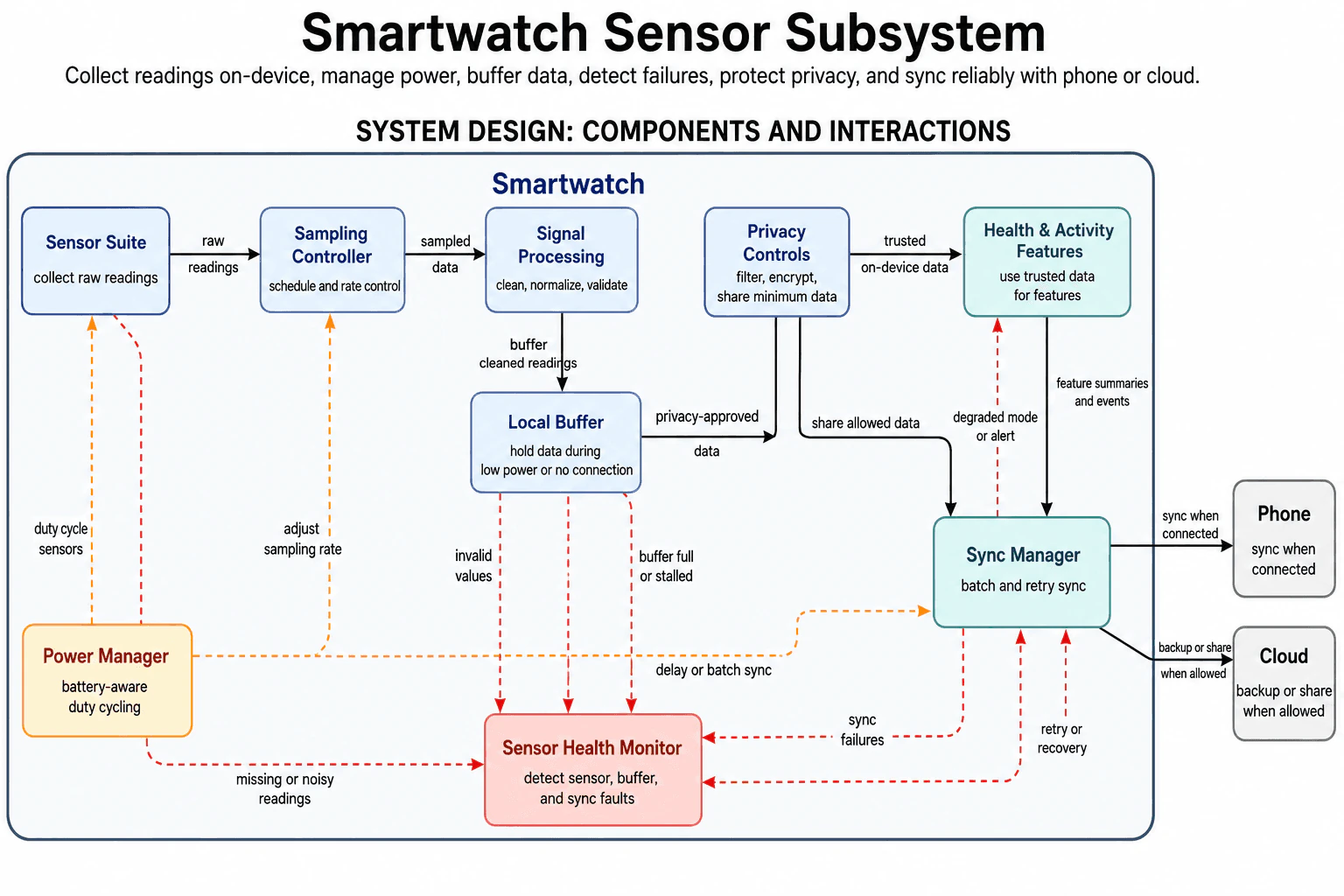
The goal is to collect useful sensor readings while protecting battery life and personal data. The watch may also lose its phone or cloud connection for some time. The diagram handles this by separating data collection, local processing, privacy checks, synchronization, power control, and fault handling.
Useful Questions to Ask the Interviewer
Which user flows and system capabilities are required for the first version?
What traffic, data volume, latency, and availability targets should I design for?
Which consistency, security, geographic, and cost constraints matter most?
How to Explain It in an Interview
1. Explain the main design idea
I would begin by saying that a smartwatch has limited battery power. It must still collect enough data for reliable health and activity features.
The normal data path moves from the Sensor Suite toward the Sync Manager. Two supporting parts control this path. The Power Manager reduces work, while the Sensor Health Monitor detects problems.
2. Explain how readings are collected and cleaned
The Sensor Suite collects raw readings from the watch sensors. These readings move to the Sampling Controller.
The Sampling Controller decides when and how often sensors are sampled. The Power Manager can duty cycle sensors, which means turning them on only when needed. It can also reduce the sampling rate to save battery power.
The sampled data then moves to Signal Processing. This component cleans, normalizes, and validates each reading. Cleaning removes unusable noise. Normalizing puts values into a consistent form.
3. Explain local buffering and privacy
Signal Processing sends cleaned readings to the Local Buffer. The Local Buffer keeps data during low power or connection loss. This prevents temporary network problems from immediately losing useful readings.
The Local Buffer sends privacy-approved data to Privacy Controls. Privacy Controls filters and encrypts the data. It also shares only the minimum information needed.
Privacy Controls sends trusted on-device data to Health & Activity Features. It also sends allowed data directly to the Sync Manager for sharing.
4. Explain health features and synchronization
Health & Activity Features use trusted readings to produce useful results. These may include health summaries or activity events. The component sends those summaries and events to the Sync Manager.
The Sync Manager groups records into batches and retries failed syncs. Batching means sending several records together. This usually uses less power than many small sends.
When connected, the Sync Manager sends data to the Phone. It may also back up or share allowed data with the Cloud. The Power Manager can delay or batch this work when battery power is limited.
5. Explain faults and recovery
The Sensor Health Monitor watches the important failure paths. It receives missing or noisy reading reports from the Sensor Suite. It also receives invalid-value reports, Local Buffer problems, and Sync Manager failures.
When a problem affects feature quality, the monitor can tell Health & Activity Features to use a limited mode or show an alert. The diagram calls this degraded mode, which means the feature continues with reduced ability. The monitor can also ask the Sync Manager to retry or recover.
The main trade-off is freshness versus battery life. More sampling and faster syncing produce newer results. Less work saves power, but updates may arrive later.
Engineering Considerations / Design Trade-offs
The benefit is that each concern has a clear place. The Local Buffer protects readings during connection loss. Privacy Controls limit what leaves the watch. The Power Manager saves battery, and the Sensor Health Monitor finds failures. The downside is delayed data. Lower sampling rates may reduce detail. Larger sync batches may reach the Phone or Cloud later. Retry work can also use extra battery. We accept these costs because a smartwatch must balance useful health results, privacy, reliable storage, and limited power.
Why Interviewers Ask This
Interviewers ask this question to test how you balance several real limits. They want to see how you handle sensor data, battery use, offline periods, privacy, synchronization, and faults. They also want clear reasoning about which work must happen immediately and which work can wait to save power.
Interviewer may ask next
How would the design change if the watch must run for several days with very little battery power?
I would keep the same components, but the Power Manager would reduce more work. It would duty cycle the Sensor Suite more often and ask the Sampling Controller to sample less frequently.
The Power Manager would also tell the Sync Manager to delay sends and create larger batches. The Local Buffer would keep cleaned readings until enough power or a good connection becomes available.
Health & Activity Features could continue using trusted on-device data. However, some features may update less often because fewer readings are collected. The Sensor Health Monitor should report when reduced sampling affects feature quality.
Correctness is still protected because Signal Processing validates every collected reading. Privacy Controls also continue checking all shared data. The main downside is lower freshness and less detailed health or activity results.
What happens if the Phone connection is unavailable for a long time?
The watch continues collecting and processing readings locally. Signal Processing cleans the data, and the Local Buffer holds it while the Phone is unavailable.
Privacy Controls still prepare approved data. Health & Activity Features can continue using trusted on-device readings. The Sync Manager keeps pending batches and retries when the connection returns.
If synchronization continues failing, the Sync Manager reports the problem to the Sensor Health Monitor. The monitor can request recovery or show an alert. It can also protect features from depending on data that has not synced correctly.
The main limit is Local Buffer space. If the buffer becomes full or stalled, the monitor reports that failure. The downside is that older readings may need to be kept for less time until synchronization returns.
35. Design Apple Photos memories and highlights using on-device ML.System DesignHardApple
i Question Details
Design a Photos feature that creates memories or highlights using on-device machine learning. Explain local processing, model updates, privacy, metadata, storage, ranking inputs, battery limits, offline behavior, and fallback handling.
Short Interview Answer (30-60 seconds)
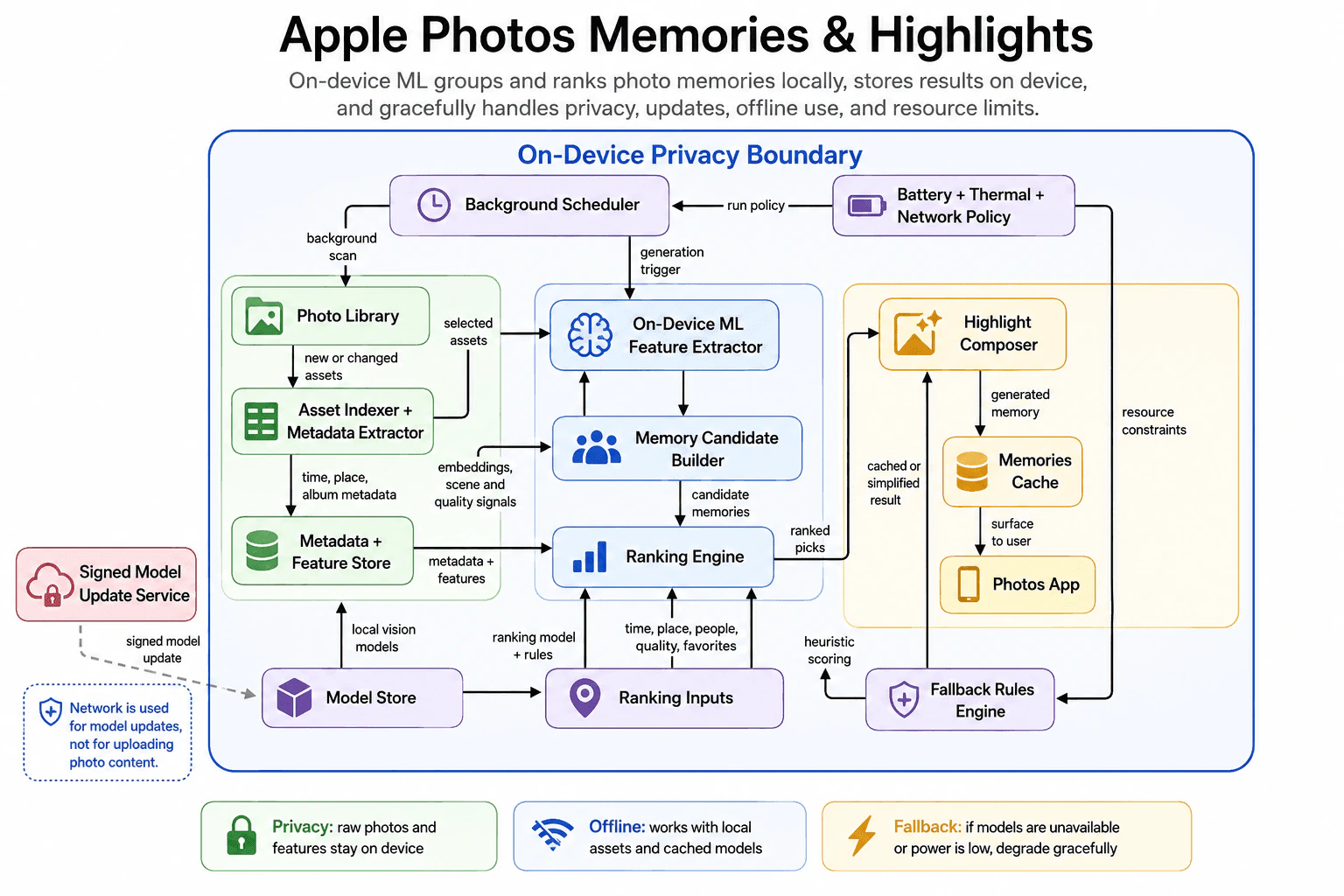
At a high level, this feature creates useful photo memories entirely on the device. The main challenge is producing good results while protecting privacy, saving battery, and working offline. I would explain it in three parts: local photo analysis, candidate ranking, and highlight delivery. A scheduler starts allowed work, local models create features, and the Ranking Engine selects memories. The Photos App reads saved results from the Memories Cache. The trade-off is that limited resources may produce delayed or simpler highlights.
Detailed Explanation
The goal is to turn local photos into useful memories without uploading photo content. The difficult part is balancing ranking quality with privacy, battery use, heat, and offline operation. The diagram organizes the solution into local scanning, feature extraction, ranking, highlight creation, and fallback handling.
Useful Questions to Ask the Interviewer
Which user flows and system capabilities are required for the first version?
What traffic, data volume, latency, and availability targets should I design for?
Which consistency, security, geographic, and cost constraints matter most?
How to Explain It in an Interview
1. Explain the privacy-first design
I would begin by saying that photo analysis stays on the device.
The On-Device Privacy Boundary contains the Photo Library, extracted features, ranking logic, and generated memories. Raw photos and features do not cross the network.
The only network path is for signed model updates. The Signed Model Update Service sends an approved update to the Model Store.
2. Explain scheduling and local photo processing
The Battery + Thermal + Network Policy decides when work may run.
It sends the run policy to the Background Scheduler. This prevents heavy work from running during poor device conditions.
The scheduler starts a background scan of the Photo Library. The Photo Library sends new or changed assets to the Asset Indexer + Metadata Extractor.
This component reads time, place, and album metadata. It saves that information in the Metadata + Feature Store.
Selected assets also move to the On-Device ML Feature Extractor. The scheduler can start this work through the generation trigger.
The extractor uses local vision models from the Model Store. It creates embeddings, scene signals, and quality signals. An embedding is a small numeric description of photo content.
These results are stored in the Metadata + Feature Store.
3. Explain candidate creation and ranking
The On-Device ML Feature Extractor sends processed information to the Memory Candidate Builder.
The builder groups related photos into candidate memories. It then sends those candidates to the Ranking Engine.
The Ranking Engine also reads metadata and features from the Metadata + Feature Store. The Ranking Inputs provide time, place, people, quality, and favorite signals.
The Model Store provides the ranking model and rules. The engine combines these inputs and produces ranked picks.
4. Explain highlight creation and delivery
The Ranking Engine sends ranked picks to the Highlight Composer.
The composer creates the final memory. It saves the generated memory in the Memories Cache.
The cache then surfaces the result to the Photos App. This supports quick display and lets saved memories remain available offline.
The cache stores generated results. It does not replace the Photo Library or the local feature stores.
5. Explain resource limits and fallback handling
The Battery + Thermal + Network Policy also sends resource constraints to the Fallback Rules Engine.
When normal processing is too expensive, the fallback engine can provide heuristic scoring to the Ranking Engine. A heuristic is a simple rule that needs less processing.
It can also send a cached or simplified result to the Highlight Composer. This keeps the feature useful when models are unavailable or device power is low.
The benefit is strong privacy and offline operation. The downside is that new memories may appear later or use simpler ranking during constrained conditions.
Engineering Considerations / Design Trade-offs
The benefit is that raw photos and features remain on the device. This protects privacy and allows memories to work without internet access. The Memories Cache also makes saved highlights quick to display. The downside is that local processing uses battery and creates heat. The policy may delay heavy work until conditions improve. The Fallback Rules Engine may use simpler scoring or a cached result when resources are limited. Signed model updates can improve results, but the device must download and store them safely. We accept slower or simpler results because privacy and device health are more important.
Why Interviewers Ask This
Interviewers ask this question to test practical design judgment. They want to see whether you can divide an ML feature into clear local stages. They also check your understanding of privacy, metadata, model updates, storage, ranking, battery limits, offline use, and fallback behavior. A strong candidate explains the normal flow and resource-limited flow without adding unnecessary cloud processing.
Interviewer may ask next
How would the system behave if heavy ML work must never run while the user is actively using the phone?
I would keep the same architecture and make the Battery + Thermal + Network Policy stricter. It would allow the Background Scheduler to start heavy work only when the device is idle. The scheduler could still notice that the Photo Library contains new or changed assets. However, feature extraction, candidate creation, and full ranking would wait until allowed conditions return.
During that delay, the Photos App could continue showing results from the Memories Cache. The Fallback Rules Engine could also provide a cached or simplified result to the Highlight Composer. This keeps the feature available without starting expensive ML work.
Privacy remains unchanged because all photos and features stay inside the On-Device Privacy Boundary. The main downside is freshness. New photos may not appear in a memory until the device becomes idle.
What should happen when the device stays offline for several days?
The main memory flow should continue using local data and cached models. The Photo Library, Asset Indexer + Metadata Extractor, On-Device ML Feature Extractor, Metadata + Feature Store, and Ranking Engine all remain inside the device boundary. They do not need a network connection for normal processing.
The Model Store continues providing the vision model, ranking model, and rules already saved on the device. The Signed Model Update Service simply cannot deliver a newer model while the device is offline. Existing memories remain available through the Memories Cache and Photos App.
The Battery + Thermal + Network Policy can still control when local work runs. The Fallback Rules Engine remains available when processing is too expensive. The main downside is that the device may use an older model until network access returns.
36. Design Apple TV+ video streaming infrastructure.System DesignHardApple
i Question Details
Design video streaming infrastructure for Apple TV+. Explain content ingestion, encoding, CDN delivery, playback startup, adaptive bitrate, user sessions, catalog metadata, observability, regional scaling, and failure handling.
Short Interview Answer (30-60 seconds)
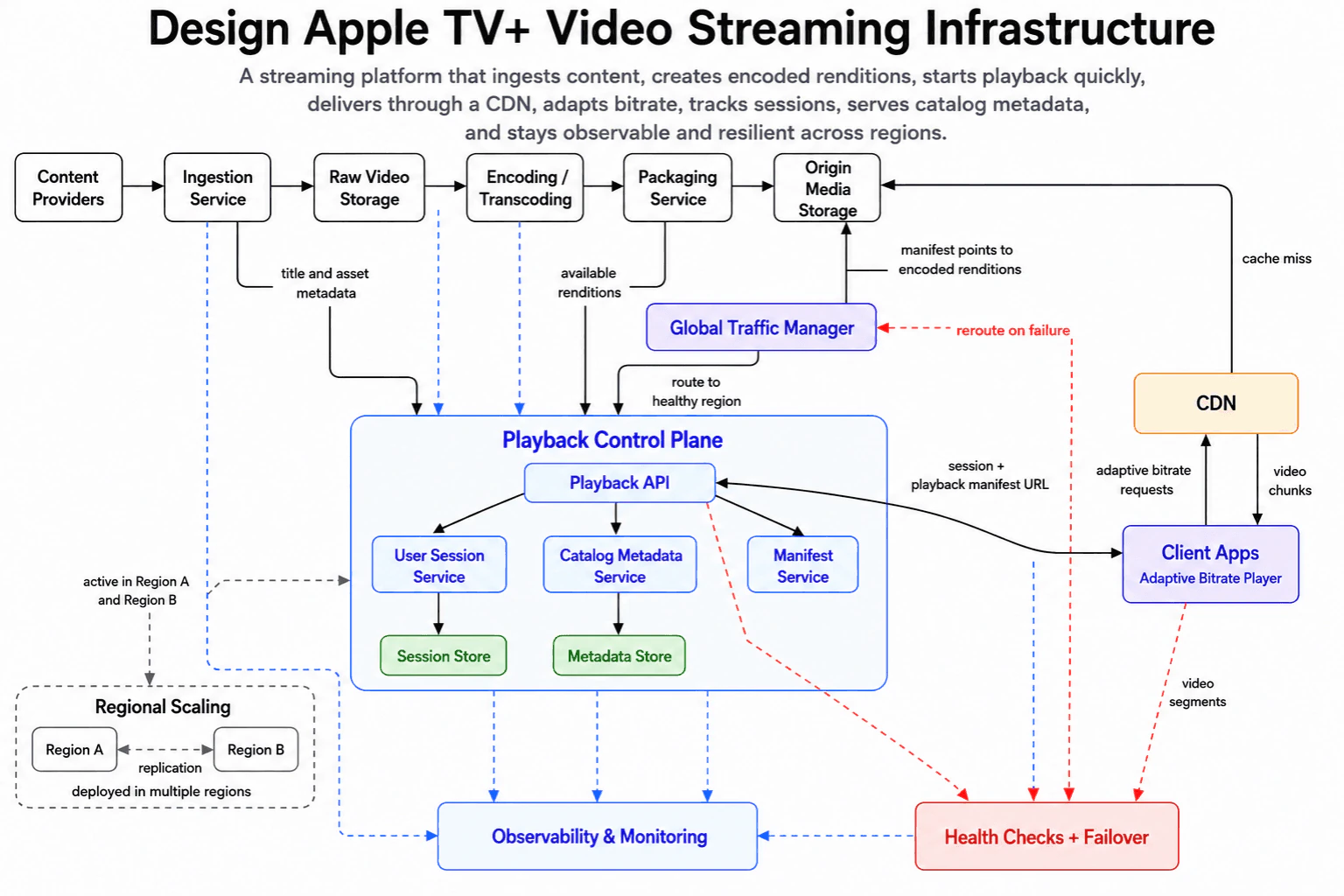
At a high level, this system prepares videos and delivers them with fast, smooth playback. The main challenge is handling different network speeds while keeping the service available across regions. I would explain three flows: content preparation, playback startup, and CDN delivery. Videos move through ingestion, storage, encoding, packaging, and Origin Media Storage. The Playback Control Plane creates the session and manifest. The CDN serves video chunks to the Adaptive Bitrate Player. The trade-off is greater reliability with more operational complexity.
Detailed Explanation
The goal is to turn source videos into several playable versions and deliver them quickly. The system must start playback fast and adjust quality when network speed changes. It must also continue serving users when a region becomes unhealthy. The diagram organizes the solution into content preparation, playback control, CDN delivery, regional scaling, monitoring, and failover.
Useful Questions to Ask the Interviewer
Which user flows and system capabilities are required for the first version?
What traffic, data volume, latency, and availability targets should I design for?
Which consistency, security, geographic, and cost constraints matter most?
How to Explain It in an Interview
1. Explain the content preparation flow
I would begin with how a source video becomes ready for streaming. Content Providers send the video to the Ingestion Service. The service places the original file in Raw Video Storage.
Encoding / Transcoding then creates multiple renditions. A rendition is one version of the video at a specific quality. These versions let the player choose suitable video quality for the current network.
The Packaging Service prepares the renditions for streaming. It sends the completed media to Origin Media Storage. The Ingestion Service also sends title and asset metadata toward the Playback Control Plane. The Packaging Service publishes the available rendition information there.
2. Explain playback startup
When a viewer presses play, Client Apps send a request toward the Playback API. The Global Traffic Manager routes requests to a healthy region. This keeps playback startup available when one region has problems.
The Playback API coordinates the startup flow. The User Session Service manages the viewing session and writes session information to the Session Store. The Catalog Metadata Service manages title information and uses the Metadata Store.
The Manifest Service prepares the playback manifest. A manifest is a small file that lists the available video renditions and chunks. The Playback API sends the session and playback manifest URL back to Client Apps.
3. Explain CDN delivery and adaptive bitrate
After startup, the Adaptive Bitrate Player requests video through the CDN. Adaptive bitrate means the player can change video quality while playback continues. It requests lower-quality chunks when the connection becomes slow. It can request higher-quality chunks when conditions improve.
The CDN returns video chunks to Client Apps. When the requested content is not available in the CDN, the cache-miss path goes from the CDN to Origin Media Storage. The origin holds the packaged video renditions referenced by the manifest.
This design keeps large video transfers away from the Playback Control Plane. The control services handle sessions and manifests. The CDN and origin handle the media files.
4. Explain regional scaling and observability
The Playback Control Plane is deployed across Region A and Region B. The diagram shows replication between the regions. Replication means important state is copied so another region can continue serving requests.
Observability & Monitoring receives health and behavior signals from the platform. These signals help the team find failed ingestion, processing issues, slow playback startup, and service problems.
5. Explain failure handling and trade-offs
Health Checks + Failover watches important paths. When a region becomes unhealthy, it signals the Global Traffic Manager to reroute traffic. New requests can then move toward a healthy region.
The benefit is fast delivery, flexible video quality, and better regional availability. The downside is more system complexity. The team must operate multiple regions, replicated state, monitoring, origin fallback, and reliable traffic-routing rules.
Engineering Considerations / Design Trade-offs
The benefit is that the CDN serves video chunks without sending every request through the application services. Adaptive bitrate also helps playback continue when network speed changes. Running the Playback Control Plane in two regions improves availability. The downside is more work for the engineering team. Session and metadata state must be copied between regions. Health checks must correctly detect failures and reroute traffic. A CDN cache miss also sends work to Origin Media Storage. We accept this complexity because fast playback and regional reliability are the main goals.
Why Interviewers Ask This
Interviewers want to see whether you can divide a large streaming problem into clear flows. They check your understanding of ingestion, encoding, manifests, CDN delivery, adaptive bitrate, sessions, metadata, regional scaling, monitoring, and failures. They also want to hear why each component exists. A strong candidate explains the data flow clearly and discusses trade-offs without making unsupported guarantees.
Interviewer may ask next
How would this design handle a complete failure of one playback region?
I would keep the same architecture and move new playback requests to the healthy region. Health Checks + Failover would detect that one region is unavailable. It would signal the Global Traffic Manager to stop routing new requests there.
The Playback API, User Session Service, Catalog Metadata Service, and Manifest Service already belong to the multi-region Playback Control Plane. The replicated regional state lets the healthy region continue handling session and manifest requests. The CDN can still deliver available video chunks. Cache misses continue to use Origin Media Storage.
Correctness depends on routing requests only to a region that can serve them. Some active sessions may need to restart if their newest session state was not copied before the failure. The main downside is that the remaining region must handle more traffic until recovery is complete.
What happens when the CDN does not contain a requested video chunk?
The CDN uses the cache-miss path to fetch the requested chunk from Origin Media Storage. The arrow must point from the CDN toward the origin because the CDN is requesting missing media. The origin then provides the packaged rendition referenced by the playback manifest.
The CDN returns the video chunk to Client Apps. The Adaptive Bitrate Player continues choosing chunks that match the current network speed. The Playback Control Plane does not carry the video file itself. It remains responsible for the session and manifest startup flow.
This keeps the responsibilities clear. The control services manage playback information, while the CDN and origin deliver media. The main downside is that a cache miss can take longer than a normal CDN response. Many simultaneous misses can also create more work for Origin Media Storage.
37. Design Apple Push Notification service at scale.System DesignHardApple
i Question Details
Design a push notification service at Apple scale. Explain device registration, provider authentication, routing, fanout, delivery state, retries, rate limits, privacy, observability, and behavior when devices are offline.
Short Interview Answer (30-60 seconds)
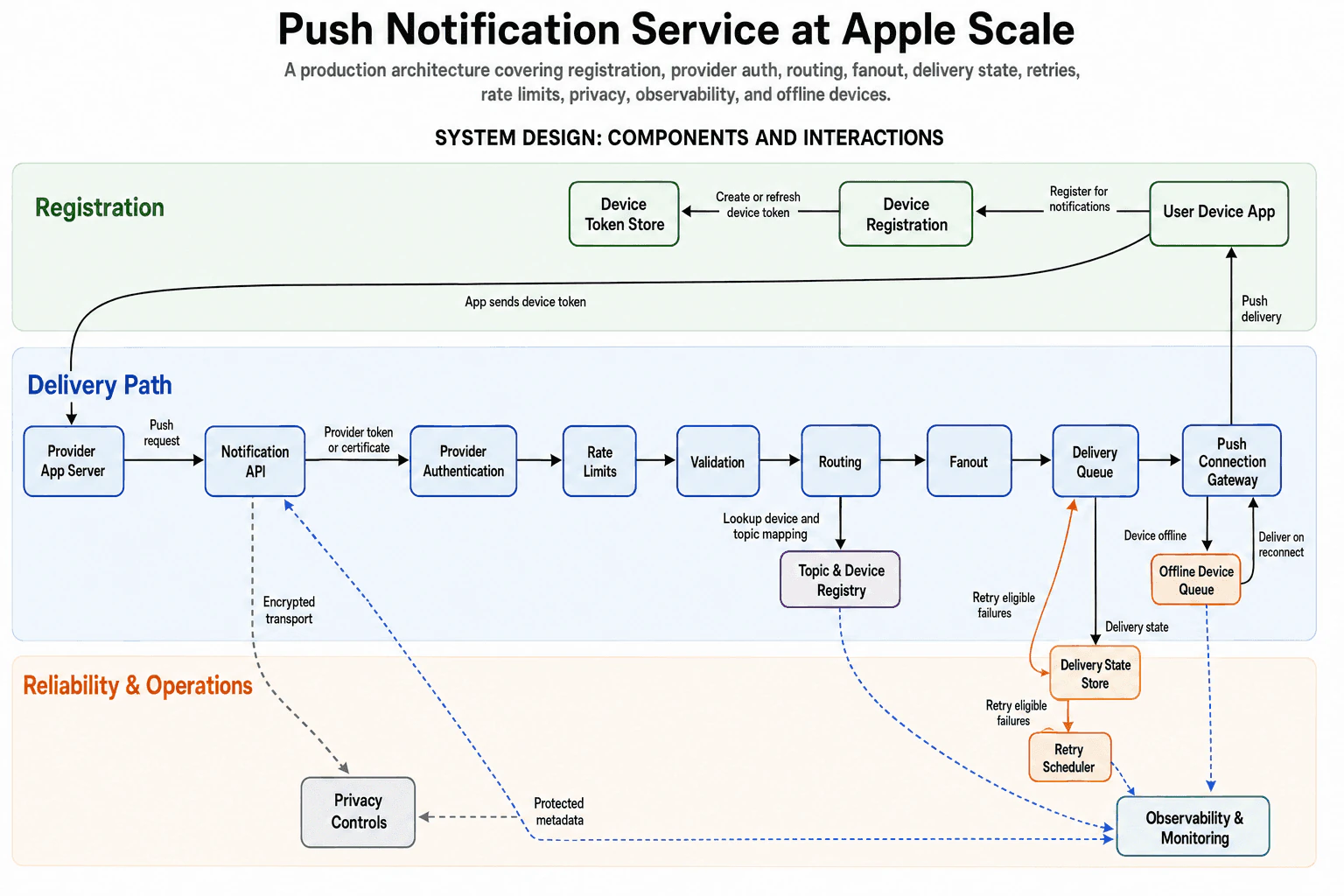
At a high level, this system delivers push notifications from provider apps to user devices. The main challenge is fast delivery while handling large traffic, offline devices, failures, privacy, and retries. I would explain it in three flows: device registration, normal delivery, and reliability work. The provider request passes through authentication, rate limits, validation, routing, fanout, and a delivery queue. The gateway delivers the message or waits for reconnection. The trade-off is more operational complexity for better reliability and scale.
Detailed Explanation
The goal is to deliver push notifications from a Provider App Server to the correct User Device App. The difficult part is that providers can send heavy traffic, devices may disconnect, and delivery attempts can fail. The diagram handles this with three connected areas: Registration, the Delivery Path, and Reliability & Operations.
Useful Questions to Ask the Interviewer
Which user flows and system capabilities are required for the first version?
What traffic, data volume, latency, and availability targets should I design for?
Which consistency, security, geographic, and cost constraints matter most?
How to Explain It in an Interview
1. Explain the goal and the main idea
I would begin by separating registration from message delivery. Registration creates the device token used to identify a device. The delivery path then uses that token and its topic mapping to route each notification.
The normal path should remain fast. Offline handling, retries, privacy, and monitoring support that path without changing its main purpose.
2. Explain device registration
For registration, the User Device App sends a request to Device Registration. Device Registration creates or refreshes the device token. The Device Token Store keeps the current token.
The User Device App also sends that token to the Provider App Server. The provider needs it when sending future push requests. Refreshing matters because a device token may change over time.
3. Explain the main delivery path
The Provider App Server sends a push request to the Notification API. The request carries a provider token or certificate. Provider Authentication checks that the provider is allowed to send messages.
Rate Limits then control how much traffic one provider can send. Validation checks that the request is usable. Routing looks up the device and topic mapping in the Topic & Device Registry.
Fanout turns the routed request into delivery work for the target devices. The Delivery Queue holds that work until the next stage can process it. The Push Connection Gateway then sends the notification to the User Device App.
This queue separates request acceptance from device delivery. A short delivery slowdown does not immediately break the earlier request path.
4. Explain offline devices and failed delivery
If the device is offline, the Push Connection Gateway sends the work to the Offline Device Queue. When the device reconnects, the queued work returns to the gateway. The gateway can then try delivery again.
The gateway also sends the delivery state to the Delivery State Store. The state may show delivery, failure, or expiration. Retry eligible failures move to the Retry Scheduler.
The Retry Scheduler sends the work back to the Delivery Queue with backoff. Backoff means waiting before another attempt. This avoids repeating failed work too quickly.
5. Explain privacy, monitoring, and trade-offs
Privacy Controls cover encrypted transport and reduced payload retention. They also protect stored delivery metadata. This limits how much sensitive notification data remains in the system.
Observability & Monitoring receives signals from the Notification API, Routing, the Push Connection Gateway, and the Retry Scheduler. These signals help operators find request errors, routing problems, delivery failures, and growing retry work.
The benefit is that registration, delivery, offline handling, and retries are separated clearly. The downside is more state and more queues to operate. Some notifications may also arrive later when a device reconnects or a retry waits for backoff.
Engineering Considerations / Design Trade-offs
The benefit is that each part has one clear job. Authentication, rate limits, routing, delivery, and retry work can be handled separately. The Delivery Queue protects the request path when device delivery slows down. The Offline Device Queue avoids dropping work as soon as a device disconnects. Retry with backoff reduces repeated pressure after failures. The downside is more moving parts. Device tokens must stay current. Delivery state must match what really happened. Queues can grow during failures or long offline periods. Some notifications may arrive late. We accept this because delayed delivery is often better than immediate message loss.
Why Interviewers Ask This
Interviewers ask this question to see whether you can divide a large system into clear flows. They want to hear how you handle identity, rate limits, routing, fanout, queues, offline devices, retries, privacy, and monitoring. They also want to see whether you explain failure behavior and trade-offs without claiming perfect delivery or unlimited scale.
Interviewer may ask next
How would the design handle a very large number of devices reconnecting at the same time?
I would keep the same architecture, but I would protect the Push Connection Gateway from a sudden reconnect wave. The Offline Device Queue would still hold pending work. When devices reconnect, that work should return to the gateway at a controlled rate instead of all at once.
The Delivery Queue and Rate Limits help control pressure on the delivery path. Retry work should also continue using backoff. This prevents normal deliveries, reconnect deliveries, and retries from creating one large traffic spike.
The Delivery State Store remains important because it shows which messages are still pending, delivered, failed, or expired. Observability & Monitoring should track offline queue size, reconnect traffic, gateway errors, and delivery delay.
The main downside is slower recovery for some devices. A controlled release protects the system, but it means not every waiting notification can be delivered immediately.
What should happen when the Push Connection Gateway cannot deliver a notification?
I would first separate an offline device from a real delivery failure. If the device is offline, the gateway sends the work to the Offline Device Queue. That work returns when the device reconnects.
For another delivery failure, the gateway records the result in the Delivery State Store. Retry eligible failures then move to the Retry Scheduler. The scheduler waits and sends the work back to the Delivery Queue with backoff.
This keeps the normal delivery path unchanged. It also prevents the gateway from retrying the same failure too quickly. Observability & Monitoring should report gateway errors, failed states, retry growth, and delayed work.
Correctness comes from recording the delivery state before starting the retry path. The main downside is delay. Some notifications may arrive later, and repeated retries create more queue and state-management work.
38. Tell me how you defined done for a complex technical project.BehavioralHardApple
i Question Details
Describe a complex project and explain what done meant. Include technical quality, user or stakeholder impact, metrics, operational readiness, unresolved tradeoffs, and how you knew the project was complete enough.
Interview tip:
Use STAR to structure your answer: briefly explain the Situation and Task, make Action the most detailed part, and finish with the Result. For example, describe a complex Python project where you agreed on clear completion criteria, protected technical quality, measured user impact, prepared the system for production, documented remaining tradeoffs, and gained stakeholder approval.
Situation
In my last role, I worked on a Python service that collected data from several internal systems, validated it, and produced reports used by operations teams. The existing process was slow and required manual checks. The project was complex because each source used a different data format, some records arrived late, and mistakes could affect important business decisions.
Task
I was responsible for the main Python service and for helping the team define what done meant. I wanted to avoid calling the project complete only because the code worked on my laptop. We needed a shared definition that covered correct results, useful outcomes for the operations team, production support, and any limits we were choosing to accept.
Action
I first met with the operations team, the product owner, and the engineers who managed the source systems. I asked what problems the current process caused and which results mattered most. From those discussions, I created a completion checklist with several parts. For technical quality, the service had to validate required fields, handle late or duplicate records safely, include automated tests for important paths, and produce clear error messages. I also required code review and a successful test run in an environment that matched production. For user impact, the operations team had to confirm that the reports were understandable and that the new process removed the manual steps that caused the most delay. For measurement, we tracked whether reports completed reliably, whether validation errors were visible, and whether users still needed to correct results by hand. For operational readiness, I added structured logs, health checks, alerts, a support guide, and a safe way to rerun failed work without creating duplicate output. I also documented ownership so people knew who would respond if the service failed. We still had one tradeoff. A small group of rare source formats would require manual review because supporting every format would have delayed the main release. I documented that limit, explained its effect, and agreed with the stakeholders on when we would review it again. Before release, I walked through the checklist with the team and asked each owner to confirm their area. I considered the project complete enough only after the service passed the technical checks, the users accepted the workflow, the monitoring was active, the support steps were tested, and the remaining tradeoff was clearly understood.
Result
The service moved into production with a clear agreement about what success meant. The operations team could use the reports with fewer manual checks, and the engineering team could detect and investigate failures more easily. The documented exception did not surprise anyone because it had been discussed before release. I learned that done is not a single technical event. It is a shared decision based on quality, user value, measurable behavior, operational readiness, and accepted limits.
Why Interviewers Ask This
Interviewers ask this question to understand how a candidate judges completeness on difficult work. A strong answer shows that the candidate looks beyond writing code and considers quality, user value, measurable results, production support, communication, risk, and unresolved tradeoffs before declaring a project complete.
Interviewer may ask next
How did you handle disagreement about whether the project was ready?
I brought the discussion back to the agreed completion checklist. Instead of debating personal opinions, we reviewed the evidence for technical quality, user acceptance, monitoring, support readiness, and the documented exception. When a concern was valid, I assigned an owner and kept the project open until that item was resolved or formally accepted as a tradeoff.
What would you do differently on a similar project now?
I would define the completion checklist earlier and review it throughout development instead of using it mainly near release. That would expose missing monitoring, support needs, and user concerns sooner. I would also test the recovery process earlier because safe failure handling is part of the product, not work that should be added at the end.
39. Why Apple, and why this team?BehavioralMediumApple
i Question Details
Explain why Apple and the specific team interest you. Connect your technical experience, product judgment, collaboration style, and long-term career goals to the role without giving a generic answer.
Interview tip:
Use STAR to structure your answer: briefly explain the Situation and Task, make Action the most detailed part, and finish with the Result. For example, describe a previous Python project that showed you the value of strong product judgment, reliable engineering, close collaboration, and careful attention to the user experience, then connect those lessons to Apple, this team, and your long term goals.
Situation
In my last role, I worked on a Python service that processed product data for a user facing application. The service worked, but small data quality issues could create confusing results for users. That experience showed me that good engineering is not only about making code run. It is also about understanding how technical decisions affect the final product.
Task
I was responsible for improving the reliability of the service while working closely with product, testing, and other engineering teams. My goal was to protect the user experience without making the system too complex or slowing the team down.
Action
I first traced the full data flow so I could understand where incorrect or incomplete values entered the system. I added clear validation in Python, improved error handling, and created tests for the cases that had caused problems. I also added simple logging so the team could find the source of an issue instead of only seeing the final failure. Before making larger changes, I spoke with the product team to understand which data problems had the greatest effect on users. This helped me focus on the most important cases first. I shared my design with the other developers, listened to their concerns, and adjusted the solution so it fit the existing system. I also worked with testers to define expected behavior for unusual inputs. This project shaped what I now look for in my next role. I want to work where engineers care about product details, reliability, privacy, and the complete user experience. That is why Apple interests me. I am also interested in this team because the role appears to combine Python engineering with product judgment and collaboration across different functions. That matches both how I work today and how I want to grow.
Result
The service became easier to test, support, and change. The team had clearer behavior for bad data and could investigate problems more quickly. I learned that my best work happens when technical quality and product quality are treated as the same responsibility. At Apple, I would bring that mindset to this team while continuing to grow in designing dependable Python systems that support products used with care and purpose.
Why Interviewers Ask This
Interviewers ask this question to learn whether the candidate has a specific and thoughtful reason for choosing Apple and the team. A strong answer connects relevant experience, working style, product values, and career goals to the actual role instead of relying on general praise.
Interviewer may ask next
What part of this team’s work is most connected to your experience?
The strongest connection is building reliable Python services that support a user facing product. In my previous project, I had to understand the full data flow, improve validation and testing, and work with product and testing teams. I would bring the same combination of technical ownership and product awareness to this team.
What would you hope to learn by joining Apple?
I would like to learn how experienced teams make engineering decisions when product quality, privacy, reliability, and scale must all be considered together. My previous project taught me to connect backend decisions to the user experience, and I want to develop that judgment further while contributing my Python and collaboration skills.
40. Describe a technical decision you made that affected user experience.BehavioralMediumApple
i Question Details
Describe a technical decision that changed the user experience. Explain the alternatives, constraints, how you evaluated the effect on users, how you tracked the outcome, and what you learned.
Interview tip:
Use STAR to structure your answer: briefly explain the Situation and Task, make Action the most detailed part, and finish with the Result. For example, describe a technical choice that changed how users experienced a Python application, the alternatives and constraints you considered, how you evaluated the effect on users, how you tracked the outcome, and what you learned.
Situation
In my last role, I worked on a Python web application that generated reports after users submitted a large set of data. The application processed the request before returning a response, so users often saw a loading screen for a long time. Some users submitted the same request again because they were not sure whether the first request was still running.
Task
I was responsible for improving this experience without changing the report logic or creating a risk of duplicate processing. I needed to choose between making the existing request faster, adding a longer loading state, or moving the work out of the web request and giving users clear progress information.
Action
I first reviewed request logs and traced the slow path in the Python service. I found that report creation included several database queries and file generation steps that could not reliably finish within a normal web request. I discussed the alternatives with the product designer and the engineers who maintained the service. Optimizing the queries would help, but it would not remove the delay for large reports. A longer loading screen would be simple, but users would still have no clear status and could lose the request if the connection failed. I recommended moving report generation to a background worker. This meant the web application could accept the request, create a job record, and immediately show a confirmation page. I added a unique request key so repeated clicks would not create duplicate jobs. I also added simple status values such as queued, processing, completed, and failed. The user interface checked the status through an API and showed a clear message for each state. Before release, I tested the flow with small and large data sets, slow connections, repeated submissions, worker failures, and browser refreshes. I worked with the product designer to make the messages clear and avoid technical language. After release, I tracked job completion, duplicate request attempts, failures, support feedback, and application logs. I also reviewed user comments with the support team so we could understand whether the new flow felt clearer.
Result
Users received an immediate confirmation and could see what was happening instead of waiting on an uncertain loading screen. Repeated submissions became less common, and support feedback showed that the process was easier to understand. The background job design also made failures easier for the team to detect and retry safely. I learned that a technical decision should not focus only on server performance. It should also reduce uncertainty for users, provide clear recovery paths, and include a way to measure whether the experience actually improved.
Why Interviewers Ask This
Interviewers ask this question to understand whether a candidate connects technical choices with real user needs. A strong answer shows that the candidate can compare alternatives, work within constraints, communicate with other teams, measure the effect of a decision, and learn from the outcome.
Interviewer may ask next
Why did you choose background processing instead of only optimizing the existing request?
I still improved the slow queries, but the report included work that could remain slow for large data sets. Background processing gave users an immediate response, protected the request from connection failures, and allowed us to show clear progress while the work continued.
What would you do differently if you made this decision again?
I would involve a small group of users earlier and test the status messages before implementation. The technical flow worked well, but earlier user feedback could have helped us choose clearer wording and decide which progress details were most useful.
More questions load as you scroll
Disclaimer: This interview guide is for educational and informational purposes only. It is designed to help readers prepare, but it does not guarantee any interview result, hiring decision, offer, or outcome. Interview questions, hiring criteria, and preferred answers can vary by employer, interviewer, industry, location, and time. All answers, examples, and explanations in this guide are suggested examples for interview preparation, not definitive answers or instructions for professional practice. They are based on research and judgment, are provided without warranties of any kind, and should be adapted to the question, role, and applicable laws and professional requirements. Diagrams are simplified illustrations intended to highlight the main concepts and their relationships; actual situations, systems, and practices may be more complex. Alternative approaches may be equally valid or better suited to a particular question, context, or interviewer. To the fullest extent permitted by applicable law, the contributors and publisher are not liable for decisions made, actions taken, or losses incurred based on this guide.
State Laws and Professional Responsibilities: Laws and requirements governing an occupation vary by state and jurisdiction. You are responsible for checking the current laws, licensing requirements, and scope-of-practice rules that apply to your location and role, and for ensuring that your answers and actions comply with them. Adapt examples in this guide to those requirements. This guide is not legal advice.
Company Notice: This guide is an independent educational resource and is not affiliated with, endorsed by, sponsored by, or approved by the company named in this guide. Company names identify reported interview experiences or the employer context of clearly labeled original practice exercises. Interview practices can change without notice, and inclusion of company-specific content does not mean these questions are official, complete, or guaranteed to be asked. To the fullest extent permitted by law, the author, contributors, and publisher are not responsible for outcomes related to use of this material.
Content Accuracy and Verification: To the fullest extent permitted by applicable law, we do not represent or warrant that interview guides, questions, answers, examples, or diagrams are accurate, complete, current, error-free, or suitable for any particular purpose. You are responsible for independently reviewing and verifying the information before relying on it.