21. Design a paginated stock-data dashboard frontend.
Design the reported stock dashboard as a browser application that lists instruments, pages through records, and refreshes changing prices. Define route, filter, page, selection, and data-cache ownership; component boundaries; request cancellation; background revalidation; and behavior when a user changes pages faster than responses arrive. Cover initial, loading, stale, empty, error, and market-closed states, stable row identity, responsive tables, keyboard access, and a chart detail view. Explain what should be cached, when it becomes stale, how a later response is prevented from replacing newer state, and how the design remains testable without depending on live market data.
At a high level, I would build this as a CSR single-page dashboard. The main challenge is keeping pagination, filters, cached prices, and fast user actions consistent. The URL owns page, filters, sort, and page size. React Query or SWR owns remote stock data. AbortController cancels old requests, while a request id prevents late responses from replacing newer state. Cached data can stay visible during background refresh. This adds browser logic, but navigation stays fast and resilient.
The goal is to help users browse stocks, change pages and filters, and open a detailed chart. The hardest frontend problem is keeping several kinds of state consistent while prices change and requests finish in different orders. I would use a CSR single-page application because this dashboard values fast interaction more than search-engine rendering. I would explain the design through delivery and routing, state ownership, data fetching, UI states, and cross-cutting browser concerns.
- How fresh must prices be during market hours?
- Should the dashboard work when the network disappears?
- Which browsers and screen sizes must we support?
- Are localization and keyboard access required from the first release?
- How much historical chart data should the detail view load?
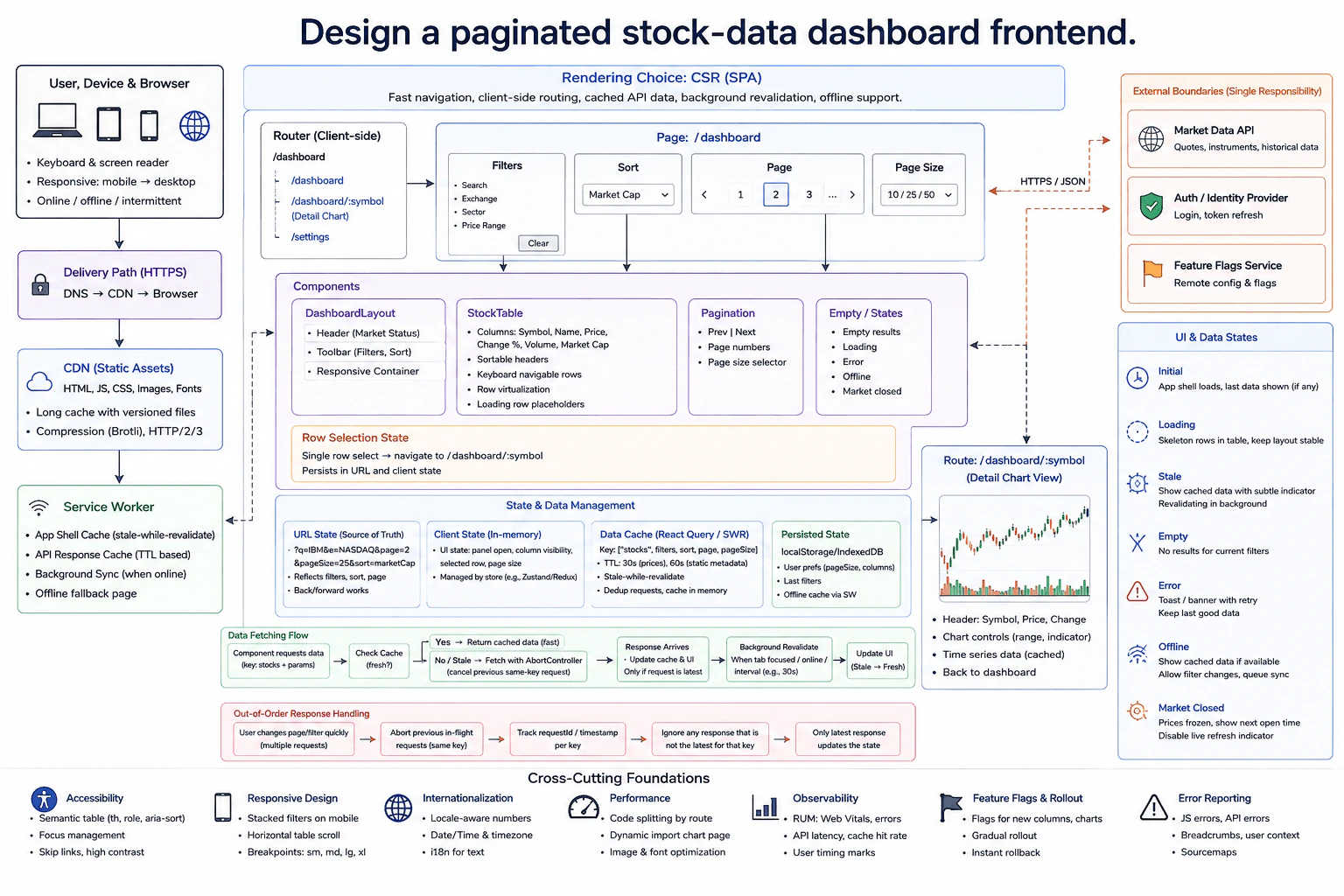
I would use CSR, meaning the browser renders the interactive application after loading HTML, JavaScript, and CSS. Static assets come through the CDN. Versioned files can use long browser cache times.
The service worker can cache the app shell and selected API responses. The client router owns /dashboard. Selecting a stock moves to /dashboard/:symbol for the detail chart. /settings is another client route. The chart route can use code splitting, which means loading its JavaScript only when that route is opened.
DashboardLayout contains the market header, filters, responsive container, StockTable, Pagination, and empty or state views. The table uses the stock symbol as stable row identity. Rows support keyboard navigation, and column headers can be sortable.
The URL is the source of truth for filters, sort, page, and page size. This keeps links shareable and makes Back and Forward navigation work. In-memory client state owns open panels, column visibility, and other temporary UI choices. User preferences can persist in localStorage or IndexedDB.
React Query or SWR owns remote stock data. Its cache key includes stocks, filters, sort, page, and page size. The diagram uses about 30 seconds for prices and about 60 seconds for more static metadata.
When cached data becomes stale, meaning it may be older than the latest remote result, I can keep showing it while fetching newer data. This is stale-while-revalidate. Matching requests can also be deduplicated.
The Market Data API is one external boundary. The Auth or Identity Provider and Feature Flags Service are also external boundaries. Their internal server design stays outside this frontend answer.
When the user changes page or filters, the URL changes first. The component checks the cache. Fresh cached data can appear immediately. Otherwise, the browser sends an HTTPS JSON request to the Market Data API.
AbortController cancels an older in-flight request for the same key. I would also track a request id or timestamp per query key. Only the latest request may update the cache and UI. This prevents a slow response for an older page from replacing the newer page the user already selected.
Initial loading shows skeleton rows so the table layout stays stable. Stale data stays visible with a small indicator while background revalidation runs. Empty results show a clear empty state. Errors show a retry action while keeping last good data when possible.
Offline mode shows cached data if available and allows limited actions. Market-closed mode freezes prices and shows the next open time. The detail route shows the selected symbol, price, change, chart controls, and cached time-series data.
I would use semantic table markup, sortable-header attributes, focus management, skip links, and high contrast. On smaller screens, filters stack and the table can scroll horizontally. Dates, times, and numbers use locale-aware formatting.
I would measure Web Vitals, API latency, and cache-hit rate. JavaScript and API errors go to error reporting with useful context. Feature flags allow gradual rollout and quick rollback.
Tests should not depend on live market data. The data layer can use fixed mock responses, delayed responses, errors, and intentionally out-of-order results. That makes pagination, cancellation, stale-data behavior, and race-condition handling deterministic.
The benefit is fast navigation because the browser can reuse cached pages and data. The downside is more frontend state to manage correctly. Keeping filters and pagination in the URL makes links and browser navigation predictable. The remote-data cache reduces repeated requests, but prices can become stale, so background refresh is needed. AbortController reduces wasted work, while the request id protects correctness when responses finish out of order. Offline caching improves resilience, but service workers and persisted storage add complexity. Code splitting keeps the first bundle smaller, but the chart route may need an extra load.
The interviewer wants to see how you organize a frontend with changing remote data. They are checking whether you can choose clear state owners, handle caching, prevent race conditions, and design useful loading and failure states. They also want to see whether you consider keyboard access, responsive layouts, testing, performance, and safe rollout instead of designing only the happy path.