9 Amazon Cloud Engineer Interview Questions & Answers

amazon icon

Questions with Detailed ExplanationsWith Detailed Explanations

(Last Updated: September 3, 2026)

1. What is an EC2 instance in AWS?Cloud ArchitectureEasyAmazon

Question Details

Explain the virtual compute resource represented by an EC2 instance and the launch choices that determine its machine image, compute capacity, storage, and VPC placement.

Short Interview Answer (30-60 seconds)

At a high level, an EC2 instance is a resizable virtual server that runs in AWS. The main challenge is choosing the right software image, compute capacity, storage, and network placement for the workload. I would explain it in three parts: what the instance contains, how it connects inside a VPC, and which launch choices define it. The benefit is flexible compute. The trade-off is that you still manage the guest operating system, applications, configuration, and access settings.

Detailed Explanation

An EC2 instance is a computer that runs virtually inside AWS. You choose what software starts on it, how much computing power it has, where its operating system and data are stored, and where it sits in your network. The important part is understanding that these choices work together. Compute size affects capacity. Storage holds the operating system and data. Network placement controls connectivity. The diagram organizes the answer around the EC2 instance itself, its network path, and the four main launch choices.

Useful Questions to Ask the Interviewer
  1. Should I focus only on the basic EC2 concept, or also explain network access?
  2. Should I assume this instance needs direct Internet access?
  3. Would you like examples of AMIs and instance types?
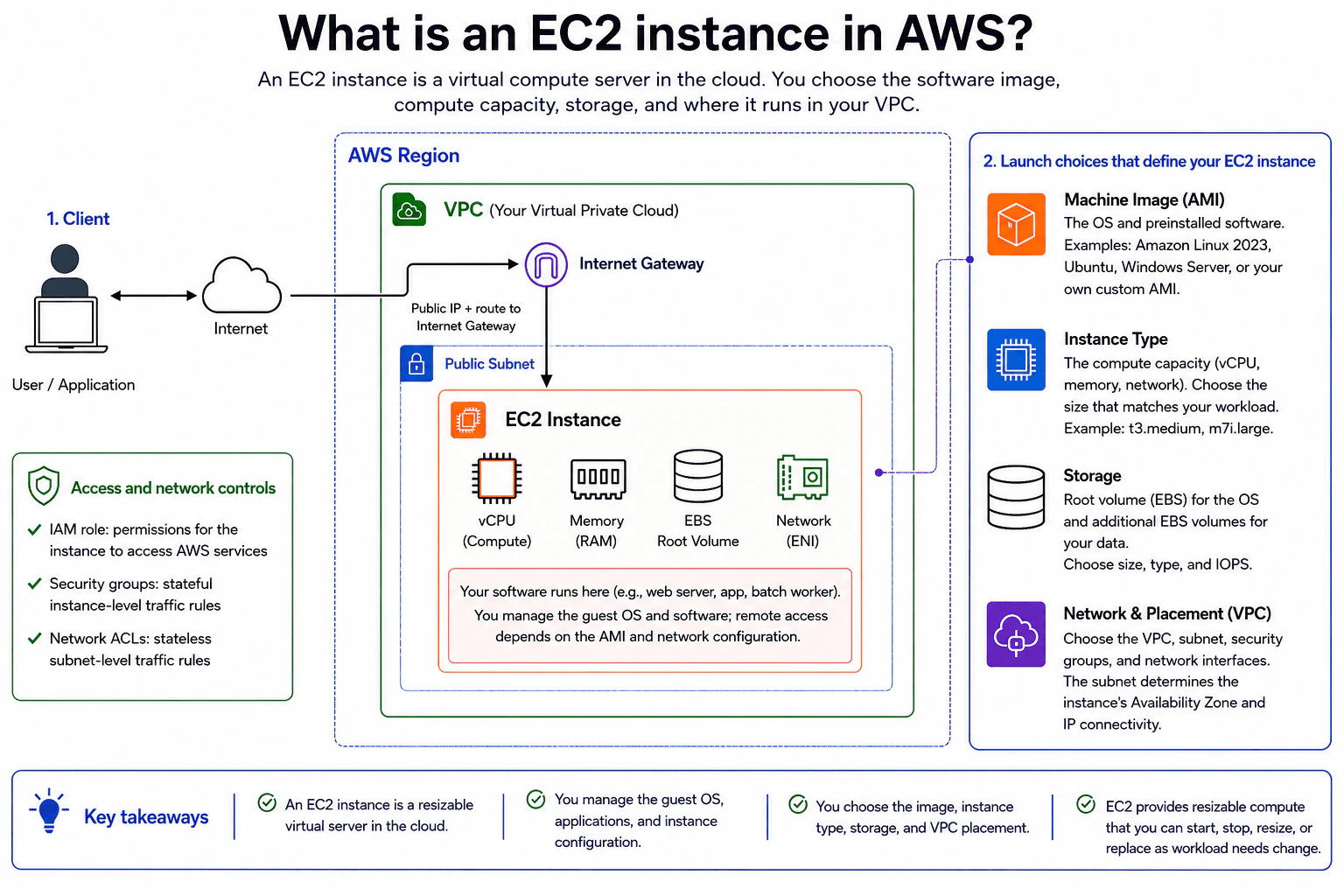
What is an EC2 instance in AWS? diagram
How to Explain It in an Interview
1. Explain what an EC2 instance represents

I would start by saying that an EC2 instance is a resizable virtual server in AWS. Your software runs on that server. For example, it could run a web server, an application, or a batch worker.

The diagram shows four important parts around the instance. It has vCPU for compute, memory for working data, an EBS Root Volume for storage, and a Network Interface, or ENI, for network connectivity. You manage the guest operating system, applications, and instance configuration.

2. Explain the Machine Image and Instance Type

When launching the instance, I first choose a Machine Image, or AMI. The AMI defines the operating system and preinstalled software. The diagram gives examples such as Amazon Linux 2023, Ubuntu, Windows Server, or a custom AMI.

Next, I choose the Instance Type. This determines the instance's compute capacity, including vCPU, memory, and network capability. The diagram shows examples such as t3.medium and m7i.large. The right choice depends on the workload.

3. Explain storage

The diagram uses EBS for the instance's block storage. The EBS Root Volume holds the operating system. Additional EBS volumes can hold application data.

At launch time, storage choices include size, type, and IOPS. IOPS means input and output operations per second. It is one way to describe how much storage activity a volume can support.

4. Explain VPC placement and Internet access

The instance runs inside a VPC, which is the network boundary shown in the diagram. This example places the EC2 instance in a Public Subnet. The subnet also determines the instance's Availability Zone and network connectivity.

For the direct Internet path shown here, the instance needs a public IP and a route to the Internet Gateway. Traffic then reaches the EC2 instance through its network interface. Security groups provide stateful instance-level traffic rules. Network ACLs provide stateless subnet-level traffic rules.

5. Explain permissions and the main trade-off

The IAM role gives the instance permission to access AWS services. This is different from network security. IAM controls AWS permissions, while security groups and Network ACLs control network traffic.

The main benefit is flexibility. You choose the image, compute size, storage, and VPC placement for the workload. EC2 compute can be started, stopped, resized, or replaced as needs change. The downside is that this control also gives you more configuration and operating responsibility.

Practical Complexity & Trade-offs

The benefit is flexibility. You can choose the AMI, Instance Type, EBS storage, and VPC placement for the workload. You can also start, stop, resize, or replace the compute as needs change. The downside is that more control means more work. You manage the guest operating system, applications, configuration, and access settings. Direct Internet access also needs the correct public IP, route to the Internet Gateway, and network rules. Security groups and Network ACLs add protection, but they must be configured correctly. An IAM role is separate because it controls permissions to AWS services rather than network traffic.

Why Interviewers Ask This

Interviewers ask this question to see whether you understand the basic pieces of AWS compute. They want more than the definition of EC2. They want to know whether you can explain how the AMI, Instance Type, EBS storage, VPC placement, network controls, and IAM role have different jobs. A good answer shows that you understand both the virtual server and the important choices around it.
Interviewer may ask next
What would change if this EC2 instance should not be directly reachable from the Internet?

I would change the network placement and remove the direct Internet path shown in the diagram. The EC2 instance would still use an AMI, Instance Type, EBS storage, and a network interface. Those core parts do not change.

The main difference is connectivity. I would not depend on a public IP and a direct route from the instance to the Internet Gateway. The instance would instead use network placement that does not expose it directly to Internet traffic. Security groups and Network ACLs would still control allowed network traffic.

The IAM role would also keep the same purpose. It controls which AWS services the instance can access. It does not make the instance publicly reachable.

The benefit is less direct Internet exposure. The downside is that users, administrators, or the instance itself may need another approved network path when they need connectivity outside that private placement.

How would you choose between a smaller and a larger EC2 Instance Type?

I would choose the Instance Type from the compute needs of the workload. The diagram shows that this choice affects vCPU, memory, and network capability. A smaller type can work well for a light application. A larger type makes sense when the workload needs more compute or memory.

I would keep the other launch choices separate. The AMI still defines the operating system and software. EBS still provides the storage. The VPC, subnet, security groups, and network interface still define the network placement and access rules.

I would start with enough capacity for the expected workload and adjust when the workload changes. EC2 is resizable, so the compute choice does not have to stay fixed forever.

The benefit of a larger type is more capacity. The downside is using more resources than the workload needs. A smaller type is lighter, but it may not provide enough capacity under heavier demand.

2. Define OSPF and explain its purpose in network routing.NetworkingEasyAmazon

Question Details

Describe the routing problem OSPF solves, the information routers exchange, and how that information is used to select an IP path inside an autonomous system.

Short Interview Answer (30-60 seconds)

At a high level, OSPF helps routers choose the best IP path inside one autonomous system. The main challenge is keeping routers aware of link costs and topology changes. I would explain it in three parts: routers exchange Link-State Advertisements, build a Link-State Database, and run Dijkstra’s SPF algorithm. SPF chooses the lowest-cost path and installs it in the routing table. OSPF converges quickly, while larger networks can use hierarchical areas to limit routing work.

Detailed Explanation

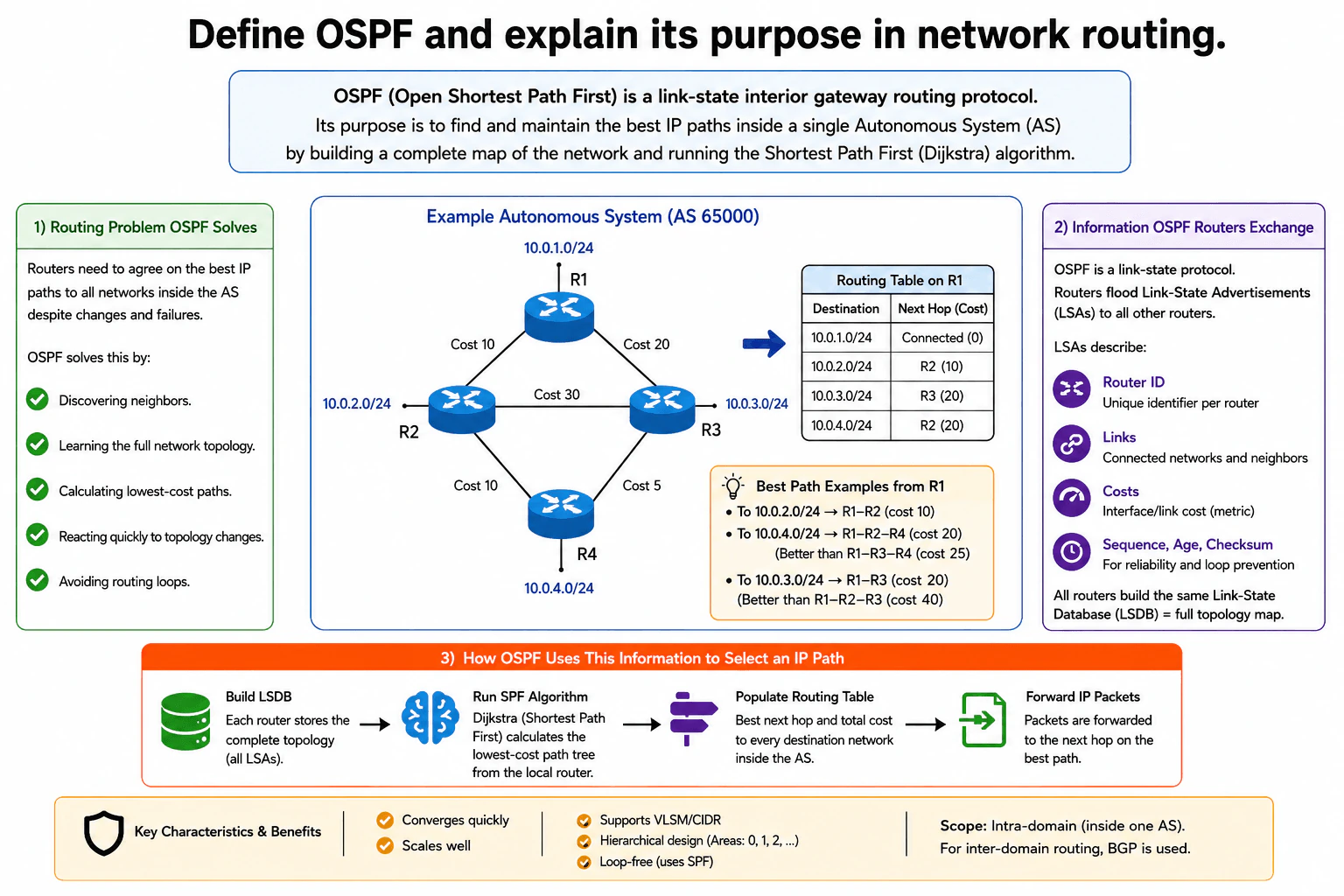
OSPF helps routers decide how to reach IP networks inside one autonomous system. The difficult part is that several paths may reach the same destination, and every path can have a different cost. Links can also change or fail. Routers therefore need a shared view of the relevant network topology before choosing routes. The diagram explains the process in three main steps. Routers exchange link-state information, build a topology map, and then calculate the lowest-cost paths that are placed into their routing tables.

Useful Questions to Ask the Interviewer
  1. Are we discussing OSPF only inside one autonomous system?
  2. Should I explain how OSPF chooses paths using link costs?
  3. Should I also explain how OSPF areas help larger networks scale?
Define OSPF and explain its purpose in network routing. diagram
How to Explain It in an Interview
1. Explain the routing problem OSPF solves

I would start by saying that routers need a reliable way to choose the best IP paths inside one autonomous system. More than one route may reach the same network. A link can also fail or change.

OSPF solves this by discovering neighbors, learning the topology, calculating lowest-cost paths, and reacting when the topology changes. The diagram uses four routers named R1, R2, R3, and R4. Their links have different OSPF costs, and lower total cost is preferred.

2. Explain what OSPF routers exchange

Next, I would explain that OSPF is a link-state routing protocol. Routers flood Link-State Advertisements, called LSAs, so other routers can learn about the topology.

The diagram shows LSAs describing router IDs, links, connected networks, neighbors, prefixes, and costs. It also shows sequence, age, and checksum information. Sequence numbers help identify newer information. Age helps remove stale information, while the checksum helps detect corrupted LSA contents.

3. Explain the Link-State Database

Each router stores the LSAs in a Link-State Database, called the LSDB. In the single-area example shown, routers build the same topology view from those LSAs. In a larger multi-area OSPF design, the detailed LSDB is maintained per area.

The LSDB gives each router the information needed to calculate paths locally. It is the input to the SPF calculation shown in the diagram.

4. Explain how OSPF selects the best path

Each router runs Dijkstra’s Shortest Path First algorithm, usually called SPF. SPF builds a shortest-path tree from that router’s point of view. It adds the OSPF costs along each possible route and chooses the path with the lowest total cost.

From R1, the network behind R4 is reached through R1–R2–R4 with total cost 20. The alternative R1–R3–R4 costs 25. For the network behind R3, the direct R1–R3 path costs 20, while R1–R2–R3 costs 40.

5. Explain how the result is used

After SPF finishes, OSPF places the selected next hop and total cost into the routing table. IP packets can then be forwarded using that route.

The diagram also shows that OSPF converges quickly, supports VLSM and CIDR, and can scale with hierarchical areas. SPF produces loop-free shortest paths from the topology view. OSPF is an intra-domain protocol, meaning it operates inside an autonomous system. The diagram shows BGP for routing between autonomous systems.

Practical Complexity & Trade-offs

The benefit is that routers can calculate good paths from shared link-state information. OSPF also reacts quickly when the topology changes and supports VLSM and CIDR. The downside is that routers must store LSAs and run SPF calculations after important topology changes. As a network grows, that work can also grow. Hierarchical areas help by limiting how much detailed routing information must be handled together. This makes OSPF easier to scale. SPF gives routers loop-free shortest paths from their topology view. OSPF is designed for routing inside one autonomous system, while the diagram uses BGP for routing between autonomous systems.

Why Interviewers Ask This

Interviewers ask this question to see whether you understand how a routing protocol actually chooses paths. They want to know if you can explain the problem OSPF solves, what information routers exchange, how the LSDB represents topology, and how SPF turns link costs into routes. A strong answer also shows that you understand OSPF’s intra-domain scope and how areas help larger networks scale.

Interviewer may ask next
What happens if the R2–R4 link fails after R1 has selected R1–R2–R4 as its best path?

OSPF would react to the topology change and calculate a new best path. The R2–R4 link would no longer be usable, so updated link-state information would be flooded. Routers would update their Link-State Databases to reflect the changed topology.

R1 would then run Dijkstra’s SPF algorithm again. Before the failure, R1 reached the network behind R4 through R1–R2–R4 with total cost 20. After that link fails, this path disappears. The remaining visible path is R1–R3–R4. Its total cost is 20 plus 5, which equals 25.

After SPF finishes, R1 updates its routing table so R3 becomes the next hop for that destination. Packets can then use the new path. The downside is that topology changes cause new LSA processing and another SPF calculation before routing settles on the updated path.

Why would you divide a large OSPF network into areas instead of keeping all routers in one area?

I would use OSPF areas to reduce how much detailed topology information routers must handle as the network grows. The basic process does not change. Routers still exchange LSAs, build an LSDB for their area, run SPF, and install routes.

The difference is scope. The diagram lists hierarchical areas as an OSPF scaling feature. Areas divide a larger OSPF design into smaller routing sections. This limits detailed link-state flooding and reduces the amount of SPF work caused by changes outside a router’s own area.

The main benefit is better scalability. Routers can manage a smaller detailed topology instead of treating the entire autonomous system as one large area. The downside is extra design complexity. Engineers must plan the area structure carefully, so the network is harder to operate than a very small single-area OSPF design.

3. How would you help a customer who cannot SSH into an EC2 instance in a public subnet?NetworkingMediumAmazon

Question Details

The client initiates TCP port 22 from the internet to an EC2 public address, but the session cannot be established. Walk through DNS or address selection, route-table and internet-gateway path, security rules, instance reachability, SSH service state, and return traffic.

Short Interview Answer (30-60 seconds)

At a high level, I would trace the SSH connection from the customer to the EC2 instance, then trace the response back. The main challenge is finding where TCP port 22 stops. I would check the public DNS or Elastic IP, the Internet Gateway and subnet route table, then the Security Group and Network ACL. After that, I would verify the ENI, instance health, SSH service, host firewall, and return path. The downside is that several independent settings can cause the same timeout.

Detailed Explanation

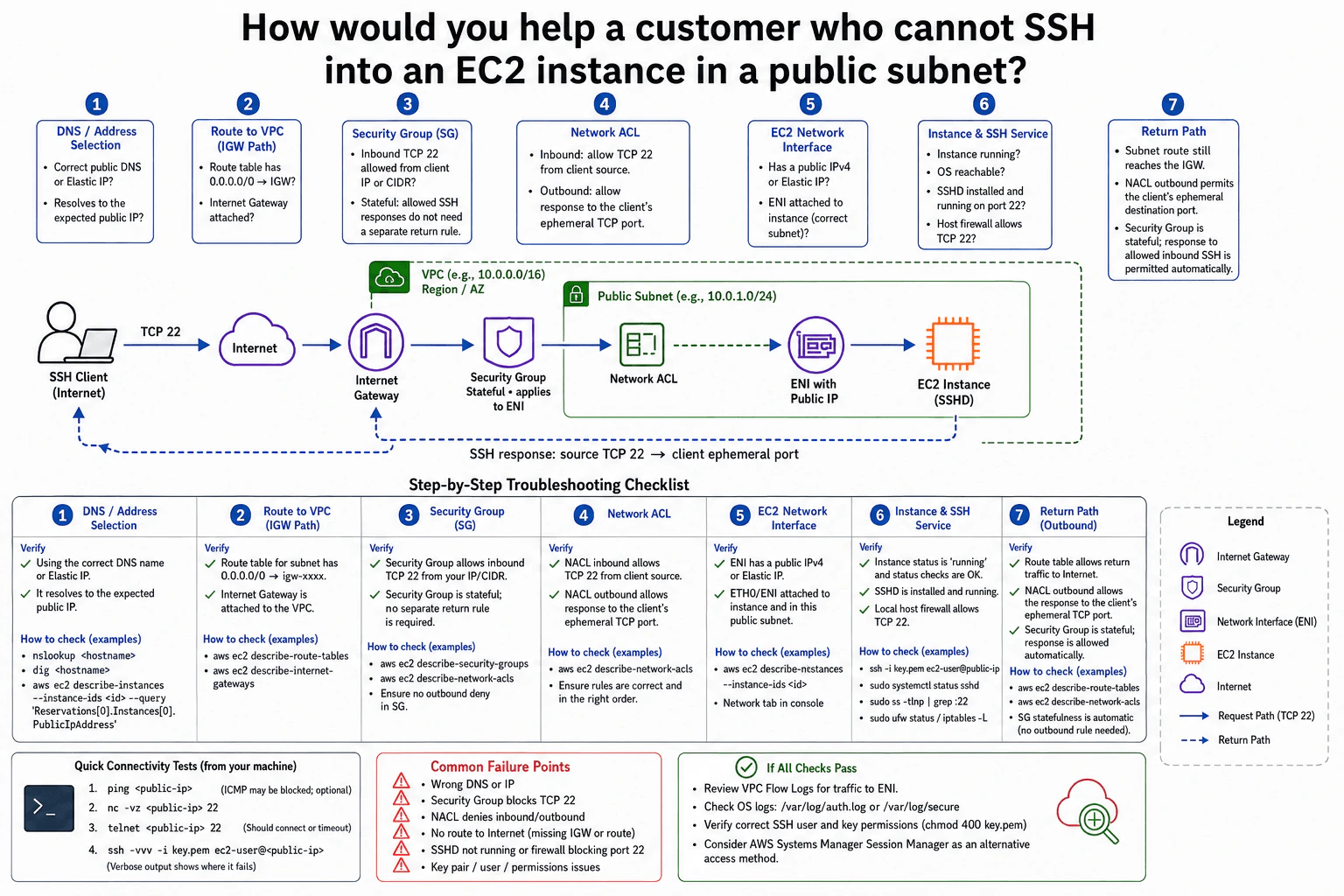
The goal is to find why a customer cannot open an SSH session to an EC2 instance that should be reachable from the internet. The difficult part is that several different settings can stop the same connection. A wrong public address, missing route, blocked security rule, stopped instance, or stopped SSH service can all look similar to the customer. I would troubleshoot in the same order shown in the diagram. Then I would check the response path back to the customer.

Useful Questions to Ask the Interviewer
  1. Is the customer using the instance public DNS name, public IPv4 address, or Elastic IP?
  2. Does the SSH attempt time out, or does it reach the server and reject the login?
  3. Did SSH work before, or has this instance never been reachable?
How would you help a customer who cannot SSH into an EC2 instance in a public subnet? diagram
How to Explain It in an Interview
1. Check DNS and the public address

I would start by confirming that the customer is connecting to the correct public endpoint. I would verify the public DNS name, public IPv4 address, or Elastic IP shown for the instance. If DNS is used, it should resolve to the expected public IP. Commands such as nslookup or dig can confirm this. A wrong or old address means the connection is going to the wrong place.

2. Check the Internet Gateway and route table

Next, I would verify the path from the internet into the VPC. The public subnet's route table needs a default route such as 0.0.0.0/0 pointing to the Internet Gateway. The Internet Gateway must also be attached to the VPC. If either part is missing, the instance cannot use the direct internet path shown in the diagram.

3. Check the Security Group and Network ACL

Then I would check the two network security layers separately. The Security Group must allow inbound TCP port 22 from the customer's public IP or CIDR range. A Security Group is stateful. This means a response to an allowed SSH connection does not need a separate Security Group return rule.

The Network ACL is stateless, so both directions matter. Its inbound rules must allow TCP port 22 from the client source. Its outbound rules must allow the SSH response to the client's ephemeral TCP port. I would also check the Network ACL rule order because an earlier matching deny can block the traffic.

4. Check the ENI, instance, and SSH service

After the network settings look correct, I would verify the EC2 Network Interface, or ENI. The instance should have the expected public IPv4 or Elastic IP association, and the ENI should belong to the expected instance and public subnet.

The EC2 instance must be running and passing its status checks. Inside the instance, sshd must be installed, running, and listening on TCP port 22. The local host firewall must also allow port 22. If the network connection succeeds but login fails, I would check the SSH username, private key, and key-file permissions.

5. Verify the return path and narrow the failure

Finally, I would trace the SSH response back toward the client. The subnet still needs its route to the Internet Gateway. The Network ACL outbound rules must allow traffic to the client's ephemeral destination port. The Security Group does not need a separate response rule because it is stateful.

From the client, I can use nc -vz <public-ip> 22 to test TCP port 22 and ssh -vvv to see more detail about where SSH fails. If the cause is still unclear, I would review VPC Flow Logs for traffic to the ENI and check operating-system SSH logs such as /var/log/auth.log, /var/log/secure, or the relevant journal entries. If AWS Systems Manager Session Manager is already configured, it can provide an alternative way to access the instance.

Practical Complexity & Trade-offs

The benefit is that this method follows the connection step by step, so each check removes one possible cause. It also separates network problems from SSH or key problems. The downside is that several independent settings must agree. A correct Security Group cannot help if the Internet Gateway route is missing. A correct route cannot help if the Network ACL blocks the traffic. Network ACLs also need more care because they are stateless and must allow the required traffic in both directions. This ordered approach reduces guessing and makes the failure easier to isolate.

Why Interviewers Ask This

The interviewer wants to see whether you can troubleshoot a network problem in a clear order instead of changing random settings. They also want to know whether you understand public subnet routing, Internet Gateways, Security Groups, Network ACLs, EC2 reachability, and SSH service checks. A strong answer also shows that you understand return traffic and can separate network failures from operating-system or authentication failures.

Interviewer may ask next
What would you change if the EC2 instance had no public IPv4 address or Elastic IP?

I would first say that the internet client could no longer use the direct SSH path shown in the diagram. The public IPv4 address or Elastic IP is part of that direct internet path. Opening the Security Group more widely would not solve the problem because a Security Group rule does not create a public address.

I would still keep the same instance-side checks. I would verify the ENI, running state, SSH service, and host firewall. The access method would need to change. If AWS Systems Manager Session Manager is already configured, I could use that alternative method instead of direct internet SSH. This matches the alternative access option shown in the diagram.

The main downside is that administrators can no longer connect directly from the internet. The alternative management path must already have the required configuration and access in place.

How would you troubleshoot the case where TCP port 22 is reachable, but SSH authentication still fails?

I would focus on the instance and SSH checks because reaching TCP port 22 shows that the network path is working far enough to reach the SSH service.

First, I would run ssh -vvv from the client. The verbose output helps show whether the failure occurs during the SSH handshake or during authentication. I would verify that the customer is using the correct SSH username and private key. I would also check the private-key file permissions, such as chmod 400 key.pem.

On the EC2 instance, I would confirm that sshd is running and listening on TCP port 22. Then I would review SSH logs such as /var/log/auth.log, /var/log/secure, or the relevant journal entries. These logs can explain why a login was rejected.

The downside is that successful TCP connectivity only proves network reachability. It does not prove that the username, key, permissions, or SSH configuration is correct.

4. What is swap in a Linux system?Observability And TroubleshootingEasyAmazon

Question Details

Explain the role of swap relative to physical memory and identify the observable behavior that would show normal use, memory pressure, or performance degradation on a cloud-hosted Linux server.

Short Interview Answer (30-60 seconds)

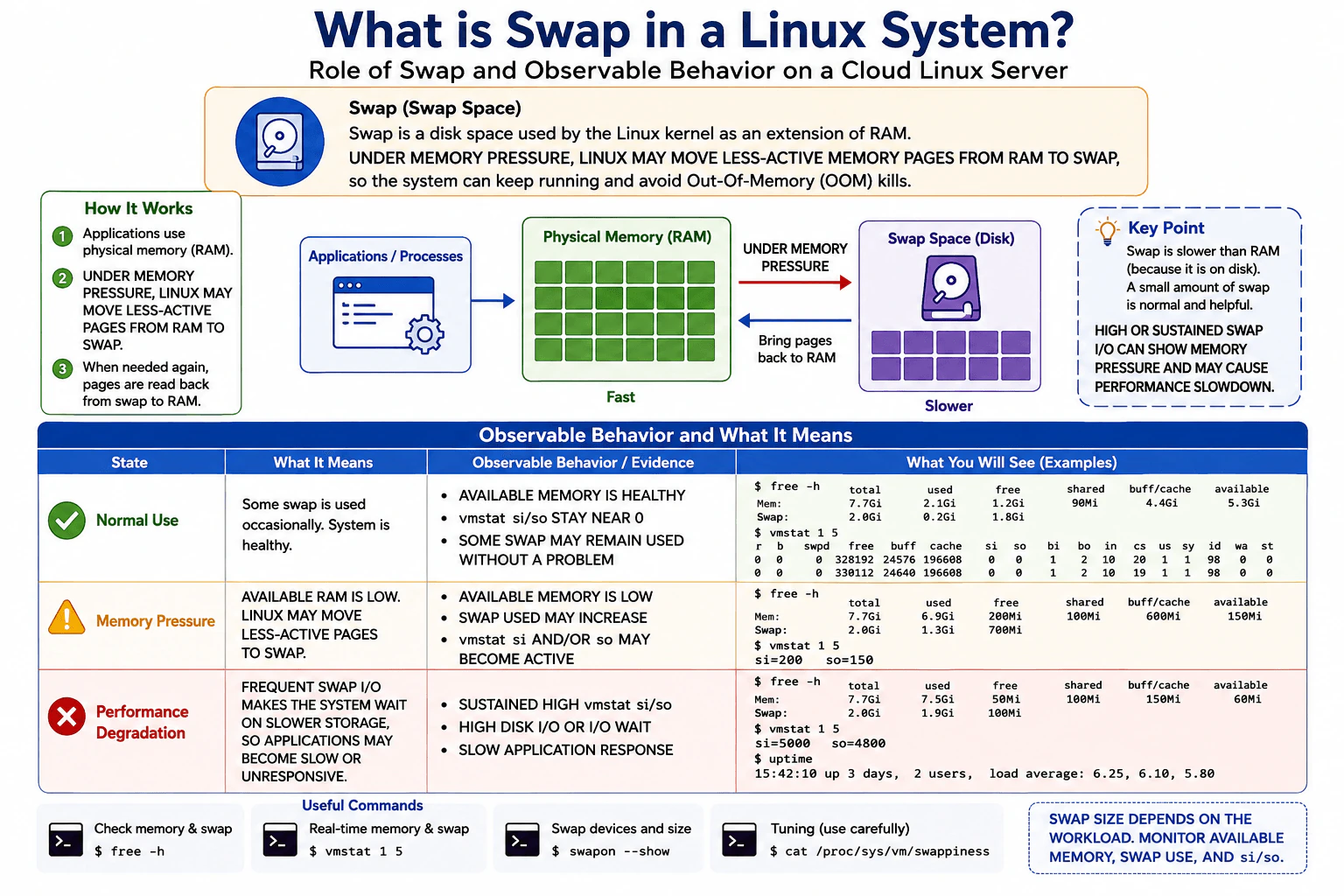
Swap is disk space Linux can use for memory pages moved out of physical RAM. Some swap use can be normal. I would check available memory and vmstat si/so: falling memory with active swapping shows pressure, while sustained high swap I/O with slow applications can show performance degradation.

Detailed Explanation

A computer has a limited amount of fast working space for programs that are running. When that space becomes tight, the system can place less-used information in a slower storage area and bring it back when needed. This can help the computer keep working, but using the slower area too often can make programs respond slowly. The important point is that seeing some information there is not automatically bad. You look at how much fast space is still available, whether information is moving frequently, and whether users notice slower performance.

Useful Questions to Ask the Interviewer
  1. Do you want only the Linux swap concept, or should I also explain how I would diagnose memory pressure on a cloud server?
  2. Should I focus on host-level Linux observations such as free and vmstat?
What is swap in a Linux system? diagram
How to Explain It in an Interview

Swap is disk space that Linux can use to hold memory pages moved out of physical RAM. RAM is fast but limited. Swap is slower because it uses storage. Under memory pressure, Linux may move less-active pages from RAM to swap, and pages can be brought back into RAM when needed.

The key troubleshooting point is that swap occupancy alone does not prove a problem. Some pages may remain in swap while the server still has healthy available memory and almost no active swapping. A normal state therefore looks like healthy available memory, a responsive system, and vmstat si/so values staying near zero. Here, si means pages being read from swap into memory, and so means pages being written from memory to swap.

Memory pressure becomes more likely when available RAM falls, swap used may increase, and vmstat si and/or so become active. These signals should be considered together. A single value by itself is not enough to prove the cause.

Performance degradation is more concerning when swap activity is sustained. Frequent swap I/O makes the system wait on slower storage. Evidence can include sustained high vmstat si/so, high disk I/O or I/O wait, and slow or unresponsive applications. Load average can provide supporting context, but it does not by itself prove that swap caused the slowdown.

Useful commands include free -h to inspect physical memory and swap usage, vmstat 1 5 to observe swap-in and swap-out activity, swapon --show to list active swap devices, and cat /proc/sys/vm/swappiness when examining swap tuning. Swap size depends on the workload, so I would monitor available memory, swap use, and si/so rather than assume one fixed swap size is correct.

The main tradeoff is resilience versus speed. Swap can reduce or delay out-of-memory pressure, but it is much slower than RAM and does not replace adequate physical memory. If sustained swapping is hurting application performance, I would confirm the evidence first and then investigate memory demand, workload behavior, or whether the server needs more RAM.

Technical Approach
  1. Check physical memory and swap with free -h, paying attention to available memory rather than only the free column.
  2. Check vmstat 1 5 and inspect si and so for active swap-in and swap-out activity.
  3. If available memory is healthy and si/so stay near zero, treat stable swap occupancy as potentially normal.
  4. If available memory is falling and si/so become active, identify memory pressure.
  5. If si/so remain high, correlate them with disk I/O or I/O wait and application latency or responsiveness.
  6. Check active swap devices with swapon --show and review swappiness only when tuning behavior is relevant.
  7. Correct the underlying memory or workload problem rather than assuming that clearing swap alone is the fix.
Practical Insights

Swap has an operational cost rather than an algorithmic time complexity. RAM access is much faster than storage access, so frequent swapping adds storage I/O and can increase application latency. Monitoring with free and vmstat is lightweight. The maintenance cost comes from watching memory trends, correlating swap activity with storage and application behavior, choosing workload-appropriate swap capacity, and deciding when more RAM or workload changes are needed.

Why Interviewers Ask This

This question checks whether the candidate understands the relationship between physical RAM and swap and can troubleshoot memory pressure using observable evidence instead of assuming that any swap usage is bad. A strong answer distinguishes harmless swap occupancy from active swapping and connects sustained swap I/O with storage delay and application performance.

Common interview mistakes

Common mistakes are saying that Linux swaps only after RAM is completely full, assuming any nonzero swap use means the server has a problem, treating nearly full swap as proof of performance degradation, or using load average alone to blame swap. Another mistake is recommending one universal swap size. The better approach is to correlate available memory, swap occupancy, vmstat si/so, disk I/O or I/O wait, and application responsiveness.

Interview tip

Explain three states clearly: normal use, memory pressure, and performance degradation. Emphasize that active swap I/O matters more than swap occupancy alone. Mention free -h and vmstat 1 5, define si/so, and finish by explaining that sustained swapping should be correlated with disk and application performance before deciding on a fix.

Interviewer may ask next
Is it bad if a Linux server is using swap even though it still has available RAM?

Not necessarily. Linux may keep less-active pages in swap while using RAM for more useful data such as active pages and cache. If available memory is healthy, the application is responsive, and vmstat si/so stay near zero, stable swap occupancy can be normal. I would not treat the swap-used number alone as evidence of memory pressure.

How would you tell whether swap is causing a performance problem?

I would correlate several signals. First, check available memory with free -h. Then use vmstat 1 5 and look for sustained nonzero or high si/so values, which show active swap I/O. I would also check for high disk I/O or I/O wait and confirm that applications are slow or unresponsive at the same time. High swap occupancy or load average alone does not prove that swap is the cause.

5. How would you debug an AWS Lambda function that times out intermittently?Observability And TroubleshootingHardAmazon

Question Details

Only some invocations reach the timeout. Correlate CloudWatch invocation and duration metrics, request logs, traces, cold starts, concurrency and throttling, VPC networking when used, downstream latency, retries, and the affected event cohort before changing the timeout.

Short Interview Answer (30-60 seconds)

I would isolate the affected invocation cohort, correlate CloudWatch metrics, logs, traces, cold starts, concurrency, throttling, retries, and event attributes, and compare slow requests with healthy ones. Then I would locate the slow boundary, test hypotheses, fix only the confirmed bottleneck, and verify before increasing the Lambda timeout.

Detailed Explanation

Some runs finish normally, while a smaller group takes too long and gets stopped. I would not immediately give every run more time, because that could hide the real problem. First, I would find the affected runs and look for what they share, such as when they happened, what started them, and which version handled them. Then I would compare them with successful runs from the same period, find where the extra waiting happens, test each possible reason, correct only the proven problem, and repeat the same checks afterward.

Useful Questions to Ask the Interviewer
  1. Which event sources invoke the Lambda, and is the problem associated with one source or event type?
  2. Is the Lambda attached to a VPC?
  3. Are traces available for enough affected and healthy invocations to compare their paths?
  4. Does the function call databases, APIs, queues, or other downstream services?
  5. Did the timeout pattern begin after a deployment, configuration change, or traffic change?
  6. What is the configured Lambda timeout, and how close are normal and slow invocation durations to it?
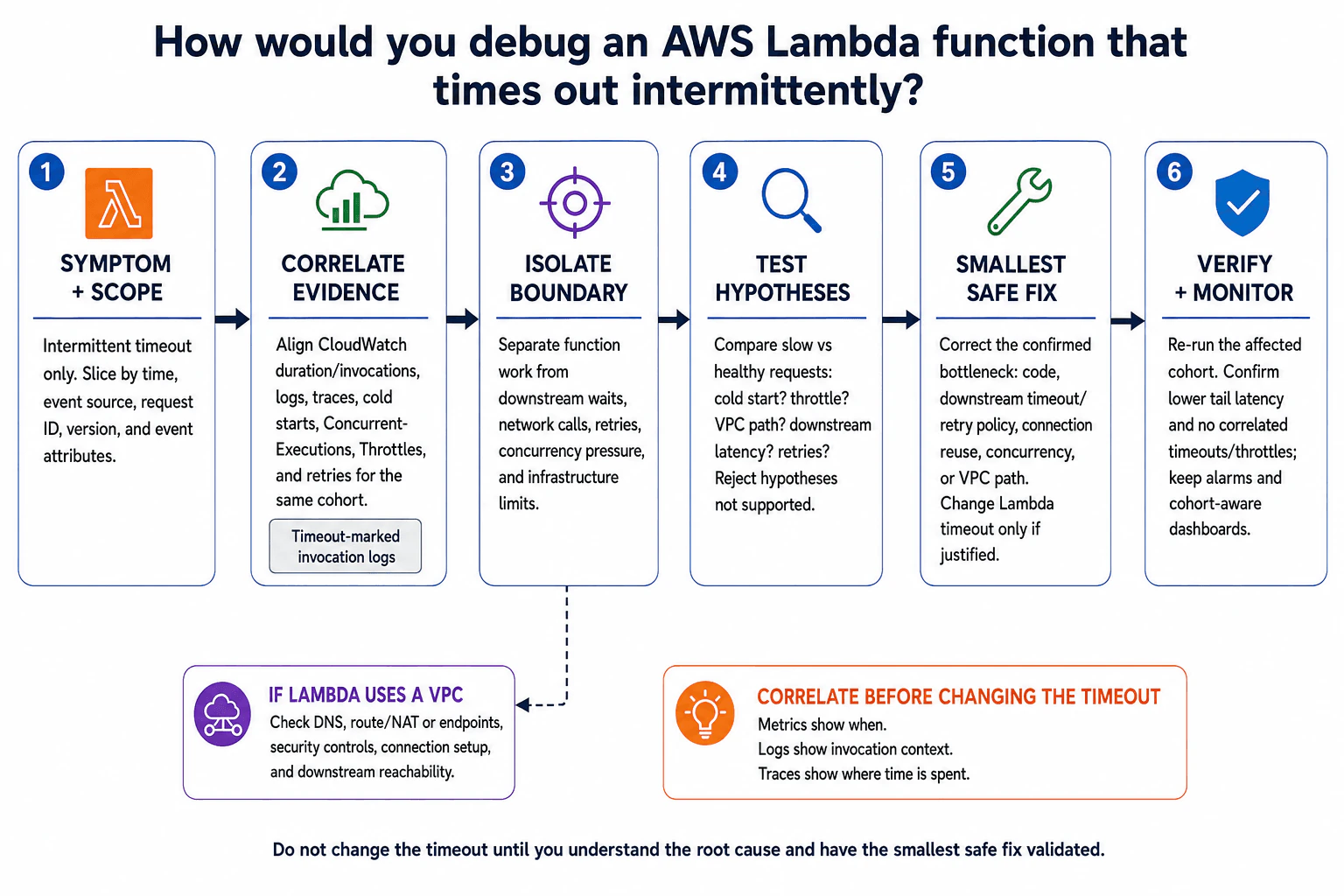
How would you debug an AWS Lambda function that times out intermittently? diagram
How to Explain It in an Interview
1. Symptom and scope

The symptom is an intermittent timeout, so I would first define the affected cohort instead of treating every invocation as identical. I would slice the affected requests by time, event source, request ID, deployed version or alias, and safe event attributes. Then I would compare that cohort with healthy requests from the same period.

This matches the first step in the diagram: understand which requests fail before changing anything. Sensitive payloads, credentials, tokens, and personal information must be redacted rather than copied into diagnostic telemetry.

2. Correlate the evidence

I would align the same time range across CloudWatch invocation and duration metrics, request logs, and traces. Metrics show when the problem happens and how widespread it is. Logs provide invocation context. Traces show where time is spent across the request path.

I would correlate duration, especially high-percentile or tail duration such as p95 or p99, with invocation volume, ConcurrentExecutions, Throttles, cold-start evidence, retries, and the same affected event cohort. Timeout-marked invocation logs are useful evidence, but a timeout message alone does not prove the root cause.

Telemetry should be correlated with consistent timestamps and request identifiers. Missing telemetry, different clocks between systems, or incomplete trace sampling can make unrelated events appear connected or hide rare failures, so I would account for those limitations before drawing conclusions.

3. Isolate the boundary

Next I would determine where the extra time is spent. The main boundaries are function work, downstream waits, network calls, retries, concurrency pressure, and infrastructure limits.

If traces show that most of the time is inside the function, I would inspect that code path. If a downstream call dominates the request, I would investigate that dependency's latency and retry behavior. If ConcurrentExecutions or Throttles correlate with the affected cohort, I would investigate concurrency pressure and event-source behavior instead of assuming the function itself is slow.

4. Test cold-start and concurrency hypotheses

I would compare slow and healthy requests for cold-start behavior. A cold start can add initialization time, but its presence does not prove that it caused the timeout. The evidence should show that affected invocations consistently have extra initialization delay compared with comparable healthy invocations.

Likewise, I would check whether throttling or concurrency pressure is actually correlated with the failures. I would not automatically increase reserved concurrency or other limits without evidence that the existing limit is part of the problem.

5. Check VPC networking only when the Lambda uses a VPC

If the Lambda is attached to a VPC, I would test networking as an additional hypothesis. I would check DNS resolution, routing, NAT or VPC endpoint paths where applicable, security controls, connection setup, and downstream reachability.

The existence of a VPC is not proof of a networking problem. I would correlate networking evidence with the affected requests and traces to determine whether the VPC path is actually where time is being lost.

6. Test hypotheses against healthy requests

I would compare slow and healthy requests and ask: Is the delay associated with a cold start? Does it happen when throttling occurs? Is it limited to a VPC path? Is one downstream dependency slower? Are retries extending execution time?

Each hypothesis must be supported by evidence. If the comparison disproves one, I would reject it instead of continuing to treat it as the cause.

7. Apply the smallest safe correction

Once the evidence identifies the bottleneck, I would correct only that boundary. Depending on the confirmed cause, that could mean optimizing function code, adjusting a downstream timeout or retry policy, reusing connections, correcting concurrency configuration, or fixing a VPC path.

I would change the Lambda timeout only if the evidence shows that the workload legitimately needs more execution time after the underlying bottleneck is understood. Increasing the timeout too early can simply make a slow failure take longer.

8. Verify the same cohort

After the correction, I would rerun representative requests or observe equivalent production traffic using the same cohort dimensions. I would confirm that high-percentile or tail latency is lower and that correlated timeouts or throttles no longer appear at the previous level.

I would also confirm that errors, retries, concurrency behavior, and downstream latency remain healthy. Metrics, logs, and traces should agree; improvement in one signal alone is not enough to prove the complete request path is healthy.

9. Monitoring, SLI, SLO, and alerting

A useful service-level indicator, or SLI, is the percentage of invocations that complete successfully within the expected latency. A service-level objective, or SLO, is the target for that indicator. I would define the service objective before choosing alert thresholds.

Dashboards should show invocation volume, high-percentile duration, failures, ConcurrentExecutions, Throttles, and workload-specific downstream signals that help operators recognize the same symptom. Alerts should be symptom-based and actionable, with ownership, severity, runbook context, and noise controls rather than firing on every isolated spike.

10. Telemetry lifecycle and operational tradeoffs

Lambda and application instrumentation create the relevant metrics, logs, and traces. Correlation identifiers and safe resource attributes enrich them. The platform or configured instrumentation transports them to their monitoring and tracing backends, where operators query and retain them for investigation.

Trace sampling reduces ingestion cost but can miss rare slow requests. High-cardinality fields such as request IDs are valuable for per-request correlation but should not be used carelessly as metric dimensions because they can increase cardinality and cost. Retaining more data helps investigate intermittent failures but increases storage expense. Missing data, clock skew, sampling bias, and short retention windows can all weaken an investigation.

The interview takeaway is the same as the diagram: correlate before changing the timeout. Metrics show when the problem happens, logs show invocation context, and traces show where time is spent. I would use those signals to isolate the boundary, test hypotheses, make the smallest safe correction, and verify the affected cohort.

Key Insight / Why This Solution Works
  1. Define the intermittent timeout symptom and identify the affected invocation cohort by time, event source, request ID, version, and safe event attributes.
  2. Compare the affected cohort with healthy invocations from the same period.
  3. Align CloudWatch invocation and duration metrics, request logs, and traces for the same time range and cohort.
  4. Correlate cold starts, ConcurrentExecutions, Throttles, retries, and downstream latency with the slow requests.
  5. Isolate whether time is spent in function work, downstream waits, network calls, retries, concurrency pressure, or infrastructure limits.
  6. If the Lambda uses a VPC, test DNS, routing, NAT or endpoint paths, security controls, connection setup, and downstream reachability.
  7. Compare slow and healthy requests to test each hypothesis and reject unsupported explanations.
  8. Apply only the smallest correction that addresses the confirmed bottleneck.
  9. Re-run or observe the affected cohort and verify lower high-percentile latency with no correlated timeout or throttling regression.
  10. Keep cohort-aware dashboards, actionable alerts, and runbook context, and change the Lambda timeout only when evidence shows that it is appropriate.
Why Interviewers Ask This

This question tests whether the candidate can troubleshoot an intermittent production problem using correlated evidence instead of guessing. A strong answer shows that the candidate can define an affected event cohort, combine metrics, logs, and traces, distinguish function work from downstream and networking delays, evaluate cold starts, concurrency, throttling, and retries, reject unsupported hypotheses, apply the smallest safe correction, and verify the result before changing an infrastructure limit.

Common interview mistakes

Common mistakes are increasing the Lambda timeout before finding where the time is spent; looking only at average duration instead of the slow tail; examining metrics, logs, and traces independently rather than correlating the same cohort; assuming a cold start automatically caused the timeout; blaming VPC networking merely because a VPC exists; ignoring retries, concurrency, and throttling; failing to compare slow requests with healthy requests; treating one telemetry signal as proof of the root cause; using request IDs as uncontrolled high-cardinality metric dimensions; logging sensitive data; ignoring missing telemetry, sampling bias, clock skew, or short retention; and declaring success without verifying the same affected cohort.

Interview tip

Present the answer as one evidence-first flow: scope the affected cohort, correlate CloudWatch metrics, logs, and traces, isolate where time is spent, test each hypothesis against healthy requests, apply the smallest confirmed correction, and verify the same cohort. Explicitly say that you would not increase the Lambda timeout until the root cause is understood.

Interviewer may ask next
What would you investigate differently if the Lambda is attached to a VPC?

I would add the VPC path as a hypothesis instead of assuming it is the cause. I would check DNS resolution, routing, NAT or VPC endpoint paths where applicable, security controls, connection establishment, and downstream reachability. I would correlate those observations with traces and the affected invocation cohort. If slow requests consistently spend extra time on that path while comparable healthy requests do not, I would correct the confirmed networking issue and then verify the same cohort again.

When would increasing the Lambda timeout be an appropriate correction?

I would increase the timeout only after evidence shows that the workload legitimately needs more execution time and there is no smaller underlying bottleneck to correct first. After optimizing the confirmed slow path, the expected high-percentile duration might still require a larger limit because the work is inherently long-running. I would then choose a justified safety margin, test it with representative traffic, and continue monitoring duration, failures, retries, concurrency, throttling, and downstream health. A larger timeout should not be used to hide unexplained latency.

6. How does Instance Store differ from EBS volumes?Database And StorageEasyAmazon

Question Details

Compare attachment and lifecycle, persistence when an instance stops or terminates, durability expectations, performance characteristics, and the workload state that may safely be placed on each storage type.

Short Interview Answer (30-60 seconds)

Instance Store is fast, host-local, temporary block storage tied to an EC2 host. EBS is persistent network block storage with an independent volume lifecycle. Use Instance Store for disposable or replicated data and EBS for state that must survive instance stops, replacement, or termination.

Detailed Explanation

Instance Store and EBS both give an EC2 server space to keep data, but they are designed for different kinds of information. One is closely tied to the physical machine running the server, so its contents must be treated as temporary. The other is separate storage that can remain available even when the server using it changes. The practical decision is simple: if losing the only copy of the data would cause a problem, use persistent storage. If the data can be rebuilt or recovered elsewhere and very fast local access is useful, temporary storage can be appropriate.

Useful Questions to Ask the Interviewer
  1. Does the data need to survive an instance stop, replacement, or termination?
  2. Can the workload recreate or recover the data automatically if the underlying EC2 host is lost?
  3. Is very low-latency local storage more important than independent persistence?
  4. Does the storage need snapshots, resizing, backup integration, or later attachment to another supported EC2 instance?
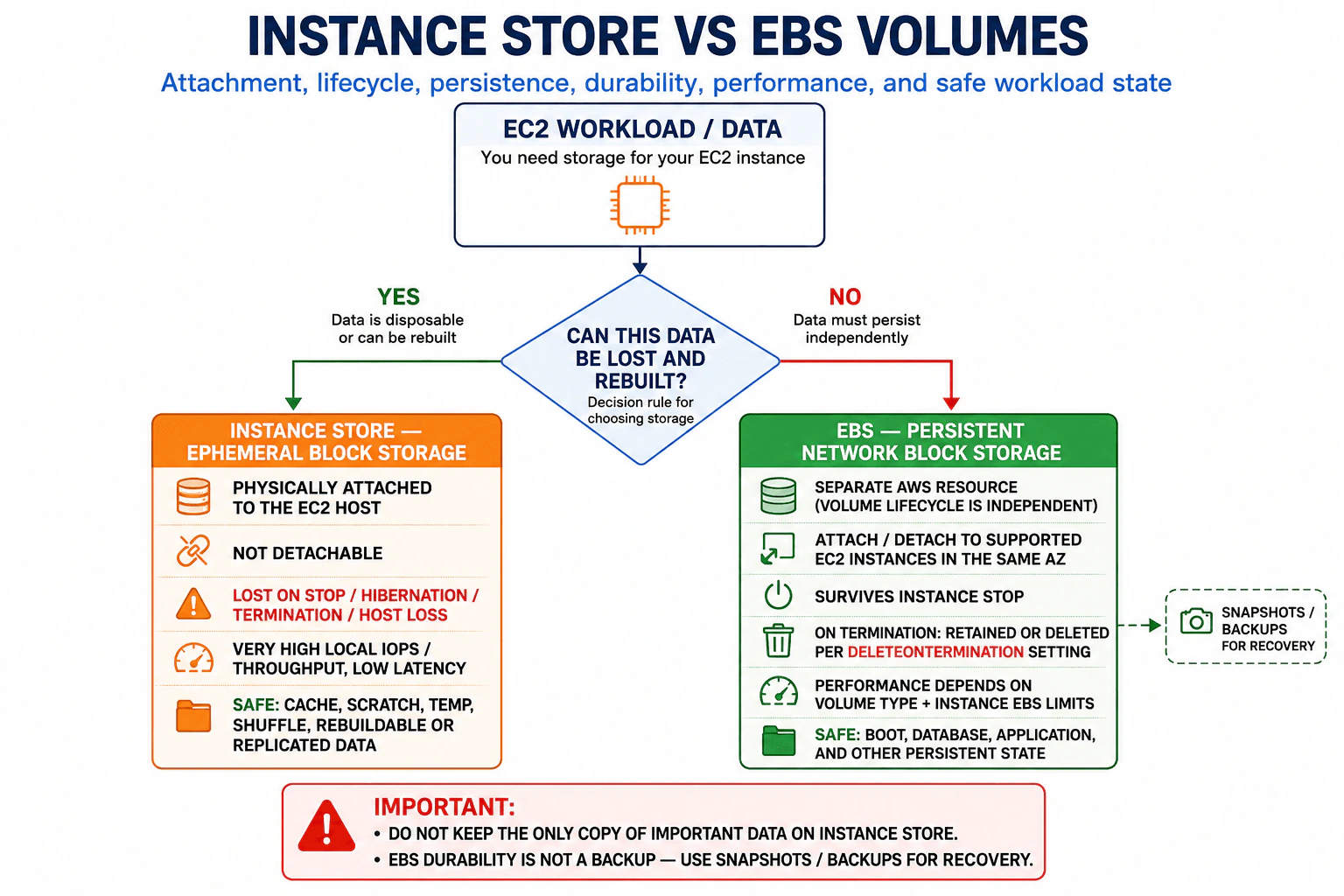
How does Instance Store differ from EBS volumes? diagram
How to Explain It in an Interview

Start with the lifecycle difference. Instance Store is ephemeral block storage provided by disks physically attached to the EC2 host. Its lifecycle is tied to that instance placement and underlying host. EBS, or Elastic Block Store, is persistent network-attached block storage whose volume lifecycle is separate from the EC2 compute instance.

For attachment, Instance Store is available only on EC2 instance types that provide instance-store devices. You cannot detach an Instance Store volume from one EC2 instance and later attach that same storage to another instance. EBS volumes are separate AWS resources. Subject to AWS attachment rules, an EBS volume can be detached from one supported instance and attached to another supported instance in the same Availability Zone. Some EBS volume types and configurations also support specialized attachment patterns such as Multi-Attach, but that is not the normal single-instance case.

For lifecycle and persistence, Instance Store data must be considered temporary. If an instance with Instance Store volumes is stopped, hibernated, or terminated, the data on those instance-store volumes is lost. Data can also be lost if the underlying host fails. Rebooting an instance does not by itself erase Instance Store data, but applications must never depend on Instance Store as the only durable copy because host replacement or other lifecycle events can remove it.

EBS is designed for persistent block storage. Stopping and starting an EC2 instance does not normally delete its EBS volumes. When an instance is terminated, whether a particular EBS volume is automatically deleted depends on that volume attachment's DeleteOnTermination setting. EBS volumes can also be snapshotted to Amazon EBS Snapshots for backup, restore, migration, and recovery workflows.

For durability, do not describe Instance Store as durable persistent storage. Its main advantage is local storage performance, while the application must tolerate losing that local copy. EBS is designed to provide persistent storage independently of a single EC2 host and has durability characteristics appropriate for persistent block storage. However, storage durability is not the same as backup. Important EBS data should still have an appropriate recovery strategy such as EBS snapshots, application-aware backups, replication, or another independent copy.

For performance, Instance Store can provide very high IOPS, high throughput, and low latency because the devices are physically local to the EC2 host. Exact performance depends on the selected EC2 instance type and its local NVMe or other instance-store devices. EBS performance uses the EC2 instance's EBS network path. Different EBS volume types offer different combinations of IOPS, throughput, latency, capacity, and cost, and achievable performance is also limited by the EC2 instance's EBS bandwidth and IOPS capabilities.

The safest workload rule is the most important part. Put only disposable, reproducible, or independently protected state on Instance Store. Good examples include caches, temporary processing files, shuffle data, scratch space, intermediate results, or replicated application data whose authoritative copy exists elsewhere. Do not keep the only copy of important business data on Instance Store.

Use EBS for state that should persist independently of an EC2 instance. Typical examples include EC2 boot volumes, persistent application file systems, self-managed database files when EBS is suitable for that database, and application state that needs snapshots or recovery after an instance is stopped, replaced, or terminated.

A practical summary is: Instance Store gives high-performance local storage but requires the application to tolerate complete loss of that local data. EBS gives persistent network block storage with an independent lifecycle and management features, but it still requires an appropriate backup and recovery plan for important data.

Technical Approach
  1. Decide whether the data must survive an instance stop, termination, replacement, or host failure.
  2. If the only copy must survive, use EBS or another appropriate durable AWS storage service rather than Instance Store.
  3. If the data is temporary, reproducible, or safely replicated elsewhere, consider Instance Store.
  4. Compare required latency, IOPS, and throughput with the capabilities of the selected EC2 instance and EBS volume type.
  5. Determine whether snapshots, backup, resizing, or later volume reattachment are required.
  6. Keep authoritative persistent state on durable storage and reserve Instance Store for data the application can safely lose.
Time & Space Complexity

There is no algorithmic time or memory complexity to calculate for this storage-selection question. The important costs are operational, performance, recovery, and financial. Instance Store can provide very fast local access, but the application must rebuild or recover lost data when the instance or host disappears. Its capacity is included with EC2 instance types that provide it, although selecting a larger instance mainly for local storage can raise compute cost. EBS is billed separately based on its volume type, capacity, and applicable provisioned performance or snapshot usage. It is easier to manage for persistent state, but performance depends on both the EBS configuration and the EC2 instance's EBS limits.

Where it is used

Instance Store is commonly used for temporary caches, distributed-processing scratch space, shuffle data, transient indexes, temporary files, intermediate computation results, and replicated systems where another node or durable service holds the authoritative data. EBS is commonly used for EC2 boot volumes, persistent application storage, self-managed database data files, transactional application state, and workloads that need snapshots, persistent lifecycle, resizing, or recovery after replacing an EC2 instance.

Why Interviewers Ask This

Interviewers want to know whether you understand the difference between temporary host-local storage and persistent network block storage in AWS. They are evaluating whether you can choose storage based on attachment model, lifecycle, durability, performance, failure behavior, and the importance of the stored data. A strong answer also shows that you understand that high local performance is useful only when the application can safely recreate or recover the data after the instance or host is lost.

Common interview mistakes

A common mistake is saying Instance Store data survives an EC2 stop. It does not; stopping or hibernating the instance loses the instance-store data. Another mistake is saying a reboot always deletes Instance Store data; a reboot normally preserves it, although the storage must still be treated as ephemeral because host loss or other lifecycle events can destroy it. Candidates also sometimes say EBS data is always deleted when an instance terminates. The actual behavior depends on the volume attachment's DeleteOnTermination setting. Another mistake is treating EBS durability as a substitute for backups. Persistent storage, replication, and backups solve different failure scenarios. Finally, do not claim Instance Store is always faster for every workload; actual results depend on the EC2 instance type, EBS volume configuration, I/O pattern, and instance bandwidth limits.

Interview tip

Lead with the lifecycle rule: Instance Store is temporary host-local storage, while EBS is persistent network block storage with an independent volume lifecycle. Then compare stop and termination behavior, attachment, durability, and performance. Finish with one decision rule: disposable or reproducible data can use Instance Store; important persistent state belongs on EBS or another durable storage service.

Interviewer may ask next
What happens to Instance Store and EBS data when an EC2 instance is stopped and started again?

Instance Store data is lost when the instance is stopped, so the application must recreate or recover anything it needs afterward. EBS volumes persist through the stop and start cycle and normally remain associated with the instance. This is why EBS is appropriate for persistent operating-system and application state, while Instance Store should contain only disposable, reproducible, or independently protected data.

When would you intentionally choose Instance Store instead of EBS?

I would choose Instance Store when the workload benefits from very fast local I/O and losing that local copy is acceptable. Examples include caches, distributed shuffle data, scratch space, temporary processing files, or replicated data that can be rebuilt or recovered from another source. I would not use it for the only copy of business data or any state that must survive an instance stop, termination, or underlying host failure.

7. Tell us about yourself.BehavioralEasyAmazon

Question Details

Summarize your real background, the cloud or support work most relevant to this role, and the evidence that connects your experience to helping customers operate cloud systems.

Interview tip:

Use STAR to structure your answer: briefly explain the Situation and Task, make Action the most detailed part, and finish with the Result. For example, describe your background, the cloud and support work most relevant to this role, the responsibilities you owned, how you helped operate and troubleshoot cloud systems, how you communicated with users and teammates, and what you learned from that experience.

Situation

In my last role, I worked with cloud systems that supported applications used by internal teams and customers. My work included helping keep services available, responding when something failed, and working with other engineers to understand issues across compute, networking, storage, monitoring, and access controls.

Task

My responsibility was to help operate those systems reliably and make technical problems easier to understand and resolve. I needed to investigate incidents carefully, communicate clearly with the people affected, and make changes in a controlled way so that solving one problem did not create another.

Action

I built my approach around understanding the system before changing it. When an issue appeared, I first gathered evidence from monitoring data, logs, recent changes, and the reported symptoms. I then narrowed the problem by checking the most likely dependencies, such as network paths, permissions, instance health, storage, or application configuration. I tried to separate facts from assumptions so I could explain what I knew, what I was testing, and why. When other teams were involved, I shared clear updates and asked focused questions instead of passing the problem to them without context. I also documented useful findings after incidents so repeated problems could be diagnosed faster. Over time, this work strengthened both my cloud engineering skills and my ability to support people who needed reliable systems but did not always need every technical detail behind the problem.

Result

I became more confident at owning cloud issues from the first report through investigation and recovery. The systems were easier to support because problems were handled with a consistent process and useful knowledge was captured for future incidents. I also learned that strong cloud engineering is not only about knowing services. It is about using evidence, communicating clearly, managing risk, and helping customers operate their systems with confidence.

Why Interviewers Ask This

Interviewers ask this question to understand how your background connects to the Cloud Engineer role. A strong answer shows that you can explain your experience clearly, identify the cloud and support work that matters most, demonstrate ownership and practical judgment, and connect technical skills with helping customers operate reliable systems.

Interviewer may ask next
What part of your previous cloud work prepared you most for supporting customers?

The most useful experience was learning how to investigate problems methodically while keeping people informed. I learned to start with evidence from monitoring, logs, recent changes, and user symptoms, then narrow the issue across areas such as networking, access, compute, storage, or configuration. At the same time, I explained progress in simple language. That combination helped me solve technical problems while also giving customers confidence that the issue was being handled carefully.

What have you learned about being an effective Cloud Engineer?

I learned that technical knowledge is only one part of the role. I also need to understand how systems depend on each other, avoid making changes based on guesses, communicate clearly during problems, and think about the customer impact of every decision. I now try to approach cloud work with evidence, controlled changes, clear ownership, and documentation that helps the next person solve the problem faster.

8. What did you learn from a recent failure, and how did it make you a better Cloud Support Engineer?BehavioralMediumAmazon

Question Details

Use a real recent failure. Explain your responsibility, the effect on a customer or team, the evidence that changed your understanding, the corrective action you took, and the behavior you now apply differently.

Interview tip:

Use STAR to structure your answer: briefly explain the Situation and Task, make Action the most detailed part, and finish with the Result. For example, describe a recent support failure where your first technical assumption was wrong, explain the effect on the customer or team, show what evidence changed your understanding, describe how you corrected the issue and communicated clearly, and explain the troubleshooting behavior you now use differently.

Situation

Recently, in my last role, I handled a support case where an application running in the cloud was repeatedly losing access to a backend service. I initially believed the problem was caused by a recent application change because the failures started soon after a deployment. I focused too heavily on that assumption, which delayed the investigation and caused the customer to wait longer for a useful answer.

Task

I was responsible for identifying the actual cause, restoring reliable connectivity, and keeping the customer informed. I also needed to understand why my first troubleshooting path had failed so I would not repeat the same mistake on another support case.

Action

I went back to the evidence instead of continuing to defend my first assumption. I reviewed application logs, network connection errors, recent infrastructure changes, and the timing of the failures. The logs showed that the application was failing even when the new code path was not being used. That evidence told me the deployment was probably only a coincidence. I then checked the network path and found that a recent security rule change had removed access that the application needed to reach the backend service. I worked with the team responsible for the rule to restore the required access using the smallest necessary permission. I explained to the customer what we had found, what we were changing, and how we would confirm recovery. After service was stable, I reviewed my own troubleshooting process. I realized that I had started with a conclusion instead of starting with evidence. I changed my approach so that I now create a short list of possible causes, collect evidence for each one, and actively look for information that could prove my first idea wrong.

Result

The correct network access was restored and the application became stable again. More importantly, I learned that fast troubleshooting is not the same as quickly choosing a cause. I became a better Cloud Support Engineer because I now separate facts from assumptions, test more than one possible cause, communicate uncertainty clearly, and change direction as soon as the evidence shows that my first idea is wrong.

Why Interviewers Ask This

Interviewers ask this question to see whether a candidate can take ownership of a mistake without hiding it or blaming others. They also want to know whether the candidate can learn from evidence, correct the immediate problem, and turn the lesson into a better support habit. A strong answer shows self awareness, technical judgment, customer focus, and a clear change in future behavior.

Interviewer may ask next
What would you do differently if you faced the same type of incident today?

I would begin by separating confirmed facts from assumptions. I would list several possible causes, gather evidence for each one, and check recent application and infrastructure changes in parallel instead of focusing only on the most obvious event. I would also tell the customer what we know, what we are still testing, and when I will provide the next update.

How do you prevent yourself from becoming too attached to your first technical theory now?

I actively look for evidence that could prove my first theory wrong. For example, I compare the failure timing with logs, configuration changes, network behavior, and other affected components. If the evidence does not support my first idea, I change direction quickly. That habit helps me avoid spending too much time trying to confirm an assumption.

9. Tell me about a time you went above and beyond for a customer or your manager.BehavioralHardAmazon

Question Details

Use a real example in which normal ownership would not have been enough. Explain the customer or business need, the extra action you chose, the tradeoff or risk, and the verified result.

Interview tip:

Use STAR to structure your answer: briefly explain the Situation and Task, make Action the most detailed part, and finish with the Result. For example, describe a situation where a customer faced an important cloud reliability issue, explain why normal support was not enough, show the extra investigation and coordination you personally chose to do, explain the tradeoff or risk you considered, and finish with how you verified that the customer received a reliable result.

Situation

In my last role, a customer reported that an important cloud application was becoming unreliable during periods of heavy traffic. The service was still running, so the issue did not meet the normal threshold for an emergency response. However, the customer had an important business event approaching, and I could see that simply giving them standard troubleshooting steps would leave too much risk.

Task

I was responsible for reviewing the cloud infrastructure and helping the customer understand the cause. My normal responsibility would have been to investigate the reported symptoms, recommend changes, and hand the work back to the customer. I decided that was not enough because the problem involved several parts of the environment and the customer needed confidence that the whole path would remain stable under load.

Action

I first reviewed monitoring data, application logs, load balancer behavior, instance health, and scaling activity so I could understand the full request path instead of focusing on one symptom. I found that the application could add capacity, but new instances were taking too long to become useful because their startup process included several slow configuration steps. I explained this clearly to the customer and proposed that we improve the startup process and test the complete scaling flow before their business event. This was extra work beyond the original request, and it required time from both my team and the customer, so I made the tradeoff clear before continuing. I then worked with the application team to identify which startup steps were necessary and which work could be completed earlier when the machine image was created. I also reviewed the health checks to make sure traffic was sent only after an instance was truly ready. After the changes were prepared, I helped organize a controlled load test. During the test, I watched scaling events, instance readiness, error logs, and application response behavior. I noticed one remaining delay caused by a dependency check, so I worked with the team to adjust that step and repeated the test. I documented the final configuration, the reason for each change, and the signals the customer should watch during the event. I also stayed involved through the final validation instead of ending my work after giving the initial recommendation.

Result

The customer entered the business event with a scaling process that had been tested from end to end and with clear monitoring steps for the team to follow. The application handled the expected traffic pattern without the reliability problem we had seen earlier. The customer also had a better understanding of how to verify scaling behavior in future tests. I learned that going above and beyond does not mean adding unnecessary work. It means recognizing when the normal handoff leaves an important risk unresolved and taking responsible extra ownership to close that gap.

Why Interviewers Ask This

Interviewers ask this question to understand whether a candidate notices important needs that fall outside the minimum assigned task and takes responsible ownership without losing judgment. A strong answer shows customer focus, initiative, communication, careful risk management, and the discipline to verify that the extra effort produced a useful result.

Interviewer may ask next
Why did you decide to stay involved instead of giving the customer your recommendation and moving on?

I stayed involved because the main risk was not just identifying the likely cause. The customer needed to know that the complete scaling process would work before an important event. A recommendation without validation would still leave that question open. I made sure the customer understood the extra effort involved, then I stayed through the controlled test so we could verify the result rather than assume the changes were enough.

What would you do differently if you faced a similar situation again?

I would introduce the complete scaling test earlier in the investigation. In this case, I first studied each part of the environment and then organized the full test. That approach worked, but an earlier controlled test could have exposed the startup delay sooner. I would still review the individual components carefully, but I would combine that work with an early end to end test so the team could learn faster.

Disclaimer: This interview guide is for educational and informational purposes only. It is designed to help readers prepare, but it does not guarantee any interview result, hiring decision, offer, or outcome. Interview questions, hiring criteria, and preferred answers can vary by employer, interviewer, industry, location, and time. The examples and explanations reflect the authors' research and judgment, are provided without warranties of any kind, and should not be treated as the only correct approach. Diagrams are simplified illustrations intended to highlight the main components and their interactions; actual systems and implementations may be more complex. Alternative approaches may be equally valid or better suited to a particular question, context, or interviewer. To the fullest extent permitted by applicable law, the author, contributors, and publisher are not liable for decisions made, actions taken, or losses incurred based on this guide.

Company Notice: This guide is an independent educational resource and is not affiliated with, endorsed by, sponsored by, or approved by the company named in this guide. Company names are used only to identify interview experiences commonly reported by candidates. Interview practices can change without notice, and inclusion of company-specific content does not mean these questions are official, complete, or guaranteed to be asked. To the fullest extent permitted by law, the author, contributors, and publisher are not responsible for outcomes related to use of this material.

Content Accuracy and Verification: To the fullest extent permitted by applicable law, we do not represent or warrant that interview guides, questions, answers, examples, or diagrams are accurate, complete, current, error-free, or suitable for any particular purpose. You are responsible for independently reviewing and verifying the information before relying on it.