This interview guide is for educational and informational purposes only. It is designed to help readers prepare, but it does not guarantee any interview result, hiring decision, offer, or outcome. Interview questions, hiring criteria, and preferred answers can vary by employer, interviewer, industry, location, and time. All answers, examples, and explanations in this guide are suggested examples for interview preparation, not definitive answers or instructions for professional practice. They are based on research and judgment, are provided without warranties of any kind, and should be adapted to the question, role, and applicable laws and professional requirements. Diagrams are simplified illustrations intended to highlight the main concepts and their relationships; actual situations, systems, and practices may be more complex. Alternative approaches may be equally valid or better suited to a particular question, context, or interviewer. To the fullest extent permitted by applicable law, the contributors and publisher are not liable for decisions made, actions taken, or losses incurred based on this guide.
State Laws and Professional Responsibilities
Laws and requirements governing an occupation vary by state and jurisdiction. You are responsible for checking the current laws, licensing requirements, and scope-of-practice rules that apply to your location and role, and for ensuring that your answers and actions comply with them. Adapt examples in this guide to those requirements. This guide is not legal advice.
Identity, Image, and Privacy Notice
To respect individual privacy, some names, profile photographs, avatars, biographical details, and other identifying information displayed in this guide may be replaced with pseudonyms, licensed stock images, illustrative avatars, composite images, or representative descriptions. Unless a person is expressly identified as an actual contributor, a displayed name, image, or profile should not be understood as depicting or identifying a specific candidate, interviewer, employee, or other real individual. These representations are provided for editorial and illustrative purposes only and do not imply endorsement, employment, participation, or affiliation with this guide or any company mentioned in it. Any resemblance to an actual person is coincidental.
Company Notice
This guide is an independent educational resource and is not affiliated with, endorsed by, sponsored by, or approved by the company named in this guide. Company names identify reported interview experiences or the employer context of clearly labeled original practice exercises. Interview practices can change without notice, and inclusion of company-specific content does not mean these questions are official, complete, or guaranteed to be asked. To the fullest extent permitted by law, the author, contributors, and publisher are not responsible for outcomes related to use of this material.
Content Accuracy and Verification
To the fullest extent permitted by applicable law, we do not represent or warrant that interview guides, questions, answers, examples, or diagrams are accurate, complete, current, error-free, or suitable for any particular purpose. You are responsible for independently reviewing and verifying the information before relying on it.
Questions or comments?
Contact us for general questions, or share feedback, technical corrections, and comments with the community.
1. How would you integrate Azure AI services into an existing cloud architecture?NEWCloud ArchitectureMediumMicrosoft
i Question Details
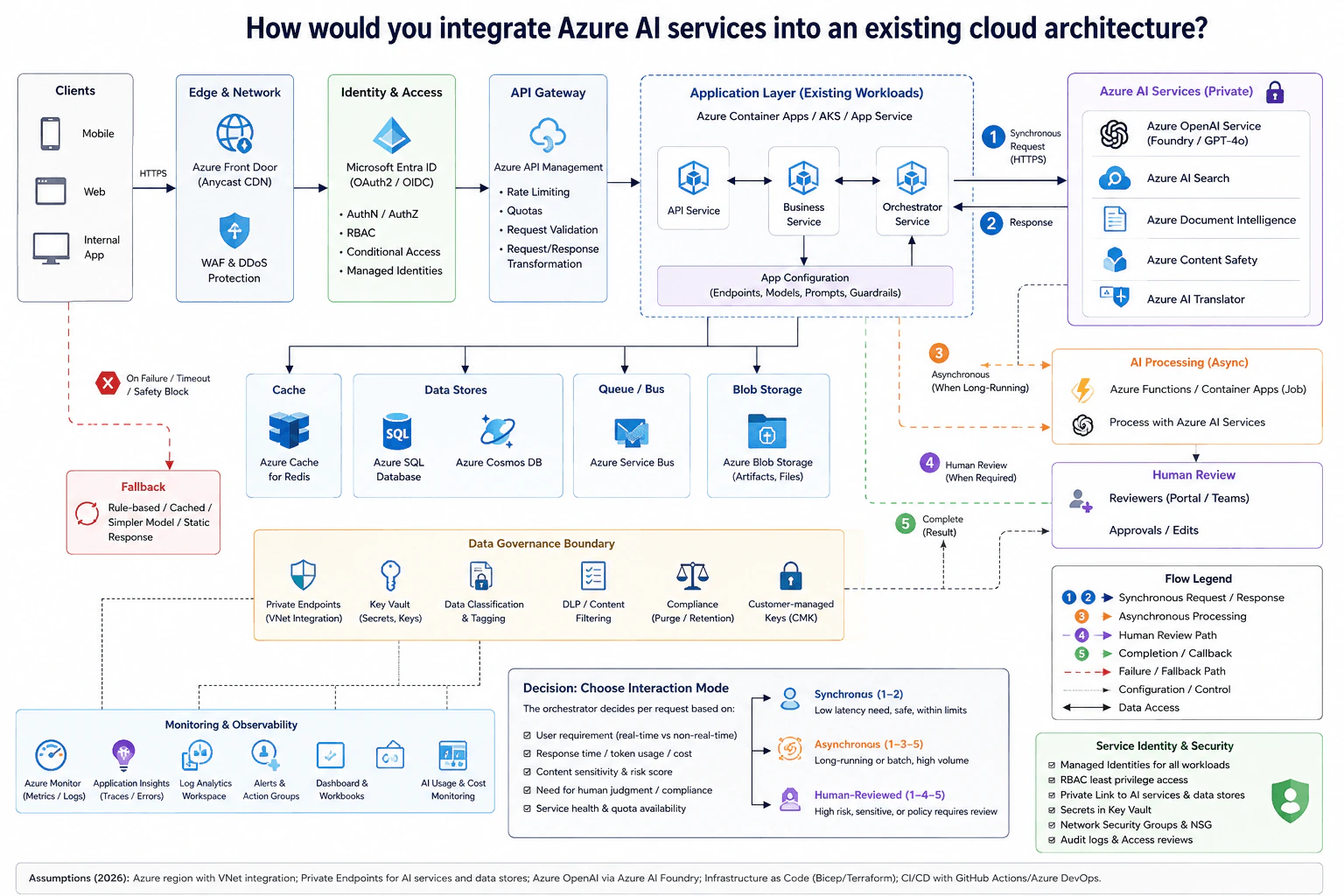
An established application is adding an Azure AI capability. Describe the request and data paths, service identity, network exposure, data-governance boundary, application fallback, monitoring, and the decision that determines whether the AI interaction is synchronous, asynchronous, or human-reviewed.
Short Interview Answer (30-60 seconds)
At a high level, I would add AI without making the existing application depend on one slow or risky path. The main decision is whether each request needs an immediate answer, background processing, or human review. I would explain the design through the secured request path, the AI processing path, and the failure and governance path. The application uses private Azure AI services, managed identities, governed data, monitoring, and graceful fallback. The trade-off is stronger control and resilience, but more operational complexity.
Detailed Explanation
The goal is to add Azure AI features to an existing application without weakening security, reliability, or data control. Some requests need an answer immediately. Other work may run for a long time, while sensitive results may require a person to approve them. The application must also stay useful when an AI service fails, times out, or blocks unsafe content. The diagram solves this by keeping the existing application in control, choosing an interaction mode for each request, using private AI access, protecting customer data, and adding monitoring and fallback paths.
Useful Questions to Ask the Interviewer
Which AI requests need an immediate response?
Which requests can finish later in the background?
Which results require human approval before use?
What customer data may be sent to each AI service?
What should users receive when AI fails, times out, or blocks content?
How to Explain It in an Interview
1. Start with the secured request path
I would keep the existing application entry path in front of the AI feature. Clients send HTTPS traffic through Azure Front Door. WAF and DDoS Protection guard the edge. Microsoft Entra ID handles authentication and authorization. Azure API Management then applies rate limiting, quotas, request validation, and request or response transformation.
This prevents the AI layer from becoming a separate public entry point. It also protects downstream services from uncontrolled requests.
2. Let the existing application orchestrate AI work
The request next enters the existing Application Layer. The diagram shows Azure Container Apps, AKS, or App Service as possible workloads. The API Service, Business Service, and Orchestrator Service keep the normal application flow intact.
The Orchestrator Service decides how AI should handle each request. App Configuration provides endpoints, models, prompts, and guardrails. The application also connects to Azure Cache for Redis, Azure SQL Database, Azure Cosmos DB, Azure Service Bus, and Azure Blob Storage where the existing workload needs them.
3. Choose the interaction mode per request
The orchestrator chooses synchronous, asynchronous, or human-reviewed processing. It considers the user's real-time need, expected response time, token usage and cost, content sensitivity, risk, human judgment requirements, compliance needs, service health, and quota availability.
A low-latency request that is safe and within limits uses the synchronous HTTPS path to Azure AI Services and returns a response. Long-running or batch work goes through Azure Service Bus to Azure Functions or a Container Apps job. High-risk or policy-controlled work goes to Human Review through reviewers using the portal or Teams. Completed background or reviewed work follows the result or callback path.
4. Keep AI services and customer data private
The private Azure AI Services area includes Azure OpenAI Service, Azure AI Search, Azure Document Intelligence, Azure Content Safety, and Azure AI Translator. Private Link and private endpoints keep AI services and data stores away from normal public exposure.
Managed identities provide service identity without placing credentials in application code. RBAC gives each workload only the access it needs. The Data Governance Boundary includes Key Vault, data classification and tagging, DLP or content filtering, compliance controls, customer-managed keys, and private endpoints for governed Azure SQL Database, Azure Cosmos DB, and Azure Blob Storage data.
5. Handle failure and monitor the complete flow
If AI fails, times out, or a safety rule blocks the request, the application follows the fallback path. The diagram allows a rule-based, cached, simple-model, or static response instead of making the whole application fail.
Azure Monitor, Application Insights, Log Analytics Workspace, Alerts and Action Groups, Dashboard and Workbooks, and AI Usage and Cost Monitoring provide visibility. The benefit is secure private access, controlled data handling, and graceful failure. The downside is more moving parts across queues, review workflows, networking, governance, and monitoring.
Practical Complexity & Trade-offs
The benefit is that the existing application stays in control of the AI feature. Fast and safe requests can return directly. Longer work can move through Azure Service Bus and run in the background. Sensitive results can wait for Human Review. Private endpoints, managed identities, RBAC, Key Vault, and data-governance controls reduce unnecessary exposure. The fallback path also keeps the application useful when AI is unavailable. The downside is more complexity. The team must operate queues, workers, private networking, review flows, monitoring, and governance rules. Human review also makes some responses slower. We accept this because different AI requests have different risk and response-time needs.
Why Interviewers Ask This
Interviewers want to see whether you treat AI as part of the whole cloud system, not just as an API call. They are testing your judgment about request flow, identity, private networking, data protection, failures, and monitoring. They also want to know whether you can choose between immediate responses, background work, and human review based on latency, risk, cost, service limits, and business needs.
Interviewer may ask next
What would you change if most AI requests started taking too long for a synchronous response?
I would keep the same architecture, but move more requests to the asynchronous path. The Orchestrator Service would decide that those requests should not keep the user waiting for the full AI operation. It would place the work on Azure Service Bus instead.
Azure Functions or a Container Apps job would then process the work with Azure AI Services in the background. This keeps long-running or batch processing away from the immediate HTTPS response path. Azure Monitor, Application Insights, Log Analytics Workspace, and alerts would continue to track failures, latency, and service behavior.
Requests that remain fast, safe, and within service limits could still use the synchronous path. Sensitive or policy-controlled results could still move to Human Review. The existing fallback path would remain available when AI fails, times out, or blocks content.
The main downside is that users may not receive the final result immediately. The application also has to operate the queue, background jobs, and completion path.
How would you handle an AI feature that processes sensitive customer data?
I would keep the same design, but make the Data Governance Boundary central to that request. Traffic would still enter through Azure Front Door, Microsoft Entra ID, and Azure API Management. The Orchestrator Service would remain responsible for deciding which Azure AI Service receives the work.
Managed identities would give workloads their service identity. RBAC would limit each workload to only the access it needs. Private Link and private endpoints would keep Azure AI Services and data stores away from normal public exposure. Key Vault would protect secrets and keys. Data classification and tagging would identify sensitive information. DLP or content filtering would apply the required rules. Compliance controls, retention rules, and customer-managed keys would protect governed data where required.
If policy requires a person to approve the output, the request would use the Human Review path. The main downside is more governance work and a potentially slower response.
2. What is the difference between platform engineering and traditional DevOps?DevOpsEasyMicrosoft
i Question Details
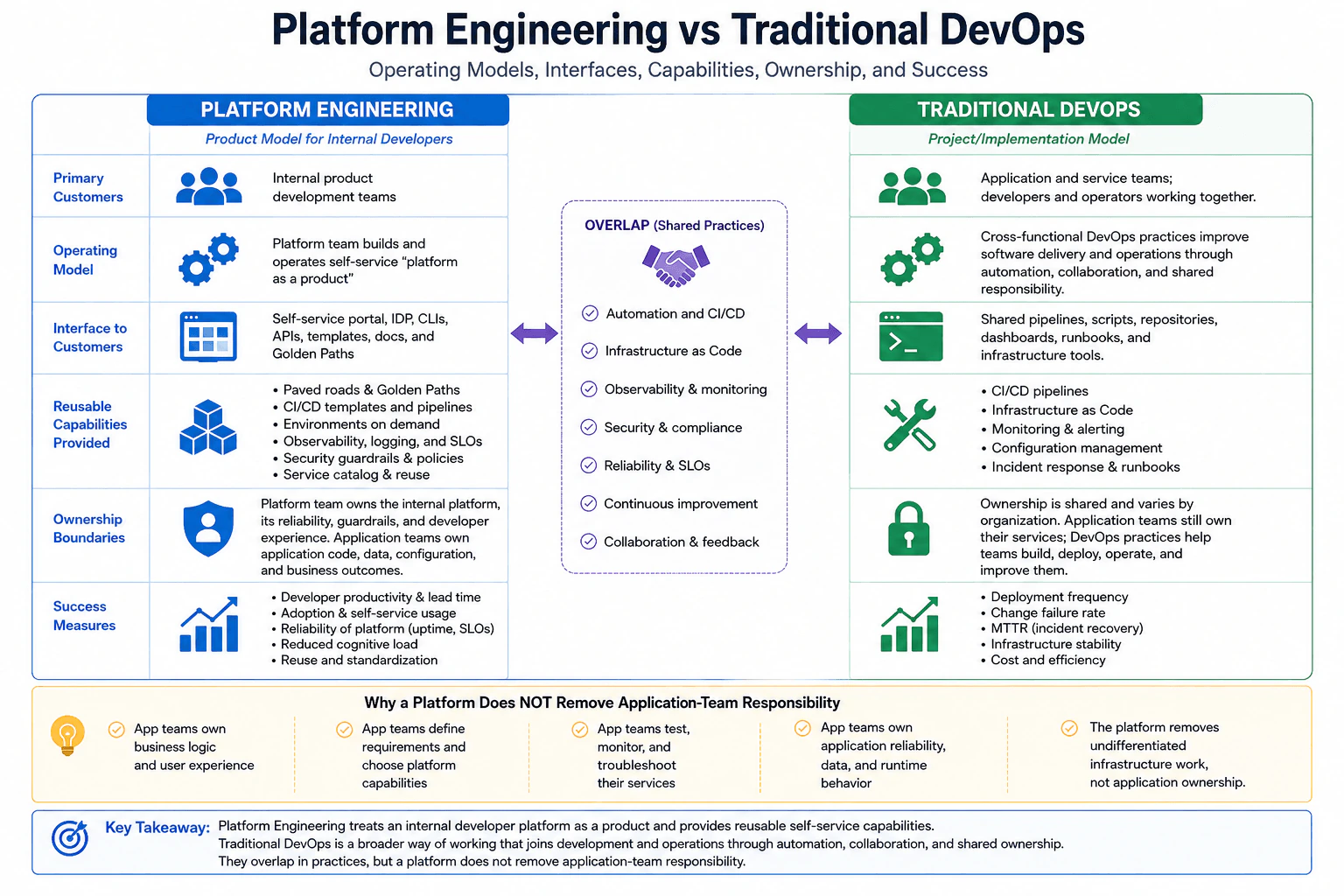
Compare the operating model, customers, interfaces, reusable capabilities, ownership boundaries, and success measures of a platform-engineering team with those of a traditional DevOps implementation. Explain where the practices overlap and why a platform does not remove application-team responsibility.
Short Interview Answer (30-60 seconds)
Platform engineering treats an internal developer platform as a product for application teams. The platform team provides reusable self service capabilities such as portals, APIs, templates, standard pipelines, environments, observability, and security guardrails. Traditional DevOps is a broader way of working where development and operations improve software delivery together through automation, collaboration, and shared ownership. Both can use CI/CD, infrastructure as code, observability, security, reliability practices, and continuous improvement. The platform team owns the platform, but application teams still own their applications and business outcomes.
Detailed Explanation
Platform engineering and traditional DevOps both help teams deliver software more safely and quickly, but they organize the work in different ways. Platform engineering creates a common internal service that many application teams can use. Traditional DevOps focuses more broadly on people working together to build, release, run, and improve software. The main difference is who receives the service, how teams interact with it, what work is reused, who owns each part, and how success is measured. A platform removes repeated setup work, but the application team still owns the application and its results.
Useful Questions to Ask the Interviewer
Are we comparing a dedicated platform team with a particular DevOps team structure?
Does the organization already have an internal developer platform?
Should I focus more on developer productivity measures or delivery and reliability measures?
How to Explain It in an Interview
I would start with the operating model. A platform engineering team treats the internal developer platform as a product. Its primary customers are internal application and development teams. The platform team builds and operates reusable capabilities that those teams can consume without rebuilding the same infrastructure work each time.
Typical interfaces include a self service portal, APIs, command line interfaces, templates, documentation, service catalogs, and golden paths. Reusable capabilities can include CI/CD templates and pipelines, environments on demand, infrastructure modules, observability, logging, service level objectives, security guardrails, policies, and standard service patterns. Useful platform measures include adoption, developer productivity, lead time, platform reliability, reduced cognitive load, reuse, and standardization.
Traditional DevOps is broader. It uses collaboration and automation to improve software delivery and operations. Application and service teams, developers, and operators work together. Common interfaces include shared pipelines, scripts, repositories, dashboards, runbooks, and infrastructure tools. Useful measures include deployment frequency, change failure rate, recovery time, infrastructure stability, availability, and cost efficiency.
The practices overlap heavily. Both can use automation, CI/CD, infrastructure as code, observability, monitoring, security, compliance, reliability practices, and continuous improvement.
The ownership boundary is important. The platform team owns the internal platform, its reliability, guardrails, and developer experience. Application teams still own their application code, data, configuration, runtime behavior, testing, monitoring, troubleshooting, reliability, and business outcomes. The platform removes undifferentiated infrastructure work. It does not remove application ownership.
Why Interviewers Ask This
Interviewers ask this to see whether I understand that platform engineering and DevOps overlap but use different operating models. They want me to compare their customers, interfaces, reusable capabilities, ownership boundaries, and success measures. They also want to know whether I understand shared responsibility. A strong answer explains that an internal platform reduces repeated infrastructure work without taking ownership of the application away from the application team.
Common interview mistakes
A common mistake is saying that platform engineering replaces DevOps. It does not. Platform engineering builds and operates a reusable internal product, while DevOps is a broader set of practices for collaboration, automation, delivery, and operations. Another mistake is assuming that a central DevOps team must own every environment and tool. Ownership varies by organization. It is also incorrect to say that application teams lose operational responsibility after a platform is introduced. They still own their services, data, configuration, runtime behavior, testing, monitoring, reliability, and business outcomes. Another mistake is measuring a platform only by the number of tools it contains instead of adoption, usability, reliability, reuse, and reduced cognitive load.
Interview tip
Explain the difference with three ideas. First, platform engineering treats an internal developer platform as a product for application teams. Second, DevOps is a broader way of working based on collaboration, automation, and shared ownership. Third, state the ownership boundary clearly: the platform team owns the platform, while application teams still own their applications and outcomes.
Interviewer may ask next
What should happen when an application team needs something that the platform does not support?
The application team should use an approved alternative or exception rather than forcing the workload through a platform capability that does not fit. This matters because a platform should provide useful golden paths without becoming a rigid bottleneck. The platform team should examine repeated exceptions and decide whether the missing capability should become a reusable platform feature. The main tradeoff is standardization versus flexibility. Too much restriction can slow teams, while too many exceptions can reduce consistency, security, supportability, and reuse.
When is a dedicated internal developer platform not worth the investment?
A dedicated platform may not be worth the investment when there are only a few application teams, little repeated infrastructure work, or no clear developer problems that a shared platform would solve. A platform creates ongoing product ownership, maintenance, support, reliability, and governance work. The investment becomes more useful when many teams need the same capabilities and repeated manual work creates delay or inconsistency. The main tradeoff is platform cost and complexity versus the productivity, reuse, safety, and consistency gained across many teams.
3. How do you import existing Azure resources into Terraform management?DevOpsMediumMicrosoft
i Question Details
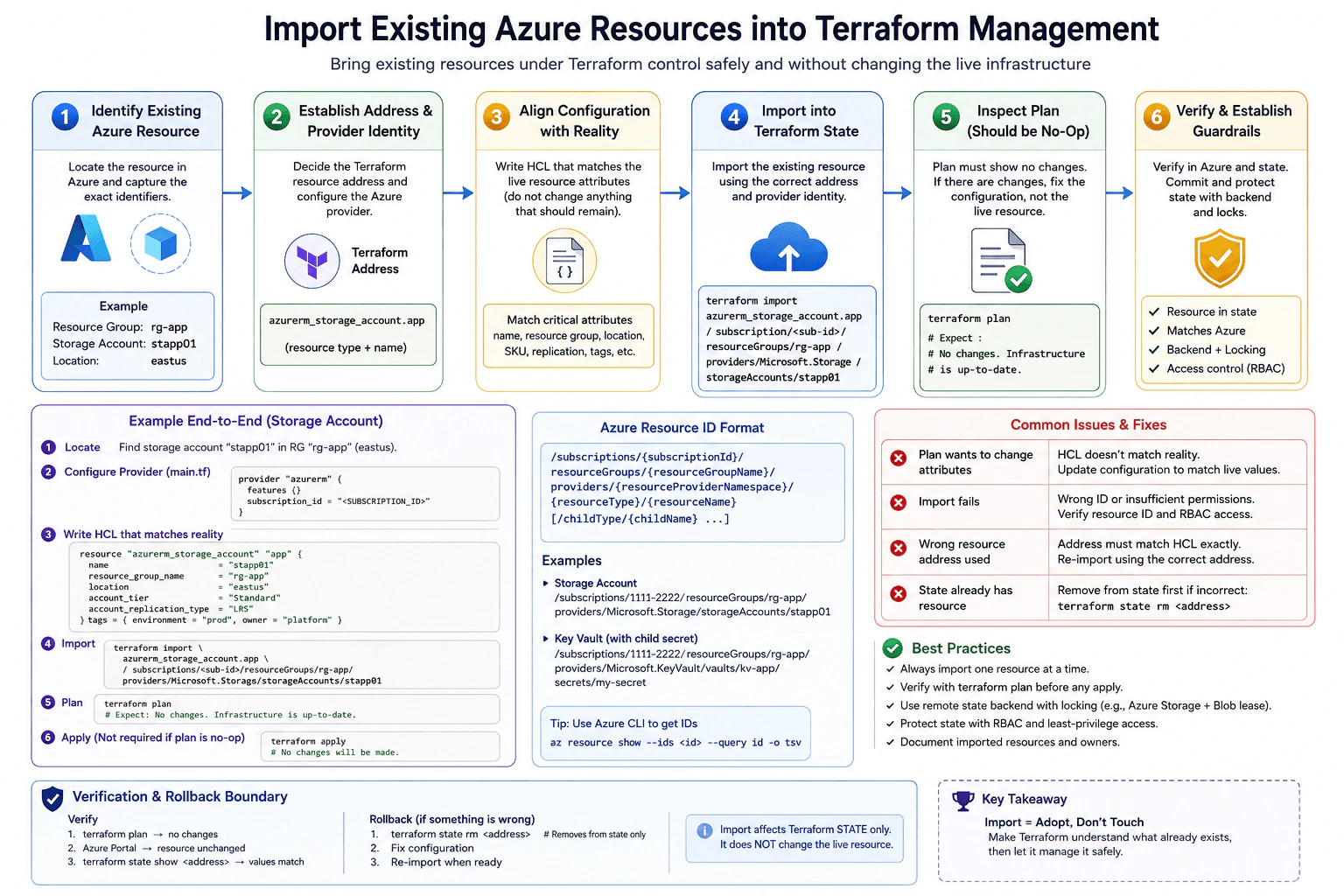
An Azure resource already exists outside the current Terraform configuration. Explain how to establish the correct resource address and provider identity, align configuration with reality, import without unintentionally changing the live resource, inspect the resulting plan, and define the verification and rollback boundary.
Short Interview Answer (30-60 seconds)
I first identify the exact Azure resource, its full Azure resource ID, and the Terraform resource address that should manage it. I configure the correct Azure provider identity and write HCL that matches the live resource. Then I run terraform import with the Terraform address and Azure resource ID. Import changes Terraform state only and should not change the live Azure resource. After import, I run terraform plan and expect no changes. If the plan shows differences, I correct the configuration before any apply. Finally, I verify Azure and Terraform state and protect the state with remote storage, locking, and access controls.
Detailed Explanation
The safe goal is to adopt an Azure resource that already exists without changing the live infrastructure. First, I identify the exact resource, the Terraform resource address that should own it, and the Azure identity that Terraform will use. Then I write Terraform configuration that matches what already exists. I import the live object into Terraform state and inspect the resulting plan. Import itself should not modify the Azure resource. The important safety boundary is the plan. I do not apply anything until the plan is understood and the live resource has been verified.
Useful Questions to Ask the Interviewer
Is this Azure resource already present anywhere else in Terraform state?
Which Azure subscription and provider identity should Terraform use?
Should every property be managed by Terraform, or are some properties intentionally managed by Azure or another process?
Where is Terraform state stored, and is locking enabled?
How to Explain It in an Interview
I start by locating the exact Azure object and getting its full resource ID. In the diagram example, the resource is storage account stapp01 in resource group rg app and region eastus. The Terraform address is azurerm_storage_account.app. That address must match the resource block that will own the object.
Next, I configure the AzureRM provider for the intended subscription and authenticated identity. I then write the Terraform resource block so it reflects the live storage account. The example matches the name stapp01, resource group rg app, location eastus, account tier Standard, replication type LRS, and the managed tags for environment prod and owner platform.
Then I run terraform import with azurerm_storage_account.app and the exact Azure resource ID. Terraform records the mapping in state. It does not create, update, or delete the Azure storage account.
Immediately after import, I run terraform plan. The expected result is no changes. If Terraform wants to change attributes, I do not change the live resource just to satisfy Terraform. I inspect the differences and update the HCL to match reality. If a property truly must remain managed outside Terraform, I can use an appropriate lifecycle rule after making that ownership decision explicit.
Finally, I verify that the Azure resource is unchanged and that terraform state show returns the expected values. I protect remote state with locking and restricted access. If I imported the wrong address, the rollback boundary is Terraform state. I remove the incorrect state entry, correct the configuration or address, and import again. The Azure resource remains in place.
Why Interviewers Ask This
Interviewers ask this to check whether I understand Terraform state, Azure resource identity, provider configuration, resource addresses, drift, planning, and safe infrastructure adoption. They want to see that I know import records an existing Azure object in Terraform state rather than creating the object. They also want to see whether I can align configuration with reality, inspect the plan before any apply, protect shared state, verify the live resource, and recover safely when the state mapping is wrong.
Common interview mistakes
Common mistakes include using the wrong Terraform resource address, importing the wrong Azure resource ID, using the wrong Azure subscription or provider identity, and assuming import automatically creates correct Terraform configuration. Another mistake is running terraform apply immediately after import without reading the plan. That can change the live Azure resource when the HCL does not match reality. Engineers can also misuse lifecycle ignore settings to hide unexplained drift instead of deciding which system owns each property. Other risks include importing a resource that is already represented in state, keeping shared state without locking, giving excessive access to state, or using terraform destroy as a rollback method. A wrong import should normally be corrected at the Terraform state boundary.
Interview tip
Explain the workflow in a simple order: identify, address, align, import, plan, verify, and protect. State clearly that terraform import changes Terraform state only and does not modify the live Azure resource. Then explain that terraform plan is the safety gate before any apply. Mention the exact Terraform address, Azure resource ID, provider identity, no changes goal, remote state locking, and state only rollback.
Interviewer may ask next
What would you do if terraform plan shows changes immediately after the import?
I would not apply the plan immediately. The proposed changes mean the Terraform configuration and the observed Azure resource do not fully agree, or Terraform is trying to manage a property that should remain under another owner. I would inspect every proposed difference and update the HCL to match the live resource where appropriate. If a property intentionally must not be managed by Terraform, I would make that ownership decision explicit and use a suitable lifecycle rule only when justified. Then I would run terraform plan again. The goal is a reviewed no changes plan before Terraform is allowed to modify the imported resource.
How would you recover if you imported the Azure resource to the wrong Terraform address?
I would correct the Terraform state mapping rather than destroy the Azure resource. I would confirm the incorrect address and use terraform state rm with that address. This removes the Terraform state association only and leaves the Azure resource in place. I would then correct the configuration or destination address and import the same Azure resource again using its exact Azure resource ID. After the new import, I would run terraform plan and terraform state show to confirm that the resource is mapped correctly and that no unintended infrastructure changes are proposed.
4. Your production pipeline failed at midnight. How would you handle it?NEWDevOpsHardMicrosoft
i Question Details
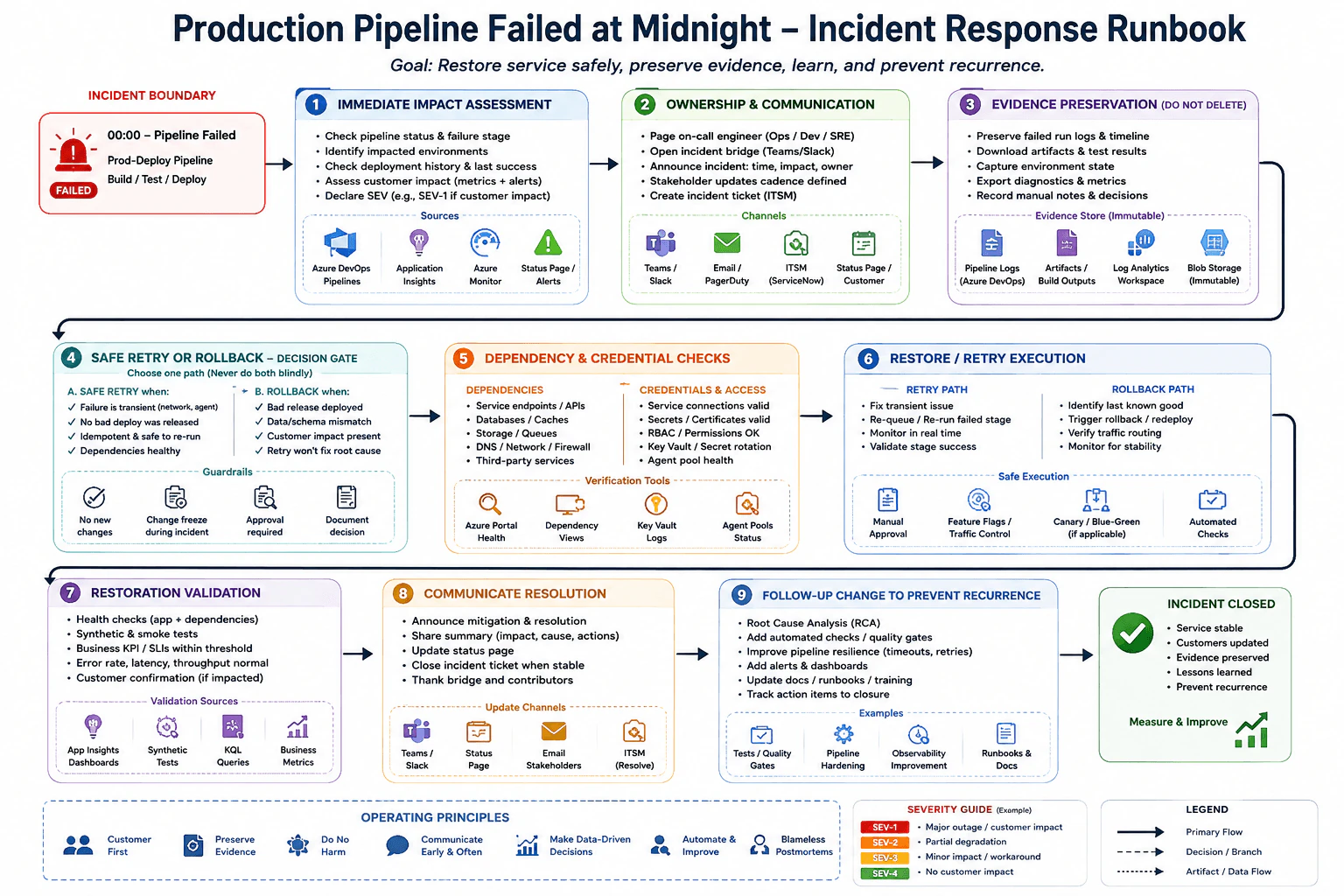
Use the failed pipeline as the incident boundary. Describe immediate impact assessment, ownership and communication, evidence preservation, safe retry or rollback criteria, dependency and credential checks, restoration validation, and the follow-up change that prevents the same failure without deleting the original evidence.
Short Interview Answer (30-60 seconds)
I would treat the failed production pipeline as an incident, not just rerun it. First I would measure customer impact and identify the failed stage. I would assign an owner, open the incident communication channel, and preserve the failed run logs, artifacts, metrics, diagnostics, and environment state. Then I would decide whether a retry is safe or whether rollback to the last known good release is safer. I would check dependencies, service connections, permissions, secrets, certificates, network paths, and agent health. After restoration, I would validate service health and business signals, communicate resolution, and complete root cause and prevention work without deleting the original evidence.
Detailed Explanation
A production pipeline failure can affect real customers, so I would first understand what failed and whether the service is damaged. I would not immediately repeat the release. I would identify the affected environment, check customer impact, and decide how serious the incident is. One person should own the response while the team communicates through the agreed incident channel. I would also keep the original logs, artifacts, test results, metrics, and decisions so the cause can be studied later. Then I would choose the safest recovery path, verify that service is healthy again, communicate the result, and create prevention work.
Useful Questions to Ask the Interviewer
Is the production service currently unavailable or is only the deployment pipeline failing?
Did any part of the new release reach production before the pipeline stopped?
Is there an approved rollback path to the last known good release?
Which incident communication and service management tools does the team use?
How to Explain It in an Interview
I would begin with immediate impact assessment. In Azure DevOps Pipelines I would identify the failed stage and review the recent deployment history. I would use Application Insights, Azure Monitor, alerts, and the customer status view to check errors, latency, saturation, affected environments, and customer impact. I would assign an appropriate incident severity.
Next I would establish ownership and communication. I would page the responsible on call engineer, open the incident bridge in Teams or the approved collaboration channel, create the incident record in the service management system, notify the required stakeholders, and define an update cadence.
At the same time I would preserve evidence. I would retain the failed pipeline logs and timeline, build artifacts, test results, configuration snapshots, diagnostics, metrics, and important manual decisions. Where required, I would copy evidence into protected or immutable storage. I would not delete the failed run or overwrite the original evidence.
Then I would make an explicit retry or rollback decision. I would retry only when the failure appears transient, no bad release reached production, the operation is safe to repeat, and dependencies are healthy. I would rollback when a bad release is active, customer impact is present, data or schema risk exists, or retry will not remove the cause. The rollback target should be the last known good release and the action should follow the required approval process.
Before restoration I would check service endpoints, APIs, databases, caches, storage, queues, DNS, network and firewall paths, third party services, Azure DevOps service connections, role based access permissions, Key Vault secrets, certificates, and agent pool health. I would correct the identified transient issue before retrying, or trigger the approved rollback and verify traffic routing when rollback is selected. Feature flags, traffic control, canary release, or blue green release controls can reduce risk when they are already part of the deployment design.
After restoration I would validate application and dependency health, run smoke tests and synthetic tests, check business indicators and service objectives, and verify that error rate, latency, and throughput have returned to expected levels. I would communicate the mitigation and resolution, update the status page when applicable, resolve the incident record only after stability is demonstrated, and preserve the evidence.
Finally I would complete root cause analysis. I would add automated checks or quality gates, strengthen pipeline resilience such as appropriate timeouts or safe retries, improve observability, update alerts and dashboards, update runbooks and training material, test the correction in lower environments, and track every action item to closure.
Why Interviewers Ask This
Interviewers ask this question to test whether I can handle a production incident safely under pressure. They want to see whether I can measure customer impact, establish ownership, communicate clearly, preserve evidence, choose between retry and rollback, check dependencies and access, validate recovery, and turn the incident into prevention work.
Common interview mistakes
Common mistakes include immediately rerunning the pipeline without understanding the failure, deleting logs or artifacts, assuming every retry is safe, rolling back without confirming the correct target, ignoring a partial deployment, missing data or schema risk, failing to check expired secrets or certificates, ignoring service connection or role permissions, checking pipeline success without validating the application, relying only on technical health while ignoring customer impact, communicating too late, and closing the incident without root cause analysis or owned prevention actions.
Interview tip
Explain the response as a clear sequence. Start with customer impact and ownership. Then cover evidence preservation, the retry or rollback decision, dependency and credential checks, restoration, validation, communication, and prevention. Emphasize that fast recovery matters, but a blind retry or deletion of incident evidence can make the situation worse.
Interviewer may ask next
What would you do if part of the release had already reached production before the pipeline failed?
I would treat it as a partial production change and would not blindly rerun the entire pipeline. I would identify which deployment steps completed, compare the observed production state with the intended release state, and check whether data or schema changes occurred. If the deployed portion is unsafe and rollback is technically valid, I would use the approved rollback path to the last known good release. If rollback could cause more harm, I would use the documented recovery or forward correction path. This matters because a partial deployment can make repeated execution unsafe even when the pipeline supports retry.
When would you choose retry instead of rollback during this incident?
I would choose retry only when evidence shows a transient failure, no harmful release is active, the failed operation is safe to repeat, dependencies are healthy, and the likely cause has been removed. An agent failure or temporary service connection problem can justify retrying the failed stage after validation. I would choose rollback when a bad release reached production, customer impact continues, data or schema risk exists, or repeating the operation will not remove the cause. The main tradeoff is recovery speed versus change risk. Retry can be faster, while rollback is safer when the deployed change itself is the problem.
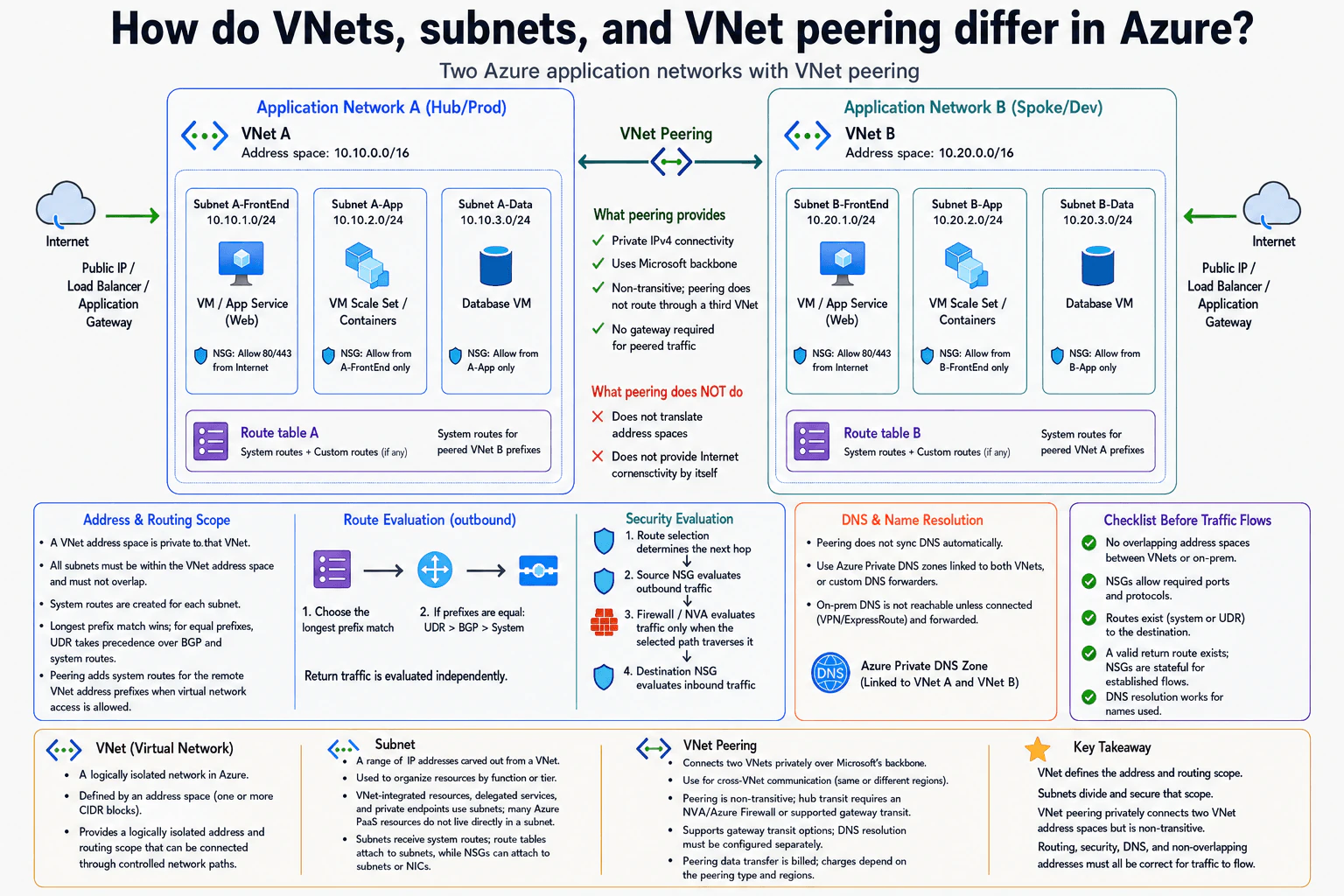
5. How do VNets, subnets, and VNet peering differ in Azure?NetworkingEasyMicrosoft
i Question Details
Use two Azure application networks as the context. Explain the address and routing scope of a VNet, how subnets divide that scope, what peering connects, how routes and security controls are evaluated, and which DNS and address-overlap facts must be checked before traffic can flow.
Short Interview Answer (30-60 seconds)
At a high level, a VNet defines a private address and routing boundary in Azure. The main challenge is knowing where traffic can go and what can block it. I would explain this in three parts: VNet scope, subnet separation, and VNet peering. Subnets divide a VNet into smaller network ranges. Peering privately connects two non-overlapping VNets. Traffic still needs valid routes, allowed security rules, and working DNS. Peering is also non-transitive, which is an important limitation.
Detailed Explanation
The goal is to understand how Azure divides and connects private application networks. A VNet gives an application a private address and routing scope. Subnets split that scope into smaller areas for different workloads. VNet peering then connects two separate VNets privately. The difficult part is that creating the peering alone does not guarantee traffic will work. Routes must select the right path. Security rules must allow the traffic. DNS must resolve names correctly. The two VNet address spaces must also not overlap.
Useful Questions to Ask the Interviewer
Are the two VNets in the same Azure region or different regions?
Do the applications need only direct VNet-to-VNet communication?
Will either VNet use a shared VPN or ExpressRoute gateway?
Are custom DNS servers used, or is Azure Private DNS used?
How to Explain It in an Interview
1. Start with the VNet boundary
I would start by saying that a VNet is the main private network boundary. VNet A uses 10.10.0.0/16. VNet B uses 10.20.0.0/16. These ranges do not overlap. Each VNet gets system routes for its own address space. This gives each application network its own logically isolated address and routing scope.
2. Explain how subnets divide the VNet
Inside each VNet, subnets divide the address space into smaller ranges. The diagram uses FrontEnd, App, and Data subnets. Internet traffic can enter the FrontEnd side through a Public IP, Load Balancer, or Application Gateway. The example security rules allow web traffic on ports 80 and 443 to the FrontEnd. The App subnet accepts traffic from the FrontEnd, and the Data subnet accepts traffic from the App tier. Route tables attach to subnets. NSGs can attach to subnets or network interfaces.
3. Explain what VNet peering connects
The two VNets use VNet Peering for private connectivity over Microsoft's backbone. Peering adds system routes for the remote VNet address prefixes when virtual network access is allowed. It does not translate addresses. It also does not provide Internet connectivity by itself. Most importantly, peering is non-transitive. A third VNet does not automatically become reachable through one of these two VNets.
4. Explain route and security evaluation
Route table A and Route table B can contain system routes and custom routes. Azure first chooses the route with the longest matching prefix. If routes have the same prefix length, a user-defined route has priority over BGP and system routes. The selected route determines the next hop. The source NSG checks outbound traffic. If the chosen path crosses an Azure Firewall or NVA, that device checks the traffic. The destination NSG then checks inbound traffic. Return traffic is routed independently, and NSGs are stateful for established flows.
5. Finish with DNS and traffic checks
Peering does not automatically synchronize DNS. The diagram links an Azure Private DNS Zone to both VNets. Custom DNS forwarding can also be used. On-premises DNS needs the required VPN or ExpressRoute connectivity and forwarding. Before traffic flows, I would check for non-overlapping address spaces, valid routes, allowed ports and protocols, a valid return route, and successful name resolution. The benefit is simple private connectivity. The limitation is that routing, security, and DNS still need correct configuration.
Practical Complexity & Trade-offs
The benefit is that VNet peering gives two VNets private connectivity over Microsoft's backbone without using the public Internet for the peered path. Subnets also make each VNet easier to organize and protect. The downside is that peering does not solve everything automatically. It is non-transitive, so a third VNet is not reached through a peer by default. Routes still decide where packets go. NSGs can still block traffic. DNS must be configured correctly. Address spaces cannot overlap. Gateway transit can support shared gateway connectivity, but it adds more routing choices that must be understood.
Why Interviewers Ask This
Interviewers ask this to see whether you understand Azure networking as a complete traffic path instead of memorizing definitions. They want to know if you can connect address ranges, subnets, routes, NSGs, peering, and DNS. They also want to see whether you can find common connectivity problems such as overlapping addresses, missing routes, blocked ports, incorrect return paths, or failed name resolution.
Interviewer may ask next
What changes if VNet B must reach an on-premises network through a gateway connected to VNet A?
I would keep the same two VNets, but I would use the gateway transit option already shown in the design. VNet A would contain the VPN or ExpressRoute gateway. The peering settings would allow VNet A to provide gateway transit and allow VNet B to use the remote gateway.
Then I would check the routes from VNet B toward the on-premises prefixes. The on-premises network also needs a valid return path to VNet B. NSGs still apply to the workloads. If names are resolved through on-premises DNS, the DNS forwarding path must also work across the connected network.
This does not make VNet peering transitive in general. Gateway transit is a specific supported feature. The main downside is greater routing complexity because peering settings, gateway routes, return paths, security rules, and DNS must all agree.
What would you check first if a VM in VNet A cannot connect to the Database VM in VNet B?
I would trace the connection from source to destination instead of changing several settings at once. First, I would confirm that VNet A and VNet B have non-overlapping address spaces and that their peering allows virtual network access.
Next, I would inspect the effective route from the source subnet. It should have a system route for the VNet B prefix through VNet peering. I would also check that VNet B has a valid return route to VNet A. Then I would inspect the source outbound NSG rules and the destination inbound NSG rules for the required protocol and port. If the selected route crosses an Azure Firewall or NVA, I would check that device too.
Finally, if the application uses a hostname, I would verify DNS resolution. The main downside is that several independent controls can cause the same failure, so the path must be checked one step at a time.
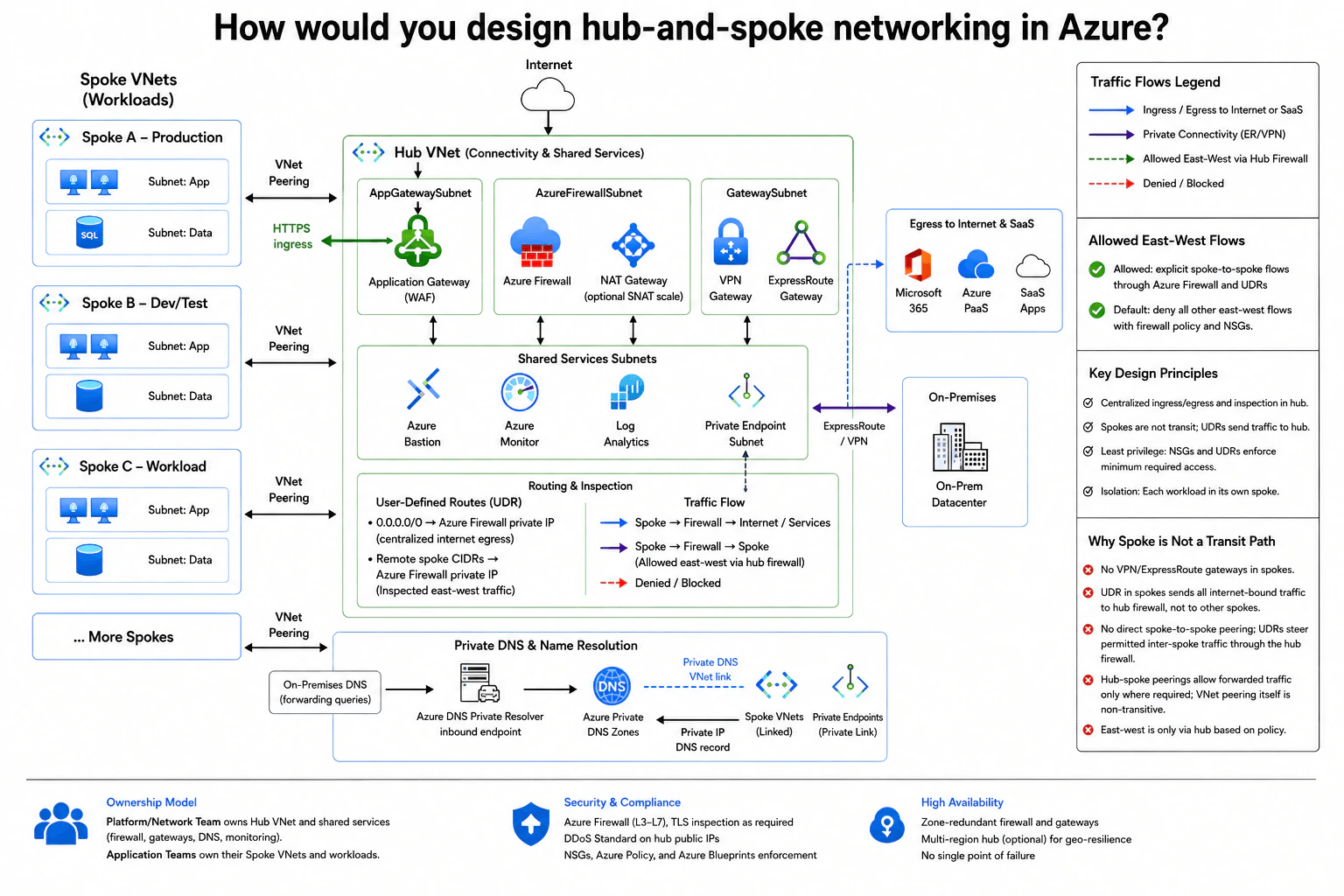
6. How would you design hub-and-spoke networking in Azure?NetworkingMediumMicrosoft
i Question Details
Define the hub and spoke VNets, shared services, routing, firewall or inspection insertion, private DNS, ingress, egress, peering, and allowed east-west flows. Explain ownership and how the design prevents a spoke from becoming an unintended transit path.
Short Interview Answer (30-60 seconds)
At a high level, I would use one hub VNet to control shared network traffic. The main challenge is keeping spokes isolated while still allowing safe ingress, egress, private access, and selected east-west traffic. I would explain three paths: inbound traffic, outbound traffic, and private or spoke-to-spoke traffic. Application Gateway, Azure Firewall, gateways, DNS, and shared services stay centralized. The trade-off is more routing and policy management, but we gain stronger isolation and one controlled inspection point.
Detailed Explanation
The goal is to connect several separate workload networks without letting them freely route through each other. The difficult part is giving applications the connections they need while keeping traffic controlled and easy to inspect. The diagram uses one central network for common networking services. Each workload stays in its own spoke network. Internet traffic, on-premises traffic, private name lookup, and selected traffic between spokes use controlled paths through the hub. This gives the network team one place to manage shared connectivity while application teams still own their workloads.
Useful Questions to Ask the Interviewer
Which spoke workloads need to communicate with each other?
Which applications need public HTTPS ingress?
Do we need VPN, ExpressRoute, or both for on-premises connectivity?
Which services must be reached through Private Endpoints?
How to Explain It in an Interview
1. Start with the hub and spoke boundaries
I would say that each workload gets its own Spoke VNet. The diagram shows Production, Dev/Test, another workload spoke, and room for more spokes. Each spoke connects to the Hub VNet through VNet peering.
The Hub VNet contains shared network services. The platform or network team owns the hub, firewall, gateways, DNS, and monitoring. Application teams own their Spoke VNets and workloads. This keeps network ownership separate from application ownership.
2. Explain ingress and egress
For public HTTPS ingress, Internet traffic enters Application Gateway with WAF inside AppGatewaySubnet. WAF means the gateway can inspect web requests before they reach the workload. The diagram then sends HTTPS traffic from Application Gateway toward the selected spoke workload through the hub-spoke connection.
For outbound traffic, spoke UDRs send internet-bound traffic to Azure Firewall. A UDR is a user-defined route that tells Azure which next hop to use. The 0.0.0.0/0 route points to the firewall private IP. Azure Firewall applies central policy before traffic reaches internet or SaaS services. The optional NAT Gateway associated with AzureFirewallSubnet can provide additional outbound SNAT scale.
3. Explain private connectivity and shared services
GatewaySubnet contains the VPN Gateway and ExpressRoute Gateway. They connect the Hub VNet to the on-premises datacenter. The spokes do not contain VPN or ExpressRoute gateways.
The hub also contains Azure Bastion, Azure Monitor, Log Analytics, and a Private Endpoint subnet. Centralizing these services avoids repeating the same network tooling in every spoke. The design also shows zone-redundant firewall and gateways for higher availability.
4. Explain private DNS
On-premises DNS forwards queries to the Azure DNS Private Resolver inbound endpoint. The resolver uses Azure Private DNS Zones to resolve private names. Those zones are linked to the spoke VNets through Private DNS VNet links.
Private Endpoints use private IP addresses. Their private IP DNS records are represented in Azure Private DNS Zones. This lets workloads resolve private service names without relying on public service endpoints.
5. Explain east-west control and transit prevention
Spokes are not directly peered to each other. If two spokes may communicate, UDRs send the remote spoke CIDR to Azure Firewall. The firewall inspects that east-west traffic and allows only approved flows. Firewall policy and NSGs deny other paths.
VNet peering itself is non-transitive. Hub-spoke peerings allow forwarded traffic only where required. A spoke therefore cannot automatically become a route between other spokes. The benefit is strong isolation and centralized inspection. The downside is that routes, firewall rules, peering settings, and DNS links need careful management.
Practical Complexity & Trade-offs
The benefit is one controlled place for routing, inspection, DNS, private connectivity, and monitoring. Spokes stay separate, so one workload does not automatically become a path to another workload. Central firewall policy also makes allowed east-west traffic easier to control. The downside is more network setup. UDRs, firewall rules, VNet peering, DNS links, and gateway settings must agree with each other. The hub is also important to many workloads, so its shared services must be highly available. The diagram uses zone-redundant firewall and gateways, with a multi-region hub shown as an optional choice for geographic resilience.
Why Interviewers Ask This
Interviewers want to see whether you can separate workloads while still giving them the connections they need. They also test whether you understand Azure routing, peering, firewalls, private DNS, ingress, egress, and on-premises connectivity. A strong answer shows that you can trace traffic clearly, define ownership, apply least privilege, and prevent a spoke from accidentally becoming a transit network.
Interviewer may ask next
What would you change if two spoke VNets now need frequent communication with each other?
I would keep the same hub-and-spoke design and continue sending approved east-west traffic through Azure Firewall. I would not add direct spoke-to-spoke peering because the diagram uses the hub as the inspection path.
I would add or update the UDRs for the remote spoke CIDRs so Azure Firewall stays the next hop. Then I would update firewall policy to allow only the required source, destination, and service traffic. NSGs would still limit access inside each spoke.
I would also check whether the extra east-west traffic changes the required firewall capacity. The existing design already uses a centralized firewall, so scaling that inspection point keeps the security model consistent.
The downside is that traffic takes an extra path through the hub. That adds cost and routing work, but it preserves isolation and prevents a spoke from becoming an unintended transit path.
What would you check if on-premises users cannot resolve a service name that should use a Private Endpoint?
I would trace the DNS path shown in the diagram from the beginning. On-premises DNS should forward the query to the Azure DNS Private Resolver inbound endpoint. The resolver must then be able to resolve the name from the Azure Private DNS Zone.
Next, I would check that the zone has the expected private IP DNS record for the Private Endpoint. I would also confirm that the required Private DNS VNet links exist for the spoke VNets. Then I would verify that VPN or ExpressRoute connectivity reaches the resolver inbound endpoint and that network security rules are not blocking the DNS request.
I would keep DNS troubleshooting separate from application routing. A working network route does not prove that name resolution is correct.
The downside of centralized private DNS is that forwarding, resolver, zone, record, and VNet-link settings must all match.
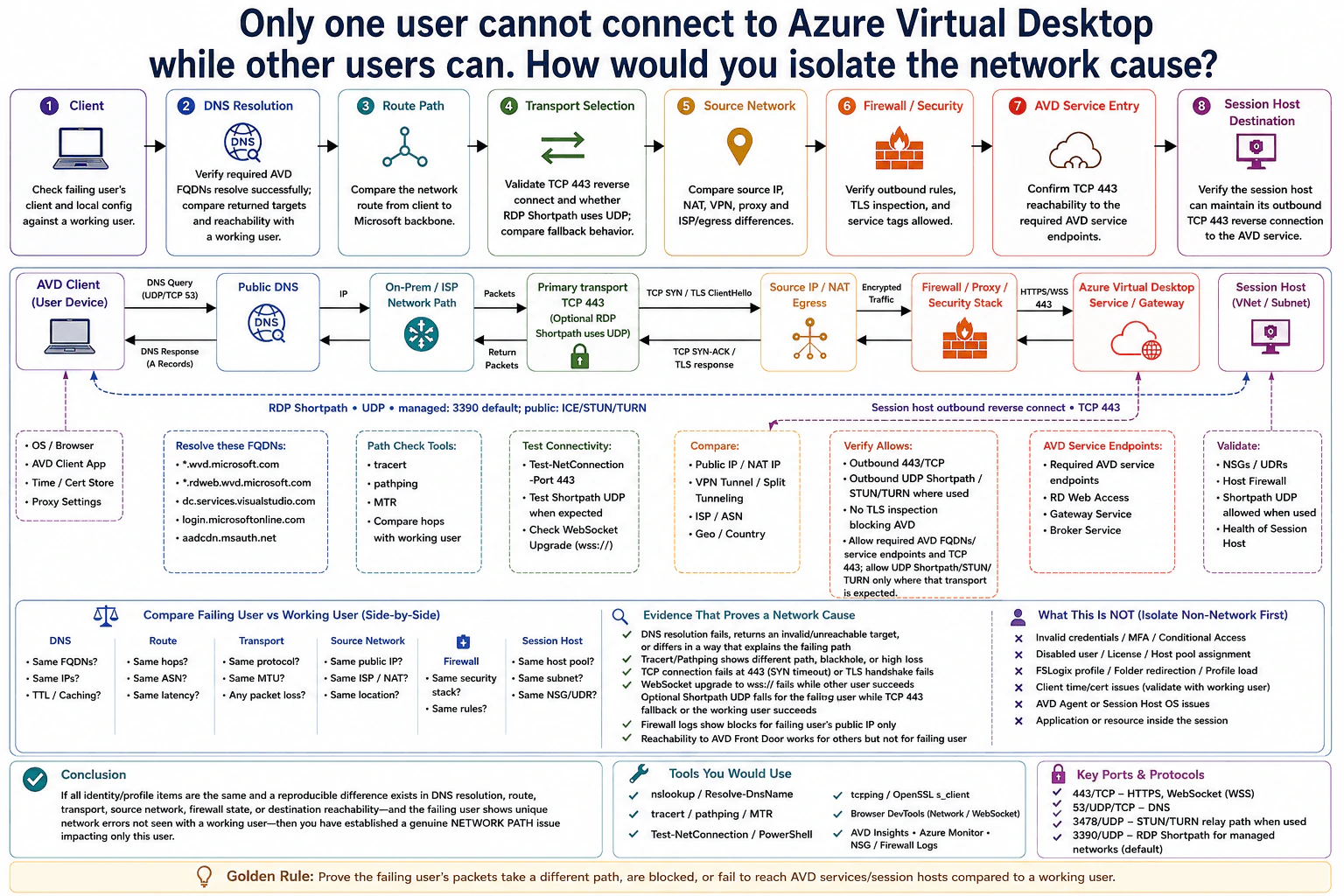
7. Only one user cannot connect to Azure Virtual Desktop while other users can. How would you isolate the network cause?NetworkingHardMicrosoft
i Question Details
Compare the failing user's client, DNS resolution, route, transport selection, source network, firewall state, and session-host destination with a working user. Separate user-specific identity or profile failures from a genuine network-path difference and state what packet, socket, or service evidence would prove the network hypothesis.
Short Interview Answer (30-60 seconds)
At a high level, I would prove whether this user has a different network path from a working user. The main challenge is separating a real network failure from an identity, profile, or client problem. I would compare the client and DNS first, then the route, TCP 443 transport, source network, firewall state, AVD service reachability, and session-host path. I would require repeatable evidence seen only for this user. The trade-off is that optional RDP Shortpath can fail while the normal TCP 443 path still works.
Detailed Explanation
The goal is to find why one person cannot reach Azure Virtual Desktop while other users can. A failed connection does not automatically mean the network is broken. The problem could instead be the user's account, profile, client, or device. I would compare the failing user with a working user at every important step. I would start at the user's device, follow the connection toward the Azure Virtual Desktop Service / Gateway, and then check the session-host side. I would call it a network problem only when repeatable packet, socket, firewall, or service evidence explains the difference.
Useful Questions to Ask the Interviewer
Does the same user fail from another network or another device?
Does a working user succeed from the failing user's network?
Is RDP Shortpath expected in this environment?
Does the failure happen before or after sign-in succeeds?
How to Explain It in an Interview
1. Compare the client first
I would first compare the failing user's device with a working one. I would check the operating system, AVD client, time and certificate store, proxy settings, and local security software. A broken client can look like a network failure.
I would also separate non-network causes. These include invalid credentials, MFA, licensing, host-pool assignment, FSLogix profile problems, and session-host operating-system issues.
2. Compare DNS and the route
Next, I would verify that the required AVD FQDNs resolve successfully. An FQDN is the full service name used by DNS. I would compare returned targets and confirm they are reachable.
Then I would compare the route using tracert, pathping, or MTR. Different routes are not automatically wrong. I need a difference that explains the failure, such as a timeout, unreachable target, blackhole, or heavy packet loss seen only for the failing user.
3. Test the primary TCP 443 path
The primary transport uses TCP 443. I would test whether the failing user can create the TCP connection and complete the TLS handshake. I would compare this with the working user.
A TCP SYN timeout, failed TLS handshake, failed WebSocket upgrade, or firewall block seen only for the failing user is strong evidence. I would also compare the user's public source IP, NAT, VPN or split tunneling, ISP, and location.
4. Compare firewall and AVD service reachability
I would verify outbound TCP 443 to the required AVD service endpoints. I would check firewall and proxy logs for blocks tied to the failing user's source path. TLS inspection must also not break AVD traffic.
The session host must maintain its outbound reverse connection to the Azure Virtual Desktop Service / Gateway over TCP 443. I would verify this session-host-side path separately from the user's client path.
5. Test RDP Shortpath separately
RDP Shortpath is an optional UDP path. On managed networks, UDP 3390 is the default direct Shortpath listener. On public networks, Shortpath can use ICE, STUN, or TURN, including UDP 3478 when the relay path is used.
I would compare Shortpath results between users, but I would not make Shortpath a requirement for basic AVD connectivity. A Shortpath failure can still fall back to TCP 443. I would confirm a network cause only when the failing user has a repeatable DNS, route, socket, transport, firewall, or destination-reachability failure that the working user does not have.
Practical Complexity & Trade-offs
The benefit is that a working user gives me a known-good comparison. That helps me find the exact step where behavior becomes different. The downside is that a difference does not always prove the cause. Different DNS answers, routes, or source addresses can still be valid. RDP Shortpath adds another case because its UDP path may fail while the normal TCP 443 path still succeeds. We accept this extra checking because it prevents us from blaming the network when the real problem is the user's identity, profile, client, or device.
Why Interviewers Ask This
Interviewers ask this to see whether you troubleshoot with evidence instead of guessing. They want to know if you can compare a failing user with a known-good user, follow traffic step by step, understand packet direction, and separate network problems from identity or profile problems. They also want to hear what packet, socket, firewall, or service evidence would make you accept or reject the network hypothesis.
Interviewer may ask next
What would you do if the user connects successfully from a mobile hotspot but fails from the corporate network?
I would focus on the corporate source network because the same user and client can connect through another path. That makes an account or profile problem less likely.
I would compare the public source IP, NAT behavior, VPN state, split tunneling, proxy settings, and DNS results on both networks. Then I would test TCP 443 to the required AVD service endpoints. I would compare the TCP handshake, TLS handshake, WebSocket behavior, and firewall or proxy logs.
I would also compare the route using tracert, pathping, or MTR. If the corporate firewall blocks the user's source IP, or TLS inspection breaks the connection, that is strong proof.
If RDP Shortpath is expected, I would test its UDP path separately. I would not require Shortpath before calling the basic AVD connection healthy because TCP 443 can still work. The downside is that corporate networks can apply different NAT, proxy, or security paths to different users, so I still need direct evidence before naming the exact control that failed.
What if TCP 443 works for the failing user, but RDP Shortpath does not?
I would treat that as a Shortpath-specific network problem, not as proof that Azure Virtual Desktop is unreachable. The primary TCP 443 path and optional UDP Shortpath path are separate.
If TCP 443 succeeds and the AVD session opens, the core service path is working. I would then check whether the working user actually uses Shortpath. For a managed network, I would test UDP 3390 to the session host. For a public-network path, I would check the ICE, STUN, or TURN behavior shown in the design, including UDP 3478 when the relay path is used.
I would compare firewall rules, NAT behavior, and packet results between both users. This keeps the diagnosis correct because Shortpath is not required for the basic TCP 443 connection.
The main downside is performance. The user may fall back to the TCP 443 transport instead of using the more direct UDP path.
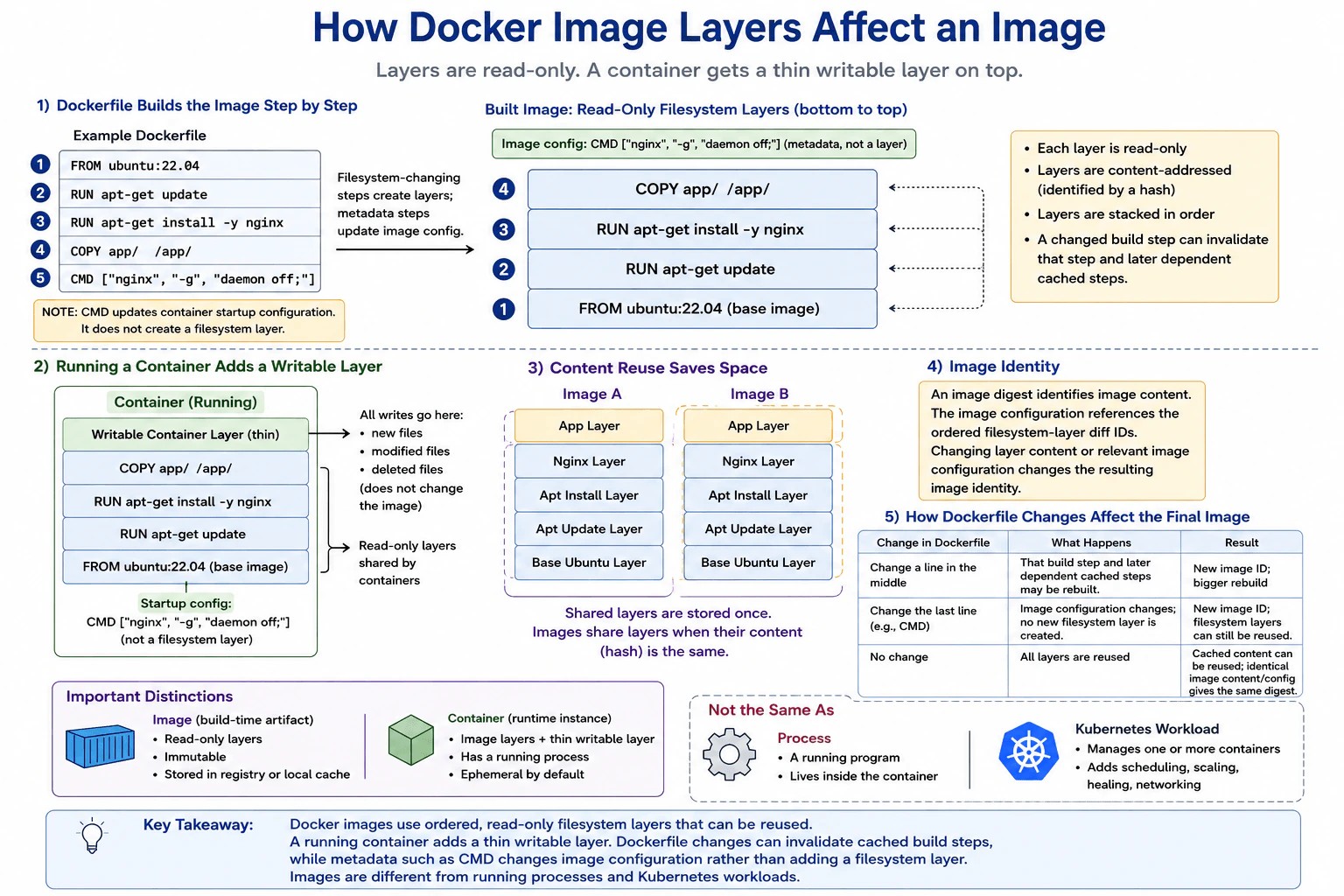
8. How do Docker image layers affect an image?Containers And KubernetesEasyMicrosoft
i Question Details
Explain the ordered, read-only layer model, the writable container layer, content reuse, image identity, and how Dockerfile changes influence the final image. Distinguish an image layer from a running process or a Kubernetes workload.
Short Interview Answer (30-60 seconds)
At a high level, Docker images are built from ordered, read-only filesystem layers. The main challenge is understanding which Dockerfile steps create filesystem changes and which only change image configuration. I would explain this in three parts: how the image is built, how a running container adds a writable layer, and how Docker reuses unchanged content. Reuse saves storage and build time. The trade-off is that changing one build step can invalidate that step and later dependent cached steps.
Detailed Explanation
The goal is to understand how Docker builds an image from reusable pieces. Filesystem-changing build steps add changes on top of earlier content. Those filesystem layers are read-only in the finished image. When the image runs, Docker adds a separate writable layer for container changes. The important detail is that not every Dockerfile instruction creates a filesystem layer. For example, CMD changes image configuration instead. The diagram also shows content reuse, image identity, cache behavior, and the difference between an image, a container, a running process, and a Kubernetes workload.
Useful Questions to Ask the Interviewer
Do you want me to explain both image layers and the writable container layer?
Should I explain how Dockerfile changes affect cached build steps?
Should I also distinguish images, containers, processes, and Kubernetes workloads?
How to Explain It in an Interview
1. Start with the Dockerfile build
I would start by saying that Docker builds the image step by step. In this example, FROM ubuntu:22.04 provides the base image. RUN apt-get update, RUN apt-get install -y nginx, and COPY app/ /app/ create filesystem changes represented by read-only layers.
CMD ["nginx", "-g", "daemon off;"] is different. It changes image configuration used when the container starts. It does not add another filesystem layer.
2. Explain the ordered read-only filesystem layers
The filesystem layers form an ordered stack. The Ubuntu base is at the bottom. The RUN and COPY changes sit above it in build order.
Each layer stores filesystem changes relative to earlier content. The finished image layers are read-only. Starting a container does not rewrite those image layers.
3. Explain the writable container layer
When Docker starts a container, it adds a thin writable layer on top. New files, modified files, and deleted files are recorded there. These runtime writes do not change the original image.
The CMD value provides startup configuration. A running program is a process inside the container. That process is not an image layer.
4. Explain content reuse and image identity
Docker can reuse layers when their content is identical. Layers are content-addressed, which means their content is identified by a hash. Two images can therefore share the same base or package layers instead of storing duplicate copies.
The image digest identifies the resulting image content. The image configuration references the ordered filesystem-layer diff IDs. Changing filesystem content or relevant image configuration changes the resulting image identity.
5. Explain Dockerfile changes and the Kubernetes distinction
If a build step changes, that step and later dependent cached steps may need rebuilding. If only CMD changes, Docker changes image configuration without creating a new filesystem layer. Existing filesystem layers can still be reused.
Finally, an image is a build-time artifact with read-only layers. A container is a runtime instance with those layers, a thin writable layer, and a running process. A Kubernetes workload manages one or more containers and adds capabilities such as scheduling, scaling, healing, and networking.
Practical Insights
The benefit is reuse. If two images contain the same layer content, Docker can share that content instead of storing another copy. This can save storage, network transfer, and build time. The writable container layer also keeps runtime changes separate from the original image. The downside is cache invalidation. If an earlier Dockerfile build step changes, that step and later dependent cached steps may need to run again. Changing CMD is different because it changes image configuration rather than creating a filesystem layer. This model keeps images efficient while keeping their filesystem layers read-only.
Why Interviewers Ask This
Interviewers ask this to check whether you understand Docker beyond basic commands. They want to see whether you can separate image build-time behavior from container runtime behavior. They also test your understanding of layer reuse, cached build steps, image identity, and metadata such as CMD. A strong answer also shows that you do not confuse image layers with processes, containers, or Kubernetes workloads.
Interviewer may ask next
What happens if you change an early RUN instruction in the Dockerfile instead of changing only CMD?
That change can cause more build work. The changed RUN step may produce different filesystem content, so Docker may not be able to reuse the cached result for that step. Later dependent cached build steps may also become invalid and need to run again.
Earlier layers whose content still matches can remain reusable. Docker does not need to replace every piece of content when only one part of the build changes. The resulting image gets a new identity when its filesystem content or relevant image configuration changes.
This is why the position of a changing Dockerfile step can affect build time. A change in the middle can cause more later work than changing only the final CMD instruction.
The downside is extra build time, storage work, and network transfer when several later cached steps cannot be reused.
What happens to files written inside a running container, and do those writes change the Docker image?
Those writes go into the container's thin writable layer. The read-only filesystem layers from the image stay unchanged. If the process creates a file, modifies a file, or deletes a file, Docker records that runtime change in the writable container layer.
The original image therefore remains unchanged. Another container started from the same image uses the same read-only image layers and gets its own writable layer.
The running process is also separate from the image layers. It runs inside the container at runtime. A Kubernetes workload is another concept. It manages one or more containers and adds behavior such as scheduling, scaling, healing, and networking.
The downside is that changes in the writable container layer belong to that container runtime instance. They do not become reusable image-layer content unless a new image is built separately.
Cloud Engineer Resume Examples
Explore the resume examples below to find the one that best matches your target Cloud Engineer role.
Disclaimer: This interview guide is for educational and informational purposes only. It is designed to help readers prepare, but it does not guarantee any interview result, hiring decision, offer, or outcome. Interview questions, hiring criteria, and preferred answers can vary by employer, interviewer, industry, location, and time. All answers, examples, and explanations in this guide are suggested examples for interview preparation, not definitive answers or instructions for professional practice. They are based on research and judgment, are provided without warranties of any kind, and should be adapted to the question, role, and applicable laws and professional requirements. Diagrams are simplified illustrations intended to highlight the main concepts and their relationships; actual situations, systems, and practices may be more complex. Alternative approaches may be equally valid or better suited to a particular question, context, or interviewer. To the fullest extent permitted by applicable law, the contributors and publisher are not liable for decisions made, actions taken, or losses incurred based on this guide.
State Laws and Professional Responsibilities: Laws and requirements governing an occupation vary by state and jurisdiction. You are responsible for checking the current laws, licensing requirements, and scope-of-practice rules that apply to your location and role, and for ensuring that your answers and actions comply with them. Adapt examples in this guide to those requirements. This guide is not legal advice.
Company Notice: This guide is an independent educational resource and is not affiliated with, endorsed by, sponsored by, or approved by the company named in this guide. Company names identify reported interview experiences or the employer context of clearly labeled original practice exercises. Interview practices can change without notice, and inclusion of company-specific content does not mean these questions are official, complete, or guaranteed to be asked. To the fullest extent permitted by law, the author, contributors, and publisher are not responsible for outcomes related to use of this material.
Content Accuracy and Verification: To the fullest extent permitted by applicable law, we do not represent or warrant that interview guides, questions, answers, examples, or diagrams are accurate, complete, current, error-free, or suitable for any particular purpose. You are responsible for independently reviewing and verifying the information before relying on it.