This interview guide is for educational and informational purposes only. It is designed to help readers prepare, but it does not guarantee any interview result, hiring decision, offer, or outcome. Interview questions, hiring criteria, and preferred answers can vary by employer, interviewer, industry, location, and time. All answers, examples, and explanations in this guide are suggested examples for interview preparation, not definitive answers or instructions for professional practice. They are based on research and judgment, are provided without warranties of any kind, and should be adapted to the question, role, and applicable laws and professional requirements. Diagrams are simplified illustrations intended to highlight the main concepts and their relationships; actual situations, systems, and practices may be more complex. Alternative approaches may be equally valid or better suited to a particular question, context, or interviewer. To the fullest extent permitted by applicable law, the contributors and publisher are not liable for decisions made, actions taken, or losses incurred based on this guide.
State Laws and Professional Responsibilities
Laws and requirements governing an occupation vary by state and jurisdiction. You are responsible for checking the current laws, licensing requirements, and scope-of-practice rules that apply to your location and role, and for ensuring that your answers and actions comply with them. Adapt examples in this guide to those requirements. This guide is not legal advice.
Identity, Image, and Privacy Notice
To respect individual privacy, some names, profile photographs, avatars, biographical details, and other identifying information displayed in this guide may be replaced with pseudonyms, licensed stock images, illustrative avatars, composite images, or representative descriptions. Unless a person is expressly identified as an actual contributor, a displayed name, image, or profile should not be understood as depicting or identifying a specific candidate, interviewer, employee, or other real individual. These representations are provided for editorial and illustrative purposes only and do not imply endorsement, employment, participation, or affiliation with this guide or any company mentioned in it. Any resemblance to an actual person is coincidental.
Company Notice
This guide is an independent educational resource and is not affiliated with, endorsed by, sponsored by, or approved by the company named in this guide. Company names identify reported interview experiences or the employer context of clearly labeled original practice exercises. Interview practices can change without notice, and inclusion of company-specific content does not mean these questions are official, complete, or guaranteed to be asked. To the fullest extent permitted by law, the author, contributors, and publisher are not responsible for outcomes related to use of this material.
Content Accuracy and Verification
To the fullest extent permitted by applicable law, we do not represent or warrant that interview guides, questions, answers, examples, or diagrams are accurate, complete, current, error-free, or suitable for any particular purpose. You are responsible for independently reviewing and verifying the information before relying on it.
Questions or comments?
Contact us for general questions, or share feedback, technical corrections, and comments with the community.
Define Java and explain its compilation to bytecode, execution on the JVM, static type system, object-oriented model, automatic memory management, platform independence, major application areas, ecosystem, strengths and tradeoffs, and the roles of the JDK, JRE, and JVM.
Short Interview Answer (30-60 seconds)
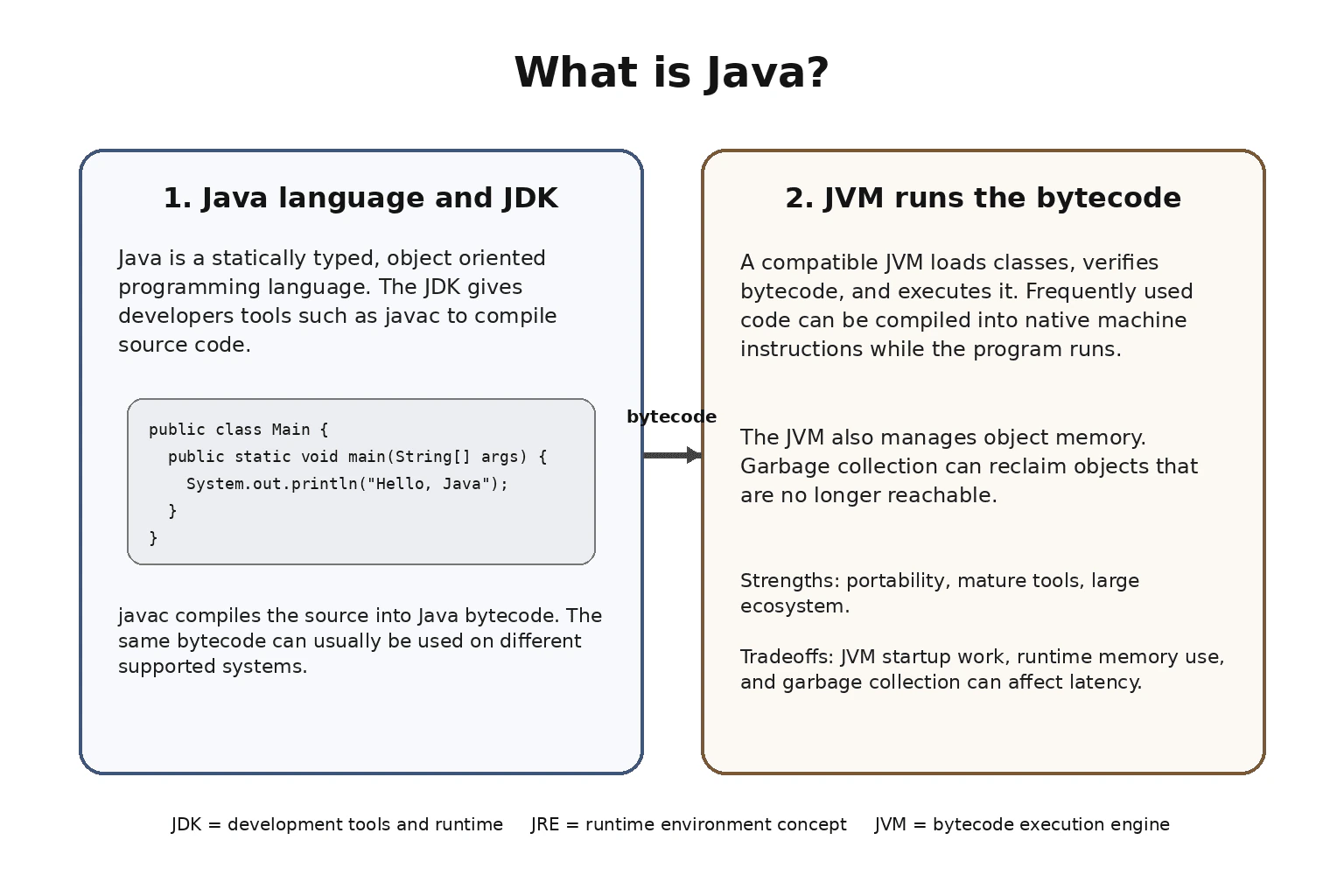
Java is a statically typed, object oriented programming language that normally compiles source code into bytecode for execution by a JVM. The JVM loads and runs that bytecode and provides services such as class loading, garbage collection, and runtime optimization. This design lets the same bytecode usually run on different supported platforms when a compatible JVM and required dependencies are available. The JDK provides development tools and a runtime, while the JRE refers to the runtime environment used to run Java applications.
Detailed Explanation
Java is a programming language used to tell computers how to perform tasks. A developer writes instructions in Java, then development tools prepare those instructions so they can run inside Java runtime software. Java checks many kinds of mistakes before normal execution and provides automatic help with memory. It is widely used to build business systems, web services, tools, and large applications. Java also has a large collection of reusable libraries and development tools, which makes it practical for both small programs and long running production systems.
Useful Questions to Ask the Interviewer
Are you asking mainly about the Java language or also how Java programs run?
Would you like me to explain the JDK, JRE, and JVM separately?
Should I include Java strengths and runtime tradeoffs in production?
How to Explain It in an Interview
Java is a general purpose programming language with static typing and a managed runtime. Static typing means the compiler checks the types of variables and expressions before normal execution. Java supports object oriented programming through classes, objects, interfaces, inheritance, composition, and dynamic method dispatch.
Java source code is normally compiled by a tool such as javac into Java bytecode. Bytecode is an instruction format defined for the Java Virtual Machine. A JVM loads classes, verifies bytecode, and executes it. A JVM can also compile frequently executed code into native machine instructions during execution. This runtime optimization is commonly called just in time compilation.
This model gives Java its common platform independence. The same bytecode can usually run on different supported operating systems when a compatible JVM and the required dependencies are available. This does not make every application completely platform independent. Native libraries, operating system features, file paths, configuration, and external services can still introduce platform specific behavior.
Java also provides automatic memory management. Objects are normally allocated in JVM managed memory. A garbage collector can reclaim memory for objects that are no longer reachable. Developers therefore do not normally free object memory manually. Garbage collection reduces many manual memory errors, but a program can still retain unnecessary references, allocate too much data, or use more memory than expected.
The JVM is the execution engine for Java bytecode. The JDK is the development kit and includes tools such as the compiler together with a runtime for executing applications. The JRE refers to the runtime environment needed to run Java applications. In modern Java distributions, developers commonly install a JDK, and separate JRE distributions are less central than they were in older Java releases.
Java is widely used for server applications, enterprise systems, cloud services, data processing, developer tools, and other long running systems. Its strengths include portability, mature tooling, strong libraries, automatic memory management, and a large ecosystem. Tradeoffs can include JVM startup time, runtime memory use, and garbage collection behavior.
Why Interviewers Ask This
Interviewers ask this question to check whether a candidate understands Java as both a programming language and a runtime platform. They want to see whether the candidate can explain how source code becomes bytecode, what the JVM does, how static typing and automatic memory management work, why Java can be portable across supported systems, and how the JDK, JRE, and JVM differ. It also tests whether the candidate can describe practical strengths and tradeoffs without confusing the language with frameworks or other tools.
Common interview mistakes
A common mistake is saying that Java source code runs directly on every operating system. Java source code is normally compiled into bytecode, and that bytecode needs a compatible JVM. Another mistake is saying that every Java application is completely platform independent. Native libraries, operating system behavior, file paths, configuration, and external dependencies can reduce portability. Candidates also sometimes treat Java, the JVM, the JDK, and the JRE as the same thing. They have different roles. Another mistake is assuming garbage collection prevents every memory problem. A program can still retain unwanted references, allocate excessive data, and run out of memory.
Interview tip
Start by defining Java in one sentence. Then explain the simple flow from source code to bytecode to the JVM. After that, mention static typing, object oriented programming, automatic memory management, and platform independence. Finish by separating the roles of the JDK, JRE, and JVM and mentioning practical strengths and runtime tradeoffs.
Interviewer may ask next
Does Java platform independence mean every Java program behaves exactly the same on every operating system?
No. Java bytecode can usually run on different supported platforms when a compatible JVM and the required dependencies are available, but complete application behavior can still depend on the environment. Native libraries, operating system APIs, file systems, configuration, external services, and other platform specific details can change behavior. This matters because production applications should be tested on the environments where they will actually run instead of assuming the JVM removes every platform difference.
What are the main runtime tradeoffs of Java in production?
Java provides a managed runtime with garbage collection and runtime optimization, but that convenience has costs. JVM startup and just in time compilation can add startup work, the runtime itself uses memory, and garbage collection can affect latency when it reclaims memory. These costs matter most for workloads with strict startup, memory, or latency limits. The tradeoff is that teams gain automatic memory management, mature runtime optimization, strong diagnostics, and a large ecosystem in exchange for some runtime overhead.
2. What is the difference between JDK, JRE, and JVM?Language SpecificEasy
i Question Details
Explain the roles of the JDK, JRE, and JVM in Java development and runtime execution.
Short Interview Answer (30-60 seconds)
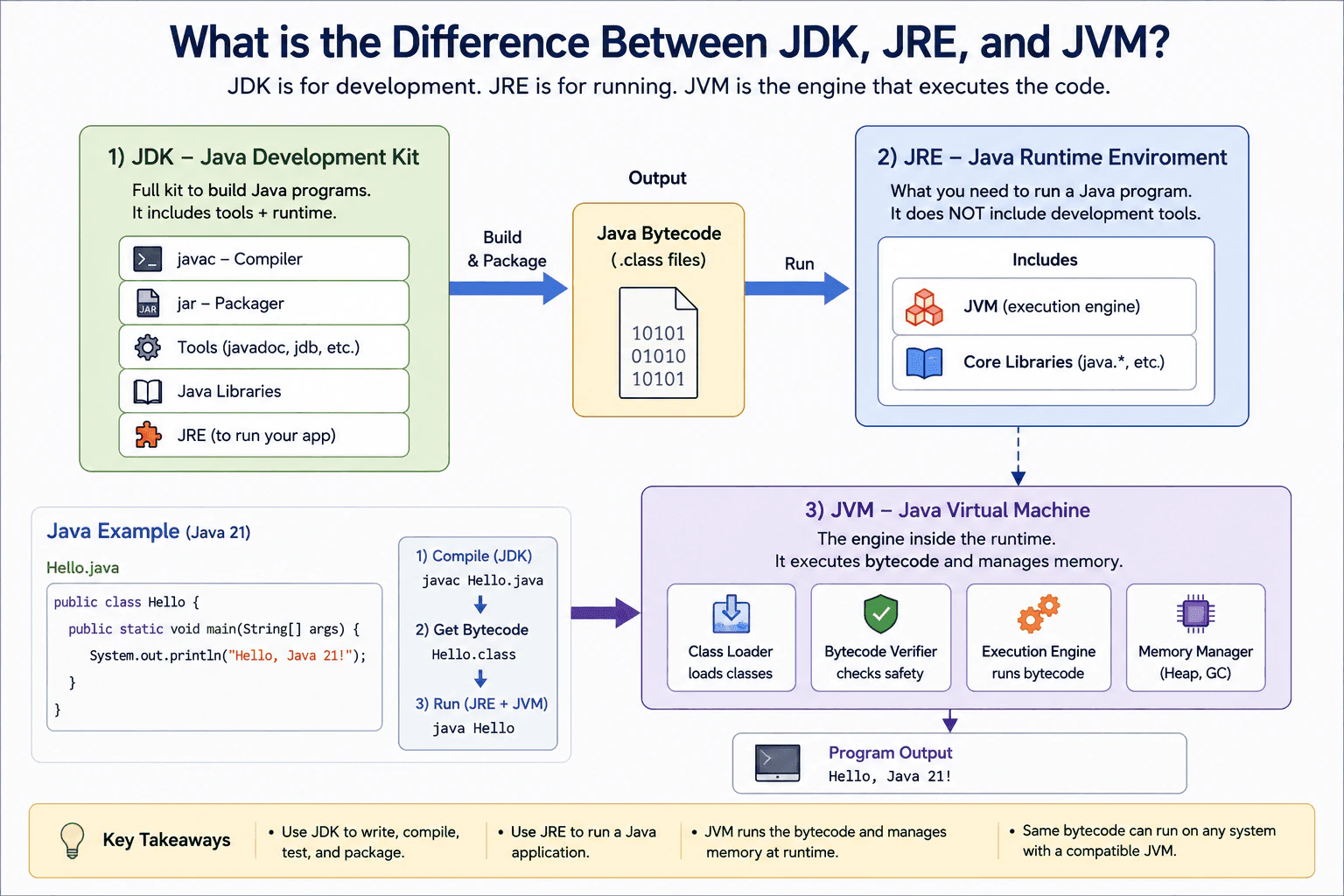
The JDK is the full kit you install to build Java programs. The JRE is the runtime you use to run them. The JVM is the engine that executes the bytecode, so the practical point is that you need the JDK for development, while the JVM is what actually runs the app.
Detailed Explanation
This question asks you to explain three Java parts and what each one does. One part helps you build a program. One part helps you run it. One part is the engine that actually runs the program on the machine. The interviewer wants to see that you know the difference between the tools you install for development and the parts used after the program is built. It also checks whether you can explain the path from the work you write to the app that runs on a computer.
Useful Questions to Ask the Interviewer
Should I explain the old separate JRE install?
Do you want me to focus on development or production use?
How to Explain It in an Interview
The JDK is the full package for Java work. It gives you the compiler, tools, libraries, and the runtime pieces you need to build and test an app. The JRE is only the runtime side. It is the part you need when you want to run a finished program. The JVM is the engine inside that runtime. It loads the bytecode, checks it, runs it, and manages memory while the program is alive.
This matters because each layer has a different job. When you write Java code, you need the JDK. When you only want to run Java software, you need a runtime. In modern Java, most developers install the JDK because it already includes what they need for development. In production, a team may still prefer a smaller runtime when they want fewer extra tools and less disk use. That choice does not make the program faster by itself. It mainly changes what is installed and shipped.
A good memory trick is simple. JDK is for development. JRE is for running. JVM is the executor. The JVM is not the whole platform. It is the part that actually starts the program and keeps it moving. The JDK is not just the compiler either. It is the full developer kit.
One edge case is that separate JRE installs are less common now. Many modern setups ship the JDK or a custom runtime image instead. That does not change the basic idea.
Why Interviewers Ask This
Interviewers ask this to check whether I understand the basic Java tool chain and runtime flow. It shows if I know what is used to write code, what is used to run code, and what actually executes Java bytecode.
Common interview mistakes
A common mistake is to treat JDK and JVM as the same thing. Another mistake is to say the JRE compiles code. Compilation is a JDK job. A third mistake is to think the JVM is the whole Java platform. It is only the execution engine. People also forget that separate JRE installs are less common now.
Interview tip
Say JDK first, then JRE, then JVM. Keep each role short and clear. Start with what you use to build, then what you use to run, then what actually executes the program.
Interviewer may ask next
Is the JRE still a separate install in modern Java?
Not usually. In modern Java setups, developers normally use the JDK, which already includes the runtime pieces they need for testing and local runs. The older separate JRE install is much less common now, but the idea of a runtime layer still matters.
Why would a production team still care about the JDK versus a smaller runtime?
A production team may choose a smaller runtime to reduce disk use and extra tools, but the JVM still does the execution. The tradeoff is smaller shipping size versus having fewer developer tools in the image.
3. Why is Java called platform independent?Language SpecificEasy
i Question Details
Explain why Java is considered platform independent and how bytecode and the JVM make that possible.
Short Interview Answer (30-60 seconds)
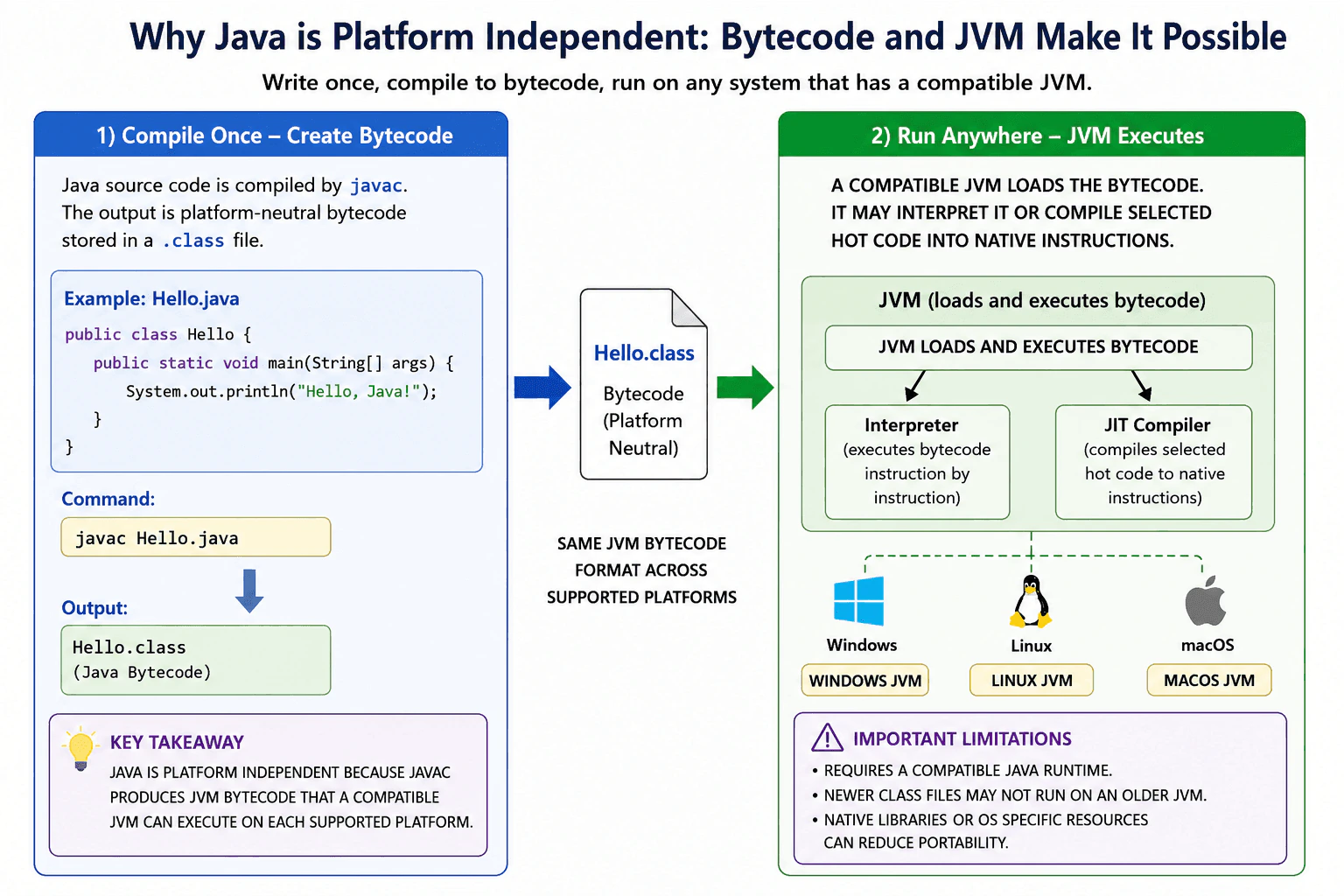
Java is called platform independent because Java source code is normally compiled into bytecode instead of native instructions for one operating system or processor. A compatible Java Virtual Machine can execute that same bytecode on Windows, Linux, macOS, and other supported platforms. The application remains portable only when the target environment has a compatible Java runtime and the code does not rely on platform specific resources.
Detailed Explanation
Java programs can usually be moved between different types of computers without rebuilding the program separately for each one. The developer first converts the written program into a common form that is not tied to one operating system or processor. Each computer then uses its own local program to read and run that common form. This approach makes software easier to distribute across laptops, servers, and cloud systems. However, the destination computer must support the required Java version, and the application must avoid features that depend on one particular operating system.
Useful Questions to Ask the Interviewer
Should I explain the roles of bytecode and the Java Virtual Machine?
Should I also discuss runtime version compatibility and platform specific dependencies?
How to Explain It in an Interview
Java is considered platform independent because the Java compiler normally converts source code into Java bytecode rather than directly producing native instructions for one operating system or processor. The bytecode is stored in class files.
Bytecode is an instruction format defined by the Java Virtual Machine Specification. A JVM implementation is created for each supported combination of operating system and processor. For example, Windows, Linux, and macOS use platform specific JVM implementations, but compatible JVMs understand the same supported class file format and bytecode instructions.
When an application starts, the JVM loads the required classes, checks the bytecode, and executes it. The JVM can interpret bytecode and can use a just in time compiler to translate selected code into native machine instructions for the current processor. This translation happens inside the JVM, so developers can distribute the same compatible class files or application archive to different supported platforms.
This idea is commonly described as write once, run anywhere. It is a goal rather than an absolute guarantee. The destination needs a Java runtime that supports the class file version used by the application. For example, code compiled for a newer Java release may not run on an older runtime unless it was compiled for an older target release.
An application can also lose portability when it uses native libraries, operating system commands, platform specific file paths, devices, fonts, default character sets, environment variables, or other external resources. Production teams should define the required Java version, use portable JDK APIs, package compatible dependencies, and test every supported environment.
Why Interviewers Ask This
Interviewers ask this question to check whether the candidate understands the roles of Java source code, bytecode, and the Java Virtual Machine. It also tests whether the candidate knows the practical limits of portability, including runtime version compatibility and dependencies on operating system resources.
Common interview mistakes
A common mistake is saying that Java is completely independent of every platform. The JVM implementation is platform specific, and the target environment must provide a compatible Java runtime. Another mistake is saying that Java source code runs directly on every operating system. Source code must normally be compiled into bytecode first. Candidates may also forget class file version compatibility. Bytecode produced for a newer Java release may not run on an older runtime. Native libraries, operating system commands, file paths, devices, fonts, default character sets, and environment settings can also make an application platform dependent.
Interview tip
Explain the flow in order: Java source code is compiled into bytecode, and a compatible platform specific JVM executes that bytecode. Then mention one practical limitation, such as Java version compatibility or the use of native operating system resources.
Interviewer may ask next
Will bytecode compiled with a newer Java release always run on an older JVM?
No. An older JVM normally rejects a class file whose version is newer than the versions it supports. This behavior matters because platform independence does not remove Java release compatibility requirements. A team can compile with an appropriate target release when the source code and APIs are compatible with that older release. The tradeoff is that targeting an older release improves deployment compatibility but prevents the application from using newer language features and newer JDK APIs.
Does platform independence remove all runtime performance and memory differences between systems?
No. The same bytecode can run on compatible JVMs, but performance and memory use can differ because of the processor, operating system, JVM implementation, garbage collector, runtime options, available memory, and workload. A JVM may interpret code first and compile selected code into native instructions later. Runtime compilation can improve repeated execution, but it uses processor time during execution and memory in the JVM code cache. Teams should therefore test and tune the application on each production platform they support.
4. What is Java bytecode?Language SpecificEasy
i Question Details
Define Java bytecode as the JVM instruction format normally produced when Java source code is compiled. Explain the source-to-bytecode-to-JVM path, the role of class files, bytecode verification, interpretation, just-in-time compilation, and why bytecode supports portability without claiming that every application is completely platform independent.
Short Interview Answer (30-60 seconds)
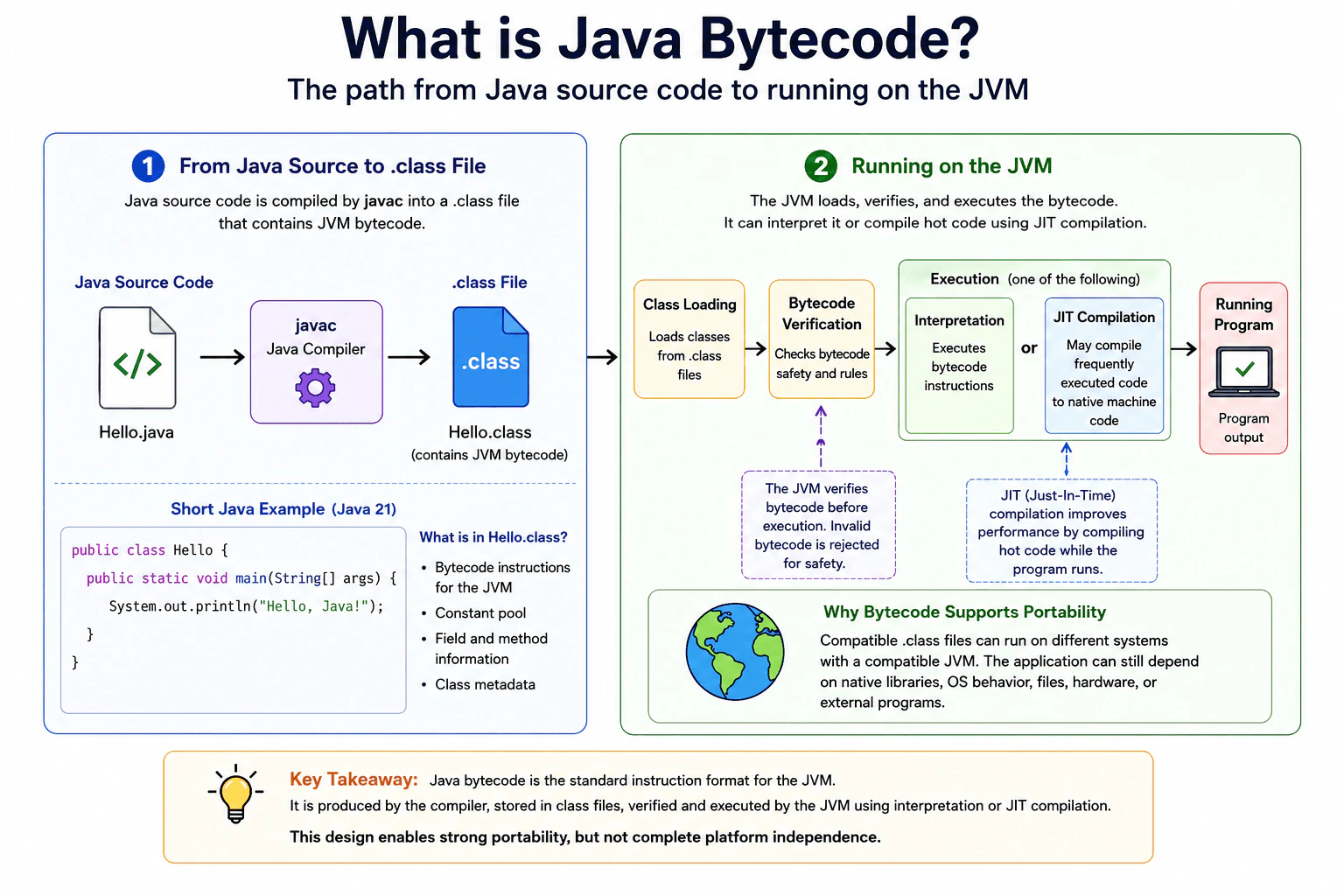
Java bytecode is the instruction format defined for the JVM. Normally, the Java compiler turns source code into bytecode stored in class files. A compatible JVM then loads the classes, verifies the bytecode, and executes it. A JVM implementation may interpret bytecode or compile frequently used parts into native machine code while the program runs. This design gives Java strong portability, but an application can still depend on platform specific libraries, files, hardware, or operating system behavior.
Detailed Explanation
Java usually does not turn the words you write directly into instructions for one kind of computer. First, Java changes your source file into a standard intermediate form and saves it in class files. A Java program on the target computer reads those files and runs the stored instructions. This extra step lets the same compiled files work on many operating systems and computer types. Java also checks that the stored instructions follow required rules. While the program runs, Java can make frequently used parts faster.
Useful Questions to Ask the Interviewer
Would you like me to explain how the JVM executes bytecode after loading a class?
Should I also explain the portability limits of Java bytecode?
How to Explain It in an Interview
Java bytecode is the instruction format defined for the Java Virtual Machine, usually called the JVM. When we compile Java source code, the Java compiler normally creates class files. Those class files contain bytecode together with information the JVM needs to describe classes, methods, fields, and other program details.
The basic path is Java source code, then bytecode in class files, then a JVM on the target system. As a class is prepared for use, the JVM performs verification checks required by the JVM rules. Verification checks that the class file and its bytecode obey important structural and type safety constraints. This helps the JVM reject invalid bytecode before allowing it to execute normally.
Bytecode itself is not native machine code. A JVM implementation decides how to execute it. It can interpret bytecode instructions. Common production JVM implementations can also find code that runs frequently and compile that code into native machine instructions while the application is running. This is called just in time compilation. It can improve performance because the JVM can optimize important code using information collected during execution.
Bytecode is a major reason Java is portable. The same compatible class files can run on different systems when each system has a suitable JVM. However, portability has limits. A class compiled for a newer Java class file version may not run on an older JVM. An application can also depend on native libraries, operating system behavior, file paths, hardware, external programs, or other platform specific resources.
In production, class files are often packaged inside JAR files or application packages and deployed with the required Java runtime and dependencies.
Why Interviewers Ask This
Interviewers ask this question to check whether a candidate understands what happens between writing Java source code and running a Java program. It tests knowledge of compilation, class files, the JVM, verification, execution, runtime compilation, and the practical reason Java programs can run on different systems.
Common interview mistakes
A common mistake is saying that Java source code runs directly on the JVM. Normally, source code is compiled first and the resulting class files contain bytecode. Another mistake is calling bytecode native machine code. Bytecode is an instruction format for the JVM, while native machine instructions are specific to a processor and execution environment. Candidates may also say that every Java application is completely platform independent. Bytecode improves portability, but native libraries, operating system features, file paths, hardware, external programs, and other dependencies can still make an application platform specific. Another mistake is assuming every JVM must use the same execution strategy. Interpretation and just in time compilation are implementation choices, not a requirement that every JVM must use them in exactly the same way.
Interview tip
Start with the simple path: Java source code is compiled into bytecode stored in class files, then a compatible JVM loads, verifies, and executes it. Next explain that bytecode is not native machine code and that a JVM implementation may interpret it or use just in time compilation. Finish by saying that bytecode improves portability but does not remove every platform specific dependency.
Interviewer may ask next
Can bytecode compiled with a newer Java version always run on an older JVM?
No. A class file has a class file version, and an older JVM may reject a class file produced for a newer Java release that it does not support. The JVM can report an unsupported class version error instead of running the class. This matters because bytecode portability still requires a compatible Java runtime. A common production choice is to compile for the oldest Java release that the deployment environment must support when that compatibility is required.
Why does a JVM use just in time compilation instead of compiling every bytecode instruction immediately?
A JVM implementation can use just in time compilation to spend optimization work on code that actually runs often. Frequently executed bytecode can be compiled into optimized native machine instructions using information observed while the program runs. This can improve steady state performance. The tradeoff is that runtime compilation uses processor time and memory and can add warmup cost, so the application may behave differently early in its lifetime than after important code has been optimized.
5. What are the main features of Java?Language SpecificEasy
i Question Details
Describe the core features of Java and explain why they matter in production software.
Short Interview Answer (30-60 seconds)
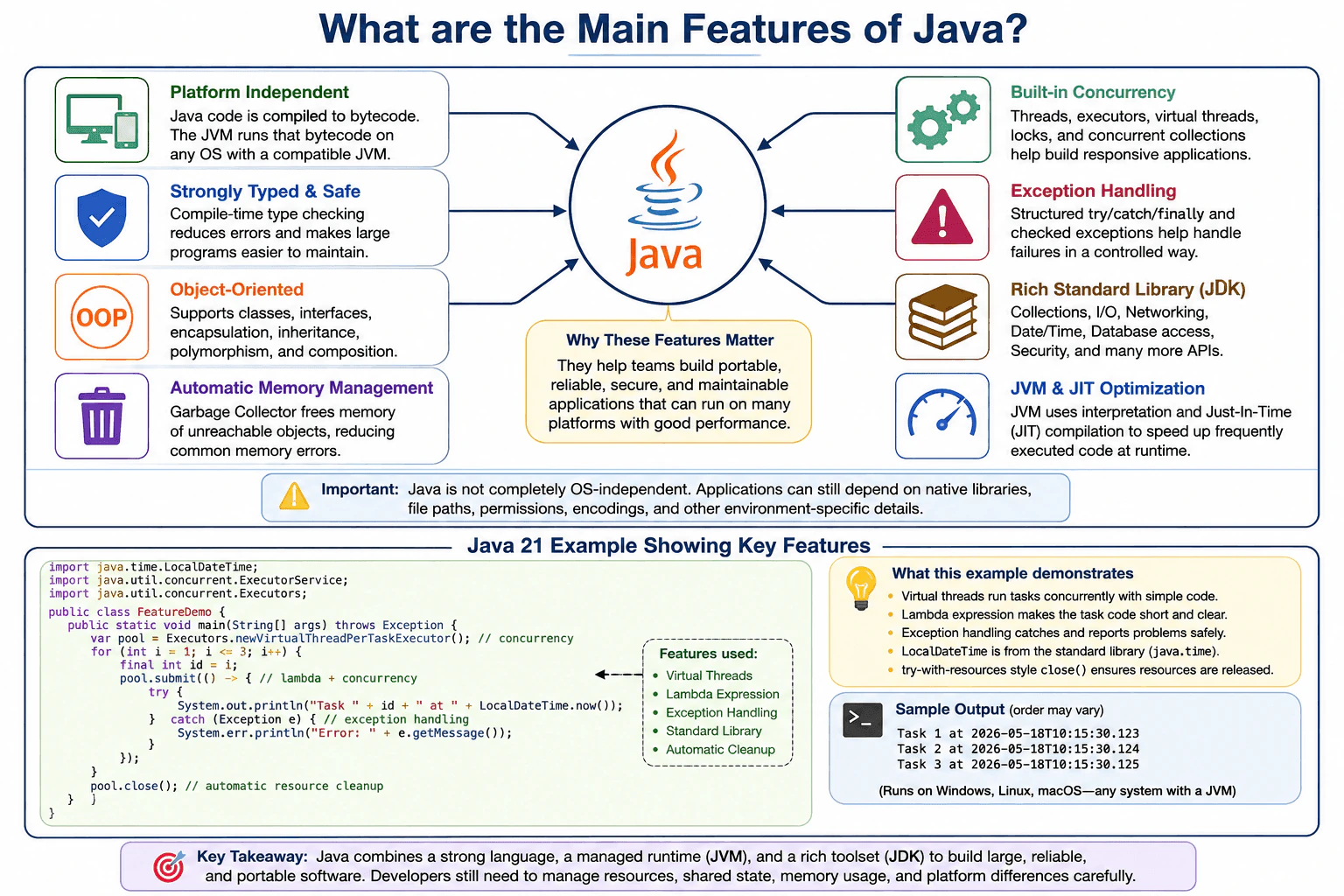
Java is a statically typed, general purpose language designed for portable, reliable, and maintainable software. Its main features include platform portability through JVM bytecode, object oriented programming, automatic memory management, exception handling, concurrency support, a large standard library, runtime safety checks, and just in time compilation. These features help teams build large applications, but developers must still manage resources, shared state, memory retention, and platform specific dependencies carefully.
Detailed Explanation
Java gives developers a consistent way to build programs for different computer systems. It provides clear rules for organizing code, checking data types, managing memory, handling failures, and running several tasks at once. These features matter because production software must remain stable, understandable, secure, and easy to change. Java does not solve every problem automatically, but its language rules, runtime environment, and built in tools reduce many common risks and support large applications maintained by many developers.
Useful Questions to Ask the Interviewer
Would you like a high level summary or production examples?
Should I separate Java language features from JVM and JDK features?
Would you like any comparison with another language?
How to Explain It in an Interview
The main point is that Java combines a structured language, a managed runtime, and a broad standard library.
Java source code is normally compiled into bytecode. A compatible JVM can execute that bytecode on different systems. This provides strong portability, although file systems, native libraries, permissions, and other environment details can still differ.
Java is statically typed. The compiler checks many type errors before execution. This improves safety and helps developers understand and refactor large codebases.
Java supports object oriented design through classes, interfaces, encapsulation, inheritance, composition, and dynamic method dispatch. Modern Java also provides records, sealed classes, lambdas, and pattern matching for clearer designs when those features fit the problem.
The JVM manages heap memory through garbage collection. Developers normally do not release objects manually. This avoids many unsafe memory errors, but objects can still remain in memory when the application keeps reachable references to them.
Java provides exception handling for reporting and recovering from failures. It also includes threads, executors, virtual threads, locks, atomic classes, and concurrent collections. These tools support concurrency, but they do not automatically make shared mutable state safe.
The JDK supplies collections, input and output, networking, date and time handling, database access, security APIs, monitoring tools, and development tools. JVM implementations can use interpretation and just in time compilation to optimize frequently executed code. The practical tradeoffs include runtime memory use, startup work, garbage collection cost, and the need for careful resource management.
Why Interviewers Ask This
Interviewers ask this question to check whether a candidate understands the qualities that make Java useful for production software. They are evaluating knowledge of the Java language, the JVM, the JDK, type safety, portability, memory management, error handling, concurrency, runtime optimization, and the practical limitations of these features.
Common interview mistakes
A common mistake is saying Java is completely independent of the operating system. Java class files are portable across compatible JVM implementations, but applications can still depend on native libraries, file paths, permissions, character encodings, and operating system services. Another mistake is saying garbage collection prevents every memory leak. Reachable objects remain in memory even when the program no longer needs them. Candidates also confuse the Java language, JVM, and JDK. Other mistakes include treating inheritance as the only form of object oriented design, assuming concurrency utilities automatically make code thread safe, and listing features without explaining their production value or limitations.
Interview tip
Begin with the main conclusion, then group the answer into Java language features, JVM runtime features, and JDK capabilities. Explain why each important feature matters and mention one practical limitation. This shows understanding instead of simple memorization.
Interviewer may ask next
Does Java platform portability guarantee identical behavior on every operating system?
No. A compatible JVM can execute the same Java class files on different systems, but the surrounding environment can change application behavior. File path rules, permissions, native libraries, default character sets, environment variables, network configuration, and operating system services can differ. This matters because production teams must test the application in its actual deployment environment. The tradeoff is that JVM portability removes many platform differences, but it cannot remove dependencies created by the application or its external environment.
What performance and memory costs can come with the JVM and automatic memory management?
The JVM uses memory for application objects, class metadata, compiled code, thread stacks, internal runtime structures, and garbage collection work. Just in time compilation can improve frequently executed code after the application has started, but compilation adds startup and CPU work. Garbage collection removes unreachable heap objects, but it also uses CPU and can affect latency. These costs matter in memory limited containers, short running programs, and services with strict response time goals. The main tradeoff is easier and safer memory management in exchange for runtime overhead that should be measured and tuned for the real workload.
6. What are primitive data types in Java?Language SpecificEasy
i Question Details
List the primitive data types in Java and explain how they differ from reference types.
Short Interview Answer (30-60 seconds)
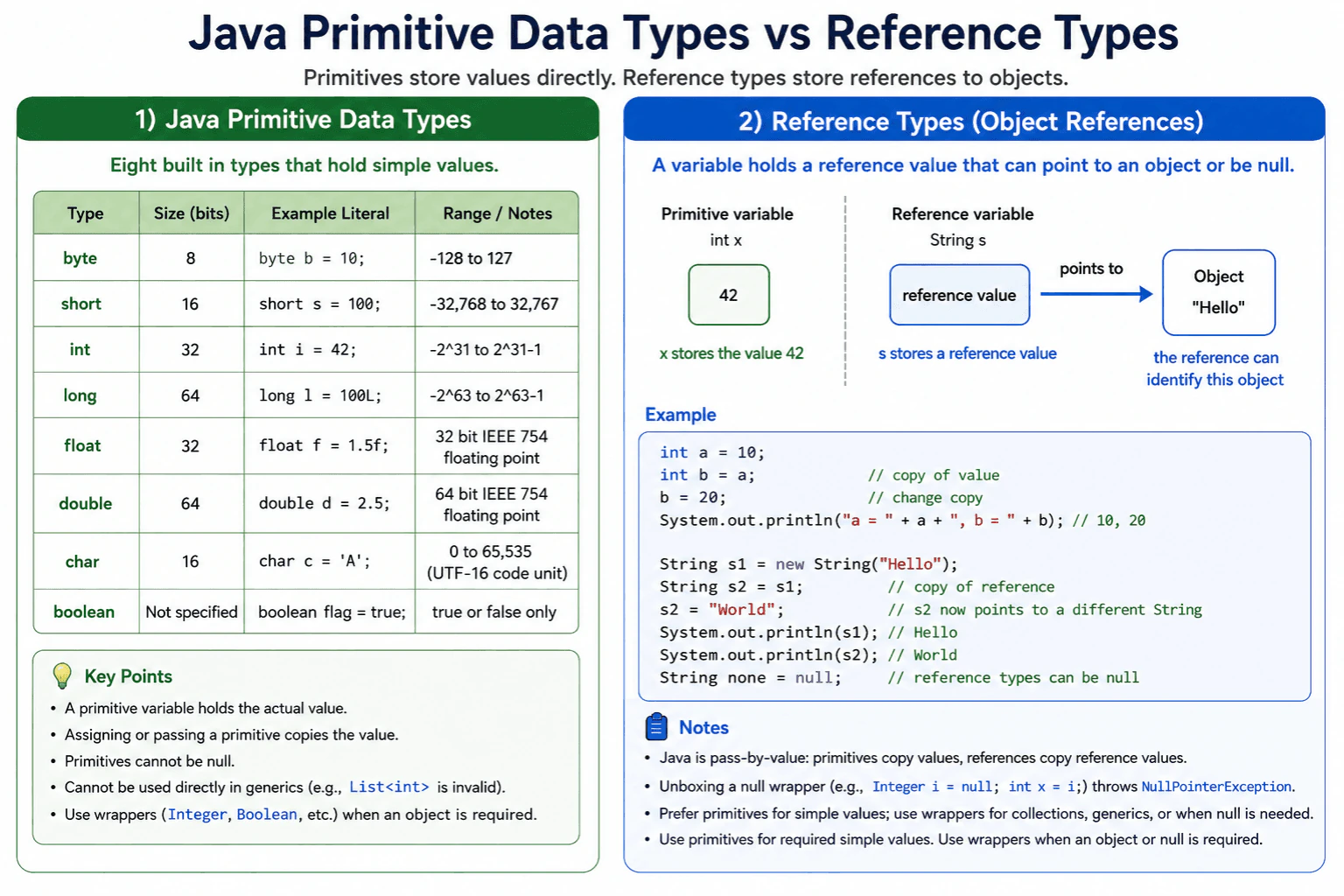
Java has eight primitive data types: byte, short, int, long, float, double, char, and boolean. A primitive variable holds a simple value, while a reference variable holds a reference value that can identify an object or be null. Primitives cannot contain null or be used directly as generic type arguments, so Java provides wrapper classes such as Integer and Boolean when an object is required.
Detailed Explanation
Java provides eight built in primitive types for simple values. Four store whole numbers, two store approximate decimal numbers, one stores a UTF 16 code unit, and one stores true or false. A primitive variable contains its value. A reference variable contains a value that can identify an object or be null. This difference affects copying, method calls, null handling, collections, calculations, and memory use. Understanding it helps a developer choose the correct type and avoid runtime errors.
Useful Questions to Ask the Interviewer
Should I explain the size and range of each numeric type?
Should I also cover wrapper classes, boxing, and unboxing?
How to Explain It in an Interview
The eight primitive types are byte, short, int, long, float, double, char, and boolean.
byte is an 8 bit signed integer. short is a 16 bit signed integer. int is a 32 bit signed integer and is the normal choice for whole numbers. long is a 64 bit signed integer and is used when int is too small.
float is a 32 bit floating point type. double is a 64 bit floating point type and is normally preferred for approximate decimal calculations. Neither type should be assumed to represent every decimal fraction exactly.
char is an unsigned 16 bit value that stores one UTF 16 code unit. Some Unicode characters require two char values. boolean stores only true or false. Java does not define it as a numeric type or specify a required storage size for it.
Assigning or passing a primitive copies its value. Changing the copy does not change the original variable. Assigning or passing a reference also copies a value, but the copied reference may identify the same object.
Primitives cannot contain null and cannot be used directly as generic type arguments. For example, List<int> is invalid. Wrapper classes such as Integer and Boolean are required in generic collections. Boxing converts a primitive value to a wrapper reference. Unboxing extracts the primitive value. Unboxing null throws NullPointerException.
Use primitives when a simple value must always be present. Use wrappers when an object is required or null has a valid meaning. For exact decimal arithmetic, such as financial amounts, BigDecimal is usually more appropriate than float or double.
Why Interviewers Ask This
Interviewers ask this question to check whether a candidate understands the foundation of the Java type system. They expect the candidate to name all eight primitive types and distinguish primitive values from reference values. This also tests practical knowledge of copying, null handling, wrapper classes, generic collections, numeric precision, and how values are passed to methods.
Common interview mistakes
A common mistake is calling String a primitive type. String is a class, so a String variable contains a reference value. Another mistake is saying Java passes objects by reference. Java is always pass by value. For an object, Java copies the reference value. Candidates may also claim that primitives are always stored on the stack and objects are always stored on the heap. The Java language does not guarantee that simple rule, and JVM optimizations may change the physical representation. Other mistakes include assuming char always represents one complete visible character, treating boolean as a number, using float or double for exact money calculations, writing generic types such as List<int>, and forgetting that unboxing a null wrapper throws NullPointerException.
Interview tip
Name all eight primitive types first. Then group them into integer types, floating point types, char, and boolean. Finish with the practical distinction: a primitive variable contains a simple value, while a reference variable contains a reference value that may identify an object or be null. Mention wrappers and null unboxing to show practical Java knowledge.
Interviewer may ask next
Can a primitive variable contain null, and what happens when Java unboxes a null wrapper?
No, a primitive variable cannot contain null. A wrapper reference such as Integer can contain null because it is a reference type. When Java tries to unbox that null reference into an int, it throws NullPointerException. This matters when values come from collections, database mappings, configuration, or external input because a simple looking assignment may fail at runtime.
When should you use a primitive instead of its wrapper class?
Use a primitive when the value must always be present and no object based API is required. This avoids null unboxing errors and can avoid wrapper object creation. Use a wrapper when a generic collection or another object based API requires an object, or when null must represent a missing value. The tradeoff is additional null handling and possible allocation or boxing work, although wrapper caching and JVM optimization may remove some costs in particular cases.
7. What is the difference between primitive and reference types?Language SpecificEasy
i Question Details
Explain the difference between primitive values and object references in Java, including memory behavior and common pitfalls.
Short Interview Answer (30-60 seconds)
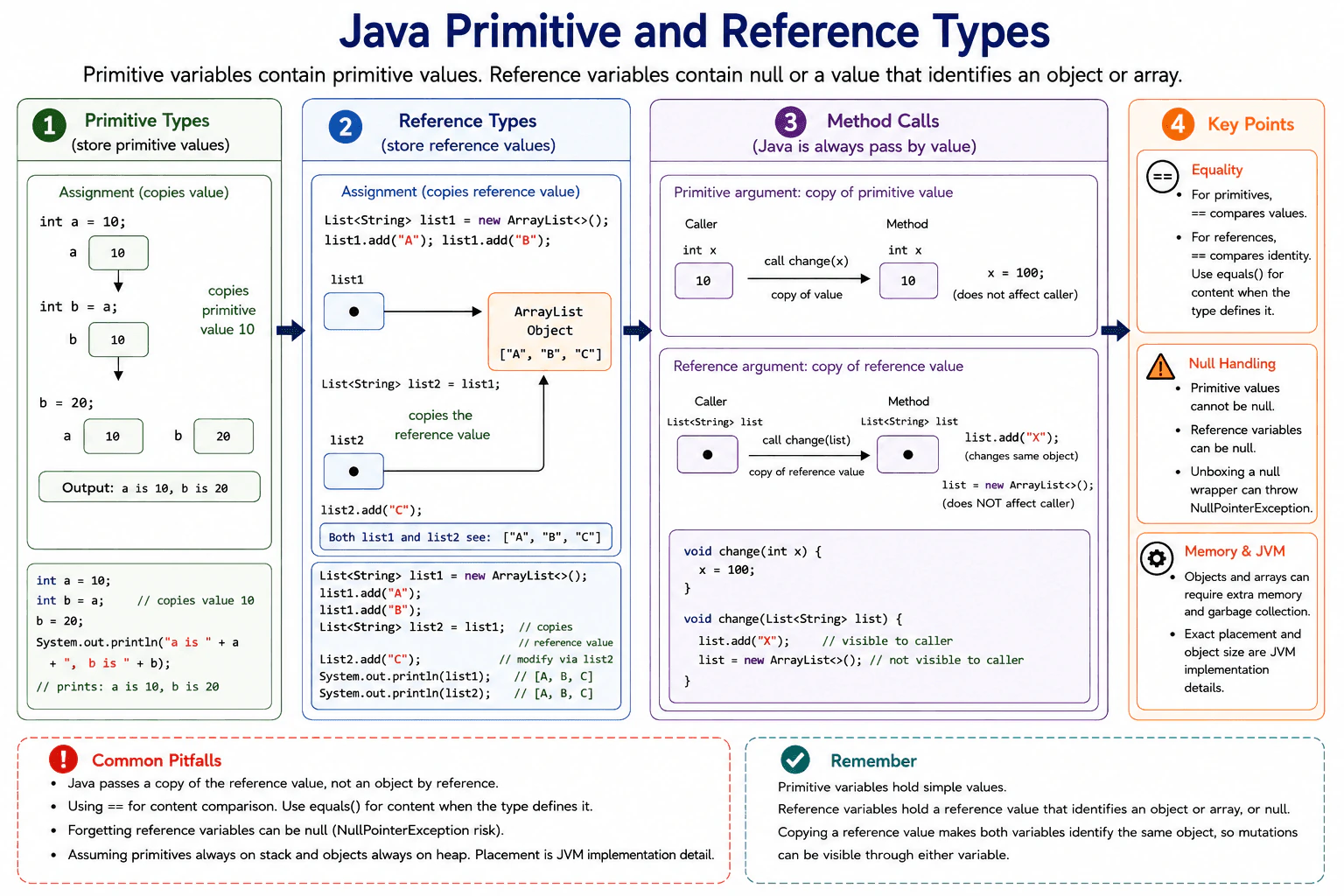
Primitive variables contain primitive values such as numbers, characters, and boolean values. Reference variables contain either null or a reference value that identifies an object or array. Assigning a primitive copies its value. Assigning a reference copies the reference value, so both variables can identify the same object. Java always passes arguments by value, including object reference values.
Detailed Explanation
Java variables hold either a primitive value or a reference value. A primitive is a simple value such as a whole number, a decimal number, a character, or true or false. A reference value identifies an object or array, or it can be null. This difference affects copying, comparison, method calls, memory use, and whether two variables can observe changes to the same object. The key practical point is that copying a reference does not copy the object. It only creates another reference to that same object.
Useful Questions to Ask the Interviewer
Should I include arrays, String, and wrapper classes as reference types?
Should I explain assignment and method argument behavior?
Should I cover equality, null values, and memory tradeoffs?
How to Explain It in an Interview
Java has eight primitive types: byte, short, int, long, float, double, char, and boolean. A primitive variable contains a primitive value. For example, if one int variable contains 10 and is assigned to another int variable, Java copies 10. Later changing one variable does not change the other.
Reference types include classes, interfaces, arrays, records, enums, and String. A reference variable contains either null or a reference value that identifies an object or array. If one ArrayList variable is assigned to another, Java copies the reference value, not the list. Both variables then identify the same list. Adding an element through either variable changes that shared list.
Java always passes arguments by value. For a primitive argument, the method receives a copy of the primitive value. For a reference argument, the method receives a copy of the reference value. The method can use that copy to modify the same mutable object. Reassigning the method parameter to a new object does not change the caller variable.
Primitive values cannot be null. Reference variables can be null, so using them without a check can cause NullPointerException. Wrapper classes such as Integer are reference types. Automatic unboxing of a null Integer also causes NullPointerException.
For primitives, == compares primitive values. For references, == checks whether both references identify the same object. Use equals when the type defines content equality. String is a reference type but is immutable, so its contents cannot be changed after creation.
Primitive values are often efficient because they do not require wrapper objects. Objects and arrays use additional memory for their data and runtime metadata. Exact locations, object sizes, and optimizations are JVM implementation details, so production code should rely on Java semantics rather than assuming stack or heap placement for every variable.
Why Interviewers Ask This
Interviewers ask this question to check whether a candidate understands Java variable semantics, value copying, object sharing, null handling, equality, method argument behavior, and realistic memory tradeoffs. These details are important because incorrect assumptions can cause unexpected object changes, incorrect comparisons, null failures, and unnecessary wrapper object use.
Common interview mistakes
A common mistake is saying that Java passes objects by reference. Java always passes arguments by value, but the copied value can be an object reference. Another mistake is assuming that assigning a reference creates a separate object. It only copies the reference value. Developers also misuse == when they intend to compare object content, forget that reference variables can be null, or assume every reference type is mutable. String and many value focused classes are immutable even though they are reference types. Another mistake is claiming that primitives always live on the stack and objects always live on the heap. Java language semantics do not guarantee such a simple placement rule.
Interview tip
Start with the copying rule. Explain that primitive assignment copies the primitive value, while reference assignment copies a value that identifies an object. Then mention shared mutable objects, Java pass by value, null, ==, equals, and the fact that exact memory placement is a JVM implementation detail.
Interviewer may ask next
If a method receives an object reference value, can it replace the caller variable with a different object?
No. The method receives a copy of the reference value. It can use that copied reference to modify the same mutable object, so the caller can observe those object changes. However, assigning the parameter to a different object changes only the local parameter. The caller variable keeps its original reference value. This matters when reviewing methods that mutate objects compared with methods that only reassign local parameters.
When should you use a primitive instead of its wrapper reference type?
Use a primitive when null is not required and the value is used directly for calculations, counters, flags, or similar work. A primitive avoids null unboxing failures and usually avoids the additional memory and allocation concerns of wrapper objects. Use a wrapper such as Integer when an API requires an object, when using generic collections, or when null represents a meaningful state. The tradeoff is added null risk, boxing and unboxing work, and possible extra memory use.
8. What is type casting in Java?Language SpecificEasy
i Question Details
Explain implicit and explicit type casting in Java and mention situations where casting can fail or lose data.
Short Interview Answer (30-60 seconds)
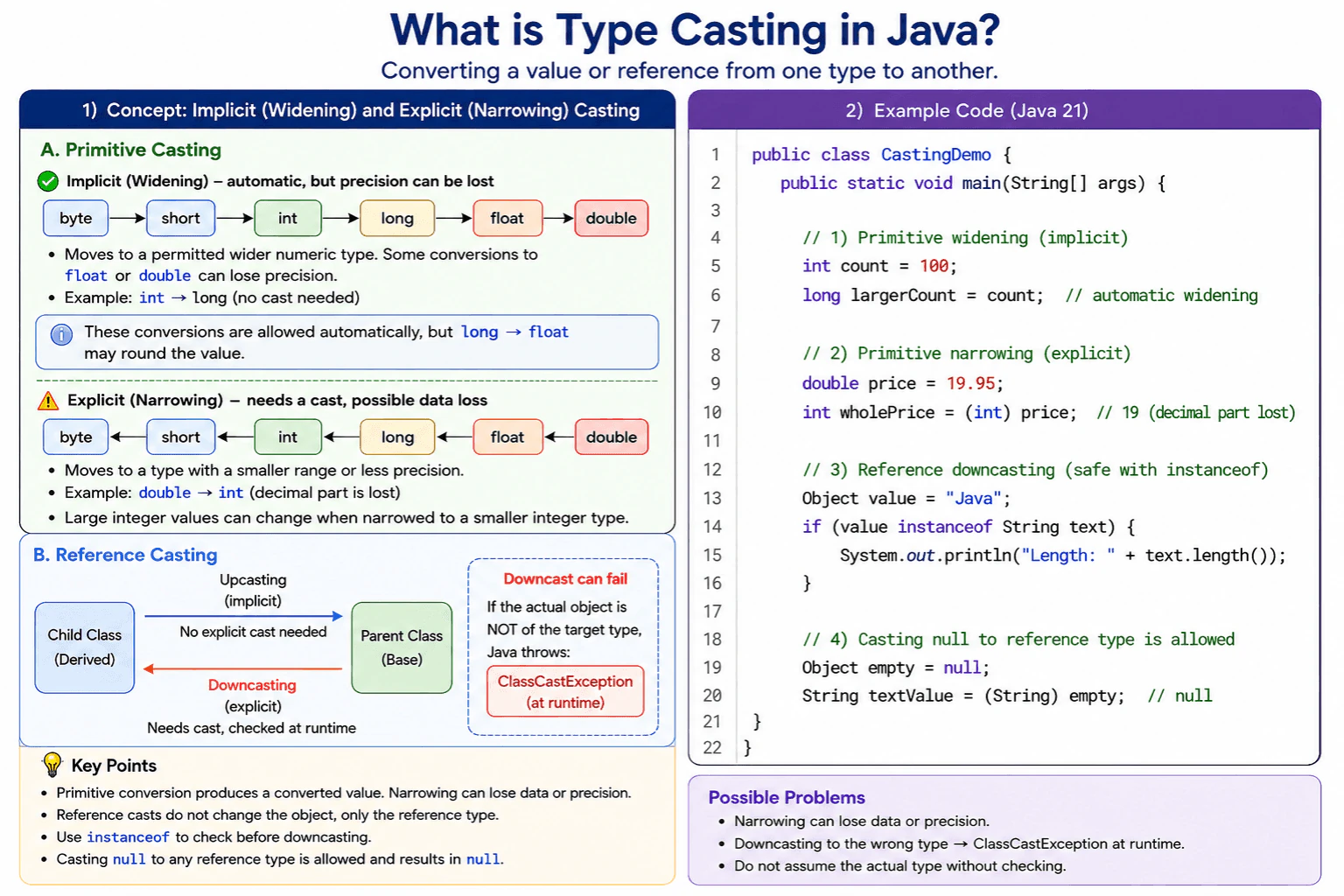
Type casting in Java means converting a primitive value to another primitive type or treating an object reference as another compatible reference type. Java performs widening conversions automatically, although some numeric widening conversions can still lose precision. Narrowing conversions require an explicit cast and can lose data. A reference downcast succeeds only when the actual object is compatible with the target type. Otherwise, Java throws ClassCastException at runtime.
Type casting means asking Java to use a value or object as another type. Some conversions happen automatically because Java considers them broadly safe. Other conversions need clear permission from the programmer because information may be lost or the requested object type may be wrong. For example, a whole number can be stored in a larger whole number type automatically. A decimal number converted to a whole number loses its decimal part. An object cast to an incompatible type causes the program to fail while it is running.
Useful Questions to Ask the Interviewer
Should I explain both primitive values and object references?
Should I include cases where numeric precision is lost?
Would you like me to explain compile time checks and runtime failures?
How to Explain It in an Interview
Java has primitive casting and reference casting.
Primitive casting converts a value between primitive numeric types. A widening conversion usually moves a value to a type with a wider range and normally needs no cast. For example, int can become long automatically. However, widening does not always preserve exact precision. An int or long converted to float can be rounded because float cannot exactly represent every integer value.
A narrowing conversion requires an explicit cast, such as int whole = (int) 19.95;. Java removes the fractional part, so the result is 19. Narrowing between integer types can discard higher bits and produce a different value. Java does not throw an exception for normal primitive narrowing.
When a floating point value is narrowed to an integer type, Java rounds toward zero. NaN becomes zero. A value outside the target range is limited according to the language conversion rules before any further narrowing to a smaller integer type.
Reference casting does not change or copy the object. Upcasting from a child type to a parent type is normally automatic. Downcasting from a parent reference to a child type requires an explicit cast. Java checks the actual object at runtime. An incompatible object causes ClassCastException. Casting null to a reference type succeeds and produces null.
Use instanceof when the runtime type is uncertain. Pattern matching, such as value instanceof String text, performs the check and creates a correctly typed variable.
Casting has constant time cost. Primitive and reference casts do not normally allocate new objects. A reference downcast may require a runtime compatibility check. In production code, validate numeric ranges and avoid repeated downcasts when polymorphism or generics can express the design more safely.
Interviewers ask this question to check whether a candidate understands Java type conversions and reference compatibility. They want to see whether the candidate can distinguish automatic and explicit conversions, predict data loss, explain runtime type checks, and avoid unsafe casts in production code.
Common interview mistakes
A common mistake is saying that every widening conversion preserves the exact value. Converting int or long to float can lose precision. Another mistake is assuming that primitive narrowing throws an exception when data is lost. Java normally performs the conversion and returns the converted value. Developers may also believe that a reference cast changes the object, but it only changes the reference type used by the compiler. Downcasting an incompatible object causes ClassCastException. Casting null is valid, but later using that null reference can cause NullPointerException. Boxing and unboxing should not be confused with ordinary primitive casting.
Interview tip
Start by separating primitive casting from reference casting. Explain automatic widening, explicit narrowing, possible precision loss, and ClassCastException. Mention that a reference cast does not create or transform the object. Use one simple numeric example and one safe instanceof example.
Interviewer may ask next
What happens when a floating point value such as NaN or a very large value is cast to int?
Java follows defined narrowing conversion rules. NaN becomes zero. A finite value is rounded toward zero. A value above the int range becomes Integer.MAX_VALUE, and a value below the int range becomes Integer.MIN_VALUE. Java does not throw an exception for these conversions, so production code should validate the value before casting when an incorrect result would be harmful.
What is the performance and memory cost of reference casting in production code?
A reference cast has constant time cost and normally does not allocate memory or copy the object. A downcast may perform a runtime compatibility check. The direct cost is usually small, but repeated casting can make code harder to maintain and can expose ClassCastException risks. Polymorphism, interfaces, and generics are often safer alternatives when the design allows them.
9. What is the difference between == and equals()?Language SpecificEasy
i Question Details
Explain how == works for primitives and objects, how equals() is used, and what equality means in Java.
Short Interview Answer (30-60 seconds)
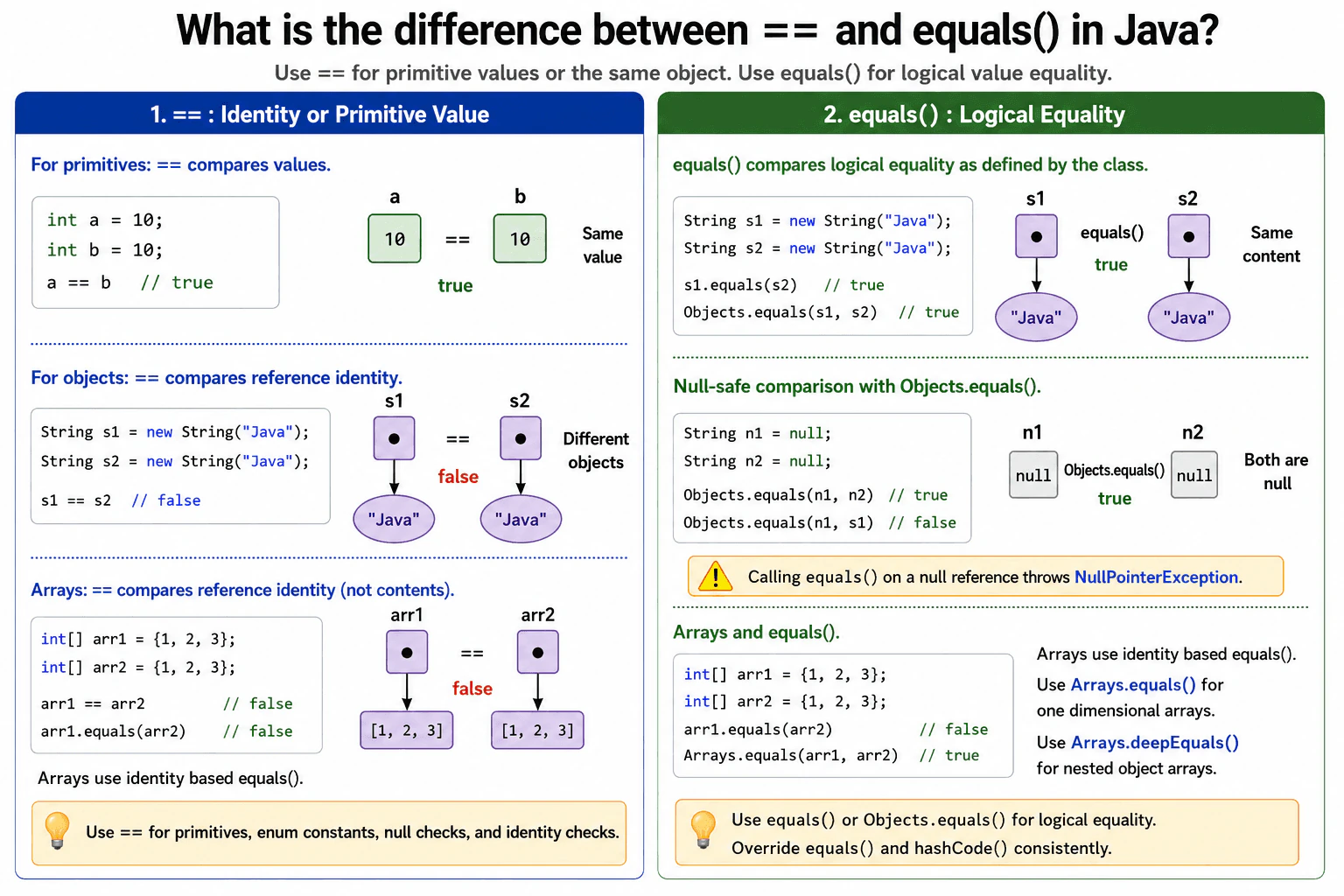
The main difference is that == compares primitive values, but with object references it checks whether both references point to the exact same object. equals() checks logical equality as defined by the object's class. For values such as String, I use equals() or Objects.equals(). I use == for primitives, enum constants, null checks, and cases where object identity is the actual requirement.
Use == when you need to compare primitive values or confirm that two object variables refer to the same object. Use equals() when you need to compare the meaning or contents of objects. Two separate objects can hold the same information but still have different identities. That is why the correct choice depends on what the program needs to prove. This matters in conditions, tests, collections, validation, and business rules. Before giving a final example, I would ask the interviewer these questions:
Useful Questions to Ask the Interviewer
Are the values primitives, object references, or arrays?
Does the object's class define logical equality by overriding equals()?
Can either reference be null?
How to Explain It in an Interview
For primitive operands, == compares values. Numeric operands may first be converted to a common numeric type according to Java's numeric promotion rules. Boolean values can also be compared with ==.
For object references, == compares identity. It returns true when both references point to the same object or when both references are null. It does not compare the objects' fields or contents.
equals() is an instance method used for logical equality. The default implementation inherited from Object performs the same identity test as ==. A class can override equals() to define meaningful equality. String, wrapper classes, records, and Java collection types provide value based equality rules appropriate to those types.
In the example, firstText and secondText contain the same characters but are separate String objects. Therefore, firstText == secondText is false, while firstText.equals(secondText) is true.
Calling firstText.equals(secondText) is unsafe when firstText might be null because the call would throw NullPointerException. Objects.equals(firstText, secondText) handles null safely. It returns true when both references are null, false when only one is null, and otherwise calls equals() on the first object.
Arrays are an important limitation. Arrays inherit Object.equals(), so array.equals() compares identity rather than elements. Use Arrays.equals() for one dimensional arrays and Arrays.deepEquals() when nested object arrays need deep element comparison.
When a class overrides equals(), it must also override hashCode() consistently. Objects that are equal must produce the same hash code. This is necessary for reliable behavior in HashMap and HashSet. Equality fields should also remain stable while an object is used as a hash based key or set element.
The == operation has constant work and creates no objects. The cost of equals() depends on its implementation. It may stop after a quick identity or type check, or it may compare many fields or elements. Calling ==, equals(), Objects.equals(), or Arrays.equals() does not inherently require copying the compared objects. A custom equals() implementation could allocate memory, but well designed equality methods normally avoid unnecessary allocation.
Interviewers ask this question to check whether a candidate understands primitive value comparison, object identity, logical equality, null handling, and the equality contract used by Java collections. It also shows whether the candidate can choose the correct comparison in production code instead of relying on behavior that only appears to work because of object caching or string interning.
Common interview mistakes
A common mistake is using == to compare String contents. Code may appear to work with some string literals because the JVM can reuse interned String objects, but identity is still the wrong test for text equality. Another mistake is assuming every equals() method compares fields, even though Object.equals() uses identity unless the class overrides it. Calling equals() on a null reference causes NullPointerException. Arrays also do not compare elements through equals(). Other serious mistakes include overriding equals() without a consistent hashCode(), comparing mutable fields that later change while the object is stored in a hash based collection, and writing an equals() implementation that violates reflexive, symmetric, transitive, consistent, or null comparison requirements.
Interview tip
Start by separating primitives from object references. State that == compares primitive values and reference identity, while equals() applies the class's logical equality rule. Then mention null safe comparison with Objects.equals(), array comparison with Arrays.equals(), and the requirement to keep equals() consistent with hashCode().
Interviewer may ask next
What happens when equals() is called on a null reference, and how should null values be compared?
Calling equals() on a null reference throws NullPointerException because there is no object on which to invoke the method. Use == for a direct null check or Objects.equals(first, second) when either reference may be null. Objects.equals() returns true when both are null, false when only one is null, and otherwise delegates to the first object's equals() method. This matters because it prevents avoidable failures while preserving the class's logical equality behavior. The method does not copy the objects and normally adds only a small method call cost.
Why must hashCode() be consistent with equals(), and what production issue can occur if equality fields change?
Objects that are equal according to equals() must return the same hash code. HashMap and HashSet use the hash code to locate a storage area and then use equals() to identify a matching key or element. If equal objects produce different hash codes, lookups and duplicate detection can fail. If fields used by equals() and hashCode() change after insertion, the object may remain stored in a location based on its old hash code and become difficult to find or remove. Immutable equality fields avoid this production risk. Computing a more detailed hash code can require more work, but correct and stable behavior is the primary requirement.
10. What is the difference between String, StringBuilder, and StringBuffer?Language SpecificEasy
i Question Details
Compare String, StringBuilder, and StringBuffer in terms of mutability, thread safety, and performance.
Short Interview Answer (30-60 seconds)
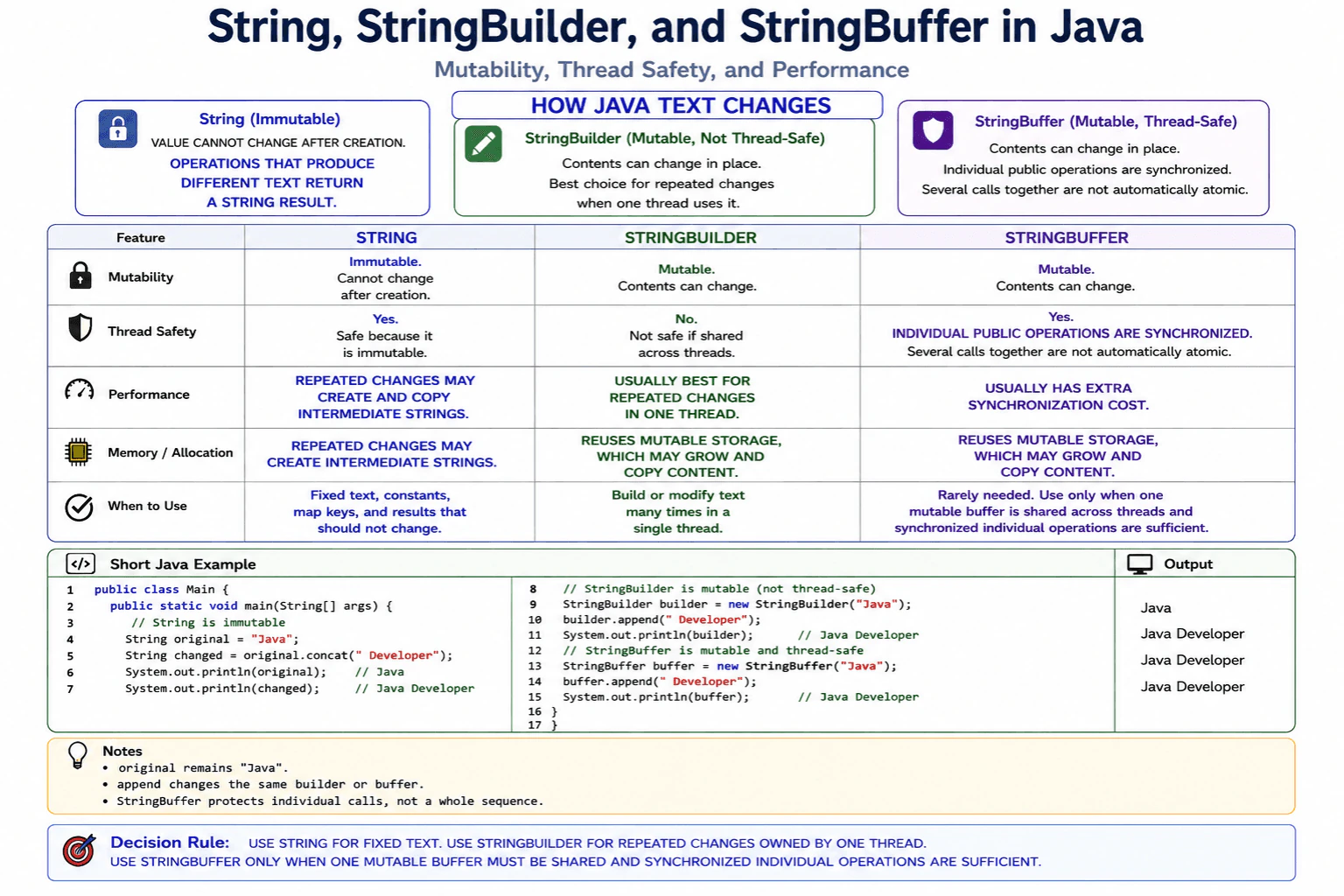
String is immutable, so its character sequence cannot change after creation. An operation that produces different text returns another String value. StringBuilder is mutable and is normally the best choice for repeated text changes when one thread owns the builder. StringBuffer is also mutable, but its methods use synchronization, so individual operations on one shared instance are thread safe at an extra synchronization cost.
These three Java classes all represent text, but they behave differently when the text must change. A String keeps the same character sequence after it is created. An operation that produces different text returns another value. StringBuilder and StringBuffer can update their stored sequence, so they are useful when text is built through many steps. The main difference between the two builders is how they handle shared access from several threads. The correct choice can reduce unnecessary allocations and can prevent unsafe updates.
Useful Questions to Ask the Interviewer
Will the text be changed many times?
Will one thread own the builder, or will several threads share it?
Does the program need one atomic action across several builder operations?
How to Explain It in an Interview
String is immutable. Its character sequence does not change after the object is created. Methods such as concat, replace, and substring return a String result instead of modifying the original object. A variable may be reassigned to another String, but that does not change the earlier object. Immutability makes String safe to share between threads and reliable as a map key when its contents are used for equality and hashing.
StringBuilder is mutable and is not thread safe. Methods such as append, insert, delete, and reverse update the same builder. It is normally the best choice when one thread constructs text through repeated operations. Its internal storage has a capacity that can grow. Growth may allocate larger storage and copy existing content. Calling toString creates the final immutable String result.
StringBuffer is also mutable and has an API similar to StringBuilder. Its public operations are synchronized. This protects individual method calls on the same instance when several threads use it. However, several calls together are not automatically one atomic action. External coordination is still needed when correctness depends on a complete sequence of operations.
Repeated String concatenation in a loop can create intermediate results and copy text many times. A compiler may optimize some simple concatenation expressions, so performance should not be judged from the plus operator alone. For a known sequence of many updates, StringBuilder clearly expresses the intended mutable construction.
Use String for fixed values and completed results. Use StringBuilder for local text construction. Use StringBuffer only when one mutable buffer must be shared and its synchronized operations match the requirement. Avoid sharing a mutable builder when each thread can build its own result.
Interviewers ask this question to check whether a candidate understands immutable and mutable text objects in Java. It also tests whether the candidate can choose an appropriate type based on repeated updates, object allocation, memory use, thread safety, and synchronization cost.
Common interview mistakes
A common mistake is saying that a String variable cannot be reassigned. The variable can point to another String, but the original String object is not modified. Another mistake is claiming that every String operation always creates a new object. Some operations may return an existing String when no different value is needed. Candidates also misuse String concatenation inside large loops without considering intermediate allocation and copying. Another mistake is saying that StringBuffer makes a whole sequence of calls atomic. Its synchronization protects individual calls, not an entire multi call action. It is also unnecessary to use StringBuffer merely because the application contains multiple threads when each builder is owned by only one thread.
Interview tip
Start with the decision rule. Use String for fixed text, StringBuilder for repeated updates owned by one thread, and StringBuffer only for a shared mutable buffer when synchronized individual operations are sufficient. Then explain immutability, allocation, and atomicity.
Interviewer may ask next
Does StringBuffer make a sequence of several operations atomic?
No. StringBuffer synchronizes individual method calls, but a sequence such as reading the length and then appending is not automatically one atomic action. Another thread may run between those calls. This matters when correctness depends on the complete sequence, so external synchronization or a design that avoids shared mutable state may be required.
Why is StringBuilder normally preferred over StringBuffer for local text construction?
StringBuilder is normally preferred because it does not perform the synchronization used by StringBuffer. When one thread owns the builder, that synchronization is unnecessary and may add overhead, although the exact performance difference depends on the runtime and workload. The tradeoff is that one StringBuilder instance must not be shared across threads without proper coordination.
More questions load as you scroll
Java Developer Resume Examples
Explore the resume examples below to find the one that best matches your target Java Developer role.
Disclaimer: This interview guide is for educational and informational purposes only. It is designed to help readers prepare, but it does not guarantee any interview result, hiring decision, offer, or outcome. Interview questions, hiring criteria, and preferred answers can vary by employer, interviewer, industry, location, and time. All answers, examples, and explanations in this guide are suggested examples for interview preparation, not definitive answers or instructions for professional practice. They are based on research and judgment, are provided without warranties of any kind, and should be adapted to the question, role, and applicable laws and professional requirements. Diagrams are simplified illustrations intended to highlight the main concepts and their relationships; actual situations, systems, and practices may be more complex. Alternative approaches may be equally valid or better suited to a particular question, context, or interviewer. To the fullest extent permitted by applicable law, the contributors and publisher are not liable for decisions made, actions taken, or losses incurred based on this guide.
State Laws and Professional Responsibilities: Laws and requirements governing an occupation vary by state and jurisdiction. You are responsible for checking the current laws, licensing requirements, and scope-of-practice rules that apply to your location and role, and for ensuring that your answers and actions comply with them. Adapt examples in this guide to those requirements. This guide is not legal advice.
Content Accuracy and Verification: To the fullest extent permitted by applicable law, we do not represent or warrant that interview guides, questions, answers, examples, or diagrams are accurate, complete, current, error-free, or suitable for any particular purpose. You are responsible for independently reviewing and verifying the information before relying on it.