This interview guide is for educational and informational purposes only. It is designed to help readers prepare, but it does not guarantee any interview result, hiring decision, offer, or outcome. Interview questions, hiring criteria, and preferred answers can vary by employer, interviewer, industry, location, and time. All answers, examples, and explanations in this guide are suggested examples for interview preparation, not definitive answers or instructions for professional practice. They are based on research and judgment, are provided without warranties of any kind, and should be adapted to the question, role, and applicable laws and professional requirements. Diagrams are simplified illustrations intended to highlight the main concepts and their relationships; actual situations, systems, and practices may be more complex. Alternative approaches may be equally valid or better suited to a particular question, context, or interviewer. To the fullest extent permitted by applicable law, the contributors and publisher are not liable for decisions made, actions taken, or losses incurred based on this guide.
State Laws and Professional Responsibilities
Laws and requirements governing an occupation vary by state and jurisdiction. You are responsible for checking the current laws, licensing requirements, and scope-of-practice rules that apply to your location and role, and for ensuring that your answers and actions comply with them. Adapt examples in this guide to those requirements. This guide is not legal advice.
Identity, Image, and Privacy Notice
To respect individual privacy, some names, profile photographs, avatars, biographical details, and other identifying information displayed in this guide may be replaced with pseudonyms, licensed stock images, illustrative avatars, composite images, or representative descriptions. Unless a person is expressly identified as an actual contributor, a displayed name, image, or profile should not be understood as depicting or identifying a specific candidate, interviewer, employee, or other real individual. These representations are provided for editorial and illustrative purposes only and do not imply endorsement, employment, participation, or affiliation with this guide or any company mentioned in it. Any resemblance to an actual person is coincidental.
Company Notice
This guide is an independent educational resource and is not affiliated with, endorsed by, sponsored by, or approved by the company named in this guide. Company names identify reported interview experiences or the employer context of clearly labeled original practice exercises. Interview practices can change without notice, and inclusion of company-specific content does not mean these questions are official, complete, or guaranteed to be asked. To the fullest extent permitted by law, the author, contributors, and publisher are not responsible for outcomes related to use of this material.
Content Accuracy and Verification
To the fullest extent permitted by applicable law, we do not represent or warrant that interview guides, questions, answers, examples, or diagrams are accurate, complete, current, error-free, or suitable for any particular purpose. You are responsible for independently reviewing and verifying the information before relying on it.
Questions or comments?
Contact us for general questions, or share feedback, technical corrections, and comments with the community.
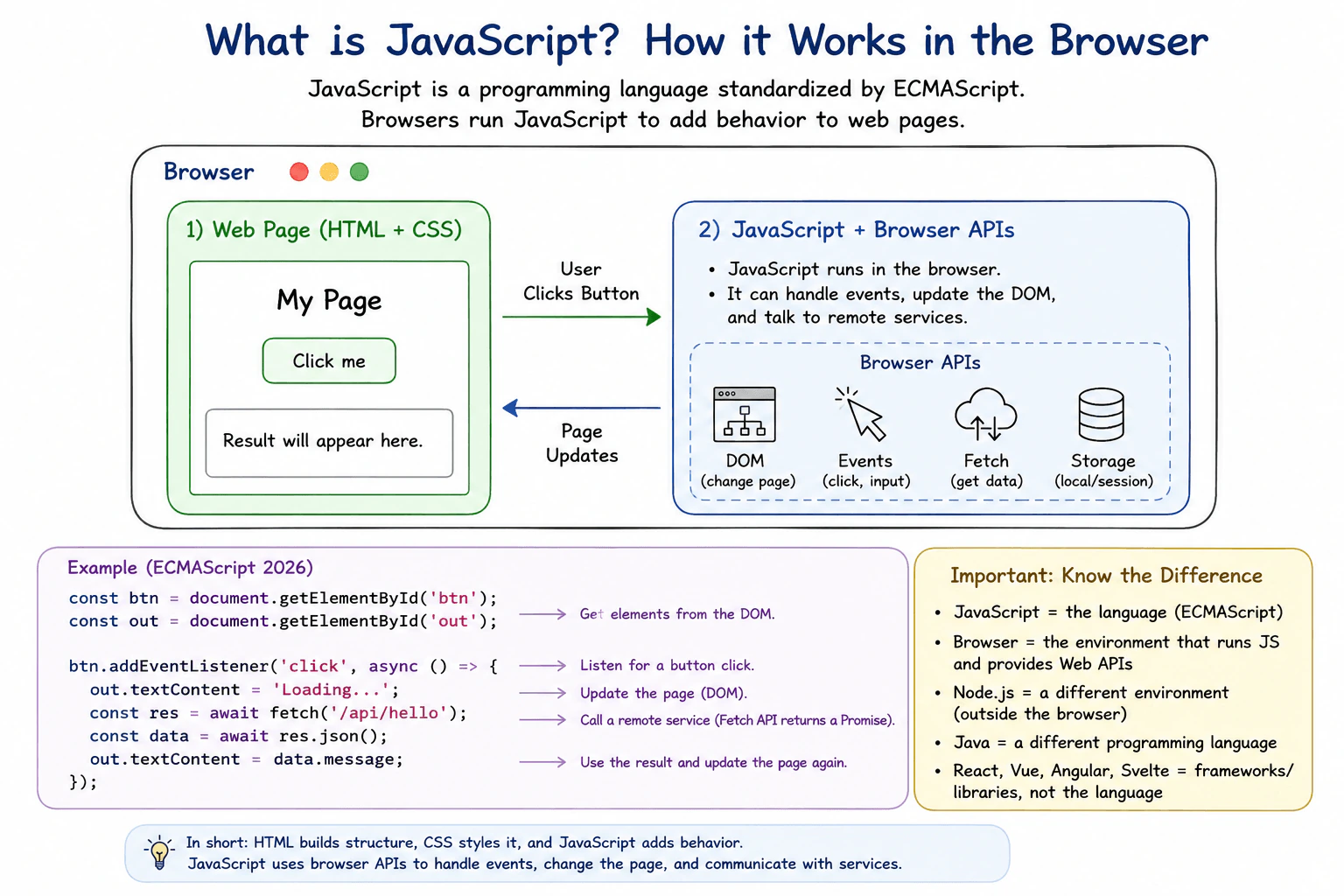
Define JavaScript as a programming language standardized through ECMAScript and commonly executed by web browsers. Explain how it adds behavior to a page, works with HTML and CSS through browser APIs, handles user events, updates the DOM, and communicates with remote services. Distinguish the JavaScript language from a browser, Node.js, Java, and a frontend framework.
Short Interview Answer (30-60 seconds)
JavaScript is a programming language standardized through ECMAScript. In frontend development, browsers commonly run JavaScript so a page can respond to users, change page content, and communicate with remote services. JavaScript works with HTML and CSS through browser APIs such as the DOM, but those browser APIs are not part of the JavaScript language itself. JavaScript is also different from Java, Node.js, and frontend frameworks such as React.
Detailed Explanation
JavaScript is the language that gives a web page behavior. HTML usually describes what is on the page, and CSS controls how it looks. JavaScript can react when a person clicks a button, types text, submits a form, or performs another action. It can also change what the person sees without loading a completely new page. It can request information from a remote service and use the result on the page. The same language can also run outside a web browser when another program provides an environment for it.
Useful Questions to Ask the Interviewer
Would you like me to focus mainly on JavaScript in the browser?
Should I also explain how JavaScript differs from Node.js and frontend frameworks?
How to Explain It in an Interview
JavaScript is a programming language. Its standard is called ECMAScript. ECMAScript defines the core language, including values, objects, functions, classes, promises, modules, and expressions.
A web browser provides an environment where JavaScript can run. The browser also provides Web APIs. These include the DOM, events, Fetch, storage, and timers. These browser APIs are separate from the ECMAScript language.
For example, HTML can create a button. CSS can control how the button looks. JavaScript can register a function to handle a click event. When the user clicks the button, the browser reports that event and runs the registered JavaScript function. The function can then use the DOM API to change text or other page content.
JavaScript can also call the browser Fetch API to communicate with a remote service. Fetch returns a Promise that represents the future result of the request. JavaScript can process that result and then update the page.
JavaScript is different from Node.js. Node.js is a runtime environment that executes JavaScript outside a browser and provides its own APIs. JavaScript is also not Java. They are separate programming languages. React, Vue, Angular, and Svelte are frameworks or libraries used with JavaScript. They are not the JavaScript language itself.
This distinction matters in production because available APIs depend on the runtime environment. Code that uses the DOM expects a browser environment that provides the DOM. Developers should know whether a feature belongs to ECMAScript, a browser Web API, Node.js, or a framework before depending on it.
Where it is used
JavaScript is used in production web applications to respond to clicks and form input, validate user interactions, update page content through the DOM, request data from remote services, manage application state, and coordinate browser features. The language can also run outside browsers in environments such as Node.js, but the APIs available there are different from browser Web APIs.
Why Interviewers Ask This
Interviewers ask this question to check whether the candidate understands what JavaScript actually is and can separate the language from the environment that runs it. They also want to see whether the candidate understands its role in a web page, its connection with browser features, and the difference between JavaScript, Java, Node.js, and frontend frameworks.
Common interview mistakes
A common mistake is saying that JavaScript is a browser. A browser is an environment that can execute JavaScript. Another mistake is treating the DOM or Fetch as part of the ECMAScript language. They are browser Web APIs. Candidates also sometimes confuse JavaScript with Java even though they are separate languages. Another mistake is saying that Node.js is another language. Node.js is a runtime environment that executes JavaScript and provides its own APIs. Frameworks such as React are also not the JavaScript language.
Interview tip
Start by saying that JavaScript is a programming language standardized through ECMAScript. Then explain its practical browser role with one simple example, such as handling a button click and changing the page. Finish by clearly separating JavaScript from browser APIs, Node.js, Java, and frontend frameworks.
Interviewer may ask next
Is the DOM part of JavaScript itself?
No. The DOM is a Web API provided by browsers, not part of the ECMAScript language. JavaScript code can use the DOM when it runs in an environment that provides that API. This matters because JavaScript can run in other environments where the DOM is not available.
What changes when JavaScript runs in Node.js instead of a browser?
The JavaScript language is still based on ECMAScript, but the runtime environment changes. Node.js provides its own APIs, while browser features such as the DOM are normally unavailable. This matters in production because code that depends on a browser API cannot automatically run in Node.js. The main tradeoff is that the same core language can be used in different environments, but environment specific code must depend only on APIs available in its target runtime.
2. What is frontend development?Language SpecificEasy
i Question Details
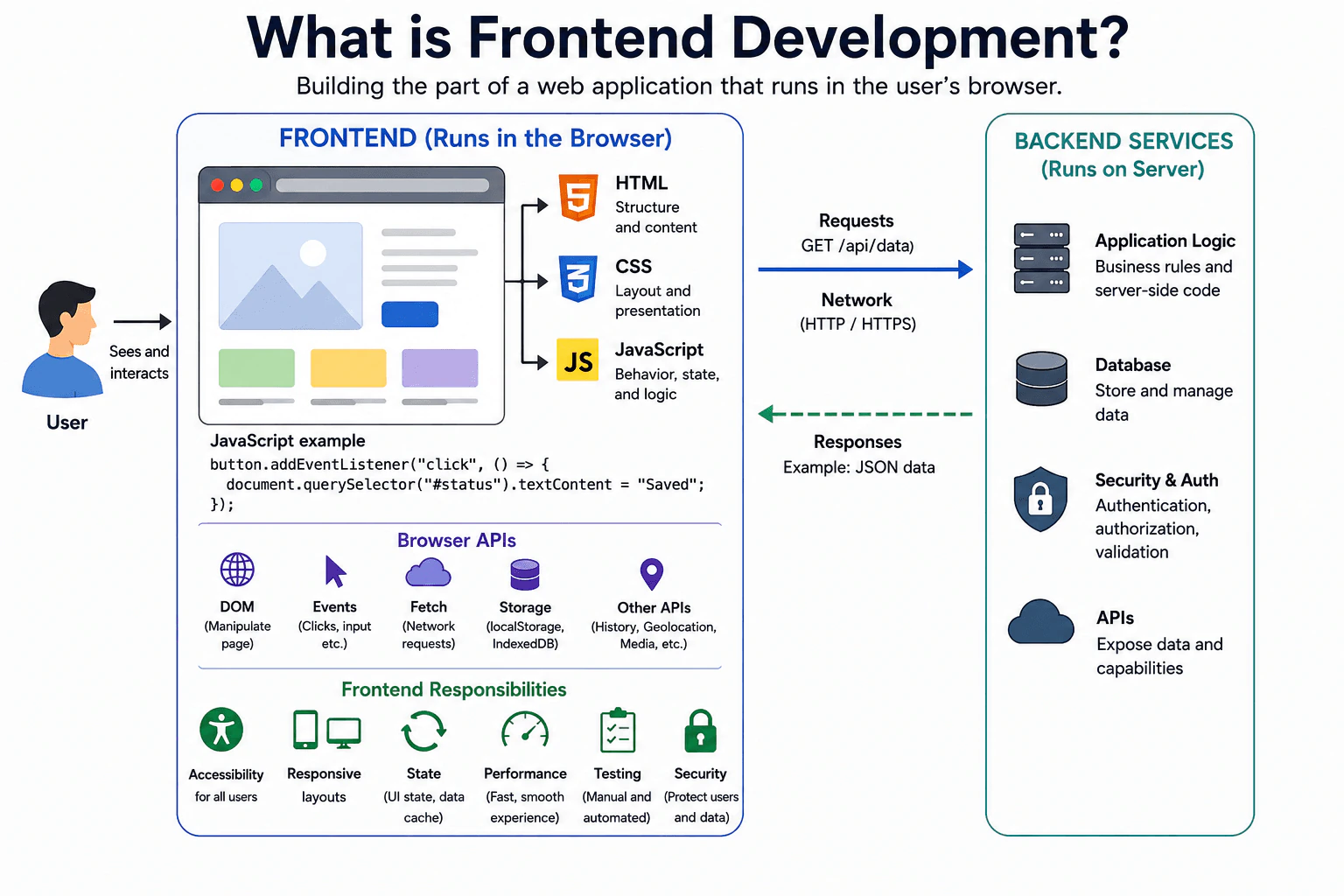
Define frontend development as building the part of a web application that runs in or is presented through the user browser. Explain the roles of HTML, CSS, JavaScript, browser APIs, accessibility, responsive layouts, network requests, state, performance, testing, and security. Distinguish frontend code from backend services while explaining how the two communicate.
Short Interview Answer (30-60 seconds)
Frontend development is building the part of a web application that users see and interact with through their browser. HTML gives the page its structure, CSS controls its presentation, and JavaScript adds behavior and connects the page to browser APIs and backend services. A frontend developer also handles accessibility, responsive layouts, state, network requests, performance, testing, and security. The backend usually stores data and applies server side business rules, while the frontend communicates with it through network requests.
Detailed Explanation
Frontend development means building the part of a website or web application that a person sees and uses in a browser. It includes the page content, its appearance, buttons, forms, menus, messages, and other interactions. The goal is to make the experience clear, usable, fast, safe, and suitable for different screen sizes and users. This work also includes getting information from services, showing loading or error states, remembering what the user is doing, and checking that the experience continues to work correctly as the application changes.
Useful Questions to Ask the Interviewer
Should I explain frontend development at a general browser level or focus more on JavaScript responsibilities?
Would you like me to describe how the frontend communicates with backend services?
How to Explain It in an Interview
Frontend development is mainly the browser side of a web application. HTML describes the structure and meaning of the page. CSS controls layout and presentation. JavaScript adds behavior, updates the page, responds to user actions, manages application state, and uses browser APIs.
JavaScript can listen for events such as clicks and input. It can change the DOM, which is the browser representation of the page. It can also use Fetch to send HTTP requests to backend services and receive responses. The frontend then decides how to show loading, success, empty, and error states.
A frontend developer must also consider accessibility so people can use the application with keyboards, screen readers, and other tools. Responsive layouts help the interface work on phones, tablets, and larger screens. Performance matters because large amounts of JavaScript, slow network requests, expensive layout work, or frequent rendering can make the interface feel slow.
Testing checks that important behavior still works. Security means respecting browser protections such as the same origin policy, handling untrusted data safely, and avoiding unsafe DOM rendering.
The backend is different. It normally runs on servers, stores or processes data, applies trusted business rules, performs protected operations, and exposes services. The frontend and backend commonly communicate through HTTP requests and responses, often exchanging data such as JSON.
Where it is used
Frontend development is used in websites, online stores, dashboards, social applications, booking systems, banking interfaces, developer tools, and many other browser based products. JavaScript is commonly used when the page must respond to user actions, update displayed data, manage interface state, validate input for user experience, communicate with backend services, or use browser capabilities such as storage, history, media, and events.
Why Interviewers Ask This
Interviewers ask this question to check whether a candidate understands what work belongs in the browser, how JavaScript supports that work, and where the boundary between frontend code and backend services sits. They also want to see whether the candidate understands practical concerns such as accessibility, responsive design, network communication, state, performance, testing, and browser security.
Common interview mistakes
A common mistake is saying that frontend development only means making pages look good. It also includes behavior, accessibility, data communication, state, performance, testing, and security. Another mistake is treating JavaScript and browser APIs as the same thing. JavaScript is the language, while APIs such as the DOM and Fetch are provided by the browser. Candidates may also incorrectly say that frontend code should directly access a protected server database. In a typical web application, the frontend communicates with backend services, and those services control protected database access, authorization, and server side rules.
Interview tip
Start by saying that frontend development is the browser side of a web application. Then explain HTML, CSS, and JavaScript, followed by accessibility, responsive design, state, network requests, performance, testing, and security. Finish by clearly separating frontend responsibilities from backend services and explain that they commonly communicate through HTTP requests and responses.
Interviewer may ask next
Can frontend JavaScript directly access every resource or service on the internet?
No. Browser JavaScript runs inside browser security boundaries. The same origin policy restricts some interactions between different origins, including reading many cross origin responses unless the server permits that access through CORS. This matters because frontend code cannot assume that every remote service is directly accessible. Production applications should use approved APIs and handle network failures, permission limits, and untrusted data safely.
What should stay in the frontend and what should stay in the backend?
User interface behavior and browser specific work normally stay in the frontend, while trusted business rules, secrets, protected database access, and authorization decisions normally stay in the backend. The frontend can validate input to improve the user experience, but the backend must still validate important data because browser code and requests can be changed by a user. This separation keeps trusted operations under server control while allowing the frontend to provide a responsive user experience.
3. What is ECMAScript?Language SpecificEasy
i Question Details
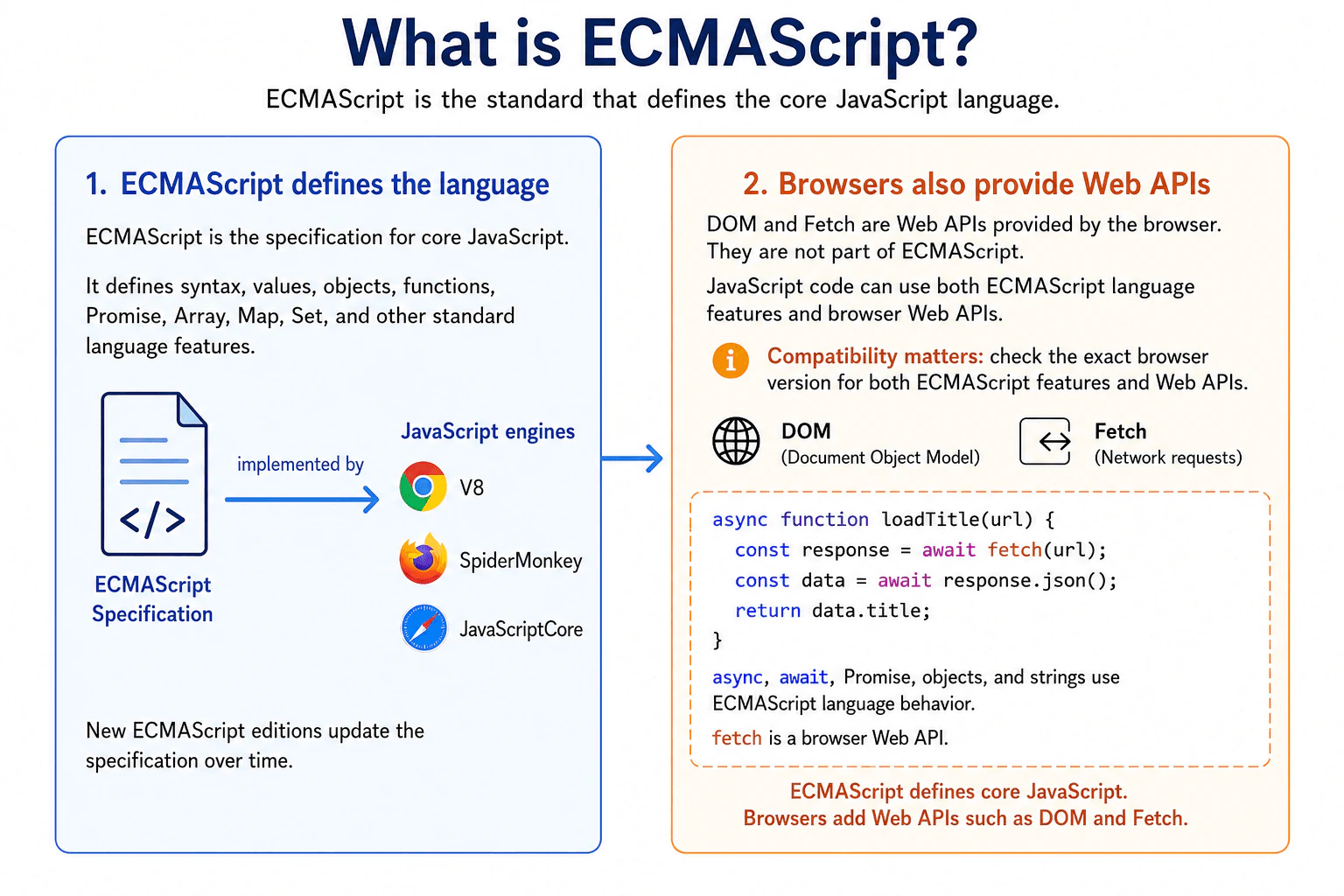
Define ECMAScript as the language specification that standardizes the core syntax and behavior commonly called JavaScript. Explain the relationship among the specification, JavaScript engines, yearly language editions, browser host APIs, and compatibility. Clarify that the DOM and Fetch are web platform APIs rather than parts of the ECMAScript language itself.
Short Interview Answer (30-60 seconds)
ECMAScript is the standard that defines the core JavaScript language. It specifies syntax, values, objects, functions, promises, and other built in language behavior. JavaScript engines implement that standard. New editions add standardized language features over time, but browser support can still vary by version. The DOM and Fetch are not part of ECMAScript. They are Web APIs provided by the browser, so I check language support and Web API support separately.
Detailed Explanation
ECMAScript is the shared set of rules that defines how the main JavaScript language should work. Browser makers use these rules when building the software that runs JavaScript. This helps the same language behave consistently in different browsers. The rules are updated over time as new language features are accepted. A browser may support some newer features before another browser does. Also, some things JavaScript uses on a web page come from the browser rather than from these language rules. Knowing this difference helps developers understand compatibility problems and choose features that work for their users.
Useful Questions to Ask the Interviewer
Would you like me to explain the difference between ECMAScript and browser Web APIs?
Should I also explain how yearly ECMAScript editions relate to browser compatibility?
How to Explain It in an Interview
ECMAScript is the specification that defines the core language commonly called JavaScript. A specification is a written standard that describes exactly how language features should behave.
JavaScript engines implement those rules. For example, ECMAScript defines language syntax and behavior for features such as let, const, classes, modules, async functions, Array, Map, Set, Promise, and JSON. Different engines can have different internal implementations, but the observable language behavior should follow the specification.
ECMAScript is published in editions as the language evolves. Modern evergreen browsers are updated regularly, but support still depends on the exact browser and version. A feature being standardized does not mean every browser used by an application supports it immediately. In production, I check compatibility for the target browsers before relying on a newer feature.
It is also important to separate ECMAScript from the browser platform. The DOM and Fetch are Web APIs. They are not defined as part of the ECMAScript language. ECMAScript gives us the JavaScript language used to call those APIs, while the browser provides the APIs themselves.
This distinction matters during development and debugging. A browser can support a particular ECMAScript language feature but lack a particular Web API, or the reverse. I therefore check the support of the language feature and the support of the Web API separately.
Where it is used
This knowledge is useful when choosing JavaScript syntax for production applications, setting browser support requirements, configuring frontend build tools, reading compatibility information, and debugging code that behaves differently across environments. It is especially useful when deciding whether a compatibility issue comes from the JavaScript language itself or from a browser Web API such as the DOM or Fetch.
Why Interviewers Ask This
Interviewers ask this to check whether a candidate understands what defines the core JavaScript language and what comes from the browser environment. It also tests whether the candidate understands how JavaScript engines follow a common standard, how language editions evolve, and why compatibility must be checked for real production browsers.
Common interview mistakes
A common mistake is saying that ECMAScript and JavaScript are completely separate languages. ECMAScript is the standard that defines the core language commonly called JavaScript. Another mistake is assuming that everything available to JavaScript in a browser belongs to ECMAScript. The DOM and Fetch are browser Web APIs. A third mistake is assuming that a new ECMAScript edition guarantees immediate support in every browser. Actual support depends on the browser and version.
Interview tip
Start by saying that ECMAScript is the standard for the core JavaScript language. Then explain that JavaScript engines implement that standard. Finish by separating ECMAScript features from browser Web APIs such as the DOM and Fetch, and mention that real browser compatibility still needs to be checked.
Interviewer may ask next
If a feature is part of a new ECMAScript edition, can I assume every browser supports it?
No. Standardization and browser implementation are separate. A feature can be part of an ECMAScript edition while some browser versions still do not support it. This matters because production code must run in the actual browsers used by the target audience. I check compatibility for the exact language feature before depending on it.
What is the practical difference between an ECMAScript feature and a browser Web API?
An ECMAScript feature belongs to the core JavaScript language standard, while a browser Web API is provided by the browser environment. For example, Promise is defined by ECMAScript, while the DOM and Fetch are Web APIs. This matters because their availability can differ across environments and browser versions, so I check their compatibility separately.
4. What is HTML?Language SpecificEasy
i Question Details
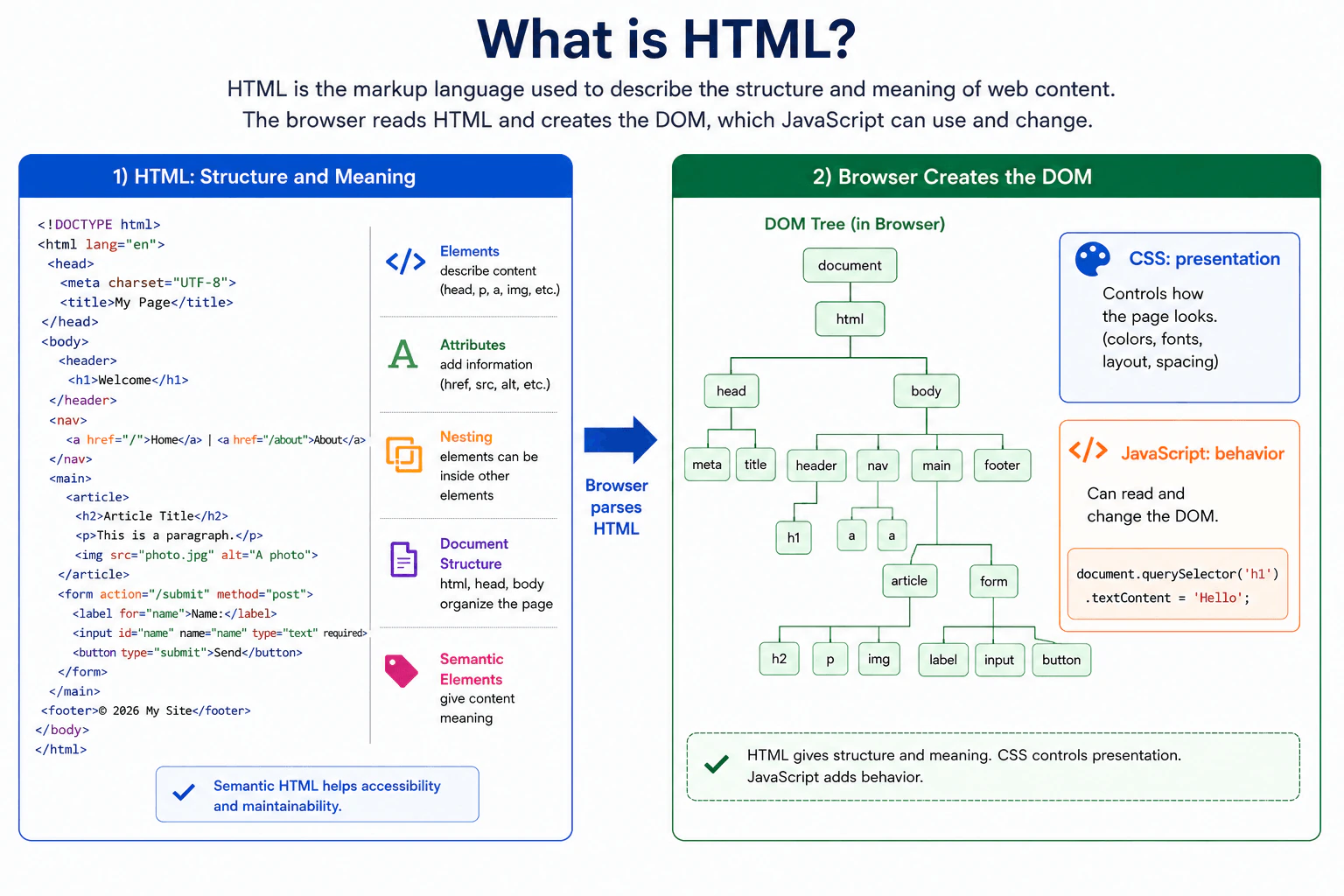
Define HTML as the markup language used to describe the structure and meaning of web content. Explain elements, attributes, nesting, document structure, semantic elements, forms, links, images, and the DOM created by the browser. Distinguish HTML structure from CSS presentation and JavaScript behavior, and explain why semantic HTML supports accessibility and maintainability.
Short Interview Answer (30-60 seconds)
HTML is the markup language used to describe the structure and meaning of content on a web page. It uses elements for things such as headings, paragraphs, links, images, forms, and buttons. Attributes add extra information to elements, and elements can be nested to form a document structure. The browser parses HTML and creates the DOM, which JavaScript can read and change. HTML provides structure and meaning, CSS controls presentation, and JavaScript adds behavior. Semantic HTML also improves accessibility and maintainability.
Detailed Explanation
HTML tells a browser what content exists on a web page and what that content means. For example, it can describe a heading, paragraph, link, image, button, or form. Elements can contain other elements, which creates the structure of the document. Elements can also have attributes that provide extra information. The browser reads the HTML and builds an internal representation of the page called the DOM. CSS can control how the page looks, while JavaScript can add behavior and change the DOM. Meaningful HTML also helps accessibility tools and makes code easier to maintain.
Useful Questions to Ask the Interviewer
Would you like me to explain how the browser turns HTML into the DOM?
Should I also compare semantic HTML with generic elements such as div and span?
How to Explain It in an Interview
HTML stands for HyperText Markup Language. It is the standard markup language used to describe the structure and meaning of web content.
An HTML document is made from elements. Many elements have an opening tag, content, and a closing tag. For example, a p element represents a paragraph. Some elements, such as img, are void elements and do not have closing tags or child content.
Elements can have attributes. Attributes provide extra information. For example, an anchor element uses the href attribute to identify a link destination. An img element uses src to identify the image resource and alt to provide a text alternative when appropriate.
Elements can be nested inside other elements. Correct nesting creates a clear document structure. A normal HTML document has an html element containing head and body. The head contains document information such as metadata and the title. The body contains the page content.
Semantic elements describe the purpose of content. Examples include header, nav, main, article, section, and footer. Native elements such as button also carry built in meaning and behavior. Choosing meaningful elements helps assistive technology understand the page and makes the code easier for developers to read and maintain.
HTML also provides links, images, tables, controls, labels, and forms. Forms collect user input with controls such as input, select, textarea, and button.
When the browser parses HTML, it creates the DOM. The DOM is an object representation of the document. JavaScript can use browser DOM APIs to find elements, listen for events, and change content, properties, or attributes.
HTML should describe structure and meaning. CSS should normally control presentation. JavaScript should add behavior when behavior is needed. Keeping these responsibilities clear makes frontend code easier to understand and maintain.
Where it is used
HTML is used to structure content in web pages and frontend applications. Production sites use it for navigation, headings, articles, forms, buttons, links, images, tables, media, and page landmarks. Frontend frameworks also create or update DOM structures that are ultimately represented as elements in the browser. Semantic HTML is especially useful for accessible interfaces, forms, reusable user interface components, automated tests, and code maintained by many developers.
Why Interviewers Ask This
Interviewers ask this question to check whether a frontend developer understands the foundation of a web page. They want to see whether the candidate knows how HTML describes structure and meaning, how the browser creates the DOM from HTML, how semantic elements support accessibility, and how HTML differs from CSS presentation and JavaScript behavior.
Common interview mistakes
A common mistake is calling HTML a programming language. HTML is a markup language. Another mistake is using div elements for everything instead of choosing meaningful native elements when they fit. Developers may also confuse HTML with CSS or JavaScript. HTML describes structure and meaning, CSS controls presentation, and JavaScript adds behavior. Other common mistakes include invalid nesting, missing labels for form controls, missing useful alt text for meaningful images, choosing elements only for their default appearance, and assuming the DOM must always have exactly the same structure as malformed source HTML after browser parsing.
Interview tip
Start by saying that HTML describes the structure and meaning of web content. Give a simple example such as a heading, link, image, or form. Then explain that elements can have attributes and can be nested. Mention that the browser parses HTML into the DOM. Finish by separating HTML structure from CSS presentation and JavaScript behavior, and explain that semantic HTML improves accessibility and maintainability.
Interviewer may ask next
What happens if HTML elements are nested incorrectly or the markup is invalid?
The browser still tries to parse the HTML and create a DOM by following defined HTML parsing rules. During error recovery, the browser can implicitly close elements, insert elements, or place nodes differently from what a developer expected from the source text. This matters because JavaScript works with the resulting DOM, not simply the original text. Developers should therefore use valid structure and inspect the actual DOM when unexpected document behavior appears.
Why should you use semantic HTML instead of using div elements for everything?
Semantic HTML should be used when a native element matches the purpose of the content. Elements such as nav, main, button, and headings communicate useful meaning that a generic div does not provide by itself. This matters for accessibility, maintainability, browser behavior, and developer understanding. A div is appropriate when no more meaningful element fits. Using a generic element where a suitable native element exists can require extra attributes and JavaScript to recreate meaning or behavior that the native element already provides.
5. What is CSS?Language SpecificEasy
i Question Details
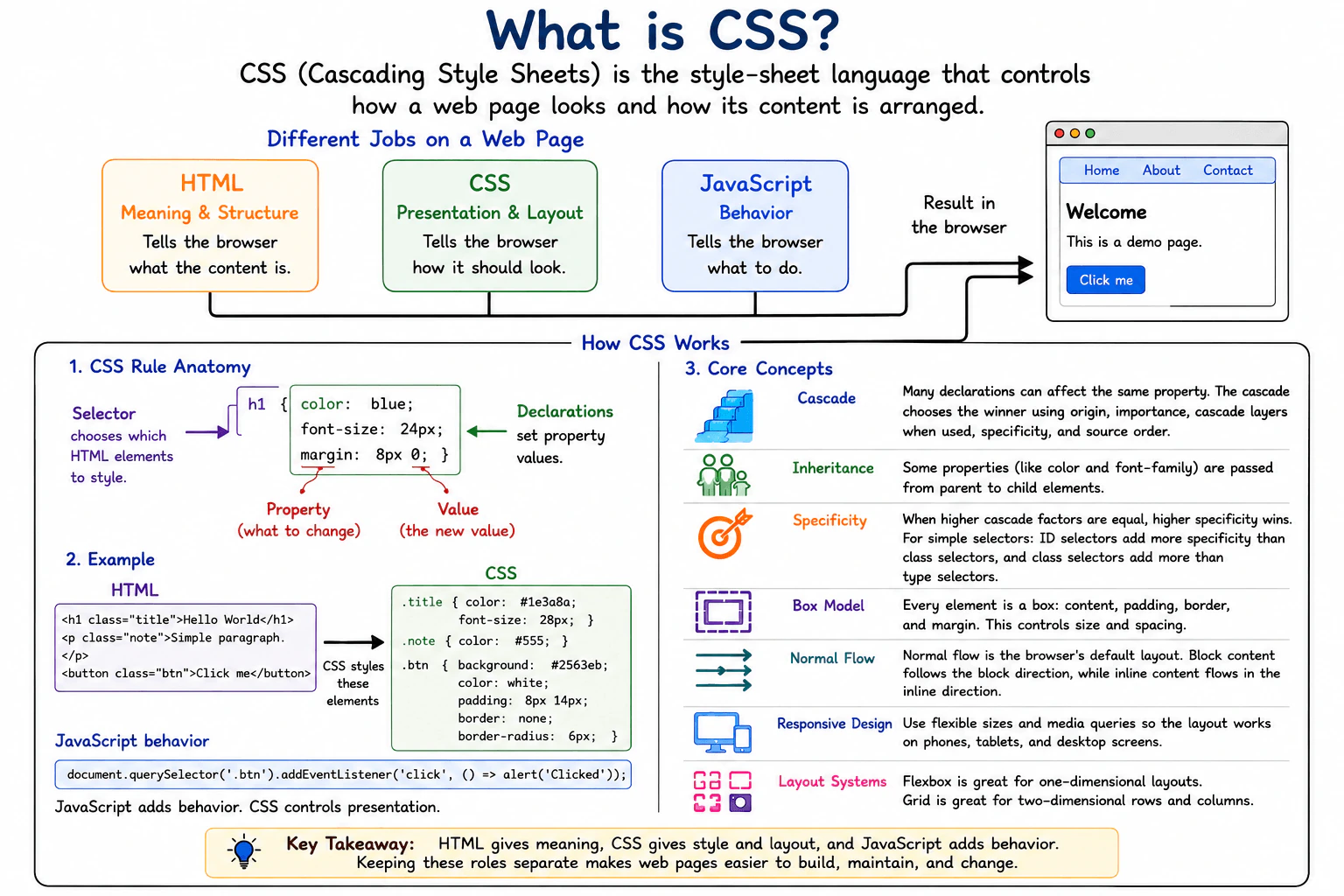
Define CSS as the style-sheet language used to control the presentation and layout of web documents. Explain selectors, declarations, the cascade, inheritance, specificity, the box model, normal flow, responsive design, and common layout systems such as Flexbox and Grid. Distinguish CSS presentation from HTML meaning and JavaScript application behavior.
Short Interview Answer (30-60 seconds)
CSS is the style sheet language I use to control how a web page looks and how its content is arranged. HTML gives the page meaning and structure, CSS controls presentation such as spacing, size, color, and layout, and JavaScript controls application behavior. An important practical point is that several CSS declarations can affect the same element, so the cascade decides which declaration wins.
Detailed Explanation
CSS controls how a web page looks and how its content is arranged on the screen. For example, it can change text size, colors, spacing, widths, and the position of content. It can also help the same page fit a phone, tablet, or large monitor. HTML describes what the content means, such as a heading, button, or paragraph. CSS decides how that content should appear. JavaScript normally handles application behavior, such as responding to a click, loading data, or changing content after the page has loaded.
Useful Questions to Ask the Interviewer
Would you like me to explain the cascade and specificity with an example?
Should I also compare Flexbox and Grid for page layout?
How to Explain It in an Interview
CSS stands for Cascading Style Sheets. A CSS rule normally contains a selector and one or more declarations. The selector chooses the elements that the rule can affect. A declaration gives a CSS property a value, such as setting a color, width, or amount of spacing.
The cascade is important because several declarations can apply to the same property on the same element. The browser follows cascade rules to decide which declaration wins. Factors include origin, importance, cascade layers when they are used, specificity, and source order. Specificity compares selectors after higher priority cascade rules have already been considered. If competing declarations still have equal priority and specificity, source order can decide the result.
Inheritance is related but different. Some properties can pass their computed value from a parent element to a child element. Text color commonly inherits. Many layout properties do not inherit automatically.
The box model describes the space around an element. It includes content, padding, border, and margin. This model is important for understanding element size and spacing.
Normal flow is the browser's default way of arranging ordinary document content. Flexbox is useful when items mainly need to be arranged and aligned in one direction. Grid is useful when rows and columns both matter.
Responsive design lets a page adapt to different screen sizes and available space. Common tools include flexible sizing, media queries, Flexbox, and Grid.
In production, I keep HTML focused on meaning, CSS focused on presentation, and JavaScript focused on application behavior. This separation usually makes the interface easier to understand, maintain, test, and change.
Where it is used
CSS is used in nearly every web interface. It styles text, buttons, forms, navigation, cards, dialogs, and page sections. It controls spacing and visual hierarchy, creates layouts with Flexbox or Grid, and adapts pages to different screen sizes. Production applications also use CSS for reusable design rules, focus and error states, print presentation, transitions, animations, and consistent visual presentation across pages and components.
Why Interviewers Ask This
Interviewers ask this question to check whether a frontend developer understands the separation between document meaning, visual presentation, and application behavior. They also want to see whether the candidate understands core CSS concepts such as selectors, declarations, the cascade, inheritance, specificity, the box model, normal flow, responsive design, Flexbox, and Grid.
Common interview mistakes
A common mistake is saying that CSS gives a page its meaning or structure. HTML provides document meaning and structure, while CSS controls presentation. Another mistake is saying that the last declaration always wins. The cascade first considers factors such as origin, importance, cascade layers when present, and specificity before source order can decide between otherwise equal declarations. Candidates also sometimes confuse inheritance with the cascade, assume every property inherits, misunderstand the box model, or treat Flexbox and Grid as identical layout systems.
Interview tip
Start by saying that CSS controls presentation and layout. Then separate the roles of HTML, CSS, and JavaScript. Next explain selectors and declarations, followed by the cascade, inheritance, specificity, the box model, normal flow, responsive design, Flexbox, and Grid. Keep each idea short and use one small example if the interviewer asks for more detail.
Interviewer may ask next
What happens when several CSS declarations try to set the same property on the same element?
The browser uses the CSS cascade to choose the winning declaration. It considers factors such as origin, importance, cascade layers when present, specificity, and source order in the defined cascade order. Inheritance is separate and can provide a value from a parent when the property inherits and no winning declaration supplies a different value for the child. This matters because simply writing a declaration later does not guarantee that it will override every earlier declaration.
When would you choose Flexbox instead of Grid in a production interface?
I would usually choose Flexbox when the main problem is arranging and aligning items along one direction, such as a row of navigation items or a vertical group of controls. I would usually choose Grid when rows and columns both matter, such as a larger page layout or a collection of cards. They can also be used together. The main tradeoff is choosing the layout model that expresses the intended structure clearly without unnecessary positioning rules.
6. What is the DOM?Language SpecificEasy
i Question Details
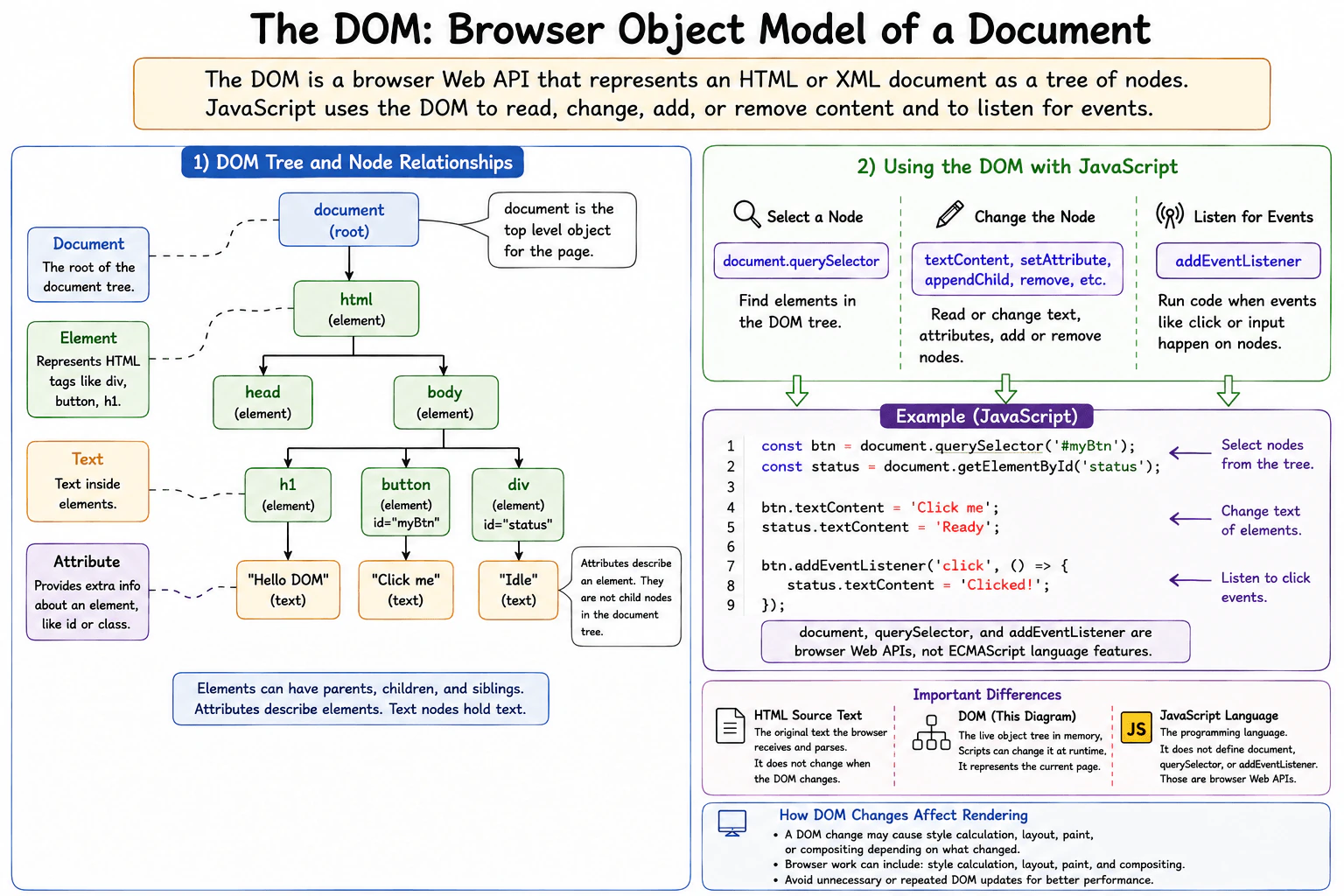
Define the Document Object Model as the browser object model that represents an HTML or XML document as a tree of nodes. Explain document, element, text, and attribute relationships; selecting and changing nodes; event listeners; and how DOM changes can affect rendering. Distinguish the DOM web API from the HTML source text and from the JavaScript language.
Short Interview Answer (30-60 seconds)
The DOM is a browser Web API that represents an HTML or XML document as a tree of objects called nodes. JavaScript can use DOM APIs to find elements, read or change content and attributes, create or remove nodes, and listen for events. The DOM is not the original HTML source text, and it is not part of the JavaScript language itself.
Detailed Explanation
When a browser opens a page, it needs a form of the page that it can work with. It builds a tree that represents the page and everything inside it. Each part of the page becomes an object the browser can read or change. Code can find parts of the page, change words, add or remove content, update settings on page items, and respond when a person clicks or types. These changes can also make the browser update what the person sees on the screen.
Useful Questions to Ask the Interviewer
Would you like me to explain the main node types and their relationships?
Should I also explain how DOM changes can affect browser rendering?
How to Explain It in an Interview
The DOM stands for Document Object Model. It is a browser Web API that represents an HTML or XML document as a tree of nodes.
The Document object represents the loaded document. Element nodes represent elements such as div, button, and input. Text nodes represent text inside elements. Attributes such as id and class belong to elements and describe them. Attributes are associated with an element rather than being child nodes in the document tree.
Tree relationships let nodes have parents, children, and siblings. For example, a button element inside a form element is a child of that form element.
JavaScript can access the DOM through browser APIs. For example, document.querySelector can select an element. Code can then change its textContent, read or change attributes, create new nodes, append nodes, or remove nodes.
The DOM also provides event APIs. addEventListener registers a function that can run when an event such as click or input is dispatched to an event target. This is a common way for a page to respond to user actions.
DOM changes can affect rendering. A change may cause style calculation, layout, painting, or compositing depending on what changed. Not every change causes every rendering step, so the exact cost varies. Avoiding unnecessary repeated DOM work can improve production performance.
The DOM is different from HTML source text and from JavaScript. HTML source text is input that the browser parses. The DOM is the current object representation of the document and can change after parsing. JavaScript is the programming language. Objects and methods such as document, querySelector, and addEventListener come from browser Web APIs, not from the ECMAScript language itself.
Where it is used
The DOM is used whenever browser code needs to read or change a page. Common examples include updating text after data loads, showing validation messages, opening menus, changing form values, adding list items, setting attributes, responding to button clicks, and removing content that is no longer needed. In production code, developers also try to avoid unnecessary repeated DOM reads and writes when the same visible result can be produced with less browser work.
Why Interviewers Ask This
Interviewers ask this to check whether a frontend developer understands the boundary between JavaScript and browser features. They want to know whether the candidate understands how the browser represents a document, how JavaScript can find and change page content, how events connect user actions to code, and why some DOM changes can cause additional browser rendering work.
Common interview mistakes
A common mistake is saying that the DOM is JavaScript. The DOM is a browser Web API that JavaScript can use. Another mistake is saying that the DOM is the same as the original HTML source text. The browser creates the DOM by parsing the document, and scripts can later change that DOM without rewriting the original source file. Another mistake is treating attributes as ordinary child nodes of an element. Attributes are associated with elements but are not children in the document tree. Developers can also incorrectly assume that every DOM change causes a complete page redraw. The browser performs only the rendering work required by the specific change.
Interview tip
Start by saying that the DOM is the browser object model for a document. Then describe the tree, explain document, element, text, and attribute relationships, show how JavaScript can select and change nodes, mention event listeners, and finish by separating the DOM from HTML source text and the JavaScript language.
Interviewer may ask next
If JavaScript changes the DOM, does it also change the original HTML source file?
No. Changing the DOM changes the browser's current in memory representation of the document. It does not rewrite the original HTML file that was delivered to the browser. This matters because the current page can differ from the original source after scripts run. The DOM can also differ from the source because the browser parses the source into its document representation before scripts make further changes.
Can frequent DOM changes cause performance problems in a production application?
Yes. Frequent DOM changes can cause extra browser work, especially when changes affect visible content, styles, dimensions, or document structure. A change may trigger style calculation, layout, painting, or compositing depending on what changed. The main tradeoff is that the interface still needs to reflect application state, so production code should make necessary updates while avoiding unnecessary repeated DOM operations.
7. What is the difference between `null` and `undefined` in JavaScript?Language SpecificEasy
i Question Details
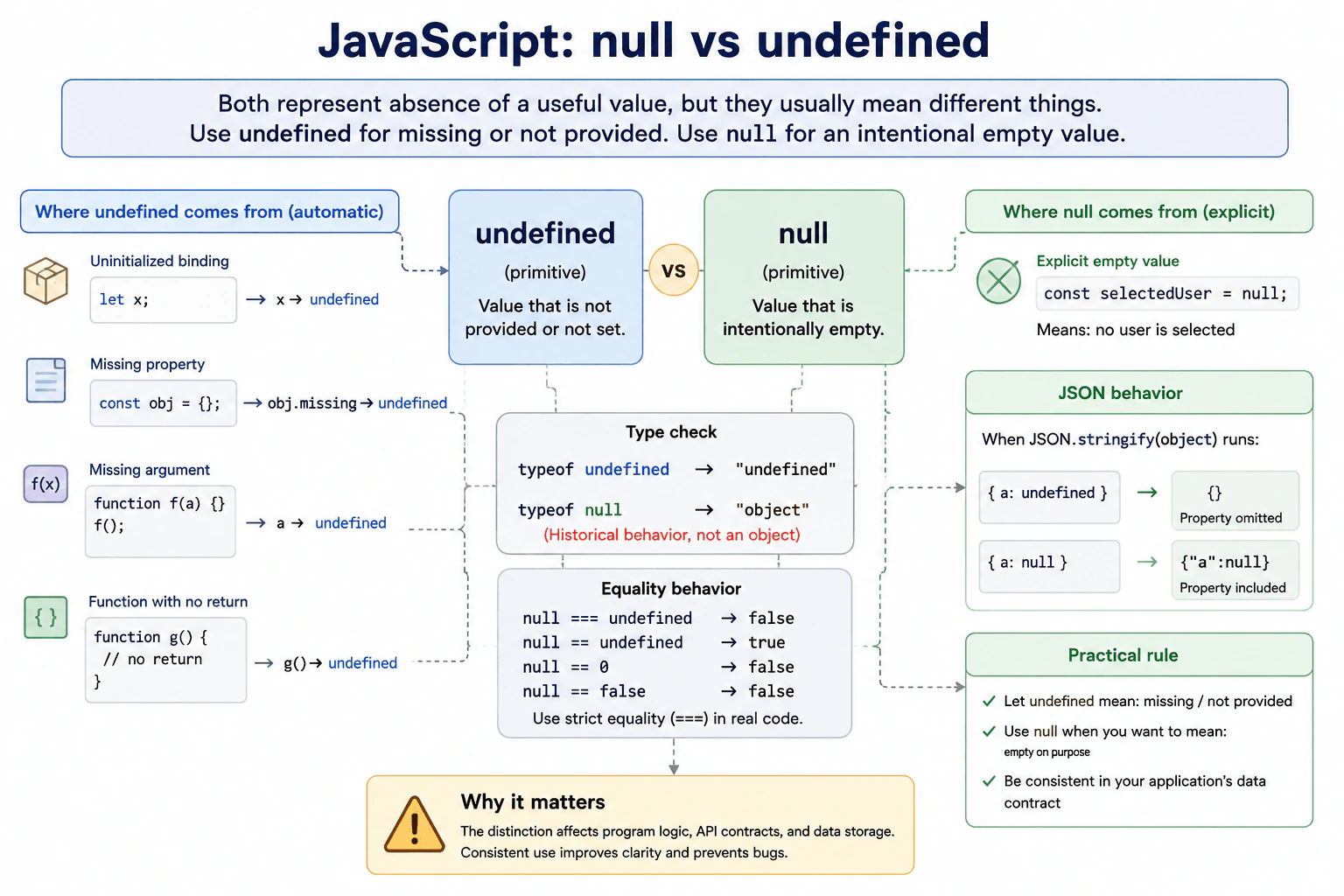
Describe the common ways each value appears: an uninitialized binding, a missing property, a missing argument, an explicit empty value, and a function with no return expression. Address typeof null, equality behavior, and when an application should deliberately use one value instead of the other.
Short Interview Answer (30-60 seconds)
undefined usually means a value has not been provided or assigned, while null usually means the application deliberately represents an empty value. JavaScript produces undefined for cases such as a declared variable without a value, a missing object property, a missing argument, or a function that finishes without returning another value. typeof undefined is "undefined", but typeof null is "object" because of a historical JavaScript behavior. I normally use strict equality because null === undefined is false, even though null == undefined is true.
Detailed Explanation
undefined and null both describe the absence of a useful value, but they usually communicate different intentions. JavaScript often gives you undefined automatically when no value was supplied. A developer usually writes null deliberately to say that a value is empty. This difference helps people understand whether something is missing naturally or was intentionally cleared. They can both appear where an application has no useful value, but they are not the same value. Choosing one clear meaning for application data makes code easier to understand and reduces unexpected behavior.
Useful Questions to Ask the Interviewer
Should I explain both strict equality and loose equality?
Would you like examples from object properties, function arguments, and API data?
How to Explain It in an Interview
undefined is a primitive value that JavaScript commonly produces when a value is absent. For example, after let value; runs, value is undefined. Reading an object property that does not exist also returns undefined. If a function parameter has no matching argument, that parameter is normally undefined. A function with no return statement, or a bare return, also returns undefined.
null is also a primitive value, but developers normally assign it deliberately. For example, an application might set selectedUser to null to mean that no user is currently selected.
There is an old JavaScript behavior that often appears in interviews. typeof undefined returns "undefined", while typeof null returns "object". The result for null is a historical language behavior. It does not mean that null is an object.
Strict equality keeps the values separate. null === undefined is false. Loose equality treats them as equal to each other, so null == undefined is true. However, null == 0 and null == false are both false. In production code, strict equality is usually clearer when the exact value matters.
A useful convention is to let undefined represent omitted or not yet supplied values and use null when the application intentionally needs an empty value. This is a convention, not a JavaScript rule. The most important production rule is consistency with the data contract. This matters especially when sending JSON because object properties whose values are undefined are omitted by JSON.stringify, while properties whose values are null are included with the value null.
Where it is used
undefined appears naturally when optional function arguments are omitted, object properties are missing, variables are declared without an assigned value, or functions finish without returning another value. null is useful when application state needs an explicit empty value, such as no selected item, no current result, or a field that has deliberately been cleared. API and storage code must distinguish them carefully because JSON can represent null, but JSON has no undefined value.
Why Interviewers Ask This
Interviewers ask this to check whether a candidate understands how JavaScript represents missing values. They want to see if the candidate knows which value JavaScript commonly produces automatically, which value developers commonly choose deliberately, how equality treats them, and how these differences affect real application data.
Common interview mistakes
A common mistake is saying that null is an object because typeof null returns "object". null is a primitive value. Another mistake is treating null and undefined as identical because loose equality says null == undefined is true. Strict equality shows that they are different values. Developers may also use both values randomly for the same application state, which makes data contracts harder to understand. Another mistake is assuming an object property with value undefined behaves exactly like a property that does not exist. Reading either can produce undefined, but the property can still exist when it was explicitly assigned that value.
Interview tip
Start with the practical distinction. Say that JavaScript often produces undefined for a missing value, while developers usually use null to represent an intentional empty value. Then give one example of each, mention the unusual typeof null result, and finish with strict equality and consistent production use.
Interviewer may ask next
What happens when an object property exists but its value is undefined?
Reading the property returns undefined, but the property can still exist on the object. This matters because reading the value alone cannot tell you whether the property is missing or was explicitly assigned undefined. Object.hasOwn can check whether the object owns that property. This distinction matters when property presence itself has meaning in configuration, update payloads, or application state.
Why might an application choose null instead of undefined when sending data as JSON?
null can be represented directly in JSON, while undefined cannot. When JSON.stringify processes an object, a property whose value is undefined is normally omitted, while a property whose value is null remains in the JSON with the value null. This matters when a server must distinguish between a field that was not sent and a field that was deliberately sent as empty. The main tradeoff is that the client and server must agree on what null means.
8. What is a JavaScript data type?Language SpecificEasy
i Question Details
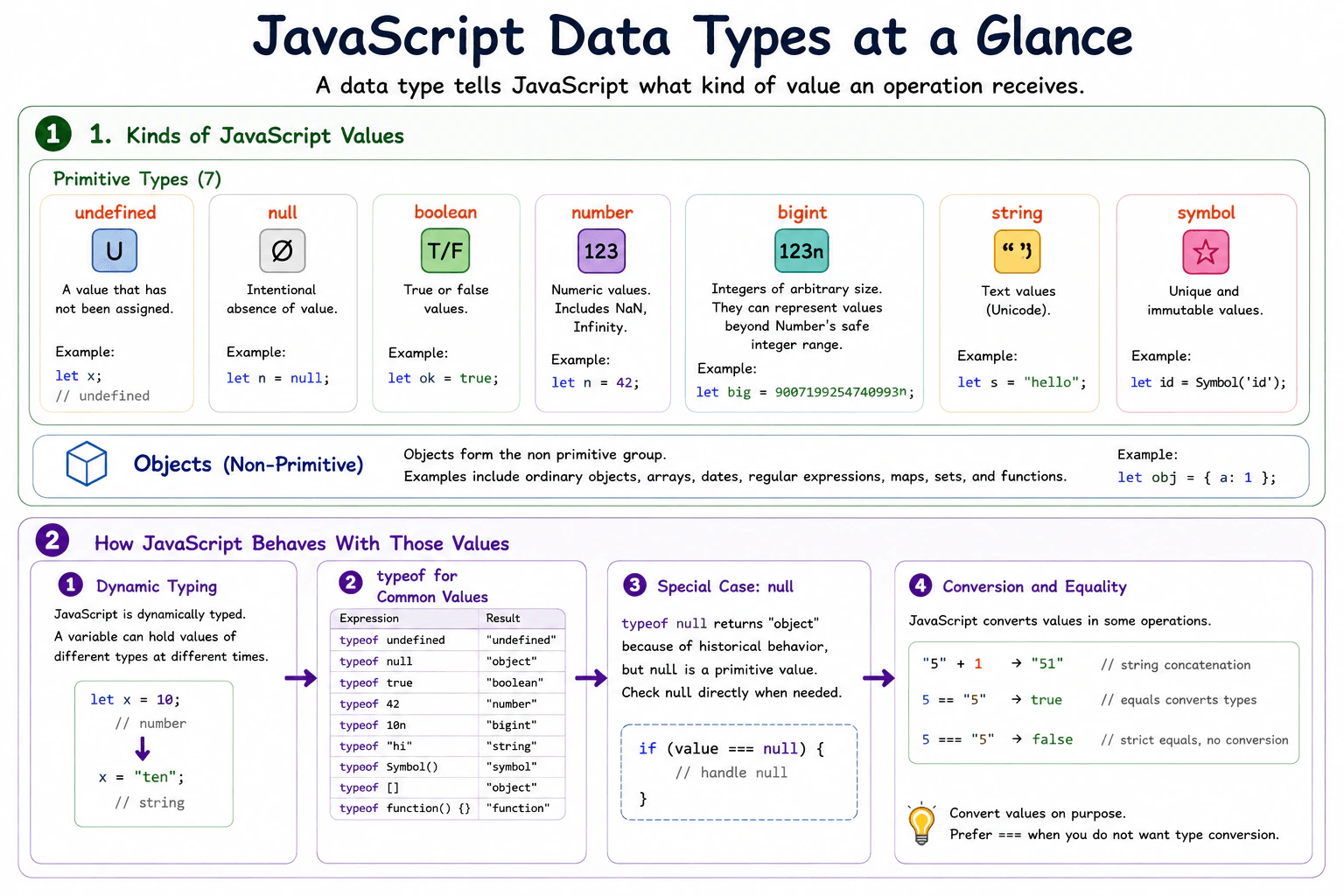
Define a data type as the kind of value a JavaScript operation receives and explain the primitive types: undefined, null, boolean, number, bigint, string, and symbol. Explain that objects form the non-primitive group, that variables are dynamically typed, how typeof behaves for common values, and why type conversion and equality rules matter.
Short Interview Answer (30-60 seconds)
A JavaScript data type tells us what kind of value we are working with. JavaScript has seven primitive types: undefined, null, boolean, number, bigint, string, and symbol. Objects form the non primitive group. JavaScript is dynamically typed, so a variable can hold values of different types at different times. I also pay attention to typeof, type conversion, and strict equality because those rules can otherwise cause surprising results.
Detailed Explanation
A data type tells us what kind of value JavaScript is working with. A value can represent text, a number, true or false, an intentionally empty value, a missing value, or a more complex collection of information. The kind of value matters because the same operation can behave differently with different values. For example, two numbers can be added, while text can be joined together. A named place that stores a value can also receive a different kind of value later. This flexibility is useful, but it means we must understand each value before using it.
Useful Questions to Ask the Interviewer
Would you like me to explain all primitive types and objects?
Should I also explain typeof, type conversion, and equality rules?
How to Explain It in an Interview
A JavaScript data type describes the kind of value an operation receives. JavaScript has seven primitive types: undefined, null, boolean, number, bigint, string, and symbol. Undefined usually represents a value that has not been assigned. Null is an intentional absence of a value. Boolean represents true or false. Number represents ordinary numeric values, including special values such as NaN and Infinity. Bigint represents integers that can be larger than the safe integer range of number. String represents text. Symbol creates unique primitive values that are often used as property keys.
Objects form the non primitive group. Arrays, dates, regular expressions, and ordinary objects are all objects. Functions are also objects with callable behavior.
JavaScript is dynamically typed. A variable does not have one permanent data type. The value currently stored in it has a type. A variable can contain the number 10 and later contain the string "ten".
The typeof operator identifies many common types. typeof 10 returns "number". typeof "hello" returns "string". typeof true returns "boolean". typeof undefined returns "undefined". typeof 10n returns "bigint". typeof Symbol() returns "symbol". Most objects return "object", while typeof a function returns "function".
One important exception is null. typeof null returns "object" because of a historical JavaScript behavior, even though null is a primitive value. Code that needs to detect null should therefore compare with null directly.
Type conversion matters too. JavaScript can convert values automatically. For example, "5" + 1 produces "51" because 1 is converted to text. Strict equality with === is usually easier to reason about because it does not perform this automatic type conversion. Understanding these rules helps prevent bugs when handling form input, API data, calculations, and conditions.
Where it is used
Data types matter throughout frontend development. Form fields commonly provide string values, so an application may need to convert a value before doing numeric calculations. API responses can contain strings, numbers, booleans, null values, arrays, and objects, so applications often validate values before using them. Type awareness is also important when handling optional values, writing conditions, formatting data for the user interface, comparing values, and deciding whether a value is safe to pass to another function.
Why Interviewers Ask This
Interviewers ask this to check whether a candidate understands the kinds of values JavaScript works with, how a variable can hold different kinds of values over time, how typeof reports common values, and how conversion and equality rules can change program behavior. This knowledge matters because incorrect assumptions about types can cause unexpected calculations, comparisons, conditions, and user interface bugs.
Common interview mistakes
A common mistake is saying that JavaScript variables have permanent types. Values have types, while a variable can later hold a value of another type. Another mistake is treating null as an object because typeof null returns "object". Null is actually a primitive value. Developers also sometimes expect typeof to identify specific object kinds, but arrays and many other objects return "object". Another mistake is assuming that number can represent every integer exactly. Large integers may require bigint. A further mistake is using loose equality without understanding its automatic conversion rules. Strict equality with === is usually clearer.
Interview tip
Start by saying that a data type describes the kind of value JavaScript is working with. Name the seven primitive types and say that objects form the non primitive group. Then explain dynamic typing, give a few typeof examples, mention the special null behavior, and finish with why deliberate type conversion and strict equality help prevent bugs.
Interviewer may ask next
Why does typeof null return "object" if null is a primitive value?
It returns "object" because of a historical JavaScript behavior. Null is still a primitive value, so this typeof result does not change its actual type category. This matters because code that checks only typeof value === "object" can accidentally accept null. When null must be excluded, the code should compare the value with null directly as well.
Why is strict equality usually preferred when values may have different types?
Strict equality with === compares values without automatic type conversion. For example, the number 5 and the string "5" are not strictly equal because their types are different. This makes comparisons easier to understand and reduces surprises in production code. Loose equality can be used when its conversion rules are intentionally wanted, but the tradeoff is that developers must understand those extra conversion rules.
9. Which JavaScript values are falsy, and how does truthiness affect conditionals?Language SpecificEasy
i Question Details
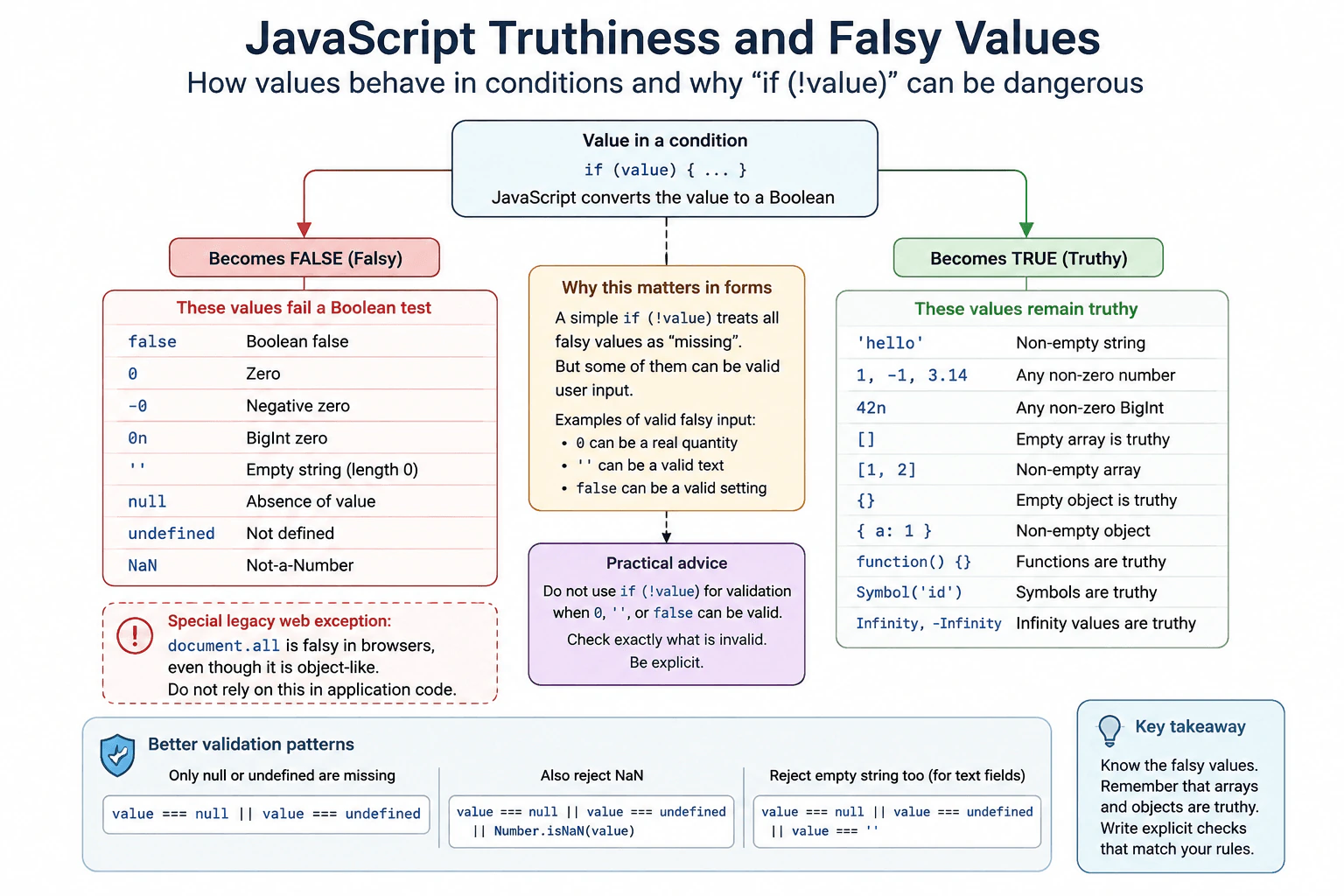
A form handler receives values that may be 0, '', false, null, undefined, NaN, empty arrays, or empty objects. Identify which values fail a Boolean test and which remain truthy. Explain why a generic if (!value) check can incorrectly reject valid numeric or text input.
Short Interview Answer (30-60 seconds)
The standard JavaScript falsy values are false, 0, negative zero, 0n, an empty string, null, undefined, and NaN. They act like false when JavaScript converts them to Boolean values in a condition. Empty arrays and empty objects are truthy. Because of that, I would not use if (!value) to mean missing input when zero, false, or an empty string can be valid. I would check for the exact invalid values instead.
JavaScript conditions can accept values that are not already true or false. JavaScript first decides whether the value should count as true or false. Some values count as false. Most values count as true. This matters in forms because zero may be real input even though it counts as false in a condition. An empty string also counts as false. Empty arrays and empty objects are different because they count as true. Good validation should therefore describe exactly what is missing or invalid instead of treating every value that counts as false as an error.
Useful Questions to Ask the Interviewer
Can zero be a valid value for this form field?
Can an empty string or false be valid input, or should either be treated as missing?
How to Explain It in an Interview
When JavaScript evaluates an if condition, it converts the tested value to a Boolean result. The standard falsy values are false, 0, negative zero, 0n, an empty string, null, undefined, and NaN. Each of these makes the condition behave as false.
Most other values are truthy. This includes nonempty strings, nonzero numbers, arrays, functions, and objects. An important edge case is that an empty array and an empty object are both truthy. JavaScript does not inspect their contents when deciding truthiness. The array or object reference itself is an object value, so its Boolean conversion is true.
This is why a generic check such as if (!value) can be unsafe for form validation. If a quantity field accepts 0, the check treats that valid value as false. It can also reject false when false is a valid setting, or an empty string when that string is allowed by the business rule.
If only null and undefined mean missing, I would check value === null || value === undefined. If NaN is invalid, I would test it separately with Number.isNaN(value). If an empty string is invalid, I would check that rule directly.
These checks take constant work and use no meaningful extra memory. They do not copy the input or allocate another collection. The main production concern is correctness and clarity.
In browsers, document.all is a special legacy web compatibility exception that behaves as falsy even though it is object like. It is not a normal rule for JavaScript objects and should not be used as a model for application logic.
Example
The example converts each supplied value with Boolean so the runtime behavior is visible. Zero, an empty string, false, null, undefined, and NaN produce false. The empty array and empty object produce true. The example then uses an explicit missing value check that treats only null and undefined as missing, which preserves valid values such as zero, false, and an empty string.
Code
const values = [0, '', false, null, undefined, NaN, [], {}];
// Show the Boolean result that JavaScript uses when each value is tested in a condition.for (const value of values) {
console.log(value, Boolean(value));
}
functionisMissing(value) {
// Only null and undefined represent missing input for this example.// This preserves valid falsy values such as 0, false, and an empty string.return value === null || value === undefined;
}
console.log(isMissing(0));
console.log(isMissing(''));
console.log(isMissing(false));
console.log(isMissing(null));
console.log(isMissing(undefined));
Where it is used
Truthy and falsy checks are common in form validation, conditional rendering, configuration handling, optional input processing, and API response handling. Explicit checks are especially important when zero, false, or an empty string has a valid business meaning. In those cases, checking only the exact missing or invalid values prevents valid user input from being rejected.
Why Interviewers Ask This
Interviewers ask this to check whether the candidate understands Boolean conversion in JavaScript and can apply it safely in frontend code. They want to see whether the candidate knows the exact falsy values, understands that arrays and objects stay truthy even when empty, and avoids validation that accidentally rejects valid values such as zero, false, or an empty string.
Common interview mistakes
A common mistake is assuming that empty arrays or empty objects are falsy. They are truthy. Another mistake is using if (!value) as a general missing value test when zero, false, or an empty string can be valid. Developers may also assume that all objects are truthy without knowing about the browser legacy exception document.all. For normal application objects, arrays, and functions, the truthy rule still applies. Validation should name the exact values that are invalid.
Interview tip
Start by naming the falsy values. Then point out that empty arrays and empty objects are truthy. Finish with the practical lesson that if (!value) can reject valid zero, false, or empty string input, so production validation should check the exact invalid values.
Interviewer may ask next
Are empty arrays and empty objects falsy because they contain no values?
No. Empty arrays and empty objects are truthy. Their Boolean conversion does not depend on how many elements or properties they contain. This matters because if ([]) and if ({}) both enter the true branch. If the application needs to know whether an array has elements, it should check array.length. If it needs to know whether an object has relevant data, it should check the required properties or another rule that matches the application.
When should you use an explicit null or undefined check instead of if (!value)?
Use an explicit null or undefined check when other falsy values can still be valid data. For example, zero may be a valid quantity, false may be a valid setting, and an empty string may be an allowed text value. Checking value === null || value === undefined rejects only the two missing values. The tradeoff is slightly more code, but the rule is precise, easier to review, and less likely to reject valid production input.
10. What does the `typeof` operator return for common JavaScript values?Language SpecificEasy
i Question Details
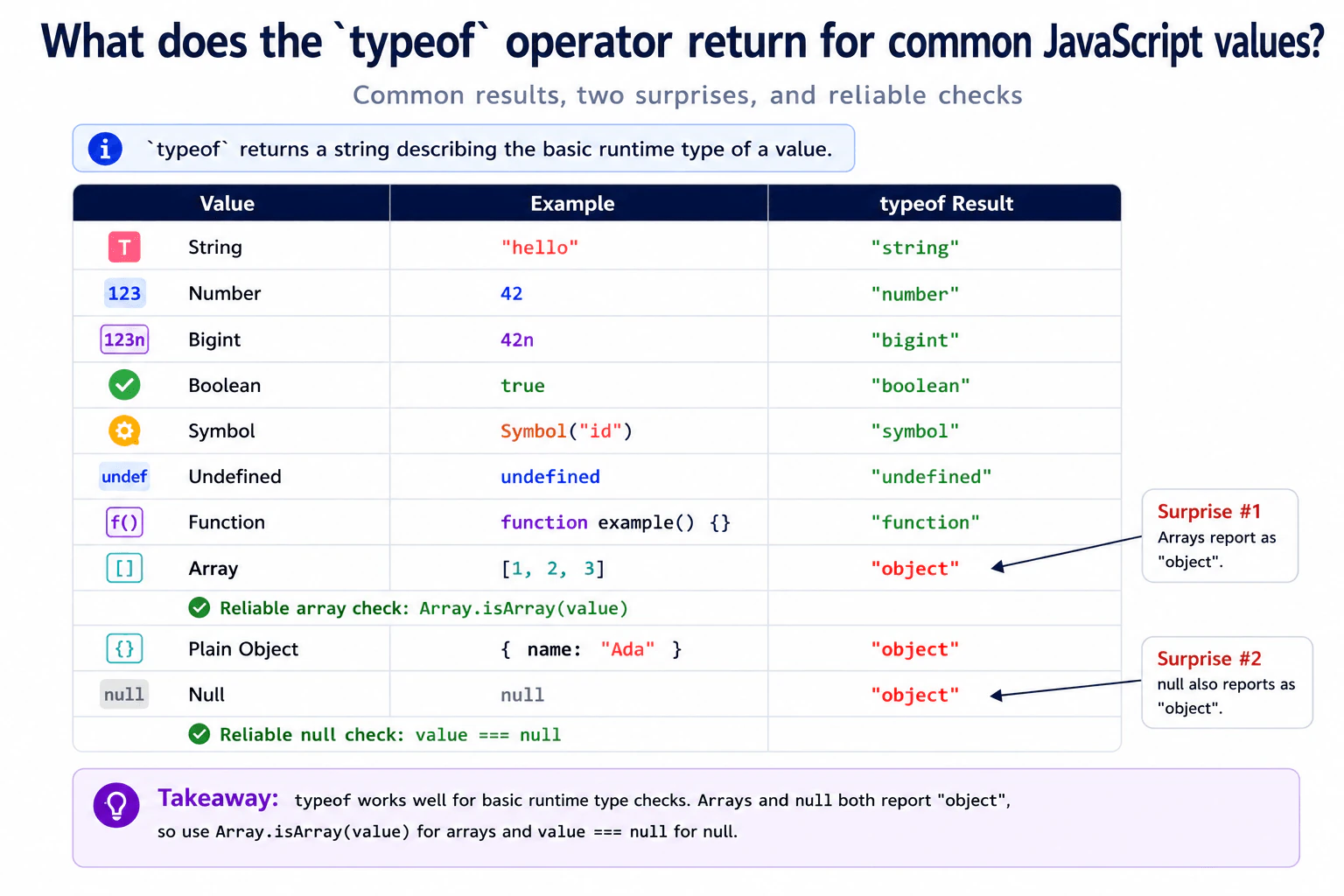
Evaluate the expected typeof result for a string, number, bigint, boolean, symbol, undefined value, function, array, plain object, and null. Explain the two historical surprises—arrays reporting as objects and null reporting as 'object'—and name reliable checks for arrays and null.
Short Interview Answer (30-60 seconds)
The typeof operator returns a string that describes the basic runtime type of a JavaScript value. A string returns string, a number returns number, a bigint returns bigint, a boolean returns boolean, a symbol returns symbol, undefined returns undefined, and a function returns function. Arrays and plain objects both return object. Null also returns object because of historical JavaScript behavior. I use Array.isArray(value) to detect arrays and value === null to detect null.
JavaScript can inspect a value while a program is running and return a word that describes its basic kind. Most common values have clear results. Text, numbers, true or false values, symbols, missing undefined values, and functions each return a useful type name. Two cases need extra care. An array is reported as an object, so another check is needed to know that it is specifically an array. Null is also reported as an object because of an old JavaScript behavior. Developers therefore use separate checks for arrays and null when exact identification matters.
Useful Questions to Ask the Interviewer
Would you like me to list the exact typeof result for every value in the question?
Should I also explain the reliable checks for arrays and null?
How to Explain It in an Interview
typeof is a JavaScript operator. It returns a string that describes the basic runtime type of a value.
For a string, typeof "hello" returns "string". For a number, typeof 42 returns "number". For a bigint, typeof 42n returns "bigint". For a boolean, typeof true returns "boolean". For a symbol, typeof Symbol("id") returns "symbol". For undefined, typeof undefined returns "undefined". For a function, typeof function example() {} returns "function".
A plain object returns "object". An array also returns "object" because arrays are specialized JavaScript objects. If I need to know whether a value is specifically an array, I use Array.isArray(value).
Null is the other important surprise. typeof null returns "object". This result comes from historical JavaScript behavior and remains for compatibility. It does not mean that null is actually an object. To identify null exactly, I use value === null.
In production code, typeof is useful for simple runtime checks such as checking for strings, numbers, functions, symbols, bigints, booleans, and undefined values. I do not rely on it alone for arrays or null. These checks have negligible practical performance and memory cost in normal frontend code.
Example
The example applies typeof to each common value in the question and prints the exact runtime result. It then demonstrates the two important special cases. An array produces "object", so Array.isArray is used to identify it reliably. Null also produces "object", so strict equality with null is used to identify null exactly.
Code
const values = {
stringValue: 'hello',
numberValue: 42,
bigintValue: 42n,
booleanValue: true,
symbolValue: Symbol('id'),
undefinedValue: undefined,
functionValue: functionexample() {},
arrayValue: [1, 2, 3],
objectValue: { name: 'Ada' },
nullValue: null,
};
// Print the typeof result for each common value so the runtime behavior is easy to compare.for (const [name, value] ofObject.entries(values)) {
console.log(name, typeof value);
}
// typeof reports arrays as object, so use the dedicated array check when exact identification matters.console.log('array check', Array.isArray(values.arrayValue));
// typeof reports null as object, so use strict equality to identify null exactly.console.log('null check', values.nullValue === null);
Where it is used
This behavior is useful when code needs simple runtime checks for values from user input, configuration, browser APIs, parsed data, or reusable functions. For example, code may verify that a callback is a function before calling it or confirm that a value is a string before using string operations. When an array is required, production code should use Array.isArray(value). When null needs special handling, code should use value === null.
Why Interviewers Ask This
Interviewers ask this question to check whether I understand how JavaScript reports the basic runtime type of common values. They also want to see whether I know the special results for arrays and null, and whether I can choose reliable checks when typeof alone is not specific enough.
Common interview mistakes
A common mistake is assuming that typeof returns a unique result for every JavaScript value. It does not. Arrays return "object", so checking typeof value === "array" is incorrect. Null also returns "object", so a check for only typeof value === "object" can include null as well as actual objects. Another mistake is forgetting that functions return "function". Use Array.isArray(value) for arrays and value === null for null.
Interview tip
Start by listing the normal typeof results. Then call out the two important surprises. Explain that arrays return "object" and null also returns "object". Finish with the reliable checks: Array.isArray(value) for arrays and value === null for null.
Interviewer may ask next
What does `typeof null` return, and how should you reliably check for null?
typeof null returns "object". This is historical JavaScript behavior that remains for compatibility. Null is not actually an object. When I need to identify null exactly, I use value === null. This matters because a check such as typeof value === "object" also matches arrays and plain objects.
Should you use `typeof` to detect whether a value is an array in production code?
No. typeof reports an array as "object", so it cannot distinguish an array from a plain object. I use Array.isArray(value) when the code specifically requires an array. This is the reliable built in check and makes the intent clear without adding a meaningful performance or memory cost in normal frontend code.
More questions load as you scroll
JavaScript Frontend Developer Resume Examples
Explore the resume examples below to find the one that best matches your target JavaScript Frontend Developer role.
Disclaimer: This interview guide is for educational and informational purposes only. It is designed to help readers prepare, but it does not guarantee any interview result, hiring decision, offer, or outcome. Interview questions, hiring criteria, and preferred answers can vary by employer, interviewer, industry, location, and time. All answers, examples, and explanations in this guide are suggested examples for interview preparation, not definitive answers or instructions for professional practice. They are based on research and judgment, are provided without warranties of any kind, and should be adapted to the question, role, and applicable laws and professional requirements. Diagrams are simplified illustrations intended to highlight the main concepts and their relationships; actual situations, systems, and practices may be more complex. Alternative approaches may be equally valid or better suited to a particular question, context, or interviewer. To the fullest extent permitted by applicable law, the contributors and publisher are not liable for decisions made, actions taken, or losses incurred based on this guide.
State Laws and Professional Responsibilities: Laws and requirements governing an occupation vary by state and jurisdiction. You are responsible for checking the current laws, licensing requirements, and scope-of-practice rules that apply to your location and role, and for ensuring that your answers and actions comply with them. Adapt examples in this guide to those requirements. This guide is not legal advice.
Content Accuracy and Verification: To the fullest extent permitted by applicable law, we do not represent or warrant that interview guides, questions, answers, examples, or diagrams are accurate, complete, current, error-free, or suitable for any particular purpose. You are responsible for independently reviewing and verifying the information before relying on it.