This interview guide is for educational and informational purposes only. It is designed to help readers prepare, but it does not guarantee any interview result, hiring decision, offer, or outcome. Interview questions, hiring criteria, and preferred answers can vary by employer, interviewer, industry, location, and time. All answers, examples, and explanations in this guide are suggested examples for interview preparation, not definitive answers or instructions for professional practice. They are based on research and judgment, are provided without warranties of any kind, and should be adapted to the question, role, and applicable laws and professional requirements. Diagrams are simplified illustrations intended to highlight the main concepts and their relationships; actual situations, systems, and practices may be more complex. Alternative approaches may be equally valid or better suited to a particular question, context, or interviewer. To the fullest extent permitted by applicable law, the contributors and publisher are not liable for decisions made, actions taken, or losses incurred based on this guide.
State Laws and Professional Responsibilities
Laws and requirements governing an occupation vary by state and jurisdiction. You are responsible for checking the current laws, licensing requirements, and scope-of-practice rules that apply to your location and role, and for ensuring that your answers and actions comply with them. Adapt examples in this guide to those requirements. This guide is not legal advice.
Identity, Image, and Privacy Notice
To respect individual privacy, some names, profile photographs, avatars, biographical details, and other identifying information displayed in this guide may be replaced with pseudonyms, licensed stock images, illustrative avatars, composite images, or representative descriptions. Unless a person is expressly identified as an actual contributor, a displayed name, image, or profile should not be understood as depicting or identifying a specific candidate, interviewer, employee, or other real individual. These representations are provided for editorial and illustrative purposes only and do not imply endorsement, employment, participation, or affiliation with this guide or any company mentioned in it. Any resemblance to an actual person is coincidental.
Company Notice
This guide is an independent educational resource and is not affiliated with, endorsed by, sponsored by, or approved by the company named in this guide. Company names identify reported interview experiences or the employer context of clearly labeled original practice exercises. Interview practices can change without notice, and inclusion of company-specific content does not mean these questions are official, complete, or guaranteed to be asked. To the fullest extent permitted by law, the author, contributors, and publisher are not responsible for outcomes related to use of this material.
Content Accuracy and Verification
To the fullest extent permitted by applicable law, we do not represent or warrant that interview guides, questions, answers, examples, or diagrams are accurate, complete, current, error-free, or suitable for any particular purpose. You are responsible for independently reviewing and verifying the information before relying on it.
Questions or comments?
Contact us for general questions, or share feedback, technical corrections, and comments with the community.
41. What steps does the `new` operator perform?Language SpecificMedium
i Question Details
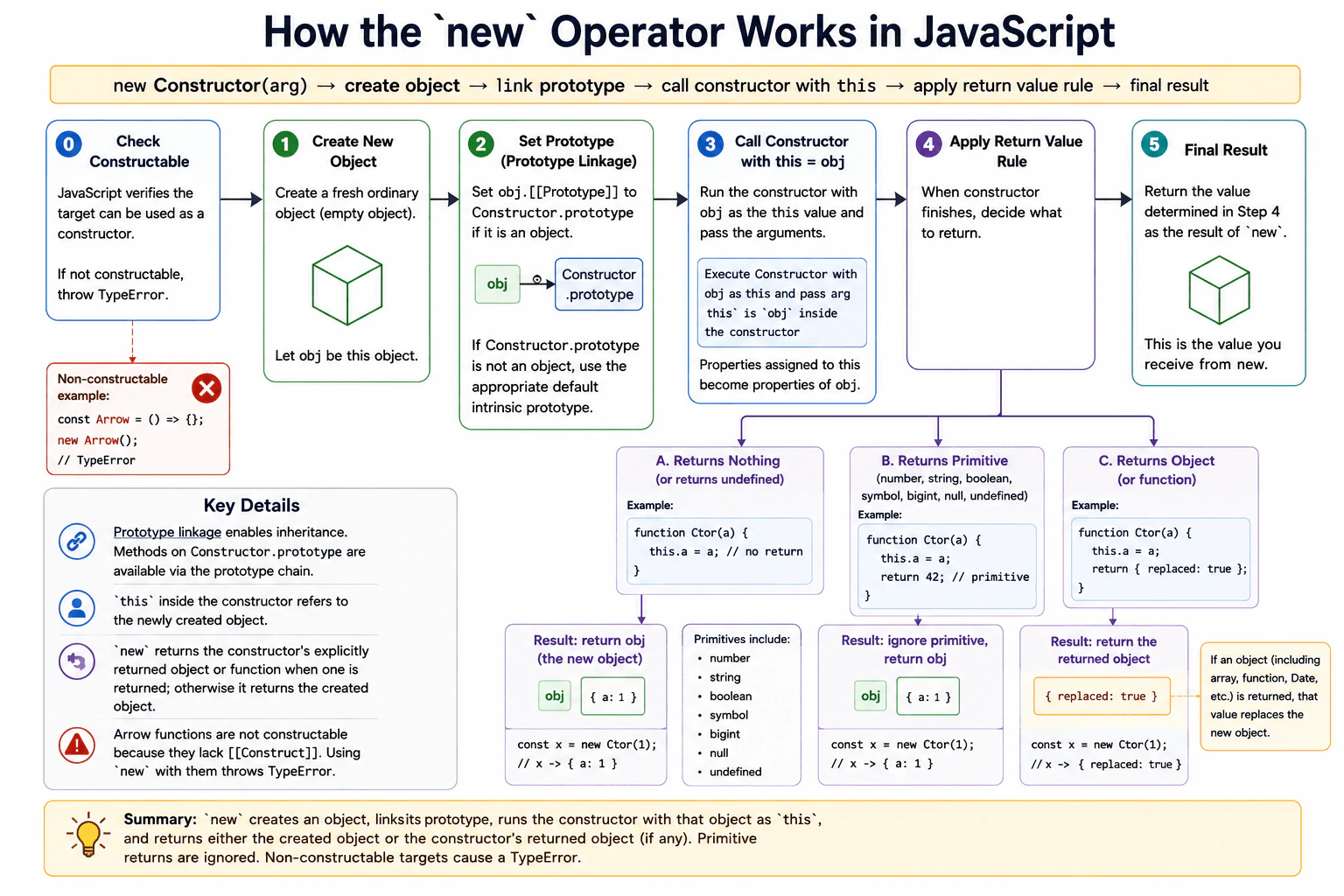
Manually describe the behavior of new Constructor(arg) using a constructor that returns nothing, one that returns a primitive, and one that returns an object. Cover prototype linkage, this binding, execution, the return-value override rule, and what happens when the target is not constructable.
Short Interview Answer (30-60 seconds)
The new operator creates a fresh object, chooses its prototype from the constructor, calls the constructor with that new object as this, and then decides what value to return. If the constructor returns an object or function, that value replaces the fresh object. If it returns nothing or returns a primitive value, JavaScript returns the fresh object. The target must also be constructable. For example, an arrow function cannot be used with new.
The main idea is that new creates an object by following a fixed set of steps. JavaScript prepares a fresh object and connects it to an object used for shared behavior. It then runs the constructor while making the fresh object the current object. What the constructor returns can change the final result. Returning no value keeps the fresh object. Returning a simple value also keeps it. Returning another object replaces it. JavaScript also requires the value after new to support object construction. If it does not, JavaScript reports an error instead of creating an instance.
Useful Questions to Ask the Interviewer
Should I explain both constructor functions and classes?
Would you like me to show the return value rule with a small code example?
How to Explain It in an Interview
For new Constructor(arg), JavaScript first checks that the target can be used as a constructor. If it is not constructable, new throws a TypeError.
For a constructable target, JavaScript creates a fresh ordinary object. Its prototype is normally taken from Constructor.prototype. If that property is an object, the fresh object uses it as its prototype. If that property is not an object, JavaScript uses the appropriate default intrinsic prototype instead.
Next, JavaScript runs the constructor with the fresh object as this. The arguments in the new expression are passed to the constructor. For example, this.name = name adds a name property to the fresh object.
JavaScript then applies the constructor return rule. If the constructor finishes without an explicit return value, the fresh object is returned. If it explicitly returns a primitive value such as a number, string, boolean, symbol, bigint, null, or undefined, that value does not replace the fresh object. If it returns an object or function, that returned value becomes the result instead.
So a constructor that sets this.name and returns nothing produces the fresh instance. A constructor that returns 42 still produces the fresh instance. A constructor that returns { replacement: true } produces that replacement object instead.
This behavior matters in production when working with classes, constructor functions, prototype methods, inheritance, libraries, and older frontend code. The construction itself has no useful single asymptotic complexity because the constructor can perform arbitrary work. The main allocation is the new object, unless the constructor returns another object instead.
Example
The example uses three constructable functions. ReturnsNothing stores a name on this and has no explicit return value, so new returns the fresh instance. ReturnsPrimitive stores a name and returns the number 42. JavaScript ignores that primitive result and still returns the fresh instance. ReturnsObject stores a name and then returns another object, so that returned object replaces the fresh instance. The example also uses an arrow function to show that a nonconstructable target causes new to throw a TypeError.
Code
functionReturnsNothing(name) {
// Store state on the fresh object that JavaScript supplies as this.this.name = name;
// There is no explicit return, so new returns the fresh object.
}
functionReturnsPrimitive(name) {
// Store state on the fresh object before returning a primitive value.this.name = name;
// A primitive return value does not replace the object created by new.return42;
}
functionReturnsObject(name) {
// This changes the fresh object, but that object will not be the final result.this.name = name;
// An explicit object return replaces the object that new created.return { replacement: true, originalName: name };
}
const first = newReturnsNothing('Ada');
const second = newReturnsPrimitive('Grace');
const third = newReturnsObject('Linus');
console.log(first.name);
console.log(second.name);
console.log(third);
constArrowConstructor = () => {};
try {
// Arrow functions are callable but not constructable, so new throws a TypeError.newArrowConstructor();
} catch (error) {
// Confirm that the failed construction produced the expected error type.console.log(error instanceofTypeError);
}
Where it is used
This behavior is used whenever frontend code creates instances with JavaScript classes or constructor functions. It appears in custom models, reusable components that are implemented as plain JavaScript objects, browser and library APIs that expose constructors, and older code that uses constructor functions with prototypes. Understanding the return rule is useful when a constructor unexpectedly produces a different object. Understanding prototype linkage is useful when methods are shared through a prototype instead of being created separately for every instance.
Why Interviewers Ask This
Interviewers ask this to check whether a candidate understands what JavaScript actually does when creating an object with new. A strong answer shows knowledge of prototype linkage, this binding, constructor execution, the special return rule, and the requirement that the target be constructable. This knowledge helps when reading constructor functions, using classes, debugging prototype behavior, and understanding why some functions cannot be used with new.
Common interview mistakes
A common mistake is saying that new always returns whatever the constructor returns. That is false because primitive return values are ignored. Another mistake is forgetting that the fresh object's prototype normally comes from the constructor's prototype property. Candidates may also assume that every function can be used with new. Arrow functions are callable but not constructable. Another mistake is assuming that changes made through this must appear in the final result even when the constructor explicitly returns another object. It is also incorrect to treat null as an object return for this rule. Returning null does not replace the fresh instance.
Interview tip
Explain the behavior in order: verify the target is constructable, create the object, choose its prototype, call the constructor with that object as this, then apply the return rule. Give the three requested cases next: no return value, primitive return value, and object return value. Finish by mentioning that a nonconstructable target causes a TypeError.
Interviewer may ask next
What happens if a constructor explicitly returns `null`?
The fresh instance is still returned. For the constructor return rule, null does not count as an object that can replace the created instance. JavaScript therefore ignores the returned null and uses the fresh object. This matters because typeof null is "object", but that historical typeof result does not change how constructor returns are handled.
Why would you put methods on a constructor prototype instead of creating the same method inside every constructor call?
Prototype methods let many normal instances share the same function object. Because new normally links each instance to the constructor prototype, method lookup can find that shared function through the prototype chain. Creating the same method during every constructor call can allocate a separate function for each instance. Sharing a prototype method can therefore reduce repeated function allocation when many instances are created. An instance specific function is still useful when each object truly needs its own function state or behavior.
42. When do static fields and static initialization blocks run?Language SpecificMedium
i Question Details
Define a base class and subclass with static fields, a computed static name, and a static initialization block that records execution. Explain evaluation order, the receiver used by static methods, inheritance of static properties, and why instance construction does not rerun static initialization.
Short Interview Answer (30-60 seconds)
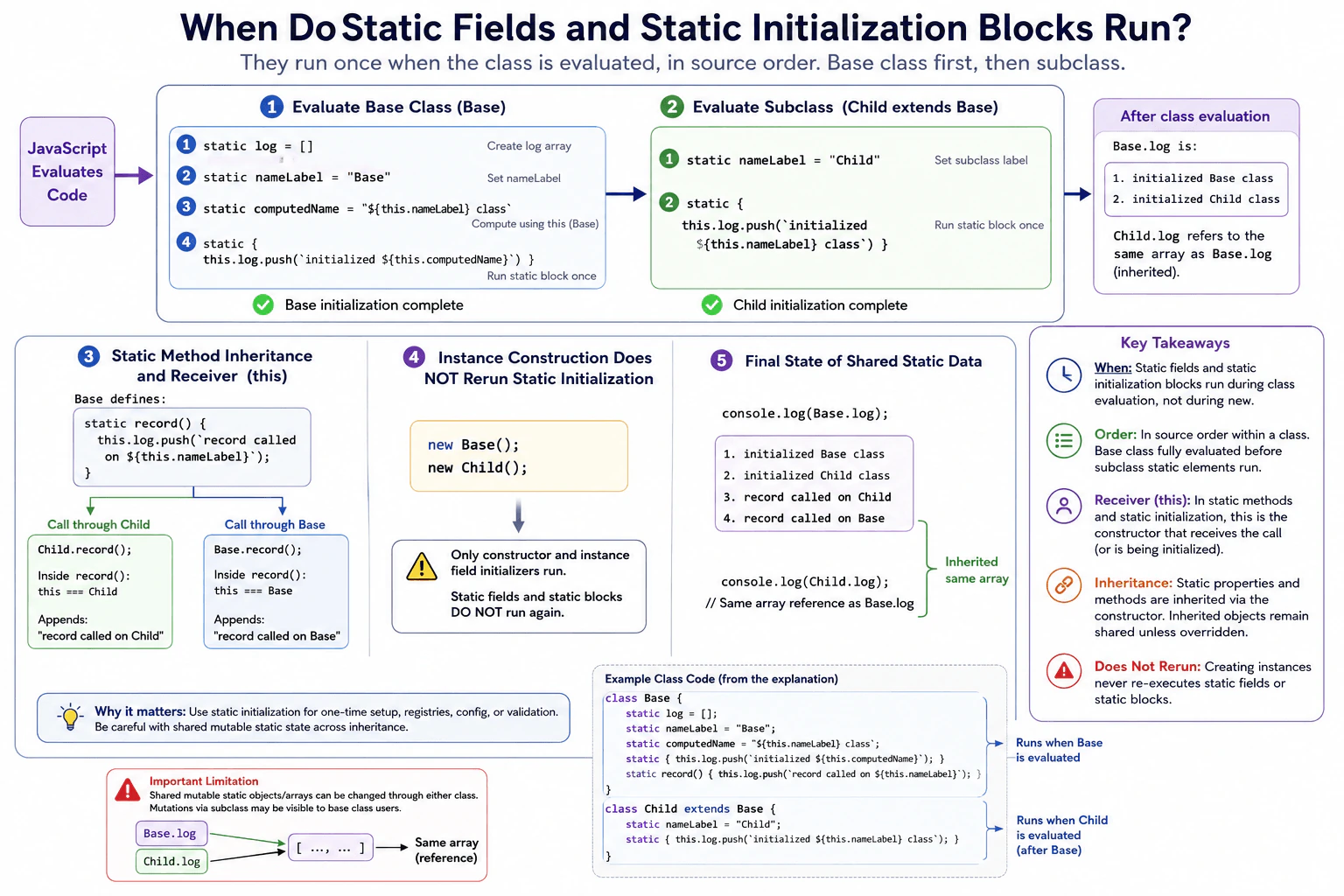
Static fields and static initialization blocks run when JavaScript evaluates the class definition, not when an instance is created. They run once for that class evaluation and in the order they appear. The base class is already evaluated before the subclass static elements run. Static methods are inherited, and this inside a static method depends on which constructor receives the call. Creating objects with new does not run static initialization again.
Static values belong to the class itself instead of each object created from the class. JavaScript creates these values while it creates the class. It processes them from top to bottom. A child class is created after its parent class is available. The child can also access class level values and functions from its parent. Creating a normal object later does not repeat this class setup. This matters when a program needs shared settings, counters, registration information, or setup work that should happen once when a class definition is evaluated.
Useful Questions to Ask the Interviewer
Should I explain both a base class and a subclass?
Should I include how this behaves inside an inherited static method?
How to Explain It in an Interview
A static field initializer runs while JavaScript evaluates the class definition. A static initialization block also runs during that class evaluation. Static fields and static blocks are processed in source order, so a later static element can observe values or changes produced by an earlier static element.
For a base class, its static elements finish while that class is being evaluated. When JavaScript evaluates a subclass, the base class constructor already exists. JavaScript then processes the subclass static elements in their own source order. This gives a clear sequence: base class setup first, then subclass setup.
Static properties and static methods can be inherited through the relationship between constructor objects. If Base defines a static method named record, Child can call Child.record(). Inside that call, this is Child because Child is the receiver of the call. If Base.record() is called, this is Base.
Inside a static field initializer or static block, this refers to the class constructor currently being initialized. This makes it possible to compute class level values or record initialization work.
Creating an instance with new Child() does not evaluate the class definition again. Instance construction runs the constructor and initializes instance fields, but it does not rerun static fields or static blocks. Static initialization runs again only when JavaScript evaluates a separate class definition again.
A practical limitation is shared mutable state. If a static field contains an object or array and a subclass inherits access to it, both classes may refer to the same object unless the subclass defines its own static value. Production code should control such mutations carefully.
Example
The example records the order in which static elements run. Base first creates its log, then its name label, then its computed name, and then its static block records that Base initialization happened. Child is evaluated afterward. Its static field and static block then run. Child inherits the Base static method named record. Calling Child.record uses Child as this, while calling Base.record uses Base as this. Because Child inherits the same log array and does not define its own log, changes made through Child are visible through Base.log as well. Constructing Base or Child instances afterward does not add static initialization entries because static elements are not part of instance construction.
Code
classBase {
// This shared array is created while Base itself is being evaluated.static log = [];
// Static fields run in source order during class evaluation.static nameLabel = 'Base';
// this refers to Base while this Base static field is initialized.static computedName = `${this.nameLabel} class`;
// This block runs once during this evaluation of Base.static {
this.log.push(`initialized ${this.computedName}`);
}
// The receiver of the call decides what this means in this static method.staticrecord() {
this.log.push(`record called on ${this.nameLabel}`);
}
}
classChildextendsBase {
// Child static initialization happens after Base already exists.static nameLabel = 'Child';
// Child inherits Base.log, so this mutation reaches the same array.static {
this.log.push(`initialized ${this.nameLabel} class`);
}
}
// Base.log already contains entries from both class evaluations.console.log(Base.log);
// Child inherits record. Because Child receives the call, this is Child.Child.record();
// Instance construction does not repeat static initialization.newBase();
newChild();
// Both names resolve to the same inherited log array in this example.console.log(Base.log);
console.log(Child.log);
Where it is used
Static initialization is useful for class level configuration, registries, counters, lookup data, validation of related class settings, and setup that should happen when a class is evaluated. A frontend library might use a static block to register metadata or prepare shared values. Static fields are also useful when all instances should refer to one class level value. Shared mutable static state should be used carefully because changes can affect every caller that reaches the same inherited object.
Why Interviewers Ask This
Interviewers ask this to check whether the candidate understands when class level state is created, the order in which static elements run, how static members behave with inheritance, and how this works inside static methods. It also tests whether the candidate can clearly separate class initialization from instance construction.
Common interview mistakes
A common mistake is saying static initialization runs when the first object is created. It actually runs when the class definition is evaluated. Another mistake is assuming every new instance reruns a static block. It does not. Candidates also sometimes think an inherited static method always uses the base class as this. The receiver matters, so Child.record() uses Child as this. Another mistake is forgetting that an inherited static object can still be the same object owned by the base class. Mutating that object through the subclass can therefore affect what the base class sees.
Interview tip
Start by saying that static fields and static blocks run during class evaluation, not during new. Then explain source order, base class before subclass, and the receiver rule for this in static methods. Use one small execution log to show the behavior clearly.
Interviewer may ask next
What happens if a subclass calls an inherited static method that uses this?
The subclass becomes this when the method is called through the subclass. For example, Child.record() uses Child as this even though record was declared on Base. This matters because property reads and writes through this can resolve to subclass static properties or inherited static properties. The method is inherited, but the receiver is determined by the call.
What is the main production concern with mutable static fields shared through inheritance?
The main concern is shared mutable state. If a base class owns a static array or object and a subclass only inherits access to it, both classes can refer to that same object. A mutation through the subclass can therefore be visible through the base class. This can be useful for one shared registry, but it can also create surprising coupling. If each subclass needs independent state, define a separate static value on each subclass.
43. How do `Object.is`, `===`, and SameValueZero equality differ?Language SpecificMedium
i Question Details
Compare NaN, positive and negative zero, primitive strings, and object references under Object.is, strict equality, and the equality used by Set and Array.prototype.includes. Explain which relation treats NaN as equal to itself and which one distinguishes the two zero signs.
Short Interview Answer (30-60 seconds)
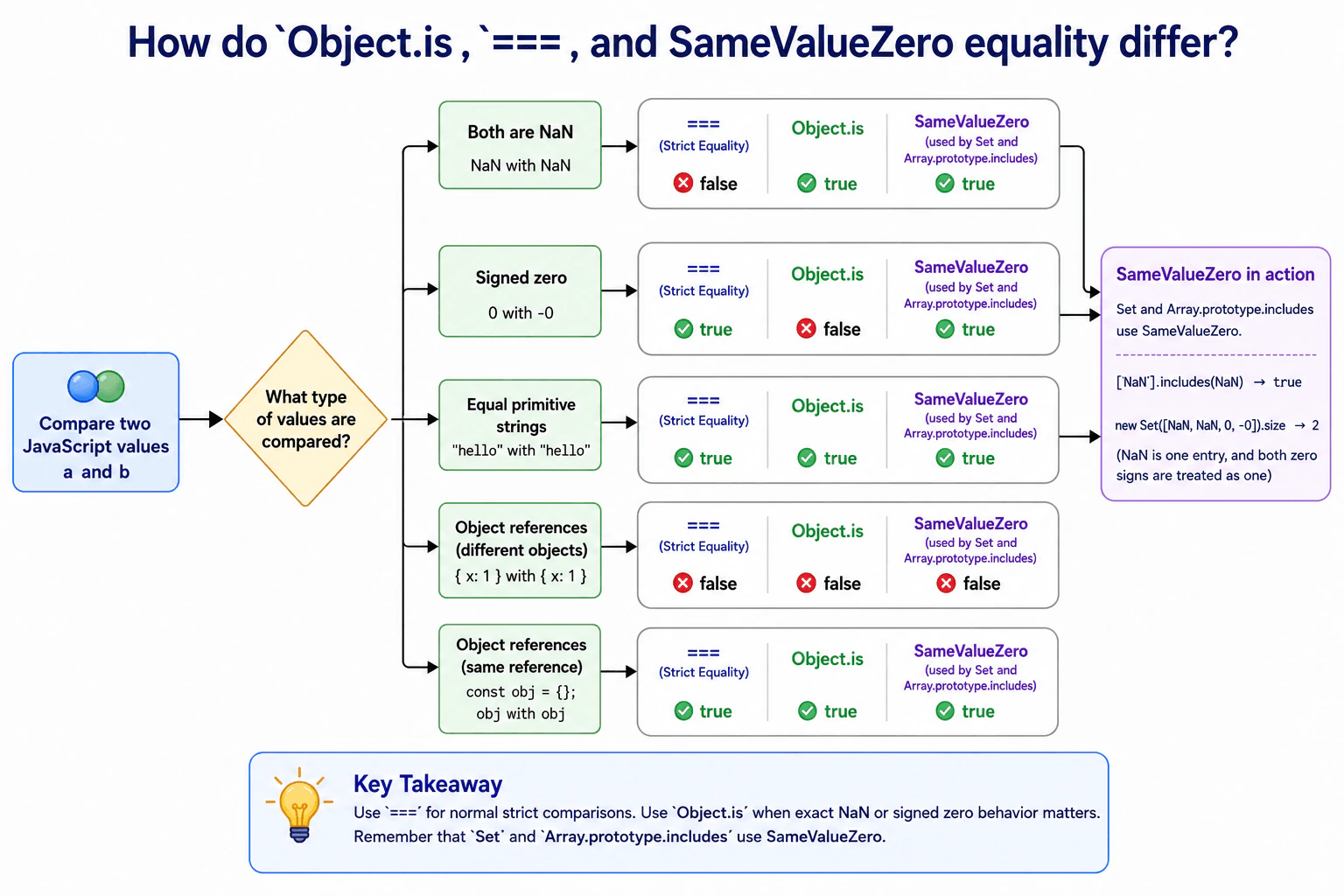
===, Object.is, and SameValueZero are almost the same, but NaN and signed zero show their differences. === says NaN is not equal to itself and treats positive zero and negative zero as equal. Object.is says NaN equals itself and distinguishes positive zero from negative zero. SameValueZero says NaN equals itself but treats both zero signs as equal. Set and Array.prototype.includes use SameValueZero. For objects, all three compare identity, so two separate objects with the same contents are not equal.
JavaScript has several rules for deciding whether two values should count as the same. Most ordinary values give the same result with all three rules, but two unusual number cases behave differently. One case is NaN, which represents a numeric result that is not a normal number. The other case is zero, because JavaScript can preserve a positive sign or a negative sign on zero. Objects are also important because JavaScript checks whether two values refer to the same object, rather than checking whether their contents merely look the same.
Useful Questions to Ask the Interviewer
Would you like me to compare the important cases with a small code example?
Should I also explain how Set and Array.prototype.includes use SameValueZero?
How to Explain It in an Interview
Start with the practical rule. Use === for normal strict comparisons. Use Object.is when the exact behavior of NaN or signed zero matters. Remember that Set and Array.prototype.includes use SameValueZero.
For ordinary primitive values, all three relations usually agree. For example, the primitive strings "hello" and "hello" compare as equal with ===, Object.is, and SameValueZero.
The first important case is NaN. NaN === NaN is false. Object.is(NaN, NaN) is true. SameValueZero also treats NaN as equal to itself. This is why [NaN].includes(NaN) returns true. A Set also treats repeated NaN values as the same entry.
The second important case is signed zero. JavaScript has positive zero and negative zero. Strict equality treats them as equal, so 0 === -0 is true. SameValueZero also treats them as equal. Object.is is different because Object.is(0, -0) is false. This makes Object.is useful when the sign of zero must be preserved as part of the comparison.
For objects, all three relations compare object identity. Two separately created objects are not equal even when their properties contain the same values. A reference compared with itself is equal.
These comparisons do not copy or allocate the compared values. The important production concern is choosing the equality behavior that matches the operation. In most application logic, === is the normal choice. For collection membership with Set or includes, understand that SameValueZero makes NaN searchable and combines both zero signs.
Example
The example compares the same important values under the three equality behaviors. It shows that ordinary primitive strings agree under all three rules. It shows that NaN differs under strict equality, while signed zero differs under Object.is. It also shows that two separate objects are different, while the same object reference is equal. Set and Array.prototype.includes demonstrate SameValueZero because JavaScript does not provide SameValueZero as a standalone comparison function.
Code
const firstObject = { value: 1 };
const secondObject = { value: 1 };
// Compare NaN with the three relevant equality behaviors.console.log('NaN with strict equality:', NaN === NaN); // falseconsole.log('NaN with Object.is:', Object.is(NaN, NaN)); // trueconsole.log('NaN with includes:', [NaN].includes(NaN)); // true// Signed zero is equal with strict equality and SameValueZero, but not with Object.is.console.log('Signed zero with strict equality:', 0 === -0); // trueconsole.log('Signed zero with Object.is:', Object.is(0, -0)); // falseconsole.log('Signed zero with includes:', [0].includes(-0)); // true// Equal primitive strings represent the same primitive string value.console.log('Strings with strict equality:', 'hello' === 'hello'); // trueconsole.log('Strings with Object.is:', Object.is('hello', 'hello')); // trueconsole.log('Strings with includes:', ['hello'].includes('hello')); // true// Separate objects have different identities even when their contents match.console.log('Separate objects with strict equality:', firstObject === secondObject); // falseconsole.log('Separate objects with Object.is:', Object.is(firstObject, secondObject)); // falseconsole.log('Separate objects with includes:', [firstObject].includes(secondObject)); // false// The same object reference is equal under all three behaviors.console.log('Same reference with strict equality:', firstObject === firstObject); // trueconsole.log('Same reference with Object.is:', Object.is(firstObject, firstObject)); // trueconsole.log('Same reference with includes:', [firstObject].includes(firstObject)); // true// Set uses SameValueZero, so repeated NaN values become one entry and both zero signs become one entry.const values = newSet([NaN, NaN, 0, -0]);
console.log('Set size:', values.size); // 2
Where it is used
=== is the normal choice for strict comparisons in application logic because it compares without type conversion. Object.is is useful when code must distinguish positive zero from negative zero or deliberately recognize NaN as the same value. SameValueZero is used by standard JavaScript APIs such as Set membership and Array.prototype.includes. This matters when frontend code stores unique primitive values, checks whether an array contains NaN, or reasons about collection membership. These equality checks do not copy the values or create new objects as part of the comparison.
Why Interviewers Ask This
Interviewers ask this to check whether a candidate understands JavaScript equality beyond the common === operator. The important cases are NaN, positive zero, negative zero, primitive values, and object identity. It also tests whether the candidate knows that standard APIs such as Set and Array.prototype.includes use SameValueZero and can therefore behave differently from strict equality.
Common interview mistakes
A common mistake is saying that Object.is is simply a stricter version of ===. It is not. They specifically disagree for NaN and signed zero. Another mistake is assuming Array.prototype.includes uses ===. It uses SameValueZero, so [NaN].includes(NaN) is true. Developers also sometimes expect objects with identical properties to compare as equal. These equality relations compare object identity, so two separately created objects are different. Another mistake is assuming a Set can keep positive zero and negative zero as separate values. SameValueZero treats them as the same value.
Interview tip
State the two special number cases first. Say that Object.is treats NaN as equal to itself and distinguishes the two zero signs. Then say that SameValueZero also treats NaN as equal to itself but considers both zero signs equal. Finish by noting that Set and Array.prototype.includes use SameValueZero and that objects are compared by identity.
Interviewer may ask next
Why does `[NaN].includes(NaN)` return true while `[NaN].indexOf(NaN)` returns negative one?
Array.prototype.includes returns true because it uses SameValueZero, which treats NaN as equal to itself. Array.prototype.indexOf uses strict equality semantics for its element comparison, and NaN === NaN is false, so it does not find that element and returns negative one. This matters when application data can contain NaN. Use includes when the goal is a membership check and SameValueZero is the desired behavior.
When would you choose `Object.is` instead of `===` in production code?
Choose Object.is when the exact NaN or signed zero behavior matters. It treats two NaN values as the same and distinguishes positive zero from negative zero. For most ordinary application comparisons, === is simpler and more familiar. The tradeoff is semantic rather than a copying or memory concern. Object.is gives the precise edge case behavior when the application needs it, while === is usually clearer when those cases do not matter.
44. How do inherited properties become shadowed or exposed again?Language SpecificMedium
i Question Details
Create a prototype with a writable data property and an accessor, then assign similarly named properties on a child object. Explain when assignment creates an own property, when an inherited setter runs, how delete reveals the inherited value again, and how Object.hasOwn verifies the result.
Short Interview Answer (30-60 seconds)
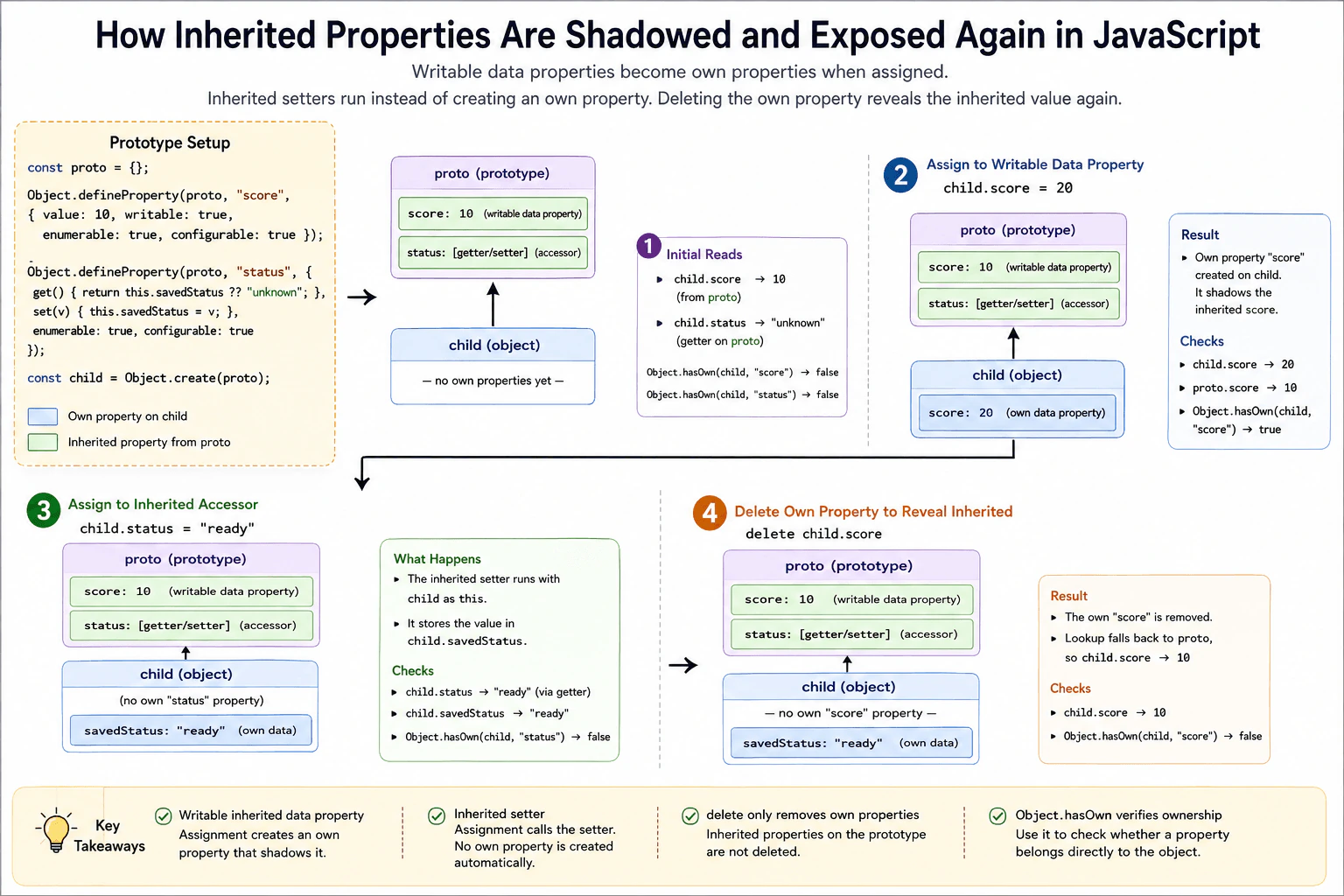
An inherited writable data property is usually shadowed when I assign the same property name on the child, because JavaScript creates an own property on the child. An inherited setter behaves differently. Assignment calls the setter and does not automatically create an own property with that name. If I delete a shadowing own property, normal lookup can see the inherited property again. I can use Object.hasOwn to confirm whether the property belongs directly to the child.
A child object can use values that come from another object above it. If the child gets its own value with the same name, that value can hide the older one. Removing the child value can make the older value visible again. There is one important special case. If the older object reacts when a value is assigned, the assignment can trigger that reaction instead of storing a new value on the child. We should check which object really owns each value after every change.
Useful Questions to Ask the Interviewer
Should I show both a normal stored value and a property that reacts to assignment?
Should I verify ownership with Object.hasOwn after assignment and deletion?
How to Explain It in an Interview
Suppose proto has a writable data property named score with value 10. A child object inherits from proto. Reading child.score first returns 10 because child has no own score, so property lookup continues to proto.
When we run child.score = 20, JavaScript finds the inherited data property and sees that it is writable. The assignment creates an own score property on child with value 20. That own property now shadows the inherited score. The original proto.score is still 10. Object.hasOwn(child, "score") returns true.
Now consider an inherited accessor named status that has a setter. When we assign child.status = "ready", JavaScript calls the inherited setter with child as this. Assignment does not automatically create an own status property. In this example, the setter stores the received value in child.savedStatus. Object.hasOwn(child, "status") therefore remains false.
If we delete child.score, only the own score property is removed. The prototype property is not deleted. Reading child.score again continues through the prototype chain, finds proto.score, and returns 10. Object.hasOwn(child, "score") now returns false.
This behavior matters when objects inherit shared defaults or shared behavior. Shadowing is useful when one object needs its own value. An inherited setter can validate, transform, or redirect an assignment. A key limitation is that an inherited data property that is not writable blocks normal assignment to that name. Another important point is that delete only removes a configurable own property from the object where delete is used. Prototype based designs can save repeated definitions, but they can also make ownership less obvious, so production code should use clear conventions and ownership checks when that distinction matters.
Example
The example creates proto with two inherited properties. score is a writable data property. status is an accessor with a setter and getter. child inherits from proto. Assigning child.score creates an own score property that shadows proto.score. Assigning child.status calls the inherited setter with child as this. The setter stores the value in child.savedStatus, so child does not gain an own status property. Deleting child.score removes the own shadowing property, so reading child.score finds the inherited value 10 again. Object.hasOwn verifies whether score and status belong directly to child.
Code
const proto = {};
// Define a writable data property that a child can shadow with its own value.Object.defineProperty(proto, 'score', {
value: 10,
writable: true,
enumerable: true,
configurable: true,
});
// Define an inherited accessor whose setter redirects the assigned value.Object.defineProperty(proto, 'status', {
get() {
returnthis.savedStatus ?? 'unknown';
},
set(value) {
// Store the value on the receiving child instead of creating its own status property.this.savedStatus = value;
},
enumerable: true,
configurable: true,
});
// Create a child whose property lookup can continue to proto.const child = Object.create(proto);
console.log(child.score); // 10console.log(Object.hasOwn(child, 'score')); // false// This assignment creates an own score because the inherited data property is writable.
child.score = 20;
console.log(child.score); // 20console.log(proto.score); // 10console.log(Object.hasOwn(child, 'score')); // true// The inherited setter runs with child as this and stores the value in savedStatus.
child.status = 'ready';
console.log(child.status); // readyconsole.log(child.savedStatus); // readyconsole.log(Object.hasOwn(child, 'status')); // false// Delete only the own shadowing score so lookup exposes proto.score again.delete child.score;
console.log(child.score); // 10console.log(Object.hasOwn(child, 'score')); // false
Where it is used
This behavior appears when applications use prototypes for shared defaults or shared behavior and allow individual objects to override selected values. It also matters with JavaScript classes because methods and accessors declared in a class are normally placed on the class prototype. Understanding shadowing helps when debugging configuration objects, model objects, custom component state, inherited getters and setters, and code that removes temporary overrides so lookup returns to a shared default.
Why Interviewers Ask This
Interviewers ask this to check whether a candidate understands how property assignment works with prototypes, data properties, setters, deletion, and own property checks. The question also tests whether the candidate can predict runtime behavior instead of assuming every assignment creates a new property on the child object.
Common interview mistakes
A common mistake is assuming every assignment creates an own property. An inherited setter can receive the assignment instead. Another mistake is thinking that shadowing changes the prototype property. It does not. The own property only hides it during lookup. Developers may also expect delete child.score to delete proto.score, but delete only targets an own property on child. Another mistake is using the in operator as an ownership check because in reports both own and inherited properties. Object.hasOwn checks direct ownership. It is also incorrect to assume normal assignment can shadow an inherited data property that is not writable.
Interview tip
Explain the two assignment cases separately. First show a writable inherited data property that becomes shadowed by an own property. Then show an inherited setter that receives the assignment without automatically creating that property on the child. Finish by deleting the shadowing property and using Object.hasOwn to prove that the inherited value is visible again.
Interviewer may ask next
What happens if the inherited data property is not writable?
Normal assignment does not create a shadowing own property when an inherited data property with that name is not writable. In strict mode, the assignment throws a TypeError. Outside strict mode, the assignment fails without changing the value. This matters because the inherited property descriptor can block an override through ordinary assignment. If the child is extensible, Object.defineProperty can still define a new own property directly because defining an own property follows different rules from ordinary assignment.
What is the production tradeoff of relying on prototype shadowing for object specific values?
Prototype shadowing can reduce duplication for shared defaults while allowing each child to store only the values it overrides. The tradeoff is that property ownership becomes less obvious because a visible value may come from the child or from its prototype. This can make debugging, serialization, and maintenance harder. In production code, Object.hasOwn and clear property conventions help distinguish direct object state from inherited defaults.
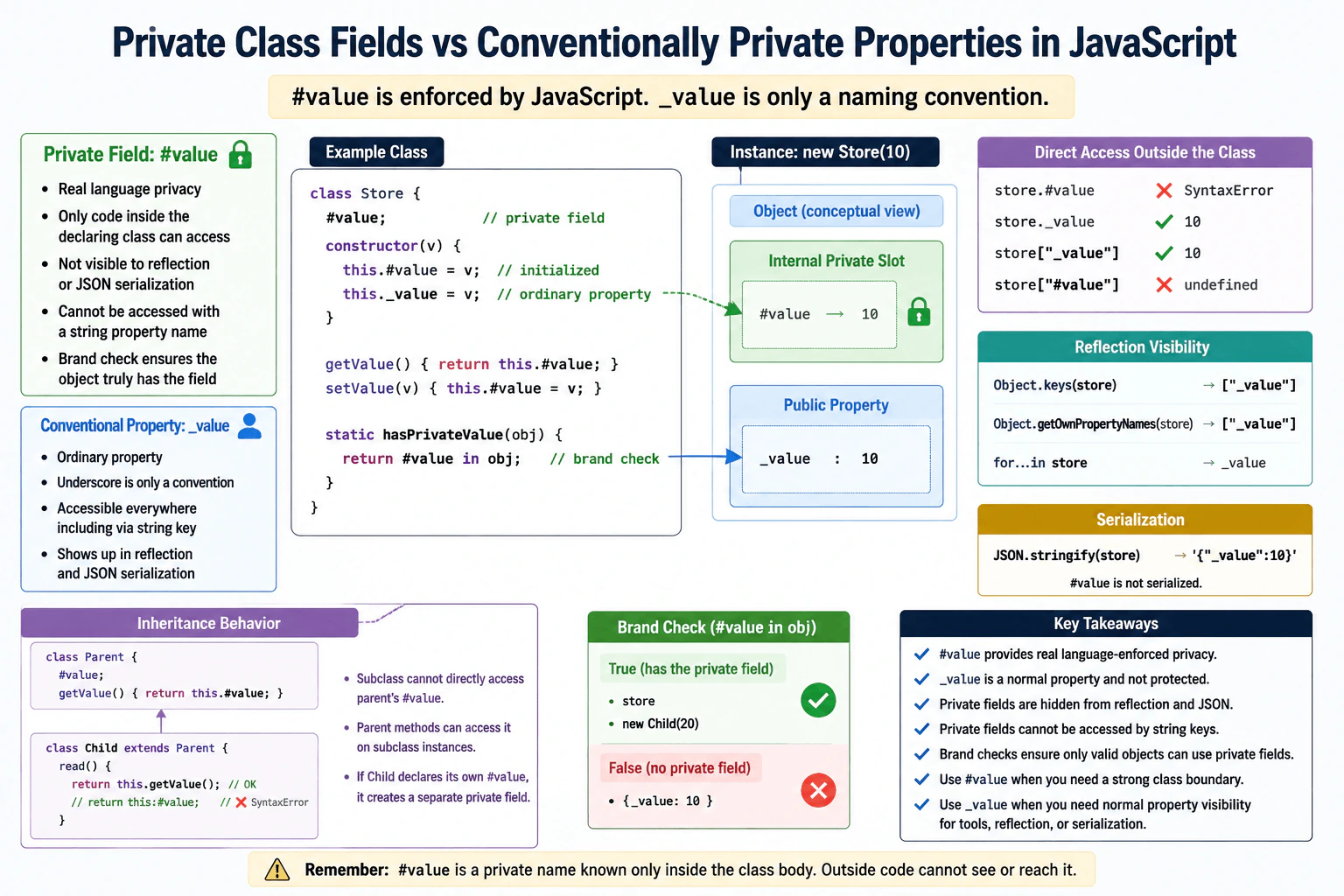
45. How do private class fields differ from conventionally private properties?Language SpecificMedium
i Question Details
Define a class with a #value field and compare it with an _value property. Explain brand checks, syntax-level access restrictions, inheritance behavior, reflection and serialization visibility, and why private fields cannot be dynamically addressed by a string property name.
Short Interview Answer (30-60 seconds)
#value gives real language enforced privacy, while _value is only a normal property that follows a naming convention. Code outside the declaring class cannot directly use #value, and a subclass body cannot directly use the parent class private name. Private fields are also hidden from normal property reflection and JSON serialization. In contrast, _value can be read, changed, listed, serialized, or dynamically accessed with a string such as obj["_value"]. A private field cannot be dynamically addressed that way because #value is a private name, not a normal string property key.
The practical difference is simple. A name that starts with an underscore only asks other programmers not to touch it. Nothing in the language stops them from reading or changing it. A name that starts with # has a stronger rule. JavaScript itself controls where that value can be used. A child class does not automatically get permission to use the parent private name. Normal ways of listing object values do not reveal it. Converting the object to JSON does not include it either. This makes #value useful when a value must stay behind the class public behavior.
Useful Questions to Ask the Interviewer
Should I compare inheritance behavior as well as direct access?
Would you like me to show how reflection and JSON serialization treat both forms?
How to Explain It in an Interview
I would start with one class that contains both #value and _value.
_value is an ordinary JavaScript property. The underscore has no special meaning to the language. Any code with the object can normally use obj._value or obj["_value"]. If it is an enumerable own property, it can appear in Object.keys and JSON.stringify. It also appears in Object.getOwnPropertyNames because that method returns ordinary own string properties whether they are enumerable or not.
#value is different. It is a private field declared by the class. Code in a place where that private name is not in scope cannot write obj.#value. JavaScript rejects that source because the private name is not available there.
JavaScript also performs a brand check when private access happens. In simple terms, the object must actually have the private field created by that class. A method cannot successfully read its private field from an unrelated object just because that object has a property with similar text.
Inheritance is strict about private names. An instance of a subclass can still contain the parent class private field because the parent constructor initializes it. Parent class methods can access that field on the subclass instance. However, code written in the subclass body cannot directly use the parent private name. If the subclass declares its own #value, that is a different private field.
Private fields are not normal properties with string keys. Therefore obj["#value"] does not reach the private field. It only looks for an ordinary public property whose string key is #value. Private fields are also absent from normal property reflection and JSON serialization.
I use #value when the class should enforce an internal boundary. I use _value when a project only needs a visible convention or when external tools intentionally need ordinary property access.
Example
The example creates one class with both forms. Public methods read and update the real private field because those methods are declared where #value is available. The underscore property is accessed directly and through a string key to show that it is an ordinary property. The example also shows that normal reflection and JSON serialization see _value but not #value. A static method uses #value in object to perform a private brand check. The subclass shows that parent methods can still read the parent private field on a subclass instance, while the subclass body cannot directly use the parent private name.
Code
classStore {
#value;
constructor(value) {
// Create the private field and a normal underscore property with the same starting value.this.#value = value;
this._value = value;
}
getPrivateValue() {
// Access is valid because this method is declared in the class that owns #value.returnthis.#value;
}
setPrivateValue(value) {
// Keep updates to the private state behind a public method.this.#value = value;
}
statichasPrivateValue(object) {
// Check whether this object carries the private field created by Store.return #value in object;
}
}
classChildStoreextendsStore {
readParentValue() {
// The subclass body cannot directly use the parent private name, so it calls a parent public method.returnthis.getPrivateValue();
}
}
const store = newStore(10);
console.log(store.getPrivateValue());
console.log(store._value);
// A normal property can be addressed dynamically with a string key.console.log(store['_value']);
// This is an ordinary public property lookup. It does not reach the private field.console.log(store['#value']);
// Reflection sees the underscore property but does not expose the private field.console.log(Object.keys(store));
console.log(Object.getOwnPropertyNames(store));
// JSON serialization includes the enumerable underscore property but not the private field.console.log(JSON.stringify(store));
// The private brand check is true for objects that carry the Store private field.console.log(Store.hasPrivateValue(store));
console.log(Store.hasPrivateValue({ _value: 10 }));
const child = newChildStore(20);
// The parent method can access the parent private field on this subclass instance.console.log(child.readParentValue());
console.log(Store.hasPrivateValue(child));
Where it is used
Private fields are useful in production classes that keep internal state, cached values, counters, validation state, or implementation details that callers should not modify directly. They are especially useful when public methods should control how internal state is read or changed. An underscore property is useful when a team wants to mark a property as internal but still needs ordinary property access for debugging, reflection, serialization, libraries, or existing application conventions.
Why Interviewers Ask This
Interviewers ask this to check whether I understand that #value is enforced by JavaScript itself, while _value is only a naming convention. They also want to see whether I understand access rules, inheritance, visibility, brand checks, reflection, serialization, and when real language enforced privacy is useful in production code.
Common interview mistakes
A common mistake is saying that _value is private. It is not. The underscore only communicates intent. Another mistake is trying to access a private field with obj["#value"]. That searches for a normal string property and does not access the private field. Candidates also sometimes say that subclass instances do not contain parent private fields. They can contain them when the parent constructor initializes them. The important restriction is that the subclass body cannot directly use the parent private name. Another mistake is expecting Object.keys, Object.getOwnPropertyNames, or JSON.stringify to expose private fields. They do not. Finally, a private field with the same spelling declared in a subclass is a separate private field.
Interview tip
Start with the main contrast: #value is enforced by JavaScript, while _value is only a convention. Then explain direct access, inheritance, reflection, JSON serialization, string property access, and the private brand check. A small example containing both fields makes each difference easy to show.
Interviewer may ask next
What happens if a subclass declares its own `#value` when the parent class already has a `#value`?
It creates a separate private field. The subclass private name does not give the subclass access to the parent private field, even though both are written as #value. A subclass instance can contain both fields, but each declaration belongs to its own class. This matters because inheritance does not weaken the private boundary. If the subclass needs behavior that uses the parent field, it can call an accessible parent method that performs that work.
When might you choose `_value` instead of `#value` in production code?
I would choose _value when I want an internal naming convention but still need the value to behave like an ordinary JavaScript property. For example, existing tools, serializers, reflection code, or libraries may need string based property access. The tradeoff is that JavaScript does not protect _value, so callers can read or change it. I would choose #value when enforcing the class boundary is more important than that flexibility.
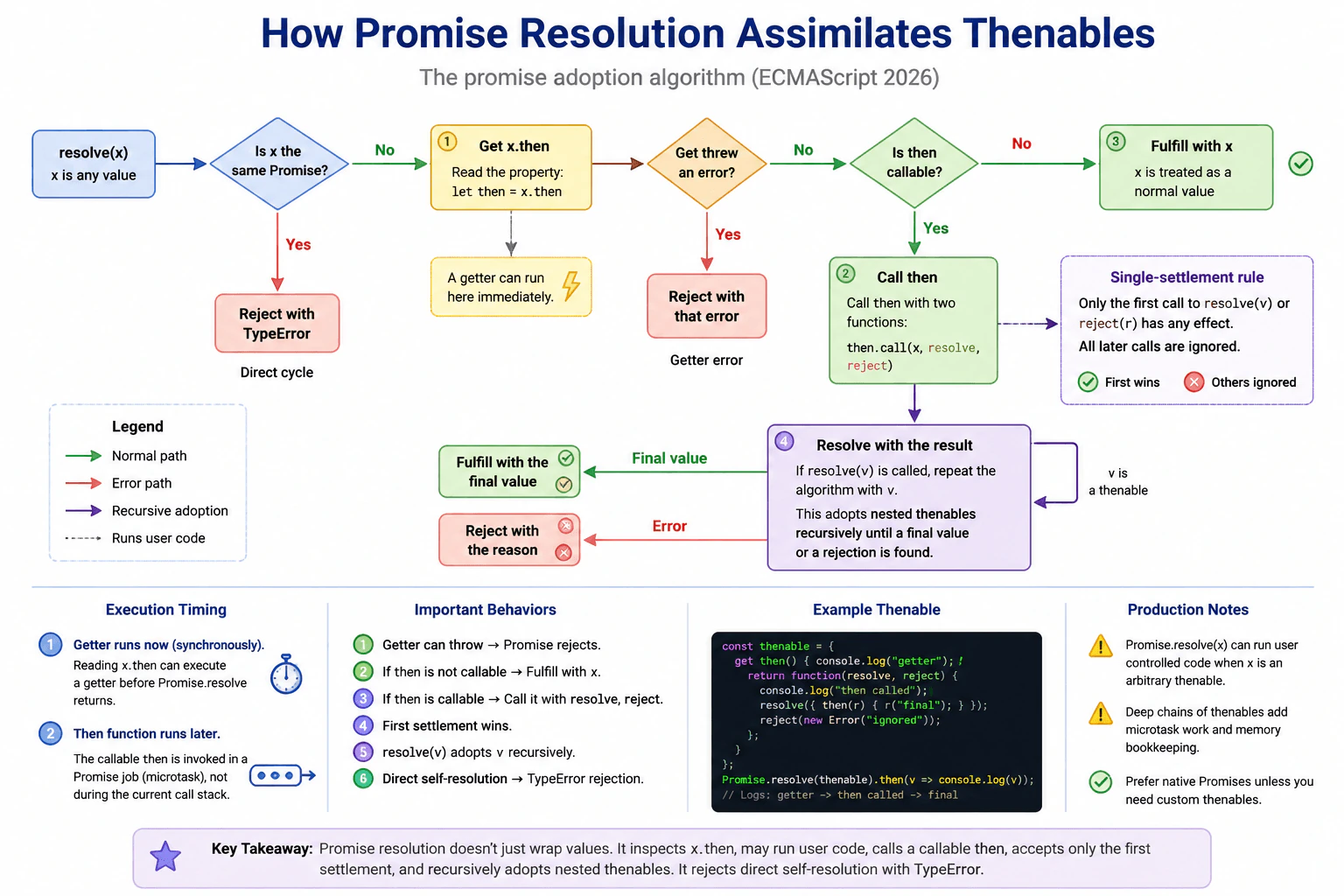
46. How does promise resolution assimilate thenables?Language SpecificHard
i Question Details
Resolve a promise with an object whose then getter logs access and whose then method calls both resolve and reject. Explain getter errors, the single-settlement rule, recursive adoption of returned thenables, cycle rejection, and why Promise.resolve(x) may still invoke user-controlled code when x is not a native promise.
Short Interview Answer (30-60 seconds)
Promise resolution adopts thenables instead of simply fulfilling with them. JavaScript reads the value's then property first. That property access can run a getter immediately. If the getter throws, the Promise rejects. If then is callable, JavaScript calls it later through Promise job processing and adopts what it produces. Only the first resolve or reject call matters. Nested thenables are adopted recursively. Directly resolving a Promise with itself rejects with a TypeError.
The main idea is that some values can carry instructions for how a future result should finish. JavaScript does not always accept such a value as the final result right away. It first looks for a special part of that value. Looking at that part can itself run code. That code may fail, or it may provide instructions that later choose success or failure. Only the first choice counts. Those instructions may point to another similar value, so JavaScript can keep following them until it reaches an ordinary final value or a failure.
Useful Questions to Ask the Interviewer
Should I explain both when the then getter runs and when the returned then function runs?
Should I cover direct self resolution and nested thenable cycles separately?
How to Explain It in an Interview
The practical rule is that Promise resolution adopts a thenable instead of automatically fulfilling with that object.
When a Promise is resolved with an object x, JavaScript reads x.then. This property access happens as part of resolving the value. A getter for then can therefore execute immediately. With Promise.resolve(x), that getter can run before Promise.resolve returns. If reading then throws, the Promise is rejected with that error.
If the retrieved then value is not callable, the Promise is fulfilled with x. If it is callable, JavaScript schedules a Promise job that later calls that function with resolve and reject functions.
Those functions follow a single settlement rule. If the thenable calls resolve first and reject second, the rejection is ignored. The first call wins even when the value passed to resolve still needs more adoption.
If resolve receives another thenable, JavaScript repeats the adoption process. This can continue through several thenables until an ordinary value is reached or one step rejects.
JavaScript also rejects direct self resolution. If a Promise is resolved with that same Promise, it rejects with a TypeError. This direct check does not mean every indirect thenable cycle is detected. A cycle formed only through separate thenables can repeatedly continue the adoption process instead.
This behavior matters at library and application boundaries. An unfamiliar object may run code through its then getter and later through its then function. Each additional thenable layer also creates more Promise job work and bookkeeping, so unnecessary deep adoption chains should be avoided.
Example
The example shows the important resolution cases with the same rules described above. The outer thenable has a then getter, so its log happens when Promise.resolve reads that property. The getter returns a then function that is invoked later. That function resolves with a nested thenable and then tries to reject. The rejection is ignored because resolve was called first. JavaScript recursively adopts the nested thenable and eventually fulfills with final value. A second object demonstrates that a throwing then getter causes rejection. A final example demonstrates direct self resolution, which rejects with a TypeError.
Code
const outerThenable = {
getthen() {
// Reading then can immediately execute user supplied getter code.console.log('outer getter');
returnfunction (resolve, reject) {
// JavaScript invokes this callable then later through Promise job processing.console.log('outer then function');
const nestedThenable = {
then(nestedResolve) {
// Resolving with another thenable starts another adoption step.console.log('nested then function');
nestedResolve('final value');
},
};
// The first call wins, although this value still needs thenable adoption.resolve(nestedThenable);
// This later rejection has no effect because resolve was already called.reject(newError('ignored rejection'));
};
},
};
console.log('before Promise.resolve');
const adopted = Promise.resolve(outerThenable);
console.log('after Promise.resolve');
// This handler runs after the nested thenable has produced the final value.
adopted.then((value) =>console.log('fulfilled:', value));
const throwingThenable = {
getthen() {
// A failure while reading then becomes the Promise rejection reason.thrownewError('getter error');
},
};
// The catch handler observes the error thrown by the then getter.Promise.resolve(throwingThenable).catch((error) => {
console.log('getter rejection:', error.message);
});
let resolveCycle;
const cycle = newPromise((resolve) => {
// Save this resolver so the Promise can later be resolved with itself.
resolveCycle = resolve;
});
// Direct self resolution rejects this Promise with a TypeError.
cycle.catch((error) =>console.log('cycle:', error.name));
resolveCycle(cycle);
Where it is used
This behavior is used when application code normalizes an unknown value with Promise.resolve, when a library returns a Promise compatible object, and when one asynchronous abstraction adopts the result of another. It matters most at boundaries where values come from unfamiliar code. An object that appears to be ordinary data can execute code when its then property is read. In production, developers should also avoid unnecessary chains of custom thenables because every additional adoption step adds Promise job processing and runtime bookkeeping.
Why Interviewers Ask This
Interviewers ask this to check whether a candidate understands the exact steps JavaScript follows when Promise resolution receives another object. It tests knowledge of property access, getters, Promise settlement, recursive adoption, error handling, execution timing, and direct cycle detection. It also tests production judgment because an object passed to Promise.resolve can contain user supplied behavior that runs during resolution.
Common interview mistakes
A common mistake is saying that calling resolve always fulfills a Promise immediately. Resolve can instead begin adoption of another thenable. Another mistake is assuming that both resolve and reject can change the result when a thenable calls both. Only the first call has an effect. Candidates also sometimes say that the then getter and the callable then function run at the same time. The getter can run during the synchronous resolution call, while the callable then function runs later through Promise job processing. Another mistake is saying that JavaScript detects every possible thenable cycle. The required direct check rejects a Promise resolved with itself, but separate thenables can form indirect cycles that are not caught by that same direct identity check.
Interview tip
Start with the rule that Promise resolution adopts thenables. Then explain the order clearly: read then, reject if that access throws, fulfill directly if then is not callable, call a callable then later, accept only its first resolve or reject call, recursively adopt nested thenables, and reject direct self resolution with TypeError. Mention that Promise.resolve can execute a user supplied getter before returning when given an arbitrary thenable.
Interviewer may ask next
What happens if the then getter throws before returning a function?
The Promise is rejected with the thrown error. JavaScript must read the object's then property before deciding whether the object is a thenable. If that property access throws, resolution stops and the thrown value becomes the rejection reason. The then function is never called. This matters because reading a property can execute a getter, so even inspecting an unfamiliar object's then property can run user supplied code.
Does Promise.resolve always return its argument without running user supplied code when the value looks like a Promise?
No. For an arbitrary object, Promise.resolve can read its then property, so a user supplied getter can run during that property access. If the retrieved value is callable, JavaScript later invokes it during Promise job processing. A native Promise whose constructor matches the Promise constructor being resolved has a special case and can be returned directly. This matters when normalizing values from unfamiliar libraries because generic thenables can execute code during assimilation.
47. How can an unbounded microtask chain starve the browser?Language SpecificHard
i Question Details
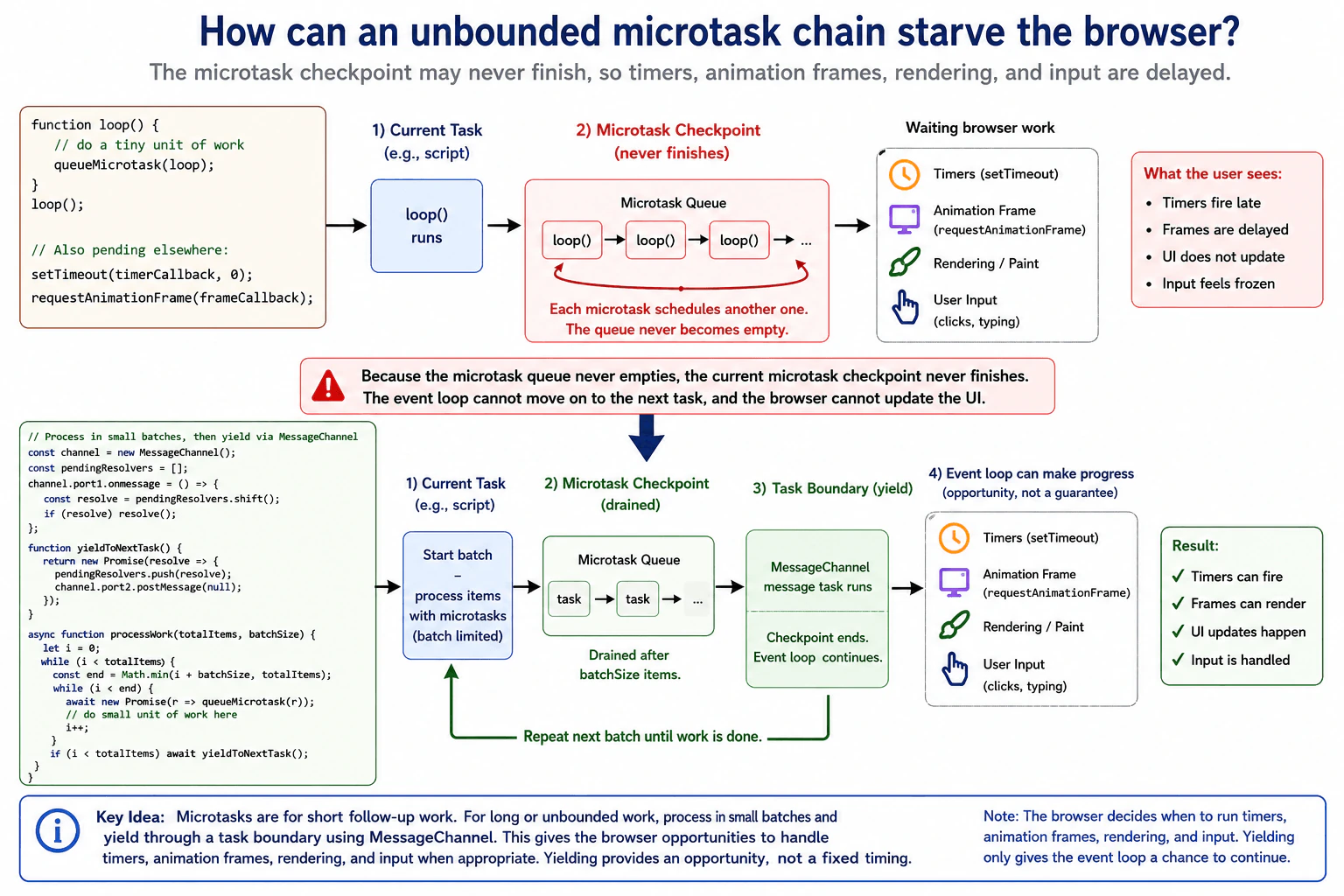
Consider a function that recursively schedules itself with queueMicrotask while a timer and animation frame are pending. Explain why the current microtask checkpoint may never finish, which user-visible work is delayed, and how yielding through an appropriate task or scheduler boundary restores responsiveness without assuming a fixed timer delay.
Short Interview Answer (30-60 seconds)
An unbounded microtask chain can keep the browser inside the same microtask checkpoint because every microtask adds another microtask before the queue becomes empty. The browser may therefore keep delaying timers, animation frames, rendering, and user input. I would bound the amount of microtask work and periodically yield through a task boundary. That lets the event loop move on to other browser work. I would not assume that the yield or a pending timer happens after an exact amount of time.
The main problem is that a small piece of work can keep adding another piece of urgent work forever. The browser normally gets chances to update what the user sees and react to clicks, typing, and other actions. But if each piece creates another piece before the browser gets that chance, the browser can stay busy with the chain. A waiting timer or screen update may remain delayed even though its requested time has passed. The practical fix is to stop after a limited amount of work and give control back to the browser regularly.
Useful Questions to Ask the Interviewer
Should I assume this code is running on the browser main thread?
Do you want the solution to preserve frequent microtask processing while still allowing rendering and input?
How to Explain It in an Interview
A browser performs a microtask checkpoint after certain JavaScript work finishes. During that checkpoint, it keeps taking microtasks from the microtask queue until the queue is empty.
That rule is important here. Suppose a callback runs through queueMicrotask and schedules itself again before returning. The new microtask is added to the same microtask queue. When the browser finishes the current callback, another one is already waiting. If this continues without a limit, the queue never becomes empty, so the current checkpoint may never finish.
Other browser work can then be delayed. A pending timer callback runs as a later task, so it cannot run while the browser remains inside the endless microtask checkpoint. A pending animation frame can also be delayed because the browser does not reach a rendering opportunity. Paint, visual updates, and handling of user input can therefore appear frozen.
The production solution is to bound the work. Process only a limited number of items, then yield through a task boundary. The example uses MessageChannel to schedule that boundary. When the message task runs, the previous microtask checkpoint has ended, so the event loop can make progress between batches and the browser can take rendering opportunities when appropriate.
The exact timing is not guaranteed. Yielding gives the browser an opportunity to continue other work. It does not promise that a timer, animation frame, paint, or input callback will happen after a fixed delay.
Example
The example processes work in small batches. Each item in a batch is scheduled as a microtask, so the example still shows microtask behavior. After a fixed number of items, it awaits a Promise resolved by MessageChannel. A channel message is handled as a task, so this creates a task boundary instead of extending the current microtask checkpoint forever. The batch size controls how much work can happen before yielding. The code does not depend on a timer duration and does not claim that rendering or another callback will run at an exact moment.
Code
const pendingTaskResolvers = [];
const channel = newMessageChannel();
channel.port1.onmessage = () => {
// Resolve one waiting yield when the browser runs this message task.const resolve = pendingTaskResolvers.shift();
if (resolve) resolve();
};
functionyieldToNextTask() {
returnnewPromise((resolve) => {
// Save the resolver before posting the message so this yield can finish later.
pendingTaskResolvers.push(resolve);
channel.port2.postMessage(null);
});
}
functionrunOneMicrotask() {
returnnewPromise((resolve) => {
// Schedule one small unit through the browser microtask queue.queueMicrotask(resolve);
});
}
asyncfunctionprocessWork(totalItems, batchSize) {
let completed = 0;
while (completed < totalItems) {
const batchEnd = Math.min(completed + batchSize, totalItems);
while (completed < batchEnd) {
// Keep each individual unit small and finish only a bounded batch.awaitrunOneMicrotask();
completed += 1;
}
if (completed < totalItems) {
// Cross a task boundary so the current microtask checkpoint can end.awaityieldToNextTask();
}
}
return completed;
}
processWork(10000, 100).then((completed) => {
// Report completion after all bounded batches have finished.console.log(`Completed ${completed} items`);
});
Where it is used
This matters in production code that processes large client side queues, performs repeated Promise based work, batches state updates, consumes streams, coordinates cache work, or schedules many small callbacks. Microtasks are useful for short follow up work that should happen before later tasks. They are a poor choice for an unlimited processing loop on the main thread. Long running work should be divided into bounded chunks. CPU heavy work may instead belong in a Web Worker when moving that work away from the main thread is appropriate.
Why Interviewers Ask This
Interviewers ask this to check whether a candidate understands that finishing one JavaScript callback does not always let the browser immediately render or run other queued work. It tests knowledge of microtask checkpoints, task boundaries, animation frames, responsiveness, and the practical need to divide continuous work so the browser gets chances to handle rendering and input.
Common interview mistakes
A common mistake is assuming that queueMicrotask automatically gives the browser time to render. It does not. Another mistake is believing that returning from one microtask ends the checkpoint even when that microtask has already queued another one. Developers also sometimes replace the chain with Promises but keep the same unbounded behavior, because Promise reactions also use microtasks. Another mistake is assuming that a timer with zero delay runs immediately or after an exact delay. Finally, yielding after every tiny operation can create unnecessary scheduling overhead, so production code should choose a reasonable amount of work between yields.
Interview tip
Start with the key rule: the browser drains microtasks until the microtask queue is empty. Then explain that recursively adding another microtask prevents that empty state. Name the visible effects, such as delayed timers, animation frames, rendering, and input. Finish by explaining bounded work plus a task boundary, and clearly say that yielding provides an opportunity for other browser work rather than an exact timing guarantee.
Interviewer may ask next
What happens if each microtask queues two more microtasks instead of one?
The starvation problem becomes worse because the microtask queue can grow instead of merely staying nonempty. During the same checkpoint, each callback adds more work than it removes. The browser can remain unable to reach later tasks or rendering opportunities, while memory use can also increase because pending callbacks accumulate. The important behavior is still the same: the checkpoint continues while microtasks remain queued, so the code must bound the work and eventually cross a task boundary.
Why not yield after every microtask?
Yielding after every microtask would create more opportunities for other browser work, but it can add unnecessary task scheduling overhead and reduce throughput. The practical tradeoff is responsiveness versus batching efficiency. A production implementation normally processes a bounded batch of small operations and then yields. Smaller batches usually improve responsiveness, while larger batches reduce scheduling overhead. The correct batch size depends on the amount of work in each operation and the responsiveness requirements of the page.
48. What happens to the JavaScript call stack across an `await` boundary?Language SpecificHard
i Question Details
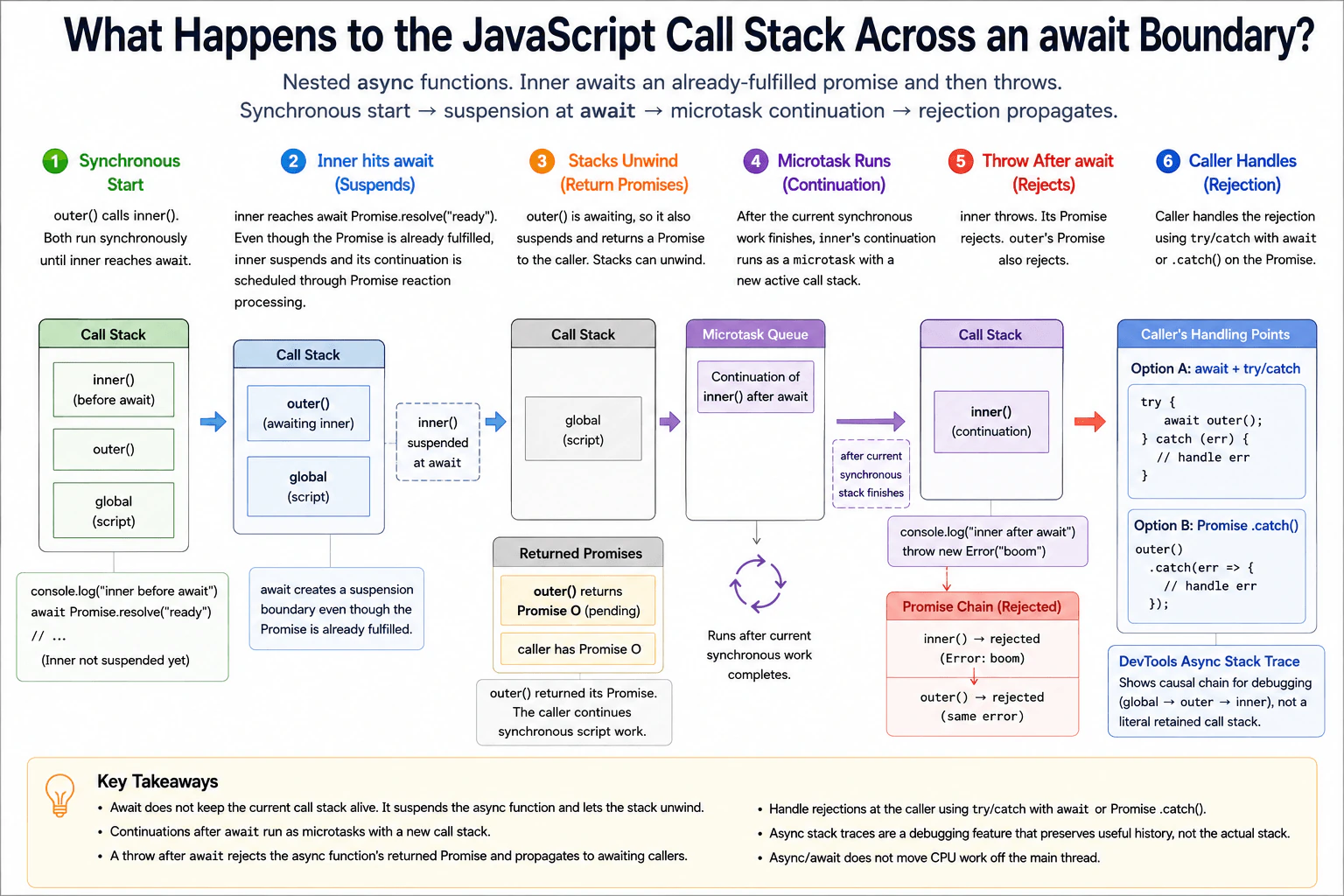
Use nested async functions where the inner function awaits an already-fulfilled promise and then throws. Explain synchronous execution before the first suspension, continuation as a microtask, the returned promise chain, async stack traces as a debugging feature rather than a literal retained stack, and the caller's available handling points.
Short Interview Answer (30-60 seconds)
The current call stack does not stay in place across an await. An async function runs normally until it reaches await. It then suspends and returns control to its caller, so the active stack can unwind. Even when the Promise is already fulfilled, the code after await continues later as a microtask. If that continuation throws, the async function's returned Promise rejects. A caller can handle that rejection with await inside try and catch, or by attaching .catch() to the returned Promise.
Before await, JavaScript runs the nested function calls immediately, like ordinary function calls. When the inner function reaches await, it pauses at that point and gives control back. The outer function also pauses if it is waiting for the inner function. The current work can then finish and its call stack can disappear. Later, JavaScript continues the inner function. If that continued work throws an error, the failure travels through the results returned by the waiting functions. The original caller can then handle that failure instead of leaving it unhandled.
Useful Questions to Ask the Interviewer
Should I assume the Promise being awaited is already fulfilled?
Should I explain both try and catch with await and Promise .catch() handling?
Should I also explain what browser developer tools mean when they show an async stack trace?
How to Explain It in an Interview
An async function executes synchronously until it reaches an await. In this example, outer() calls inner(), so both functions initially execute as normal JavaScript calls on the active call stack. inner() then executes await Promise.resolve("ready").
The Promise is already fulfilled, but await still creates a suspension boundary. JavaScript does not execute the next statement in inner() on that same active stack. inner() suspends and its async call has already returned a Promise to outer(). Because outer() awaits that Promise, outer() suspends too. Its async call has already returned its own Promise to the original caller. The active call stack can then unwind completely.
The continuation after the inner await is scheduled by Promise reaction processing as a microtask. After the current synchronous work finishes, that continuation runs during microtask processing with a new active call stack. JavaScript did not keep the old runtime stack alive and resume it later.
When inner() throws after the await, the Promise returned by inner() becomes rejected. outer() is waiting for that Promise. Because outer() does not catch the rejection, the Promise returned by outer() also becomes rejected. The original caller can handle that rejection by awaiting it inside try and catch, or by attaching .catch().
Browser developer tools may show an async stack trace that connects the related async calls. That is debugging information that preserves useful causal history. It does not mean the original runtime call stack remained active across the await.
This matters in production because error handling must follow the Promise chain. A normal synchronous try and catch around a call to outer() without awaiting its returned Promise cannot catch a rejection that happens later.
Example
The example uses outer() and inner(). outer() calls and awaits inner(). inner() logs a message, awaits an already fulfilled Promise, and then throws. The first logs happen synchronously on the original active call stack. Reaching await suspends inner(). outer() also suspends because it awaits the Promise returned by inner(). The original caller already has the Promise returned by outer(), so the remaining synchronous log statements run before the inner continuation. The inner continuation later runs as a microtask and throws. That rejects the Promise from inner(). Because outer() does not catch the rejection, its returned Promise also rejects. The caller's .catch() handles that final rejection.
Code
console.log('script start');
asyncfunctioninner() {
// This part runs immediately on the current call stack.console.log('inner before await');
// The Promise is already fulfilled, but await still suspends this function.awaitPromise.resolve('ready');
// This continuation runs later during Promise microtask processing.console.log('inner after await');
// Throwing here rejects the Promise returned by inner.thrownewError('boom');
}
asyncfunctionouter() {
// outer also begins synchronously on the current call stack.console.log('outer before inner');
// outer suspends while waiting for the Promise returned by inner.awaitinner();
// This does not run because inner rejects before outer continues normally.console.log('outer after inner');
}
// Calling outer starts its synchronous portion and gives the caller its Promise.const result = outer();
// Execution reaches here after inner and outer have suspended.console.log('after outer call');
// The caller handles the rejection that propagates through the Promise chain.
result.catch((error) => {
console.log('caller caught:', error.message);
});
// This synchronous work finishes before the continuation after await runs.console.log('script end');
Where it is used
This behavior appears in frontend code whenever async functions wait for Promise based work. Common examples include waiting for fetch, reading a response body, waiting for browser storage operations, running dependent requests, and handling asynchronous user workflows. Understanding the stack boundary helps when debugging errors that happen after an await, when tracing which async function caused a rejection, and when deciding where try and catch or .catch() should be placed. It also prevents the mistake of assuming that async and await keep a normal call stack active or move JavaScript work to another thread.
Why Interviewers Ask This
Interviewers ask this to check whether the candidate understands that await does not keep the current JavaScript call stack alive. They want to see whether the candidate can separate synchronous execution from later Promise continuation work, explain rejection propagation through nested async functions, and understand why developer tools can show useful async stack information even though the original runtime stack has already unwound.
Common interview mistakes
A common mistake is saying that await blocks the JavaScript thread. It does not. The async function suspends and other JavaScript work can continue. Another mistake is saying that an already fulfilled Promise makes await continue synchronously. The continuation still runs later through Promise microtask processing. Candidates also sometimes say that the original call stack is frozen until the async function resumes. The active stack actually unwinds, and the continuation later runs with a new active stack. Another mistake is treating an async stack trace as proof that one physical runtime stack survived the suspension. Developer tools can preserve useful causal async information for debugging. Finally, a synchronous try and catch around outer() without awaiting its Promise does not catch a rejection that happens later.
Interview tip
Explain the sequence in time order. First say that nested async functions run synchronously until await. Then say that await suspends the function and lets the current stack unwind. Next explain that the continuation runs as a microtask. Finish by showing how a throw becomes a Promise rejection that the caller handles with awaited try and catch or .catch().
Interviewer may ask next
Does `await` continue synchronously if the Promise is already fulfilled?
No. An already fulfilled Promise does not remove the await suspension boundary. The async function still suspends at await, and its continuation runs later through Promise microtask processing after the current synchronous stack finishes. This matters because code after the await is not part of the same active call stack. It also affects log order, error propagation, and code that depends on whether execution happens before or after the current stack completes.
Where should a caller handle an error that is thrown after an `await`?
The caller should handle the rejected Promise produced by the async operation. If the caller uses await, it can place that await inside try and catch. If the caller works directly with the Promise, it can attach .catch(). A throw after await rejects the Promise returned by that async function, and an awaiting async caller also rejects unless it catches the error. The main tradeoff is choosing the layer that has enough context to recover, report a useful failure, or convert the error into a safe result without hiding a failure that another layer needs to know about.
49. Why can `instanceof` fail across iframes or other realms?Language SpecificHard
i Question Details
Create an array in a same-origin iframe and test it with the parent realm's Array. Explain that each realm has distinct intrinsic constructors and prototypes, how Array.isArray avoids this specific problem, and why custom classes may need explicit branding or structural checks at cross-realm boundaries.
Short Interview Answer (30-60 seconds)
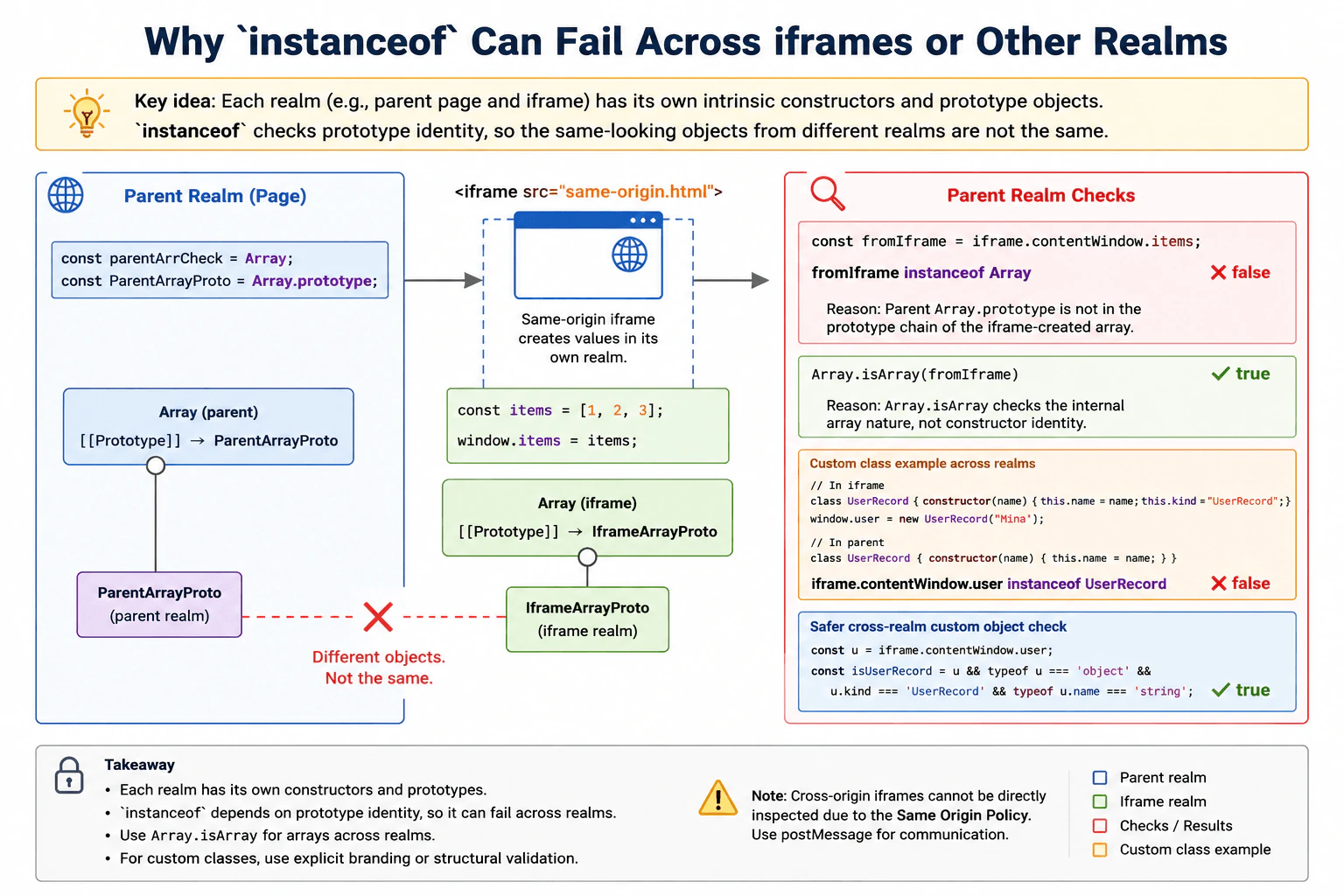
instanceof can fail across realms because each realm has its own constructors and prototype objects. An array created inside an iframe can be a real array but still fail value instanceof Array when Array comes from the parent realm. For arrays, I would use Array.isArray(value). For custom classes crossing realm boundaries, I would use an explicit brand or carefully validate the required structure instead of assuming the parent constructor has the same identity.
A page and an iframe can each have their own JavaScript world. An array made inside the iframe belongs to that iframe world. The parent page has a different Array object. Because of this, asking whether the iframe array came from the parent Array can return false even though the value really is an array. The practical fix is to use Array.isArray when you need to recognize arrays. For your own object types, use a clear brand or validate the data you expect when values can cross between separate JavaScript worlds.
Useful Questions to Ask the Interviewer
Should I assume the iframe is same origin so the parent can directly read values from it?
Should I also explain how custom class instances should be checked across realm boundaries?
How to Explain It in an Interview
instanceof uses prototype identity. In normal use, value instanceof Constructor checks whether Constructor.prototype appears in the prototype chain of value.
Each JavaScript realm has its own intrinsic constructors and prototype objects. An iframe creates another realm. Its Array, Object, and other built in constructors are separate objects from the matching constructors in the parent realm.
Suppose a same origin iframe creates const items = []. That array has the iframe realm Array.prototype in its prototype chain. If the parent checks items instanceof Array, the parent realm Array.prototype is not in that chain, so the result is false.
For arrays, Array.isArray(items) is the correct cross realm check. It recognizes whether the value has the internal array nature instead of depending on the parent realm Array prototype identity.
Custom classes have the same identity problem. A class defined in the iframe and a class with the same name defined in the parent are still different constructor objects. An instance created by the iframe class normally fails instanceof against the parent class.
At a cross realm boundary, custom objects can use an explicit brand together with validation of the required data. Structural validation can also check the properties and value types that the application needs. The tradeoff is that a structural check proves that the value has an expected shape. It does not prove that one exact constructor created the value.
For a cross origin iframe, the parent cannot directly read arbitrary objects from the iframe because of the same origin policy. Communication normally uses messaging. That is a separate browser security boundary from the realm identity issue demonstrated by a directly accessible same origin iframe.
Example
The example creates a same origin iframe with srcdoc. The iframe creates an array in its own realm and stores it on the iframe window. After the iframe loads, the parent reads that array. The parent realm instanceof Array check returns false because the parent Array prototype is different from the iframe Array prototype. Array.isArray returns true because it recognizes the value as an array without depending on that prototype identity. The example also creates a custom class in each realm and shows that matching class names do not make the constructor objects identical. It then validates an explicit brand and the required data shape.
Code
const iframe = document.createElement('iframe');
// Use srcdoc so this example creates a separate iframe realm that the parent can access.
iframe.srcdoc = `
<script>
// Create the array with this iframe realm's Array constructor and prototype.
window.items = [1, 2, 3];
// Define a custom class in the iframe realm and create one instance from it.
class UserRecord {
constructor(name) {
this.name = name;
this.kind = "UserRecord";
}
}
window.userRecord = new UserRecord("Mina");
<\/script>`;
document.body.appendChild(iframe);
iframe.addEventListener('load', () => {
// Read both values only after the same origin iframe has finished loading.const frameArray = iframe.contentWindow.items;
const frameUser = iframe.contentWindow.userRecord;
// The parent Array prototype is not in the iframe array's prototype chain.console.log(frameArray instanceofArray); // false// Array.isArray recognizes arrays across realm boundaries.console.log(Array.isArray(frameArray)); // true// Define a different constructor object in the parent realm.classUserRecord {
constructor(name) {
this.name = name;
this.kind = 'UserRecord';
}
}
// The iframe object was not created by this parent realm constructor.console.log(frameUser instanceofUserRecord); // false// Check the explicit brand and every piece of data this example depends on.const isUserRecord =
frameUser !== null &&
typeof frameUser === 'object' &&
frameUser.kind === 'UserRecord' &&
typeof frameUser.name === 'string';
console.log(isUserRecord); // true
});
Where it is used
This behavior matters when a frontend application directly exchanges JavaScript values with same origin iframes, popup windows, or browser test environments that create separate realms. Array detection is a common case, so production code should prefer Array.isArray when the goal is to determine whether a value is an array. For application defined objects that can cross a realm boundary, explicit branding and validation can provide a stable contract without depending on one constructor object being shared.
Why Interviewers Ask This
Interviewers ask this to check whether the candidate understands that separate JavaScript realms have separate built in constructors and prototype objects. It also tests whether the candidate knows why constructor identity matters to instanceof, when Array.isArray is the correct check for arrays, and how to validate custom objects that cross realm boundaries.
Common interview mistakes
A common mistake is assuming that every real array must pass value instanceof Array. That is false when the value and Array constructor come from different realms. Another mistake is assuming that two custom classes are equivalent because they have the same name or source text. Their constructor and prototype objects can still have different identities. It is also a mistake to treat one loose property check as proof that untrusted data is valid. If structural validation is used, the code should validate every property and value type that the application actually depends on. A separate mistake is forgetting that direct access to a cross origin iframe is restricted by the browser same origin policy.
Interview tip
Start with the key rule: instanceof depends on prototype identity, and each realm has separate constructors and prototypes. Then give the iframe array example. Say that Array.isArray works for cross realm array detection. Finish by explaining that custom classes often need explicit branding or structural validation when constructor identity is not a stable boundary.
Interviewer may ask next
What happens if I test the iframe array with the iframe realm's own Array constructor?
It returns true when the value is tested against the matching Array constructor from the realm that created it. For example, frameArray instanceof iframe.contentWindow.Array is true because that iframe Array prototype is in the array's prototype chain. This matters because it shows that instanceof is behaving correctly. The failure happens when the test uses a different realm constructor. In production, Array.isArray is usually clearer because array detection does not need access to the constructor from the source realm.
Should I replace every instanceof check with structural validation in production?
No. instanceof is useful when constructor identity is meaningful and the values stay within a controlled realm. The alternative is needed when values can cross realm boundaries or constructor identity is not a stable contract. For arrays, Array.isArray is the direct choice. For custom objects, explicit branding together with structural validation can be appropriate. The main tradeoff is that structural validation checks the required shape and data rather than proving that one exact constructor created the object.
50. What is an algorithm?CodingEasy
i Question Details
Define an algorithm as a finite, unambiguous sequence of steps for transforming valid input into the required output. Explain correctness, termination, input constraints, boundary cases, time and space use, and how the same algorithm can be implemented in JavaScript using different data structures. Use a small search example before discussing the general idea.
Short Interview Answer (30-60 seconds)
An algorithm is a finite and clear sequence of steps that transforms valid input into the required output. In this example, I use linear search on [3, 7, 1, 9, 7, 4] to find 7. I check values from left to right and stop at the first match, which is index 1. The same steps work with a JavaScript Array or TypedArray. The search takes O(n) time and O(1) auxiliary space.
An algorithm is a clear set of steps for solving a problem. The steps must have one clear meaning and must eventually finish. Here, the input is [3, 7, 1, 9, 7, 4], and the target is 7. We want the index of the first matching value. Linear search fits because it checks each value from left to right and can stop when it finds the target. The same search steps can work with either a JavaScript Array or a TypedArray.
Useful Questions to Ask the Interviewer
Should I return the index of the first matching value?
What should I return when the target is not present?
Can the input be empty or contain duplicate values?
How to Explain It in an Interview
1. Understand the input and required output
The input is a sequence of values and a target value. In the diagram, the input is [3, 7, 1, 9, 7, 4], and the target is 7. The required output is the index of the first matching value. The answer is index 1 because the value at index 1 is 7. If no match exists, the function returns -1.
2. Choose linear search
Linear search checks the input from the beginning, one item at a time. It fits because the values are not shown as sorted. At each index, compare the current value with the target. If they are equal, return the current index immediately. Otherwise, move to the next item.
3. Walk through the example
Start at index 0. The current value is 3. Check whether 3 === 7. It is false, so move to the next index.
Now check index 1. The current value is 7. Check whether 7 === 7. It is true, so return index 1 and stop. Indices 2 through 5 are not processed because the answer has already been found.
4. Explain why the result is correct and why the algorithm finishes
Before checking index i, every earlier index has already been checked and did not contain the target. Therefore, the first successful comparison gives the first matching index. If the loop reaches the end without a match, then every valid index has been checked, so returning -1 is correct. The loop also always terminates because the index increases by one each time and cannot continue past the input length.
5. Explain the JavaScript data structures
The same linearSearch function works with a normal JavaScript Array and an Int32Array. Both provide indexed access and a length property, so the search steps do not change. For [3, 7, 1, 9, 7, 4] with target 7, both versions return index 1. Only the structure that stores the values changes.
6. Explain complexity and boundary cases
Let n be the number of input items. Linear search checks at most n items, so its time complexity is O(n). It uses only a fixed amount of extra state, so its auxiliary space complexity is O(1). Important boundary cases are an empty input, a single item, the target at the first or last position, duplicate target values, and a target that is not present.
Key Insight / Why This Solution Works
The key idea is to scan the input from left to right and return as soon as the target is found. The invariant is: before checking index i, every earlier index has already been checked and does not contain the target. This means the first successful comparison gives the first matching index. If no comparison succeeds, returning -1 is correct because every valid position was checked. The same algorithm works with both Array and Int32Array because both support indexed access and a length property.
Code
functionlinearSearch(arr, target) {
// Start at index 0 and move from left to right.for (let i = 0; i < arr.length; i++) {
// Compare the current value with the target.// Returning here stops at the first matching index.if (arr[i] === target) {
return i;
}
}
// If the loop ends, every item was checked and no match was found.return -1;
}
// Use the exact Array example from the diagram.const values = [3, 7, 1, 9, 7, 4];
const target = 7;
// The first 7 is at index 1.console.log(linearSearch(values, target)); // 1// Store the same values in a TypedArray.const data = newInt32Array([3, 7, 1, 9, 7, 4]);
// Run the same linear-search algorithm on the TypedArray.console.log(linearSearch(data, 7)); // 1
Time & Space Complexity
Let n be the number of items in the input. The algorithm checks at most n items, so the time complexity is O(n). It can stop earlier when it finds the target. The algorithm uses only a small fixed amount of extra state, mainly the loop index, so the auxiliary space complexity is O(1). The Array and TypedArray versions shown in the diagram use the same search steps and have the same complexity.
Where it is used
Linear search is useful when data is small, unsorted, or searched only occasionally. Frontend code can use it to find the first matching item in a simple in-memory list. The same pattern also works for indexed numeric data stored in a TypedArray.
Why Interviewers Ask This
This question checks whether the candidate understands what an algorithm is, not just how to write code. The interviewer can evaluate whether the candidate can describe clear finite steps, explain correctness and termination, respect input constraints, handle boundary cases, distinguish values from indices, reason about early return, compare data structures, and state time and auxiliary space correctly. It also tests whether the candidate can express the same algorithm clearly in JavaScript.
Common interview mistakes
A common mistake is returning the value 7 instead of its index 1. Another mistake is continuing after the first match even though the diagram returns the first matching index. Candidates may also forget to return -1 when the target is absent. With duplicate values, they should return the first match because the search moves from left to right. Another mistake is claiming O(1) time because one indexed access is constant time. The full search may still inspect up to n items, so the time complexity is O(n).
Interview tip
Walk through the first two positions aloud: index 0 contains 3, so continue; index 1 contains 7, so return 1 and stop. This makes the processing order, early return, correctness, and complexity easy to explain.
Interviewer may ask next
What changes if the target is not present in the input?
The algorithm does not change. It checks each item from left to right. If no value equals the target, the loop finishes and returns -1. Correctness is preserved because every valid index has been checked before returning -1. The time complexity is O(n), and the auxiliary space complexity remains O(1).
What changes if duplicate target values exist?
Nothing changes when the required result is the first matching index. Linear search visits indices in increasing order and returns immediately at the first match. For [3, 7, 1, 9, 7, 4] with target 7, it returns index 1 and does not process the later 7 at index 4. The worst-case time remains O(n), and the auxiliary space remains O(1).
More questions load as you scroll
Disclaimer: This interview guide is for educational and informational purposes only. It is designed to help readers prepare, but it does not guarantee any interview result, hiring decision, offer, or outcome. Interview questions, hiring criteria, and preferred answers can vary by employer, interviewer, industry, location, and time. All answers, examples, and explanations in this guide are suggested examples for interview preparation, not definitive answers or instructions for professional practice. They are based on research and judgment, are provided without warranties of any kind, and should be adapted to the question, role, and applicable laws and professional requirements. Diagrams are simplified illustrations intended to highlight the main concepts and their relationships; actual situations, systems, and practices may be more complex. Alternative approaches may be equally valid or better suited to a particular question, context, or interviewer. To the fullest extent permitted by applicable law, the contributors and publisher are not liable for decisions made, actions taken, or losses incurred based on this guide.
State Laws and Professional Responsibilities: Laws and requirements governing an occupation vary by state and jurisdiction. You are responsible for checking the current laws, licensing requirements, and scope-of-practice rules that apply to your location and role, and for ensuring that your answers and actions comply with them. Adapt examples in this guide to those requirements. This guide is not legal advice.
Content Accuracy and Verification: To the fullest extent permitted by applicable law, we do not represent or warrant that interview guides, questions, answers, examples, or diagrams are accurate, complete, current, error-free, or suitable for any particular purpose. You are responsible for independently reviewing and verifying the information before relying on it.