This interview guide is for educational and informational purposes only. It is designed to help readers prepare, but it does not guarantee any interview result, hiring decision, offer, or outcome. Interview questions, hiring criteria, and preferred answers can vary by employer, interviewer, industry, location, and time. All answers, examples, and explanations in this guide are suggested examples for interview preparation, not definitive answers or instructions for professional practice. They are based on research and judgment, are provided without warranties of any kind, and should be adapted to the question, role, and applicable laws and professional requirements. Diagrams are simplified illustrations intended to highlight the main concepts and their relationships; actual situations, systems, and practices may be more complex. Alternative approaches may be equally valid or better suited to a particular question, context, or interviewer. To the fullest extent permitted by applicable law, the contributors and publisher are not liable for decisions made, actions taken, or losses incurred based on this guide.
State Laws and Professional Responsibilities
Laws and requirements governing an occupation vary by state and jurisdiction. You are responsible for checking the current laws, licensing requirements, and scope-of-practice rules that apply to your location and role, and for ensuring that your answers and actions comply with them. Adapt examples in this guide to those requirements. This guide is not legal advice.
Identity, Image, and Privacy Notice
To respect individual privacy, some names, profile photographs, avatars, biographical details, and other identifying information displayed in this guide may be replaced with pseudonyms, licensed stock images, illustrative avatars, composite images, or representative descriptions. Unless a person is expressly identified as an actual contributor, a displayed name, image, or profile should not be understood as depicting or identifying a specific candidate, interviewer, employee, or other real individual. These representations are provided for editorial and illustrative purposes only and do not imply endorsement, employment, participation, or affiliation with this guide or any company mentioned in it. Any resemblance to an actual person is coincidental.
Company Notice
This guide is an independent educational resource and is not affiliated with, endorsed by, sponsored by, or approved by the company named in this guide. Company names identify reported interview experiences or the employer context of clearly labeled original practice exercises. Interview practices can change without notice, and inclusion of company-specific content does not mean these questions are official, complete, or guaranteed to be asked. To the fullest extent permitted by law, the author, contributors, and publisher are not responsible for outcomes related to use of this material.
Content Accuracy and Verification
To the fullest extent permitted by applicable law, we do not represent or warrant that interview guides, questions, answers, examples, or diagrams are accurate, complete, current, error-free, or suitable for any particular purpose. You are responsible for independently reviewing and verifying the information before relying on it.
Questions or comments?
Contact us for general questions, or share feedback, technical corrections, and comments with the community.
51. What are generators and iterators, and how are they different?Language SpecificMedium
i Question Details
Explain the iterator protocol, iter(), next(), StopIteration, generator functions, yield, lazy evaluation, and why generators are useful when processing large or streaming datasets.
Short Interview Answer (30-60 seconds)
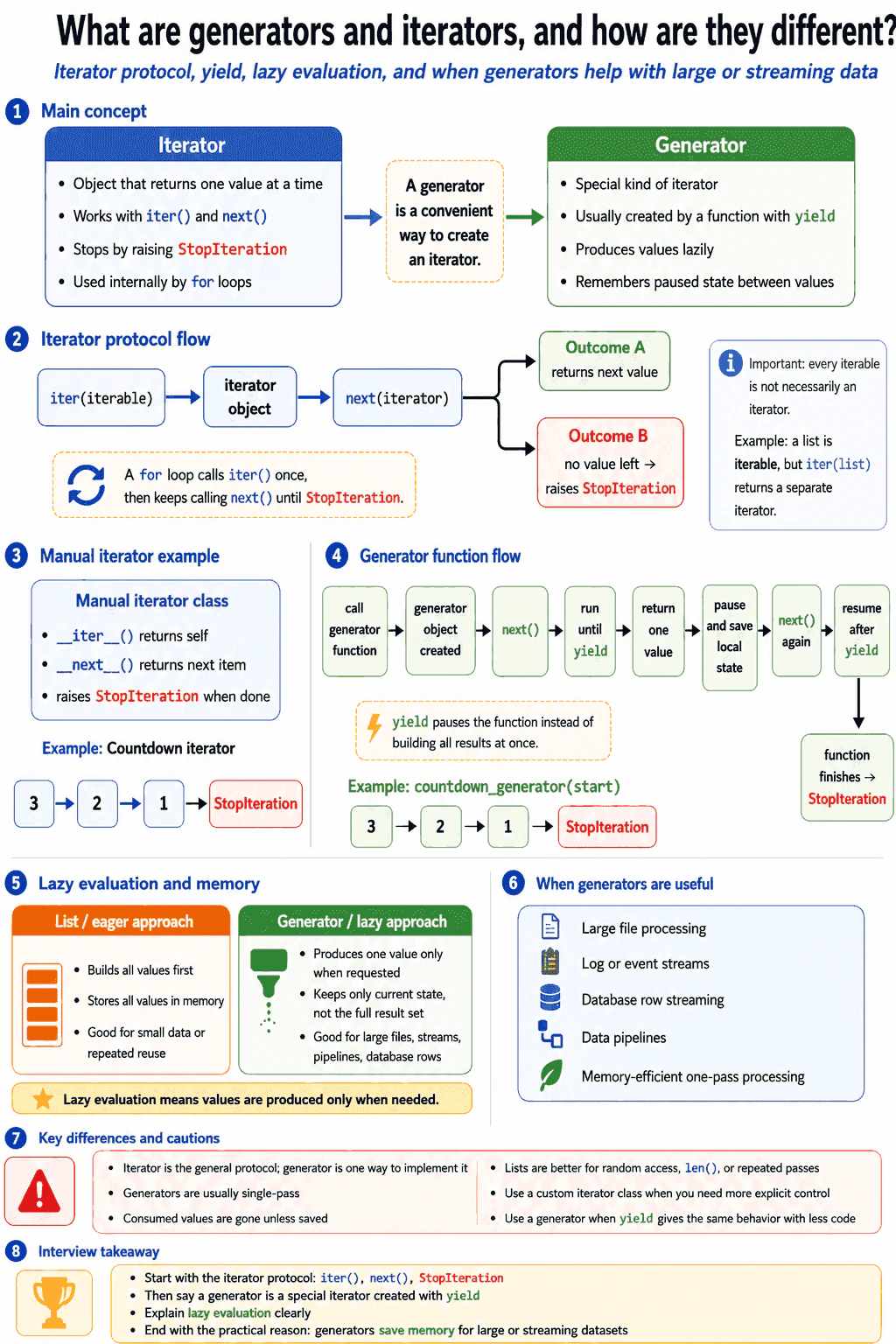
An iterator is any object that knows how to return its next value. It uses iter() and next(), and it stops by raising StopIteration. A generator is a special kind of iterator made by a function that uses yield. The main difference is that a generator creates values lazily, one at a time, without storing the whole result. That is useful for large files, streams, database rows, or pipelines where loading everything would waste memory.
The practical answer is that an iterator is the general protocol, and a generator is an easy way to create one. A protocol means a set of methods that Python expects. For iteration, Python expects an object to work with iter() and next().
Useful Questions to Ask the Interviewer
Should I focus on Python language behavior, or also explain the runtime and standard library?
Which Python version and execution environment should I assume?
Would you like a small code example together with production tradeoffs and edge cases?
An iterator must return itself from __iter__(). It must also define __next__(), which returns the next value. When there are no more values, __next__() raises StopIteration. A for loop uses this behavior for you. It calls iter() once, then keeps calling next() until StopIteration happens.
A generator function is a function that contains yield. When you call it, Python does not run the full function immediately. It returns a generator object. That object is also an iterator. Each call to next() runs the function until the next yield. Then Python pauses the function and remembers its local state.
The key idea is lazy evaluation. Lazy evaluation means values are produced only when they are requested. This is different from building a full list first. A list stores every value in memory. A generator can produce one value, hand it to the caller, then continue later.
This matters when data is large or continuous. For example, reading a huge log file line by line is a good generator use case. The program does not need the whole file in memory. It only needs the current line and a little state.
The tradeoff is that generators are usually single pass. Once a value is consumed, it is gone unless you save it somewhere. If you need random access, repeated passes, or the total length, a list may be clearer. So I would use generators when I want memory efficiency and streaming behavior. I would use a list when the data is small or I need to reuse it many times.
Key Insight / Why This Solution Works
First, explain the iterator protocol. An object becomes an iterator when iter() returns an object that has next() behavior through __next__(). Second, explain how the loop stops. When __next__() raises StopIteration, Python knows there are no more values. Third, explain a generator function. A function with yield creates a generator object instead of returning all values at once. Fourth, explain lazy evaluation. The generator produces one value only when next() asks for it. Fifth, choose between them. Use a custom iterator when you need full class control. Use a generator when yield gives the same behavior with less code.
Example
The code shows both forms. Countdown is a manual iterator because it implements __iter__() and __next__(). It raises StopIteration when the count reaches zero. countdown_generator does the same job with yield. Python saves the function state after each yield and resumes it on the next call. Both examples produce the same values, but the generator needs less manual code.
Code
classCountdown:
def__init__(self, start):
self.current = start
def__iter__(self):
returnselfdef__next__(self):
ifself.current <= 0:
raise StopIteration
value = self.current
self.current -= 1return value
defcountdown_generator(start):
current = start
while current > 0:
yield current
current -= 1print(list(Countdown(3)))
print(list(countdown_generator(3)))
Where it is used
Generators are used when processing large files, log streams, database result streams, message streams, and data pipelines. They are useful when each item can be handled one at a time. Iterators are also used in custom collection classes. For example, a class can define how its items should be visited without exposing its internal storage. In production code, generators often make pipelines simpler and reduce memory use.
Why Interviewers Ask This
Interviewers ask this to check whether you understand how Python loops work internally. They want to see if you know the iterator protocol, StopIteration, and lazy evaluation. They also want practical judgment. A good candidate knows when a generator saves memory and when a normal collection is simpler.
Common interview mistakes
A common mistake is thinking every iterable is an iterator. A list is iterable because iter(list) returns an iterator, but the list itself is not consumed by next() directly. Another mistake is forgetting StopIteration in a manual iterator. That can make code fail or loop forever. Some candidates think a generator runs when the function is called. It actually starts when next() asks for a value. Another mistake is trying to reuse a consumed generator like a list. If repeated passes are needed, store the values or create a new generator.
Interview tip
Start by saying that an iterator is the protocol and a generator is a convenient iterator made with yield. Then explain iter(), next(), StopIteration, and lazy evaluation. End with the practical use case. Generators are best when the data is large, streaming, or should be processed one item at a time.
Interviewer may ask next
What happens when a generator has already been consumed?
A consumed generator does not start over by itself. This behavior matters because a generator keeps its current position. When next() has already reached the end, the generator raises StopIteration. If you loop over it again, there are no values left. This is different from a list. A list can be iterated many times because the values are stored. If I need another pass over generated data, I would either create a new generator or save the values in a list. The tradeoff is memory. Saving values makes repeated reads easy, but it uses more memory.
When would you not use a generator?
I would not use a generator when I need random access, repeated passes, or the full length of the data. A generator is best for one pass processing. It gives each value when requested, but it does not naturally support indexing like items[5]. It also does not keep all previous values unless I store them myself. If the data is small and I need to sort it, count it, index it, or reuse it many times, a list is often simpler. The tradeoff is memory. A list uses more memory, but it gives easier access and repeated use.
52. What are classes and objects in Python?Language SpecificEasy
i Question Details
Define a class as a runtime object that creates a new type and an object as an instance of a type. Explain class bodies, instance attributes, class attributes, methods, object identity, encapsulating state and behavior, composition, and the dynamic nature of Python classes. Use one small example and explain when a function or simple data structure is clearer than a class.
Short Interview Answer (30-60 seconds)
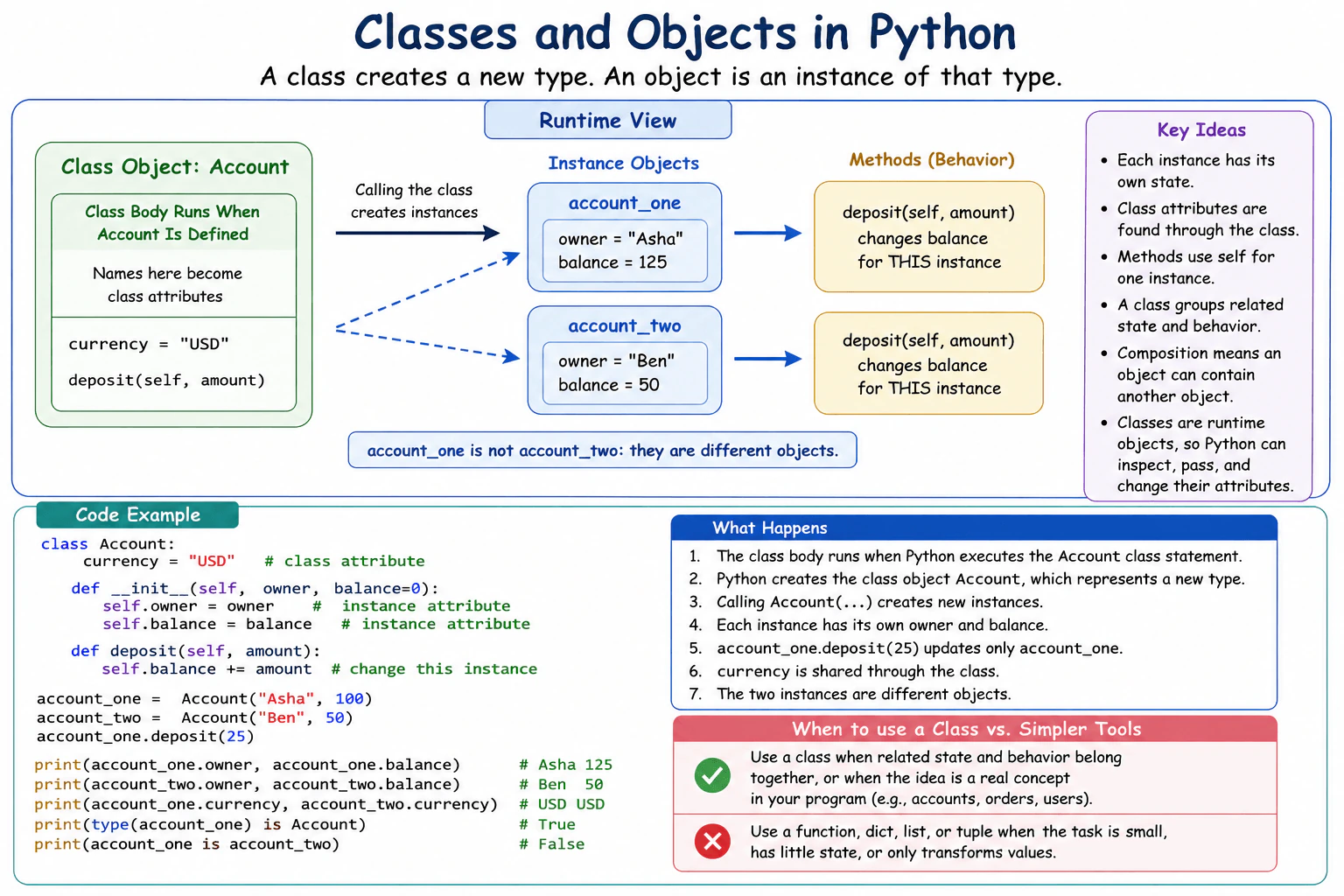
A class in Python is a runtime object that represents a new type, and an object is an instance of a type. I use a class when related state and behavior belong together. Each instance can have its own attributes, while class attributes live on the class and can be found through instances. Methods provide behavior for instances. Python classes are dynamic objects, so code can inspect them, pass them around, and change attributes at runtime.
A class describes a kind of thing that a program needs to work with. An object is one real value made from that description. For example, one description can represent an account, while separate values can represent Asha's account and Ben's account. Each account can keep its own owner and balance, while both follow the same rules for actions such as adding money. This is useful when related information and actions belong together. For a very small task, a simple function, dictionary, list, or tuple may be easier to understand.
Useful Questions to Ask the Interviewer
Would you like me to explain the difference between values stored on each object and values stored on the class?
Should I also show a small Python example?
How to Explain It in an Interview
In Python, running a class statement executes the class body and creates a class object. That class object represents a new type. Calling it normally creates an instance of that type.
Names assigned in the class body become class attributes. Values assigned through self, such as self.balance, are instance attributes, so each instance can keep different state.
A method is a function stored on the class. When it is accessed through an instance, Python normally binds that instance to the method as self.
Every object also has an identity. Two objects can hold equal values and still be different objects. is checks identity, while == normally checks equality.
Classes group state and behavior and can use composition by storing other objects. Because classes are runtime objects, Python can inspect them, pass them to functions, and change attributes dynamically. Use a class when this structure makes a real concept clearer. Use a function or simple data structure when the problem does not need that extra structure.
Example
The example defines an Account class. The class attribute currency belongs to the class and can be found through each instance. The __init__ method stores owner and balance as instance attributes, so each Account object keeps its own values. The deposit method changes the balance of the specific instance passed as self. Two Account instances show that they use the same class but keep separate instance state. The final checks show that account_one has type Account and that the two variables refer to different objects.
Code
classAccount:
# This class attribute belongs to the Account class.
currency = "USD"def__init__(self, owner, balance=0):
# These instance attributes belong to each Account object.self.owner = owner
self.balance = balance
defdeposit(self, amount):
# This method changes only this Account object's balance.self.balance += amount
# Create two different instances of the same class.
account_one = Account("Asha", 100)
account_two = Account("Ben", 50)
# Change only the first instance.
account_one.deposit(25)
# Each instance keeps its own state.print(account_one.owner, account_one.balance)
print(account_two.owner, account_two.balance)
# Both instances can find the class attribute.print(account_one.currency)
print(account_two.currency)
# The first object is an Account instance.print(type(account_one) is Account)
# The two variables refer to different objects.print(account_one is account_two)
Where it is used
Classes are useful when production code has concepts that own both state and behavior. Common examples include user accounts, orders, service objects, configuration objects, and domain entities. Composition is useful when one object contains another object, such as an Order containing Customer information. A class is often unnecessary when code performs one small calculation or only groups a few values. In those cases, a function, dictionary, list, or tuple can be simpler to read and maintain.
Why Interviewers Ask This
Interviewers ask this to check whether the candidate understands what Python creates when a class statement runs and how instances use that class. They also want to see whether the candidate can explain instance attributes, class attributes, methods, object identity, composition, and the practical choice between a class and a simpler function or data structure.
Common interview mistakes
A common mistake is treating a class as something outside normal Python runtime behavior. In Python, the class itself is an object. Another mistake is confusing class attributes with instance attributes. A mutable class attribute, such as a list, can be shared by instances and cause unexpected changes. Candidates also sometimes confuse is with ==. The first checks object identity, while the second normally checks equality. Another mistake is creating a class for a tiny task where a function or simple data structure would be clearer.
Interview tip
Start with the main definition: a class is a runtime object representing a type, and an object is an instance of a type. Then use one small example to explain instance attributes, class attributes, and methods. Mention identity and composition briefly. Finish by explaining that a class is useful when related state and behavior belong together, but simpler tools are often better for small problems.
Interviewer may ask next
What happens if a class attribute contains a mutable object such as a list?
The mutable object can be shared by instances because attribute lookup can find the same object on the class. If one instance mutates that shared list, another instance can observe the change. This matters when each instance is expected to have independent state. If every object needs its own list, create the list as an instance attribute, usually inside __init__. The tradeoff is that each instance then stores its own list instead of sharing one object.
When would you use a function or simple data structure instead of creating a class?
I would use a function or simple data structure when the task has little state and no strong need to keep state and behavior together. For example, a function that converts one temperature value does not need a class. A dictionary or tuple may also be enough for a small group of values. This matters because classes add structure but also add more concepts and code. The main tradeoff is clarity. A class is useful for a meaningful object with related state and behavior, while simpler tools are usually easier to read for small problems.
53. What is self in a Python method?Language SpecificEasy
i Question Details
Define self as the conventional name for the instance passed to an instance method. Explain method binding, why self appears explicitly in the function definition but is supplied through obj.method(), how it accesses instance state and other methods, and why self is a convention rather than a reserved keyword. Distinguish instance methods from class methods and static methods.
Short Interview Answer (30-60 seconds)
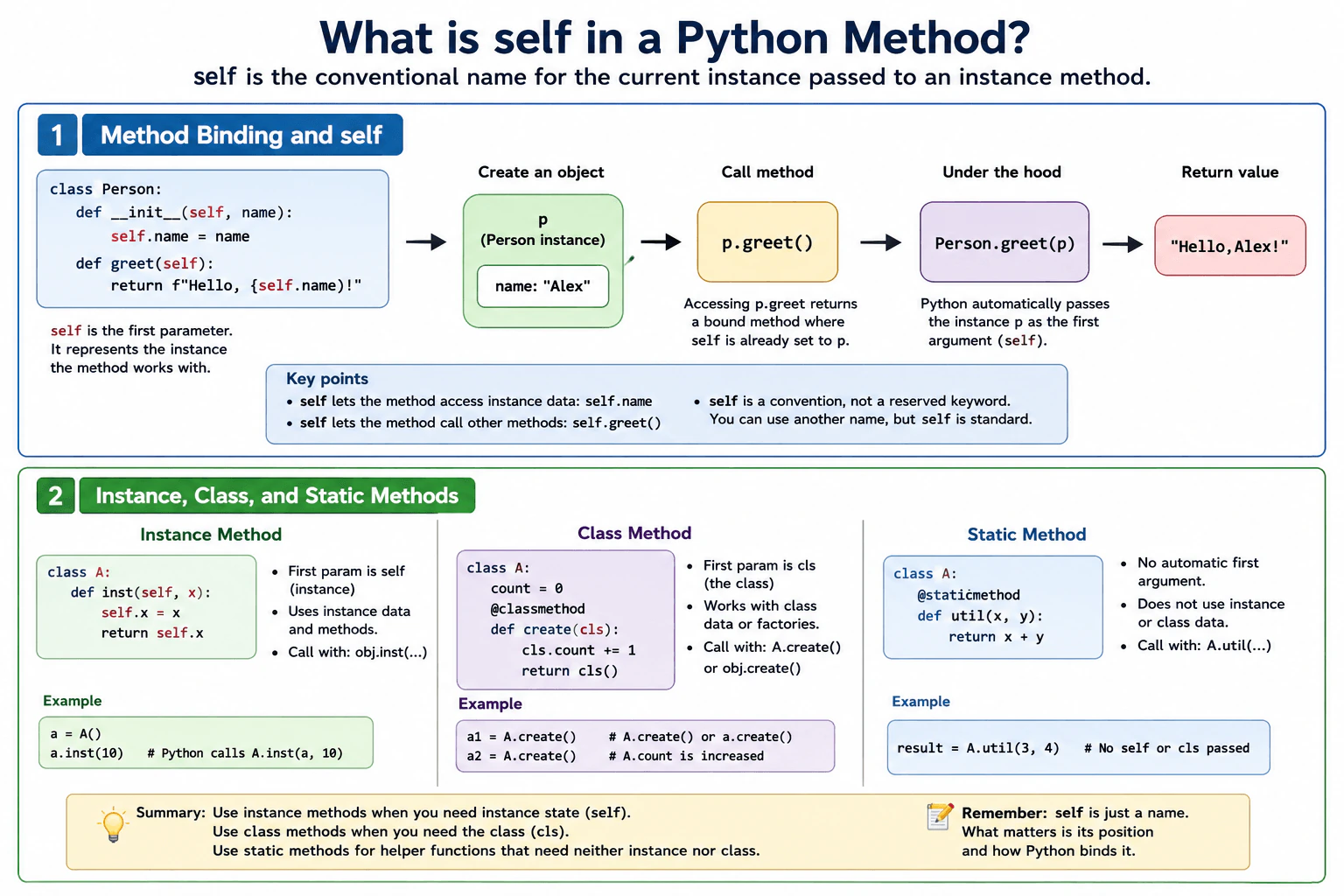
self is the conventional name for the current instance passed to an instance method. When I call obj.method(), Python binds that method to obj and supplies obj as the first argument, so I do not pass self myself. Inside the method, self lets me read or change that object's state and call its other methods. self is a convention, not a reserved Python word.
Detailed Explanation
In Python, an instance method usually works with one particular object. The first parameter in the method definition represents that object, and Python programmers normally call it self. For example, when you call obj.show(), Python supplies obj to the method as its first argument. This lets the method read or change information stored on that object and call other actions that belong to the same object. The name self is not a special reserved word. Another name can work, but self is the normal convention because it makes Python code easier to understand.
Useful Questions to Ask the Interviewer
Would you like me to explain how method binding supplies self?
Should I also compare instance methods with class methods and static methods?
How to Explain It in an Interview
The practical rule is simple. Use an instance method when the behavior needs a specific object's state or other instance methods.
When Python evaluates obj.show, it creates access to show that is bound to obj. Calling obj.show() therefore passes obj as the first argument to the underlying function. That is why the definition includes self even though the normal call does not.
Inside the method, self.value accesses state on that exact instance. self.save() calls another method using the same instance.
You can also call an instance method through the class, such as MyClass.show(obj). In that form, you supply the instance yourself. This shows that self is an ordinary parameter name, not a keyword.
A class method receives the class as its first argument, usually named cls. A static method receives no automatic instance or class argument. These choices do not add a special performance or memory benefit by themselves. Choose the method type based on what context the behavior actually needs.
Where it is used
Instance methods are common in production Python whenever an object keeps its own state. A service object can store configuration and use self to read it in several methods. A domain object can update its own fields through self. A model object can use instance methods that work with values belonging to one particular record. The important point is that self identifies the exact instance whose state and methods should be used.
Why Interviewers Ask This
Interviewers ask this to check whether the candidate understands how Python connects an object to an instance method. They want to see whether the candidate understands method binding, why the instance appears as an explicit parameter in the method definition, and why Python supplies that instance when the method is called through an object. They also test whether the candidate can distinguish instance methods from class methods and static methods.
Common interview mistakes
A common mistake is thinking self is a reserved Python keyword. It is only a naming convention. Another mistake is passing self manually in a normal call such as obj.method(self). Python already supplies the instance for a bound method call. Candidates may also forget the first instance parameter in the method definition. Another mistake is assuming every method receives self. A class method receives the class, usually as cls, while a static method receives no automatic instance or class argument.
Interview tip
Start by saying that self is the current instance passed to an instance method. Then explain that obj.method() binds the method to obj and Python supplies obj as the first argument. Mention that self is a convention rather than a reserved word. Finish by briefly comparing self with cls in a class method and with a static method that receives no automatic instance or class argument.
Interviewer may ask next
What happens if I call an instance method through the class instead of through an object?
You must supply the instance explicitly. For example, MyClass.show(obj) passes obj as the first argument to show. In contrast, obj.show() uses method binding, so Python supplies obj automatically. This matters because it shows that self is an ordinary function parameter and that the automatic behavior comes from binding the function through an instance.
When should I use an instance method instead of a class method or static method?
Use an instance method when the behavior needs state or methods from a specific object. It receives that instance as the first argument, conventionally named self. Use a class method when the behavior needs the class itself, conventionally received as cls. Use a static method when the operation needs neither instance state nor class state. The main tradeoff is clarity of required context. Choosing the narrowest suitable method type makes the code easier to understand and avoids unnecessary access to object or class state.
54. What is __init__ in Python?Language SpecificEasy
i Question Details
Define __init__ as the instance-initialization method called after a new instance has been created. Explain its self parameter, constructor arguments, assigning valid initial state, inheritance and super().__init__, its required None return, and the difference between initialization in __init__ and object creation in __new__. Include a small class example.
Short Interview Answer (30-60 seconds)
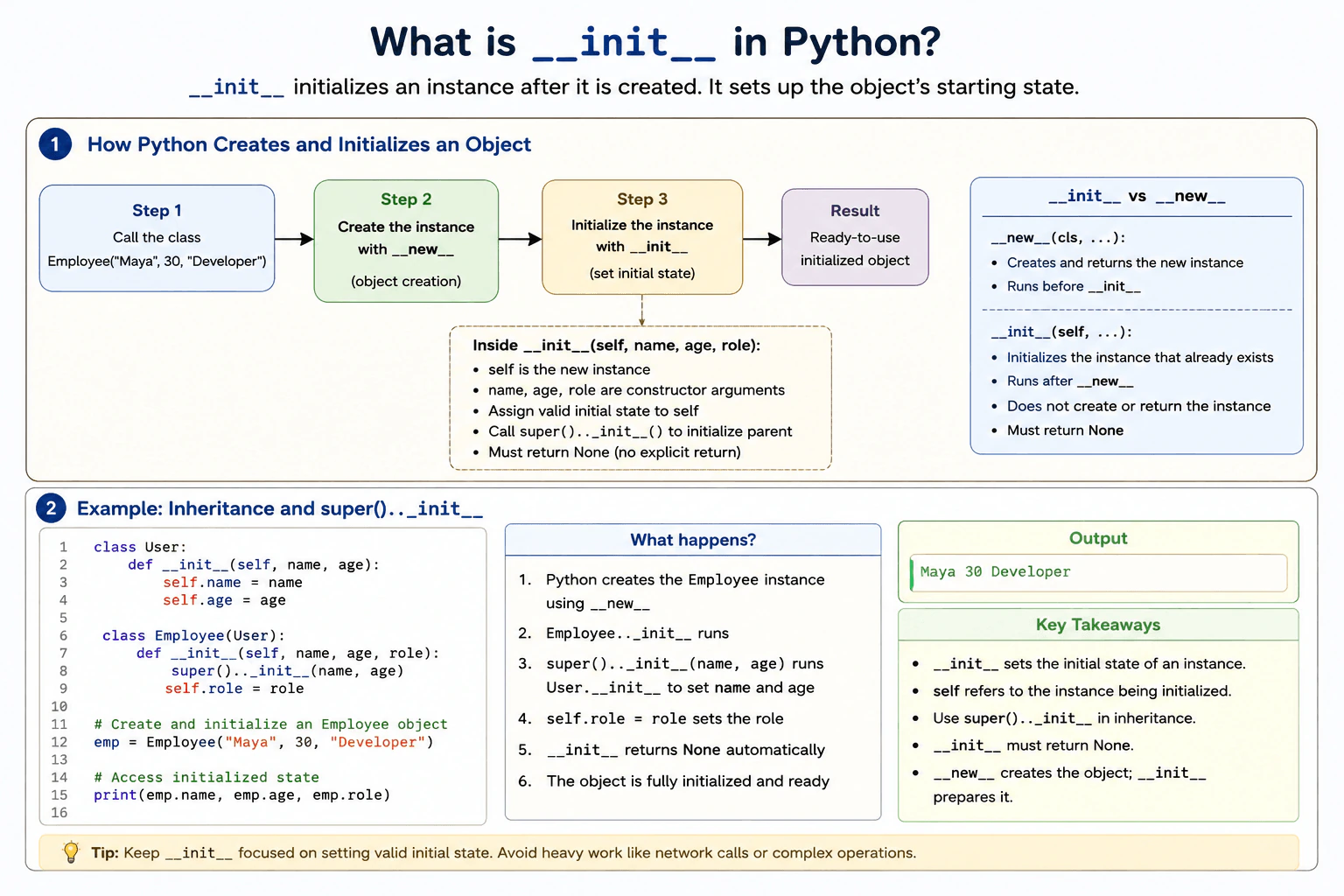
__init__ initializes a new instance after Python has created it. It receives the instance through self and usually saves constructor arguments as instance attributes. With inheritance, a class often calls super().__init__ so required initialization earlier in the method resolution order can run. __init__ must return None. The actual creation of the instance is handled by __new__.
__init__ is the place where an object gets its starting information. For example, when we create an employee with a name, age, and role, this method can save those values inside the new employee. Python gives the method the new object automatically, so the method can change that object. This is useful because every new object can begin with valid values. A class can also reuse initialization from another class that it inherits from. This method does not make the object itself. It prepares an object that has already been created.
Useful Questions to Ask the Interviewer
Would you like me to explain the difference between __init__ and __new__?
Should I also show how __init__ works with inheritance?
How to Explain It in an Interview
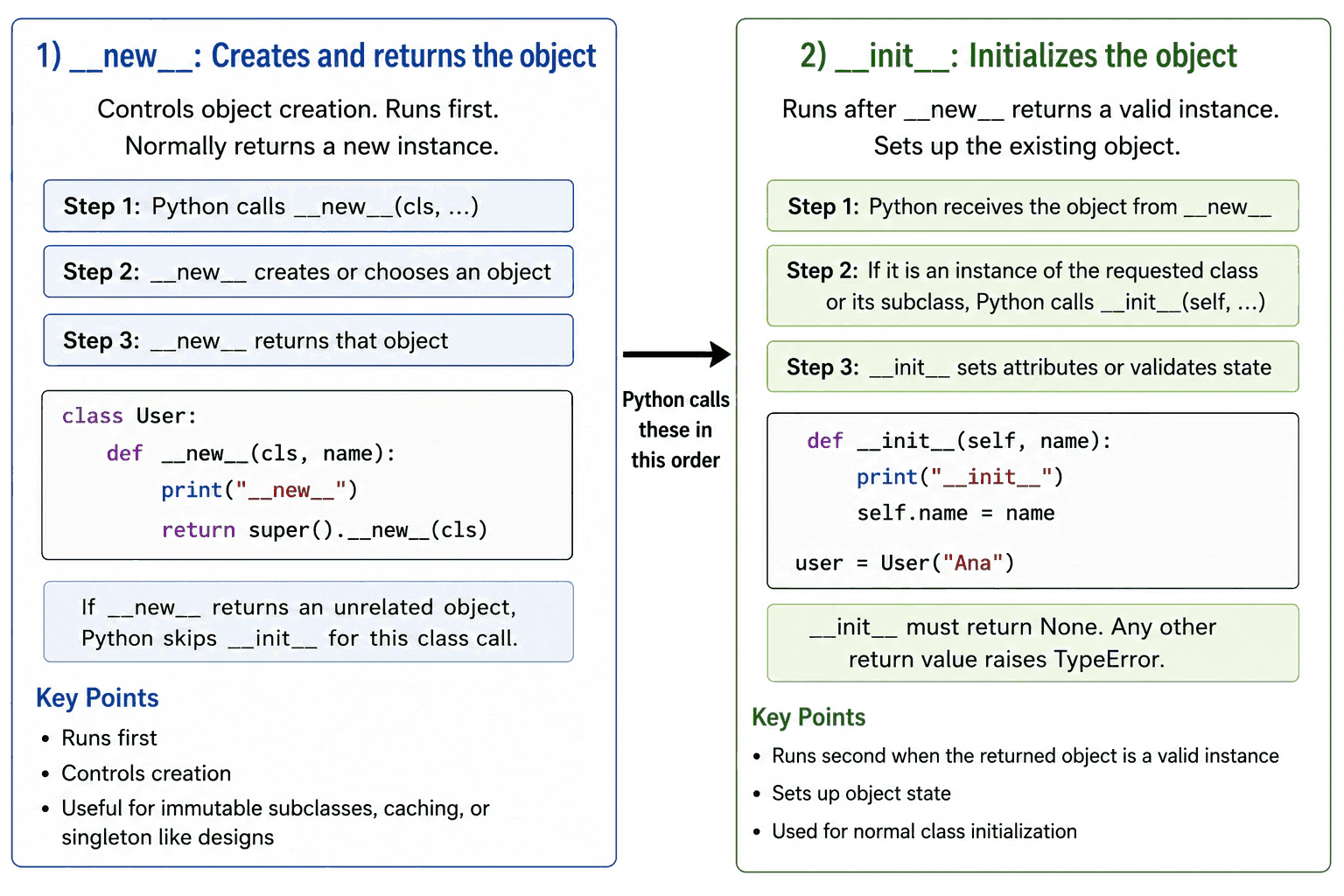
When Python evaluates Employee("Maya", 30, "Developer"), object creation happens first. __new__ is responsible for creating and returning the new instance. Python then normally calls __init__ on that instance.
The self parameter refers to the instance being initialized. Statements such as self.name = name save constructor arguments as attributes on that instance. Simple validation can also happen here so the object begins in a valid state.
Employee calls super().__init__(name, age). In this example, that runs the User initializer, which stores the shared name and age values. Employee then stores role.
__init__ must return None. Returning another value causes a TypeError because __init__ initializes an existing instance rather than replacing it.
One runtime edge case is that if __new__ returns an object that is not an instance of the class, Python does not call that class's __init__.
In production code, keep __init__ focused on creating valid initial state. Expensive network calls or unrelated work can make instance creation slower and harder to test.
Example
The example defines a User class whose __init__ stores name and age on each instance. Employee inherits from User. Its __init__ calls super().__init__(name, age), which runs the User initializer in this inheritance structure. Employee then stores role. Creating Employee("Maya", 30, "Developer") produces an instance whose name is Maya, age is 30, and role is Developer. Neither __init__ method explicitly returns a value, so each returns None as required.
Code
classUser:
def__init__(self, name, age):
# Save the constructor arguments on this instance.self.name = name
self.age = age
classEmployee(User):
def__init__(self, name, age, role):
# Run the User initializer for the shared attributes.super().__init__(name, age)
# Save the attribute specific to Employee.self.role = role
# Python creates the Employee instance and then initializes it.
employee = Employee("Maya", 30, "Developer")
# Show the initialized state.print(employee.name)
print(employee.age)
print(employee.role)
Where it is used
__init__ is commonly used when creating application objects such as users, configuration objects, service classes, data models, and domain objects. It is useful for saving required values, checking simple input rules, and giving attributes sensible starting values. In inherited classes, super().__init__ is commonly used when initialization from another class in the method resolution order must also run.
Why Interviewers Ask This
Interviewers ask this to check whether a candidate understands how Python initializes instances, how self refers to the instance being initialized, how constructor arguments become instance state, how initialization works with inheritance, and why object creation with __new__ is different from initialization with __init__. It also checks whether the candidate knows that __init__ must return None.
Common interview mistakes
A common mistake is saying that __init__ creates the object. Object creation is handled by __new__, while __init__ initializes an instance after creation. Another mistake is returning a value other than None from __init__, which causes a TypeError. Developers may also forget self when assigning instance attributes, skip super().__init__ when required initialization from another class must run, or place expensive external work inside __init__, making instance creation slow and harder to test.
Interview tip
Start by saying that __init__ initializes an instance after it is created. Then explain self, constructor arguments, and assigning initial attributes. Mention that __init__ must return None. Finish by distinguishing it from __new__ and briefly show how super().__init__ supports inheritance.
Interviewer may ask next
What happens if __init__ returns a value other than None?
Python raises a TypeError if __init__ explicitly returns a value other than None. The exact behavior matters because __init__ is meant to initialize the instance that Python already created. It cannot replace that instance by returning another object. If custom control over object creation is needed, that behavior belongs in __new__ instead.
When should a child class call super().__init__?
A child class should call super().__init__ when required initialization earlier in the method resolution order needs to run. In the Employee example, the call runs the User initializer so name and age are set before Employee adds role. This matters because skipping required initialization can leave expected attributes unset. The main tradeoff is that the child depends on the initialization contract of the classes it cooperates with, but it avoids copying the same initialization logic.
55. What is inheritance in Python?Language SpecificEasy
i Question Details
Define inheritance as creating a class that derives behavior and attributes from one or more base classes. Explain method overriding, super(), isinstance, issubclass, method resolution order, multiple inheritance, and the tradeoff between inheritance and composition. Use one small example and avoid presenting inheritance as the default reuse mechanism.
Short Interview Answer (30-60 seconds)
I use inheritance when one class is truly a more specific kind of another class. In Python, a derived class can use attributes and methods from one or more base classes, and it can override methods when its behavior needs to differ. super() can continue method lookup through the method resolution order. I do not treat inheritance as the default way to reuse code because composition often creates a simpler and more flexible relationship.
Use inheritance when one kind of object is clearly a more specific kind of another. It lets the new kind receive shared data and actions from the older kind, while still changing an action when needed. For example, a dog can use the general behavior of an animal and add its own sound. This can reduce repeated work and keep related behavior together. However, it should not be used only to share code. If one object simply needs help from another object, keeping them separate is often easier to change.
Useful Questions to Ask the Interviewer
Would you like me to explain multiple inheritance as well?
Should I compare inheritance with composition?
How to Explain It in an Interview
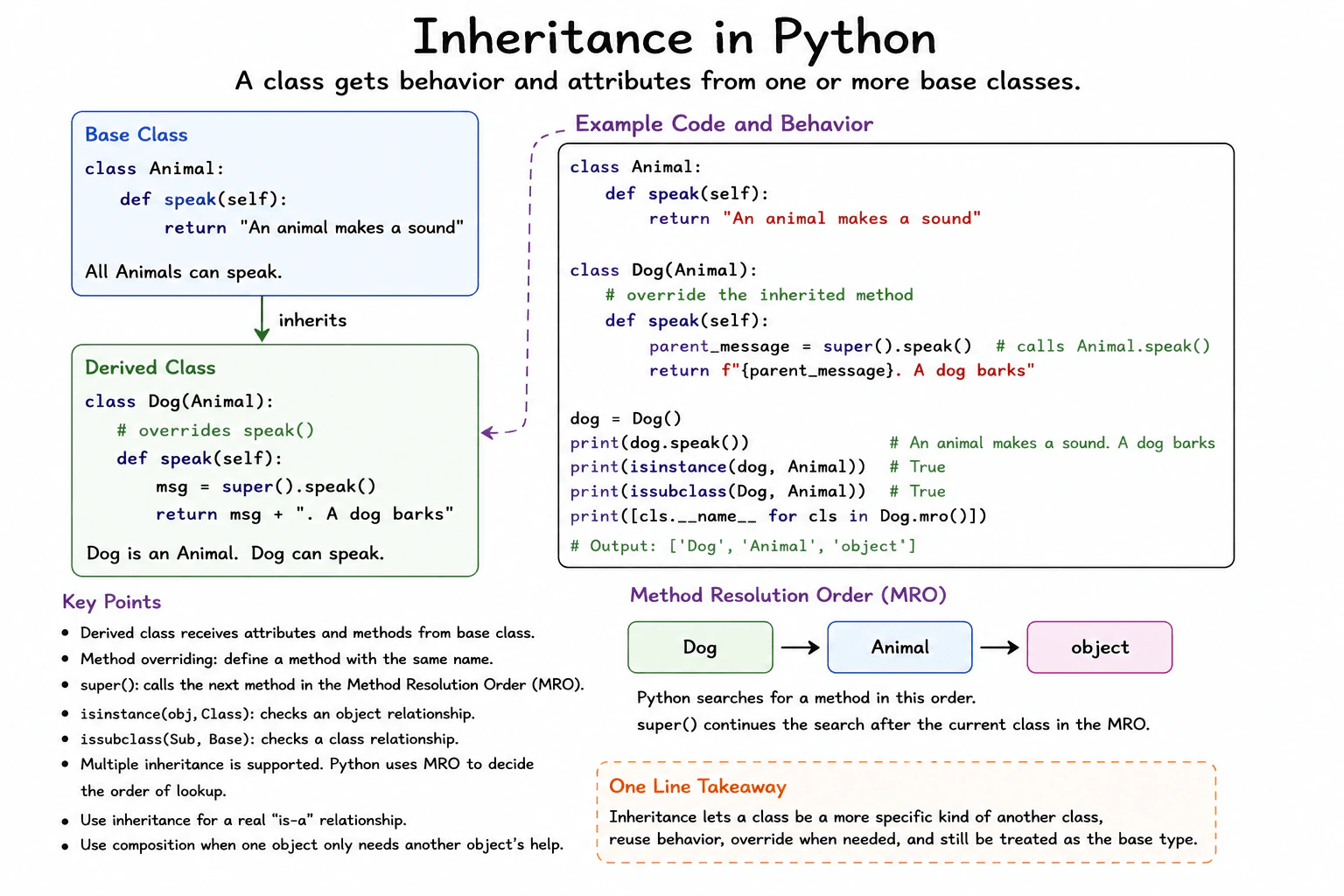
In Python, class Dog(Animal) makes Animal a base class of Dog. A Dog object can use attributes and methods found on Animal.
If Dog defines speak() again, it overrides the inherited method. super().speak() continues method lookup after Dog according to Python's method resolution order, called MRO. Here, it reaches Animal.speak().
isinstance(dog, Animal) checks the object relationship. issubclass(Dog, Animal) checks the class relationship.
Python also supports multiple inheritance. A class can have several base classes, and the MRO decides the lookup order.
Use inheritance for a real type relationship with shared behavior. Prefer composition when one object only needs another object's service. Composition often reduces coupling and makes parts easier to replace.
Inherited methods are not copied into every instance. They stay on classes and are found during attribute lookup. Each instance still stores its own instance state.
Example
The example defines Animal as the base class and Dog as the derived class. Dog.speak() overrides Animal.speak(). Inside the override, super().speak() continues lookup through the MRO and reaches Animal.speak() in this class structure. The example also shows that isinstance() recognizes the object as an Animal, that issubclass() recognizes the class relationship, and that Dog.mro() exposes the method lookup order.
Code
classAnimal:
# This method provides behavior that derived classes can reuse.defspeak(self):
return"An animal makes a sound"classDog(Animal):
# This method overrides the method inherited from Animal.defspeak(self):
# super() continues lookup through Python's method resolution order.
parent_message = super().speak()
returnf"{parent_message}. A dog barks"# Create one instance of the derived class.
dog = Dog()
# Call the overridden method.print(dog.speak())
# Check whether the object is an Animal or a derived type of Animal.print(isinstance(dog, Animal))
# Check the relationship between the two classes.print(issubclass(Dog, Animal))
# Show the order Python follows when looking for methods.print([cls.__name__ for cls in Dog.mro()])
Where it is used
Inheritance is useful in production when several classes have a real type relationship and share stable behavior. Frameworks may provide a base class with standard behavior that derived classes customize. It is also useful when code accepts a base type and should work with several derived types. Composition is usually a better choice when an object only needs to use another object's service rather than being a more specific form of that object.
Why Interviewers Ask This
Interviewers ask this to check whether a candidate understands how Python classes can reuse and change behavior from other classes. They also want to see whether the candidate understands overriding, super(), type checks, method lookup order, multiple inheritance, and when composition is a better design choice.
Common interview mistakes
A common mistake is using inheritance only because two classes share some code. Shared code alone does not create a good type relationship. Another mistake is assuming that super() always means the immediate parent class. It actually continues lookup according to the MRO. Developers can also misunderstand multiple inheritance and ignore how the full MRO affects method lookup. Another mistake is forgetting that isinstance() can return true when an object belongs to a class derived from the class being checked.
Interview tip
Start with the practical rule: use inheritance for a real type relationship, not just for code reuse. Then explain overriding and super(). Mention isinstance(), issubclass(), and the MRO. Finish by explaining that multiple inheritance follows the MRO and that composition is often better when the goal is only to use another object's behavior.
Interviewer may ask next
What happens if two base classes provide a method with the same name?
Python uses the method resolution order to determine which implementation is found first. With multiple inheritance, Python creates one consistent lookup sequence for the class and its base classes. A normal method lookup follows that sequence, and super() also continues through that sequence. This matters because changing the base class order can change the MRO and therefore change which implementation runs. Multiple inheritance can be useful, but its main tradeoff is that class relationships and cooperative method calls can become harder to understand.
When would you choose composition instead of inheritance?
I would choose composition when one object needs another object's behavior but is not truly a more specific form of that object. With composition, one object stores or receives another object and calls it when needed. This usually reduces coupling and makes the dependency easier to replace or test. Inheritance is useful when there is a meaningful type relationship and shared behavior belongs to that relationship. The main tradeoff is that inheritance gives convenient shared type behavior, while composition usually gives more flexibility.
56. How do __new__ and __init__ differ?Language SpecificHard
i Question Details
Explain object allocation versus initialization, the order in which they run, the return requirements of __new__, and why immutable subclasses or singleton-like designs may override __new__.
Short Interview Answer (30-60 seconds)
__new__ creates and returns an object, while __init__ initializes an object that has already been created. Python calls __new__ first. It then calls initialization only when the returned object is an instance of the requested class or one of its subclasses. I normally use __init__ for regular setup and override __new__ only when creation itself must be controlled, such as for an immutable subclass or a singleton like design.
Detailed Explanation
__new__ handles object creation. It receives the class as its first argument and must return an object. In a normal custom class, it usually calls super().__new__(cls) and returns the new instance.
Useful Questions to Ask the Interviewer
Should I focus on Python language behavior, or also explain the runtime and standard library?
Which Python version and execution environment should I assume?
Would you like a small code example together with production tradeoffs and edge cases?
Python then performs initialization when the returned object is an instance of the requested class or one of its subclasses. __init__ receives that existing object. It can validate input, assign attributes, and prepare state. It must return None. Returning another value raises TypeError.
The order is therefore creation first and initialization second. If __new__ returns an unrelated object, Python skips initialization for the requested construction call.
Most classes should only define __init__. Immutable subclasses may define __new__ because values such as an int, str, or tuple value must be chosen while the object is being created. A singleton like design may also define __new__ to return a cached instance. However, __init__ can still run after each successful class call, so repeated initialization must be safe or guarded.
Overriding __new__ has no fixed performance or memory cost by itself. The cost depends on extra allocation, caching, locking, validation, or lookup logic added by the implementation.
Where it is used
__init__ is used in ordinary application classes to validate constructor input, assign instance attributes, and prepare dependencies. __new__ is used when creation must be controlled before initialization begins. Common examples include subclasses of immutable built in types, instance caching, and singleton like designs. In production, __new__ should remain small and predictable. Cached instances can reduce repeated allocation, but the cache also keeps objects in memory and may require synchronization when several threads can create the object at the same time.
Why Interviewers Ask This
Interviewers ask this question to check whether a candidate understands the two stages of Python object construction. It tests knowledge of instance allocation, initialization order, return rules, immutable types, and the risks of controlling object creation in production code.
Common interview mistakes
A common mistake is saying that __init__ creates the object. The object already exists when __init__ starts. Another mistake is forgetting that __new__ must return an object. If it returns None or an unrelated object, normal initialization does not occur. Developers may also return a value from __init__, but Python requires an implicit or explicit None return. In singleton like designs, it is incorrect to assume that __init__ runs only once. It can run after every class call that returns a valid instance. Another mistake is overriding __new__ for normal attribute assignment when __init__ is simpler and clearer.
Interview tip
Begin with the direct rule: __new__ creates and returns the object, while __init__ prepares the returned object. Then explain the call order, the return requirements, and the case where initialization is skipped. Finish with one practical example involving an immutable subclass.
Interviewer may ask next
What happens if __new__ returns an object that is not an instance of the requested class?
Python returns that object and skips the normal initialization step for the requested construction call. This matters because __new__ can change the final result of calling a class. Returning an unrelated object should therefore be rare, intentional, and clearly documented.
What tradeoff comes with using __new__ to return a cached singleton instance?
The design can avoid repeated allocation and provide one shared object, but it also creates shared state and can keep the object in memory for a long time. __init__ may still run after later class calls, so initialization must be guarded or safe to repeat. Threaded code may also need synchronization around first creation, which adds complexity and possible contention.
57. What is a Python decorator?Language SpecificEasy
i Question Details
Define a decorator as a callable that receives a function, method, or class and returns a replacement or modified object, using @ syntax as convenient assignment. Explain one wrapper example, closures, *args and **kwargs, functools.wraps, decorator arguments, evaluation time, stacked decorators, and common uses such as logging, authorization, caching, registration, and retries.
Short Interview Answer (30-60 seconds)
A Python decorator is a callable that receives a function, method, or class and returns a replacement or modified object. The @ syntax is convenient syntax for assigning the decorated result back to the same name. A common decorator creates a wrapper that runs extra logic around the original function. In production code, I normally use functools.wraps so the wrapper keeps useful information such as the original function name and documentation.
A decorator lets us add the same extra behavior around existing work without rewriting that work. Imagine a greeting action that already works correctly. We may also want to record when it runs or check permission first. Instead of mixing those extra steps into the greeting itself, we can place them around it. This keeps the main job focused and makes the extra rule reusable. Python connects this extra behavior when it creates the decorated item, so the setup is normally done once when that definition is executed.
Useful Questions to Ask the Interviewer
Would you like a simple function decorator example?
Should I also explain decorators that accept their own arguments?
How to Explain It in an Interview
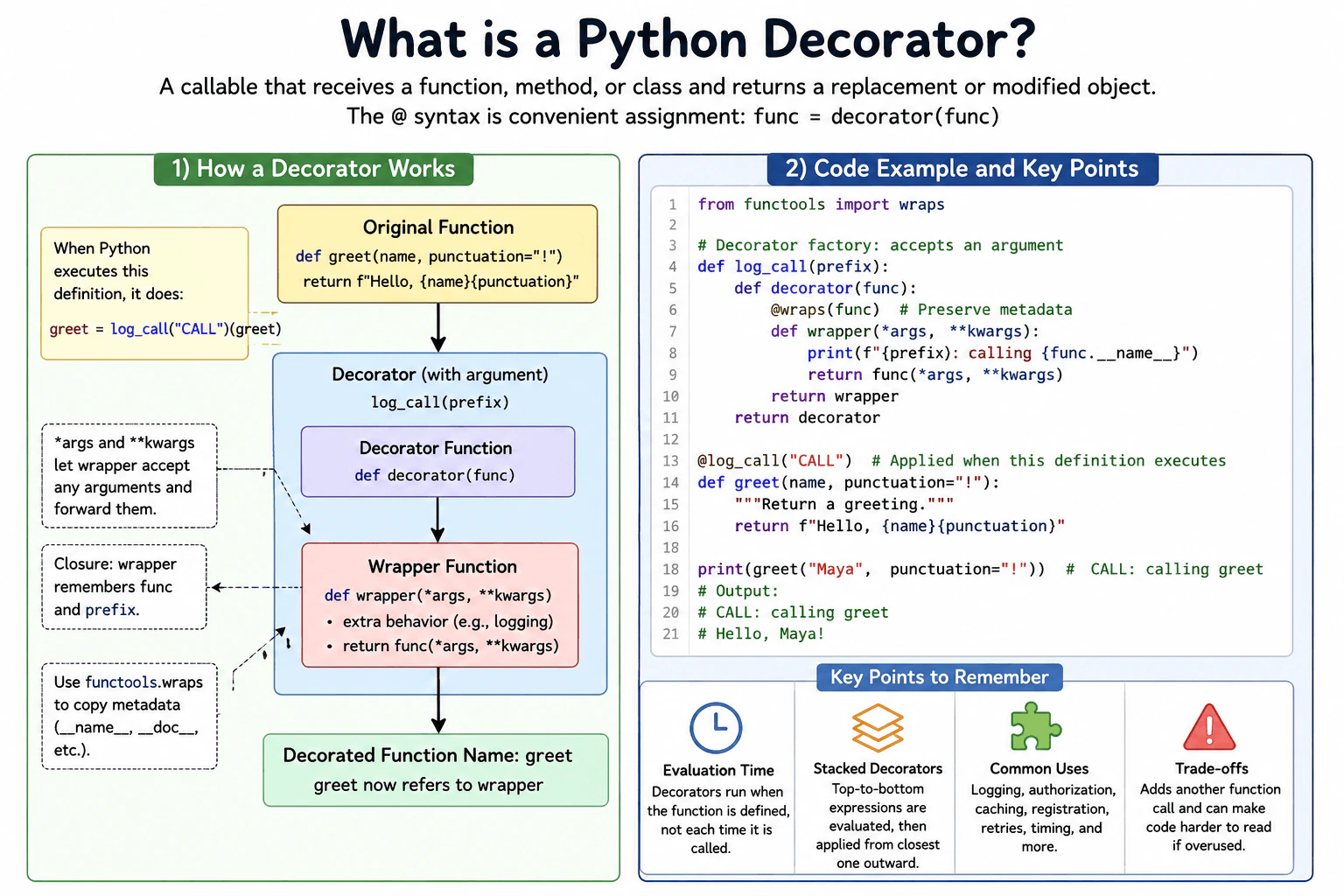
A decorator is a callable that receives a function, method, or class and returns a replacement or modified object. For a function, it often returns a wrapper.
The @ syntax is convenient assignment syntax. Writing @log_call above greet is effectively greet = log_call(greet). Decoration happens when Python executes that definition.
A wrapper often accepts *args and **kwargs to pass arguments through. It is a closure because it remembers the original function. functools.wraps preserves useful metadata.
A decorator can accept arguments through another outer callable. With stacked decorators, Python evaluates expressions from top to bottom, then applies decorators from the closest one outward.
Decorators suit logging, authorization, caching, registration, and retries. They add call overhead and another control flow layer, so direct code can be clearer for simple cases.
Example
The example uses a decorator factory named log_call. The outer function receives a prefix, so the decorator itself accepts an argument. The decorator function receives greet and returns wrapper. The wrapper remembers both prefix and greet through closures. It accepts *args and **kwargs and forwards them unchanged to greet. functools.wraps preserves useful metadata from greet. Python evaluates log_call("CALL") when it executes the decorated definition, then applies the returned decorator to greet. Calling greet later runs wrapper, prints the prefix, and then calls the original greet function.
Code
from functools import wraps
# This outer function lets the decorator accept its own argument.deflog_call(prefix):
# This function receives the function that will be decorated.defdecorator(func):
# wraps copies useful metadata from func to wrapper. @wraps(func)defwrapper(*args, **kwargs):
# This extra behavior runs before the original function.print(f"{prefix}: calling {func.__name__}")
# Forward all positional and keyword arguments unchanged.return func(*args, **kwargs)
# The decorator replaces the original name with this wrapper.return wrapper
# Return the actual decorator function.return decorator
# Python evaluates log_call("CALL") and applies its returned decorator# when this function definition is executed.@log_call("CALL")defgreet(name, punctuation="!"):
returnf"Hello, {name}{punctuation}"# Calling greet now calls the wrapper, which then calls the original function.print(greet("Maya", punctuation="!"))
Where it is used
Decorators are useful when many functions need the same surrounding behavior. Production examples include recording function calls, checking authorization before protected work, caching repeated results, registering handlers with a framework, measuring execution, and applying retry rules. Standard library tools such as functools.lru_cache also use decorator syntax. A wrapper normally adds another Python function call, and a closure keeps references to captured objects for as long as the wrapper is alive. Use decorators when the shared behavior is clear and reusable.
Why Interviewers Ask This
Interviewers ask this to check whether a candidate understands that Python functions and classes are objects that can be passed to other callables. They also want to see whether the candidate understands decoration time, closures, wrappers, metadata preservation with functools.wraps, decorator arguments, stacking order, and practical production uses.
Common interview mistakes
A common mistake is saying that a decorator only adds code before a function call. A decorator can return a replacement object and may change behavior in many ways. Another mistake is forgetting to return the original result from a wrapper. Developers also forget *args and **kwargs, which can make a wrapper reject arguments accepted by the original function. Forgetting functools.wraps can hide useful metadata. Another mistake is thinking decoration happens on every function call. Decorator expressions are evaluated when Python executes the decorated definition. With stacked decorators, candidates also sometimes confuse expression evaluation order with application order.
Interview tip
Start with the simple rule: a decorator receives an object and returns a replacement or modified object. Then explain @ syntax as assignment, show one wrapper, and mention closures, *args and **kwargs, and functools.wraps. Finish with one production use and explain that stacked decorator expressions are evaluated from top to bottom but applied from the closest decorator outward.
Interviewer may ask next
When is a Python decorator evaluated, and what happens with stacked decorators?
Decorator expressions are evaluated when Python executes the decorated definition. With stacked decorators, the expressions are evaluated from top to bottom, but the resulting decorators are applied from the closest decorator outward. For example, with outer above inner, the final result behaves like func = outer(inner(func)). This matters because each decorator receives the object produced by the decorator below it, so changing the order can change behavior.
What are the main tradeoffs of using decorators in production code?
Decorators are useful when the same surrounding behavior must be reused across many functions, such as logging, authorization, caching, registration, or retries. The tradeoff is that a wrapper normally adds another function call and another layer of control flow. A closure can also keep captured objects alive while the wrapper exists. This matters for readability, debugging, performance, and memory when decorators are used heavily. I use them when the shared behavior is clear and reusable, but I avoid unnecessary layers when direct code is easier to understand.
58. What is duck typing?Language SpecificMedium
i Question Details
Explain behavior-based compatibility, how Python code relies on supported operations rather than declared inheritance, and how protocols or abstract base classes can document expected behavior.
Short Interview Answer (30-60 seconds)
Duck typing means Python code usually cares about what an object can do, not which class it belongs to. If an object supports the operation my code needs, I can use it. For example, a function can call write on any object that provides a compatible write method. This makes code flexible, but the expected behavior should still be documented and tested because missing or incompatible operations fail when they are used.
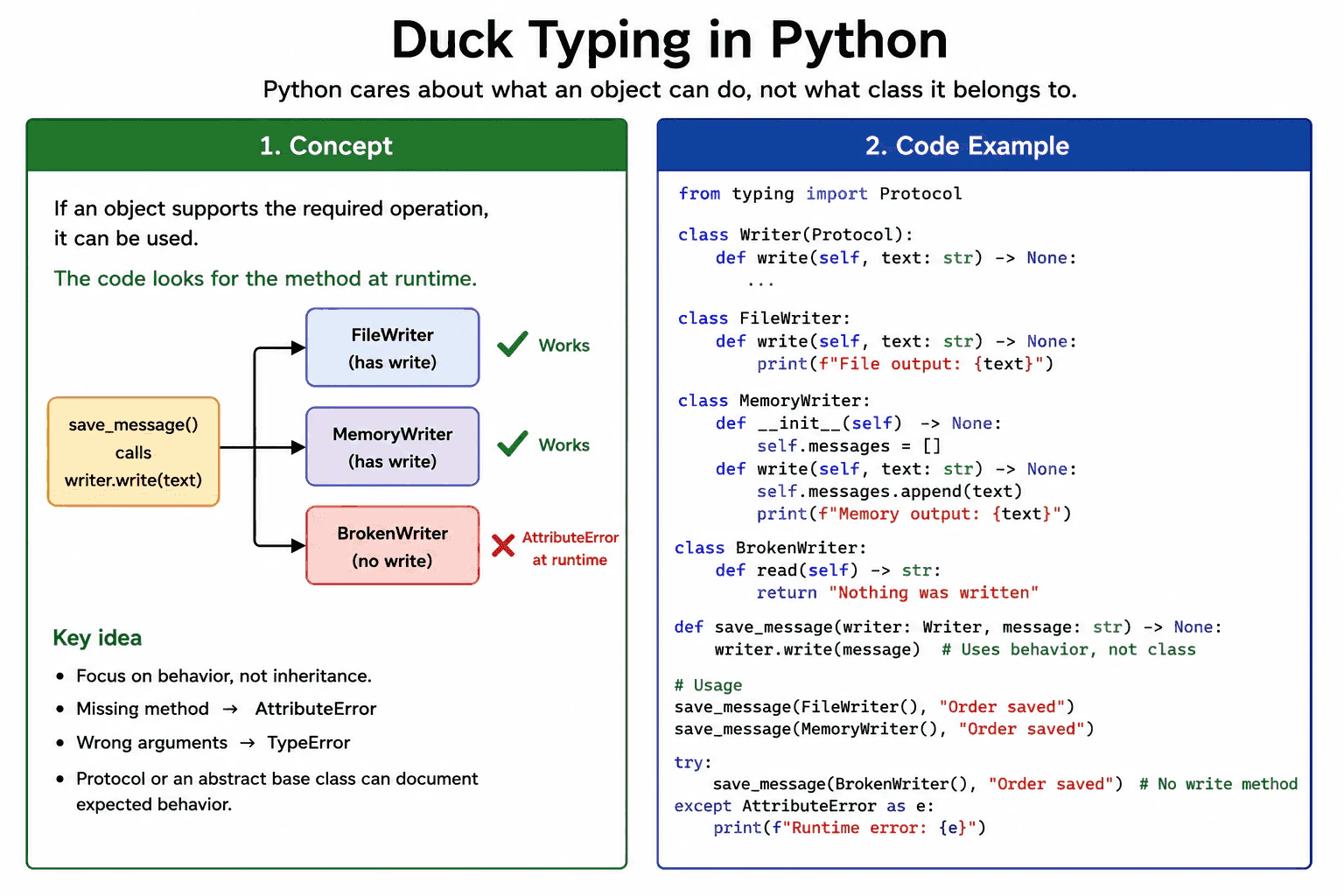
Duck typing means code accepts an object because it supports the behavior the code needs. The object does not have to inherit from one required class. For example, a function that calls writer.write can work with a file object, an in memory stream, or a custom writer. They are compatible because each provides a suitable write method.
Useful Questions to Ask the Interviewer
Should I focus on Python language behavior, or also explain the runtime and standard library?
Which Python version and execution environment should I assume?
Would you like a small code example together with production tradeoffs and edge cases?
Python normally checks this when the operation runs. It looks up write on the object. If the method exists, accepts the supplied arguments, and behaves as expected, the call works. If write is missing, Python raises AttributeError. If its call signature is incompatible, Python can raise TypeError.
Duck typing is useful for reusable functions, testing, adapters, iterables, context managers, and file like objects. Its main limitation is that the required behavior can be unclear. A Protocol can document the expected methods for static type checkers without forcing inheritance. An abstract base class is useful when explicit inheritance, shared code, or runtime membership rules are needed.
Duck typing itself does not copy the object or create a replacement object. Its cost is the normal attribute lookup and method call. In production, use small interfaces, clear names, type hints, focused tests, and useful boundary validation.
Example
The example defines save_message without checking the concrete class of its argument. The function only calls write because that is the behavior it requires. FileWriter and MemoryWriter are unrelated classes, but both work because each provides a compatible write method. BrokenWriter does not provide write, so Python raises AttributeError when the call is attempted. The Writer Protocol documents the expected method for static type checking. It does not change the runtime method call or force the classes to inherit from Protocol.
Code
from typing import Protocol
classWriter(Protocol):
# Any compatible object must provide this method.defwrite(self, text: str) -> None: ...
classFileWriter:
# This class satisfies the expected behavior.defwrite(self, text: str) -> None:
print(f"File output: {text}")
classMemoryWriter:
def__init__(self) -> None:
# Store written values in memory.self.messages: list[str] = []
# This class also satisfies the expected behavior.defwrite(self, text: str) -> None:
self.messages.append(text)
print(f"Memory output: {text}")
classBrokenWriter:
# This class does not provide a write method.defread(self) -> str:
return"Nothing was written"defsave_message(writer: Writer, message: str) -> None:
# The function uses behavior instead of checking a class name.
writer.write(message)
defmain() -> None:
file_writer = FileWriter()
memory_writer = MemoryWriter()
# Both unrelated classes work because both provide write.
save_message(file_writer, "Order saved")
save_message(memory_writer, "Order saved")
print(memory_writer.messages)
broken_writer = BrokenWriter()
try:
# This fails at runtime because write is missing.
save_message(broken_writer, "Order saved")
except AttributeError as error:
print(f"Runtime error: {error}")
if __name__ == "__main__":
main()
Where it is used
Duck typing is used when one function should work with several kinds of objects that provide the same operation. A logging or export function can accept different destinations that provide write. Tests can replace a real service with a fake object that provides the methods used by the application. Python also relies on this idea with iterables, context managers, callable objects, and file like objects. Protocol type hints can document these expectations while keeping implementations independent.
Why Interviewers Ask This
Interviewers ask this question to check whether a candidate understands how Python decides whether different objects can be used by the same code. They want to see whether the candidate focuses on supported operations instead of only class names or inheritance. The question also tests judgment about runtime failures, clear interfaces, type hints, protocols, and abstract base classes.
Common interview mistakes
A common mistake is saying duck typing means Python has no types. Python objects still have types. The point is that code can accept different types when they support the required behavior. Another mistake is checking every object with type or isinstance even when the needed operation is enough. A matching method name is also not a complete guarantee. The method must accept compatible arguments and follow the expected meaning. Another mistake is believing Protocol changes runtime behavior. It mainly helps static type checkers unless separate runtime checking is added. Broad exception handling can also hide defects, so catch errors only where the program can respond usefully.
Interview tip
Start with the practical rule that Python uses supported behavior rather than requiring one parent class. Give one small write example. Then explain that missing methods fail at runtime and that Protocol or an abstract base class can make the expected interface clearer.
Interviewer may ask next
What happens if an object has the expected method name but an incompatible method signature?
The call can fail with TypeError when Python passes arguments that the method does not accept. Duck typing requires compatible behavior, not only a matching name. This matters because an object may appear suitable but still fail when the operation runs. Protocol definitions and static type checking can find many signature problems earlier, while tests still confirm runtime behavior.
When should you use a Protocol instead of an abstract base class?
Use a Protocol when you want to describe required methods without forcing classes to inherit from one shared parent. This keeps unrelated implementations compatible through their existing behavior. Use an abstract base class when explicit inheritance, shared implementation, or runtime membership rules are important. The tradeoff is that Protocol gives looser coupling, while an abstract base class gives stronger control over the class hierarchy.
59. How does method binding work for instance methods, class methods, and static methods?Language SpecificMedium
i Question Details
Compare how each form is defined and accessed, what object is supplied automatically, how inheritance affects class methods, and when each form is appropriate.
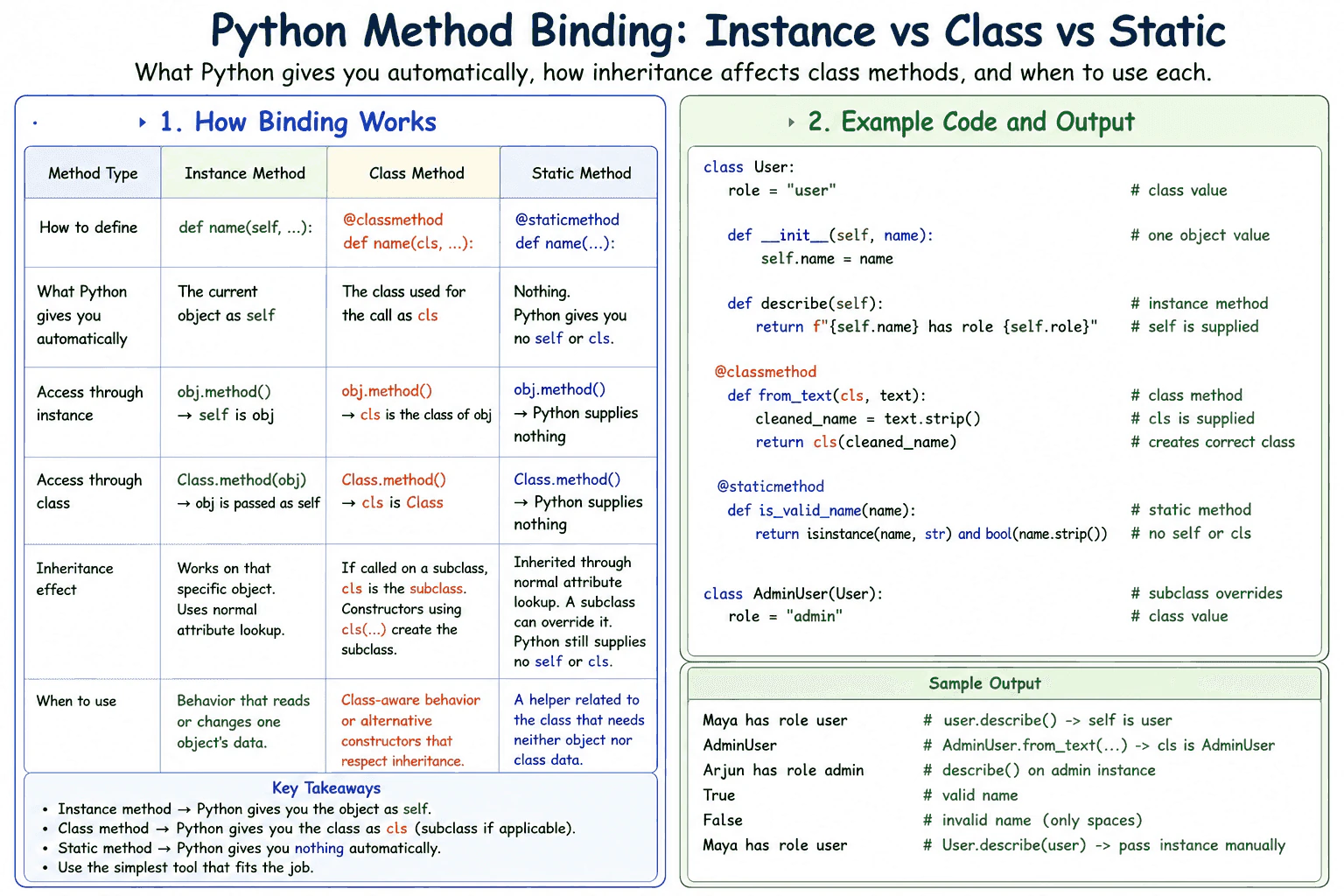
Short Interview Answer (30-60 seconds)
The main difference is what Python binds automatically. An instance method receives the current object as self when accessed through an instance. A class method receives the class as cls, including a subclass used for the call. A static method receives nothing automatically. I use an instance method for object state, a class method for class aware behavior or alternative constructors, and a static method for a related helper that needs neither object nor class state.
Choose the method type by deciding what the operation needs. A normal function defined in a class acts as an instance method. When it is accessed through an instance, Python creates a bound method that supplies that instance as self. When it is accessed through the class, no instance is supplied, so one must be passed explicitly if the function is called.
Useful Questions to Ask the Interviewer
Should I focus on Python language behavior, or also explain the runtime and standard library?
Which Python version and execution environment should I assume?
Would you like a small code example together with production tradeoffs and edge cases?
A class method uses the classmethod decorator. Python supplies the class as cls whether the method is accessed through the class or an instance. If a subclass performs the access, cls is that subclass. This makes class methods useful for alternative constructors and behavior that must respect inheritance.
A static method uses the staticmethod decorator. Python returns the stored function without supplying self or cls. It is useful for a helper that belongs conceptually with the class but needs no object or class state.
Binding does not copy the object or class data. Instance and class method access can create a small temporary bound method object. This cost is normally minor. Use module functions instead of static methods when the helper is not closely related to the class.
Example
The example uses a base class and a subclass. The instance method reads data from one object through self. The class method creates an object by calling cls, so calling it through AdminUser creates an AdminUser object and preserves inherited behavior. The static method validates a value without receiving self or cls. The final class level call also shows that an instance method is not given an object automatically when it is accessed through the class.
Code
classUser:
# This value belongs to the class and can be inherited.
role = "user"def__init__(self, name):
# This value belongs to one User instance.self.name = name
defdescribe(self):
# Access through an instance supplies that instance as self.returnf"{self.name} has role {self.role}" @classmethoddeffrom_text(cls, text):
# Access through User supplies User as cls.# Access through AdminUser supplies AdminUser as cls.
cleaned_name = text.strip()
return cls(cleaned_name)
@staticmethoddefis_valid_name(name):
# Python supplies neither self nor cls here.returnisinstance(name, str) andbool(name.strip())
classAdminUser(User):
# The subclass replaces the inherited class value.
role = "admin"# The instance method receives user as self.
user = User("Maya")
print(user.describe())
# The class method receives AdminUser as cls.
admin = AdminUser.from_text(" Arjun ")
print(type(admin).__name__)
print(admin.describe())
# The static method receives only the value passed explicitly.print(User.is_valid_name("Lina"))
print(User.is_valid_name(" "))
# Access through the class does not supply an instance.print(User.describe(user))
Where it is used
Instance methods are used for behavior that reads or changes one object, such as updating an order or formatting one customer record. Class methods are commonly used as alternative constructors, such as creating an object from text or a dictionary while preserving the subclass used for the call. They are also useful for operations that read class configuration. Static methods are suitable for validation, parsing, or conversion helpers that belong closely to the class but need no instance or class state. A module function is usually clearer when the helper is general and is shared by unrelated classes.
Why Interviewers Ask This
Interviewers ask this question to check whether a candidate understands Python method descriptors, automatic argument binding, inheritance, and method selection. It also tests whether the candidate can place behavior correctly based on whether it needs one object, the current class, or neither.
Common interview mistakes
A common mistake is forgetting self in an instance method or cls in a class method. Another mistake is believing that self and cls are Python keywords. They are strong naming conventions, but the binding behavior depends on the method form, not the parameter name. Developers may also use a static method for an alternative constructor, which prevents Python from supplying the subclass automatically. Another mistake is assuming that accessing an instance method through the class supplies an instance. It does not. A caller must provide the instance explicitly. It is also unnecessary to place every helper inside a class. A general helper may be clearer as a module function.
Interview tip
Start with what Python supplies automatically: an instance, a class, or nothing. Then explain that inherited class methods receive the subclass used for access. Finish with one practical use case for each method type.
Interviewer may ask next
What happens when an inherited class method is called through a subclass or a subclass instance?
Python binds the subclass as cls in both cases. A constructor that returns cls(...) therefore creates an instance of that subclass. This matters because one inherited constructor can preserve subclass behavior without being rewritten. The limitation is that the constructor arguments must still be valid for the subclass.
What runtime and design tradeoff exists between a static method and a module function?
Both receive no automatic instance or class argument and usually have similar practical call cost. A static method keeps a closely related helper discoverable through the class namespace, while a module function creates less coupling and is easier to reuse across unrelated classes. Neither form copies instance or class data, so the main tradeoff is code organization rather than performance or memory.
60. How does Python's method resolution order work?Language SpecificMedium
i Question Details
Explain attribute lookup across multiple inheritance, the C3 linearization rules at a practical level, how __mro__ exposes the order, and how cooperative super() calls depend on it.
Short Interview Answer (30-60 seconds)
Python uses the method resolution order, or MRO, to decide which class supplies an attribute or method when inheritance is involved. It calculates one consistent order with C3 linearization and exposes it through ClassName.__mro__ or ClassName.mro(). The super function continues with the next class in that order, not always the direct parent. This is why cooperative multiple inheritance requires compatible method signatures and careful super calls.
Python uses the method resolution order, or MRO, to decide which class supplies an attribute or method when inheritance is involved. For class lookup, Python checks classes in the MRO and uses the first matching definition. Normal instance lookup rules still apply, so an instance attribute or descriptor can affect the result before a class attribute is returned.
Useful Questions to Ask the Interviewer
Should I focus on Python language behavior, or also explain the runtime and standard library?
Which Python version and execution environment should I assume?
Would you like a small code example together with production tradeoffs and edge cases?
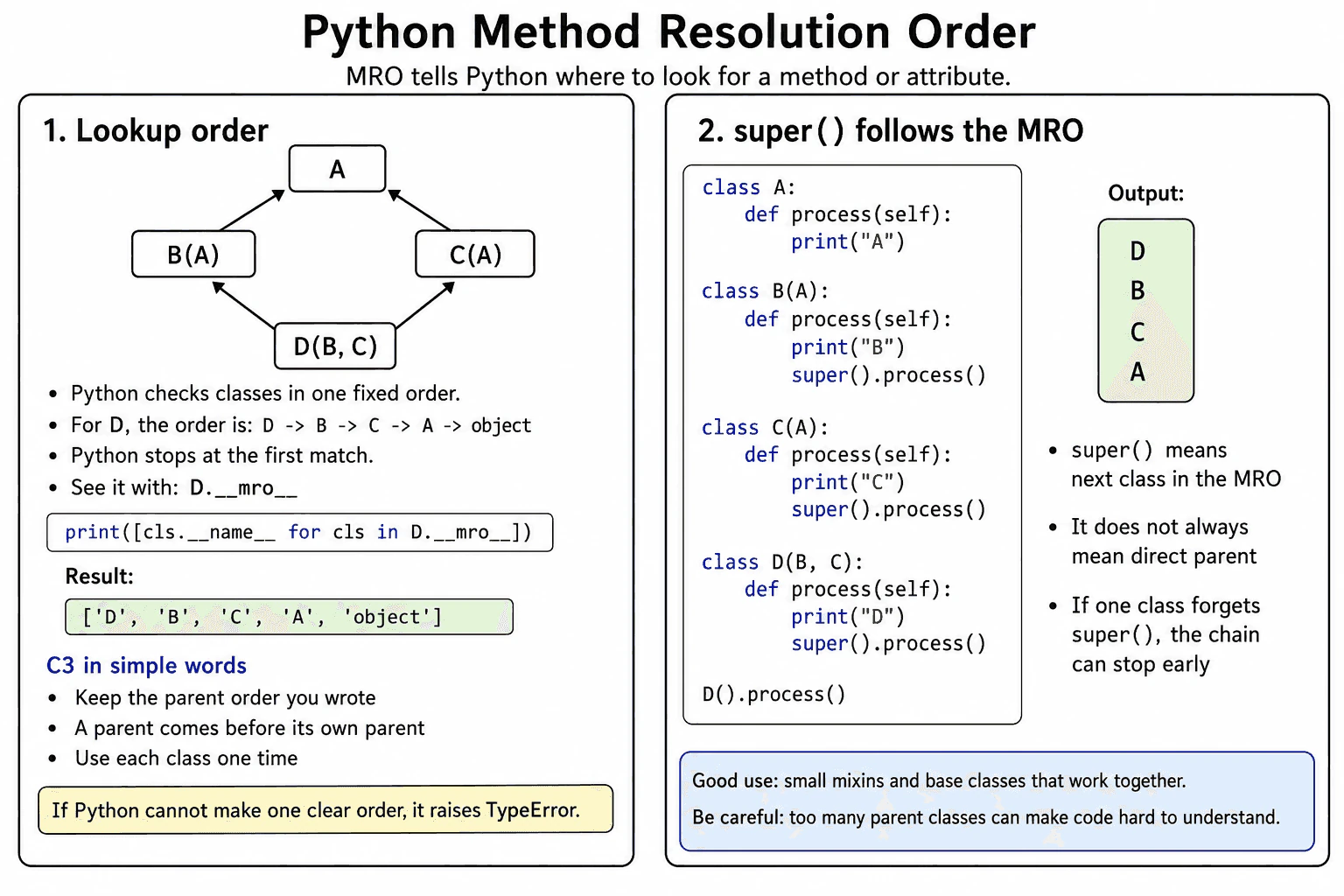
Python calculates the MRO when the class is created by using C3 linearization. In practical terms, the result preserves the parent order written in the class definition, keeps every parent before its own parents, and produces one consistent order without repeating a class. Python raises TypeError if no valid order exists.
You can inspect the order with ClassName.__mro__, which is a tuple, or ClassName.mro(), which returns a list. The super function continues after the current class in that MRO. It does not simply call a fixed parent.
Cooperative inheritance works when each nonterminal override calls super once and compatible methods accept compatible arguments. A final method may intentionally end the chain. The MRO is stored on the class, so Python does not recalculate it for every call. Lookup may inspect several classes, while the stored order uses memory proportional to the number of classes.
Example
The example uses a diamond inheritance structure. Class D inherits from B and C, while both B and C inherit from A. Python calculates the order D, B, C, A, object. Calling D().process() starts in D. The super call in D continues to B. The super call in B continues to C, not directly to A, because C is next in the MRO. The super call in C then continues to A. Class A intentionally ends this custom method chain because object does not define process. Each custom implementation therefore runs exactly once.
Code
classA:
defprocess(self):
# A is the final custom implementation in this chain.# The chain ends here because object has no process method.print("A")
classB(A):
defprocess(self):
# Run the behavior owned by B.print("B")
# Continue with the next class in the MRO.# For an instance of D, the next class is C.super().process()
classC(A):
defprocess(self):
# Run the behavior owned by C.print("C")
# Continue with A, which is next in the MRO.super().process()
classD(B, C):
defprocess(self):
# D is the first class searched for this method.print("D")
# Continue with B, which is next in the MRO.super().process()
# __mro__ exposes the exact class lookup order as a tuple.print([class_type.__name__ for class_type in D.__mro__])
# Start the cooperative method chain.
D().process()
# Expected output:# ['D', 'B', 'C', 'A', 'object']# D# B# C# A
Where it is used
MRO matters in production code that combines behavior through base classes and mixins. Common examples include framework views, serializers, permission classes, test helpers, logging mixins, and validation mixins. It is especially important when several parent classes define the same method or when each class must add behavior through super. Developers should inspect the MRO when a method runs in an unexpected order. Multiple inheritance should be avoided when the class relationships are difficult to explain, parent methods use incompatible arguments, or the behavior depends on fragile parent ordering.
Why Interviewers Ask This
Interviewers ask this question to check whether a candidate understands attribute lookup in multiple inheritance, C3 linearization, and the real behavior of super. It also tests whether the candidate can inspect class relationships and design cooperative inheritance without skipping or repeating behavior.
Common interview mistakes
A common mistake is assuming that super always calls the direct parent. It continues with the next class after the current class in the MRO. Another mistake is calling a parent method directly, such as A.process(self), because this can skip another class or run a shared ancestor more than once. A class can also break the cooperative chain by omitting super too early, calling it more than once, or using arguments that the next method cannot accept. Developers may also forget that changing the order of parent classes can change the MRO and therefore change runtime behavior.
Interview tip
Begin with the practical rule that Python searches classes in MRO order and uses the first matching definition. Then explain that C3 linearization creates the order, show how __mro__ exposes it, and state that super moves to the next class in that order. Use a small diamond example to prove that super does not always mean direct parent.
Interviewer may ask next
What happens when Python cannot create a consistent MRO?
Python raises TypeError while creating the class. This means the parent relationships and declared parent order contain conflicting requirements that C3 linearization cannot satisfy. It matters because Python rejects an ambiguous class structure instead of selecting an unpredictable lookup order.
What is the main tradeoff of cooperative multiple inheritance?
The main tradeoff is flexibility versus coordination. Cooperative super calls let several classes contribute behavior without naming a fixed parent, but every participating method must follow compatible calling rules and understand the shared MRO. This design is useful for small, focused mixins, but it becomes difficult to maintain when the inheritance graph or method contracts are complex.
More questions load as you scroll
Disclaimer: This interview guide is for educational and informational purposes only. It is designed to help readers prepare, but it does not guarantee any interview result, hiring decision, offer, or outcome. Interview questions, hiring criteria, and preferred answers can vary by employer, interviewer, industry, location, and time. All answers, examples, and explanations in this guide are suggested examples for interview preparation, not definitive answers or instructions for professional practice. They are based on research and judgment, are provided without warranties of any kind, and should be adapted to the question, role, and applicable laws and professional requirements. Diagrams are simplified illustrations intended to highlight the main concepts and their relationships; actual situations, systems, and practices may be more complex. Alternative approaches may be equally valid or better suited to a particular question, context, or interviewer. To the fullest extent permitted by applicable law, the contributors and publisher are not liable for decisions made, actions taken, or losses incurred based on this guide.
State Laws and Professional Responsibilities: Laws and requirements governing an occupation vary by state and jurisdiction. You are responsible for checking the current laws, licensing requirements, and scope-of-practice rules that apply to your location and role, and for ensuring that your answers and actions comply with them. Adapt examples in this guide to those requirements. This guide is not legal advice.
Content Accuracy and Verification: To the fullest extent permitted by applicable law, we do not represent or warrant that interview guides, questions, answers, examples, or diagrams are accurate, complete, current, error-free, or suitable for any particular purpose. You are responsible for independently reviewing and verifying the information before relying on it.