This interview guide is for educational and informational purposes only. It is designed to help readers prepare, but it does not guarantee any interview result, hiring decision, offer, or outcome. Interview questions, hiring criteria, and preferred answers can vary by employer, interviewer, industry, location, and time. All answers, examples, and explanations in this guide are suggested examples for interview preparation, not definitive answers or instructions for professional practice. They are based on research and judgment, are provided without warranties of any kind, and should be adapted to the question, role, and applicable laws and professional requirements. Diagrams are simplified illustrations intended to highlight the main concepts and their relationships; actual situations, systems, and practices may be more complex. Alternative approaches may be equally valid or better suited to a particular question, context, or interviewer. To the fullest extent permitted by applicable law, the contributors and publisher are not liable for decisions made, actions taken, or losses incurred based on this guide.
State Laws and Professional Responsibilities
Laws and requirements governing an occupation vary by state and jurisdiction. You are responsible for checking the current laws, licensing requirements, and scope-of-practice rules that apply to your location and role, and for ensuring that your answers and actions comply with them. Adapt examples in this guide to those requirements. This guide is not legal advice.
Identity, Image, and Privacy Notice
To respect individual privacy, some names, profile photographs, avatars, biographical details, and other identifying information displayed in this guide may be replaced with pseudonyms, licensed stock images, illustrative avatars, composite images, or representative descriptions. Unless a person is expressly identified as an actual contributor, a displayed name, image, or profile should not be understood as depicting or identifying a specific candidate, interviewer, employee, or other real individual. These representations are provided for editorial and illustrative purposes only and do not imply endorsement, employment, participation, or affiliation with this guide or any company mentioned in it. Any resemblance to an actual person is coincidental.
Company Notice
This guide is an independent educational resource and is not affiliated with, endorsed by, sponsored by, or approved by the company named in this guide. Company names identify reported interview experiences or the employer context of clearly labeled original practice exercises. Interview practices can change without notice, and inclusion of company-specific content does not mean these questions are official, complete, or guaranteed to be asked. To the fullest extent permitted by law, the author, contributors, and publisher are not responsible for outcomes related to use of this material.
Content Accuracy and Verification
To the fullest extent permitted by applicable law, we do not represent or warrant that interview guides, questions, answers, examples, or diagrams are accurate, complete, current, error-free, or suitable for any particular purpose. You are responsible for independently reviewing and verifying the information before relying on it.
Questions or comments?
Contact us for general questions, or share feedback, technical corrections, and comments with the community.
Explain that None is a singleton representing the absence of a value, how it differs from false, zero, and an empty collection, and how it should be compared.
Short Interview Answer (30-60 seconds)
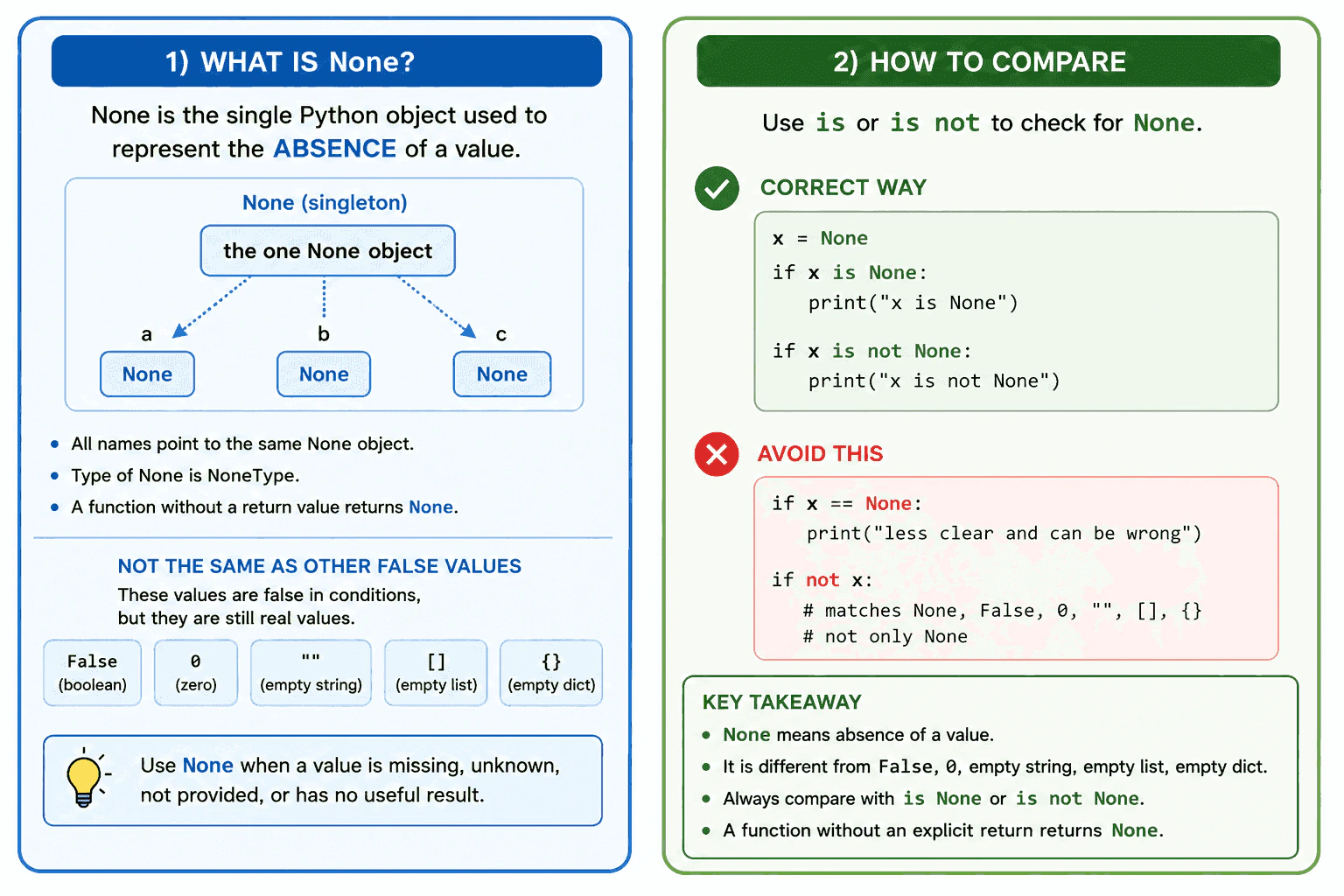
None is the single Python object used to represent the absence of a value. It is different from False, zero, an empty string, and an empty collection, even though all of them are treated as false in a condition. I compare a value with None by using is or is not because the check is about whether the value refers to the exact None object.
Detailed Explanation
Use None when a value is missing, unknown, not provided, or has no useful result. None is the only instance of NoneType, so every reference to None points to the same object.
Useful Questions to Ask the Interviewer
Should I focus on Python language behavior, or also explain the runtime and standard library?
Which Python version and execution environment should I assume?
Would you like a small code example together with production tradeoffs and edge cases?
None is not equal to False, zero, an empty string, or an empty collection. These values are all false in a truth value test, but they can still contain valid information. For example, zero can be a valid count, and an empty list can be a valid result with no items.
Compare a value with None by writing value is None or value is not None. The is operator checks object identity. Writing value == None may call custom equality behavior defined by the value's class, so it is less clear and can produce unexpected behavior.
A function that reaches its end without an explicit return statement returns None. A return statement with no expression also returns None.
The identity check takes constant time and does not create another None object. Python reuses the singleton. In production, None is commonly used for optional arguments, missing database values, cache misses, and operations that do not return useful data. Use a direct None check when other false values are valid.
Where it is used
None is used for optional function arguments, values that have not been loaded, missing configuration values, database fields with no value, cache misses, and functions that perform an action without returning useful data. A direct None check is important when zero, False, an empty string, or an empty collection is valid data. When None itself is a valid input, production code can use a separate sentinel object to distinguish a missing argument from an explicitly supplied None.
Why Interviewers Ask This
Interviewers ask this question to check whether a candidate understands object identity, truth value testing, function return behavior, and the difference between missing data and valid false values. It also tests whether the candidate uses the correct comparison syntax in production code.
Common interview mistakes
A common mistake is writing value == None instead of value is None. Another mistake is assuming that None is the same as False, zero, an empty string, or an empty collection. Developers also sometimes write if not value when they only want to detect None. That condition also matches every other false value. Another mistake is forgetting that a function without an explicit returned expression produces None. It is also incorrect to use None as a default argument when the application must distinguish an omitted argument from an argument explicitly set to None.
Interview tip
Start by saying that None represents the absence of a value and is the only instance of NoneType. Then separate it from other false values and state the comparison rule clearly: use is None or is not None.
Interviewer may ask next
What does a Python function return when it has no return statement?
It returns None. Python produces None when execution reaches the end of the function without an explicit return statement. A return statement with no expression has the same behavior. This matters because callers may need to distinguish an operation with no useful result from one that returns a real value.
What should you use when None is a valid argument value but you also need to detect an omitted argument?
Use a separate sentinel object as the default value. The sentinel represents an omitted argument, while None remains a valid value supplied by the caller. This adds one private object and an identity check, but it removes ambiguity and makes the function behavior reliable.
22. What does the pass statement do?Language SpecificEasy
i Question Details
Explain why pass is a no-operation statement, where syntactically valid placeholders are needed, and how pass differs from continue and break.
Short Interview Answer (30-60 seconds)
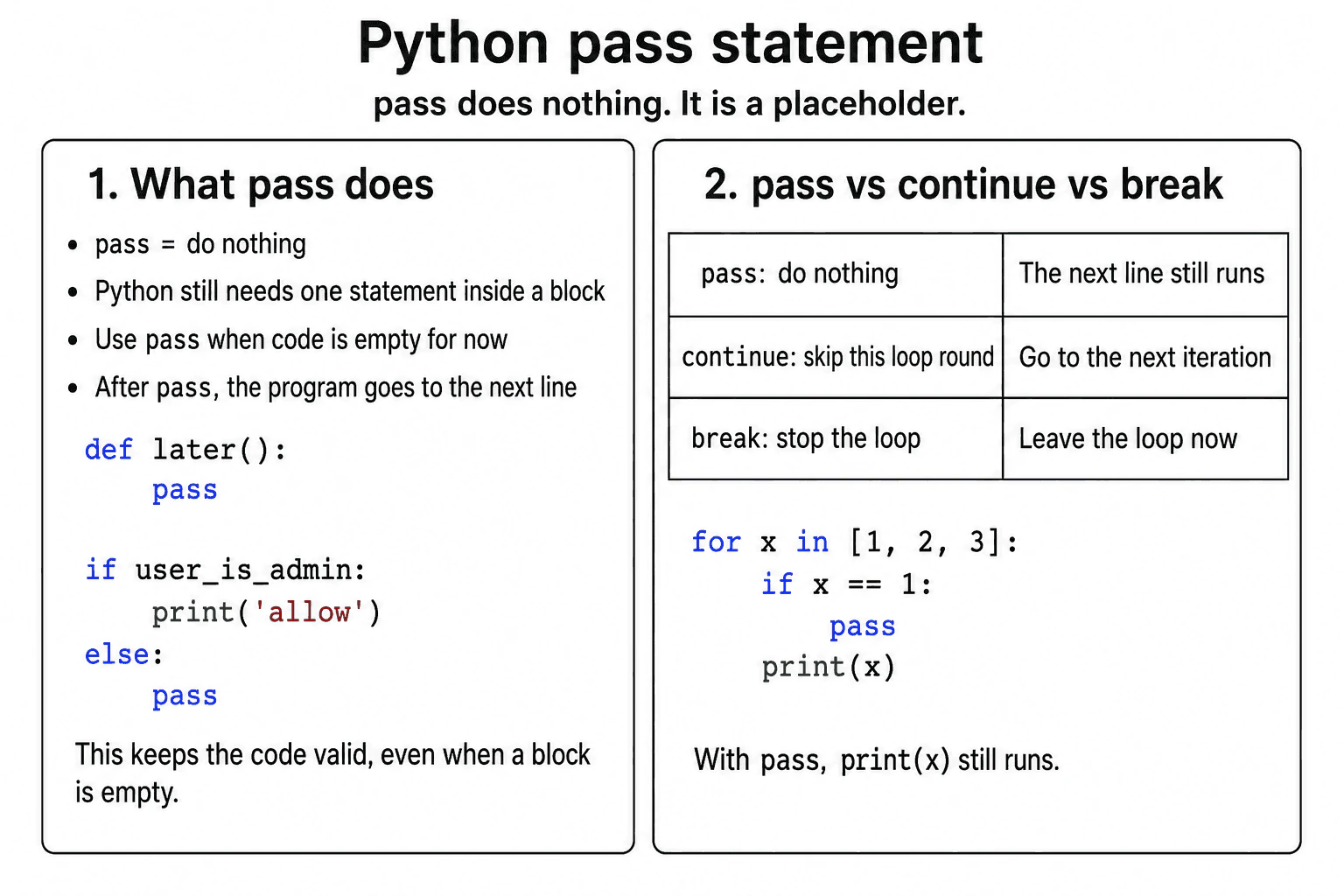
The pass statement performs no action. It is mainly used as a valid placeholder when Python requires a statement inside a block, but no behavior is needed yet. Execution continues with the next statement. Unlike continue, pass does not skip the rest of a loop iteration. Unlike break, it does not end the loop.
Detailed Explanation
The pass statement performs no action. When Python reaches it, execution continues with the next statement.
Useful Questions to Ask the Interviewer
Should I focus on Python language behavior, or also explain the runtime and standard library?
Which Python version and execution environment should I assume?
Would you like a small code example together with production tradeoffs and edge cases?
Python requires at least one statement inside an indented block. For example, a function, class, loop, condition, or exception handler cannot have a completely empty body. Pass can fill that body while keeping the code syntactically valid.
A developer may use pass while defining an unfinished function, creating an empty class, keeping one condition intentionally empty, or temporarily leaving a loop body blank. It can also appear in an exception handler when a specific and expected exception should be ignored. That use requires care because ignoring an exception can hide a real problem.
Pass does not change control flow. In a loop, continue skips the remaining statements in the current iteration and starts the next iteration. Break exits the nearest loop. Pass does neither, so later statements in the same block still run.
Pass does not copy values or create an application data structure. Its performance and memory effect are normally insignificant. Its main value is providing a valid statement where Python syntax requires one.
Where it is used
Pass is used in unfinished function bodies, empty class definitions, temporary condition branches, loop bodies, and narrow exception handlers. It is useful during development and when a block is intentionally empty. In production code, developers should review each use because a forgotten pass may leave required behavior unimplemented, and pass inside an exception handler may hide a failure.
Why Interviewers Ask This
Interviewers ask this question to check whether the candidate understands Python block syntax and control flow. They also want to know whether the candidate can distinguish a placeholder statement from statements that change loop execution.
Common interview mistakes
A common mistake is believing that pass skips the current loop iteration. Continue does that. Another mistake is believing that pass exits a loop. Break does that. Developers may also leave pass inside an unfinished function and accidentally release code with missing behavior. Using pass in a broad exception handler is another mistake because it can hide unexpected errors without logging or handling them.
Interview tip
Begin by saying that pass performs no action and is used as a valid placeholder. Then explain that execution continues normally. Finish by comparing it with continue, which skips an iteration, and break, which exits a loop.
Interviewer may ask next
What happens when pass is followed by another statement in the same block?
The next statement runs normally. Pass does not skip the remaining block, start a new loop iteration, or exit the loop. This matters because pass only satisfies the need for a valid statement and does not change control flow.
What is the risk of using pass inside an exception handler?
The exception is ignored when the handler contains only pass. This can be acceptable for a narrow and expected exception, but it can also hide failures and make debugging difficult. The main tradeoff is simpler handling versus reduced visibility into errors.
23. How are break, continue, and else used in Python loops?Language SpecificEasy
i Question Details
Explain the control-flow effect of break and continue, and explain when a loop's else clause executes or is skipped.
Short Interview Answer (30-60 seconds)
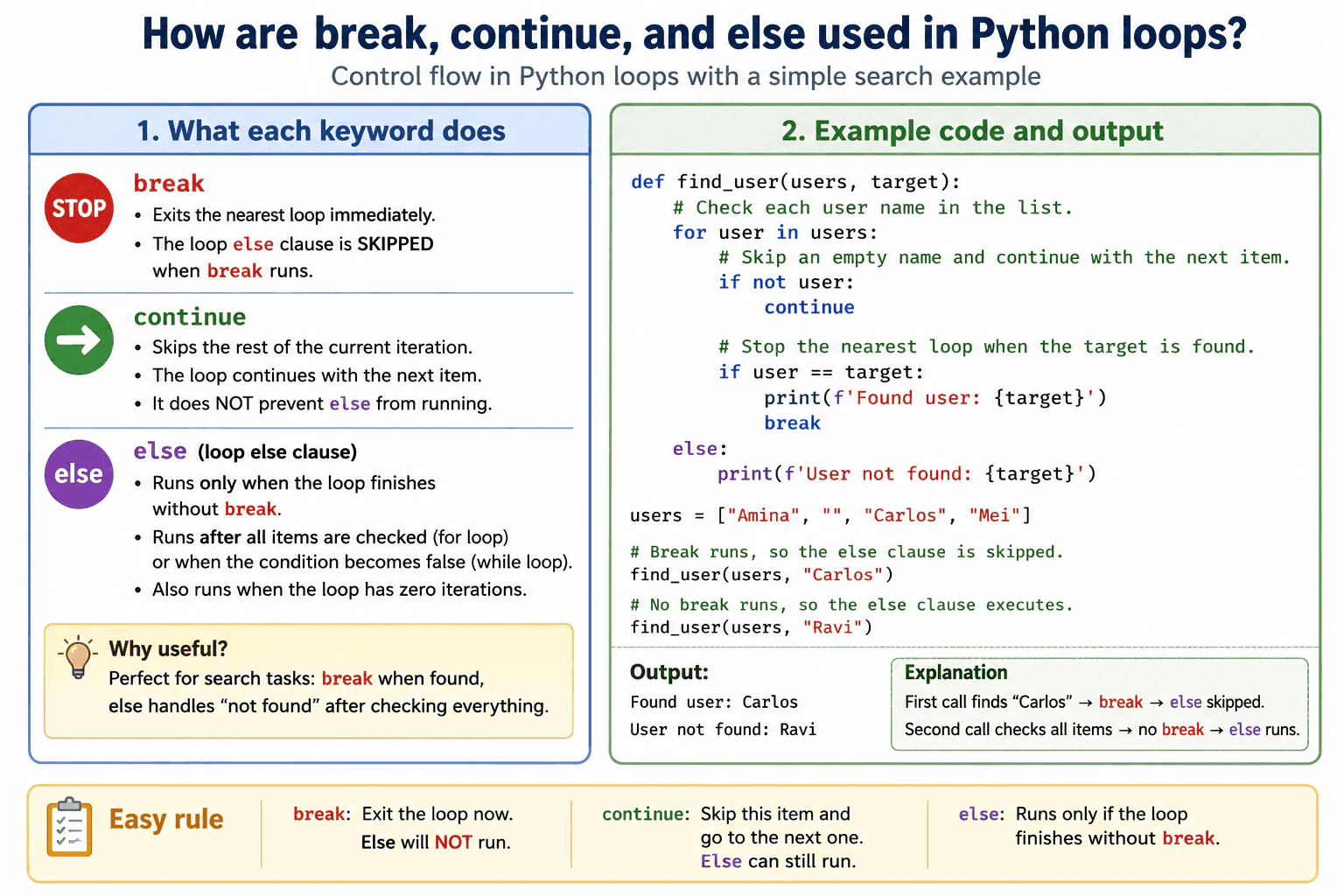
The main rule is that break exits the nearest loop, continue skips the rest of the current iteration, and a loop else clause runs only when the loop finishes without break. Continue does not prevent else from running because it does not end the loop. This is useful for searches where break handles a found result and else handles the case where every item was checked without finding a match.
Use break to stop the nearest loop. Use continue to skip the rest of the current iteration. Use a loop else clause for work that should happen only when the loop finishes without break.
Useful Questions to Ask the Interviewer
Should I focus on Python language behavior, or also explain the runtime and standard library?
Which Python version and execution environment should I assume?
Would you like a small code example together with production tradeoffs and edge cases?
In a for loop, else runs after all items are exhausted. In a while loop, else runs when the condition becomes false. It also runs when the loop has zero iterations. Continue does not skip else because it does not end the loop. The else clause is skipped when break runs. It is also not reached when return or an exception leaves the loop before normal completion.
This pattern is useful for a search. The loop checks each user name. Empty names are skipped with continue. A match prints the result and uses break. If no match is found, else reports that every item was checked.
For a list of n items, the worst case time is O of n because every item may be checked. Break can stop earlier. The loop uses O of one extra memory because it does not copy the list or create another collection. Use loop else when it makes the no match path clear. Avoid it when the control flow may confuse readers.
Example
The example searches a list of user names. An empty name is skipped with continue, so the loop moves to the next item. When the requested name is found, break exits the loop and the else clause is skipped. When no matching name exists, the for loop reaches the end of the list without break, so the else clause runs. The function checks at most every item, creates no copy of the list, and uses only a small fixed amount of extra memory.
Code
deffind_user(users, target):
# Check each user name in the list.for user in users:
# Skip an empty name and continue with the next item.ifnot user:
continue# Stop the nearest loop when the target is found.if user == target:
print(f"Found user: {target}")
breakelse:
# This runs only when the loop finishes without break.print(f"User not found: {target}")
users = ["Amina", "", "Carlos", "Mei"]
# Break runs, so the else clause is skipped.
find_user(users, "Carlos")
# No break runs, so the else clause executes.
find_user(users, "Ravi")
Where it is used
This behavior is useful when searching records, validating a collection, filtering input, or retrying an operation. A search can use continue to ignore empty or invalid records, break when the requested record is found, and else when the full collection was checked without a match. In production code, this can avoid an extra found flag, but it should be used only when the relationship between break and else is easy for the team to understand.
Why Interviewers Ask This
Interviewers ask this question to check whether a candidate understands Python loop control beyond basic repetition. They want to see whether the candidate knows how break changes loop completion, how continue changes only the current iteration, and why a loop else clause depends on whether break executed. It also tests whether the candidate can choose clear control flow for search and validation logic.
Common interview mistakes
A common mistake is thinking that loop else runs whenever the loop condition is false during an iteration. It runs once after normal completion without break. Another mistake is thinking that continue skips the else clause. Continue only skips the remaining statements in the current iteration. Break also exits only the nearest loop, not every nested loop. In a while loop, placing continue before the statement that updates the loop condition can cause an infinite loop. Developers may also forget that else runs when a for loop receives an empty collection because no break occurred.
Interview tip
State the three rules first. Break exits the nearest loop. Continue skips the rest of the current iteration. Else runs only when the loop finishes without break. Then give a small search example and mention that continue does not prevent else from running.
Interviewer may ask next
Does the else clause run when the loop has no iterations or every iteration uses continue?
Yes, the else clause runs as long as the loop finishes without break. An empty for loop is already exhausted, so it completes normally. Continue also does not end the loop. It only skips the remaining work in the current iteration. This matters because neither an empty collection nor repeated continue statements count as a break.
What are the performance and readability tradeoffs of using loop else?
Loop else adds only constant control flow work and does not copy the collection or require a separate found flag. The loop still has the same time cost as the search itself, which is O of n in the worst case for n items, and O of one extra memory. The main tradeoff is readability. It is a good choice when the no break meaning is clear, but it should be avoided when readers may misunderstand the connection between break and else.
24. What is the difference between sort() and sorted()?Language SpecificEasy
i Question Details
Explain in-place sorting versus returning a new list, accepted iterable types, return values, and use of key and reverse parameters.
Short Interview Answer (30-60 seconds)
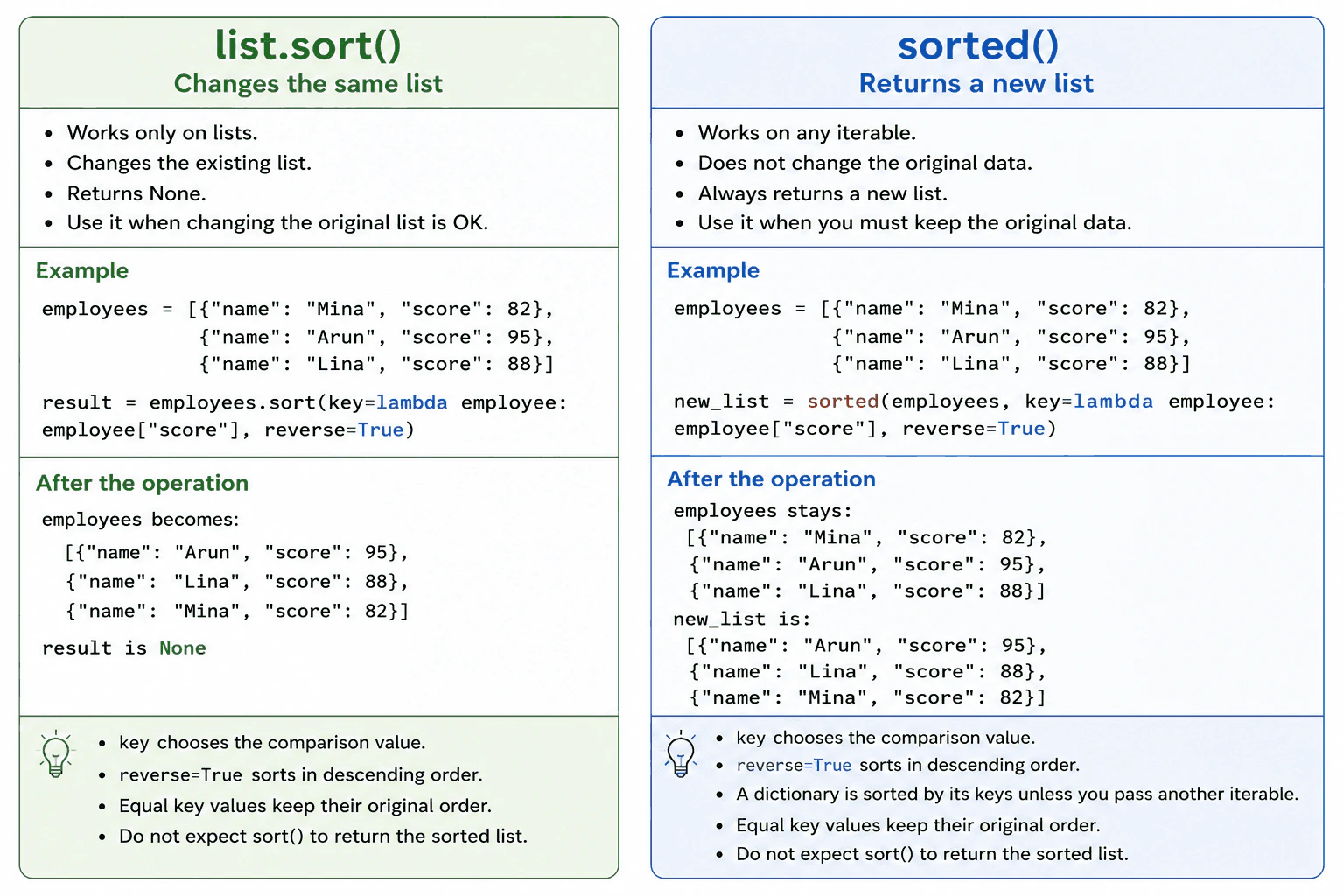
Use list.sort() when I want to change an existing list. It sorts that list in place and returns None. Use sorted() when I want a new sorted list or need to sort another iterable such as a tuple, set, dictionary, or generator. Both accept key for choosing the comparison value and reverse for controlling the sort direction.
The practical choice is simple. Use list.sort() when changing the existing list is acceptable. Use sorted() when the original data must remain unchanged or the input is not a list.
Useful Questions to Ask the Interviewer
Should I focus on Python language behavior, or also explain the runtime and standard library?
Which Python version and execution environment should I assume?
Would you like a small code example together with production tradeoffs and edge cases?
The sort() method exists only on lists. It rearranges the items inside the same list object and returns None. Returning None helps show that the method performs a change instead of creating a result value.
The sorted() function accepts any iterable. This includes lists, tuples, sets, dictionaries, and generators. It reads the iterable and returns a new list. For a dictionary, it sorts the keys unless another iterable is provided.
Both forms accept key and reverse. Python calls key once for each item and sorts using the returned values. Setting reverse=True produces descending order. Python sorting is stable, so items with equal key values keep their original relative order.
Sorting is usually O(n log n), but already ordered data can be closer to O(n). sorted() needs O(n) memory for its new list. list.sort() avoids that second result list, but the sorting process can still use temporary memory. Items must also have values that Python can compare.
Example
The example uses one employee list as the shared source data. sorted() creates a new list ordered by score and leaves the source list unchanged. A separate copy is then sorted with list.sort(), which changes that copy directly and returns None. Both operations use the score field as the key and reverse=True to place higher scores first.
Code
employees = [
{"name": "Mina", "score": 82},
{"name": "Arun", "score": 95},
{"name": "Lina", "score": 88},
]
# sorted() reads the iterable and creates a new list.# The original employees list keeps its current order.
employees_by_score = sorted(
employees,
key=lambda employee: employee["score"],
reverse=True,
)
print("Original list:", employees)
print("New list from sorted():", employees_by_score)
# Create a separate list so the shared source data is not changed.
employees_copy = employees.copy()
# sort() changes the existing list object and returns None.
sort_result = employees_copy.sort(
key=lambda employee: employee["score"],
reverse=True,
)
print("List changed by sort():", employees_copy)
print("Return value from sort():", sort_result)
Where it is used
Use list.sort() when a program owns a list and no longer needs its previous order, such as arranging records before processing them. Use sorted() when the original order is still needed, when the data is shared with other code, or when the input is a tuple, set, dictionary, generator, or another iterable. The key parameter is useful for sorting records by fields such as name, date, priority, score, or price. In production code, sorted() is often safer when changing the original collection could create unexpected behavior elsewhere.
Why Interviewers Ask This
Interviewers ask this question to check whether a candidate understands mutation, return values, iterable handling, sorting options, and memory tradeoffs in Python. It also tests whether the candidate can avoid changing shared data by accident or assigning the None value returned by list.sort().
Common interview mistakes
A common mistake is writing result = values.sort() and expecting result to contain the sorted list. The result is None because sort() changes values directly. Another mistake is calling sort() on a tuple, set, dictionary, or generator. Only lists provide this method. Use sorted() for other iterables. Developers may also forget that sorted() always returns a list, even when the input is another type. The key function does not replace the items. It only provides the comparison value. Sorting values that cannot be compared can raise TypeError. A key function should return values that are mutually comparable. Finally, calling sort() on a shared list can change what other parts of the program observe.
Interview tip
Begin with the main difference. Say that list.sort() changes one list and returns None, while sorted() accepts any iterable and returns a new list. Then mention key, reverse, stable ordering, comparable values, and the memory tradeoff.
Interviewer may ask next
What happens when two items have the same key value?
They keep their original relative order because Python sorting is stable. This behavior matters when data was already ordered by another field. A later sort can group items by a new key without changing the earlier order among items whose new keys are equal.
Which option is better when memory usage matters?
Use list.sort() when the input is already a list and changing it is acceptable. It avoids allocating a second full result list, although the sorting process can still use temporary memory. Use sorted() when preserving the original data or accepting a general iterable is more important than the additional list allocation.
25. How does string formatting work with f-strings?Language SpecificEasy
i Question Details
Explain expression interpolation, conversion flags, format specifications, debugging syntax, and why f-strings are often preferred for readable formatting.
Short Interview Answer (30-60 seconds)
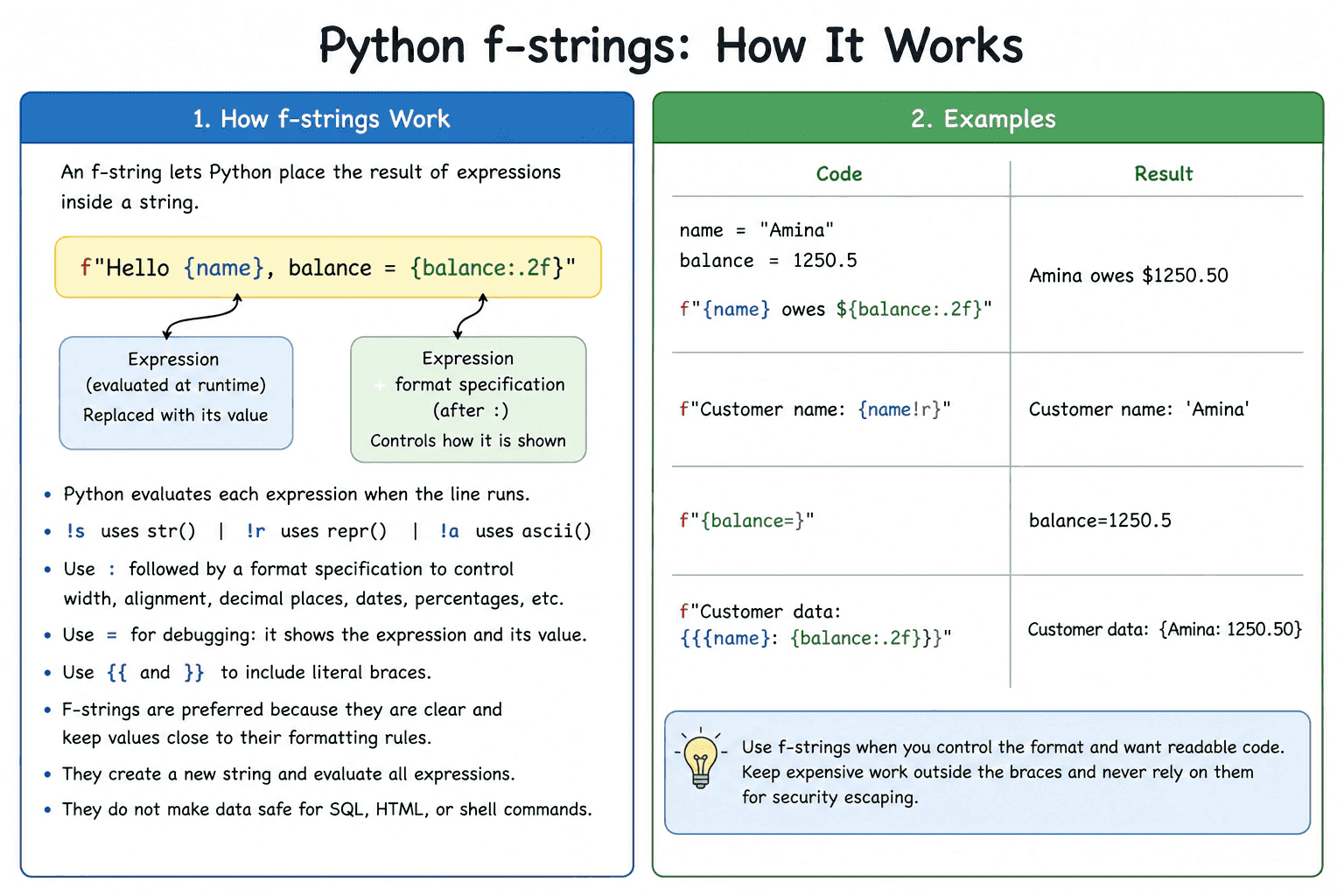
F strings are usually the most readable way to place Python values and expressions inside text. I add the letter f before the opening quote and put each expression inside braces. Python evaluates the expressions when that line runs and builds a new string from their formatted results. I can use conversion flags such as !r, a format specification after a colon, and the equals debugging syntax. I keep expensive work outside the f string and do not treat formatted output as automatically safe for SQL, HTML, or shell commands.
F strings place evaluated Python expressions inside text. Add the letter f before the opening quote and put an expression inside braces. For example, f"{name} owes ${balance:.2f}" inserts a name and displays a number with two decimal places.
Useful Questions to Ask the Interviewer
Should I focus on Python language behavior, or also explain the runtime and standard library?
Which Python version and execution environment should I assume?
Would you like a small code example together with production tradeoffs and edge cases?
Python evaluates each expression when the statement runs. The result is converted and added to a newly created string. A conversion flag controls the first conversion step. !s uses str, !r uses repr, and !a uses ascii. A format specification follows a colon and controls details such as width, alignment, decimal places, percentage display, or date formatting when the value supports that rule.
The equals debugging syntax, such as f"{balance=}", includes the expression text and its value. Literal braces must be doubled as {{ and }}.
F strings are preferred when developers control the format because the value and its display rule stay close together. They do not make data safe for SQL, HTML, or shell commands. Their runtime cost includes evaluating every expression and creating the result string. Memory use mainly depends on the final text size and any temporary objects created by the expressions.
Example
The example uses the same customer name and balance throughout. The first f string inserts both values and formats the balance with two decimal places. The second uses !r to show the representation of the name. The third uses the equals debugging syntax to include the expression name and value. The fourth doubles the outer braces so they appear as literal text. Every statement creates a new result string after evaluating its expressions.
Code
name = "Amina"
balance = 1250.5# Insert values and display the balance with two decimal places
message = f"{name} owes ${balance:.2f}"print(message)
# Use repr conversion to show the Python representation of the name
representation = f"Customer name: {name!r}"print(representation)
# Include both the expression text and its current value
debug_message = f"{balance=}"print(debug_message)
# Double braces when literal braces are required in the result
literal_braces = f"Customer data: {{{name}: {balance:.2f}}}"print(literal_braces)
Where it is used
F strings are used for log messages, command output, error details, reports, file names, monitoring messages, and developer controlled response text. For example, a billing service can show a customer name and a balance with two decimal places. Values for SQL queries should still use query parameters. Values placed in HTML or shell commands still need the correct escaping or safer API for that context.
Why Interviewers Ask This
Interviewers ask this question to check whether a candidate understands how Python evaluates expressions inside formatted strings. They also want to see whether the candidate can choose conversion flags and format specifications correctly, explain debugging syntax, and recognize production concerns such as readability, allocation cost, and unsafe use of formatted values.
Common interview mistakes
Common mistakes include forgetting the letter f, using single braces when literal braces are required, placing a conversion flag after the format specification, and applying a format rule that the value does not support. Another mistake is hiding slow function calls or expressions with side effects inside braces. Developers may also assume that an f string escapes values for SQL, HTML, URLs, or shell commands. It does not. Using eval on untrusted text to create dynamic f string behavior is also unsafe because it can execute Python code.
Interview tip
Begin by saying that an f string evaluates expressions inside braces when the statement runs and creates a new string. Show one small example. Then explain conversion flags, the colon format specification, the equals debugging syntax, and doubled literal braces. Finish with the allocation cost and the fact that formatting does not provide security escaping.
Interviewer may ask next
What happens when an f string uses an invalid format specification?
Python raises an exception when the value cannot use that format specification. The exact exception depends on the value and rule, but ValueError is common for an invalid specification. This matters because the failure happens when the f string is evaluated. Production code should use format rules that match the value type and test paths that handle unexpected data.
When should another formatting approach be used instead of an f string?
Use another approach when the format must be stored separately, translated, reused later with different values, or supplied through a controlled template system. An f string evaluates immediately in the current Python code and is very readable for developer controlled formats. The tradeoff is that it tightly connects the format to the code and is not a safe replacement for SQL parameters, HTML escaping, or shell argument handling.
26. Why are Python strings immutable?Language SpecificEasy
i Question Details
Explain what string immutability means, how apparent modifications create new strings, and how immutability affects hashing, sharing, and repeated concatenation.
Short Interview Answer (30-60 seconds)
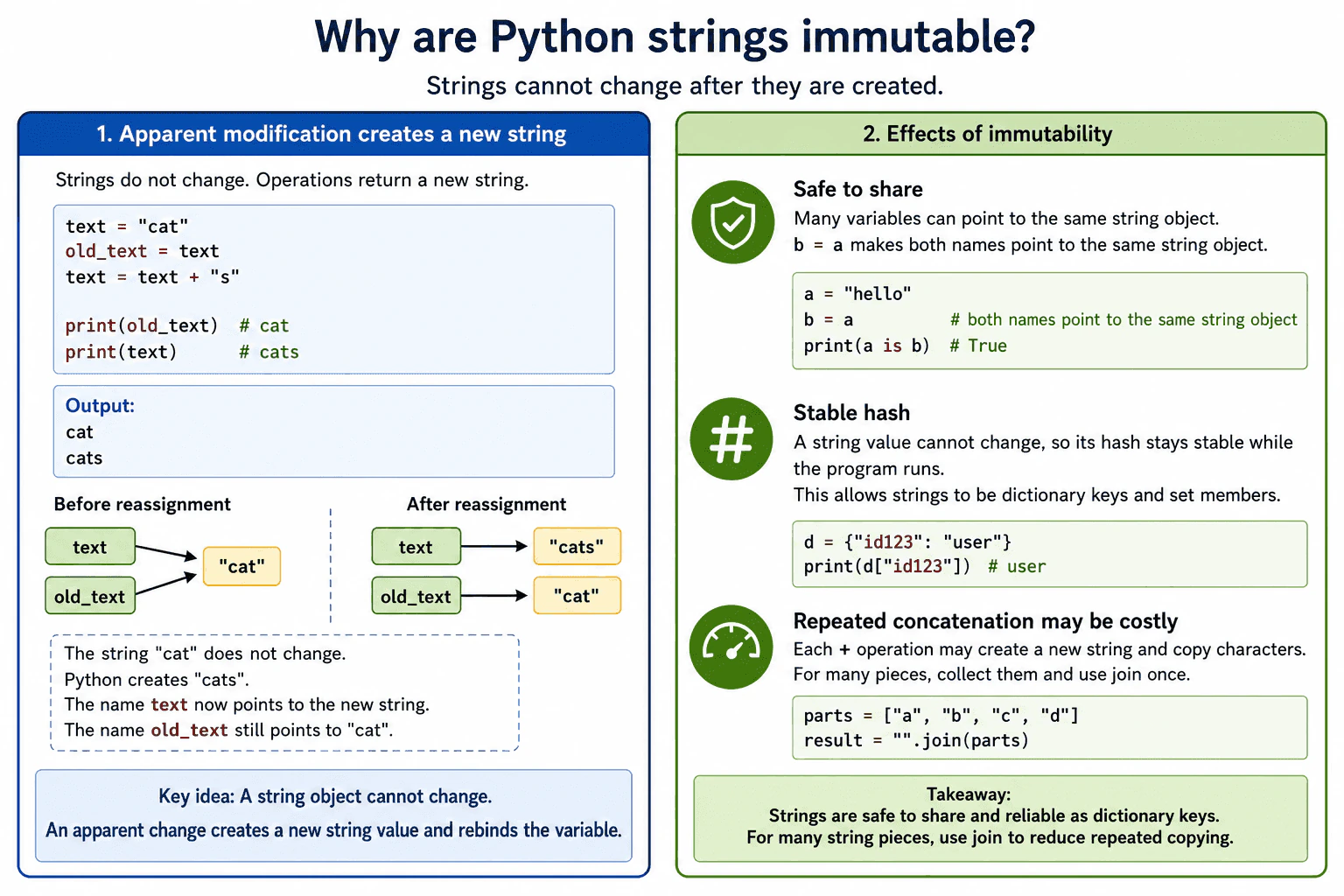
Python strings are immutable, so their character sequence cannot change after creation. Operations such as replace, upper, slicing, and concatenation return a string value instead of changing the original object. This makes strings safe to share and suitable as dictionary keys, but repeated concatenation can create extra copying and temporary string objects.
Detailed Explanation
Python strings are immutable. This means the sequence of characters inside a string object cannot change after Python creates it. Code cannot replace a character by assigning to an index.
Useful Questions to Ask the Interviewer
Should I focus on Python language behavior, or also explain the runtime and standard library?
Which Python version and execution environment should I assume?
Would you like a small code example together with production tradeoffs and edge cases?
Operations that appear to modify a string return a string value instead. For example, replace, upper, slicing, and concatenation leave the original value unchanged. When the result is assigned to the same variable, the variable is rebound. It now refers to the result rather than changing the old object.
This behavior makes strings safe to share. Several variables can refer to the same string without one part of the program changing the value seen by another part. A string also keeps the same value and hash during its lifetime. This allows it to be used as a dictionary key or set member.
The main performance concern appears when many pieces are added repeatedly. Each concatenation may allocate another string and copy characters. Some Python implementations can optimize certain simple cases, but code should not depend on that optimization. For many pieces, store them in a list and call join once. Join usually reduces repeated copying and temporary allocations.
Where it is used
String immutability is useful for dictionary keys, set members, cache keys, file paths, configuration values, identifiers, log text, protocol messages, and values shared between functions. In production code, join is commonly used when a program must combine many small string pieces into one result.
Why Interviewers Ask This
Interviewers ask this question to check whether a candidate understands immutable objects, variable rebinding, hashing, object sharing, allocation, and the performance cost of building strings repeatedly. It also tests whether the candidate can choose an efficient string building method in production code.
Common interview mistakes
A common mistake is saying that assigning a new value to the same variable changes the original string. The assignment only rebinds the variable. Another mistake is trying to assign to a string index, which raises a TypeError. Developers may also build a large string with repeated concatenation inside a loop and overlook the possible copying and temporary allocations. Another mistake is using is to compare string values. Value comparison should use == because Python may reuse some string objects, but object identity is not guaranteed.
Interview tip
Begin by saying that the characters inside a string object cannot change. Then explain that apparent modifications return a string value and may rebind the variable. Finish with the practical effects: safe sharing, stable hashing, and possible copying during repeated concatenation.
Interviewer may ask next
What happens if code assigns a new character to a string index?
Python raises a TypeError because strings do not support item assignment. The existing character sequence cannot be changed. The program must create a new string, such as by combining slices with the replacement character. This matters because strings cannot be updated in place like lists.
Why is join usually better than repeated concatenation for many pieces?
Join usually performs less repeated copying because it combines all pieces into the final result in one operation. Repeated concatenation may create temporary strings and copy characters many times, although some implementations optimize simple cases. Concatenation is still clear for a small number of pieces, while join is the safer production choice for a large or growing collection.
27. How do append(), extend(), and insert() differ for lists?Language SpecificEasy
i Question Details
Explain how each method changes a list, what arguments it accepts, and how append differs from adding each element of another iterable.
Short Interview Answer (30-60 seconds)
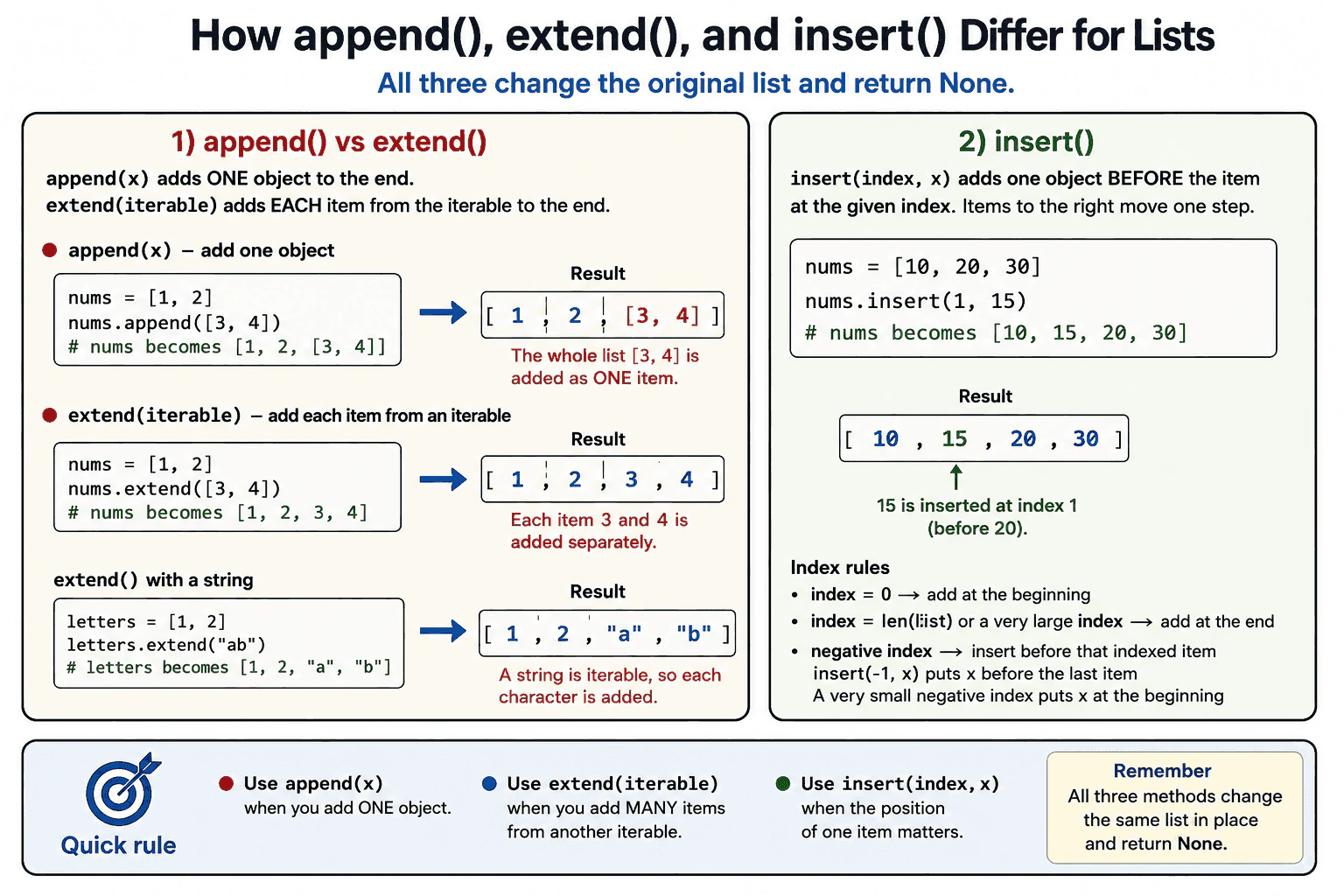
append adds one object to the end of a list. extend takes an iterable and adds each item from it to the end. insert takes an index and one object, then places that object before the element currently at that position. All three methods change the existing list and return None. I use append for one object, extend for several items, and insert when a specific position is required.
Detailed Explanation
The practical rule is to use append for one object, extend for every item from an iterable, and insert for one object at a chosen position.
Useful Questions to Ask the Interviewer
Should I focus on Python language behavior, or also explain the runtime and standard library?
Which Python version and execution environment should I assume?
Would you like a small code example together with production tradeoffs and edge cases?
append accepts one object and adds it to the end. Appending [3, 4] to [1, 2] produces [1, 2, [3, 4]]. The added list remains one nested object.
extend accepts one iterable. Python reads that iterable and adds each item separately. Extending [1, 2] with [3, 4] produces [1, 2, 3, 4]. A non iterable value raises TypeError. Extending with a string adds its characters separately.
insert accepts an index and one object. It places the object before the element at that position. A large positive index places it at the end. A very small negative index places it at the beginning.
All three methods modify the same list and return None. They store references to objects rather than copying the objects themselves. The list may allocate more internal space as it grows. append is usually constant time on average. extend takes time based on the number of added items. insert may take time based on the list size because existing references may need to move.
Where it is used
append is useful when a program collects one result at a time, such as validation errors, parsed records, or processed file names. extend is useful when several results already exist in another iterable, such as records from another page or values produced by a generator. insert is useful when one value must appear at a specific position, such as adding a default choice at the start of a menu. In production code, repeated insertion near the beginning of a large list should usually be avoided because many existing references may need to move. These methods change the original list, so shared references to that list will observe the changes.
Why Interviewers Ask This
Interviewers ask this question to check whether a candidate understands how Python changes lists in place. It also tests whether the candidate can choose the correct method, predict the resulting list structure, reason about object references, and consider the cost of moving or adding elements.
Common interview mistakes
A common mistake is using append when each item from another iterable should be added separately. This creates one nested element instead of adding the items individually. Another mistake is writing values = values.append(3). append returns None, so values then refers to None. The same return behavior applies to extend and insert. Developers may also forget that extend with a string adds separate characters. Another mistake is expecting these methods to copy mutable objects. They add object references, so later changes to a shared mutable object can be visible through the list. Repeated insert calls near the beginning of a large list can also create unnecessary performance cost.
Interview tip
Start with the decision rule. Say that append adds one object, extend adds each item from an iterable, and insert adds one object at a chosen index. Then use the same small list example to show that append can create a nested list while extend adds separate items. Finish by stating that all three methods modify the original list and return None.
Interviewer may ask next
What happens when extend is called with a string or a non iterable value?
A string is iterable, so extend adds each character as a separate list element. For example, extending [1, 2] with "ab" produces [1, 2, "a", "b"]. A non iterable value, such as an integer, raises TypeError because extend needs an object that Python can iterate over. This matters because append should be used when the complete string or other object must remain one list element.
Why can insert be slower than append, and what memory behavior do these methods have?
insert can be slower because Python may need to move existing object references to create space at the requested position. The work can grow with the size of the list, especially near the beginning. append is usually constant time on average because it adds at the end, although the list may occasionally allocate a larger internal storage area. append, extend, and insert change the existing list and store references to the added objects. They do not copy those objects.
28. How do remove(), pop(), and del differ?Language SpecificEasy
i Question Details
Explain removal by value versus index, return values, error behavior, and how del can also remove slices or delete a name.
Short Interview Answer (30-60 seconds)
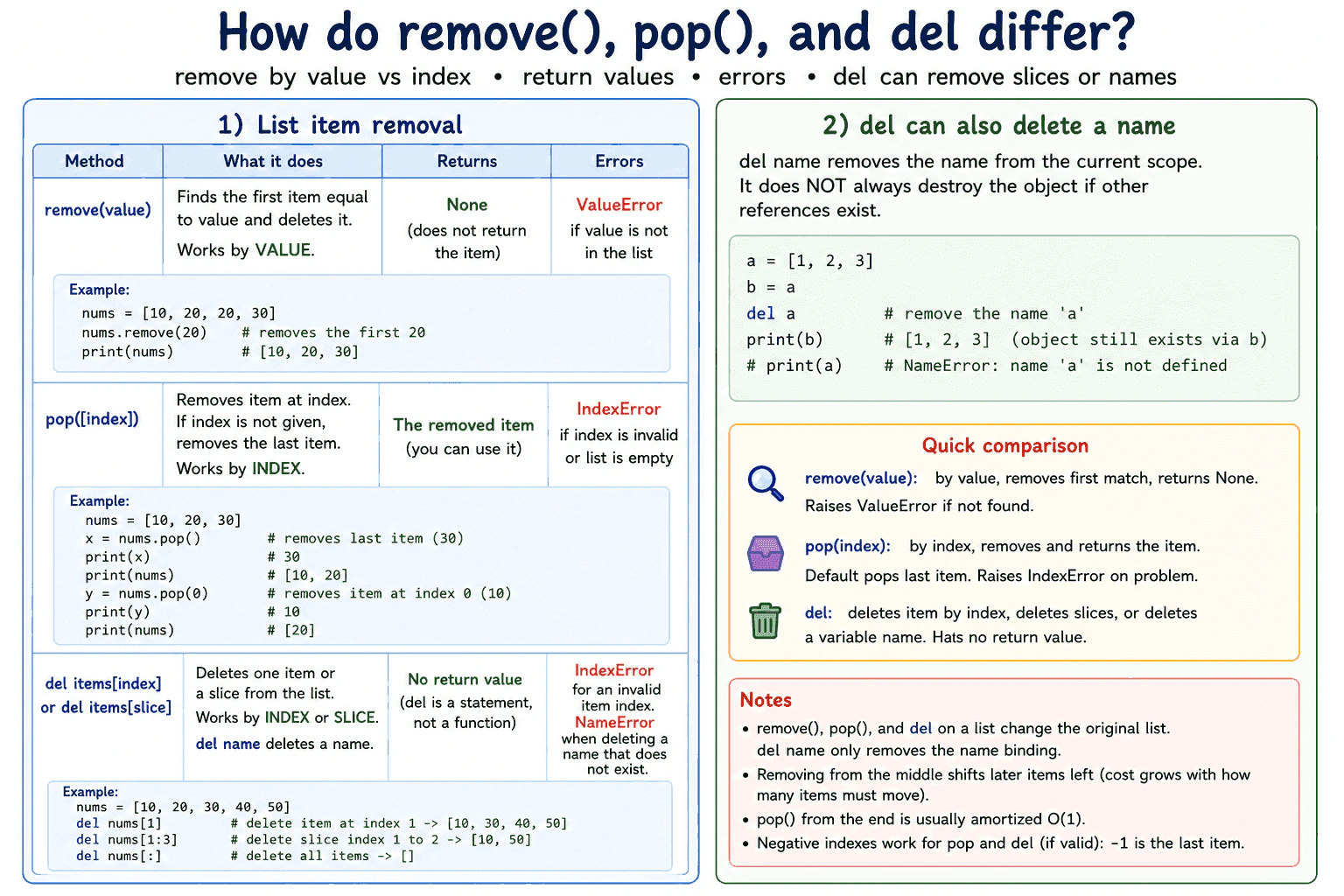
Use remove when you know the value, pop when you know the index and need the removed value, and del when you want to delete an item, a slice, or a variable name. remove deletes the first matching value and returns None. pop removes and returns an item, using the last item when no index is given. del is a statement, so it does not return a value.
Detailed Explanation
The practical choice depends on what you know and whether you need the removed value. list.remove(value) searches from the start of the list and deletes the first item that compares equal to the value. It returns None. If no match exists, Python raises ValueError. Use it when the value matters more than its position.
Useful Questions to Ask the Interviewer
Should I focus on Python language behavior, or also explain the runtime and standard library?
Which Python version and execution environment should I assume?
Would you like a small code example together with production tradeoffs and edge cases?
list.pop(index) removes and returns the item at that index. With no index, it removes the final item. A missing item in an empty list or an index outside the valid range raises IndexError. Negative indexes are allowed when they refer to a valid position.
del is a Python statement. del items[index] removes one item. del items[start:stop] removes a slice. del name removes that name from its current scope. It does not directly destroy the object if other references still point to it.
All list removal operations change the original list. remove may scan many items before finding a match. Removing from the front or middle also shifts later items left. pop() from the end is amortized constant time in normal Python list use. These operations usually do not create a new list, although Python manages the internal list storage and may keep some allocated capacity.
Where it is used
remove is useful when deleting the first occurrence of a known value, such as removing a selected tag from a list. pop is useful in stack processing, undo logic, work processing, or any flow that needs the removed item. del is useful when deleting a known position, removing a range with a slice, clearing the entire list with del items[:], or removing a temporary variable name from the current scope.
Why Interviewers Ask This
Interviewers ask this question to check whether a candidate understands removal by value, removal by index, return values, exceptions, slice deletion, and variable name deletion. It also tests whether the candidate can choose a clear operation and explain the performance cost of changing a Python list.
Common interview mistakes
A common mistake is expecting remove to return the deleted item. It returns None. Another mistake is assuming remove deletes every matching value. It deletes only the first match. Developers may also call pop on an empty list or use an invalid index without handling IndexError. Another error is treating del like a function or expression that returns a value. del is a statement. It is also incorrect to assume del name always destroys the object immediately. It removes one name binding, but other references may still keep the object alive. Removing items while iterating over the same list can also skip values or produce confusing results because indexes change.
Interview tip
Start with the decision rule. Say remove is by value, pop is by index and returns the item, and del deletes an item, slice, or name without returning anything. Then mention the main exceptions and explain that removing from the middle of a list requires later items to shift.
Interviewer may ask next
What happens when remove cannot find the value?
Python raises ValueError because remove requires a matching value. This matters when absence is possible. Code can check whether the value is present or catch ValueError. Checking first may scan the list once and remove may scan it again, while catching the exception avoids that second scan when missing values are uncommon.
Which operation is best for repeatedly removing the last list item?
pop() is usually the best list operation because it removes and returns the final item and normally does not shift other elements. Its cost is amortized constant time. This makes a list suitable for stack behavior. Frequent removal from the front is linear time because remaining items must shift, so collections.deque is usually a better production choice when items must be removed often from both ends.
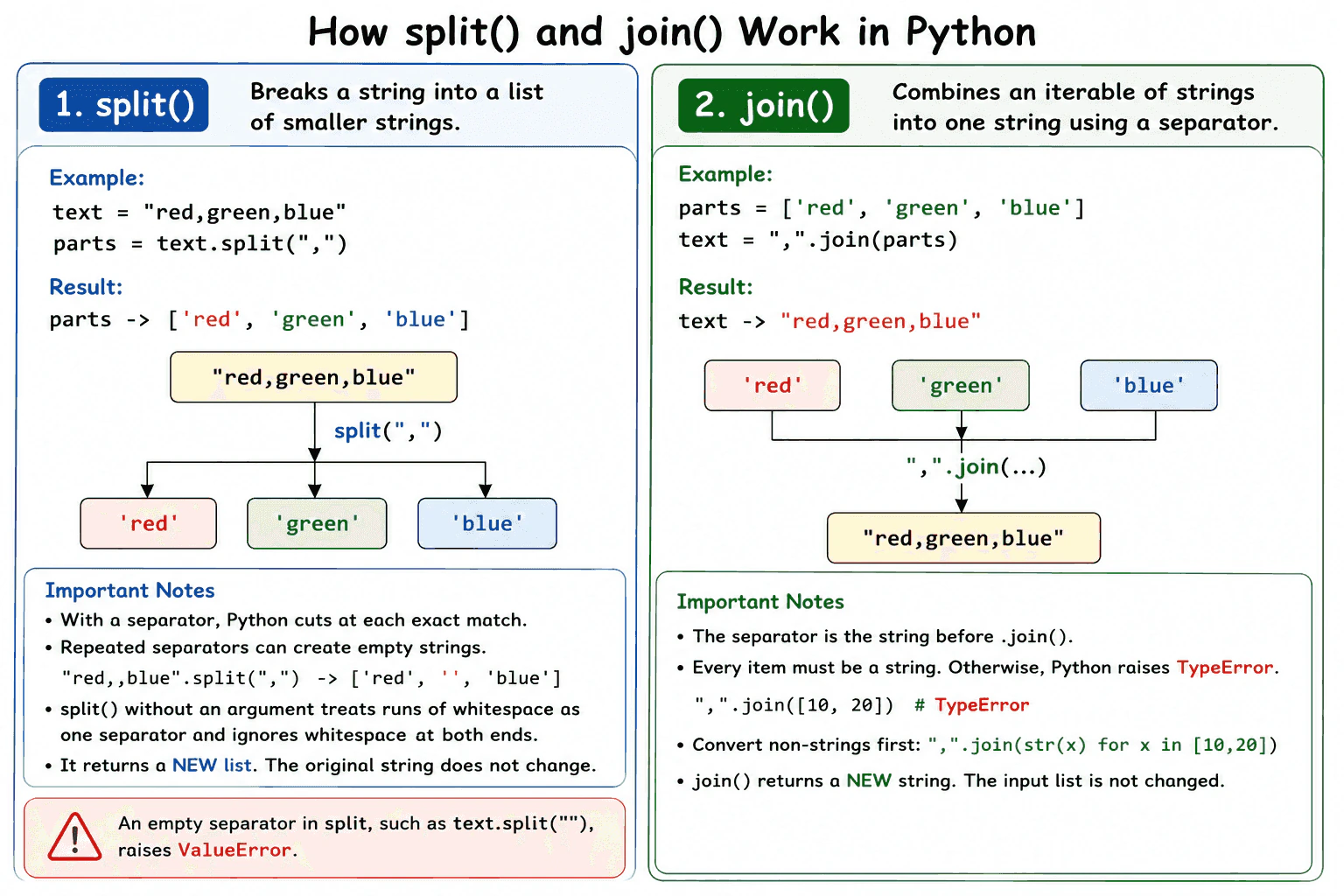
29. How do split() and join() work?Language SpecificEasy
i Question Details
Explain how split creates substrings from a string and how join combines an iterable of strings using a separator, including common type errors.
Short Interview Answer (30-60 seconds)
split breaks one string into a new list of smaller strings. join combines an iterable of strings into one new string and places a separator between the items. For example, "red,green,blue".split(",") returns ["red", "green", "blue"], and ",".join(["red", "green", "blue"]) returns "red,green,blue". Every item passed to join must be a string, or Python raises TypeError.
Use split when you need to break one string into parts. Use join when you need to combine strings with a separator.
Useful Questions to Ask the Interviewer
Should I focus on Python language behavior, or also explain the runtime and standard library?
Which Python version and execution environment should I assume?
Would you like a small code example together with production tradeoffs and edge cases?
For example, "red,green,blue".split(",") returns a new list containing "red", "green", and "blue". When a separator is provided, Python cuts at each occurrence of that exact separator. Repeated separators can create empty strings. For example, "red,,blue".split(",") returns ["red", "", "blue"]. An empty separator is invalid and raises ValueError.
When split is called without a separator, Python treats runs of whitespace as one separator and ignores whitespace at both ends. This differs from split(" "), which uses one exact space and can produce empty strings.
join works in the opposite direction. The separator calls the method. For example, ",".join(["red", "green", "blue"]) returns "red,green,blue". Every item must be a string. A non string item causes TypeError.
Strings are immutable, so neither method changes the original string. split creates a new list and new substring results. join creates a new result string. Time and memory use grow with the total amount of text processed.
Example
The first example starts with the string "red,green,blue". split uses a comma as the separator and returns the list ["red", "green", "blue"]. join then uses the same comma separator and produces "red,green,blue". The second example contains integers. Each integer is converted to a string before join because join accepts string items only.
Code
defmain():
# Start with one string containing comma separated values
text = "red,green,blue"# Split the string wherever a comma appears
colors = text.split(",")
print(colors)
# Join the strings using a comma between each item
combined = ",".join(colors)
print(combined)
# Start with integer values
numbers = [10, 20, 30]
# Convert each integer to a string before calling join
number_text = ",".join(str(number) for number in numbers)
print(number_text)
if __name__ == "__main__":
main()
Where it is used
split is useful for simple command input, log lines, fixed separator records, configuration values, and user entered text. join is useful for display messages, file content, report rows, URL query fragments after proper encoding, and text created from validated values. split should not be used as a complete CSV parser when fields may contain quoted separators. Python's csv module should be used for that case. File system paths should normally be built with pathlib or os.path instead of plain string join.
Why Interviewers Ask This
Interviewers ask this question to check whether a candidate understands common Python string operations, separator rules, returned data types, empty values, whitespace handling, type errors, and object allocation. It also tests whether the candidate can choose safe text processing methods for production code.
Common interview mistakes
A common mistake is calling join on the iterable, such as values.join(","). The separator must call join, so the correct form is ",".join(values). Another mistake is passing integers, bytes, or other non string items directly to join, which raises TypeError. Developers may also assume split() and split(" ") behave the same, but repeated whitespace is handled differently. Other mistakes include using an empty separator, which raises ValueError, forgetting that repeated explicit separators can create empty strings, and using simple split for structured formats such as CSV that have quoting rules.
Interview tip
Explain split and join as opposite operations. State that split returns a new list, join returns a new string, the separator calls join, and every joined item must be a string. Then mention one edge case, such as repeated separators or whitespace handling.
Interviewer may ask next
What is the difference between split() and split(" ")?
split() without an argument treats any run of whitespace as one separator and ignores whitespace at the beginning and end. split(" ") uses one exact space as the separator, so repeated spaces can create empty strings. This matters when input may contain tabs, new lines, or inconsistent spacing.
What are the performance and memory costs of split and join?
Both operations take time proportional to the total amount of text they process. split creates a new list and substring results, so its memory use grows with the number and total size of the parts. join creates one new result string and must inspect every item before completing the result. Using a generator can avoid explicitly building a separate converted list in application code, but the converted strings and final output still require memory.
30. What does enumerate() do?Language SpecificEasy
i Question Details
Explain how enumerate produces index-value pairs, how its start argument works, and why it is preferable to manually maintaining a loop counter.
Short Interview Answer (30-60 seconds)
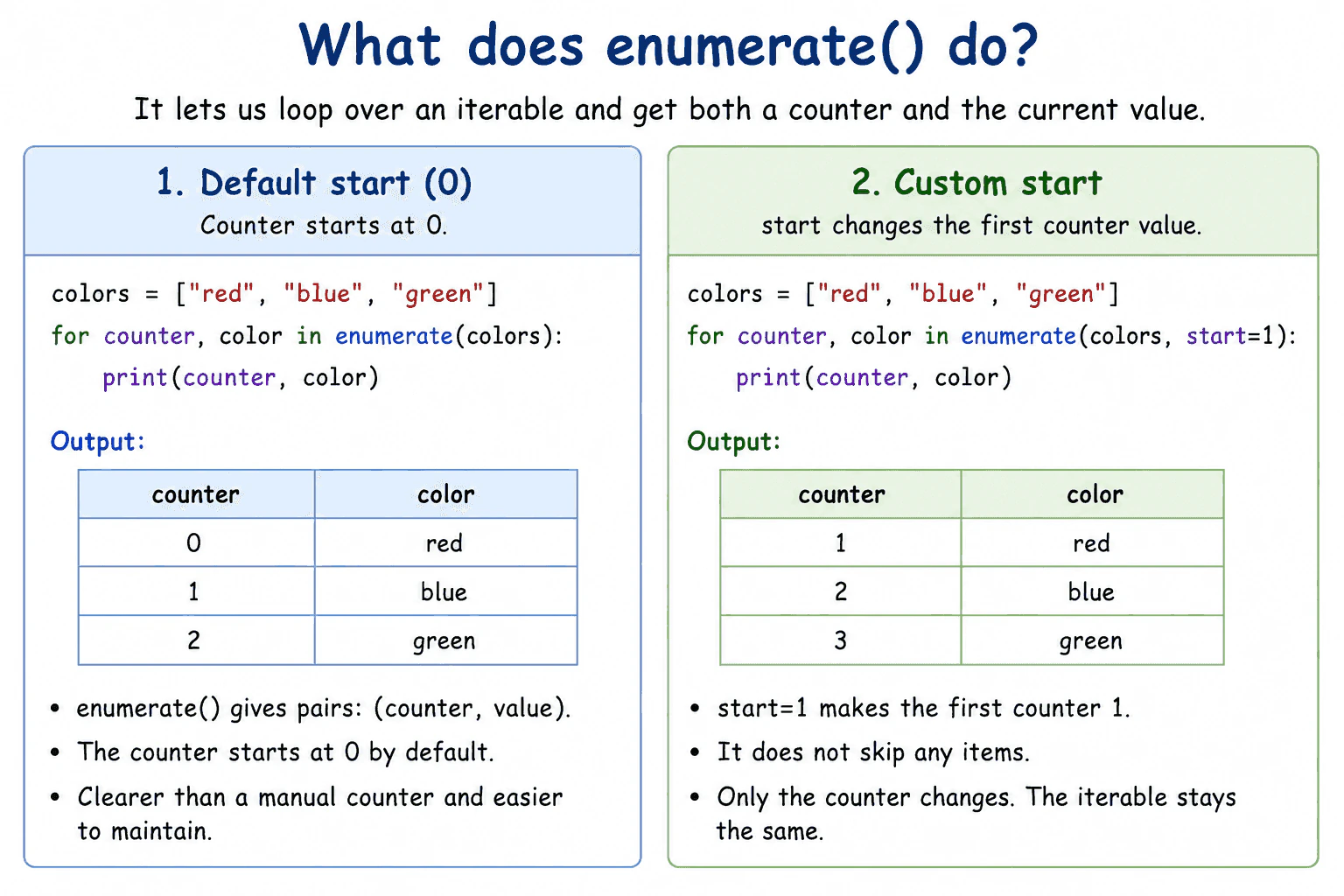
enumerate() lets me loop over an iterable while receiving both a counter and the current value. It yields pairs containing the counter and the item. The counter starts at zero by default, but the start argument can change its first value. It is usually clearer and safer than maintaining a separate counter.
Detailed Explanation
Use enumerate() when a loop needs both a counter and the current item. It accepts an iterable, such as a list, tuple, string, or generator, and returns an enumerate iterator. As the loop requests values, the iterator yields tuples containing the current counter and the next item.
Useful Questions to Ask the Interviewer
Should I focus on Python language behavior, or also explain the runtime and standard library?
Which Python version and execution environment should I assume?
Would you like a small code example together with production tradeoffs and edge cases?
For example, enumerate(["red", "blue"]) yields (0, "red") and then (1, "blue"). A loop can unpack each tuple into two names, such as position and color.
The counter starts at zero unless start is provided. enumerate(values, start=1) pairs the first item with one. The start argument does not skip items and does not change the original iterable.
enumerate() is usually better than a manual counter because it removes extra state. A manual counter can become incorrect when the loop changes, especially when continue causes an update statement to be skipped.
enumerate() works lazily. It does not create every pair in advance. Creating the iterator uses constant extra memory, and processing all items takes linear time. The iterator is consumed as it is read, so reuse requires creating a new enumerate object.
Where it is used
enumerate() is useful when numbering displayed results, reporting the position of invalid input, processing rows with row numbers, logging item positions, or updating a collection while also needing each current index. It is most appropriate when the loop needs both the value and a related counter.
Why Interviewers Ask This
Interviewers ask this question to check whether a candidate understands Python iteration, can write clear loops, and knows when to replace a manually updated counter with a built in tool.
Common interview mistakes
A common mistake is assuming that the counter is always the real index of a sequence. When start is not zero, the counter and the actual index differ. Another mistake is expecting start to skip items. It changes only the counter. Developers may also convert enumerate() to a list without needing every pair in memory, reuse an already consumed enumerate iterator, or maintain a separate counter when enumerate() would be clearer.
Interview tip
Explain three points clearly: enumerate() yields counter and value pairs, the default counter starts at zero, and start changes the counter without skipping items. Then mention that it avoids the extra state of a manual counter.
Interviewer may ask next
Does the start argument make enumerate() skip items?
No. The start argument changes only the first counter value. enumerate(values, start=5) still reads the first item first, but pairs it with five. This matters because the counter is produced alongside iteration and does not control which item is read.
When is range(len(values)) more suitable than enumerate(values)?
range(len(values)) can be more suitable when the numeric index itself is required for several index based operations, such as comparing nearby elements or coordinating multiple sequences. enumerate() is clearer when the loop mainly needs each item and its counter. The tradeoff is greater index control versus simpler and safer iteration.
More questions load as you scroll
Disclaimer: This interview guide is for educational and informational purposes only. It is designed to help readers prepare, but it does not guarantee any interview result, hiring decision, offer, or outcome. Interview questions, hiring criteria, and preferred answers can vary by employer, interviewer, industry, location, and time. All answers, examples, and explanations in this guide are suggested examples for interview preparation, not definitive answers or instructions for professional practice. They are based on research and judgment, are provided without warranties of any kind, and should be adapted to the question, role, and applicable laws and professional requirements. Diagrams are simplified illustrations intended to highlight the main concepts and their relationships; actual situations, systems, and practices may be more complex. Alternative approaches may be equally valid or better suited to a particular question, context, or interviewer. To the fullest extent permitted by applicable law, the contributors and publisher are not liable for decisions made, actions taken, or losses incurred based on this guide.
State Laws and Professional Responsibilities: Laws and requirements governing an occupation vary by state and jurisdiction. You are responsible for checking the current laws, licensing requirements, and scope-of-practice rules that apply to your location and role, and for ensuring that your answers and actions comply with them. Adapt examples in this guide to those requirements. This guide is not legal advice.
Content Accuracy and Verification: To the fullest extent permitted by applicable law, we do not represent or warrant that interview guides, questions, answers, examples, or diagrams are accurate, complete, current, error-free, or suitable for any particular purpose. You are responsible for independently reviewing and verifying the information before relying on it.