This interview guide is for educational and informational purposes only. It is designed to help readers prepare, but it does not guarantee any interview result, hiring decision, offer, or outcome. Interview questions, hiring criteria, and preferred answers can vary by employer, interviewer, industry, location, and time. All answers, examples, and explanations in this guide are suggested examples for interview preparation, not definitive answers or instructions for professional practice. They are based on research and judgment, are provided without warranties of any kind, and should be adapted to the question, role, and applicable laws and professional requirements. Diagrams are simplified illustrations intended to highlight the main concepts and their relationships; actual situations, systems, and practices may be more complex. Alternative approaches may be equally valid or better suited to a particular question, context, or interviewer. To the fullest extent permitted by applicable law, the contributors and publisher are not liable for decisions made, actions taken, or losses incurred based on this guide.
State Laws and Professional Responsibilities
Laws and requirements governing an occupation vary by state and jurisdiction. You are responsible for checking the current laws, licensing requirements, and scope-of-practice rules that apply to your location and role, and for ensuring that your answers and actions comply with them. Adapt examples in this guide to those requirements. This guide is not legal advice.
Identity, Image, and Privacy Notice
To respect individual privacy, some names, profile photographs, avatars, biographical details, and other identifying information displayed in this guide may be replaced with pseudonyms, licensed stock images, illustrative avatars, composite images, or representative descriptions. Unless a person is expressly identified as an actual contributor, a displayed name, image, or profile should not be understood as depicting or identifying a specific candidate, interviewer, employee, or other real individual. These representations are provided for editorial and illustrative purposes only and do not imply endorsement, employment, participation, or affiliation with this guide or any company mentioned in it. Any resemblance to an actual person is coincidental.
Company Notice
This guide is an independent educational resource and is not affiliated with, endorsed by, sponsored by, or approved by the company named in this guide. Company names identify reported interview experiences or the employer context of clearly labeled original practice exercises. Interview practices can change without notice, and inclusion of company-specific content does not mean these questions are official, complete, or guaranteed to be asked. To the fullest extent permitted by law, the author, contributors, and publisher are not responsible for outcomes related to use of this material.
Content Accuracy and Verification
To the fullest extent permitted by applicable law, we do not represent or warrant that interview guides, questions, answers, examples, or diagrams are accurate, complete, current, error-free, or suitable for any particular purpose. You are responsible for independently reviewing and verifying the information before relying on it.
Questions or comments?
Contact us for general questions, or share feedback, technical corrections, and comments with the community.
111. What changed in ASP.NET Core validation and authentication in .NET 10?Debugging And DiagnosticsHard
i Question Details
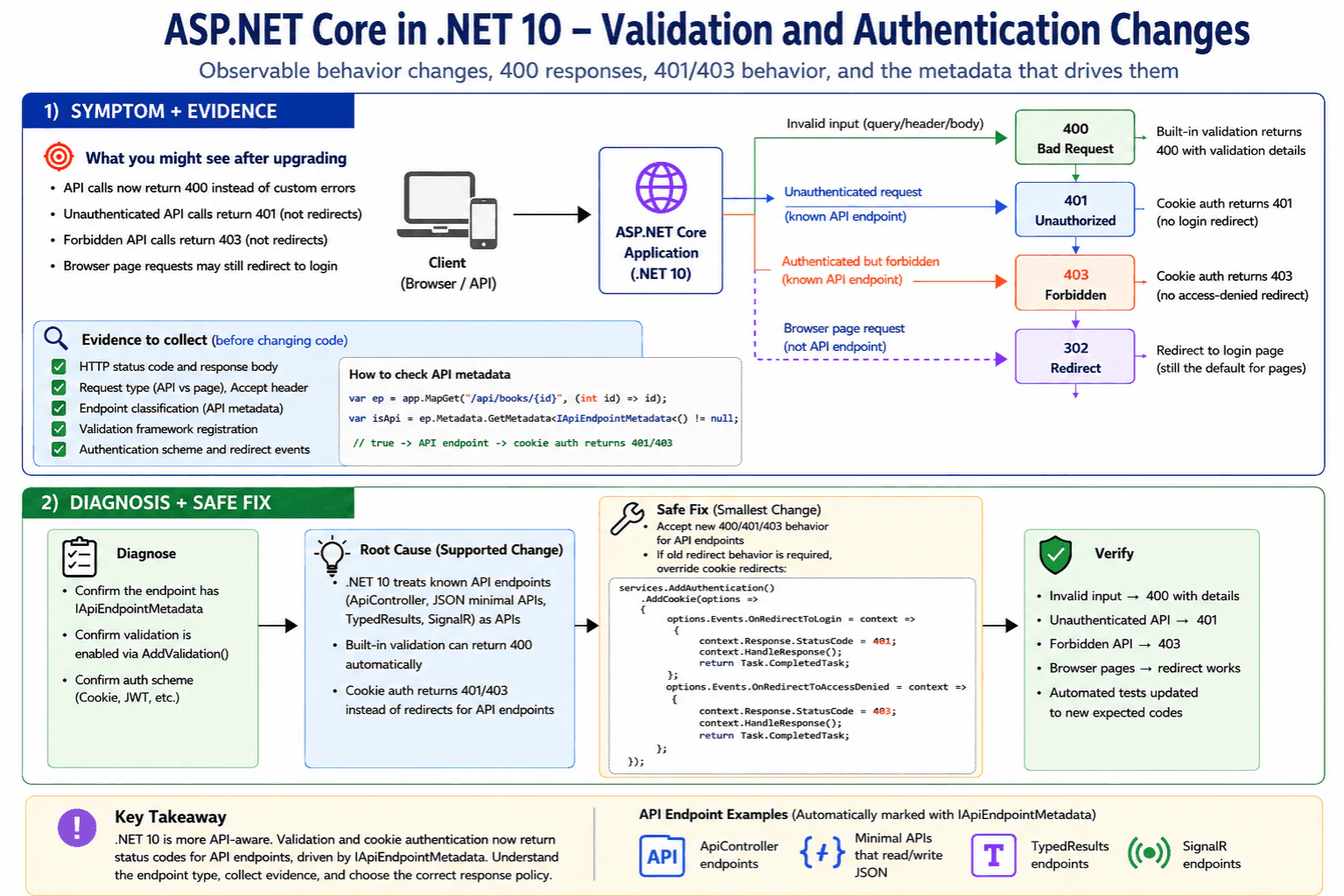
Focus on the observable behavior changes that can confuse upgrades, especially 400 responses, 401/403 behavior, and the endpoint metadata that drives them.
Short Interview Answer (30-60 seconds)
In .NET 10, ASP.NET Core validation moved to Microsoft.Extensions.Validation with AddValidation(), and minimal APIs can auto-return 400 with validation details. Cookie auth also changed for known API endpoints: they now return 401/403 instead of redirects, based on IApiEndpointMetadata. learn.microsoft.com
Detailed Explanation
This question asks what changed after an upgrade, not how to build a new app. The main thing to notice is how the app now reacts when input is wrong or when the user is not signed in. In some cases, the app now sends a plain error number instead of showing a web page. The change mainly affects API-style routes, so a developer must know which endpoints are treated like APIs and why that changes the response. devblogs.microsoft.com
Useful Questions to Ask the Interviewer
Are we talking about controllers, minimal APIs, or both?
Do these endpoints use cookie auth or another scheme?
Are validation failures expected to return JSON, redirects, or both?
How to Explain It in an Interview
In .NET 10, ASP.NET Core changed two behaviors that often surprise teams during upgrades.
First, validation means checking whether the input is acceptable. In .NET 10, the shared validation APIs moved to the Microsoft.Extensions.Validation package, and apps typically register them with AddValidation(). For minimal APIs, validation can now run automatically for query values, header values, and request body values. If validation fails, the framework returns 400 Bad Request with validation details instead of making every endpoint handle that manually. devblogs.microsoft.com
Second, authentication means checking who the user is, and authorization means checking whether the user may do the action. In .NET 10, cookie authentication now treats known API endpoints differently. For those endpoints, unauthenticated requests return 401 and forbidden requests return 403 instead of redirecting to login or access-denied pages. The change is driven by IApiEndpointMetadata, which is applied automatically to [ApiController] endpoints, minimal APIs that read or write JSON, TypedResults endpoints, and SignalR endpoints. XHR requests already returned 401/403, and that behavior continues. learn.microsoft.com
The practical debugging step is to reproduce the request and check whether the endpoint is now classified as an API endpoint. If it is, the new 400, 401, or 403 response may be the correct .NET 10 behavior rather than a regression. If a team still needs the old redirect flow, it can override the cookie redirect events. learn.microsoft.com
Technical Approach
Reproduce the request that changed after the upgrade.
Check whether the endpoint is treated as an API endpoint.
Verify whether validation is registered with Microsoft.Extensions.Validation and AddValidation().
Compare the observed status code with the old expected behavior.
Decide whether to keep the new 400/401/403 behavior or override cookie redirects only where necessary. learn.microsoft.com
Practical Insights
The runtime cost is small. The bigger cost is upgrade testing, because requests that used to redirect may now fail with 400, 401, or 403. Maintenance is usually easier after the change because behavior is more consistent and easier for API clients to consume.
Why Interviewers Ask This
To see whether the candidate can recognize upgrade-side behavior changes, trace them to endpoint metadata, and explain why validation failures and auth failures may now return status codes instead of redirects.
Common interview mistakes
A common mistake is treating the new 401 or 403 as a broken login flow when the endpoint is now classified as an API. Another mistake is forgetting the explicit Microsoft.Extensions.Validation package and AddValidation() registration. Teams also miss that browser page behavior and API behavior are now intentionally different. learn.microsoft.com
Interview tip
Lead with the behavior change, then name the metadata that drives it, and finish with how you would verify whether the new response is correct or a real regression.
Interviewer may ask next
How do you tell whether an endpoint is affected?
Check whether the endpoint has API metadata. In .NET 10, that metadata is added automatically to [ApiController] endpoints, JSON-reading or JSON-writing minimal APIs, TypedResults endpoints, and SignalR endpoints. Those are the endpoints that switch cookie auth behavior from redirects to 401/403. learn.microsoft.com
How do you keep the old redirect behavior?
Override the cookie authentication redirect events. In practice, you handle OnRedirectToLogin and OnRedirectToAccessDenied yourself and decide whether to send a redirect or a 401/403 based on the request type. That is the supported escape hatch when the old behavior is still required. learn.microsoft.com
112. What are async and await?Performance And ScalingEasy
i Question Details
Explain how asynchronous code frees the calling thread during I/O waits and why that improves request concurrency.
Short Interview Answer (30-60 seconds)
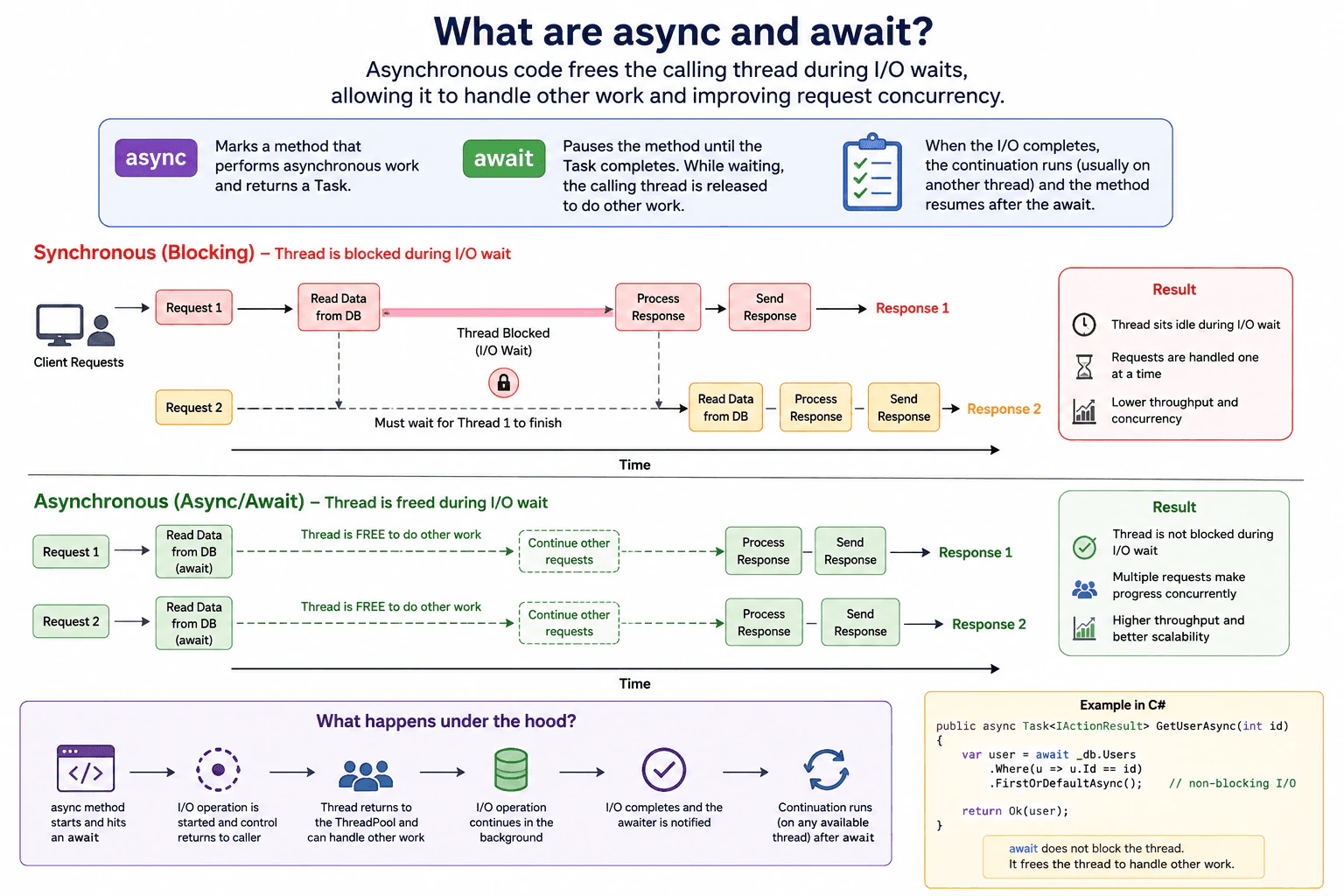
async marks a method that can run asynchronously and usually returns a Task. await pauses that method until the I O work finishes, then resumes it later. During the wait, the calling thread is released so it can handle other requests. That improves request concurrency, especially for database, HTTP, and file I O.
Detailed Explanation
This question is about how a program can wait for outside work, like getting data, without stopping the rest of the app. One part pauses, but the part that was helping it can go do something else until the answer comes back. That means the same computer can keep serving more users at the same time. It is useful when the slow part is waiting for something else to answer, instead of doing hard math. In that case, the app stays useful while it waits.
Useful Questions to Ask the Interviewer
Is this mainly database, web, or file waiting?
Is the goal fewer blocked workers or higher request handling?
Is this request code or background work?
How to Explain It in an Interview
I would say async and await let a method pause while it waits for I O, then continue later when the result is ready. The key performance idea is that the caller is not stuck doing nothing during the wait. That worker can help another request, so the app can handle more waiting work with the same resources.
The important point is that async does not make the wait itself shorter. It mainly improves request concurrency and thread use for I O bound work. It is a good fit for database, HTTP, and file waits, but it is not a fix for CPU heavy code.
Technical Approach
Identify the I O wait in the request path.
Show that the thread is released during the wait.
Explain that the continuation resumes when the I O finishes.
Connect that to higher request concurrency because more requests can make progress with the same thread count.
State the tradeoff that async improves thread usage and scalability for waiting work, but it does not speed up CPU heavy code by itself.
Practical Insights
async and await usually reduce thread blocking and improve throughput for waiting work. They add some state machine and scheduling overhead, but that is usually small compared with the cost of database or network waits. The main practical cost is code complexity, because you must keep the whole call chain async and handle exceptions, cancellation, and context flow correctly.
Why Interviewers Ask This
Interviewers ask this to see whether you understand how asynchronous code affects request concurrency, thread usage, and I O wait time in .NET. They also want to know if you can explain the practical tradeoff that async and await do not make work faster by themselves. They free the calling thread while waiting so the same server can handle more requests.
Common interview mistakes
A common mistake is to think async means faster code. It does not. It mainly prevents thread blocking during waits. Another mistake is wrapping real I O in Task.Run instead of using true async APIs. Another is using async in only one method and leaving the rest of the call chain synchronous. A fourth mistake is comparing a small local test and assuming production will behave the same under real load.
Interview tip
Explain async and await in one sentence first. Then say what happens to the thread during the wait. Finish by linking that to higher concurrency in an I O bound server.
Interviewer may ask next
Why does async help an ASP.NET Core API handle more requests even if each database call still takes the same time?
Because the request thread is not blocked while the database call is waiting. The database time stays the same, but the server can reuse that thread for other requests during the wait. That matters for the same workload because request concurrency goes up and ThreadPool starvation is less likely. The tradeoff is that the code becomes asynchronous end to end and you still need to watch downstream database capacity.
When would async and await not be the right answer for a performance problem?
For CPU heavy work, async and await do not reduce the actual compute cost. They mainly help when the workload spends time waiting on I O. For the same workload boundary, if the bottleneck is CPU, you usually need algorithm changes, bounded parallelism, or another way to reduce computation. That matters because async alone will not fix CPU saturation, and it can add complexity without improving throughput.
113. What does async/await actually do?Performance And ScalingMedium
i Question Details
Describe the generated state machine, the continuation behavior, and the practical impact on thread usage under load.
Short Interview Answer (30-60 seconds)
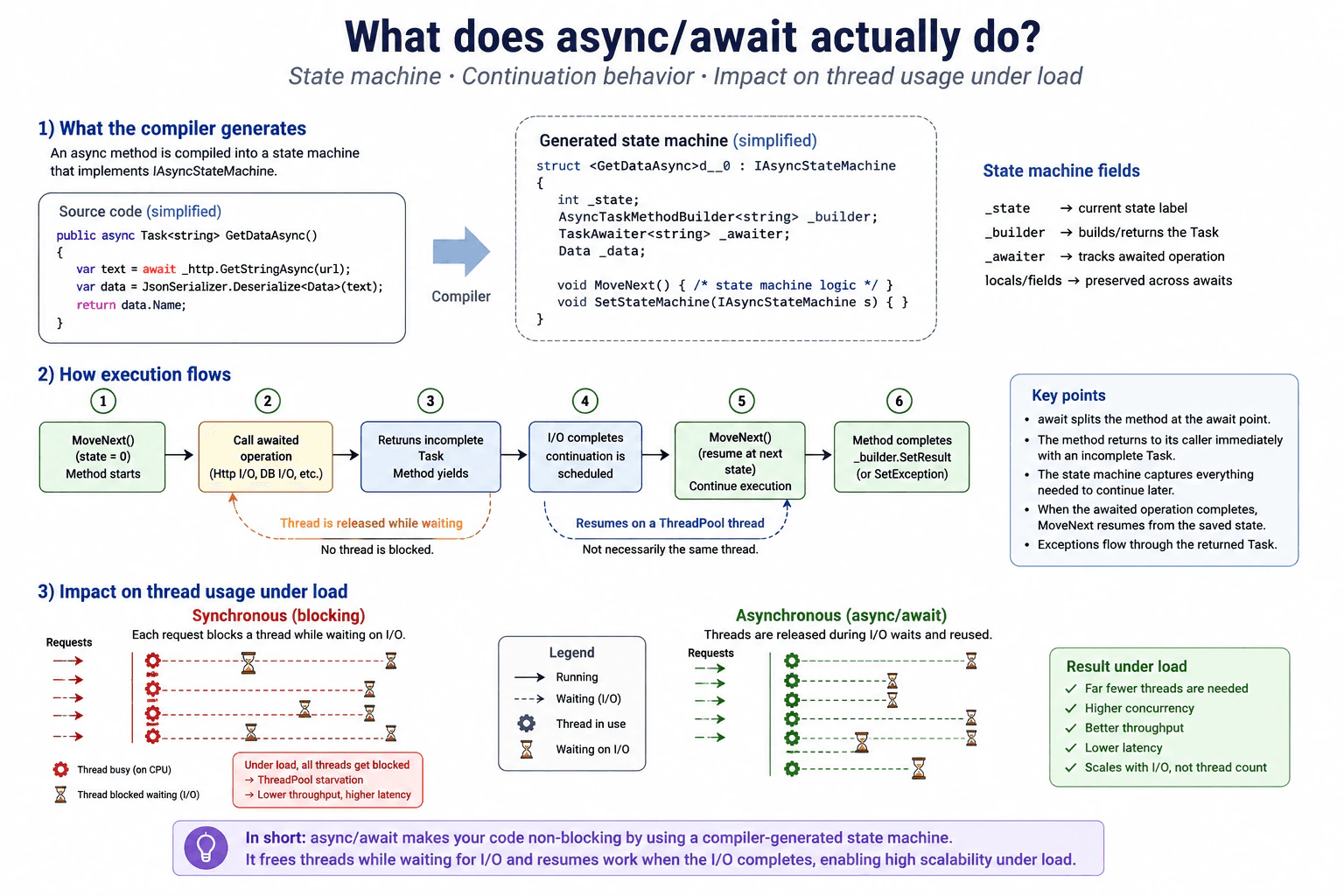
Async and await let a method pause while it waits for work, then continue later. The compiler turns the method into a state machine, so the thread can go back to other requests during I/O. That helps throughput under load, but it does not make CPU work faster.
Detailed Explanation
In simple terms, async and await let a method pause while it waits for work to finish, then continue later. The waiting does not keep one server worker busy the whole time. That means the app can serve other requests instead of sitting idle. It does not make the work itself faster. It mainly helps when many calls spend time waiting on web, database, file, or other outside work. Under load, that usually means better responsiveness and more useful work from the same server.
Useful Questions to Ask the Interviewer
Is this workload mostly waiting on outside work, or is it mostly CPU work?
Do you want me to focus on ASP.NET request handling or a background service?
How to Explain It in an Interview
async and await are not magic speed switches. The compiler rewrites an async method into a state machine. The local values that must survive across an await are stored in fields. When the method reaches await, it saves its state and returns control to the caller with an incomplete Task.
When the awaited work finishes, a continuation is scheduled. The method resumes from the saved state and finishes the next part. It may run on a different ThreadPool thread. async and await do not create a new thread for the wait.
Under load, this helps when the real cost is waiting on I/O. It frees threads so the server can handle more requests. It does not help CPU heavy code by itself. If the code blocks with Result or Wait, it can still tie up threads and hurt scalability.
Technical Approach
Decide whether the workload is waiting on I/O or using CPU.
Check whether the async method pauses at await and returns control.
Measure thread usage and throughput under representative load.
Watch for blocking calls that remove the benefit.
Verify that the same workload still works correctly after the change.
Practical Insights
Async adds a small state machine and some scheduling work. That costs a little CPU and memory. The gain comes when many operations wait on I/O, because the thread can do other work during the wait. So it usually helps scalability, but it does not remove the cost of the real work.
Why Interviewers Ask This
Interviewers ask this to see whether you know async and await are about waiting, not magic speed. They want to hear that you understand the compiler generated state machine, continuation behavior, thread usage under load, and the tradeoff between scalability and extra overhead.
Common interview mistakes
Thinking async makes CPU work faster. Using Result or Wait inside an async path. Wrapping naturally async I/O in Task.Run. Assuming the same thread will resume. Measuring only one request instead of real load. Ignoring thread usage, downstream limits, and correctness after the change.
Interview tip
Start with the real bottleneck. Say that async and await free the thread while waiting, then explain the state machine and the continuation. Finish by saying it helps I/O bound load, not CPU bound work.
Interviewer may ask next
Does async make a CPU heavy method faster?
No. For CPU heavy work, async and await do not reduce the actual computation. They mainly help when the method waits on I/O. If the workload is mostly CPU work, measure CPU time and use bounded parallelism or another CPU focused design. Under load, the bottleneck is still the CPU, so async can add overhead without improving throughput.
When can async hurt performance?
It can hurt when you use it for short CPU work, block inside it with Result or Wait, or create too much task churn and ignore downstream limits. For the same workload, the extra state machine and continuation work adds overhead. The right check is representative load, p95 latency, throughput, CPU, and thread usage before and after.
114. What is the difference between a Thread and a Task in a server application?Performance And ScalingEasy
i Question Details
Compare raw thread ownership with task-based scheduling and explain why thread exhaustion affects throughput.
Short Interview Answer (30-60 seconds)
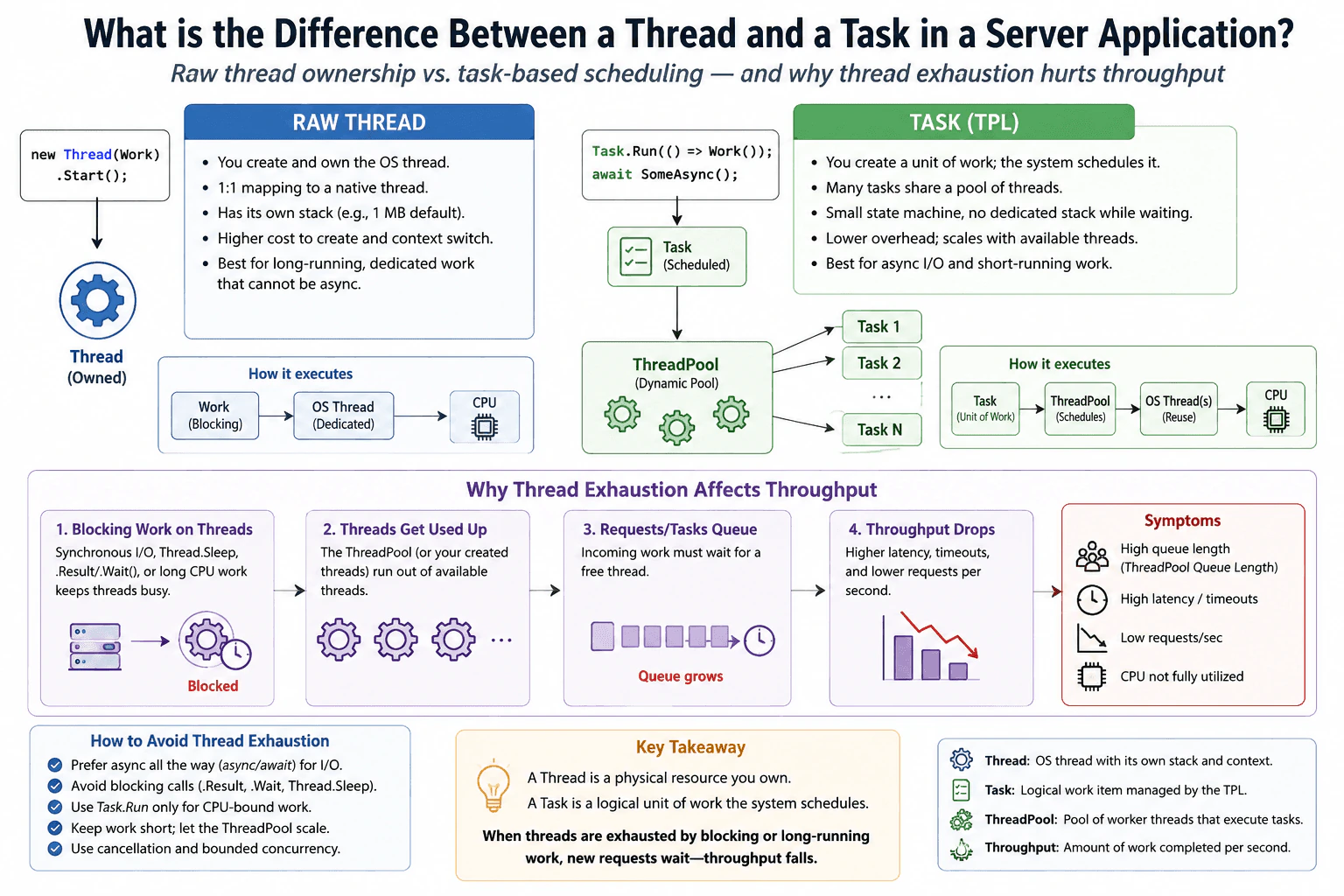
A Thread is an operating system worker that you own, while a Task is a unit of work that the runtime schedules, usually on the ThreadPool. In a server app, I prefer Tasks for async work because they let a thread return to the pool while waiting. If threads are blocked, new requests wait in line, latency rises, and throughput falls.
Detailed Explanation
In a server application, this question is asking whether you should give each request its own worker or let the system manage smaller pieces of work. A Thread is a worker you own and it can be tied up while waiting. A Task is a unit of work that can be scheduled more flexibly. The main idea is that if too many workers are blocked, new requests must wait, so the server handles less traffic. The interviewer wants to see that you understand why this affects speed and capacity.
Useful Questions to Ask the Interviewer
Is the work mostly waiting on database or network calls, or is it CPU heavy?
Is this for a request handler, a background worker, or both?
How to Explain It in an Interview
Start by saying that a Thread is the physical worker and a Task is the work item. A thread has an OS cost and a stack. A task is a schedulable unit of work. On a server, the goal is to keep threads free for useful work. For async I O, the task waits without holding a thread. For CPU work, use tasks or bounded parallelism, but do not create unbounded work or block inside request handlers.
When many threads block on I O, locks, or sleep calls, the ThreadPool can run out of free workers. New requests queue up, p95 latency rises, and throughput drops. A good way to explain it is to measure p95 latency, request rate, and ThreadPool queue length first. If latency is high but CPU is not saturated, that is a clue that waiting and thread exhaustion are the real bottleneck.
The fix is usually to make the slow wait async, remove blocking calls, and keep the work bounded. Then retest with the same load and confirm correctness. Also check that the bottleneck did not move to the database, network, or a lock.
Technical Approach
Identify whether the work is CPU heavy or mostly waiting.
Check p95 latency, throughput, and ThreadPool queue length.
Compare thread ownership with task scheduling.
Use async work or bounded concurrency, then retest with the same load.
Practical Insights
A Thread costs more because it owns an OS worker and a stack. A Task is lighter because it is a scheduled work item. The server stays faster when tasks let threads return to the pool during waits. The tradeoff is that blocking work can still exhaust threads, so the real cost comes from waiting, queueing, context switching, and too much concurrency.
Why Interviewers Ask This
Interviewers want to see whether you understand threads as a limited resource, tasks as schedulable work, and the way blocked threads can reduce server throughput. They are checking your judgment on when to use async work, when to use bounded concurrency, and how to explain the performance tradeoff in simple words.
Common interview mistakes
Treating every Task as a new thread. Blocking inside async request code. Using Task.Run for naturally async I O. Measuring only one fast request instead of real load. Ignoring thread queueing, lock contention, and downstream limits. Adding more workers without checking CPU, memory, and connection pools. Comparing results with different traffic.
Interview tip
Say that a Thread is a resource and a Task is work. Then explain that servers scale better when they keep threads free, use async for waiting, and measure throughput and queue delay under representative load.
Interviewer may ask next
How would you tell whether a slow server is blocked on threads or on the database?
I would compare p95 latency, CPU, ThreadPool queue length, and database time under the same request load. If CPU is not saturated but queue length and latency rise, the server is likely waiting on blocked threads. If database time dominates, the bottleneck is downstream.
When would you use Task.Run in a server app?
I would use it only for CPU work that I want to run on the ThreadPool, and I would keep it bounded. I would not use it to wrap async I O. If the work is long or blocking, I would consider a dedicated worker, a channel based pipeline, or a separate service instead.
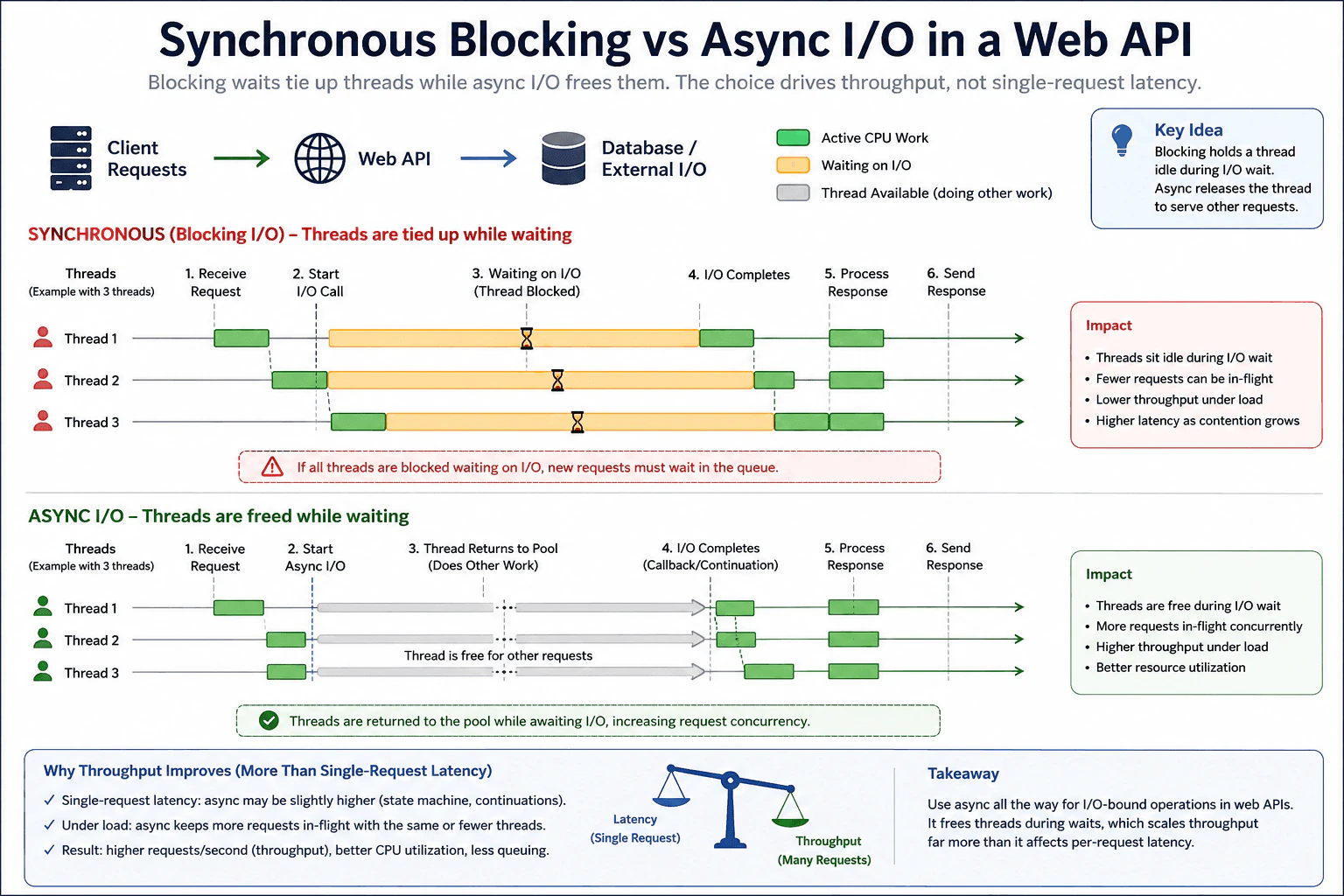
115. How do you compare synchronous blocking and async I/O in a web API?Performance And ScalingHard
i Question Details
Explain how blocking waits tie up threads while async I/O frees them, and why the choice affects throughput more than single-request latency.
Short Interview Answer (30-60 seconds)
I would compare both approaches under the same representative concurrent load and focus on throughput, queueing, and worker availability. With synchronous blocking, a worker thread stays occupied while the database or external I/O is still pending. With async I/O, the request starts the operation and gives the worker back to the ThreadPool while it waits. When the operation completes, a worker continues the request. This usually lets the same web API keep more requests in flight. It may not make one request complete faster, but it can improve throughput and reduce queueing under load.
Detailed Explanation
The main difference is what the server does while it waits for another system to finish some work. With blocking, a worker stays occupied even though it cannot make progress. If many requests wait at the same time, available workers can become busy and new requests may wait in a queue. With async I/O, the worker becomes available while the operation is pending and can help another request. This matters most when many requests are active together. The external operation may still take the same amount of time, but the server can use its worker capacity more efficiently.
Useful Questions to Ask the Interviewer
Is the request mainly waiting for a database, file, or external service?
Are we comparing behavior under concurrent load or only one request at a time?
Do the database or external services have connection or concurrency limits that could become the next bottleneck?
How to Explain It in an Interview
The request path in the diagram is client requests to the web API, then database or external I/O, followed by response processing and the response back to the client.
With synchronous blocking, a worker thread receives the request and starts the I/O call. While that I/O is pending, the worker stays occupied. It cannot serve another request during that wait. If enough requests are waiting and the available workers are occupied, later requests must wait in the queue. The application may use little CPU during those waits, but worker capacity is still consumed. Under concurrent load, this can reduce throughput and increase queueing and request latency.
With async I/O, a worker receives the request and starts an asynchronous I/O operation. If the operation does not complete immediately, the method yields and the worker returns to the ThreadPool. That worker can process other requests while the I/O remains pending. When the I/O completes, a ThreadPool worker runs the continuation, processes the response, and sends it back to the client. The continuation does not need to run on the same worker that started the operation.
This is why async usually affects throughput more than single request latency. Async does not make the database, network, or file operation itself complete faster. One request may therefore have similar latency, and async adds a small amount of state machine and continuation overhead. Under concurrent I/O bound load, however, workers are not held idle during dependency waits. More requests can stay in flight with the same worker capacity, so throughput can improve and queueing can decrease.
I would validate the difference with the same representative concurrent workload before and after the change. I would compare throughput, request latency, queueing, ThreadPool worker availability, CPU use, error rate, and dependency timing. I would also verify that the returned responses remain correct. If the web API processes more requests but the database, connection pool, or external service becomes saturated, then the bottleneck has moved rather than disappeared.
The practical choice is to use true asynchronous APIs for I/O bound operations and keep the request path asynchronous through the controller, service, and data access layers. I would not block an async request path by synchronously waiting for asynchronous work. I would also respect downstream connection and concurrency limits because async can allow more requests to reach those resources at the same time.
Technical Approach
Define the workload as a web API request that waits for database, file, or external I/O.
Capture a baseline under representative concurrent load using throughput, latency, queueing, ThreadPool worker availability, CPU use, errors, and dependency timing.
Observe the synchronous version and confirm whether worker threads remain occupied while I/O is pending.
Observe the async version and confirm that a worker starts the I/O, returns to the ThreadPool while waiting, and a worker continues the request after completion.
Compare both versions with the same request mix, concurrency, payloads, and dependency behavior.
Check whether async reduces worker pressure and queueing while increasing completed requests per unit of time.
Verify that responses and application behavior remain correct.
Check whether the limiting resource moved to the database, connection pool, external service, CPU, or another dependency.
Monitor the same measurements after deployment.
Practical Insights
Async does not reduce the amount of external I/O that each request needs. Its main benefit is how worker threads are used while requests wait. Blocking can keep one worker occupied for each waiting request, so worker pressure increases as concurrent waits increase. Async keeps the request state while the I/O is pending and returns the worker to the ThreadPool. This adds some state machine and continuation overhead, but it usually uses worker capacity more efficiently for I/O bound workloads. Higher concurrency can also increase pressure on database connections, external services, memory, and queues, so those limits still need to be measured.
Why Interviewers Ask This
Interviewers want to see whether I understand what happens to request threads while a web API waits for database or external I/O. They are also testing whether I can separate single request latency from throughput, explain ThreadPool pressure and queueing, and recognize that async improves concurrency only when the workload spends meaningful time waiting for I/O.
Common interview mistakes
Common mistakes include saying that async automatically makes one request faster, testing only one request instead of representative concurrency, calling asynchronous APIs and then blocking while waiting for their results, using synchronous database or network calls inside an async request path, assuming that more requests in flight are always safe, ignoring database connection and external service limits, comparing different workloads before and after the change, and declaring success when throughput improves without checking whether queueing or saturation moved to another dependency.
Interview tip
Explain the worker timeline first. Blocking keeps a worker occupied during the I/O wait. Async returns that worker to the ThreadPool and continues the request after the I/O completes. Then connect that difference to the main interview point: async usually improves concurrency and throughput much more than it changes the latency of one request.
Interviewer may ask next
What if an async web API still has poor throughput under load?
Async does not guarantee high throughput. For this web API workload, I would measure the complete request boundary again and check queueing, ThreadPool worker availability, CPU use, dependency timing, errors, and downstream saturation. A blocking call may still exist inside the async request path, or the database, connection pool, external service, CPU, or another limited resource may now be the bottleneck. Async frees workers during I/O waits, but it does not increase the capacity of those dependencies.
Can async I/O cause problems when it allows many more requests to stay in flight?
Yes. For this web API workload, async can allow more concurrent requests to reach the database or external service. That improves worker utilization, but it can expose connection limits, service limits, memory pressure, or queue growth. I would keep the request path asynchronous while respecting downstream concurrency limits, then test with the same representative workload and monitor throughput, latency, queueing, errors, worker availability, and dependency saturation to confirm that the bottleneck was reduced rather than moved.
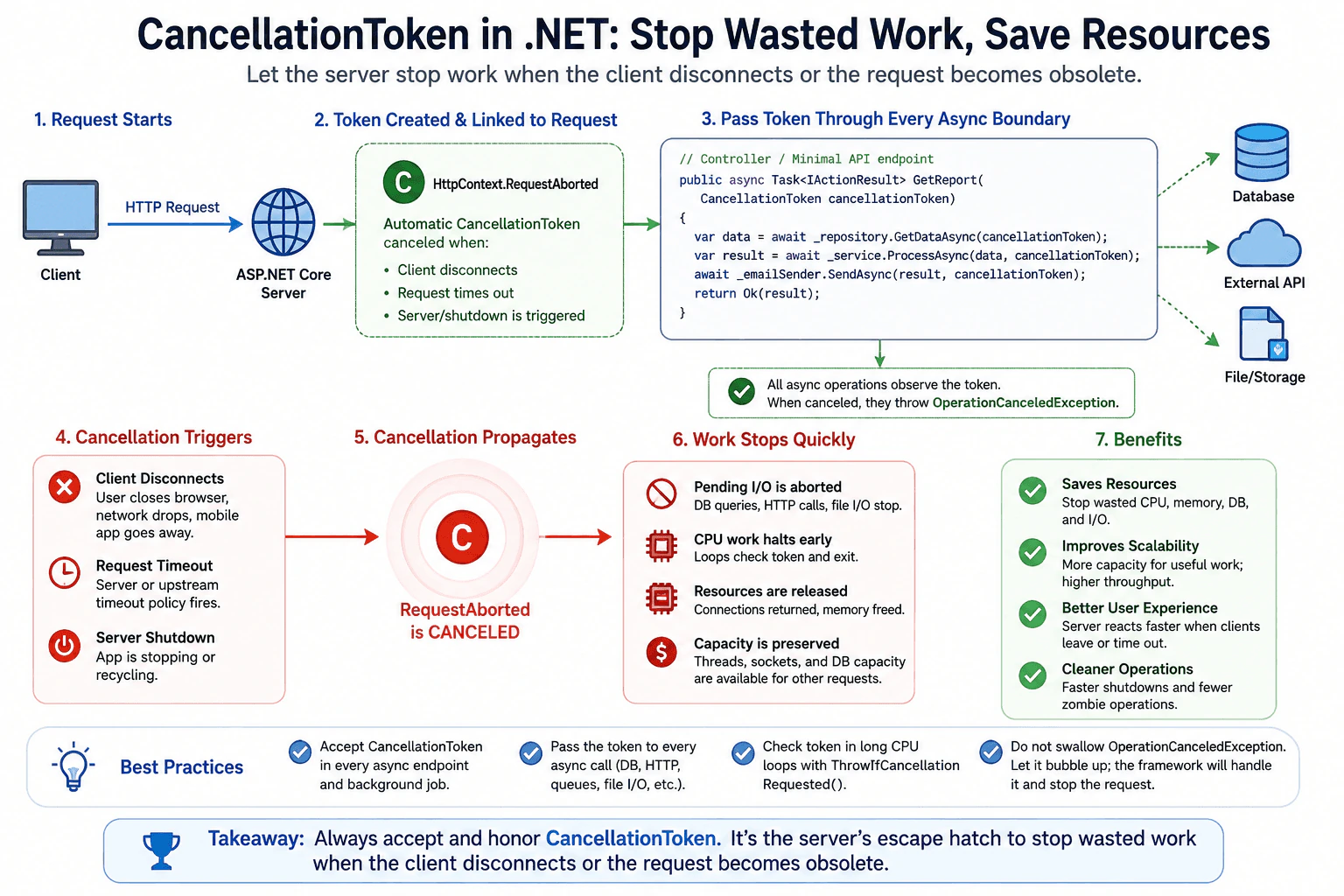
116. What is CancellationToken and why should every async endpoint accept one?Performance And ScalingMedium
i Question Details
Explain how cancellation lets the server stop wasted work when the client disconnects or the request becomes obsolete.
Short Interview Answer (30-60 seconds)
I would accept the CancellationToken from RequestAborted on every async endpoint and pass it into every async call below it. That lets the server stop work when the client disconnects or the request is no longer useful, so it does not waste CPU, threads, or database connections. The key is that cancellation is cooperative, so I still need to check the token in long loops and treat cancellation as a normal outcome.
Detailed Explanation
When a user leaves or a request is no longer useful, the app should not keep spending time on it. A CancellationToken is a small signal that tells async work to stop if it can. In ASP.NET Core, every async endpoint should accept that signal so the server can stop database calls, web calls, file work, and long loops early. That saves CPU, threads, and connections, and it keeps the app responsive for other requests.
Useful Questions to Ask the Interviewer
Do you want me to describe the ASP.NET Core request path or a background worker too?
Which async calls in the current code already accept a CancellationToken?
How to Explain It in an Interview
CancellationToken is a cooperative stop signal. It does not kill code by force. It asks the work to stop when the request is gone or stale.
In ASP.NET Core, HttpContext.RequestAborted is the token tied to the request. If the client disconnects, the browser closes, the request times out, or the server is shutting down, that token is triggered. The endpoint should accept it, and every async method below it should pass the same token into database calls, HTTP calls, file I O, and long CPU loops.
This matters because the whole request path is the boundary. If only the controller accepts the token but the repository or service ignores it, the app can still burn CPU, hold database connections, and keep threads busy after the response is useless.
When I explain it in an interview, I say I first measure where the waste is. Then I pass the token through every async layer. Then I verify that cancellation stops work early, the response stays correct, and the same workload uses fewer resources. When an operation notices the token, it normally throws OperationCanceledException, and I treat that as a normal cancellation result.
Technical Approach
Accept CancellationToken from RequestAborted.
Pass it into every async call.
Check it in long CPU loops.
Stop work when the client disconnects, the request times out, or the server shuts down.
Verify that the same workload finishes sooner and frees resources.
Practical Insights
The token itself is almost free. The main cost is wiring it through each async layer and checking it in long loops. The benefit is large when the request is stale. The server can save CPU, memory, database connections, thread time, and I O. The tradeoff is cooperative design. Cancellation does not stop code that ignores the token.
Why Interviewers Ask This
Interviewers ask this to see if I understand cooperative cancellation and whether I know how to stop wasted work when a request is no longer needed. It tests whether I understand the request path, resource waste, and how to protect CPU, threads, and downstream work when the client leaves or the request expires.
Common interview mistakes
Only accepting the token in the controller and not passing it down.
Treating cancellation like a server error.
Using it only for network calls and forgetting long loops.
Assuming it will stop non cooperative code by force.
Not checking that the same workload still returns the right result.
Interview tip
Say that CancellationToken is a cooperative stop signal. It helps the server stop wasted work early when the client leaves or the request is obsolete. Then mention that you pass it through every async boundary.
Interviewer may ask next
What happens if a repository method ignores the token?
The request can still keep doing database or web work after the client is gone. That means the workload boundary is too small, because only the controller is cancellable. It matters because wasted work still burns CPU and holds connections. The tradeoff is a little extra wiring in every async layer.
Can CancellationToken stop a CPU loop right away?
No. It is cooperative. A CPU loop must check the token often or call ThrowIfCancellationRequested. That matters for long loops in the same request path because otherwise the server keeps burning CPU after the request is obsolete. The tradeoff is a small check in the loop for much less wasted work.
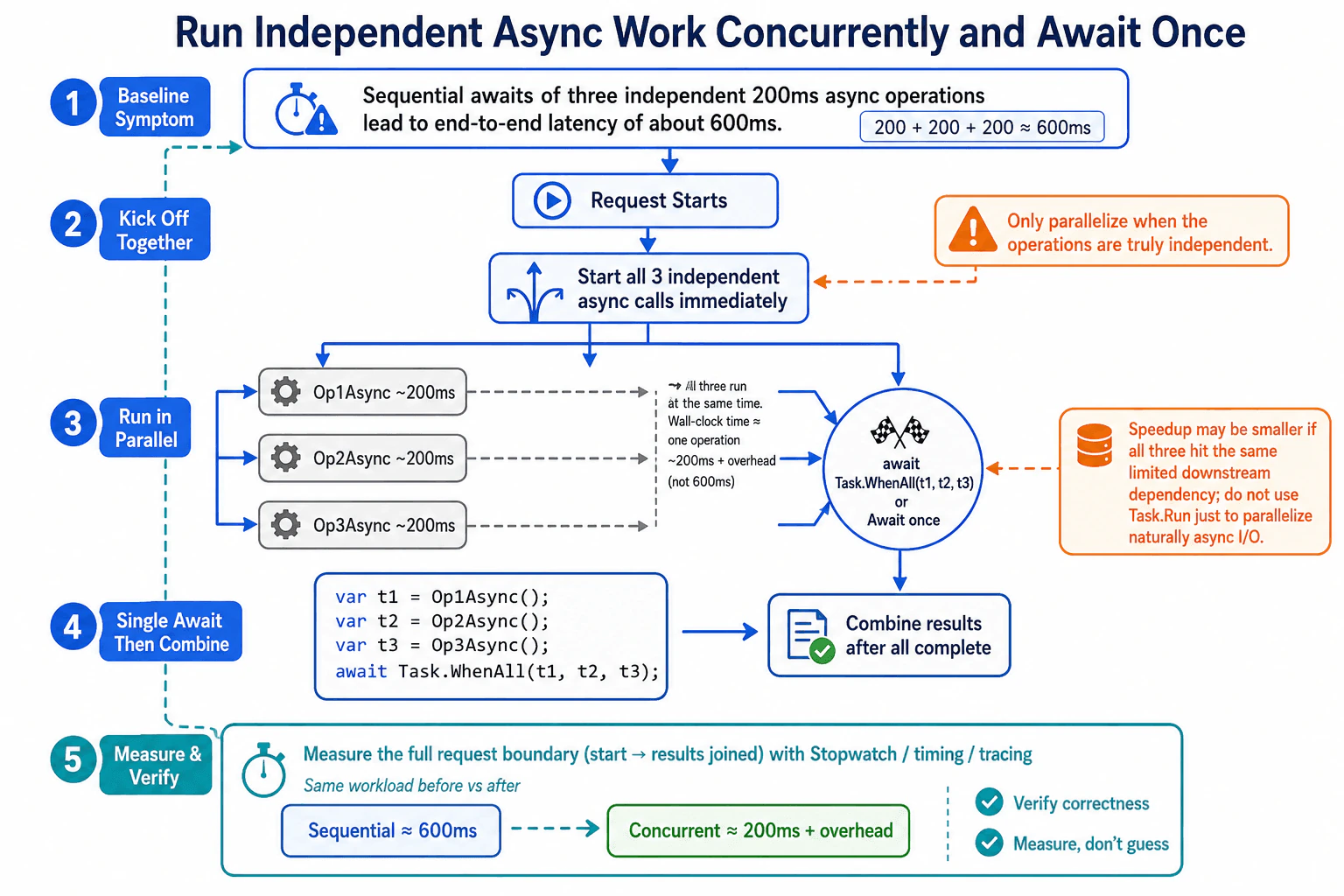
117. Three independent async operations, each 200ms. How do you optimize?Performance And ScalingMedium
i Question Details
Focus on running independent work concurrently, waiting once, and proving the latency improvement with measurement rather than guesses.
Short Interview Answer (30-60 seconds)
I would first measure the full request from the request start until all three results are ready. If the three asynchronous operations are truly independent, I would start all three immediately, keep their Tasks, and then await Task.WhenAll once. Each operation still takes about 200ms, but their waiting time overlaps, so the request can take about 200ms plus normal overhead instead of about 600ms. I would repeat the same measurement with the same inputs, verify the results, and check that a shared dependency did not become the new bottleneck.
The request needs three separate results, and each operation takes about 200 milliseconds. If we wait for one operation before starting the next, the waiting time adds up to about 600 milliseconds. Because the operations are independent, we can start all three at the same time and wait until every result is ready. This does not make each operation faster. It reduces the total waiting time by overlapping their work. We should measure the complete request before and after the change and confirm that the returned results stay correct.
Useful Questions to Ask the Interviewer
Are all three operations completely independent, or does any operation need a result from another one?
Do the three operations use the same limited database, external service, connection pool, or other shared resource?
Should I measure this with a Stopwatch, existing request timing, or tracing that already covers the full request?
How to Explain It in an Interview
I would define the measurement boundary first. It starts when the request begins and ends when all three results have been received and joined. With sequential awaits, the first 200ms operation finishes before the second starts, and the second finishes before the third starts. That gives a baseline of about 600ms.
Because Op1Async, Op2Async, and Op3Async are independent, I would call all three methods immediately and keep the returned Task objects. I would then await Task.WhenAll once. The three operations can make progress during the same wall clock period. Each operation still takes about 200ms. The improvement comes from overlapping their waiting time, so the full request can be close to 200ms plus normal overhead rather than about 600ms.
I would measure the sequential version and the concurrent version using the same inputs and exactly the same request boundary. A Stopwatch is enough for a controlled example. Existing request timing or distributed tracing can also be used when that instrumentation already exists. The important point is to measure rather than guess.
I would then verify that both versions return the same results. Starting work together is correct only when the operations are truly independent. If one operation needs data produced by another, they cannot safely be started as independent work.
I would not use Task.Run merely to make naturally asynchronous input and output calls run concurrently. I would call the asynchronous APIs directly. I would also check whether the three operations compete for the same limited downstream resource. A connection limit, service throttle, or similar resource limit can reduce the expected improvement and can move the bottleneck to that dependency.
Finally, I would repeat the same measurement after the change, verify correctness, and watch dependency timing or saturation. The optimization is successful only when the same request becomes faster without creating incorrect results or an unhealthy downstream bottleneck.
Key Insight / Why This Solution Works
Define the measurement boundary from request start until all three results are joined.
Measure the sequential baseline with the same inputs. Three sequential 200ms waits are about 600ms.
Confirm that Op1Async, Op2Async, and Op3Async are truly independent.
Start all three asynchronous calls immediately and keep their Task objects.
Await Task.WhenAll once so their waiting time can overlap.
Combine the results after all three Tasks complete.
Measure the concurrent version with the same inputs and the same request boundary.
Compare the result with the baseline and verify that the returned values are identical.
Check whether the additional concurrency caused throttling, connection pressure, or another downstream limit.
Code
using System;
using System.Diagnostics;
using System.Threading.Tasks;
publicstaticclassProgram
{
publicstaticasync Task Main()
{
// Warm up the same asynchronous operations before collecting the demonstration timings.await WarmupAsync();
// Measure from request start until every sequential result is available.var sequentialWatch = Stopwatch.StartNew();
string sequential1 = await Op1Async();
string sequential2 = await Op2Async();
string sequential3 = await Op3Async();
sequentialWatch.Stop();
// Start the concurrent measurement at the same logical request boundary.var concurrentWatch = Stopwatch.StartNew();
// Start all three independent asynchronous operations immediately.
Task<string> t1 = Op1Async();
Task<string> t2 = Op2Async();
Task<string> t3 = Op3Async();
// Await once so the waiting periods can overlap, then collect all results.string[] concurrentResults = await Task.WhenAll(t1, t2, t3);
concurrentWatch.Stop();
// Report the same end to end measurement boundary for both approaches.
Console.WriteLine($"Sequential: {sequentialWatch.ElapsedMilliseconds}ms");
Console.WriteLine($"Concurrent: {concurrentWatch.ElapsedMilliseconds}ms");
// Verify that the optimized path produced the same logical values.bool sameResults = sequential1 == concurrentResults[0] &&
sequential2 == concurrentResults[1] &&
sequential3 == concurrentResults[2];
Console.WriteLine($"Results match: {sameResults}");
// This sample owns no persistent resources, so no additional cleanup is required.
}
privatestaticasync Task WarmupAsync()
{
// Exercise the same methods once before the measured runs.await Task.WhenAll(Op1Async(), Op2Async(), Op3Async());
}
privatestaticasync Task<string> Op1Async()
{
// Simulate one naturally asynchronous operation that takes about 200ms.await Task.Delay(200);
return"Op1";
}
privatestaticasync Task<string> Op2Async()
{
// Simulate a second independent asynchronous operation with the same duration.await Task.Delay(200);
return"Op2";
}
privatestaticasync Task<string> Op3Async()
{
// Simulate a third independent asynchronous operation with the same duration.await Task.Delay(200);
return"Op3";
}
}
Why Interviewers Ask This
Interviewers ask this to see whether I understand that independent asynchronous work can overlap, whether I know how to start multiple Tasks before waiting for them, and whether I measure the full request to prove the improvement. They also want to see whether I check that the operations are truly independent and whether I consider shared downstream limits before adding concurrency.
Common interview mistakes
Common mistakes are awaiting each independent operation immediately instead of starting all three first, assuming concurrency is faster without measuring the full request, comparing different inputs before and after the change, and using Task.Run around naturally asynchronous input and output calls. Another mistake is assuming that three 200ms operations must finish in exactly 200ms when started together. Scheduling, application work, connection limits, throttling, and dependency contention can add overhead. It is also wrong to add unlimited concurrency without considering downstream capacity or to accept a faster timing without checking that the returned results are still correct.
Interview tip
State the key condition first: the three operations must be independent. Then explain the pattern in order: measure the baseline, start all three Tasks, await Task.WhenAll once, combine the results, and measure the same request again. Finish by mentioning correctness and shared downstream limits.
Interviewer may ask next
What if the concurrent version still takes close to 600ms?
I would not assume Task.WhenAll is the problem. I would measure the same request boundary and inspect where the waiting occurs. If Op1Async, Op2Async, and Op3Async all use the same limited dependency, they may be waiting for a connection, throttle, queue, or another shared resource. The Tasks can start together while the downstream system still handles the work mostly one at a time. I would use request timing or tracing around those dependency calls and compare the same workload. The main tradeoff is that additional concurrency can increase pressure on the dependency instead of reducing latency.
Would you start hundreds of independent async operations at once with Task.WhenAll?
Not automatically. For this request with three independent operations, starting all three together is small and easy to reason about. With hundreds of operations, I would keep the same end to end measurement boundary but also measure downstream capacity, connection usage, memory, throttling, and errors. I would use an explicit concurrency limit when the dependency cannot safely accept every operation at once. The tradeoff is that limiting concurrency can add waiting time, while unlimited concurrency can cause saturation, throttling, failures, or a new bottleneck.
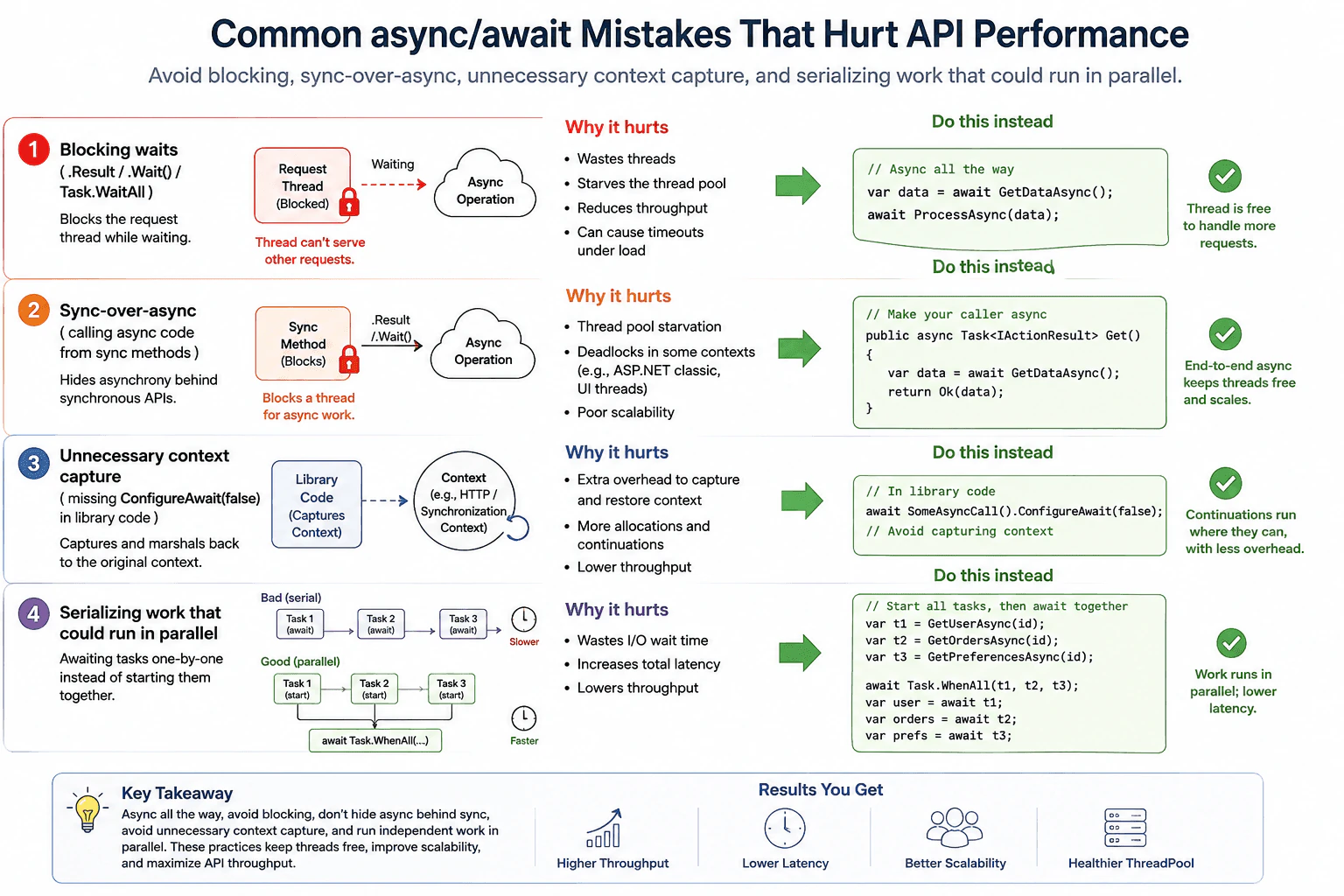
118. What common async/await mistakes hurt API performance?Performance And ScalingMedium
i Question Details
Cover blocking waits, sync-over-async, unnecessary context capture, and serializing work that could run in parallel.
Short Interview Answer (30-60 seconds)
I would first look for blocking waits like .Result or .Wait, then fix sync over async, remove unnecessary context capture in library code, and run independent calls together with Task.WhenAll. After that I would retest with the same load and check latency and thread pool pressure.
Detailed Explanation
This question asks about common ways of writing code that makes an API wait too long. The main mistakes are blocking while waiting, calling waiting code from regular code, keeping extra context when it is not needed, and doing separate jobs one after another even when they could start together. In an interview, I would explain how each mistake wastes request time and lowers capacity. Then I would say I measure the real slowdown first, fix only the part that the data points to, and retest with the same load.
Useful Questions to Ask the Interviewer
Is this about an ASP.NET Core request path or a background worker?
Are the async calls independent, or does one depend on the result of another?
Is the main symptom high latency, low throughput, or thread pool pressure under load?
How to Explain It in an Interview
Start with measurement, not with a guess. I would look at p95 latency, throughput, errors, CPU, ThreadPool queue delay, and dependency time. Then I would break the request into waiting time and real work time.
Blocking waits such as .Result, .Wait, or Task.WaitAll keep a request thread busy while the async work is still running. That can lower throughput and lead to thread pool starvation under load. Sync over async has the same problem. It hides async work behind sync code, so the request path cannot release the thread while it waits.
Unnecessary context capture is the next thing to check. In reusable library code, ConfigureAwait(false) can avoid capturing a context that is not needed. In ASP.NET Core this is usually less important than blocking waits, because there is usually no request synchronization context, but it still matters in shared libraries and other environments that do have one.
The last common mistake is serializing independent work. If two or three calls do not depend on each other, start them together and await them together with Task.WhenAll. That lowers total wait time because the requests run in parallel instead of one after another. I would only do that when the work is truly independent and the downstream system can handle the extra concurrency.
After the change, I would rerun the same representative load and compare the same metrics. I would also verify correctness, check that the bottleneck did not move to another dependency, and watch production metrics after deployment.
Technical Approach
Measure the API symptom with p95 latency, throughput, and ThreadPool pressure.
Separate waiting time from real work time.
Look for blocking waits such as .Result, .Wait, and Task.WaitAll.
Check for sync over async and unnecessary context capture in shared library code.
Find independent calls that are being awaited one by one.
Change only the part that causes the measured delay.
Retest with the same workload and compare the same metrics.
Verify correctness and confirm the bottleneck did not move elsewhere.
Practical Insights
The main cost is wasted threads, higher latency, lower throughput, extra context switches, and sometimes thread pool starvation or deadlocks in older hosting models. Running independent work together can lower total time, but it can also increase pressure on databases, HTTP services, or other downstream systems. So the tradeoff is simple. Add concurrency only when the calls are truly independent and the downstream limits are known.
Why Interviewers Ask This
This question checks whether the candidate can spot common async and await mistakes that slow an API, reduce throughput, and waste request threads. It also checks whether the candidate can explain the fix in a simple way, measure the real problem first, and choose the right tradeoff for production.
Common interview mistakes
Optimizing before measuring the real request path. Using averages only and ignoring p95 or p99 latency. Treating one local call or one microbenchmark as proof of production performance. Blocking on async work with .Result, .Wait, or Task.WaitAll. Assuming async code is faster by itself even when the calls are still serial. Ignoring downstream limits when adding parallel work. Skipping the correctness check after the change.
Interview tip
Start with the symptom, then explain the four mistakes in this order: blocking waits, sync over async, needless context capture, and serial work. Finish by saying that the real fix depends on the measured bottleneck, and that you always retest with the same workload before claiming success.
Interviewer may ask next
How do you tell whether the slowdown is caused by .Result or by a slow database call?
I would measure the same request path and separate request time from dependency time. If .Result or .Wait is blocking the request thread, ThreadPool queue delay and throughput problems usually get worse while the thread waits. If the database is slow, the trace will show long dependency time instead. This matters because the fix is different, and a local test alone can hide the real bottleneck.
When should you use Task.WhenAll, and when should you not use it?
Use Task.WhenAll when the calls are truly independent and the API can handle the extra concurrency. That reduces total wait time because the work starts together instead of one step at a time. Do not use it when one call depends on another, when the downstream service has tight limits, or when extra concurrency would create retries, throttling, or memory pressure. The workload and the same load test should guide the choice.
119. What is the difference between string and StringBuilder when building text repeatedly?Performance And ScalingEasy
i Question Details
Explain the allocation pattern that makes repeated string concatenation expensive and why StringBuilder reduces intermediate garbage.
Short Interview Answer (30-60 seconds)
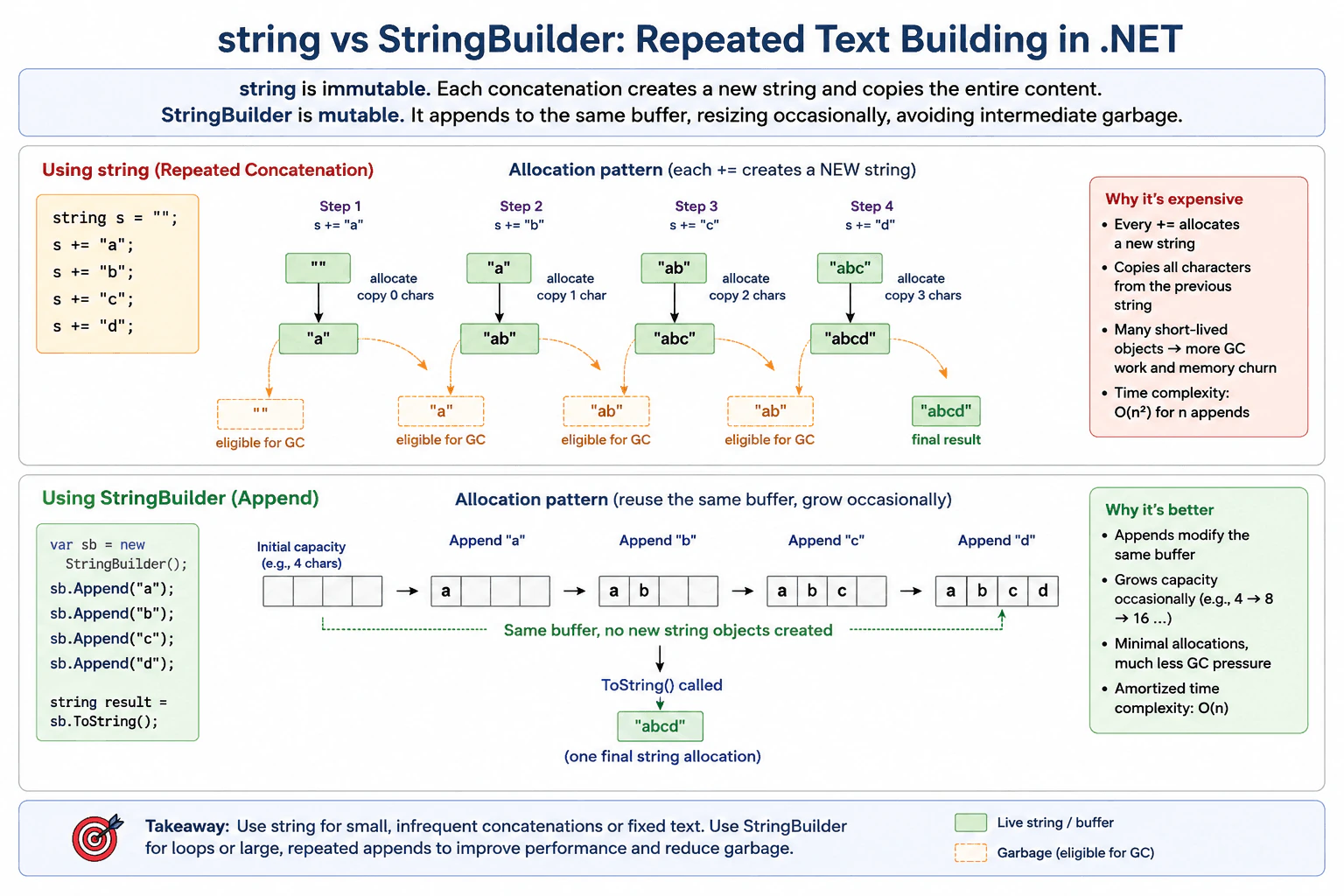
A string makes a new copy every time you add text, so repeated += work creates many short lived copies and more garbage. StringBuilder keeps one growing buffer, so it usually copies less and is better for loops or large text building.
Detailed Explanation
This question asks about the cost of adding text many times in .NET. With string, each new piece makes a fresh copy of the full text, so the old copy is no longer needed. That creates many short lived objects and extra work for the memory system. StringBuilder works differently. It keeps one buffer and adds new text into it. When the buffer is full, it grows. So the code usually makes fewer temporary objects, less garbage, and better speed when text is built in a loop or with many appends.
Useful Questions to Ask the Interviewer
How many pieces of text are added in the real case?
Is the text built once or inside a loop?
How to Explain It in an Interview
Start with the simple rule. A string does not change in place. Each time you add text, .NET creates a new string and copies the old content plus the new part. If you do this many times, the total copying grows fast and the old strings become garbage.
StringBuilder works differently. It keeps one growing buffer and appends into it. When the buffer runs out, it grows to a larger one. That means far fewer temporary objects and usually less garbage collection work.
So the choice is simple. Use string for a few joins. Use StringBuilder when you build text many times, especially in a loop or when the final text is large. The main tradeoff is that StringBuilder uses a mutable buffer, so it is better for building text, not for keeping many small immutable values.
When I explain this in an interview, I would say I would measure the workload first, then choose the simpler string approach only when the number of joins is small. If the text is built repeatedly, I would use StringBuilder to reduce copying and memory churn.
Key Insight / Why This Solution Works
Start with a string or a StringBuilder.
Add text many times in a loop.
Explain that string creates a new copy on every add.
Explain that StringBuilder reuses one buffer and grows it only when needed.
Compare copy count and garbage.
Choose string for small joins and StringBuilder for repeated appends.
Why Interviewers Ask This
This question checks whether the candidate understands why repeated string concatenation creates extra allocations and garbage, and when StringBuilder is the better choice.
Common interview mistakes
A common mistake is to use string += inside a loop for a large amount of text. Another mistake is to assume StringBuilder is always faster. It helps most when there are many appends. People also forget that the real cost is not only speed, but also the extra garbage and memory churn caused by many temporary strings.
Interview tip
Say the rule first. string is immutable, so repeated concatenation makes new copies. StringBuilder reuses a buffer, so it reduces copying and garbage. Then add that you would choose based on how many times the text is built.
Interviewer may ask next
When would string still be the better choice?
Use string when you only join a few pieces or when the text is not built repeatedly. In that case, the simple code is usually fine and the overhead of StringBuilder is not worth it.
Why does StringBuilder reduce garbage?
It keeps one mutable buffer and appends into it instead of creating a new string for every add. That means fewer temporary objects are created, so the garbage collector has less to clean up.
120. What is garbage collection (GC), and why does it matter for application latency?Performance And ScalingEasy
i Question Details
Describe how managed allocation pressure can create pauses or CPU overhead and why that matters to a request/response service.
Short Interview Answer (30-60 seconds)
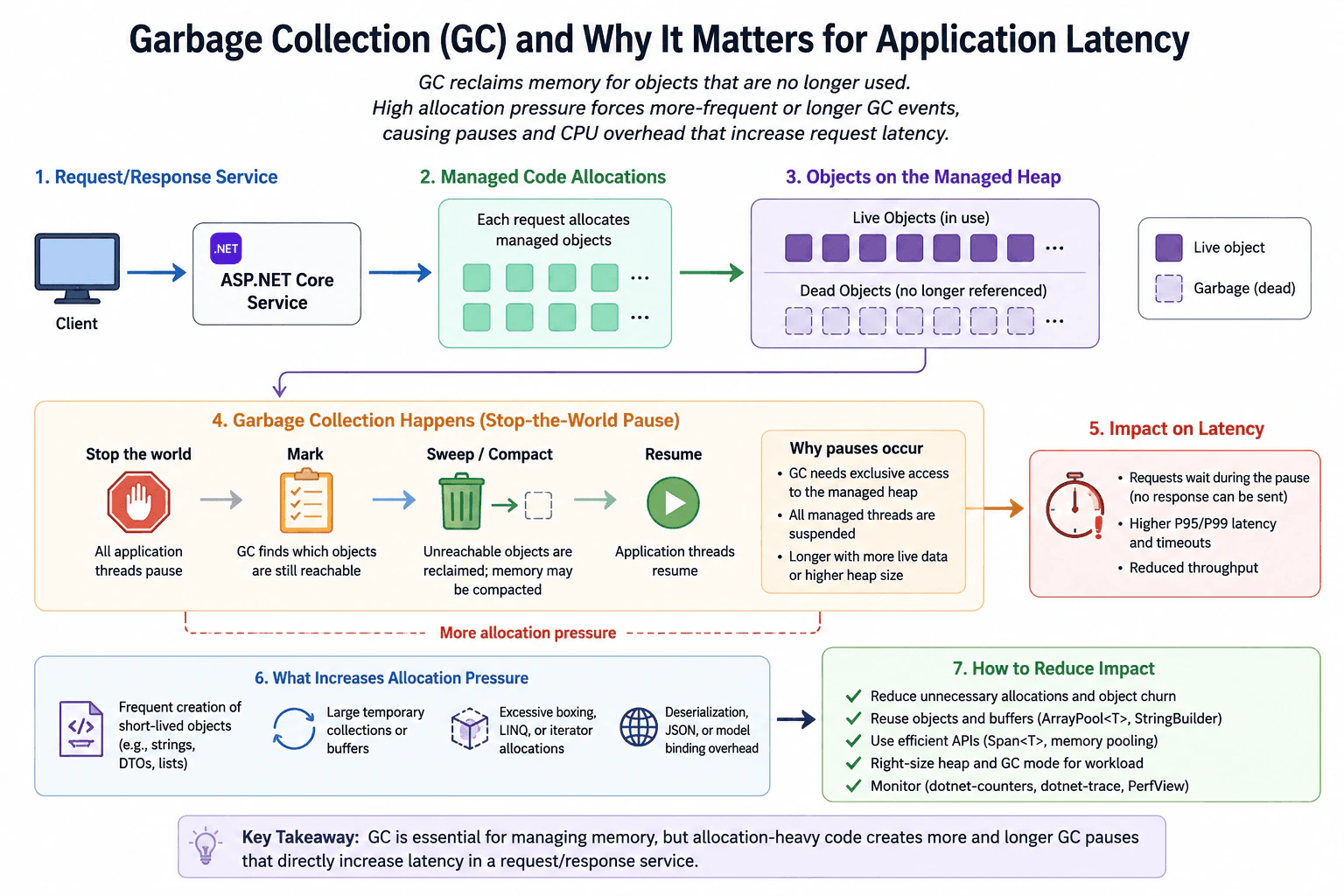
I would start by measuring the latency problem and the allocation rate. GC matters because it reclaims unused managed objects, but heavy allocation can make it run more often and spend more CPU or pause managed threads. In a request path, that can raise p95 and p99 latency, so I would confirm the symptom, measure GC activity, reduce needless allocations, then retest with the same workload.
Detailed Explanation
This question asks you to explain how a program uses memory for short lived objects and why the cleanup work can slow down requests. In a web service, each call may create many temporary items. When too many build up, the system spends time finding old items and freeing space instead of answering users. That can make some requests slower and less steady. A good answer should connect object creation, cleanup frequency, short pauses, extra CPU work, and the effect on response time. That matters most for the slowest requests that users notice.
Useful Questions to Ask the Interviewer
Is the slowdown in one endpoint or across the whole service?
Do we already know whether GC activity, CPU, or database time is rising?
Do you care most about p95, p99, or total throughput?
How to Explain It in an Interview
GC is the runtime work that finds managed objects that are no longer needed and reclaims their memory. It matters because if the app creates lots of temporary objects, the runtime must do more cleanup work. That can mean extra CPU use and short pauses while managed threads wait. In a request response service, those pauses show up as slower replies and worse tail latency.
I would explain it in this order. First, define the symptom with a metric such as p95 or p99 latency. Second, check the allocation rate and GC counters with dotnet counters. Third, use dotnet trace with PerfView or Visual Studio Profiler on representative traffic to see whether the time is going into GC work, allocation churn, or something else. Then I would reduce the measured source of allocation pressure, such as temporary objects, boxing, string churn, or large object use. After that, I would rerun the same workload, confirm the latency improvement, and verify that behavior and correctness stayed the same.
A good tradeoff note is that reducing allocations can improve latency, but pooling or more complex code can add lifetime bugs and harder maintenance. That is why the change should match the measured bottleneck, not the code that looks busiest.
Technical Approach
Define the latency symptom and success metric.
Measure allocation rate and GC activity.
Reproduce with representative request load.
Use dotnet counters for first level metrics.
Use dotnet trace and PerfView or Visual Studio Profiler for deeper evidence.
Reduce allocation pressure if GC is the bottleneck.
Retest with the same workload.
Verify correctness and check that the bottleneck did not move elsewhere.
Practical Insights
The practical cost is more CPU work, more memory traffic, and shorter or more frequent pauses when the app creates many temporary objects. The fix can lower tail latency, but it may add code complexity if you use pooling or more careful object reuse. The main cost to watch is whether the change is worth the lower latency it gives.
Why Interviewers Ask This
Interviewers ask this to see whether you can connect allocation pressure to pause time, CPU overhead, and user visible latency, and whether you know to measure before tuning.
Common interview mistakes
A common mistake is to blame GC before measuring the real problem. Another is to use one local request or a microbenchmark as proof of service performance. Another is to look only at average latency and miss tail latency. It is also wrong to ignore database, network, or ThreadPool waits, because GC may not be the real bottleneck.
Interview tip
Say what GC does, then link it to the user symptom, then name the evidence you would collect, and finish with the change you would make and how you would verify it.
Interviewer may ask next
How do you tell whether the latency is from GC or from database time?
I would measure the same endpoint under the same workload and separate GC counters, request latency, and database timing. If GC pauses and allocation rate rise with latency while database time stays flat, GC is the likely cause. If database time rises instead, the bottleneck is elsewhere.
What tradeoff comes from reducing allocations with pooling or object reuse?
It can lower allocation pressure and reduce GC work, but it can also add complexity, lifetime bugs, and retention risk if objects are held too long. I would use it only when the measurements show allocation pressure is the bottleneck, then retest the same workload and verify correctness.
More questions load as you scroll
Disclaimer: This interview guide is for educational and informational purposes only. It is designed to help readers prepare, but it does not guarantee any interview result, hiring decision, offer, or outcome. Interview questions, hiring criteria, and preferred answers can vary by employer, interviewer, industry, location, and time. All answers, examples, and explanations in this guide are suggested examples for interview preparation, not definitive answers or instructions for professional practice. They are based on research and judgment, are provided without warranties of any kind, and should be adapted to the question, role, and applicable laws and professional requirements. Diagrams are simplified illustrations intended to highlight the main concepts and their relationships; actual situations, systems, and practices may be more complex. Alternative approaches may be equally valid or better suited to a particular question, context, or interviewer. To the fullest extent permitted by applicable law, the contributors and publisher are not liable for decisions made, actions taken, or losses incurred based on this guide.
State Laws and Professional Responsibilities: Laws and requirements governing an occupation vary by state and jurisdiction. You are responsible for checking the current laws, licensing requirements, and scope-of-practice rules that apply to your location and role, and for ensuring that your answers and actions comply with them. Adapt examples in this guide to those requirements. This guide is not legal advice.
Content Accuracy and Verification: To the fullest extent permitted by applicable law, we do not represent or warrant that interview guides, questions, answers, examples, or diagrams are accurate, complete, current, error-free, or suitable for any particular purpose. You are responsible for independently reviewing and verifying the information before relying on it.