This interview guide is for educational and informational purposes only. It is designed to help readers prepare, but it does not guarantee any interview result, hiring decision, offer, or outcome. Interview questions, hiring criteria, and preferred answers can vary by employer, interviewer, industry, location, and time. All answers, examples, and explanations in this guide are suggested examples for interview preparation, not definitive answers or instructions for professional practice. They are based on research and judgment, are provided without warranties of any kind, and should be adapted to the question, role, and applicable laws and professional requirements. Diagrams are simplified illustrations intended to highlight the main concepts and their relationships; actual situations, systems, and practices may be more complex. Alternative approaches may be equally valid or better suited to a particular question, context, or interviewer. To the fullest extent permitted by applicable law, the contributors and publisher are not liable for decisions made, actions taken, or losses incurred based on this guide.
State Laws and Professional Responsibilities
Laws and requirements governing an occupation vary by state and jurisdiction. You are responsible for checking the current laws, licensing requirements, and scope-of-practice rules that apply to your location and role, and for ensuring that your answers and actions comply with them. Adapt examples in this guide to those requirements. This guide is not legal advice.
Identity, Image, and Privacy Notice
To respect individual privacy, some names, profile photographs, avatars, biographical details, and other identifying information displayed in this guide may be replaced with pseudonyms, licensed stock images, illustrative avatars, composite images, or representative descriptions. Unless a person is expressly identified as an actual contributor, a displayed name, image, or profile should not be understood as depicting or identifying a specific candidate, interviewer, employee, or other real individual. These representations are provided for editorial and illustrative purposes only and do not imply endorsement, employment, participation, or affiliation with this guide or any company mentioned in it. Any resemblance to an actual person is coincidental.
Company Notice
This guide is an independent educational resource and is not affiliated with, endorsed by, sponsored by, or approved by the company named in this guide. Company names identify reported interview experiences or the employer context of clearly labeled original practice exercises. Interview practices can change without notice, and inclusion of company-specific content does not mean these questions are official, complete, or guaranteed to be asked. To the fullest extent permitted by law, the author, contributors, and publisher are not responsible for outcomes related to use of this material.
Content Accuracy and Verification
To the fullest extent permitted by applicable law, we do not represent or warrant that interview guides, questions, answers, examples, or diagrams are accurate, complete, current, error-free, or suitable for any particular purpose. You are responsible for independently reviewing and verifying the information before relying on it.
Questions or comments?
Contact us for general questions, or share feedback, technical corrections, and comments with the community.
Explain What is C# in C# with a simple example, common mistakes, and when it matters in production.
Short Interview Answer (30-60 seconds)
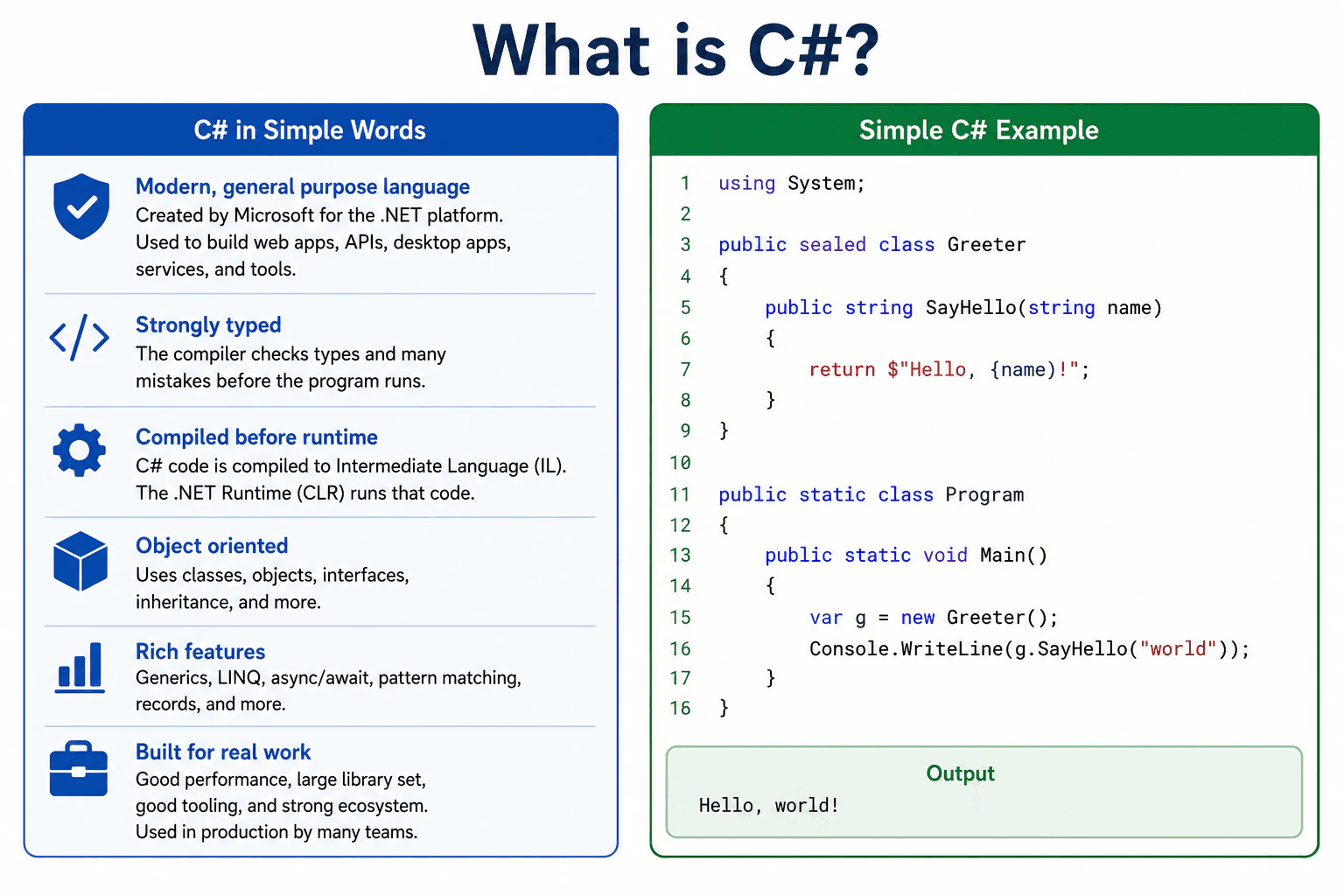
C# is a modern language used to build software on .NET. It is strongly typed and compiled, so many mistakes are caught before the program runs. In production, I use it because it gives good performance, good tooling, and a large library set.
C# is a way to write programs for computers. People use it to build websites, internal tools, desktop apps, and the logic inside bigger systems. It helps catch many mistakes before the program runs, so problems are found earlier. That makes the code safer and easier to maintain. In real work, it matters because teams need code that is clear, fast, and easy to change over time. It is also popular in Microsoft based systems, which is why many .NET developers learn it first.
Useful Questions to Ask the Interviewer
Do you want the language view or the .NET view?
Should I keep it short or explain production use too?
How to Explain It in an Interview
C# is a general purpose language from Microsoft for the .NET platform. It is used to write code that runs on the .NET runtime. The language is built to be clear, safe, and productive. It has strong typing, automatic memory management, classes, interfaces, generics, and async support. These features help teams write code that is easier to read and maintain.
C# code is usually compiled first, then run on the .NET runtime. That is why it can catch many errors early and still run fast. In production, C# is a strong choice for APIs, cloud services, desktop apps, and background workers because it has good tooling, a large library set, and solid performance. The main tradeoff is that it has more structure than very small scripting languages, but that structure helps on larger systems.
Code
using System;
publicsealedclassGreeter
{
publicstringSayHello(string name)
{
// Keep the greeting logic in one place so it is easy to reuse.return$"Hello, {name}";
}
}
publicstaticclassProgram
{
publicstaticvoidMain()
{
// Create a small object that owns the greeting logic.var greeter = new Greeter();
// Call the method and print the result so we can see the program run.
Console.WriteLine(greeter.SayHello("world"));
}
}
Why Interviewers Ask This
Interviewers ask this to see whether the candidate can explain C# as a language, separate it from .NET, and describe why it is a practical choice in real systems. They want a basic definition plus signs that the candidate understands type safety, compilation, and production use.
Common interview mistakes
A common mistake is to say C# is only for web apps. It is also used for APIs, desktop apps, services, and tools. Another mistake is to mix up C# with .NET. C# is the language, while .NET is the platform and runtime. People also sometimes forget that C# code is compiled first, so it is not just run as plain source text. Another error is to ignore strong typing and the safety it gives in large projects.
Interview tip
Start with one clean sentence, then add one production use and one runtime fact. Keep the answer simple, and do not mix C# with .NET unless you explain the difference clearly.
Interviewer may ask next
Is C# compiled or interpreted?
C# is compiled first. The compiler turns C# into intermediate code, and the .NET runtime runs that code. This matters because many errors are caught early, and the runtime can still optimize the program before and during execution.
Why do teams choose C# in production?
Teams choose C# in production because it gives strong typing, good tooling, solid performance, and a large .NET library set. The main tradeoff is more structure than tiny scripting languages, but that structure helps when the system is large and must stay maintainable.
2. What is the .NET SDK, and how is it different from the .NET runtime?Language SpecificEasy
i Question Details
Define the .NET SDK and the .NET runtime. Explain that the SDK contains development tools such as the dotnet CLI, compiler, build tools, templates, libraries, and a runtime, while a runtime installation provides what a compatible built application needs to execute. Include when a developer machine, build server, framework-dependent deployment, or self-contained deployment needs each one.
Short Interview Answer (30-60 seconds)
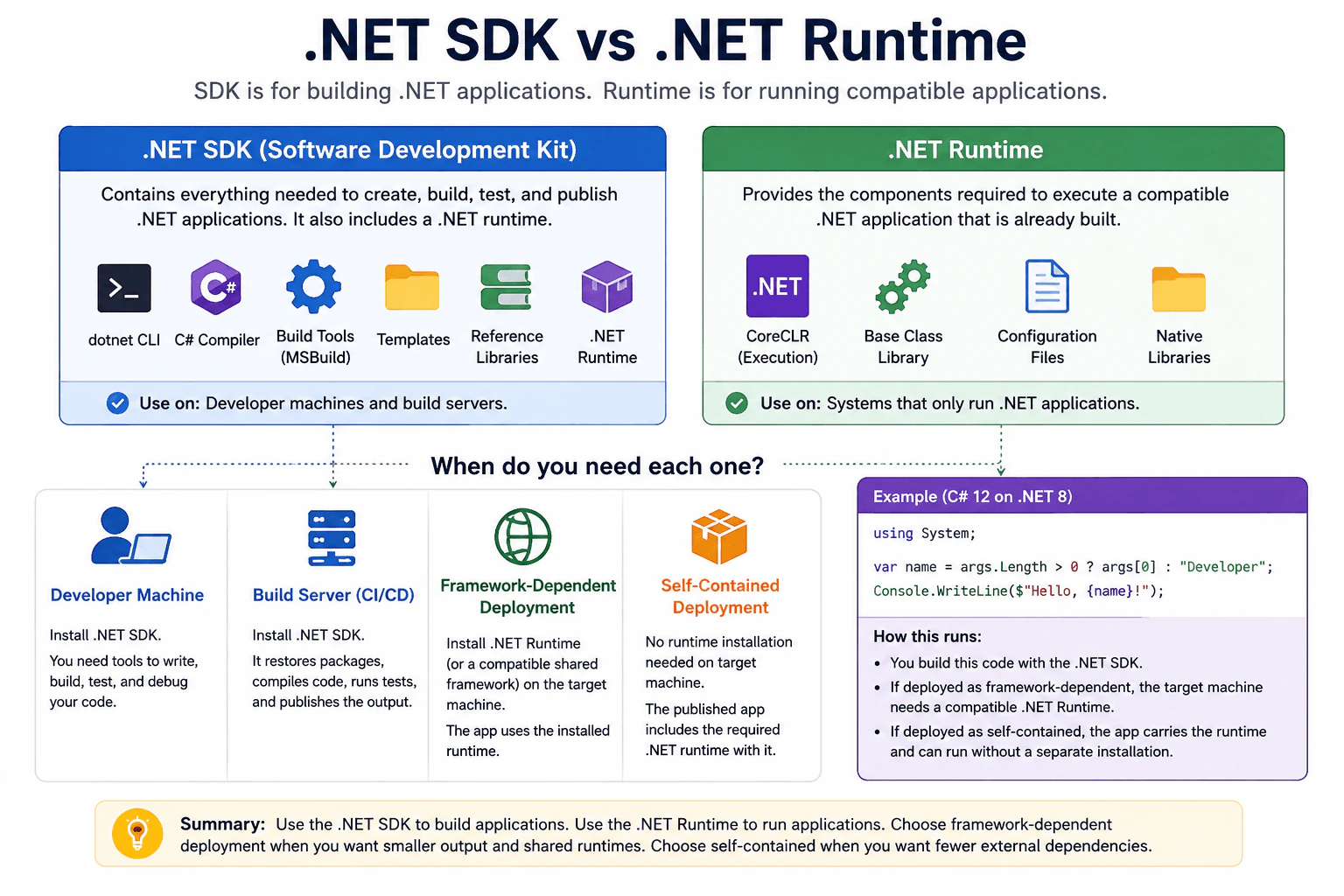
The .NET SDK is for building .NET applications, while the .NET runtime is for running compatible applications that are already built. The SDK includes development tools such as the dotnet CLI, compiler, build tools, templates, libraries, and a runtime. A developer machine or build server normally needs the SDK. A framework dependent application needs its compatible runtime on the target machine. A self contained application includes its required runtime, so that runtime does not need to be installed separately on the target machine.
Detailed Explanation
The practical difference is simple. One package gives a developer the tools needed to create and prepare an application. The other provides what an already prepared application needs so it can run. A programmer normally installs the larger package because the programmer must create, check, and prepare the application. A computer that only runs the finished application may need only the smaller package. Some applications can also carry everything they need with them, so the destination computer does not need a separate installation.
Useful Questions to Ask the Interviewer
Are you asking about framework dependent deployment or self contained deployment?
Should I also explain what belongs on developer machines and build servers?
How to Explain It in an Interview
The .NET SDK is the development package. It contains the tools needed to create, restore, compile, build, test, and publish .NET projects. Important parts include the dotnet CLI, the C# compiler, build tools based on MSBuild, project templates, reference libraries, and a .NET runtime. Because the SDK includes a runtime, a machine with the SDK can also run applications that are compatible with that included runtime.
The .NET runtime has a narrower job. It provides the execution components needed by a compatible application that is already built. It does not provide the complete development tool set that comes with the SDK. Installing only a runtime is therefore not the normal choice when a machine must compile source code or build a project.
A developer machine normally needs the SDK because developers create, compile, test, and publish projects. A build server also normally needs the SDK because it restores dependencies, compiles code, runs build steps, and produces published output.
Deployment changes what the target machine needs. A framework dependent application uses a compatible runtime or shared framework installed on the target machine. This usually keeps the published application smaller because the runtime is not copied into every application deployment.
A self contained application includes the required .NET runtime with its published files. The target machine does not need that runtime installed separately for that application. The tradeoff is a larger deployment because the application carries its runtime files.
In production, I would first ask whether the machine builds the application or only runs it. Then I would check whether the published application expects an installed runtime or includes its own runtime.
Where it is used
Developers install the .NET SDK on workstations where they create, compile, test, and publish applications. Continuous integration and build servers normally use the SDK for restoring dependencies, compiling code, running tests, and publishing output. Production machines that run framework dependent applications need the compatible runtime or shared framework required by those applications, but they normally do not need the full SDK. Self contained deployment is useful when the application should carry its required runtime instead of depending on a separately installed runtime on the destination machine.
Why Interviewers Ask This
Interviewers ask this to check whether the candidate understands the difference between developing .NET applications and running applications that are already built. They also want to see whether the candidate can choose the correct installation for a developer machine, build server, or production machine, and whether the candidate understands framework dependent and self contained deployment.
Common interview mistakes
A common mistake is saying that the SDK and runtime are unrelated packages. The SDK includes a runtime in addition to development tools. Another mistake is saying that every production machine needs the SDK. A machine that only runs a framework dependent application normally needs the compatible runtime or shared framework required by that application, not the full SDK. Candidates also sometimes say that every .NET application requires a separately installed runtime. A self contained application includes its required runtime. Another mistake is assuming that installing only the runtime gives a machine the complete compiler and build tool set needed to build normal .NET projects.
Interview tip
Start with one clear sentence: the SDK is for building applications and the runtime is for running compatible built applications. Then explain developer machines, build servers, framework dependent deployments, and self contained deployments. Mention that the SDK includes a runtime so the relationship between the two is clear.
Interviewer may ask next
If the .NET SDK is installed on a machine, does that machine also need a separate .NET runtime installation to run compatible applications?
Usually no. The .NET SDK includes a .NET runtime, so a machine with an appropriate SDK can run applications that are compatible with that included runtime. The exact runtime requirement still matters because an application may target a runtime or shared framework that is not available on the machine. This matters in production because installing an SDK does not mean that every possible .NET application can automatically run there.
What is the practical tradeoff between framework dependent and self contained deployment?
Framework dependent deployment relies on a compatible runtime or shared framework available on the target machine, while self contained deployment includes the required .NET runtime with the application. Framework dependent output is usually smaller and allows applications to use installed shared components. Self contained deployment reduces dependence on a separately installed runtime, but the published output is larger because runtime files are included. The choice depends on deployment size, runtime management, and how much control the team has over the production environment.
3. What is .NET Framework, and how does it work?Language SpecificEasy
i Question Details
Explain how the runtime, base class libraries, and managed execution cooperate, and keep the answer focused on the framework model rather than C# syntax.
Short Interview Answer (30-60 seconds)
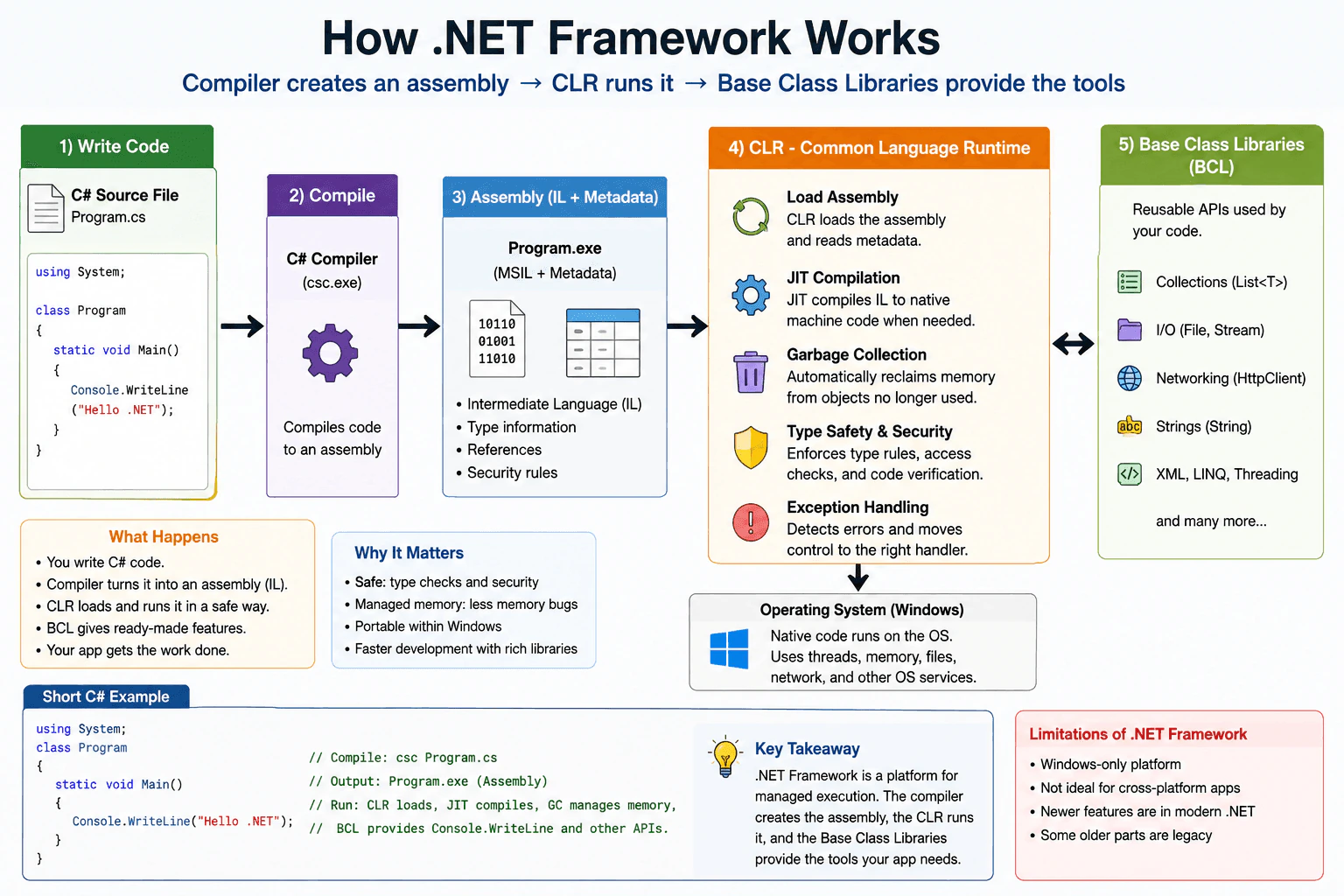
.NET Framework is Microsoft’s older platform for running managed apps on Windows. The CLR loads the assembly, JIT compiles the code, and the base class libraries provide common APIs. It matters because the runtime manages memory, types, and execution for you.
Detailed Explanation
.NET Framework is Microsoft’s older system for building and running programs on Windows. It gives each program shared tools, helps it start, and watches over memory while it runs. The program does not do all of that work by itself. Instead, the system loads it, lets it use common code, and turns that code into something the computer can run. That is why many older business apps used it. It made development simpler, and it kept apps more consistent for teams.
Useful Questions to Ask the Interviewer
Is this about a legacy Windows app?
Do you want a comparison with modern .NET too?
How to Explain It in an Interview
.NET Framework has three main parts that work together. First, your code is compiled into an assembly. That assembly contains intermediate language and metadata. Second, the CLR, which is the runtime, loads that assembly and manages execution. It JIT compiles methods into machine code when they are needed. It also runs garbage collection, handles exceptions, and checks type safety. Third, the base class libraries provide the reusable APIs that most apps need, such as collections, files, networking, strings, and XML.
Managed execution means the runtime takes care of important work instead of leaving everything to the app. That gives better safety and easier development. It also adds some cost, such as JIT time and garbage collection work, so there is a small performance tradeoff. In production, .NET Framework is still useful for older Windows only systems, especially when they depend on legacy libraries or frameworks. For new cross platform work, modern .NET is usually the better choice. So the key idea is simple: the compiler creates the assembly, the CLR runs it, and the base class libraries give it the tools it needs.
Why Interviewers Ask This
Interviewers ask this to check whether you understand the platform that runs managed code, not just the syntax. They want to see if you know what the CLR does, what the base class libraries provide, and how managed execution affects memory, safety, and deployment choices.
Common interview mistakes
Mixing up .NET Framework with modern .NET. Thinking the CLR and the libraries are the same thing. Assuming code runs directly as machine code. Forgetting that it is Windows only and not the best choice for new cross platform work.
Interview tip
Start with the simple model: code is compiled into an assembly, the CLR runs it, and the base class libraries provide common services. Then mention why managed execution matters for memory, safety, and maintenance.
Interviewer may ask next
What happens when an assembly runs for the first time?
The CLR loads the assembly, reads its metadata, and JIT compiles the needed methods into machine code. That matters because the first call can cost more time, but later calls run as native machine code.
When should a team keep using .NET Framework?
A team should keep using it when the app depends on old Windows only APIs or existing libraries that are not available on modern .NET. The tradeoff is lower migration risk now, but less portability and fewer newer platform features later.
4. What is the CLR?Language SpecificEasy
i Question Details
Cover what the CLR is responsible for at runtime, especially loading, execution, memory management, and how it differs from the language itself.
Short Interview Answer (30-60 seconds)
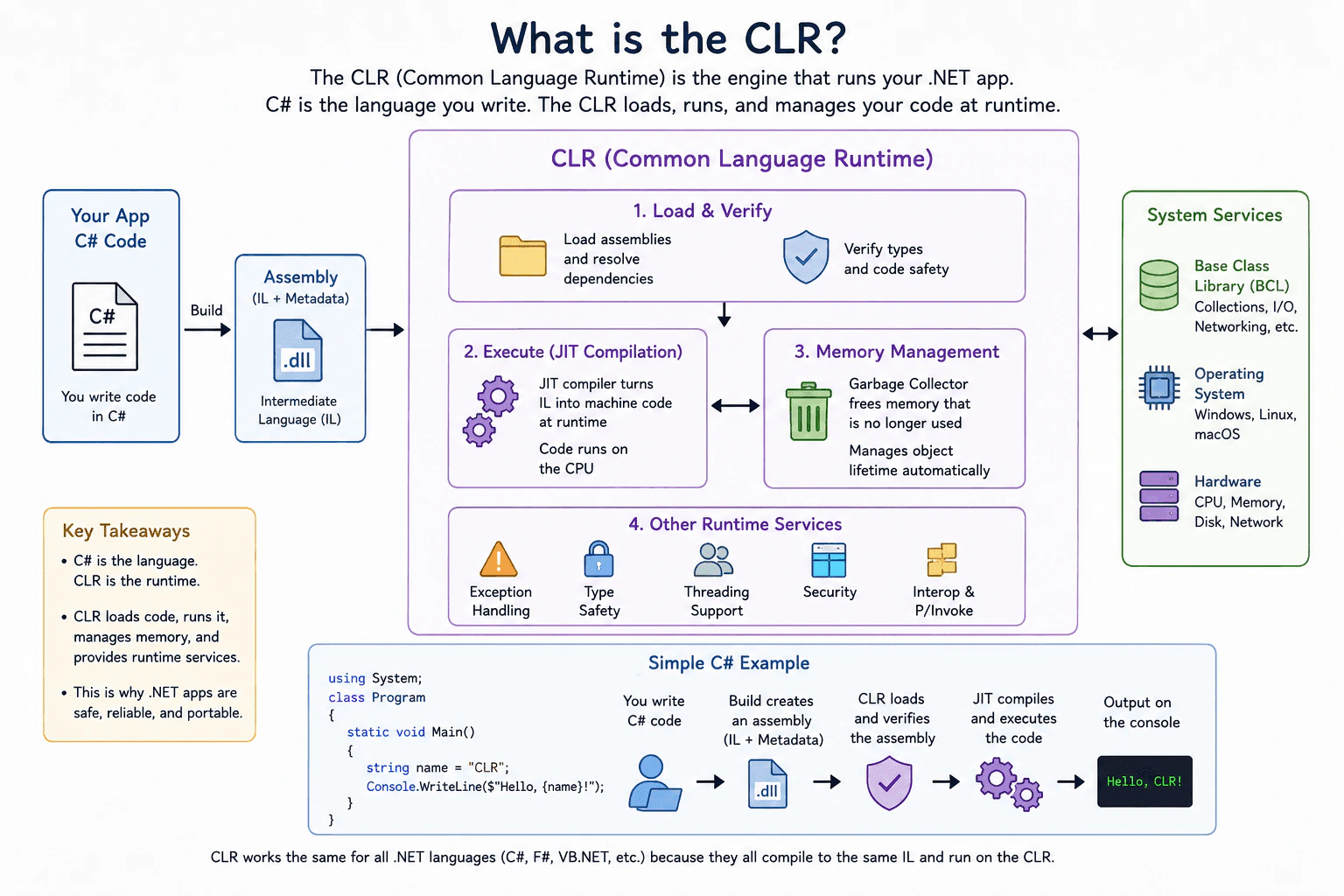
The CLR is the runtime engine for .NET. It loads compiled C# code, runs it, manages memory, and handles things like garbage collection and exception handling. C# is the language I write, and the CLR is the part that actually executes the code.
Detailed Explanation
The CLR is the part of .NET that runs your program after it is built. It loads the program, starts it, keeps track of memory, and helps clean up things you no longer use. It also helps handle errors when something goes wrong. In simple terms, C# is the language you write, and the CLR is the engine that makes the app run. That is why the CLR matters when you think about how a .NET app behaves in real use.
Useful Questions to Ask the Interviewer
Do you want the answer from a language view or a runtime view?
Should I also explain garbage collection and JIT?
How to Explain It in an Interview
The CLR, or Common Language Runtime, is the engine that runs managed .NET code. C# is only the language. When you compile C# code, you do not get native machine code right away in the usual sense. You get an assembly that the CLR loads and runs.
The CLR is responsible for several core jobs. It loads assemblies, verifies that the code is valid, and manages execution. It also provides memory management through garbage collection, which frees objects that are no longer used. This matters because it reduces manual memory work and helps prevent many memory bugs.
The CLR also handles runtime services such as exception handling, type safety, thread support, and just in time compilation. JIT compilation means code is turned into machine code while the app runs. That lets the runtime optimize based on actual execution.
A good way to explain the difference is this. C# is the language and syntax. The CLR is the runtime environment that makes the code run. In production, this matters because performance, memory use, and startup behavior all depend on the CLR, not just the C# source code. If you know that split, you understand how .NET apps really execute.
Why Interviewers Ask This
Interviewers ask this to check whether you understand what runs a C# app after it is compiled, not just the language syntax. They want to see if you know how .NET loads code, executes it, manages memory, and handles runtime services like garbage collection and type safety.
Common interview mistakes
A common mistake is saying that C# itself runs the app. C# is the language, not the runtime. Another mistake is thinking the CLR only does garbage collection. It does much more, including loading code, execution, verification, and exception support. People also sometimes mix up compile time and runtime work.
Interview tip
Say the difference in one sentence first. Then name two or three CLR jobs, such as loading code, running it, and managing memory. Keep the focus on runtime behavior, not on C# syntax.
Interviewer may ask next
Does the CLR compile C# directly to machine code?
No. The CLR runs the compiled assembly and uses just in time compilation to turn intermediate code into machine code at runtime. That matters because the app can be optimized while it runs, and the runtime still keeps control of memory and execution.
Why does the CLR matter in production?
It matters because the CLR controls startup, memory use, exception handling, and execution behavior. If an app has memory pressure, slow startup, or runtime errors, the CLR and its garbage collection and JIT behavior are often part of the diagnosis.
5. What is IL?Language SpecificEasy
i Question Details
Describe the role of Intermediate Language in compilation and execution, including where it sits between source code and machine code.
Short Interview Answer (30-60 seconds)
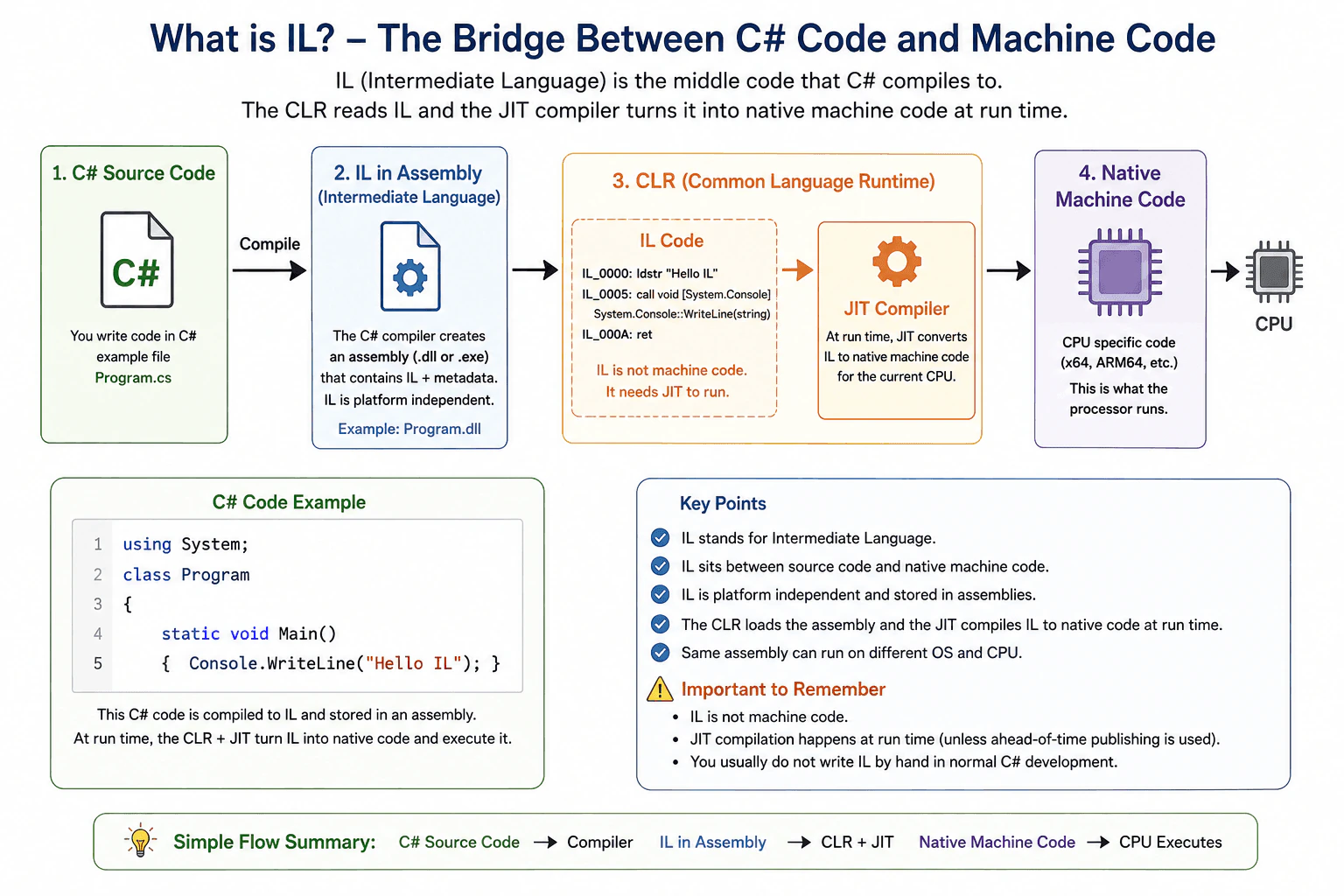
IL is the middle code that C# compiles to before .NET turns it into native machine code. It is not the final CPU code, but the form the CLR loads and then finishes at run time.
Detailed Explanation
When C# code is built, it does not go straight to the final code that the computer runs. It first becomes a shared middle form that .NET can load and understand. That middle form is IL, which stands for Intermediate Language. It sits between your source code and the native machine code for the current CPU. This matters because the same assembly can move to another system, and the CLR can still finish the last step there at run time.
Useful Questions to Ask the Interviewer
Do you want the build step or the run time step?
Should I also explain JIT compilation?
How to Explain It in an Interview
IL is the code that the C# compiler writes into an assembly after it compiles your source. The CLR does not execute C# directly. At run time, the CLR reads the IL and the JIT compiler turns that IL into native machine code for the current processor. That is why IL is the bridge between source code and machine code.
IL is useful because it keeps the .NET model portable and lets the runtime apply CPU specific work later. It also stores metadata, so the runtime knows about types, methods, and other details in the assembly. You normally do not write IL by hand in everyday C# work. You use it as the hidden output of compilation.
There are a few practical points to remember. IL is not the same as native code. It is still higher level than machine code, so it needs JIT compilation in the normal .NET model. In some publish modes, .NET can do more work ahead of time, but the basic idea is still that IL is the managed intermediate form between source code and execution. If you explain that flow clearly, you show that you understand both the language and the runtime.
Why Interviewers Ask This
Interviewers ask this to check that you know where C# fits in .NET and what the CLR actually runs. It also shows whether you understand the link between source code, IL, JIT, and native machine code.
Common interview mistakes
A common mistake is to think .NET runs C# directly. Another mistake is to think IL is already native machine code. IL is the managed middle form, while machine code is CPU specific. People also forget that the JIT is the part that finishes the last step for the current platform.
Interview tip
Say that C# compiles to IL first, then the CLR JIT compiles IL to native machine code at run time. Keep the bridge idea clear and simple.
Interviewer may ask next
Is IL the same as machine code?
No. IL is not the same as machine code. It is the intermediate form that .NET stores in the assembly first, and the JIT turns it into native machine code for the current CPU when the program runs. This matters because IL keeps the assembly portable, while native code is specific to a processor.
Can you inspect or change IL?
Yes. IL can be inspected with decompilers or disassemblers, and some tools can rewrite assemblies. That matters for debugging and analysis, but production code should not depend on manual IL edits unless you fully control the toolchain. The main tradeoff is visibility and flexibility versus extra build and maintenance complexity.
6. What is the difference between managed and unmanaged code?Language SpecificEasy
i Question Details
Explain What is the difference between managed and unmanaged code in C# with a simple example, common mistakes, and when it matters in production.
Short Interview Answer (30-60 seconds)
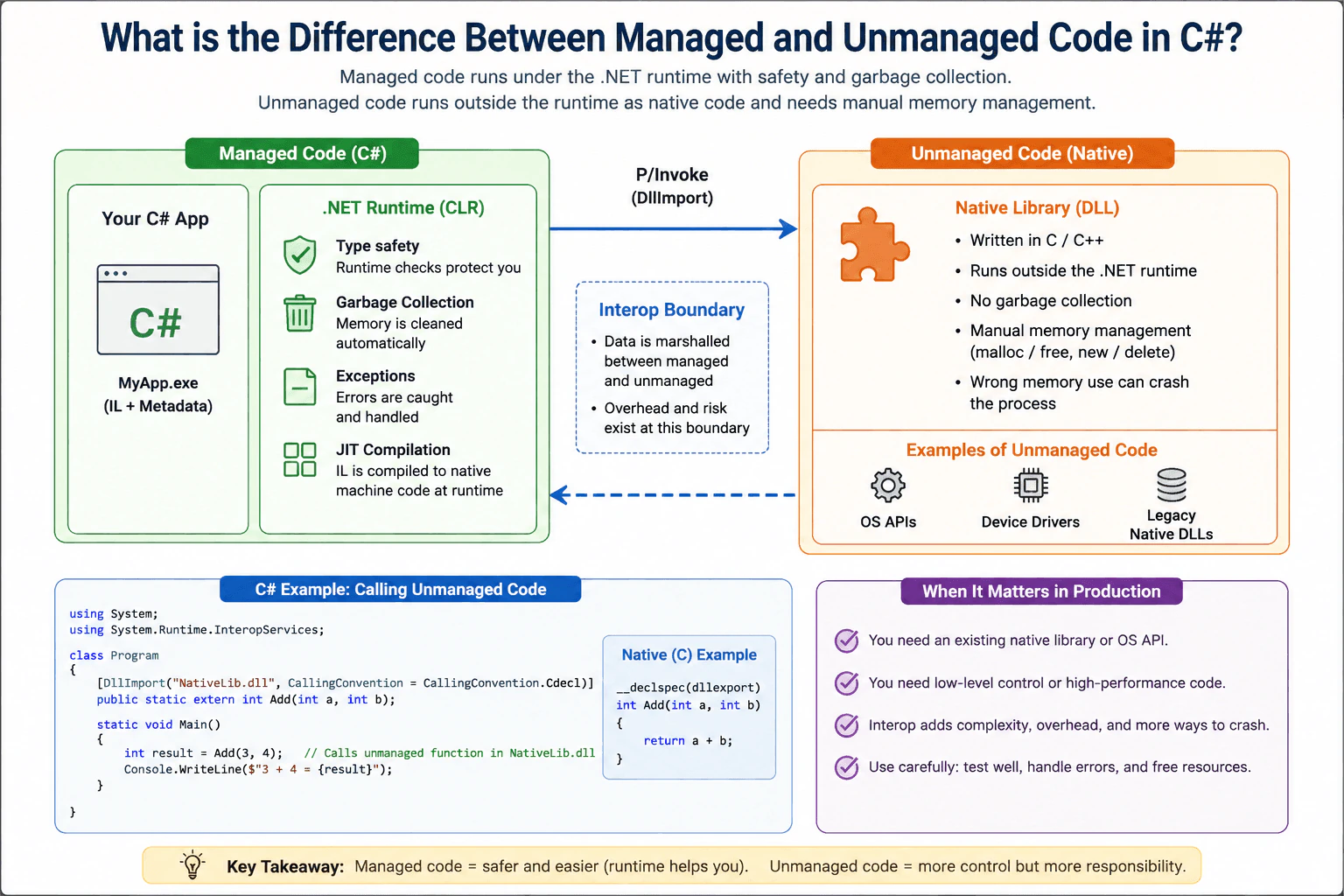
Managed code runs under the .NET runtime, while unmanaged code runs outside it as native code. In C#, the practical difference is that managed code gets garbage collection and runtime safety, while unmanaged code needs more manual care for memory and lifetime.
Detailed Explanation
This question asks you to compare two kinds of C# programs. One kind runs with help from the .NET system, which watches memory and cleans it up for you. The other kind runs on its own as native code and must handle memory and safety more directly. In interviews, the main idea is knowing what C# normally gives you, what changes when you call native libraries, and why that matters for reliability and debugging. It also helps explain why some bugs are caught earlier and why some crashes are harder to control.
Useful Questions to Ask the Interviewer
Do you want a C# example that calls a native library?
Should I explain unsafe code as well?
Do you want the production impact of interop?
How to Explain It in an Interview
In practice, C# code is managed code because it runs under the .NET runtime. The runtime loads the code, checks it, runs it, and cleans up memory with garbage collection. That gives you safety and less manual work.
Unmanaged code is code that runs outside the .NET runtime, usually as native code from C, C++, or an operating system library. It does not get garbage collection from .NET, so memory, handles, and object lifetime must be managed by that code or by the caller.
A simple example is a C# app that calls a native DLL through P/Invoke. The C# part stays managed, but the call crosses into unmanaged code for that work. That boundary matters because values may need marshalling, some objects may be pinned, and bugs in the native side can crash the whole process.
In production, managed code is the normal choice for business logic because it is safer and easier to maintain. Unmanaged code matters when you need an existing native library, device access, or very low level control. One important point is that unsafe code in C# does not make the program unmanaged. It only allows pointer style work inside managed code.
Why Interviewers Ask This
Interviewers ask this to check whether I understand how C# runs on .NET, what the runtime does for me, and what changes when I call native code or use low level features.
Common interview mistakes
A common mistake is thinking unmanaged code means faster code in every case. Another mistake is thinking unsafe code in C# turns the whole program into unmanaged code. A third mistake is forgetting that native calls can add overhead and can fail in ways the runtime cannot fully protect you from.
Interview tip
Start with the practical rule: normal C# is managed, native code is unmanaged, and the main difference is who handles memory and safety.
Interviewer may ask next
What happens when managed code calls unmanaged code?
Managed code crosses a boundary into native code, so values may need marshalling and some data may need pinning. This matters because the runtime cannot fully protect that native call, and the call can add overhead or even crash the process if the native code is wrong.
When would unmanaged code be a better choice in production?
Unmanaged code is a better choice when you need an existing native library, device access, or very low level control that .NET does not provide. The tradeoff is more manual memory work, more testing, and more risk at the boundary between managed and unmanaged code.
7. What is a namespace in C#?Language SpecificHard
i Question Details
Explain how namespaces organize types, reduce naming collisions, and differ from assemblies.
Short Interview Answer (30-60 seconds)
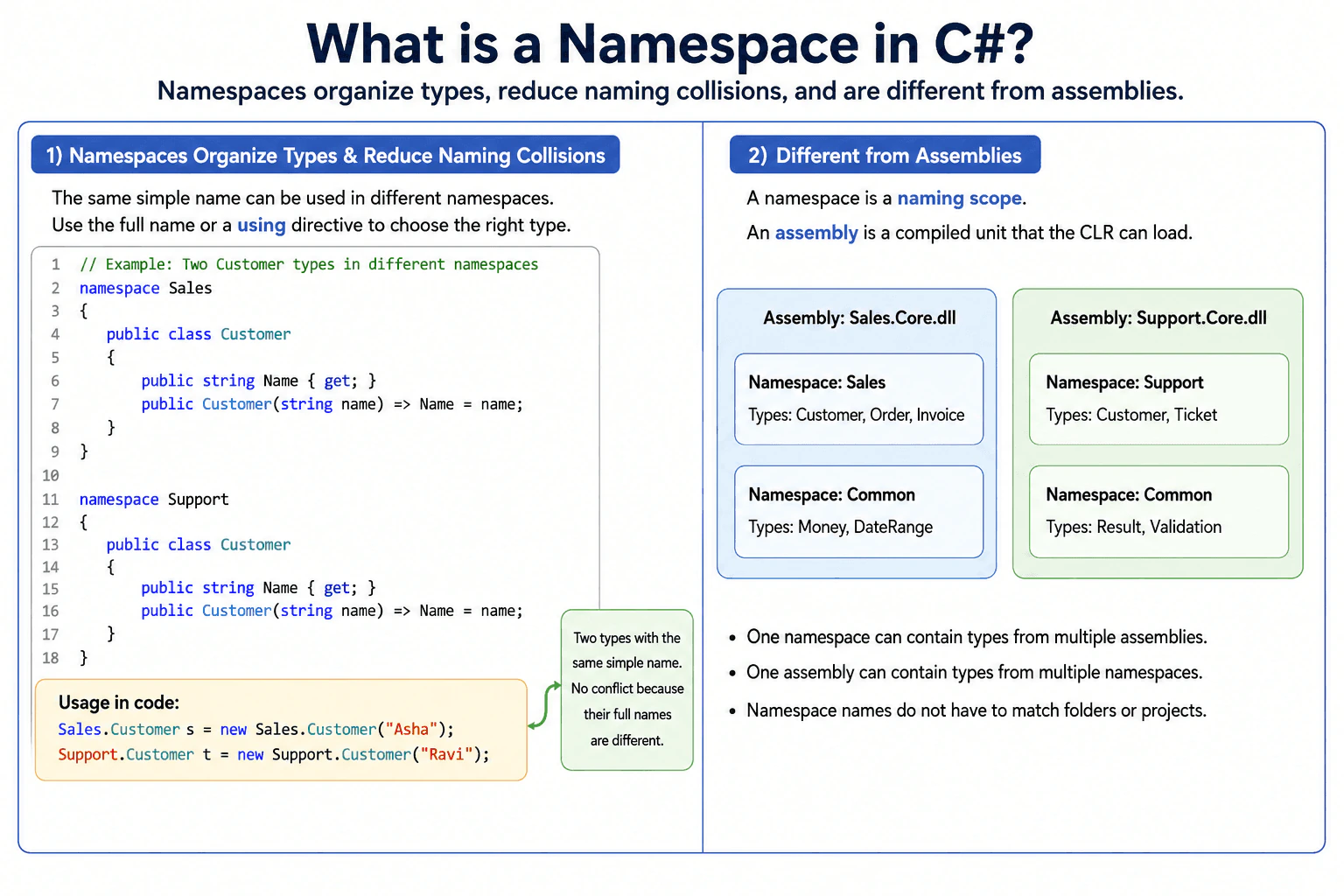
A namespace in C# is a naming scope used to organize types such as classes, interfaces, structs, and enums and to reduce naming collisions. Two types can have the same simple name when they are in different namespaces. I can identify the intended type with its fully qualified name or an appropriate using directive. A namespace is not an assembly. A namespace organizes names, while an assembly is a compiled unit that the CLR can load.
A namespace gives related types a shared name so that a large program stays organized and different types can use the same simple name without conflicting. For example, Sales.Customer and Support.Customer can both exist because their full names are different. When code needs one of them, it can state which Customer it means. This is useful in large applications that use many libraries or have many development teams. A namespace organizes names in code. It does not create a separate program, file, memory area, or deployment unit.
Useful Questions to Ask the Interviewer
Would you like me to explain how namespaces differ from assemblies?
Should I show how C# resolves two types with the same simple name?
How to Explain It in an Interview
In C#, a namespace is part of the full name used to identify a type. For example, Sales.Customer and Support.Customer are different type names even though both types have the simple name Customer. This helps prevent naming collisions.
A namespace declaration places types inside that naming scope. C# also supports file scoped namespace syntax, which applies a namespace to declarations in that source file.
A using directive can let source code refer to a type by a shorter name. It does not load a namespace into memory or copy its contents. If two available namespaces contain a Customer type and the compiler cannot determine which one is intended, the reference is ambiguous. The code can resolve this by using a fully qualified type name such as Sales.Customer or by using an alias.
A namespace is different from an assembly. A namespace organizes type names. An assembly is a compiled deployment and loading unit containing metadata and code. One namespace can contain types from multiple assemblies, and one assembly can contain types from multiple namespaces.
Namespace names also do not have to match folder or project names. Matching them is a useful convention, not a C# requirement. Namespaces have no meaningful per access performance or memory cost. They should not be treated as security, deployment, or runtime isolation boundaries.
Code
using System;
namespaceSales
{
publicsealedclassCustomer
{
publicstring Name { get; }
publicCustomer(string name)
{
// Store the name for this Sales.Customer instance.
Name = name;
}
}
}
namespaceSupport
{
publicsealedclassCustomer
{
publicstring Name { get; }
publicCustomer(string name)
{
// Store the name for this Support.Customer instance.
Name = name;
}
}
}
publicstaticclassProgram
{
publicstaticvoidMain()
{
// Use full type names because both namespaces define Customer.
Sales.Customer salesCustomer = new Sales.Customer("Asha");
Support.Customer supportCustomer = new Support.Customer("Ravi");
// These objects have different types even though the simple type name is Customer.
Console.WriteLine(salesCustomer.Name);
Console.WriteLine(supportCustomer.Name);
}
}
Why Interviewers Ask This
Interviewers ask this question to check whether a candidate understands how C# organizes type names, how namespaces reduce naming collisions, and how namespaces differ from assemblies. A strong answer also shows that the candidate does not confuse namespaces with folders, projects, compiled files, or runtime isolation boundaries.
Common interview mistakes
A common mistake is saying that a namespace is a compiled file or physical container. It is a naming scope. Another mistake is assuming that one namespace belongs to exactly one assembly. A namespace can contain types from multiple assemblies, and an assembly can contain types from multiple namespaces. Developers also sometimes think a using directive loads a namespace into memory. It does not. It affects how names are resolved in source code. Another mistake is assuming namespace names must match folders or project names. That is a convention, not a C# requirement.
Interview tip
Start by saying that a namespace organizes type names and reduces naming collisions. Give a simple example such as Sales.Customer and Support.Customer. Then make the important distinction that namespaces organize names while assemblies are compiled units loaded by the CLR. Mention that using directives can shorten type references but do not load namespaces at runtime.
Interviewer may ask next
What happens if two namespaces in scope contain a type with the same simple name?
The reference can become ambiguous if the compiler cannot determine which type is intended. For example, if both Sales and Support make Customer available and the code writes only Customer, C# can report a compile time ambiguity. The code can resolve it by writing Sales.Customer or Support.Customer, or by using an alias. This matters because namespaces allow identical simple type names, but each type reference must still resolve to one exact type.
Can one namespace contain types from multiple assemblies?
Yes. One namespace can contain types from multiple assemblies, and one assembly can also contain types from multiple namespaces. A namespace is a naming scope, while an assembly is a compiled deployment and loading unit. This matters in production because changing the assembly that contains a type does not inherently require changing that type's namespace, although project references, deployment files, and loading behavior may change.
8. What are assemblies in .NET?Language SpecificHard
i Question Details
Describe how an assembly packages compiled code and metadata, and how that packaging affects deployment and versioning.
Short Interview Answer (30-60 seconds)
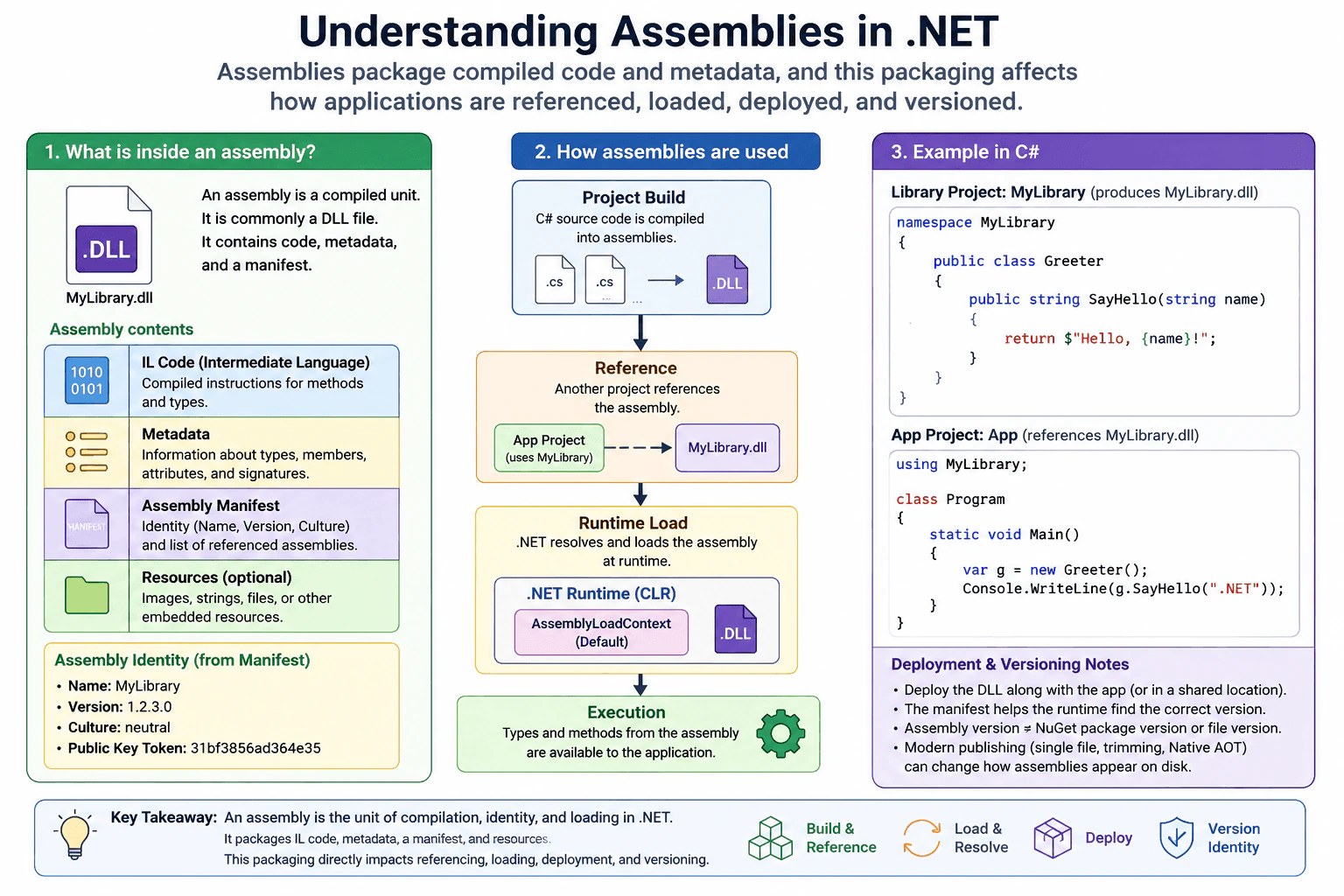
An assembly is a compiled unit of managed .NET code that the runtime can identify and load. It usually contains Intermediate Language code, type metadata, an assembly manifest, and optional resources. The manifest gives the assembly its identity and records information such as referenced assemblies. In normal managed applications, assemblies are commonly stored in DLL files. This matters for references, loading, deployment, and versioning, although modern publishing options can change how those assemblies appear in the final deployed files.
Detailed Explanation
An assembly is a package produced when managed .NET code is built. Think of it as a container that holds program instructions and information describing those instructions. It gives .NET a clear identity for compiled code and tells the runtime what types and other compiled parts are available. Assemblies also help projects refer to compiled libraries. In a normal deployment, they are commonly present as DLL files. Modern publishing can package or transform the application differently, so one assembly does not always mean one visible deployed file.
Useful Questions to Ask the Interviewer
Would you like me to focus on assembly contents, loading behavior, or deployment and versioning?
Should I also explain how assembly versions differ from NuGet package versions and file versions?
How to Explain It in an Interview
In managed .NET, an assembly is a compiled unit that the runtime can identify and load. It is commonly stored in a Portable Executable file with a DLL extension. Some older or specialized managed assemblies can use an EXE extension, while modern SDK applications often use a managed DLL together with a separate native application host.
A managed assembly contains Common Intermediate Language instructions for compiled methods, metadata describing types and members, and an assembly manifest. The manifest describes the assembly itself. It includes its identity and information such as its name, version, culture when applicable, and references to other assemblies. An assembly can also contain embedded resources.
A C# class library project commonly produces one assembly. Another project can reference that assembly and use accessible types from it. At runtime, .NET resolves and loads required managed assemblies. AssemblyLoadContext provides loading boundaries and custom loading behavior for cases such as plugin systems.
Assemblies affect deployment because build and publish tooling determines which application assemblies and dependency assemblies are needed in the output. They affect versioning because an assembly has an assembly version, but that value is separate from a NuGet package version and a file version.
A key limitation is that modern deployment can change the physical representation. Single file publishing can bundle assemblies, trimming can remove unused code, and Native AOT can compile managed code ahead of time into native code. Therefore, an assembly is an important managed code and runtime concept, but it should not always be described as one physical file that must appear unchanged in production.
Why Interviewers Ask This
Interviewers ask this to check whether a candidate understands how managed .NET code is packaged, identified, referenced, loaded, deployed, and versioned. A strong answer shows that the candidate can distinguish source code, namespaces, assemblies, NuGet packages, and physical deployment files, and can reason about dependencies and runtime loading in production applications.
Common interview mistakes
A common mistake is saying that an assembly is simply a DLL file. DLL is a common physical form, but the assembly is the managed compiled unit described by its metadata and manifest. Another mistake is treating an assembly version as the same thing as a NuGet package version or file version. Candidates also sometimes confuse an assembly with a namespace. A namespace organizes type names, while an assembly is a compiled unit with its own identity. Another mistake is assuming that every assembly must appear as one separate file in production. Single file publishing, trimming, and Native AOT can change the final deployment layout. It is also incorrect to assume that changing an assembly version alone controls package restore or automatically downloads a different dependency.
Interview tip
Start by saying that an assembly is a compiled managed code unit that .NET can identify and load. Then name its main contents: Intermediate Language code, metadata, the manifest, and optional resources. Connect the manifest to assembly identity and references. Finish by explaining that assembly versioning is different from NuGet package versioning and that modern publishing can change the physical deployment layout.
Interviewer may ask next
What happens if two loaded assemblies contain types with the same namespace and type name?
They can still represent different runtime types because a managed type is not identified only by its namespace and type name. Its defining assembly also matters, and the loading context can matter when assemblies are loaded into different AssemblyLoadContext instances. This is important in plugin systems because two types that look identical by name are not automatically interchangeable when they come from different assembly identities or loading contexts.
How do modern publishing options change the relationship between assemblies and deployed files?
They can make the relationship different from one assembly per visible file. Single file publishing can bundle managed assemblies into the application package, trimming can remove unused managed code, and Native AOT can compile managed code into native code before deployment. The tradeoff is that these options can reduce or simplify deployment and startup requirements, but they can also restrict dynamic loading, reflection dependent behavior, or other features that expect assemblies and metadata to remain available in their normal managed form.
9. What are value types and reference types?Language SpecificEasy
i Question Details
Compare storage behavior, copying semantics, and typical examples, and explain the practical consequences in method calls and assignments.
Short Interview Answer (30-60 seconds)
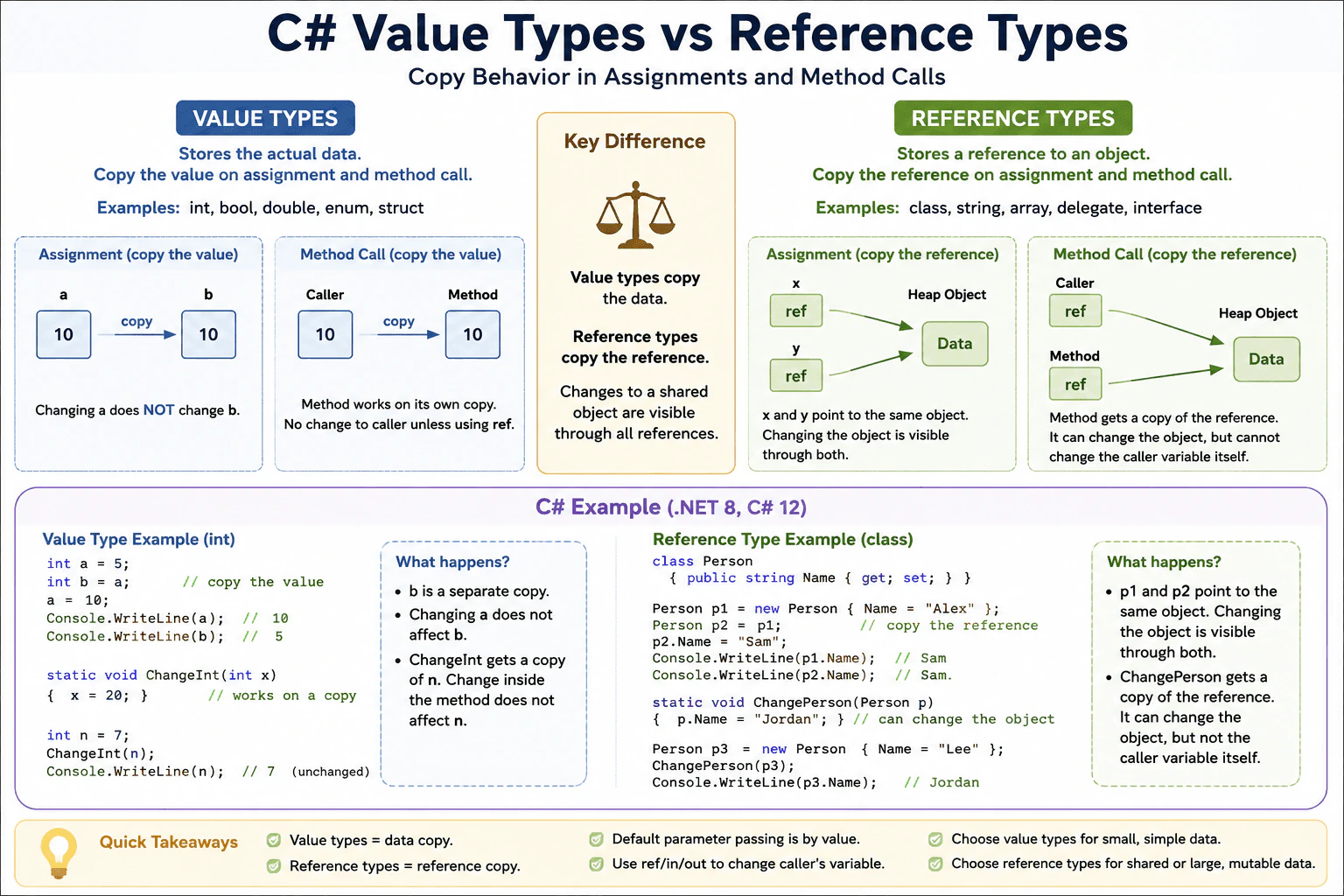
Value types keep the actual data, so assignments and method calls copy the value. Reference types keep a reference to an object, so assignments and method calls copy the reference, not the whole object. In practice, that means two value variables are separate copies, while two reference variables can point to the same object.
Detailed Explanation
In C#, these two kinds of data behave differently when you copy them or pass them into a method. One kind carries its own data, so each copy is separate. The other kind points to one shared object, so different variables can still refer to the same thing. That matters because a change in one place may stay local for one kind, but can be seen from another variable for the other kind. This choice affects bugs, memory use, and how easy the code is to reason about.
Useful Questions to Ask the Interviewer
Do you want me to compare structs and classes too?
Should I include how ref changes method calls?
How to Explain It in an Interview
In C#, value types and reference types differ mainly in what gets copied.
A value type stores the value itself. Common examples are int, bool, double, enum, and struct. When you assign one value variable to another, C# copies the data. When you pass it to a method, the method gets a copy too unless you use ref, in, or out.
A reference type stores a reference to an object. Common examples are class, string, array, delegate, and interface instances. When you assign one reference variable to another, C# copies the reference. Both variables can point to the same object. If the object is mutable, a change through one variable is visible through the other.
This is why people often say value types give value semantics and reference types give shared object semantics. But the old stack versus heap shortcut is not the full rule. A value type can still be inside a heap object, and a reference variable can live on the stack as a local. The important rule is copy behavior and object sharing.
In production, I choose a value type for small, simple data that should behave like a copy. I choose a reference type when I want shared state, inheritance, or I want to avoid copying a larger object. I also watch out for large structs because copying them can cost more than people expect.
Why Interviewers Ask This
Interviewers ask this to check if you understand how C# stores data, how copying works, and why the same assignment or method call can behave differently for structs and classes. It also shows whether you know the practical effect on mutation, object sharing, and parameter passing.
Common interview mistakes
A common mistake is thinking value types always mean stack and reference types always mean heap. Another mistake is assuming assignment copies the whole object for classes. People also forget that strings are reference types but are immutable, so changing a string usually creates a new value. Another common bug is expecting a method to change the caller variable when the parameter was passed by value.
Interview tip
Say the copy rule first. Then give one example for a value type and one for a reference type. Finish by explaining what happens in a method call, because that is where the difference becomes clear.
Interviewer may ask next
What happens when you pass a struct to a method?
A struct is a value type, so C# copies the struct when it is passed by value. The method works on its own copy, so changes inside the method do not affect the caller unless you use ref. This matters because large structs can be expensive to copy.
Why would I choose a class instead of a struct?
Choose a class when you want shared object identity, reference semantics, or a large mutable object that should not be copied often. The tradeoff is that class assignment and parameter passing copy only the reference, so multiple variables can point to the same object and changes are visible through all of them.
10. What is boxing and unboxing?Language SpecificEasy
i Question Details
Explain the conversion path between value types and reference-type wrappers, including why allocations and casts matter.
Short Interview Answer (30-60 seconds)
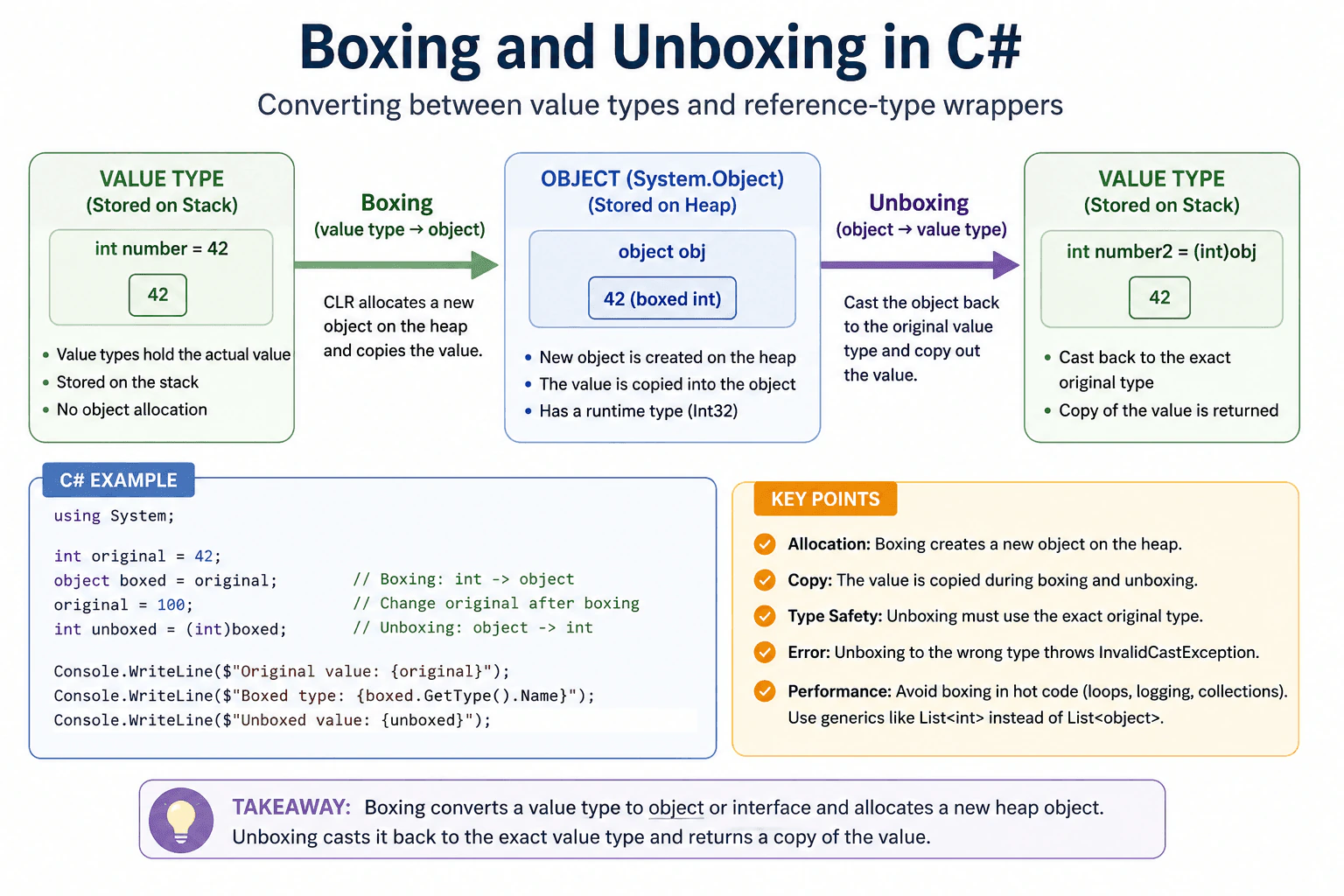
Boxing is when C# converts a value type into an object. Unboxing is when I cast that object back to the original value type. Boxing creates a heap object and copies the value, so I try to avoid it in hot code when I can.
This question is asking how C# turns a simple value, like an int, into a general object, and how it turns it back again. The important part is that the value is copied when it is boxed, so the runtime creates extra work and uses extra memory. When it is unboxed, the value must be cast back to the exact original type. I would explain that this matters in real programs because repeated boxing can slow code down and create garbage.
Useful Questions to Ask the Interviewer
Do you want the answer focused on object boxing or interface boxing?
Should I explain the performance impact in real code?
How to Explain It in an Interview
Boxing happens when a value type is converted to object or to an interface type. The CLR creates a new object and copies the value into it. Unboxing is the reverse. You cast the object back to the original value type, and the runtime checks the stored type first. If it does not match, you get InvalidCastException.
The important part is cost. Boxing makes an allocation and a copy. Unboxing copies the value back out. That is usually fine for small, rare cases, but it can matter in loops, logging paths, or code that handles many values. It also changes behavior because you are working with a copy, not the original value.
In practice, I avoid boxing with generics, for example List<int> instead of List<object>. That keeps values unboxed and reduces garbage. I only box when I need to use an API that requires object or an interface and the cost is acceptable.
Practical Insights
O(1) per boxing or unboxing, but boxing creates a heap allocation and a copy.
Code
using System;
publicstaticclassProgram
{
publicstaticvoidMain()
{
int original = 42;
// Boxing copies the value into an object.object boxed = original;
// Changing the original later does not change the boxed copy.
original = 100;
// Unboxing needs the exact original value type.int unboxed = (int)boxed;
Console.WriteLine($"Original value: {original}");
Console.WriteLine($"Boxed value type: {boxed.GetType().Name}");
Console.WriteLine($"Unboxed value: {unboxed}");
}
}
Why Interviewers Ask This
Interviewers ask this to see whether you know the difference between value types and reference types, when the CLR creates an object, and why extra allocation and casting can hurt performance or cause runtime errors.
Common interview mistakes
A common mistake is thinking boxing is free. Another is forgetting that boxing makes a copy, so later changes to the original value do not change the boxed object. A third mistake is trying to unbox to the wrong type, which throws InvalidCastException. People also box too much in loops when a generic type would avoid the cost.
Interview tip
Say the simple rule first. Boxing converts a value type to object or an interface and allocates. Unboxing casts it back and must match the original type. Then mention the performance cost and a generic alternative.
Interviewer may ask next
What happens if I unbox to the wrong type?
It throws InvalidCastException because the runtime checks the exact stored type before it returns the value. That matters because unboxing is not a loose conversion. It must match the original boxed value type exactly.
Why do people avoid boxing in generic code?
Because boxing creates a heap allocation and a copy. Generic code can keep the value type unboxed, so it usually runs faster and creates less garbage. That tradeoff matters in loops and other hot paths.
More questions load as you scroll
.NET Developer Resume Examples
Explore the resume examples below to find the one that best matches your target .NET Developer role.
Disclaimer: This interview guide is for educational and informational purposes only. It is designed to help readers prepare, but it does not guarantee any interview result, hiring decision, offer, or outcome. Interview questions, hiring criteria, and preferred answers can vary by employer, interviewer, industry, location, and time. All answers, examples, and explanations in this guide are suggested examples for interview preparation, not definitive answers or instructions for professional practice. They are based on research and judgment, are provided without warranties of any kind, and should be adapted to the question, role, and applicable laws and professional requirements. Diagrams are simplified illustrations intended to highlight the main concepts and their relationships; actual situations, systems, and practices may be more complex. Alternative approaches may be equally valid or better suited to a particular question, context, or interviewer. To the fullest extent permitted by applicable law, the contributors and publisher are not liable for decisions made, actions taken, or losses incurred based on this guide.
State Laws and Professional Responsibilities: Laws and requirements governing an occupation vary by state and jurisdiction. You are responsible for checking the current laws, licensing requirements, and scope-of-practice rules that apply to your location and role, and for ensuring that your answers and actions comply with them. Adapt examples in this guide to those requirements. This guide is not legal advice.
Content Accuracy and Verification: To the fullest extent permitted by applicable law, we do not represent or warrant that interview guides, questions, answers, examples, or diagrams are accurate, complete, current, error-free, or suitable for any particular purpose. You are responsible for independently reviewing and verifying the information before relying on it.