This interview guide is for educational and informational purposes only. It is designed to help readers prepare, but it does not guarantee any interview result, hiring decision, offer, or outcome. Interview questions, hiring criteria, and preferred answers can vary by employer, interviewer, industry, location, and time. All answers, examples, and explanations in this guide are suggested examples for interview preparation, not definitive answers or instructions for professional practice. They are based on research and judgment, are provided without warranties of any kind, and should be adapted to the question, role, and applicable laws and professional requirements. Diagrams are simplified illustrations intended to highlight the main concepts and their relationships; actual situations, systems, and practices may be more complex. Alternative approaches may be equally valid or better suited to a particular question, context, or interviewer. To the fullest extent permitted by applicable law, the contributors and publisher are not liable for decisions made, actions taken, or losses incurred based on this guide.
State Laws and Professional Responsibilities
Laws and requirements governing an occupation vary by state and jurisdiction. You are responsible for checking the current laws, licensing requirements, and scope-of-practice rules that apply to your location and role, and for ensuring that your answers and actions comply with them. Adapt examples in this guide to those requirements. This guide is not legal advice.
Identity, Image, and Privacy Notice
To respect individual privacy, some names, profile photographs, avatars, biographical details, and other identifying information displayed in this guide may be replaced with pseudonyms, licensed stock images, illustrative avatars, composite images, or representative descriptions. Unless a person is expressly identified as an actual contributor, a displayed name, image, or profile should not be understood as depicting or identifying a specific candidate, interviewer, employee, or other real individual. These representations are provided for editorial and illustrative purposes only and do not imply endorsement, employment, participation, or affiliation with this guide or any company mentioned in it. Any resemblance to an actual person is coincidental.
Company Notice
This guide is an independent educational resource and is not affiliated with, endorsed by, sponsored by, or approved by the company named in this guide. Company names identify reported interview experiences or the employer context of clearly labeled original practice exercises. Interview practices can change without notice, and inclusion of company-specific content does not mean these questions are official, complete, or guaranteed to be asked. To the fullest extent permitted by law, the author, contributors, and publisher are not responsible for outcomes related to use of this material.
Content Accuracy and Verification
To the fullest extent permitted by applicable law, we do not represent or warrant that interview guides, questions, answers, examples, or diagrams are accurate, complete, current, error-free, or suitable for any particular purpose. You are responsible for independently reviewing and verifying the information before relying on it.
Questions or comments?
Contact us for general questions, or share feedback, technical corrections, and comments with the community.
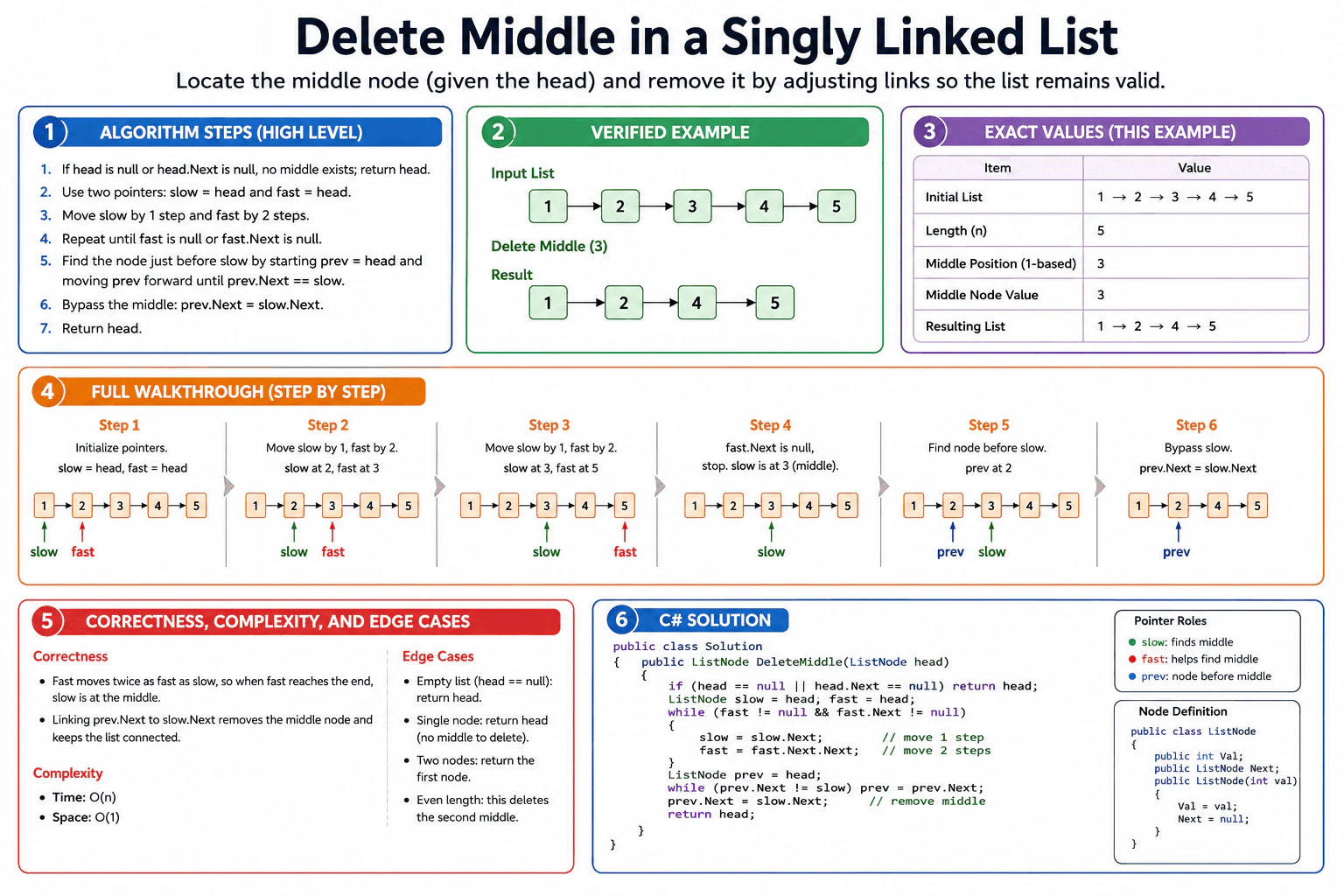
Explain how to locate the middle node and adjust links so the list remains valid after removal.
Short Interview Answer (30-60 seconds)
I use slow and fast pointers to find the middle node in a singly linked list, then I remove that node by rewiring the node before it to skip over it. The fast pointer moves two steps while the slow pointer moves one step, so slow reaches the middle when fast reaches the end. I process the list in linear time and use only constant extra space, so the solution is O(n) time and O(1) space.
The question asks me to remove the middle node from a singly linked list and keep the rest of the list connected in the same order. I use two pointers because one moves one step and the other moves two steps. When the faster pointer reaches the end, the slower pointer is at the middle. Then I find the node just before that middle node and change one link to skip it. This works well because it is simple, uses little memory, and runs in linear time.
Useful Questions to Ask the Interviewer
For an even-length list, should I remove the first middle node or the second middle node?
Should I return the updated head after the middle node is removed?
How to Explain It in an Interview
1. Understand the input and output
The input is the head of a singly linked list. The output is the same list after removing the middle node. For an even-length list, this approach removes the second middle node, which matches the diagram.
2. Choose slow and fast pointers
I use two pointers. Slow moves one node at a time. Fast moves two nodes at a time. This lets slow land on the middle when fast reaches the end. I also keep a prev pointer so I can reach the node before slow.
3. Initialize the state
If the list is empty or has one node, I return it right away. Then I start slow = head, fast = head, and later move prev from head until prev.Next == slow.
4. Walk through the example
For 1 -> 2 -> 3 -> 4 -> 5, slow moves to 2 and fast moves to 3, then slow moves to 3 and fast moves to 5. At that point the loop stops. Then prev moves to 2, and I set 2.Next = 4. The result is 1 -> 2 -> 4 -> 5.
5. Explain why the result is correct
The key idea is that slow reaches the middle only after fast has moved through the list at double speed. Once I know the middle node, I only change one link. That removes the middle node without breaking the rest of the list.
6. Explain the C# implementation
The code checks the small-list cases first. Then it moves slow and fast together. After that, it finds the node before slow and rewires prev.Next to slow.Next. Finally, it returns the original head, because the first node does not change.
Key Insight / Why This Solution Works
The key idea is to use two pointers to locate the middle node, then use one more pointer to find the node before it. Slow moves one step and fast moves two steps. When fast reaches the end, slow is at the middle. The invariant is simple: slow marks the middle candidate, fast controls when to stop, and prev ends on the node just before slow. Then I change one link, prev.Next = slow.Next, so the list stays connected.
Code
using System;
publicclassListNode
{
publicint Val;
public ListNode? Next;
publicListNode(int val, ListNode? next = null)
{
Val = val;
Next = next;
}
}
publicclassSolution
{
public ListNode? DeleteMiddle(ListNode? head)
{
// Empty list or single-node list: there is no middle node to remove.if (head == null || head.Next == null)
{
return head;
}
// Start both pointers at the head.// Slow moves one step. Fast moves two steps.
ListNode? slow = head;
ListNode? fast = head;
// When this loop ends, slow is at the middle node.while (fast != null && fast.Next != null)
{
slow = slow.Next;
fast = fast.Next.Next;
}
// Find the node right before slow so we can bypass the middle node safely.
ListNode? prev = head;
while (prev.Next != slow)
{
prev = prev.Next;
}
// Skip the middle node and keep the rest of the list connected.
prev.Next = slow!.Next;
// Return the original head. The first node does not change.return head;
}
}
publicstaticclassProgram
{
publicstaticvoidMain()
{
// Diagram example input: 1 -> 2 -> 3 -> 4 -> 5
ListNode head =
new ListNode(1, new ListNode(2, new ListNode(3, new ListNode(4, new ListNode(5)))));
Solution solution = new Solution();
ListNode? updatedHead = solution.DeleteMiddle(head);
Console.WriteLine("Input: 1 -> 2 -> 3 -> 4 -> 5");
Console.Write("Output: ");
PrintList(updatedHead);
}
privatestaticvoidPrintList(ListNode? node)
{
while (node != null)
{
Console.Write(node.Val);
if (node.Next != null)
{
Console.Write(" -> ");
}
node = node.Next;
}
Console.WriteLine();
}
}
Time & Space Complexity
The list is walked in linear time. The slow and fast pointers move through the list together, and the prev pointer may make one more pass to find the node before the middle. Even with that extra pass, the total work is still O(n). The code stores only a few pointers, so the extra memory is O(1).
Where it is used
This pattern is useful when you need to edit a chain of items in place. A simple linked list queue, a message chain, or a playlist-style list can use the same idea when one item in the middle must be removed without building a new list.
Why Interviewers Ask This
The interviewer wants to see that you can reason about linked list pointers without breaking the chain. They also want to hear a clear explanation of why slow and fast pointers find the middle, how you keep the list connected, and how you handle small edge cases. Correct C# code, correct complexity, and a simple step-by-step explanation matter here.
Common interview mistakes
A common mistake is moving the fast pointer by one step instead of two. That breaks the middle-node logic. Another mistake is deleting the node by value and not by node reference. That can remove the wrong item when values repeat. Candidates also forget the empty-list and one-node checks. A last common bug is rewiring links without first finding the node before the middle, which can break the rest of the list.
Interview tip
Say the invariant out loud: slow finds the middle, fast tells you when to stop, and prev is the node before slow.
Interviewer may ask next
What changes if the list has an even number of nodes and I want to delete the first middle instead of the second middle?
I would change the stopping rule for the slow and fast pointers. The goal is to stop slow on the first middle instead of the second middle. The rest of the idea stays the same. Time stays O(n) and space stays O(1).
Why do I need the prev pointer instead of changing slow directly?
I need the node before the middle so I can reconnect the list safely. Slow points to the middle node itself, but prev points to the node that must skip over it. Without prev, I cannot update the link that removes the middle node.
72. Add two numbers represented by linked lists.CodingEasy
i Question Details
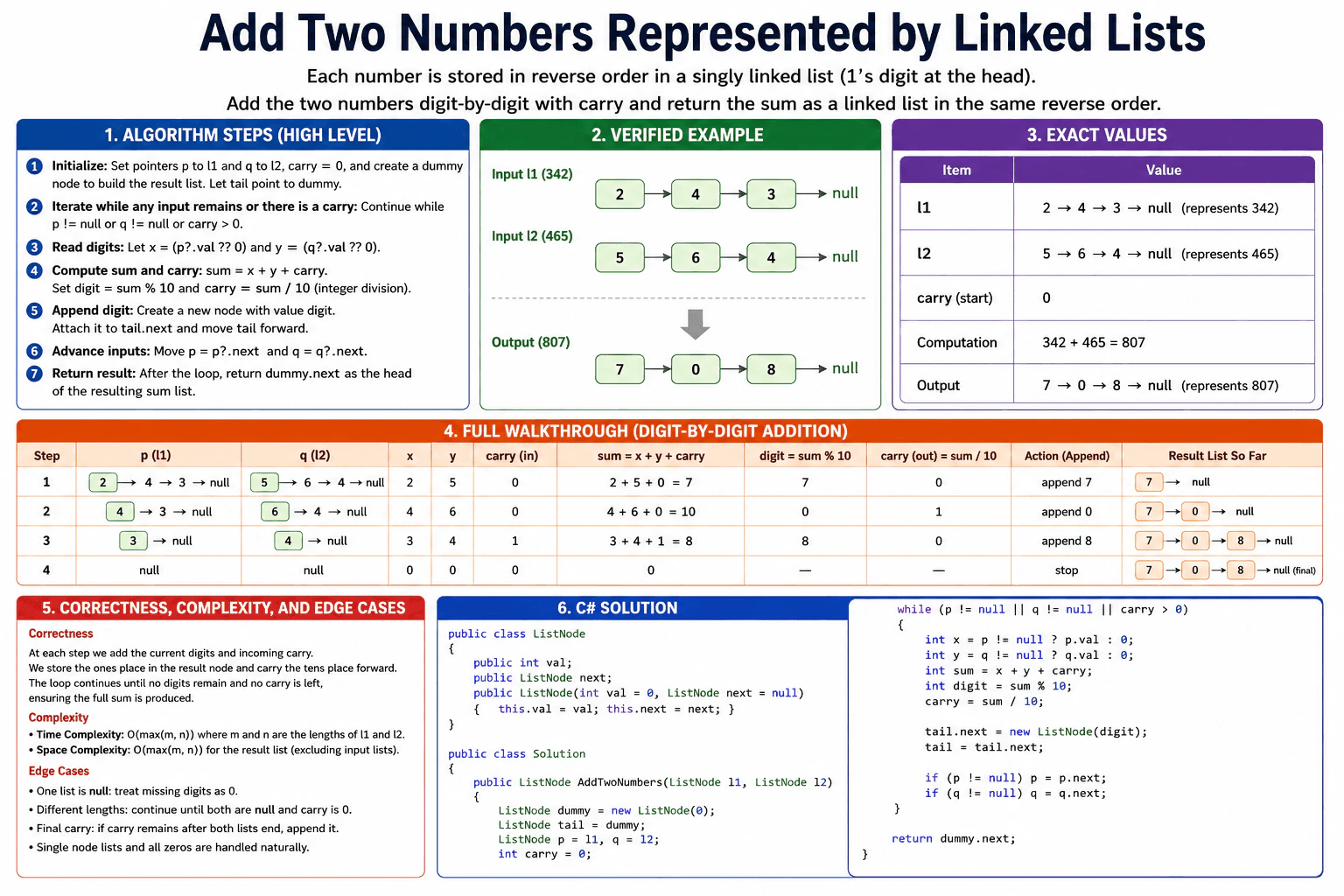
Describe digit-by-digit addition, carry handling, and how the output list is built.
Short Interview Answer (30-60 seconds)
I would add the two linked lists digit by digit from the head, because the head stores the ones place. I keep a carry value and a dummy head for the result list. On each step, I read the current digit from each list, use 0 when a list is already finished, add them, and store sum % 10 in a new node. I process each node at most once. The time is O(max(m, n)) and the extra space is O(max(m, n)).
This question asks me to add two numbers that are written one digit at a time in linked lists. The first node is the ones place, so I can read both lists from the front. At each step, I add the two current digits and any carry from the previous step. I write the new digit into the answer and move forward. I stop when both lists are finished and there is no carry left. That fits this problem because each step only depends on the current digits and the carry.
Useful Questions to Ask the Interviewer
Are the digits always stored in reverse order?
Can one of the lists be empty?
How to Explain It in an Interview
1. Understand the input and required output
The input is two linked lists. Each node stores one digit. The output is one linked list with the sum in the same reverse order.
2. Choose the algorithm and data structure
I use two moving pointers, one carry value, and a dummy head node. This is enough because each step only needs the current digits and the previous carry.
3. Initialize the state
I set p to l1, q to l2, carry to 0, and tail to the dummy node. The dummy node makes it easy to build the result list.
4. Walk through the example
For 2 -> 4 -> 3 and 5 -> 6 -> 4, the first step gives 2 + 5 + 0 = 7. The next step gives 4 + 6 + 0 = 10, so I write 0 and keep carry 1. The last step gives 3 + 4 + 1 = 8. The result is 7 -> 0 -> 8.
5. Explain why the result is correct
After each loop, the result list already holds the correct lower digits, and carry holds the unfinished part of the next digit. When the loop ends, all digits have been handled, so the list is correct.
6. Explain the C# implementation
The code reads the current digit from each list, treats a missing node as 0, adds the digits and carry, creates one new node, then moves both pointers forward. At the end it returns dummy.next as the real head.
7. Explain complexity and edge cases
The time is O(max(m, n)). The extra space is O(max(m, n)) for the new result list. Important edge cases are one empty list, different lengths, and a final carry such as 5 + 5 = 10.
Key Insight / Why This Solution Works
The key idea is to add the numbers one digit at a time from the head, because the head already stores the ones place. I keep a carry, two pointers, and a dummy head for the result list. At each step I read the current digit from each list, using 0 when a list is already done. Then I compute sum = x + y + carry, store sum % 10 in a new node, and keep sum / 10 for the next step. The invariant is simple: the result list always contains the correct lower-order digits built so far, and carry holds the only unfinished part from the previous addition.
Code
using System;
using System.Text;
publicclassListNode
{
publicint val;
public ListNode next;
publicListNode(int val = 0, ListNode next = null)
{
// Store one digit in this node.this.val = val;
// Keep a reference to the next digit.this.next = next;
}
}
publicclassSolution
{
public ListNode AddTwoNumbers(ListNode l1, ListNode l2)
{
// Dummy head makes list building simple.
ListNode dummy = new ListNode(0);
ListNode tail = dummy;
// p and q walk through the two input lists.
ListNode p = l1;
ListNode q = l2;
// carry stores the value that must be added to the next digit.int carry = 0;
// Keep going while a digit still exists in either list or carry is still needed.while (p != null || q != null || carry > 0)
{
// Missing digits count as 0.int x = p != null ? p.val : 0;
int y = q != null ? q.val : 0;
// Add both digits and the carry from the previous step.int sum = x + y + carry;
// The ones digit becomes the next result node.int digit = sum % 10;
// The tens digit becomes the next carry.
carry = sum / 10;
// Append the new digit to the result list.
tail.next = new ListNode(digit);
tail = tail.next;
// Move each pointer forward only if that list still has a next node.if (p != null)
{
p = p.next;
}
if (q != null)
{
q = q.next;
}
}
// Return the real head after the dummy node.return dummy.next;
}
}
publicstaticclassProgram
{
publicstaticvoidMain()
{
// Build the exact example from the diagram.
ListNode l1 = BuildList(newint[] { 2, 4, 3 }); // represents 342
ListNode l2 = BuildList(newint[] { 5, 6, 4 }); // represents 465
Solution solution = new Solution();
ListNode result = solution.AddTwoNumbers(l1, l2);
// Print the example input and output in a simple interview-friendly form.
Console.WriteLine("Input l1: 2 -> 4 -> 3 -> null (342)");
Console.WriteLine("Input l2: 5 -> 6 -> 4 -> null (465)");
Console.WriteLine("Output : " + ToArrowString(result) + " -> null (807)");
}
privatestatic ListNode BuildList(int[] digits)
{
// Use a dummy head so appending is easy.
ListNode dummy = new ListNode(0);
ListNode tail = dummy;
foreach (int digit in digits)
{
// Add one digit node at a time, in the same order as the array.
tail.next = new ListNode(digit);
tail = tail.next;
}
return dummy.next;
}
privatestaticstringToArrowString(ListNode node)
{
// Convert the linked list to a readable arrow string for the demo output.if (node == null)
{
return"null";
}
StringBuilder sb = new StringBuilder();
while (node != null)
{
sb.Append(node.val);
node = node.next;
if (node != null)
{
sb.Append(" -> ");
}
}
return sb.ToString();
}
}
Time & Space Complexity
The time is O(max(m, n)), where m and n are the lengths of the two lists. We move through the lists one node at a time and stop when both lists are finished and carry is 0. The extra space is O(max(m, n)) for the new result list, not counting the input lists. We do not use a map, stack, or table.
Where it is used
This pattern is useful when numbers are stored digit by digit and you need to add them safely. It appears in big integer math, interview problems, and systems that store numeric data as linked nodes instead of one normal integer.
Why Interviewers Ask This
Interviewers use this question to check careful pointer handling, carry logic, and clean linked-list building. It also shows whether you can handle different lengths, null inputs, and a final carry without breaking the list. They want to see a simple loop, a dummy head, and an exact explanation of time and space cost.
Common interview mistakes
• Forgetting to include carry in the loop condition, so the final digit is lost. • Reading p.val or q.val without checking for null first. • Returning dummy instead of dummy.next. • Moving the pointers before using the current digits. • Losing the rest of the list after appending a new node.
Interview tip
Say the invariant out loud: after each step, the result list is correct for the digits already processed, and carry holds the only unfinished part.
Interviewer may ask next
What changes if one of the input lists is empty?
Nothing changes in the main logic. I treat a missing node as 0, so the loop still works. The same carry rule and stop condition still apply.
What changes if the digits are stored in forward order instead of reverse order?
I would need extra storage, such as stacks or reversed lists, so I can add from the least significant digit first. The digit addition and carry logic stay the same, but the traversal order changes. Correctness still comes from adding matching digits with carry. The time stays O(max(m, n)), and the extra space increases because of the added storage.
73. Reverse in groups.CodingEasy
i Question Details
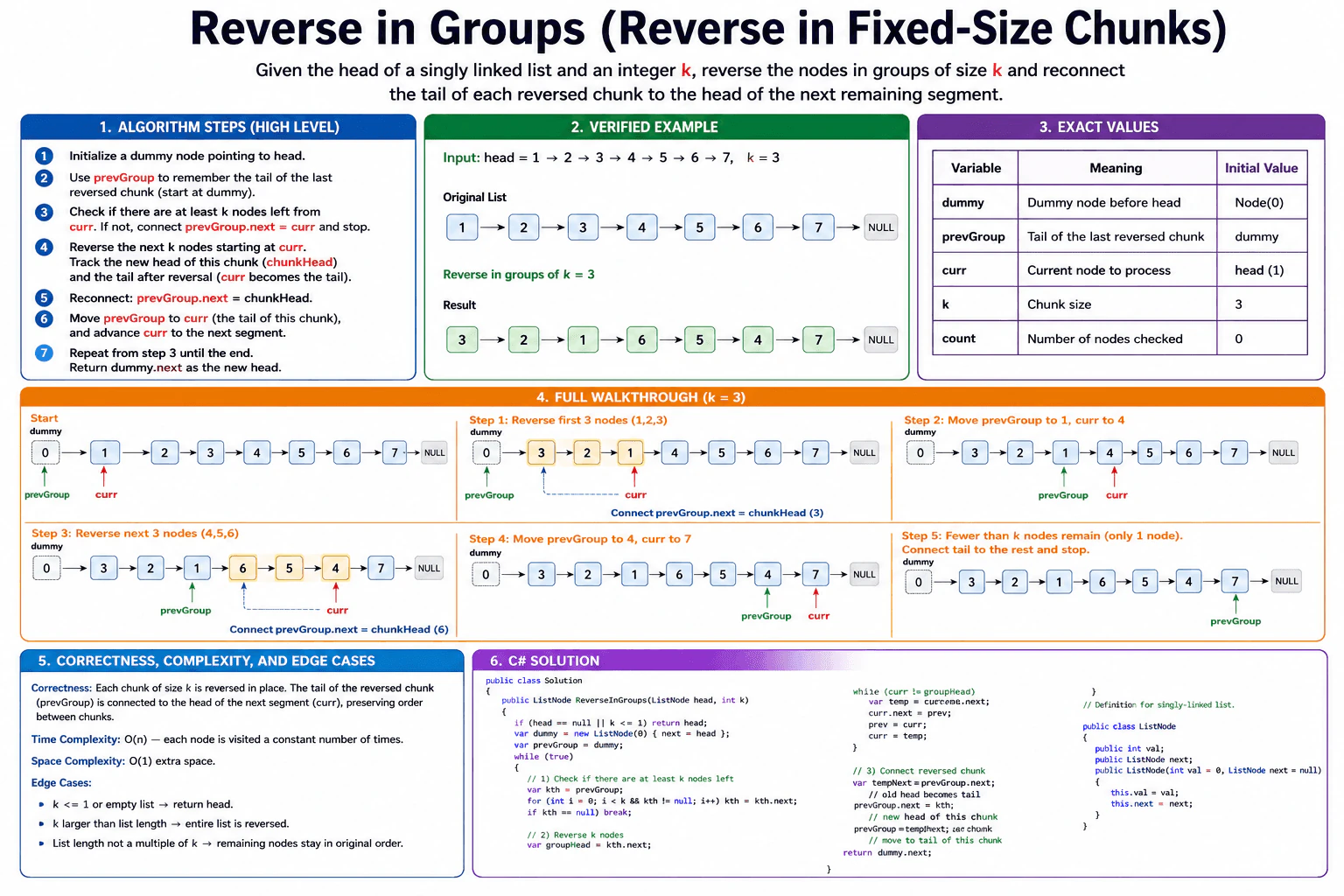
Explain how to reverse the list in fixed-size chunks and how you reconnect the tail of each chunk to the next segment.
Short Interview Answer (30-60 seconds)
I use a dummy node and reverse the linked list one full group at a time. For each chunk, I first check that k nodes exist. If they do, I reverse those nodes in place, reconnect the previous chunk’s tail to the new head, and move forward. If fewer than k nodes remain, I stop and leave them as they are. This runs in O(n) time and O(1) extra space.
The task is to take a chain of connected items and flip the order inside small groups. I only flip a group when it has exactly k items. After that, I connect the last item of the flipped group to the next group. Then I move forward and repeat. If fewer than k items remain, I stop and keep the rest in the same order. This fits a simple in-place method because I can change the links without making a copy, and I only need a few working values.
Useful Questions to Ask the Interviewer
Should the last short group stay unchanged if it has fewer than k nodes?
Do you want an in-place solution, or is extra memory allowed?
How to Explain It in an Interview
1. Understand the input and output
The input is the head of a singly linked list and an integer k. The output is the same list with each full group of k nodes reversed. The nodes inside one group change order, but the groups themselves stay in the same order.
2. Choose the pointers and invariant
I use a dummy node, a pointer called prevGroup, a pointer called kth, and two pointers for reversal, curr and prev. The key invariant is simple. Everything before prevGroup is already finished. prevGroup always points to the tail of the last reversed group.
3. Initialize the state
I start with dummy.next = head and prevGroup = dummy. This makes the first reconnect step easy, because the head of the list can change after the first reversal. Then I look for the kth node ahead of prevGroup. If I cannot find it, I stop.
4. Walk through the example
The example in the diagram is 1 -> 2 -> 3 -> 4 -> 5 -> 6 -> 7 with k = 3. The first full group is 1, 2, 3. I reverse it to 3, 2, 1. Then I connect the tail of that group, which is now node 1, to node 4. Next I move prevGroup to node 1. The second full group is 4, 5, 6. I reverse it to 6, 5, 4. Then I connect node 4 to node 7 and move prevGroup to node 4. One node is left, so I stop.
5. Explain why the result is correct
Each time I reverse a group, I only touch the nodes inside that group. The node before the group keeps the list connected, and the node after the group is saved before reversal. That is why no nodes are lost. The invariant stays true after every loop.
6. Explain the C# implementation
The code first handles the easy cases. If the list is empty or k is 1, it returns the head. Then it creates the dummy node and starts the main loop. It finds the kth node, saves the node after the group, reverses the group one link at a time, reconnects the new head and the new tail, and moves prevGroup forward.
7. Explain complexity and edge cases
The time is O(n) because each node is visited only a constant number of times. The extra space is O(1) because the algorithm only uses a few pointers. The important edge cases are an empty list, k = 1, and a final group with fewer than k nodes.
Key Insight / Why This Solution Works
Use a dummy node, then repeat the same four-pointer routine. First find the kth node ahead of prevGroup. If fewer than k nodes remain, stop. Otherwise reverse the nodes from prevGroup.next through kth in place, reconnect prevGroup.next to the new head, and move prevGroup to the old head of that group. The invariant is that everything before prevGroup is already finished, and the next group always starts at prevGroup.next.
Code
using System;
using System.Text;
publicclassListNode
{
publicint val;
public ListNode next;
publicListNode(int val = 0, ListNode next = null)
{
this.val = val;
this.next = next;
}
}
publicclassSolution
{
public ListNode ReverseInGroups(ListNode head, int k)
{
// Empty list or a group size of 1 does not change anything.if (head == null || k <= 1)
{
return head;
}
// Dummy keeps the reconnect step simple when the head changes.
ListNode dummy = new ListNode(0, head);
ListNode prevGroup = dummy;
while (true)
{
// Find the kth node from prevGroup.// If it does not exist, there is no full group left.
ListNode kth = prevGroup;
for (int i = 0; i < k && kth != null; i++)
{
kth = kth.next;
}
if (kth == null)
{
break;
}
// Save the node after the group.// The reversed group must point here at the end.
ListNode groupNext = kth.next;
// Reverse the current group in place.
ListNode prev = groupNext;
ListNode curr = prevGroup.next;
while (curr != groupNext)
{
ListNode temp = curr.next; // Save the next node before changing the link.
curr.next = prev; // Reverse the arrow for the current node.
prev = curr; // Move prev forward.
curr = temp; // Move curr forward.
}
// prevGroup.next is the old head of the group.// After reversal, that node becomes the tail.
ListNode oldGroupHead = prevGroup.next;
// Connect the previous finished part to the new head of this group.
prevGroup.next = kth;
// Move prevGroup to the tail of the reversed group.
prevGroup = oldGroupHead;
}
return dummy.next;
}
}
publicstaticclassProgram
{
publicstaticvoidMain()
{
// Build the same example from the diagram:// 1 -> 2 -> 3 -> 4 -> 5 -> 6 -> 7
ListNode head = BuildList(1, 2, 3, 4, 5, 6, 7);
int k = 3;
Solution solution = new Solution();
ListNode result = solution.ReverseInGroups(head, k);
// Print the result in the same arrow style as the diagram.
Console.WriteLine(ToArrowString(result));
}
privatestatic ListNode BuildList(paramsint[] values)
{
// Build the linked list in input order.
ListNode dummy = new ListNode(0);
ListNode tail = dummy;
foreach (intvaluein values)
{
tail.next = new ListNode(value);
tail = tail.next;
}
return dummy.next;
}
privatestaticstringToArrowString(ListNode head)
{
// Convert the list to the same readable output format.
StringBuilder sb = new StringBuilder();
ListNode current = head;
while (current != null)
{
sb.Append(current.val);
sb.Append(" -> ");
current = current.next;
}
sb.Append("NULL");
return sb.ToString();
}
}
Time & Space Complexity
The list is processed in chunks. Each node is touched only a constant number of times, so the time is O(n). The algorithm uses only a few pointer variables and one dummy node, so the extra space is O(1).
Where it is used
This pattern is useful when you need to rewrite linked data in blocks. It shows up in interview problems about reversing list segments, and in real code any time a linked structure must be updated in place without copying the whole list.
Why Interviewers Ask This
The interviewer wants to see if you can manage linked-list pointers safely. This question checks whether you can find group boundaries, reverse nodes in place, reconnect the list without losing data, and explain the cost clearly. It also shows whether you can handle edge cases and keep your C# code simple and correct.
Common interview mistakes
A common mistake is to start reversing before checking that a full group of k nodes exists. Another mistake is to lose the next segment while changing pointers. Candidates also often reconnect the wrong node after reversal, or forget to move prevGroup to the tail of the finished group. A final mistake is to keep processing the last short group instead of stopping.
Interview tip
Say the invariant out loud: everything before prevGroup is already fixed, and prevGroup is always the tail of the last reversed chunk.
Interviewer may ask next
What changes if the last short group must also be reversed?
I would remove the stop condition that waits for a full group. Then I would reverse the remaining nodes too. The pointer logic stays the same, so the time is still O(n) and the extra space is still O(1). The tradeoff is that the final short segment no longer stays in original order.
What changes if k is 1?
Nothing changes in the list. I would return the head immediately, because reversing groups of size 1 does no work. That keeps the code simpler and avoids unnecessary pointer rewiring. The cost after the check is O(1).
74. What is Entity Framework Core?Database And Ef CoreEasy
i Question Details
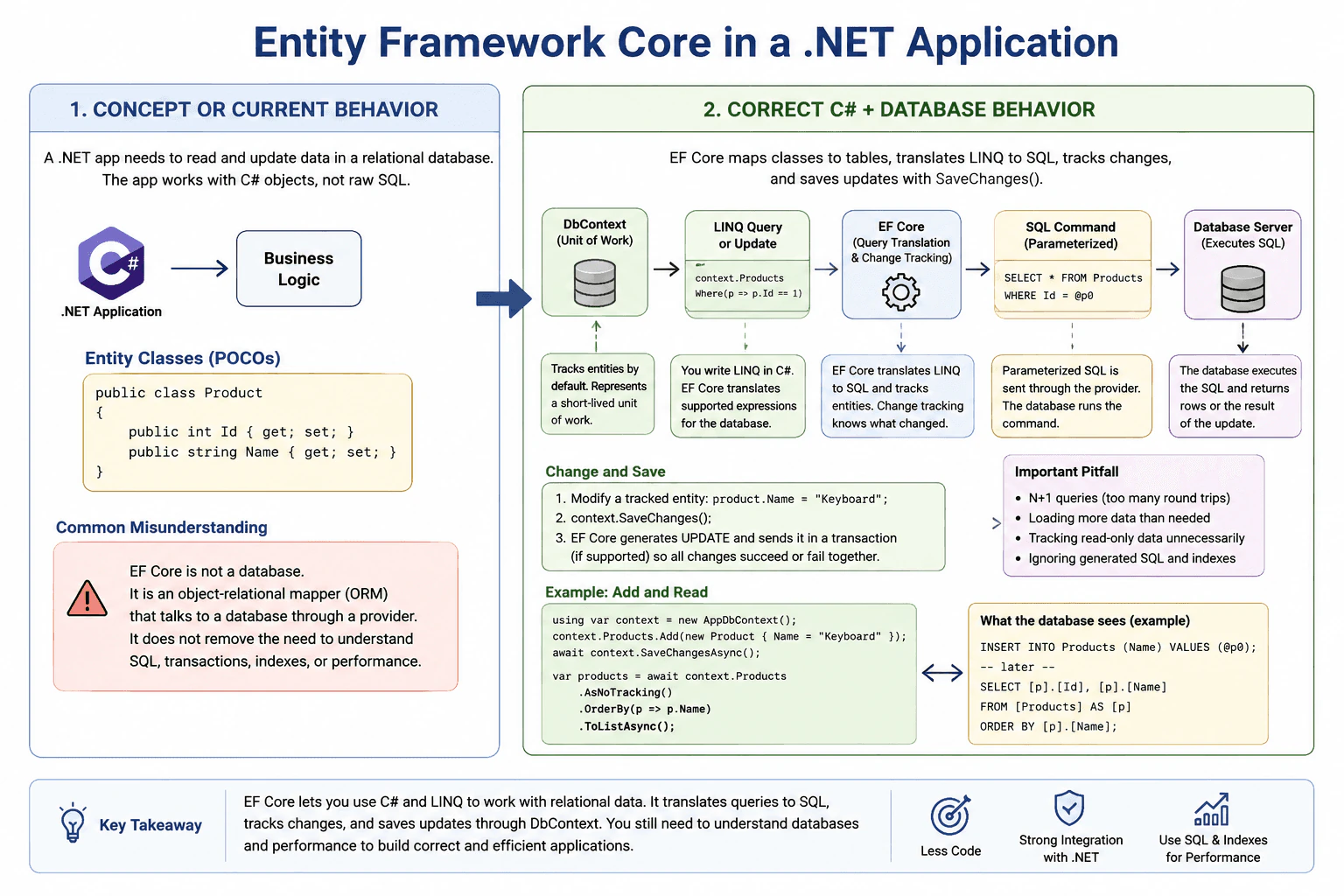
Explain the EF Core concept, how it behaves in a real app, and the most common pitfall or misunderstanding.
Short Interview Answer (30-60 seconds)
Entity Framework Core is Microsoft's object-relational mapper for .NET. It lets C# code query and update relational databases using classes and LINQ. EF Core translates supported operations into database commands, tracks entities through DbContext, and persists changes with SaveChanges, while developers still need to understand database behavior and performance.
Entity Framework Core helps a .NET program read and change stored information without requiring the developer to manually write every instruction sent to the storage system. The developer works mainly with normal C# classes representing things such as customers, orders, or products. The framework handles much of the communication needed to find, add, change, and remove those records. It saves repetitive work and keeps application code easier to organize. However, it does not make storage concerns disappear. Developers still need to understand what work happens underneath and avoid choices that cause unnecessary requests, excessive data transfer, or poor performance.
Useful Questions to Ask the Interviewer
Would you like me to focus on the basic EF Core concept, or also explain DbContext, change tracking, and SaveChanges?
Would you like an example of how EF Core behaves when reading and updating entities in a real application?
How to Explain It in an Interview
Entity Framework Core, usually called EF Core, is Microsoft's modern object-relational mapper, or ORM, for .NET. An ORM maps application objects to relational database structures and helps translate operations between the object model used by C# and the relational model used by the database.
In a typical application, C# classes such as Customer or Order are called entities. EF Core maps those entities and their properties to database tables, columns, keys, and relationships. A DbContext represents a short-lived unit of work and provides access to mapped entities, commonly through DbSet<TEntity> properties.
When the application builds a LINQ query against EF Core, EF Core attempts to translate the supported query expression into the query language understood by the configured database provider. With a relational provider, this is normally SQL. The database server executes that SQL and returns rows. EF Core then materializes those rows into C# objects. The database, not EF Core, performs the actual relational query execution.
By default, queries that return entity instances are tracking queries. Change tracking means the DbContext remembers the state of those entities. If the application modifies a tracked entity and later calls SaveChanges or SaveChangesAsync, EF Core detects the pending changes and generates the necessary INSERT, UPDATE, or DELETE commands. For read-only work, AsNoTracking can reduce tracking memory and processing overhead when the returned entities will not be modified and persisted through that context.
SaveChanges is an important persistence boundary. Changing a C# object does not immediately update the database. EF Core sends pending changes when SaveChanges or SaveChangesAsync is called. For relational database providers, when multiple changes are sent by one SaveChanges call, EF Core normally uses a transaction when the provider supports transactions so those changes can succeed or fail together. Applications can also manage explicit transactions when several operations must share a larger transaction boundary.
Related data can be loaded in different ways. Eager loading requests related data as part of an intentionally shaped query, commonly with Include. Explicit loading asks EF Core to load a relationship later through an explicit API call. Lazy loading can automatically issue a query when an unloaded navigation property is accessed, but it requires additional configuration and can easily cause unexpected database round trips.
A major pitfall is treating EF Core as if it completely hides the database. It does not. LINQ expressions are translated into provider-specific database queries, and different expressions can produce very different SQL and performance. Developers should understand generated queries, indexes, result sizes, relationship loading, transaction boundaries, constraints, and the number of database round trips.
Another common issue is the N+1 query problem. It occurs when one query loads a collection and then additional queries are executed separately for related data for each item. For example, loading 100 orders and then causing one additional query for each order's related data can result in 101 database queries. Appropriate projection, eager loading, or another intentionally shaped query can often avoid this pattern.
The practical tradeoff is productivity versus direct control. EF Core provides strong integration with C#, LINQ, change tracking, relationships, migrations, and other .NET application features, which reduces repetitive data-access code. However, developers must still inspect important queries and understand database behavior. For highly specialized SQL, unusual bulk operations, provider-specific features, or performance-critical paths, direct SQL or another data-access approach can sometimes provide more precise control.
Key Insight / Why This Solution Works
Define entity classes that represent the application's data model.
Configure a DbContext and the appropriate database provider.
Map entities, keys, properties, and relationships using conventions, attributes, or the Fluent API.
Query through EF Core, usually with LINQ, while remembering that supported expressions are translated for database execution.
Shape queries so only required data and relationships are retrieved.
Use tracking when entities will be changed through that context and consider AsNoTracking for read-only entity queries.
Add, modify, or remove entities through the DbContext.
Call SaveChanges or SaveChangesAsync to persist pending changes.
Inspect generated SQL, query plans, indexes, and database performance when an operation is important or slow.
Code
using Microsoft.EntityFrameworkCore;
// Define an entity whose properties EF Core maps to database columns.publicsealedclassProduct
{
publicint Id { get; set; }
publicrequiredstring Name { get; set; }
}
publicsealedclassAppDbContext : DbContext
{
// Expose the mapped Product entity set through this DbContext.public DbSet<Product> Products => Set<Product>();
protectedoverridevoidOnConfiguring(DbContextOptionsBuilder optionsBuilder)
{
// Configure SQLite as the relational provider for this executable example.// Production applications commonly provide configured options through dependency injection.
optionsBuilder.UseSqlite("Data Source=efcore-demo.db");
}
}
publicstaticclassProgram
{
publicstaticasync Task Main()
{
// Keep the write DbContext short-lived so it owns only this unit of work.awaitusing (var writeContext = new AppDbContext())
{
// Create the schema for this demonstration if it does not already exist.// Production systems commonly manage schema evolution with EF Core migrations instead.await writeContext.Database.EnsureCreatedAsync();
// Add begins tracking the new entity in the Added state; it does not immediately write// a row.
writeContext.Products.Add(new Product { Name = "Keyboard" });
// Persist the pending INSERT. EF Core manages the generated command and its parameters;// a single SaveChanges call normally uses a transaction when one is needed and// supported.await writeContext.SaveChangesAsync();
}
// Use a new context for a separate read-only unit of work and dispose it asynchronously// afterward.awaitusingvar readContext = new AppDbContext();
// Disable tracking because these Product objects are only being read.// EF Core translates the LINQ expression into parameterized provider-specific SQL for// execution.var products = await readContext.Products.AsNoTracking().OrderBy(p => p.Name).ToListAsync();
// Work with the materialized C# objects after EF Core has received the database rows.foreach (var product in products)
{
Console.WriteLine($"{product.Id}: {product.Name}");
}
}
}
Why Interviewers Ask This
Interviewers want to confirm that the candidate understands EF Core as a .NET data-access framework rather than as a database. They are checking whether the candidate can explain DbContext, entity mapping, LINQ query translation, change tracking, SaveChanges, and the boundary between application behavior and database behavior. They also want practical judgment about common problems such as inefficient queries, unnecessary tracking, N+1 queries, and assuming the framework automatically makes every database operation efficient.
Common interview mistakes
A common mistake is saying that EF Core is a database. It is a .NET data-access framework and ORM that communicates with a database through a provider. Another mistake is assuming that LINQ queries execute entirely in C#; supported database query expressions are normally translated by the provider and executed by the database. Candidates may also say that modifying an entity immediately changes the database, forgetting that SaveChanges or SaveChangesAsync is normally required. Other mistakes include keeping DbContext instances alive for too long, tracking read-only entities unnecessarily, ignoring generated SQL and indexes, confusing eager, explicit, and lazy loading, assuming Include is always the fastest choice, and allowing N+1 queries to create excessive database round trips.
Interview tip
Start with one sentence: EF Core is Microsoft's ORM for .NET. Then explain the normal flow: C# entities and LINQ, DbContext, database-query translation, change tracking, and SaveChanges. Finish with the key warning that EF Core simplifies data access but does not remove the need to understand SQL, database design, indexes, transactions, and query performance.
Interviewer may ask next
What is DbContext in Entity Framework Core?
DbContext is the main EF Core object that represents a short-lived unit of work with the database. It provides access to mapped entities, coordinates queries, tracks returned entities by default, and persists pending changes through SaveChanges or SaveChangesAsync. It should normally be disposed after that unit of work rather than kept for the entire application lifetime. In ASP.NET Core, AddDbContext registers DbContext as scoped by default, so one context instance is commonly used within one request scope.
What is a common EF Core performance problem, and how can you avoid it?
A common problem is the N+1 query pattern, where an initial query loads a collection and then additional queries are executed separately for related data for each item. This increases database round trips and can become expensive as the collection grows. Avoid it by intentionally shaping the query, for example with projection or appropriate eager loading. For read-only entity queries, AsNoTracking can also reduce unnecessary change-tracking overhead. The best choice depends on the required data, generated SQL, result size, indexes, and number of database round trips.
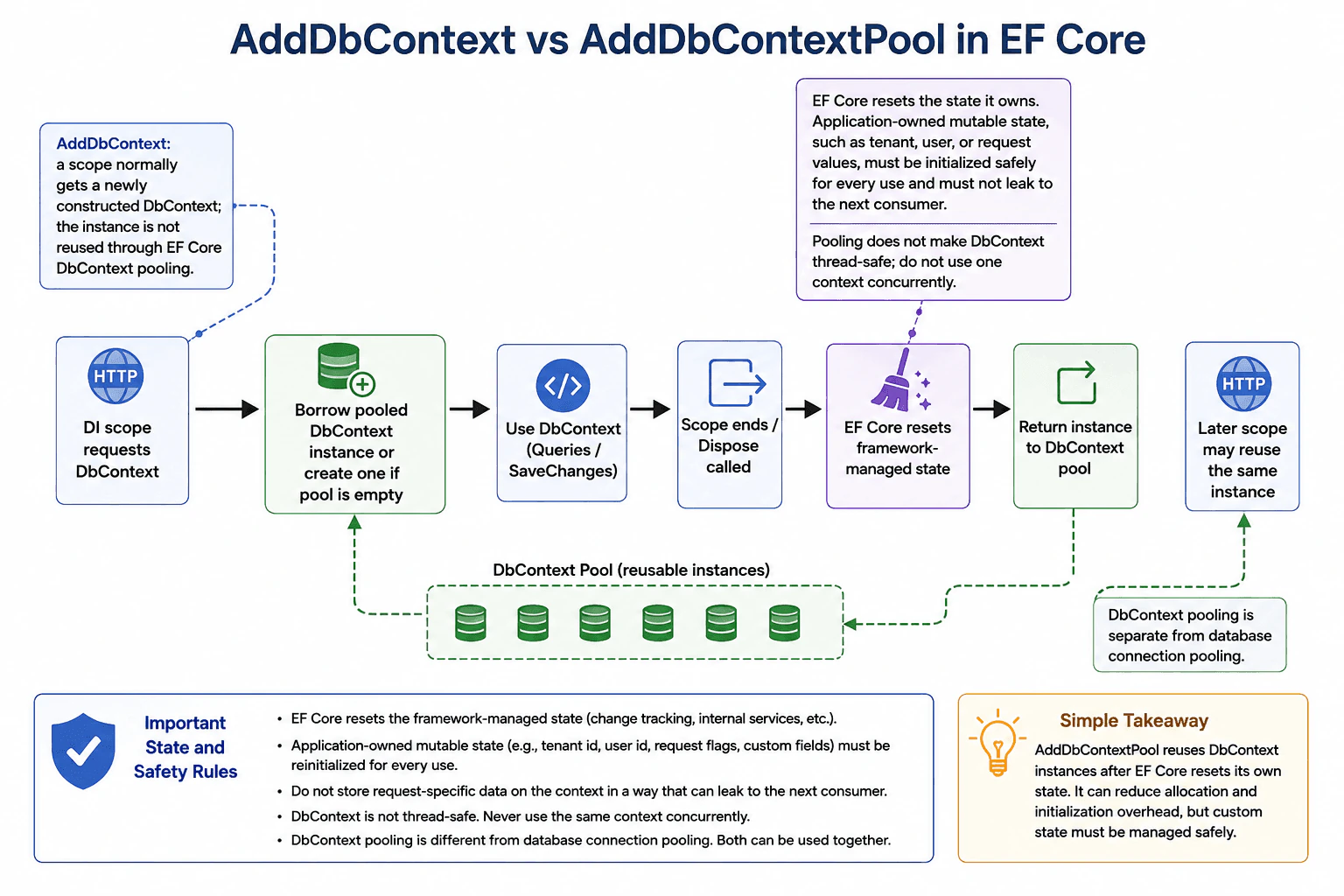
75. What is the difference between AddDbContext and AddDbContextPool?Database And Ef CoreEasy
i Question Details
Compare normal context creation with pooled reuse, and describe the state that must be reset before a pooled instance is reused.
Short Interview Answer (30-60 seconds)
AddDbContext normally creates a scoped DbContext instance for each scope. AddDbContextPool also provides a scoped context, but completed instances can be reset and reused from a pool. Pooling reduces creation overhead, but application-owned mutable state must not leak between uses.
Detailed Explanation
This question asks about two ways an application can prepare an object that works with stored information. In the first way, a new object is normally prepared for each unit of work and then discarded. In the second way, finished objects can be cleaned and kept so another unit of work can reuse them later. Reuse can save some setup work. The main risk is leftover information: anything belonging to one request, customer, or user must not remain when the same object is later given to someone else.
Useful Questions to Ask the Interviewer
Does the DbContext contain any request-specific state, such as a tenant identifier or user-specific value?
Should I also explain how DbContext pooling differs from database connection pooling?
How to Explain It in an Interview
AddDbContext<TContext>() registers the DbContext with dependency injection using a scoped lifetime by default. In a typical request-based application, one context instance is created for that scope and disposed when the scope ends. A later scope normally receives a newly constructed DbContext instance.
AddDbContextPool<TContext>() also makes the DbContext available as a scoped service, but the underlying DbContext object can be reused. When the scope finishes and the context is disposed, EF Core resets the framework-managed state that supports pooling and returns the instance to the pool. A later scope may receive that same underlying object instance.
The main benefit is lower application-side overhead. DbContext objects are generally lightweight, but pooling can reduce repeated allocations and some initialization work in high-throughput applications. It does not make SQL statements execute faster by itself, and it should be considered an optimization whose value should be confirmed with measurement.
The main risk is mutable state. EF Core resets the state that its pooling infrastructure knows how to reset, including change-tracking state and other resettable EF Core services. EF Core cannot automatically understand arbitrary mutable fields or properties that application code adds to a custom DbContext. If the context stores a tenant identifier, current-user value, request flag, or similar state, that value must be safely initialized for every use and must not remain for the next consumer.
This also affects configuration. A pooled DbContext instance is configured when that instance is first created. OnConfiguring is not a per-request hook for a pooled instance. Configuration that must vary by request, such as tenant-specific information, should therefore be supplied through a safe per-scope design rather than assuming that a reused context is newly constructed for every request.
Pooling does not make DbContext thread-safe. A DbContext still must not be used concurrently by multiple operations. Pooling means that an instance can be reused sequentially after one consumer has finished with it; it does not mean that the same context should be shared simultaneously between requests or threads.
DbContext pooling is also different from database connection pooling. DbContext pooling reuses EF Core DbContext objects. Database connection pooling is normally implemented by the database provider and reuses physical database connections behind logical open and close operations. The two mechanisms are independent and can be used together.
Application code must also restore lower-level database state that EF Core does not own. For example, if code manually opens a database connection or changes provider-specific connection state, it must restore that state before the context is returned to the pool. Otherwise, the next consumer could receive unexpected state.
The practical decision is: use AddDbContext when the normal scoped lifetime is sufficient and simplicity is more important than removing a small amount of construction overhead. Consider AddDbContextPool when measurements show that repeated DbContext allocation or initialization matters and the context can be safely reused without carrying request-specific mutable state across scopes.
Technical Approach
Start with AddDbContext unless there is a measured reason to optimize DbContext creation.
If profiling shows meaningful creation or initialization overhead, evaluate AddDbContextPool.
Treat every borrowed pooled context as scoped to the current unit of work even though its underlying object may later be reused.
Keep request-specific mutable state out of the DbContext when possible.
If custom per-request state is necessary, initialize it for every use and guarantee that stale values cannot reach the next consumer.
Restore any manually changed database-driver or connection state before disposal.
Never use one DbContext concurrently across threads or requests.
Measure again after enabling pooling to verify that it provides a worthwhile benefit.
Practical Insights
Pooling does not change the time complexity of database queries and does not make the database server process a query faster. Its benefit is mainly reducing application-side object creation and initialization. This can lower CPU work, allocations, and garbage-collection pressure when contexts are created very frequently. Pooling also keeps reusable context instances in memory, so there is a small retained-memory cost for the pool. The maintenance cost is higher because developers must carefully manage custom mutable state. If network or database execution time dominates the request, the performance improvement from DbContext pooling may be small.
Why Interviewers Ask This
The interviewer is checking whether the candidate understands DbContext lifetime, dependency-injection scopes, EF Core context pooling, performance tradeoffs, and the risk of leaking mutable request-specific state between unrelated operations. A strong answer should also distinguish DbContext pooling from database connection pooling and explain which state EF Core resets automatically versus which state the application must manage.
Common interview mistakes
Common mistakes are saying that AddDbContextPool shares one DbContext concurrently across requests, assuming pooling makes DbContext thread-safe, confusing DbContext pooling with database connection pooling, or claiming that all custom application state is automatically reset. Another mistake is using OnConfiguring as though it runs for every request on a reused pooled instance. It is also dangerous to store a tenant or user identifier on a pooled context without safely reinitializing that value for every use. Finally, pooling does not automatically make slow SQL queries faster; it primarily reduces DbContext allocation and initialization overhead.
Interview tip
Lead with the lifecycle difference: AddDbContext normally gives each scope a newly constructed context, while AddDbContextPool can reuse context instances after EF Core resets its own state. Then emphasize the key safety rule: custom request-specific mutable state must not leak between uses. Finish by distinguishing DbContext pooling from database connection pooling.
Interviewer may ask next
Is AddDbContextPool the same as database connection pooling?
No. AddDbContextPool reuses Entity Framework Core DbContext objects. Database connection pooling is normally handled by the database provider and reuses physical database connections behind logical open and close operations. They reduce different kinds of overhead and can both be used in the same application.
What state must be reset or handled carefully before a pooled DbContext is reused?
EF Core resets the framework-managed state that its pooling infrastructure owns, but application-owned mutable state must be handled explicitly. Examples include tenant identifiers, current-user values, request-specific flags, and lower-level database or connection state changed manually by application code. Those values must be safely initialized or restored for each use so they cannot leak to the next consumer.
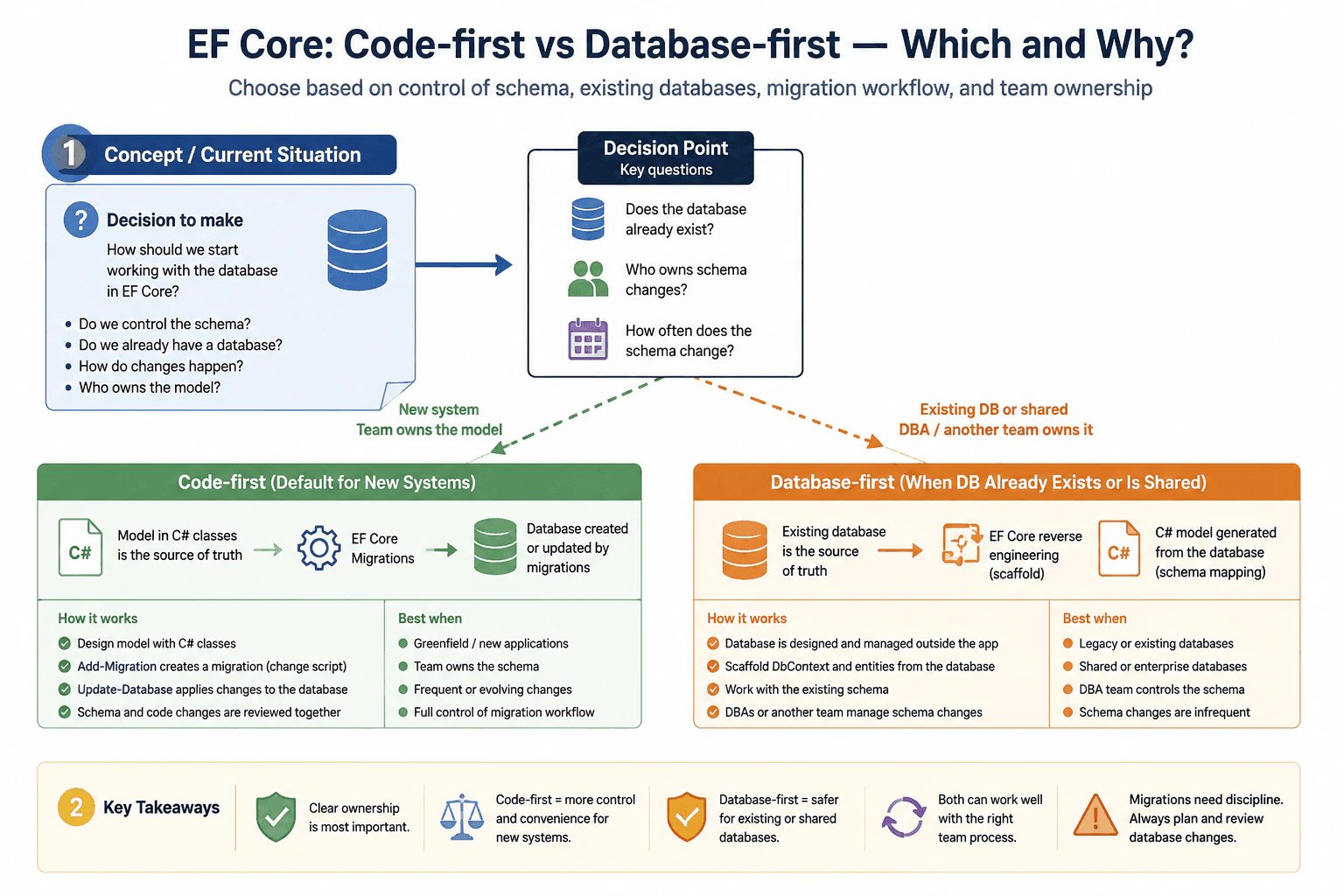
76. Code-first or database-first in EF Core — which do you use and why?Database And Ef CoreEasy
i Question Details
Discuss the decision in terms of control over schema, existing databases, migration workflow, and team ownership of the model.
Short Interview Answer (30-60 seconds)
I use code-first for new applications when my team owns the model and migrations. I use database-first when the database already exists or is owned by another team. The right choice depends on schema control, change flow, and how the team manages updates.
Detailed Explanation
The question asks which way I would start when building a new program that needs to save information. It wants to know whether I would begin with the program design or with an already existing place where the records live. It also asks how I think about control, change, and who is responsible for updates over time. In real work, the best choice depends on whether the records are new or already in use, and on which team owns them.
Useful Questions to Ask the Interviewer
Does the database already exist, or are we designing it from scratch?
Who owns database changes in this team?
How often does the schema change in production?
How to Explain It in an Interview
I usually choose code-first for new applications when the development team owns the data model. It keeps the C# classes and the database changes aligned through EF Core migrations, so the model changes in code can be reviewed and applied in a controlled way.
I choose database-first when the database already exists, when I must work with a shared enterprise database, or when a DBA team owns the schema. In that case, the database is the source of truth, and EF Core is used to map to it.
The main tradeoff is control versus convenience. Code-first gives the team more control over the design and change workflow. Database-first is better when the schema is already fixed or managed outside the app team. In both cases, I want a clear ownership model and a safe way to manage changes.
If I were making the choice in a real project, I would start with the existing situation, the team’s ownership, and the expected rate of schema change. For a greenfield app, code-first is usually my default. For a legacy system or a shared database, database-first is usually the safer choice.
Technical Approach
Check whether the database already exists.
Check who owns schema changes.
If the team owns a new schema, use code-first and EF Core migrations.
If the schema already exists or is shared, use database-first.
Keep the database as the source of truth when another team controls it.
Review how often the schema changes before choosing the workflow.
Practical Insights
Code-first adds migration work, but it is simple for new apps and keeps code and database changes together. Database-first avoids rebuilding an existing schema, but it can cost more effort when the database changes often. The real cost is mostly in team coordination, change management, and long-term maintenance, not in CPU or memory.
Why Interviewers Ask This
This question checks whether the candidate can choose the right EF Core workflow for the situation. It evaluates understanding of schema control, legacy database integration, migration planning, team ownership, and the tradeoff between developer convenience and database stability.
Common interview mistakes
A common mistake is treating code-first as always better. Another mistake is using database-first for a database that the team really owns, which makes schema changes harder to manage. People also forget that migrations need discipline, and they sometimes ignore the fact that a shared database should usually be treated as the source of truth.
Interview tip
Give a clear default, then explain the exception. Say code-first for new team-owned systems, database-first for existing or shared databases, and mention schema control and migration ownership.
Interviewer may ask next
When would you avoid code-first in EF Core?
I would avoid code-first when the database already exists, when a DBA team manages the schema, when multiple applications share the same database, or when I must match an approved enterprise schema exactly. In those cases, database-first reduces the risk of drifting away from the real database design.
How do migrations change the choice?
Migrations make code-first very practical because they let the team evolve the schema from C# changes in a controlled way. If migrations are part of the team’s normal workflow, code-first is usually a strong fit. If schema changes must happen outside the app team, database-first is usually a better fit.
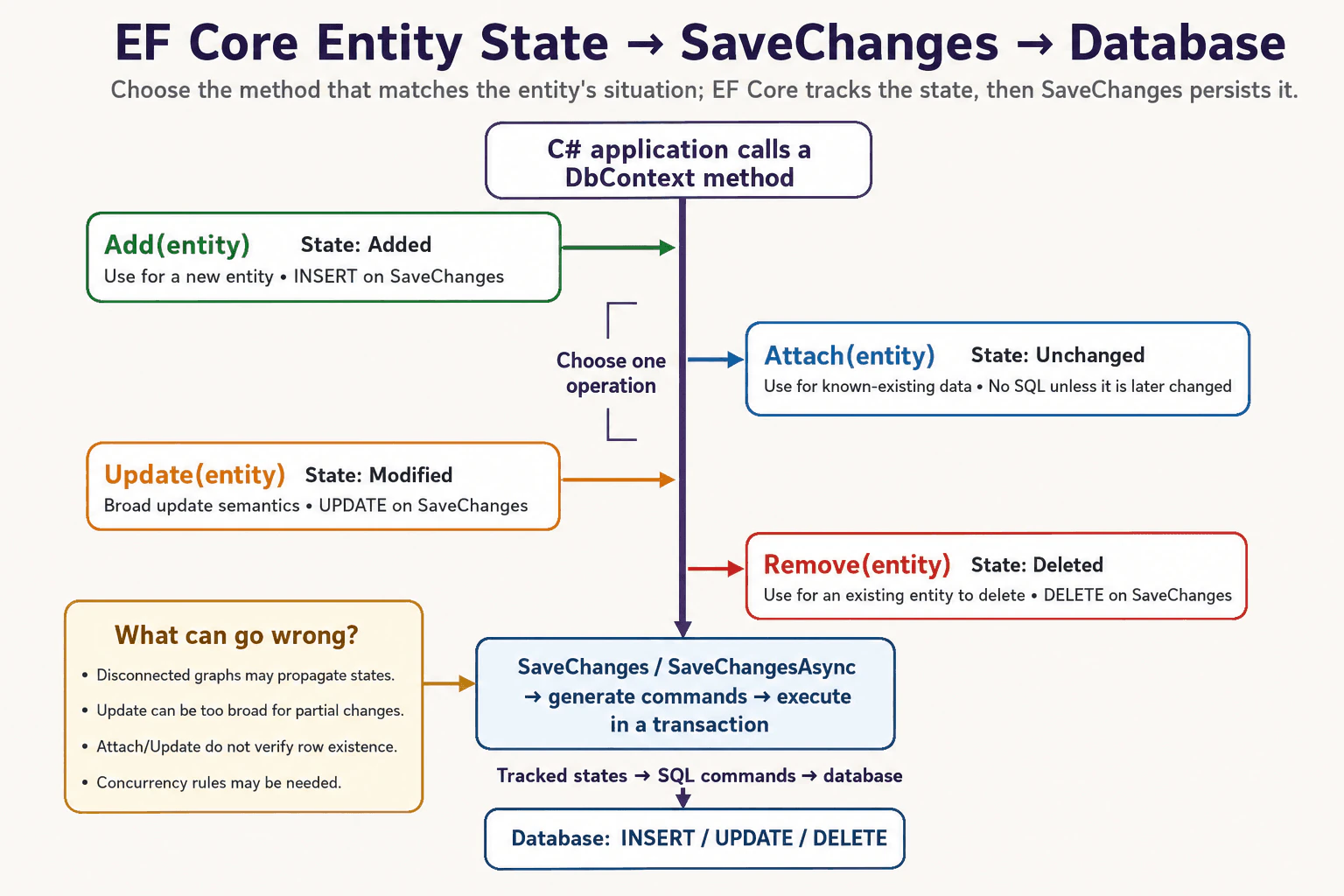
77. What is the difference between Add, Attach, Update, and Remove in EF Core?Database And Ef CoreMedium
i Question Details
Explain the EF Core behavior, how you would implement it, the tradeoffs involved, and what can go wrong in production.
Short Interview Answer (30-60 seconds)
Add marks an entity as Added, Attach normally tracks it as Unchanged, Update marks it as Modified, and Remove marks it as Deleted. These methods mainly change EF Core tracking state; SaveChanges or SaveChangesAsync persists that state. The important production issue is making sure the selected state matches whether the entity and related entities are actually new, existing, changed, or being deleted.
These methods answer a simple business question: are we introducing a new object, tracking an existing object without changing it yet, changing an existing object, or removing an existing object? The main risk is choosing the wrong action and causing an unexpected insert, update, or delete.
Useful Questions to Ask the Interviewer
Are the entities always loaded from the same DbContext, or do we receive disconnected DTOs from an API?
Should Update change all submitted values, or only properties that actually changed?
Can the operation include related entity graphs?
How to Explain It in an Interview
Add: EF Core normally sets the entity state to Added. When SaveChanges runs, EF Core normally generates an INSERT. This is the normal choice for a new row.
Attach: EF Core normally tracks the entity as Unchanged. Attaching alone does not mean that EF Core has verified that the row exists in the database. If the entity remains unchanged, SaveChanges normally generates no UPDATE or INSERT for it. Attach is useful when the application already knows the entity represents existing data and needs it tracked without immediately treating all of its values as modified.
Update: EF Core marks the entity as Modified. When SaveChanges runs, EF Core normally generates an UPDATE for that entity. The convenient part is that a disconnected entity can be updated without first loading the row, but the tradeoff is that Update is broad: it is a poor default for partial updates when only a small number of properties should change. With disconnected graphs, related entities can also receive states based on their keys and graph traversal, so unintended inserts or updates are possible.
Remove: EF Core marks an existing tracked entity as Deleted. When SaveChanges runs, EF Core normally generates a DELETE. If an entity is still Added and has never represented a saved database row, removing it does not create a database DELETE; EF Core can detach the Added entity because there is no persisted row to delete.
The most important interview point is that these methods primarily change tracked entity state; they do not normally execute the database command immediately. SaveChanges or SaveChangesAsync performs the persistence operation. For relational providers, EF Core normally uses a transaction for a SaveChanges operation so the set of changes is handled atomically when the provider supports transactions.
For disconnected API requests, the right choice depends on what the application knows. If the entity is definitely new, use Add. If it definitely represents existing data and should initially be tracked without being changed, Attach can be appropriate. If the operation intentionally treats an existing entity as broadly modified, Update can be appropriate. For a partial update, loading the existing entity and changing only the intended properties is often safer because EF Core then has clearer state information and the application does not rely on broad disconnected update semantics. Remove is appropriate after authorization and application rules establish that the target should be deleted.
A production mistake is assuming Attach or Update proves that a database row exists. They do not. The eventual database command can still affect zero rows, and concurrency handling may be required when the application needs to detect conflicting changes. Another risk is passing an entire disconnected object graph to Update or Remove and unintentionally changing related entities. Generated keys also matter because EF Core uses key information when determining states for entities in a graph.
Performance is usually not about the cost of the method call itself. The important costs are the size of the tracked graph, the number of database commands generated by SaveChanges, database work, locking, and network round trips. Marking unnecessary properties or related entities as modified can increase database work and make maintenance harder without improving correctness.
Key Insight / Why This Solution Works
Decide whether the entity represents a new database row or existing data.
Use Add for a new entity.
Use Attach when an existing entity should be tracked as unchanged unless specific changes are made later.
Use Update when the operation intentionally treats an existing entity as broadly modified.
Use Remove when an existing entity should be deleted.
For disconnected graphs, inspect keys and related entities because state can propagate through the graph and may produce unintended inserts, updates, or deletes.
For partial updates, prefer loading the existing entity and changing only the intended properties when that gives safer semantics.
Call SaveChanges or SaveChangesAsync after the tracked states represent the intended database changes, and handle concurrency or database exceptions as required.
Code
using System.Threading;
using System.Threading.Tasks;
using Microsoft.EntityFrameworkCore;
publicsealedclassCustomer
{
publicint Id { get; set; }
publicstring Name { get; set; } = "";
publicbool IsActive { get; set; }
}
publicsealedclassAppDbContext : DbContext
{
publicAppDbContext(DbContextOptions<AppDbContext> options) : base(options)
{
}
public DbSet<Customer> Customers => Set<Customer>();
}
publicstaticclassCustomerOperations
{
publicstaticasync Task DemoAsync(IDbContextFactory<AppDbContext> factory,
CancellationToken cancellationToken)
{
// Create a bounded DbContext for this unit of work; the factory supplies the configured// provider and options.awaitusingvar db = await factory.CreateDbContextAsync(cancellationToken);
// Add marks a new entity as Added so SaveChangesAsync will normally generate an INSERT.var customerToAdd = new Customer { Name = "New Customer", IsActive = true };
db.Customers.Add(customerToAdd);
// Attach marks a known-existing entity as Unchanged; attaching alone does not verify// database existence.var customerToAttach =
new Customer { Id = 10, Name = "Existing Customer", IsActive = true };
db.Customers.Attach(customerToAttach);
// Update marks a known-existing entity as Modified; use this only when broad update// semantics are intended.var customerToUpdate = new Customer { Id = 20, Name = "Updated Customer", IsActive = true };
db.Customers.Update(customerToUpdate);
// Load the row for a partial update so only the intended property becomes a database// change.var customerToEdit = await db.Customers.SingleAsync(c => c.Id == 30, cancellationToken);
customerToEdit.IsActive = false;
// Remove marks the existing tracked entity as Deleted so SaveChangesAsync will normally// generate a DELETE.var customerToDelete = await db.Customers.SingleAsync(c => c.Id == 40, cancellationToken);
db.Customers.Remove(customerToDelete);
// Persist all tracked state changes; EF Core performs the database work during// SaveChangesAsync.await db.SaveChangesAsync(cancellationToken);
}
}
Why Interviewers Ask This
This question tests whether the candidate understands EF Core change tracking rather than treating Add, Attach, Update, and Remove as interchangeable CRUD methods. It also evaluates judgment about disconnected entities, generated keys, graph traversal, unintended inserts or updates, deletion behavior, and when SaveChanges actually sends changes to the database.
Common interview mistakes
A common mistake is thinking Add, Attach, Update, or Remove immediately execute SQL. They primarily change EF Core tracking state, and SaveChanges or SaveChangesAsync performs persistence. Another mistake is using Update for every API request, which can apply broad modified-state semantics when only a few properties should change. Using Attach for a new entity can prevent the intended insert. Assuming Attach or Update proves database existence is also incorrect. Finally, ignoring related entities in disconnected graphs can lead to unexpected inserts, updates, or deletes.
Interview tip
Start with the four states: Added, Unchanged, Modified, and Deleted. Then explain that SaveChanges translates those states into database operations. Finish by mentioning disconnected graphs and the main tradeoff: Update is convenient for broad disconnected updates, while explicit changes are often safer for partial updates.
Interviewer may ask next
What happens if you call Update on a disconnected entity with related entities?
EF Core can traverse the reachable graph and assign entity states based on the graph, key values, and whether entities are considered existing or new. This can cause existing entities to be treated as modified and new entities to be treated as added. An incomplete graph or incorrect key can therefore produce unintended UPDATEs or INSERTs. For sensitive graph updates, explicitly load or attach the known-existing entities and control the intended states or properties.
When would you prefer loading an entity and changing specific properties instead of calling Update?
Prefer that approach for partial updates when only selected properties should change. Loading the existing row gives EF Core a tracked representation of the current database state, and changing only the allowed properties gives more precise update behavior. This is especially useful for server-managed fields, sensitive columns, validation rules, and optimistic concurrency because the application can make the intended changes explicit.
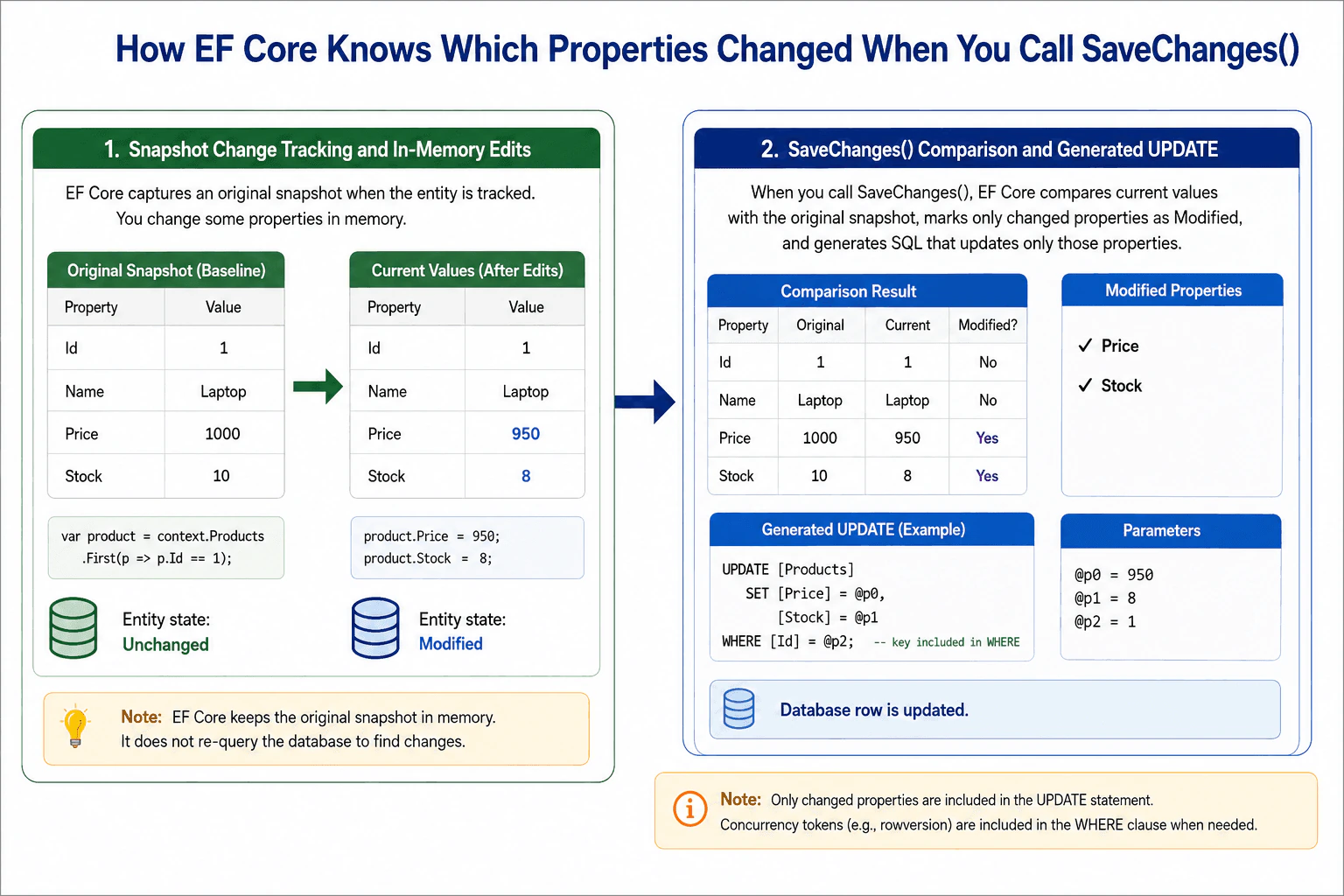
78. How does EF Core know which properties changed when you call SaveChanges()?Database And Ef CoreHard
i Question Details
Explain snapshot change tracking, state transitions, and what EF compares before composing update statements.
Short Interview Answer (30-60 seconds)
EF Core tracks entities by storing original values in a snapshot. On SaveChanges(), it compares current values with that snapshot, detects changes, updates entity state, and sends SQL only for modified properties unless another tracking strategy is being used.
Detailed Explanation
This question asks how the software remembers what a data object looked like when it was first loaded, notices when you edit one or more fields, and then decides what needs to be sent back to the database when you save. It is asking whether the tool checks every field again, keeps its own copy, or uses another method. It also wants you to explain why only some fields may be included in the final update, and how the tool knows whether the item is new, changed, or removed.
Useful Questions to Ask the Interviewer
Do you want the explanation to stay focused on snapshot tracking, or should I also mention notifications and lazy proxies?
Should I include how concurrency tokens and detached entities affect the generated UPDATE statement?
How to Explain It in an Interview
Start with the practical decision: EF Core uses the change tracker to remember what an entity looked like when it started tracking it. That original set of values is the baseline. When you change a property in memory, EF Core can compare the current value with the original value and detect the difference.
This is called snapshot change tracking. A snapshot is a saved copy of the original values. A state transition means the entity moves between states such as Unchanged, Modified, Added, and Deleted. SaveChanges() checks the entity state first, then compares tracked properties where needed.
For a normal tracked entity, EF Core compares current values with original values. If a property changed, EF marks only that property as modified. Then it builds an UPDATE statement that includes only the changed columns, not every column.
EF Core also uses original values for optimistic concurrency checks when a concurrency token exists, such as a rowversion column. That helps it detect when another writer changed the same row first.
Tradeoff: snapshot tracking is simple and reliable, but it uses extra memory and comparison work for tracked entities. For large object graphs or high-write workloads, explicit state changes, no-tracking reads, or notification-based tracking can be better when the model supports them.
Technical Approach
Track the entity in a DbContext and store the original property snapshot.,Change one or more property values in memory.,Call SaveChanges(), which triggers change detection.,Compare current values with the snapshot and mark changed properties as Modified.,Use the entity state to decide whether to INSERT, UPDATE, or DELETE.,Generate SQL that updates only the changed columns, plus concurrency checks when needed.
Practical Insights
The cost is mostly in memory and comparison work. EF Core keeps original values for tracked entities, so it uses extra memory. SaveChanges() must compare properties, so it takes more CPU as the number of tracked entities grows. The database cost is lower because EF sends smaller UPDATE statements when only some properties changed.
Why Interviewers Ask This
This checks whether the candidate understands EF Core change tracking, entity states, how SaveChanges decides what SQL to send, and the difference between tracked values and database values.
Common interview mistakes
A common mistake is thinking EF Core scans the database again to find changes. It usually compares against the tracked snapshot in memory. Another mistake is assuming every property is always sent in the UPDATE. EF Core often sends only the modified columns. A third mistake is forgetting that state and change tracking can be bypassed with detached entities or custom tracking strategies.
Interview tip
Say snapshot, state, and SaveChanges in that order. That shows you understand both the tracking model and how EF Core turns object changes into SQL.
Interviewer may ask next
How does EF Core decide which columns go into the UPDATE statement?
It uses the change tracker. EF Core compares the current values with the original snapshot and includes only the properties marked as modified, plus any key or concurrency columns needed for the WHERE clause.
What happens if the entity is detached before SaveChanges()?
EF Core cannot rely on snapshot tracking if the entity is detached. You must attach it and mark the correct state or properties manually, otherwise EF may not know what changed.
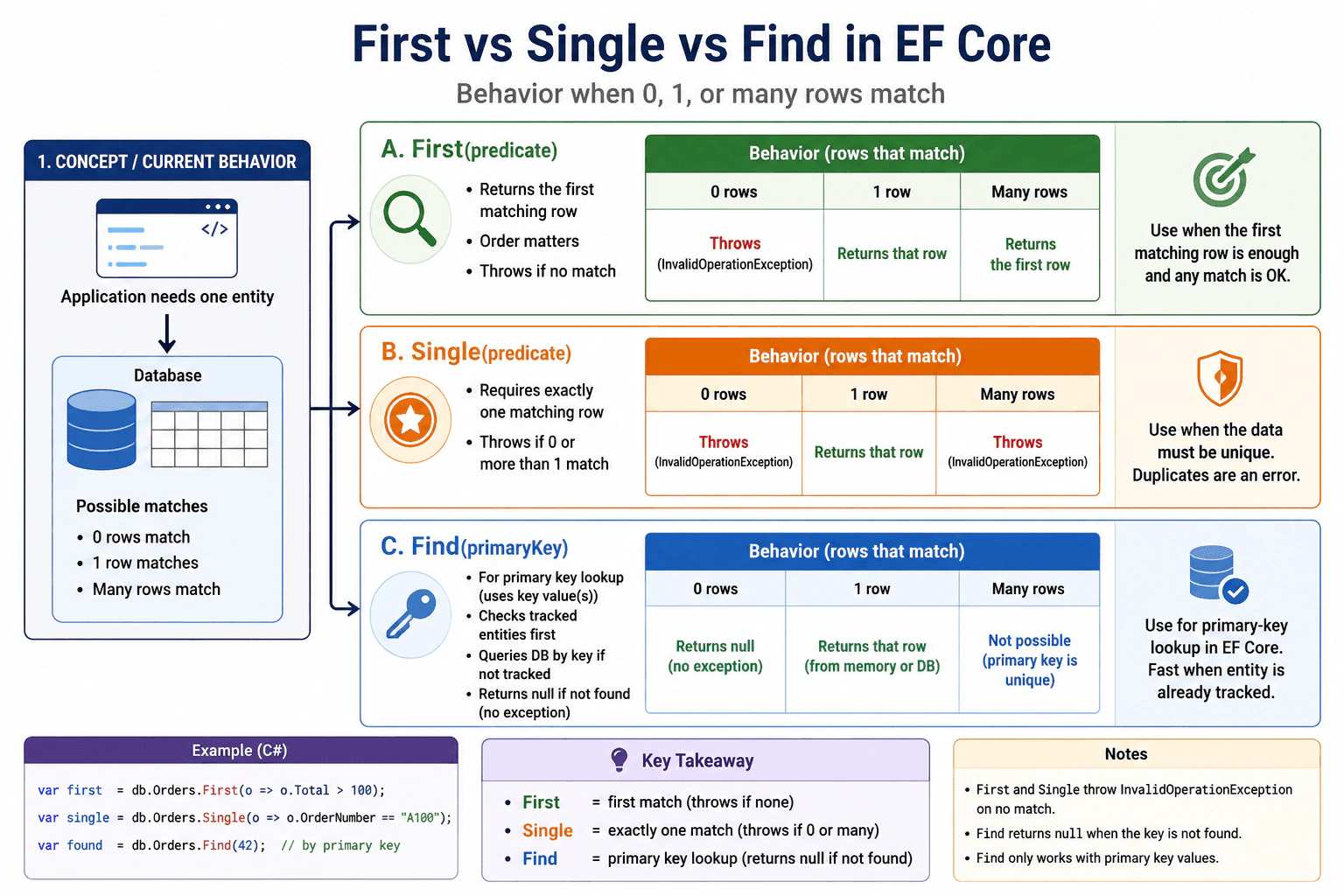
79. What’s the difference between First, Single, and Find?Database And Ef CoreEasy
i Question Details
Focus on how each method behaves when zero, one, or many rows match and how that affects entity lookup code.
Short Interview Answer (30-60 seconds)
First returns the first match and throws if none exists. Single requires exactly one match, so it throws if there are zero or many. Find is an EF Core primary-key lookup that can return a tracked entity without hitting the database again.
Detailed Explanation
This question asks how three helper methods behave when no item is found, one item is found, or more than one item is found. It also asks when to use the method that checks saved information first and only looks in the store if needed. The point is to choose the method that matches the rule behind the search: any matching item is enough, exactly one item is required, or the item is identified by one special number that belongs to it in the system today.
Useful Questions to Ask the Interviewer
Is the row supposed to be unique?
Should missing data be treated as an error?
Are we using EF Core or raw SQL?
How to Explain It in an Interview
First means “give me the first matching row.” If no row matches, it throws. If many rows match, it still returns the first one. Use it when order matters and any match is fine.
Single means “there must be exactly one matching row.” If no row matches, it throws. If more than one row matches, it also throws. Use it when the data should be unique.
Find is for primary-key lookup in EF Core. It checks the current DbContext first, so it can return an already tracked entity from memory. If it is not tracked, it queries the database by key. If no row is found, it returns null. It is not for arbitrary columns.
Technical Approach
Use First when any matching row is acceptable and the first one is good enough.
Use Single when the data must be unique and more than one row is an error.
Use Find in EF Core when you already know the primary key.
Expect First and Single to throw on a missing row, but expect Find to return null when nothing is found.
Remember that Find checks tracked entities before it queries the database.
Practical Insights
First and Single may need to inspect rows until they can decide what to return or whether to throw. Find can be cheaper because EF Core may return an entity already tracked in memory. In practice, the main cost difference is how much data is read and whether a database round trip is needed.
Why Interviewers Ask This
This checks whether you know the exact result each method returns, how they behave when no rows, one row, or many rows match, and when to choose a faster primary-key lookup versus a stricter uniqueness check.
Common interview mistakes
A common mistake is using First when the code really needs exactly one row. That hides duplicate data. Another mistake is using Single when many rows are valid and only the first one matters. A third mistake is using Find for non-key columns, which it is not meant for. Another frequent error is forgetting that Find can return null instead of throwing when nothing is found.
Interview tip
Say the rule in one line: First = first match, Single = exactly one match, Find = primary-key lookup in EF Core.
Interviewer may ask next
When should I use FirstOrDefault instead?
Use FirstOrDefault when a missing row is normal and you want null or default instead of an exception. It still returns the first match when rows exist, but it does not throw if nothing is found.
Why can Find be faster in EF Core?
Find can be faster because EF Core checks the current DbContext first. If the entity is already tracked, it returns it from memory. Only if it is not tracked does it query the database by primary key.
80. How do you write a left join in EF Core LINQ?Database And Ef CoreEasy
i Question Details
Describe the query shape needed to preserve unmatched left-side rows and what the projection should return for missing right-side data.
Short Interview Answer (30-60 seconds)
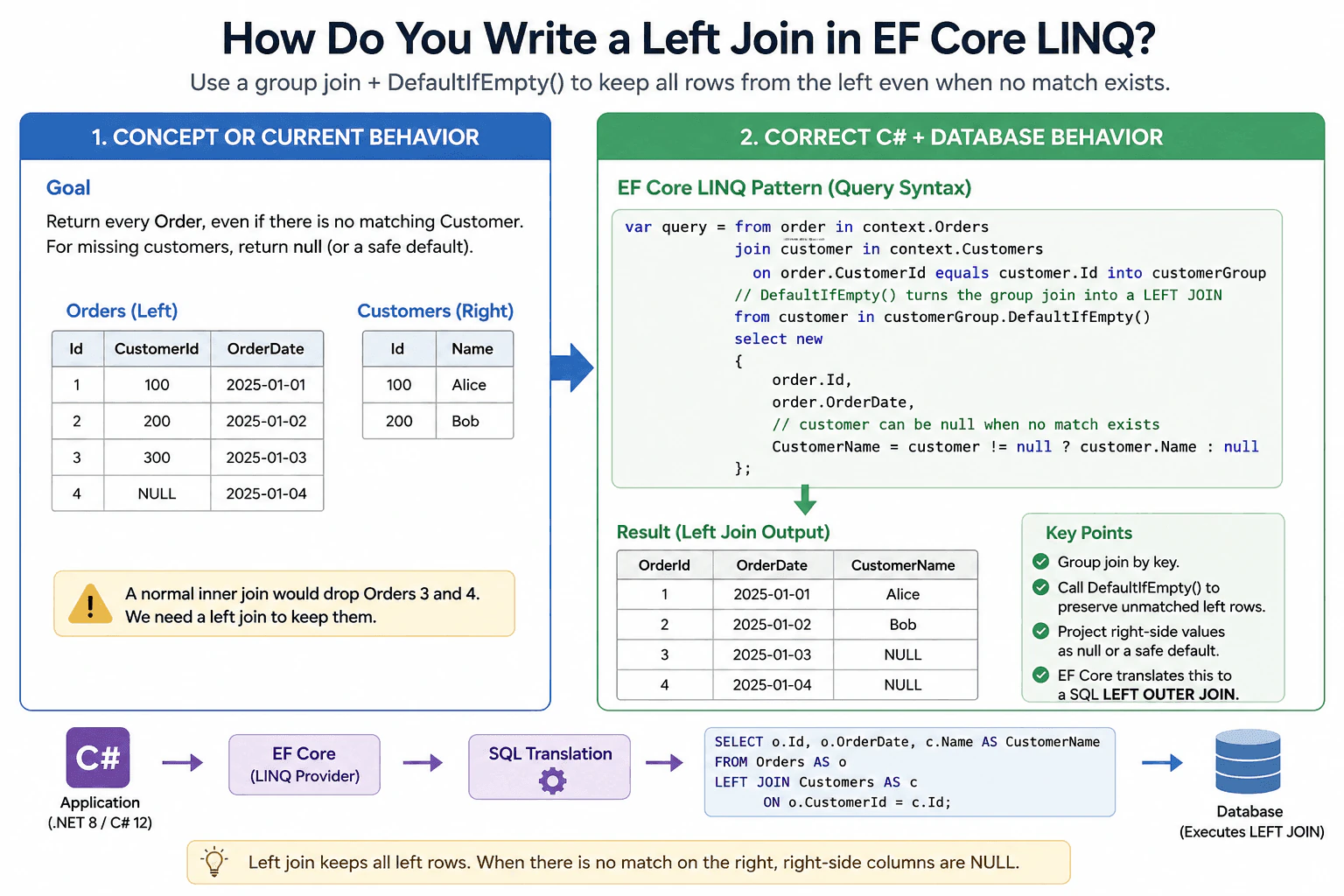
Write a group join and then call DefaultIfEmpty() on the grouped result. That produces a left join shape, keeps all left-side rows, and returns null for the right-side entity when no match exists.
The question asks how to keep every item from the first list even when nothing on the second list matches it. It also asks what value to show for the missing part when there is no match. In plain words, the interviewer wants to know whether you understand how to write the code so the first side is never lost, and how to handle empty results safely without causing errors or leaving the answer unclear in the final projected result.
Useful Questions to Ask the Interviewer
Should I show query syntax or method syntax?
Should the projection return an anonymous type or a DTO?
How to Explain It in an Interview
In EF Core, a left join is usually written with a group join and DefaultIfEmpty(). The group join finds matching rows, and DefaultIfEmpty() keeps the left-side row even when the right side has no match. That is the important part: without DefaultIfEmpty(), you get only matching rows.
I would explain it this way: use the left table as the main source, group the right table by the matching key, and then flatten the group with DefaultIfEmpty(). In the projection, treat the right-side entity as nullable and use a safe fallback when it is missing.
Example: csharp public sealed record OrderCustomerDto( int OrderId, DateTime OrderDate, string? CustomerName);
public static IQueryable<OrderCustomerDto> BuildQuery(AppDbContext context) { return from order in context.Orders // Group the matching customers for each order key. join customer in context.Customers on order.CustomerId equals customer.Id into customerGroup // DefaultIfEmpty() keeps the order even when no customer exists. from customer in customerGroup.DefaultIfEmpty() select new OrderCustomerDto( order.Id, order.OrderDate, // customer can be null here, so read it safely. customer != null ? customer.Name : null); }
The tradeoff is null handling. The query is simple and translates well, but the projection must be null-safe because the right-side row may not exist. This pattern is the standard EF Core way to write a left join.
Key Insight / Why This Solution Works
Start with the left source.
Group-join the right source on the matching key.
Apply DefaultIfEmpty() to preserve rows with no match.
Project the result and handle the right side as nullable.
Let EF Core translate the query to SQL.
Code
publicsealedrecordOrderCustomerDto(int OrderId, DateTime OrderDate, string? CustomerName);
publicstatic IQueryable<OrderCustomerDto> BuildQuery(AppDbContext context)
{
returnfrom order in context
.Orders
// Group matching customers so the query can preserve unmatched orders.join customer in context.Customers on order.CustomerId equals customer
.Id into customerGroup
// DefaultIfEmpty() turns the grouped join into a left outer join.from customer in customerGroup.DefaultIfEmpty() selectnewOrderCustomerDto(
order.Id, order.OrderDate,
// The customer row may be missing, so this must be null-safe.
customer != null ? customer.Name : null);
}
Why Interviewers Ask This
This checks whether you know the LINQ pattern that EF Core translates into a SQL left outer join, and whether you understand how to preserve unmatched left-side rows and handle missing right-side values safely.
Common interview mistakes
A common mistake is using a normal join, which drops left-side rows that do not match. Another mistake is forgetting DefaultIfEmpty(). A third mistake is reading right-side fields without a null check, which can fail when there is no matching row.
Interview tip
Say the pattern clearly: group join, then DefaultIfEmpty(). That shows you know both the LINQ shape and the left-join behavior.
Interviewer may ask next
What does DefaultIfEmpty() do in this query?
It turns the grouped join into a left outer join. Without it, only matching rows are returned. With it, EF Core keeps the left row and returns null for the right side when no match exists.
Can EF Core translate this to SQL?
Yes. This is one of the standard LINQ patterns EF Core translates into a SQL left outer join, so it is the preferred approach for relational database queries.
More questions load as you scroll
Disclaimer: This interview guide is for educational and informational purposes only. It is designed to help readers prepare, but it does not guarantee any interview result, hiring decision, offer, or outcome. Interview questions, hiring criteria, and preferred answers can vary by employer, interviewer, industry, location, and time. All answers, examples, and explanations in this guide are suggested examples for interview preparation, not definitive answers or instructions for professional practice. They are based on research and judgment, are provided without warranties of any kind, and should be adapted to the question, role, and applicable laws and professional requirements. Diagrams are simplified illustrations intended to highlight the main concepts and their relationships; actual situations, systems, and practices may be more complex. Alternative approaches may be equally valid or better suited to a particular question, context, or interviewer. To the fullest extent permitted by applicable law, the contributors and publisher are not liable for decisions made, actions taken, or losses incurred based on this guide.
State Laws and Professional Responsibilities: Laws and requirements governing an occupation vary by state and jurisdiction. You are responsible for checking the current laws, licensing requirements, and scope-of-practice rules that apply to your location and role, and for ensuring that your answers and actions comply with them. Adapt examples in this guide to those requirements. This guide is not legal advice.
Content Accuracy and Verification: To the fullest extent permitted by applicable law, we do not represent or warrant that interview guides, questions, answers, examples, or diagrams are accurate, complete, current, error-free, or suitable for any particular purpose. You are responsible for independently reviewing and verifying the information before relying on it.