This interview guide is for educational and informational purposes only. It is designed to help readers prepare, but it does not guarantee any interview result, hiring decision, offer, or outcome. Interview questions, hiring criteria, and preferred answers can vary by employer, interviewer, industry, location, and time. All answers, examples, and explanations in this guide are suggested examples for interview preparation, not definitive answers or instructions for professional practice. They are based on research and judgment, are provided without warranties of any kind, and should be adapted to the question, role, and applicable laws and professional requirements. Diagrams are simplified illustrations intended to highlight the main concepts and their relationships; actual situations, systems, and practices may be more complex. Alternative approaches may be equally valid or better suited to a particular question, context, or interviewer. To the fullest extent permitted by applicable law, the contributors and publisher are not liable for decisions made, actions taken, or losses incurred based on this guide.
State Laws and Professional Responsibilities
Laws and requirements governing an occupation vary by state and jurisdiction. You are responsible for checking the current laws, licensing requirements, and scope-of-practice rules that apply to your location and role, and for ensuring that your answers and actions comply with them. Adapt examples in this guide to those requirements. This guide is not legal advice.
Identity, Image, and Privacy Notice
To respect individual privacy, some names, profile photographs, avatars, biographical details, and other identifying information displayed in this guide may be replaced with pseudonyms, licensed stock images, illustrative avatars, composite images, or representative descriptions. Unless a person is expressly identified as an actual contributor, a displayed name, image, or profile should not be understood as depicting or identifying a specific candidate, interviewer, employee, or other real individual. These representations are provided for editorial and illustrative purposes only and do not imply endorsement, employment, participation, or affiliation with this guide or any company mentioned in it. Any resemblance to an actual person is coincidental.
Company Notice
This guide is an independent educational resource and is not affiliated with, endorsed by, sponsored by, or approved by the company named in this guide. Company names identify reported interview experiences or the employer context of clearly labeled original practice exercises. Interview practices can change without notice, and inclusion of company-specific content does not mean these questions are official, complete, or guaranteed to be asked. To the fullest extent permitted by law, the author, contributors, and publisher are not responsible for outcomes related to use of this material.
Content Accuracy and Verification
To the fullest extent permitted by applicable law, we do not represent or warrant that interview guides, questions, answers, examples, or diagrams are accurate, complete, current, error-free, or suitable for any particular purpose. You are responsible for independently reviewing and verifying the information before relying on it.
Questions or comments?
Contact us for general questions, or share feedback, technical corrections, and comments with the community.
81. Why is lazy loading considered dangerous in a web API?Database And Ef CoreEasy
i Question Details
Focus on hidden database round trips, serialization-triggered queries, and why that becomes unpredictable under load.
Short Interview Answer (30-60 seconds)
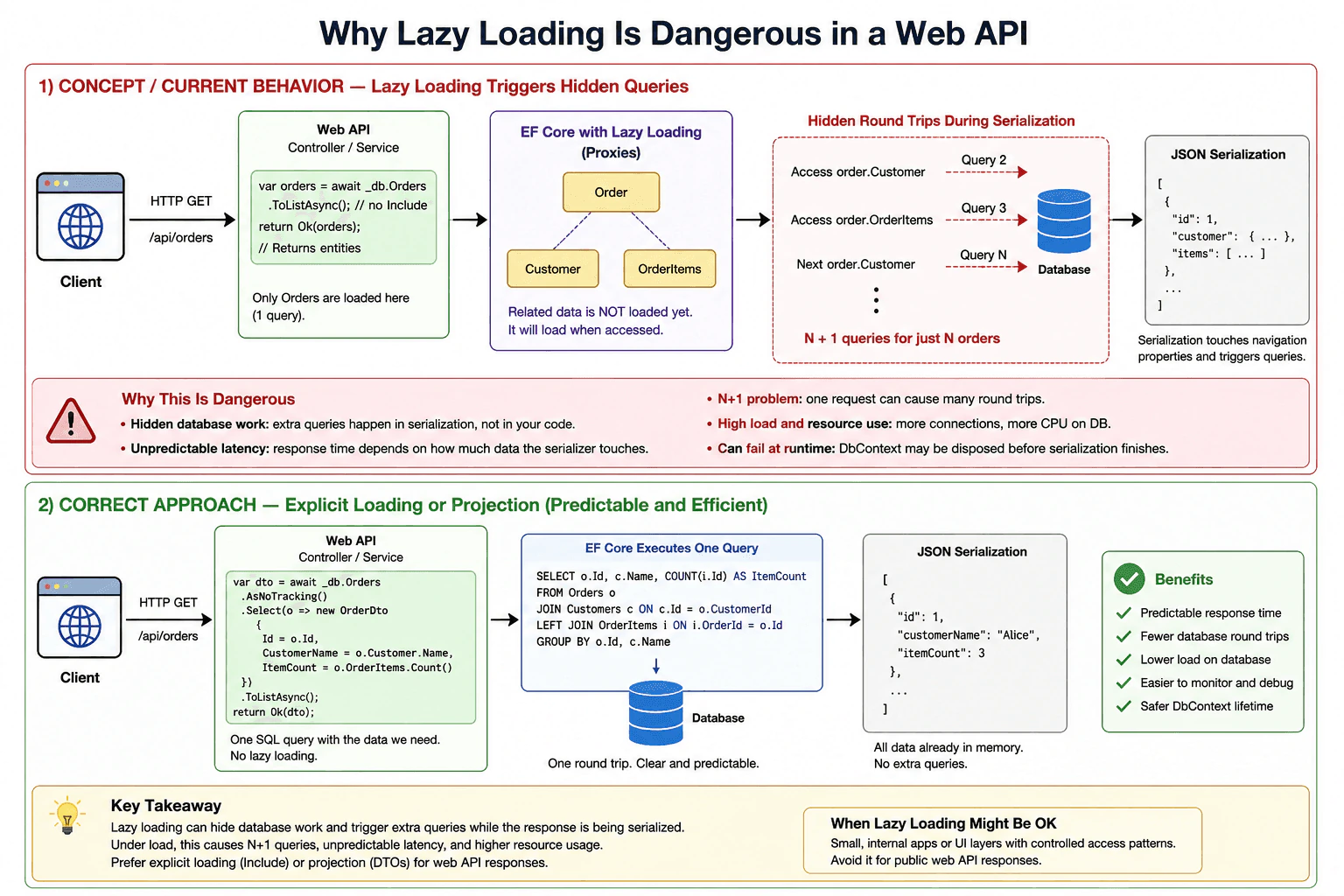
Lazy loading is risky in a web API because it can silently trigger extra database queries while the response is being built or serialized. That creates hidden round trips, N+1 problems, slower responses, and unpredictable load on the database.
Detailed Explanation
This question asks why letting an app fetch extra details on its own can be risky when it sends data to a user. The problem is that more requests can happen in the background, often at the worst time, so the reply gets slower and harder to predict. When many people use the app, those hidden lookups can pile up and create delays. The interviewer wants to know that you would prefer clear, planned data loading instead of surprise work.
Useful Questions to Ask the Interviewer
Do you want API responses to include related data?
Should we favor predictable response time over fewer lines of code?
How to Explain It in an Interview
Lazy loading is dangerous in a web API because it hides database reads behind property access. In EF Core, that means a simple object walk or JSON serialization can trigger more queries than the developer expected. One request can turn into many small database calls, which is the classic N+1 problem.
That is risky for three reasons. First, response time becomes unpredictable. Second, the database gets extra round trips. Third, debugging becomes harder because the queries do not appear clearly in the controller or service code. In some cases, the DbContext may also be disposed before serialization finishes, which can cause runtime errors.
For APIs, I usually prefer eager loading with Include or projection into DTOs so I fetch exactly the data I need. I would only use lazy loading in controlled cases, not for public API responses.
Practical Insights
The hidden cost is extra database work. One request can become many round trips, so latency grows with the size of the object graph and with traffic. Maintenance also becomes harder because performance is less predictable and harder to debug.
Why Interviewers Ask This
Explain the exact knowledge and judgment evaluated by this question.
Common interview mistakes
A common mistake is thinking lazy loading only saves code and has no performance cost. Another mistake is returning EF entities directly from controllers and forgetting that serialization can trigger more database reads. People also underestimate the N+1 problem and the risk of DbContext lifetime issues.
Interview tip
Say that lazy loading is usually a bad default for APIs. Mention hidden round trips, serializer-triggered queries, and N+1. Then close with the safer choice: explicit loading, eager loading, or DTO projection.
Interviewer may ask next
How do you avoid this in EF Core?
Disable lazy loading for API endpoints, then use Include, explicit loading, or projection into DTOs. That keeps the query shape clear and makes performance easier to predict.
When is lazy loading acceptable?
It can be acceptable in small internal apps or UI layers where access patterns are controlled. In web APIs, though, it is usually safer to load data explicitly.
82. Lazy, eager, or explicit loading — what is the default in EF Core?Database And Ef CoreEasy
i Question Details
Explain the default loading mode and what extra steps are needed to bring related entities into memory.
Short Interview Answer (30-60 seconds)
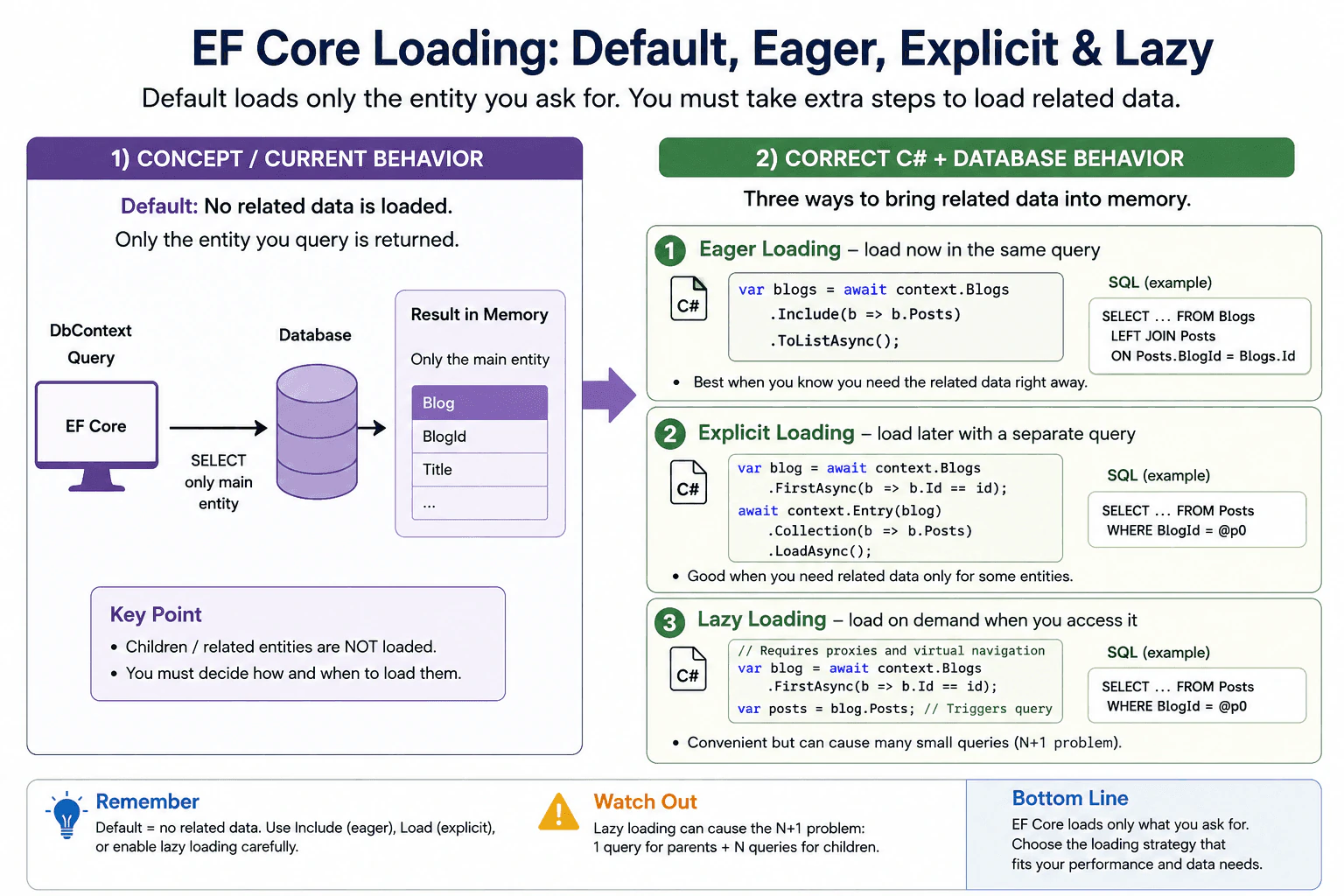
EF Core’s default is neither eager nor lazy loading of related data. By default, it loads only the entity you query. To get related entities, you must use Include for eager loading, Load for explicit loading, or enable lazy loading proxies if you want on-demand access.
Detailed Explanation
This question asks whether, when your app gets one record, the related records come along by themselves or stay separate. It also asks what you must do when you need those extra pieces of information. The interviewer wants to know if you understand the usual behavior and the safest way to get the data you need. The main point is deciding whether to ask for everything at once, fetch more later, or let the app reach for it only when needed.
Useful Questions to Ask the Interviewer
Which related data is usually needed for this screen or feature?
Are there performance limits or extra request concerns I should avoid?
How to Explain It in an Interview
EF Core’s default behavior is to load only the entity you query. It does not automatically bring related entities into memory.
The three patterns are:
Eager loading: use Include / ThenInclude to load related data in the same query.
Explicit loading: load related data later with a separate call.
Lazy loading: related data is fetched when you access the navigation property, but this must be enabled and can cause hidden extra queries.
The practical answer is: default is no related-data loading. You must ask for it.
This matters because it affects performance and the number of database calls. For interviewers, the key point is that you understand the default and the tradeoff between convenience and query cost.
Technical Approach
Query the main entity only.
Decide whether related data is needed now or later.
Use Include for eager loading when you need it immediately.
Use explicit loading for a second-step fetch.
Use lazy loading only when it is enabled and the extra query cost is acceptable.
Practical Insights
The main cost is not CPU work. The real cost is extra database trips, more memory use if you load too much, and possible slowdowns if lazy loading causes many small queries.
Why Interviewers Ask This
To check whether the candidate understands EF Core's default behavior for related data, how to load navigation properties correctly, and the performance tradeoffs between eager, explicit, and lazy loading.
Common interview mistakes
People often think EF Core automatically brings back child data. Another mistake is using lazy loading without noticing the many extra queries it can create. A third mistake is loading too much data when only a small part is needed.
Interview tip
Say the default clearly first: EF Core loads only the entity you query. Then name the three loading styles and mention that eager loading is the common choice when you know you need the related data.
Interviewer may ask next
How do I load related entities in EF Core?
Use Include and ThenInclude for eager loading when you want the related data in the same query. Use explicit loading when you want to load the navigation later. Lazy loading works only when it is enabled, and it should be used carefully because it can hide extra database calls.
Why can lazy loading be a problem?
Lazy loading can cause the N+1 problem. That means one query loads the main rows, and then many extra queries run one by one as you touch each related object. This can make the app much slower than eager loading with Include.
83. When do you use Include versus a projection?Database And Ef CoreEasy
i Question Details
Compare entity materialization with targeted shaping, and explain when returning DTOs avoids unnecessary columns and tracking.
Short Interview Answer (30-60 seconds)
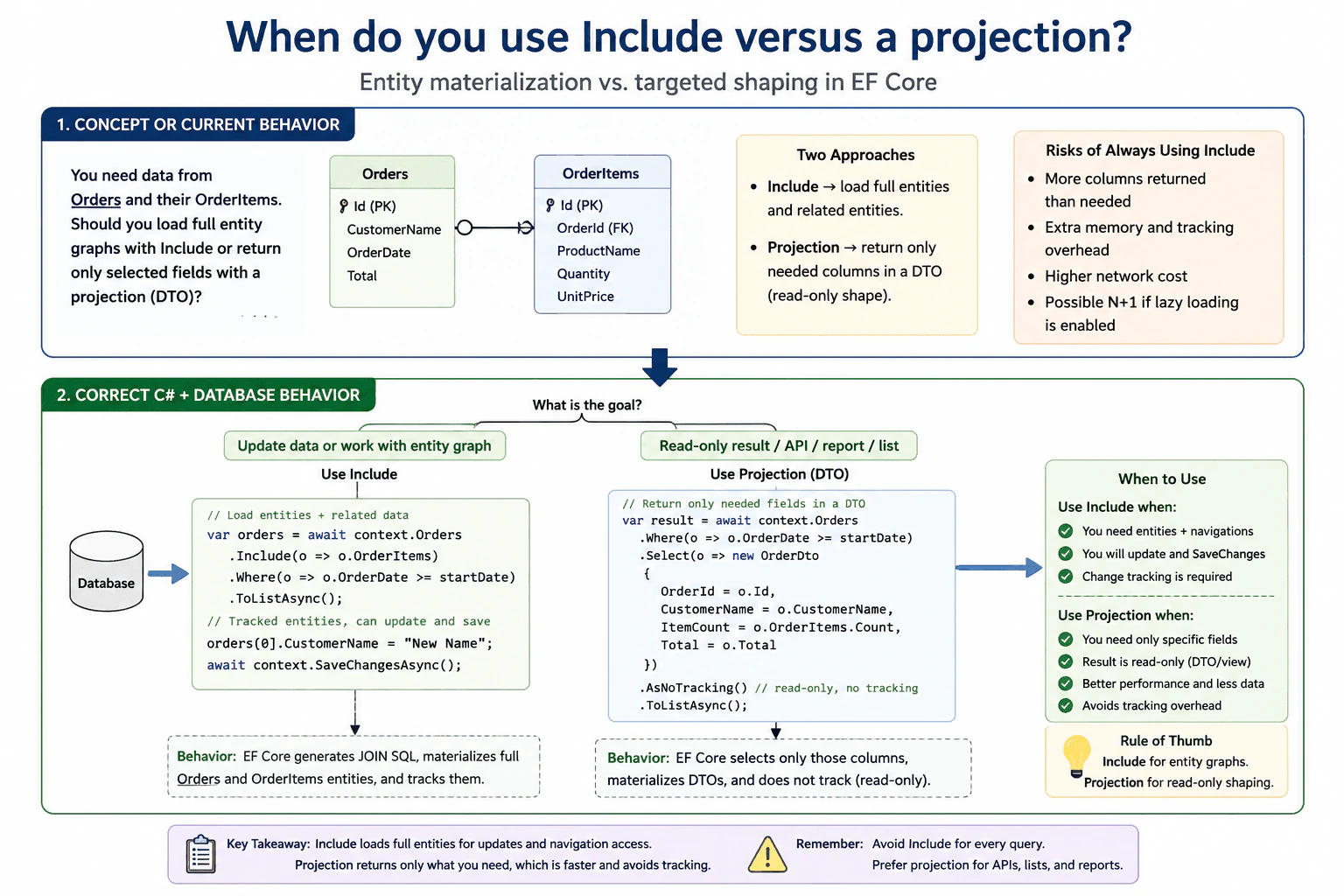
Use Include when you need entity graphs for updates or navigation access. Use a projection when you only need specific fields or a DTO. Projection is usually the better read-only choice because it returns less data and avoids extra tracking work.
Detailed Explanation
This question asks whether you should load a whole record with its related records, or only the exact pieces you need. One choice is better when you want to work with the data as objects and may change it later. The other choice is better when you only need to show information on a screen or send it somewhere else, because it can be simpler, faster, and lighter. When you return a smaller shape instead of whole objects, you avoid extra data and extra work.
Useful Questions to Ask the Interviewer
Is this query for reading data only, or will the result be updated later?
Do you want entity objects, or a DTO/view model shape?
Are there any performance limits or large related tables I should optimize for?
How to Explain It in an Interview
Use Include when you need entity objects plus related entities, usually in a workflow where the data may be edited or passed around as a tracked object graph. Use a projection when you only need certain columns or a custom shape for display, export, or API output. Projection is often the better default for read-only queries because it reduces payload size and avoids change tracking overhead.
A good rule is: if you need to save changes to the entity, start with Include; if you only need to read and return data, prefer a projection.
Tradeoff: Include is simpler when working with entities, but it can load more data than needed. Projection gives better performance and clearer API contracts, but you must explicitly select every field you need. In EF Core, Include is for entity graphs, while projection is for shaping the result.
Technical Approach
Decide whether the result is read-only or will be updated.
If you need entities and navigation properties, use Include.
If you only need some fields, project into a DTO or anonymous type.
Prefer projection for API responses and screens.
Prefer Include when change tracking and entity updates matter.
Practical Insights
Include can fetch more data than needed, so it may cost more time and memory. Projection usually uses less network traffic, less memory, and less tracking work. For maintenance, Include is simpler for entity work, while projection is clearer for read-only responses.
Why Interviewers Ask This
To check whether you understand EF Core loading patterns, object materialization, read versus write workflows, and how to avoid unnecessary data transfer and tracking overhead.
Common interview mistakes
A common mistake is using Include for every query, even when only a few fields are needed. Another mistake is expecting Include to help when the query already projects into a DTO. People also forget that projection is usually better for read-only results and that tracking is often unnecessary there.
Interview tip
Give a simple rule first: Include for entity graphs, projection for read-only shaping. Then mention performance, tracking, and DTOs.
Interviewer may ask next
What happens if I use Include and then project to a DTO?
In most cases, the projection controls the final shape, so the Include does not help much and may be ignored by the query translation. If you only need a DTO, project directly and select the related fields you need.
When should I use AsNoTracking with a projection?
Use AsNoTracking for read-only queries when you do not need EF Core to track changes. It fits very well with projection because both choices reduce overhead. This is a common choice for list pages, search results, and API responses.
84. What is the difference between AsNoTracking() and default tracking?Database And Ef CoreMedium
i Question Details
Explain tracking overhead, change detection, and why read-heavy queries often choose the no-tracking path.
Short Interview Answer (30-60 seconds)
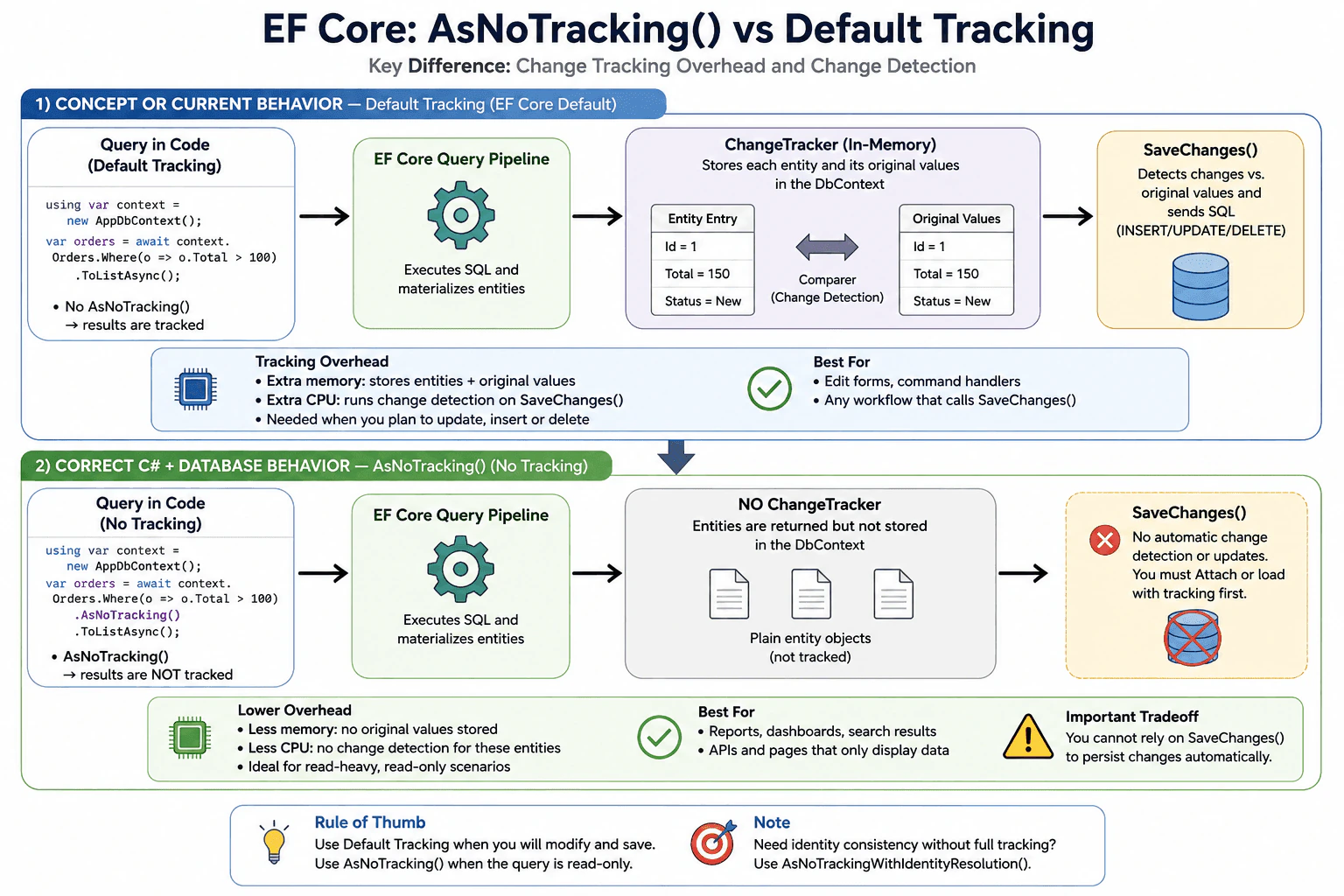
Default tracking stores entities in the DbContext so EF Core can detect and save changes later. AsNoTracking() skips that tracking work, which reduces CPU and memory use for read-only queries, but the returned entities are not automatically updated or saved.
Detailed Explanation
This question asks about two ways a program can handle data after it reads it. In one way, the system keeps watching the items so it can notice later changes and save them. In the other way, it only reads the items and does not keep watching them. The main choice is between extra work for updates and lower cost for simple reading. Read-only pages and reports usually prefer the lighter option.
Useful Questions to Ask the Interviewer
Do you want the answer for read-only queries, update flows, or both?
Should I include the impact on memory and performance?
Do you want a simple interview explanation or a code example too?
How to Explain It in an Interview
Default tracking is EF Core's normal behavior. When a query returns entities, the DbContext keeps them in the ChangeTracker. Change tracking means EF Core remembers the original values and watches the entity for modifications. When you call SaveChanges(), EF Core compares the current values with the tracked original values and sends the needed INSERT, UPDATE, or DELETE statements.
AsNoTracking() tells EF Core not to track the returned entities. That lowers overhead because EF Core does not need to store tracking metadata or run change detection for those objects. This is usually better for read-heavy queries, reporting pages, APIs that only display data, and any query where you will not edit the result.
The tradeoff is important. With AsNoTracking(), if you change the entity later, EF Core will not automatically detect it, because the entity is not attached to the context. If you need to update it, you must attach it or query it with tracking first. For most write flows, default tracking is the safer choice. For most read-only flows, AsNoTracking() is faster and uses less memory.
A practical rule is simple: use default tracking when you plan to modify and save the entity, and use AsNoTracking() when the query is only for display or transfer. If you need read-only queries with repeated entity references and identity consistency, you can also consider AsNoTrackingWithIdentityResolution().
Technical Approach
Decide whether the query is read-only or will be updated.,Use normal tracking for create, edit, and delete flows.,Use AsNoTracking() for display, reporting, and API read models.,If identity consistency matters without full tracking, consider AsNoTrackingWithIdentityResolution().,Keep queries projected to DTOs when you only need a subset of columns.
Practical Insights
Tracking costs more CPU and memory because EF Core stores extra information and checks for changes. AsNoTracking() costs less because it skips that work. The tradeoff is maintenance simplicity for writes versus speed for reads. In large read-heavy systems, the lower cost can matter a lot.
Why Interviewers Ask This
They want to see whether you understand EF Core change tracking, memory and CPU overhead, and when a read-only query should avoid tracking. It also checks whether you know when tracking is required for updates, concurrency, and unit-of-work style code.
Common interview mistakes
A common mistake is using tracking for every query, even when the data is only being displayed. Another mistake is using AsNoTracking() and then expecting SaveChanges() to persist later edits automatically. People also confuse tracking with loading related data; tracking does not by itself solve N+1 problems.
Interview tip
Say the rule clearly: tracking is for changes, no-tracking is for reads. Then mention the performance tradeoff and one safe use case for each.
Interviewer may ask next
When should I use AsNoTrackingWithIdentityResolution()?
Use it when the query is still read-only, but you want the same entity instance reused when the same row appears multiple times in the result. It gives identity consistency without full change tracking, but it still has some extra cost compared with plain AsNoTracking().
Can I update an entity after AsNoTracking()?
Yes, but not automatically. You must attach the entity to the DbContext or load it again with tracking before saving. Otherwise EF Core does not know that the object changed.
85. How do you seed reference data with EF Core?Database And Ef CoreMedium
i Question Details
Explain the model configuration used for stable seed rows and the tradeoffs between seeding in migrations and seeding at startup.
Short Interview Answer (30-60 seconds)
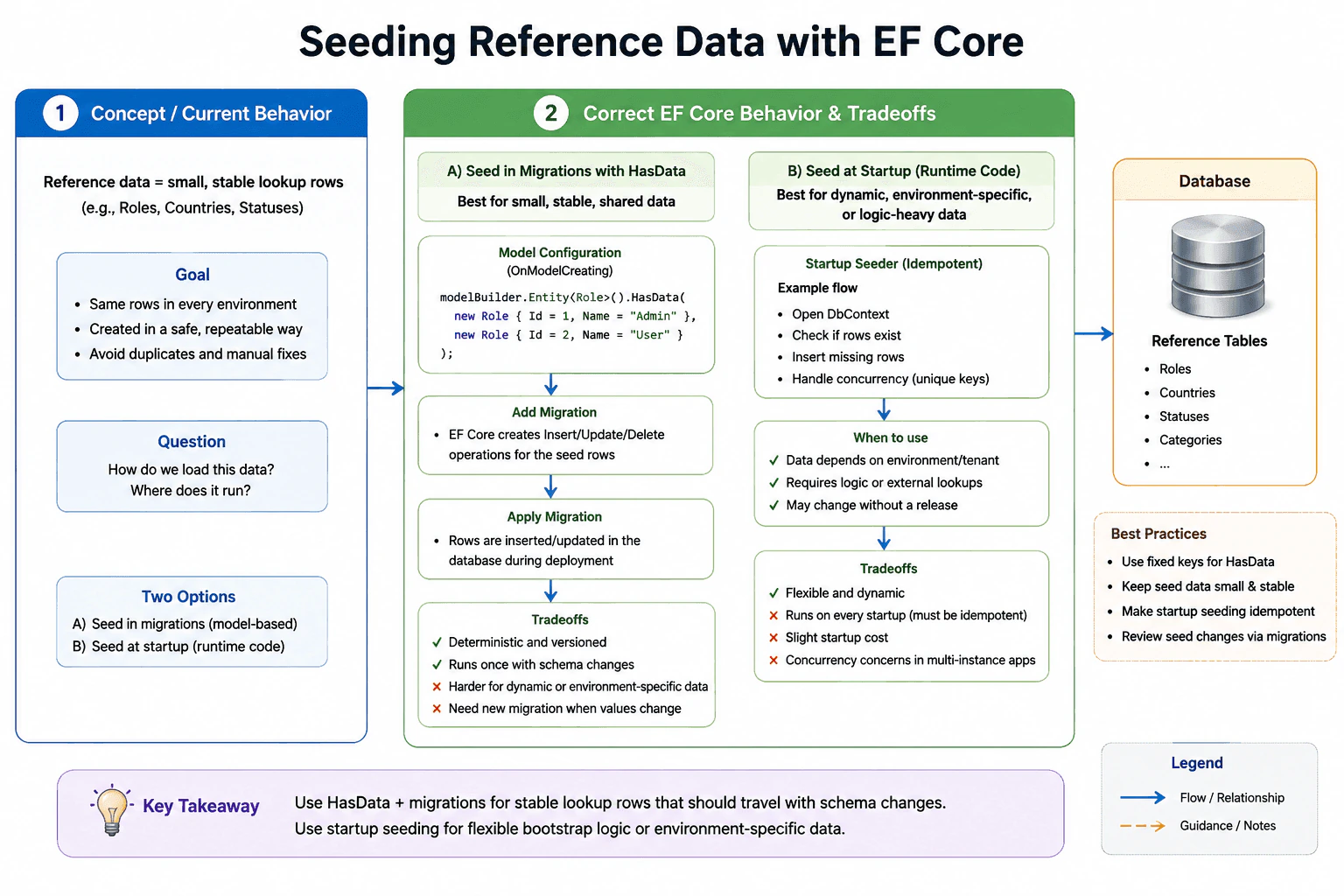
Use HasData for small, stable reference rows with fixed keys, because EF Core records them in migrations. Use startup seeding only when data is dynamic, environment-specific, or needs logic. Migration seeding is deterministic; startup seeding is more flexible but must be idempotent.
Detailed Explanation
Some information should be the same in every copy of an app, such as country names, job levels, or status labels. This question asks how to load that fixed information in a safe and repeatable way, and whether to do it as part of setup changes or when the app starts. The interviewer wants to see that you can keep the data correct, avoid duplicates, and choose a method that still works after updates. They also want to know when each choice is a better fit for maintenance and release work.
Useful Questions to Ask the Interviewer
Which reference rows must always exist in every environment?
Can this data ever change after release, or must it stay fixed?
Should the data be managed by migrations, or loaded at startup?
How to Explain It in an Interview
For stable reference data, I would use HasData in OnModelCreating. EF Core treats that seed data as part of the model and creates migration operations for it, so new environments get the same rows in a repeatable way. I would give each row a fixed primary key and keep the seed values small and stable. If the seed values change, I would create a new migration so the change is versioned and reviewable.
I would use startup seeding only when the data is more dynamic, depends on the environment, or needs logic that is hard to express in model configuration. Startup seeding is flexible, but it must be idempotent, meaning it should be safe to run more than once without creating duplicates. It can also slow application startup, and it needs care when multiple instances start at the same time.
The tradeoff is simple: migration seeding is best for small, shared lookup data that should travel with schema changes, while startup seeding is better for bootstrap logic, external lookups, or data that may vary by tenant or environment. In practice, I would choose HasData for things like roles, countries, statuses, and categories, and I would reserve startup seeding for cases where the app must compute or fetch the rows first.
Technical Approach
Identify reference data that is small, shared, and mostly unchanged.
Configure it in OnModelCreating with HasData and fixed primary keys.
Add or update a migration so EF Core emits the insert, update, or delete operations.
Use startup seeding only for dynamic, environment-specific, or logic-heavy data.
Make runtime seeding idempotent and run it after the database is created or migrated.
Practical Insights
Migration seeding has little runtime cost, but it adds maintenance work whenever seed values change. Startup seeding adds a little boot-time cost and can run every time the app starts unless you guard it. Both approaches are fine for small lookup tables; neither is a good fit for very large data loads.
Why Interviewers Ask This
It checks whether you know how EF Core treats reference data, when model-based seeding is appropriate, and how to choose between versioned migration seeding and runtime startup seeding.
Common interview mistakes
Using HasData for large or user-changing data, forgetting to assign fixed keys, changing seed rows without creating a new migration, seeding the same rows on every startup without checks, and mixing reference data with transactional user data.
Interview tip
Say that HasData is for stable lookup rows, startup seeding is for flexible bootstrap logic, and the key tradeoff is versioned repeatability versus runtime flexibility and idempotency.
Interviewer may ask next
What happens when seeded values change?
EF Core compares the model seed values with the migration snapshot. When the values differ, you should create a new migration so the database gets the matching update through UpdateData, InsertData, or DeleteData instead of changing the rows manually in production.
When should I avoid HasData?
Avoid HasData for large datasets, data that changes often, rows that depend on other systems, or data that needs business logic before insert. In those cases, startup seeding or a separate import job is usually safer and easier to control.
86. How do you run EF Core migrations in production CI/CD?Database And Ef CoreEasy
i Question Details
Describe the release-time migration flow, the need for ordering, and how to avoid applying schema changes manually by hand.
Short Interview Answer (30-60 seconds)
Treat migrations as versioned release artifacts. In production CI/CD, apply them in one controlled step before the app rollout, use a dedicated migrator or migration bundle, verify the result, and never patch the live schema by hand.
Detailed Explanation
This question asks how you safely apply database changes when a new version goes live. It is really asking whether you can keep the app and the database in sync, make the change in the right order, and avoid risky manual fixes on the live database. The interviewer also wants to know if you can repeat the same release steps every time, check that the change worked, and have a safe way to stop or recover if something goes wrong.
Useful Questions to Ask the Interviewer
Do you want the migration run by a separate release job or a migration bundle?
Do you need zero-downtime deploys, or is a short maintenance window acceptable?
How to Explain It in an Interview
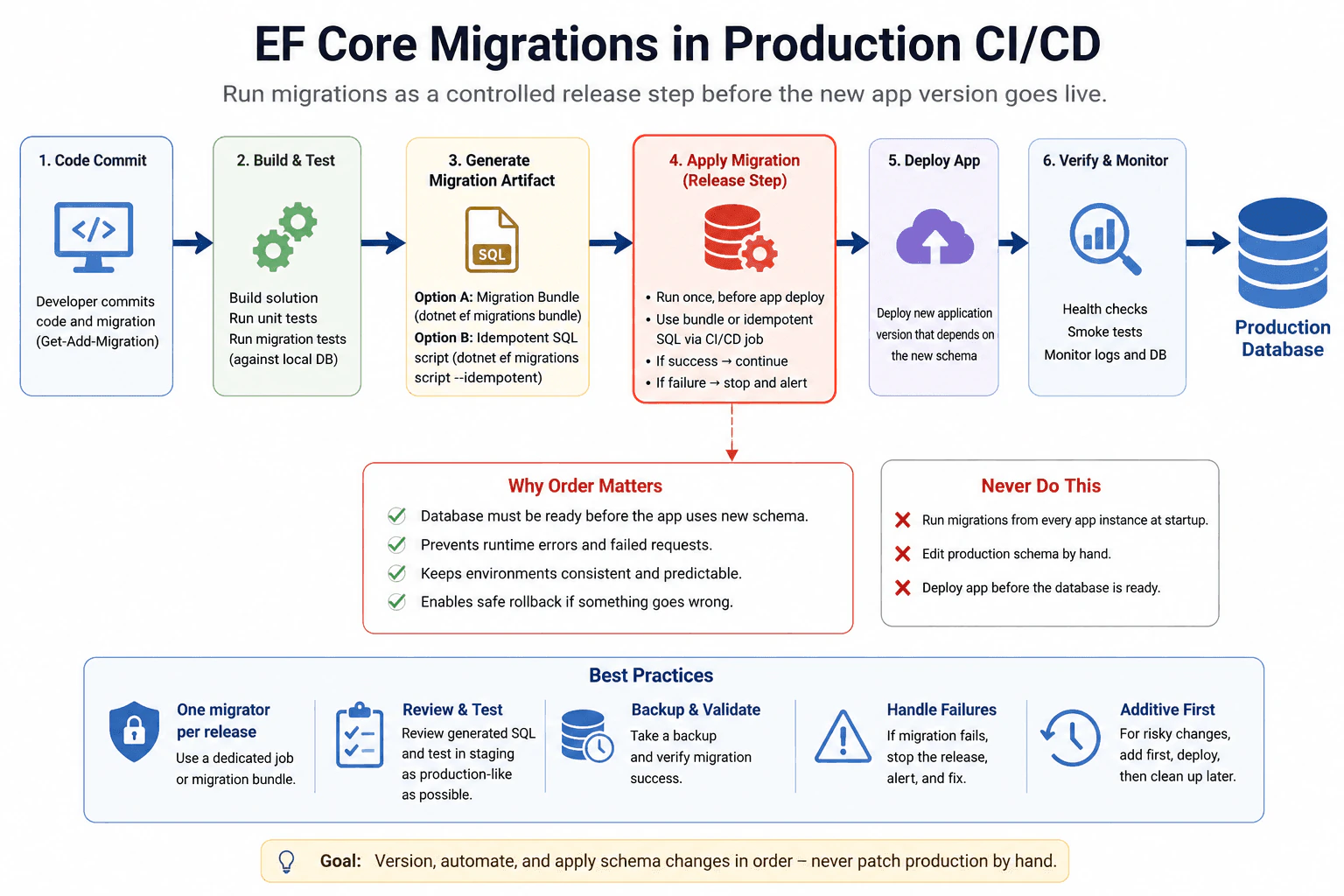
I keep EF Core migrations in source control and make them part of the release pipeline. The migration is created in development, reviewed like normal code, and then applied by one controlled step in CI/CD before the new app version depends on the new schema. In production, I avoid manual schema edits because they create drift between environments and make rollback harder.
The safest pattern is one migrator per release, not many app instances all trying to migrate at startup. That can be done with a migration bundle, an idempotent SQL script, or a dedicated deployment job. For larger changes, I prefer additive changes first, then application rollout, then cleanup in a later migration. That keeps ordering clear and lowers risk.
I also make sure there is a backup, a verification step, and an alert if the migration fails. The main idea is: version the schema change, automate it, run it in order, and never patch production by hand.
Technical Approach
Create the EF Core migration in development.
Review the generated changes and test them in staging.
Package the migration step into the release pipeline.
Run the migration once, before the new app version serves traffic.
Deploy the app after the schema is ready.
Verify the release and keep a rollback plan.
Never change the production schema manually.
Practical Insights
The code cost is small, but the release process matters. Time cost is the migration runtime in the database. Memory cost is low. Operational cost is higher because you need ordering, one migrator, validation, and rollback planning. Maintenance cost is keeping migrations reviewed and tested.
Why Interviewers Ask This
They want to see whether you can explain a safe production release flow for schema updates, keep app and database changes in order, and avoid risky manual edits in production.
Common interview mistakes
Running migrations from every app instance at startup, editing the live schema by hand, deploying the app before the database is ready, skipping review of generated SQL, and forgetting that destructive changes need a safer staged rollout.
Interview tip
Say that schema changes are versioned, automated, and applied by one controlled release step. Mention ordering, one migrator, and no manual production edits.
Interviewer may ask next
How do you handle a risky migration in production?
Split the change into safe steps. First add new columns or tables, deploy code that works with both old and new shapes, then remove old schema later. Use backups, monitoring, and a maintenance window if the change is large.
Should the app run migrations on startup in production?
Usually no. A separate CI/CD migration step is safer because it gives one writer, clear ordering, and better visibility. Startup migrations can race when multiple app instances start together.
87. You get “The model has changed since the last migration.” What causes it and how do you recover?Database And Ef CoreHard
i Question Details
Describe the mismatch between the model snapshot and the current model, plus the safe recovery steps in a team environment.
Short Interview Answer (30-60 seconds)
It usually means the current EF Core model and the last migration snapshot are out of sync. The safe fix is to review the diff, create a new migration for the missing changes, and apply it. In a team, do not rewrite applied migrations; make a corrective one instead.
Detailed Explanation
Your app is saying that the saved picture of the data shape no longer matches the code you are running. That usually happens after someone adds, removes, renames, or rearranges fields, or when two branches change the same area in different ways. The tool cannot safely guess which change is correct, so it stops and asks for a fix. The safe recovery is to compare the current code with the last saved change record, create a new change for the real difference, review it, test it, and then apply it carefully.
Useful Questions to Ask the Interviewer
Is this a local development database or a shared team database?
Have the model changes already been merged to main?
How to Explain It in an Interview
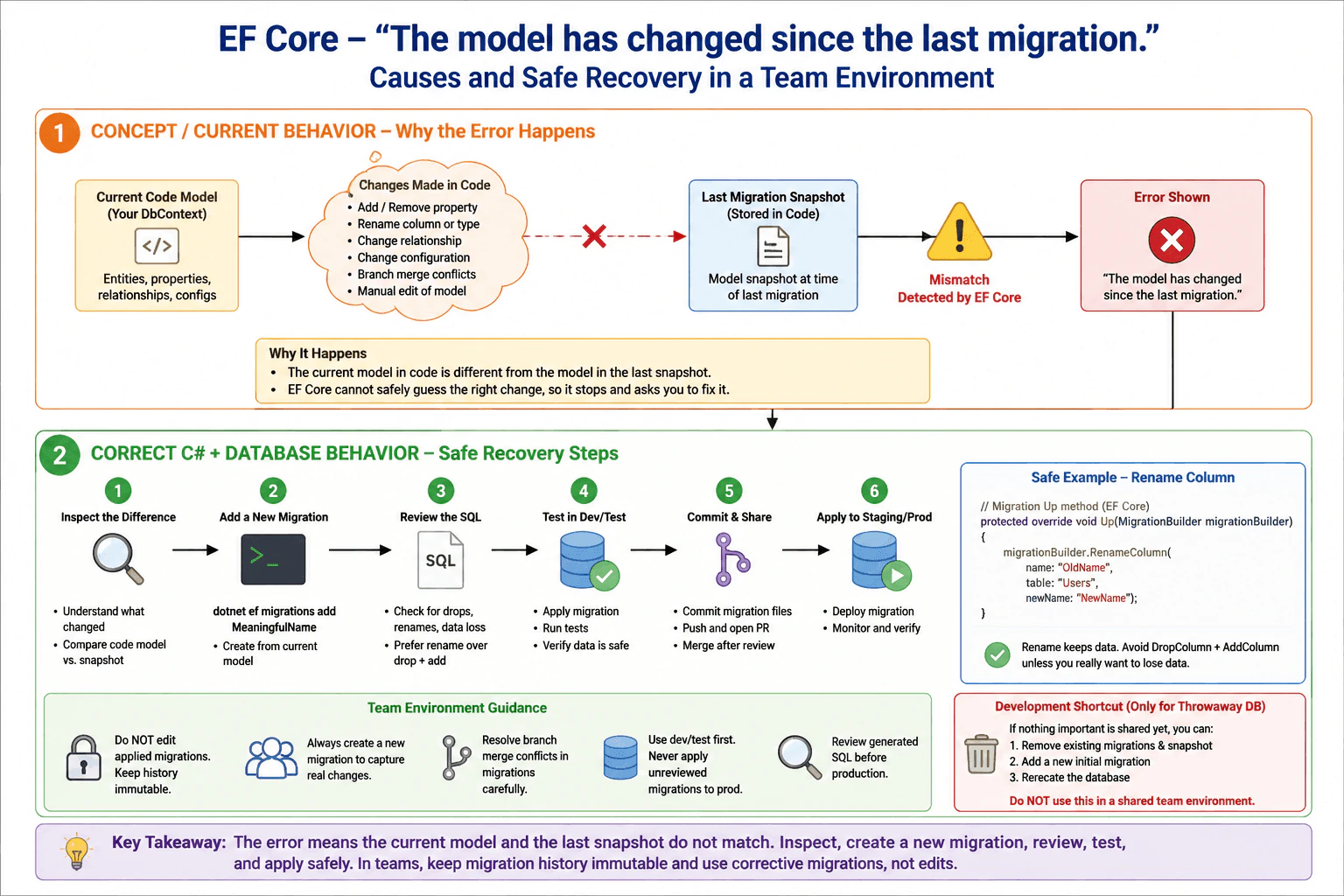
The message means the current EF Core model and the last model snapshot are out of sync. The snapshot is EF Core's saved picture of the model at the time of the last migration. Common causes are property changes, relationship changes, renamed columns, configuration changes, branch merges, or manual edits to old migration files.
The safe recovery is to inspect the model difference, generate a new migration from the current model, review the generated operations, and apply it to a non-production database first. If the database already has shared history, do not edit old migrations. Create a corrective migration instead.
In throwaway development databases, you can sometimes remove and rebuild migrations if nothing important has been shared yet. In shared team environments, that is risky because it changes history for everyone. For real renames, prefer rename operations so data is preserved. Always review the generated SQL before production.
Technical Approach
Compare the current entity model with the last migration snapshot.
Check whether the change came from a branch merge, rename, or manual edit.
Generate a new migration from the current model.
Review the generated SQL for drops, renames, and data loss.
Apply it first in dev or test.
Merge the migration and keep history immutable in shared environments.
Practical Insights
The CPU and memory cost is small. The real cost is process cost: checking the difference, reviewing the generated SQL, testing the migration, and coordinating with the team. The safest fix may take more time, but it reduces the risk of data loss and broken shared history.
Why Interviewers Ask This
To check whether you understand migration snapshots, how model drift happens, and how to recover safely without breaking shared database history.
Common interview mistakes
Editing an old migration after other people have pulled it, deleting the snapshot without understanding the history, forcing the database to match code by dropping tables, ignoring branch merge conflicts, and treating a rename as a drop-and-create change that loses data.
Interview tip
Say 'snapshot mismatch' first, then explain the safe recovery: create a new migration, review the diff, and keep shared history immutable. That shows both EF Core knowledge and good production judgment.
Interviewer may ask next
What if the migration is empty after you add it?
That usually means the change was not part of the mapped model, or the difference was already captured. Recheck the entity configuration, the snapshot, and any branch merge conflicts before assuming the model is correct.
What if the app changed a column name instead of dropping it?
Use a real rename in the migration so the data stays in place. Do not let EF Core treat a rename as drop plus add unless you truly want to lose the old data.
88. A teammate changed the production schema manually. Now migrations are broken. How do you fix it?Database And Ef CoreHard
i Question Details
Focus on reconciling the database history with the EF migration history without losing data or creating duplicate schema changes.
Short Interview Answer (30-60 seconds)
I would stop further changes, compare the live schema with the EF Core model and migration snapshot, and decide whether production or the model is the source of truth. Then I would create a new corrective or baseline migration, not rewrite old applied ones, so the history matches reality without losing data.
Detailed Explanation
A person on the team made a direct change to the live database. After that, the app’s record of planned changes no longer matches the real database. The interviewer wants to know how you would safely bring them back into agreement without losing information or causing the same change to happen twice. A strong answer should show careful checking, choosing which version should be kept, and making one safe follow-up change so future updates work normally again, with no surprise breakage for the next release.
Useful Questions to Ask the Interviewer
Was the manual production change intended to stay?
Do we need to preserve all existing data exactly as it is?
Is the migration history broken only in production, or in every environment?
How to Explain It in an Interview
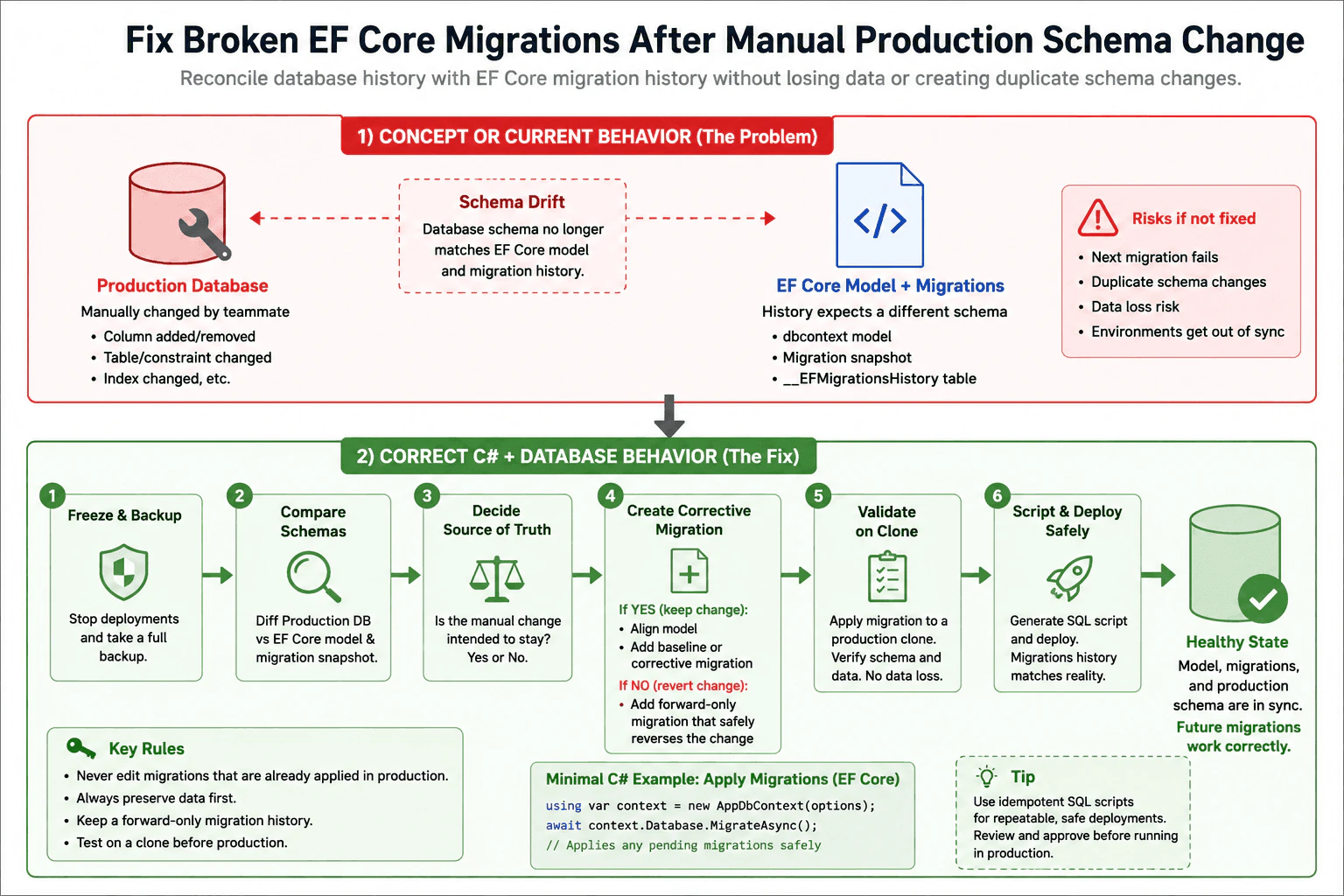
I would treat this as schema drift, which means the real database and EF Core’s migration history have moved apart. First, I would freeze deployments and take a backup. Then I would compare production, the EF Core model, and the last migration snapshot to see exactly what changed.
If the manual change is correct and should remain, I would update the EF Core model to match it and create a new corrective migration or a new baseline migration. That keeps the history forward-only and avoids rewriting migrations that were already deployed. If the manual change was wrong, I would create a safe migration that reverses only that change.
The key rule is: do not edit old applied migrations in production. Instead, add a new migration that makes the model, the snapshot, and the live schema consistent again. I would test the fix on a production clone, generate a deployment script, and confirm that no data is lost and no schema change runs twice.
This approach works because EF Core migrations are a history of changes, not a place to patch the past. When production is already modified, the safest repair is usually a new migration that reconciles reality with the model.
Technical Approach
Freeze deployments and take a backup.
Diff the live schema against the EF Core model and migration snapshot.
Decide whether the manual production change is now the desired state.
If yes, align the model and add a corrective or baseline migration.
If no, add a forward-only migration that safely reverses the manual change.
Test on a clone, generate a deployment script, and deploy without data loss.
Practical Insights
The work is usually small in code but high in safety cost. The main cost is analysis, testing, and deployment review. Time grows with the size of the schema and the amount of data that must be protected. Memory cost is not important. The real risk is operational: one wrong step can break production or lose data.
Why Interviewers Ask This
This checks whether the candidate can recover from schema drift, protect data, understand EF Core migration history, and choose a safe repair plan instead of making the problem worse.
Common interview mistakes
Editing old migrations that are already applied, forcing a rebuild that drops data, assuming the EF snapshot is always correct, skipping backup and validation, or using the same migration again without checking whether production already has the change. Another mistake is trying to fix drift only by changing the model and ignoring the live database.
Interview tip
Say that you preserve data first, history second, and convenience last. Interviewers want a safe recovery plan, not a clever shortcut.
Interviewer may ask next
What if the manual change is actually the new intended design?
Then I would accept the live schema as the new truth, update the EF Core model to match it, and create a new baseline or corrective migration so future deployments start from the corrected state. I would still avoid rewriting already-applied migrations, because that can create more drift and confusion.
What if the broken migration would change existing data?
I would split the fix into a schema step and a data step, test both on a clone, and run them in a transaction when the provider supports it. I would also use a deployment script and verify the result before production, because data changes are the part most likely to cause loss or downtime.
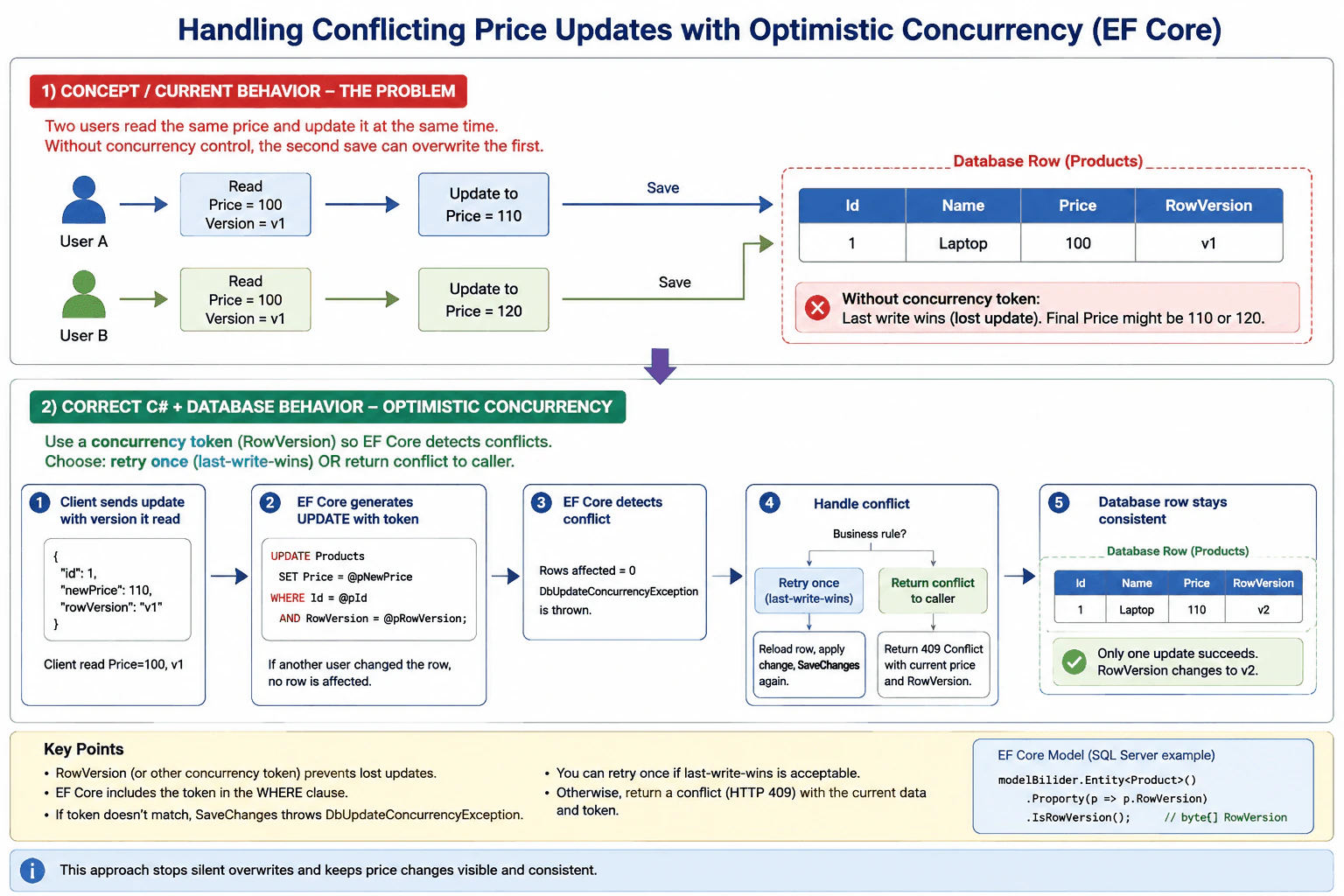
89. Two users submit conflicting price updates simultaneously. How do you handle this?Database And Ef CoreMedium
i Question Details
Focus on concurrency tokens, conflict detection, and the options for retrying or surfacing a conflict to the caller.
Short Interview Answer (30-60 seconds)
Use optimistic concurrency with a version token such as rowversion or a version column. If EF Core detects that the row changed first, catch DbUpdateConcurrencyException, reload the latest values, and either retry once or return a conflict so the caller can resolve it.
Two people may try to change the same price at nearly the same moment. The question asks how to stop one person’s newer change from quietly wiping out the other person’s change. The goal is to keep the final price honest and to make sure the site notices when two edits collide. You should also explain what happens next: whether the site tries again, shows the newest price, or tells the user that someone else already changed it first, and then asks them to choose.
Useful Questions to Ask the Interviewer
Do you want last-write-wins, or should the user see a conflict?
Should the API return the current price when a conflict happens?
Is the database expected to be SQL Server, PostgreSQL, or something else?
How to Explain It in an Interview
The practical answer is optimistic concurrency. In EF Core, I add a concurrency token such as rowversion/timestamp or a version column. When SaveChanges runs, EF Core includes that token in the WHERE clause. If another user updated the row first, no row is affected and EF Core throws DbUpdateConcurrencyException. Then I either reload and retry once, or I return a conflict response such as HTTP 409 with the current price and version.
For prices, I usually avoid blind retries unless the business rule is true last-write-wins. That keeps changes visible and prevents silent data loss. If contention is very high, I would only consider a stricter transaction or locking approach, but for normal price edits, optimistic concurrency is usually the best fit.
Key Insight / Why This Solution Works
Add a concurrency token to the price row.
Read the row and keep the token the user saw.
Save the new price with that token.
If EF Core throws DbUpdateConcurrencyException, reload the latest row.
Either retry once if the business rule allows it, or return a conflict response to the caller.
Code
using System;
using System.Threading;
using System.Threading.Tasks;
using Microsoft.EntityFrameworkCore;
publicsealedclassProduct
{
publicint Id { get; set; }
publicstring Name { get; set; } = string.Empty;
publicdecimal Price { get; set; }
// SQL Server rowversion/timestamp or another provider-specific concurrency token.publicbyte[] RowVersion { get; set; } = Array.Empty<byte>();
}
publicsealedclassAppDbContext : DbContext
{
public DbSet<Product> Products => Set<Product>();
protectedoverridevoidOnModelCreating(ModelBuilder modelBuilder)
{
modelBuilder.Entity<Product>().Property(p => p.RowVersion).IsRowVersion();
}
}
publicsealedrecordUpdatePriceResult(bool Success, bool Conflict, decimal? CurrentPrice,
byte[]? CurrentRowVersion);
publicsealedclassProductService
{
privatereadonly AppDbContext _db;
publicProductService(AppDbContext db) => _db = db;
publicasync Task<UpdatePriceResult> UpdatePriceAsync(int productId, decimal newPrice, byte[] expectedRowVersion, bool retryOnce,
CancellationToken cancellationToken = default)
{
// Load the row in the current DbContext so EF Core can track the entity.var product =
await _db.Products.SingleOrDefaultAsync(p => p.Id == productId, cancellationToken);
if (product isnull)
{
returnnew UpdatePriceResult(false, false, null, null);
}
// Tell EF Core which version the caller saw earlier.// If the row changed after that, SaveChangesAsync will fail with a concurrency exception.
_db.Entry(product).Property(p => p.RowVersion).OriginalValue = expectedRowVersion;
product.Price = newPrice;
try
{
// SaveChangesAsync is one unit of work; EF Core will use a transaction for it by// default.await _db.SaveChangesAsync(cancellationToken);
returnnew UpdatePriceResult(true, false, null, null);
}
catch (DbUpdateConcurrencyException)
{
if (!retryOnce)
{
// Another user won the race. Reload the latest database values and surface a// conflict.await _db.Entry(product).ReloadAsync(cancellationToken);
returnnew UpdatePriceResult(false, true, product.Price, product.RowVersion);
}
// Retry only when the business rule allows last-write-wins or a safe merge.await _db.Entry(product).ReloadAsync(cancellationToken);
product.Price = newPrice;
try
{
await _db.SaveChangesAsync(cancellationToken);
returnnew UpdatePriceResult(true, false, null, null);
}
catch (DbUpdateConcurrencyException)
{
// A second conflict means the row changed again. Return the current values to the// caller.await _db.Entry(product).ReloadAsync(cancellationToken);
returnnew UpdatePriceResult(false, true, product.Price, product.RowVersion);
}
}
}
}
Why Interviewers Ask This
This checks whether you can prevent lost updates, use EF Core concurrency tokens correctly, and choose between retrying and surfacing a conflict based on business rules.
Common interview mistakes
Common mistakes are silently overwriting the first change, retrying forever, forgetting to send the version back from the client, using a lock for every update, or comparing only the price instead of a real concurrency token.
Interview tip
Say that you would not allow a quiet overwrite of a price. Then mention the token, the EF Core concurrency exception, and the choice between retrying once and returning HTTP 409 Conflict.
Interviewer may ask next
What status would you return to the client on a conflict?
Usually I would return 409 Conflict. I would also send the current price and the current version so the client can refresh the screen or ask the user to resolve the difference.
When would you prefer pessimistic locking instead?
Only when contention is very high or the business rule requires strict serialization. Locks reduce concurrency, so I would use them only when optimistic concurrency is not enough.
90. Bulk update: set IsActive = false for all products in a category. What is the most efficient way?Database And Ef CoreMedium
i Question Details
Discuss set-based updates, avoiding per-row loops, and how you would validate that the generated SQL matches the intent.
Short Interview Answer (30-60 seconds)
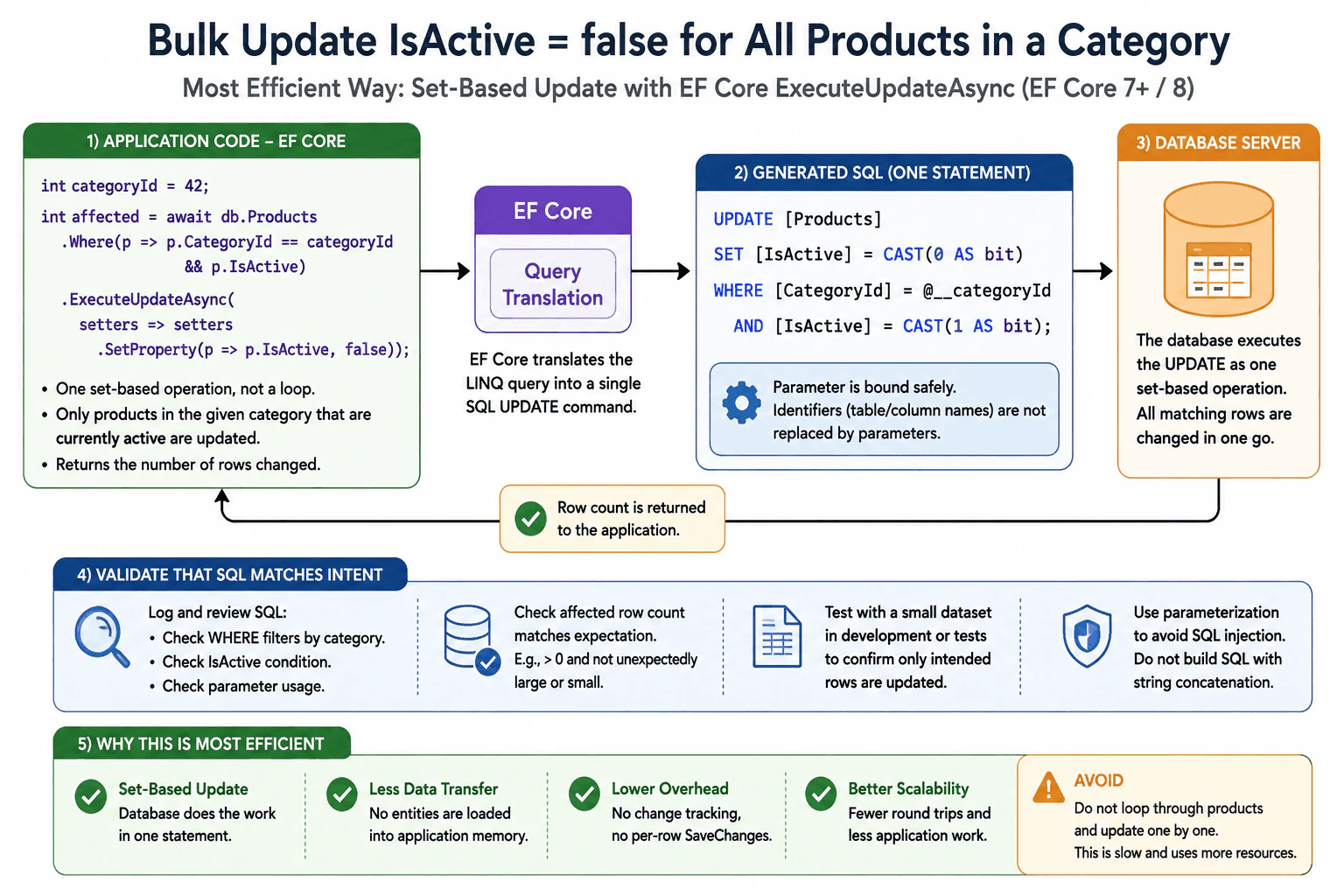
Use a single set-based update, ideally EF Core ExecuteUpdateAsync or parameterized SQL UPDATE with a category filter. That updates all matching products in one database call, avoids loading entities into memory, and is much faster than looping through products and saving each one separately.
This question asks how to switch off many products at once when they all belong to one group. The interviewer wants to know whether you would change them one by one or use one direct change for all matching products. They also want to see whether you can keep the work fast, avoid loading extra data, and check that only the right products were changed. The goal is to choose the safest and most efficient practical method for a large change.
Useful Questions to Ask the Interviewer
Should every product in the category be switched off, or only products that are currently on?
Do you want the EF Core bulk update version, or a plain SQL example too?
Do we need to report how many products changed for validation or audit logs?
How to Explain It in an Interview
Use a set-based update. That means one database command changes all matching products together. This is the most efficient approach because the database does the work directly, and the app does not load each product into memory. In EF Core 7+ or 8, ExecuteUpdateAsync is the cleanest choice. If you are outside EF Core, a parameterized UPDATE statement does the same job.
The main tradeoff is speed versus flexibility. A loop is easier when each product needs different logic, but it is much slower and creates more database traffic. A set-based change is best when every matching product gets the same value.
To validate the SQL, I would check the generated command in logs or tests, confirm the WHERE filter uses the category correctly, and verify the affected-row count.
Technical Approach
Filter products by category.
Use one set-based UPDATE, not a per-row loop.
In EF Core 7+ or 8, call ExecuteUpdateAsync on the filtered query.
Pass the category as a parameter, never by string concatenation.
Check the affected-row count.
Verify the generated SQL in logs or tests.
Practical Insights
Time cost is low because the database does the work in one pass instead of many round trips. Memory use is low because rows are not loaded into the app. Maintenance is simpler than loop-based code. The main cost is making sure the filter is correct and the category lookup is efficient.
Code
using Microsoft.EntityFrameworkCore;
publicstaticclassProductMaintenance
{
publicstaticasync Task<int> DeactivateProductsInCategoryAsync(
AppDbContext db, int categoryId, CancellationToken cancellationToken = default)
{
// One set-based command is faster than loading products and updating them one by one.// The database performs the change directly, and EF Core sends a single UPDATE statement.var affectedRows =
await db.Products.Where(p => p.CategoryId == categoryId && p.IsActive)
.ExecuteUpdateAsync(setters => setters.SetProperty(p => p.IsActive, false),
cancellationToken);
// Return the number of rows changed so callers can validate the result.return affectedRows;
}
}
// Example DbContext shape for context only.publicsealedclassAppDbContext : DbContext
{
public DbSet<Product> Products => Set<Product>();
}
publicsealedclassProduct
{
publicint Id { get; set; }
publicint CategoryId { get; set; }
publicbool IsActive { get; set; }
}
Why Interviewers Ask This
They want to see whether you know how to change many records efficiently, avoid row-by-row work, understand bulk update support in EF Core, and validate that the SQL does exactly what you intended.
Common interview mistakes
The biggest mistake is loading all products into memory and updating them in a loop. That causes extra tracking, extra network traffic, and slower writes. Another mistake is forgetting to filter by category, which can disable too many rows. A third mistake is building SQL with string concatenation instead of parameters.
Interview tip
Say "set-based update" early. Then explain that one SQL command is faster, simpler, and safer than row-by-row updates. Mention how you would verify the SQL and the affected-row count.
Interviewer may ask next
How would you do the same bulk update in raw SQL?
Use one parameterized UPDATE statement: UPDATE Products SET IsActive = 0 WHERE CategoryId = @CategoryId AND IsActive = 1. That is still set-based, still efficient, and still avoids loading rows into the application.
What if you need to update only a small subset with extra rules?
If the logic is still expressible in SQL, keep it set-based with a WHERE clause and maybe a CASE expression. If each row needs different custom logic, then a row-by-row approach may be necessary, but it will be slower and should be a deliberate exception.
More questions load as you scroll
Disclaimer: This interview guide is for educational and informational purposes only. It is designed to help readers prepare, but it does not guarantee any interview result, hiring decision, offer, or outcome. Interview questions, hiring criteria, and preferred answers can vary by employer, interviewer, industry, location, and time. All answers, examples, and explanations in this guide are suggested examples for interview preparation, not definitive answers or instructions for professional practice. They are based on research and judgment, are provided without warranties of any kind, and should be adapted to the question, role, and applicable laws and professional requirements. Diagrams are simplified illustrations intended to highlight the main concepts and their relationships; actual situations, systems, and practices may be more complex. Alternative approaches may be equally valid or better suited to a particular question, context, or interviewer. To the fullest extent permitted by applicable law, the contributors and publisher are not liable for decisions made, actions taken, or losses incurred based on this guide.
State Laws and Professional Responsibilities: Laws and requirements governing an occupation vary by state and jurisdiction. You are responsible for checking the current laws, licensing requirements, and scope-of-practice rules that apply to your location and role, and for ensuring that your answers and actions comply with them. Adapt examples in this guide to those requirements. This guide is not legal advice.
Content Accuracy and Verification: To the fullest extent permitted by applicable law, we do not represent or warrant that interview guides, questions, answers, examples, or diagrams are accurate, complete, current, error-free, or suitable for any particular purpose. You are responsible for independently reviewing and verifying the information before relying on it.