This interview guide is for educational and informational purposes only. It is designed to help readers prepare, but it does not guarantee any interview result, hiring decision, offer, or outcome. Interview questions, hiring criteria, and preferred answers can vary by employer, interviewer, industry, location, and time. All answers, examples, and explanations in this guide are suggested examples for interview preparation, not definitive answers or instructions for professional practice. They are based on research and judgment, are provided without warranties of any kind, and should be adapted to the question, role, and applicable laws and professional requirements. Diagrams are simplified illustrations intended to highlight the main concepts and their relationships; actual situations, systems, and practices may be more complex. Alternative approaches may be equally valid or better suited to a particular question, context, or interviewer. To the fullest extent permitted by applicable law, the contributors and publisher are not liable for decisions made, actions taken, or losses incurred based on this guide.
State Laws and Professional Responsibilities
Laws and requirements governing an occupation vary by state and jurisdiction. You are responsible for checking the current laws, licensing requirements, and scope-of-practice rules that apply to your location and role, and for ensuring that your answers and actions comply with them. Adapt examples in this guide to those requirements. This guide is not legal advice.
Identity, Image, and Privacy Notice
To respect individual privacy, some names, profile photographs, avatars, biographical details, and other identifying information displayed in this guide may be replaced with pseudonyms, licensed stock images, illustrative avatars, composite images, or representative descriptions. Unless a person is expressly identified as an actual contributor, a displayed name, image, or profile should not be understood as depicting or identifying a specific candidate, interviewer, employee, or other real individual. These representations are provided for editorial and illustrative purposes only and do not imply endorsement, employment, participation, or affiliation with this guide or any company mentioned in it. Any resemblance to an actual person is coincidental.
Company Notice
This guide is an independent educational resource and is not affiliated with, endorsed by, sponsored by, or approved by the company named in this guide. Company names identify reported interview experiences or the employer context of clearly labeled original practice exercises. Interview practices can change without notice, and inclusion of company-specific content does not mean these questions are official, complete, or guaranteed to be asked. To the fullest extent permitted by law, the author, contributors, and publisher are not responsible for outcomes related to use of this material.
Content Accuracy and Verification
To the fullest extent permitted by applicable law, we do not represent or warrant that interview guides, questions, answers, examples, or diagrams are accurate, complete, current, error-free, or suitable for any particular purpose. You are responsible for independently reviewing and verifying the information before relying on it.
Questions or comments?
Contact us for general questions, or share feedback, technical corrections, and comments with the community.
31. What is the difference between List<T> and ArrayList?Language SpecificEasy
i Question Details
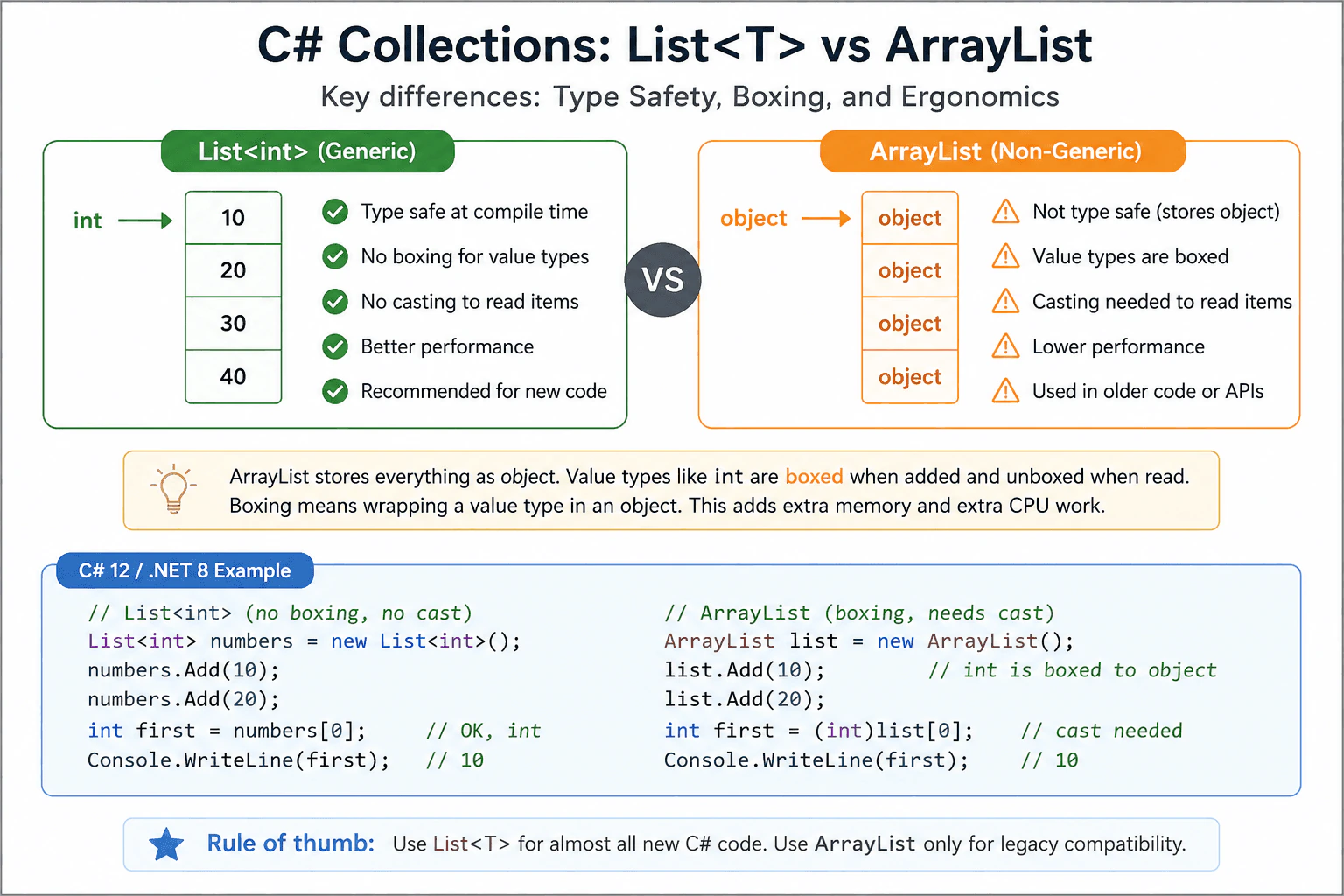
Compare type safety, boxing risk, and the ergonomics of modern generic collections versus the older non-generic one.
Short Interview Answer (30-60 seconds)
List<T> is the better choice in modern C#. It is type safe, so the compiler checks the element type for you, and it avoids boxing for value types like int. ArrayList is older, stores items as object, and usually needs casts when you read values back.
Detailed Explanation
List<T> and ArrayList both hold items in a sequence, but they are not the same. The main difference is that List<T> is made for one specific item type, while ArrayList stores every item as object. That means List<T> checks types before the code runs and ArrayList often needs casts when you read values back. This matters because value types like int can be boxed in ArrayList, which adds extra work and memory use. For new C# code, I would choose List<T>.
Useful Questions to Ask the Interviewer
Are you asking about new code or older code that already uses ArrayList?
Do you want the answer for value types, reference types, or both?
How to Explain It in an Interview
Start with the practical rule: use List<T> for almost all new C# code. It is generic, so the element type is known at compile time. That means List<string> only accepts strings and List<int> only accepts ints. With ArrayList, every item is stored as object. For value types such as int, C# must box them when adding them and unbox them when reading them. Boxing means wrapping the value in an object. That adds extra allocations and extra work.
List<T> is also easier to read and maintain. You do not need casts, so the code is shorter and safer. Type mistakes are caught earlier, before the code runs. The list still keeps order and supports indexed access, but with better type checking and usually better performance.
ArrayList mainly matters for old code or old APIs that already use it. In production, I would choose List<T> unless compatibility is the real reason to use ArrayList. That is the simple interview answer: modern C# favors List<T> because it is type safe, clearer, and usually faster for value types.
Why Interviewers Ask This
Interviewers ask this to check whether you know modern C# collection basics, type safety, and the cost of boxing. They also want to see if you know when an older API still matters and when a newer generic collection is the better choice.
Common interview mistakes
People think ArrayList is better because it can hold anything. The tradeoff is that this flexibility removes compile time checks. Another mistake is forgetting boxing cost for value types. A third is assuming modern code should still prefer ArrayList. In new C# code, List<T> is the normal choice.
Interview tip
Say the rule first: use List<T> for modern code because it is type safe and avoids boxing. Then mention ArrayList only for legacy compatibility.
Interviewer may ask next
Why does ArrayList box ints?
Because ArrayList stores items as object. An int is a value type, so it must be boxed when stored and unboxed when read. That matters because it adds allocations and extra work.
When would you still use ArrayList?
Only when you must work with old code or an older API that already uses ArrayList. In new code, List<T> is usually better because it is type safe and has less overhead.
32. What is the difference between Dictionary<TKey, TValue> and Hashtable?Language SpecificEasy
i Question Details
Explain What is the difference between Dictionary<TKey, TValue> and Hashtable in C# with a simple example, common mistakes, and when it matters in production.
Short Interview Answer (30-60 seconds)
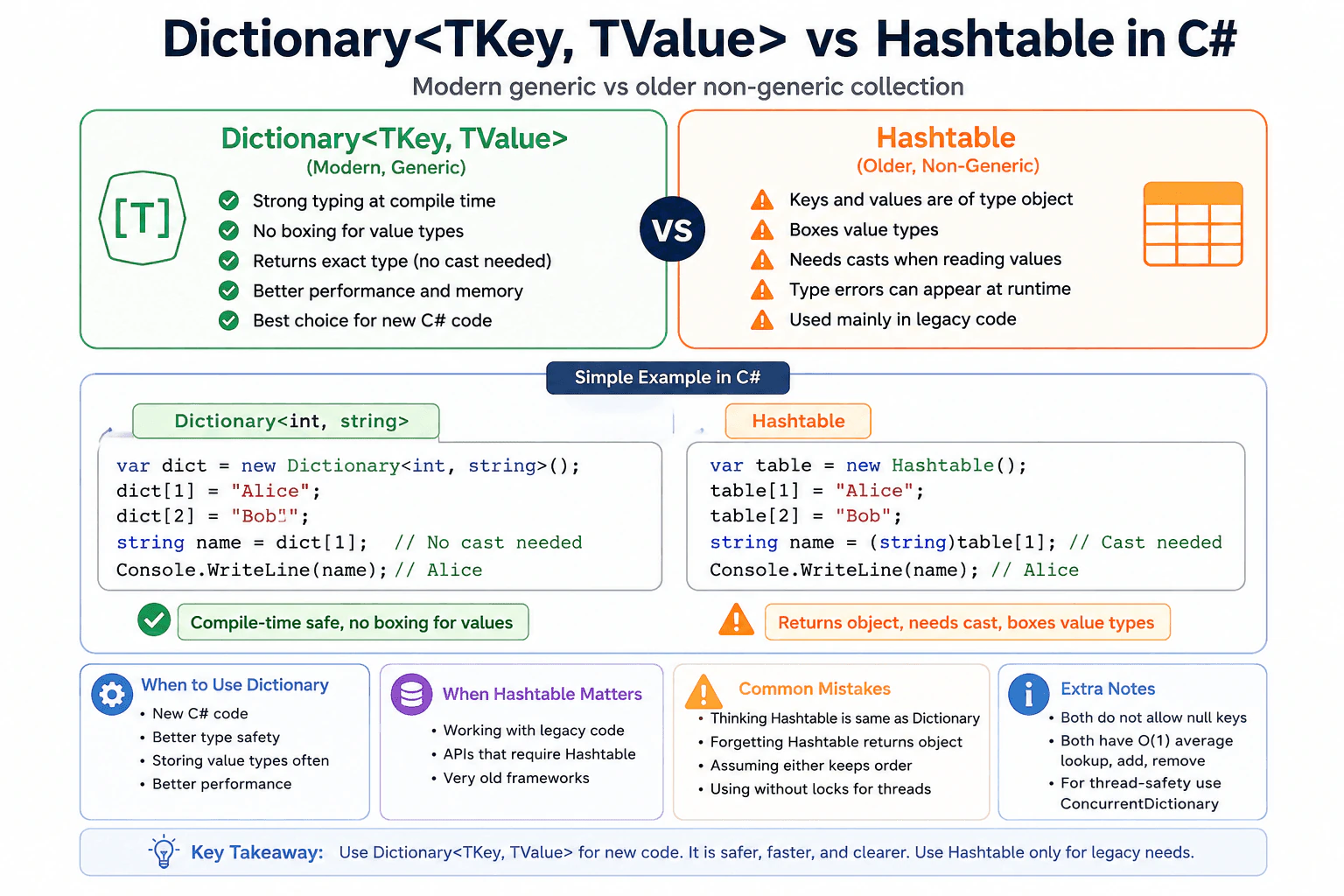
Dictionary<TKey, TValue> is the modern generic choice. Hashtable is the older non generic type. Dictionary gives compile time type checking, avoids casts, and avoids boxing for value types. Hashtable stores keys and values as object, so it needs casts and can hide type mistakes until runtime. For new C# code, I would use Dictionary<TKey, TValue> almost every time.
Detailed Explanation
These two types both let you store values by using a key. The main difference is that Dictionary<TKey, TValue> is the modern type, and it knows the exact key and value types at compile time. Hashtable is the older type, and it stores keys and values as object. That means Dictionary gives earlier error checks, simpler code, and less work when reading values. Hashtable usually needs casts, and value types may be boxed, so it is less safe and less efficient in new code.
Useful Questions to Ask the Interviewer
Are you working with old code that already uses Hashtable?
Do you need to store value types a lot?
How to Explain It in an Interview
Dictionary<TKey, TValue> is the modern generic collection. You choose the key type and value type up front, such as Dictionary<int, string>. That gives compile time type checking. When you read a value, you get the exact type back, so no cast is needed. If the value type is a value type, Dictionary stores it without boxing, so it usually uses less CPU and memory.
Hashtable is the older non generic collection. It stores keys and values as object. That means every value type is boxed when stored and must be unboxed when read. You also need casts when you take values out, so type mistakes can show up later at runtime.
For new C# code, I would almost always choose Dictionary<TKey, TValue>. It is clearer, safer, and better fits modern code. Hashtable mainly matters for legacy APIs or old code bases that already use it. If you need shared access from multiple threads, neither type is a full solution for concurrent writes. In that case, use locking or ConcurrentDictionary.
Why Interviewers Ask This
This checks whether the candidate knows the difference between the older non generic collection and the modern generic one, and whether they can choose the safer option in real C# code.
Common interview mistakes
Thinking Hashtable is the same as Dictionary. Forgetting that Hashtable returns object. Assuming either type keeps insertion order. Using either one for concurrent writes without locks. Choosing Hashtable in new code when Dictionary would be safer.
Interview tip
Say Dictionary for new code, Hashtable for legacy code, then mention casts, boxing, and safer typing.
Interviewer may ask next
Can Dictionary<TKey, TValue> store a null key?
No. Dictionary<TKey, TValue> throws ArgumentNullException for a null key, and Hashtable also does not allow a null key. This matters because you should validate the key before adding it.
Why does Dictionary<TKey, TValue> usually perform better?
It usually performs better because it is generic, so value types are not boxed and reads do not need casts. That reduces extra work and memory use. The tradeoff is only that you must choose the key and value types when you create it, which is exactly what makes it safer.
33. What are generics and why are they useful?Language SpecificEasy
i Question Details
Focus on type safety, code reuse, and the difference between runtime boxing avoidance and compile-time checks.
Short Interview Answer (30-60 seconds)
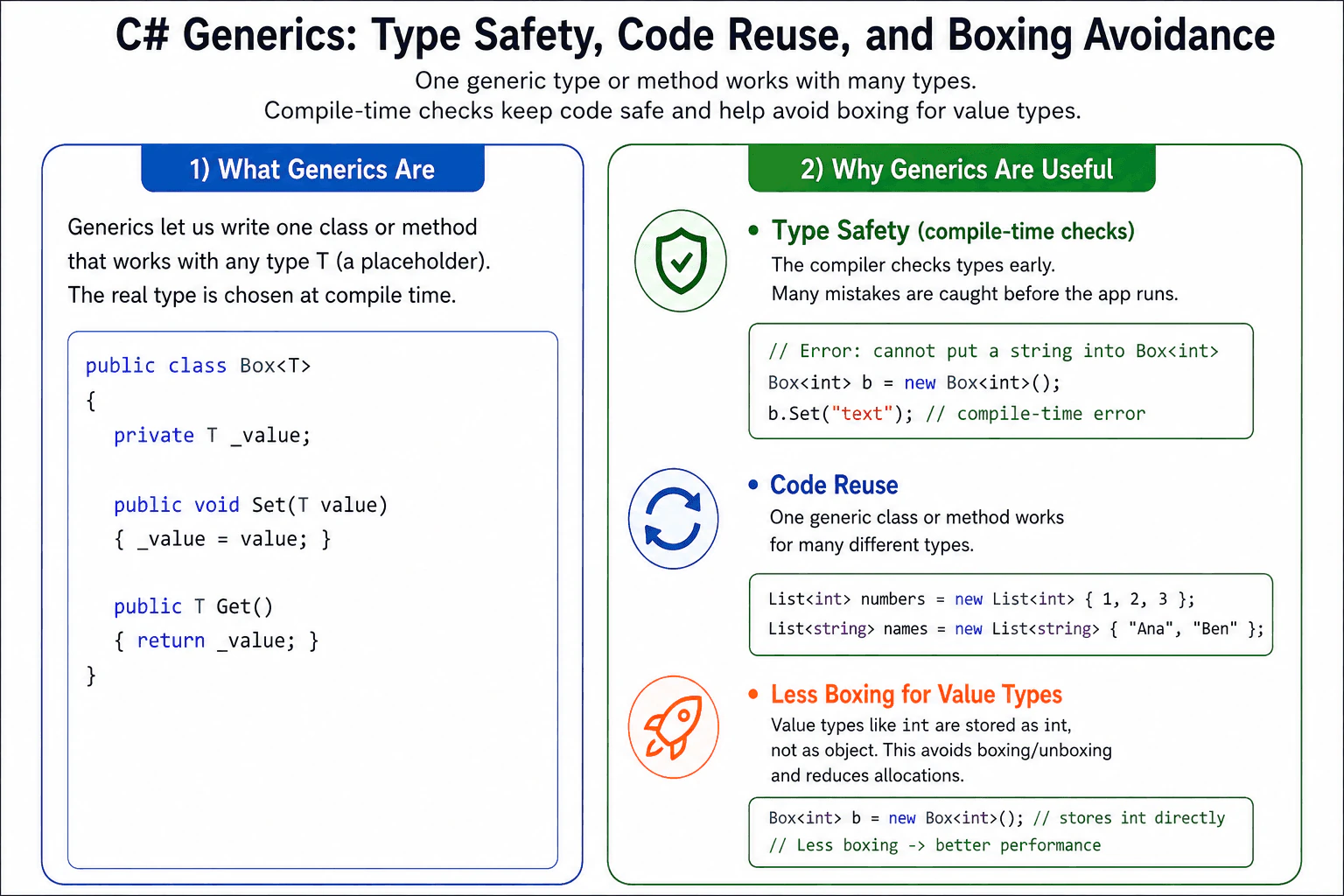
Generics let me write one class or one method that works with many types while still keeping strong type safety. In C#, they help reuse code, catch type mistakes at compile time, and avoid boxing for value types like int in many cases.
Detailed Explanation
Generics let me write one piece of code and use it with many kinds of data. Instead of making one version for numbers and another for words, I can make one version that works with both. C# checks the type before the program starts, so many mistakes are caught early. That makes the code safer and easier to reuse. It also helps when I use value types like int, because the runtime can often avoid extra wrapping, which saves memory and work.
Useful Questions to Ask the Interviewer
Are you asking about generic classes, generic methods, or both?
Do you want me to focus on boxing and performance as well?
How to Explain It in an Interview
In C#, generics let you define a class, interface, or method with a type parameter such as T. The caller chooses the real type later, such as List<int> or List<string>. That gives you one clear benefit first. The compiler checks the type at compile time, so you catch many mistakes before the app runs.
The second benefit is code reuse. You can write one sorting helper, one repository, one cache, or one collection and use it with many types without copying code. That keeps code smaller and easier to maintain.
The third benefit is performance for value types. If you use a value type like int, generics can store it as int instead of wrapping it as object. That avoids boxing and unboxing, which means less allocation and less work for the runtime. For reference types, the main win is type safety and reuse.
Use generics when the same logic should work for many types. Do not use them when the type is always fixed or when you need very different behavior for each type. You can add constraints, such as where T : class or where T : new(), when you need extra rules. In production, generics are the standard choice for collections and many reusable helper APIs because they make code safer and clearer.
Why Interviewers Ask This
Interviewers ask this to see whether I understand how C# keeps code safe, reusable, and efficient. It checks whether I know compile time type checking, how generic collections work, and why value types can avoid boxing when used with generics.
Common interview mistakes
A common mistake is thinking generics are only for performance. They are also about type safety and cleaner reuse. Another mistake is using object and casts instead of generics, which moves errors to runtime and can cause boxing for value types. A third mistake is assuming generics remove every allocation. They avoid boxing for value types, but the collection or other objects may still allocate.
Interview tip
Start with type safety, then code reuse, then mention boxing for value types like int. Keep the answer simple and give one small example such as List<int> or List<string>.
Interviewer may ask next
What happens when I use int in a generic collection?
It stays strongly typed as int, such as List<int>. That matters because the compiler checks the type and the runtime can store the value directly instead of boxing it as object, which reduces allocation and unboxing cost.
When should I choose generics instead of object or dynamic?
I should use generics when the type is known at compile time and I want reuse with safety. I should use object or dynamic only when I truly need mixed types or late binding. The tradeoff is that generics give stronger checks and better performance for value types, while dynamic gives flexibility but moves errors to runtime.
34. What are Stack and Queue collections?Language SpecificEasy
i Question Details
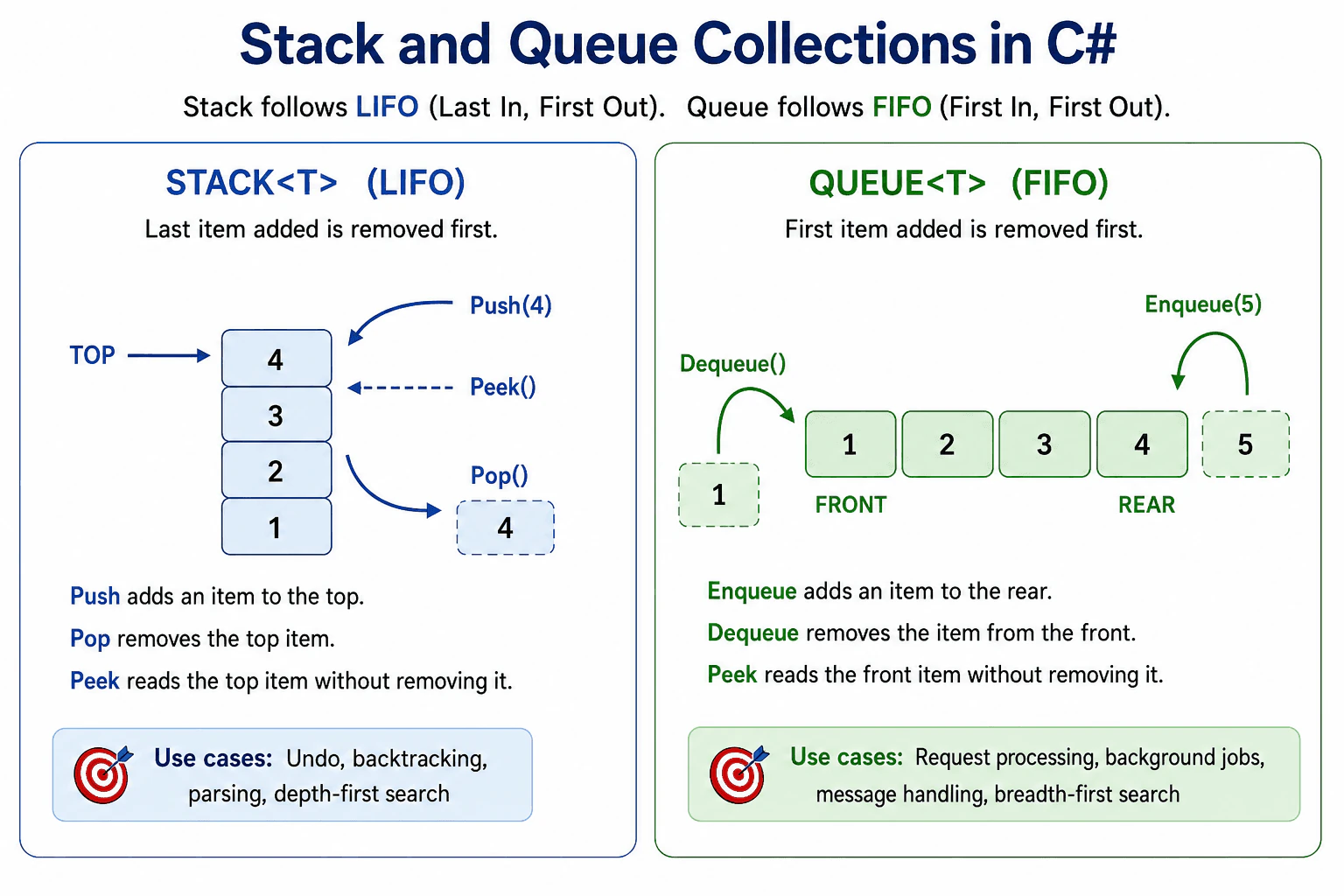
Describe LIFO versus FIFO behavior, the operations each collection supports, and typical use cases.
Short Interview Answer (30-60 seconds)
A Stack<T> uses last in first out, so the newest item is removed first. A Queue<T> uses first in first out, so the oldest item is removed first. In C#, I use Push and Pop for a stack, and Enqueue and Dequeue for a queue.
Detailed Explanation
This question asks about two simple ways to store items in C#. One way keeps the newest item on top. The other way keeps items in arrival order. A stack removes the last item added first. A queue removes the first item added first. In an interview, I would name the operations, explain the order rule, and give one real use case for each. This helps show I know when each collection fits.
Useful Questions to Ask the Interviewer
Do you want me to focus on Stack<T> and Queue<T>?
Should I compare them with List<T> or concurrent collections?
How to Explain It in an Interview
In C#, Stack<T> and Queue<T> are built in generic collections in System.Collections.Generic. A stack follows last in first out. You add items with Push, read the top item with Peek, and remove the top item with Pop. A queue follows first in first out. You add items with Enqueue, read the first item with Peek, and remove the first item with Dequeue.
The reason they behave this way is simple. They are designed for different job patterns. A stack is good when the most recent item should be handled first, such as undo, backtracking, parsing, or depth first search style work. A queue is good when items should be handled in arrival order, such as request processing, background work, message handling, or breadth first search style work.
Both collections grow as needed and are usually fast for add and remove at the allowed end. Random access is not their strength. They are also not thread safe by default, so shared use across threads needs care or a concurrent collection. A common mistake is using List<T> like a queue and removing from the front, which is slower because items must shift.
Why Interviewers Ask This
Interviewers ask this to check whether you know the basic C# collections and the order rules they follow. It also shows whether you can choose the right collection for the job and explain the runtime behavior in simple terms.
Common interview mistakes
A common mistake is mixing up the order rules. Another mistake is saying both collections work the same way. Some people also use List<T> for queue behavior and remove from the front, which is a poor choice because it shifts the remaining items. Another mistake is forgetting that Pop, Dequeue, and Peek can fail on an empty collection. It is also wrong to assume these collections are thread safe by default.
Interview tip
Start with the order rule, then name the main methods, then give one real use case for each collection. Keep the explanation short and clear.
Interviewer may ask next
What happens if I call Pop or Dequeue on an empty collection?
It throws InvalidOperationException. That matters because you should check whether the collection has items before removing one. Peek can also fail on an empty collection, so empty checks help prevent runtime errors.
When should I use Queue<T> instead of List<T>?
Use Queue<T> when you need first in first out processing. That matters because Queue<T> keeps add and remove operations at the correct ends of the collection. A List<T> can remove from the front, but that shifts the other items and costs more work, so Queue<T> is a better fit for work lines and message processing.
35. When would you use HashSet<T>?Language SpecificEasy
i Question Details
Explain uniqueness, constant-time membership checks, and the difference from list-style duplicate-friendly storage.
Short Interview Answer (30-60 seconds)
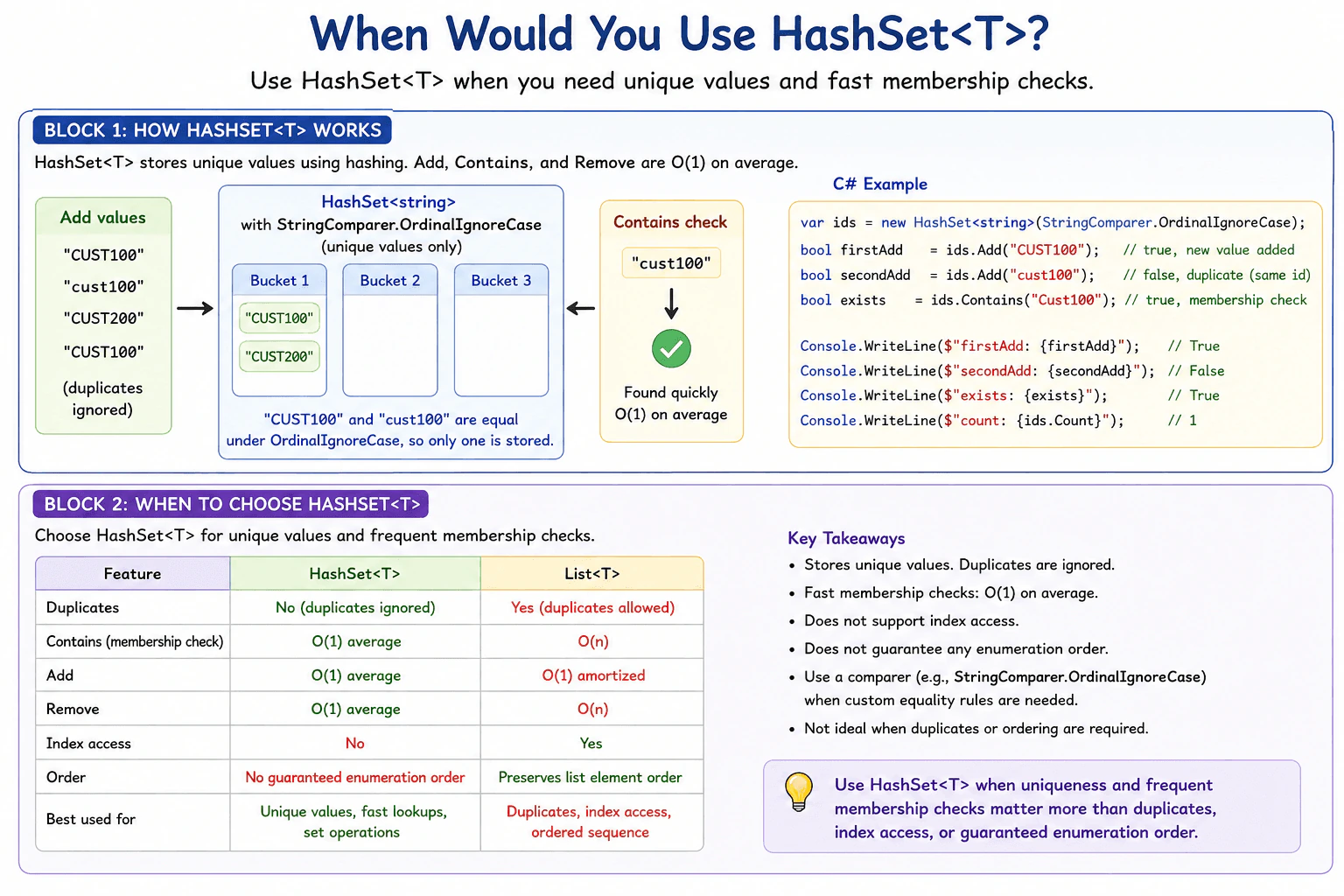
I would use HashSet<T> when I need to store unique values and frequently check whether a value is already present. Add, Remove, and Contains normally take constant time on average because HashSet<T> uses hashing. Unlike List<T>, it does not keep duplicate values, and I would not choose it when I need numeric index access, duplicate friendly storage, or a guaranteed iteration order.
Use HashSet<T> when you need a group of values where each value should appear only once. It is especially useful when your program often asks whether a value is already in the group. For example, you may collect customer identifiers and want repeated identifiers to be ignored automatically. A normal list allows the same value to appear many times and usually checks values one by one when searching. A set is designed for uniqueness and quick membership checks. The choice mainly depends on whether duplicates, ordering, index access, and frequent membership checks matter.
Useful Questions to Ask the Interviewer
Do the values need to be unique?
Does the order of the values matter?
Will membership checks happen frequently?
How to Explain It in an Interview
HashSet<T> is a collection in the .NET Base Class Library that stores unique values. When you call Add, it checks whether an equal value is already present. If the value is new, Add stores it and returns true. If an equal value already exists, Add returns false and the collection is unchanged.
HashSet<T> uses hashing to organize its values. It obtains a hash code and uses equality comparison when needed to decide whether an incoming value matches an existing member. Add, Contains, and Remove therefore normally take O(1) time on average. In an unfavorable case with many collisions, an operation can take longer. By comparison, List<T>.Contains normally examines elements one at a time and takes O(n) time.
I would use HashSet<T> for tasks such as keeping unique customer identifiers, tracking values that have already been processed, checking allowed values, or performing set operations. HashSet<T> provides operations such as UnionWith, IntersectWith, and ExceptWith.
I would not use it when duplicate entries are meaningful, when I need access by numeric index, or when I require a guaranteed iteration order. HashSet<T> does not promise a particular enumeration order.
Equality is important. By default, HashSet<T> uses EqualityComparer<T>.Default. You can also provide an IEqualityComparer<T> when the application needs different equality rules. For example, StringComparer.OrdinalIgnoreCase can make string membership checks ignore letter case.
For custom mutable objects, values used in equality and hash code calculations should not be changed while the object is stored in the set. Changing them can make later lookups fail because the object may no longer belong in the location chosen from its earlier hash code.
HashSet<T> also uses extra memory for its internal hash based storage. That memory cost is often worthwhile when uniqueness and frequent membership checks are more important than compact sequential storage.
Code
using System;
using System.Collections.Generic;
publicstaticclassProgram
{
publicstaticvoidMain()
{
// Use one consistent equality rule for adding and checking customer identifiers.var customerIds = new HashSet<string>(StringComparer.OrdinalIgnoreCase);
// This identifier is new, so Add stores it and returns true.bool firstAdd = customerIds.Add("CUST100");
// The comparer treats this value as equal to the existing identifier, so Add returns false.bool secondAdd = customerIds.Add("cust100");
// Contains uses the same comparer and therefore finds the stored identifier.bool exists = customerIds.Contains("Cust100");
Console.WriteLine(firstAdd);
Console.WriteLine(secondAdd);
Console.WriteLine(exists);
Console.WriteLine(customerIds.Count);
}
}
Why Interviewers Ask This
Interviewers ask this to check whether a candidate can choose the right C# collection based on uniqueness, membership checks, equality rules, performance, memory use, and ordering requirements instead of using List<T> for every collection.
Common interview mistakes
A common mistake is using HashSet<T> when duplicate values must be preserved. Another is expecting values to remain in insertion order or trying to access them by numeric index. Developers may also forget that equality controls uniqueness. For custom types, Equals and GetHashCode must follow a consistent equality contract. Another important mistake is changing a stored object's fields when those fields affect equality or its hash code, because later Contains or Remove calls may fail to find it. It is also wrong to assume HashSet<T> always uses less memory than List<T>, since its hash based lookup requires additional internal storage.
Interview tip
Start with the decision rule: use HashSet<T> for unique values and frequent membership checks. Then compare it with List<T>: a list keeps duplicates and supports numeric index access, while a set enforces uniqueness and normally gives faster membership checks. Mention equality rules, the lack of guaranteed iteration order, and the risk of changing equality related state after insertion.
Interviewer may ask next
What happens if two different values have the same hash code in a HashSet<T>?
They can both be stored if the equality comparison says they are different. A matching hash code does not mean two values are equal. HashSet<T> uses equality checks to distinguish values that have the same hash code. This matters because hash collisions are valid, although many collisions can make membership operations slower.
When would you choose List<T> instead of HashSet<T>?
I would choose List<T> when duplicate values are meaningful, when I need numeric index access, or when list style storage fits the required behavior. HashSet<T> is better when uniqueness and frequent membership checks are the main requirements. The main tradeoff is that HashSet<T> normally gives faster membership checks but uses extra memory for hash based lookup and does not provide numeric index access or a guaranteed iteration order.
36. What is the difference between break, continue, and return?Language SpecificEasy
i Question Details
Explain What is the difference between break, continue, and return in C# with a simple example, common mistakes, and when it matters in production.
Short Interview Answer (30-60 seconds)
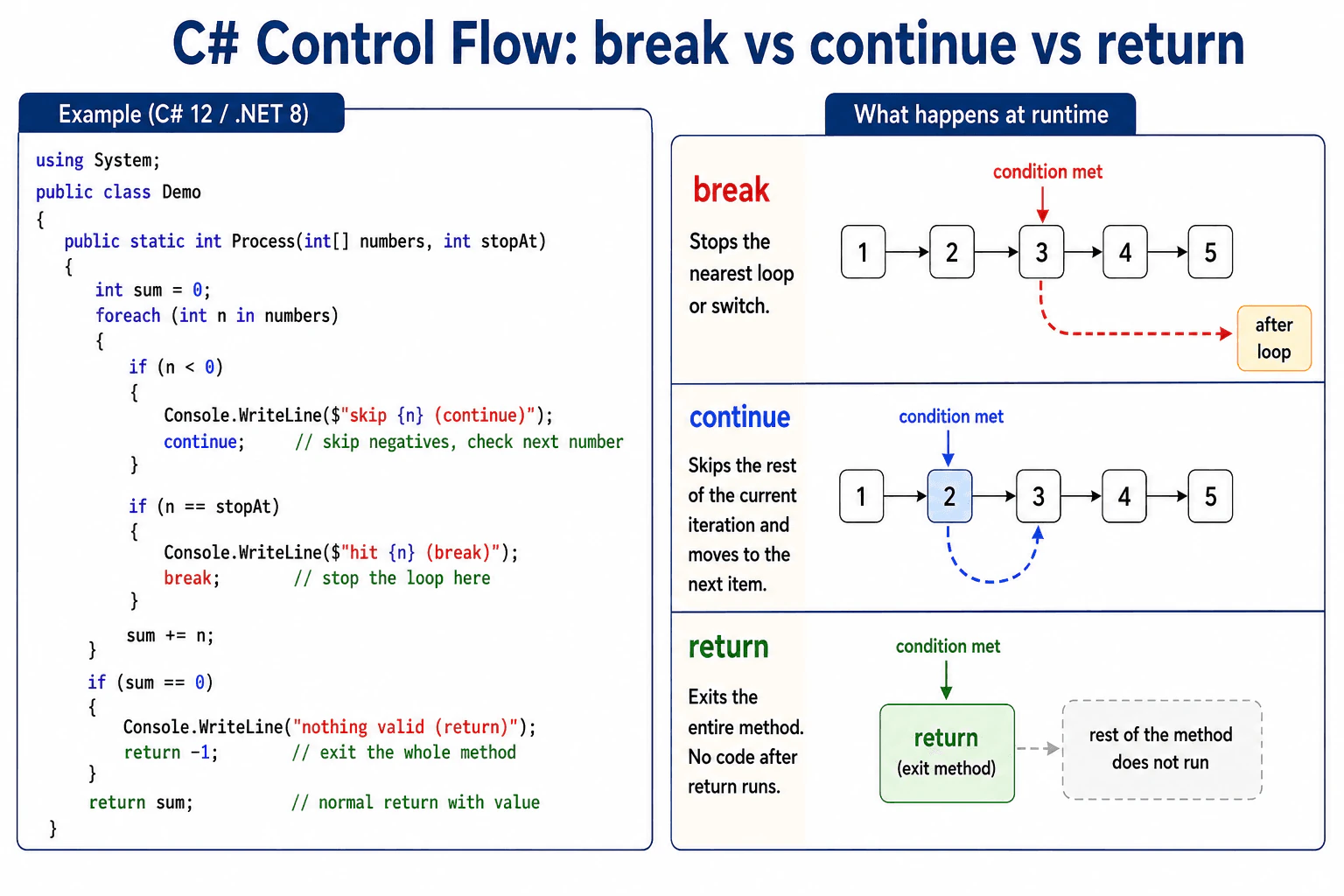
Break stops the nearest loop or switch, continue skips the rest of the current loop step and moves to the next one, and return exits the whole method. The main practical point is that return ends everything right away, while break and continue only affect the current loop or switch.
Detailed Explanation
This question asks how three small words change what a program does next. One word stops a repeating action. One word skips the rest of the current pass and moves to the next one. One word ends the whole routine right away. In C sharp, the difference matters because using the wrong word can make code stop too soon or keep doing work it should skip. Interviewers want to see that I know the scope of each word and when each one is the safest choice.
Useful Questions to Ask the Interviewer
Is this inside a loop, a switch, or a method?
Do you want to stop one pass or stop all work?
How to Explain It in an Interview
Use break when you want to leave the nearest loop or switch. Use continue when you want to skip the rest of the current loop step and move to the next item. Use return when you want to exit the whole method immediately, with or without a value.
The key idea is scope. break only affects the nearest loop or switch. continue only works inside a loop. return ends the current method, so any code after it does not run. That is why return is stronger than break and continue.
In production, break is useful when you found the item you needed. continue is useful when one item should be ignored but the loop should keep going. return is useful when a condition makes the rest of the method unnecessary, such as invalid input or a failed check.
A simple example is a loop that scans numbers. break stops after the first match. continue skips bad values and keeps scanning. return leaves the method completely, which can be clearer when the whole operation should stop. One important edge case is a while loop. If you use continue before updating the counter, you can create an endless loop.
Why Interviewers Ask This
Interviewers ask this to check whether you know how C sharp changes control flow in a loop or in a method, and whether you can pick the right word for the job.
Common interview mistakes
A common mistake is thinking break leaves every loop. It only leaves the nearest one. Another mistake is using continue in a while loop before the counter changes, which can trap the code in an endless loop. Another mistake is using return when only the loop should stop, which can skip cleanup or later work in the method.
Interview tip
Say the scope first. break stops the nearest loop or switch, continue skips one iteration, and return exits the method. Then give one short example from a loop.
Interviewer may ask next
What happens with break in nested loops?
Break only exits the nearest loop or switch. In nested loops, the outer loop keeps running. If you need to stop both loops, you can use return, a flag, or move the inner work into a separate method.
When should I use return instead of break?
Use return when the whole method should stop, such as invalid input or a failed check. The tradeoff is that return can make cleanup less obvious, so use using blocks or finally when resources must always be released.
37. What is recursion and when should it be used?Language SpecificEasy
i Question Details
Describe the call pattern, termination condition, and the tradeoff between clarity and stack depth for recursive solutions.
Short Interview Answer (30-60 seconds)
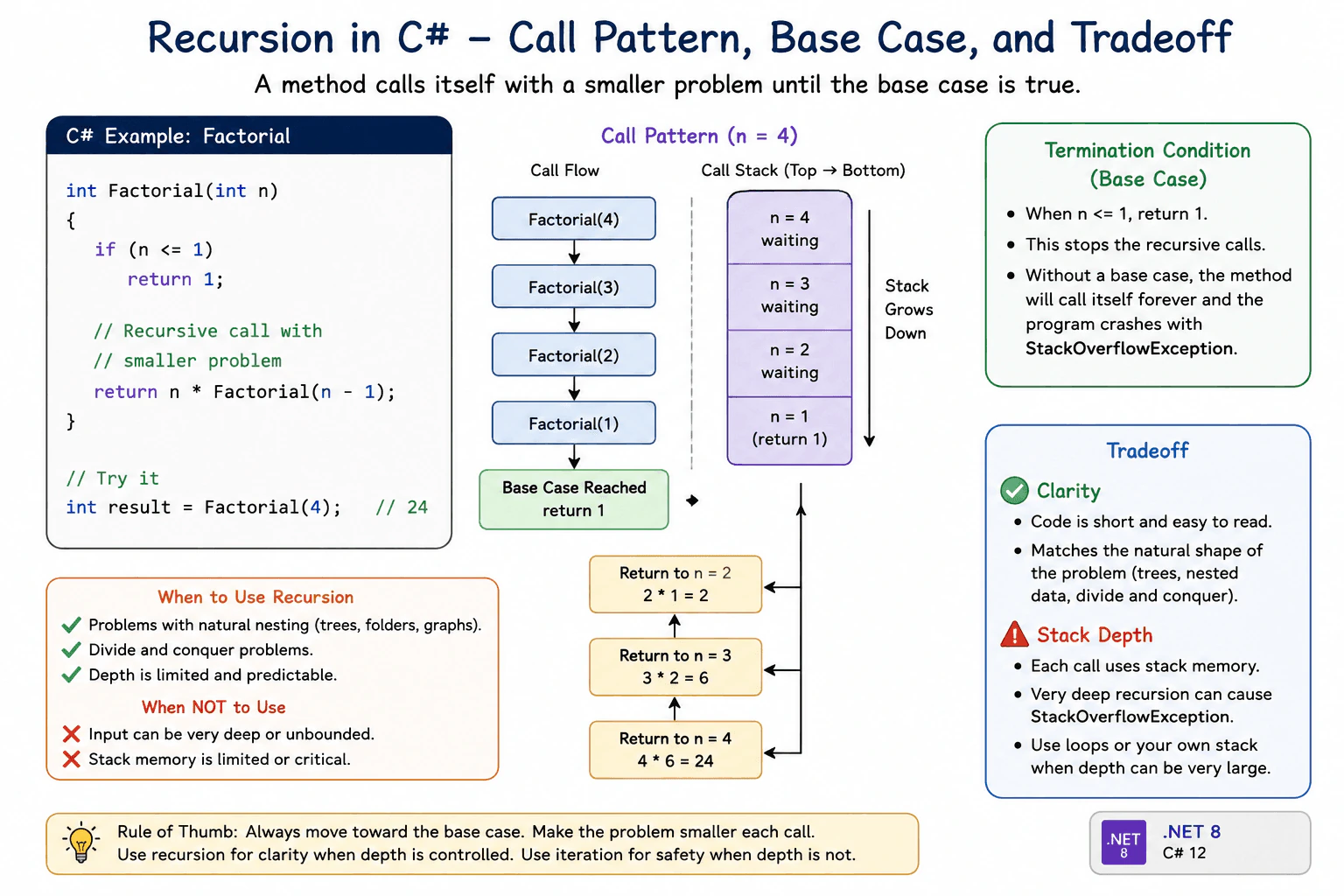
Recursion is when a method calls itself to solve a smaller version of the same problem. I use it when the problem naturally breaks into smaller parts, like a tree, and I always make sure there is a base case so the calls stop.
Detailed Explanation
Recursion is a way to solve a problem by asking the same method to solve a smaller version of the same problem again and again until it reaches a stopping point. It works best when the problem has a natural repeated shape, like folders inside folders, nested data, or a tree. It is not the best choice for very deep data because each call uses more stack memory. So the main idea is to keep the stopping point clear and make sure each step gets smaller.
Useful Questions to Ask the Interviewer
How deep can the input get in production?
Do you prefer the clearest version or the safest version for deep data?
How to Explain It in an Interview
Recursion means a method calls itself to solve a smaller part of the same problem. In C#, each call adds a new stack frame, which is the runtime memory used to keep track of that call. That is why a recursive method must have a base case, which is the condition that stops the method from calling itself again.
I would use recursion when the data or the problem is naturally nested and the depth is not too large. Common examples are walking a tree, reading nested folders, or solving a problem that splits into smaller subproblems. Recursion can make code shorter and easier to read because it matches the shape of the problem.
The main tradeoff is stack usage. Every call uses more memory, so very deep recursion can fail with StackOverflowException. In production, that matters when input size is not controlled. In those cases, an iterative loop or an explicit stack is often safer. So my rule is simple: use recursion for clarity when the depth is limited, and use a loop when the input can grow too deep.
Why Interviewers Ask This
They want to see if I understand how a method can call itself, how the calls stop, and what that does to stack memory in C#. They also want to know if I can choose recursion only when it fits the problem.
Common interview mistakes
Forgetting the base case. Making a call that does not get smaller. Using recursion on very deep data and causing a stack overflow. Assuming recursion is always faster than a loop. Ignoring the memory cost of each call.
Interview tip
Say the base case first, then the smaller call, then the tradeoff. End by saying you choose recursion only when the depth is controlled.
Interviewer may ask next
What happens if the base case is missing?
The method keeps calling itself until the stack runs out. In C#, that usually ends with StackOverflowException, which is a serious failure and is not a normal exception you should plan to catch. The base case matters because it is what stops the call chain.
When would you choose a loop instead?
I choose a loop when the input can be very deep, when stack safety matters, or when the recursive version would create too many calls. The tradeoff is that the loop can be less direct to read, but it uses less stack memory and is safer for production.
38. What is the difference between for and foreach loops?Language SpecificEasy
i Question Details
Compare iteration mechanics, mutation behavior, and when each loop is a better fit in C#.
Short Interview Answer (30-60 seconds)
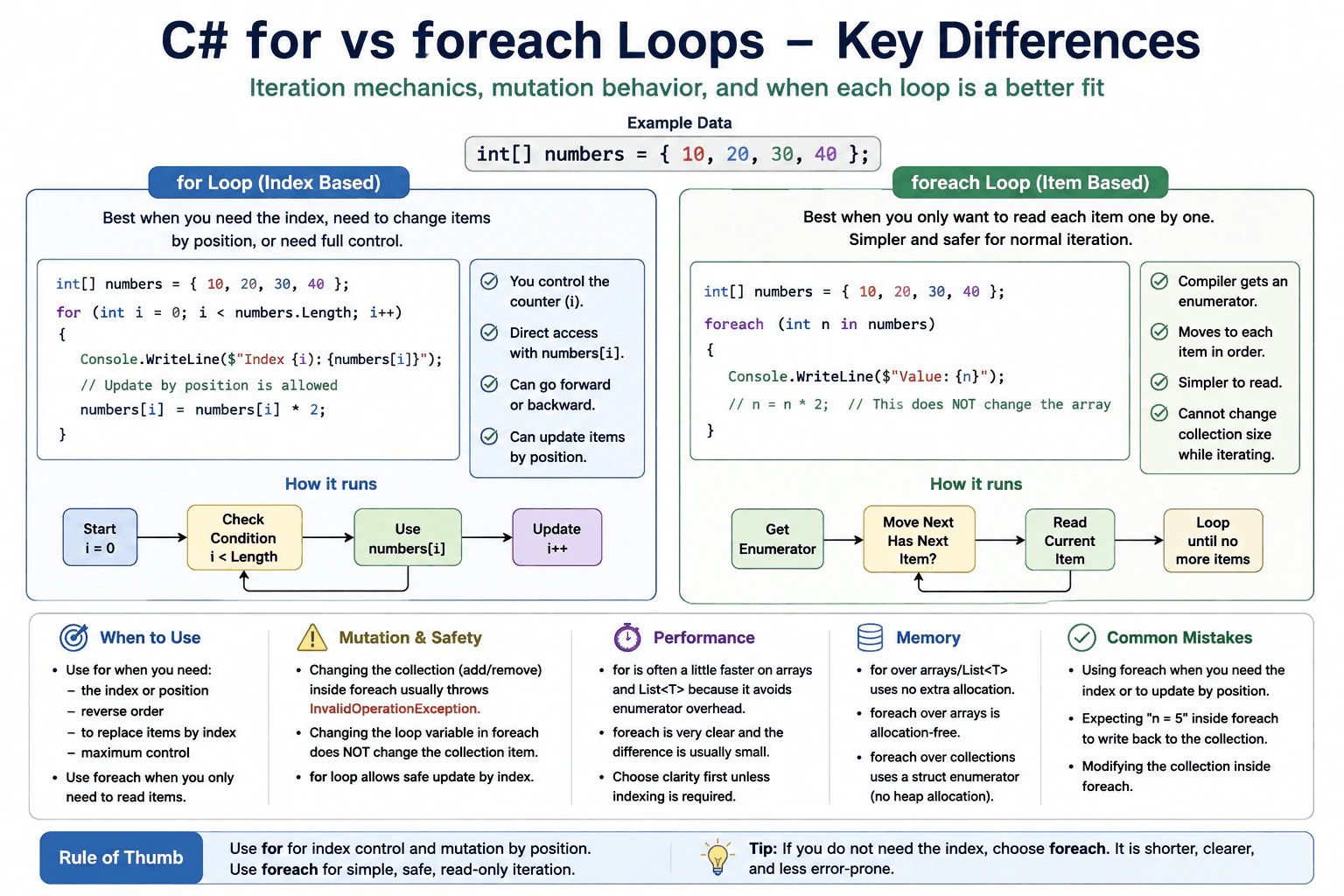
Use for when I need the index, need to change items by position, or need full control over the loop counter. Use foreach when I only want to read each item one by one. In C#, foreach is simpler and safer for normal iteration, while for is better for index based work and some mutation tasks.
Detailed Explanation
In plain words, for is best when you already know the start and end of the loop, or when you need the index. foreach is best when you want to read every item in a sequence one by one. In C#, for gives you direct control over the counter and lets you update items by position. foreach is simpler to read, but it is mainly for walking through items, not for changing the sequence structure while you loop.
Useful Questions to Ask the Interviewer
Do you need the item position or only the item?
Is the collection a list, array, or something else?
How to Explain It in an Interview
A for loop is an index based loop. You write the start, the end condition, and how the counter changes. That makes it a good fit for arrays and List<T> when you need the position of each item, need to update by index, or want reverse order. A foreach loop is item based. It asks the collection for an enumerator and moves through each item in order. That makes the code shorter and easier to read.
The main runtime difference is control. With for, you control the counter and can access collection[i]. With foreach, you do not manage the counter yourself. That is why foreach is a better fit when you only need to read items. It also helps avoid off by one mistakes. In C#, foreach over arrays and many collections is very clear and often has little overhead. For some cases, for can be a little faster, especially when direct indexing is useful.
A key limitation is mutation. In many collections, changing the collection while inside foreach is not allowed and can throw InvalidOperationException. Also, assigning to the loop variable in foreach does not write back into the collection item slot. Use for when you need to replace items by position. Use foreach when you want simple and safe reading code.
Why Interviewers Ask This
Interviewers want to see whether I understand how C# iteration works, when I need index control, and when the loop should stay read only. They also want to know if I understand how the compiler and runtime handle enumeration, mutation, and safety while walking through a sequence.
Common interview mistakes
A common mistake is thinking foreach can safely change the collection structure while looping. In many C# collections, that can fail. Another mistake is thinking changing the foreach loop variable changes the item in the collection. It usually only changes the local copy. Another mistake is using for when no index is needed, which makes the code longer for no gain.
Interview tip
Start with the rule of thumb. Say that for is index based and foreach is item based. Then add one practical point about mutation or safety, because that is what shows real C# knowledge.
Interviewer may ask next
What happens if I change a collection inside foreach?
Usually the loop becomes invalid and can throw InvalidOperationException for many standard collections like List<T>. That happens because the enumerator detects that the collection changed while it was being read. This matters because foreach is meant for stable iteration, not structural changes.
Which one is better for performance?
For arrays and List<T>, for can be a little faster when you need direct index access, because it avoids extra iterator work and gives you the item slot directly. But in many real cases the difference is small, so clarity is often more important. Use for when indexing matters, and use foreach when simple reading is the goal.
39. What is exception handling in C#?Language SpecificEasy
i Question Details
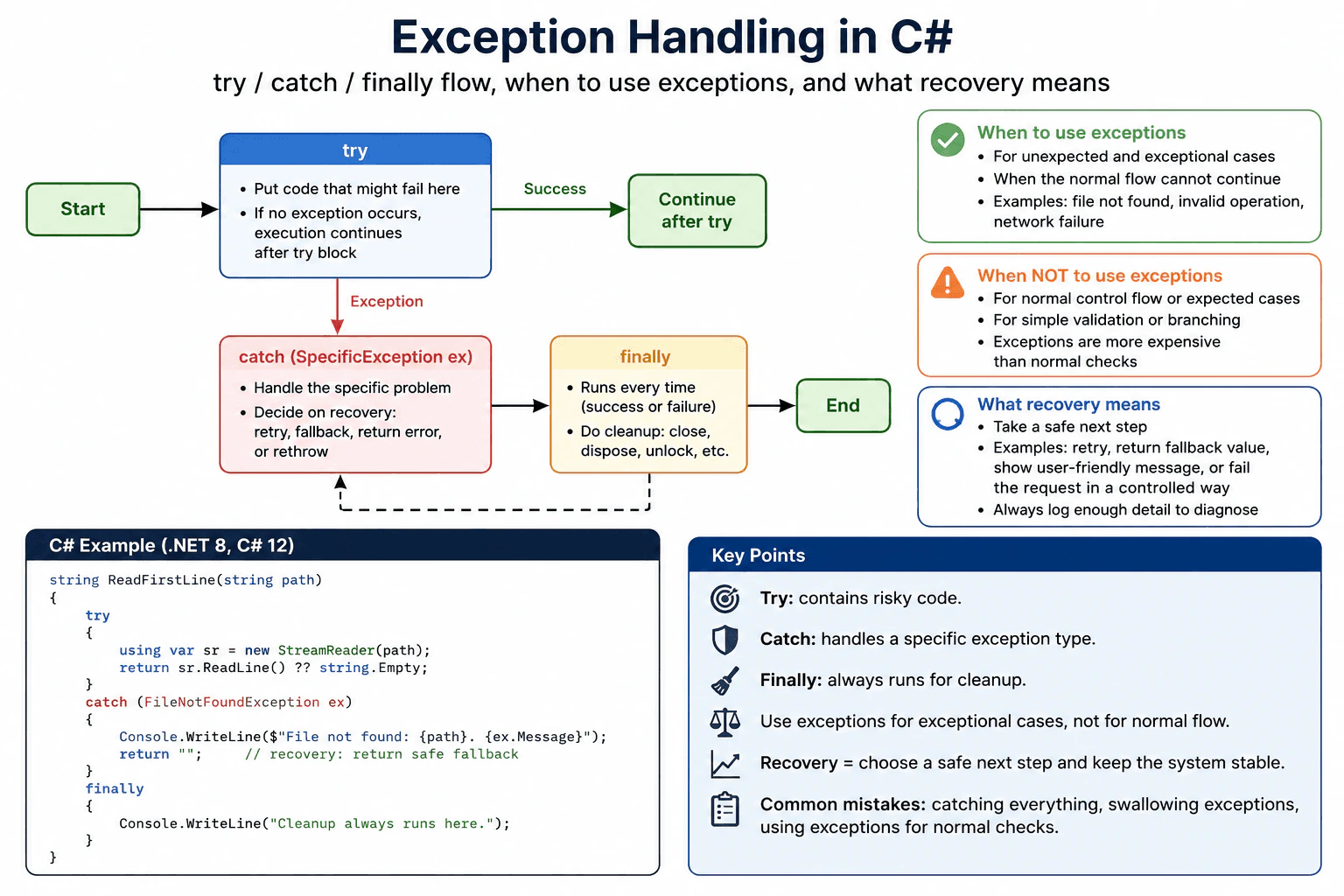
Cover try/catch/finally flow, when exceptions should be reserved for exceptional cases, and what recovery means in practice.
Short Interview Answer (30-60 seconds)
Exception handling in C# is how I deal with unexpected failures. I put risky code in try, handle the failure in catch, and use finally for cleanup that must run whether it succeeds or fails. I use exceptions for truly unexpected cases, not for normal control flow.
Detailed Explanation
Exception handling in C# is the way a program deals with an unexpected problem while it is running. Instead of crashing or keeping bad data, it can move to a safer path. The question asks how C# separates the part that might fail, the part that deals with the problem, and the part that still has to run at the end. It also asks when a program should stop and when it should try to recover in a controlled way.
Useful Questions to Ask the Interviewer
Do you want me to focus on application code or library code?
Should I include how we log and recover from failures in production?
How to Explain It in an Interview
C# uses exceptions to signal failure that the normal path cannot handle. The try block contains the code that may fail. Each catch block handles one kind of problem, such as a file error or an invalid operation. That is why specific catch types are better than a broad catch for everything. The finally block runs after try and after catch, even when the code throws again. That makes it the right place for cleanup, like closing a stream, releasing a lock, or disposing a resource.
Exceptions should be reserved for rare and unexpected cases. They are not a good choice for normal checks such as missing input that you can test with if, or for simple validation that can return a result. Throwing an exception is more expensive than a normal branch because the runtime builds exception data and stack trace information. The memory cost also appears at throw time, because the exception object and related state must be created and tracked. In production, I catch only what I can truly handle, log enough detail to diagnose the problem, and either recover with a safe fallback or let the exception move upward. Recovery means the app chooses a controlled next step instead of hiding the failure. For example, a web app might show an error page, retry a transient network call, or return a clear error to the caller. The main edge case is not to swallow exceptions and pretend success, because that can hide bugs and corrupt state.
Why Interviewers Ask This
Interviewers ask this to check whether I understand how C# reports failures, how control flow moves through try, catch, and finally, and when an exception should be used instead of a normal return value. They also want to see whether I can judge recovery correctly in production code.
Common interview mistakes
A common mistake is catching every exception and doing nothing. That hides real bugs. Another mistake is using exceptions for normal checks, like a missing item that could have been handled with a normal if test. People also forget that finally still runs, so it is the right place for cleanup. Another mistake is catching the wrong type and missing the real failure.
Interview tip
Say the flow in order: try for risky code, catch for handling, finally for cleanup. Then add that exceptions are for unexpected failures and that recovery means making the failure safe, visible, and controlled.
Interviewer may ask next
What happens if a catch block does not handle the exception?
If a catch block does not handle the exception, it can rethrow it or let it continue upward. The exact behavior matters because the next matching catch higher in the call stack gets a chance to handle it. This is useful when the current code cannot recover safely and a parent layer, such as a web request handler, should decide what to do.
Why not use exceptions for normal input checks?
Because normal input checks are not exceptional in C#. Using exceptions for common cases makes the code slower and harder to read. It also mixes expected control flow with failure handling. For normal validation, a simple if check, Try pattern, or validation result is usually better. Save exceptions for rare, unexpected failures.
40. What is the purpose of the finally block?Language SpecificEasy
i Question Details
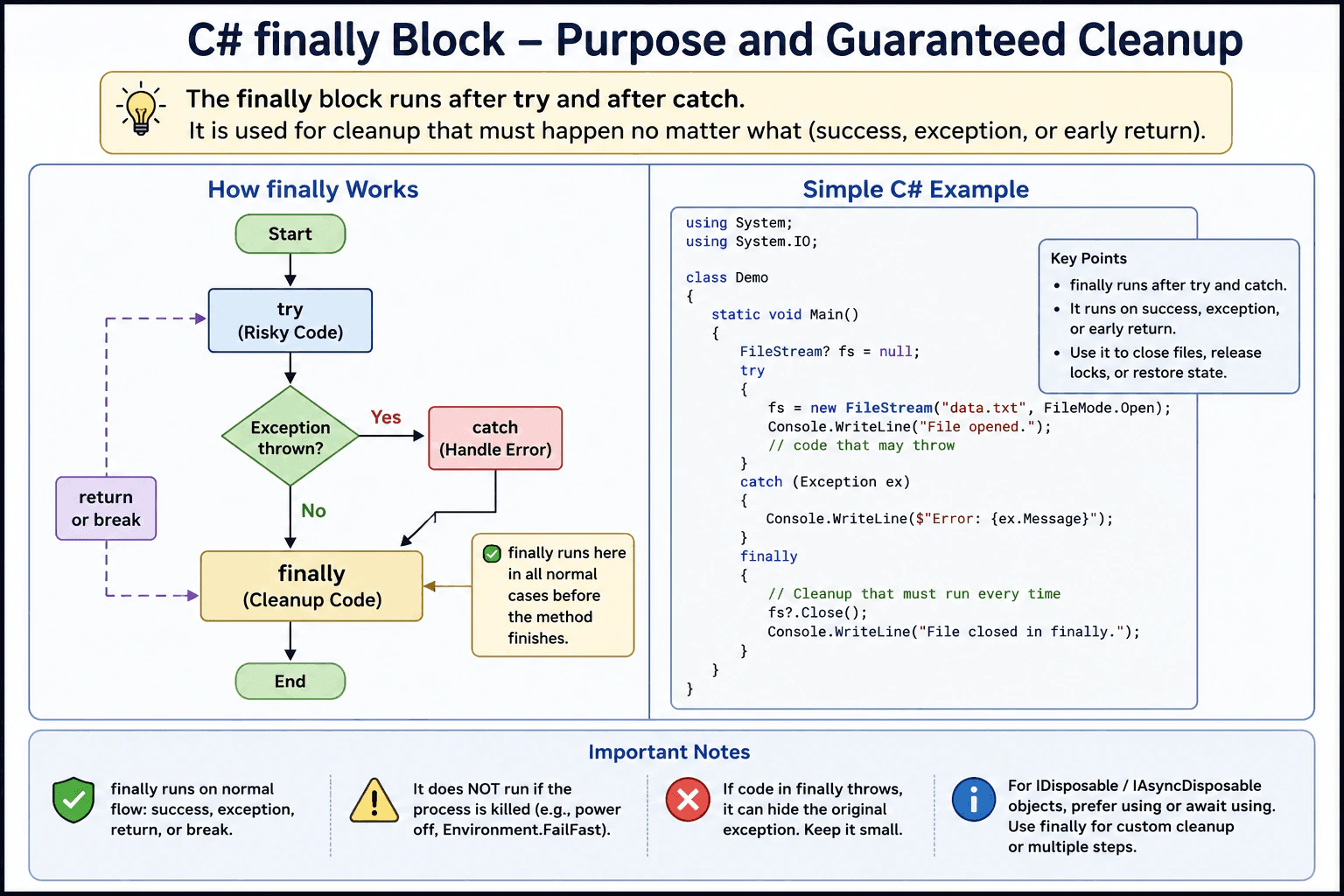
Explain guaranteed cleanup semantics and where finally belongs when resources must be released.
Short Interview Answer (30-60 seconds)
The finally block is for cleanup that must run after try or catch, even when an exception happens. I use it to close files, release locks, or restore state. For disposable objects, using or await using is usually the better choice.
Detailed Explanation
When code does not finish in the normal way, finally is the place for the clean up work that still must happen. It is used to close a file, unlock something, or put values back the way they were. That helps keep the program from leaving things open or half done. It is not where you fix the problem itself. That belongs in the error handling part. The point is to make sure important clean up still happens before the method ends, even if the main work stops early.
Useful Questions to Ask the Interviewer
Is this cleanup for a disposable resource or custom state?
Should this cleanup run even if the code throws or returns early?
How to Explain It in an Interview
In C#, finally is the cleanup block that runs after try and after catch. It is the right place for actions that must happen no matter what, such as closing a stream, releasing a lock, rolling back work, or restoring shared state. That is why it is useful in production code where partial work must not leave the system in a bad state.
The key idea is that finally is about guaranteed cleanup, not about handling the error itself. If you need to react to the error, use catch. If you need to clean up, use finally. If the resource is IDisposable, using or await using is usually simpler and safer because C# turns that into cleanup for you. Use finally when cleanup is custom, when you need more control, or when you must clean up several things in a specific order.
One limitation is that finally cannot protect against every kind of sudden process stop. It is reliable for normal exception flow, return, and break paths, but not for abrupt termination. Also, if code inside finally throws, it can hide the original problem, so cleanup code should stay small and safe.
Why Interviewers Ask This
They want to see whether you know how C# keeps cleanup code safe when work fails, and whether you understand when finally is the right place to release resources or restore state.
Common interview mistakes
A common mistake is to put error handling work in finally instead of catch. Another mistake is assuming finally always runs in every possible failure, including abrupt process stop. People also forget that cleanup code in finally should stay small, because if it throws, it can hide the real exception. For IDisposable objects, another mistake is writing manual finally cleanup when using would be clearer.
Interview tip
Say that finally is for cleanup, not for handling the error. Then give one simple example like closing a file or releasing a lock, and mention that using is usually preferred for disposable objects.
Interviewer may ask next
Does finally run after a return inside try?
Yes. In normal flow, finally runs before the method leaves the try block, even if the code returns or throws. That is why it is safe for cleanup. The main limit is abrupt process stop, where no cleanup can be trusted.
Should I use finally instead of using for IDisposable objects?
No, not usually. For IDisposable and IAsyncDisposable objects, using and await using are better because they are shorter and less error prone. Use finally when you need custom cleanup, several steps in one place, or more control over the order of cleanup. The tradeoff is more manual code.
More questions load as you scroll
Disclaimer: This interview guide is for educational and informational purposes only. It is designed to help readers prepare, but it does not guarantee any interview result, hiring decision, offer, or outcome. Interview questions, hiring criteria, and preferred answers can vary by employer, interviewer, industry, location, and time. All answers, examples, and explanations in this guide are suggested examples for interview preparation, not definitive answers or instructions for professional practice. They are based on research and judgment, are provided without warranties of any kind, and should be adapted to the question, role, and applicable laws and professional requirements. Diagrams are simplified illustrations intended to highlight the main concepts and their relationships; actual situations, systems, and practices may be more complex. Alternative approaches may be equally valid or better suited to a particular question, context, or interviewer. To the fullest extent permitted by applicable law, the contributors and publisher are not liable for decisions made, actions taken, or losses incurred based on this guide.
State Laws and Professional Responsibilities: Laws and requirements governing an occupation vary by state and jurisdiction. You are responsible for checking the current laws, licensing requirements, and scope-of-practice rules that apply to your location and role, and for ensuring that your answers and actions comply with them. Adapt examples in this guide to those requirements. This guide is not legal advice.
Content Accuracy and Verification: To the fullest extent permitted by applicable law, we do not represent or warrant that interview guides, questions, answers, examples, or diagrams are accurate, complete, current, error-free, or suitable for any particular purpose. You are responsible for independently reviewing and verifying the information before relying on it.