This interview guide is for educational and informational purposes only. It is designed to help readers prepare, but it does not guarantee any interview result, hiring decision, offer, or outcome. Interview questions, hiring criteria, and preferred answers can vary by employer, interviewer, industry, location, and time. All answers, examples, and explanations in this guide are suggested examples for interview preparation, not definitive answers or instructions for professional practice. They are based on research and judgment, are provided without warranties of any kind, and should be adapted to the question, role, and applicable laws and professional requirements. Diagrams are simplified illustrations intended to highlight the main concepts and their relationships; actual situations, systems, and practices may be more complex. Alternative approaches may be equally valid or better suited to a particular question, context, or interviewer. To the fullest extent permitted by applicable law, the contributors and publisher are not liable for decisions made, actions taken, or losses incurred based on this guide.
State Laws and Professional Responsibilities
Laws and requirements governing an occupation vary by state and jurisdiction. You are responsible for checking the current laws, licensing requirements, and scope-of-practice rules that apply to your location and role, and for ensuring that your answers and actions comply with them. Adapt examples in this guide to those requirements. This guide is not legal advice.
Identity, Image, and Privacy Notice
To respect individual privacy, some names, profile photographs, avatars, biographical details, and other identifying information displayed in this guide may be replaced with pseudonyms, licensed stock images, illustrative avatars, composite images, or representative descriptions. Unless a person is expressly identified as an actual contributor, a displayed name, image, or profile should not be understood as depicting or identifying a specific candidate, interviewer, employee, or other real individual. These representations are provided for editorial and illustrative purposes only and do not imply endorsement, employment, participation, or affiliation with this guide or any company mentioned in it. Any resemblance to an actual person is coincidental.
Company Notice
This guide is an independent educational resource and is not affiliated with, endorsed by, sponsored by, or approved by the company named in this guide. Company names identify reported interview experiences or the employer context of clearly labeled original practice exercises. Interview practices can change without notice, and inclusion of company-specific content does not mean these questions are official, complete, or guaranteed to be asked. To the fullest extent permitted by law, the author, contributors, and publisher are not responsible for outcomes related to use of this material.
Content Accuracy and Verification
To the fullest extent permitted by applicable law, we do not represent or warrant that interview guides, questions, answers, examples, or diagrams are accurate, complete, current, error-free, or suitable for any particular purpose. You are responsible for independently reviewing and verifying the information before relying on it.
Questions or comments?
Contact us for general questions, or share feedback, technical corrections, and comments with the community.
101. What is the correct middleware order in ASP.NET Core?Debugging And DiagnosticsEasy
i Question Details
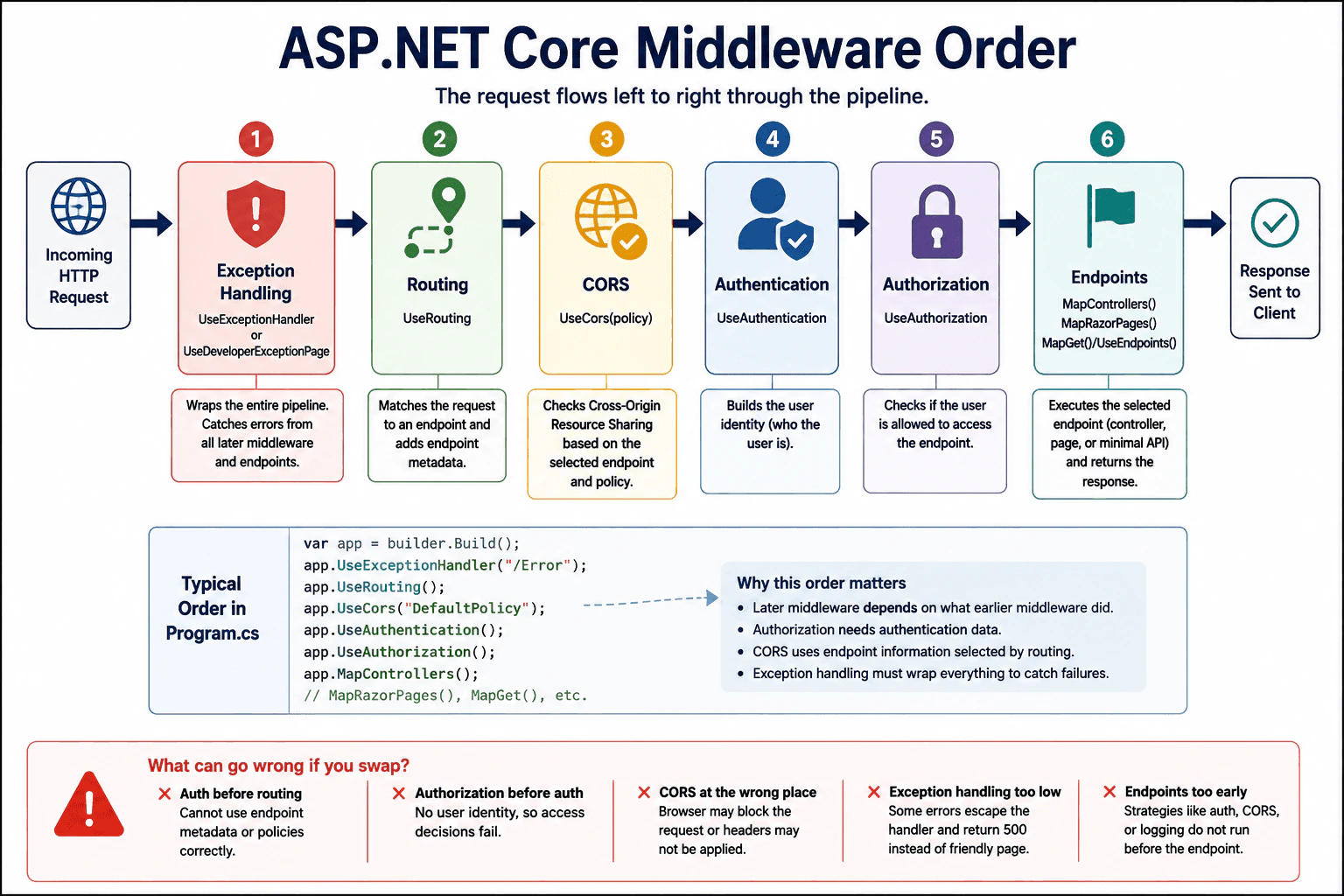
Describe the ordering constraints among exception handling, routing, CORS, authentication, authorization, and endpoints, and why a swap can break the request pipeline.
Short Interview Answer (30-60 seconds)
The usual order is: exception handling first, then routing, then CORS, then authentication, then authorization, and endpoints last. That order matters because later middleware depends on routing and identity data, and exception handling must wrap the rest of the pipeline.
Detailed Explanation
This question asks for the correct order of the steps that handle one incoming web request in an ASP.NET Core app. One step should catch problems first. Another step should find the right page or action. Another step should check browser access. Then the app should confirm who the user is and whether that user is allowed to continue. The final step should run the page, controller, or endpoint. If these steps are moved around, the app may hide errors, block valid requests, or let checks run too late.
Useful Questions to Ask the Interviewer
Are you using minimal APIs, controllers, or both?
Do you want the classic UseRouting and UseEndpoints pattern or the newer Map style?
How to Explain It in an Interview
The safe general order in ASP.NET Core is:
Exception handling first — UseExceptionHandler or UseDeveloperExceptionPage should be near the top so it can catch errors from the rest of the pipeline.
Routing next — UseRouting decides which endpoint matches the request.
CORS after routing — UseCors often needs endpoint metadata or route context to choose the right policy.
Authentication next — UseAuthentication builds the user identity.
Authorization after authentication — UseAuthorization checks whether that user can access the endpoint.
Endpoints last — MapControllers, MapRazorPages, MapGet, or UseEndpoints executes the selected endpoint.
The reason order matters is simple: each step depends on the previous one. If you move authorization before authentication, the app may not know who the user is. If you place CORS in the wrong spot, the browser may block the request. If exception handling is too low in the pipeline, some failures will escape the handler. If routing happens too late, endpoint-based middleware cannot make the right decision.
In an interview, I would say the rule is: wrap first, route early, secure before execute, and map last. That shows both the correct sequence and the reason behind it.
Technical Approach
Put exception handling at the top.
Enable routing.
Apply CORS after routing.
Authenticate the request.
Authorize the user.
Map and run endpoints last.
Verify by testing an unauthenticated request, a blocked CORS request, and a thrown exception.
Practical Insights
Time cost is small because these are per-request checks already needed by the web app. Memory cost is low. The real cost is maintenance: the wrong order creates hard-to-debug failures, so the pipeline must stay consistent and well documented.
Why Interviewers Ask This
This checks whether you understand the ASP.NET Core request pipeline, endpoint routing, and why middleware order changes behavior. It also shows whether you can diagnose bugs caused by misplaced middleware, such as broken auth, failed CORS, or exceptions that bypass handling.
Common interview mistakes
Placing authentication before routing, which can break endpoint-aware policy decisions. Putting authorization before authentication, which leaves no user identity to check. Running CORS after the endpoint, which can cause browser failures. Putting exception handling too late, which lets errors escape unhandled. Forgetting that the exact pattern differs slightly between UseEndpoints and minimal APIs, but the dependency order is still the same.
Interview tip
State the order first, then give one sentence for why each middleware depends on the one before it.
Interviewer may ask next
Does UseCors go before or after UseAuthentication?
Usually after UseRouting and before UseAuthentication and UseAuthorization. That placement lets CORS use the selected endpoint and still run before the request is protected or executed.
What changes in minimal APIs?
The idea stays the same. Exception handling still comes first, routing still happens before auth, authentication still comes before authorization, and endpoint mapping still comes last with MapGet, MapPost, or similar calls.
102. What is the difference between IOptions, IOptionsSnapshot, and IOptionsMonitor?Debugging And DiagnosticsEasy
i Question Details
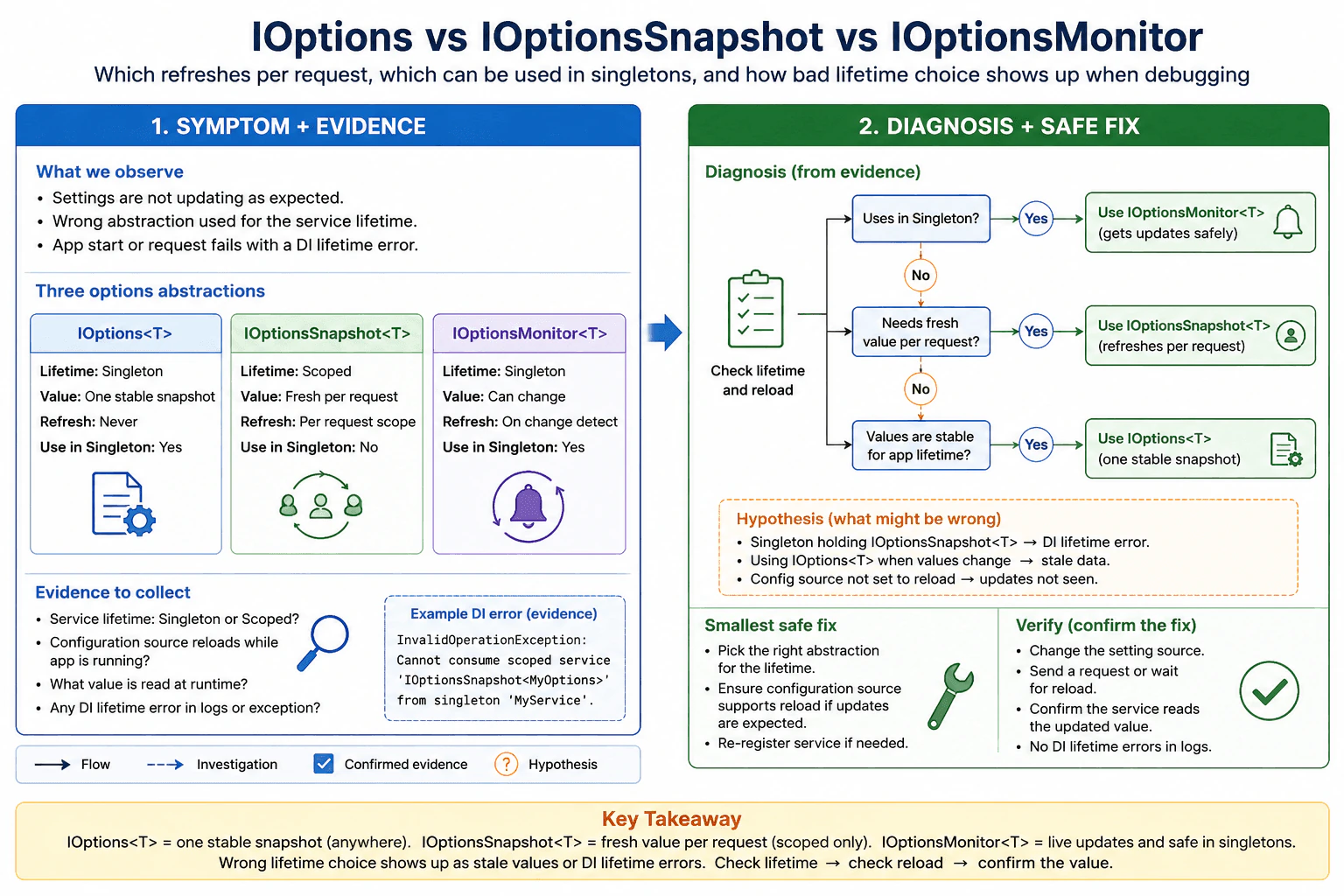
Describe which one refreshes per request, which one can be used in singletons, and how a bad lifetime choice shows up during debugging.
Short Interview Answer (30-60 seconds)
IOptions is a stable app-wide snapshot, IOptionsSnapshot refreshes once per request scope, and IOptionsMonitor is for long-lived services that need updated values. In debugging, the wrong choice shows up as stale configuration or a lifetime mismatch error.
Detailed Explanation
Imagine an app that reads settings from one place. This question asks how three helpers behave when those settings change. One keeps the same copy for the whole app. One gives a fresh copy each time a request starts. One watches for updates while the app is still running. The interviewer also wants to know which helper is safe in long-lived code and how a bad choice shows up as old values or an error when the app starts or handles a request in the wrong place.
Useful Questions to Ask the Interviewer
Do these settings change while the app is running?
Is this code inside a short-lived request or a long-lived service?
How to Explain It in an Interview
Start with the practical rule:
Use IOptions<T> when the values are effectively fixed for the app lifetime.
Use IOptionsSnapshot<T> when you want a fresh value per request scope.
Use IOptionsMonitor<T> when a singleton or background service needs to see updates.
The key lifetime difference is this:
IOptions<T> is a simple options object you can inject anywhere, but it does not re-read changes automatically.
IOptionsSnapshot<T> is scoped, so it is recreated for each request scope. That is why it refreshes per request, but it cannot be injected into a singleton.
IOptionsMonitor<T> is singleton-friendly and can react to reloads. It is the best choice when a long-lived service should use the latest configuration.
How bad lifetime choices appear during debugging:
If a singleton holds IOptionsSnapshot<T>, you usually get a dependency injection lifetime error, because a scoped service is being used from a longer-lived object.
If code uses IOptions<T> or the wrong abstraction for changing settings, the app keeps using old values, so the bug looks like stale configuration.
If IOptionsMonitor<T> is used but the underlying configuration source does not reload, you may still see old values, so you should check the reload settings and the change source.
A good interview answer is: IOptions is for stable values, IOptionsSnapshot is for per-request values, and IOptionsMonitor is for live updates and singleton use. In debugging, I first check the service lifetime, then whether the configuration source reloads, and finally whether the app is reading the current value from the correct abstraction.
Technical Approach
Decide whether the value is stable or can change at runtime.
Use IOptions<T> for stable, app-wide settings.
Use IOptionsSnapshot<T> in controllers or request handlers that should see updated settings on each request.
Use IOptionsMonitor<T> in singleton background workers, hosted services, caches, or long-running processors that must react to configuration updates.
When debugging, confirm the DI lifetime, then confirm config reload behavior, then verify the value being read at runtime.
Practical Insights
Time cost is small because reading options is cheap. Memory cost is also small, but Snapshot creates a fresh copy per request scope. The main maintenance cost is choosing the right lifetime. The wrong choice can cause stale values, DI errors, or confusing bugs during runtime.
Why Interviewers Ask This
This checks whether you understand ASP.NET Core configuration lifetimes, dependency injection scope rules, and how to debug stale or incorrect settings caused by the wrong options abstraction.
Common interview mistakes
A common mistake is injecting IOptionsSnapshot<T> into a singleton and then getting a lifetime error. Another mistake is expecting IOptions<T> to refresh automatically. A third mistake is using IOptionsSnapshot<T> outside a request scope and wondering why the value does not behave like a live update. Another is forgetting that IOptionsMonitor<T> still depends on the configuration source being set up to reload.
Interview tip
Say the lifetime rule first, then the debugging clue. That shows both API knowledge and practical judgment.
Interviewer may ask next
Which one should a singleton service use?
A singleton should use IOptions<T> if the value can stay fixed, or IOptionsMonitor<T> if it needs to see updated values. It should not use IOptionsSnapshot<T>, because Snapshot is scoped and belongs to a request lifetime, not a singleton lifetime.
How do you debug stale option values?
First check whether the right abstraction is injected for that lifetime. Then verify the configuration source supports reload and that reload-on-change is enabled where needed. Next, log the current option value at runtime and compare it with the source file or environment setting. If a singleton still sees old data, IOptionsMonitor<T> is usually the right fix.
103. How does the request pipeline differ behind a reverse proxy?Debugging And DiagnosticsMedium
i Question Details
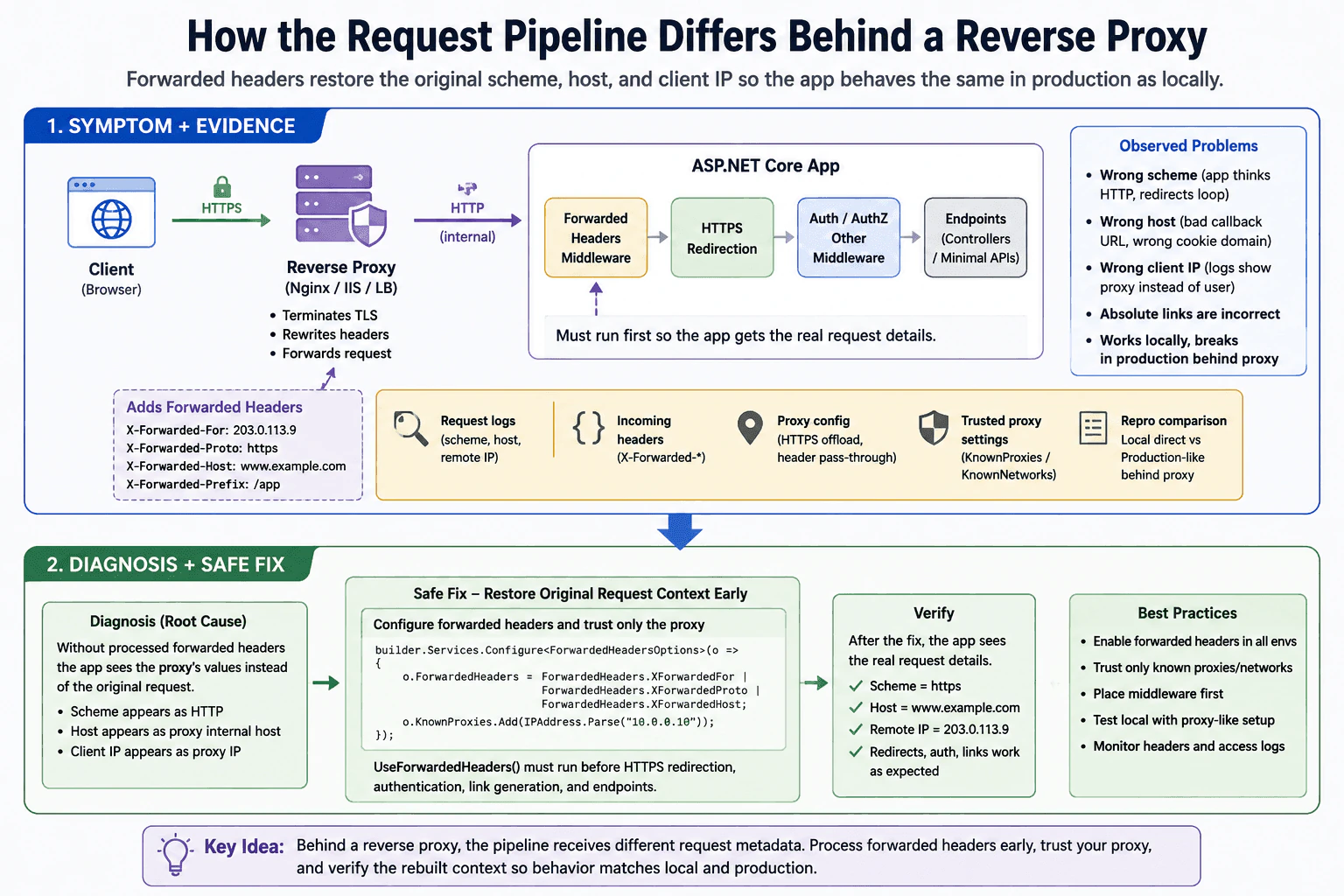
Focus on forwarded headers, original scheme and host, and the mismatches that make debugging local behavior differ from production.
Short Interview Answer (30-60 seconds)
A reverse proxy can hide the original scheme, host, and client IP from the app. In ASP.NET Core, you usually need forwarded headers processed early so redirects, authentication, logging, and link generation use the real request context instead of the proxy’s internal one.
Detailed Explanation
This question asks what changes when another server sits in front of your app. The app may not see the visitor's real web address, secure connection, or home address directly. Instead, it may only see the values from the middle server unless those original details are passed along. That can make a test on your laptop look correct while the live site acts differently. The interviewer wants to know whether you can spot that hidden change, find where it happens, and explain why it affects page jumps, sign-in steps, and links.
Useful Questions to Ask the Interviewer
Is HTTPS terminated at the proxy before the request reaches the app?
Are forwarded headers and trusted proxy settings already configured?
How to Explain It in an Interview
The practical difference is that the app no longer receives the client request exactly as it left the browser. The reverse proxy may terminate TLS, rewrite the host, change the scheme to HTTP internally, and pass the real values in forwarded headers such as X-Forwarded-For, X-Forwarded-Proto, and X-Forwarded-Host.
In ASP.NET Core, I would process forwarded headers early in the pipeline, before HTTPS redirection, authentication, authorization, or link generation. That lets the app rebuild the original request context and avoid bad redirects, wrong callback URLs, incorrect cookies, or logs that show the proxy instead of the real client.
For debugging, I would compare local direct requests with production-like proxy requests, inspect the incoming headers, confirm KnownProxies or KnownNetworks, and check the observed Scheme, Host, and RemoteIpAddress. The root issue is often not the controller code. It is the request metadata that changed on the way in.
Technical Approach
Reproduce the problem with and without the proxy.
Inspect the observed scheme, host, path base, and client IP.
Verify forwarded headers are enabled and run first.
Confirm trusted proxy settings.
Check redirects, auth callbacks, and absolute links.
Add regression tests for proxy and non-proxy paths.
Practical Insights
The runtime cost is usually small. The main cost is configuration and testing. The hard part is not CPU or memory. It is making sure the app sees the same request information in every environment and that the middleware order is correct.
Why Interviewers Ask This
They want to see whether you understand that reverse proxies change what the app can observe, and whether you know how forwarded headers, middleware order, HTTPS termination, host and scheme rewriting, and production-versus-local mismatches affect debugging.
Common interview mistakes
Common mistakes are reading Scheme or Host before forwarded headers run, trusting raw proxy headers from any client, forgetting KnownProxies or KnownNetworks, placing HTTPS redirection before the forwarded headers middleware, and assuming local direct requests behave like production.
Interview tip
Lead with one clear rule: restore the original request context first, then let the rest of the pipeline use it.
Interviewer may ask next
Which middleware should run first?
UseForwardedHeaders should run very early, before HTTPS redirection, authentication, authorization, and link generation. If it runs too late, later middleware will use the proxy’s internal values instead of the original request.
How do you trust only your proxy?
Configure KnownProxies or KnownNetworks so the app accepts forwarded headers only from trusted infrastructure. Do not trust arbitrary client-supplied forwarding headers, because that can let someone spoof scheme, host, or client IP.
104. Your API returns 200 products but SQL Profiler shows 201 queries. What happened?Debugging And DiagnosticsMedium
i Question Details
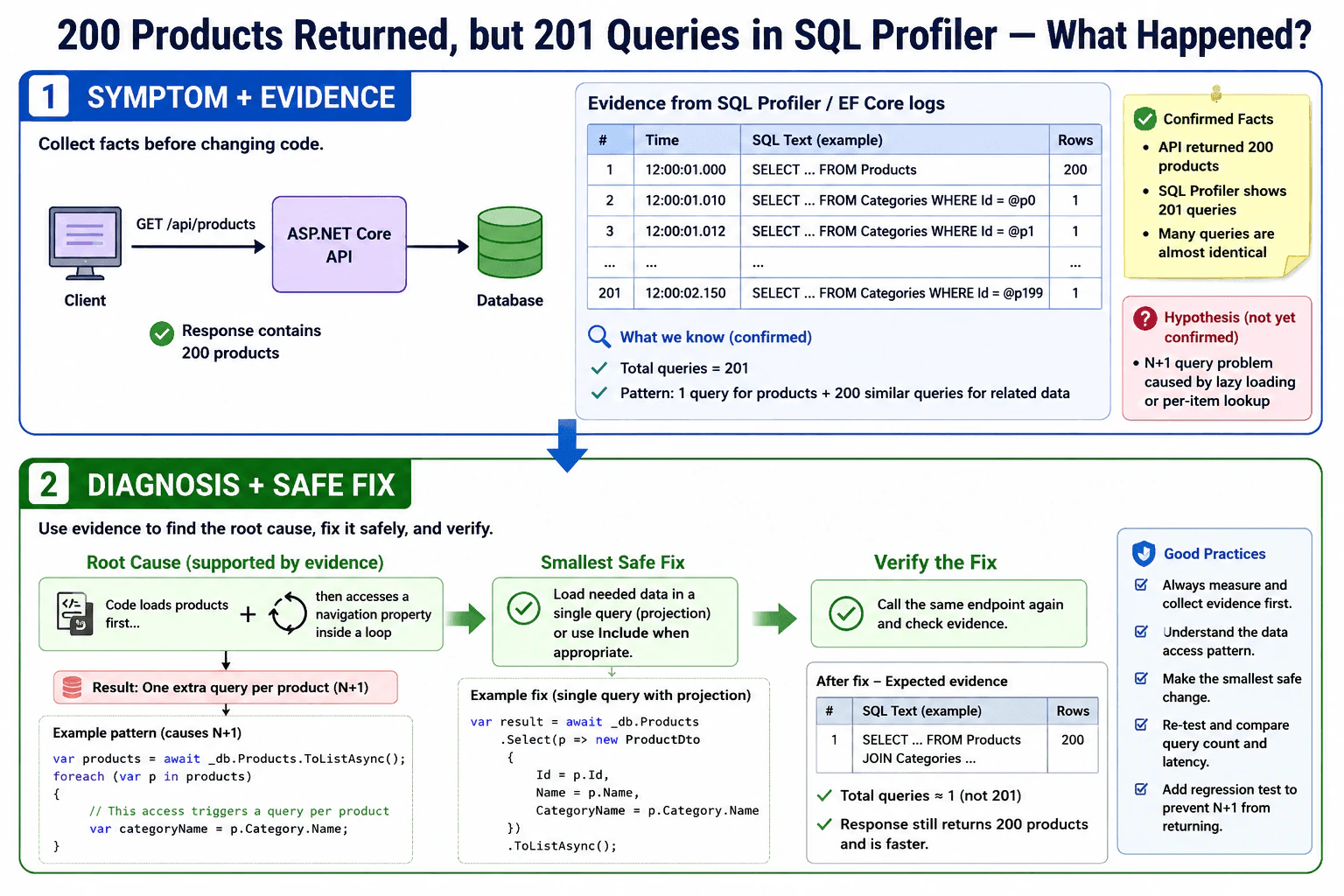
Describe how you would identify the hidden extra query, why it likely indicates an N+1 pattern, and how you would verify the fix.
Short Interview Answer (30-60 seconds)
The API likely ran one query for the product list and then hidden follow-up queries from lazy loading or a per-row lookup. That is a classic N+1 pattern. I would trace the request, find the repeated SQL, and verify the fix by rerunning the same endpoint.
Detailed Explanation
The question is asking why one action that should return 200 items still caused one extra hidden trip to where the app keeps its data. The likely reason is that the program loaded the main list and then asked for more details item by item instead of getting everything together. In an interview, you should explain how to find that hidden call, why it points to the common one-by-one lookup problem, and how to prove the fix by checking the request again after the change.
Useful Questions to Ask the Interviewer
Is Entity Framework Core using lazy loading here?
Are any related properties accessed inside a loop?
Should the endpoint return related data or only product fields?
How to Explain It in an Interview
I would first reproduce the endpoint and confirm the query count with SQL Profiler, EF Core logging, or a command interceptor. Then I would look for one query that loads the products and many similar queries that repeat for each product or each related entity. That is the typical N+1 pattern.
The most likely cause is lazy loading or code that touches a navigation property inside a loop. For example, the API may load 200 products and then issue one query per product for related data such as category, supplier, or reviews. In your case, 201 total queries usually means one main query plus 200 follow-up queries, not just one harmless extra call.
To verify the root cause, I would correlate the SQL text with the request path, check the call stack or logs, and identify exactly where the repeated query starts. Then I would fix it by projecting the needed fields in one query, using Include only when appropriate, or disabling lazy loading if it is causing hidden database access. After the fix, I would rerun the same request and confirm that the query count drops, the response data stays correct, and the latency improves. I would also add a regression test or performance check so the N+1 pattern does not return.
Technical Approach
Reproduce the endpoint and confirm the query count with SQL Profiler or EF Core SQL logs.
Identify the repeated SQL statement and the point in the request where it appears.
Check for lazy loading, navigation-property access, or a database call inside a loop.
Map the repeated query back to the exact code path, mapper, or serializer.
Fix the access pattern by projecting the needed data in one query or using the right eager-loading shape.
Rerun the request and verify the query count, response correctness, and latency.
Add a regression test or performance guard so the same pattern is caught later.
Practical Insights
The cost is not about CPU only. It is mostly extra database round trips, which slow the API and increase database load. The hidden queries also make debugging harder and can create maintenance risk because the slowdown may appear only with real data. After the fix, the API usually becomes faster and more predictable.
Why Interviewers Ask This
This question checks whether you can spot hidden database work, connect query counts to application code, and diagnose common ORM performance bugs such as N+1 queries. It also tests whether you verify the fix with evidence instead of guessing.
Common interview mistakes
A common mistake is to count only the main query and ignore extra queries caused by lazy loading, mapping, or serialization. Another mistake is to assume the extra query is harmless because the response still works. A third mistake is to fix the symptom without checking whether the query shape still returns the same data.
Interview tip
Say the evidence first, then the root cause, then the fix, and end with how you verified it. Interviewers like a diagnosis that is based on logs and traces, not a guess.
Interviewer may ask next
How would you stop the N+1 pattern in EF Core?
I would load the needed related data in a single shaped query, usually with projection to a DTO or with Include only when the full related entity is needed. If lazy loading is the cause, I would disable it for that path or avoid accessing navigation properties inside loops.
How do you prove the fix worked?
I would rerun the same request under the same conditions and compare the before-and-after SQL count, duration, and rows returned. The fix is good only if the query count drops, the response stays correct, and the endpoint is consistently faster in repeat tests.
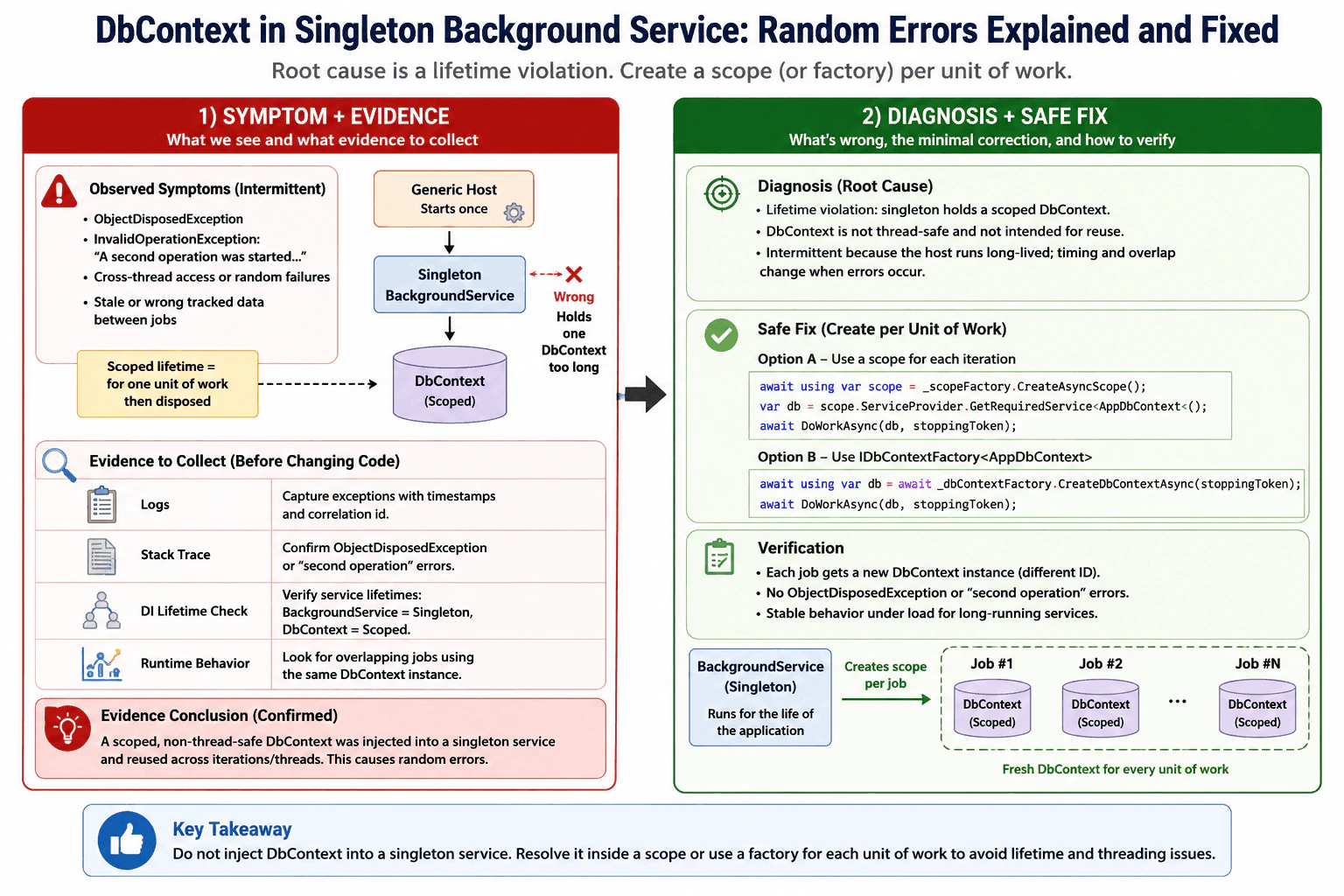
105. You inject DbContext into a singleton background service and get random errors. What’s wrong?Debugging And DiagnosticsMedium
i Question Details
Explain the lifetime violation, what kind of exceptions or shared-state symptoms it creates, and how the hosting model makes the bug intermittent.
Short Interview Answer (30-60 seconds)
You injected a scoped, non-thread-safe DbContext into a singleton service. That creates a lifetime violation, so the same context can be reused after disposal or concurrently, causing random ObjectDisposedException, second-operation, and shared-state bugs. Resolve DbContext per work item through a scope or a factory.
A long-running app has one always-on worker that keeps using a database helper meant to be short-lived. That helper is shared longer than intended, so it can be used after it has been cleaned up or by two jobs at the same time. Because the timing changes from run to run, the app sometimes seems fine and sometimes fails. The question is asking you to spot that the helper is being kept in the wrong place, explain why that makes the errors come and go, and describe the safer way to get a fresh helper for each job.
Useful Questions to Ask the Interviewer
Is the background service doing one job at a time, or can jobs overlap?
Should the fix use IServiceScopeFactory or IDbContextFactory<TContext>?
How to Explain It in an Interview
Start with the practical rule: a singleton background service must not hold a DbContext field. DbContext is scoped, which means it is created for one unit of work and then discarded. A singleton lives for the whole process, so it can outlive the context and also share it across threads. That causes intermittent failures such as ObjectDisposedException, InvalidOperationException about a second operation starting, stale tracked entities, or cross-thread access problems.
The root cause is the lifetime violation, not the database itself. The hosting model makes it intermittent because the Generic Host creates the background service once, but the service may run many iterations over time. Sometimes the old context still appears to work, sometimes it has already been disposed, and sometimes two overlapping operations touch it at the same time. Timing changes the symptom.
The correct fix is to resolve DbContext inside a scope for each iteration, or use IDbContextFactory<TContext> when that fits the design. I would also verify the fix by checking that every unit of work gets a new context instance and by watching for the random errors to disappear under load.
Key Insight / Why This Solution Works
Reproduce the failure with logging and stack traces.
Confirm the service lifetime and the DbContext lifetime.
Check whether the DbContext is stored in a field on the singleton.
Create a scope per background operation, or switch to IDbContextFactory<TContext>.
Verify that no DbContext instance is reused across iterations or threads.
Add a regression test or load test to confirm the random errors are gone.
Code
using System;
using System.Threading;
using System.Threading.Tasks;
using Microsoft.EntityFrameworkCore;
using Microsoft.Extensions.DependencyInjection;
using Microsoft.Extensions.Hosting;
publicsealedclassAppDbContext : DbContext
{
publicAppDbContext(DbContextOptions<AppDbContext> options) : base(options)
{
}
}
publicsealedclassWorker : BackgroundService
{
privatereadonly IServiceScopeFactory _scopeFactory;
publicWorker(IServiceScopeFactory scopeFactory)
{
// Keep only the scope factory in the singleton service.// Do not store AppDbContext here because it is scoped and not thread-safe.
_scopeFactory = scopeFactory;
}
protectedoverrideasync Task ExecuteAsync(CancellationToken stoppingToken)
{
while (!stoppingToken.IsCancellationRequested)
{
// Create a fresh scope for one unit of background work.awaitusing IServiceScope scope = _scopeFactory.CreateAsyncScope();
// Resolve DbContext inside the scope so its lifetime matches the work item.
AppDbContext db = scope.ServiceProvider.GetRequiredService<AppDbContext>();
// Example placeholder operation. Replace with real query or save logic.
_ = db;
// Simulate a delay between jobs.await Task.Delay(TimeSpan.FromSeconds(1), stoppingToken);
}
}
}
publicstaticclassProgram
{
publicstaticasync Task Main(string[] args)
{
IHost host = Host.CreateDefaultBuilder(args)
.ConfigureServices(services =>
{
// DbContext is registered as scoped, which matches// EF Core's intended lifetime.
services.AddDbContext<AppDbContext>(options =>
{
// Configure// a real// provider// in// production.// The exact// provider// is not// important// for the// lifetime// pattern.
});
// BackgroundService is singleton by design, so it// must not capture a scoped DbContext.
services.AddHostedService<Worker>();
})
.Build();
await host.RunAsync();
}
}
Why Interviewers Ask This
To check whether the candidate understands dependency-injection lifetimes, scoped versus singleton services, thread safety, and how to diagnose intermittent runtime failures in ASP.NET Core and Generic Host apps.
Common interview mistakes
A common mistake is injecting DbContext directly into the singleton and keeping it in a field. Another mistake is creating one scope in the constructor and reusing it forever. A third mistake is blaming the database when the real bug is service lifetime and concurrency.
Interview tip
Say the lifetime rule first: singleton service plus scoped DbContext is invalid. Then name the symptoms, explain why they are intermittent, and finish with the fix: create a scope per work item or use a DbContext factory.
Interviewer may ask next
What exception would you expect first?
Common first failures are ObjectDisposedException, InvalidOperationException about a second operation starting on the same context, or the DI error that says a scoped service cannot be consumed from a singleton.
When would IDbContextFactory be better than IServiceScopeFactory?
IDbContextFactory is a good choice when the worker needs to create contexts on demand without taking a full scope for other services. IServiceScopeFactory is better when the job needs several scoped services together.
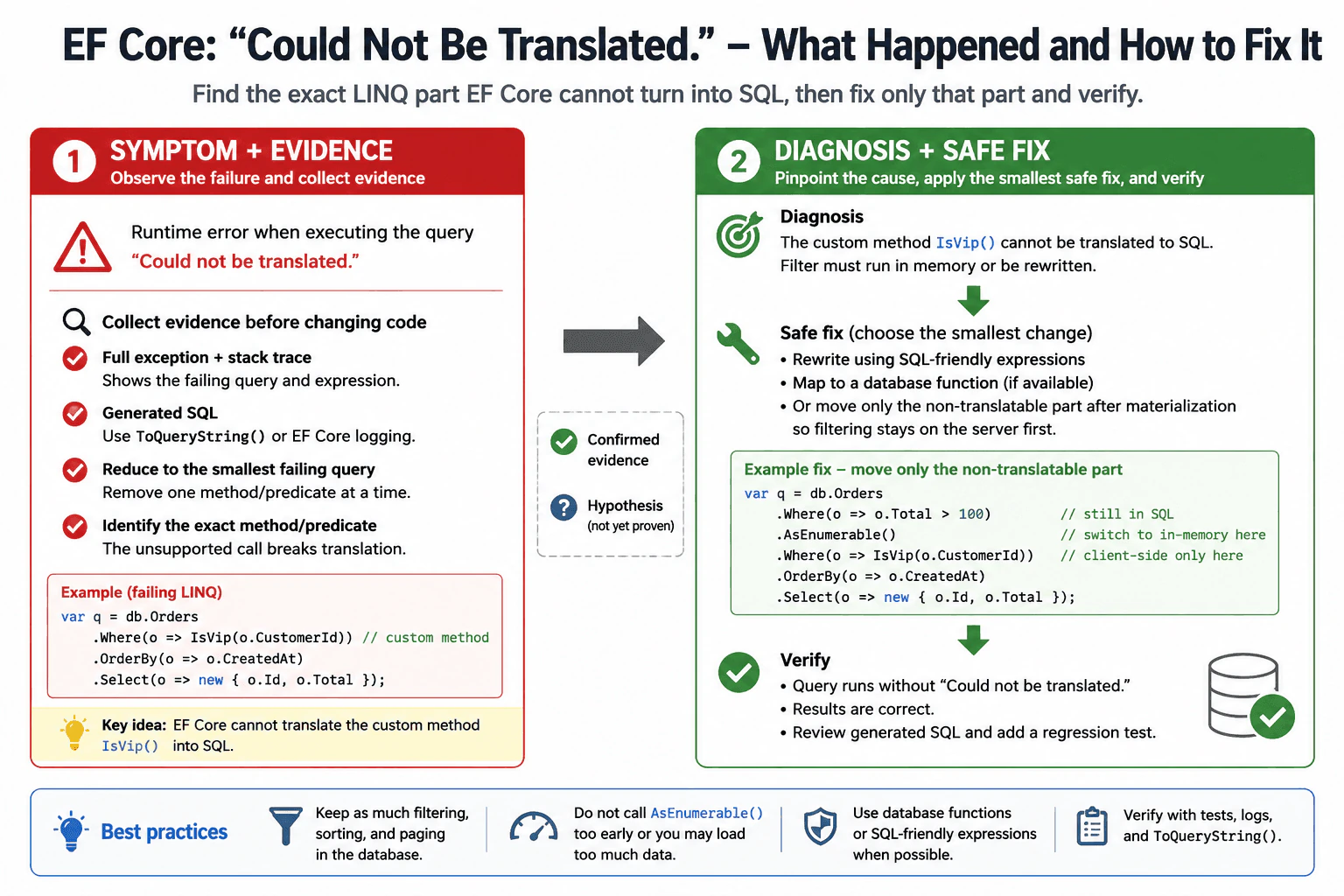
106. You get “Could not be translated.” What happened and how do you fix it?Debugging And DiagnosticsMedium
i Question Details
Focus on the LINQ expression that EF Core cannot turn into SQL and how you would isolate the exact method call or predicate causing the failure.
Short Interview Answer (30-60 seconds)
This usually means EF Core found a LINQ part it cannot convert to SQL, often a custom method or unsupported expression. I would reproduce the query, isolate the exact failing call or predicate, rewrite it to a SQL-friendly form, or move only the non-translatable part after materialization, then verify with logging and tests.
Detailed Explanation
This question asks about a search in your program that looks normal, but fails because one part cannot be turned into something the database can use. The app starts the search, reaches that part, and stops with an error. In an interview, I would say I first find the smallest version that still breaks, read the error carefully, and then change the code so the database can handle it or move only the hard part after the data is loaded.
Useful Questions to Ask the Interviewer
Which database provider and EF Core version are you using?
Can I see the exact LINQ query and full exception text?
How to Explain It in an Interview
This is usually a runtime translation failure, not a compile error. EF Core builds an expression tree from the LINQ query and tries to convert each part into SQL. One unsupported method call, custom helper, comparer, or predicate can break the whole query.
My first step is to reproduce the failure with the smallest possible input. Then I inspect the full exception, the stack trace, and the generated SQL using ToQueryString() or EF Core query logging. I remove one method call or predicate at a time until the failing piece is obvious.
The root-cause fix is to rewrite that piece into SQL-friendly operations, map a database function when appropriate, or move only the truly client-only part after AsEnumerable() or ToList() so filtering still happens in the database first. I do not switch to client evaluation too early, because that can load far too much data.
If production needs a temporary workaround, I narrow the query or precompute the value outside the query, but I treat that as containment, not the final fix. After the change, I rerun the query, add a regression test, and confirm paging, filtering, and sorting still work.
Technical Approach
Reproduce the failure with the smallest possible input.
Read the full exception and stack trace.
Identify the exact method call, predicate, or projection that fails to translate.
Inspect the generated SQL with ToQueryString() or query logging.
Rewrite the failing part to use SQL-friendly expressions.
If needed, move only the non-translatable part after AsEnumerable() or ToList().
Verify the fix with tests and regression coverage.
Practical Insights
The query itself usually does not get harder to run, but debugging takes time. The main cost is reading logs, shrinking the query, and testing the fix. If you move too much work to memory, you may add extra data transfer, slower response time, and more memory use.
Why Interviewers Ask This
To check whether the candidate understands EF Core query translation, can isolate the exact failing expression, and can choose a safe fix instead of guessing or forcing unnecessary client-side evaluation.
Common interview mistakes
A common mistake is assuming the database is broken when the LINQ expression is the real problem. Another is using AsEnumerable() too early and pulling too much data into memory. People also forget to check the exact failing call, or they replace the query with a broad client-side load that hurts performance.
Interview tip
Say the exact failing expression first, then explain how you would narrow it down and fix only the non-translatable part.
Interviewer may ask next
What if only one helper method is not translatable?
I would inline the logic if it is simple, rewrite it with SQL-friendly operators, or map it as a database function if the database supports it. If only a tiny part is not translatable, I would keep the filter in SQL and move just that tiny part after materialization.
When is AsEnumerable() acceptable here?
It is acceptable only after you have already filtered the data down to a small set on the server. Then the remaining client-only step is cheap. It is not a good fix if it forces a large table into memory just to finish one unsupported predicate.
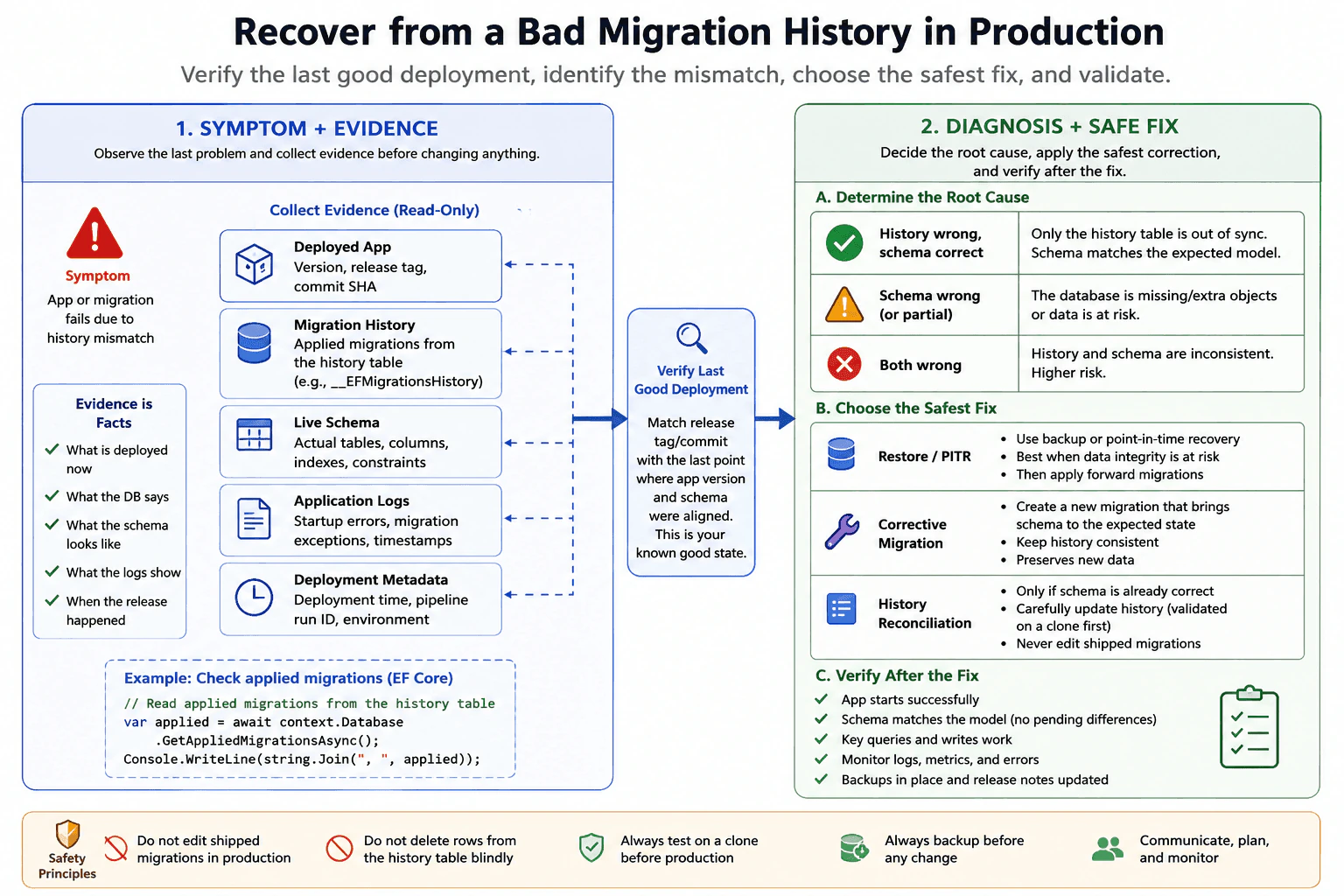
107. How do you recover from a bad migration history in production?Debugging And DiagnosticsHard
i Question Details
Describe the steps you would take when the applied migration history no longer matches the live database, including how you would verify the last good deployment before making changes.
Short Interview Answer (30-60 seconds)
I would stop further damage first, then verify the live schema, migration history, and last known-good deployment. After that, I would repair the mismatch with a controlled rollback, restore, or corrective migration, validate on a clone, and only then bring production back with monitoring.
Detailed Explanation
This question asks how you would handle a live system when the record of past changes no longer matches what is actually running. You need to show that you would not guess, rush, or make random edits. Instead, you would first find the last version that worked, check what changed, protect users from more damage, and then fix the mismatch in a careful, controlled way. The interviewer wants to hear that you verify before changing anything, pick the safest repair, and confirm the system works again afterward.
Useful Questions to Ask the Interviewer
Is the live schema wrong, or only the migration history table out of sync?
Can I take the system read-only or schedule a short maintenance window?
Do we need to preserve new production data, or is a restore acceptable?
How to Explain It in an Interview
I would start by treating it as a production incident. My first step is to stop further writes if needed and collect evidence: the deployed app version, the migration history table, the current schema, logs, and any recent deployment metadata. Then I would verify the last good deployment by matching the release tag or commit SHA with the migration set and checking when the schema and app version were still aligned.
Next, I would decide whether the problem is only the history table or the actual schema. If the schema is correct but the history is wrong, I would reconcile it carefully, usually with a controlled script after validating on a clone. If the schema is damaged or data is unsafe, I would prefer restore or point-in-time recovery, then apply a forward fix. I would avoid rewriting shipped migrations in production. Finally, I would validate in a restored copy, redeploy, monitor, and add a prevention step such as migration checks in CI, release gates, and backup verification.
Technical Approach
Freeze the blast radius and stop new damage.,Collect evidence from the deployed app, migration records, schema, logs, and release metadata.,Verify the last good deployment by matching the release tag or commit to the last known working schema.,Decide whether only the history is wrong or the live schema is wrong.,Choose the safest repair: restore, point-in-time recovery, or a controlled corrective change.,Test the fix on a clone first.,Apply the approved fix in production.,Validate behavior, then add CI and release checks to prevent repeat drift.
Practical Insights
The work is not about code speed. The main cost is operational time: finding the last good release, checking the database, testing a fix, and restoring safely if needed. Larger databases make backup or restore slower. Memory use is usually small, but the maintenance cost is high because you need careful coordination and strong rollback planning.
Why Interviewers Ask This
This question checks whether you can handle a production schema problem safely, prove what actually happened, find the last known-good state, choose the least risky repair, and prevent the same migration drift from happening again.
Common interview mistakes
A common mistake is editing already-shipped migration files and pretending the history is enough. Another mistake is deleting rows from the migration history table without checking the real schema first. People also skip backups, apply fixes directly in production without a clone, or forget that data may have changed after the bad migration. Another error is not verifying the exact release that last matched the database.
Interview tip
Lead with safety, evidence, and verification. Say what you would check first, how you would identify the last good release, and how you would choose between restore, corrective migration, or history reconciliation.
Interviewer may ask next
How would you fix only the migration history table if the schema is already correct?
I would first confirm there are no real schema differences between production and the expected model. If the schema is already correct, I would reconcile the history in a controlled script, usually by updating the migration history table on a clone first, then applying the same carefully reviewed change in production with backups in place.
What if new production data arrived after the bad migration?
Then I would avoid a blunt full restore if it would lose valid new data. I would prefer a forward fix that preserves the new data, or a point-in-time recovery followed by replaying the needed writes. The choice depends on whether the recent data is more important than a simple rollback.
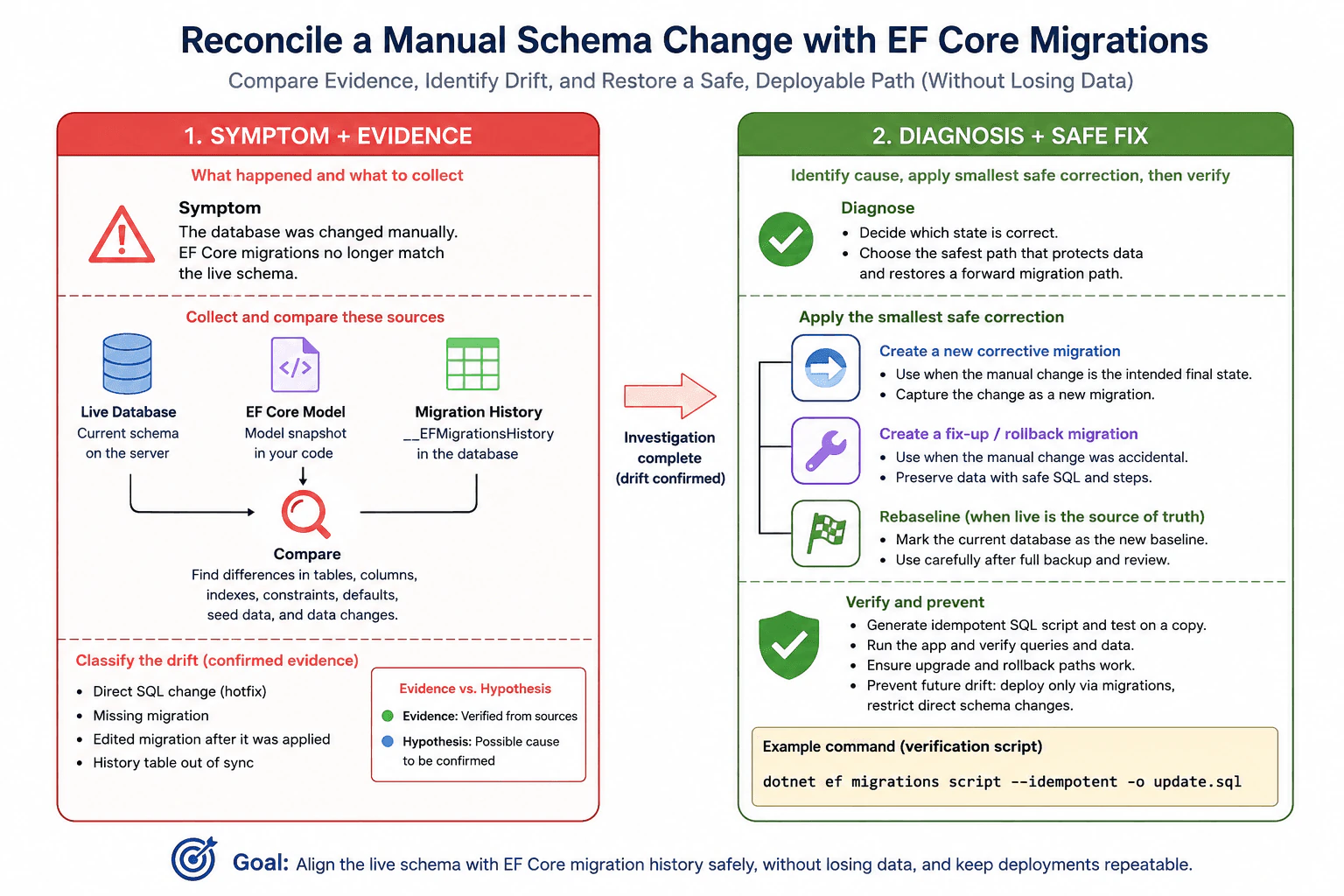
108. How do you reconcile a manual schema change with EF Core migrations?Debugging And DiagnosticsHard
i Question Details
Explain how you would compare the live schema with the source-controlled migration history, identify the mismatch, and restore a deployable migration path without losing data.
Short Interview Answer (30-60 seconds)
I compare the live database to the EF Core model and migration history, find the mismatch, and then repair it with a new migration or a controlled baseline. I avoid editing already-applied migrations and I verify the fix on a copy before deployment.
Detailed Explanation
Sometimes a person changes the live data setup by hand instead of using the normal team process. That can make the running system and the saved history disagree. The question asks how you would spot that mismatch, decide which version should be kept, and fix things so future changes can still be delivered safely. The important part is to protect the existing data, avoid breaking the live app, and leave behind a clear, repeatable path for later updates. In practice, you would compare what is there now, what the team wrote down, and the plan, then choose the safest repair.
Useful Questions to Ask the Interviewer
Was the manual change done only in production, or in other environments too?
Is the manual change the intended final state, or should it be reversed?
Is there any data that must be preserved exactly as-is?
How to Explain It in an Interview
I would treat this as schema drift: the database on disk no longer matches the schema EF Core thinks it manages. The first step is reproduction on a safe copy of the database. Then I compare three things: the live schema, the EF Core migration files, and the migration history table. That tells me whether the drift came from a direct SQL change, a missing migration, or a migration that was edited after it was deployed.
My main rule is not to rewrite an already-applied migration. If the manual change is the correct end state, I create a new corrective migration so the source-controlled history catches up to reality. If the live change was only an emergency hotfix, I keep it as a forward migration and apply it consistently across environments. If the live database should not have changed, I create a safe, data-preserving rollback or fix-up migration.
After that, I generate an idempotent script, test it on a clone, and run the app against the updated schema. The goal is a deployable path where future releases can apply cleanly again.
This approach works because it separates evidence, containment, and repair. The evidence is the live schema and migration history. The containment is stopping more drift. The repair is a new, versioned migration or a controlled baseline, never a silent manual fix.
If the manual change includes data movement, I keep the data script inside the migration or in a separate one-time fix, and I test it on restored data first. That way I protect data and keep the deployment repeatable.
Technical Approach
Restore or clone the live database so you can investigate safely.
Compare the live schema with the EF Core model snapshot, migration files, and __EFMigrationsHistory.
Identify the exact object-level drift: tables, columns, indexes, constraints, defaults, seed data, or data changes.
Decide which state is correct: the live schema or the source-controlled migration path.
If the live change is intended, create a new corrective migration that captures it.
If the live change is accidental, create a safe fix-up or rollback migration that preserves data.
Avoid editing migrations that have already been applied in shared environments.
Generate an idempotent SQL script and test it on a copy.
Verify application startup, queries, and rollback/upgrade paths.
Lock in prevention: require migrations in deployment and block direct schema changes.
Practical Insights
The comparison work is usually quick, but the safe repair takes time because you must test carefully. The memory cost is low. The main cost is operational risk: a wrong fix can break deployments or lose data. Testing on a copy adds time, but it lowers that risk a lot.
Why Interviewers Ask This
This checks whether you can detect schema drift, protect data, and turn an ad hoc production change into a repeatable, deployable migration plan.
Common interview mistakes
Editing an already-applied migration, deleting rows from the migration history table without a plan, trusting only the EF snapshot, ignoring indexes or constraints, forgetting data changes, testing only on a developer database, and using a destructive drop-and-recreate fix when the data must be preserved.
Interview tip
Say that you compare evidence first, preserve data second, and restore repeatable deployments last. That shows you understand both debugging and release safety.
Interviewer may ask next
What if the manual change was only in production?
Treat production as drift. Compare the live schema to source control, then encode the production change as a new migration on a branch, test it on a copy, and roll it forward everywhere instead of editing an old applied migration.
What if the live schema is right but migration history is wrong?
Verify the schema first, then repair the history in a controlled way so EF Core matches reality again. Use a baseline or a carefully reviewed history fix only after you are sure no data or objects will be lost.
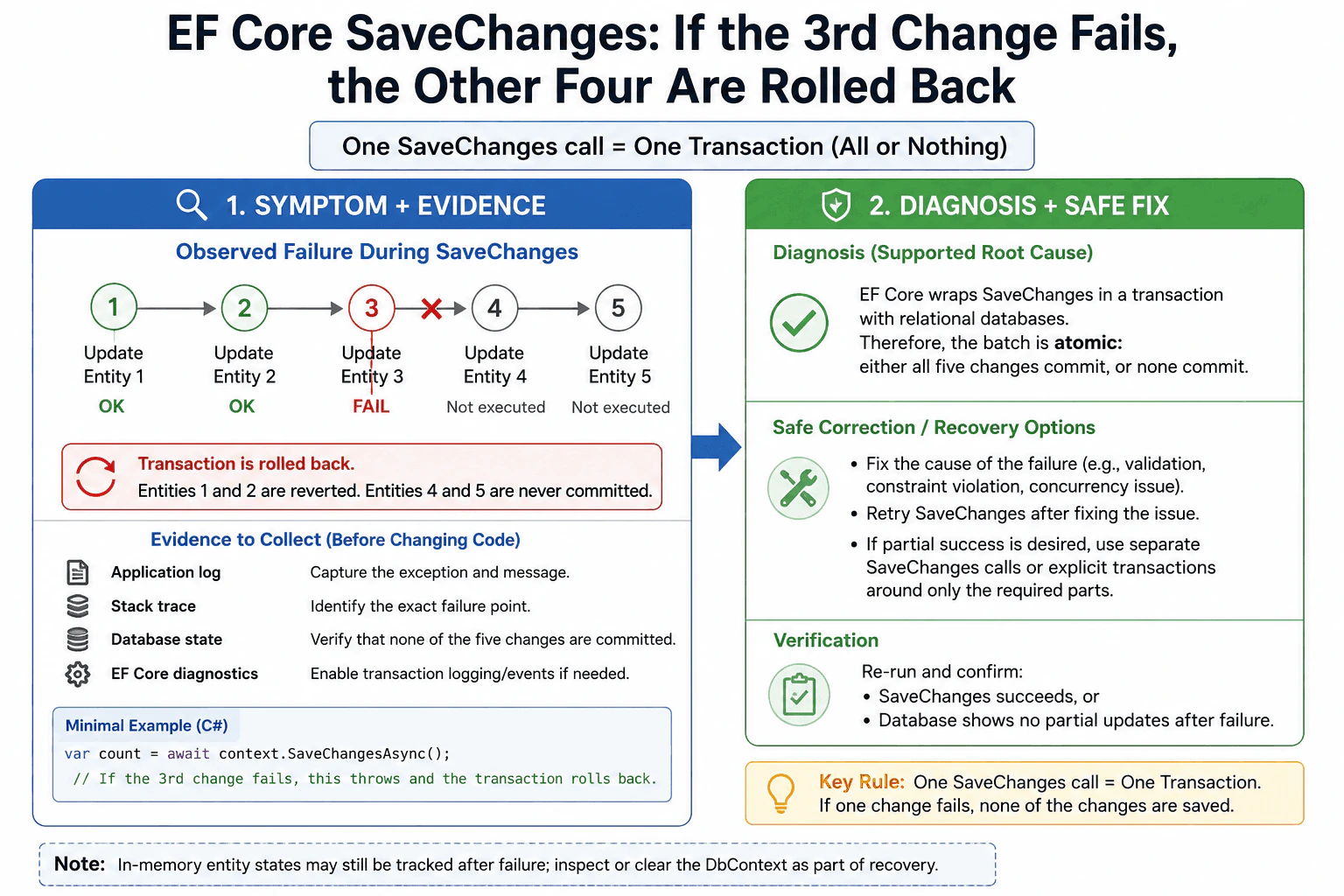
109. If SaveChanges modifies five entities and the third fails, what happens to the other four?Debugging And DiagnosticsHard
i Question Details
Explain the transactional behavior you would expect while debugging a failed batch and how that affects partial failure recovery.
Short Interview Answer (30-60 seconds)
With a normal relational SaveChanges call, EF Core treats the batch as one unit. If the third entity fails, the whole save fails and the other four are not committed. The earlier successful changes are rolled back, so you do not get a partial database update.
Detailed Explanation
The question asks whether a group of changes stays together or gets partly saved when one item breaks. Imagine updating five records at once. If the third one fails, the interviewer wants to know whether the other four stay saved or are removed too. The expected answer is about one save acting like one package, and what that means for recovery after the failure.
Useful Questions to Ask the Interviewer
Is this one SaveChanges call against a relational database?
Do you want all five changes to succeed together, or can some succeed independently?
How to Explain It in an Interview
With EF Core on a relational database, SaveChanges normally runs the pending changes in a transaction, which means the batch is atomic: it either all succeeds or all fails. If the third entity fails, the earlier two are rolled back and the later two are not committed. So the database does not end up with a partial update.
I would also mention one important nuance: the database rollback is not the same as the in-memory change tracker. After a failure, the DbContext may still hold tracked state that you need to inspect or clear before retrying. If partial success is acceptable, you must split the work into separate SaveChanges calls or design an explicit transaction boundary around only the parts that must stay together. In debugging, I would first confirm the exception, check the transaction boundary, and then verify the final database state.
Technical Approach
Confirm that all five changes are part of one SaveChanges call.
Verify that the provider is a relational database with transaction support.
Reproduce the failure and capture the exception and stack trace.
Check whether the transaction rolled back in the database.
Inspect DbContext state separately from database state.
Decide whether the fix is better error handling, a smaller batch, or an explicit transaction boundary.
Practical Insights
The normal cost is one database save plus one rollback if something fails. Memory use is small because EF Core tracks the entities in the DbContext. The bigger cost is debugging the failure and deciding whether to retry, split the work, or change the transaction design.
Why Interviewers Ask This
They want to see whether you know EF Core's default transaction behavior, whether you can separate database state from tracked in-memory state, and how you would recover safely after a batch save failure.
Common interview mistakes
A common mistake is thinking the first successful updates stay saved even though one later change failed. Another mistake is assuming the DbContext automatically resets itself after the exception. People also forget that partial success requires separate save boundaries or explicit transaction design.
Interview tip
Start with the one-sentence rule: one SaveChanges call usually means one transaction. Then add the rollback detail and the note that in-memory tracking is separate from database commit.
Interviewer may ask next
Does SaveChanges always use a transaction?
For relational providers, EF Core normally wraps SaveChanges in a transaction so the batch succeeds or fails together. Some providers or special scenarios can behave differently, so I would confirm the provider and the exact code path before assuming the same result everywhere.
What if I need the first two changes to stay saved even when the third fails?
Then I should not put all five changes in one unit of work. I would split them into separate SaveChanges calls, or use explicit transaction boundaries only around the parts that must succeed together. That way, I can allow partial success by design.
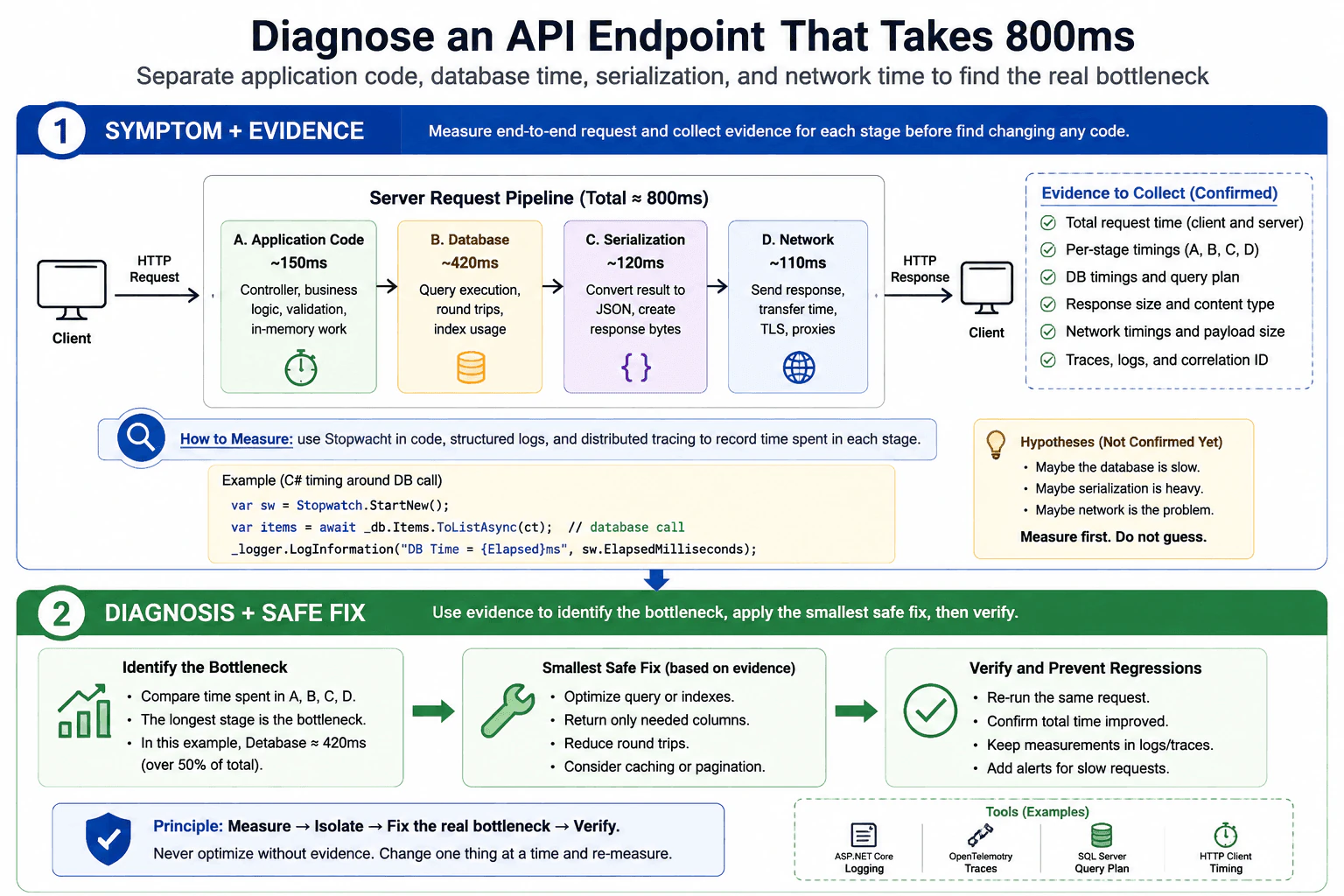
110. How do you diagnose an API endpoint that takes 800ms?Debugging And DiagnosticsHard
i Question Details
Describe how you would separate application code, database time, serialization, and network time so the real bottleneck is isolated before any optimization.
Short Interview Answer (30-60 seconds)
I would reproduce the slow request, measure each part separately, and compare server time, database time, serialization, and network time. Then I would fix the slowest verified part first, re-test, and keep the same measurements so I know the improvement is real.
Detailed Explanation
This question asks how you would find out why one web call feels slow. You should not guess. First repeat the same call and measure the time for each main part separately. Check how long the program spends doing its own work, how long it waits for stored data, how long it takes to turn the result into text, and how long the reply takes to travel back. The goal is to prove the slow part with evidence before changing anything.
Useful Questions to Ask the Interviewer
Is the 800ms measured on the server, the client, or both?
Is this slow for one request type or for all traffic?
Did the slowdown start after a recent change?
Do we have logs, traces, or database timings already?
How to Explain It in an Interview
I would start with reproduction and scope. I would confirm whether the 800ms is end-to-end latency or only server time. Then I would break the request into parts: application work, database access, serialization, and network transfer.
For the application side, I would add timing around the main code path, use structured logs, and inspect traces if needed. For database time, I would measure the exact query, look at query plans, and check round trips, indexing, and rows returned. For serialization, I would compare object size and response shape, because large payloads can be expensive to convert to JSON. For network time, I would compare server timing with client timing, check payload size, compression, and any proxy or TLS overhead.
I would not optimize until I know which part is actually slow. If database time is the issue, I would fix the query or indexes. If serialization is the issue, I would reduce the payload or simplify the response. If network time is the issue, I would reduce response size or add compression. After each change, I would re-measure the same request so I can prove the improvement.
The main tradeoff is speed of diagnosis versus depth of measurement. A quick first pass gives direction, but a deeper trace gives proof. In production, I would prefer low-risk measurements first, then use detailed tracing only if the simple timings do not isolate the bottleneck.
Technical Approach
Reproduce the slow request with the same inputs.
Decide whether 800ms is server time or end-to-end time.
Measure app work, database time, serialization time, and network time separately.
Use logs and traces to find the slow segment.
Inspect the slow segment in detail: query plan, payload size, CPU work, or client/network path.
Fix the proven bottleneck only.
Re-run the same test and compare before/after numbers.
Add regression checks so the issue does not return.
Practical Insights
The main cost is investigation time, not CPU or memory. Good measurement tools add a little overhead, but that is usually worth it. The bigger cost is if you optimize the wrong part and make the system more complex without real benefit.
Why Interviewers Ask This
Interviewers want to see whether you can measure first, narrow the problem with evidence, separate app, database, serialization, and network time, and avoid random optimization before the real bottleneck is proven.
Common interview mistakes
A common mistake is guessing that the database is slow without measuring it. Another mistake is looking only at total request time and missing serialization or network cost. People also often test with different inputs, which hides the real issue. A final mistake is fixing code before proving the bottleneck.
Interview tip
Say that you measure first, split the request into parts, and only optimize the proven slow step. That shows discipline, not guesswork.
Interviewer may ask next
How would you tell if the database is the bottleneck?
I would time the database call directly, inspect the SQL or ORM-generated query, compare execution time with total request time, and review the query plan, indexes, returned rows, and number of round trips. If the database time is close to the full 800ms, that is strong evidence it is the main bottleneck.
What if the app is fast on the server but slow for the client?
Then I would focus on network and response size. I would compare server timing with client timing, check payload size, compression, proxy or gateway delays, TLS overhead, and whether the client is waiting on multiple requests. If server work is small but client time is large, the issue is usually outside the app code path.
More questions load as you scroll
Disclaimer: This interview guide is for educational and informational purposes only. It is designed to help readers prepare, but it does not guarantee any interview result, hiring decision, offer, or outcome. Interview questions, hiring criteria, and preferred answers can vary by employer, interviewer, industry, location, and time. All answers, examples, and explanations in this guide are suggested examples for interview preparation, not definitive answers or instructions for professional practice. They are based on research and judgment, are provided without warranties of any kind, and should be adapted to the question, role, and applicable laws and professional requirements. Diagrams are simplified illustrations intended to highlight the main concepts and their relationships; actual situations, systems, and practices may be more complex. Alternative approaches may be equally valid or better suited to a particular question, context, or interviewer. To the fullest extent permitted by applicable law, the contributors and publisher are not liable for decisions made, actions taken, or losses incurred based on this guide.
State Laws and Professional Responsibilities: Laws and requirements governing an occupation vary by state and jurisdiction. You are responsible for checking the current laws, licensing requirements, and scope-of-practice rules that apply to your location and role, and for ensuring that your answers and actions comply with them. Adapt examples in this guide to those requirements. This guide is not legal advice.
Content Accuracy and Verification: To the fullest extent permitted by applicable law, we do not represent or warrant that interview guides, questions, answers, examples, or diagrams are accurate, complete, current, error-free, or suitable for any particular purpose. You are responsible for independently reviewing and verifying the information before relying on it.