This interview guide is for educational and informational purposes only. It is designed to help readers prepare, but it does not guarantee any interview result, hiring decision, offer, or outcome. Interview questions, hiring criteria, and preferred answers can vary by employer, interviewer, industry, location, and time. All answers, examples, and explanations in this guide are suggested examples for interview preparation, not definitive answers or instructions for professional practice. They are based on research and judgment, are provided without warranties of any kind, and should be adapted to the question, role, and applicable laws and professional requirements. Diagrams are simplified illustrations intended to highlight the main concepts and their relationships; actual situations, systems, and practices may be more complex. Alternative approaches may be equally valid or better suited to a particular question, context, or interviewer. To the fullest extent permitted by applicable law, the contributors and publisher are not liable for decisions made, actions taken, or losses incurred based on this guide.
State Laws and Professional Responsibilities
Laws and requirements governing an occupation vary by state and jurisdiction. You are responsible for checking the current laws, licensing requirements, and scope-of-practice rules that apply to your location and role, and for ensuring that your answers and actions comply with them. Adapt examples in this guide to those requirements. This guide is not legal advice.
Identity, Image, and Privacy Notice
To respect individual privacy, some names, profile photographs, avatars, biographical details, and other identifying information displayed in this guide may be replaced with pseudonyms, licensed stock images, illustrative avatars, composite images, or representative descriptions. Unless a person is expressly identified as an actual contributor, a displayed name, image, or profile should not be understood as depicting or identifying a specific candidate, interviewer, employee, or other real individual. These representations are provided for editorial and illustrative purposes only and do not imply endorsement, employment, participation, or affiliation with this guide or any company mentioned in it. Any resemblance to an actual person is coincidental.
Company Notice
This guide is an independent educational resource and is not affiliated with, endorsed by, sponsored by, or approved by the company named in this guide. Company names identify reported interview experiences or the employer context of clearly labeled original practice exercises. Interview practices can change without notice, and inclusion of company-specific content does not mean these questions are official, complete, or guaranteed to be asked. To the fullest extent permitted by law, the author, contributors, and publisher are not responsible for outcomes related to use of this material.
Content Accuracy and Verification
To the fullest extent permitted by applicable law, we do not represent or warrant that interview guides, questions, answers, examples, or diagrams are accurate, complete, current, error-free, or suitable for any particular purpose. You are responsible for independently reviewing and verifying the information before relying on it.
Questions or comments?
Contact us for general questions, or share feedback, technical corrections, and comments with the community.
111. What is AI infrastructure?Ai Infrastructure And ScalabilityEasy
i Question Details
Define AI infrastructure and explain the compute, storage, networking, model-serving, batching, caching, scaling, observability, reliability, and cost controls needed to train or run AI models in production.
Short Interview Answer (30-60 seconds)
I would first separate training from online serving because they have different resource needs. AI infrastructure is the compute, storage, networking, model serving software, and operational controls needed to train models and run them reliably in production. Training can use GPU or TPU clusters, data storage, validation, checkpoints, and a model registry. Serving can use load balancing, model servers, batching, caching, and replicas. Around both paths, I would measure demand, scale capacity, watch latency and errors, recover from failures, and control cost.
Detailed Explanation
AI infrastructure is the complete set of systems that supports an AI model from data to production use. It provides computing power, places to store information, fast connections, and software that runs the model for users. One path prepares data and trains the model. Another path serves the finished model to applications. The infrastructure also groups work, reuses results when safe, watches system health, adds or removes capacity, recovers from failures, and controls spending. These parts work together so the AI service can stay useful, reliable, and affordable as demand changes.
Useful Questions to Ask the Interviewer
Are we discussing training, online serving, or both?
Is the main goal low latency, high throughput, lower cost, or a balance of them?
What traffic level, model size, and reliability target should the infrastructure support?
How to Explain It in an Interview
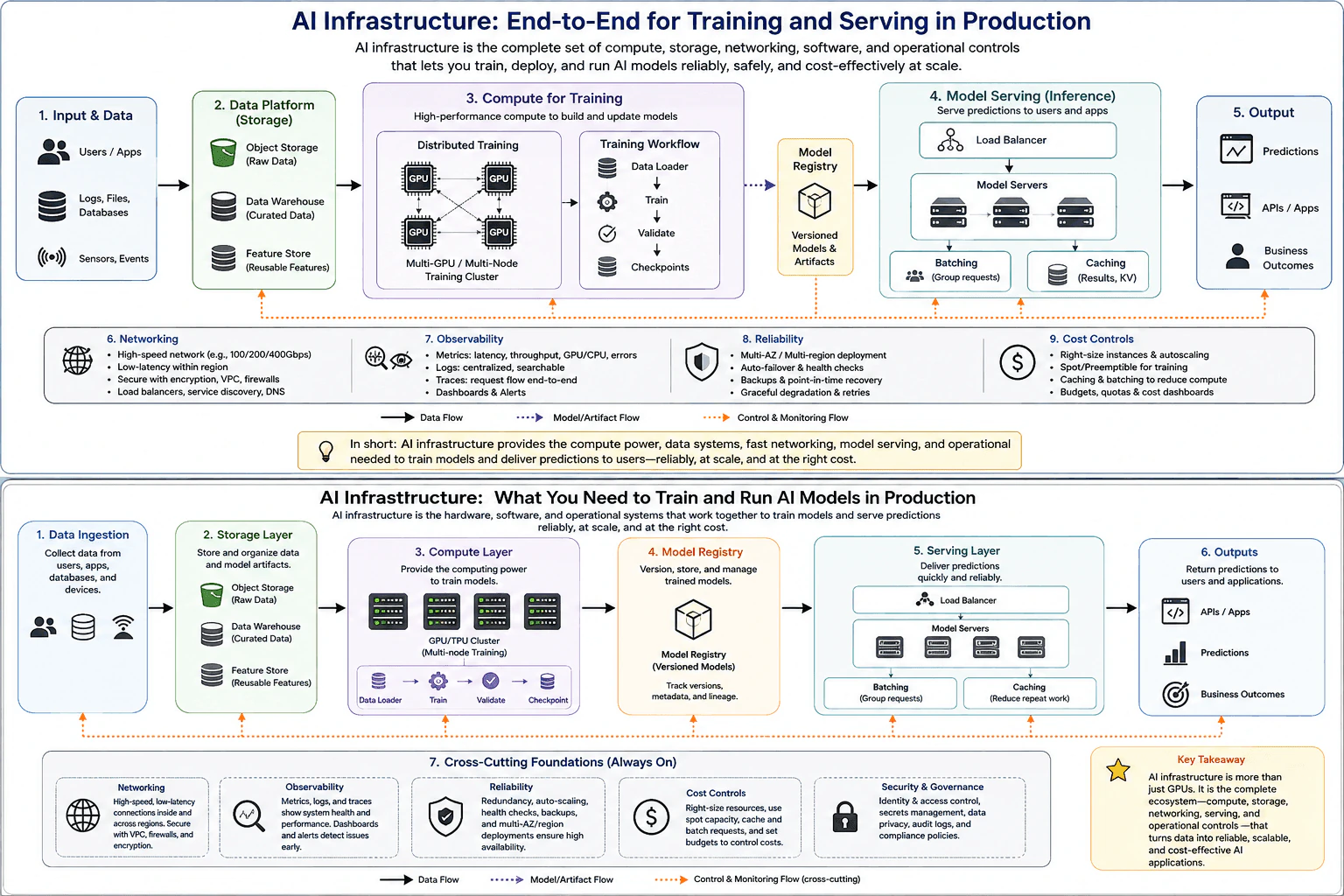
I would explain AI infrastructure as one connected path from input data to model output.
First, data can come from users, applications, logs, files, databases, sensors, or events. A storage platform keeps the data needed by training. Object storage can hold large raw data sets and model files. A data warehouse can hold curated data. A feature store can hold reusable features that models consume.
Next comes training compute. Training may use one GPU or TPU, or a distributed cluster with many accelerators when the workload is too large for one device. A data loader feeds training data into the training workflow. The workflow trains the model, validates it, and writes checkpoints. A checkpoint saves training progress so work can continue after an interruption instead of starting again from the beginning.
After validation, the approved model artifact moves to a model registry. The registry keeps versioned models and related metadata. This gives the serving system a controlled source for the model version it should load.
For online inference, requests reach a load balancer. The load balancer spreads work across model servers. Each model server loads a model and runs inference to produce a prediction or another model result.
Batching can group compatible requests before model execution. This can improve accelerator use and throughput because more work is processed together. The tradeoff is waiting time. A server may add latency while it waits for enough requests to form a batch. Request batching is different from request concurrency. Batch size describes how many items are processed together. Concurrency describes how many requests are active at the same time.
Caching can avoid repeated model work. A result cache can return a recent result when the same result is still valid. Some generative models also use a KV cache to keep reusable attention state during generation. Caching can reduce latency and compute use, but it consumes memory and may return stale information if the cache policy is wrong.
Scaling should follow measured demand. I would watch request rate, queue length, latency percentiles, throughput, error rate, CPU use, accelerator use, memory use, and model server saturation. When demand grows, autoscaling can add model server replicas. When demand falls, it can remove replicas. Scaling too slowly can create long queues. Scaling too aggressively can waste money. Capacity planning must also consider model memory because every replica needs enough memory for the model and its working state.
Networking connects storage, training workers, model servers, caches, and applications. Distributed training may need high bandwidth and low latency because workers exchange data during training. Serving also needs reliable and fast connections between the load balancer, model servers, caches, and other services. A network problem can become the real bottleneck even when accelerator use looks healthy.
Observability tells us what the system is doing. Metrics can show latency, throughput, CPU use, accelerator use, errors, and queue size. Logs record important system events. Distributed traces show where a request spends time across services. Dashboards and alerts help operators find problems early. I would examine these signals before adding more compute because a slow request may actually be waiting on the network, storage, a queue, or another service.
Reliability controls keep the system working when parts fail. Health checks can identify unhealthy model servers. Automatic restart or failover can replace failed capacity. Multiple availability zones or regions can reduce the effect of a local failure when the reliability requirement justifies the added cost. Checkpoints help training recover. Backups protect important data and artifacts. Retries should be bounded because unlimited retries can make overload worse. Graceful degradation can keep a reduced service available when full service is not possible.
Cost control is part of the architecture. I would right size compute, use autoscaling, use batching and caching when they are valid, and consider lower cost interruptible capacity for training jobs that can recover from interruption. I would track cost together with latency, throughput, reliability, and resource use. The best design is not simply the cheapest or the fastest. It balances service goals with the cost of compute, storage, networking, and operations.
Compute and Serving Path
Identify whether the workload is training, serving, or both. Training usually needs large compute jobs. Serving usually needs predictable response time for many requests.
Store raw data, curated data, reusable features, model artifacts, and checkpoints in storage systems that match how each item is read and written.
Feed training data through a data loader into GPU or TPU compute. Use distributed training when one accelerator or one machine is not enough. Validate the model and save checkpoints during training.
Place the approved model artifact and its metadata in a model registry so the serving layer can load a known version.
Route online requests through a load balancer to model server replicas. Keep request queues bounded so overload does not create unlimited waiting or memory growth.
Use batching when compatible requests can be grouped without breaking the latency goal. Treat batch size and request concurrency as separate controls.
Use caching when results or model state can safely be reused. Measure cache effectiveness, memory use, and correctness because caching trades memory and freshness for less model work.
Measure latency percentiles, throughput, queue delay, error rate, CPU use, accelerator use, memory use, storage delay, and network delay. Start with metrics. Use logs and distributed traces when the delay must be located across several services.
Scale model server replicas from measured demand and saturation. Check model memory, model loading time, network capacity, and downstream limits before assuming that more replicas will help.
Test failure cases such as an unhealthy model server or interrupted training worker. Verify health checks, checkpoints, failover, bounded retries, and graceful degradation.
Compare cost with the service goal. Right size resources, reduce idle capacity when safe, and use lower cost training capacity only when interruption can be handled.
After a change, repeat the same representative workload. Compare latency, throughput, errors, resource use, and output correctness. Check whether the original bottleneck was reduced or simply moved to storage, networking, a queue, or another dependency.
Practical Complexity & Trade-offs
The main practical costs are compute, memory, storage, networking, and the number of running model server replicas. Training can consume many GPU or TPU hours and can move large amounts of data between storage and training workers. Serving cost grows with request volume, model size, replica count, and memory used by each replica. Larger batches can improve accelerator use but may add waiting time. More caching can reduce repeated compute but uses extra memory. More replicas can increase capacity and reliability but also increase cost. Observability, backups, multiple locations, and failover also add operating cost. The goal is to meet latency, throughput, and reliability needs with the smallest safe amount of infrastructure.
Where it is used
This infrastructure pattern is used whenever an organization trains or serves AI models in production. A training system can use object storage, curated data, reusable features, distributed GPU or TPU workers, validation, checkpoints, and a model registry. An online prediction service can use a load balancer, several model servers, batching, caching, and autoscaling. Similar ideas are used for language models, recommendation systems, forecasting models, computer vision services, and other AI workloads where capacity, reliability, observability, networking, and cost matter.
Why Interviewers Ask This
Interviewers ask this question to see whether I understand the complete production foundation around an AI model, not only the model itself. They want to know whether I can separate training from serving, choose suitable compute and storage, connect the system through networking, scale model servers, observe system health, recover from failures, and control cost. They also want to see whether I understand practical choices such as batching, caching, replicas, checkpoints, and load balancing.
Common interview mistakes
Common mistakes include treating AI infrastructure as only GPUs, mixing training and serving requirements, and adding more compute before measuring the real bottleneck. Another mistake is assuming low accelerator use means more replicas are needed when requests may actually be waiting on storage, networking, queues, or another service. Teams may confuse training batch size with request concurrency or increase serving batches without checking added waiting time. Unbounded queues, retries, or caches can cause overload or memory growth. Caching without a freshness policy can return stale results. Autoscaling without considering model memory and model loading time may react too slowly. It is also a mistake to watch average latency only, ignore failure recovery, or optimize cost without checking output correctness and reliability.
Interview tip
Explain AI infrastructure as one connected system. Start with input data and storage. Then move through training compute, validation, checkpoints, and the model registry. Next explain online serving with load balancing, model servers, batching, caching, and replicas. Finish with the controls around the whole path: networking, scaling, observability, reliability, and cost. For each part, say what problem it solves and mention an important tradeoff.
Interviewer may ask next
If model requests are slow but GPU utilization is low, would you add more GPUs?
No. I would first measure where the serving request spends time. The measurement boundary starts when the request enters the serving layer and ends when the response leaves it. I would check queue delay, load balancing, request processing, cache access, model execution, storage calls, and network delay. Metrics and distributed traces can show whether the accelerator is really the bottleneck. Low GPU utilization may mean requests are waiting somewhere else or batching is inefficient. Adding GPUs before finding the cause can increase cost without reducing latency.
How would you scale the model serving layer during a large traffic increase?
I would scale model server replicas from measured request rate, queue length, latency, accelerator use, memory use, and server saturation. The serving path is the load balancer, model servers, batching or caching when valid, and then the output. Autoscaling can add replicas as that path approaches capacity. I would also check model loading time, model memory, networking, and downstream limits because new replicas may not become useful immediately. The main tradeoff is cost versus response time and spare capacity. I would keep queues bounded, use graceful degradation during overload, and verify the change with representative traffic while watching latency, throughput, errors, and cost.
112. How do you select GPUs for LLM inference?Ai Infrastructure And ScalabilityEasy
i Question Details
Translate the answer into concrete engineering decisions about model weights and KV memory, numerical formats, memory bandwidth, compute, interconnect, concurrency, power, availability, and cost per token.
Short Interview Answer (30-60 seconds)
I start with the inference workload and the service targets. I size model weights and KV cache for the expected context length and active concurrency, then choose a numerical format that meets memory and quality needs. I compare GPUs on HBM capacity, memory bandwidth, usable compute, interconnect, concurrency support, power, availability, and cost. I remove options that fail hard limits, then load test the strongest configuration with the same workload. I compare tokens per second, p95 latency, GPU utilization, memory use, and cost per token before making the final choice.
Detailed Explanation
Choosing the right hardware starts with the job it must do. I first ask how large the model is, how much text each request may contain, how many requests may be active at once, and how quickly answers must arrive. Those facts tell me how much memory and processing capacity I need. I then compare suitable machines, remove any choice that cannot meet memory, power, supply, or budget limits, and test the strongest options with realistic traffic. The best choice is the one that meets the service goal reliably at the lowest practical cost for each generated token.
Useful Questions to Ask the Interviewer
What model size and numerical format do we expect to serve?
What input and output lengths should I plan for?
What request rate, active concurrency, and throughput target should the service support?
What p95 latency and availability target define acceptable service behavior?
Will inference run on one GPU, several GPUs inside one node, or several nodes?
Are there rack power, cooling, region, hardware availability, budget, or team expertise constraints?
How to Explain It in an Interview
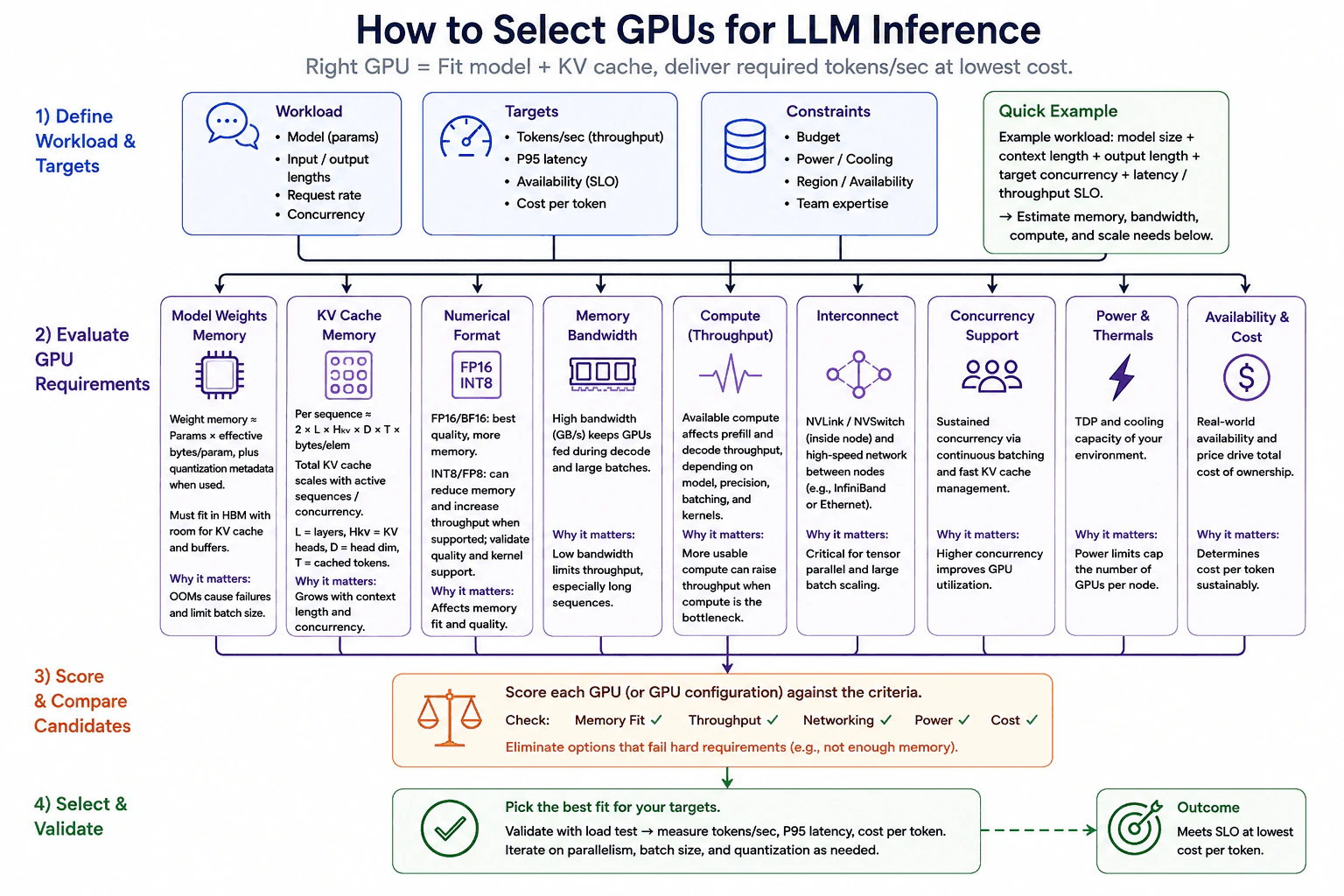
I would begin by defining one representative inference workload. I record model size, input length, output length, request rate, active concurrency, throughput target, p95 latency, and the availability target. A service level objective, or SLO, is the measurable target that the service is expected to meet. These values form the measurement boundary for the GPU decision.
First, I size model weight memory. A useful estimate is parameter count multiplied by the effective bytes stored for each parameter. Quantized models can use fewer bytes, but quantization metadata can add memory. The model must fit in HBM, which is the high bandwidth memory on the GPU, with room for KV cache, runtime buffers, and other serving overhead. If it does not fit, the configuration fails a hard requirement.
Next, I size KV cache memory. KV cache stores the key and value attention state for tokens that have already been processed. For one sequence, a useful approximation is 2 times the number of layers times the number of KV heads times the head dimension times the cached token count times the bytes stored for each element. Total KV cache memory grows with the number of active sequences. This is why longer contexts and higher concurrency can require much more HBM even when model weight memory stays nearly unchanged.
Then I choose the numerical format. FP16 and BF16 are common higher precision choices and usually require more memory than lower precision formats. INT8 or FP8 can reduce memory and can improve throughput when the model, GPU, and serving kernels support them. I would validate output quality and kernel support rather than assuming that lower precision automatically gives a speedup.
After memory fit, I compare memory bandwidth and usable compute. Memory bandwidth is how quickly data can move through GPU memory. LLM decoding often moves model and KV cache data repeatedly, so bandwidth can limit token generation. Prefill, which processes the input tokens before generation starts, and some larger batches can place more pressure on compute. More compute does not automatically mean more throughput. It helps when compute is the active bottleneck.
I then check the interconnect. An interconnect is the communication path between GPUs or nodes. If the model fits on one GPU, this may not be a major factor. If tensor parallel inference splits model computation across several GPUs inside a node, fast links such as NVLink with NVSwitch can reduce communication cost. Tensor parallelism means several GPUs cooperate on the same model operation. If the workload spans nodes, I need a suitable high speed network such as InfiniBand or Ethernet. Communication can become the bottleneck when GPUs exchange tensors frequently.
Concurrency is another important part of the decision. Continuous batching means the server combines work from several active requests as requests arrive and finish. This can keep the GPU busy and improve utilization. Fast KV cache management also matters because every active sequence consumes memory. I would raise concurrency only while p95 latency, memory use, queue behavior, and the SLO remain acceptable.
I also check power, cooling, hardware availability, region, and team expertise. A fast GPU may not fit the rack power or cooling budget. It may also be hard to obtain in the required region. A configuration that the team cannot operate reliably can add deployment and maintenance risk. I therefore compare the complete usable configuration, not only the GPU price.
Next, I score each GPU or GPU configuration against the same criteria. I check memory fit, throughput, networking, power, availability, and cost. Any option that cannot satisfy a hard requirement is removed before detailed cost comparison.
The final step is a representative load test. I use the same model, numerical format, context lengths, request mix, concurrency, and serving settings for every candidate. I measure tokens per second, p95 latency, GPU utilization, memory use, and cost per token. If needed, I adjust parallelism, batch size, or quantization and repeat the test. I also verify output quality and check whether the bottleneck moved from memory or compute to networking, queueing, or another resource. The selected configuration is the one that meets the required SLO with acceptable reliability and the lowest practical cost per token.
Compute and Serving Path
Define the workload. Record model size, input length, output length, request rate, active concurrency, throughput target, p95 latency, and availability target.
Estimate model weight memory using parameter count and effective bytes per parameter. Include quantization metadata and leave room for serving buffers.
Estimate KV cache memory using the number of layers, KV heads, head dimension, cached tokens, bytes per stored element, and active sequences.
Choose a numerical format such as FP16, BF16, INT8, or FP8 based on memory, output quality, GPU support, and serving kernel support.
Remove GPU options that cannot satisfy the required HBM capacity.
Compare memory bandwidth because decode can be limited by movement of model and KV cache data.
Compare usable compute because prefill and some larger batches can become compute limited.
Decide whether one GPU is enough. If several GPUs are required, measure the communication cost and check the available interconnect inside the node or between nodes.
Test continuous batching and KV cache management at the target concurrency while watching p95 latency, queue behavior, GPU utilization, and memory pressure.
Check power, cooling, region, hardware availability, team expertise, and total infrastructure cost.
Score each candidate against the same hard requirements and remove any candidate that fails them.
Load test the remaining configurations with the same representative workload.
Compare tokens per second, p95 latency, GPU utilization, memory use, availability needs, and cost per token.
Verify output quality and check whether the bottleneck moved to networking, queueing, memory, compute, or another resource.
Practical Complexity & Trade-offs
The main practical costs are memory, processing capacity, communication, power, and operations. Model weights use a mostly fixed amount of HBM for a chosen model and numerical format. KV cache memory grows as context length and active sequence count grow. Higher concurrency can improve GPU utilization, but it also increases KV cache memory use and can raise latency. Several GPUs add communication work, and several nodes add network cost and operational complexity. Lower precision can reduce memory and can improve throughput when supported, but output quality must be checked. The final economic measure is the complete infrastructure cost divided by the useful tokens served while the required latency, throughput, and availability targets are still met.
Where it is used
This approach is used when choosing inference hardware for an online LLM API, a chat assistant, a retrieval augmented generation service, a coding assistant, or another production model serving system. It is especially useful when a team must decide whether a model fits on one GPU, whether several GPUs are required, which numerical format to use, how much concurrency can be supported, what interconnect is needed, and whether a more expensive configuration actually reduces cost per token while meeting the service target.
Why Interviewers Ask This
Interviewers ask this question to see whether I can turn an LLM inference workload into concrete infrastructure choices. They want to know whether I can size model weight memory and KV cache memory, choose a numerical format, reason about memory bandwidth and compute, understand interconnect needs, plan concurrency, respect power and availability limits, and compare candidates using cost per token. They also want to see whether I validate the choice with representative load instead of selecting hardware from specification sheets alone.
Common interview mistakes
Common mistakes include choosing a GPU only from peak compute, checking model weight memory but forgetting KV cache memory, confusing context length with active concurrency, and assuming lower precision always improves throughput. Another mistake is ignoring memory bandwidth during decode or assuming more GPUs will scale well without measuring communication. Teams can also overlook rack power, cooling, regional availability, or operational complexity. Comparing candidates with different models, context lengths, concurrency, or serving settings also gives misleading results. The final mistake is declaring success after a faster test without checking output quality, the original SLO, cost per token, and whether the bottleneck moved somewhere else.
Interview tip
Explain the decision in a fixed order. Start with the workload and SLO. Then cover model weights, KV cache, numerical format, memory bandwidth, compute, interconnect, concurrency, power, availability, and cost. Remove candidates that fail hard limits. Finish with the same representative load test for every remaining option and compare cost per token. This shows that the GPU choice comes from measured workload needs rather than from a specification sheet alone.
Interviewer may ask next
What if the model weights fit in GPU memory, but the service still runs out of memory at production concurrency?
I would check KV cache memory first because model weight fit does not prove that the complete inference workload fits. For this workload, the memory boundary includes model weights, KV cache for every active sequence, runtime buffers, and serving overhead. Longer contexts and more active sequences increase KV cache memory even though model weight memory stays nearly fixed. I would measure memory with representative context lengths and concurrency, then lower concurrency, reduce the allowed context, use a smaller KV representation when the serving stack supports it, or select more HBM if the SLO requires that capacity. The tradeoff is that lower concurrency can reduce throughput, while more HBM can increase cost.
When would you choose several GPUs instead of one larger GPU for the same inference workload?
I would choose several GPUs when one GPU cannot meet the required memory capacity or measured throughput and the added communication cost remains acceptable. For this workload, I would test the complete configuration with the same model, numerical format, context lengths, active concurrency, and SLO. Inside one node, NVLink with NVSwitch can help tensor parallel communication. Between nodes, the network can become a larger limit, so I would measure it directly. I would compare tokens per second, p95 latency, GPU utilization, memory use, and cost per token. The tradeoff is greater capacity against more communication, power use, operational complexity, and cost.
113. How do you improve inference speed in production LLM deployments?Ai Infrastructure And ScalabilityEasy
i Question Details
Translate the answer into concrete engineering decisions about prefill and decode profiling, batching, kernel and memory efficiency, quantization, caching, parallelism, and latency-versus-throughput tradeoffs.
Short Interview Answer (30-60 seconds)
I would measure first, then optimize the bottleneck I can prove. I would separate prefill from decode and track time to first token, tokens per second, queue wait, GPU utilization, and memory bandwidth under representative traffic. Then I would tune continuous batching, kernels, memory access, quantization, KV cache reuse, prompt caching, parallelism, or speculative decoding as the evidence supports. I would retest with the same workload because higher throughput can also increase queueing or latency.
Detailed Explanation
The goal is to make responses arrive faster while keeping the service correct and stable. I first measure the full request path, including routing, admission, queue wait, batching, model work, and response delivery. I then split model time into prompt processing and token generation because they can have different bottlenecks. I use the same representative traffic before and after each change. This prevents me from tuning the wrong part of the system or trading a small local speed gain for worse user latency.
Useful Questions to Ask the Interviewer
Is the main goal lower time to first token, faster token generation, higher throughput, or a balance of these?
What prompt lengths, output lengths, concurrency levels, and latency goals represent production traffic?
Are small model quality changes from lower precision acceptable if they are measured and validated?
How to Explain It in an Interview
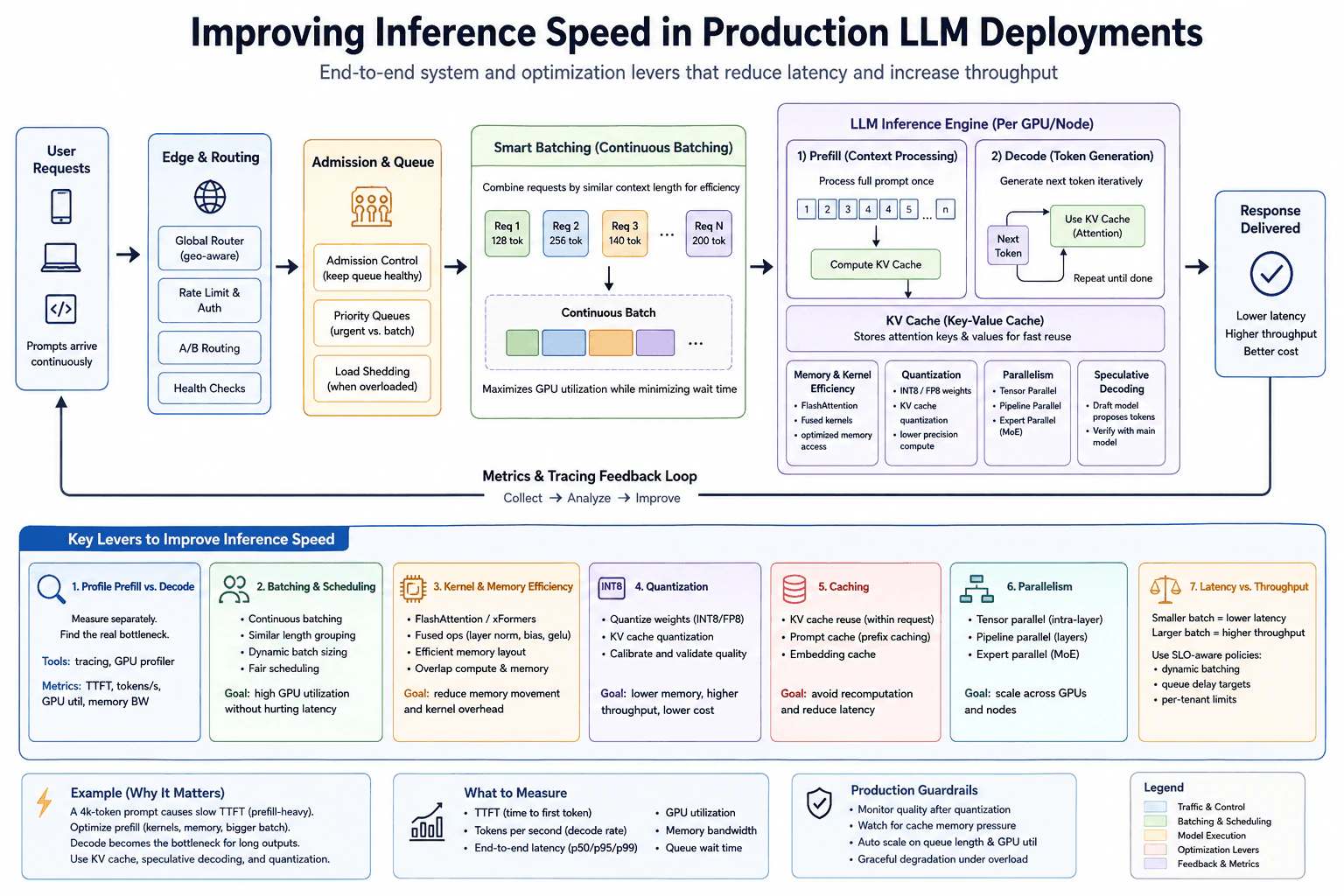
I would follow the production path shown in the diagram. Requests first pass through routing, rate limits, health checks, and admission control. Admission control keeps the queue healthy. Priority rules and load shedding protect the service when demand is too high. I would measure queue wait separately from model execution so I do not blame the accelerator for time spent waiting.
Next, I would profile prefill and decode separately. Prefill processes the prompt and creates the KV cache. Decode generates tokens one at a time and repeatedly reads that cache. I would use service metrics and a compatible accelerator profiler to inspect time to first token, tokens per second, GPU utilization, memory bandwidth, and kernel behavior. A profiler can add overhead or miss very short events, so one sample is not final proof.
For batching, I would use continuous batching so requests can enter and leave the active batch as capacity changes. Grouping requests with similar context lengths can reduce wasted work. Dynamic batch sizing and fair scheduling can improve GPU use while protecting latency. The key tradeoff is that larger batches usually raise throughput, while smaller batches usually reduce queueing and latency.
If kernels or memory movement are limiting speed, I would use optimized attention, fused kernels, and an efficient memory layout when supported. The goal is to reduce launch overhead and unnecessary memory traffic. I would verify the effect with the same profiler and workload instead of assuming that a named kernel is always faster.
For quantization, I would consider lower precision weights such as INT8 or FP8 when the model and hardware support them. I would also consider KV cache quantization if cache memory is a limit. Lower precision can reduce memory use and sometimes raise throughput, but I would validate output quality because numerical changes can affect model behavior.
Caching avoids repeated work. The KV cache stores attention keys and values from earlier tokens in the same request. Prefix or prompt caching can reuse repeated prompt work across requests when safe. Embedding caching can also avoid repeated embedding computation when the exact same reusable input is requested. I would watch cache memory pressure and reuse rate because a cache that grows too large can reduce capacity for active requests.
If one device is not enough, I would choose parallelism based on the model and hardware. Tensor parallelism splits work inside a layer. Pipeline parallelism splits layers across devices. Expert parallelism distributes mixture of experts work. These approaches can increase capacity, but device communication adds overhead, so I would measure whether they improve the target metric.
The diagram also shows speculative decoding. A smaller draft model proposes tokens and the main model verifies them. This can reduce decode time for suitable workloads, but the benefit depends on how often proposed tokens are accepted and on verification cost.
Finally, I would repeat the same representative load test. I would compare time to first token, token generation rate, end to end latency percentiles, queue wait, GPU utilization, memory bandwidth, errors, and quality where relevant. I would also check whether the bottleneck moved to another resource. In production I would keep autoscaling, load shedding, admission control, canary deployment, alerts, and graceful degradation around the optimized service.
Compute and Serving Path
Define the target metric, such as time to first token, token generation rate, latency percentiles, throughput, or a clear combination.
Capture a baseline with representative prompt lengths, output lengths, concurrency, warmup, and queue behavior.
Break the request path into routing, admission, queue wait, continuous batching, prefill, decode, and response delivery.
Profile prefill and decode separately with service metrics and a compatible accelerator profiler.
Classify the measured limit as compute, memory bandwidth, queueing, scheduling, cache pressure, or communication overhead.
Apply one targeted change, such as batching, fused kernels, better memory access, quantization, cache reuse, parallelism, or speculative decoding.
Retest with the same workload and compare the same metrics.
Verify output quality, error behavior, memory pressure, and whether the bottleneck moved.
Roll out with admission control, load shedding, autoscaling, alerts, and graceful degradation.
Practical Complexity & Trade-offs
The main cost is a balance among compute, memory, queueing, and communication. Continuous batching can raise GPU use, but larger batches can add wait time. KV cache reuse saves repeated attention work, but the cache consumes memory as more requests and tokens stay active. Quantization can lower memory use and raise throughput, but it needs quality checks. Parallelism can add capacity, but device communication adds overhead. Speculative decoding adds draft work and verification work, so it helps only when enough proposed tokens are accepted. Profiling and load testing also consume resources, so they should use controlled, representative traffic.
Where it is used
This approach is used in production chat systems, coding assistants, search assistants, and other online generation services. It is especially useful when traffic is continuous, prompt and output lengths vary, GPU memory is limited, or the service must balance strict latency goals with high accelerator utilization.
Why Interviewers Ask This
Interviewers ask this to see whether you measure the real inference path before tuning it. They want to know if you can separate prefill from decode, distinguish queue delay from model work, identify compute or memory pressure, choose the right optimization, and explain the latency and throughput tradeoff without hurting correctness or reliability.
Common interview mistakes
Common mistakes are optimizing before measuring, using averages only, mixing queue wait with model time, profiling prefill and decode as one undivided block, testing unrealistic prompts, assuming a larger batch is always better, treating quantization as free, ignoring KV cache memory pressure, adding parallelism without measuring communication cost, using speculative decoding without checking acceptance behavior, and comparing before and after with different workloads. Another mistake is declaring success from a local microbenchmark without checking end to end production latency, throughput, errors, and output quality.
Interview tip
Explain this as a measurement loop. Start with the target metric, separate queue wait from model work, profile prefill and decode, name the measured bottleneck, choose one matching optimization, and then explain how you retest the same workload while protecting the latency and throughput goal.
Interviewer may ask next
What if GPU utilization is high but token generation is still slow?
High GPU utilization alone does not prove that useful token work is efficient. For the same decode workload, I would inspect tokens per second, memory bandwidth, kernel time, KV cache access, and queue wait. Decode can be limited by memory traffic even while the GPU looks busy. I would change kernels, memory layout, quantization, or cache handling only after the measurements point to that limit, then retest the same traffic.
How would you choose between lower latency and higher throughput?
I would choose using the service latency goal for the same production request path. Smaller batches and stricter queue limits usually favor lower latency. Larger continuous batches can increase GPU utilization and throughput, but they can also increase waiting time. I would test representative prompt lengths, output lengths, and concurrency, then set batch limits, admission rules, and replica capacity so the required latency percentiles are met without wasting too much accelerator capacity.
114. What is model parallelism vs data parallelism in distributed training?Ai Infrastructure And ScalabilityEasy
i Question Details
Compare the alternatives across what is replicated or partitioned, communication patterns, memory limits, scaling efficiency, optimizer state, and suitable workloads.
Short Interview Answer (30-60 seconds)
I would start with data parallelism when the full model fits in one GPU. Each GPU keeps a complete model copy and processes a different part of the training batch. After backward computation, the GPUs synchronize gradients with All Reduce so the copies receive the same update. I would use model parallelism when the model is too large for one GPU. The model is divided across GPUs, so activations move forward through the model parts and gradients move backward. This reduces model memory per GPU, but it usually adds more communication and synchronization.
Detailed Explanation
The practical choice starts with one question: can the complete model fit in the memory of one GPU? If it can, data parallelism is usually the simpler choice. Each worker keeps the full model and receives a different part of the training batch. If the model cannot fit, model parallelism splits the model across workers. Each worker stores only one part. The choice changes communication, memory use, optimizer state placement, and scaling behavior. The best option depends on model size, GPU memory, network speed, and the amount of useful computation per worker.
Useful Questions to Ask the Interviewer
Does the complete model fit in the memory of one GPU?
Is the main goal higher training throughput or fitting a larger model?
How fast is communication between the GPUs?
Are we comparing basic data parallelism with the layer based model parallel design shown here?
How to Explain It in an Interview
Start with what is copied and what is divided.
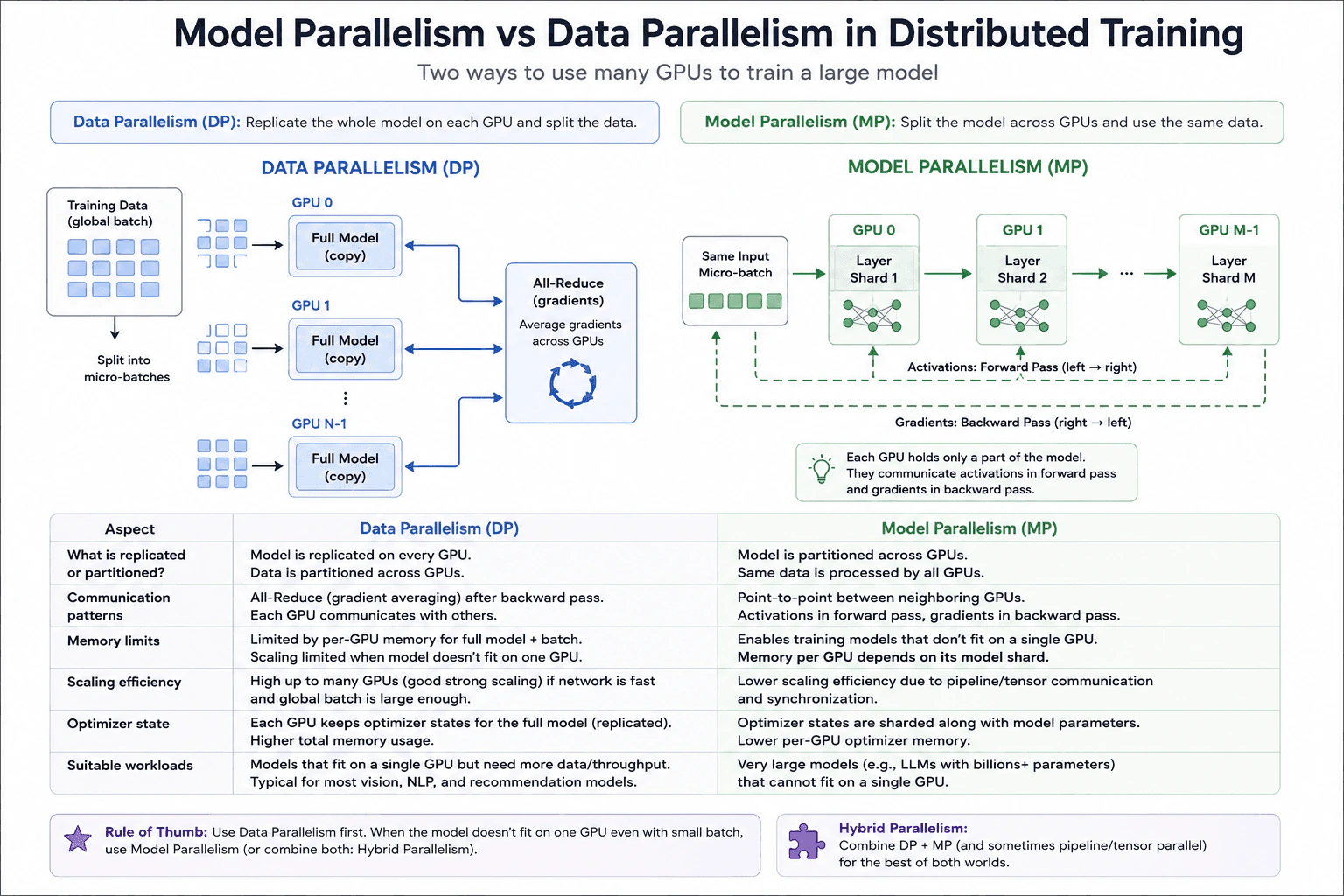
In data parallelism, every GPU holds a full copy of the model. The global training batch is divided into smaller batches, and each GPU processes a different part. Each GPU runs the forward pass and backward pass on its local data. After backward computation, the GPUs synchronize their gradients with All Reduce. The reduction combines gradients across the GPUs so every model copy can apply the same synchronized update.
This design is useful when the full model fits in one GPU and the goal is more training throughput. The main memory limit is that every GPU must still hold the complete model. In the basic design shown in the diagram, every GPU also keeps optimizer state for the complete model. Adding GPUs increases total model and optimizer memory across the cluster even though each GPU works on less data.
The main communication cost in data parallelism is gradient synchronization. Scaling can be good when each GPU has enough useful computation and the network can move gradients quickly. As more GPUs are added, All Reduce communication can become a larger part of each training step. If each GPU receives too little work, communication and synchronization can limit the benefit of adding more GPUs.
In the model parallel design shown in the diagram, the model is divided into layer shards across GPUs. One GPU holds one model part, the next GPU holds another part, and so on. The same micro batch passes through those model parts. Activations move from earlier model parts to later model parts during the forward pass. Gradients move in the opposite direction during the backward pass.
The main benefit is memory. Each GPU stores only its model shard instead of the entire model. This allows training a model that is too large for one GPU. In the design shown, optimizer state is also divided with the model parameters, so each GPU keeps optimizer state for its own shard rather than for the whole model.
The tradeoff is communication and synchronization. Activations must cross GPU boundaries during the forward pass, and gradients must cross those boundaries during the backward pass. Pipeline waiting or other synchronization can leave some GPUs idle for part of the step. This can make scaling less efficient than simple data parallelism even though model parallelism solves the model memory limit.
The practical rule is simple. Use data parallelism first when the complete model fits on one GPU and more throughput is needed. Use model parallelism when the model is too large for one GPU. For very large training jobs, both approaches can be combined. A hybrid design can divide a model across a group of GPUs and also create data parallel copies of that group.
Compute and Serving Path
Check whether the complete model fits in the memory of one GPU.
If it fits, consider data parallelism first.
Copy the full model to every GPU and divide the global training batch across those GPUs.
Let each GPU run forward and backward computation on its own data.
Synchronize gradients across the GPUs with All Reduce before applying the model update.
Check whether gradient communication is becoming large compared with useful GPU computation as more GPUs are added.
If the complete model does not fit in one GPU, divide the model into shards across GPUs.
Pass activations forward through the model shards and pass gradients backward through those shards.
Account for the memory used by each model shard, its optimizer state, and its training activations.
Compare the memory benefit with the added communication and synchronization cost.
If both model size and throughput require more scale, consider a hybrid design that combines model parallelism and data parallelism.
Practical Complexity & Trade-offs
Data parallelism uses a full model copy on every GPU. In the basic design shown, every GPU also stores optimizer state for the full model. Its main communication cost is the All Reduce operation used to synchronize gradients. Adding GPUs helps while the useful training work remains large enough compared with communication.
Model parallelism reduces model memory on each GPU because each GPU stores only one model shard. In the design shown, optimizer state is divided with those model parameters. The cost is more communication between model parts. Activations travel forward and gradients travel backward. Synchronization and pipeline waiting can reduce GPU use and scaling efficiency.
Where it is used
Data parallelism is commonly used when a model fits on one GPU but training needs more throughput. It is suitable for many vision, language, and recommendation training workloads because different GPUs can process different parts of the global batch while keeping synchronized model copies. Model parallelism is used when a model is too large to fit on one GPU. Different GPUs store different model parts and cooperate on the same micro batch. Very large training clusters can combine model parallelism with data parallelism when they need both model memory capacity and higher training throughput.
Why Interviewers Ask This
Interviewers ask this to check whether I understand how distributed training uses several GPUs and how memory limits affect the design. They want me to compare what is copied or divided, how workers communicate, where optimizer state lives, how efficiently training can scale, and which workloads fit each approach. A strong answer also explains why communication can become a bottleneck and why very large models may need model parallelism.
Common interview mistakes
A common mistake is saying that data parallelism divides the model. In the basic design shown, it does not. Every GPU holds the full model, while the training data is divided across GPUs.
Another mistake is saying that model parallelism gives every GPU a full model. The model is divided, so each GPU holds only its assigned model shard.
It is also a mistake to ignore communication. Data parallel GPUs must synchronize gradients. In the layer based model parallel design shown, GPUs exchange activations during the forward pass and gradients during the backward pass.
Another mistake is assuming data parallelism solves a model memory limit. If the complete model cannot fit in one GPU, creating more complete copies does not solve that problem.
A final mistake is assuming either approach scales perfectly. Data parallelism can become limited by gradient synchronization. Model parallelism can become limited by communication, synchronization, and pipeline waiting. The better choice depends on model size, GPU memory, network performance, and the workload.
Interview tip
Start with the memory decision. If the full model fits on one GPU, data parallelism is usually the simpler first choice. If it does not fit, model parallelism can divide the model across GPUs. Then compare what is copied, what communicates, the memory limit, optimizer state, scaling efficiency, and suitable workloads. Finish by mentioning that very large systems can combine both approaches.
Interviewer may ask next
If I keep adding GPUs with data parallelism, will training keep scaling efficiently?
No. In the data parallel workload shown, every GPU processes a different part of the global batch and then joins the All Reduce operation for gradient synchronization. As the GPU count grows, communication can take a larger share of each training step. If the useful computation per GPU becomes too small, adding another GPU may provide little benefit. Network performance, model size, gradient size, and the amount of work per GPU all affect the result.
When would you combine data parallelism and model parallelism?
I would combine them when the model is too large for one GPU and the training job also needs more total throughput. In this workload, model parallelism first divides the model across a group of GPUs. Data parallelism can then create multiple copies of that divided model group and give each copy different training data. The benefit is greater memory capacity and more throughput. The tradeoff is that the system must handle both gradient synchronization between data parallel copies and communication between model shards.
115. What is tensor parallelism, and how does it help serve large models?Ai Infrastructure And ScalabilityEasy
i Question Details
Clarify the relationships among partitioning matrix operations, collective communication, device topology, memory savings, and serving or training tradeoffs.
Short Interview Answer (30-60 seconds)
I would use tensor parallelism when one model layer is too large for one GPU or when several GPUs should share one large matrix operation. I split the tensor operation across the GPUs, let each GPU store and compute its local shard, and use a collective such as All Gather when the full result is needed. This lowers sharded weight memory on each GPU, but communication adds latency and bandwidth cost, so the device topology and workload shape matter.
Detailed Explanation
Tensor parallelism lets several GPUs share one very large piece of model work. Instead of asking one GPU to hold and process everything, we divide the work into smaller pieces. Each GPU keeps one piece, does its part, and then exchanges the pieces needed to finish the result. This can help when the model is too large for one GPU. The main cost is that the GPUs must communicate often. Fast, nearby connections make this exchange cheaper, while slower or more distant connections can reduce the benefit.
Useful Questions to Ask the Interviewer
Are we discussing inference, training, or both?
Is the main goal to fit the model in memory, increase throughput, or reduce latency?
Are the tensor parallel GPUs on the same node with high bandwidth links?
How to Explain It in an Interview
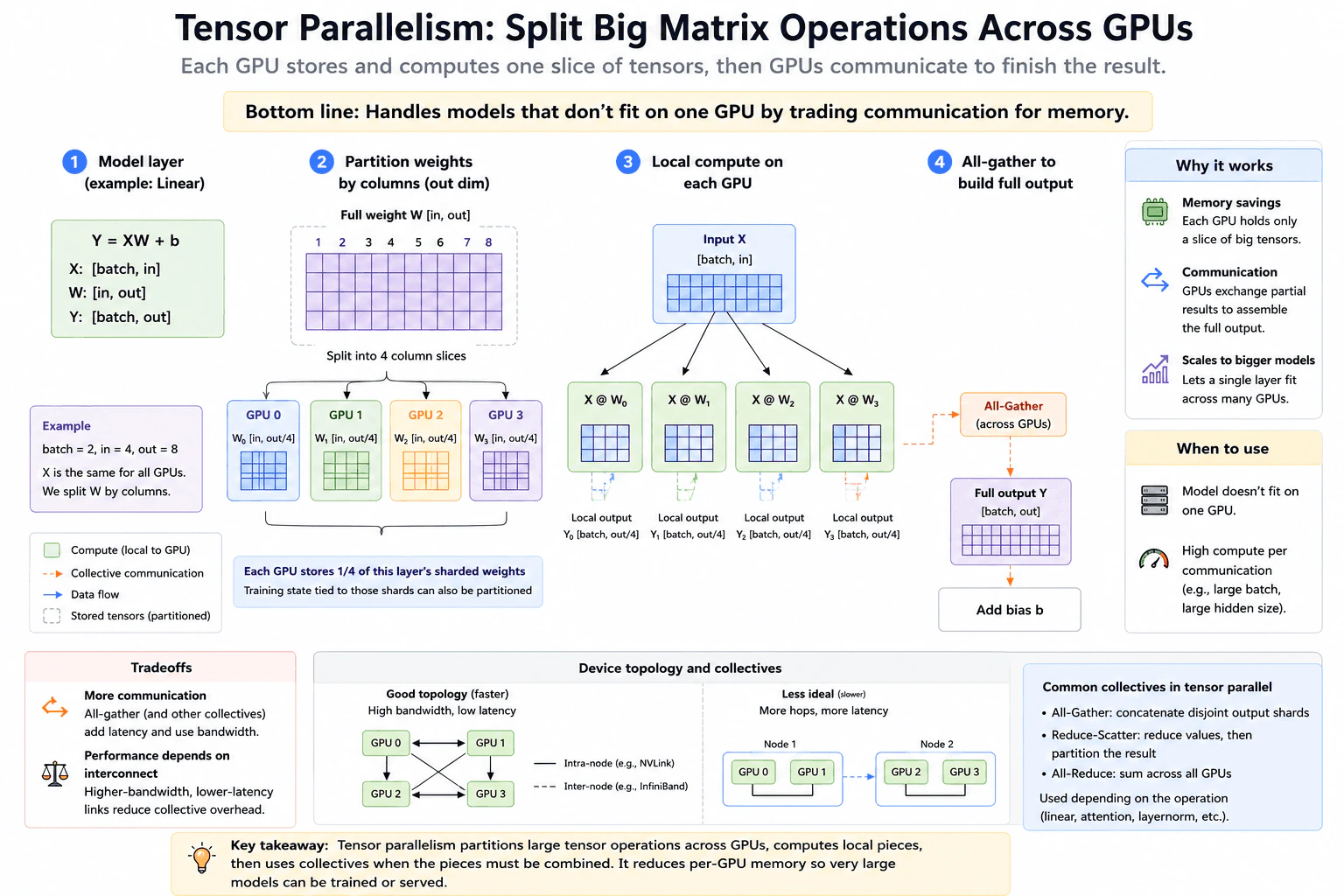
Start with the linear layer shown in the diagram. Let the input be X and the weight matrix be W. Split W by its output columns into W0, W1, W2, and W3. Every GPU receives the same X, but each GPU stores only its own weight shard. GPU 0 computes X times W0, GPU 1 computes X times W1, and the other GPUs do the same for their shards. Each local result is a disjoint slice of the output.
When the next operation needs the complete output, All Gather concatenates those disjoint output shards to build Y. Other tensor parallel layouts can use collectives such as Reduce Scatter or All Reduce. The collective must match the partitioned matrix operation, because different layouts produce different kinds of partial results.
The memory benefit comes from sharding the layer weights. In the four GPU example, each GPU stores one fourth of this layer's sharded weights. Training state tied to those shards can also be partitioned. This does not mean every memory category becomes one fourth. Activations, temporary buffers, communication workspaces, and serving state can follow different layouts.
Device topology matters because tensor parallel GPUs communicate inside many model operations. Higher bandwidth and lower latency links reduce collective overhead. A tightly connected local group is therefore usually more efficient than a group that requires more network hops.
For serving, tensor parallelism can make a model or a large layer fit across several GPUs, and those GPUs cooperate on each request. For training, the same partitioning reduces per GPU parameter storage for the sharded layers. In both cases, the tradeoff is communication. More GPUs can reduce local compute and memory per GPU, but they also add more collective communication and synchronization.
The practical choice should be measured with the real workload. Compare per GPU memory use, collective time, request latency or training step time, throughput, and accelerator use. If communication becomes the dominant cost, increasing the tensor parallel group can stop helping. The useful group size depends on model shape, batch and sequence shape, device links, and whether the goal is memory capacity, latency, or throughput.
Compute and Serving Path
Identify the large tensor operation to split, such as the matrix multiply in a linear layer.
Choose a partition that preserves the math. In the diagram, W is split by output columns across four GPUs.
Give every GPU the same input X and keep only its local weight shard on that GPU.
Compute one local output shard on each GPU.
Use the collective required by the partition. For the shown column partition, All Gather concatenates the disjoint output shards when a full output is needed.
Add the bias b after the full output is assembled, matching the diagram.
Place the tensor parallel group on links with enough bandwidth and low enough latency for the repeated collectives.
Measure memory use, collective time, latency or training step time, throughput, and accelerator use with a representative workload.
Increase or decrease the tensor parallel group only when those measurements show a useful tradeoff.
Practical Complexity & Trade-offs
The matrix math still has to be done, but it is divided across the GPUs. Each GPU stores only its shard of the partitioned weights, which reduces sharded weight memory per GPU. The new cost is communication. All Gather moves output shards between GPUs when a complete output is required. As the tensor parallel group grows, each GPU may do less local matrix work, but communication and synchronization can take a larger share of total time. The best group size depends on tensor shapes, workload size, and the speed of the links between devices.
Where it is used
Tensor parallelism is used in large model inference and training when one accelerator cannot hold a model or a large layer comfortably, or when several accelerators should cooperate on the same large matrix operations. It is most useful when the memory savings and shared compute are worth the repeated collective communication, especially inside a tightly connected group of GPUs.
Why Interviewers Ask This
Interviewers ask this to see whether you understand how one large model operation can be split across several GPUs. They want to know whether you can connect lower weight memory on each GPU with extra collective communication, explain why device topology matters, and discuss the serving and training tradeoffs without claiming that adding more GPUs is always better.
Common interview mistakes
Common mistakes are treating tensor parallelism as simply splitting whole layers, assuming every memory category shrinks by the same factor, using the wrong collective for the chosen partition, ignoring device topology, and assuming more GPUs always make one request or one training step faster. Another mistake is measuring only local matrix time while ignoring collective time. For the diagrammed column partition, the local outputs are disjoint slices, so All Gather concatenates them when the full output is needed. The final decision should compare memory, communication time, latency or training step time, throughput, and accelerator use under the same workload.
Interview tip
Explain one linear layer first. Say what is split, what each GPU stores, what each GPU computes, and why a collective is needed. Then connect that flow to the two main consequences: lower sharded weight memory per GPU and higher communication cost. Finish by saying that topology and workload shape decide whether the tradeoff is useful.
Interviewer may ask next
If each GPU stores one fourth of the sharded weights with four tensor parallel GPUs, does total GPU memory usage always become one fourth?
No. In the shown four GPU linear layer, each GPU stores one fourth of that layer's sharded weights, but not every memory category scales the same way. Activations, temporary buffers, communication workspaces, and serving state can follow different layouts. This matters because the real memory limit is the sum of all memory uses, not only parameter storage. I would measure per GPU memory under the exact serving or training workload before choosing the tensor parallel group size.
Why can adding more tensor parallel GPUs stop improving serving or training performance?
Because the shown tensor parallel linear layer trades local compute and memory for collective communication. More GPUs can reduce the matrix work and sharded weight storage on each device, but All Gather and other required collectives move data across the tensor parallel group. If collective time becomes a large share of the measured request or training step, extra GPUs can add little benefit or can increase latency. I would compare collective time, end to end latency or training step time, throughput, and accelerator use on the same workload, and I would prefer a topology with high bandwidth and low latency links.
116. What is the role of load balancing in AI serving infrastructure?Ai Infrastructure And ScalabilityMedium
i Question Details
Expected depth includes capacity-aware routing, session or cache affinity, health, heterogeneous accelerators, queue length, retries, and avoiding hot replicas.
Short Interview Answer (30-60 seconds)
I would use the load balancer as a smart router in front of the model serving pool. It should send each inference request to a healthy replica that has enough compute and memory, a reasonable queue, and hardware that can run the model. When useful, it should keep session or KV cache affinity so repeated requests can reuse cached state. It should stop routing to unhealthy or overloaded replicas, use bounded retries with backoff when a request can be retried safely, and use live feedback so traffic does not create hot replicas.
Detailed Explanation
Load balancing decides where each incoming AI request should go. The goal is to keep responses fast, use the available machines well, and keep the service working when one machine is busy or fails. A good design does not send work blindly. It looks at how busy each machine is, how much work is already waiting, whether the machine is healthy, and whether a request would benefit from returning to the same place. It can then spread work more safely, reuse useful stored state, and avoid sending too much traffic to one machine.
Useful Questions to Ask the Interviewer
Are all model replicas using the same accelerator and model configuration?
Does the service depend on session state or reusable cache state between requests?
Which routing signals are available, such as queue length, utilization, memory, errors, latency, and throughput?
Which requests are safe to retry if a replica fails?
How to Explain It in an Interview
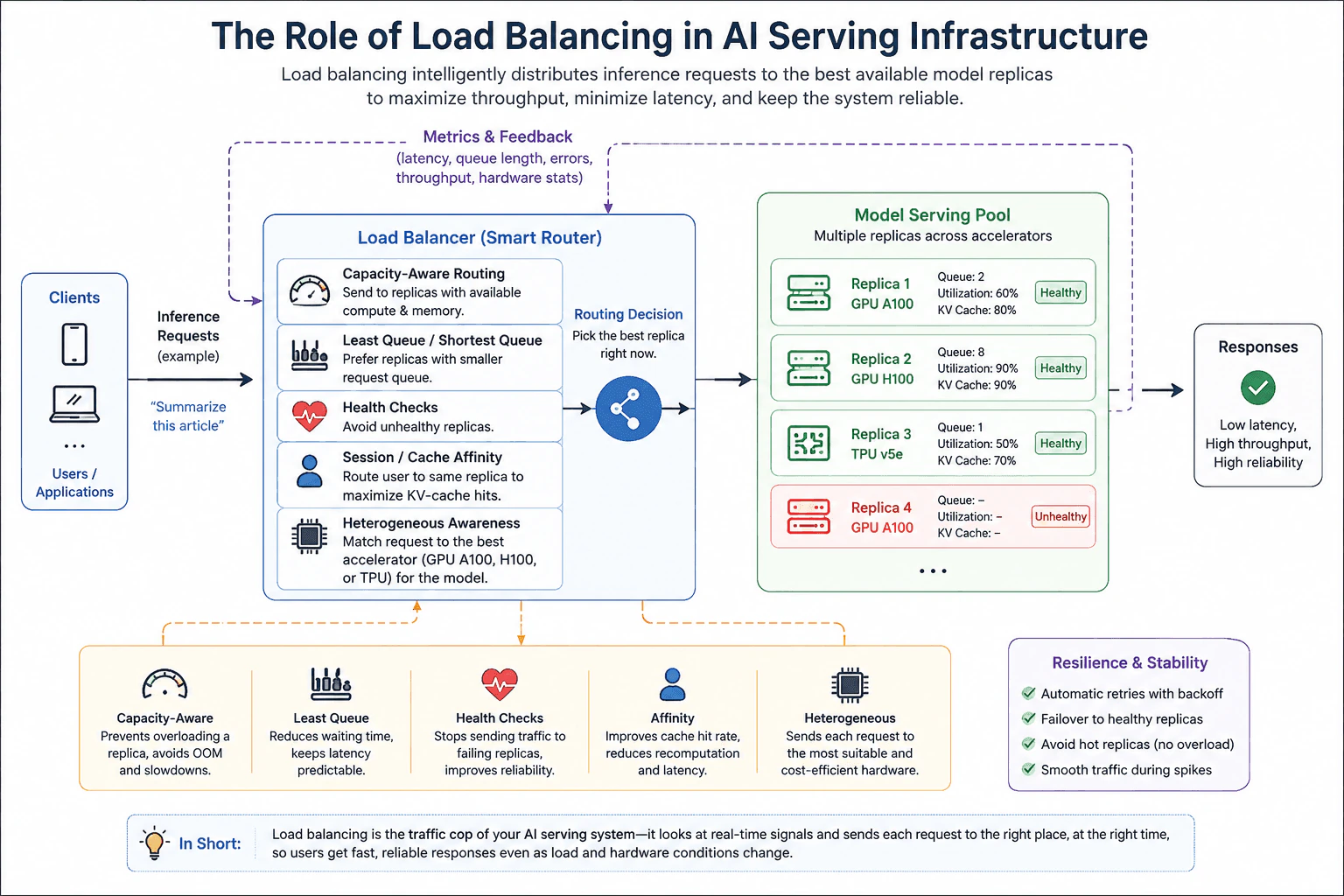
I would place a load balancer in front of the model serving pool and make routing decisions from live serving signals. Capacity aware routing means the router prefers replicas with usable compute and memory instead of treating every replica as equal. Queue length matters because a healthy replica can still be a poor choice if many requests are already waiting there.
Health monitoring should mark failing replicas as unavailable so the router stops sending normal traffic to them. If a routed request fails and the operation is safe to retry, the system can retry a limited number of times with backoff and choose another healthy replica. The retry policy must stay bounded so a failure does not create a retry storm.
Affinity matters when repeated requests can reuse session state or KV cache entries. Sending related work back to the same replica can reduce repeated computation and may lower latency. The tradeoff is that strict affinity can create a hot replica. The router should therefore treat affinity as a preference, not as a reason to overload one worker.
Heterogeneous awareness matters when the serving pool contains different accelerators, such as the GPU A100, GPU H100, and TPU v5e examples shown in the diagram. The router should first choose a replica that can serve the model and request. It can then compare capacity, queue length, health, and affinity among suitable replicas.
The model serving pool should continuously send metrics and feedback back to the routing system. Useful signals include latency, throughput, queue length, errors, accelerator utilization, memory availability, and cache state when that information is available. These measurements help the router avoid hot replicas and adapt as load changes.
After changing the routing policy, I would test the same representative traffic and compare latency, throughput, errors, queueing, and saturation. I would also verify response correctness and check that the bottleneck did not simply move to another replica or shared dependency.
Compute and Serving Path
Define the goal for the inference service, such as lower tail latency, steady throughput, and fewer overloaded replicas.
Collect live signals from each model replica, including health, available compute and memory, queue length, errors, latency, throughput, and useful cache state when available.
Filter out replicas that are unhealthy or cannot serve the model or request on their accelerator.
Among the remaining replicas, prefer enough capacity and a shorter queue. Use session or KV cache affinity as a preference when it saves useful work.
Route the request and observe the result through metrics and feedback from the serving pool.
If the request fails and retry is safe, use a bounded retry with backoff and choose another healthy replica.
Under representative load, watch for hot replicas, long queues, rising errors, or saturation.
Retest any routing change with the same workload and verify both performance and correctness.
Practical Complexity & Trade-offs
The router adds a small decision cost to every request because it must use recent replica signals and choose a destination. More detailed routing can also require more metrics, health information, cache information, and control state. Affinity can improve cache reuse, but it can also make traffic less even. Retries improve resilience when used carefully, but they add extra work during failures. Supporting several accelerator types also makes routing rules and capacity tracking more complex. The main production cost is keeping routing signals fresh, bounded, and reliable without adding too much control overhead.
Where it is used
This approach is used in online model inference services with multiple replicas. It is especially useful when replica load changes quickly, request queues can grow, some replicas become unhealthy, or the serving pool contains different accelerator types. It is also useful for workloads that benefit from session or KV cache affinity, because the router can reuse cached state while still protecting the system from hot replicas. Large shared AI serving platforms use the same ideas to spread traffic, isolate failures, and keep latency and throughput stable as demand changes.
Why Interviewers Ask This
Interviewers ask this to see whether you can route inference traffic using real serving signals instead of simple round robin distribution. They want to hear how you balance available compute, memory, queue length, replica health, cache affinity, and accelerator type. They also test whether you understand retries, failover, hot replicas, and the tradeoff between spreading traffic and keeping a request close to useful cached state.
Common interview mistakes
Common mistakes include using round robin distribution when replicas have very different load, ignoring queue length, routing to a replica only because it is healthy, and assuming affinity must always be strict. Another mistake is treating all accelerators as interchangeable without checking whether the replica can serve the model and request. Unbounded retries can multiply traffic during an outage. Stale metrics can also cause poor routing decisions. Finally, adding more replicas does not solve a bad routing policy by itself. You still need to measure whether traffic is balanced, queues are controlled, failures are isolated, and the policy preserves correct responses.
Interview tip
Explain load balancing as a decision loop. First filter for compatibility and health. Then choose among suitable replicas using capacity and queue signals. Add affinity only when it has a clear cache or session benefit. Finally explain bounded retries, feedback metrics, and how you avoid hot replicas. This keeps the answer practical and shows that routing is based on current serving conditions, not just equal request counts.
Interviewer may ask next
What can go wrong if the load balancer uses only average accelerator utilization?
Average utilization is not enough for this inference serving workload. A replica can show an acceptable average while its request queue is growing, its memory is tight, or its tail latency is already poor. I would use the same model serving pool and consider queue length, health, available compute and memory, errors, latency, throughput, and compatibility together. This matters because one misleading signal can create a hot replica. The tradeoff is that richer routing needs fresher metrics and more control logic, so the signal set should stay focused and reliable.
How would you handle affinity when one replica starts becoming overloaded?
I would treat session or KV cache affinity as a preference, not an absolute rule, for this inference serving pool. If the preferred replica becomes unhealthy, saturated, or develops a long queue, the router should choose another compatible healthy replica with better capacity. This may lose some cache reuse and cause extra computation, but it prevents one replica from becoming a hot spot. I would measure latency, queue length, cache reuse, errors, and accelerator saturation under the same representative load to choose the right balance.
117. How do you implement auto-scaling for AI workloads?Ai Infrastructure And ScalabilityMedium
i Question Details
Explain how the system would manage request and token signals, queue depth, warm capacity, scale-up delay, GPU availability, cooldown, and overload protection.
Short Interview Answer (30-60 seconds)
I would implement autoscaling as a feedback control loop around the inference service. I would watch request rate, token throughput, queue depth, queue wait time, GPU utilization, GPU availability, and worker startup time. The controller would add GPU workers when sustained demand is above the target range, keep a small warm pool for bursts, and remove workers only after a cooldown and sustained low load. I would also bound the queue and use admission control and load shedding when safe capacity is exhausted.
Detailed Explanation
The system needs to keep enough computing capacity ready as demand changes. It watches how many requests arrive, how much work those requests create, how long work is waiting, how busy the machines are, and whether more machines are available. When demand stays high, it adds capacity. When demand stays low for long enough, it removes capacity. Some ready capacity stays available for sudden bursts. If demand becomes larger than the system can safely handle, it limits or rejects new work so waiting time does not grow without control.
Useful Questions to Ask the Interviewer
Is this an online inference service with a latency target, or can requests wait longer?
How long does a new GPU worker take to load the model and become ready?
Are GPU resources limited by cluster, zone, or region?
During overload, should we protect latency, maximize accepted traffic, or minimize cost first?
How to Explain It in an Interview
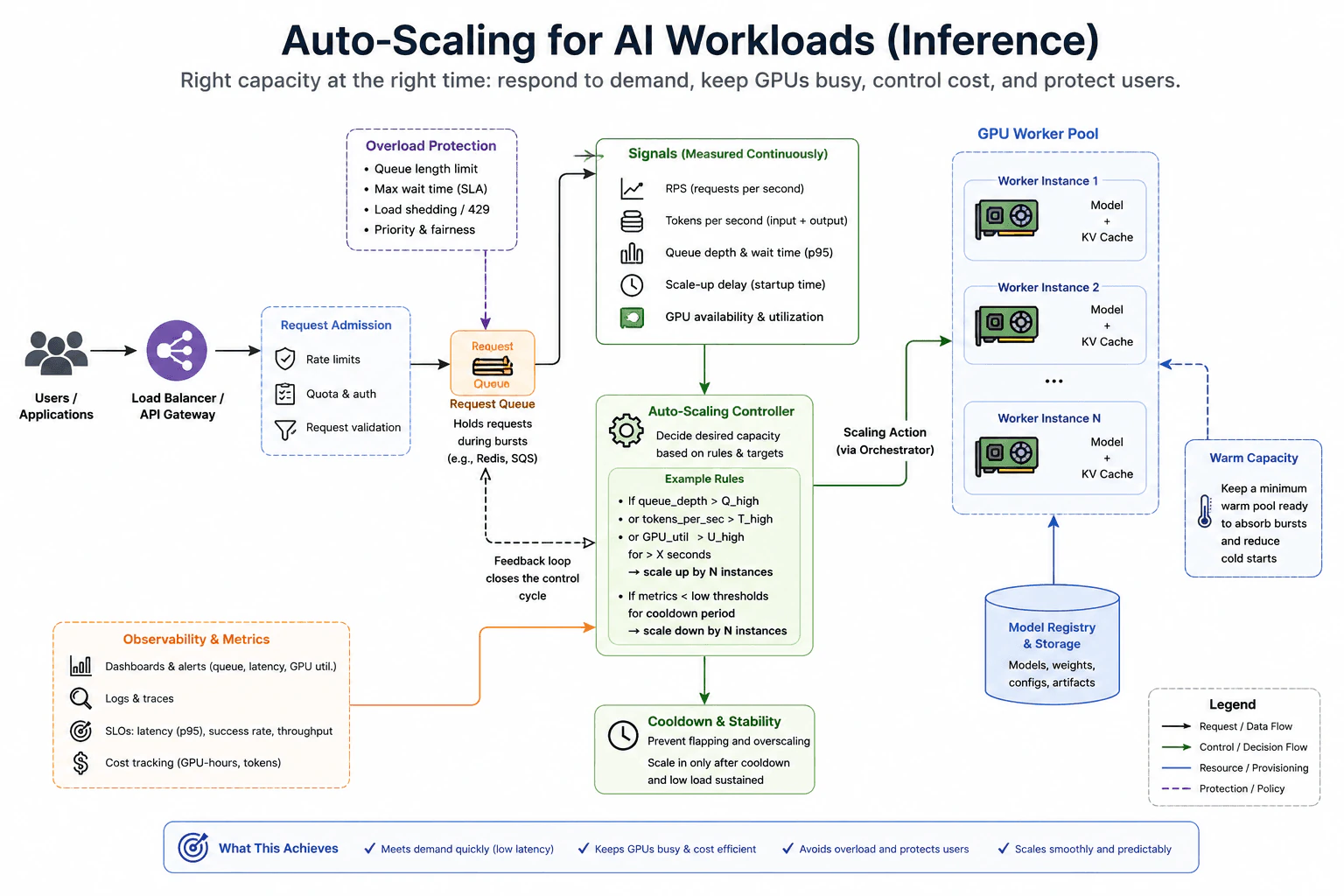
I would use one feedback control loop around the online inference path. Users send requests through the load balancer or API gateway. Request admission applies rate limits, quota checks, authentication, and validation. Accepted requests enter a bounded request queue. The queue absorbs short bursts, but it also exposes backlog. Queue depth and queue wait time show when requests are arriving faster than the GPU workers can process them.
The controller continuously measures several signals. Requests per second show arrival pressure. Tokens per second show the amount of model work because two requests can have very different input and output lengths. Queue depth and p95 queue wait time show backlog. GPU utilization shows how busy the current workers are. GPU availability shows whether more workers can actually be provisioned. Scale up delay measures how long a requested worker takes to become ready after model loading and startup.
The controller combines these signals instead of trusting one metric. If queue depth stays above its target, token throughput stays high, or GPU utilization remains high for a sustained period, the controller increases desired capacity. It sends a scaling action through the orchestrator to add GPU worker instances. Each ready worker has the model loaded and maintains runtime state such as its KV cache while serving requests.
The model registry and storage layer provide the model weights, configuration, and serving artifacts that a worker needs when it starts. This startup path matters because adding a GPU does not create useful capacity until the worker has loaded what it needs and is ready to serve traffic. The measured startup delay therefore affects how early the controller should react.
I would keep a minimum warm pool of ready GPU workers. Warm capacity reduces the effect of cold starts and helps absorb sudden bursts. The tradeoff is cost because idle warm workers still consume expensive resources. The right warm level depends on burst size, startup delay, latency goals, and budget.
Scale in should be slower than reacting to a short drop in traffic. I would require a cooldown and sustained low load before removing workers. This prevents flapping, where capacity repeatedly moves up and down around a threshold. The cooldown improves stability, but it can keep extra GPUs running for longer.
Overload protection is required even with autoscaling. The request queue must have a hard limit. Admission control can enforce rate limits, quotas, maximum waiting time, priority, and fairness. If queue pressure becomes unsafe or more GPU capacity is unavailable, the service can shed load and return a retry response such as HTTP 429 when that matches the API contract. This protects latency and prevents an unbounded backlog.
Observability closes the feedback loop. I would monitor queue depth, queue wait time, latency percentiles, success rate, throughput, GPU utilization, GPU availability, worker startup time, token volume, and GPU cost. Logs and traces help explain failures or unexpected request behavior. After changing scaling rules, I would run the same representative traffic pattern and compare the same metrics. I would also verify correct model responses and check whether the bottleneck moved to GPU inventory, model loading, the queue, or another dependency.
Key Insight / Why This Solution Works
Measure requests per second, tokens per second, queue depth, p95 queue wait time, GPU utilization, GPU availability, and worker startup time.
Keep request admission and the request queue bounded so overload is visible and backlog cannot grow without limit.
Feed the measured signals into the autoscaling controller.
Estimate desired GPU worker capacity from sustained demand, queue pressure, utilization, available GPUs, and startup delay.
Keep a minimum warm pool of ready workers so short bursts do not always wait for cold startup.
Scale out through the orchestrator when demand stays above the target range and GPU capacity is available.
Allow new workers to load the model and serving artifacts before treating them as ready capacity.
Scale in only after a cooldown and sustained low load.
Apply admission limits, priority rules, fairness, and load shedding when safe capacity is exhausted.
Retest with the same representative workload and verify latency, throughput, errors, queue behavior, GPU use, correctness, and cost.
Where it is used
This design is common for online language model inference, image generation, speech systems, recommendation services, and other GPU based AI APIs where request size and model work can change quickly. It is especially useful when GPU workers are expensive, startup is slow, traffic is bursty, and the service must balance latency, utilization, reliability, and cost.
Why Interviewers Ask This
Interviewers ask this to see whether you can turn changing AI inference demand into safe capacity decisions. They want to know whether you can choose useful signals, account for slow GPU startup, keep enough warm capacity for bursts, prevent rapid scaling changes, and protect the service when demand exceeds available GPU capacity.
Common interview mistakes
Common mistakes are scaling from one metric, scaling from request count while ignoring token work, allowing an unbounded request queue, ignoring queue wait time, waiting for complete GPU saturation before reacting, ignoring worker startup delay, assuming more GPUs are always available, and removing workers without a cooldown. Another mistake is treating warm capacity as free. A service also needs overload protection because autoscaling cannot help immediately when startup is slow or GPU inventory is exhausted. I would also avoid changing thresholds after one test. I would use representative traffic and verify whether the bottleneck moved after the change.
Interview tip
Explain the design as one closed control loop. Follow the real request path from admission to the queue and GPU workers, then explain the measured signals, scaling decision, warm capacity, startup delay, cooldown, and overload path. State clearly that the thresholds come from representative measurements and that adding capacity is useful only when GPUs are available and new workers become ready.
Interviewer may ask next
What if request rate is low but the request queue keeps growing?
I would not conclude that demand is low from request count alone. For this inference workload, I would inspect tokens per second, p95 queue wait time, and GPU utilization across the request queue and GPU worker pool. A small number of long generation requests can create heavy token work and keep the workers saturated. If that is the cause, the controller should react to token pressure and queue growth as well as request rate. The tradeoff is that token based signals require reliable measurement and careful thresholds.
What should the system do if a traffic spike occurs but no additional GPUs are available?
I would keep the same inference control loop, but I would treat GPU availability as a hard capacity constraint. The warm worker pool can absorb part of the spike, but the controller cannot create useful capacity when the cluster has no available GPUs. The bounded queue, admission limits, maximum waiting time, priority rules, fairness, and load shedding path should then protect the service. Some requests may receive a retry response such as HTTP 429. The tradeoff is accepting less traffic in order to protect latency and system stability.
118. What is model sharding, and when would you use it?Ai Infrastructure And ScalabilityHard
i Question Details
Expected depth includes partition boundaries, interconnect traffic, placement, replication, failure domains, rebalancing, and when a single device cannot hold the model.
Short Interview Answer (30-60 seconds)
I would use model sharding when the required model state cannot fit on one device, or when one device does not provide enough memory or compute capacity for the workload. Sharding splits model state and related computation across several devices. For example, GPU 0 can hold early layers and GPU 1 can hold later layers. Activations move between those shards during execution. The main tradeoff is communication between devices, so I would choose balanced partition boundaries, place communicating shards on fast links, and plan replication and failure recovery carefully.
Detailed Explanation
A large model may be too big for one device that does the main calculation. Instead of forcing the whole model into one place, we can divide it into smaller pieces and put those pieces on several devices. A request then moves through those pieces in order until the final result is produced. This lets us use more total memory and computing power. The main challenge is that the pieces must exchange information, so the way we divide and place them can strongly affect speed, reliability, and operating cost.
Useful Questions to Ask the Interviewer
Are we discussing training, inference, or both?
Is the main reason for sharding that the model state does not fit on one device?
Are the devices inside one machine or spread across several machines?
Is the main goal memory capacity, compute capacity, availability, or a combination of these?
How to Explain It in an Interview
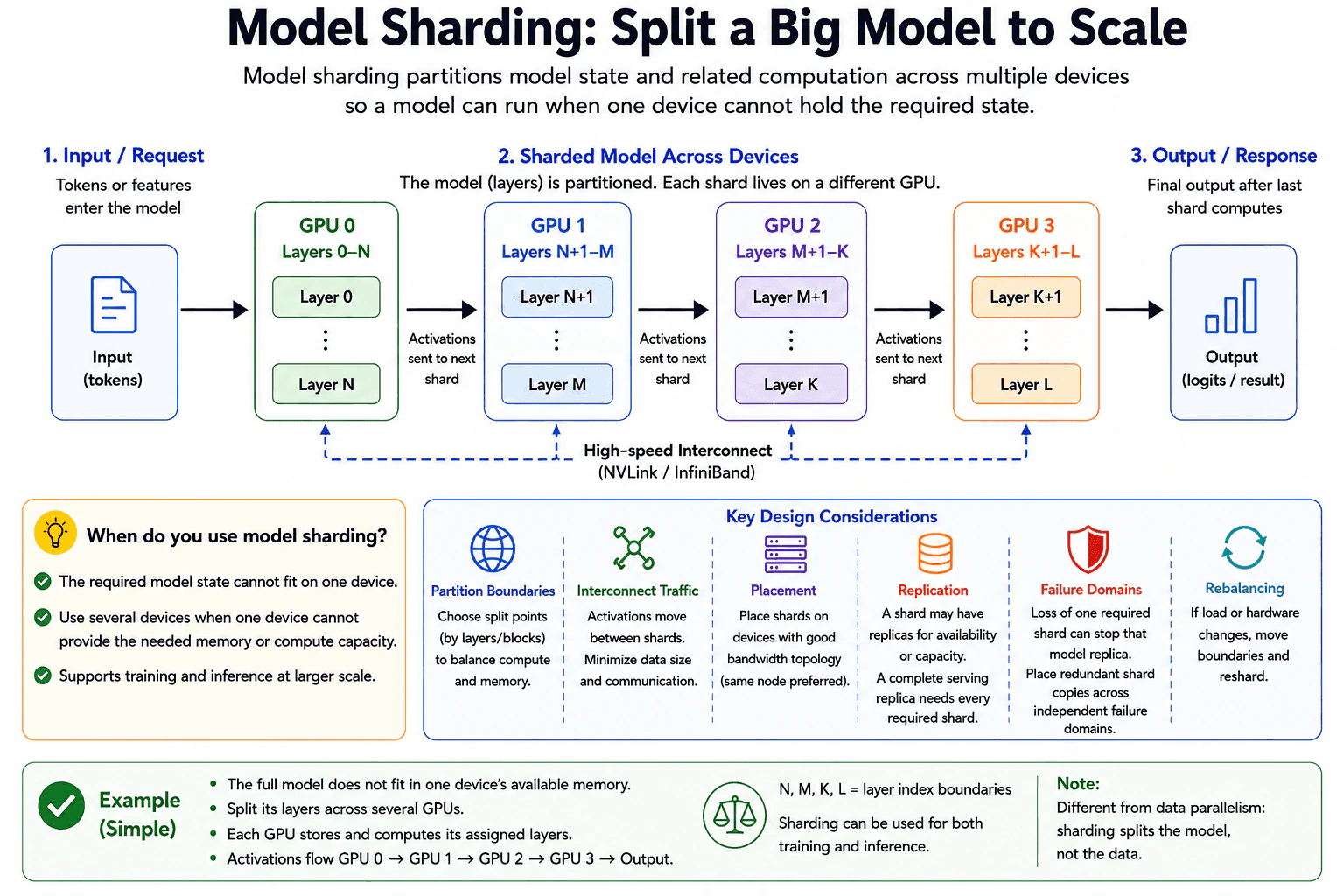
Model sharding means splitting model state and related computation across multiple devices. A shard is one piece of the model. I would use sharding when one device cannot hold the required model state, or when several devices are needed to provide enough compute capacity.
A simple example is layer based sharding. GPU 0 stores and runs the first group of layers. GPU 1 stores and runs the next group. GPU 2 and GPU 3 continue the same pattern. Input tokens enter the first shard. After one shard finishes its layers, it sends activations to the next shard. Activations are the intermediate values produced by the model. The final shard produces the output.
Partition boundaries are the points where the model is split. Good boundaries balance memory and computation. A poor split can leave one device overloaded while another device waits. The boundaries also affect how much data must cross between devices.
Interconnect traffic is the data sent between devices. In the layer based example, activations cross shard boundaries. This communication can become a bottleneck. I would therefore place shards that communicate often on devices with fast links when possible. Technologies such as NVLink or InfiniBand can provide high bandwidth communication, but the exact benefit depends on the hardware and workload.
Placement means deciding which shard runs on which device. I would consider device memory, compute capacity, and network topology. Keeping closely communicating shards on nearby devices can reduce communication cost.
Replication is different from sharding. Sharding divides one model replica into pieces. Replication creates additional shard copies for availability or capacity. A shard may have replicas, but a complete serving replica needs every required shard in its execution path.
Failure domains also matter. If one required shard becomes unavailable because its device fails, that model replica may stop serving requests. To reduce this risk, redundant shard copies can be placed across independent failure domains so one failure does not remove every copy of the same required shard.
Rebalancing means changing shard placement or partition boundaries when hardware or load changes. For example, if one shard becomes overloaded or a device is removed, the system may move a shard or change the split. Rebalancing adds operational work and may move model state, so it should be controlled carefully.
Sharding can be used for both training and inference. The exact communication pattern can differ, but the central idea is the same. Model state and related computation are distributed because one device is not enough. Sharding is also different from data parallelism. Data parallelism mainly copies the model and splits the input data. Model sharding splits the model itself.
Compute and Serving Path
Start with the capacity problem. Check whether the required model state fits on one device and whether one device has enough compute capacity.
Choose a sharding method that matches the model. For the layer based design shown here, divide groups of layers across several GPUs.
Choose partition boundaries that balance memory and computation across devices.
Estimate the communication created by each boundary. In this layer based flow, activations move from one shard to the next.
Place shards so heavily communicating neighbors use fast links when possible.
Decide how replicas will be used for capacity or availability. Remember that one complete serving replica needs all required shards.
Place redundant shard copies across independent failure domains so one failure does not remove every copy of a required shard.
Plan for rebalancing when load, device availability, or hardware topology changes.
Validate the design with representative training or inference traffic. Measure device memory, device utilization, communication time, throughput, latency, and errors as appropriate.
Confirm that model output remains correct and check whether communication or one shard has become the new bottleneck.
Practical Complexity & Trade-offs
The main cost is not just the number of devices. Each device stores only part of the model, which helps with memory capacity, but the devices must communicate. More partition boundaries can create more data transfers. Poor placement can make those transfers slower. Replication needs extra memory and compute because additional shard copies must be stored and run. Failure recovery, deployment, and rebalancing also add operational and maintenance work. The best design depends on model size, device memory, compute load, communication volume, hardware topology, and the required level of availability.
Where it is used
Model sharding is used when a model is too large for the available memory of one GPU or TPU, or when one device does not provide enough compute capacity. It is used in large model training and in inference systems that serve models whose required state cannot fit on one accelerator. It is also useful when a serving system combines sharding with replicas so it can add capacity or recover when a required shard becomes unavailable.
Why Interviewers Ask This
Interviewers ask this to see whether I understand how to run a model that is too large for one accelerator. They want to know if I can choose sensible partition boundaries, understand communication between devices, place shards well, plan replicas and failure recovery, and handle changes in load or hardware. They also want to see whether I understand the main tradeoff. Sharding gives access to more combined memory and compute, but it adds communication, coordination, and operational complexity.
Common interview mistakes
Common mistakes include assuming that adding more GPUs automatically makes the model faster, choosing partition boundaries without balancing memory and computation, ignoring activation traffic between shards, and placing communicating shards across slow links. Another mistake is confusing sharding with data parallelism. Sharding splits the model, while data parallelism mainly copies the model and splits input work. It is also risky to assume that losing one device affects only a small part of the service. If that device holds a required shard, the whole model replica may stop. Finally, teams can forget to plan replication, failure domains, and rebalancing before production deployment.
Interview tip
Start with the decision point. Use model sharding when one device cannot hold the required model state or provide enough compute capacity. Then walk through one simple layer based example from input to GPU 0, GPU 1, GPU 2, GPU 3, and output. After that, explain the main tradeoffs in this order: partition boundaries, communication, placement, replication, failure domains, and rebalancing. Finish by saying that sharding splits the model, while data parallelism mainly copies the model and splits input work.
Interviewer may ask next
What happens if one GPU that holds a required shard fails?
That model replica may stop serving because its execution path is missing a required shard. In the layer based workload, a request cannot continue through the full model if one required group of layers is unavailable. I would use redundant shard copies and place them across independent failure domains so one failure does not remove every copy of the same required shard. The tradeoff is extra memory, compute capacity, coordination, and recovery complexity.
How would you know if communication between shards is becoming the bottleneck?
I would measure the sharded training or inference path and separate device computation time from communication time at shard boundaries. In the layer based design, I would watch how long activation transfers take, whether devices wait for neighboring shards, and whether utilization becomes uneven. I would also compare placement across the actual hardware topology. If communication dominates, I may change partition boundaries or place communicating shards on faster links. The tradeoff is that a better communication layout may produce a less even memory or compute balance.
119. What are the cost trade-offs between self-hosted and API-based AI inference?Ai Infrastructure And ScalabilityHard
i Question Details
A complete explanation should cover capital and operational cost, utilization, staffing, data control, latency, elasticity, provider limits, and break-even uncertainty.
Short Interview Answer (30-60 seconds)
I would compare total cost for the expected workload, not just the price per request. Self hosted inference needs upfront capacity and ongoing operations, but it can become cheaper when demand is high, steady, and well utilized. API based inference has little upfront infrastructure cost and is often attractive for low, variable, or uncertain demand. I would also compare staffing, data control, latency, elasticity, provider quotas, and future price changes. The break even point is uncertain, so I would measure real usage and revisit the decision regularly.
Detailed Explanation
This question asks which way of running an AI model costs less for a real product. One choice is to buy or reserve computing capacity and operate it yourself. The other is to pay a provider for managed inference. The cheaper choice depends on how much work you have, how steady that work is, how much control you need, how quickly demand can change, and how much engineering work your team can support. There is no fixed answer because future usage, hardware cost, service prices, quotas, and model needs can all change.
Useful Questions to Ask the Interviewer
Is the expected traffic low and variable, or high and steady?
Are there strict data residency or compliance requirements?
Is very low latency more important than easy scaling?
Does the team already have infrastructure and operations expertise?
Are there provider quotas, rate limits, or model availability limits we must plan for?
How to Explain It in an Interview
I would start with the expected inference workload. I would estimate request volume, token usage, traffic shape, growth, latency needs, and data constraints. I would use the same workload when comparing both options so the comparison is fair.
For self hosted inference, the first major cost is capital expense. This can include accelerators, servers, networking, storage, racks, power equipment, and upfront purchases or reserved infrastructure capacity. That capacity can cost money even when it is idle.
The next cost is ongoing operations. The team may pay for power, cooling, maintenance, software, monitoring, security, reliability work, upgrades, and incident response. Staffing is part of this cost too. The team needs enough infrastructure and operations skill to deploy, monitor, secure, and recover the service.
Utilization strongly affects self hosted economics. When accelerators stay busy, the fixed cost is spread across more inference requests. When traffic is low or spiky, idle capacity can make each request more expensive. The team also needs capacity planning because extra capacity cannot always appear immediately when demand rises.
Self hosting gives more direct control over models, data flows, policies, and infrastructure. This can help when data residency or compliance requirements are strict. It can also avoid an external provider network hop. The team can tune hardware, batching, and KV cache behavior. But low latency is not guaranteed. Performance still depends on the model, serving stack, capacity, networking, and workload.
API based inference changes the cost shape. There is usually little or no customer hardware capital expense. Instead, the customer pays usage based provider charges. This is useful when demand is low, variable, or uncertain because the customer does not need to own enough hardware for every possible peak.
The API approach also reduces the infrastructure burden on the application team. The provider handles much of the underlying service operation and scaling. The tradeoff is less direct control. Requests and data are handled under the provider deployment and data policies, which may not fit every residency or compliance need.
API latency includes the network path to the provider, and performance may vary with provider service conditions. Managed scaling can add capacity quickly, but it still works within quotas, rate limits, model availability, and other service limits. Pricing and terms can also change.
For break even analysis, I would compare the monthly total for each option. The self hosted side includes amortized capital expense plus monthly operating expense. The API side uses the expected workload and the provider pricing model. If the self hosted total is lower for the expected workload, self hosting may be cheaper. Sustained high utilization makes that outcome more likely, but it does not guarantee it.
I would treat break even as a range rather than one permanent number. Future usage, hardware prices, API prices, quotas, model changes, and efficiency gains can move it. A practical path is to start with an API when speed and uncertainty matter, measure real usage, project roughly 6 to 12 months of steady state demand, run the cost comparison, and revisit it as the workload changes.
Compute and Serving Path
Define the expected inference workload using request volume, token usage, traffic shape, growth, latency needs, and data constraints.
Estimate the self hosted monthly total. Include amortized hardware or reserved capacity cost, power, cooling, networking, software, maintenance, monitoring, security, reliability work, and staffing.
Estimate the API monthly total using the same workload and the provider pricing model.
Compare utilization. High steady utilization can make owned capacity more efficient. Low or spiky utilization can make idle capacity expensive.
Compare staffing, data control, latency, elasticity, quotas, rate limits, model availability, and provider dependency.
Estimate a break even range rather than one exact point because future usage and prices are uncertain.
If the product is early or traffic is uncertain, starting with an API can reduce initial infrastructure work while real usage is measured.
Project roughly 6 to 12 months of steady state demand and rerun the comparison.
Revisit the decision when usage, hardware cost, API prices, quotas, or model needs change.
Practical Complexity & Trade-offs
The main cost is total ownership and operating cost, not algorithm complexity. Self hosted inference uses fixed capacity, so the team can pay for hardware and operations even when demand is low. Its cost per request usually improves when utilization is consistently high. API based inference converts more of the cost into usage based spending, so it can be efficient when demand is low or variable, but the bill grows with usage. Self hosting also adds staffing, maintenance, security, reliability, and capacity planning work. API based inference reduces much of that burden but adds provider dependency, quotas, rate limits, pricing uncertainty, and less direct control.
Where it is used
This comparison is used when a team chooses how to serve an AI model in production. A new product with uncertain or spiky demand may prefer API based inference because it can start quickly without buying hardware. A mature service with high and steady demand may evaluate self hosting if strong utilization can lower total cost and the team already has infrastructure expertise. Strict data control or very demanding latency goals can also favor self hosting. Rapid elasticity, low initial capital cost, and lower operations burden can favor an API based service.
Why Interviewers Ask This
Interviewers ask this to see whether I can compare total cost instead of looking only at the price of one request. They want to know whether I understand capital cost, operating cost, utilization, staffing, data control, latency, elasticity, provider limits, and uncertainty around the break even point. They are also testing whether I can connect those factors to the expected inference workload and make a practical infrastructure decision.
Common interview mistakes
Common mistakes are comparing only the price per request, ignoring idle hardware, leaving staffing out of the self hosted cost, assuming API scaling is unlimited, ignoring provider quotas and rate limits, assuming self hosting always gives lower latency, and forgetting data residency or compliance needs. Another mistake is treating one traffic estimate as a permanent break even point. The comparison should use the same workload for both options and should be repeated when usage, hardware prices, API prices, quotas, or model needs change.
Interview tip
Start with the workload and total cost model. Then compare utilization, staffing, control, latency, elasticity, and provider limits. Explain that self hosting can win at sustained high utilization, while API based inference can win when demand is low, variable, or uncertain. Finish by saying that break even is a range that should be recalculated as usage and prices change.
Interviewer may ask next
What if average utilization looks high, but traffic has large spikes and long idle periods?
I would not use the average alone. For the same inference workload, I would look at the traffic shape and the capacity needed for peaks. A self hosted system may need extra accelerators that sit idle for long periods, which can raise the real cost per request. An API based service may handle those spikes more economically if the traffic stays within provider quotas and service limits. The main tradeoff is paying for reserved peak capacity versus paying for elastic usage.
How would you revisit the decision after the product grows?
I would rerun the same cost comparison with the new inference workload and the same cost boundary. I would update request volume, token usage, traffic shape, hardware cost, operating cost, staffing, API pricing, quotas, latency needs, and model requirements. Then I would compare amortized self hosted cost with expected API usage cost again. This matters because the break even range can move as utilization improves, provider prices change, quotas change, or the model needs different infrastructure.
120. Implement a prompt template system with variable substitution.CodingEasy
i Question Details
Assess correctness and production boundaries; the code must accept a template and variables, detect missing or extra fields, escape untrusted values, produce deterministic output, and include tests for malformed templates.
Short Interview Answer (30-60 seconds)
I would treat the template as a small, strict format. I first validate the placeholder syntax. Then I compare the placeholder names with the variable keys so missing or extra fields fail before rendering. After validation, I replace each placeholder with its HTML-escaped value. The process is deterministic, so the same inputs give the same output. The main work is O(n + s), and the extra field sets use O(f) auxiliary space.
The function receives a template string and a dictionary of values. A placeholder looks like {user}. The goal is to reject malformed placeholders, reject missing values, reject unused extra values, and then replace every valid placeholder in a predictable way. Each substituted value is HTML-escaped before insertion. For example, <bob> becomes <bob>. This protects HTML-sensitive characters, but it does not by itself prevent prompt injection.
Useful Questions to Ask the Interviewer
Should placeholder names start with a letter or underscore and then contain only letters, digits, or underscores?
Should both missing variables and extra variables fail immediately instead of allowing partial rendering?
Is HTML escaping the required encoding for substituted values in this output context?
How to Explain It in an Interview
1. Understand the input and output
The input is a template string and a dictionary of variables. The output is one rendered string.
The example template is: Hello {user}, Your order {order_id} total is {total}. Notes: {notes}
The variables are: user = <bob> order_id = A123 total = $42.50 notes = Deliver ASAP & handle with care
The rendered result is: Hello <bob>, Your order A123 total is $42.50. Notes: Deliver ASAP & handle with care
2. Validate the template syntax
The validator scans the template from left to right. Normal text is allowed. When it sees an opening brace, it finds the next closing brace. The text inside must be a valid variable name.
A valid name starts with a letter or underscore. The remaining characters can be letters, digits, or underscores. An unmatched opening brace, unmatched closing brace, empty placeholder, nested brace, or invalid name raises TemplateError("Malformed template").
This validation happens before missing or extra field checks.
3. Compare placeholders with the supplied variables
After the syntax is valid, the code extracts every placeholder name into a set. It also builds a set from the dictionary keys.
missing = fields - variable_keys
This finds placeholders that have no supplied value.
extra = variable_keys - fields
This finds supplied values that the template never uses.
If either set is non-empty, the function raises TemplateError before substitution starts. This prevents partial rendering.
4. Escape and substitute values
The regular expression matches each valid placeholder during rendering. The replacement function reads the placeholder name, gets the matching value, and calls html.escape with quote=True.
For the example, <bob> becomes <bob>. The ampersand in Deliver ASAP & handle with care becomes &. A123 and $42.50 stay unchanged because they do not contain characters that need HTML escaping.
5. Explain why the result is correct
The important invariant is that rendering starts only after the template is valid and the placeholder-name set exactly matches the variable-key set.
Because of this, every placeholder has a value when substitution begins. No required value is missing. No extra supplied value is silently ignored.
The replacement step is deterministic. It uses no randomness, external state, time-dependent value, or model call. The same template and variables therefore produce the same output.
6. Explain complexity and production boundaries
Let n be the template length. Let s be the total length of the substituted values after conversion to strings. Validation, placeholder extraction, and substitution make linear passes through the template, while escaping processes the substituted text. The main work is O(n + s).
Let f be the number of field names. The temporary sets use O(f) auxiliary space. Python set operations are O(1) on average per field.
HTML escaping protects HTML-sensitive characters in this output context. It is not a complete prompt-injection defense. Prompt-injection controls must be handled separately at the application level.
Key Insight / Why This Solution Works
The key idea is to separate validation from rendering. First, validate the brace structure and placeholder names. Next, extract the placeholder names and compare them with the supplied dictionary keys. The central invariant is that rendering starts only when the template is valid and the two field sets match exactly. Finally, substitute each value through one replacement callback and HTML-escape it. This order gives fail-fast errors, prevents partial rendering, and keeps the output deterministic.
Code
import html
import re
from typing importDict, Set
PLACEHOLDER_RE = re.compile(r"\{([A-Za-z_][A-Za-z0-9_]*)\}")
classTemplateError(ValueError):
"""Raised when the template or its fields are invalid."""defextract_fields(template: str) -> Set[str]:
# Collect each unique placeholder name used by the template.returnset(PLACEHOLDER_RE.findall(template))
defvalidate_template(template: str) -> None:
# Scan left to right so malformed syntax is rejected before rendering.
index = 0
length = len(template)
while index < length:
char = template[index]
if char == "{":
# Find the closing brace for this placeholder.
close_index = template.find("}", index + 1)
if close_index == -1:
raise TemplateError("Malformed template")
# Keep the exact text inside the braces. Do not trim whitespace.
name = template[index + 1 : close_index]
# Empty placeholders such as {} are invalid.ifnot name:
raise TemplateError("Malformed template")
# The name must start with a letter or underscore.# Remaining characters may be letters, digits, or underscores.if re.fullmatch(r"[A-Za-z_][A-Za-z0-9_]*", name) isNone:
raise TemplateError("Malformed template")
# Continue scanning immediately after the closing brace.
index = close_index + 1continueif char == "}":
# A closing brace without a matching opening brace is malformed.raise TemplateError("Malformed template")
index += 1defrender_template(template: str, variables: Dict[str, str]) -> str:
# Reject an invalid template type before parsing it.ifnotisinstance(template, str):
raise TemplateError("Template must be a string")
# Validate all placeholder syntax before checking field sets.
validate_template(template)
# Compare the names required by the template with the supplied keys.
fields = extract_fields(template)
variable_keys = set(variables.keys())
missing = fields - variable_keys
extra = variable_keys - fields
# Fail before substitution so no partial output is returned.if missing:
raise TemplateError(f"Missing variables: {sorted(missing)}")
if extra:
raise TemplateError(f"Extra variables: {sorted(extra)}")
defreplace(match: re.Match[str]) -> str:
# Read the exact field name captured by the placeholder regex.
name = match.group(1)
# HTML-escape the substituted value for this output context.return html.escape(str(variables[name]), quote=True)
# Replace all validated placeholders deterministically.return PLACEHOLDER_RE.sub(replace, template)
defrun_tests() -> None:
# Use the same complete example shown in the diagram.
template = "Hello {user},\nYour order {order_id} total is {total}.\nNotes: {notes}"
variables: Dict[str, str] = {
"user": "<bob>",
"order_id": "A123",
"total": "$42.50",
"notes": "Deliver ASAP & handle with care",
}
expected = (
"Hello <bob>,\n""Your order A123 total is $42.50.\n""Notes: Deliver ASAP & handle with care"
)
# Basic rendering must match the exact expected output.assert render_template(template, variables) == expected
# A missing variable must fail before substitution begins.try:
render_template("Hello {user} {age}", {"user": "Bob"})
raise AssertionError("Expected missing-variable failure")
except TemplateError as exc:
assert"Missing variables"instr(exc)
# An extra supplied variable must also fail.try:
render_template("Hello {user}", {"user": "Bob", "age": "30"})
raise AssertionError("Expected extra-variable failure")
except TemplateError as exc:
assert"Extra variables"instr(exc)
# HTML-sensitive characters are escaped during substitution.assert render_template("Hello {user}", {"user": "<bob>"}) == "Hello <bob>"# A malformed opening brace must fail during syntax validation.try:
render_template("Hello {name", {"name": "Bob"})
raise AssertionError("Expected malformed-template failure")
except TemplateError as exc:
assertstr(exc) == "Malformed template"# An unmatched closing brace must also fail during syntax validation.try:
render_template("Hello name}", {})
raise AssertionError("Expected malformed-template failure")
except TemplateError as exc:
assertstr(exc) == "Malformed template"# Invalid placeholder names such as spaces are rejected exactly as written.try:
render_template("Hello { name }", {"name": "Bob"})
raise AssertionError("Expected malformed-template failure")
except TemplateError as exc:
assertstr(exc) == "Malformed template"# Rendering is deterministic for identical inputs.assert render_template(template, variables) == render_template(template, variables)
defmain() -> None:
# Run the diagram example so the file can be executed directly.
template = "Hello {user},\nYour order {order_id} total is {total}.\nNotes: {notes}"
variables: Dict[str, str] = {
"user": "<bob>",
"order_id": "A123",
"total": "$42.50",
"notes": "Deliver ASAP & handle with care",
}
result = render_template(template, variables)
print(result)
# Run the success and failure checks after the example.
run_tests()
if __name__ == "__main__":
main()
Time & Space Complexity
Let n be the number of characters in the template. Let s be the total number of characters in the substituted values after converting them to strings. The validator, placeholder extraction, and final substitution each make linear passes, so the main work is O(n + s). Python set lookup and insertion are O(1) on average. Let f be the number of field names. The temporary sets use O(f) auxiliary space. The returned output string also needs space proportional to its final length.
Where it is used
This pattern is useful for prompt builders, message templates, configuration text, emails, and UI text that use named fields. Strict validation catches configuration mistakes before output is produced. Deterministic rendering makes tests and debugging easier. The escaping rule should always match the real output context. This diagram uses HTML escaping.
Why Interviewers Ask This
The interviewer is checking whether you can build a small production-style utility with clear boundaries. They want to see strict parsing, exact missing and extra field handling, deterministic behavior, correct treatment of untrusted values for the chosen output context, and useful malformed-input tests. They are also checking whether your explanation, error behavior, code, example, and tests all describe the same implementation.
Common interview mistakes
One mistake is substituting values before validating the template. That can create partial output before an error is found. Another mistake is checking only missing fields and silently ignoring extra variables. A third mistake is trimming placeholder text and accidentally accepting invalid forms such as { name }. Candidates may also forget unmatched braces or empty placeholders. Another common error is calling HTML escaping a complete prompt-injection defense. It only protects HTML-sensitive characters in this output context.
Interview tip
Explain the order clearly: validate syntax first, compare the two field sets second, and render only after both checks pass. Then explain that HTML escaping is context-specific output encoding, not a complete prompt-injection defense.
Interviewer may ask next
How would you support a different escaping rule instead of HTML escaping?
I would keep the same syntax validation and field-set checks. I would change only the value-escaping step by passing an explicit escaping function into the renderer. The replacement callback would call that function before insertion. Correctness is preserved because every placeholder is still validated and matched before rendering. The running time remains O(n + s), and the auxiliary field-set space remains O(f). The tradeoff is that the caller must choose the correct escaping rule for the real output context.
How would you prove that malformed templates fail before missing or extra field validation?
I would test malformed syntax with variables that would otherwise be valid. For example, render_template("Hello {name", {"name": "Bob"}) must raise TemplateError("Malformed template"). I would also test render_template("Hello name}", {}). These cases show that validate_template runs before field-set comparison. The algorithm does not change. The tests take linear time in the small template being checked and use only constant test-specific state beyond the normal renderer data.
More questions load as you scroll
Disclaimer: This interview guide is for educational and informational purposes only. It is designed to help readers prepare, but it does not guarantee any interview result, hiring decision, offer, or outcome. Interview questions, hiring criteria, and preferred answers can vary by employer, interviewer, industry, location, and time. All answers, examples, and explanations in this guide are suggested examples for interview preparation, not definitive answers or instructions for professional practice. They are based on research and judgment, are provided without warranties of any kind, and should be adapted to the question, role, and applicable laws and professional requirements. Diagrams are simplified illustrations intended to highlight the main concepts and their relationships; actual situations, systems, and practices may be more complex. Alternative approaches may be equally valid or better suited to a particular question, context, or interviewer. To the fullest extent permitted by applicable law, the contributors and publisher are not liable for decisions made, actions taken, or losses incurred based on this guide.
State Laws and Professional Responsibilities: Laws and requirements governing an occupation vary by state and jurisdiction. You are responsible for checking the current laws, licensing requirements, and scope-of-practice rules that apply to your location and role, and for ensuring that your answers and actions comply with them. Adapt examples in this guide to those requirements. This guide is not legal advice.
Content Accuracy and Verification: To the fullest extent permitted by applicable law, we do not represent or warrant that interview guides, questions, answers, examples, or diagrams are accurate, complete, current, error-free, or suitable for any particular purpose. You are responsible for independently reviewing and verifying the information before relying on it.