143 Cloud Engineer Interview Questions & Answers

90 top • 9 Amazon • 3 Apple • 9 Google • 7 Meta • 8 Microsoft • 9 Netflix • 8 NVIDIA

Cloud Engineer icon

Questions with Detailed ExplanationsWith Detailed Explanations

(Last Updated: September 3, 2026)

71. What cloud cost-allocation data should every workload provide?Performance And Cost OptimizationEasy

Question Details

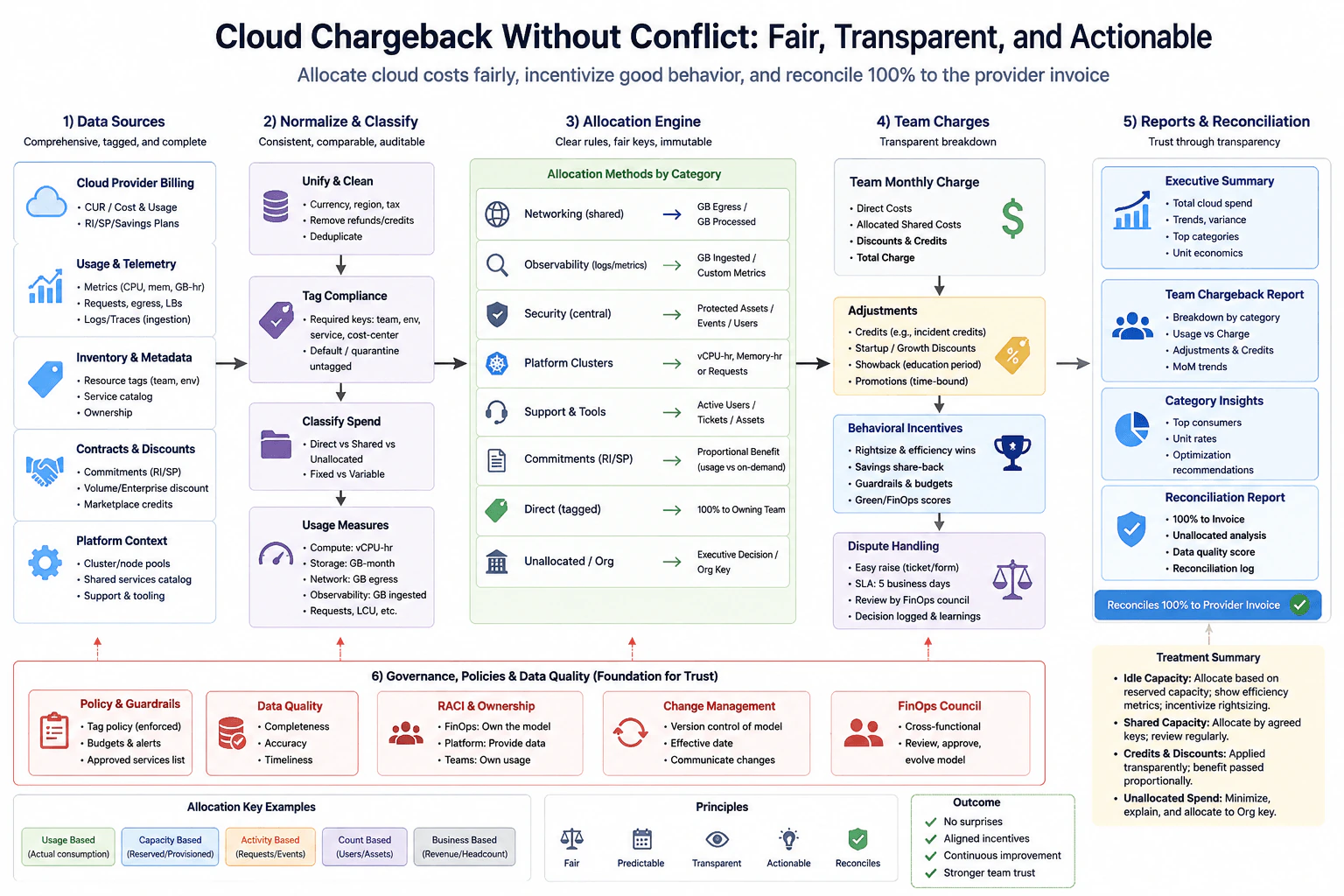
Describe a provider-neutral allocation model that maps accounts or subscriptions, resources, tags or labels, shared platform charges, support, commitments, marketplace items, and data transfer to an owner and environment. Explain how missing or conflicting metadata is handled and how allocation accuracy is checked against the provider bill.

Short Interview Answer (30-60 seconds)

I would require every workload to provide an owner, environment, service or application, and workload or component identity. I would combine that metadata with the account or subscription, resource, provider billing data, region, and time period. Then I would allocate direct charges, shared platform charges, support, commitments, marketplace items, and data transfer using documented rules. Missing required metadata goes to an Unallocated bucket, conflicting metadata follows a defined precedence rule, and unresolved conflicts go to review. Finally, I would reconcile the sum of allocated costs with the provider bill and investigate meaningful variance.

Detailed Explanation

The goal is to make sure every cloud charge can be connected to the right team and environment. Each workload should identify who owns it, where it runs, which service it belongs to, and which workload created the usage. Billing records also provide the account, resource, location, time, and charge details. Some costs belong directly to one workload, while shared costs need a fair rule. Missing information should remain visible instead of being guessed. The allocated total must then be compared with the provider bill so errors can be found and corrected.

Useful Questions to Ask the Interviewer
  1. Which metadata fields are mandatory for every workload?
  2. Which allocation rules are approved for shared platform and support charges?
  3. How should commitment benefits be distributed across matching usage?
  4. What variance from the provider bill should trigger investigation?
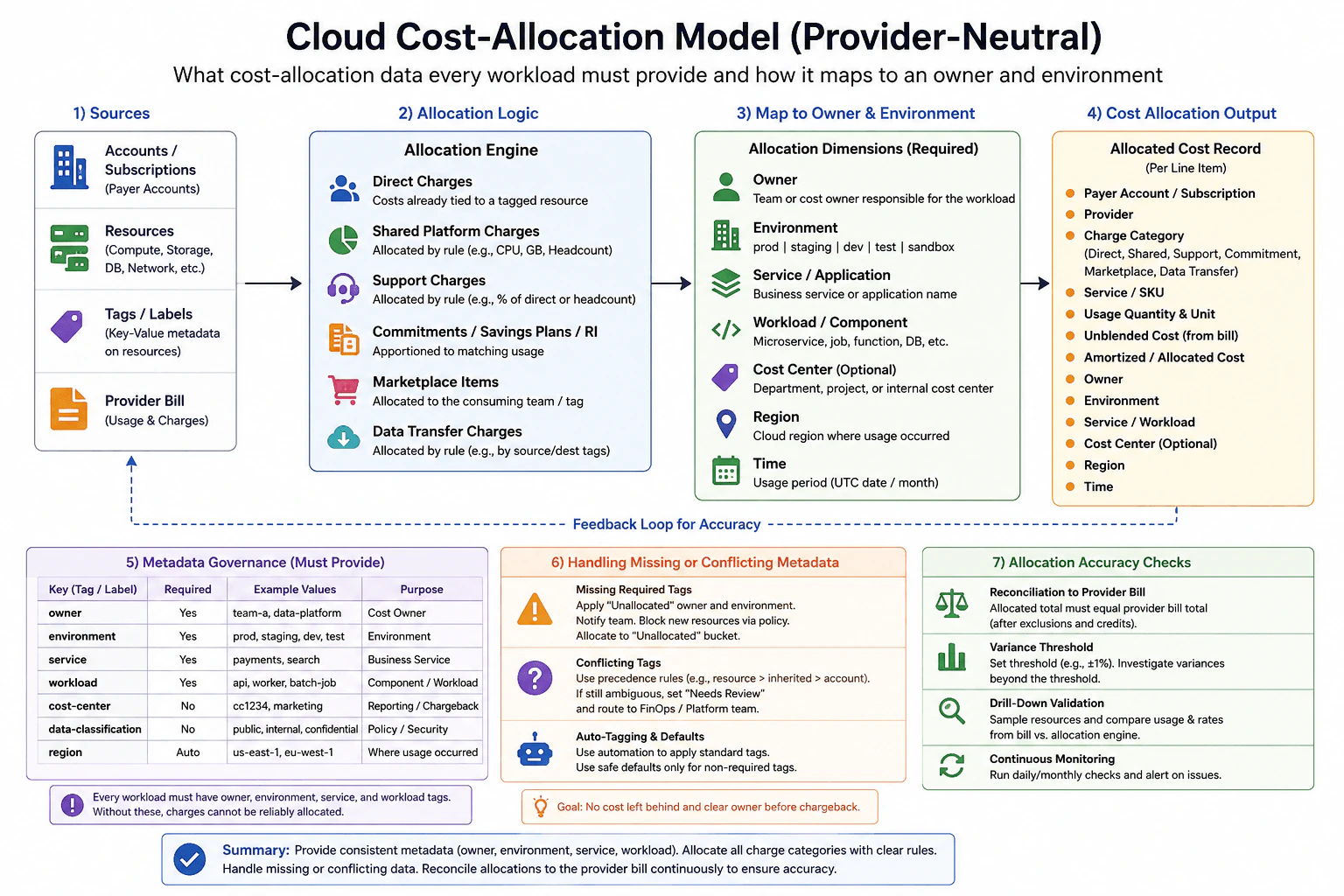
What cloud cost-allocation data should every workload provide? diagram
How to Explain It in an Interview

I would start with the sources shown in the allocation model. These are accounts or subscriptions, cloud resources, tags or labels, and the provider bill. The provider bill supplies usage and charge records. Resource and account metadata gives the context needed to connect those records to workloads.

Every workload should provide four core allocation dimensions. These are owner, environment, service or application, and workload or component. Owner identifies the responsible team or cost owner. Environment separates values such as production, staging, development, test, and sandbox. Service or application connects infrastructure to a business service. Workload or component identifies a specific microservice, job, function, database, or similar component.

Cost center can be useful for reporting and chargeback, but the diagram treats it as optional. Data classification is also optional metadata that can support policy and security reporting. Region should normally come automatically from provider or resource data. Time should come from the billing usage period. This keeps manually maintained metadata focused on ownership and workload identity.

Next, I would classify and allocate every charge category. Direct charges that are already tied to a tagged resource can go directly to that workload. Shared platform charges need a documented allocation rule using an appropriate driver such as CPU use, storage amount, or headcount. Support charges can use an approved rule such as a percentage of direct cost or headcount. Commitment benefits should be apportioned to the usage that actually matches the commitment. Marketplace items should be assigned to the consuming team or workload when that relationship is known. Data transfer charges need rules based on available source, destination, account, resource, or tag information.

The allocated cost record should retain enough information to explain each billing line. It should include the payer account or subscription, provider, charge category, service or SKU, usage quantity and unit, raw billed cost, allocated or amortized cost, owner, environment, service or workload, optional cost center, region, and time. The diagram calls the raw billed value unblended cost. A provider neutral implementation can map each provider's equivalent raw billing field into this common record.

Metadata governance is important because cost allocation becomes unreliable when required values are missing. Owner, environment, service, and workload should use standard keys and controlled values. If required metadata is missing, I would assign the record to an Unallocated bucket instead of silently guessing. The responsible team should be notified when it can be identified. Policy can also block new resources that do not provide required metadata.

Automation can apply standard tags where the value is known safely. Defaults should only be used for fields where a safe default exists. Required ownership metadata should not receive an invented value merely to make the record look complete.

Conflicting metadata needs a deterministic precedence rule. A valid example from the diagram is resource metadata first, then inherited metadata, then account metadata. If the conflict still cannot be resolved, I would mark the record as Needs Review and route it to the finance operations or platform team. Historical metadata should also be retained so that a later tag change does not silently rewrite the ownership of an older billing period.

The final control is reconciliation. For the same billing scope and time period, I would compare the provider bill total with the sum of allocated costs after using the same exclusions and credits. I would calculate the variance and investigate results outside the agreed threshold. For example, a team might choose a threshold of 1 percent in either direction. I would also sample individual resources and compare usage and rates from the provider bill with the allocation engine output.

This drill down can reveal missing records, duplicate records, incorrect allocation rules, stale metadata, or incorrect commitment handling. I would run the reconciliation regularly, such as daily or monthly depending on the billing pipeline, and alert when important issues appear.

The main tradeoff is between allocation detail and operational complexity. More dimensions and more precise allocation rules can make chargeback more accurate, but they require stronger metadata governance and more maintenance. I would therefore require the small set of metadata needed for reliable ownership, use clear allocation rules for every charge category, keep unresolved costs visible, and continuously reconcile the result with the provider bill.

Technical Approach
  1. Ingest provider billing records, accounts or subscriptions, resource data, and metadata for the same billing scope and time period.
  2. Normalize the billing records into one common allocation structure.
  3. Collect owner, environment, service or application, and workload or component metadata for each workload.
  4. Add optional cost center and data classification when available, and obtain region and time from provider or resource data.
  5. Map direct resource charges to the workload that generated them.
  6. Allocate shared platform charges using a documented driver such as CPU use, storage amount, or headcount.
  7. Allocate support charges using the approved business rule.
  8. Apportion commitment benefits to matching usage.
  9. Map marketplace items and data transfer charges using the available consumer, source, destination, account, resource, and metadata evidence.
  10. Send records with missing required metadata to the Unallocated bucket.
  11. Resolve conflicting metadata using the defined precedence order of resource metadata, inherited metadata, then account metadata. Send unresolved records to Needs Review.
  12. Produce an allocated cost record containing billing details and allocation dimensions.
  13. Sum allocated costs for the billing period and reconcile that total with the provider bill using the same exclusions and credits.
  14. Investigate meaningful variance and drill into sample resources by comparing usage and rates.
  15. Repeat the checks regularly and alert when allocation or metadata issues appear.
Practical Insights

The main operational cost comes from processing provider billing line items and joining them with account, resource, and metadata records. More allocation dimensions and more detailed shared cost rules increase storage, processing, governance, and maintenance effort. Reconciliation also requires reading the billing records and allocated records again so their totals can be compared. Historical metadata needs extra storage because ownership and environment values can change over time. A practical design keeps required metadata small while retaining enough information to explain every important charge.

Why Interviewers Ask This

Interviewers ask this question to see whether I can build a complete and trustworthy cloud cost allocation model. They want to know if I understand which metadata every workload needs, how direct and shared charges are assigned, how support and commitment costs are handled, and how missing or conflicting metadata is resolved. They also want to see whether I verify the allocated result against the provider bill instead of assuming that resource tags alone make the numbers correct.

Common interview mistakes

Common mistakes include relying only on resource tags while ignoring account and provider billing data, making owner or environment optional when reliable allocation needs them, silently guessing missing required metadata, using defaults for ownership fields that have no safe default, allowing conflicting metadata without a precedence rule, hiding Unallocated costs, assigning shared platform or support charges without a documented driver, assigning commitment benefits without matching them to eligible usage, ignoring marketplace or data transfer charges, changing current tags and accidentally rewriting historical ownership, and reporting allocated totals without reconciling them against the provider bill for the same scope and time period.

Interview tip

Explain the model as one flow. Start with the billing and resource inputs. State the required workload metadata. Explain how each charge category is allocated. Then explain how missing and conflicting metadata are handled. Finish with reconciliation against the provider bill and drill down validation. This shows that the allocation is both useful and auditable.
Interviewer may ask next
What would you check if most workloads have valid tags but the allocated total is still lower than the provider bill?

I would treat the provider bill as the reconciliation boundary and investigate the missing amount instead of assuming valid workload tags prove that allocation is complete. For the same account or subscription scope and billing period, I would check shared platform charges, support, commitments, marketplace items, data transfer, exclusions, credits, and records in the Unallocated bucket. I would also sample provider billing lines and compare their usage and rates with the allocation output. This matters because many important charges are not attached directly to a tagged resource. The tradeoff is more classification and reconciliation work, but the result is much more trustworthy.

How would you keep allocation accurate when thousands of workloads frequently change owners or environments?

I would keep the same allocation model but automate metadata validation and preserve historical values by billing period. Each workload would still provide owner, environment, service, and workload identity. Automated checks would flag missing required values, and changes would take effect from a known time instead of silently rewriting older billing periods. Conflicts would use the same precedence rule and unresolved records would go to Needs Review. I would reconcile after billing data refreshes and monitor both the Unallocated amount and provider bill variance. The main tradeoff is extra storage and governance work, but historical metadata is necessary when ownership changes frequently and old cost reports must remain explainable.

72. How would you investigate an S3 bill that increases every month?Performance And Cost OptimizationEasy

Question Details

The object-storage bill rises despite stable application traffic. Describe how you would break down stored bytes, object count, storage class, requests, retrieval, replication, data transfer, incomplete multipart uploads, versioned objects, and tags or owners, then connect each cost driver to usage evidence before proposing a change.

Short Interview Answer (30-60 seconds)

I would start by defining the billing scope and comparing the S3 cost trend by account, Region, bucket, storage class, and cost category. Then I would break the increase into stored bytes, object count, storage class mix, requests, retrieval, replication, data transfer, incomplete multipart uploads, versioned objects, and unallocated cost. I would validate each driver with Cost Explorer, S3 Storage Lens, CloudWatch, S3 Inventory, logs, and configuration. I would change only the largest verified cause, then measure the same cost and usage signals again to confirm the improvement.

Detailed Explanation

The goal is to find out why storage spending keeps growing even though application traffic is not growing. I would first decide which accounts, Regions, buckets, and time period belong to the investigation. Then I would compare what is being stored and how the storage is being used. I would look for more data, more objects, different storage choices, more requests, retrieval activity, copies, transfers, unfinished uploads, old versions, or costs with no clear owner. I would only recommend a change after the growing cost is connected to real usage evidence.

Useful Questions to Ask the Interviewer
  1. Is the increase limited to one account, Region, bucket, or application owner?
  2. Which S3 cost categories are increasing the most each month?
  3. Is versioning, replication, or Intelligent Tiering enabled on the affected buckets?
  4. Are lifecycle rules already configured for old objects, old versions, and incomplete multipart uploads?
  5. Is the data expected to remain available immediately, or can older data move to a colder storage class?
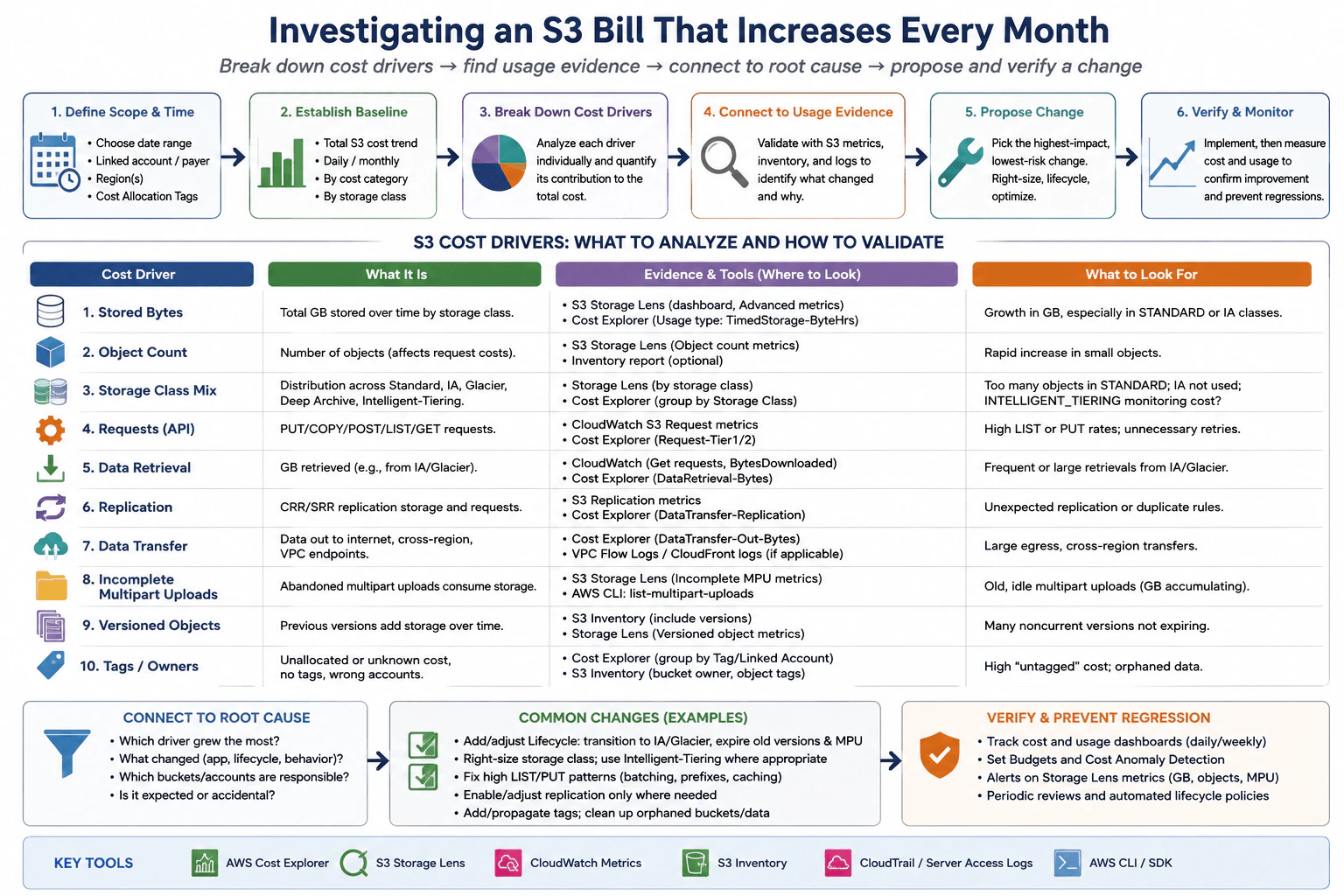
How would you investigate an S3 bill that increases every month? diagram
How to Explain It in an Interview

I would investigate the bill in a measurement first order.

First, I would define the scope. I would choose the date range and identify the linked account or payer account, Region, bucket, and available cost allocation tags. This keeps unrelated S3 usage outside the investigation.

Next, I would establish a baseline in AWS Cost Explorer. I would review the total S3 cost trend by day and month, then group the cost by useful dimensions such as account, Region, usage type, and storage class. The main question is which billing category is actually growing.

Then I would break that growth into the same S3 drivers shown in the diagram. For stored bytes, I would compare total bytes over time and separate them by storage class. S3 Storage Lens and Cost Explorer can show whether the growth comes from Standard storage, an infrequent access class, Glacier classes, Deep Archive, Intelligent Tiering, or another class.

For object count, I would check whether the number of objects is growing even when application traffic is stable. A large increase in small objects can increase storage overhead and may increase request activity if the application lists, writes, reads, or manages those objects more often. S3 Storage Lens and S3 Inventory help show the object population and its distribution.

For storage class mix, I would check whether data that could move to a less expensive class is staying in Standard storage, whether older data is transitioning as intended, and whether Intelligent Tiering or another class matches the real access pattern. I would inspect lifecycle configuration before changing the class because retrieval behavior and retention requirements can change the best choice.

For request costs, I would separate operations such as GET, PUT, COPY, POST, and LIST. CloudWatch S3 request metrics, Cost Explorer, CloudTrail data events when enabled, or server access logs can help show which operations increased. I would look for excessive listing, unnecessary retries, or a behavior change rather than assuming traffic volume alone explains the cost.

For data retrieval, I would look for bytes restored or retrieved from storage classes that can charge for retrieval. CloudWatch request metrics and Cost Explorer can help show whether retrieval activity has increased. Frequent retrieval from a colder class can change the best storage class decision.

For replication, I would inspect Same Region Replication or Cross Region Replication configuration and metrics. I would verify whether replicated bytes and related requests increased, whether duplicate or unnecessary rules exist, and whether the destinations are still required.

For data transfer, I would separate internet egress and cross Region transfer from other traffic. Cost Explorer is the main billing evidence. CloudWatch, VPC Flow Logs, and CloudFront logs can add usage evidence when those services are part of the actual path. I would use that evidence to identify which application or network path produced the transfer rather than assuming all transfer came from normal S3 reads.

For incomplete multipart uploads, I would check for uploads that were started but never completed or aborted. Uploaded parts continue consuming storage until they are completed or removed. S3 Storage Lens, the S3 console, or the AWS CLI can reveal incomplete multipart uploads. A lifecycle rule can automatically abort old incomplete uploads when that behavior is safe for the application.

For versioned objects, I would inspect noncurrent versions and delete markers. A bucket can look stable from the application point of view while old versions continue accumulating storage. S3 Inventory, S3 Storage Lens, and lifecycle configuration help show whether old versions are being retained longer than intended.

Finally, I would check tags, owners, linked accounts, and buckets. Cost Explorer grouping and cost allocation tags help identify which team or workload owns the increase. S3 Inventory can help inspect affected objects. Missing or inconsistent tags are mainly an attribution problem because they make it harder to connect spending to an owner or project.

After finding the largest verified driver, I would choose one targeted change. Examples include adding or adjusting lifecycle transitions, expiring old versions, aborting old incomplete multipart uploads, choosing a storage class that matches access patterns, reducing unnecessary LIST or PUT activity, batching operations, limiting unnecessary replication, reducing avoidable transfer, or correcting tagging. I would not apply all of these changes blindly.

I would then verify the result using the same measurement boundary. I would compare cost and usage by account, Region, bucket, storage class, and cost category before and after the change. I would also confirm that required data remains available, retention behavior is correct, replication still meets requirements, and application requests still work as expected. I would continue monitoring Cost Explorer, S3 Storage Lens, and CloudWatch and use Budgets or Cost Anomaly Detection to catch another unexpected increase.

Technical Approach
  1. Define the billing scope by date, payer or linked account, Region, bucket, and available cost allocation tags.
  2. Establish the S3 cost baseline in Cost Explorer and identify which cost category grows each month.
  3. Break stored data down by bytes, object count, and storage class using S3 Storage Lens, Cost Explorer, and S3 Inventory.
  4. Break activity costs down into requests, retrieval, replication, and data transfer using billing data plus CloudWatch metrics and logs where appropriate.
  5. Inspect hidden storage growth from incomplete multipart uploads, noncurrent object versions, and delete markers.
  6. Group costs by tags, accounts, buckets, and owners to identify responsibility and unallocated usage.
  7. Connect the largest cost increase to a concrete usage or configuration change. Do not optimize from intuition alone.
  8. Choose one targeted change such as a lifecycle update, storage class adjustment, request reduction, replication adjustment, transfer reduction, or tagging correction.
  9. Measure the same cost and usage dimensions after the change.
  10. Confirm that required access, retention, replication, and application behavior remain correct, then continue monitoring for regression.
Practical Insights

This investigation is mainly an operational analysis task rather than an algorithm problem. Cost Explorer and S3 Storage Lens can summarize large amounts of usage without scanning every object manually. S3 Inventory is useful when object level evidence is needed because examining millions of objects directly with repeated API calls would create more request activity and take longer. More detailed CloudWatch metrics, CloudTrail data events, logs, Inventory reports, Budgets, and Cost Anomaly Detection can also have their own service or operational cost. The practical approach is to start with billing summaries, narrow the problem, and collect detailed evidence only where it is needed.

Why Interviewers Ask This

Interviewers want to see whether I investigate cloud cost with evidence instead of guessing. I should be able to define the billing scope, establish a baseline, separate the major S3 cost drivers, connect each increase to real usage, and choose a change that targets the measured cause. They also want to see whether I understand storage classes, requests, retrieval, replication, data transfer, object versions, incomplete multipart uploads, ownership, tagging, and how to verify that a change actually reduces cost without harming required behavior.

Common interview mistakes

A common mistake is looking only at the total S3 bill instead of separating the billing categories. Another is assuming stable application traffic means S3 usage is stable. Stored bytes, old versions, incomplete multipart uploads, replication, retrieval, and transfer can grow without a matching increase in normal application traffic. It is also a mistake to move everything to a colder storage class without checking retrieval patterns and retention needs. Other mistakes include deleting data before confirming ownership, ignoring noncurrent versions, overlooking incomplete uploads, treating tags as proof of usage instead of attribution metadata, and applying lifecycle rules before understanding their effect. I would also avoid comparing different time ranges or scopes before and after a change because that can make an optimization appear successful when the measurement boundary changed.

Interview tip

Explain the investigation as a funnel. Start with the bill, identify the cost category that grew, connect that category to S3 usage evidence, change only the verified driver, and measure again. Name the important drivers from the question instead of jumping directly to lifecycle rules. This shows the interviewer that the recommendation comes from evidence and that both cost and operational risk were considered.

Interviewer may ask next
What if application request traffic is flat, but the S3 storage charge still grows every month?

I would treat flat request traffic as only one signal, not proof that S3 usage is stable. Within the same accounts, Regions, and buckets, I would compare stored bytes, object count, storage class mix, noncurrent versions, delete markers, incomplete multipart uploads, and replicated bytes. S3 Storage Lens, Cost Explorer, and S3 Inventory can show whether storage is accumulating independently of request traffic. For example, versioning can retain old copies while the visible object set looks unchanged. The main point is to find which storage component is growing before applying a lifecycle or retention change.

How would you verify that a lifecycle change really reduced cost without creating a new problem?

I would keep the same measurement boundary and compare the affected account, Region, bucket, storage class, and cost category before and after the lifecycle change. I would confirm that the targeted bytes or old versions decrease as expected and that request, retrieval, and transfer costs do not rise enough to offset the benefit. I would also verify required retention and object availability. If colder storage causes frequent retrieval or restores, the original storage saving may create a different cost driver. I would monitor Cost Explorer, S3 Storage Lens, and CloudWatch after deployment and use Budgets or Cost Anomaly Detection for unexpected changes.

73. How would you investigate latency in a read-heavy product catalog with spiky traffic?Performance And Cost OptimizationEasy

Question Details

A product-catalog API is read-heavy, experiences bursts, and now misses its latency objective. Explain how you would inspect request percentiles, cache hit rate, database query time, connection pools, CPU and memory, load distribution, throttling, and dependency errors, then distinguish an immediate scaling action from the measured bottleneck.

Short Interview Answer (30-60 seconds)

I would first compare p50, p95, and p99 latency during normal traffic and spike periods. Then I would correlate those changes with cache hit rate, database query time, connection pool waits, CPU, memory, load distribution, throttling, and dependency errors. If the evidence shows that one tier is saturated, I would temporarily add capacity only to that tier to protect users. I would continue the investigation, fix the measured bottleneck, then retest with the same representative workload and verify latency, errors, saturation, correctness, and cost.

Detailed Explanation

The product catalog receives mostly read requests, but sudden traffic bursts are making some requests too slow. I would first measure when the slowdown happens and which part of the request path becomes busy. I would compare normal periods with spike periods and look for waiting, overloaded resources, slow data access, uneven traffic, service limits, or failing dependencies. If one part is clearly saturated, I may add temporary capacity to protect users. I would still find the real cause, correct that measured problem, repeat the same test, verify correct behavior, and review the cost.

Useful Questions to Ask the Interviewer
  1. Which latency objective is currently being missed, and do we care most about p95, p99, or both?
  2. Does the slowdown happen only during traffic spikes, or does latency stay high after the spike ends?
  3. Do we already collect cache hit rate, database query time, connection pool wait time, CPU, memory, load distribution, throttling, and dependency error metrics?
  4. Are there capacity or cost limits that affect how much temporary scaling is acceptable?
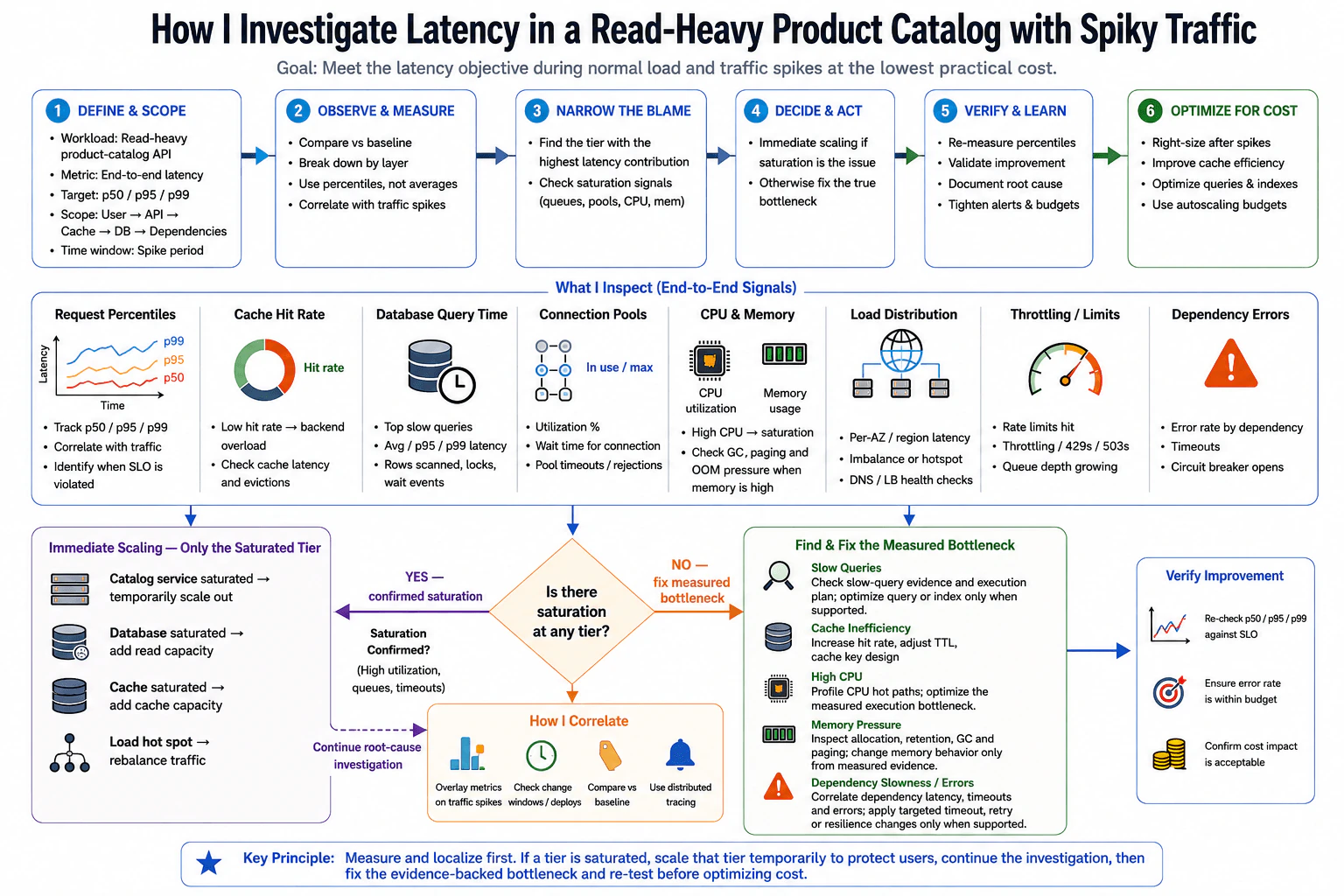
How would you investigate latency in a read-heavy product catalog with spiky traffic? diagram
How to Explain It in an Interview

I would start with the user visible symptom. The read heavy product catalog is missing its latency objective during burst traffic. I would capture a baseline using p50, p95, and p99 latency during normal traffic and compare those values with the spike period. Percentiles matter because an average can hide a small group of very slow requests.

Next, I would inspect the full request boundary from the user through the application, cache, database, and other dependencies. I would correlate the latency spike with cache hit rate, database query duration, connection pool utilization and wait time, CPU utilization, memory usage, load distribution, throttling signals, and dependency errors or timeouts. This tells me whether requests are spending time executing work or waiting for another resource.

For the cache, I would check whether hit rate falls during spikes and whether that sends more read traffic to the database. I would also check cache latency and eviction behavior. A lower hit rate is useful evidence, but it is not automatically the root cause.

For the database, I would inspect query duration, slow query evidence, rows scanned, lock or wait behavior when available, and execution plans. I would change a query or index only when that evidence supports the change. I would not assume that every slow request needs a new index.

For connection pools, I would check how many connections are in use, how long requests wait for a connection, and whether timeouts or rejections appear during spikes. Increasing the pool size without checking database capacity can simply move saturation to the database.

For CPU and memory, I would correlate resource usage with the same latency window. Sustained high CPU together with request queues can indicate compute saturation, but utilization alone does not prove the cause. If memory is high, I would inspect allocation, retention, garbage collection, paging, and out of memory pressure instead of assuming there is a memory leak.

I would also inspect load distribution. I would look for uneven traffic across instances, availability zones, or regions because a hot spot can create high tail latency even when total capacity looks healthy. I would check load balancer health and whether requests are distributed as expected.

For throttling, I would check rate limits, rejected requests, growing queues, and responses that indicate capacity or service limits. For dependencies, I would correlate their latency, timeouts, and error rates with the same traffic spike. Distributed traces can help show where a request spends time across services, while metrics show trends and saturation. Tracing can be sampled, so I would combine traces with metrics, logs, and database evidence instead of treating one trace as complete proof.

The main decision is whether a tier is actually saturated. If the catalog service is saturated, I can temporarily scale it out. If database read capacity is saturated, I can add read capacity where the architecture supports it. If the cache is saturated, I can add cache capacity. If traffic is concentrated on a hot spot, I can rebalance traffic. These actions can protect users, but they do not replace root cause analysis.

I would continue the investigation after temporary scaling. If slow query evidence and the execution plan identify a database bottleneck, I would optimize that measured database problem. If CPU profiling identifies an application hot path, I would optimize that execution path. If cache efficiency is the problem, I would adjust cache behavior based on hit rate, latency, eviction, time to live, and cache key evidence. If a dependency is slow or failing, I would apply timeout, retry, or resilience changes only when the dependency evidence supports them.

Finally, I would retest with the same representative traffic pattern, data conditions, and dependency behavior. I would compare p50, p95, and p99 latency, cache behavior, database timing, connection waits, CPU, memory, errors, saturation, and dependency timing. I would verify that catalog responses are still correct and that the bottleneck did not simply move to another resource. After the system is stable, I would reduce unnecessary temporary capacity and confirm that the final performance and cost are acceptable.

Technical Approach
  1. Define the symptom. Confirm that the read heavy product catalog is missing its latency objective during traffic spikes.
  2. Capture a baseline. Record p50, p95, and p99 latency during normal traffic and spike periods.
  3. Inspect the complete request boundary. Follow the request through the application, cache, database, and dependencies.
  4. Correlate signals. Compare latency with cache hit rate, database query time, connection pool waits, CPU, memory, load distribution, throttling, and dependency errors.
  5. Classify the bottleneck from evidence. Decide whether the delay comes from compute saturation, memory pressure, database work, connection waiting, uneven load, service limits, or a slow dependency.
  6. Protect users when saturation is confirmed. Temporarily add capacity only to the saturated tier or rebalance an identified traffic hot spot.
  7. Continue root cause analysis. Use database plans, traces, logs, metrics, or profiling evidence for the suspected component.
  8. Apply one targeted change. Change only the part supported by the measurements.
  9. Retest with the same representative workload. Compare the same percentiles and resource signals used for the baseline.
  10. Verify correctness and cost. Confirm that catalog responses remain correct, errors are acceptable, the bottleneck did not move elsewhere, and temporary capacity can be reduced when it is no longer needed.
Practical Insights

The investigation mainly costs monitoring time, engineering time, and any temporary resources used during testing or emergency scaling. Adding catalog instances, database read capacity, or cache capacity can reduce saturation quickly, but it also increases infrastructure cost while that extra capacity is running. Tracing and profiling add some collection overhead, so they should be used carefully. The best result is to protect users during the spike, remove the measured bottleneck, then right size the system so the improvement does not leave unnecessary permanent cost.

Why Interviewers Ask This

Interviewers want to see whether I measure a production problem before changing capacity or code. This question tests whether I can use latency percentiles, cache behavior, database timing, connection pool waits, CPU, memory, load distribution, throttling, and dependency errors to locate the real bottleneck. It also tests whether I understand the difference between temporary scaling that protects users during confirmed saturation and a lasting change that removes the measured cause without creating unnecessary cost.

Common interview mistakes

Common mistakes include looking only at average latency instead of p95 and p99, scaling every tier before measuring saturation, assuming a low cache hit rate is automatically the root cause, increasing connection pool size without checking database capacity, treating high memory as proof of a leak, adding an index without query and execution plan evidence, assuming high CPU alone proves a CPU bottleneck, ignoring uneven traffic distribution, overlooking throttling and dependency errors, treating one trace or profiler sample as complete proof, testing with traffic that does not resemble the real spike, changing several things at once, comparing different workloads before and after the change, moving the bottleneck to another dependency, and stopping after temporary scaling without finding the measured cause.

Interview tip

Explain the investigation as a simple evidence chain. Start with latency percentiles, follow the request across each tier, correlate every suspected bottleneck with the same traffic spike, and clearly separate temporary scaling from the lasting evidence based correction. End by saying that you retest with the same workload, verify correctness, check whether the bottleneck moved, and review cost.

Interviewer may ask next
What would you do if CPU utilization looks normal, but p99 latency becomes very high during catalog traffic spikes?

I would not classify the read heavy product catalog as CPU limited from that evidence. I would keep the same end to end request boundary and inspect connection pool wait time, database query time, cache misses, uneven load, throttling, dependency latency, timeouts, and growing queues. High p99 with normal CPU can mean that some requests are waiting instead of executing CPU work. Distributed traces can help locate that waiting time, but I would correlate them with metrics and logs because tracing may be sampled. The tradeoff is that deeper tracing gives better timing detail but adds instrumentation and analysis overhead.

How would you decide when to remove temporary capacity after the spike and root cause correction?

I would remove temporary capacity only after the read heavy product catalog has been retested with representative traffic and the same measurement boundary shows stable p50, p95, and p99 latency, acceptable errors, healthy cache and database behavior, normal connection waits, and no new saturation elsewhere. I would reduce capacity gradually while watching the same signals. The main tradeoff is cost versus safety. Keeping excess capacity too long wastes money, while removing it too quickly can recreate saturation if traffic or the corrected bottleneck behaves differently in production.

74. What would you do first if a cloud bill is $180,000 per month and must fall by 20% by the third quarter?Performance And Cost OptimizationMedium

Question Details

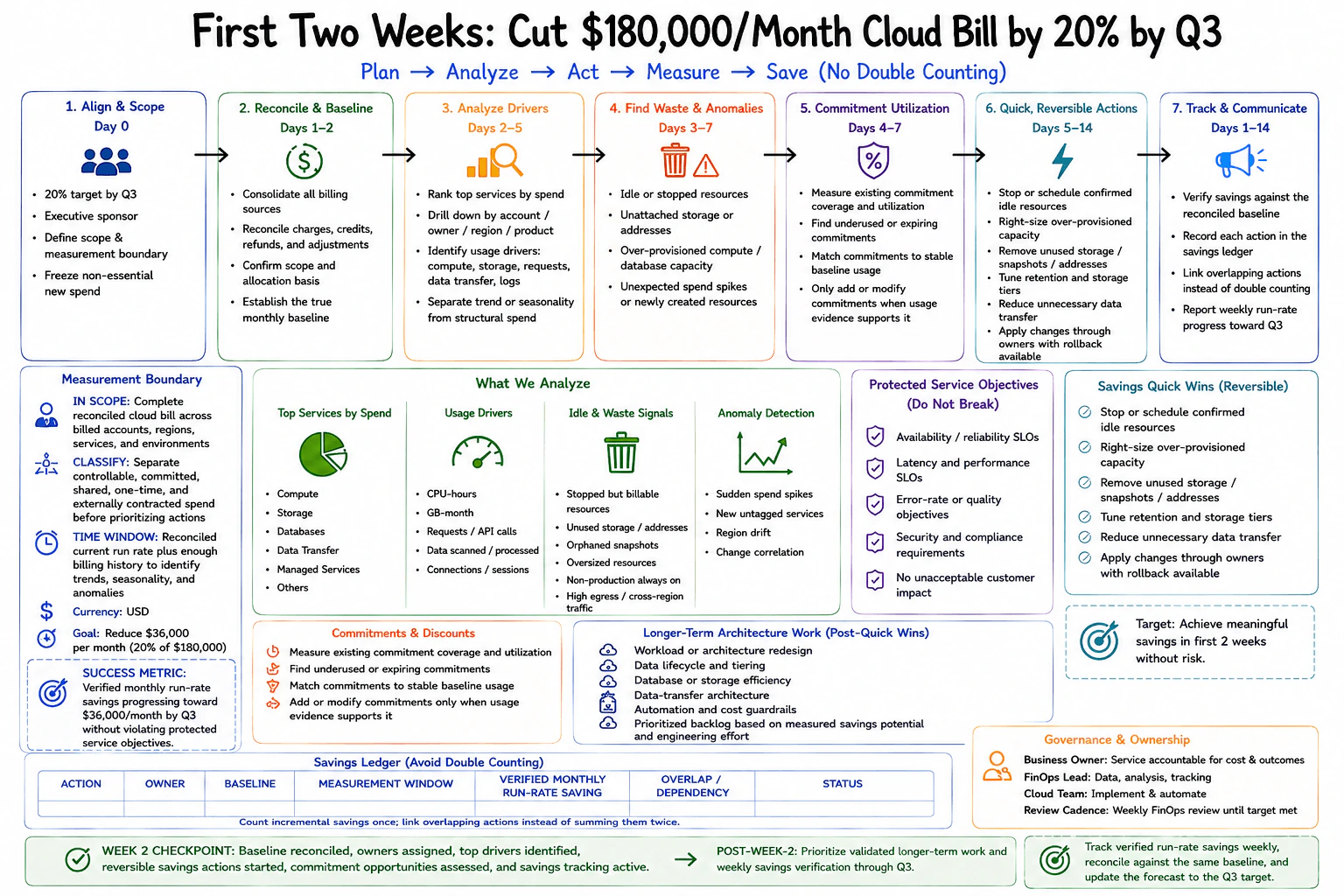
Define the first two weeks of analysis and action for a $180,000 monthly bill with a 20% reduction target by Q3. Include billing reconciliation, ownership, top services and usage drivers, idle and anomalous spend, commitment utilization, quick reversible actions, protected service objectives, longer-term architecture work, and a savings ledger that avoids double counting.

Short Interview Answer (30-60 seconds)

I would first reconcile the full $180,000 monthly bill and establish a trustworthy baseline across all billed accounts, regions, services, and environments. I would assign owners, rank the largest services and usage drivers, and then investigate idle resources, abnormal spending, oversized capacity, and commitment utilization. During the second week I would start low risk reversible actions with the service owners while protecting reliability, latency, security, compliance, and customer impact. I would record every action in one savings ledger, link overlapping actions, and verify monthly run rate savings against the same baseline. The Q3 target is $36,000 per month in verified savings.

Detailed Explanation

The company spends $180,000 each month and wants to reduce that amount by 20 percent by Q3. That means the target is $36,000 per month in verified savings. My first job is to understand the complete bill before changing anything. I would confirm the true monthly baseline, identify who owns the spending, find the largest areas, and connect cost to real usage. Then I would find waste, review commitments, make safe reversible changes, protect important services, and measure every saving against the same baseline. Larger architecture work can follow after the strongest opportunities are measured.

Useful Questions to Ask the Interviewer
  1. Does the $180,000 baseline include every billed account, region, service, and environment?
  2. How much billing history is available for identifying trends, seasonality, and unusual spending?
  3. Which reliability, latency, security, compliance, or customer objectives must not be affected?
  4. Are there existing commitments or discount agreements that must be included in the analysis?
  5. Who are the business and technical owners for the largest areas of cloud spending?
  6. Can nonessential new spend be temporarily paused while the baseline and ownership are being established?
What would you do first if a cloud bill is $180,000 per month and must fall by 20% by the third quarter? diagram
How to Explain It in an Interview

I would organize the first two weeks around one rule: measure first, then change what the evidence supports.

First, I would define the scope and target. Twenty percent of $180,000 is $36,000 per month. I would name an executive sponsor, define the billing boundary, and, if the business agrees, temporarily pause nonessential new spend so the baseline does not keep moving while the analysis starts.

Next, I would reconcile the billing data. I would combine all billing sources and confirm that charges, credits, refunds, and adjustments are represented correctly. The measurement boundary is the complete reconciled cloud bill across billed accounts, regions, services, and environments. I would use enough billing history to recognize trends, seasonality, and unusual spikes. I would classify spend into controllable, committed, shared, one time, and externally contracted categories before prioritizing actions.

Then I would establish ownership. Each major spending area should have a business or service owner. I would correct missing allocation information so teams can understand which usage creates which cost. A FinOps lead can coordinate the analysis and savings tracking, while the cloud team implements approved changes with the service owners.

After that, I would rank the largest services by spend and drill down by account, owner, region, and product. I would connect the cost to usage drivers such as compute time, storage consumption, requests, data processed, data transfer, log volume, and connection activity. I would separate steady structural spend from normal seasonal changes and temporary spikes.

I would then investigate idle and anomalous spend. Examples include stopped but still billable resources, unused storage or addresses, orphaned snapshots, oversized resources, nonproduction capacity that stays on unnecessarily, unexpected spending spikes, newly created resources, and unusually high cross region or external data transfer. These are investigation targets, not automatic deletion candidates.

I would review commitment utilization separately. I would measure existing commitment coverage and utilization, find underused or expiring commitments, and compare commitments with stable baseline usage. I would only add or modify commitments when the usage evidence supports the decision. A commitment can lower unit cost, but it can also reduce flexibility, so I would not use a new commitment to hide waste.

During the second week I would start reversible actions with the appropriate owners. Examples include stopping or scheduling confirmed idle resources, right sizing overprovisioned capacity, removing unused storage, snapshots, or addresses, tuning retention and storage tiers, and reducing unnecessary data transfer. Each change should have a clear owner and a rollback path when practical.

Cost reduction must not break the service. I would protect availability and reliability objectives, latency and performance objectives, error or quality objectives, security and compliance requirements, and acceptable customer impact. Where a cost action can affect workload behavior, I would compare these service signals before and after the change.

I would keep longer term architecture work separate from the quick wins. That backlog may include workload or architecture redesign, data lifecycle and tiering work, database or storage efficiency, data transfer architecture, automation, and cost guardrails. I would prioritize this work using measured savings potential, engineering effort, risk, and service impact.

Finally, I would maintain one savings ledger. Each entry should contain the action, owner, original baseline, measurement window, verified monthly run rate saving, overlap or dependency with other actions, and status. If two actions affect the same cost, I would link them and count the incremental combined effect once instead of adding both estimates independently.

At the end of week two I want the baseline reconciled, owners assigned, top drivers identified, reversible actions started, commitment opportunities assessed, and savings tracking active. I would review verified monthly run rate savings every week, reconcile them against the same baseline, and update the forecast toward the $36,000 monthly target by Q3.

Technical Approach
  1. Confirm the target. Twenty percent of $180,000 is $36,000 in monthly run rate savings by Q3.
  2. Define the billing boundary across all billed accounts, regions, services, and environments.
  3. Reconcile charges, credits, refunds, and adjustments to establish the true monthly baseline.
  4. Use enough billing history to identify trends, seasonality, and anomalies.
  5. Classify spend into controllable, committed, shared, one time, and externally contracted categories.
  6. Assign business and technical owners to the major spending areas.
  7. Rank the largest services by spend and drill down by account, owner, region, and product.
  8. Connect spending to usage drivers such as compute, storage, requests, data processed, data transfer, logs, and connections.
  9. Investigate idle resources, oversized capacity, unused storage, unexpected spikes, and other anomalous spend.
  10. Measure existing commitment coverage and utilization before changing commitments.
  11. Start reversible actions with owners and a rollback path while protecting service objectives.
  12. Put larger architecture opportunities into a prioritized backlog based on measured savings potential and engineering effort.
  13. Record every action in one savings ledger with its owner, baseline, measurement window, verified monthly run rate saving, overlap or dependency, and status.
  14. Link overlapping actions so the same saving is counted once.
  15. Review verified savings weekly and update the forecast toward the $36,000 monthly target by Q3.
Practical Insights

The main cost of this approach is engineering and analysis time. Billing data must be reconciled across the full scope, ownership gaps must be resolved, and enough historical data must be reviewed to separate normal variation from real anomalies. Reversible changes can still require testing, owner coordination, monitoring, and rollback planning. Commitment changes need careful utilization analysis because they can reduce flexibility. Architecture work may require significant engineering effort and should follow measured evidence. The savings ledger also requires discipline because each action needs a baseline, measurement window, owner, verified impact, and overlap check.

Why Interviewers Ask This

Interviewers ask this question to see whether I treat a large cloud bill as a measured engineering problem instead of making random cuts. They want to see whether I can reconcile the real billing baseline, establish ownership, rank the largest spending areas, connect cost to usage, find idle and anomalous spend, evaluate existing commitments, protect service objectives, choose reversible actions, and prove savings without counting the same reduction twice. They also want to see whether I can separate immediate savings work from architecture changes that need more time and engineering effort.

Common interview mistakes

A common mistake is cutting resources before reconciling the bill and understanding ownership. Another is looking only at the current month and treating normal seasonality as waste. Some candidates focus on the largest service without checking the usage driver that created the cost. Others remove idle looking resources without confirming ownership or service impact. Buying more commitments before removing waste or measuring stable baseline usage is also risky. Another mistake is counting estimated savings instead of verified monthly run rate savings, or counting the same saving twice when several actions affect the same cost. It is also a mistake to start expensive architecture redesign before taking simpler reversible actions. Finally, a cost reduction is not successful if reliability, latency, security, compliance, or customer experience becomes unacceptable.

Interview tip

Explain the answer as a controlled two week sequence. Start with the reconciled $180,000 baseline, then ownership, top spending areas and usage drivers, waste and anomalies, commitment utilization, reversible actions, protected service objectives, and the savings ledger. State clearly that the Q3 target is $36,000 in verified monthly run rate savings. Emphasize that overlapping savings are linked and counted once, and that larger architecture work follows the first measured actions.

Interviewer may ask next
What if the first week shows a large spending spike, but it happened because of a normal seasonal workload rather than waste?

I would not count the spike as a savings opportunity until I compare it with enough billing history and confirm the workload context. The measurement boundary remains the complete reconciled cloud bill across billed accounts, regions, services, and environments. I would identify the service and usage driver behind the spike, compare it with previous periods, and confirm with the owner whether the demand was expected. If it is normal seasonal usage, I would keep it in the baseline model instead of treating it as idle or anomalous waste. The tradeoff is additional analysis time, but that prevents an unsafe cost reduction based on a misleading short term signal.

What if a new commitment appears to save more money than the reversible actions you found?

I would still measure existing commitment coverage and utilization before adding the new commitment. The relevant workload is the stable baseline usage inside the reconciled $180,000 monthly bill. I would first remove confirmed waste and understand which demand is likely to remain steady. Then I would compare that stable demand with the commitment terms. A commitment can reduce unit cost, but it also reduces flexibility and can become waste if demand falls or the architecture changes. I would record the action in the same savings ledger and only recognize verified incremental monthly run rate savings without counting reductions already created by right sizing or resource removal.

75. How would you reduce AWS compute spend by 30% without reducing performance?Performance And Cost OptimizationMedium

Question Details

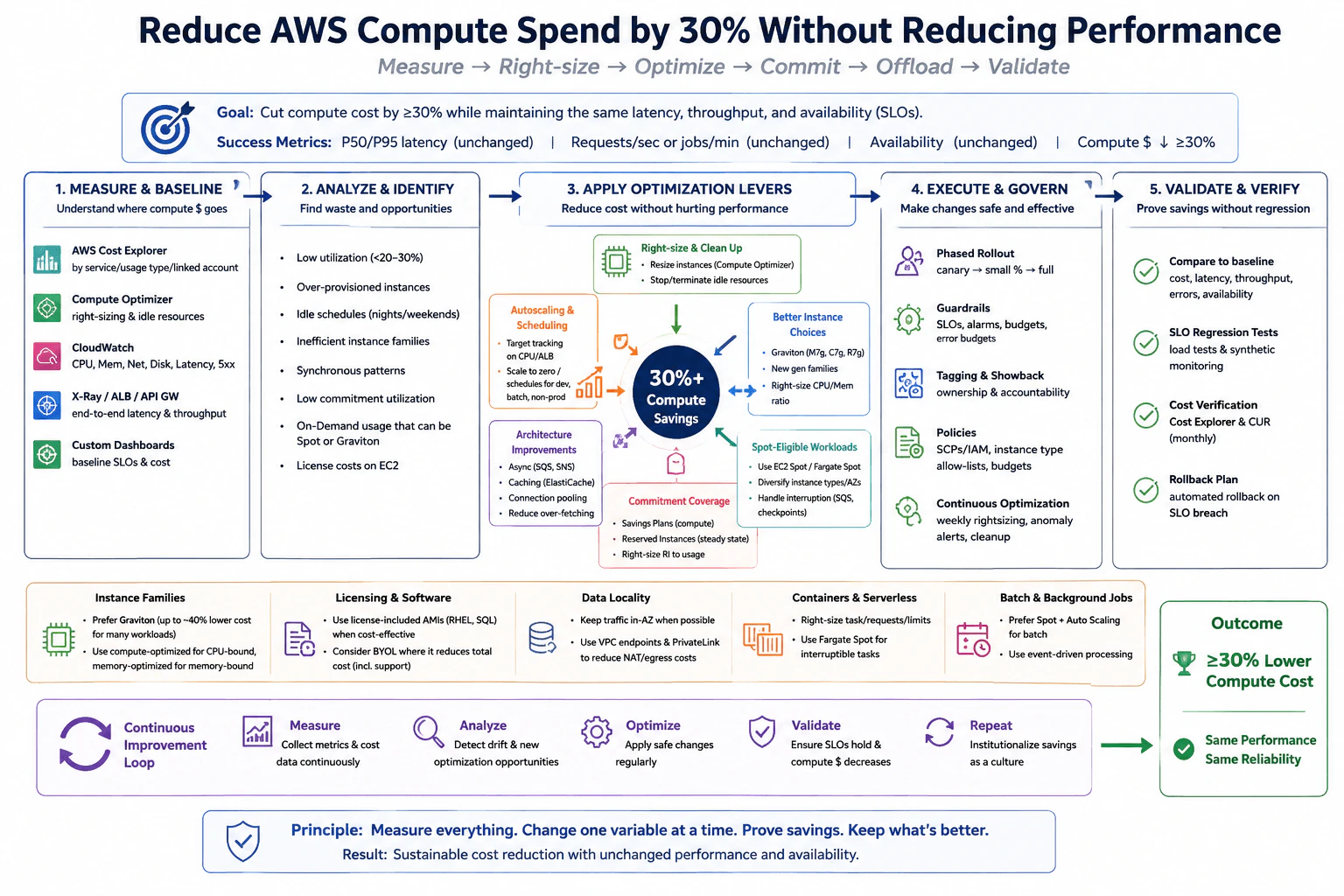
A production estate has an explicit 30% compute-cost target and unchanged latency, throughput, and availability objectives. Build a measured plan covering utilization, right-sizing, idle capacity, autoscaling, instance families, architecture, commitment coverage, Spot-eligible work, license effects, migration risk, and controlled validation of each saving.

Short Interview Answer (30-60 seconds)

I would first establish a compute cost and performance baseline using AWS Cost Explorer, the Cost and Usage Report, CloudWatch, and Compute Optimizer. Then I would find oversized instances, idle capacity, poor scaling, inefficient instance families, weak commitment coverage, license cost issues, and workloads that can safely use Spot. I would apply the lowest risk changes first, then test instance family, architecture, commitment, and Spot changes through staged rollout. I would count a saving only after the same workload still meets the original latency, throughput, availability, and error objectives. The goal is at least 30 percent lower compute spend with no performance regression.

Detailed Explanation

The goal is to lower the money spent on computing power by at least 30 percent while keeping the service just as fast and reliable as before. I would not remove machines simply because the bill looks high. I would first measure where the money goes and how busy each resource really is. Then I would remove clear waste and test changes in small steps. Every saving must be checked against the same speed, work volume, reliability, and error results. If a change hurts users, I would stop it or roll it back.

Useful Questions to Ask the Interviewer
  1. Which AWS accounts, regions, environments, and compute services are inside the 30 percent target?
  2. Which latency, throughput, availability, and error objectives must remain unchanged?
  3. How much demand is steady, bursty, scheduled, or seasonal?
  4. Which workloads can tolerate interruption and may therefore use Spot?
  5. Are there software licenses, architecture rules, or compliance limits that affect instance family or operating system choices?
  6. What Savings Plans or Reserved Instances already exist, and how much stable usage do they cover?
  7. What migration window, canary size, and rollback tolerance are acceptable?
How would you reduce AWS compute spend by 30% without reducing performance? diagram
How to Explain It in an Interview

I would treat the 30 percent target as a measured optimization program rather than one large cut. First I would define the measurement boundary. I would group compute spend by service, usage type, linked account, environment, region, and instance family with AWS Cost Explorer and the Cost and Usage Report. I would keep that same billing boundary for every later comparison so the reported saving is real compute saving rather than a change in accounting scope.

At the same time, I would record the performance contract. The diagram uses P50 and P95 latency, requests per second or jobs per minute, availability, errors, CPU, memory, network, disk, and saturation. CloudWatch provides first level operational metrics. Compute Optimizer provides supporting right sizing evidence. Request level evidence such as X Ray, Application Load Balancer metrics, or API Gateway metrics can help show whether a compute change affects end to end latency or throughput. These tools provide different evidence, so I would not treat any one of them as complete proof.

Next I would identify waste and opportunity. I would look for consistently low utilization, oversized instances, idle schedules, unused capacity, inefficient instance families, synchronous patterns that keep compute occupied while waiting, low commitment utilization, On Demand usage that may fit commitments or Spot, and software license costs tied to EC2 choices. I would not resize from average CPU alone. I would also examine peaks, memory, network, disk, startup behavior, scaling limits, and availability headroom.

The first optimization group is right sizing and cleanup. Where measured headroom is large enough, I would choose a smaller instance or a better CPU to memory ratio. Compute Optimizer can help identify candidates, but I would validate each recommendation against real workload behavior. Confirmed idle resources can be stopped or terminated after ownership and dependency checks. Suitable development, batch, and nonproduction capacity can use schedules or scale to zero when the workload supports it.

The second group is autoscaling. For variable services I would use target tracking or another measured scaling policy based on a useful demand or saturation signal. I would set minimum and maximum capacity so scaling keeps the required availability headroom. I would test scale out time, scale in behavior, warmup, queue depth when relevant, and latency during bursts before accepting the saving.

The third group is instance family selection. I would evaluate newer generation instances and Graviton where the application, operating system, libraries, and dependencies are compatible. I would choose compute optimized families for workloads limited mainly by CPU and memory optimized families where memory is the limiting resource. This is a workload decision, not a universal rule. A family migration can require image changes, application testing, dependency validation, regional capacity checks, and rollback planning, so I would use a canary before broad rollout.

The fourth group is architecture efficiency. The diagram shows asynchronous work with SQS or SNS, caching with ElastiCache, connection pooling, reduced over fetching, container right sizing, serverless placement, and event driven processing. I would use these only where measurements show that they reduce required compute while preserving correctness. Data locality and storage efficiency may reduce other AWS charges, but I would not count those savings toward the 30 percent compute target unless they also measurably reduce compute consumption.

The fifth group is commitment coverage. After right sizing, I would measure the stable base load and decide how much should be covered by Compute Savings Plans or appropriate Reserved Instances. I would not buy commitments before removing waste because that can lock the organization into unnecessary spend. Variable or uncertain demand should retain enough flexibility.

The sixth group is Spot eligible work. Batch jobs, queue consumers, CI work, and other fault tolerant tasks may use EC2 Spot or Fargate Spot when interruption is acceptable. I would diversify instance types and Availability Zones where appropriate and make workers interruption aware. Queue based work should use safe retries, idempotent processing, and checkpoints when the workload requires them. Critical stateful work should not be moved to Spot simply because the price is lower.

Licensing is another decision point. I would compare the total cost of license included images, Linux options, and bring your own license models according to the existing contracts and support requirements. A smaller EC2 bill is not a real saving if the software license cost rises enough to offset it.

I would release each material change in phases. The diagram shows canary, small percentage, then full rollout. Guardrails include SLOs, alarms, budgets, error budgets, ownership tags, policies, and rollback criteria. If P95 latency, throughput, availability, errors, saturation, or capacity headroom moves outside the agreed range, I would stop or roll back that change.

Finally, I would compare the changed estate with the original baseline using the same representative workload and the same billing boundary. Cost Explorer and the Cost and Usage Report verify compute spend. CloudWatch, request level monitoring, load tests, and synthetic checks verify performance and reliability. I would also check whether pressure moved to memory, network, storage, queues, databases, or another service. The target is complete only when measured compute spend is at least 30 percent lower and the agreed performance and availability objectives still hold.

After reaching the target, I would keep the process continuous. Weekly right sizing reviews, anomaly alerts, cleanup, tagging, budget controls, policy guardrails, infrastructure as code standards, and regular cost reviews help prevent the estate from drifting back into waste. The operating principle is simple: measure, change one variable at a time, prove the saving, keep what is better, and repeat.

Technical Approach
  1. Define the optimization boundary. List the AWS accounts, regions, environments, compute services, and compute cost categories included in the target.
  2. Define the performance contract. Record P50 and P95 latency, throughput, availability, errors, CPU, memory, network, disk, saturation, and job or queue measures that matter.
  3. Capture a representative compute cost baseline with AWS Cost Explorer and the Cost and Usage Report. Keep the same billing boundary for all later comparisons.
  4. Measure utilization with CloudWatch and use Compute Optimizer as supporting evidence for right sizing candidates.
  5. Identify oversized instances, idle capacity, unnecessary schedules, inefficient instance families, weak scaling, poor commitment utilization, Spot eligible work, and avoidable software license cost.
  6. Apply lower risk changes first. Remove confirmed idle capacity, right size resources, and schedule suitable nonproduction systems.
  7. Tune autoscaling for variable demand. Validate minimum capacity, maximum capacity, scale out speed, scale in behavior, warmup, and performance headroom.
  8. Test better instance families. Evaluate newer generation instances, Graviton where compatible, and compute or memory optimized families according to measured workload needs.
  9. Apply architecture efficiency changes only when evidence supports them. Examples from the diagram include asynchronous queues, caching, connection pooling, reduced over fetching, container right sizing, and suitable serverless or event driven processing.
  10. Cover the measured steady base load with Savings Plans or appropriate Reserved Instances after right sizing.
  11. Move only interruption tolerant work to Spot. Test retries, idempotency, checkpoints, interruption handling, and capacity diversification where required.
  12. Check operating system and software license cost before approving instance or architecture migrations.
  13. Roll out each material change through a canary and staged deployment with alarms and rollback thresholds.
  14. Retest with the same representative workload and compare compute cost, latency, throughput, availability, errors, saturation, and capacity headroom with the original baseline.
  15. Check whether the optimization moved the bottleneck or created a new reliability or operational risk.
  16. Repeat the cycle through budgets, anomaly alerts, tagging, policies, infrastructure as code standards, and regular reviews.
Practical Insights

The main cost of this approach is engineering and validation effort rather than algorithmic runtime. Measurement requires billing data, CloudWatch metrics, dashboards, and sometimes request tracing. Right sizing reduces spare CPU or memory, so enough headroom must remain for peaks. Autoscaling adds policy tuning, warmup behavior, and capacity risk. New instance families may require compatibility testing and migration work. Spot adds interruption handling. Commitments reduce purchasing flexibility because future usage must match the commitment. Architecture changes such as queues or caching add components and failure cases. Canary testing, representative load testing, monitoring, and rollback add deployment work, but they reduce the chance that a saving causes a performance or availability regression.

Why Interviewers Ask This

Interviewers ask this to test whether I can reduce cloud cost through evidence instead of guessing. They want to see whether I can find wasted capacity, choose safe compute changes, understand scaling and AWS purchasing options, preserve latency, throughput, and availability, and prove each saving with controlled validation. They also want to see whether I understand migration risk, interruption risk, software license effects, commitment coverage, rollback, and ongoing cost governance.

Common interview mistakes

Common mistakes include buying Savings Plans before right sizing the estate, reducing capacity from average CPU alone, ignoring memory or network peaks, terminating resources before confirming ownership, and treating Compute Optimizer recommendations as automatic decisions. Another mistake is scaling in too aggressively and creating latency during bursts. Teams may move critical work to Spot without interruption handling, switch instance families without compatibility testing, or ignore software license effects. Architecture changes can move cost or saturation to queues, storage, databases, or network services. Comparing different traffic periods or different billing boundaries can create false savings. The final mistake is declaring success from a lower bill without proving that latency, throughput, availability, errors, and operational risk stayed within the original objectives.

Interview tip

Present the plan in the same order as the diagram. Start with measurement, then remove obvious waste, improve scaling and instance selection, cover steady demand with commitments, use Spot only for suitable work, and validate every change. Keep repeating that a saving counts only when the same latency, throughput, availability, and error objectives still pass. This shows that the 30 percent target is an engineering objective, not only a purchasing exercise.

Interviewer may ask next
What would you do if average CPU is low but P95 latency becomes worse after right sizing?

I would reject or revise that right sizing change because low average CPU does not prove that the smaller instance has enough performance headroom. For the same production workload and measurement boundary, I would compare P95 latency, throughput, CPU peaks, memory, network, disk, errors, saturation, and request level timing before and after the change. I would look for short CPU bursts, memory pressure, network limits, storage limits, or dependency waits that an average hides. If the smaller instance causes a regression, I would roll it back or choose a better instance family rather than count the apparent saving.

How would you roll out Graviton, Spot, and commitment changes without creating migration or availability risk?

I would separate the three decisions because their risks are different. For Graviton, I would validate application and dependency compatibility and use a canary before increasing traffic. For Spot eligible work, I would limit it to interruption tolerant workloads and test interruption handling, retries, idempotency, checkpoints, and capacity diversification. For commitments, I would first right size the estate and then cover only the measured steady base load with Savings Plans or appropriate Reserved Instances. Across the same production boundary, I would monitor latency, throughput, availability, errors, compute cost, and capacity headroom during each staged change so a problem can be rolled back without hiding which optimization caused it.

76. How would you meet a 99.95% payment-service SLA without paying for 99.99% everywhere?Performance And Cost OptimizationHard

Question Details

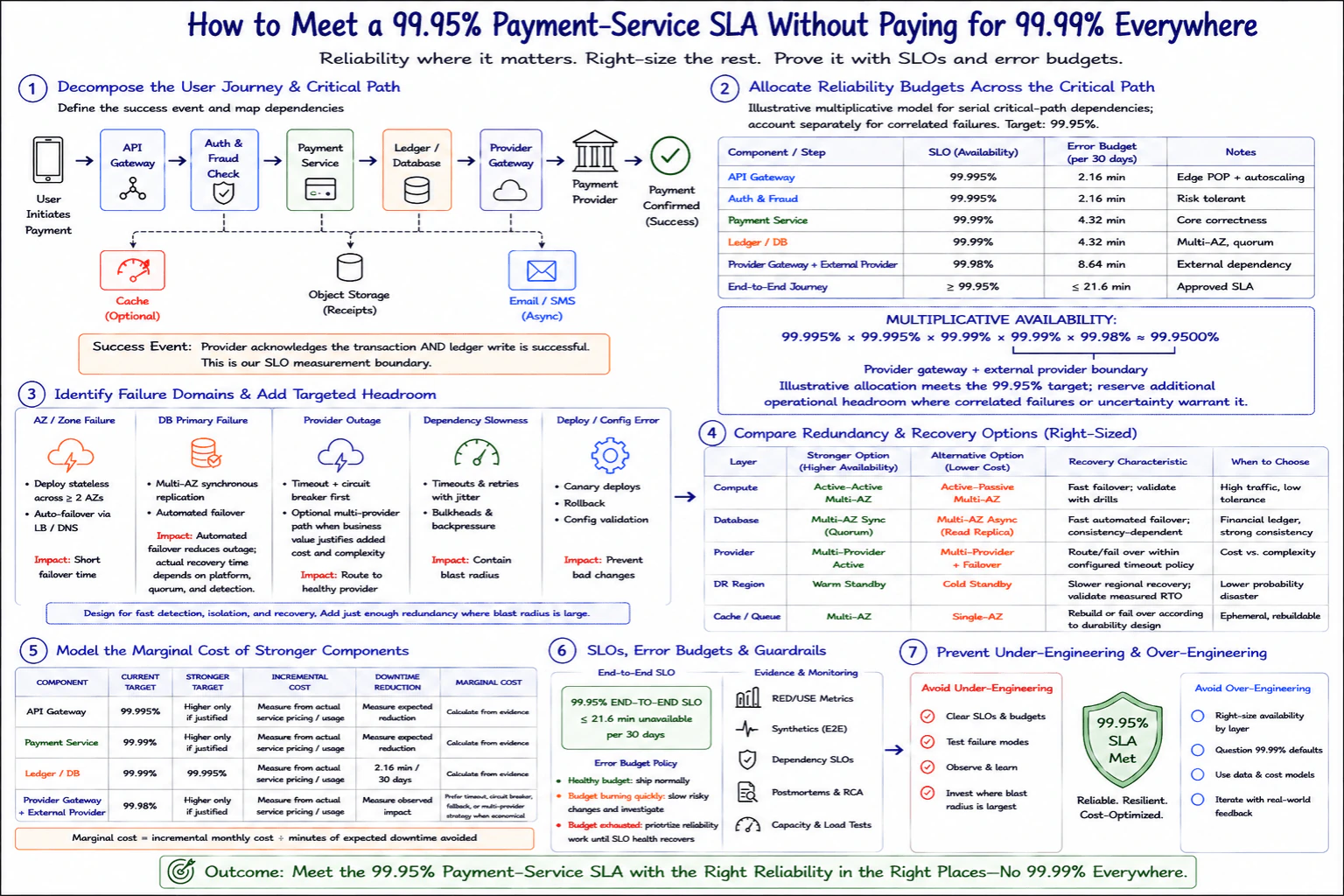
A payment service has an approved 99.95% SLA, and leadership wants reliability spending aligned to that target. Decompose the user journey and dependency budgets, identify failure domains and required headroom, compare redundancy and recovery options, model the marginal cost of stronger components, and show how SLO and error-budget evidence prevents both under-engineering and unnecessary 99.99% design.

Short Interview Answer (30-60 seconds)

I would start with the approved 99.95% customer journey SLO and work backward through the critical payment path. I would define payment success, assign reliability budgets to the API Gateway, Auth and Fraud Check, Payment Service, Ledger or Database, and the combined Provider Gateway plus external Payment Provider boundary. I would then test zone, database, provider, dependency, and deployment failures and choose stronger redundancy only where customer impact and recovery risk justify the cost. I would use actual service pricing, measured downtime avoided, SLI data, and error budget burn to decide whether any stronger target is worth buying.

Detailed Explanation

The goal is to keep the complete payment journey available at least 99.95% of the time without making every part of the system equally expensive. I would first define exactly what counts as a successful payment. Then I would identify the steps that must work for that success, decide how much failure each step can tolerate, and test how the system recovers from important failures. I would compare the real cost of stronger protection with the customer downtime it is expected to avoid. Actual SLI results and error budget use would guide future reliability spending.

Useful Questions to Ask the Interviewer
  1. What exact event counts as a successful payment for the 99.95% SLA?
  2. Is the SLA measured over 30 days, so the unavailable time allowance is about 21.6 minutes?
  3. Which payment dependencies are controlled by our team and which belong to an external provider?
  4. Which dependencies share a zone, region, network path, deployment system, or other common failure domain?
  5. What current pricing, usage, recovery test results, and failure history are available for each important component?
How would you meet a 99.95% payment-service SLA without paying for 99.99% everywhere? diagram
How to Explain It in an Interview

I would begin by defining the measurement boundary. In this design, the customer starts a payment, then the synchronous path passes through the API Gateway, Auth and Fraud Check, Payment Service, Ledger or Database, Provider Gateway, and external Payment Provider. A successful payment means the provider acknowledges the transaction and the ledger write succeeds. The optional cache, receipt object storage, and asynchronous Email or SMS path are useful supporting functions, but they are not part of this payment success boundary unless the business SLA explicitly says they are.

Next I would allocate reliability budgets across the serial critical path. The diagram uses an illustrative target of 99.995% for the API Gateway, 99.995% for Auth and Fraud, 99.99% for the Payment Service, 99.99% for the Ledger or Database, and 99.98% for the combined Provider Gateway plus external Payment Provider boundary. Under the simplified multiplicative model, the product is about 99.9500%, which meets the approved 99.95% target. This is a planning model for serial dependencies. I would account separately for correlated failures because components that share infrastructure can fail together. The displayed allocation therefore should not be treated as a complete model of operational risk. I would reserve additional practical headroom when measured uncertainty or shared failure domains justify it.

I would then examine the failure domains shown in the diagram. For an availability zone failure, I would place stateless services across at least two zones and use automated traffic failover through the load balancing and name resolution path. For a database primary failure, I would use synchronous replication where the consistency requirement justifies it and automated failover, while measuring the real recovery time because it depends on detection, quorum, and platform behavior. For a provider outage, I would start with timeouts and a circuit breaker. A second provider path is optional and should be added only when the business value is greater than the added integration and operating cost. For dependency slowness, I would use bounded retries with jitter, bulkheads, and backpressure. For deployment or configuration errors, I would use canary deployment, rollback, and configuration validation.

The next step is choosing the right amount of redundancy and recovery. Compute can use active active capacity across multiple zones when fast failover and traffic requirements justify the additional running capacity. Active passive capacity can be a lower cost alternative when slower activation is acceptable. The Ledger or Database can justify Multi AZ synchronous replication with quorum because durable financial state has high correctness value. An asynchronous read replica can be cheaper, but it does not provide the same consistency or failover behavior. For the provider layer, active use of multiple providers can reduce dependency risk but costs more to build and operate. A provider failover model can be cheaper when the application can tolerate the switchover behavior. A warm disaster recovery region gives faster regional recovery than a cold standby but costs more because more capacity is kept ready. Cache or queue infrastructure may use Multi AZ protection when its durability matters, while rebuildable data may justify a cheaper design. I would validate every recovery characteristic with drills instead of assuming a universal recovery time.

For cost, I would not invent prices or savings. I would collect the actual monthly service price and usage for the current design and the stronger design. I would also estimate the expected customer downtime avoided from observed incidents and tested recovery behavior. The comparison is marginal cost, which is incremental monthly cost divided by the expected minutes of customer downtime avoided. This lets me compare reliability investments on the same basis. For example, stronger protection for the Ledger or Database can have high value because it protects durable financial state, while an expensive reliability increase for a rebuildable cache may prevent little customer impact.

Finally I would operate the design with SLIs, SLOs, and an error budget. The main SLI is whether the complete payment success event occurred. I would also observe RED and USE style metrics where appropriate, synthetic end to end checks, dependency SLOs, capacity and load tests, and postmortem findings. When the error budget is healthy, normal delivery can continue. If the budget is burning quickly, I would slow risky changes and investigate. If the budget is exhausted, I would prioritize reliability work until SLO health recovers. This prevents under engineering because real failures consume the budget. It also prevents over engineering because a healthy budget provides evidence that an expensive reliability increase may not be necessary.

I would validate the design with representative payment load, controlled failure drills, provider failure tests, database failover tests, and production SLI measurements. I would verify payment correctness, ledger consistency, timeout behavior, retry idempotency, and graceful recovery. I would also check whether a reliability change simply moved the weakness to another dependency. The final goal is to spend reliability money where customer impact, blast radius, recovery difficulty, and measured evidence justify it, rather than applying 99.99% to every component.

Technical Approach
  1. Define the payment success event as external provider acknowledgement plus a successful ledger write.
  2. Define the synchronous critical path as API Gateway, Auth and Fraud Check, Payment Service, Ledger or Database, Provider Gateway, and external Payment Provider.
  3. Keep the optional cache, receipt object storage, and asynchronous Email or SMS work outside the synchronous success boundary unless the business SLA includes them.
  4. Set the end to end target at 99.95%, which allows about 21.6 minutes of unavailable time in a 30 day period.
  5. Use the diagram allocation as an illustrative planning model: API Gateway 99.995%, Auth and Fraud 99.995%, Payment Service 99.99%, Ledger or Database 99.99%, and the Provider Gateway plus external Payment Provider boundary 99.98%.
  6. Multiply those serial dependency targets. The result is about 99.9500%, which meets the illustrative 99.95% target.
  7. Treat correlated failures separately. Identify shared zones, regions, networks, deployment systems, and other common causes that can make several dependencies fail together.
  8. Test the main failure domains shown in the design: zone failure, database primary failure, provider outage, dependency slowness, and deployment or configuration error.
  9. Choose recovery per layer. Use stronger redundancy where blast radius, correctness needs, and customer impact are high. Use lower cost recovery where slower restoration or rebuilding is acceptable.
  10. Measure recovery behavior with controlled drills rather than assuming fixed recovery times.
  11. Obtain actual pricing and usage for each stronger design. Estimate expected customer downtime avoided from observed failure data and tested recovery behavior.
  12. Calculate marginal cost as incremental monthly cost divided by expected minutes of customer downtime avoided.
  13. Monitor the end to end payment SLI, dependency SLOs, synthetic checks, RED and USE style metrics where appropriate, error budget consumption, capacity results, and postmortems.
  14. When the error budget is healthy, ship normally. When it burns quickly, slow risky changes and investigate. When it is exhausted, prioritize reliability work until SLO health recovers.
  15. Reevaluate the reliability allocation when traffic, failure history, dependency behavior, business impact, or pricing changes.
Practical Insights

The main cost here is infrastructure and operating complexity rather than algorithm runtime. Active active compute across zones keeps more capacity running. Stronger database replication uses more storage, network, and managed service capacity. Multiple payment providers add integration code, testing, routing logic, monitoring, and support work. A warm disaster recovery region costs more than a cold standby because more resources stay ready. Failure drills, synthetic checks, load tests, and monitoring also consume engineering and platform resources. The useful comparison is marginal cost: additional monthly cost divided by the expected minutes of customer downtime avoided. Both values should come from real pricing, usage, incident history, and recovery tests.

Why Interviewers Ask This

Interviewers want to see whether I can turn a business availability target into a practical reliability design instead of making every component as reliable as possible. They are testing whether I can define the customer success boundary, allocate availability budgets across dependencies, reason about shared failure domains, compare recovery choices, measure the extra cost of stronger components, and use real SLI and error budget evidence to decide where additional reliability is worth paying for.

Common interview mistakes

A common mistake is setting every component to 99.99% without calculating whether that target is needed. Another is treating component failures as independent when several components share the same zone, region, network, or deployment system. Teams may also put optional receipt or notification work inside the synchronous payment success boundary without a business reason. Another mistake is inventing cloud prices, savings, or recovery times instead of using actual measurements. Unbounded retries can make a provider outage worse, so retries should be limited and combined with timeouts, jitter, idempotency, bulkheads, and backpressure where appropriate. A second payment provider is not automatically better because it adds integration and operating complexity. Active active architecture is also not automatically required for every layer. It is a mistake to trust a failover time that has never been tested or to treat healthy component SLOs as proof that the customer journey is healthy. The final decision should use the end to end payment SLI, dependency evidence, failure drills, error budget consumption, and measured cost.

Interview tip

Start with the approved 99.95% customer journey target instead of listing highly available products. Define payment success and the critical path first. Then explain the illustrative reliability allocation, shared failure domains, recovery choices, and marginal cost calculation. Finish with the SLI and error budget policy that tells the team when more reliability spending is justified. Mention that the multiplicative model is only a planning model and that correlated failures need separate treatment.

Interviewer may ask next
What if every component meets its own SLO, but the end to end payment journey still misses 99.95%?

I would trust the end to end payment SLI first because the customer journey is the measurement boundary that defines success. I would break failed payments down across the API Gateway, Auth and Fraud Check, Payment Service, Ledger or Database, and the Provider Gateway plus external Payment Provider boundary. I would then check for correlated failures, retry amplification, timeout behavior, deployment errors, or an omitted dependency that makes the simple planning model too optimistic. Synthetic payment checks, request metrics, dependency metrics, traces, and incident records can show where the gap comes from. The main tradeoff is that stronger targets may reduce some failures but add cost. I would change the reliability allocation or recovery design only after the evidence shows which failure source is consuming the customer error budget.

When would you pay for a second payment provider instead of relying on timeouts, circuit breakers, and failover behavior with the current provider?

I would add a second payment provider only when measured outages in the Provider Gateway plus external Payment Provider boundary consume enough of the 99.95% payment journey error budget to justify the extra cost and complexity. I would compare expected customer downtime avoided with provider fees, integration work, routing logic, payment consistency concerns, testing effort, and ongoing operations. I would also test the switchover path because a second provider adds value only when traffic can move safely and payment correctness remains intact. If the existing provider rarely threatens the end to end SLO, better timeout, circuit breaker, and recovery behavior may be the lower cost choice.

77. How would you implement cloud chargeback without creating conflict among teams?Performance And Cost OptimizationHard

Question Details

Design a chargeback model for product teams that share networking, observability, security, commitments, support, and platform clusters. Define allocation keys, treatment of idle and shared capacity, credits and discounts, unallocated spend, data quality, dispute handling, behavioral incentives, and reports that reconcile exactly to the provider invoice.

Short Interview Answer (30-60 seconds)

I would start with the provider invoice as the financial boundary and build one transparent allocation model that reconciles completely to it. Direct tagged costs go to the owning team. Shared networking, observability, security, platform, support, and commitment costs use published allocation keys based on measurable usage, provisioned capacity, activity, or benefit. I would keep unallocated spend visible, apply credits and discounts transparently, publish team and unit cost reports, and use a documented dispute process. The main tradeoff is precision versus simplicity. The model must be fair enough to guide behavior and simple enough for every team to verify.

Detailed Explanation

Cloud chargeback means dividing one company cloud bill among the teams that caused or benefited from the spending. The hard part is not only calculating numbers. Teams must trust the result. I would collect the complete bill and usage data, apply clear ownership and allocation rules, and keep every adjustment visible. Direct costs go to the owning team. Shared costs use agreed measurements. Costs that cannot be assigned stay visible. Credits and discounts are shown separately. Every team gets a clear report, and the complete result must reconcile exactly to the provider invoice.

Useful Questions to Ask the Interviewer
  1. Which cloud costs can already be tied directly to a product team?
  2. Which shared services are included, such as networking, observability, security, support, commitments, and platform clusters?
  3. Do teams already have reliable tags, service ownership, and usage measurements?
  4. Should idle reserved capacity be charged to teams, held centrally, or split using an agreed capacity rule?
  5. How should enterprise discounts, credits, refunds, and promotional benefits be distributed?
  6. What review period and dispute process does the organization want?
How would you implement cloud chargeback without creating conflict among teams? diagram
How to Explain It in an Interview

I would design the system as one traceable flow from cloud billing data to team reports.

First, I would collect the complete provider billing records together with usage telemetry, resource ownership, contracts, commitments, discounts, credits, and platform context. The provider invoice is the financial boundary. The final chargeback model must account for every amount in that billing period.

Next, I would normalize and classify the data. I would standardize currency, region, account, project, environment, service, team, and cost category fields. I would remove duplicates and represent refunds and credits correctly. Required ownership fields such as team, environment, service, and cost center should be validated. Records with missing ownership should not be guessed. They should enter a visible quarantine or unallocated path until the ownership problem is resolved.

Then I would classify spend into direct, shared, and unallocated costs. Direct tagged spend goes completely to the owning team. Shared spend uses a published allocation key that represents actual consumption, provisioned capacity, activity, user count, or business benefit.

For networking, a useful allocation key is measured traffic such as gigabytes of egress or gigabytes processed. For observability, the key can be gigabytes ingested, custom metrics, or another documented consumption measure. For central security, the key can be protected assets, security events, or users when that matches how the service is consumed. Platform clusters can use vCPU hours, memory hours, storage, or requests. Support and common tools can use active users, tickets, or managed assets. Each key must be understandable, reproducible, and linked to use or benefit.

Commitments need separate treatment. Reservation or savings commitment costs and benefits should be allocated using a documented proportional benefit rule, such as comparing eligible usage with the equivalent on demand usage. This avoids charging one team for a commitment while another team receives most of the benefit.

Idle capacity should also be explicit. If capacity is intentionally reserved for reliability, scaling, or future demand, I would separate that reserved capacity from actual consumption and allocate it using an agreed capacity rule. Reports should show the difference so teams can understand what they consumed, what capacity was held for them, and where rightsizing may reduce cost.

Credits, refunds, and discounts must remain visible. Broad enterprise discounts can be distributed proportionally across eligible usage. A credit tied to a specific incident can be assigned to the affected service or team. Promotional benefits can appear as separate negative line items. The rule should be documented so teams see both the gross charge and the benefit they receive.

Any spend that cannot be allocated reliably should stay in an explicit organization or unallocated bucket. I would report the amount, reason, and age of that spend and review it regularly with the responsible business owners. This avoids hiding weak ownership data inside arbitrary allocations.

Data quality is part of the financial control. I would track completeness, accuracy, and timeliness of tags and ownership data. Automated checks should verify that required billing records are present, allocation keys are valid, and totals remain balanced. A recurring data quality score makes ownership problems visible before they become billing disputes.

Each team should receive a monthly charge report that shows direct costs, allocated shared costs, discounts, credits, and the final total. I would also provide category breakdowns, usage versus charge views, month over month trends, unit costs, budget variance, commitment utilization, and data quality information. Unit cost examples can include cost per request, gigabyte, job, or another business unit supported by the available data.

The most important control is reconciliation. The sum of team charges, explicitly unallocated spend, and all positive or negative adjustments must equal the total provider invoice for the same billing period. I would keep a reconciliation log so every difference can be traced back to source data and allocation rules.

To prevent conflict, governance must be designed before disputes happen. Allocation rules should be version controlled, have effective dates, and have clear owners. The FinOps function can own the model, platform teams can provide the underlying usage data, and product teams can remain responsible for their own usage and ownership metadata. A cross functional FinOps council can review major changes and difficult cases.

I would also provide a simple dispute process. A team raises a ticket or form, the cost review group checks the source data and published rules, evidence is reviewed, and the decision is documented and communicated. A service target such as five business days can keep the process predictable. If a dispute reveals bad data or a weak allocation rule, the learning should feed back into the model through the normal change process.

Chargeback should also create useful behavior. I would always provide showback visibility, use budgets and guardrails, highlight rightsizing opportunities, show commitment utilization, and track unit cost trends. When policy allows, teams can receive part of the benefit from verified savings. The goal is to reward efficient decisions rather than make cloud cost feel like an unexplained tax.

The final model should be fair, predictable, transparent, actionable, and fully reconcilable. Those properties matter more than using the most complicated allocation formula.

Key Insight / Why This Solution Works
  1. Establish the provider invoice as the financial boundary for the billing period.
  2. Collect billing records, usage telemetry, inventory, ownership metadata, contracts, commitments, discounts, credits, and platform context.
  3. Normalize currency, region, account, project, environment, service, team, and cost category fields.
  4. Validate required ownership data and route unresolved records into a visible unallocated bucket.
  5. Classify each cost as direct, shared, or unallocated.
  6. Assign direct tagged costs completely to the owning team.
  7. Assign each shared category a published allocation key based on measurable usage, provisioned capacity, activity, user count, or business benefit.
  8. Allocate networking with traffic measures, observability with ingestion measures, security with protected assets or events, platform clusters with compute, memory, storage, or request measures, and support with users, tickets, or assets.
  9. Allocate commitment costs and benefits using a documented proportional benefit rule.
  10. Separate actual usage from intentional idle or reserved capacity and apply the agreed capacity policy.
  11. Apply credits, refunds, promotions, and discounts transparently using documented benefit rules.
  12. Produce each team monthly charge with direct cost, shared cost, adjustments, category detail, unit cost, trends, budget information, commitment utilization, and data quality information.
  13. Reconcile team charges, unallocated spend, and adjustments exactly to the provider invoice.
  14. Track completeness, accuracy, and timeliness of the billing and ownership data.
  15. Route disputes through a documented evidence based review process.
  16. Version allocation rules, assign clear ownership, and review important changes through a cross functional FinOps council.
  17. Use reports, budgets, guardrails, rightsizing signals, savings incentives, and unit cost trends to encourage better behavior.
Why Interviewers Ask This

Interviewers ask this question to test whether I can turn a shared cloud bill into fair, explainable, and actionable team charges. They want to see whether I understand direct ownership, shared allocation keys, idle capacity, commitments, credits, discounts, unallocated spend, data quality, governance, disputes, behavioral incentives, reporting, and exact reconciliation to the provider invoice. They are also testing judgment because a mathematically valid model can still fail if teams cannot understand, verify, or influence their charges.

Common interview mistakes

A common mistake is dividing every shared cost equally because the formula is easy. Equal division can be unfair when consumption differs greatly. Another mistake is using a very complicated allocation formula that teams cannot reproduce. Hiding unallocated spend is also dangerous because ownership problems remain invisible. Other mistakes include charging teams for commitments without showing the related benefit, keeping enterprise discounts centrally while allocating gross costs to teams, silently guessing missing ownership, changing allocation rules without notice, mixing billing periods, using different source totals for reports and reconciliation, and treating disputes as exceptions instead of designing a formal evidence based process. Chargeback also fails when teams see charges but receive no unit cost, trend, budget, rightsizing, or optimization information that helps them change behavior.

Interview tip

Explain chargeback as a trust problem as well as a billing problem. Start with the provider invoice, show how every cost becomes direct, shared, or unallocated, and give a few concrete allocation keys. Then explain idle capacity, commitments, credits, discounts, data quality, exact reconciliation, and dispute handling. Finish by saying that the best model is transparent enough for a team to reproduce its charge and actionable enough for that team to reduce future cost.

Interviewer may ask next
What would you do if a large amount of cloud spend had missing or incorrect team ownership data?

I would not guess the ownership or silently spread that spend across product teams. For this chargeback model, the measurement boundary is the complete provider invoice for the billing period. Costs with unreliable ownership would go into an explicit organization or unallocated bucket. I would report the amount and reason, track ownership completeness and accuracy, and assign owners to correct the source data. Once ownership becomes reliable, future billing records can follow the normal direct or shared allocation rule. This matters because invented ownership can make the arithmetic balance while destroying trust. The tradeoff is that visible unallocated spend may initially look undesirable, but it exposes the real data problem and creates an incentive to correct it.

How would you change the model as the company grows and shared platform costs become much larger?

I would keep the same provider invoice reconciliation boundary but review whether the current allocation keys still represent consumption and benefit at the new scale. A shared platform cluster might need separate vCPU hours, memory hours, storage, request volume, and reserved capacity treatment instead of one broad team count. I would version the new rules, set an effective date, validate the calculation with historical billing data, and communicate the impact before the rule affects team budgets. I would also keep both the source data and allocation decisions auditable so disputes can be explained. The tradeoff is precision versus simplicity. More detailed allocation can improve fairness, but every new key increases telemetry, data quality, maintenance, and explanation costs.

78. What is a managed cloud database, and how does it differ from running a database on a virtual machine?Database And StorageEasy

Question Details

Define a managed database service and compare it with a self-managed database on cloud compute. Cover provisioning, patching, backups, replication, failover, scaling, monitoring, access, configuration limits, portability, operational responsibility, and cost, then explain when the additional control of self-management is justified.

Short Interview Answer (30-60 seconds)

A managed database lets the cloud provider handle much of the setup, patching, backups, monitoring, replication, and failover. A database on a virtual machine gives you greater software and operating-system control, but your team owns those operational tasks. I would normally prefer managed unless specific control requirements justify self-management.

Detailed Explanation

A managed cloud database is like renting a ready-to-use service where much of the difficult care is done for you. You still decide how your application uses the information, who can reach it, and how your data should be protected. If you run the same software on your own rented computer, you gain more freedom, but your team must install it, keep it updated, make copies, watch for problems, recover from failures, and plan growth. The choice is mainly between easier operation and greater control.

Useful Questions to Ask the Interviewer
  1. Does the application require a specific database engine, version, extension, operating-system feature, or configuration that a managed service may not support?
  2. What availability and recovery requirements must the database meet?
  3. How quickly must the database restore after a failure, and how much recent data loss is acceptable?
  4. What are the expected workload size, latency, throughput, connection count, and growth pattern?
  5. Are there data residency, encryption, retention, audit, or regulatory requirements?
  6. Is portability across clouds or into another environment an important requirement?
  7. Does the team have enough database operations experience to safely manage patching, replication, backups, failover, monitoring, and recovery?
  8. Should cost be compared only by infrastructure price, or by total operational cost including engineering effort and on-call responsibility?
What is a managed cloud database, and how does it differ from running a database on a virtual machine? diagram
How to Explain It in an Interview

A managed cloud database is a database service where the provider operates a large part of the underlying database platform. The application still connects to the database and sends reads, writes, transactions, or queries. The customer still owns application design, schemas or data models, indexes, queries, credentials, authorization, connection behavior, data classification, and recovery requirements. The provider manages only the responsibilities promised by that specific service.

The first difference is provisioning. With a managed service, you normally request a database through a provider control plane, such as a console, API, CLI, or infrastructure-as-code workflow. The service creates and configures the required infrastructure. With a virtual machine, the cloud provider gives you compute, storage, and networking, but your team installs and configures the database software itself.

The second difference is patching. A managed service commonly handles supported database maintenance and underlying infrastructure updates according to its maintenance model. Your team still has to understand version compatibility and test application behavior before important changes. On a virtual machine, your team must patch the operating system and database software, plan downtime or rolling procedures, test upgrades, and recover if an update fails.

Backups are also different. A managed database often provides automated backup and restore features, and many services support point-in-time recovery. Point-in-time recovery means restoring the database to a selected time within a retained recovery window. A snapshot is a copy captured at a particular point, while point-in-time recovery usually combines backups with change history so more restore points are available. Neither feature removes the need to define retention, test restores, protect backups, and confirm that recovery objectives can actually be met.

High availability is not the same as backup. A managed database may support replicas or redundant database instances that can take over after infrastructure failure. A synchronous replica confirms a change as part of the write path, so it can reduce data loss during failover but may increase write latency. An asynchronous replica receives changes later, which can improve flexibility and geographic distance but can lag behind. Replication helps availability. Backups protect against other events such as accidental deletion, corruption, or the need to restore older data. Replicas do not replace backups.

Failover is usually easier with a managed database because the service may detect failures and promote or redirect to another healthy database according to its documented behavior. The application must still handle temporary connection failures, retries, transaction errors, and reconnect behavior. With a self-managed database, your team must design the health checks, replication topology, leader election or promotion procedure, routing changes, split-brain protection, and failover testing.

Scaling also differs. A managed service commonly exposes supported ways to change compute or storage capacity and may offer read replicas or automated scaling for certain resources. That does not mean scaling is unlimited or automatic. Connection limits, storage throughput, write capacity, index cost, query efficiency, replication lag, and service limits can still become bottlenecks. With a virtual machine, your team controls more of the scaling design but must implement and operate it.

Monitoring is partially shared. Managed services normally expose database and infrastructure metrics, logs, events, and alarms through provider monitoring systems. The provider may monitor whether the service infrastructure is healthy, but the application team must still monitor slow queries, failed transactions, connection-pool exhaustion, storage growth, replication lag, application latency, restore readiness, and business-level symptoms. A self-managed database requires your team to operate even more of the database and operating-system monitoring stack.

Access is another important boundary. A managed database normally exposes supported database endpoints and provider control-plane APIs. Applications should use the database's normal data-plane protocol through authenticated connections. Administrative operations such as creating an instance, changing capacity, or configuring backups happen through the provider control plane. With a virtual machine, administrators can usually access the operating system and database files directly, which gives more control but also increases security and operational responsibility.

Managed services intentionally limit some configuration. You may not receive root operating-system access, direct control of database files, arbitrary plugins, unsupported extensions, every engine parameter, or unrestricted version selection. These limits allow the provider to operate the service safely. A self-managed database is justified when one of those restrictions blocks a real requirement, such as a required extension, custom storage layout, unsupported engine version, specialized tuning, unusual replication topology, or deep operating-system integration.

Portability can also favor self-management. A standard database engine running on virtual machines may make it easier to reproduce a similar environment elsewhere because you control the software and operating system. A managed database may expose provider-specific APIs, backup formats, replication options, identity integrations, monitoring integrations, or scaling features. However, self-management is not automatically portable. Applications can still depend on infrastructure, networking, automation, storage, and operational procedures specific to one environment.

Operational responsibility is the biggest practical difference. In a managed database, the provider takes responsibility for a defined part of the platform. Your team still owns data correctness, application behavior, access control, schema design, query performance, capacity planning, recovery objectives, and correct service configuration. In a self-managed database, your team additionally owns the operating system, database installation, patches, replication, failover automation, backup jobs, monitoring agents, maintenance procedures, and much more of incident recovery.

Cost should therefore be compared as total cost, not only as the hourly price. A managed database can have a higher service price because operational capabilities are included. A virtual machine may appear cheaper for compute and storage, but the organization must also pay for engineering time, monitoring, backup infrastructure, maintenance, testing, on-call work, failure recovery, and the risk of operational mistakes. Managed services are often economical when they remove substantial routine operational work.

Before choosing either model, I would define the actual requirements: access pattern, expected latency, throughput, consistency, durability, availability, data residency, retention, encryption, backup retention, restore time, acceptable data loss, replication needs, connection limits, scaling pattern, and cost target. I would then check whether a managed service satisfies those requirements and whether its configuration limits are acceptable.

My default choice would normally be a managed database because it reduces routine operational responsibility and provides standardized backup, monitoring, maintenance, and availability features. I would choose a database on virtual machines when the additional control solves a concrete requirement that the managed service cannot meet and when the organization has the engineering maturity to operate that database safely.

Technical Approach
  1. Identify the database engine and application access pattern: reads, writes, transactions, latency, throughput, and connection requirements.
  2. Define availability, durability, backup retention, acceptable data loss, and restore-time requirements.
  3. Check security, encryption, residency, retention, and access requirements.
  4. Evaluate whether a managed database supports the required engine version, extensions, parameters, replication model, scaling model, and operational controls.
  5. Compare the managed-service responsibility boundary with the work the team would own on virtual machines.
  6. Evaluate portability requirements and any provider-specific dependencies.
  7. Compare total cost, including infrastructure, licenses where applicable, backups, monitoring, engineering effort, maintenance, testing, and on-call operations.
  8. Prefer the managed service when it satisfies the requirements. Choose self-management only when the added control provides a clear technical or organizational benefit that justifies the operational burden.
Practical Complexity & Trade-offs

There is no algorithmic time or memory complexity to calculate for this question. The important complexity is operational. A managed database reduces installation, patching, backup, replication, failover, monitoring, and maintenance work, but may have a higher direct service price and more configuration limits. A self-managed database can provide deeper control and sometimes lower raw infrastructure cost, but it requires more engineering time, testing, monitoring, storage planning, backup capacity, recovery work, and on-call responsibility. As data volume, traffic, replicas, connections, and recovery requirements grow, the operational cost of self-management usually grows as well.

Where it is used

Managed databases are common for web applications, APIs, business systems, SaaS platforms, internal applications, and production workloads where teams want reliable database capabilities without operating the entire database platform. Self-managed databases on virtual machines are used when an organization needs unsupported extensions, unusual database versions, deep operating-system access, custom storage or networking behavior, specialized replication, strict portability requirements, or configuration freedom that a managed service does not expose. They are also reasonable when a team already has strong database operations expertise and the additional control provides enough value to justify the maintenance burden.

Why Interviewers Ask This

Interviewers want to see whether the candidate understands the operational boundary between a cloud provider and the customer. A Cloud Engineer should know what responsibilities a managed database removes, what control is lost in return, and how that affects availability, backup, recovery, scaling, security, portability, monitoring, configuration, and cost. The question also tests whether the candidate can avoid choosing self-management only because it appears cheaper or more flexible while ignoring the engineering work and operational risk that the team must take on.

Common interview mistakes

A common mistake is saying that a managed database means the provider is responsible for everything. The customer still owns schemas, queries, indexes, credentials, authorization, application connection behavior, data protection requirements, and correct configuration. Another mistake is treating high availability as a backup strategy. Replicas can improve availability but do not replace backups or tested restores. Candidates may also assume every managed service is automatically multi-region, automatically scales without limits, or supports every database feature. Another mistake is comparing only the instance price while ignoring engineering and operational cost. Finally, self-management should not be chosen simply because it gives more control; that control is valuable only when a real requirement needs it.

Interview tip

Frame the answer around the responsibility boundary. Say that managed databases trade some control for less operational work, while virtual machines trade more operational responsibility for greater control. Then compare provisioning, patching, backups, replication, failover, scaling, monitoring, access, limits, portability, and total cost. Finish by saying you would default to managed unless a specific unmet requirement justifies self-management.

Interviewer may ask next
If a managed database provides replicas and automatic failover, do you still need backups?

Yes. Replication and failover mainly improve availability when an instance or infrastructure component fails. They can also copy unwanted changes. For example, if an application accidentally deletes important rows, that deletion may be replicated to other copies. Backups and point-in-time recovery provide a separate recovery path for accidental changes, corruption, or the need to restore older data. I would define backup retention, acceptable data loss, and restore-time requirements, and I would regularly test restores instead of assuming that a successful backup guarantees successful recovery.

When would you intentionally run a database on virtual machines instead of using a managed database?

I would use virtual machines when the application has a concrete requirement that the managed service cannot meet. Examples include a required database version or extension, root operating-system access, custom database binaries, unusual storage configuration, specialized replication, unsupported tuning parameters, or stronger portability requirements. I would also confirm that the team can safely operate patching, backups, replication, monitoring, failover, upgrades, and recovery. The extra control is justified only when its value is greater than the additional operational cost and risk.

79. How would you choose between DynamoDB and a relational database service?Database And StorageEasy

Question Details

Compare the choices for an application whose access patterns must be defined before selection. Cover key-based versus relational queries, transactions, consistency, schema evolution, indexing, throughput scaling, latency, operational responsibility, backup and restore, multi-region needs, and cost behavior, including examples of a poor fit for each service.

Short Interview Answer (30-60 seconds)

I would start with access patterns. I prefer DynamoDB for predictable key-based requests, high horizontal scale, and low operational overhead. I prefer a relational service for joins, flexible SQL queries, relational constraints, and transaction-heavy data. Then I compare consistency, recovery, regions, operations, and total cost.

Detailed Explanation

The choice depends on how the application needs to find, change, and connect its information. I first ask what information is read together, whether requests follow a small set of known paths, whether several related changes must succeed together, and how quickly answers are needed. I also consider traffic growth, recovery needs, geographic requirements, and spending. One option is better for simple, predictable lookups at large scale. The other is better when information has many relationships and users need different ways to search it. The best choice matches the application's real behavior instead of popularity.

Useful Questions to Ask the Interviewer
  1. What are the application's main read and write access patterns, and can we define them before choosing the database?
  2. Are requests mainly lookups by a known key, or do users need joins, filtering, sorting, aggregation, reporting, and changing query patterns?
  3. Do multiple related records need to change atomically in one transaction?
  4. What consistency guarantees are required immediately after a write?
  5. What are the expected request rate, data size, traffic spikes, and latency goals?
  6. How frequently will the data model and query requirements change?
  7. What backup retention, point-in-time recovery, recovery point objective, and recovery time objective are required?
  8. Is high availability within one AWS Region sufficient, or must the application remain available across multiple Regions?
  9. Are there data residency, replication, or encryption requirements?
  10. Is the main priority query flexibility, minimal operational work, predictable scaling, or lowest total cost for the expected workload?
How would you choose between DynamoDB and a relational database service? diagram
How to Explain It in an Interview

I would start with the access patterns because DynamoDB and a relational database are optimized for different kinds of work.

1. Access patterns and data model

DynamoDB is a NoSQL key-value and document database. It works best when the important access patterns are known in advance. Efficient requests normally use a partition key and, when the table design includes one, a sort key. The partition key helps determine how items are distributed. A poor key design can concentrate requests on a small part of the table and create a hot-partition problem.

A relational database stores data in tables with defined relationships. It is usually a better fit when the application needs joins, many combinations of filters, aggregations, ad hoc queries, relational constraints, or query requirements that are likely to evolve.

For example, a session store where every request finds a session by session ID is a natural DynamoDB access pattern. An order-management system that frequently relates customers, orders, order lines, products, and payments through different SQL queries is usually a more natural relational workload.

2. Transactions

Both choices support transactional behavior, but the natural use cases differ.

Relational databases are usually easier when many related rows must obey constraints and change together. An ACID transaction can make several operations act as one unit: either the transaction commits successfully or it is rolled back. Isolation defines how concurrent transactions can observe one another's changes.

DynamoDB also supports ACID transactions for supported operations, so it is incorrect to say that DynamoDB cannot handle transactions. However, if the data model constantly requires complex relationships and transactions spanning many related entities, that is evidence that a relational model may be easier to understand and maintain.

For individual items and suitable workflows, DynamoDB conditional writes can also support optimistic concurrency. Optimistic concurrency means a write succeeds only if the stored item still has the state or version the application expects.

3. Consistency

I would ask what a reader must see immediately after a successful write.

For a normal single-Region DynamoDB table, eventually consistent reads are the default. Strongly consistent reads are available for the base table and local secondary indexes, but not for global secondary indexes. Eventually consistent reads can temporarily return an older committed value after a recent update. A strongly consistent read returns the latest successfully committed value according to DynamoDB's supported consistency guarantees. ([docs.aws.amazon.com](https://docs.aws.amazon.com/amazondynamodb/latest/developerguide/HowItWorks.ReadConsistency.html))

A relational database normally provides transactional consistency on its writer or primary database. Read replicas require separate analysis. A synchronously maintained replica participates more directly in durability or commit behavior and can add latency. An asynchronously replicated copy receives changes later and can temporarily lag behind the primary.

I would never assume that every replica provides the same consistency as the primary.

4. Schema evolution

DynamoDB items have a flexible attribute structure, so every item in a table does not need to contain exactly the same non-key attributes. That can make some application-level schema changes easier. However, DynamoDB is not schema-free in the architectural sense. Primary-key design and access patterns are fundamental, and changing them later can require data migration or a redesigned table.

A relational database has an explicit schema. It can enforce data types, keys, relationships, uniqueness, and other integrity rules. Adding a simple column may be easy, while changing large tables, indexes, constraints, or relationships can require carefully planned migrations.

So I would compare the expected kinds of change instead of saying that DynamoDB always handles schema changes better.

5. Indexing and query flexibility

In DynamoDB, I would design the table keys and secondary indexes around real access patterns. A global secondary index provides an additional partition-key and optional sort-key access path. Secondary indexes improve supported query patterns but also add storage and write-related cost, so I would create only the indexes the application actually needs.

In a relational database, indexes can accelerate filtering, joining, and sorting. The database optimizer chooses a query plan based on factors such as available indexes and statistics. Too many indexes are also harmful because they consume storage and add maintenance work to writes.

The major design difference is that DynamoDB rewards defining important access paths before the table is designed, while a relational database normally provides more freedom to introduce new SQL query shapes later.

6. Throughput scaling and latency

DynamoDB is designed for horizontal scaling across distributed partitions. With a well-distributed partition-key design, it is a strong option for applications that need predictable key-based access at high request rates without managing traditional database servers.

A managed relational database removes much of the infrastructure administration, but the application team still needs to consider compute capacity, storage performance, query efficiency, locks, transactions, connection limits, replicas, and scaling strategy. A traditional relational deployment can often scale vertically by increasing database capacity and scale reads by adding replicas, while write scaling depends on the specific relational architecture.

Relational applications also commonly use connection pools. A connection pool keeps a controlled number of database connections open and reuses them for requests. Pool sizing matters because too many application instances or oversized pools can exhaust the database's connection capacity.

DynamoDB applications use AWS service API requests rather than the traditional long-lived database connections used by relational database clients, so traditional relational connection-pool sizing is not the same concern.

7. Operational responsibility

DynamoDB reduces responsibility for server sizing, operating-system maintenance, traditional database connections, and many infrastructure scaling tasks. The application team still owns table design, key distribution, indexes, permissions, encryption choices, monitoring, capacity configuration where applicable, backup configuration, recovery procedures, and application correctness.

A managed relational service also removes much low-level infrastructure work, but the team still owns schemas, migrations, indexes, query tuning, connection management, transaction behavior, database capacity, replicas, backup policies, and restore testing.

Managed service does not mean zero operational responsibility.

8. Backup, restore, and high availability

I would treat high availability and backup as separate requirements.

High availability is about continuing to serve the application when infrastructure fails. A replica may help availability, but it is not automatically a backup. For example, an accidental deletion or damaging application write may also propagate to replicas.

A backup or snapshot preserves a recoverable copy or recovery state independently of the active serving path. Point-in-time recovery allows restoration to an eligible time inside a configured recovery window rather than only to the time of a particular backup snapshot.

For either database choice, I would define an RPO and an RTO. RPO, or recovery point objective, is how much recent data the business can afford to lose. RTO, or recovery time objective, is how quickly service must be restored.

I would verify backup retention, point-in-time recovery capabilities, restore procedures, encryption, authorization, and recovery testing. A service durability claim by itself does not prove that the application can recover within its required RPO and RTO.

9. Multi-region requirements

I would not assume that choosing a managed database automatically creates a multi-region architecture.

For DynamoDB, Global Tables provide multi-active, multi-Region replication. In current DynamoDB, the default global-table consistency mode is multi-Region eventual consistency, or MREC. DynamoDB also supports multi-Region strong consistency, or MRSC, for supported Global Tables. MREC replicates changes asynchronously across Regions and favors lower write latency. MRSC synchronously replicates writes according to its quorum design and allows strongly consistent reads from supported replicas, but it has additional architectural limitations and higher cross-Region coordination cost and latency. ([docs.aws.amazon.com](https://docs.aws.amazon.com/amazondynamodb/latest/developerguide/GlobalTables.html))

That means I would not simply say that all DynamoDB Global Tables are eventually consistent. I would choose between the supported consistency modes based on required consistency, latency, availability, transaction behavior, supported Regions and features, and recovery objectives.

Relational multi-region designs vary by database service. Some use asynchronous cross-region replicas, where replication lag creates a non-zero risk of losing the newest changes during a regional failure. Other distributed relational designs can provide stronger cross-region guarantees at different latency, complexity, and cost.

I would define consistency, availability, data residency, latency, failover, RPO, and RTO before selecting either architecture.

10. Cost behavior

I would compare total cost using realistic normal and peak workloads rather than comparing only storage prices.

DynamoDB cost can depend on the capacity mode, read and write activity, storage, secondary indexes, backups, replication, and data transfer. A poor key or index design, scans, unnecessarily large items, or unexpectedly high request volume can make the design less economical.

A managed relational database can have costs for database compute, storage, storage I/O or throughput depending on the service, backups, replicas, and network transfer. Traditional provisioned database capacity may continue to cost money even when traffic is light, although exact pricing depends on the selected relational service and deployment model.

I would estimate ordinary traffic, peak traffic, storage growth, index overhead, backups, replicas, multi-region replication, and data transfer before making the final choice.

Poor fit for DynamoDB

A poor DynamoDB fit would be an application where users constantly create new reports requiring arbitrary joins, filters, and aggregations across many related entities. Trying to support every possible query through predefined DynamoDB access paths could create unnecessary complexity, many indexes, duplicated data, or expensive scans.

Another warning sign is a workload where the natural data model requires frequent complex transactions across many related entities. DynamoDB has transaction support, but using it to imitate a relational schema everywhere can make the application harder to design and maintain.

Poor fit for a relational database

A poor fit for a traditional relational deployment would be an extremely high-volume application where almost every operation is a simple read or update using a well-distributed known key, traffic changes sharply, relational joins provide little value, and the team wants horizontal service-managed scaling without traditional database connection and server-capacity management.

A relational database could still technically serve such a workload, but it may require more capacity planning, connection management, read scaling, partitioning, or other operational work than a purpose-built key-value database.

Final decision rule

I would choose DynamoDB when important access patterns can be defined in advance, requests are mainly key-based, the partition key can distribute traffic well, horizontal scaling and low request latency are important, and reducing traditional database infrastructure management has high value.

I would choose a relational database service when joins, flexible SQL queries, changing query requirements, relational integrity, and transactions across related data are central to the application.

Neither option is universally better. I would document the access patterns, consistency requirements, throughput, latency, recovery objectives, multi-region behavior, and cost model first. Then I would test representative workloads and choose the database whose natural model matches the application rather than forcing one technology to behave like the other.

Technical Approach
  1. Write down the application's exact read and write access patterns before choosing a database.
  2. Decide whether requests are mainly predictable key-based operations or flexible relational queries involving joins, filtering, aggregation, or reporting.
  3. Identify transaction boundaries and determine whether several related records must commit atomically.
  4. Define the consistency required after writes, including consistency expectations for indexes, replicas, and multi-region reads.
  5. Estimate normal and peak throughput, data size, traffic spikes, latency goals, and the risk of uneven key distribution.
  6. Evaluate how often schemas and query patterns will change and which indexes each design requires.
  7. Compare operational work, including relational connection pools, query tuning, migrations, capacity planning, DynamoDB key design, index management, monitoring, and scaling behavior.
  8. Define high availability, backup retention, point-in-time recovery, RPO, RTO, encryption, authorization, data residency, and restore-testing requirements.
  9. Determine whether one Region is sufficient or whether an explicit multi-region replication strategy is required, including the desired consistency mode and failover behavior.
  10. Model total cost using relevant requests or provisioned capacity, compute, storage, indexes, I/O or throughput, backups, replicas, replication, and data transfer.
  11. Identify a poor-fit scenario for each candidate and reject designs that require a database to work against its natural strengths.
  12. Load-test the preferred design with representative access patterns and peak traffic before finalizing the architecture.
Practical Complexity & Trade-offs

With DynamoDB, a direct request using a well-designed key can stay simple and predictable even when the table becomes large. The difficult part is data modeling: bad partition keys, scans, unnecessary indexes, large items, or poorly understood access patterns can increase latency, cost, or operational risk. DynamoDB removes traditional server and connection-pool management, but the team must carefully design keys, indexes, consistency, recovery, and capacity behavior.

With a relational database, SQL makes relationships and complex queries easier to express, but joins, sorting, aggregation, transactions, and poorly indexed queries can require more CPU, memory, storage I/O, and execution time as data grows. Indexes can make reads much faster, but each index uses storage and can make writes more expensive. The team also needs to manage schema migrations, query plans, connection pools, transaction behavior, replicas, and capacity.

For both choices, more stored data, longer backup retention, extra replicas, multi-region operation, and network transfer can increase cost. The useful comparison is total application and operational cost at realistic normal and peak workloads, not only the price of storing one gigabyte.

Where it is used

DynamoDB is commonly appropriate for workloads such as session state, shopping-cart state, device state, request metadata, user preferences, idempotency records, and other applications where a small number of predictable key-based access patterns dominate and traffic can grow quickly. A relational database service is commonly appropriate for order processing, billing, inventory, account management, business administration, and other systems where entities have meaningful relationships and the application benefits from SQL joins, integrity constraints, flexible queries, and transactions across related records. A production architecture can also use both when there are genuinely different workloads. For example, a relational database may remain the authoritative transactional store while a separate DynamoDB table supports an independent high-volume key-based access pattern. Using both should solve a specific requirement because it also introduces synchronization, security, monitoring, recovery, and operational complexity.

Why Interviewers Ask This

Interviewers want to know whether the candidate can select a database from application requirements instead of choosing a familiar technology by default. The question tests judgment about key-based versus relational access, transactions, consistency, schema evolution, indexing, throughput and latency, operational responsibility, recovery, multi-region behavior, and cost. A strong answer should also recognize situations where DynamoDB or a relational database would be a poor fit.

Common interview mistakes

A common mistake is saying that DynamoDB is always faster or more scalable without describing the access pattern. Another is choosing a relational database only because SQL is familiar even when nearly every request is a predictable key lookup at high scale. Candidates may incorrectly claim that DynamoDB has no transactions, that every DynamoDB read can be strongly consistent, or that all Global Tables have only eventual cross-Region consistency. Other mistakes include designing hot partition keys, relying on scans instead of intentional access paths, creating unnecessary secondary indexes, ignoring relational connection limits and pool sizing, assuming indexes have no write cost, treating replicas as backups, assuming managed services are automatically multi-region, and comparing only storage price instead of total requests, compute, I/O, replication, backups, and data-transfer cost.

Interview tip

Start with, "I would choose from the access patterns first." Then compare key-based access, relational queries, transactions, consistency, schema changes, indexing, scaling, operations, recovery, multi-region behavior, and cost. Give one poor-fit example for DynamoDB and one for a relational database. This shows that you understand the decision as a tradeoff instead of treating either technology as universally better.

Interviewer may ask next
What if the application needs DynamoDB-scale key lookups but also needs relational reporting?

I would first determine whether one database can meet the important requirements without adding unnecessary complexity. If the operational workload is dominated by predictable key-based requests, DynamoDB can remain the serving database. Reporting can use a deliberately designed secondary data path that copies the required data asynchronously into a system designed for relational or analytical queries. I would treat that destination as derived data and define replication delay, retries, idempotency, reconciliation, security, retention, and recovery. If the relational queries are actually part of the core transactional path and must always operate on current mutually consistent data, that is strong evidence that a relational database should be the primary system instead.

Would a multi-region requirement automatically make you choose DynamoDB?

No. Multi-region is a requirement to analyze, not an automatic DynamoDB decision. I would define the required Regions, read and write latency, consistency, transaction behavior, failover behavior, data residency, RPO, RTO, and acceptable replication delay. DynamoDB Global Tables currently support both multi-Region eventual consistency and, for supported configurations, multi-Region strong consistency, and those modes have different guarantees, feature limitations, and latency tradeoffs. Relational services also offer different multi-region architectures, including asynchronous replicas and distributed relational designs. I would choose the architecture whose actual replication and failure behavior matches the application's correctness and recovery requirements. ([docs.aws.amazon.com](https://docs.aws.amazon.com/amazondynamodb/latest/developerguide/V2globaltables_HowItWorks.html))

80. When should a cloud workload use object, block, or file storage?Database And StorageEasy

Question Details

Compare the three storage models for application assets, a virtual-machine database volume, and a shared filesystem workload. Explain access interface, mutability, concurrency, latency, throughput, durability, availability, scaling, backup, encryption, lifecycle, and cost boundaries that determine the correct choice.

Short Interview Answer (30-60 seconds)

Use object storage for application assets and independent objects, block storage for low-latency VM or database volumes, and file storage for shared directory-based access. Choose by interface, mutation and concurrency needs, latency and throughput, durability, availability, scaling, backup, encryption, lifecycle, and total cost.

Detailed Explanation

The question asks you to choose the right kind of cloud storage for three common needs. One stores things such as pictures, documents, or application downloads. Another gives a virtual machine a private disk for a database. The third lets several computers work with the same folders and files. The interviewer wants to see whether you understand how each choice behaves when data changes, how many systems can use it at once, how quickly it responds, how safely it keeps data, how easily it grows, how it can be recovered, and how much it costs.

Useful Questions to Ask the Interviewer
  1. Will the workload access data as complete objects, as a mounted disk, or through shared folders and paths?
  2. Does one machine need the storage, or must multiple machines access the same data concurrently?
  3. What latency, IOPS, and throughput does the workload require?
  4. How frequently is existing data modified or overwritten?
  5. What durability, availability, backup, restore, retention, and geographic residency requirements apply?
  6. How quickly must capacity scale, and are there important performance limits or predictable peaks?
  7. What encryption, authorization, lifecycle, archival, and deletion requirements apply?
  8. Are request, retrieval, snapshot, backup, replication, or network-egress costs important constraints?
When should a cloud workload use object, block, or file storage? diagram
How to Explain It in an Interview

Start with the access interface because that normally narrows the choice quickly.

Object storage for application assets

Object storage keeps data as independent objects. Each object contains the data plus metadata and is addressed through an object identifier or key. Applications normally use a service API, SDK, or HTTP-based request to read and write objects rather than treating the service as a normal local disk.

Application assets such as images, videos, documents, downloads, backups, logs, and build artifacts are good object-storage workloads. They are commonly read or replaced as whole objects and usually do not need arbitrary in-place block updates.

Object storage normally scales to very large amounts of data without the application provisioning individual disks. Many clients can read different objects concurrently, making it well suited to large collections of independent data. If several writers can update the same object, the application must use the storage service's documented consistency and conditional-write mechanisms to prevent lost updates when needed.

Latency is generally higher than direct block storage because access occurs through a network service API. Object storage can still provide very high aggregate throughput when requests are distributed across many objects. It is not a replacement for a database volume that expects low-latency random block reads and writes.

Object storage services are commonly designed for very high durability. Durability means the service is designed to avoid losing stored data because of infrastructure failures. It does not mean the application can recover automatically from accidental deletion, logical corruption, unwanted overwrites, or compromised credentials. Versioning, retention controls, replication, or backups may still be required.

Availability is separate from durability. A service can preserve every byte and still be temporarily unavailable to an application. The required availability architecture must therefore be evaluated separately from the storage durability claim.

Object storage commonly supports encryption at rest and encrypted network transport. Authorization is still required because encryption does not determine which user or workload may access an object. Residency and replication settings must also be checked rather than assuming data is automatically stored in multiple regions.

Lifecycle management is a major advantage. Objects can often move to less expensive storage tiers as they age or be deleted after a retention period. Cost boundaries can include stored capacity, request operations, data retrieval from colder tiers, replication, and network egress.

For the application-assets example, object storage is usually the correct choice when the application can fetch or replace complete objects through an API and does not need normal filesystem semantics.

Block storage for a virtual-machine database volume

Block storage presents storage as a disk-like block device. A virtual machine attaches the volume, and an operating system filesystem or a database engine manages data on top of those blocks.

A database running on a virtual machine commonly needs block storage because database engines perform frequent small random reads and writes and usually expect predictable latency, IOPS, and throughput. IOPS means input/output operations per second. Unlike object storage, block storage lets the operating system or database update small regions of the volume without replacing a whole object.

Latency is generally lower and more predictable than an object API, which is important for transactional database workloads. Performance must still be sized correctly. Depending on the cloud service and storage class, performance boundaries can include volume size, provisioned IOPS, throughput limits, virtual-machine limits, or attachment limits.

Concurrency needs careful handling. A normal block volume is usually attached according to the provider's supported attachment model. Some platforms offer specialized multi-attach features, but attaching one raw block device to multiple machines does not automatically create a safe shared filesystem. The filesystem and applications must support coordinated concurrent access.

Block-storage durability protects against certain storage-device failures, but it is not the same as application high availability. A database can still become unavailable because its virtual machine, operating system, filesystem, database process, or availability zone fails. Database replication, clustering, or another HA design may therefore be needed.

Backups solve a different problem. Replicas can copy a bad write or deletion, so replicas do not replace backups. Storage snapshots capture volume state at particular points, but a snapshot is not automatically the same as database point-in-time recovery. A volume snapshot may be crash-consistent rather than application-consistent unless the database and storage operation are coordinated appropriately.

For important databases, recovery planning should define acceptable data loss and restore time, then choose database-aware backups, transaction-log recovery, snapshots, replication, or a combination that meets those requirements.

Encryption at rest and encryption in transit should be enabled where required, while identity, permissions, and encryption-key access remain separate authorization concerns. Cost can include provisioned capacity, IOPS, throughput, snapshots, backups, replication, and data transfer.

For the virtual-machine database example, block storage is normally the correct choice when the database expects a mounted disk and needs low-latency random reads and writes.

File storage for a shared filesystem workload

File storage exposes files and directories through a shared filesystem protocol or interface. Multiple clients can mount or otherwise access the same filesystem namespace and work with familiar paths, filenames, directories, permissions, and file metadata.

Use file storage when several machines must share the same directory structure or when an application requires normal filesystem behavior. Examples include shared content repositories, user home directories, collaborative processing workloads, and legacy applications designed around a network filesystem.

Its main advantage over raw block storage is managed shared access. Multiple clients can access the same namespace without each machine managing an independent copy of the data. However, shared access does not remove concurrency problems. Applications still need appropriate file locking, coordination, or protocol semantics when several clients may modify the same file.

File-storage latency includes network and filesystem-service overhead, so it may not be the best choice for a database requiring the lowest practical block latency. Throughput can be high, but performance depends on the service and workload. Large sequential transfers, many tiny files, metadata-heavy operations, and many concurrent clients can exercise different performance limits.

Durability and availability depend on the selected service architecture. A highly available managed filesystem reduces infrastructure-failure risk, but it does not replace backups. Accidental deletion, application corruption, malicious changes, or unwanted overwrites can still require snapshots, backups, replication, or another recovery mechanism.

Encryption can protect data at rest and in transit. Filesystem permissions and service-level identity controls determine who may use the data. Residency and replication requirements must be configured according to the service's actual capabilities rather than assuming that every managed filesystem is automatically multi-region.

File storage can cost more per unit of capacity than basic object storage because it provides shared filesystem semantics and managed access. Cost boundaries may include stored capacity, performance or throughput tiers, IOPS, snapshots, backups, replication, and network traffic.

For the shared-filesystem example, file storage is normally the correct choice because several systems need one shared directory hierarchy and normal filesystem operations.

Practical decision

Choose object storage when the workload works naturally with independent objects accessed through an API, especially for application assets and data that can use lifecycle tiers.

Choose block storage when one virtual machine or a supported clustered design needs a disk-like device with low-latency random I/O, such as a database data volume.

Choose file storage when multiple systems need shared files, directories, paths, permissions, and filesystem semantics.

After choosing the interface, validate mutability and concurrency, latency, IOPS and throughput, durability, runtime availability, scaling, backup and restore, replication, encryption and authorization, residency, retention and lifecycle, and total cost. No storage model is universally better. Each one is optimized for a different access pattern and operational boundary.

Technical Approach
  1. Identify the required access interface: object API, disk-like block device, or shared filesystem.
  2. Determine whether data is mainly read or replaced as whole objects, randomly updated in place, or accessed through files and directories.
  3. Determine whether one host or multiple hosts must access the same data concurrently.
  4. Define latency, IOPS, throughput, and capacity requirements.
  5. Define durability and runtime availability separately.
  6. Define backup, snapshot, point-in-time recovery, replication, retention, and restore requirements.
  7. Check encryption, authorization, key-management, and residency requirements.
  8. Evaluate lifecycle and archival needs.
  9. Compare total cost, including capacity, performance, requests, retrieval, backup, replication, and egress.
  10. Select object storage for independent assets, block storage for a latency-sensitive VM disk, or file storage for a shared filesystem when those access patterns match.
Time & Space Complexity

There is no algorithmic time or memory complexity to calculate for this design choice. The important costs are storage and operations. Object storage usually scales with little capacity planning and can reduce long-term cost through lifecycle tiers, but requests, retrieval, replication, and egress can add expense. Block storage requires capacity and performance planning for IOPS and throughput, while snapshots and backups add storage cost. File storage adds shared-filesystem semantics and may have separate capacity or performance charges. Operational maintenance also includes access control, encryption, monitoring, backup testing, restore procedures, retention, replication, and performance planning.

Where it is used

Object storage is used for application images, videos, documents, static downloads, logs, backups, build artifacts, and large collections of independent data objects. Block storage is used for virtual-machine boot disks, database data volumes, transactional application disks, and other workloads requiring low-latency random reads and writes. File storage is used for shared application directories, user home directories, shared content repositories, collaborative processing pipelines, media-processing workflows, and applications where multiple servers require one filesystem namespace.

Why Interviewers Ask This

Interviewers want to know whether the candidate can match a workload's access pattern and operational requirements to the correct storage model. A strong answer distinguishes object, block, and file interfaces and explains how mutability, concurrency, latency, throughput, durability, availability, scaling, backup, encryption, lifecycle, and cost affect the decision instead of choosing storage only by capacity or price.

Common interview mistakes

Common mistakes include treating object storage as a normal filesystem; putting a latency-sensitive virtual-machine database on object storage when it expects a block device; assuming raw block storage attached to several hosts automatically becomes safe shared storage; selecting file storage merely because the application stores files even when whole-object API access is sufficient; comparing only capacity price while ignoring IOPS, throughput, requests, retrieval, snapshots, backups, replication, and egress; assuming high durability means backups are unnecessary; confusing high availability with backup and recovery; assuming replicas replace backups; treating a storage snapshot as automatically equivalent to database point-in-time recovery; assuming every managed storage service is automatically multi-region; and assuming encryption replaces authentication and authorization.

Interview tip

Start with the three workload matches: object storage for application assets, block storage for the virtual-machine database volume, and file storage for the shared filesystem. Then justify each choice using interface, mutability, concurrency, latency, throughput, durability, availability, scaling, backup, encryption, lifecycle, and cost. Clearly separate durability, high availability, and backup because they solve different problems.

Interviewer may ask next
Why should a virtual-machine database normally use block storage instead of object storage?

A database running on a virtual machine normally expects a disk-like device that supports frequent small random reads and writes with predictable latency, IOPS, and throughput. Block storage provides that interface. Object storage is accessed as independent objects through an API and is optimized for object operations rather than arbitrary block updates. The database still needs separate availability and recovery mechanisms such as replication, database-aware backups, snapshots where appropriate, transaction-log recovery, and restore testing.

If object storage is highly durable, why might the application still need versioning or backups?

Durability mainly protects against the storage service losing data because of underlying infrastructure failures. It does not automatically protect the application from accidental deletion, unwanted overwrites, compromised credentials, logical corruption, or an application writing bad data. Versioning, retention controls, backups, or replication can preserve older valid copies. The recovery design must separately define how much data loss is acceptable and how quickly a usable copy must be restored.

More questions load as you scroll

Disclaimer: This interview guide is for educational and informational purposes only. It is designed to help readers prepare, but it does not guarantee any interview result, hiring decision, offer, or outcome. Interview questions, hiring criteria, and preferred answers can vary by employer, interviewer, industry, location, and time. The examples and explanations reflect the authors' research and judgment, are provided without warranties of any kind, and should not be treated as the only correct approach. Diagrams are simplified illustrations intended to highlight the main components and their interactions; actual systems and implementations may be more complex. Alternative approaches may be equally valid or better suited to a particular question, context, or interviewer. To the fullest extent permitted by applicable law, the author, contributors, and publisher are not liable for decisions made, actions taken, or losses incurred based on this guide.

Content Accuracy and Verification: To the fullest extent permitted by applicable law, we do not represent or warrant that interview guides, questions, answers, examples, or diagrams are accurate, complete, current, error-free, or suitable for any particular purpose. You are responsible for independently reviewing and verifying the information before relying on it.