This interview guide is for educational and informational purposes only. It is designed to help readers prepare, but it does not guarantee any interview result, hiring decision, offer, or outcome. Interview questions, hiring criteria, and preferred answers can vary by employer, interviewer, industry, location, and time. All answers, examples, and explanations in this guide are suggested examples for interview preparation, not definitive answers or instructions for professional practice. They are based on research and judgment, are provided without warranties of any kind, and should be adapted to the question, role, and applicable laws and professional requirements. Diagrams are simplified illustrations intended to highlight the main concepts and their relationships; actual situations, systems, and practices may be more complex. Alternative approaches may be equally valid or better suited to a particular question, context, or interviewer. To the fullest extent permitted by applicable law, the contributors and publisher are not liable for decisions made, actions taken, or losses incurred based on this guide.
State Laws and Professional Responsibilities
Laws and requirements governing an occupation vary by state and jurisdiction. You are responsible for checking the current laws, licensing requirements, and scope-of-practice rules that apply to your location and role, and for ensuring that your answers and actions comply with them. Adapt examples in this guide to those requirements. This guide is not legal advice.
Identity, Image, and Privacy Notice
To respect individual privacy, some names, profile photographs, avatars, biographical details, and other identifying information displayed in this guide may be replaced with pseudonyms, licensed stock images, illustrative avatars, composite images, or representative descriptions. Unless a person is expressly identified as an actual contributor, a displayed name, image, or profile should not be understood as depicting or identifying a specific candidate, interviewer, employee, or other real individual. These representations are provided for editorial and illustrative purposes only and do not imply endorsement, employment, participation, or affiliation with this guide or any company mentioned in it. Any resemblance to an actual person is coincidental.
Company Notice
This guide is an independent educational resource and is not affiliated with, endorsed by, sponsored by, or approved by the company named in this guide. Company names identify reported interview experiences or the employer context of clearly labeled original practice exercises. Interview practices can change without notice, and inclusion of company-specific content does not mean these questions are official, complete, or guaranteed to be asked. To the fullest extent permitted by law, the author, contributors, and publisher are not responsible for outcomes related to use of this material.
Content Accuracy and Verification
To the fullest extent permitted by applicable law, we do not represent or warrant that interview guides, questions, answers, examples, or diagrams are accurate, complete, current, error-free, or suitable for any particular purpose. You are responsible for independently reviewing and verifying the information before relying on it.
Questions or comments?
Contact us for general questions, or share feedback, technical corrections, and comments with the community.
41. What is a Kubernetes Pod, and why is it the smallest deployable unit?Containers And KubernetesEasy
i Question Details
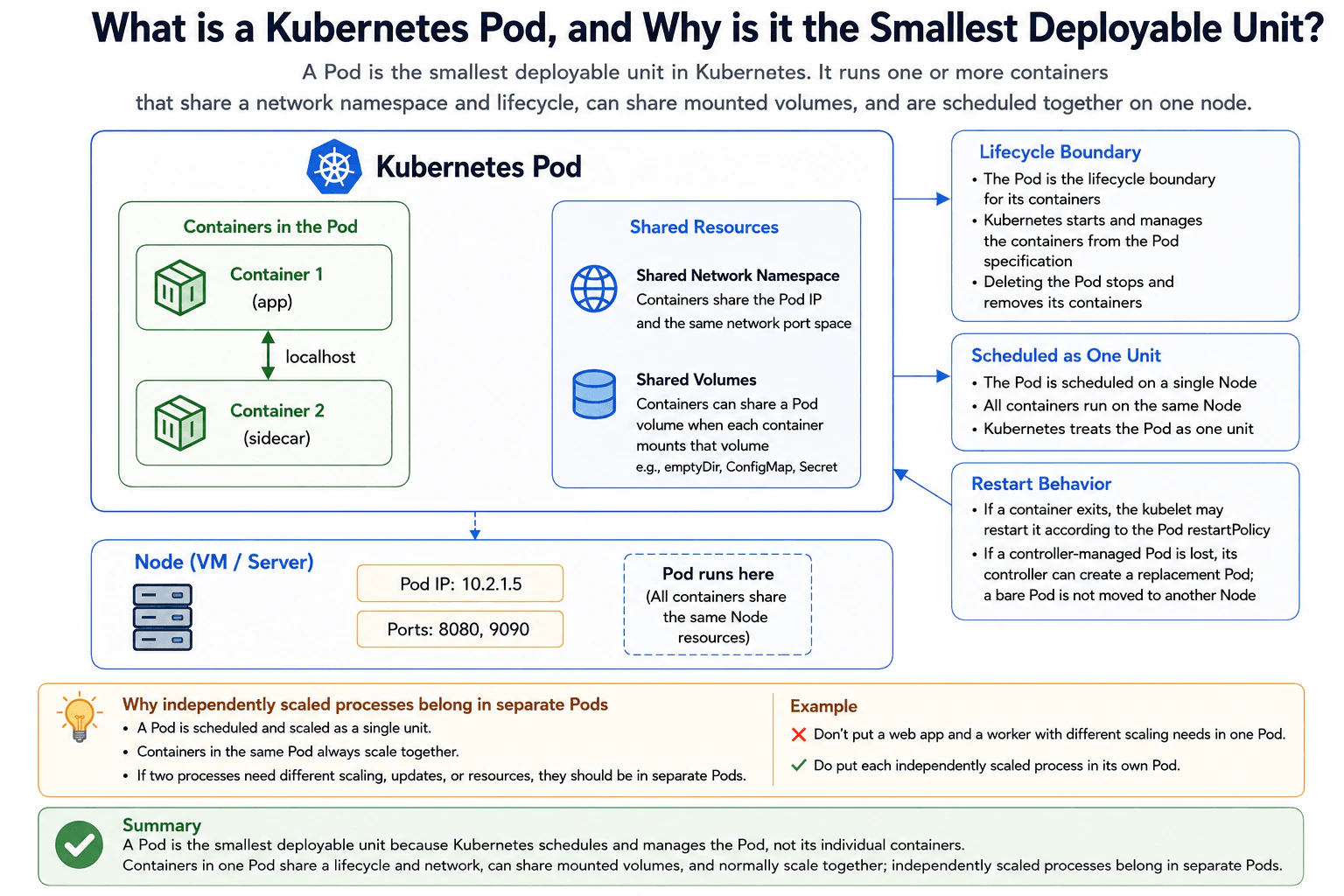
Explain the execution and lifecycle boundary of a Pod, including its containers, shared network namespace, localhost communication, attached volumes, scheduling as one unit, restart behavior, and why independently scaled processes normally belong in separate Pods.
Short Interview Answer (30-60 seconds)
At a high level, a Pod is the smallest unit Kubernetes schedules and manages. The main idea is that containers inside one Pod are tightly connected and normally move through their lifecycle together. I would explain it in three parts: what the containers share, how Kubernetes schedules and restarts them, and when to use separate Pods. Containers share the Pod network namespace, can share mounted volumes, and run on one Node. The trade-off is that containers in one Pod normally scale together.
Detailed Explanation
A Kubernetes Pod groups one or more containers that need to run closely together. The main challenge is understanding what those containers share and what Kubernetes manages as one unit. In this example, an app container and a sidecar container run inside one Pod. They share one network namespace and can share mounted volumes. Kubernetes schedules the whole Pod onto one Node. I would explain the design by covering shared resources, scheduling and lifecycle, restart behavior, and why independently scaled processes normally use separate Pods.
Useful Questions to Ask the Interviewer
Do the containers need to communicate through localhost?
Do the containers need to mount the same Pod volume?
Do the processes need to scale or update independently?
Will the Pod be managed by a controller, or run as a bare Pod?
How to Explain It in an Interview
1. Start with the Pod boundary
A useful way to explain a Pod is as one Kubernetes execution unit. The diagram has Container 1 for the app and Container 2 for a sidecar. Kubernetes schedules the Pod, not those containers independently.
Both containers therefore run on the same Node. The Pod is also their lifecycle boundary. Deleting the Pod stops and removes its containers.
2. Explain the shared network
The two containers share one network namespace. In simple words, they use the same Pod IP and the same network port space.
Because they share this network namespace, the app and sidecar can communicate through localhost. The diagram shows this with a bidirectional localhost connection between the two containers. The containers must also avoid trying to use the same port at the same time because they share one port space.
3. Explain shared volumes
Containers in the Pod can share a Pod volume when each container mounts that volume. Sharing a volume is optional and depends on what the containers need.
The diagram shows examples such as emptyDir, ConfigMap, and Secret. These can provide shared files, configuration, or secret data when mounted into the containers. A Pod does not automatically make every container filesystem shared.
4. Explain scheduling and restart behavior
Kubernetes schedules the entire Pod onto one Node. All containers in that Pod therefore run on that same Node. This is why Kubernetes treats the Pod as the deployable and scheduling unit.
If a container exits, the kubelet may restart it according to the Pod restartPolicy. If a controller-managed Pod is lost, its controller can create a replacement Pod. A bare Pod is not simply moved to another Node.
5. Explain when to use separate Pods
I would keep tightly related processes together only when they should share this boundary. Containers in the same Pod normally scale together because Kubernetes scales Pod replicas rather than individual containers inside one Pod.
If a web app and worker need different scaling, updates, or resources, they should normally be in separate Pods. The benefit is independent scaling and lifecycle control. The downside is that separate Pods cannot use localhost or a Pod-local shared volume to communicate in the same way.
Practical Insights
The benefit is that a Pod gives closely related containers one simple boundary. They can use localhost, share the Pod network, and optionally mount the same Pod volume. Kubernetes also schedules them together on one Node. The downside is that the containers are tied together for placement and normal scaling. If one process needs more copies while another does not, putting them in one Pod is a poor fit. Separate Pods give each process its own scaling and lifecycle. We accept the extra separation because independently changing workloads are easier to manage that way.
Why Interviewers Ask This
Interviewers ask this to check whether you understand Kubernetes boundaries, not just definitions. They want to see if you know what containers inside a Pod share, what Kubernetes schedules, how container restart and Pod replacement differ, and when processes should use separate Pods. A strong answer shows that you understand why tightly related containers may share one Pod while independently scaled workloads normally should not.
Interviewer may ask next
What would you change if the app and sidecar needed to scale independently?
I would put the app and sidecar into separate Pods. The important change is the scaling boundary. In the current diagram, both containers live inside one Pod, so Kubernetes schedules them together and Pod replicas normally contain both containers.
With separate Pods, the app could have more Pod replicas while the other process keeps fewer. Each process would also have its own lifecycle and placement. This is a better fit when their resource needs or update timing are different.
The main behavior that changes is communication. They would no longer share one Pod network namespace, so they could not communicate through localhost. They also would not share a Pod-local mounted volume in the same way. The benefit is independent scaling and lifecycle control. The downside is that communication and data sharing become less direct than when both containers live inside one Pod.
What happens if a container exits or the whole Pod is lost?
If one container exits, the kubelet may restart that container according to the Pod restartPolicy. The Pod remains the lifecycle boundary, and its containers still belong to the same scheduled unit on the Node.
Losing the whole Pod is different. If that Pod is managed by a controller, the controller can create a replacement Pod. That replacement is a new Pod rather than the old Pod being moved. A bare Pod does not have that controller behavior, so Kubernetes does not simply move it to another Node for you.
This distinction matters because container restart and Pod replacement happen at different boundaries. A container can restart inside an existing Pod. A lost controller-managed Pod can be replaced by another Pod. The downside is that Pod-local state should not be treated as if it automatically follows a replacement Pod.
42. What is kubectl used for when operating a Kubernetes cluster?Containers And KubernetesEasy
i Question Details
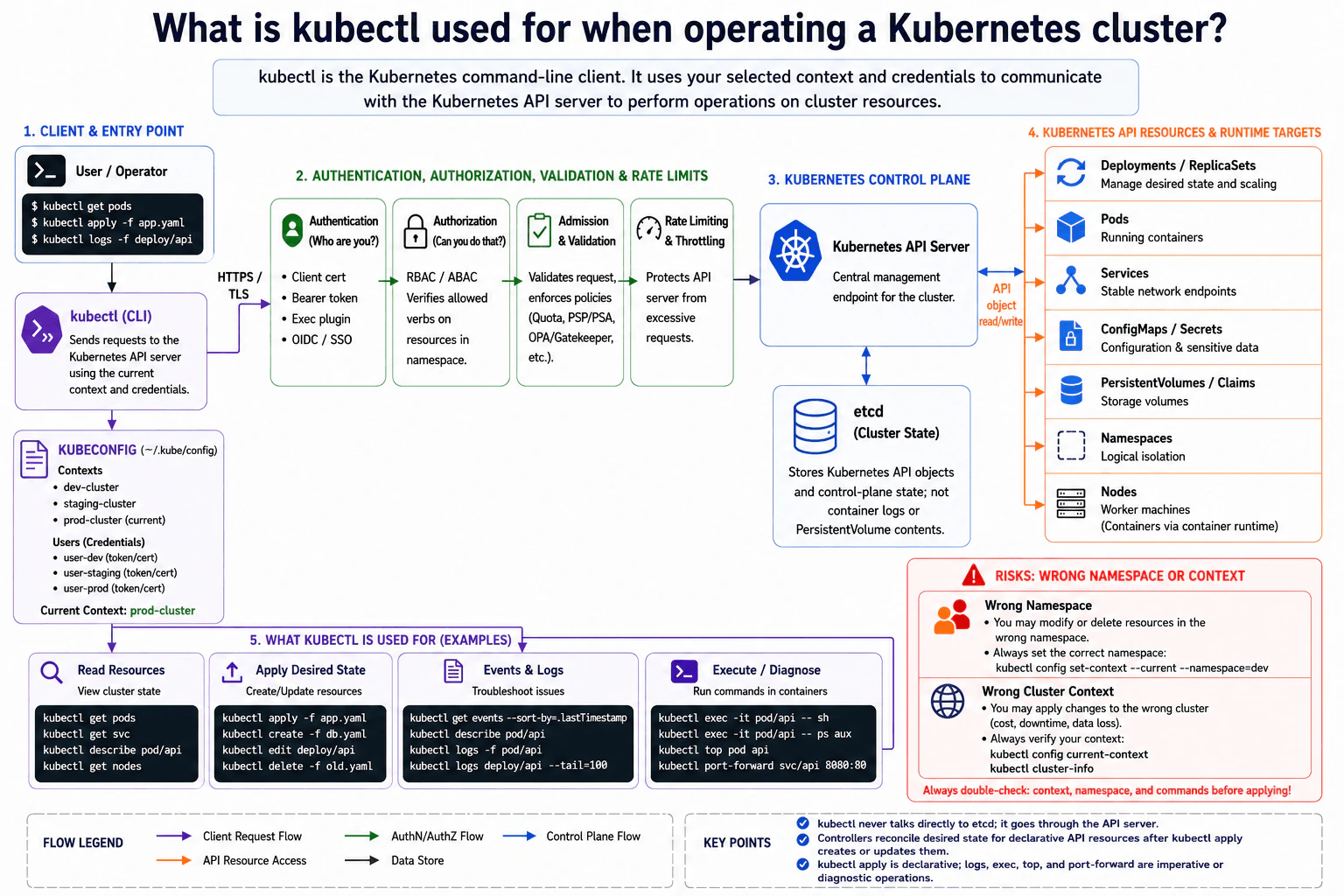
Describe how kubectl communicates with the Kubernetes API using a selected context and credentials. Cover reading resources, applying desired state, viewing events and logs, executing diagnostic commands, and the risks of using the wrong namespace or cluster context.
Short Interview Answer (30-60 seconds)
At a high level, kubectl is the command-line client used to operate a Kubernetes cluster through its API server. The main risk is that commands use the selected cluster context, namespace, and credentials. I would explain it in three parts: how kubectl connects securely, how it reads or changes Kubernetes resources, and how it helps troubleshoot workloads. The trade-off is convenience versus risk, because the wrong context or namespace can affect the wrong resources.
Detailed Explanation
The goal is to safely view, change, and troubleshoot resources in a Kubernetes cluster from the command line. The important part is knowing where each command goes and which cluster it affects. kubectl does not directly manage etcd. It uses the selected kubeconfig context and credentials to send requests to the Kubernetes API server. The API server processes security and policy checks before handling those requests. I would organize the explanation around connection and security, resource operations, troubleshooting, and the risk of selecting the wrong cluster or namespace.
Useful Questions to Ask the Interviewer
Should I explain both read commands and commands that change resources?
Should I include how kubeconfig contexts and namespaces control command scope?
Should I cover troubleshooting commands such as logs, exec, top, and port-forward?
How to Explain It in an Interview
1. Start with kubectl, kubeconfig, and the selected context
I would start by saying that kubectl is the Kubernetes command-line client. It reads kubeconfig, commonly from ~/.kube/config. A context selects a cluster, user credentials, and optionally a default namespace. In the diagram, prod-cluster is the current context. kubectl then sends the request to that cluster's Kubernetes API server over HTTPS using TLS.
2. Explain the API security and policy checks
The Kubernetes API server processes checks before allowing an operation. Authentication answers, "Who are you?" Credentials may use a client certificate, bearer token, exec plugin, or OIDC/SSO. Authorization then checks whether that identity can perform the requested action. The diagram shows RBAC or ABAC for this decision. Admission and validation check requests against rules and policies. Rate limiting protects the API server from excessive requests.
3. Explain reading and changing resources
For normal operations, kubectl works with Kubernetes API resources through the API server. Commands such as kubectl get pods, kubectl get svc, kubectl describe pod/api, and kubectl get nodes read cluster information. kubectl apply -f app.yaml creates or updates desired state. Controllers then work to make declarative resources match that desired state.
The diagram includes Deployments and ReplicaSets, Pods, Services, ConfigMaps and Secrets, PersistentVolumes and claims, Namespaces, and Nodes. The API server stores Kubernetes API objects and control-plane state in etcd. kubectl never connects directly to etcd.
4. Explain events, logs, and diagnostic commands
kubectl also helps investigate running workloads. kubectl get events shows useful cluster events. kubectl logs reads container logs. kubectl exec can run a command inside a container. kubectl top shows resource usage. kubectl port-forward temporarily forwards a local port to a Kubernetes resource. These commands are operational or diagnostic actions. They are different from declarative changes made with kubectl apply.
5. Finish with namespace and context safety
The biggest operational risk shown in the diagram is using the wrong namespace or cluster context. A valid command can still modify or delete resources in the wrong place. Before an important change, I would check the current context and confirm the namespace. The benefit of kubectl is powerful access through one client. The downside is that this power makes context, namespace, credentials, and permissions very important.
Practical Insights
The benefit is that kubectl gives one command-line tool for reading resources, applying desired state, and troubleshooting workloads. Requests still go through the Kubernetes API server, where identity, permissions, policies, and rate limits can be checked. kubectl also does not bypass the control plane or write directly to etcd. The downside is that powerful commands can affect the wrong resources when the selected context or namespace is wrong. Credentials also control what the user is allowed to do. We accept the extra checking because confirming the target cluster and namespace reduces the chance of damaging the wrong environment.
Why Interviewers Ask This
Interviewers ask this to see whether you understand kubectl as an API client, not just as a collection of commands. They want to know if you understand kubeconfig contexts, credentials, namespaces, API-server checks, resource operations, and troubleshooting. They also want to see whether you recognize the practical risk of running a correct command against the wrong cluster or namespace.
Interviewer may ask next
What would you do before using kubectl apply or delete against a production cluster?
I would first confirm exactly which cluster and namespace kubectl will target. The key point is that kubectl follows the selected kubeconfig context, so a technically correct command can still affect the wrong environment.
I would check the current context with kubectl config current-context. I would also verify the namespace stored in the context or explicitly provide the intended namespace when needed. Then I would inspect the target resource before making an important change. The credentials should also have only the permissions needed for that task.
The request still follows the same path shown in the diagram. kubectl sends it over HTTPS to the Kubernetes API server. The server processes authentication, authorization, admission, validation, and rate limiting before accepting the operation.
The downside is that these checks add a little work before changes. That small cost is worth it because it lowers the risk of modifying or deleting production resources by mistake.
How would you use kubectl when a pod is running but the application is not working correctly?
I would use the same kubectl-to-API-server path and run diagnostic commands to narrow down the problem. I would first inspect the pod and related events. kubectl describe pod/api shows useful resource details, while kubectl get events can show scheduling, startup, or lifecycle problems.
Next, I would use kubectl logs -f pod/api to inspect container logs. If I need to look inside the running container, kubectl exec -it pod/api -- sh can start a shell when that shell exists. I can also use kubectl top pod api to view resource usage. kubectl port-forward svc/api 8080:80 can temporarily expose the service locally for testing.
These commands help diagnose the workload without changing the basic architecture. They still go through the Kubernetes API server and its permission checks. The downside is that commands such as exec provide powerful access, so authorization should restrict who can use them.
43. What isolation does a Kubernetes Namespace provide?Containers And KubernetesEasy
i Question Details
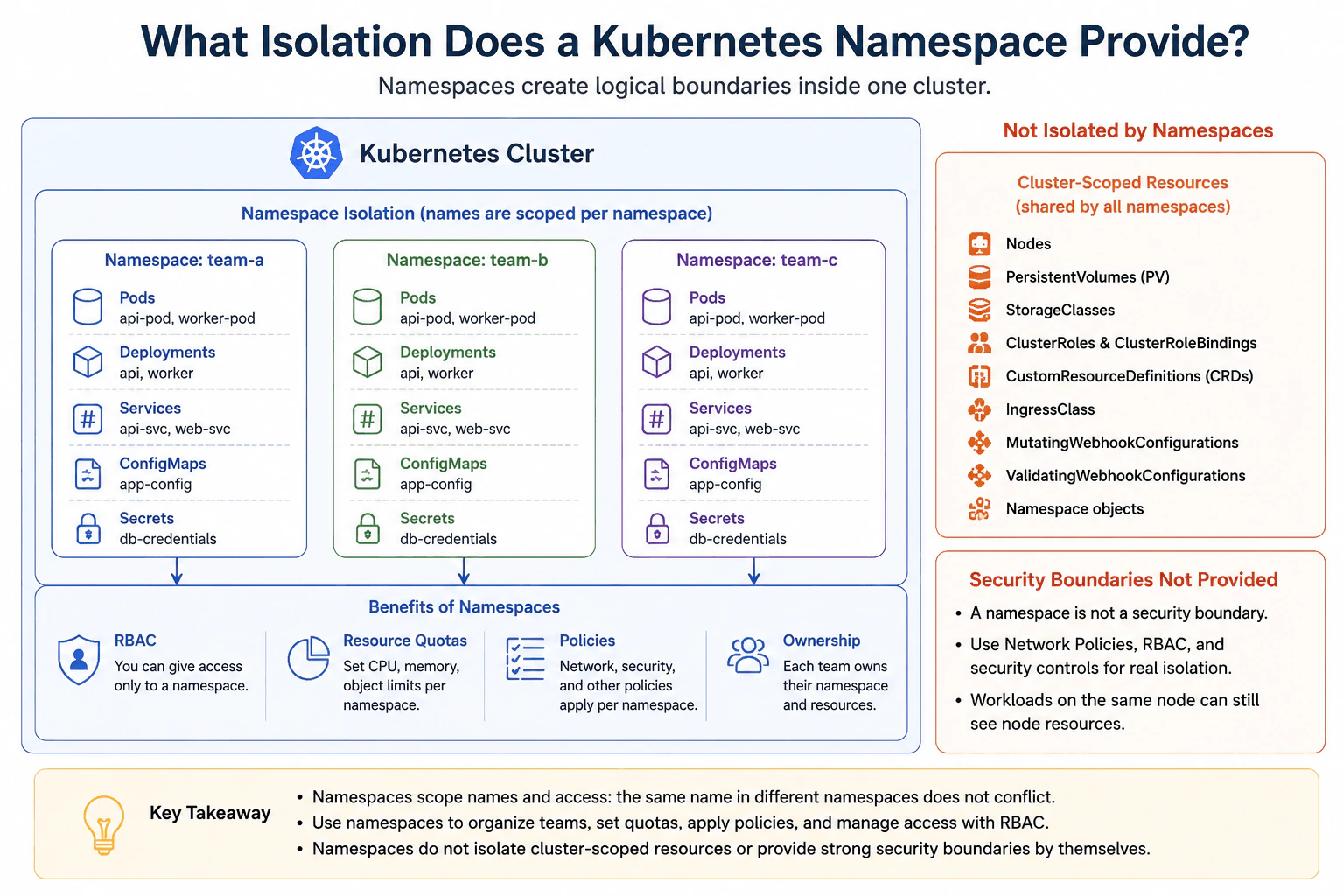
Explain how namespaces scope names and support RBAC, quotas, policies, and operational ownership. Also identify cluster-scoped resources and security boundaries that namespaces do not provide by themselves, especially when multiple teams share one cluster.
Short Interview Answer (30-60 seconds)
At a high level, a Kubernetes Namespace creates a logical boundary inside one cluster. The main challenge is understanding that this is organization and policy scoping, not strong security isolation. I would explain it in three parts: how names are scoped, how RBAC, quotas, and policies help teams, and what stays cluster-wide. Namespaces separate many resource names and ownership, but nodes, cluster-scoped resources, and the underlying security boundary remain shared unless additional controls are added.
Detailed Explanation
A Kubernetes Namespace gives teams separate logical spaces inside one Kubernetes Cluster. It helps keep resource names, access rules, limits, policies, and ownership organized. For example, team-a and team-b can each have their own Pods, Deployments, Services, ConfigMaps, and Secrets. The difficult part is knowing where this separation stops. A namespace does not create a separate cluster, separate worker nodes, or a complete security wall. The diagram therefore separates what belongs inside each namespace from the cluster-scoped resources and security boundaries that remain shared.
Useful Questions to Ask the Interviewer
Are several teams sharing the same Kubernetes Cluster?
Do different teams need different access permissions or Resource Quotas?
Do the teams require stronger security isolation than namespaces provide?
How to Explain It in an Interview
1. Start with name scoping
The first thing I would explain is that names are scoped by namespace. The diagram shows team-a, team-b, and team-c inside one Kubernetes Cluster. Each namespace contains Pods, Deployments, Services, ConfigMaps, and Secrets. The same resource name can exist in different namespaces without a naming conflict. This gives teams separate logical spaces while they still share one cluster.
2. Explain RBAC, quotas, policies, and ownership
Next, I would explain how namespaces help teams manage their own resources. RBAC can be configured so a user or team receives access to resources in a particular namespace. Resource Quotas can limit CPU, memory, and object usage for that namespace. Namespaced policies, such as NetworkPolicies, can also control allowed behavior. These controls are not automatic just because a namespace exists. They must be configured. Operational ownership is also simpler because each team can manage resources in its own namespace.
3. Identify what remains cluster-scoped
Then I would point out the resources that are not contained inside a team namespace. The diagram lists Nodes, PersistentVolumes, StorageClasses, ClusterRoles, ClusterRoleBindings, CustomResourceDefinitions, IngressClass, MutatingWebhookConfigurations, ValidatingWebhookConfigurations, and Namespace objects. These are cluster-scoped resources. A namespace does not create a private copy of them for each team. Access to these objects must therefore be controlled separately.
4. Explain the security limit
A namespace is not a strong security boundary by itself. It does not isolate worker nodes or the node operating system and kernel. Workloads from different namespaces can run on the same node. Network traffic is also not automatically blocked between namespaces. RBAC, NetworkPolicies, and other security controls are needed when stronger separation is required.
5. Finish with the trade-off
The benefit is simple multi-team organization inside one shared Kubernetes Cluster. Teams get separate names, access scopes, quotas, policies, and ownership. The downside is that the underlying cluster and cluster-scoped resources remain shared. Namespaces are therefore useful logical and administrative boundaries, but they should not be described as complete security isolation.
Practical Insights
The benefit is that namespaces let several teams share one Kubernetes Cluster without putting every resource into one large naming and ownership space. Teams can use RBAC, Resource Quotas, and namespaced policies to control access and usage. This makes administration easier and reduces accidental conflicts. The downside is that a namespace does not create separate worker nodes or a separate cluster. Cluster-scoped resources remain shared, and network isolation is not automatic. We accept this when teams can safely share one cluster. When stronger separation is required, namespaces must be combined with RBAC, NetworkPolicies, and other security controls.
Why Interviewers Ask This
Interviewers ask this question to see whether you understand the real boundary created by Kubernetes namespaces. They want more than the statement that namespaces separate resources. A strong answer explains name scoping, RBAC, Resource Quotas, policies, and team ownership. It also explains the important limit: nodes and other cluster-scoped resources remain outside the namespace boundary, and namespaces alone do not provide strong security isolation.
Interviewer may ask next
What would you change if two teams sharing the cluster required much stronger security isolation?
I would keep namespaces for organization, but I would not treat them as the complete security boundary. The diagram already shows why. team-a and team-b have separate namespace-scoped resources, but both still run inside the same Kubernetes Cluster and may use the same worker nodes.
I would tighten RBAC so each team receives only the permissions it needs in its own namespace. I would also apply NetworkPolicies so workloads can communicate only over approved network paths. Other security controls would protect the shared node and cluster environment.
Cluster-scoped resources still need separate protection because Nodes, PersistentVolumes, StorageClasses, ClusterRoles, ClusterRoleBindings, CustomResourceDefinitions, and the other cluster-wide objects are not isolated by namespaces.
If the security requirement says the teams must not share the underlying cluster or worker-node boundary, namespaces are not enough. The main downside of stronger isolation is more operational work and more infrastructure to manage.
How would you stop one team from consuming too much CPU or memory in the shared cluster?
I would use a Resource Quota for that team's namespace. The diagram shows Resource Quotas as one of the main benefits of namespaces. A quota can place namespace-level limits on resource usage, including CPU, memory, and object counts.
For example, team-a can have one quota while team-b has another. This reduces the chance that one namespace consumes an unfair amount of the shared cluster's capacity. I would combine this with the existing namespace ownership and RBAC model. RBAC controls who can manage resources, while the Resource Quota controls how much the namespace may request or create.
This still does not make the namespaces separate machines. Their workloads can run on shared worker nodes, so the node boundary remains outside namespace isolation.
The downside is that quotas need careful values. Limits that are too small can block valid workloads, while very large limits provide less protection against excessive resource use.
44. How does a Kubernetes Service give stable access to changing Pods?Containers And KubernetesEasy
i Question Details
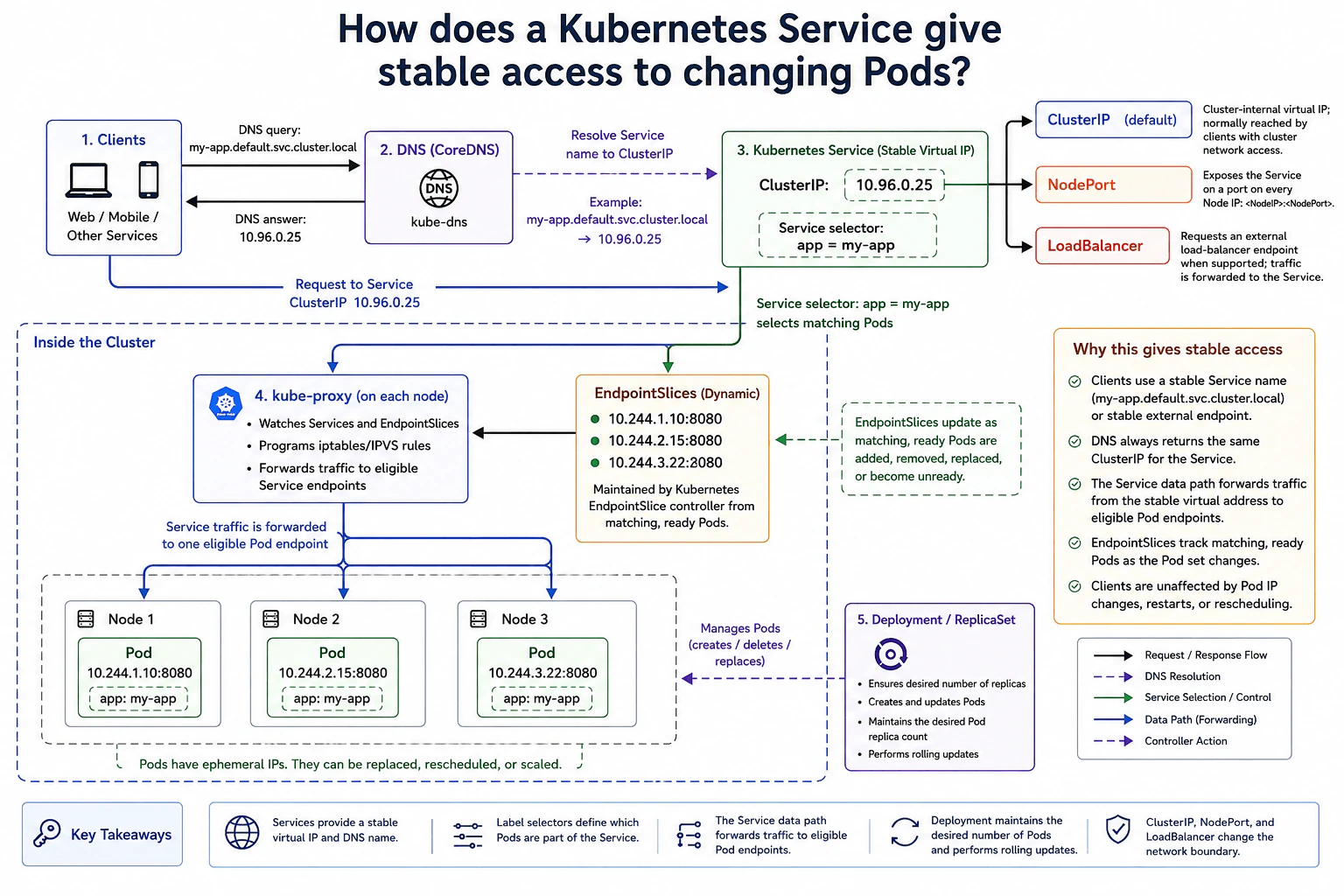
A set of Pods is created and replaced by a Deployment. Explain how labels and selectors define Service endpoints, how clients use stable virtual addressing and DNS, and how ClusterIP, NodePort, and LoadBalancer service types change the reachable network boundary.
Short Interview Answer (30-60 seconds)
At a high level, a Kubernetes Service gives clients one stable address even when Pod IPs change. The main challenge is keeping traffic pointed at the current Pods while a Deployment replaces, reschedules, or scales them. I would explain this in three parts: DNS and the stable Service address, selector-based EndpointSlices, and the reachable boundary of each Service type. ClusterIP stays cluster-internal, NodePort exposes a node port, and LoadBalancer can provide an external endpoint when supported.
Detailed Explanation
The goal is to let clients reach an application without knowing which Pods are running right now. Pods can be replaced, moved to another node, or given new IP addresses. Clients should not need to follow those changes. The diagram solves this by giving the application a stable Service name and virtual IP. The Service uses a label selector to find the correct Pods. Kubernetes keeps EndpointSlices updated as those matching, ready Pods change. Traffic can then be forwarded to an eligible Pod endpoint.
Useful Questions to Ask the Interviewer
Should the application be reachable only inside the cluster, or also from outside?
Should only ready Pods receive Service traffic?
Do clients normally connect using the Service DNS name?
How to Explain It in an Interview
1. Start with the stable address
I would start by saying that Pod IPs are temporary. The Deployment and ReplicaSet create and update Pods, keep the desired replica count, and support rolling updates. Pods may therefore be replaced or rescheduled over time.
Clients should not connect directly to those changing Pod IPs. The Kubernetes Service gives them a stable virtual address. In the diagram, that ClusterIP is 10.96.0.25.
2. Explain DNS before application traffic
Clients can use the Service name instead of remembering its IP. The example name is my-app.default.svc.cluster.local.
The client first sends a DNS query to CoreDNS. CoreDNS returns 10.96.0.25. The real application request then goes to that Service ClusterIP. DNS only resolves the name. It is not the application request path.
3. Explain labels, selectors, and EndpointSlices
The Service has the selector app = my-app. The Pods in the diagram have the same label.
Kubernetes uses that match to maintain EndpointSlices. These hold eligible backend addresses such as 10.244.1.10:8080, 10.244.2.15:8080, and 10.244.3.22:8080. EndpointSlices change as matching, ready Pods are added, removed, replaced, or become unready.
This is the key idea. The Service address stays stable while the backend Pod addresses can change.
4. Explain how traffic reaches a Pod
kube-proxy runs on each node in the diagram. It watches Services and EndpointSlices. It then programs forwarding rules using iptables or IPVS.
When traffic reaches the Service virtual address, the Service data path forwards that traffic to one eligible Pod endpoint. The client does not need to know which Pod receives the request.
As the Deployment changes the Pod set, EndpointSlices are updated. The forwarding rules can then use the current eligible endpoints.
5. Explain the Service types and network boundary
ClusterIP is the default type. It gives a cluster-internal virtual IP and is normally used by clients with cluster network access.
NodePort exposes the Service on a port on every node IP, using NodeIP:NodePort. LoadBalancer requests an external load-balancer endpoint when the environment supports it. That endpoint forwards traffic toward the Service.
The trade-off is reachability. ClusterIP keeps the boundary inside the cluster. NodePort and LoadBalancer make the Service reachable from a wider network.
Practical Insights
The benefit is that clients keep using one stable Service name and virtual IP while Pods change behind it. Labels and selectors connect the Service to the right Pods. EndpointSlices track the matching, ready Pods, so clients do not need to know individual Pod IPs. The downside is that each Service type changes the network boundary. ClusterIP keeps access inside the cluster. NodePort exposes a port on the nodes. LoadBalancer can add an external endpoint when supported. Wider access is useful, but it also exposes the application to a larger network.
Why Interviewers Ask This
Interviewers ask this to see whether you understand the difference between temporary Pods and a stable Kubernetes Service. They also want to know if you can connect DNS, labels, selectors, EndpointSlices, and traffic forwarding into one clear flow. Finally, they are checking whether you understand how ClusterIP, NodePort, and LoadBalancer change who can reach the application.
Interviewer may ask next
What happens if one of the Pods becomes unready while clients are still using the same Service address?
The client can keep using the same Service name and ClusterIP. That stable address does not need to change when one Pod becomes unready.
The change happens in the EndpointSlices. The diagram shows that EndpointSlices track matching, ready Pods. If one matching Pod becomes unready, it should no longer be treated as an eligible endpoint for normal Service traffic. New traffic can then be forwarded to the remaining eligible Pod endpoints.
CoreDNS still returns the same Service ClusterIP, so clients do not need a new address. kube-proxy continues watching the Service and EndpointSlices and updates the node forwarding rules from that information.
The benefit is that a Pod readiness change is hidden from clients. The downside is that the Service has less available backend capacity until enough Pods are ready again.
How would you change this design if clients outside the cluster must reach the application?
I would keep the same Pods, selector, EndpointSlices, and Service data path. I would change the Service type based on how external clients should enter.
NodePort exposes the Service on a port on every node IP. An external client can use NodeIP:NodePort. The traffic then enters the Service data path and is forwarded to an eligible Pod endpoint.
If the environment supports it, LoadBalancer can request an external load-balancer endpoint. External clients use that endpoint, and the traffic is forwarded toward the Service before reaching an eligible Pod.
The Pod selection logic does not change. The Service still uses app = my-app, and EndpointSlices still track matching, ready Pods.
The downside is the larger network boundary. ClusterIP stays cluster-internal, while NodePort and LoadBalancer make the application reachable from a wider network.
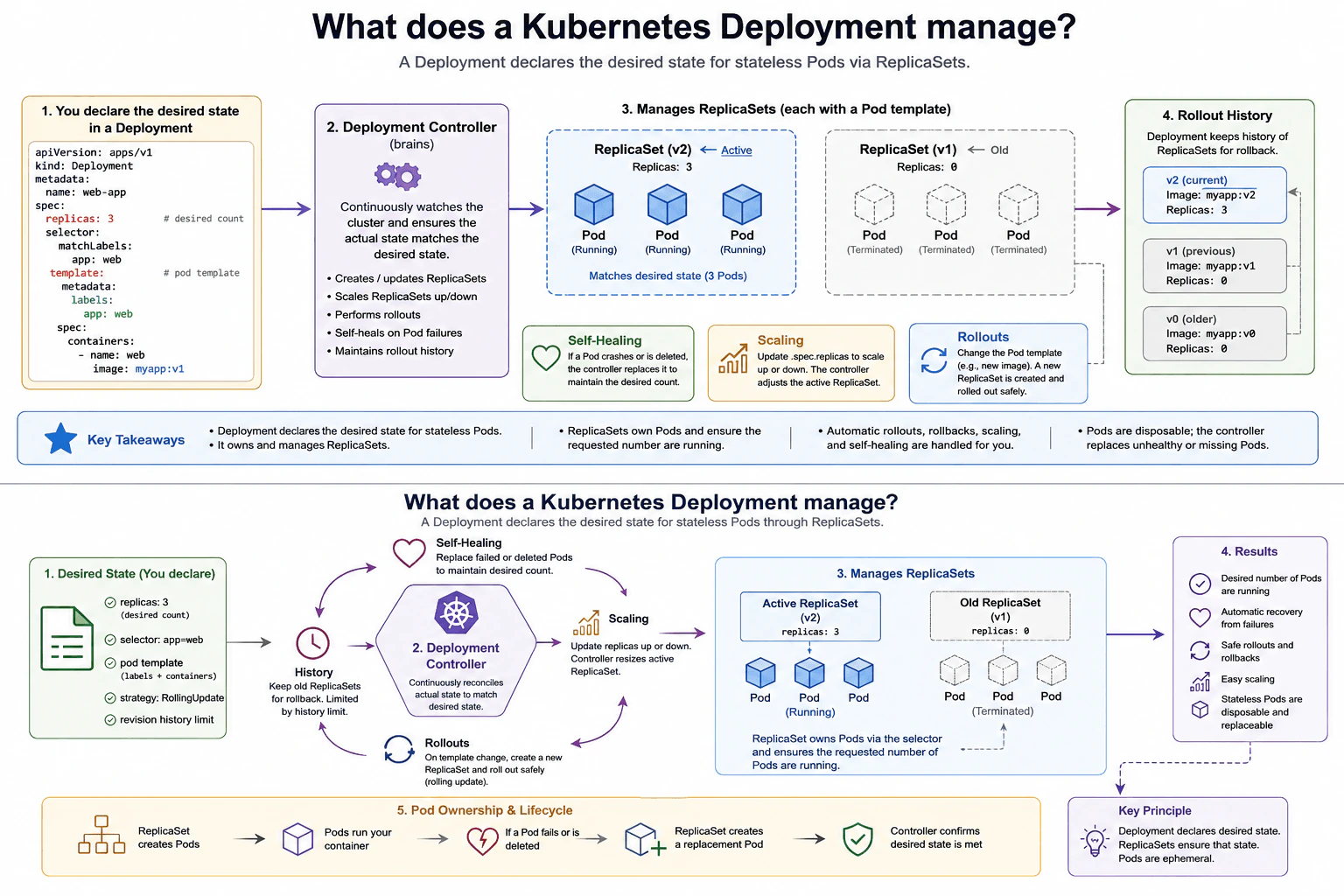
45. What does a Kubernetes Deployment manage?Containers And KubernetesEasy
i Question Details
Explain how a Deployment declares the desired state for stateless Pods through ReplicaSets. Include replica count, template changes, rollout history, self-healing after Pod loss, scaling, and the relationship between Deployment, ReplicaSet, and Pod ownership.
Short Interview Answer (30-60 seconds)
At a high level, a Kubernetes Deployment declares the desired state for stateless Pods and keeps Kubernetes working toward that state. The main challenge is maintaining the requested replicas while Pods fail, scale, or move to a new template version. I would explain it through three relationships: the Deployment manages ReplicaSets, ReplicaSets own Pods, and the controllers keep actual state close to desired state. Template changes create new ReplicaSets for rolling updates, while older ReplicaSets support rollout history and rollback.
Detailed Explanation
A Deployment tells Kubernetes what a stateless workload should look like and how many copies should normally run. The difficult part is that Pods can disappear, the replica count can change, and a new Pod template may need to replace the old one. Kubernetes therefore keeps checking the real state and moves it toward the requested state. The diagram shows this as one control loop: the Deployment stores the desired state, the Deployment controller manages ReplicaSets, and each ReplicaSet owns the Pods created from its Pod template.
Useful Questions to Ask the Interviewer
Should I explain both scaling and rolling updates?
Should I also explain how old ReplicaSets support rollout history and rollback?
How to Explain It in an Interview
1. Start with the Deployment desired state
I would start by saying that a Deployment describes the state we want Kubernetes to maintain. Its specification includes a replica count and a Pod template. The replica count says how many application replicas are wanted. The Pod template describes the labels and container settings used when Kubernetes creates Pods for that version.
The Deployment controller watches the Deployment and its ReplicaSets. It compares the desired state with the current state and changes ReplicaSets when needed.
2. Explain the Deployment and ReplicaSet relationship
The Deployment normally manages Pods through ReplicaSets rather than owning those Pods directly. A ReplicaSet represents one Pod-template version and keeps its requested number of matching Pods running.
In the diagram, the active ReplicaSet represents the current version and has three replicas. An older ReplicaSet represents a previous version and is scaled to zero after the rollout. The Deployment owns these ReplicaSets, while each ReplicaSet owns the Pods created from its template.
3. Explain scaling and self-healing
For scaling, we change the Deployment replica count. The Deployment controller adjusts the active ReplicaSet, and the ReplicaSet changes the number of Pods until the requested count is reached.
Self-healing follows the same desired-state idea. If a Pod crashes or is deleted, the ReplicaSet notices that it has fewer matching Pods than requested. The ReplicaSet controller creates a replacement Pod from the same template. The Deployment does not need a new revision for this normal Pod replacement.
4. Explain template changes and rolling updates
A change to the Deployment Pod template starts a new rollout. Kubernetes creates a new ReplicaSet for that new template instead of rewriting existing Pods in place.
During a rolling update, the Deployment controller gradually scales the new ReplicaSet up and the old ReplicaSet down. The exact temporary Pod count can depend on the rollout strategy. The final state shown in the diagram has the new ReplicaSet serving the requested replicas while the older ReplicaSet is at zero.
5. Explain rollout history and ownership
Older ReplicaSets can be retained as Deployment revision history, subject to the revision history limit. This lets Kubernetes use an earlier revision when a rollback is requested.
The ownership chain is the key idea to remember. The Deployment owns ReplicaSets. ReplicaSets own Pods. Pods are disposable, so losing one Pod does not change the desired state. Kubernetes controllers keep checking the counts and create replacements when necessary.
Practical Insights
The benefit is that a Deployment gives us one place to declare the desired state. Kubernetes then handles replica changes, Pod replacement, and rolling updates for us. Scaling is simple because we change the Deployment replica count instead of manually creating Pods. Keeping older ReplicaSets also makes rollback possible. The downside is that old ReplicaSet objects can remain as revision history, even after their replica count reaches zero. During a rolling update, Kubernetes may temporarily run a different number of Pods depending on the rollout strategy. Pods are disposable, so applications should not depend on one particular Pod surviving.
Why Interviewers Ask This
Interviewers ask this to check whether you understand Kubernetes controller relationships, not just kubectl commands. They want to hear that a Deployment declares desired state and manages ReplicaSets, while ReplicaSets own and maintain Pods. They also expect you to connect that model to scaling, self-healing, rolling updates, and rollback history. A strong answer shows that you understand why Kubernetes manages groups of replaceable Pods instead of individual long-lived Pods.
Interviewer may ask next
What happens if one of the Pods in the active ReplicaSet is deleted?
The ReplicaSet creates a replacement Pod so its actual count moves back to the requested count. The Deployment still wants the same number of replicas, and the active ReplicaSet still has that replica target. After one Pod disappears, the ReplicaSet controller notices that too few matching Pods exist.
It then creates another Pod from the same Pod template. That replacement uses the labels and container settings defined for that ReplicaSet. This is normal self-healing and does not require a new Deployment revision or a new rollout.
The important ownership detail is that the ReplicaSet owns these Pods. The Deployment manages the ReplicaSet above it. The replacement Pod does not need the same identity as the deleted Pod because Pods are disposable. The downside is that data stored only inside the deleted Pod can be lost, which is why this pattern is best for stateless workloads.
What happens when the Deployment Pod template changes to a new application version?
The Deployment starts a new rollout by creating a new ReplicaSet for the changed Pod template. Kubernetes does not simply modify the existing Pods in place. The old ReplicaSet continues to represent the previous template, while the new ReplicaSet represents the updated one.
The Deployment controller gradually scales the new ReplicaSet up and the old ReplicaSet down according to the rollout strategy. New Pods therefore come from the new template. After the rollout completes, the new ReplicaSet normally carries the requested replicas while the previous ReplicaSet can remain scaled to zero.
Keeping the older ReplicaSet is useful because it records a previous Deployment revision. Kubernetes can use that history if a rollback is requested, subject to the revision history limit. The downside is that rolling updates temporarily require Kubernetes to manage more than one ReplicaSet and may temporarily change the total Pod count depending on rollout settings.
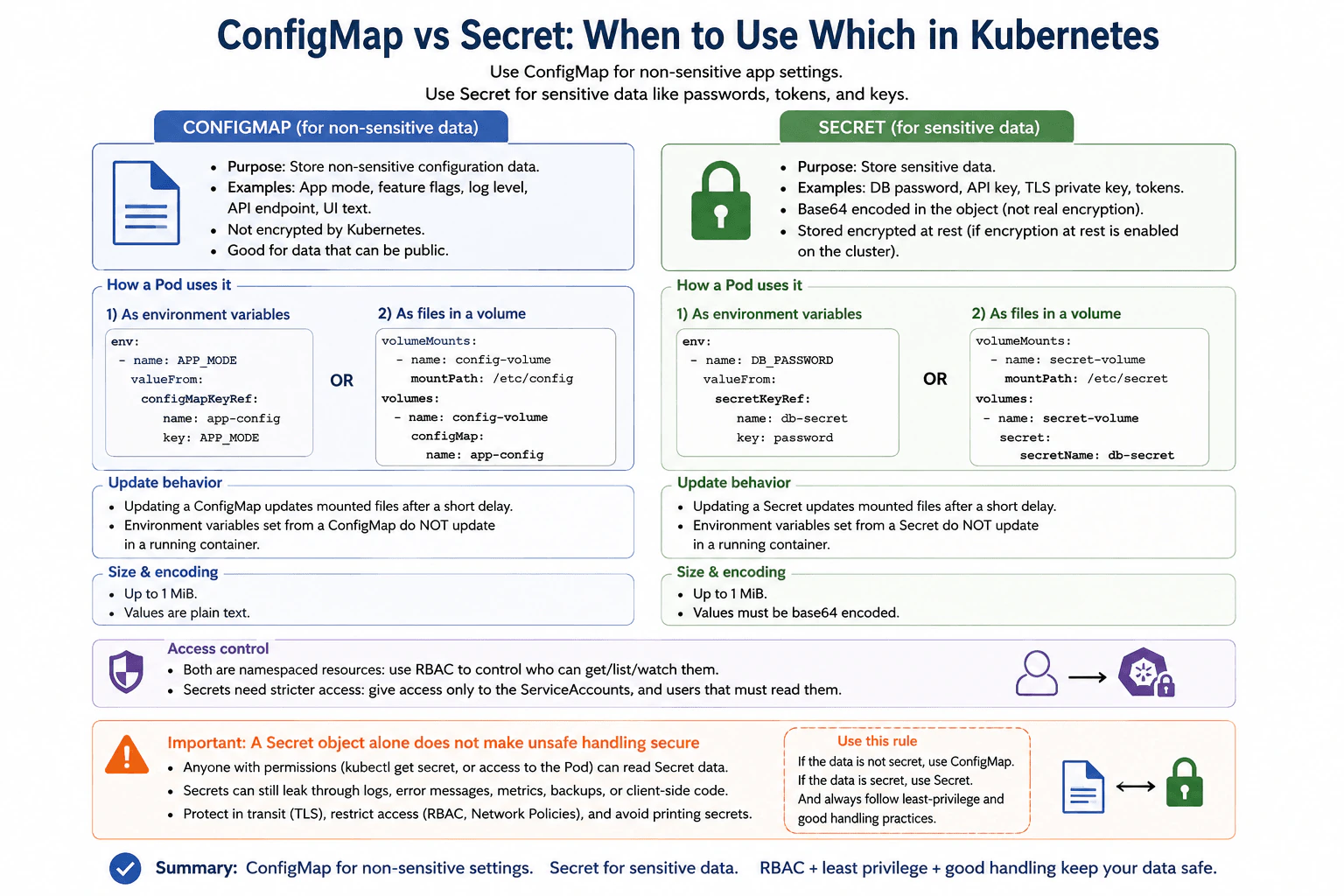
46. When should you use a ConfigMap rather than a Secret?Containers And KubernetesEasy
i Question Details
A workload needs non-sensitive application settings and a database credential. Compare ConfigMap and Secret purpose, Pod consumption methods, update behavior, size and encoding expectations, access control, encryption at rest, and why a Secret object alone does not make unsafe handling secure.
Short Interview Answer (30-60 seconds)
At a high level, I use a ConfigMap for non-sensitive application settings and a Secret for sensitive values such as database credentials. The main challenge is choosing the right object and then handling its data safely. I would compare their purpose, how Pods consume them, and how updates and security work. Both support environment variables and mounted files. ConfigMaps hold normal settings, while Secrets hold sensitive data. The trade-off is that a Secret provides better separation and access control, but it does not make unsafe handling secure.
Detailed Explanation
The workload needs two different kinds of information. Normal settings, such as an application mode or log level, do not need secret handling. A database password does. The important part is choosing the correct Kubernetes object and understanding what happens after a Pod consumes its data. A Secret is designed for sensitive values, but simply putting a password inside one does not protect it from every possible leak. I would explain the choice by comparing purpose, Pod consumption, updates, size and encoding, access control, encryption, and safe handling.
Useful Questions to Ask the Interviewer
Are the application settings non-sensitive and safe to store in a ConfigMap?
Must configuration changes reach the application without recreating the Pod?
Is encryption at rest enabled for Secret data in this cluster?
How to Explain It in an Interview
1. Start with the purpose of each object
I would use a ConfigMap for non-sensitive configuration. Examples from the diagram include application mode, feature flags, log level, API endpoint, and UI text.
I would use a Secret for sensitive data. Examples include a database password, API key, TLS private key, and tokens. This keeps credentials separate from ordinary application settings.
2. Explain how a Pod consumes the data
A Pod can consume either object in two ways shown in the diagram. It can read selected values through environment variables, or it can receive values as files in a mounted volume.
For example, APP_MODE can come from a ConfigMap key. DB_PASSWORD can come from a Secret key. The diagram also mounts ConfigMap data under /etc/config and Secret data under /etc/secret.
3. Explain update behavior
Mounted ConfigMap or Secret files can be updated after a short delay when the underlying object changes. The application must be able to notice and reload the changed file if it needs the new value immediately in its behavior.
Environment variables behave differently. A value placed into a container environment does not change while that container keeps running. The Pod must be recreated for the container to receive the new environment value.
4. Compare size, encoding, and access
The diagram shows an expectation of up to 1 MiB for each object. ConfigMap values are used for normal configuration data. Secret values placed in the data field are represented with base64 encoding, which is not encryption.
Both are namespaced Kubernetes resources. RBAC controls which users and ServiceAccounts can get, list, or watch them. Secret access should be more restricted and follow least privilege, meaning only identities that truly need the credential should receive access.
5. Explain the security boundary
A Secret object alone does not make unsafe handling secure. Anyone with enough permission to read the Secret, or enough access to the Pod using it, may still obtain the sensitive value.
Secrets can also leak through logs, error messages, metrics, backups, or client-side code. The diagram therefore combines Secrets with strict RBAC, TLS for data in transit, Network Policies for allowed Pod communication, and careful application logging. Secret data is protected at rest when Kubernetes encryption at rest is enabled for the cluster. The main trade-off is that Secrets provide the correct object and tighter access practices for sensitive values, but secure handling is still required everywhere the credential is used.
Practical Insights
The benefit is clear separation. ConfigMaps hold normal settings, while Secrets hold passwords, tokens, keys, and other sensitive values. Both can be consumed through environment variables or mounted files. Mounted files can receive changes after a short delay, but environment variables stay unchanged inside a running container. The downside is that a Secret is not a complete security boundary. Base64 is only encoding, not encryption. A user or workload with enough access may still read the value. We therefore combine Secrets with least-privilege RBAC, encryption at rest when enabled, TLS, Network Policies, and careful logging.
Why Interviewers Ask This
Interviewers ask this to test whether you understand the difference between ordinary configuration and sensitive credentials. They also want to see whether you know how Pods consume these objects and how updates behave. Most importantly, they are testing security judgment. A strong answer explains that a Secret is the correct Kubernetes object for sensitive values, but RBAC, encryption, network controls, and safe application handling are still necessary.
Interviewer may ask next
What changes if the application must receive a configuration update without recreating the Pod?
I would use the mounted-file path shown in the diagram instead of depending on an environment variable. When a ConfigMap or Secret is mounted as files, Kubernetes can update the mounted content after a short delay. The application must then notice the file change and reload the value if it needs to use the update without restarting.
Environment variables work differently. A value copied from a ConfigMap or Secret into the container environment stays the same for the life of that running container. Updating the Kubernetes object does not rewrite that environment variable. The Pod must be recreated before the container receives the new value.
The object choice does not change. A normal setting still belongs in a ConfigMap. A database credential still belongs in a Secret. The downside is that file-based updates require the application to support reloading, and the update is not immediate.
If Secret values are base64 encoded, why do we still need encryption at rest and strict RBAC?
Base64 does not protect the Secret from someone who can read it. It only represents the data in an encoded form, and that value can be decoded easily. That is why the diagram says a Secret object alone does not make unsafe handling secure.
RBAC limits which users and ServiceAccounts can get, list, or watch Secret objects. Encryption at rest protects stored Secret data when that cluster feature is enabled. TLS protects sensitive information while it travels across the network. Network Policies can restrict which Pods are allowed to communicate.
The application must also handle the credential safely after it receives it. It should not print passwords or tokens in logs, error messages, metrics, backups, or client-side output. The downside is that these protections need extra configuration and operational care, but they are necessary because a Secret by itself is not a complete security boundary.
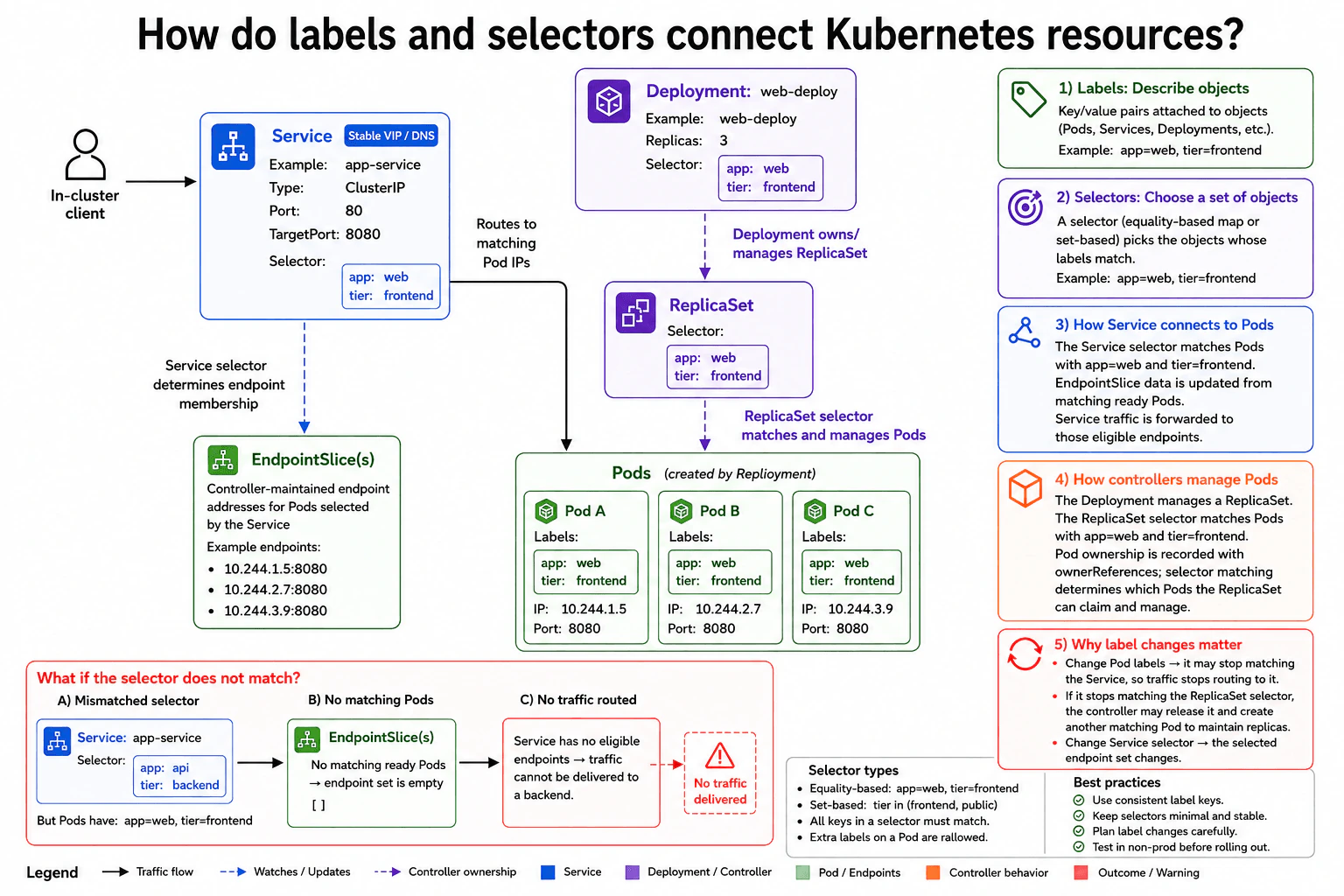
47. How do labels and selectors connect Kubernetes resources?Containers And KubernetesEasy
i Question Details
Use a Deployment and Service as the example. Explain how labels describe objects, how selectors choose a set of objects, how a mismatched selector can leave a Service with no endpoints, and why label changes affect routing and controller ownership.
Short Interview Answer (30-60 seconds)
At a high level, labels describe Kubernetes objects, while selectors choose objects whose labels match. The main challenge is keeping Service routing and controller management correct when labels change. I would explain this in three parts: how the Service finds Pods, how the Deployment and ReplicaSet manage Pods, and what happens when selectors stop matching. A mismatched Service selector can leave no eligible endpoints. The trade-off is flexibility, because a small label change can affect both traffic and controller behavior.
Detailed Explanation
The goal is to connect groups of running application copies without writing down each copy's address. Each copy can carry simple descriptions, and other parts of the system can use those descriptions to find the right group. The difficult part is that the same descriptions can affect both incoming traffic and which copies are managed together. If a description changes, the selected group can change immediately. I would explain the design by showing how objects are described, how traffic finds the right copies, and how the system keeps the requested copies running.
Useful Questions to Ask the Interviewer
Should I explain both Service routing and Deployment controller management?
Should I include the failure case where a selector matches no ready Pods?
How to Explain It in an Interview
1. Start with labels and selectors
I would start by saying that labels describe Kubernetes objects. In the diagram, every Pod has app: web and tier: frontend.
A selector chooses objects whose labels match its rules. The Service and ReplicaSet use matching values to choose the Pods they care about. This avoids connecting resources by fixed Pod addresses.
2. Explain how the Service reaches Pods
The in-cluster client sends traffic to the ClusterIP Service. The Service accepts traffic on port 80 and forwards it to port 8080 on an eligible Pod.
Its selector looks for app: web and tier: frontend. The EndpointSlice data holds endpoint addresses for the Pods selected by that Service. In the diagram, those endpoints point to the three matching Pods.
The Service traffic goes to Pod endpoints. It does not go through the Deployment or ReplicaSet.
3. Explain how the Deployment and ReplicaSet manage Pods
The Deployment manages a ReplicaSet. The ReplicaSet then manages the Pods that match its selector.
The ReplicaSet selector also uses app: web and tier: frontend. Kubernetes records controller ownership with ownerReferences. Selector matching tells the controller which Pods belong in its matching set, while ownerReferences record the controller relationship.
4. Explain the selector mismatch failure
The diagram changes the Service selector to app: api and tier: backend. The running Pods still have app: web and tier: frontend.
No ready Pods now match the Service selector. The EndpointSlice endpoint set becomes empty. The Service therefore has no eligible backend, so it cannot deliver the traffic to a Pod.
5. Explain why label changes matter
A Pod label change can affect Service routing immediately. If the Pod stops matching the Service selector, it stops being an eligible backend for that Service.
A label change can also affect the ReplicaSet. If the Pod stops matching the ReplicaSet selector, the controller can release that Pod from its managed set and create another matching Pod to maintain the requested replica count.
Changing the Service selector changes the selected endpoint set too. The benefit is flexible grouping. The downside is that careless label changes can affect both traffic and controller management.
Practical Insights
The benefit is that labels let Kubernetes connect groups of resources without fixed Pod addresses. Pods can be replaced while the Service still finds the correct group through its selector. The ReplicaSet can use the same idea to manage the desired group of Pods. The downside is that labels are part of important control decisions. A wrong Service selector can leave the Service with no eligible endpoints. A changed Pod label can remove that Pod from Service routing or from the ReplicaSet's matching set. This flexibility is useful, but label keys and selectors should stay simple, consistent, and stable.
Why Interviewers Ask This
Interviewers ask this to check whether you understand how Kubernetes connects resources dynamically. They want to see whether you can separate labels from selectors, Service routing from controller management, and selector matching from controller ownership. They also want you to recognize an important failure case: when the Service selector matches no ready Pods, the Service can have no eligible endpoints and traffic cannot reach the application.
Interviewer may ask next
What happens if one Pod changes a label so it no longer matches the Service selector but still matches the ReplicaSet selector?
The Pod can keep running and remain managed by the ReplicaSet, but the Service can stop sending traffic to it. These are separate relationships.
The Service selector decides which Pods are eligible backends. If the changed label no longer matches that selector, the Pod is removed from the Service's selected endpoint set. EndpointSlice data is updated to represent the remaining eligible Pods.
The ReplicaSet uses its own selector. If the Pod still matches that selector, the ReplicaSet can continue managing it. The Pod does not need to belong to the Service to remain part of the ReplicaSet.
If other matching Pods remain, Service traffic can still reach them. If no eligible Pods remain, the Service has no backend to receive traffic. The downside is that one small label change can remove a healthy Pod from routing while the Pod itself continues running.
What happens if a Pod stops matching the ReplicaSet selector while the Deployment still requires three replicas?
The ReplicaSet can stop treating that Pod as one of its matching replicas and create another matching Pod to keep the requested replica count. The Deployment still manages the ReplicaSet, while the ReplicaSet manages the matching Pod set.
This is why changing labels can affect controller behavior. The selector tells the ReplicaSet which Pods match its desired group. Kubernetes also records ownership through ownerReferences, so the ownership record is separate from the selector rule.
The changed Pod may continue to exist after it leaves the ReplicaSet's matching set. Meanwhile, the ReplicaSet can create another Pod with the expected labels to restore the desired count.
If the Service uses those same expected labels, the changed Pod may also stop receiving Service traffic. The downside is that an accidental label change can affect workload management and routing at the same time.
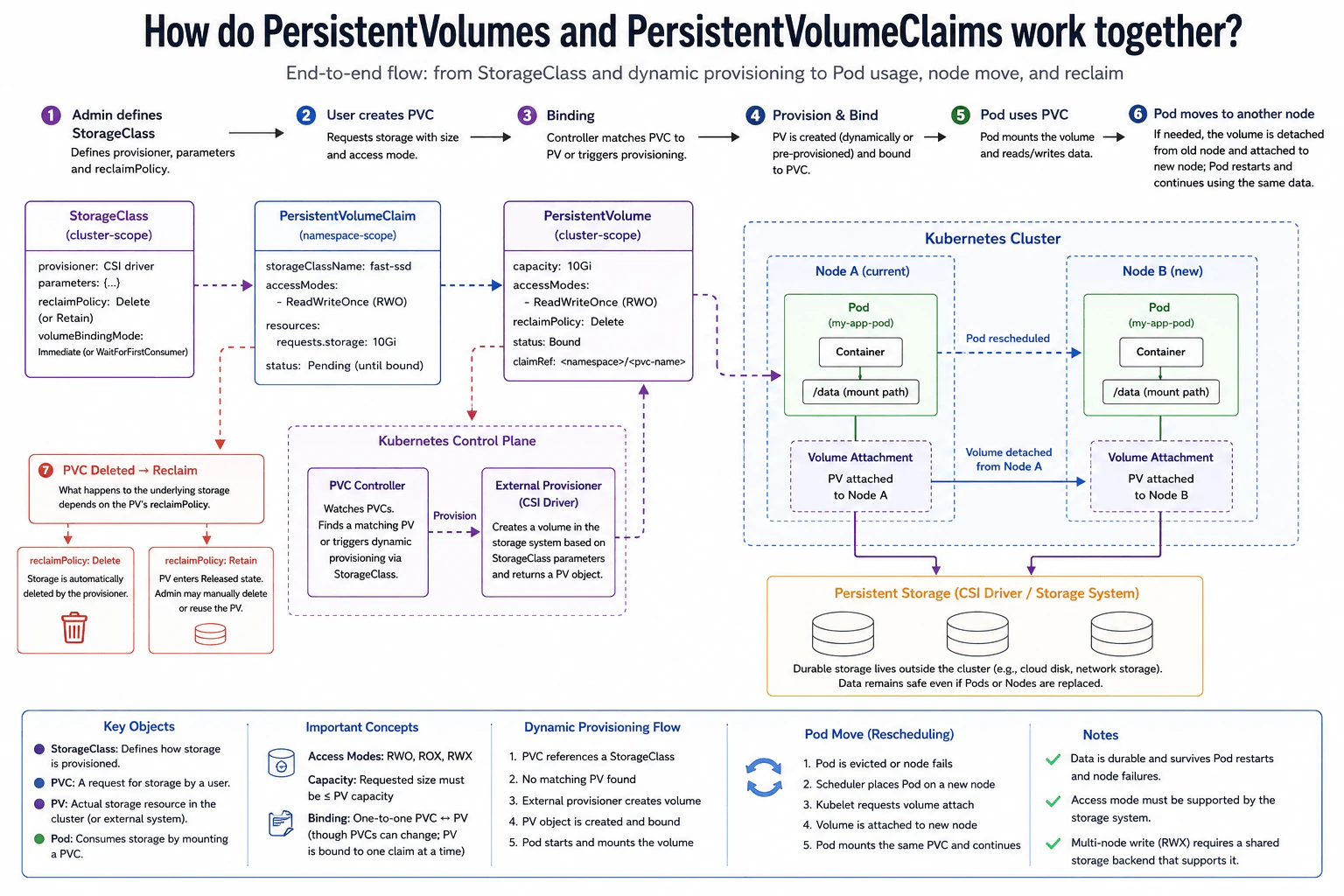
48. How do PersistentVolumes and PersistentVolumeClaims work together?Containers And KubernetesEasy
i Question Details
A Pod needs durable storage that survives rescheduling. Explain the roles of PersistentVolume, PersistentVolumeClaim, StorageClass, dynamic provisioning, access mode, capacity, binding, reclaim policy, attachment, and what happens when the Pod moves to another node.
Short Interview Answer (30-60 seconds)
At a high level, Kubernetes separates a request for storage from the actual storage resource. The main challenge is keeping the data available when a Pod restarts or moves to another node. I would explain this in three parts: requesting storage with a PersistentVolumeClaim, binding it to a PersistentVolume, and mounting the same storage after rescheduling. A StorageClass can create storage dynamically. The trade-off is that access modes, attachment behavior, and reclaim behavior depend on the storage system.
Detailed Explanation
The goal is to give a Pod storage that keeps its data even when the Pod disappears or moves to another node. The difficult part is separating the Pod from the real storage while still reconnecting them correctly later. The diagram handles this with a storage request, an actual volume, and Kubernetes control-plane work that connects the two. I would explain the flow from StorageClass and PersistentVolumeClaim creation, through provisioning and binding, then show how the Pod mounts the volume and keeps using the same data after rescheduling.
Useful Questions to Ask the Interviewer
Should Kubernetes create the storage dynamically, or is a suitable PersistentVolume already available?
Which access mode does the workload need, such as ReadWriteOnce or ReadWriteMany?
Should the underlying storage be deleted or kept after the claim is removed?
How to Explain It in an Interview
1. Start with the StorageClass and storage request
I would start by saying that a StorageClass describes how storage can be created. In the diagram, it identifies a CSI driver, storage parameters, a reclaim policy, and a volume binding mode.
The user then creates a PersistentVolumeClaim, or PVC. A PVC is the Pod's request for storage. Here it requests 10Gi and the ReadWriteOnce access mode. It also refers to the StorageClass named fast-ssd.
The volumeBindingMode matters too. With Immediate, provisioning and binding can happen as soon as the claim is created. With WaitForFirstConsumer, Kubernetes waits until a Pod needs the claim so storage placement can match the Pod's scheduling needs.
2. Explain provisioning and binding
Next, Kubernetes looks for storage that can satisfy the claim. The PVC Controller watches claims and either matches one to a suitable existing PersistentVolume or allows dynamic provisioning to create new storage.
For dynamic provisioning, the External Provisioner uses the StorageClass and CSI driver to create the backing storage. A PersistentVolume, or PV, represents that storage in Kubernetes. The diagram shows a 10Gi PV with ReadWriteOnce access, Bound status, and a claim reference to the PVC.
Binding connects one PVC to one PV. The requested capacity must fit within the PV's capacity, and the requested access mode must be supported.
3. Explain how the Pod uses the PVC
Once the claim is bound, the Pod refers to the PVC rather than choosing the PV directly. Kubernetes makes the corresponding storage available to the Pod and mounts it into the container at the shown /data path.
The application reads and writes through that mount. The durable data lives in the persistent storage system, not inside the Pod's temporary filesystem. This is why replacing the Pod does not remove the stored data.
4. Explain what happens when the Pod moves
If the Pod is evicted or its node fails, Kubernetes can schedule a replacement Pod on another node. The diagram shows the workload moving from Node A to Node B while continuing to use the same PVC and PV.
For storage that requires node attachment, Kubernetes detaches the volume from Node A and attaches it to Node B. The replacement Pod then mounts the same storage at /data. The data survives because it belongs to the persistent storage, not to the old Pod or node.
ReadWriteOnce means the volume can be mounted read-write by a single node at a time. Other access modes, such as ReadOnlyMany or ReadWriteMany, allow different mounting patterns when the storage system supports them.
5. Explain reclaim behavior
Finally, the reclaim policy controls what happens to dynamically provisioned storage after its claim is removed. With Delete, the dynamically provisioned PV and its backing storage are normally removed by the provisioner.
With Retain, the backing storage is kept. The PV moves to a Released state and needs manual handling before reuse. The main trade-off is convenience versus control. Delete gives automatic cleanup, while Retain gives more protection against automatic data removal.
Practical Insights
The benefit is that Pods do not own their durable data. A Pod can restart or move while the same PVC and PV still represent the stored data. Dynamic provisioning also reduces manual work because the CSI provisioner can create storage from a StorageClass. The downside is that storage rules still matter. Capacity and access mode must match what the storage system supports. Some volumes also need detach and attach work when a Pod moves. The reclaim policy is another trade-off. Delete gives automatic cleanup, while Retain keeps the data but requires manual handling.
Why Interviewers Ask This
Interviewers ask this to see whether you understand Kubernetes storage beyond files inside a Pod. They want to know whether you can separate a storage request from the actual storage resource, explain dynamic provisioning and binding, and describe what happens during Pod rescheduling. They also want to see whether you understand capacity, access modes, attachment, and reclaim policy well enough to explain practical trade-offs clearly.
Interviewer may ask next
What changes if the application needs Pods on different nodes to write to the same volume at the same time?
I would keep the same StorageClass, PVC, PV, and Pod relationship, but I would change the required access mode. ReadWriteOnce allows read-write mounting from one node at a time, so it does not fit a requirement where Pods on different nodes must write to the same volume simultaneously.
The PVC would need an access mode such as ReadWriteMany, and the underlying storage system must actually support that mode. The provisioning and binding flow stays the same. The PVC requests storage, the External Provisioner can create it, and Kubernetes binds a matching PV to the claim.
The important point is that Kubernetes cannot make ordinary single-node storage behave like shared multi-node storage just by changing the PVC field. The storage backend must provide that capability.
The downside is that shared storage can have different performance, cost, and operational limits from storage designed for one node at a time.
What happens if the PVC is deleted but the data must be kept for recovery?
I would use the Retain reclaim policy shown in the diagram instead of Delete. The normal flow stays the same while the claim exists. The PVC requests storage, a PV becomes bound, and the Pod mounts the volume normally.
The difference appears after the PVC is deleted. With Retain, Kubernetes keeps the PV and the underlying stored data instead of automatically removing the storage. The PV moves to a Released state because its original claim is gone. An administrator can then inspect the data and decide whether to recover, clean, reuse, or delete the storage.
With Delete, dynamically provisioned backing storage is normally removed automatically after the claim is deleted. That is convenient when the data no longer matters.
The downside of Retain is extra manual work. Someone must manage the retained PV and storage before it can be safely reused.
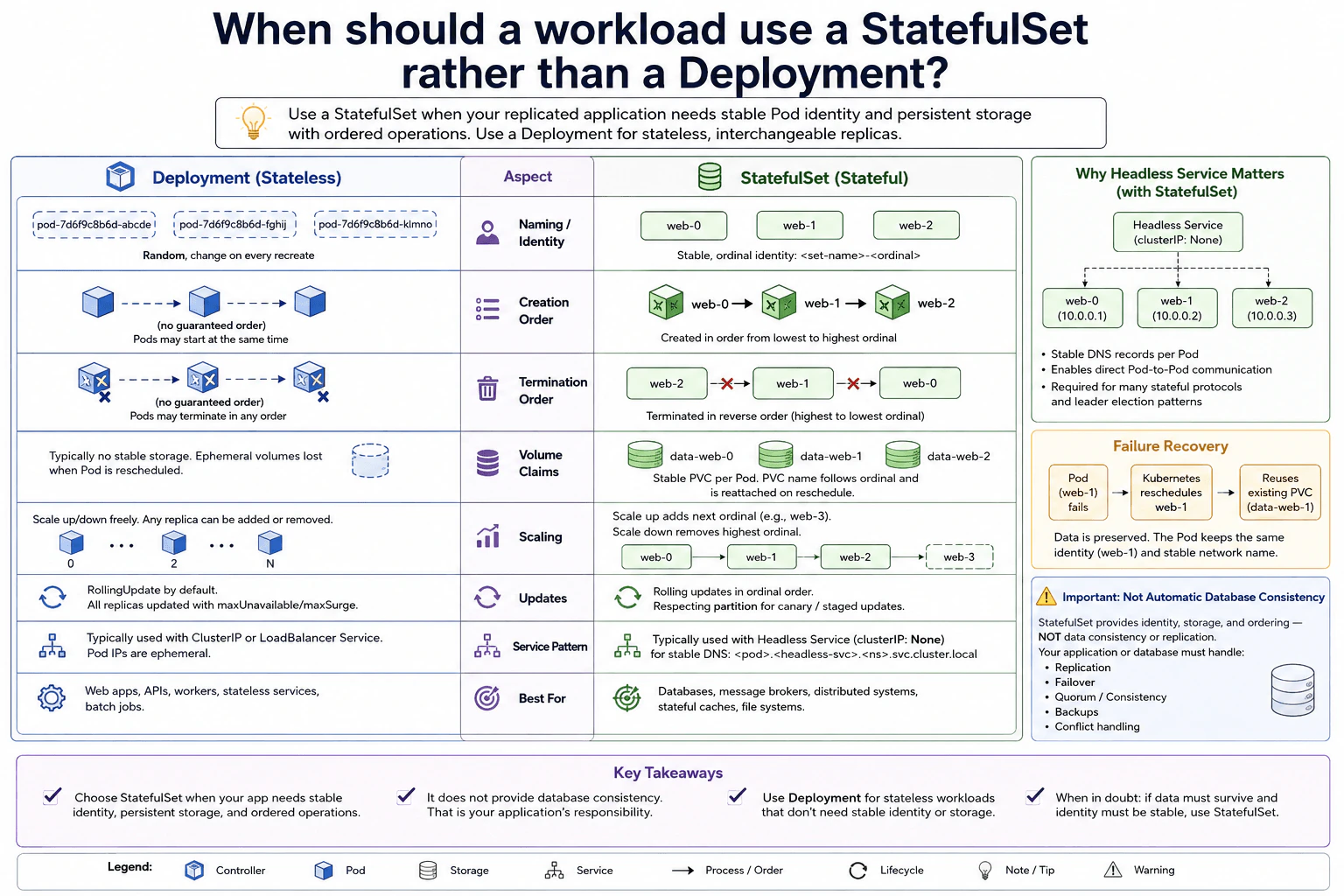
49. When should a workload use a StatefulSet rather than a Deployment?Containers And KubernetesMedium
i Question Details
Compare the controllers for a replicated application that may need stable Pod identity and persistent storage. Cover naming, creation and termination order, volume claims, scaling, updates, headless Services, failure recovery, and why a StatefulSet does not automatically provide database consistency.
Short Interview Answer (30-60 seconds)
At a high level, I would choose between these controllers based on whether replicas are interchangeable. The main challenge is deciding whether each Pod needs stable identity, storage, or ordered lifecycle behavior. I would compare identity and ordering first, then storage and networking, and finally scaling, updates, and recovery. A Deployment fits stateless interchangeable replicas. A StatefulSet fits workloads needing stable Pod names, per-Pod persistent volumes, and ordered operations. The trade-off is more operational complexity.
Detailed Explanation
The question asks whether every copy of an application can be treated the same. Some applications have interchangeable copies, so replacing one copy does not matter. Other applications need each copy to keep a predictable name, its own saved data, and a known position in a group. That difference affects how Kubernetes creates, removes, updates, and replaces Pods. The diagram compares Deployment and StatefulSet through naming, ordering, storage, scaling, networking, updates, and failure recovery. It also shows one important limit: StatefulSet does not make database data consistent by itself.
Useful Questions to Ask the Interviewer
Does each replica need a stable Pod or network identity?
Does each replica need its own persistent storage?
Does startup or shutdown order matter?
Must application members address specific Pods directly?
How to Explain It in an Interview
1. Start with Pod identity and ordering
I would first ask whether the replicas are interchangeable. In the Deployment shown, Pods have generated names, and replacement Pods can receive different names. Kubernetes does not give Deployment replicas stable ordinal identities.
The StatefulSet uses stable ordinal names such as web-0, web-1, and web-2. With the ordered behavior shown in the diagram, Pods are created from the lowest ordinal upward. Termination happens in reverse ordinal order.
2. Compare persistent storage
Next, I would ask whether each replica needs its own saved data. The Deployment side represents a stateless application where temporary Pod storage can disappear when a Pod is replaced or rescheduled. A Deployment can use persistent storage, but it does not automatically create one stable claim for each replica.
The StatefulSet shown gives each Pod a stable PersistentVolumeClaim, or PVC. For example, web-1 is associated with data-web-1. Recreating that logical Pod lets it use the same claim again.
3. Explain scaling and updates
Deployment replicas are interchangeable. Scaling can add or remove replicas without keeping a particular replica identity. Its RollingUpdate strategy can replace several Pods according to settings such as maxUnavailable and maxSurge.
The StatefulSet preserves ordinal identity while scaling. Scaling up adds the next ordinal, such as web-3. Scaling down removes the highest ordinal first under the ordered behavior shown. Rolling updates proceed in reverse ordinal order by default, and a partition can be used for staged updates.
4. Explain stable networking and recovery
The diagram shows the StatefulSet using a Headless Service with clusterIP: None. This supports stable DNS names for individual Pods, which is useful when application members need direct Pod-to-Pod communication.
If web-1 fails, Kubernetes can recreate the web-1 member. The replacement keeps the same logical identity and can reconnect to the existing data-web-1 PVC.
5. Finish with the consistency limitation
The most important limitation is that StatefulSet manages Kubernetes identity, storage attachment, and ordering. It does not replicate database records or guarantee database correctness. The application or database must still handle replication, leader or failover rules, quorum, backups, and conflict handling. I would therefore choose StatefulSet only when those stable workload properties are actually needed.
Practical Insights
The benefit of a StatefulSet is predictable identity. A Pod such as web-1 can return with the same logical name and use its existing PVC after failure. Ordered operations and stable DNS can also help applications whose members have different roles. The downside is more operational complexity because replicas are no longer completely interchangeable. A Deployment is simpler when every replica can do the same job. StatefulSet also does not solve database consistency. Replication, failover, quorum, backups, and conflict handling still belong to the database or application.
Why Interviewers Ask This
Interviewers ask this to test whether you choose Kubernetes controllers from application needs instead of habit. They want to see whether you understand stable identity, per-Pod storage, ordered lifecycle behavior, stable networking, scaling, updates, and recovery. They also want you to separate Kubernetes workload management from database correctness. A strong answer explains when StatefulSet is necessary and when a simpler Deployment is the better choice.
Interviewer may ask next
What would you change if the application stored no persistent data and every replica was completely interchangeable?
I would use a Deployment instead of the StatefulSet shown in the diagram. The application no longer needs stable Pod names, a separate PVC for every replica, or ordered startup and shutdown.
Deployment Pods can have generated names because any healthy replica can replace another. Scaling is simpler because the application does not care which specific replica is added or removed. Traffic can normally go through a regular ClusterIP or LoadBalancer Service instead of relying on stable per-Pod DNS from a Headless Service.
A Deployment also provides a RollingUpdate strategy with controls such as maxUnavailable and maxSurge. Those controls fit well when all replicas perform the same job.
The main downside is that a replacement Pod does not keep the stable ordinal identity shown for web-0, web-1, and web-2. That is acceptable because this version of the application no longer depends on stable identity or per-Pod storage.
What happens when web-1 fails, and does recreating it guarantee that the database remains consistent?
Kubernetes can recreate the logical web-1 member, but that does not guarantee database consistency. In the diagram, web-1 fails, Kubernetes creates web-1 again, and the replacement can reuse the existing data-web-1 PersistentVolumeClaim.
The stable identity is useful because other members can still address the same logical Pod. The Headless Service supports stable per-Pod DNS, and the existing PVC keeps the storage associated with that ordinal.
However, StatefulSet only manages these Kubernetes-level properties. It does not copy database records between members. It also does not automatically choose a safe database leader, enforce quorum, create backups, or resolve conflicting writes. Those rules must come from the application or database system.
The downside is that operating a stateful distributed application still requires application-specific recovery and consistency logic, even though Kubernetes makes Pod identity and storage attachment more predictable.
50. What problems can a service mesh solve, and what operational costs does it add?Containers And KubernetesMedium
i Question Details
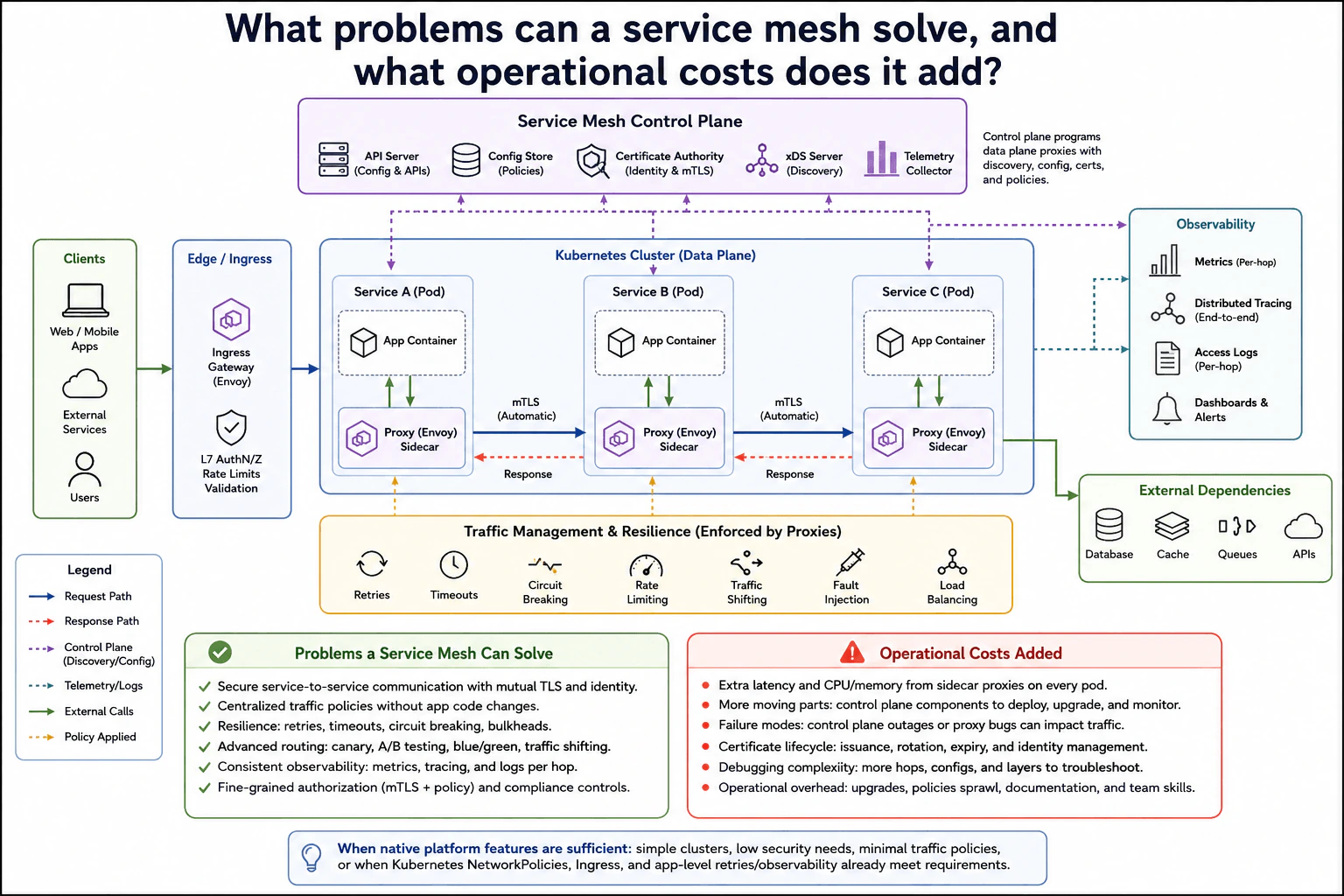
A cluster hosts many service-to-service calls. Evaluate a mesh for mutual TLS, traffic policy, retries, observability, and authorization, while also considering proxy overhead, failure modes, certificate lifecycle, debugging complexity, control-plane availability, and cases where native platform features are sufficient.
Short Interview Answer (30-60 seconds)
At a high level, a service mesh gives many services one common communication layer. The main challenge is gaining stronger security, traffic control, retries, and visibility without adding too much operational cost. I would explain it in three parts: how requests move through sidecar proxies, what the control plane manages, and what operational costs the mesh adds. The benefit is consistent mTLS, policy, resilience, and observability. The downside is proxy overhead, more failure modes, certificate work, and harder debugging.
Detailed Explanation
The goal is to make communication between many services safer, easier to control, and easier to observe. The hard part is applying the same rules across many service-to-service calls without putting all that networking logic inside every application. The diagram solves this by placing a Proxy (Envoy) Sidecar beside each App Container. Those proxies handle service traffic. A separate Service Mesh Control Plane supplies discovery, configuration, certificates, and policies. This brings strong security and traffic control, but it also adds resource use, more failure cases, certificate work, and debugging complexity.
Useful Questions to Ask the Interviewer
How many services need features such as mTLS and centralized traffic policies?
Do we need retries, traffic shifting, circuit breaking, and rate limiting across many services?
Are Kubernetes NetworkPolicies, Ingress, and application-level controls already enough?
How much extra proxy latency, CPU, and memory can we accept?
How to Explain It in an Interview
1. Explain the normal request path
I would start with where the mesh sits in normal traffic. Clients enter through the Ingress Gateway. The diagram also places L7 authentication and authorization, rate limits, and validation at this edge layer. Inside the Kubernetes Cluster, Service A, Service B, and Service C each contain an App Container and a Proxy (Envoy) Sidecar. Service-to-service requests pass through those proxies, and responses return through the proxy path.
2. Explain mTLS and authorization
The main security feature is mutual TLS, or mTLS. It lets both service proxies prove their identities and protects traffic between them. The Certificate Authority in the Service Mesh Control Plane supports identity and mTLS. Policies can also provide fine-grained authorization. This gives services one consistent security layer instead of requiring every application team to build the same controls separately.
3. Explain traffic management and resilience
The proxies enforce traffic behavior without changing application code. The diagram shows retries, timeouts, circuit breaking, rate limiting, traffic shifting, fault injection, and load balancing. It also lists bulkheads as a resilience technique. Traffic shifting can support canary, A/B, and blue-green releases. These controls can isolate failures and give operators more control over service-to-service communication.
4. Explain the control plane and observability
The Service Mesh Control Plane contains the API Server, Config Store, Certificate Authority, xDS Server, and Telemetry Collector. It programs data-plane proxies with discovery, configuration, certificates, and policies. The mesh also feeds Observability with per-hop metrics, distributed tracing, access logs, dashboards, and alerts. Service C can also make external calls to External Dependencies such as a database, cache, queues, and APIs.
5. Explain the operational cost and decision
The mesh adds a sidecar proxy to every pod, so requests use extra CPU, memory, and another network hop. More moving parts also create more failure modes. Proxy bugs, bad configuration, control-plane outages, or certificate problems can affect traffic. Certificates must be issued, rotated, and expired safely. Debugging becomes harder because requests pass through more layers.
For a simple cluster, I may not add a mesh. Kubernetes NetworkPolicies, Ingress, and application-level retries or observability may already meet the need. The main trade-off is stronger centralized security, traffic control, and visibility versus higher operational complexity.
Practical Insights
The benefit is that the mesh gives many services the same security, traffic rules, retries, and observability. Teams do not need to rebuild these features inside every application. The downside is that each Proxy (Envoy) Sidecar uses CPU and memory and adds another network hop. There are also more things that can fail. Proxy bugs, bad policies, control-plane outages, or certificate problems can affect traffic. Certificate issuance, rotation, expiry, upgrades, and debugging all add work. For a simple cluster, Kubernetes NetworkPolicies, Ingress, and application-level controls may already be enough, so the extra mesh complexity may not be worth it.
Why Interviewers Ask This
Interviewers ask this to test engineering judgment, not product memorization. They want to know whether you understand why a service mesh can help with mTLS, traffic policy, resilience, observability, and authorization. They also expect you to discuss proxy overhead, failure modes, certificates, debugging, and control-plane availability. The key skill is deciding when centralized mesh features justify the added operational cost and when native platform features are enough.
Interviewer may ask next
What would you do if the Service Mesh Control Plane became unavailable?
I would treat this as a separate failure from an application failure. In the diagram, normal service traffic runs through the Proxy (Envoy) Sidecars in the Kubernetes Cluster. The Service Mesh Control Plane supplies discovery, configuration, certificates, and policies through components such as the API Server, Config Store, Certificate Authority, and xDS Server.
If that control plane becomes unavailable, those management functions can be interrupted. Configuration changes, discovery updates, policy distribution, or certificate work may stop, and the diagram correctly treats control-plane outages as a failure mode that can impact traffic.
I would monitor the control-plane components closely and avoid unnecessary configuration changes while they are unhealthy. I would also check certificate state because certificate lifecycle problems can become service communication problems.
The main downside is operational complexity. An application may be healthy while communication still fails because the mesh management layer has a problem, so troubleshooting now has another system to inspect.
When would you decide not to use a service mesh in this Kubernetes cluster?
I would skip the mesh when the cluster is simple and the advanced mesh features are not needed. The diagram shows the main alternatives. Kubernetes NetworkPolicies can provide network isolation. Ingress can handle edge traffic. Application-level code can provide retries and observability when those needs are small.
I would especially question the mesh if there are few services, minimal traffic policies, or no strong requirement for service-to-service mTLS and fine-grained authorization. In that case, placing a Proxy (Envoy) Sidecar in every pod may create more cost than value.
Resource limits also matter. Each proxy consumes CPU and memory and adds another network hop. The mesh also introduces certificate lifecycle work, upgrades, policy management, extra failure modes, and harder debugging.
The downside of skipping the mesh is losing one centralized layer for security, traffic management, resilience controls, and consistent observability. I would add it when those shared features become valuable enough to justify that cost.
More questions load as you scroll
Disclaimer: This interview guide is for educational and informational purposes only. It is designed to help readers prepare, but it does not guarantee any interview result, hiring decision, offer, or outcome. Interview questions, hiring criteria, and preferred answers can vary by employer, interviewer, industry, location, and time. All answers, examples, and explanations in this guide are suggested examples for interview preparation, not definitive answers or instructions for professional practice. They are based on research and judgment, are provided without warranties of any kind, and should be adapted to the question, role, and applicable laws and professional requirements. Diagrams are simplified illustrations intended to highlight the main concepts and their relationships; actual situations, systems, and practices may be more complex. Alternative approaches may be equally valid or better suited to a particular question, context, or interviewer. To the fullest extent permitted by applicable law, the contributors and publisher are not liable for decisions made, actions taken, or losses incurred based on this guide.
State Laws and Professional Responsibilities: Laws and requirements governing an occupation vary by state and jurisdiction. You are responsible for checking the current laws, licensing requirements, and scope-of-practice rules that apply to your location and role, and for ensuring that your answers and actions comply with them. Adapt examples in this guide to those requirements. This guide is not legal advice.
Content Accuracy and Verification: To the fullest extent permitted by applicable law, we do not represent or warrant that interview guides, questions, answers, examples, or diagrams are accurate, complete, current, error-free, or suitable for any particular purpose. You are responsible for independently reviewing and verifying the information before relying on it.